
❌

Vue normale

Microsoft’s biggest week in months: new Surface lineup, Copilot+ fallout, and AI overhaul

Windows Central

It's been a busy week for Microsoft. Despite having a Windows and Surface event scheduled two weeks from now, the company announced two new Surface PCs and revived the Surface Mouse. Microsoft also effectively cut the legs out from under the Copilot+ PC brand by confirming the new Surface Pro 12-inch and Surface Laptop 13-inch are not Copilot+ PCs.

Biggest News of the Week

Microsoft Surface
Copilot+ PC launch event with Satya Nadella
Microsoft Surface
Microsoft Surface

Microsoft confirmed that its new Surface Pro 12-inch and Surface Laptop 13-inch will not be called Copilot+ PCs. Not because they fail to meet the requirements — both PCs have the specs to otherwise qualify — but because Microsoft is going in a different direction.

I think we may hear more about Microsoft’s plans and rebranding at the Windows and Surface event next month, but for now we just have confirmation the new Surface devices are not called Copilot+ PCs.

The Copilot+ PC brand was doomed to fail. Microsoft failed to make it clear to customers what made Copilot+ PCs special, and the flagship Recall was a disaster.

Many people were confused about the difference between a Copilot+ PC and an AI PC. And several major manufacturers made it clear that labeling a device as a Copilot+ PC was not a priority.

Too many Copilots

Close-up of Surface Laptop for Business 8th Edition desktop with pinned applications, including Microsoft Edge, Word, Excel, and Microsoft 365 Copilot.

Microsoft put too many eggs in the same basket with Copilot. The company has dozens of products with Copilot in their names. Even the Microsoft 365 app had Copilot forced into its name.

By bundling so many different products and services under the Copilot name, Microsoft tied the success (or failure) of a large part of its portfolio together.

Look online for reactions to the Copilot+ PC brand being phased out and you’ll see people discussing the Copilot app, the Copilot key, Microsoft 365 Copilot, and other Copilot-branded products. And who can blame them? It’s natural to assume the end of Copilot+ PCs means the end of at least some parts of Copilot.

But the opposite is true. In the same week it confirmed its Surface PCs are not Copilot+ PCs, Microsoft announced a massive overhaul of the Copilot platform. Microsoft CEO Satya Nadella called it a new OS, though I’m not sure what that really means in this case.

Ultimately, Microsoft fell in love with the term Copilot and tried to attach it to too many products and services. We’ve seen similar mistakes, such as Facebook going all in on the Metaverse.

Copilot+ PCs are gone or being phased out, but Copilot as an “OS” is just beginning. Microsoft will need to do some damage control and get a marketing message out to make it clear those facts aren’t in opposition.

Click to join us on r/WindowsCentral

Join us on Reddit at r/WindowsCentral to share your insights and discuss our latest news, reviews, and more.
Microsoft Teams can now automatically block unwanted bots from meetings

Your next Microsoft Teams meeting may be a little more secure. Microsoft has added a new option that allows administrators to automatically block identified external bots from joining meetings.

We've known about this feature for a while, but it is only shipping now. The option was originally slated for May 2026, but it was released with a Teams update on September 23, 2026.

Microsoft detailed the update in its release notes:

  • Automatically block identified external bots: Administrators can now automatically block identified external bots from joining meetings through Teams meeting policies.
  • Unified app and agent installation management across Microsoft 365 and Teams: Administrators can now manage app and agent installations from either the Microsoft 365 admin center or Teams admin center, with installation changes automatically synchronized across Teams, Outlook, and Microsoft 365 Copilot.

Bots are commonplace in Teams meetings and meetings on other platforms. Most of the meetings I attend have some sort of notification about transcription or recording. But unwanted bots can pose a security risk, especially if they go unnoticed. Considering how many meetings include notifications about bots, it would be easy to brush off a malicious bot as another routine attendee notification.

When the feature is enabled, organizations will see a representation of external bots in the meeting lobby. This gives organizers more control over attendees and helps prevent someone from admitting a bot that shouldn't be there.

The same update to Teams gives admins the ability to manage app and agent installation through the Microsoft 365 admin center or Teams admin center. Any changes made then sync across Teams, Outlook, and Microsoft 365 Copilot.

Have you ever seen someone accidentally admitted to a meeting? Do you let people into meetings without checking? Let us know in the comments!

Click to join us on r/WindowsCentral

Join us on Reddit at r/WindowsCentral to share your insights and discuss our latest news, reviews, and more.
Dell's XPS 13 proves you don't have to spend a fortune on a premium laptop

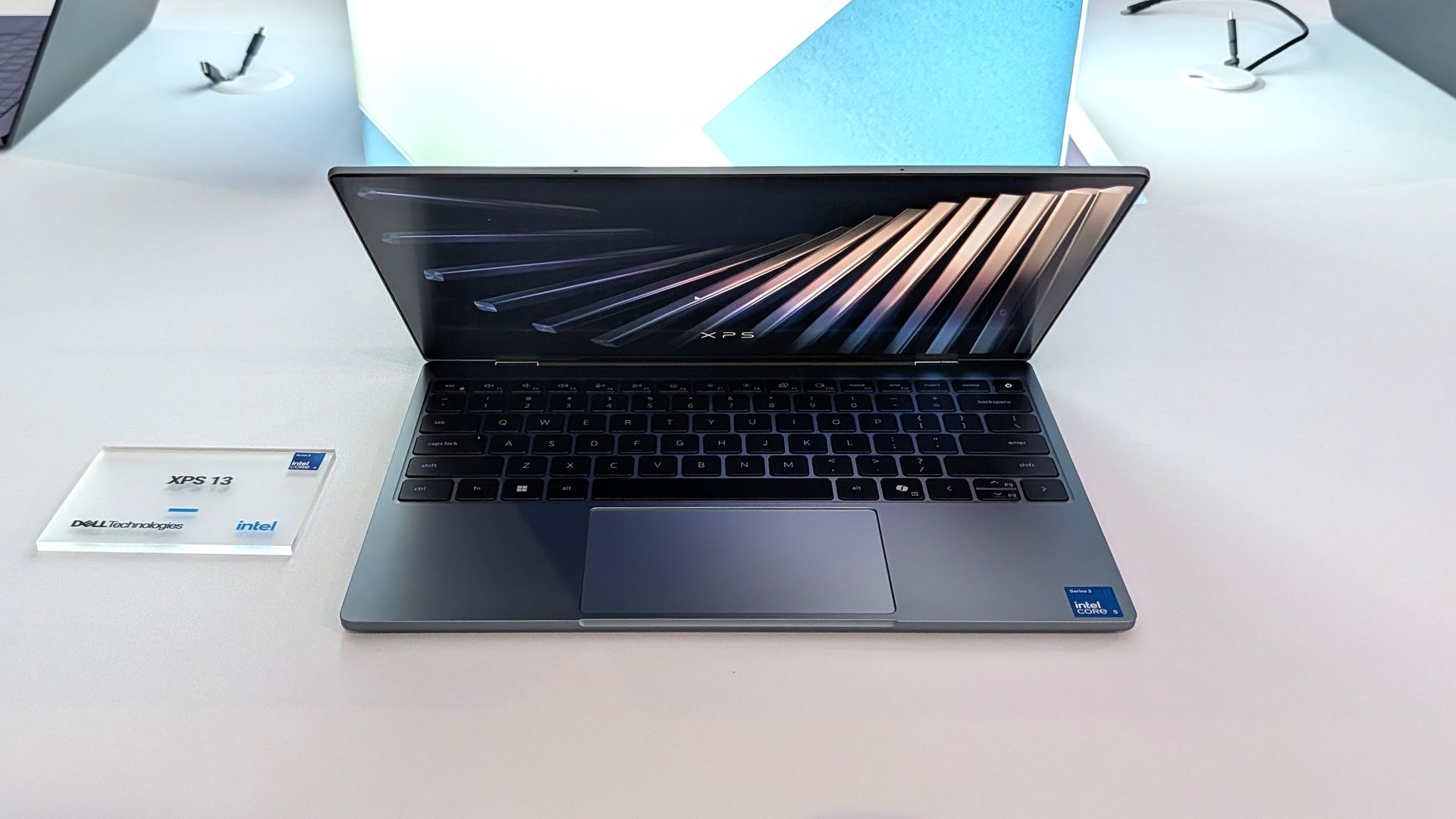
Flagship laptops often pack high-end specs and maximize the wow factor. But Dell decided to take a different approach with the XPS 13 this year. Rather than shove every premium option into a PC regardless of price, Dell built a budget-friendly laptop with premium build quality and surprisingly strong specs without breaking the bank.

The result is a truly impressive laptop that punches well above its price. The XPS 13 has a 2.5K 120Hz panel, a solid keyboard and trackpad, and a pair of Thunderbolt 4 ports packed into its thin aluminum body.

Dell is bullish about the new XPS 13, stating that the company wants the laptop to be people's first XPS. Our Cale Hunt called the new XPS 13 "the perfect starter PC" and our Zac Bowden was "shocked" at the quality and value of the laptop.

Dell's current discount on the XPS 13 is modest, but it keeps the laptop at an affordable price.

"Dell's new XPS 13 is the new best deal in laptops, surpassing the MacBook Neo with a better display, ports, build quality, and performance for the same price." — Zac Bowden, Senior Editor, Windows CentralView Deal

Pro Wireless Headset: was $139.99 now $118.99

This headset is an excellent companion to the Dell XPS 13 if you want to listen to meetings or seminars in public or have clear audio when chatting on Microsoft Teams or Zoom.View Deal

Laptop deals in 2026

The unfortunate reality in 2026 is that it's increasingly difficult to find a great deal on anything, let alone a quality PC. The ongoing RAM crisis hurts PC shoppers, but the truth is that money doesn't go as far as it used to.

That means that sometimes you need to grab a PC when it's worth it rather than holding out hope for a killer sale.

It's no longer a given that electronics will become cheaper over time. In some cases, prices have increased after launch. Apple raised the price of the MacBook Neo by $100, and Dell did the same with the XPS 13. Both those laptops were once $699 for everyday shoppers and $599 for students.

Still, the Dell XPS 13 is a bargain at its current price, and it delivers the features you'd expect from a modern laptop. That may not sound like much, but a lot of laptops in this price range are missing key features that should be commonplace in even budget-friendly computers.

Dell XPS 13 vs. MacBook Neo

Dell XPS 13

(Image credit: Zac Bowden / Windows Central)

Compare the Dell XPS 13 and MacBook Neo and you'll see that only Dell's budget-friendly laptop has backlit keys. The XPS 13 also has an IR sensor for facial recognition, better speakers, and support for Wi-Fi 7 rather than the older Wi-Fi 6E.

The XPS 13 also has Thunderbolt 4 ports that make it the obvious choice for anyone who needs to use more than one external display. And speaking of displays, the 120Hz screen of the XPS 13 also beats out Apple's offering (60Hz).

Dell delivers more value than Apple, making the XPS 13 easy to recommend.

Click to join us on r/WindowsCentral

Join us on Reddit at r/WindowsCentral to share your insights and discuss our latest news, reviews, and more.
These Microsoft 365 companion apps are getting retired after just one year

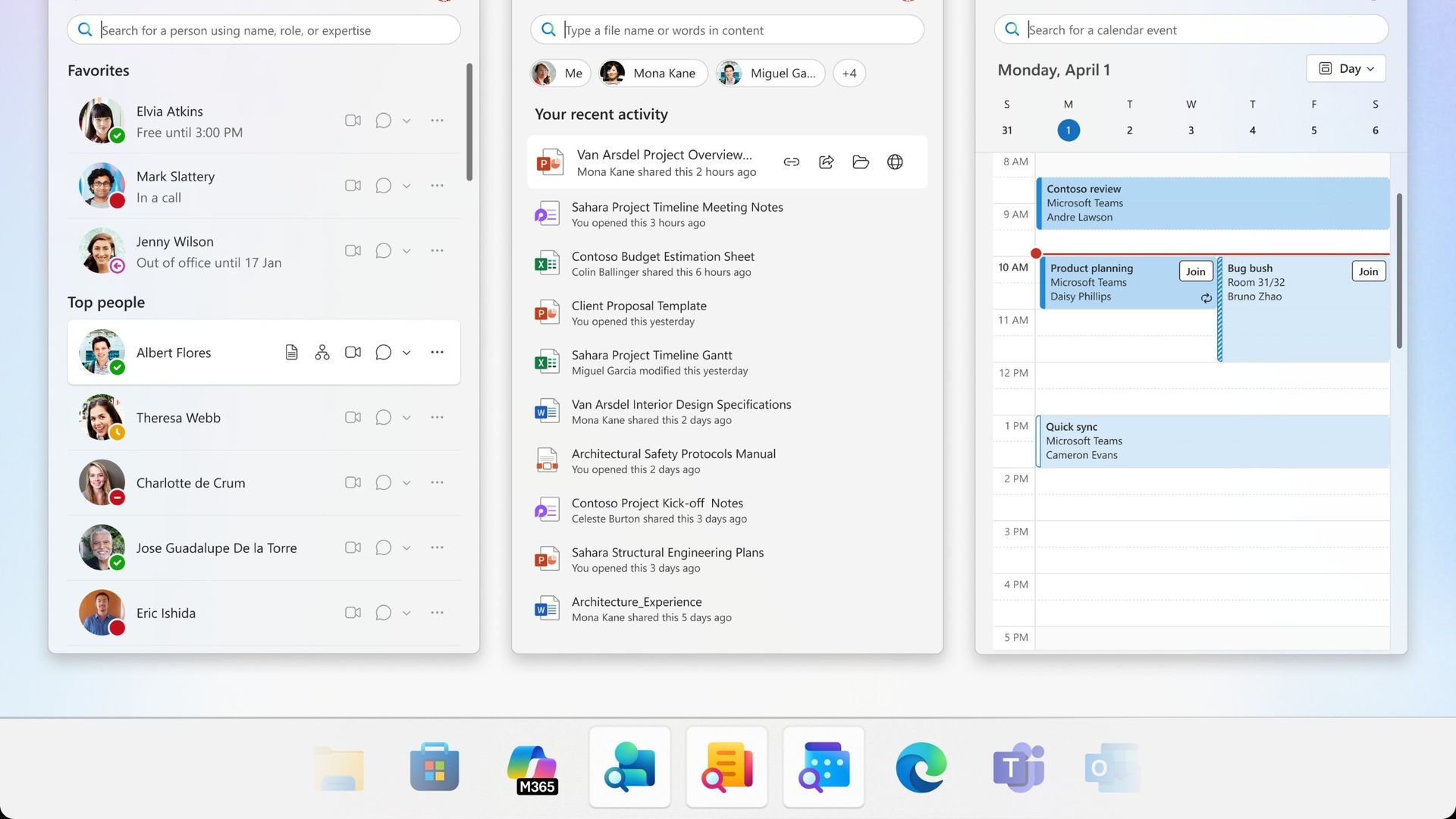
Microsoft plans to get rid of three Microsoft 365 companion apps before the end of the year. Calendar, People, and Files are all on the chopping block and set to be retired on December 16, 2026.

Calendar, People, and Files are apps that integrate with the taskbar on Windows 11 to allow quick access to certain tasks and pieces of information.

I'd forgive you for not knowing about the companion apps since they only shipped last year.

Microsoft outlined the three companion apps at the time and highlighted how the apps "enhance productivity" by providing quick access to information. Now, one year later, that productivity boost is going away.

It's interesting to compare the language Microsoft used to describe the apps when they were new and now as the apps approach retirement.

Microsoft's text from when the apps were new:

"Microsoft 365 companions are a suite of apps designed to enhance productivity by providing quick access to people, files, and calendar- powered by the Microsoft Graph, directly from the Windows 11 taskbar."

Microsoft's new text as the apps approach retirement:

"The companion apps were an additional way to find calendar information, people, and files. Removing them doesn't delete or affect any existing capabilities or Microsoft 365 data. You can continue finding the same information by using existing Microsoft 365 and Windows experiences."

It appears sometime over the last year the apps devolved from being ways to enhance productivity to additional ways to find information you can get elsewhere.

Microsoft recommends a mix of Outlook, Teams, Windows Search, File Explorer, SharePoint, OneDrive, Word, Excel, PowerPoint, and other Microsoft tools to replace the three companion apps.

The three companion apps will stop working on or before December 16, 2026, so even if you have them installed on your PC, they will not work after the cutoff.

Click to join us on r/WindowsCentral

Join us on Reddit at r/WindowsCentral to share your insights and discuss our latest news, reviews, and more.
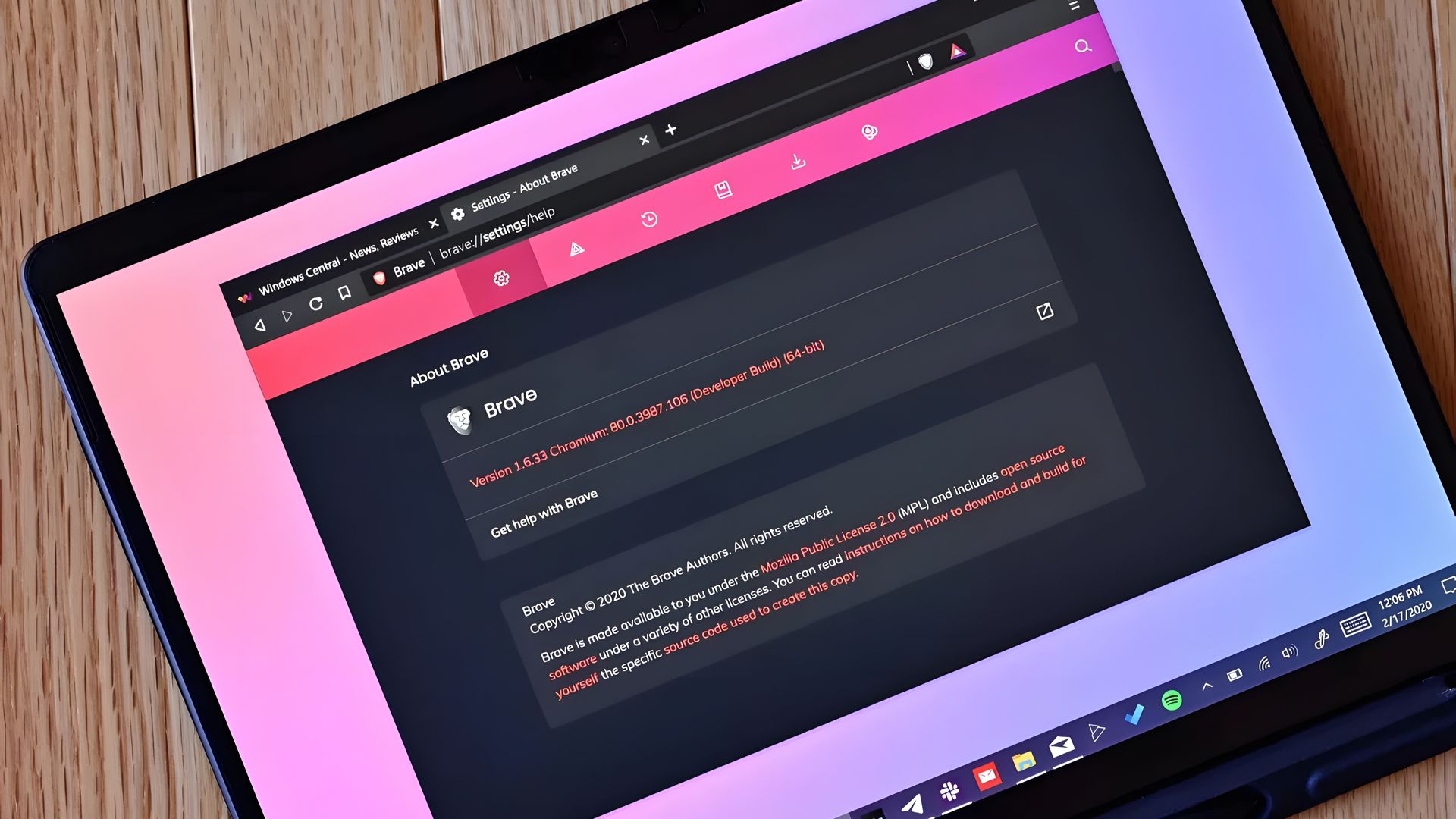
uBlock Origin broke on Edge, so I finally quit the browser

It finally happened. Earlier this week I opened Microsoft Edge and was inundated with ads. After months of warnings, uBlock Origin stopped working for me in the browser, leaving me with a choice to make: either find an alternative way to block ads in Edge or switch to a different browser.

To be transparent, I only block ads on certain websites. In fact, Windows Central is the primary reason I use an ad blocker at all. I've used uBlock Origin for years to ensure my articles appear clean and clear to our readers.

Ads help pay my bills, so I'm keenly aware that they're an important part of the web (and my life). I whitelist sites I browse regularly and often leave ad blocking disabled as I look around online. But sometimes I want to see what an article looks like with just the text and images I've placed directly. In other instances, I want to take a clean screenshot of the site for an article.

I relied on uBlock Origin for a long time and appreciated its granular controls. I was able to block certain items while approving others. For example, ad blockers sometimes falsely flag product blocks in an article. I appreciate that readers may not want to see a block about a laptop in a random piece, but if an article is literally about a specific Surface becoming available, it makes sense to show a way to purchase the PC.

I've known about the impending end of uBlock Origin for ages. Google transitioned away from Manifest Version 2 (MV2) extensions years ago and we knew Edge would follow suit. MV2 is required for a core functionality of uBlock Origin: intercepting requests.

Plenty of ad blockers still work on Microsoft Edge and even Google Chrome, but they function differently than uBlock Origin. Rather than intercepting requests and blocking them, many ad blockers simply mask ads. There are also limitations of what a Manifest Version 3 (MV3) extension can do, so even uBlock Origin Lite falls short of its "full fat" sibling.

I had toyed around with switching browsers anyway. The end of uBlock Origin on Edge gave me a clean break. I initially looked at Brave because the makers of the browser have committed to keeping MV2 extensions alive. But after installing the browser, I tried using Brave Shields for a bit and found them to be quite effective.

Brave Shields also intercept network requests for ads, so blocking ads also speeds up site performance. That means I can quickly check an article, proof it or confirm it's laid out correctly, then get back to work.

Similarly to uBlock Origin, Brave lets me block specific elements with a couple of clicks. It lacks the satisfying zapper of uBlock Origin, but Brave's tools are still effective.

I'm going to just use Brave Shields for now, but knowing I could fall back to uBlock Origin if needed is comforting.

Click to join us on r/WindowsCentral

Join us on Reddit at r/WindowsCentral to share your insights and discuss our latest news, reviews, and more.
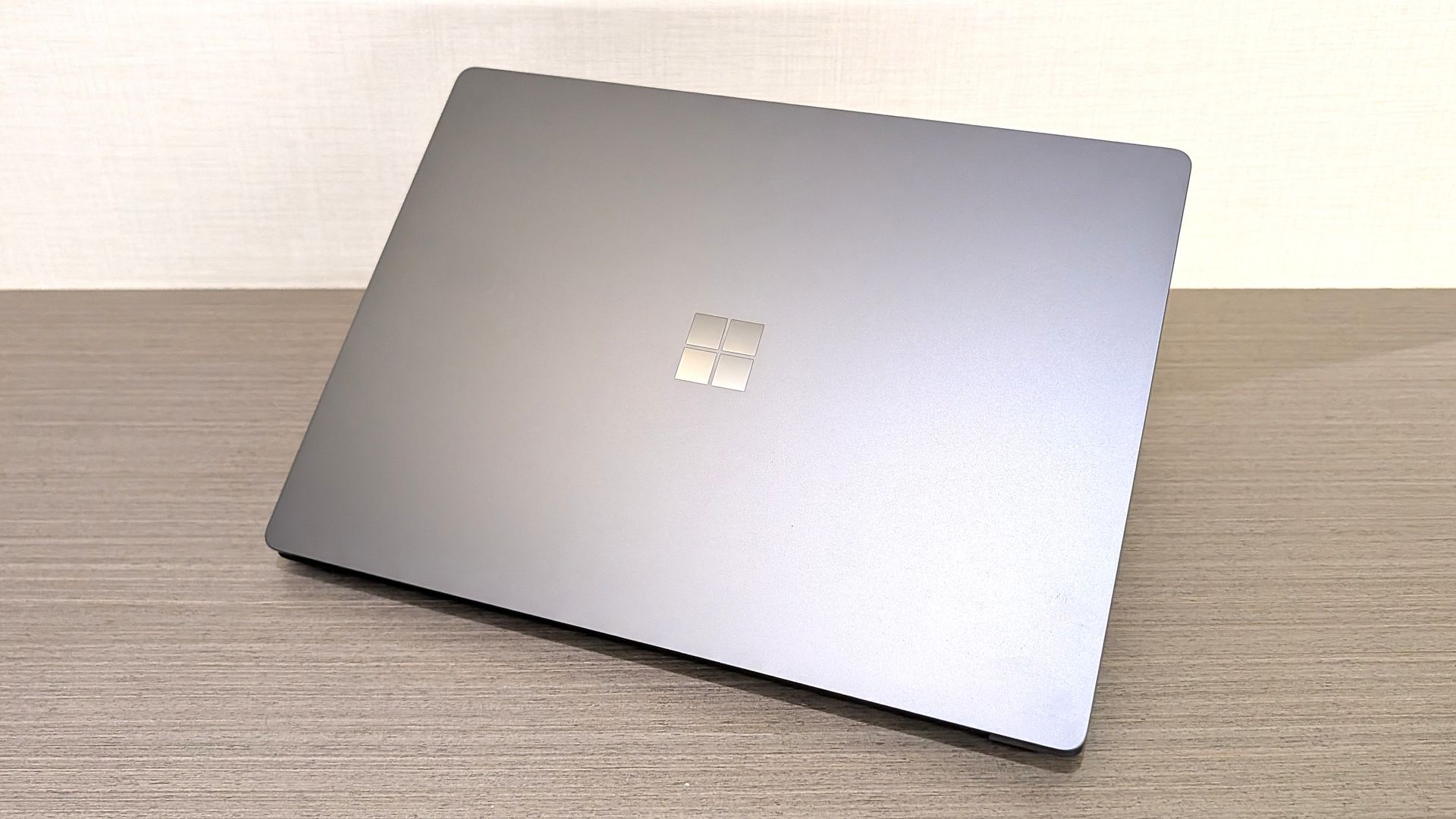
Poll: What's your favorite Surface of 2026?

Microsoft just refreshed the Surface Pro 12-inch and Surface Laptop 13-inch with Snapdragon X2 processors. The company also announced the return of the Surface Mouse. In a couple of weeks, we'll get a closer look at the Surface Laptop Ultra during Microsoft's Windows and Surface event.

The Surface family has undergone a lot of changes over the last year. Microsoft officially pulled the plug on the Surface Hub back in April. The Surface Go and Surface Laptop Go have also been cut from the portfolio. With the Surface Studio, Surface Laptop Studio, Surface Duo, Surface Book, Surface Headphones, and Surface Earbuds already discontinued, the remaining Surface lineup is rather streamlined.

But despite the relatively low number of Surface devices being made in 2026, Microsoft announced 12 Surface devices this year. To get to that number, you have to count some devices with similar chassis separately. I consider the consumer and business versions of the Surface PCs separate enough to stand on their own.

Microsoft even introduced a new type of Surface in the Surface Laptop Ultra and brought back the Surface Mouse.

It's a strange contrast. Microsoft has discontinued several Surface product lines and has one of the smallest Surface portfolios in the brand's history, yet the company has announced more Surface hardware in 2026 than in many years when the lineup was much larger.

I've voiced concerns about how Microsoft has unveiled its hardware this year. I think the company has spread things out so much that the Surface brand has been diluted. Case in point, Microsoft just announced new Surface devices two weeks before the company's Windows and Surface event.

Surface was never going to command the attention of an Apple hardware event or even Samsung presenting on stage, but trickling out announcements in press releases or at other companies' events is a bad way to draw interest in Surface.

While I would have preferred a couple of major Surface events that could create hype, Microsoft has unveiled a lot of hardware this year. I'm curious if there is one device that stands out to you.

As much as I am excited about some individual Surface devices, I still feel like the brand is fragmented and lost. What is Microsoft Surface in 2026?https://t.co/5QNvm1Uts6September 23, 2026

With 12 devices announced or launched, there's a good chance you're interested in more than one. Please hop into the comments and share your thoughts in addition to voting in the poll.

Click to join us on r/WindowsCentral

Join us on Reddit at r/WindowsCentral to share your insights and discuss our latest news, reviews, and more.
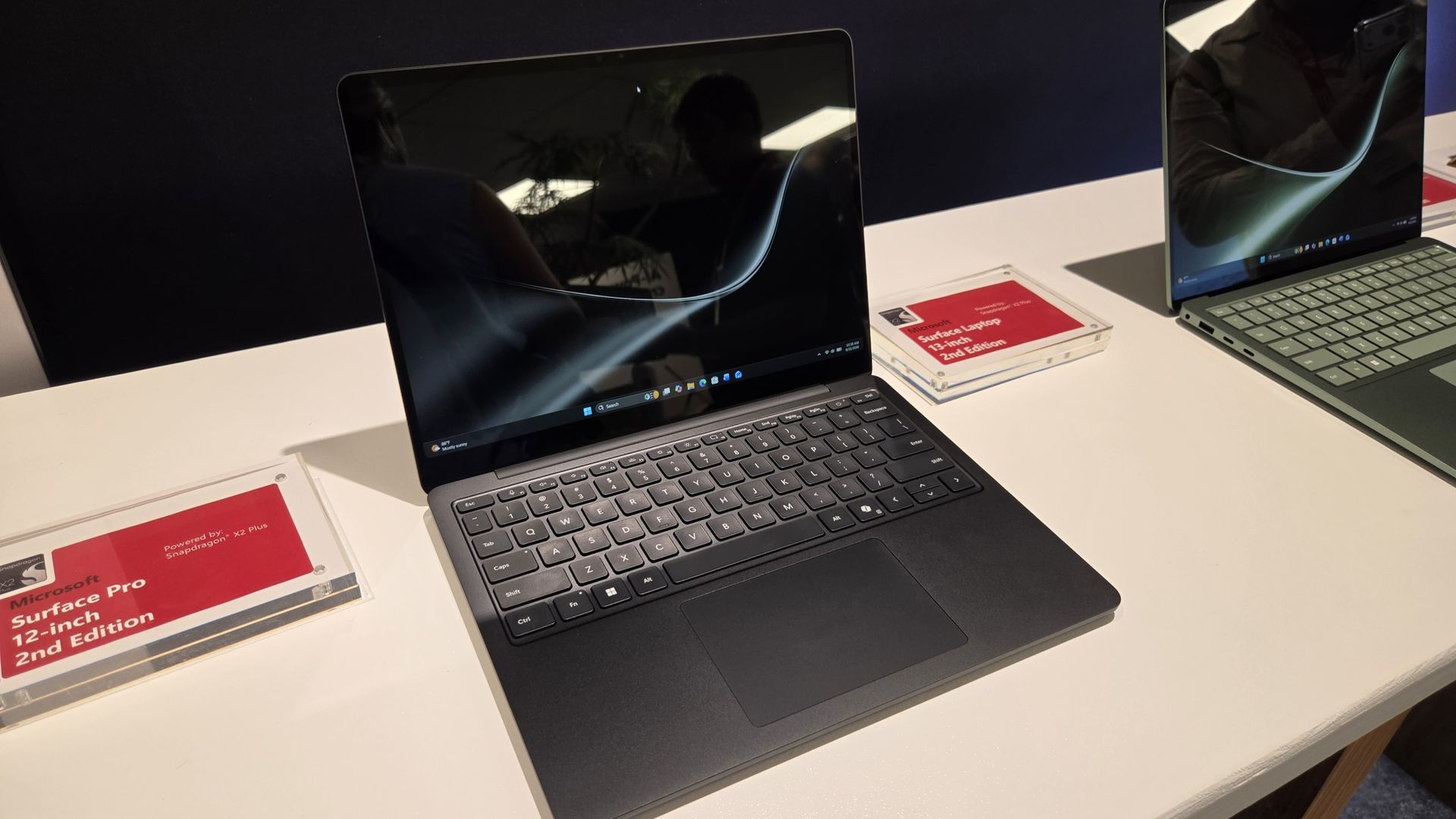
Surface feels more fragmented than ever after Microsoft's latest refresh

Microsoft's Surface team just can't help itself. Despite having a Windows and Surface event scheduled for October 7, 2026, Microsoft unveiled new Surface devices today.

Microsoft just refreshed its Surface Pro 12-inch and Surface Laptop 13-inch with new chips from Qualcomm. Thanks to the Snapdragon X2 Plus chips inside the devices, we should see better performance and better graphics in the new Surface devices.

Even local AI will run better thanks to the NPUs in the PCs. You may assume that improved local AI performance, being a highlight of the new Surface devices, would align them perfectly with the upcoming event. Microsoft's invite says that event will focus on "how local AI will shape the next chapter of the PC."

Microsoft may mention the refreshed Surface Pro 12-inch and Surface Laptop 13-inch on stage in October, but I suspect the focus will be on the Surface Laptop Ultra and NVIDIA RTX Spark. The Surface RTX Spark Dev Box may also get a mention.

Why did Microsoft just announce a new Surface Pro and Surface Laptop?

Microsoft's unveiling of the refreshed Surface Pro 12-inch and Surface Laptop 13-inch is not an accident. The announcement happened at Qualcomm's Snapdragon Summit. Perhaps there's an agreement in place to feature Surface on stage in Hawaii. Or maybe Microsoft wanted to piggyback on any attention pointed at Snapdragon this week. But I still think it's a strange strategy.

It's not as if the Snapdragon X2 Plus was announced this week. We've known about the chip for ages. It is already available in other laptops, including the Surface Laptop 13.8-inch and Surface Pro 13-inch.

If Qualcomm first announced the Snapdragon X2 Plus this week, it would make sense to announce new Surface PCs powered by it. Alternatively, Microsoft could tease that it has more to share about the chips at the Windows and Surface event.

But instead, we can now cross two more items off the list of potential things we will see at the Windows and Surface event next month.

The Windows and Surface event also falls after many improvements have shipped to Windows 11 or entered testing with Windows Insiders. It seems unlikely that we'll see much new information on stage, but Microsoft could always surprise us.

Surface continues to be a lost brand with no clear identity. Worse, it's a fragmented one. Earlier this year, Microsoft launched Intel and Snapdragon versions of the same PCs separately (see our review of the Intel-based Surface Laptop for Business 8). It announced the Surface Laptop Ultra at one event and saved the details for another. Now it has refreshed two of the few remaining Surface lines just weeks before a Surface event in October. Rather than rebuilding momentum around Surface, Microsoft seems intent on making the brand even harder to follow.

Do you agree or disagree? Let me know in the comments.

Click to join us on r/WindowsCentral

Join us on Reddit at r/WindowsCentral to share your insights and discuss our latest news, reviews, and more.
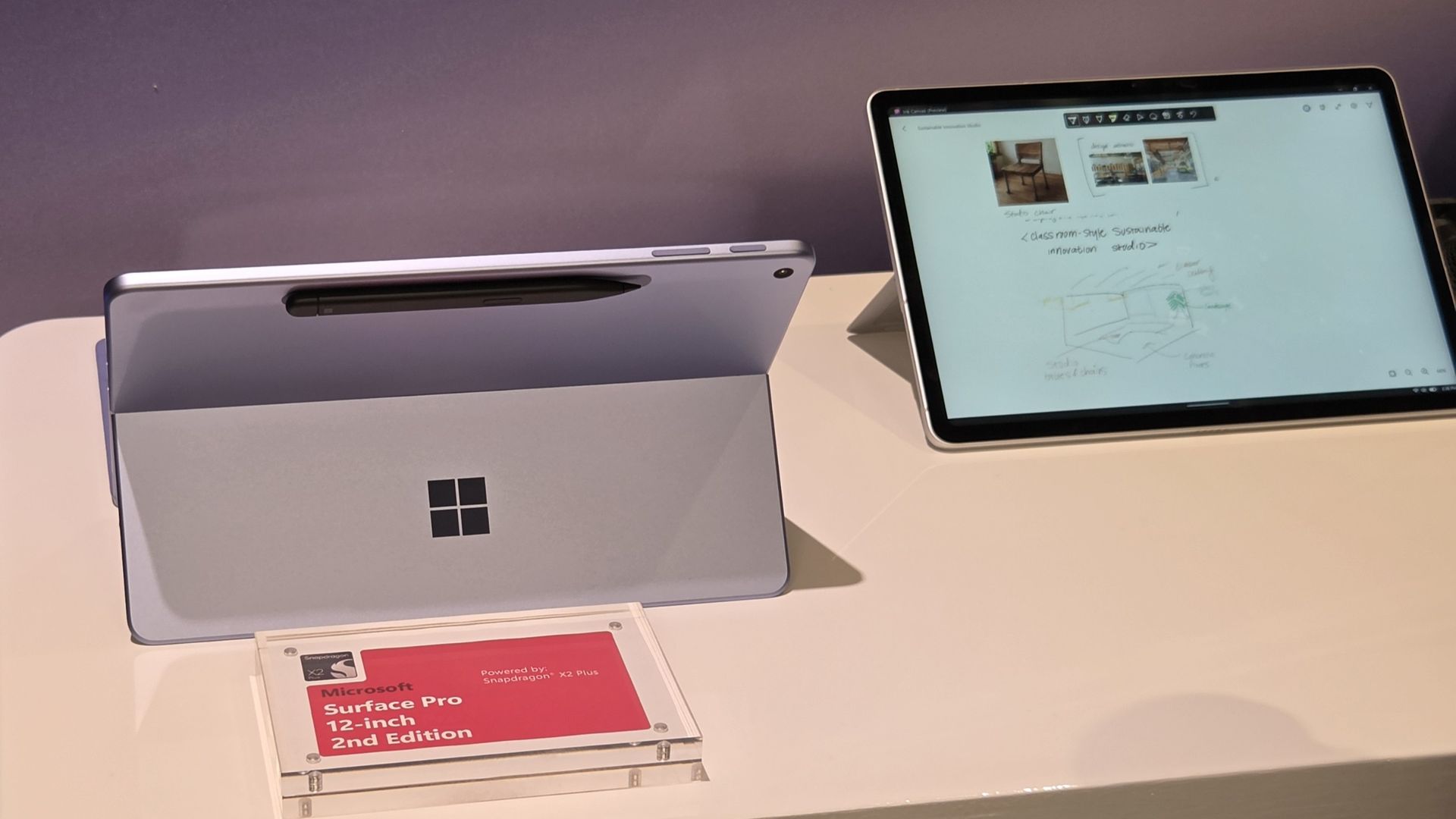
AI comes to Surface Ink: Microsoft’s new Canvas transforms handwriting into a smarter workflow

Microsoft just announced a refreshed Surface Pro 12-inch (2nd Edition), a Surface Laptop 13-inch (2nd Edition), and a new Surface Mouse. Those PCs run on Snapdragon X2 Plus processors and promise solid battery life and performance while maintaining portability. But Microsoft announced more than Surface refreshes this week. The tech giant also unveiled Microsoft Ink Canvas.

Ink Canvas is a pen-first workspace that combines handwriting, sketches, annotations, and AI features on a single canvas. Microsoft says those inputs provide Copilot with additional context that can be used to generate documents and other content.

"Ink Canvas lets customers use Slim Pen to express intent visually, spatially, and in their own handwriting — giving Copilot richer context and helping rough thoughts become useful creations faster," explained Microsoft.

Ink Canvas will be pre-installed on new Surface Pro 12-inch devices and will be added to the Microsoft Store on October 13, 2026.

Inking, now with AI

Microsoft is no stranger to inking apps and experiences. Surface PCs have supported a pen since the very beginning of the brand. Over the years, Microsoft has tested a variety of ways to integrate inking with Windows.

Back in the days of Windows 10, Microsoft introduced an Ink Workspace that was connected to Microsoft Whiteboard and the Snipping Tool. A major update to Ink Workspace shipped to Windows 11 in 2021.

The improved Ink Workspace lets you pin different apps, making it easier to open inking experiences, such as Sticky Notes or even Microsoft Paint.

I prefer the third-party app Ink Workspace (not related to Microsoft's Ink Workspace) because it has more features. Inking has been at the heart of Surface for years through both first-party and third-party experiences.

Microsoft's new Ink Canvas is the latest attempt by the company to integrate AI into a general user experience. We've seen smartphones and tablets connect inking to AI already. Googlebooks have some tricks in the same area. It will be interesting to see how Microsoft's AI ink experience stands out from the competition.

Click to join us on r/WindowsCentral

Join us on Reddit at r/WindowsCentral to share your insights and discuss our latest news, reviews, and more.
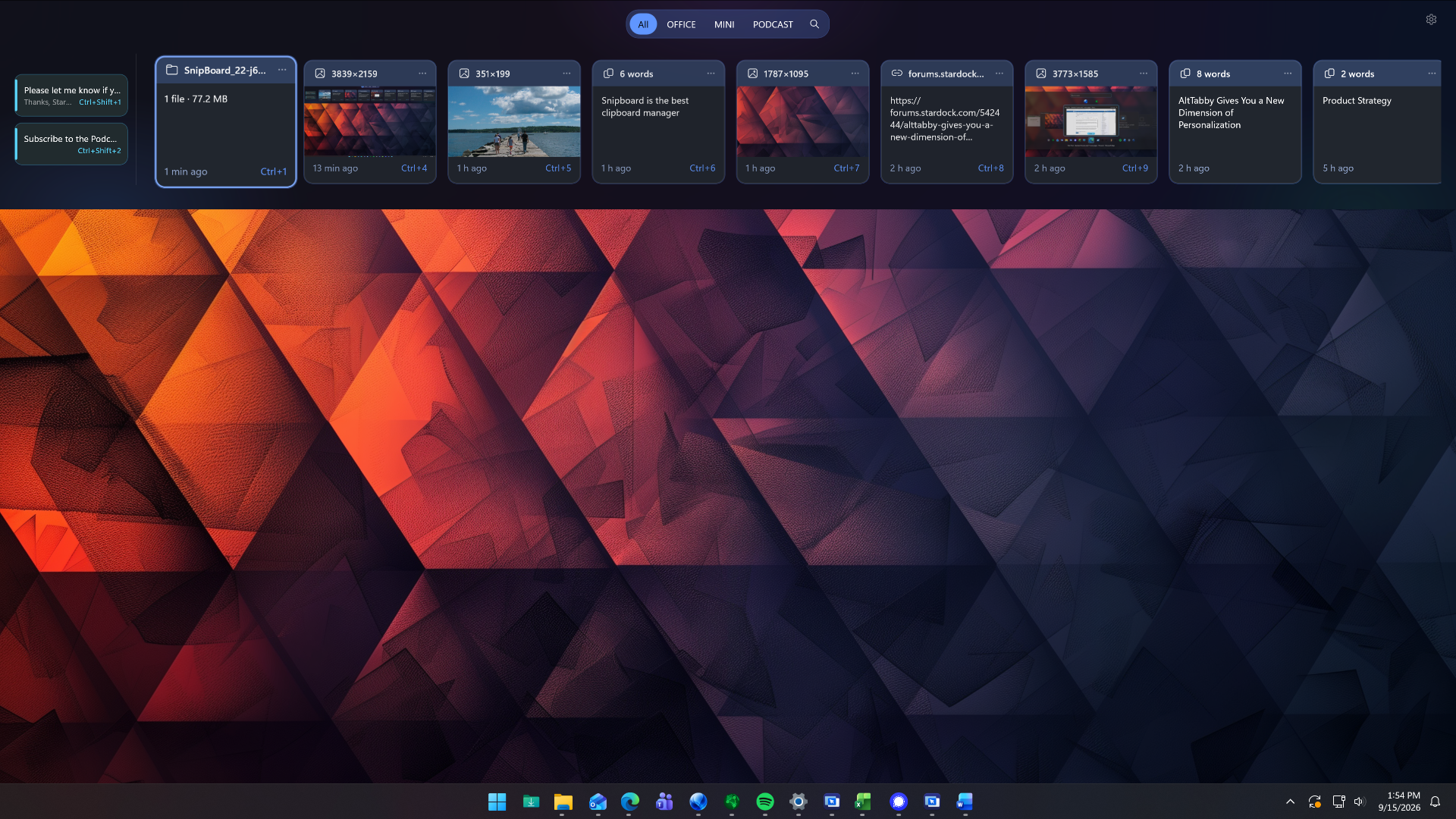
Stardock's new Snipboard app aims to fix clipboard management on Windows 11

Stardock just unveiled a new app that could potentially replace the clipboard on Windows 11. Snipboard is a clipboard dock that can be pinned to any side of your screen. It supports searching your clipboard history, pinning frequently used content, and copying and pasting content across multiple PCs.

Snipboard is available as part of Object Desktop, which starts at $49.99 for an annual subscription. After Snipboard leaves beta, you will also be able to purchase it separately.

I received early access to Snipboard, but I've only had the app for about one day. So far, it's very promising and I look forward to exploring it more. Core functionality is consistent and I appreciate some of the smaller features within the app.

Icon for Stardock's Object Desktop software suite.

Stardock
Object Desktop

This productivity suite includes several apps to customize your PC and improve your workflow. It includes apps like Groupy for tab management and Start11 for customizing your Start menu. Now, it also includes the beta version of Snipboard.

When you view an item within Snipboard, you can click the ellipsis icon to see more pasting options. Among those are UPPERCASE and Keep formatting. Some apps have shortcuts for similar features, but having those shortcuts available within all apps is nice.

Other options include the ability to exclude specific applications and a Temporary mode that stops any content from being sent to other devices.

The general concept of Snipboard is not new. I covered an app called Edge Drop a few months ago that has a similar look and feature set. Snipboard feels more robust at this point, but it is made by Stardock as opposed to Edge Drop being made by a single developer.

One way that Edge Drop beats Snipboard is with drag and drop support. You can drag items into or out of Edge Drop's dock, including text or files. I'd love to see the same thing added to Snipboard.

Blank Pixel

Click to join us on r/WindowsCentral

Join us on Reddit at r/WindowsCentral to share your insights and discuss our latest news, reviews, and more.
How to upscale videos to 4K with Clipchamp

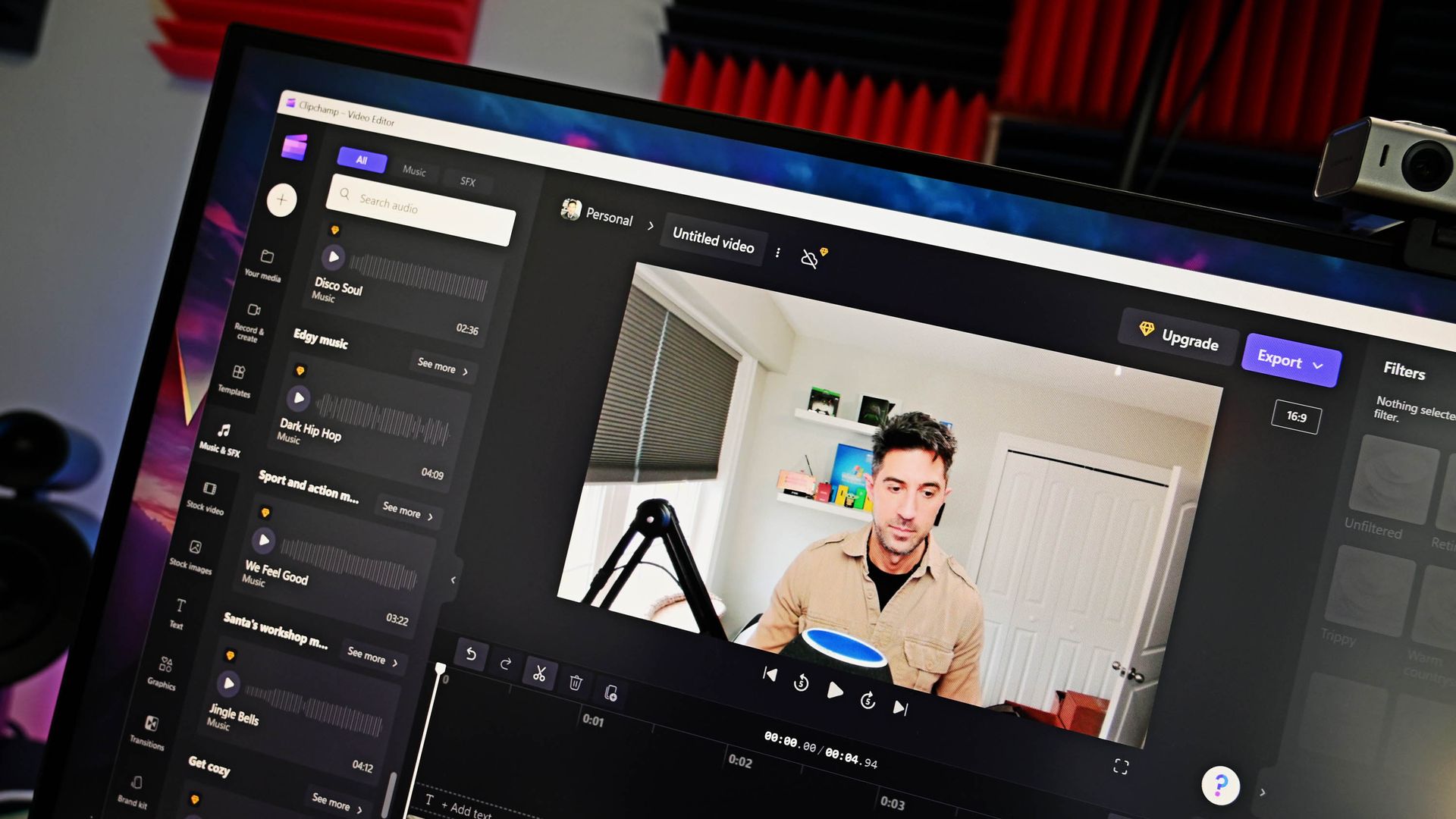
Clipchamp is the built-in video editor on Windows 11, and it has a surprisingly impressive feature list. A recent blog post by Microsoft outlines how to upscale videos to up to 4K by using Clipchamp. I've tested the feature and came away impressed.

You won't be able to take terrible footage and fix it by clicking a button in Clipchamp, but that would be an unreasonable ask of the app. What you can do is adequately scale up footage to make it viewable on larger displays or screens with a higher resolution. I tried a few different types of clips, including some with high contrast and others with objects in motion. Overall, Clipchamp handled them well.

Clipchamp upcales video by using AI-powered Video Super Resolution. The feature increases the resolution of a selected clip and adds details to make content look clearer. Upscaling is done locally on eligible Windows devices.

If you have a Copilot+ PC or a PC with a compatible NPU, Video Super Resolution will rely on that processor. But the feature can also work on compatible CPUs even if your device does not have an NPU. For example, my laptop has an 11th Gen Intel Core i9 (11950H) and an NVIDIA GeForce RTX 3070, and it was able to upscale clips in Clipchamp.

Here's how to upscale footage using Clipchamp:

  1. Import a piece of video into your timeline. This can be done by selecting Import media.
  2. Drag the clip into the timeline of your project.
  3. Select the clip you would like to upscale.
  4. On the right side of your screen, select the Upscale icon.
  5. Select the resolution you would like to upscale your clip to.
  6. Select Upscale.

If you don't like the result, you can restore the original clip with a single click. Note that there is no method to upscale an entire project at this time. Instead, you need to upscale specific clips.

Clipchamp is a surprisingly controversial video editor. Microsoft drew criticism by adding a requirement to use a Microsoft account to edit projects within the app. I don't like that requirement and think Microsoft could do more with Clipchamp, but if you're willing to jump through the company's hoops, Clipchamp is a capable video editor. That's even more true now that it can easily upscale videos.

Blank Pixel

Click to join us on r/WindowsCentral

Join us on Reddit at r/WindowsCentral to share your insights and discuss our latest news, reviews, and more.
After years of silence, Microsoft adds basic features to Mixed Reality

Using your virtual reality headset as a monitor for your Windows 11 PC just got a lot better.

Remember when mixed reality and virtual reality were the biggest buzzwords in tech? Before the advent of ChatGPT and the latest wave of AI, tech companies spent billions on the metaverse and VR.

I'd argue that the VR push yielded more concrete results than AI, but that's a topic for another day. Today's news is that mixed reality is still here, and Microsoft just released a new feature for it.

A recent update to Mixed Reality Link greatly improves the experience by allowing you to use your headset's microphone and cameras directly within Windows.

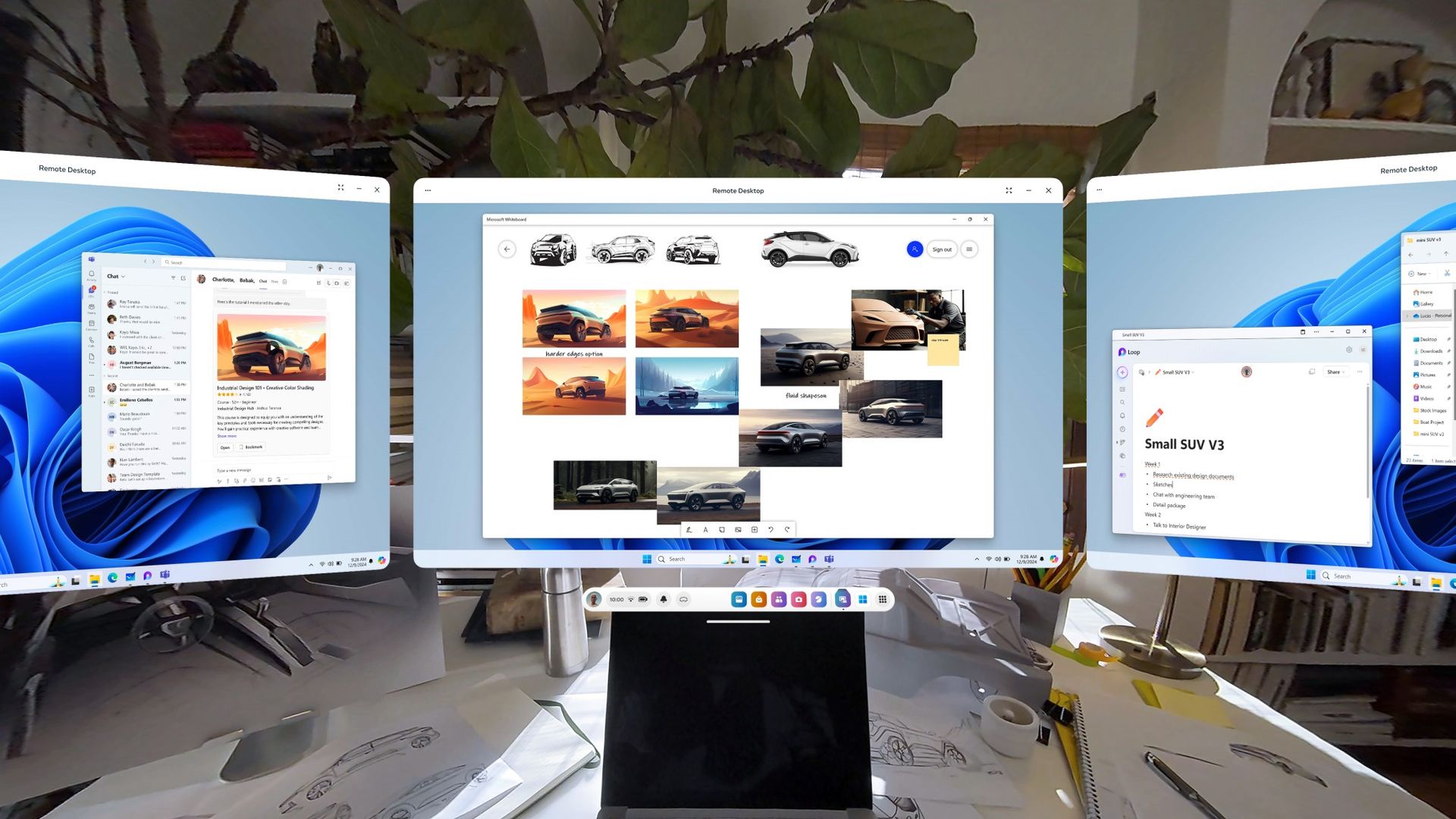
Mixed Reality Link is an app that lets you connect up to three virtual monitors on a supported headset to your PC. With the app, you can extend your computing experience to a device like the Meta Quest 3 or Meta Quest 3S. Mixed Reality Link works through a wired or wireless connection.

Mixed reality may not dominate headlines like it used to, but Microsoft still invests time and effort into it. Mixed Reality Link received an update to work with Windows on Arm last year and is even compatible with Windows 365 Cloud PC.

But Mixed Reality Link had strange limitations that made the experience awkward. If you wanted to use a microphone, you had to have one hooked up to your PC and then talk at it from a distance. Mixed reality headsets have built-in microphones, so it's strange that it took this long to integrate them with Mixed Reality Link.

The update to Mixed Reality Link version 26.9105.9070.0 adds support for using your headset's microphone, sharing your headset's camera with Windows applications, and having your Meta avatar appear as a camera source.

Windows Central take

Person playing Oculus Quest with two controllers

(Image credit: Future)

I miss virtual reality and mixed reality trending in the news. I covered the Gear VR, the original Quest headset, and the rebrand of Oculus to Meta. I interviewed a game developer in Australia while facing him in his own game. I sideloaded songs onto Beat Saber. It was a fun time in tech.

I never thought that the metaverse was going to take off. I still can't believe people spent money on virtual real estate. But by golly it was fun to cover Azure Spatial Anchors turning a laser tag arena into an intercontinental battle royale.

You can still get a VR headset, of course. There are games worth playing and experiences worth exploring. Microsoft has done some clever stuff to make headsets into virtual offices. Mixed Reality Link's latest update is overdue, but it's a reminder of what mixed reality headsets can do.

Blank Pixel

Click to join us on r/WindowsCentral

Join us on Reddit at r/WindowsCentral to share your insights and discuss our latest news, reviews, and more.
Copilot on Windows 11 will soon open links inside the app instead of launching a browser

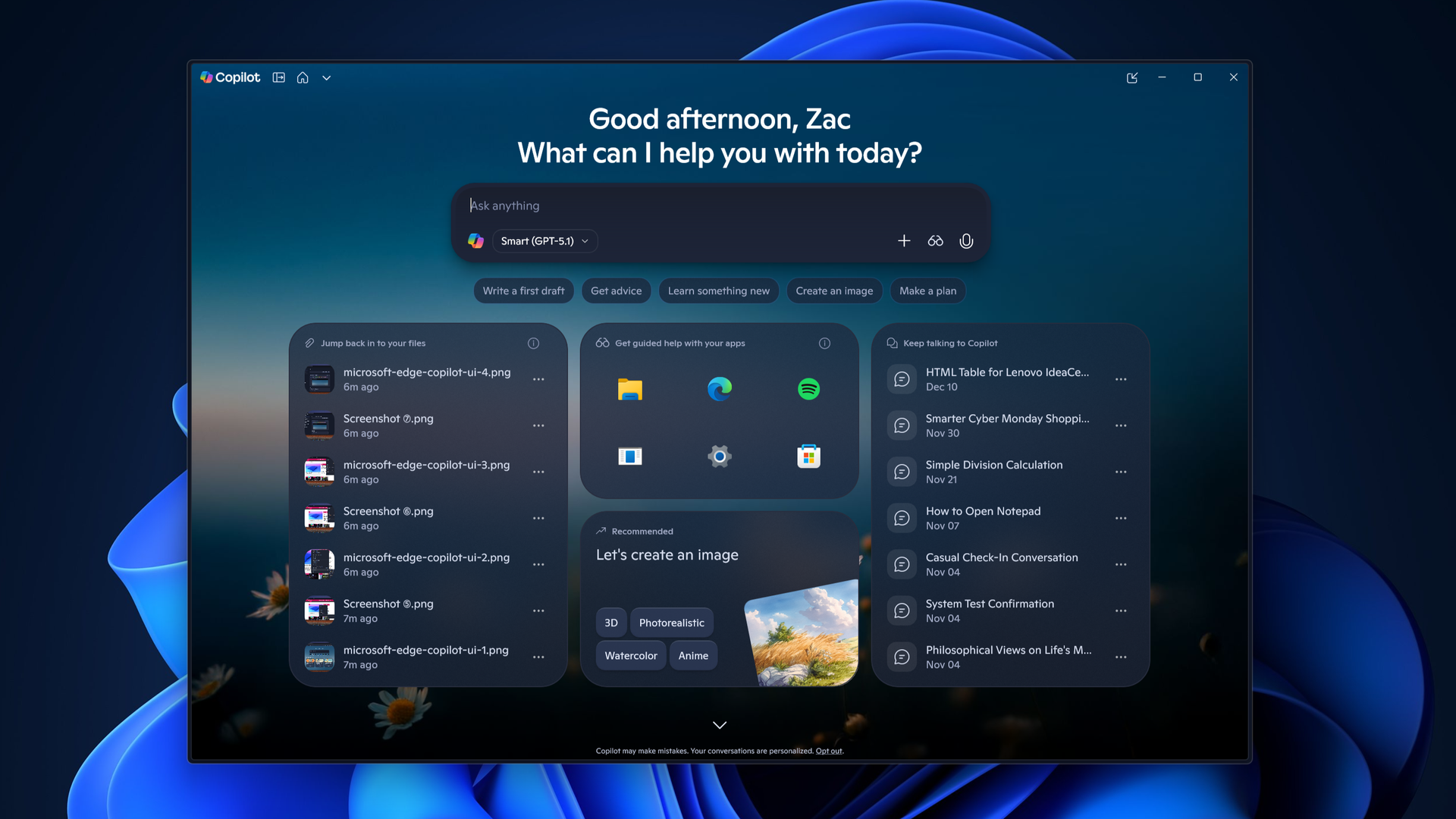
The Microsoft Copilot app will soon include a built-in browser for more users. Microsoft started testing the feature back in March, but the broader rollout of the built-in browser will begin in late November.

The idea is that when you click a link within the Copilot app, you'll stay within Copilot rather than jump into your default browser.

Microsoft described the feature through its message center (archived here):

"Microsoft Copilot app now supports in-app browsing on Windows and Mac, allowing users to open websites side-by-side with chat. Available via admin opt-in now, with broader rollout in late November 2026. Users can manage tabs, toggle full-screen, or open links externally. Data is stored locally, similar to Edge."

A split-screen view of the Microsoft Copilot application featuring built-in web browsing, showing an AI chat panel on the left generating information about a company called Zava alongside a browser window open to zavaindustries.com on the right.

You can resize the Copilot conversation and built-in web browser within the Copilot app. (Image credit: Microsoft)

Copilot's behavior is similar to what you see in Microsoft Teams. It's normal to see apps open in their own browser. X, Reddit, and other popular sites do the same thing.

The question is whether Copilot having a built-in browser will change workflows. Will people start a session by asking Copilot a question and stay in the app, or will they stick with their preferred browser and use Copilot inside it?

It may seem like a distinction without a difference, but getting someone to change their default habit is a massive challenge. Google has had some luck in this area on mobile devices. I often find myself using Gemini and then browsing the web, which effectively gets me to use a different browser. I'm sure Microsoft would love to get people to do the same thing with Copilot on their PCs.

Microsoft may have better luck retaining users who already use Copilot than trying to convert Edge users by forcing Copilot into the Sidebar. The actual experiences are quite similar, but the entry points are different.

Blank Pixel

Click to join us on r/WindowsCentral

Join us on Reddit at r/WindowsCentral to share your insights and discuss our latest news, reviews, and more.
New Windows 11 feature cuts screen glare without altering photos or videos

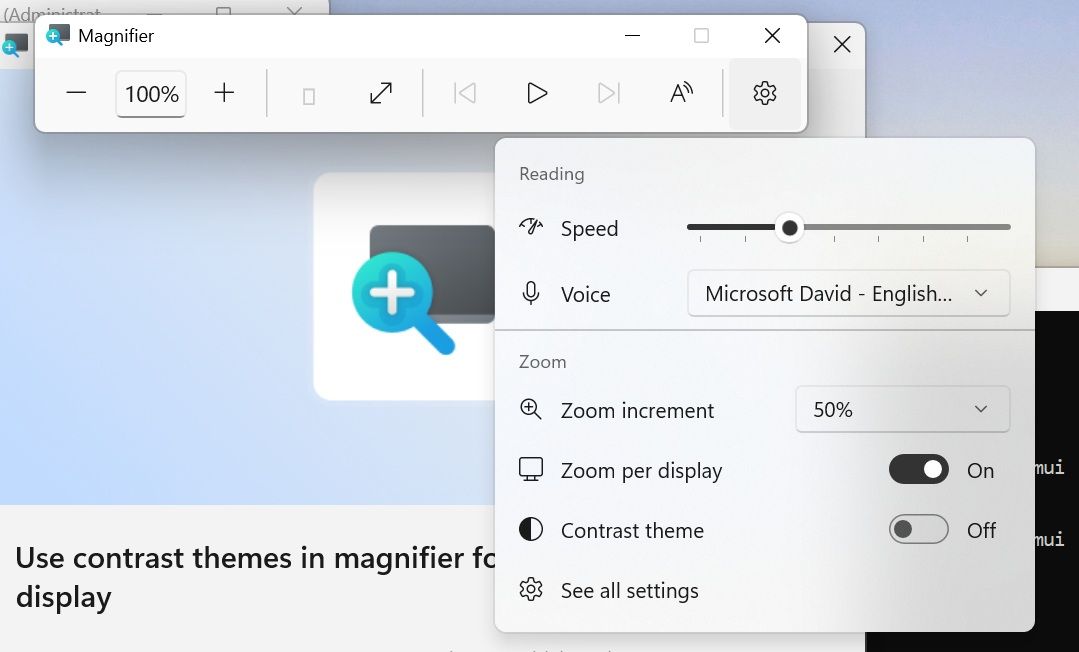
Windows 11 has some big changes on the way to one of its best accessibility features. Magnifier will soon have a contrast theme that improves visibility by reducing glare. At first glance, the feature appears similar to color inversion, but it works differently in several key ways.

Color inversion changes everything on your screen, including photos, videos, and other forms of media. In contrast (pun intended), contrast themes change the colors of an interface without adjusting media.

Four different contrast themes are in testing currently: Aquatic, Desert, Dusk, and Night sky. I think Microsoft could make these themes more accessible by picking more straightforward names. My prediction is that many will be surprised to see "Aquatic" is quite similar to dark mode and is not blue.

The new contrast themes are available for testing to Windows Insiders in the Experimental Channel. Build 26340.9502 is the first to include the themes.

Blank Pixel

The contrast themes are entirely separate from color inversion. You can still invert all the colors on your PC if you'd prefer.

That same update also brings improvements to Live Captions, Cloud Rebuild, and Mouse indicator. Here's everything that's rolling out, as shared by Microsoft.

Build 26340.9502: Changes and improvements

Accessibility - Mouse indicator

  • We're introducing a sleeker new animation for the Mouse indicator. You can enable this animation under Accessibility settings. We've also added the option to keep the indicator activated until you press the Esc key.

Magnifier

  • A new contrast theme toggle for a lower-glare screen. If bright screens are uncomfortable, many people use color inversion to reduce glare. However, inversion changes everything on screen, including photos, charts, and videos. With this update, we're introducing a new contrast theme toggle in Magnifier.
  • Reduce glare with a single toggle. Turn on a contrast theme directly from the Magnifier toolbar for a more comfortable viewing experience.
  • Choose the contrast theme that works best for you. The dark theme is applied by default, and you can choose which contrast theme the toggle uses under Settings > Accessibility > Magnifier.
  • Photos, videos, and charts keep their original colors. Unlike color inversion, the contrast theme recolors the interface without touching your photos, charts, or videos, so they keep their real colors.
  • Color inversion is still here. This isn't a replacement. If you use inversion today, it works exactly as it always has. The contrast theme is a separate, purpose-built option to reduce glare when you want a darker interface without inverting colors.

Cloud rebuild

  • We're updating Cloud rebuild, the recovery option that restores a Windows 11 PC to a clean, known-good state by performing a full OS reinstall, with two additions.
  • Cloud rebuild can now sanitize the device's drives as part of the rebuild. When you start a rebuild in WinRE, choose Remove files if you're keeping the PC, or Remove & sanitize files before recycling, returning, or reassigning it. The sanitize option uses the storage hardware's erase capability to securely erase data before Windows is reinstalled and is irreversible.
  • IT administrators can now configure and start a Cloud rebuild remotely through the Recovery CSP, using either the currently installed build or a target build you specify.

Live Captions

  • We're improving Live Captions with a new Include Screen Reader audio setting, which is off by default. With the setting off, Live Captions won't transcribe audio from screen readers such as Narrator, JAWS, and NVDA, keeping captions focused on microphone and system audio.

Hyper-V

  • Fixed an issue where some applications that used HCS-managed virtual machines experienced issues when sharing host folders with Linux VMs using Plan9. Folders shared from the Windows host using Plan9 didn't appear or couldn't be accessed in the guest environment.

Other

  • Fixed an issue where backing up using File History unexpectedly failed with an error saying, "No usable drives found."

Some of the same changes shipped to Insiders in the Beta Channel recently as well, including the improvements to Live Captions and Hyper-V. The Windows Recovery improvements related to Cloud rebuild are also live in the Experimental (26H1) Channel.

Microsoft revamped how its Insider channels work earlier this year, so we often have several builds roll out at once. We'll highlight the biggest changes here at Windows Central. You can always browse through the full documentation on Microsoft's website to see complete change logs for every single build.

Click to join us on r/WindowsCentral

Join us on Reddit at r/WindowsCentral to share your insights and discuss our latest news, reviews, and more.
Windows Wrap: Microsoft has two weeks to stop its Surface event from being an embarrassment

Windows Central

Microsoft just announced a Windows and Surface event that will be held on October 7, 2026. Based on the invite, the event will focus on "how local AI will shape the next chapter of the PC." That's not exactly a topic that will move the needle for general users.

Microsoft is all-in on AI, billions of dollars down the drain be damned. The tech giant created what may be the "best laptop ever made" to run AI locally. Considering the focus of Microsoft's event, it's safe to assume the Surface Laptop Ultra will be center stage.

Maybe I'm just part of the old guard yearning for the days of unique form factors and hardware innovation, but I just don't think a Surface running NVIDIA's new RTX Spark superchip is enough to lead an event.

The biggest news of the week was the announcement of the event, but I'm not sure that's a good thing. Our readers' reception to the announcement has been largely negative.

Biggest News of the Week

Surface Laptop Ultra
Windows 11 update in Settings app
Close-up of Surface Laptop for Business 8th Edition desktop with pinned applications, including Microsoft Edge, Word, Excel, and Microsoft 365 Copilot.
Outlook Client Hero
Close-up of a Lenovo Yoga Slim 7i Ultra (Gen 11) Aura Edition laptop keyboard showing keys like
OneDrive web albums

"Nothing about this matters. The Laptop has always been my least-favorite computer in the Surface family. The RTX version is just AI-focused internals at a comical price," said Lil Frier. "There's nothing about Surface to be interested in anymore, and Windows 11 is still nothing more than a reason I have stuck with Windows 10."

Another user, aruntopez10, said, "Honestly, I have zero faith in this event. Their events have become so boring and unwatchable ever since Panos left (including even his last event). It's sad how they went from having the BEST and interesting fall tech events to the worst."

Microsoft hasn't given our readers — or anyone else — good reason to expect much from this event. Earlier this year I outlined how Microsoft can save the Surface brand. The company has done very little of what I suggested. And it's not like I have wild ideas that are mine alone. People want Surface to be exciting and to push boundaries, not be iterative updates and boxes for AI.

Disappointment is nothing new to Surface fans. Our Senior Editor Zac Bowden called the 2023 Surface and AI event "a massive blunder and missed opportunity."

Microsoft has genuinely changed course when it comes to Windows 11. The company's Windows K2 initiative is changing some of the most complained about parts of Windows 11. As we saw this week, that process is having some hiccups, but it is a major step in the right direction.

Surface? Not so much. I'd argue things are getting worse, not better. Microsoft just doesn't understand what made Surface special and isn't willing to embrace the family's roots.

Click to join us on r/WindowsCentral

Join us on Reddit at r/WindowsCentral to share your insights and discuss our latest news, reviews, and more.
Microsoft addresses Excel’s copy/paste regression but the fix barely reaches most users

Earlier this week, Microsoft confirmed a bug in Excel that breaks copy and paste. The issue was caused by the Patch Tuesday September update. That update included almost 1,000 security fixes, but it also brought some pesky bugs to the operating system.

Microsoft had to issue an out-of-band update to address broken Hyper-V Linux folder shares, Remote Desktop freezes, and USB audio failures. The company has also had to ship an update to address the copy and paste bug in Excel.

Unfortunately, the update is rather limited at this time. The fix is only for Excel 2016 and it has some known issues. Microsoft notes that if a workbook contains conditional formatting paste operations may continue to fail. The workaround to this is to use the "Paste Special" feature. Microsoft outlines the steps in a support document:

  • On the Home tab, select the Paste dropdown list, and then select Paste Special.
  • In the Paste Special window, select one of the following options:
    • Formulas
    • Formulas & Number Formatting
    • Values
    • Values & Number Formatting
    • Link

Microsoft is still looking into the issue and will hopefully have broader fixes soon.

Windows 11 is in the middle of a refresh that will reduce pain points in the operating system. One of the many ways Microsoft will improve Windows 11 is by smoothing the update process. People are supposed to get fewer updates each month and have updates with fewer bugs.

At least in September, that has not been the case and there is clearly still a lot of work to do. I've had to install three updates on my PC in just over one week. In my case, the second and third updates were only needed to fix problems caused by the first update.

Blank Pixel

While issues like the Excel copy and paste bug are frustrating, they usually affect a small subset of users. I happened to be in that group this month, but I don't believe this was a widespread problem.

Hopefully we will reach a point at which a monthly Patch Tuesday update plugs security holes and improves the OS without introducing any bugs that break workflows.

Click to join us on r/WindowsCentral

Join us on Reddit at r/WindowsCentral to share your insights and discuss our latest news, reviews, and more.
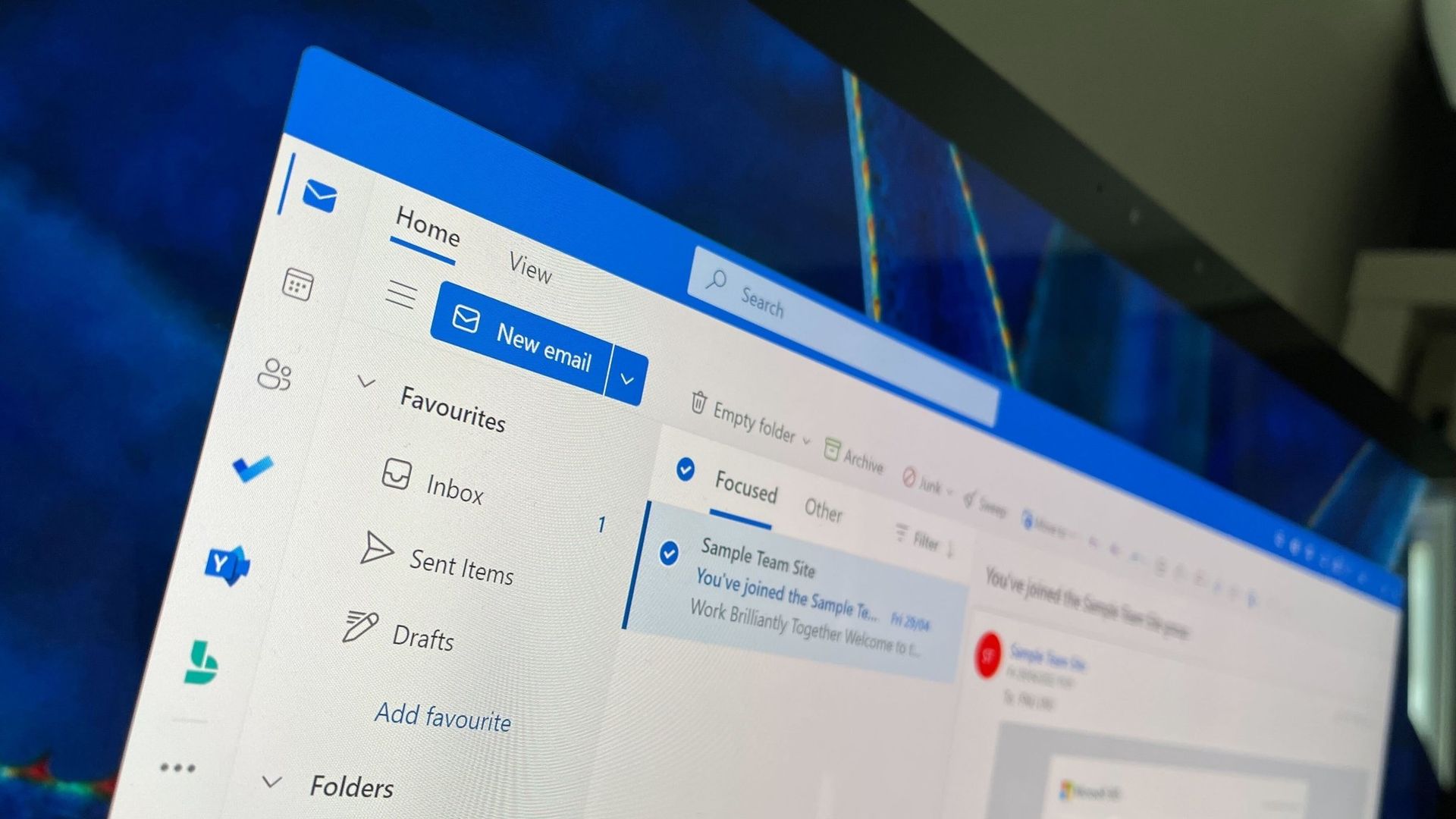
Microsoft Teams will soon support two users sharing screens simultaneously

Microsoft Teams currently limits sharing a screen to a single presenter. This can result in some awkward handoffs between presenters or restrict how much content can be shared at once. But those challenges should be a thing of the past because soon, Microsoft Teams will allow two users to share screens at once within a meeting.

A recent post by Reddit user KarthiV discusses the upcoming change to Teams:

"Microsoft is working on a solution: two presenters will be able to share their screens or windows simultaneously in a Teams meeting. Participants will be able to view both shared screens at the same time, making it easier to compare and discuss content without constantly handing the screen back and forth."

The feature is expected to ship in November 2026. When it does roll out, it will be available for Teams desktop and Teams on the web.

The Reddit post focuses largely on handing off between presenters, but I think the ability to leave two shared screens up at once is more interesting. You can already take over sharing in a Teams meeting, which forces one shared screen to go away and be replaced by a new one.

Having two shared screens appear makes it easier to compare content, guide people through tasks, or present side-by-side.

Some questions remain about the new feature, such as how the two shared screens will appear within a meeting. Microsoft will have to optimize that experience for different form factors, since viewing two shared screens at once would be much easier on a large monitor than a smaller laptop screen.

The post only mentions the desktop and web versions of Teams, so it's unclear how the new feature would appear for mobile users.

It's nice to see the addition to Teams because it helps the platform catch up to one of its biggest competitors. Zoom has long allowed multiple users to share screens simultaneously within a meeting.

Blank Pixel

Click to join us on r/WindowsCentral

Join us on Reddit at r/WindowsCentral to share your insights and discuss our latest news, reviews, and more.
Microsoft Edge's latest update is freezing web apps

If web apps are freezing on your PC, you're not alone. A recently discovered issue in Microsoft Edge can cause a window to freeze and stop responding to mouse or keyboard input.

The bug rolled out in Microsoft Edge version 153, which recently shipped to general users. Microsoft confirmed the issue and recommended rolling back to Microsoft Edge version 152 as a workaround.

As much as I love a good native app, I use quite a few web apps to get work done. For several popular services, web apps are either the only option on Windows or the official apps for those services are just wrapped web apps.

Unless a wrapped web app provides additional functionality, I prefer to just use the corresponding web app within my browser of choice. For example, I can organize Slack and Airtable in browser tabs by using their web apps rather than download dedicated apps through the Microsoft Store.

An added bonus of a browser-based setup is that I can toggle between browser instances by pressing Alt+` since I use Window Hopper in PowerToys.

If your web apps are freezing, you could also bypass the issue by using a different browser. Microsoft wouldn't recommend that, of course, but Chrome, Firefox, Brave, and other popular browsers all support web apps.

If you choose to revert Edge to its previous version, you'll have to jump through a few hoops. Unfortunately, you can't just click a toggle to go back. Even downloading a file containing a previous version still takes some extra work to install. Microsoft outlines the process on its website:

  1. Disable Microsoft Edge Updates.
    1. Open the local Group Policy Editor and go to Computer Configuration>Administrative Templates>Microsoft Edge Update>Applications>Microsoft Edge>.
    2. Select Update policy override and then select Enabled.
    3. Under Options, pick Update disabled from the Policy dropdown list.
  2. Get the MSI.
    1. Download the MSI for the version you want to roll back to from here.
    2. Save the MSI to your desktop.
  3. Run the rollback command.
    1. Open the Windows command prompt with Run as administrator.
    2. Type the following command, where: C:\Users\username\Desktop\test is the path to the MSI you downloaded, and FileName is the name of the .msi file:
       C:\Users\username\Desktop\test>msiexec /I FileName.msi /qn ALLOWDOWNGRADE=1
    3. Close and reopen Microsoft Edge to verify that the rollback worked. Under Settings and more (ALT + F), go to Settings and select About Microsoft Edge.

Blank Pixel

Click to join us on r/WindowsCentral

Join us on Reddit at r/WindowsCentral to share your insights and discuss our latest news, reviews, and more.
Microsoft announces another event in October, and it's not about Surface or Windows 11

Microsoft recently announced a Windows 11 and Surface event for October, but that’s not the only time the tech giant will take the stage next month. Microsoft will host its annual OneDrive + Copilot digital event on October 20, 2026.

The event is free to attend digitally and will be followed by a live Q&A. It will start at 9 AM PT / 12 PM ET. You can register to attend the event on Microsoft's website.

Microsoft highlighted several of the key speakers in its post announcing the event:

  • Jeff Teper, Executive Vice President of Microsoft Apps and Agents
  • Adam Harmetz, Corporate Vice President of Product, OneDrive and SharePoint
  • Arwa Tyebkhan, Head of Product, OneDrive

Blank Pixel

Microsoft also promised that "product leaders, engineers, and experts from across the OneDrive team" will share during the event.

The group of experts will show product demos and discuss real-world use cases for OneDrive and Microsoft 365.

OneDrive is at the center of many AI workflows, linking documents and images to tools like Copilot. Microsoft's teaser for the event focuses on "turning files into outcomes."

This event may appear in fewer headlines than the Windows 11 and Surface event, but I suspect a higher percentage of attendees will enjoy the event than those who watch the Windows 11 and Surface event.

Microsoft set a high bar for its Surface events for years, often introducing revolutionary hardware or major updates to fan-favorite devices. This year's Windows 11 and Surface event will likely focus more on using AI locally on devices like the Surface Laptop Ultra. We've already seen that device and even gone hands-on with it, so there isn't much mystery surrounding it.

Microsoft could always surprise us, of course, but the last few Surface or Windows 11 events have been rather tame. I don't expect the OneDrive and Copilot event to break any major news, but people will likely go into it with grounded expectations.

Click to join us on r/WindowsCentral

Join us on Reddit at r/WindowsCentral to share your insights and discuss our latest news, reviews, and more.
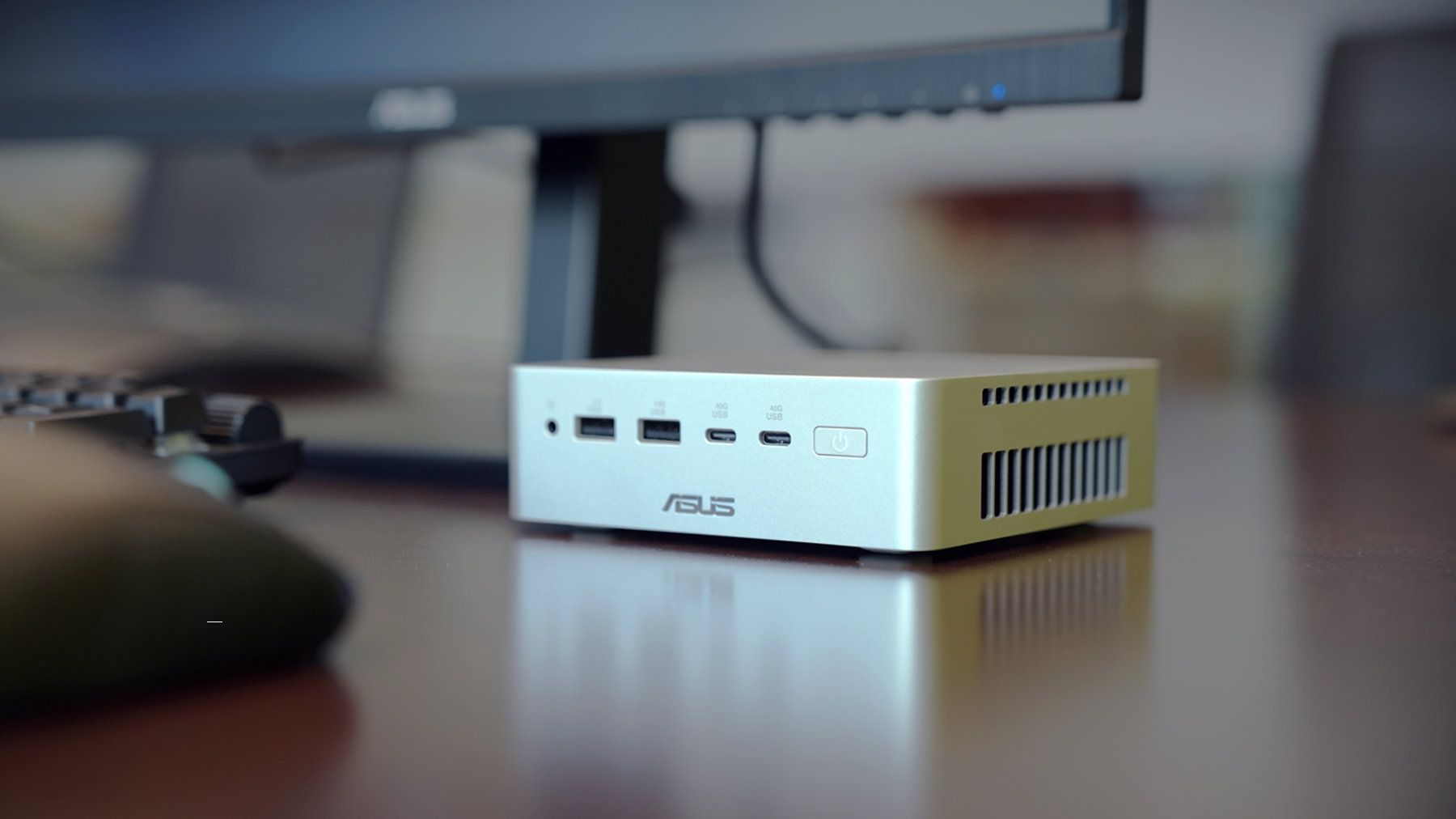
ASUS launches the Ascent QN10, an 80‑TOPS AI mini PC powered by Snapdragon X2 Elite

ASUS just started shipping the Ascent QN10, the first mini PC built around Qualcomm’s Snapdragon X2 Elite platform and its 80 TOPS NPU.

The 80 TOPS NPU is designed for local AI tasks such as language models, image processing, and automation workflows.

Up to this point, mini PCs running Windows on Arm have been largely dev kits, such as the Windows Dev Kit 2023. Those types of devices allowed developers to optimize apps for Arm, but they were not aimed at general customers. There have been some consumer mini PCs with Arm processors, but the Ascent QN10 is the first with the Snapdragon X2 Elite.

The ASUS Ascent QN10 is a very different device. It’s a consumer‑ready PC with an anodized aluminum chassis rather than the plastic developer boxes we’ve seen in the past. Our friends at Tom’s Guide said the Ascent QN10 “could be the Mac mini M4 alternative for Windows users.”

The Ascent QN10 has a 0.7-liter body, making it smaller than many of the best mini PCs. Despite the small body, it packs plenty of ports.

ASUS Ascent QN10 Specs

Processor

Qualcomm Snapdragon X2 Elite (18-Core Oryon CPU)

Graphics

Qualcomm Adreno X2-90

NPU

Qualcomm Hexagon (Up to 80 TOPS)

Memory

Up to 32GB LPDDR5x

Storage

512GB, 1TB or 2TB

Ports

2 x USB4, 2 x USB-A, 1 x 3.5mm audio jack (front), 1 x USB4, 1 x HDMI 2.1, 2 x USB-A, 1 x 2.5 Gigabit Ethernet (rear)

Connectivity

Wi-Fi 7, Bluetooth 6.0

Dimensions

5.1 x 5.1 x 1.5 inches

Weight

1.6 pounds

The specs of the Ascent QN10 received a small bump since our colleagues at Tom's Guide went hands-on with the mini PC. The Ascent QN10 features Bluetooth 6.0 rather than the older Bluetooth 5.4.

The Ascent QN10 has a clever cooling solution that keeps the heat from its CPU and SSD separate. Fresh air is brought in on one side of the device but then split and sent out separately on the other side of the device.

Overall, the Ascent QN10 looks like a strong first showing for Snapdragon X2 Elite in a mini PC. The big question is if there's a demand for an AI-focused mini PC running Windows on Arm.

The Ascent QN10 can access Qualcomm’s AI Hub, which provides over 175 pre‑optimized models and tools for testing and deploying AI workloads.

Closeup of an ASUS Ascent QN10 mini PC showing two USB ports, two USB-C ports, a power button, and a headphone jack.

ASUS
Ascent QN10 Mini PC

This mini PC runs on a Snapdragon X2 Elite and has an NPU with 80 TOPS of performance. Those specs allow it to handle AI workloads effeciently despite the compact body of the mini PC.

"Data centres have become integral to our lives" — Microsoft plans to push ahead with data center despite protests

Microsoft appears keen to go ahead with plans to build a data center in Slough, England. Plans could be submitted as soon as this autumn, according to The Slough Express.

Recently, a consultation was held to receive feedback from local residents about the data center. In that process, Microsoft said: "Data centres have become integral to our lives, with social media, contactless payments and remote working all reliant on the functionality they provide."

The tech giant added, "The UK needs more new data centres to power the economy of the future."

The consultation covered several topics related to the proposed data center, including on-site parking and if the building of the data center would affect local traffic.

Councillor Chandra Muvvala discussed the impacts of data centeres with the Local Democracy Reporting Service (LDRS). "Not having a data centre is not a problem, but having a data centre is certainly a problem," said Muvvala.

The councillor also noted things Microsoft could do to help the community, such as planting trees or improving local parks.

A petition to pause the data center project has over 600 signatures at the moment. Petitioners want an independent assessment to be completed to determine the impacts of the project.

Blank Pixel

Controversial data centers

The proposed data center in Slough is not alone in drawing criticism. Microsoft has also faced pushback about its planned data center in Leeds, England.

That project has been controversial since its inception. Over 43,000 people signed a petition to prevent the construction of the data center. Hundreds of protesters appeared at the site earlier this week, according to The Yorkshire Evening Post.

The complaints about the project in Leeds are similar to those from people in Slough. Residents in both areas have expressed concerns about the environmental impact of the data centers and raised flags about potentially high noise levels and other ways the data centers could harm their respective surrounding areas.

Microsoft has already received the go-ahead to build the data center from the Leeds City Council, which voted unanimously to approve the project. But the final decision on the project will come from Chief Planning Officer Martin Elliot.

Click to join us on r/WindowsCentral

Join us on Reddit at r/WindowsCentral to share your insights and discuss our latest news, reviews, and more.

❌