Vue normale

Framework Laptop's price decrease comes with a jab at Apple and an ominous warning

Stop the presses! A laptop maker just announced a price reduction in 2026. Despite the ongoing RAM crisis and component shortage, Framework just dropped the price of the Framework Laptop 13 Pro.

Framework was able to source a new SSD from its partner ADATA that offers better performance and reliability while costing less.

Framework Laptop 13 Pro preorders have not started shipping, so any order that's already been placed has been upgraded to the new SSD and had pricing adjusted.

"This new SSD comes in 1TB and 2TB options, and the 1TB lands at a lower price than the 500GB SSD we had previously qualified, so we will also switch 500GB orders to the 1TB drive at the lower price," explained Framework.

Framework's website did not show the reduced pricing when I drafted this piece, so I can't share the exact costs of the new configurations. I'll update this piece as more information becomes available.

The announcement comes as good news for those shopping for the unique laptop from Framework, but it's a relatively small reprieve from the current financial climate.

Even in Framework's announcement of the price decrease, the PC maker warned that CPU price increases are expected. "We expect that we will need to adjust the overall system price on Framework Laptop 13 Pro in the coming weeks for new orders," said Framework.

In response to Apple’s price increases today, we’ve lowered the price of some Framework Laptop 13 Pro configurations. We were able to source and qualify Gen 5 SSDs from ADATA that are both faster and cheaper, and now offer them on DIY Edition! https://t.co/HfS1l5wL1tJune 25, 2026

Framework dropped its prices on the same day Apple unveiled several price increases, which led to a playful jab. Framework clarified in a follow-up post that the timing of its reductions was coincidental and not in response to Apple.

The unfortunate reality is that many laptop makers have bumped up prices, including Framework. Microsoft, Dell, Lenovo, HP, and others have all had to raise prices. For a short time, Apple was immune to price hikes due to its stockpile of components, but that is no longer the case.

We shouldn't expect things to improve in the immediate future. When Microsoft announced another wave of price increases to Xbox consoles, the company said it expects another doubling of console storage and memory prices by the fall of 2027. The same factors that contribute to those components doubling in price will affect PC parts.

Click to join us on r/WindowsCentral

Join us on Reddit at r/WindowsCentral to share your insights and discuss our latest news, reviews, and more.

Framework Modular Laptop

Framework Modular Laptop
Forget PowerToys, Windows 11 needs this feature immediately

Microsoft needs to copy a new feature that makes it easier to multitask on Windows 11. But rather than Sherlocking a third-party app, Microsoft just needs to copy a concept proposed for its own app, PowerToys.

Every once in a while a feature gets added to PowerToys that makes me wonder "why isn't this part of Windows?" FancyZones immediately comes to mind, and Microsoft seems to agree since improved snapping in Windows 11 takes inspiration from that feature.

PowerToys may have another winner on its hands in AltWindowCycle, though I think a new name may be needed.

The utility allows you to switch between windows with a keyboard shortcut. It's similar to Alt + Tab, but it works within a single app. Clint Rutkas explained the tool in a GitHub pull request:

"Introduces a new utility: AltWindowCycle to quickly switch between windows from the same process using Alt + `. It works like Alt + Tab, but scoped to the app you’re already in. Perfect for juggling multiple browser windows, terminals, or editor instances."

AltWindowCycle is still in its early stages. If it is finished and made a part of PowerToys, I hope it also makes its way to Windows 11.

If it does become part of Windows 11, AltWindowCycle would help Microsoft's operating system catch up to macOS and some Linux distros, which use either Alt + \` or Cmd + ` to cycle through windows of the same app, albeit a bit differently.

Many PowerToys features are niche and would be considered bloat by non-power users if included with Windows 11. But a small shortcut that makes multitasking easier would be a natural addition to Windows 11, especially since AltWindowCycle works similarly to the well-known Alt + Tab shortcut.

This collection of utilities includes a large library of features to enhance the Windows experience. PowerToys is designed with power users in mind, but it has handy features for people who just use their PC for everyday computing too.

Free at GitHub | Free at Microsoft Store

Click to join us on r/WindowsCentral

Join us on Reddit at r/WindowsCentral to share your insights and discuss our latest news, reviews, and more.

Windows 11 Start Logo

Windows 11 Start Logo

This free app puts Microsoft to shame by bringing widgets to the Windows 11 taskbar

I love widgets. Microsoft seems much cooler on the concept. Sure, Windows 11 has a Widgets Panel, but it's barely useful due to its lack of quality widgets. That's why I was so excited to see WidBar highlighted on Reddit.

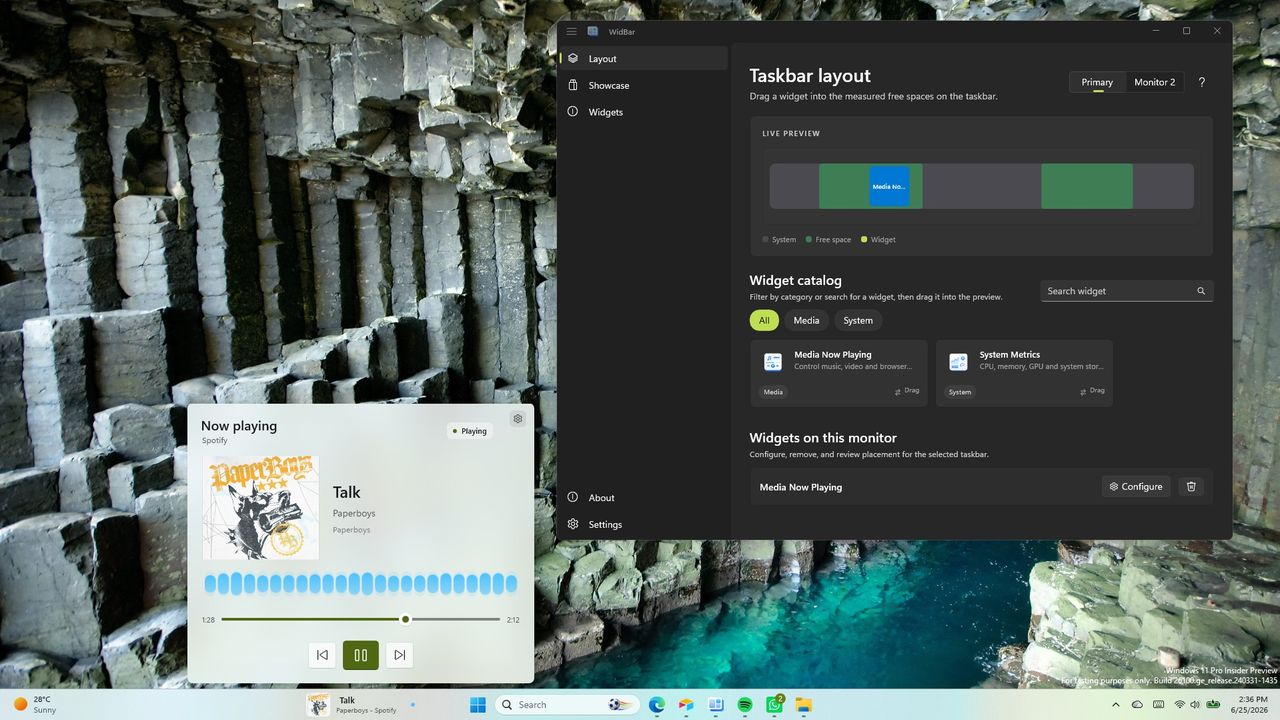
WidBar is a new app that allows you to add widgets to the empty spaces of the Windows 11 taskbar. It's still in beta, but it's off to a promising start.

The developer of WidBar, Andrea Del Bello, shared the app and detailed its progress.

At the moment, WidBar only has a pair of widgets: "Now Playing" and "System Metrics." They're basic but they do a good job showcasing the app.

Within WidBar, you can drag and drop widgets into a preview of your taskbar. Different widgets can be placed on various monitors.

This free app lets you add widgets to the empty spaces in the Windows 11 taskbar. It's still in beta, so it only has two widgets available, but developers can create their own widgets using templates.View Deal

Any developer can make widgets for WidBar. Del Bello explained how that works on Reddit:

"Each widget is just a small packaged app that you publish to the Microsoft Store like any other app, and WidBar picks it up on its own: there's no separate plugin store, no manual install into WidBar, and no approval from me. The moment your widget is installed from the Store, WidBar recognizes it automatically, it appears in the catalog, and the user can drop it onto the taskbar."

Del Bello also provided a template for making WidBar widgets on GitHub.

Putting Microsoft to shame

Windows 11 Widgets panel

The Widgets Panel only has 56 widgets available.

WidBar has two supported widgets right now and is still in beta, but it already surpasses Windows 11's Widgets Panel in an important way.

Incredibly, the Widgets Panel lacks a Now Playing widget from Microsoft. Windows 11 has those controls, but they appear in the Action Center. That shows how much Microsoft thinks about the Widgets Panel.

There is a widget made by Stefan vd called "S Media Controls" that seems to fill the gap, but I've only used it briefly in testing.

Even if you give Microsoft the benefit of the doubt and argue having audio controls in the Action Center and the Widgets Panel, it won't take much to catch up.

With just two supported widgets, WidBar is well on its way to beating the Widgets Panel. There are a grand total of 56 widgets in the Microsoft Store for the Widgets Panel. And that count includes "My Tic-Tac-Toe" and several entries that appear to be money grabs that offer little functionality.

Add a clock, a calendar, a recent files shortcut and WidBar is almost 10% of the way to the entire Widgets Panel ecosystem.

Click to join us on r/WindowsCentral

Join us on Reddit at r/WindowsCentral to share your insights and discuss our latest news, reviews, and more.

Windows 11 desktop showing a widget for controlling music and the settings of an app for widgets.

Windows 11 desktop showing a widget for controlling music and the settings of an app for widgets.

I'm sick of fake Prime Day deals — this genuine discount is the one I recommend most

I found the one Prime Day deal I can recommend above all others. At $67.67, the Logitech MX Vertical is an excellent purchase.

I hate the fact that Prime Day still requires hunting for deals. You'd think an event centered around shopping would guarantee great prices, but that's not the case.

I was pleasantly surprised to see the Logitech MX Vertical discounted by 44% on Prime Day.


"I honestly can't think of a thing I'd change about the Logitech MX Vertical. I dislike having to use other mice because I've been spoiled by the Logitech MX Vertical. " ~ Sean Endicott, news writer, Windows CentralView Deal

Are Prime Day deals worth it?

Some Prime Day deals are worth it. The shopping event is genuinely a good way to save money on some items. But that doesn't mean anything you see on sale during Prime Day is a good deal.

It's normal to see an item marked up a few weeks before Prime Day to make the Prime Day "discount" look better.

In the worst cases, an item actually becomes more expensive than usual during Prime Day. Retailers manipulate price history to make a bad price look good.

These are the types of things our team of experts looks out for when finding Prime Day deals. It's also why hand-picked Prime Day deals are better than blindly trusting a sale tag.

The Logitech MX Vertical is currently $67.67 for Prime Day. According to CamelCamelCamel, that is almost the lowest price ever for the mouse (it once hit $63.79 on Amazon). Perhaps more importantly, the price is significantly lower than what we've seen the majority of this year.

Why buy the Logitech MX Vertical

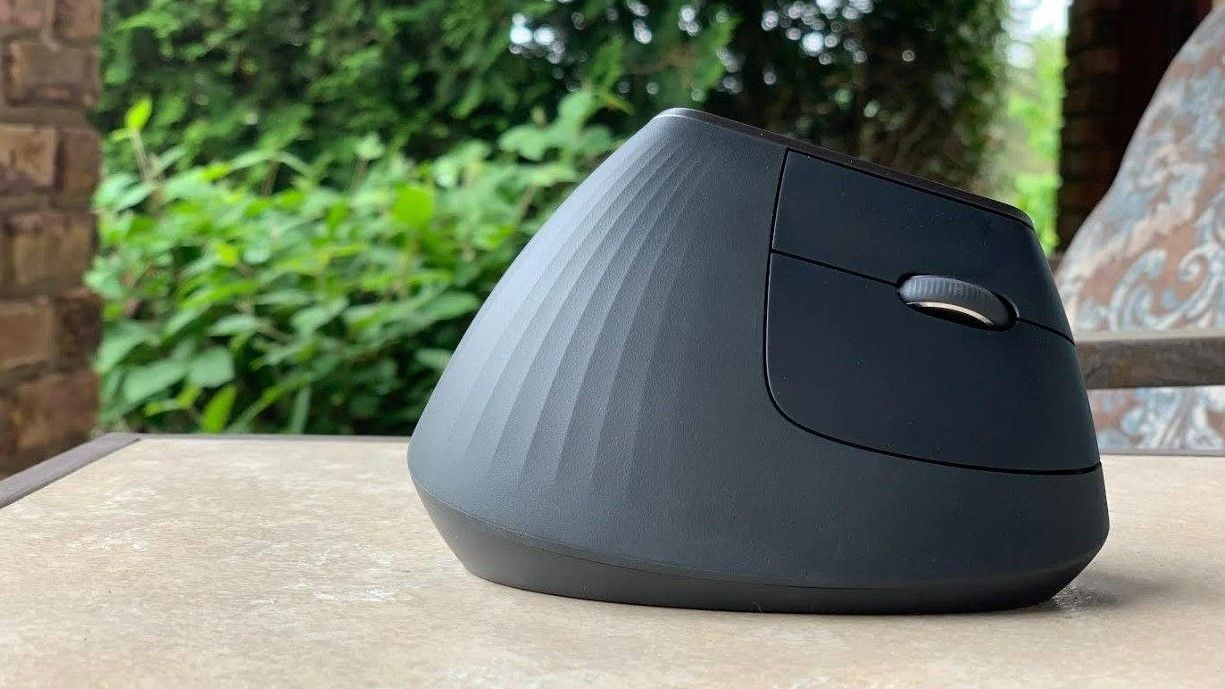
The Logitech MX Vertical is an ergonomic mouse that allows your wrist and arm to rest at a natural angle. That results in less muscle strain and reduced wrist pressure.

Because of the shape of the mouse, you don't have to move your hand as much. Tiny movements add up, and being able to keep your hand in place does a lot to reduce strain.

The Logitech MX Vertical is by far the best mouse I've used.

Over the years, its rubber grip has held up well. The mouse still lasts for ages when running on battery. It's easy to top up through USB-C when it's time to charge.

It checks all the boxes I want in a mouse.

The only downside of the Logitech MX Vertical is its retail price, but the massive discount on the mouse makes that a non-factor.

Click to join us on r/WindowsCentral

Join us on Reddit at r/WindowsCentral to share your insights and discuss our latest news, reviews, and more.

Logitech MX Vertical Mouse

My Logitech MX Vertical mouse has sat on my desk for years, and it has aged incredibly well.

A bunch of bugs that broke PowerToys have been squashed

PowerToys just received a small but important update that brings the app to version 0.100.1. The update focuses on fixes to version 0.100.0 of the app, which included a bunch of new features.

Normally I wouldn't cover a small update to an app, but in this case the bugs prevented core features of PowerToys from working. Luckily, the bugs have been squashed.

One issue caused keys that had been remapped to non-modifier keys to be delivered as system-key events. An example of that is mapping Alt to Backspace could result in deleting whole words instead of individual characters.

Another bug prevented monitors from waking from standby after selecting On through Power Display.

The developers of PowerToys log all the changes to the app on GitHub.

This collection of utilities includes a large library of features to enhance the Windows experience. PowerToys is designed with power users in mind, but it has handy features for people who just use their PC for everyday computing too.

Free at GitHub | Free at Microsoft Store

View the full changelog ↴

PowerToys v0.100.1

Highlights

  • This patch release fixes several important stability and behavior issues identified in v0.100.0 based on incoming reports. Check out the v0.100.0 notes for the full list of changes.

Color Picker

  • Fixed a bug where the main Color Picker window could appear inside the zoomed-in picker view in #48762 by @daverayment

Command Palette

  • Fixed Run history initialization in AOT builds in #48463
  • Fixed a bug where the Performance Monitor dock item could show ??? after restart in #48682 by @giruuuuj
  • Fixed the Hibernate command using the Sleep icon in #48689 by @MrBisquit
  • Limited the "pin to dock" dialog to displays where the dock is enabled in #48723

Keyboard Manager

  • Fixed modifier keys remapped to non-modifier keys being delivered as system-key events, which caused unexpected behavior in apps such as Alt-to-Backspace deleting whole words in #47192 by @oMatheusmol

Power Display

  • Fixed a bug where selecting On in the monitor power-state control did not wake a monitor from standby in #48628
  • Fixed built-in display detection and brightness control on dual-GPU laptops where the internal panel is driven by the discrete GPU in #48637

PowerToys Run

  • Fixed VS Code Workspaces discovery after VS Code moved recently opened workspace data to shared storage in #47505

Quick Access

  • Fixed Quick Access flyout crashes caused by unhandled XAML exceptions during launch or page navigation in #48457

Shortcut Guide

  • Fixed a crash when navigating between Shortcut Guide sidebar sections in #48481
  • Fixed number-key rendering in shortcut manifests and added a Postman shortcut manifest in #48461 by @brycewc
  • Updated bundled shortcut manifests to use the literal number-key token so number keys render correctly across apps in #48757 by @brycewc

ZoomIt

  • Fixed a race condition in audio initialization for ZoomIt video recording in #48685 by @MarioHewardt

Power Display is one of my favorite utilities in PowerToys. It allows you to manage the brightness and other settings of your external monitor through a series of flyouts. It saves me the hassle of reaching around the bottom or back of my display to adjust settings with awkward buttons.

The recently fixed bug took away core functionality of Power Display, so I'm happy to see it addressed.

Click to join us on r/WindowsCentral

Join us on Reddit at r/WindowsCentral to share your insights and discuss our latest news, reviews, and more.

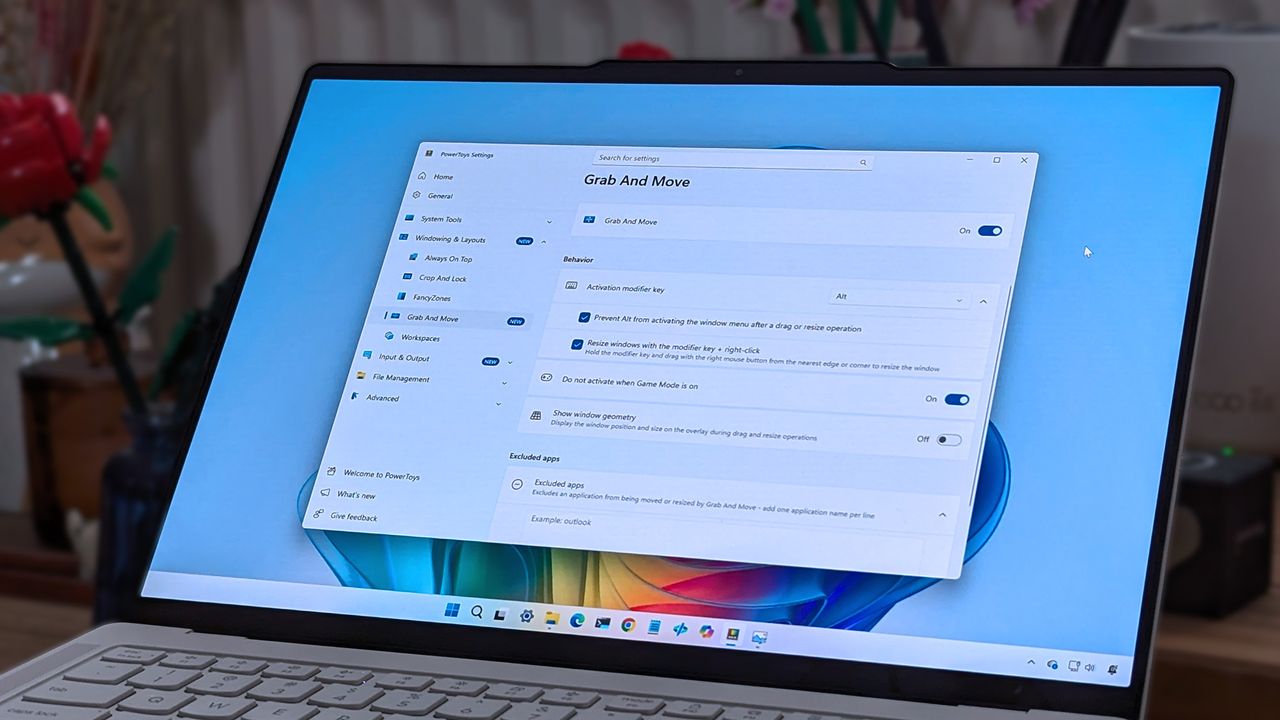
A laptop screen displaying Windows 11, featuring the "Grab And Move" settings window of PowerToys. The desktop background is colorful and vibrant.

A laptop screen displaying Windows 11, featuring the "Grab And Move" settings window of PowerToys. The desktop background is colorful and vibrant.

Windows 11 just got a major upgrade to PC recovery, and it finally protects your personal files

Recovering your Windows 11 PC just got easier. This week, Microsoft rolled out point-in-time restore for Windows 11 to general users. The feature creates restore points automatically that you can revert to if there's an issue with your computer.

Point-in-time restore is available to Enterprise, Pro, and Home users of Windows 11. According to Microsoft, the feature can recover a PC in minutes rather than hours.

When you have Point-in-time restore enabled, the feature automatically captures the system state of your PC, including Windows, installed apps, system and app configurations, settings, and your local files.

By default, restore points are captured every 24 hours, but you can configure that to a different cadence if you're an Enterprise user.

The feature is on by default on Windows Home and Windows Pro devices as long as they are not under enterprise management. Point-in-time restore is off by default for some enterprise-managed systems until Windows 11 version 26H2 is installed.

If a PC has an OS volume size under 200GB, point-in-time restore will be disabled by default.

Microsoft already had other features that are somewhat similar, such as System Restore and point-in-time restore for Windows 365 Enterprise. But both of those have key differences when compared to point-in-time restore for Windows 11.

System Restore requires manual capture of an image and does not include user files as part of the restore point. It's also accessible through the Control Panel rather than system settings and takes up more space on your PC.

Point-in-time restore for Windows 11 also provides benefits to IT admins, since the feature can be remotely managed with a wide set of controls.

Point-in-time for Windows 365 Enterprise is for Cloud PCs. It's also limited to Enterprise users.

Over two million devices had point-in-time restore enabled while the feature was in public preview. Microsoft said it used the time in preview to improve the feature based on feedback.

Click to join us on r/WindowsCentral

Join us on Reddit at r/WindowsCentral to share your insights and discuss our latest news, reviews, and more.

Windows 11 Start menu dark

Windows 11 Start menu dark

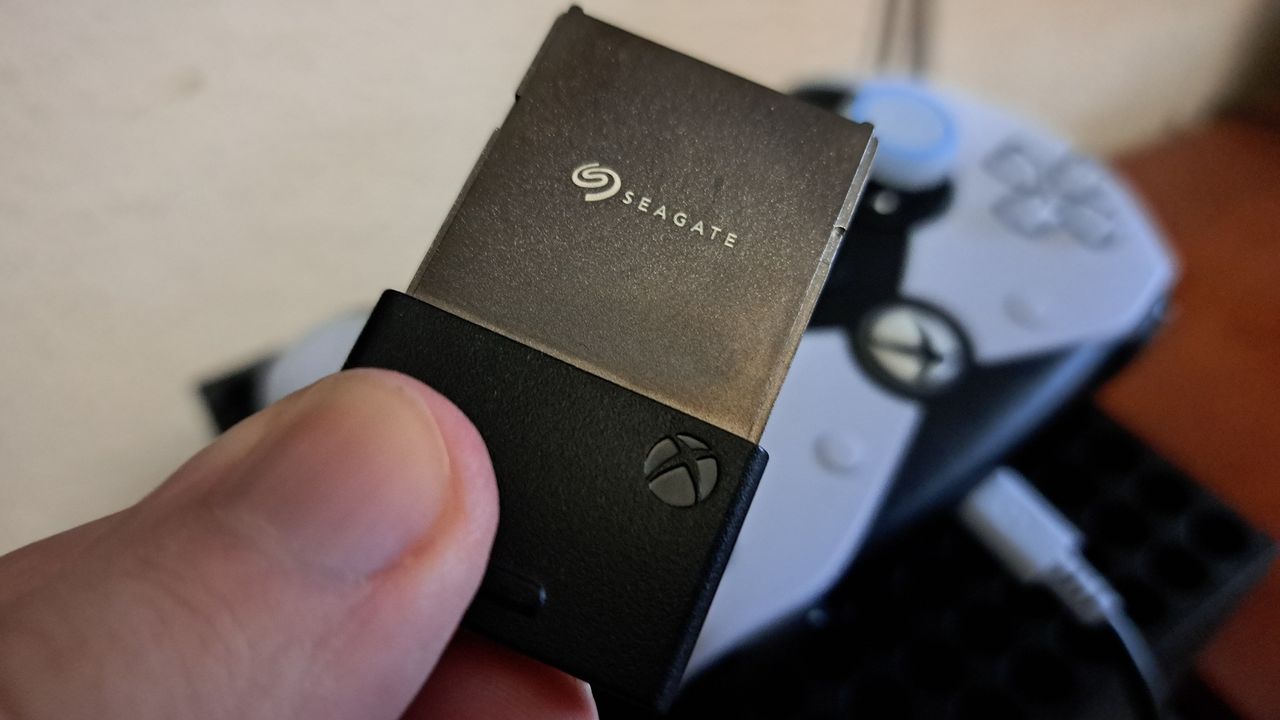
Stop deleting your favorite games: All three Seagate Xbox Expansion Cards are on sale

If you have an Xbox Series X or Xbox Series S, you probably need more storage. Having to uninstall a game to install a new game or an update to one of your favorite titles is a hassle.

The Seagate Storage Expansion Card for Xbox Series X|S is a plug-and-play solution that lets you expand the storage of your console.

Right now, all sizes of the Seagate Storage Expansion Card for Xbox Series X|S are on sale. The 1TB model costs $189.99 Best Buy (was $249.99), the 2TB version costs $259.99 (was $349.99) at Amazon. Best Buy's deal on the 4TB card drops the price to $549.99 (was $649.99).


"Seagate's Storage Expansion Card is the best way to add more space to the latest Xbox consoles, while avoiding the annoying limitations of USB drives. While it's an expensive investment that might be hard to justify, those who drop the cash won't be disappointed with the returns." — Matt Brown, former Senior Editor

Windows Central review:⭐⭐⭐⭐View Deal

This 2TB model has double the storage of the base expansion card and is a great way to get more space for games on your Xbox Series X|S.View Deal

This massive 4TB expansion card is the largest available for your Xbox Series X|S.View Deal

Why buy the Seagate Expansion Card?

Seagate Expansion Card

You can skip game file management and space issues with the Seagate Storage Expansion Card for Xbox. (Image credit: Windows Central)

The Seagate Expansion Card is the simplest way to expand the storage of your console. There's no setup or configuration required to use the card.

Xbox Series X|S games can be massive. Call of Duty: Black Ops 7 alone is 161GB, and that's without DLC. The Seagate Expansion Card delivers similar speeds to the native storage of the Xbox Series X|S, so you can store games on the card and play them without having to transfer files around.

The Seagate Expansion Card also supports Quick Resume, which is a feature that lets you pause your game and power down your console and then pick up exactly where you left off when you load the game again.

Considering how big games are and how many great games are available on the Xbox Series X|S and on the way to the consoles, an expansion card of some kind is a must have. The Seagate Expansion Card is the easiest to use, quick enough to play games off, and is a great deal during Prime Day.

Alternative discounts

Prime Day discounts and a deal at Best Buy provide the best prices on the Seagate Expansion Card, but if those deals expire, you can check out these alternatives:

1TB

2TB

FAQ

Can I use it on PC?

The Seagate Expansion Card is meant to be used with an Xbox Series X or Xbox Series S, but it can work with a PC if you pair it with the right adapter.

Click to join us on r/WindowsCentral

Join us on Reddit at r/WindowsCentral to share your insights and discuss our latest news, reviews, and more.

Photograph of the 1TB Seagate Storage Expansion Card for Xbox Series X|S

Photograph of the 1TB Seagate Storage Expansion Card for Xbox Series X|S

❌