Vue normale

Il y a de nouveaux articles disponibles, cliquez pour rafraîchir la page.
À partir d’avant-hierFlux principal

Windows 11 23H2 update KB5070312 brings quality improvements & more. Download Link.

Par : Nayan
22 novembre 2025 à 13:02
Microsoft has now released the preview update KB5070312 (OS Build 22631.6276) for PCs running Windows 11 23H2. The update KB5070312 brings quality improvements & more. Checkout the full changelog below: This non-security update includes quality improvements. The following summary outlines key issues addressed by the KB after you install it. Also, included are available new features. The bold […]

Windows 11 Insider Preview Build 26220.7070 (Dev & Beta Channels) brings new feature

Par : Nayan
12 novembre 2025 à 04:37
Microsoft has recently released new Windows 11 Insider Preview Build 26220.7070 (KB5070300) to the Dev & Beta Channels. The new build comes with many new features such as widgets where you can Choose your default dashboard in an updated Widget Board Settings. The new build also comes with fixes and improvements. Also, this is the […]

Windows 11 25H2, 24H2 update KB5067036 brings new Features, Fixes & much more. Download Link.

Par : Nayan
3 novembre 2025 à 07:42
Microsoft has now released the October 2025 update KB5067036 (OS Builds26200.7019 and 26100.7019) for PCs running Windows 11 24H2 and 25H2. The update KB5067036 brings new Features, bug Fixes & much more. The latest update includes Click to Do improvements, includes AI actions in File Explorer to edit images or summarize documents, you can pin your […]

Microsoft confirms Task Manager issue impacting performance with latest Windows 11 update

Par : Nayan
2 novembre 2025 à 07:19
Microsoft has acknowledged an issue with Task manager degrading system performance post implementation of the latest Windows 11 update KB5067036. Because of this issue closing Task Manager using the close (X) button does not fully terminate the process. This results in multiple instances of taskmgr.exe remaining open. The system performance gets impacted because of these […]

Windows 11 24H2 update available now for all Copilot+ PCs. ISO download & full changelog

Par : Nayan
9 septembre 2024 à 15:39
Microsoft has now released the annual Windows 11 update, Windows 11 version 24H2 (KB5039239) for all Copilot+ PCs. The Windows 11 version 24H2 update includes a range of new features including HDR background support, energy saver, Sudo for Windows, Rust in the Windows kernel, support for Wi-Fi 7, voice clarity and more. The 24H2 update […]

Windows 11 23H2 update (KB5039302) brings many changes & Improvements. Download Link.

Par : Nisha
26 juin 2024 à 11:40
Microsoft has now released the Windows 11 23H2 update (KB5039302) for OS Builds 22621.3810 and 22631.3810. This new build comes with many new changes and improvements. This is the non-security update includes quality improvements. Checkout the complete changelog below: Windows 11, version 22H2 This non-security update includes quality improvements. Gradual rollout These might not be available […]

Windows 10 Build 19045.4598 (KB5039299) rolling out to non-insiders. Full changelog.

Par : Nisha
26 juin 2024 à 07:54
Microsoft is rolling out a new Windows 10 non-security update to non-insiders running official Creators Update. This KB5039299 brings Windows 10 Build 19045.4598 to the version 22H2.This is a non-security update and if you installed earlier updates, only the new updates contained in this package will be downloaded and installed on your device. Read the full […]

Windows 11 23H2 update (KB5039212) brings many changes & Improvements. Download Link.

Par : Nisha
12 juin 2024 à 07:53
Microsoft has now released the Windows 11 23H2 update (KB5039212) for OS Builds 22621.3737 and 22631.3737. This new build comes with many new changes and improvements. Apart from this, new build also addresses a known issue that affects the taskbar. It might briefly glitch or not respond. It might also disappear and reappear. Checkout the […]

Windows 11 : Désactiver les applications inutiles au démarrage

Par : Wisy
3 janvier 2022 à 13:00

Imagine-toi que tu peux désactiver des applications que tu trouves totalement inutiles au démarrage de ton ordinateur. D’autant plus que ces applications peuvent prendre des ressources et ralentir le démarrage.
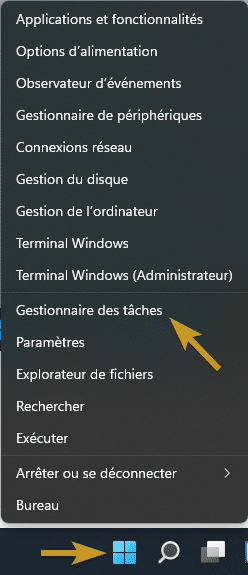
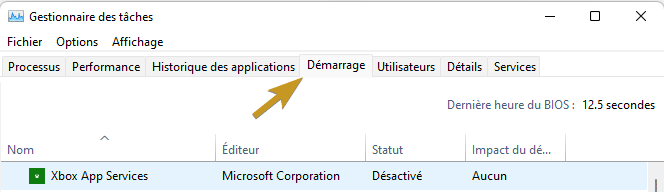
Clique le bouton droit sur le bouton démarrer puis “Gestionnaire des tâches”. Clique sur l’onglet “Démarrage” puis sélectionne les applications que tu veux activer ou désactiver au démarrage.

clic droit demarrer
gestionnaire des taches - demarrage

Attention : Ne désactivez pas des applications qui peuvent être utiles au démarrage comme votre antivirus par exemple.

Bravo : Vous avez réussi ! Vous savez comment activer/désactiver vos applications inutiles au démarrage de votre ordinateur.

À voir également : ITQ01 – chemin d’accès en 2 clics

Source : Disable unnecessary startup apps

L’article Windows 11 : Désactiver les applications inutiles au démarrage est apparu en premier sur Le Blog du Wis.

❌
❌