
❌

Vue normale

  • ✇Yanko Design
  • 8BitDo’s Forest Wonder Keyboard Puts Tiny Pixel Animals Among the Keys
    A keyboard can take you into a forest before you’ve even opened a game. 8BitDo’s Forest Wonder Retro 87 Mechanical Keyboard and Retro R8 Mouse turn familiar desktop hardware into a pixel woodland, complete with tiny animals, leafy greens, and brown keys that suggest patches of earth. The matching pair gives a gaming desk some personality without making everything look like equipment for a spaceship. The keyboard carries that theme across its dye-sublimated PBT keycaps, scattering little creatur
     

8BitDo’s Forest Wonder Keyboard Puts Tiny Pixel Animals Among the Keys

Par : JC Torres
12 novembre 2026 à 09:20

A keyboard can take you into a forest before you’ve even opened a game. 8BitDo’s Forest Wonder Retro 87 Mechanical Keyboard and Retro R8 Mouse turn familiar desktop hardware into a pixel woodland, complete with tiny animals, leafy greens, and brown keys that suggest patches of earth. The matching pair gives a gaming desk some personality without making everything look like equipment for a spaceship.

The keyboard carries that theme across its dye-sublimated PBT keycaps, scattering little creatures and fruit among the letters. A pale spacebar becomes a path through green surroundings, while yellow arrows stand out against brown directional keys. It’s an unusually busy landscape, although the familiar layout keeps everything where you’d expect it. There’s no number pad, leaving more room beside it for the mouse.

Designer: 8BitDo

Underneath are Core Green tactile switches, co-developed with Kailh, which you can replace on the hot-swappable board. You aren’t committed to the original switches if your preferences change, though the woodland artwork stays with the keycaps. Eight RGB lighting modes add another layer of decoration, giving the colorful keyboard a glow that can follow you from daytime work into an evening game.

Physical controls along the top handle connections, volume, and button mapping, keeping those adjustments away from combinations of letter keys. The included Dual Super Buttons take that approach somewhere rather less subtle. Their oversized round surfaces carry pixel artwork, including an axe, and can trigger assigned shortcuts or macros. Even a routine command gets a conspicuously big button to call its own.

The mouse is quieter, visually speaking. Its rounded green shell leaves most of the tiny woodland scenes to the keyboard and charging dock, with a yellow scroll wheel and side buttons providing the contrast. Four programmable side buttons and left- or right-hand modes offer flexibility beyond the styling. You can adjust their assignments through 8BitDo’s PC software rather than accepting the defaults.

That dock gives the mouse a place to recharge without plugging a cable into it whenever the battery runs low. It also houses the wireless receiver and serves as a signal extender, according to 8BitDo. The keyboard has its own magnetic receiver compartment underneath. Small storage details like these matter when the alternative is a missing dongle somewhere in your overflowing drawer.

Both devices support Bluetooth, 2.4 GHz wireless, and wired USB, with Windows and Android listed as supported platforms. The Xbox branding needs explanation, though. It’s an official license, not a substitute for checking console compatibility. The keyboard’s Xbox button opens Game Bar on Windows, making its purpose much closer to your gaming PC than the logo might lead you to believe.

The keyboard is listed at $119.99 and the mouse at $59.99, sold separately rather than as a bundle. That leaves room to bring home just the part you want, without replacing everything already on your desk. A plain mouse wouldn’t frighten the keyboard’s little animals away, of course, although the matching dock does give them somewhere else to continue their pixel adventures.

The post 8BitDo’s Forest Wonder Keyboard Puts Tiny Pixel Animals Among the Keys first appeared on Yanko Design.
  • ✇Yanko Design
  • Logitech’s MX Master 4 Developer Edition Is a Mouse Full of Coding Easter Eggs
    Productivity mice aren’t usually the most expressive things on a desk. Their unusual curves and extra buttons often say more about work than the person doing it. Logitech’s MX Master 4 Developer Edition takes a slightly different approach, covering its familiar shape in programming references. The limited-edition mouse keeps the standard model’s features, but gives developers something a little more personal to reach for. Rather than stick to a single muted color, the mouse pairs light gray but
     

Logitech’s MX Master 4 Developer Edition Is a Mouse Full of Coding Easter Eggs

Par : JC Torres
28 octobre 2026 à 04:15

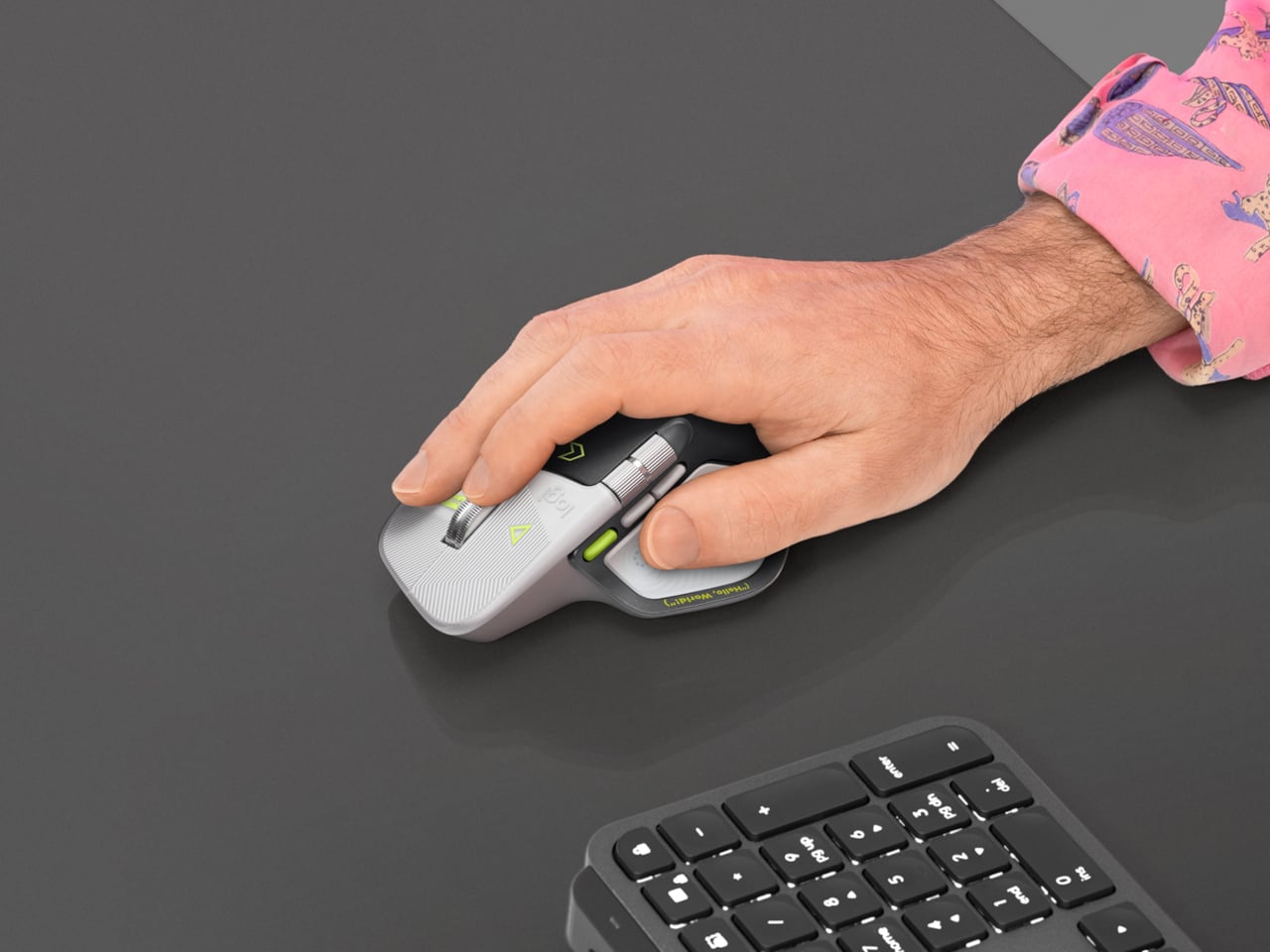
Productivity mice aren’t usually the most expressive things on a desk. Their unusual curves and extra buttons often say more about work than the person doing it. Logitech’s MX Master 4 Developer Edition takes a slightly different approach, covering its familiar shape in programming references. The limited-edition mouse keeps the standard model’s features, but gives developers something a little more personal to reach for.

Rather than stick to a single muted color, the mouse pairs light gray buttons with a dark palm rest and bright yellow-green accents. Fine circuit-like lines spread across the front, while coding symbols sit beside the controls. It’s a busier treatment than the regular version, of course, but the graphics follow the mouse’s existing divisions instead of covering everything in one continuous pattern.

Designer: Logitech

Some references are easier to recognize than others. A Hello, World greeting runs along the thumb rest, while smaller markings include 0xFF + 1 and 09.17. Logitech links those last two to Programmers’ Day and the Linux kernel’s release date. You don’t have to understand them to use the mouse, thankfully, although knowing the references does make its decoration feel rather less random.

Underneath that artwork, the familiar sculpted body remains, including a raised back and a broad platform for your right thumb. That thumb gets quite a few responsibilities, with a horizontal scroll wheel, side buttons, and the Haptic Sense Panel within reach. The asymmetric shape hasn’t become ambidextrous for this edition, so left-handed programmers are still left admiring the graphics from the wrong side.

The MagSpeed wheel handles the more familiar business of moving through long documents and code. It switches between stepped scrolling and free-spinning movement, letting you work line by line or move farther through a page. The thumb wheel provides horizontal navigation, which is useful when the thing you’re working on refuses to fit neatly inside a window, as spreadsheets have a habit of doing.

The ripples on the thumb panel hint at another kind of feedback. Rather than relying entirely on what happens onscreen, the mouse can deliver vibrations for supported actions and notifications. Logitech lets users adjust their intensity and customize app-specific feedback through Logi Options+. That doesn’t mean every application suddenly gains a sense of touch, but compatible interactions can have a physical cue.

Pressing the panel also opens Actions Ring, an onscreen collection of shortcuts arranged around the cursor. You can assign tools and macros through Options+, putting frequently used commands near where you’re already working. There is a small irony here, however. Despite the Linux reference on the shell, Logitech doesn’t provide a Linux version of Options+ for configuring that particular shortcut system.

The Developer Edition is listed for US preorder at $119.99, with shipping scheduled to start October 31, 2026. Since its functions match the standard MX Master 4, the choice comes down to how much personality you’d like under your hand. Existing owners won’t find new capabilities here, though the temptation to coordinate a keyboard, desk mat, and everything else remains.

The post Logitech’s MX Master 4 Developer Edition Is a Mouse Full of Coding Easter Eggs first appeared on Yanko Design.

❌