❌

Vue normale

Samsung Galaxy Tab S12 Ultra Cheat Sheet: What to Know Before You Buy

26 octobre 2026 à 04:47

Explore Galaxy Tab S12 Ultra features and pricing, from DeX and Galaxy AI to accessories, with buying advice to help you choose the right configuration.

The post Samsung Galaxy Tab S12 Ultra Cheat Sheet: What to Know Before You Buy appeared first on TechRepublic.

Dell’s new monitor price cuts offer sweet spots between productivity and gaming

Monitors are a quintessential part of our lives as Windows users (and gamers), whether it's for achieving the best graphics and frame rates for our favorite titles or simply giving us better details and performance when going about our daily productivity tasks.

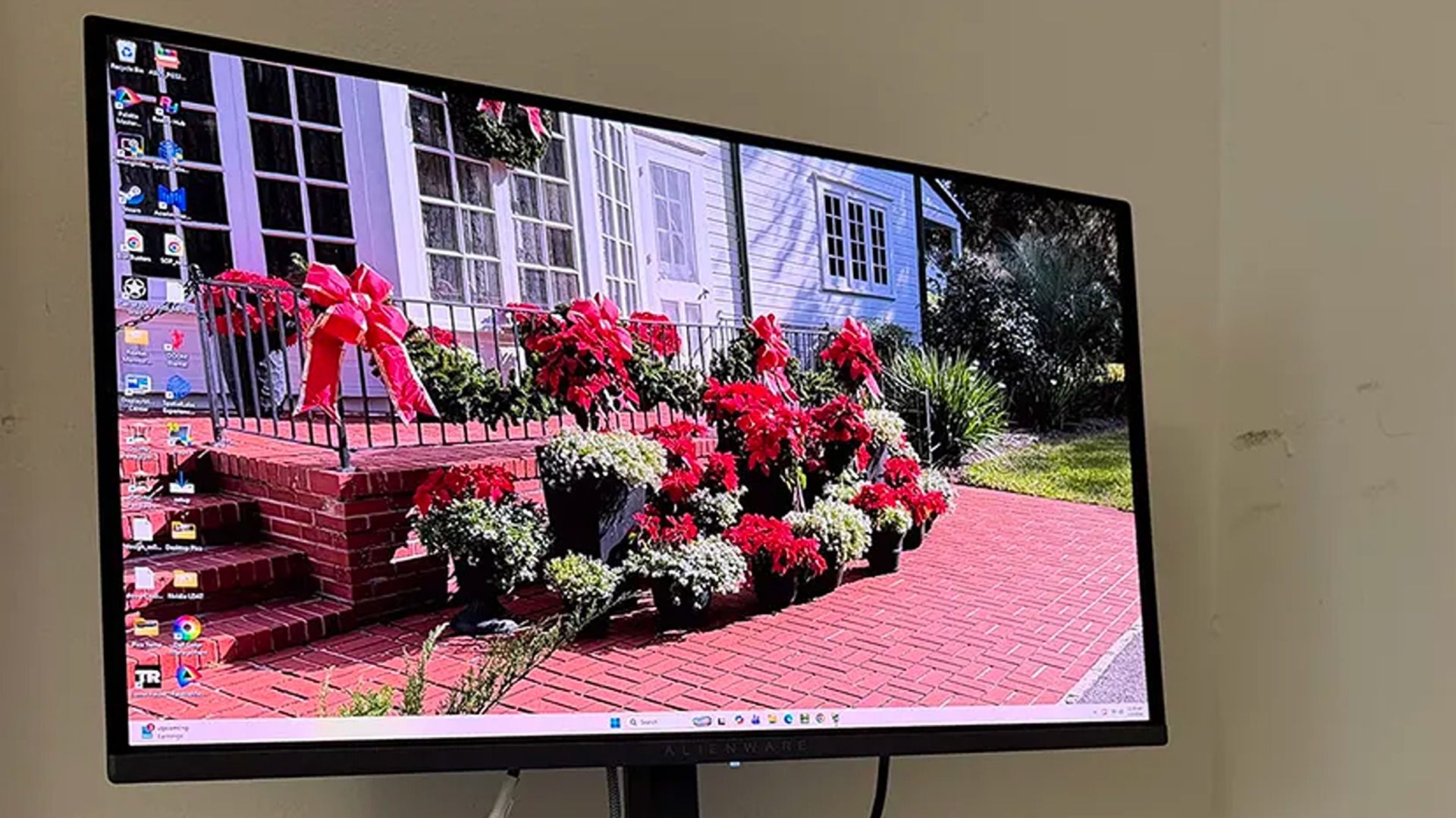
Dell's monitors fulfill this need with gusto, and several of them are now on sale if you need one to tackle the winter influx of games or workloads. That includes the productivity-focused Dell 32 Plus 4K S3225QS) for $329.99 at Dell (was $369.99), the gaming-focused Alienware 27 240Hz QD-OLED (AW2726DM) for $319.99 at Dell (was $349.99), and the budget-friendly Alienware 32 (AW3225DM) for $249.99 (was $299.99).

32 Plus 4K (S3225QS): was $369.99 now $329.99

"For around £300, the Dell 32 Plus S3225QS delivers a 4K VA panel with a 120Hz refresh rate and a typically smart, stylish design. If you're looking for a big, affordable screen to maximize your productivity, then this looks to be a very capable – and rather handsome-looking – option that won't break the bank." ~ Sasha Muller, freelancer journalist

ITPro review: ⭐⭐⭐⭐⭐View Deal

27 QD-OLED (AW2726DM): was $349.99 now $319.99

"The Alienware AW2726DM doesn’t have USB ports or internal speakers, but it does have premium-level gaming performance and an image that goes toe-to-toe with any premium OLED, for a significantly lower admission price." ~ Christian Eberle, Contributing Editor

Tom's Hardware review: ⭐⭐⭐⭐½View Deal


With its 32-inch Curved QD-OLED screen capable of rendering images and videos at 2560x1440 resolution and 180Hz refresh rates, the Alienware 32 (AW3225DM) is a great budget pick for gamers and content creators alike.View Deal

Which of these monitors is good for gaming?

Alienware's 27 240Hz QD-OLED (AW2726DM) and Alienware 32 (AW3225DM) are the best options for gaming in this round-up.

The Alienware 27 is a mid-range monitor great for gaming with its sharp and colorful images, low input lag for improved controller responsiveness, and a solid build for longer durability. Meanwhile, the Alienware 32 delivers decent frame rates and resolution at a much lower price and with a wider curved screen for greater cinematic immersion.

Additionally, these two monitors feature Variable Refresh Rates, which help games maintain stable frame rates. Plus, Call of Duty: Modern Warfare 4 requires Xbox consoles to use monitors with variable refresh rates; otherwise, it can't deliver optimal performance.

Which of these monitors is good for productivity?

The Dell 32 Plus 4K (S3225QS) is the best choice for productivity among this monitor round-up.

It features a massive 32-inch display that render 4K resolutions, an sRGB mode to provide images, documents, and other digital assets with vibrant colors, built-in 10W speakers with decent sound quality, and a sideways HDMI port for quick and easy connections to laptops or PCs when swapping desktops.

Should I wait until Black Friday for better deals?

It depends on your situation. If you're willing to wait for Black Friday on November 27, 2026 for potentially greater discounts, then I'd recommend holding off until then.

However, if you're in desperate need of a new monitor or afraid these monitors will rise in price to the point that Black Friday deals won't be useful thanks to the RAM crisis, then I'd recommend taking advantage of Dell's discounts now.

Click to join us on r/WindowsCentral

Join us on Reddit at r/WindowsCentral to share your insights and discuss our latest news, reviews, and more.

  • ✇Yanko Design
  • Statik PowerStand turns a USB-C cable into a folding phone stand
    A phone charging flat on a desk isn’t particularly useful when you want to follow a recipe or join a video call. Statik’s PowerStand gives that familiar cable an extra job, building a folding stand directly into its USB-C connector. The $19.99 retail accessory lets your phone stay propped up while plugged in, without adding a separate cradle to the table. Most of the work happens in a broad connector housing that sits across the phone’s bottom edge. Two legs pivot out from its ends, turning the
     

Statik PowerStand turns a USB-C cable into a folding phone stand

Par : JC Torres
26 octobre 2026 à 06:07

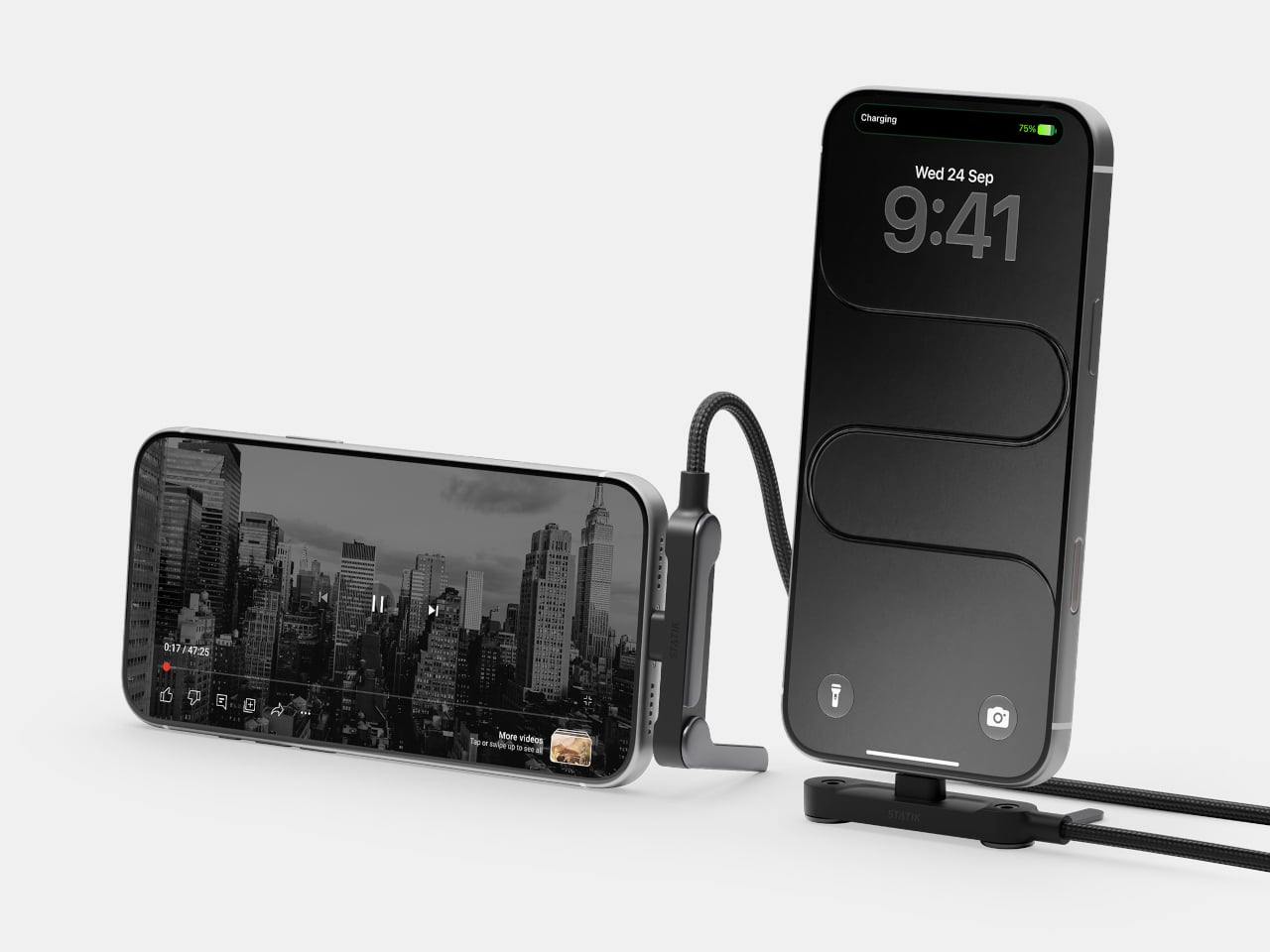
A phone charging flat on a desk isn’t particularly useful when you want to follow a recipe or join a video call. Statik’s PowerStand gives that familiar cable an extra job, building a folding stand directly into its USB-C connector. The $19.99 retail accessory lets your phone stay propped up while plugged in, without adding a separate cradle to the table.

Most of the work happens in a broad connector housing that sits across the phone’s bottom edge. Two legs pivot out from its ends, turning the plug into a little support structure for portrait or landscape viewing. Fold those legs back against the housing when you’re finished, and the stand travels with the cable rather than becoming another loose accessory to forget.

Designer: Statik

That arrangement makes particular sense beside a laptop, where a phone can sit upright for calls while the computer handles everything else. Turn it sideways, and the same support becomes useful for watching a video over lunch. There’s no magnetic ring or special case to attach first, although you do have to plug the stand end into the phone to use it.

The connector’s shape matters even when you aren’t using the stand. Its right-angle layout sends the cord along the phone’s edge instead of straight out into your hand, a useful distinction when holding it horizontally for a game. Statik also extends the plug’s shaft to reach through most cases, though that isn’t a promise that every bulky protective cover will fit.

Putting a wide piece of hardware underneath a phone creates another problem, since that space often contains speakers and microphones. PowerStand’s housing includes molded channels that Statik says direct sound toward the listener while keeping those openings clear. It’s a thoughtful response to the connector’s added width, although the available evidence doesn’t establish a measurable improvement in volume or call quality.

Statik rates the cable for up to 240W using USB Power Delivery 3.1, allowing it to serve compatible laptops when paired with an appropriate charger. That figure describes the cable’s capacity, not what every connected device will receive. Data transfers are limited to USB 2.0’s 480Mbps, making this a charging-first accessory rather than a particularly speedy file-transfer cable for large video projects and backups.

At 6.6 feet, the cord gives you some room between the outlet and whatever patch of desk or kitchen counter you’re using. It has a braided nylon jacket and reinforced strain relief, while the connector combines TPE plastic and aluminum. The rest of the lead remains a conventional cable, with a standard USB-C plug at the opposite end rather than another folding mechanism.

Of course, putting a stand inside a connector means accepting a much wider plug, even on days when you only want to charge. There’s no getting around that tradeoff by folding the feet away. But for someone who regularly props a phone beside a keyboard or hotel bed, though, that extra width buys a more useful resting place than the nearest coffee mug on the nightstand.

The post Statik PowerStand turns a USB-C cable into a folding phone stand first appeared on Yanko Design.

  • ✇Yanko Design
  • Wuben’s tiny flashlight packs 500 lumens and a blade into 40 grams
    My phone flashlight handles most of my after-dark chores, which is a funny confession from someone who writes about EDC gear for a living. It is always in my pocket, it is bright enough, and it asks for nothing extra. Then a job needs both hands, and suddenly the phone is clamped in my teeth, aiming at the ceiling while I squint at a breaker box. The phone flashlight is a great idea with one design flaw, which is that it comes attached to a phone. Hands-free light has always been the gap, and h
     

Wuben’s tiny flashlight packs 500 lumens and a blade into 40 grams

24 octobre 2026 à 21:45

My phone flashlight handles most of my after-dark chores, which is a funny confession from someone who writes about EDC gear for a living. It is always in my pocket, it is bright enough, and it asks for nothing extra. Then a job needs both hands, and suddenly the phone is clamped in my teeth, aiming at the ceiling while I squint at a breaker box. The phone flashlight is a great idea with one design flaw, which is that it comes attached to a phone. Hands-free light has always been the gap, and headlamps are too much hardware for a trip to the garage.

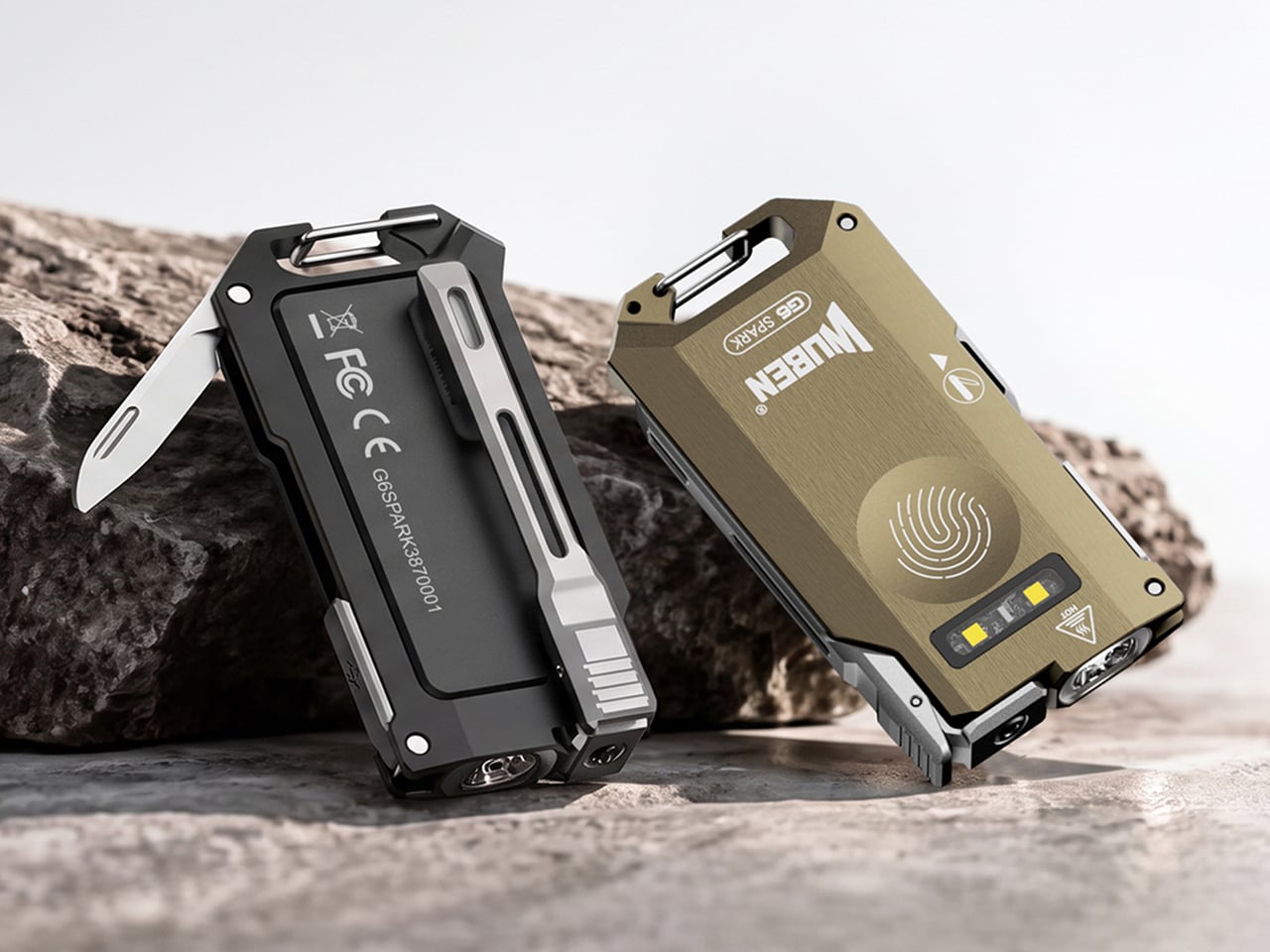
Wuben’s G6 SPARK is a keychain-sized answer to the teeth problem. Its clip rotates 90 degrees with distinct clicks, so you can clip it to a pocket, cap brim, or backpack strap and aim the beam where your hands are busy. The 500-lumen main light handles distance, a 100-lumen side light with red modes handles up close, and a hidden blunt-tip blade covers the odd chore. The body is 7075 aluminum, 0.34 inches (8.6 mm) thick, and 1.4 ounces (40 g or about as much as an AirPods case).

Designer: Wuben

Click Here to Buy Now: $33.99 $44.99 (24% off). Hurry, only 411/1000 left! Raised over $111,000.

Eleven credit cards thick and cut from aerospace aluminum

The G6 SPARK measures 2.56 by 1.35 inches and 0.34 inches thick (65 by 34.2 by 8.6 mm), and it weighs 1.4 ounces (40 g). That makes it roughly eleven credit cards thick, so it vanishes into a jeans pocket. The body is 7075 aluminum, which Wuben calls aerospace-grade, and a slab this thin needs a metal with a spine. Wuben rates it IP66 against dust and powerful water jets, with 1 meter (3.3 feet) of impact resistance, so a keychain’s daily abuse should not scare it. The USB charging port hides inside the body, which keeps the face clean and symmetrical.

7075 is the zinc-rich member of the aluminum family, and it has a reputation for being far tougher than the 6061 found in most flashlight bodies. Aircraft engineers fell for it because it is light and stiff at the same time. Stiffness is exactly what a flat flashlight needs, since a thin body that flexes is a bad day for the lens and the electronics. On a keychain, that rigidity should also help it survive a crowded pocket full of other metal. A push-release attachment lets you pop it off the ring when you want it in your hand instead of dangling off your keys.

Three lights, one button, and a click code you can learn in an evening

The main light tops out at 500 lumens with a 66 meter (217 ft) throw and a peak beam intensity of 1,089 candela. Those numbers describe a beam for the space around you, like a driveway or a campsite, rather than a hillside across the valley. Light color is 5000K, a daylight white, and the CRI of 70 means colors look decent rather than lab-accurate, which is fine for finding a dropped screw. Brightness steps are Eco, Low, Medium, and High, and you cycle them by holding the button. A double click jumps to Turbo, a triple click gives you Strobe, and mode memory remembers your last setting.

The independent side light is the one I expect to use most, since it gives a close-range pool of light at arm’s length. White comes in Low, Medium, and High, topping out at 100 lumens, which is plenty for reading a label or tracing a wire. Red adds a steady mode and a signal mode at 10 lumens, handy for saving night vision or flagging yourself on a dark road. Hold the button while the main light is off to wake the side light, and hold again to cycle the five modes. That is a lot of options on one button, though the click patterns are easy enough to learn in an evening.

A clip that aims, a blade that hides, and a cap brim that becomes a headlamp

The clip is the headline trick, rotating through 90 degrees with distinct mechanical clicks so you can feel each position. Clipped to a cap brim, it works like a minimalist headlamp, and I would happily wear it to read in a tent. Tucked into the side is a blunt-tip utility blade that handles opening boxes, slicing tape, and sharpening a pencil, and probably a marshmallow stick if you ask nicely. Fold it away and the G6 goes back to being a slab that keeps your keys company. My one wish is a tiny tactile mark near the button, so a cold thumb can find it in the dark.

Click Here to Buy Now: $33.99 $44.99 (24% off). Hurry, only 411/1000 left! Raised over $111,000.

The post Wuben’s tiny flashlight packs 500 lumens and a blade into 40 grams first appeared on Yanko Design.

❌