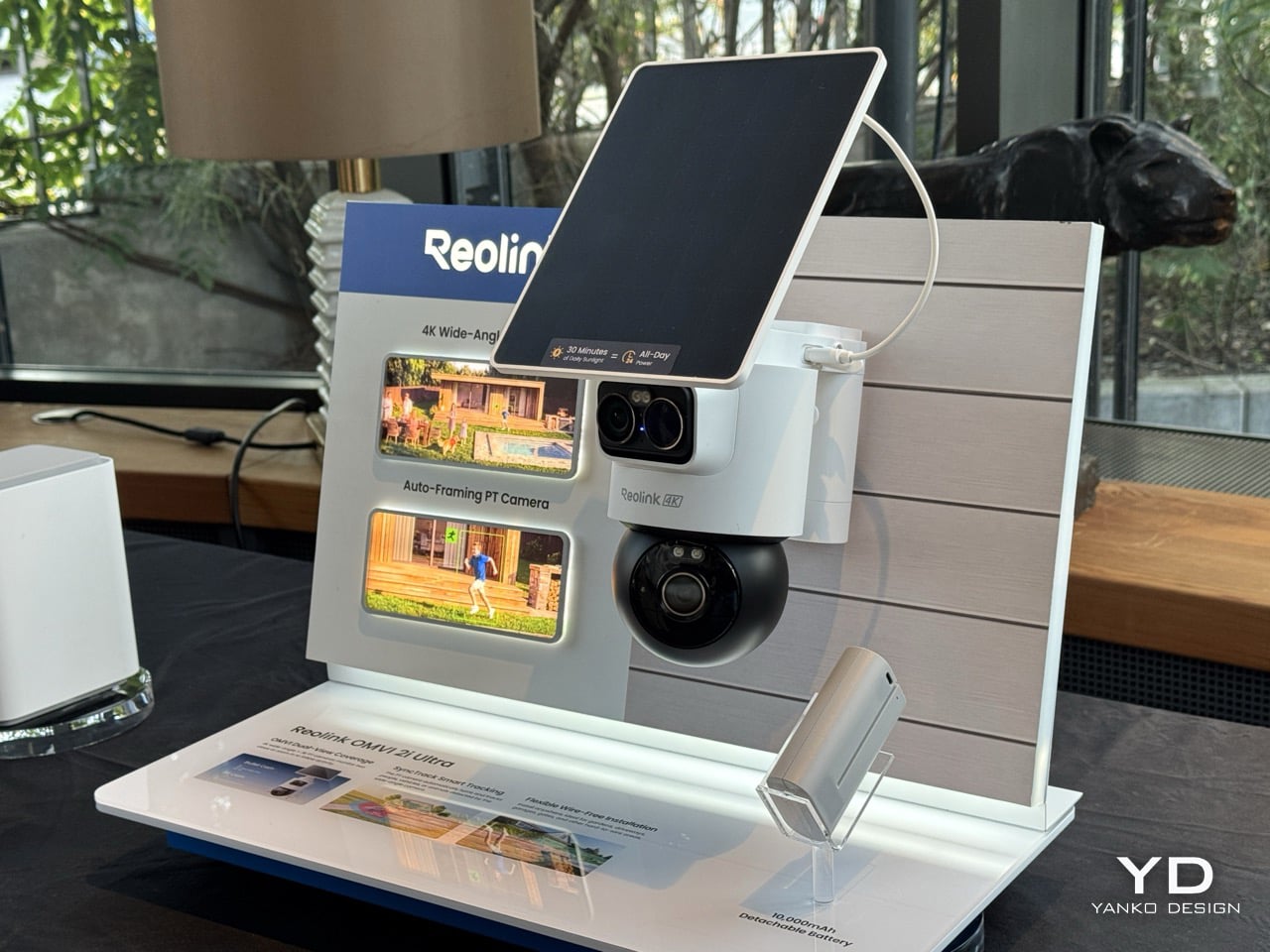
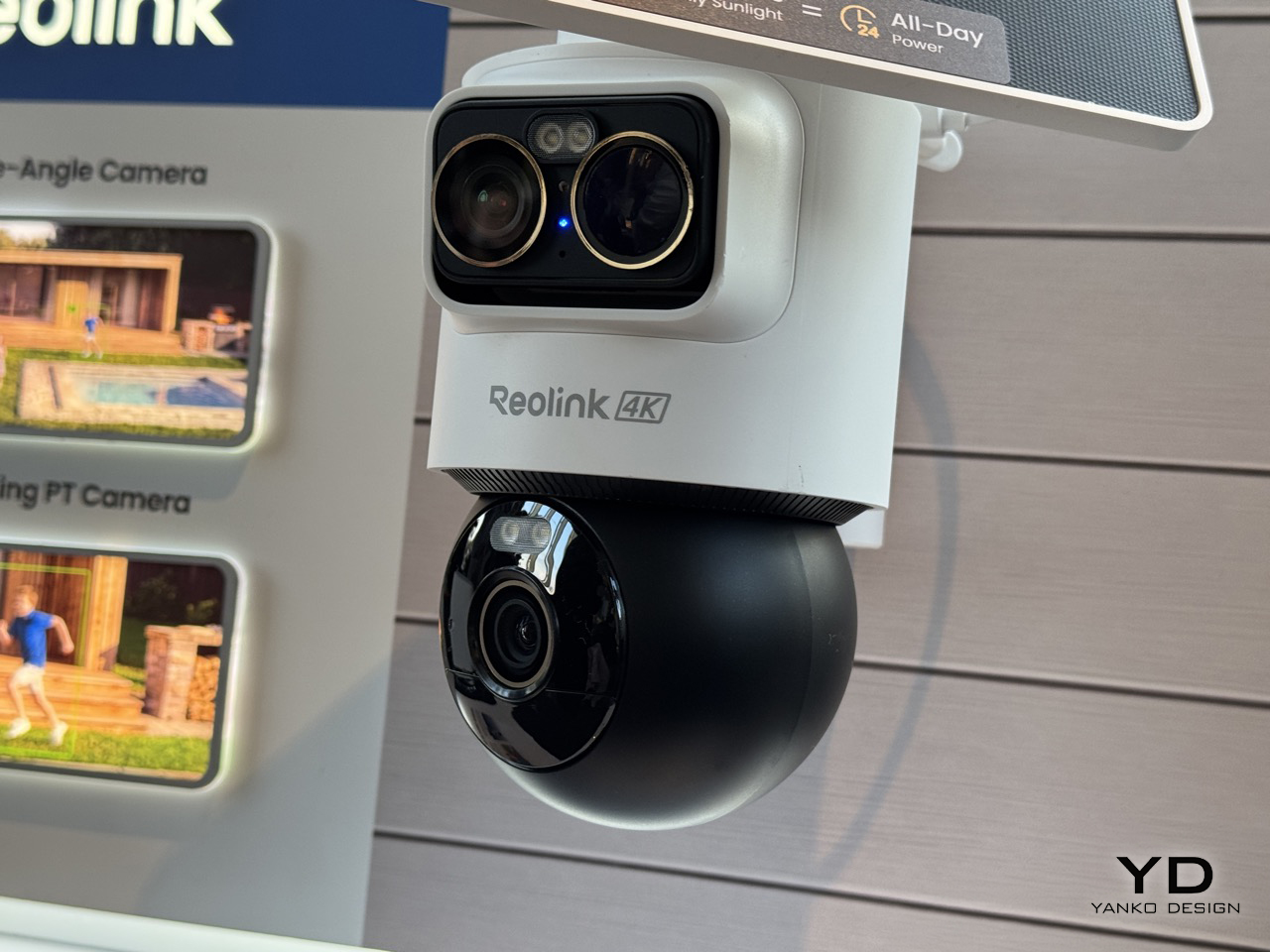
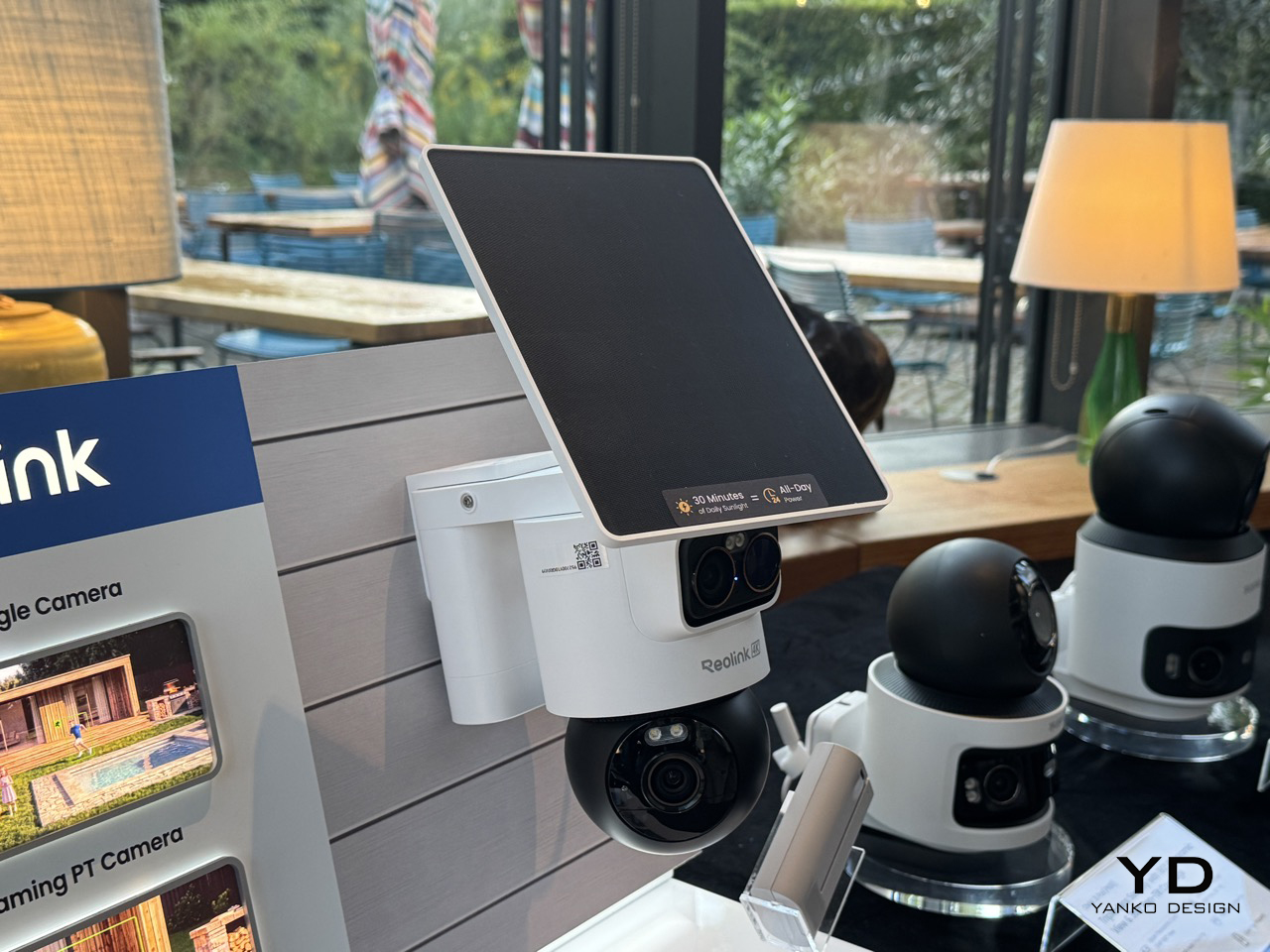
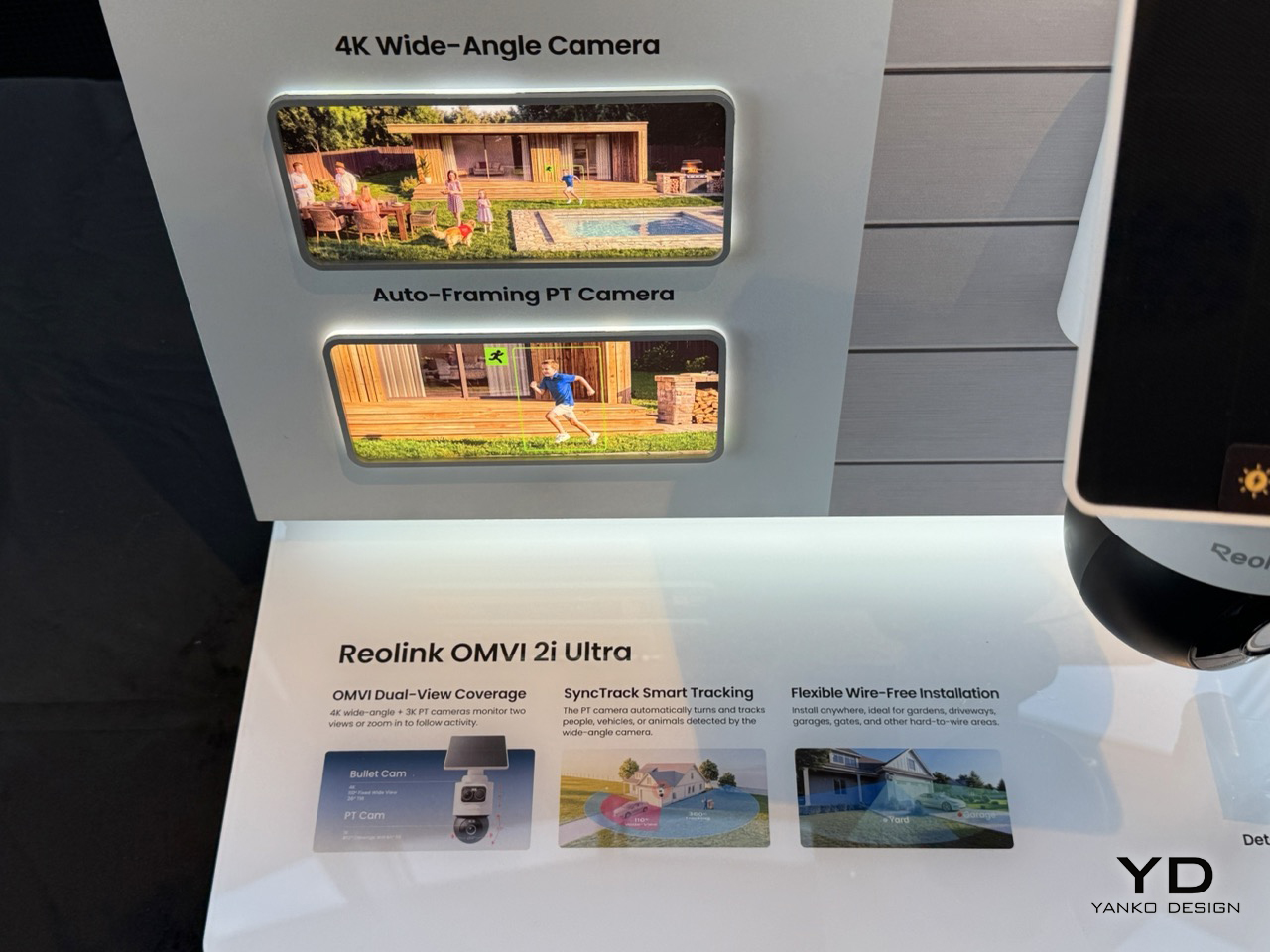
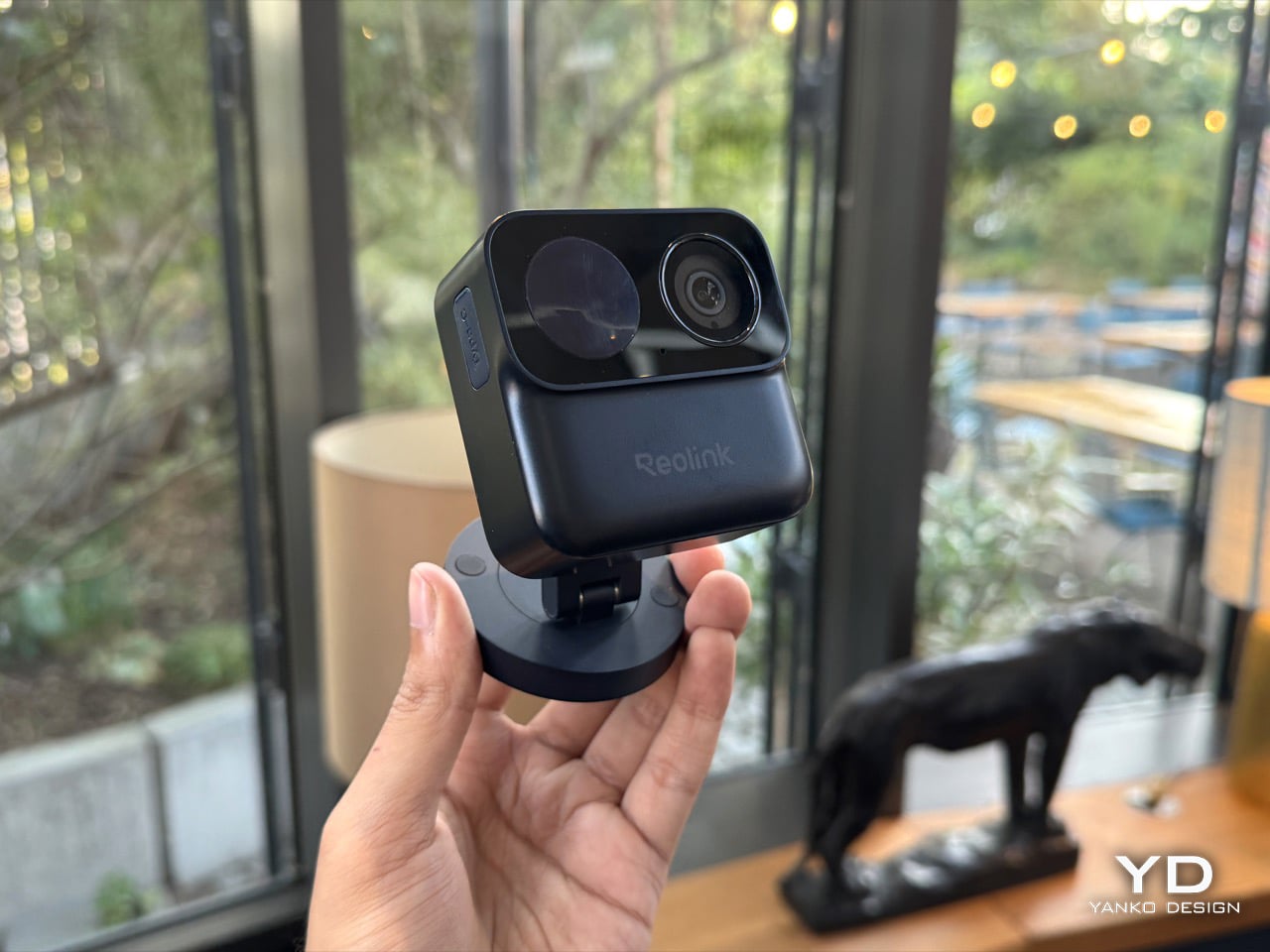
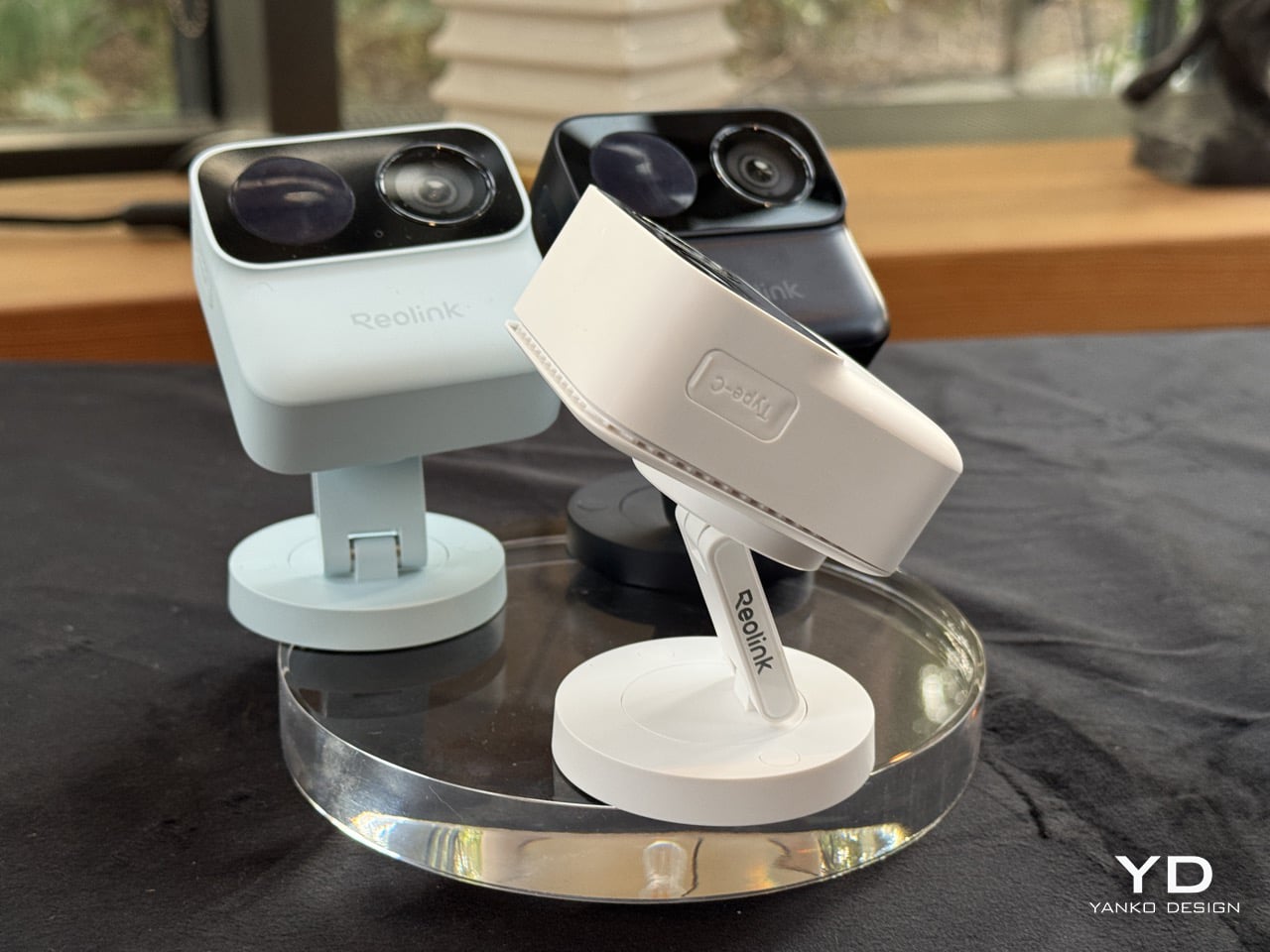
Picture a courier walking up your driveway while someone else quietly tries your side gate. A normal pan-tilt camera picks one of them and forgets the other exists. Reolink’s OMVI 2i Ultra handles it by carrying two cameras at once: a fixed 4K wide lens on top that never stops watching the full scene, and a 5MP pan-tilt ball below that spins 355 degrees to lock onto whatever the wide lens flags. Both feeds record at the same time, and you can tap anywhere on the wide view to slew the turret straight to that spot. It debuted at IFA 2026 in Berlin, ships late October, and costs between $200 and $250.
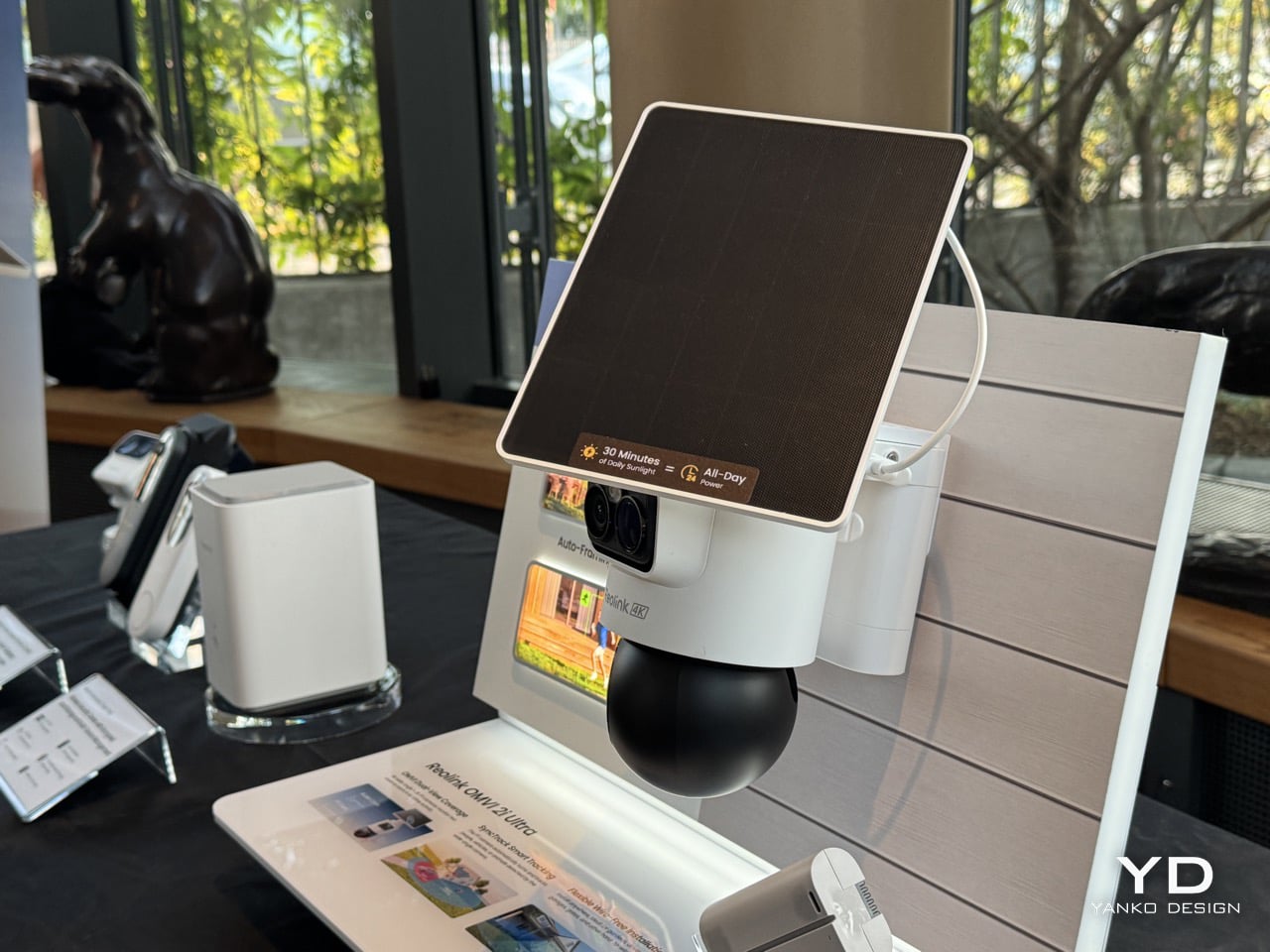
A detachable 10,000mAh pack claims six months per charge, and the 6W SolarEase panel says it needs about thirty minutes of daily sun to stay topped up, against the one to two hours Reolink quotes for rivals like Eufy’s S340 and the Tapo C675D. Those are Reolink’s own numbers, so hold them loosely until somebody leaves one on a north-facing wall through a British winter. The rest is easier to verify. Wi-Fi 6 across both bands, up to 512GB of local microSD with no subscription attached, colour night vision from twin spotlights, a siren, and IP65 sealing. At a kilogram with the bracket, it is a proper lump of hardware rather than something you tuck on a shelf.
Designer: Reolink
Pan-tilt cameras have quietly lied to buyers since the format existed. Sell someone a camera that turns to follow motion and you have also sold them a camera that stops watching everywhere else the instant it does. Reolink’s fix is embarrassingly simple once you see it. Stop asking one lens to be both the guard and the chaser, and give it a second lens that only guards. The wide 4K unit up top runs at 110 degrees horizontal and never rotates, so the scene it opened on is the scene it keeps recording no matter where the PT ball below it wanders off to. Reolink calls this SyncTrack, but the actual idea is closer to division of labour than any clever algorithm. One camera commits to context, the other commits to pursuit, and neither has to compromise for the sake of the other.
This is the third time Reolink has built this exact idea in 2026, and each version has been a slightly different argument about what matters most. The X16 landed at CES in January as a 24MP full metal flagship with 16x optical zoom, but it needs an ethernet run to function, which puts a hard ceiling on where it can live. The 3i followed in June with PoE and wired Wi-Fi options at $319.99, still asking for a nearby outlet even in its most flexible form. The 2i Ultra drops the combined resolution to 8MP plus 5MP and, in exchange, cuts the cord entirely. The trade-off is the clever bit, because being able to pop a camera on a fence or a backyard without worrying about wiring is much more convenient than haggling over megapixels.
A squared-off dual-lens head sits above a separate motorized ball, with a solar panel tilting on its own hinge overhead, and the whole assembly weighs a full kilogram once the bracket is attached. Compare that to Reolink’s own Argus MagiCam, a 108-gram cube you stick to a fridge with a magnet, and the difference in ambition is obvious at a glance. This is not a camera trying to disappear into a bookshelf. It reads more like a small piece of maritime equipment bolted under an eave, and that visible mechanical presence is doing some of the deterrence work before the siren ever gets involved.
That dual-lens design is quite literally baked into the name. OMVI reads like omni-vision, a camera built to watch in every direction at once instead of picking a lane. Arlo’s Ultra flagship still wants a wall plug or a proprietary base station to unlock its best tricks, and Nest’s outdoor cameras have quietly stayed wired-first for years now, which makes the 2i Ultra’s fully wire-free build feel like it is actually catching up to how people install things rather than how manufacturers wish they would. No drilled conduit, no hub tucked in a closet, just a battery, a solar panel, and a spot on the fence you actually wanted the camera to go.
That is the real flex against the flagships twice its price. You are not paying for a wall socket you have to plan your whole install around, and you are not paying for a bulky base station eating an outlet indoors either. You get two lenses doing genuinely different jobs, a battery that outlasts most of the category on paper, and a name that finally means something instead of just sounding techy. At $200 to $250, the OMVI 2i Ultra is the version of omni-vision security that shows up ready to mount anywhere the moment you take it out of the box.
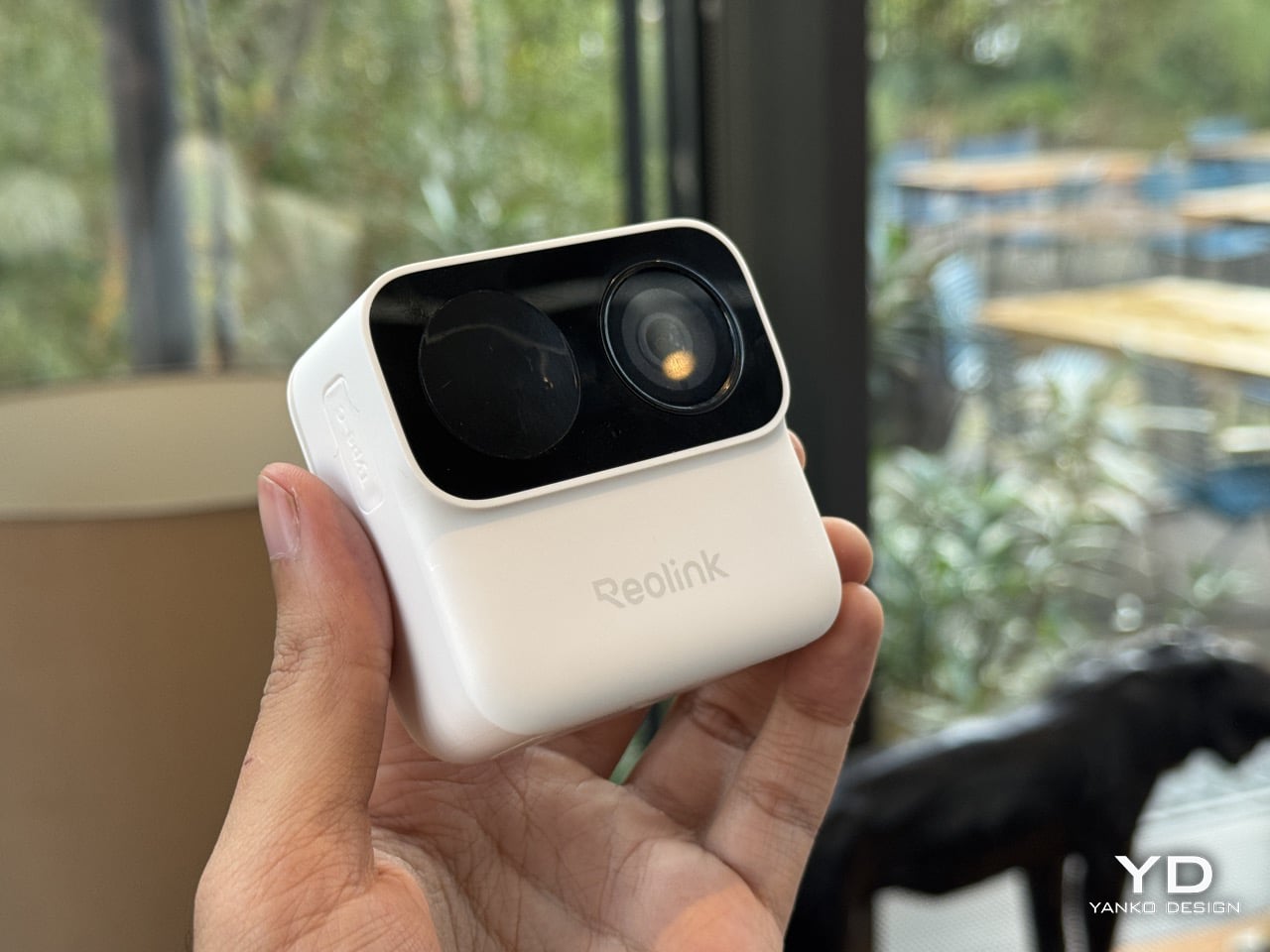
The worst part of owning a security camera has never been the camera. It is the ladder, the drill, the wall plug, and the moment you realize you aimed the thing eight degrees too far left. Reolink’s Argus MagiCam deletes all of that with a magnet. The 68mm GoPro-looking cube slaps onto any metal surface in about two seconds, or onto an included magnetic puck with a swivel arm for everything else, turning any surface into a security surveillance monitor (you can even mount it in your car as a dashcam)… and here’s the kicker. It runs up to nine months on two AA lithium batteries. Nine. Whole. Months. I repositioned it three times in under a minute at IFA 2026, which is three more times than I have ever moved a camera bolted to a wall.
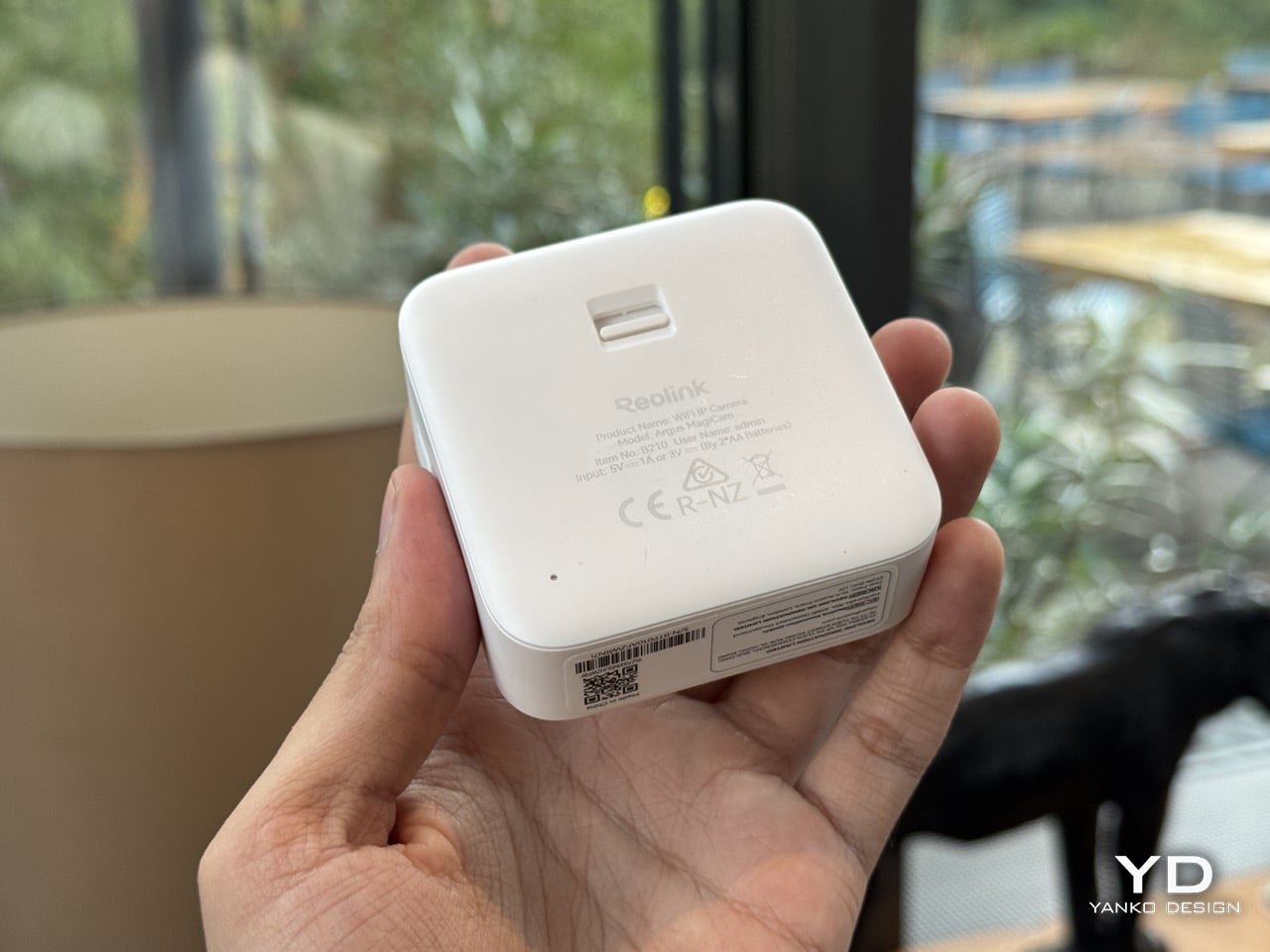
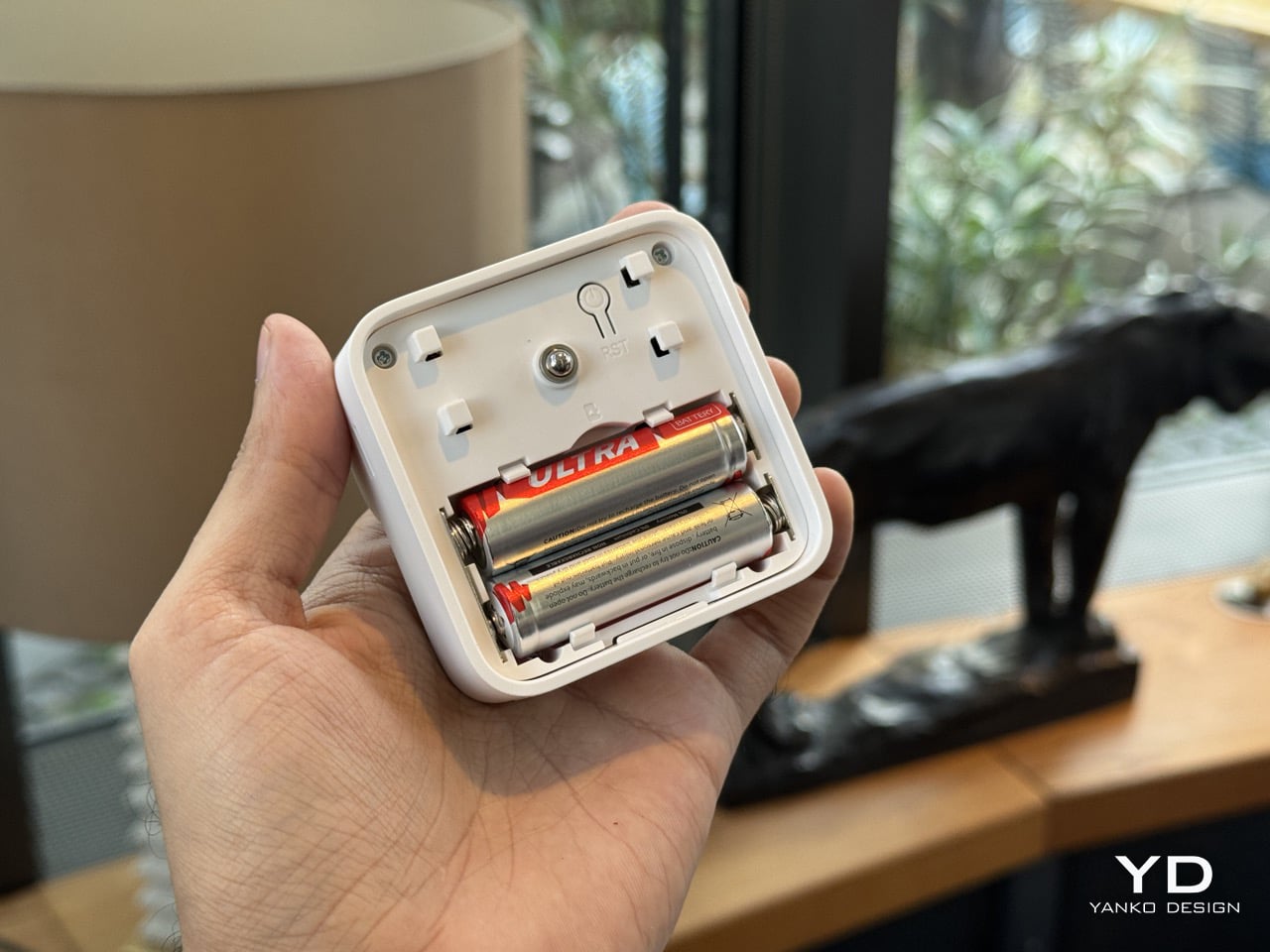
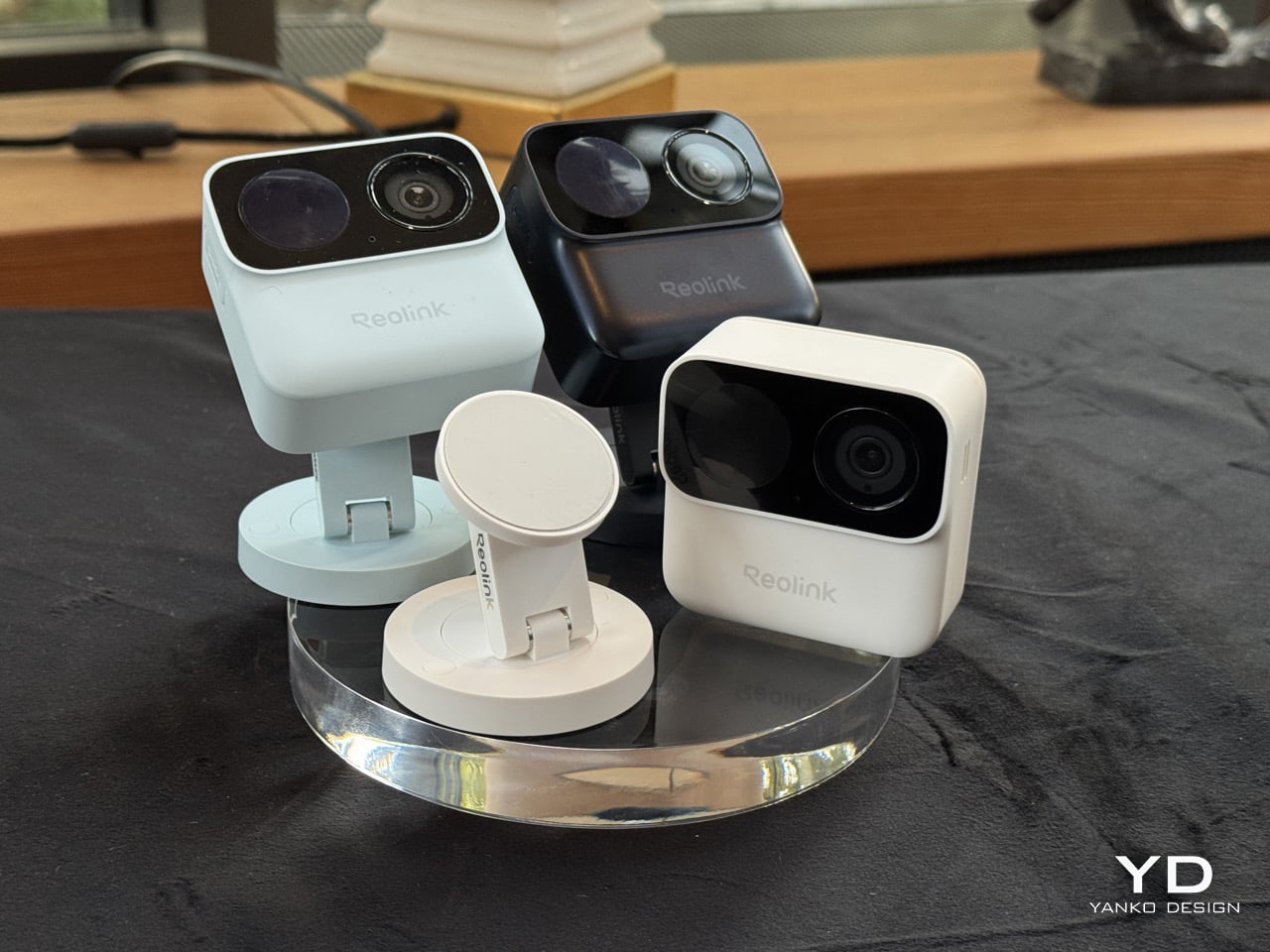
Sixty-five dollars buys 1080p, IP67 weatherproofing, dual-band Wi-Fi, on-device person detection, and local microSD storage with no monthly fee attached. Flip the cube over and the back panel detaches to a bay holding two ordinary AAs, the SD slot and the reset button, all serviceable with a coin and a spare hand. Reolink built it around Qualcomm’s QCC730 micro-power Wi-Fi chip for its Power Efficient Series, shown in Hall 1.2 next to the OMVI 2i Ultra. A USB-C port hides under a rubber flap for 24/7 recording when you want it wired. Three colours: black, white, and a mint green that has no business looking this good.
Designer: Reolink
A matte PIR dome sits on the left, a glossy ringed lens sits on the right, and a pinhole mic hides between them, the whole cluster raised on a squared-off black module that reads more like a GoPro’s lens housing than anything borrowed from traditional security hardware. Security cameras have spent two decades pretending they belong on a parking structure, all bullet housings and matte black anonymity. This one borrows its language from action cameras instead, small, chunky, built to be picked up and repositioned rather than mounted once and forgotten, which is exactly why the mint colorway makes sense sitting on a bookshelf instead of bolted above a garage. That GoPro reference is not incidental either. It signals a camera meant to be handled, not just installed.
The battery bay is the real argument here. Somewhere along the way, the smart home industry decided sealed rechargeable packs looked cleaner on a spec sheet, and quietly handed every camera, doorbell, and earbud an expiry date measured in a couple of years. Reolink went the other direction, and the QCC730 chip is what makes that reversal viable rather than nostalgic, since its whole job is sipping power in standby instead of gulping it. Blink has claimed two years off two AA lithiums since its Outdoor 4 launched, though independent testing has repeatedly landed closer to a few months once real motion traffic gets involved. Nine months against a heavier five minutes of daily recording, verified in Reolink’s own side by side tests, reads like the more honest number in the room.
What you give up for all that convenience is resolution, and it barely registers as a cost. This is a 1080p sensor at a moment when 4K battery cameras exist, sure, but 1080p is still plenty sharp for spotting a face at the door or a raccoon in the bin, and the fixed bitrate keeps file sizes sane on a modest microSD card. Night vision runs through a single mono IR LED instead of anything approaching colour, which is standard fare at this tier, not a shortfall specific to Reolink. For a camera this cheap, this easy to place, and this forgiving on power, trading a few thousand pixels feels like a fair swap rather than a compromise. The MagiCam was never trying to be the sharpest eye on your property. It is trying to be the one you actually keep charged, and on that specific promise, the AA drawer you have been ignoring for a decade just became a legitimate accessory again.
-- Article en partenariat avec Tapo - Contient des liens affiliés --
La
Tapo C675D KIT de TP-Link
est une caméra de surveillance solaire qui vient de sortie, avec un truc qu'on voit rarement à ce tarif : 2 objectifs 4K.
Un grand-angle fixe qui surveille toute la scène, et un second monté sur rotule qui zoome et suit l'action tout seul comme un grand. J'avais déjà testé sa petite sœur, la
Tapo C665G
, et là j'avoue que Tapo monte clairement d'un cran.
Les deux objectifs, c'est malin parce que sur une caméra motorisée classique, dès qu'elle pivote pour suivre quelqu'un, elle perd le reste du champ. Ainsi, pendant qu'elle zoome sur le mec qui crochète votre portail, votre bagnole sort du cadre et son complice peut se barrer avec... Alors qu'ici, non. Le grand-angle reste planté sur ses 169° et filme tout en permanence, tandis que le téléobjectif part chasser le mouvement en tournant sur 360°. Et tout ça est diffusé sur deux flux 4K séparés.
Et le mieux, c'est que les deux bossent ensemble puisque c'est le grand-angle qui fait le boulot de détection : il repère le mouvement et envoie le téléobjectif se verrouiller dessus pour le suivre en temps réel. Tapo appelle ça le suivi intelligent synchronisé, moi j'appelle ça "la caméra qui te colle aux cul". Les deux capteurs crachent du vrai 4K (3840 x 2160), le grand-angle ouvre à 169° et le téléscopique à 66° avec un zoom x5 pour aller lire une plaque ou reconnaitre un visage au fond du jardin.
Pour l'installation, rien de sorcier comme d'hab avec Tapo. Le panneau solaire doit être orienté plein sud sinon il prend pas assez de lumière, et la caméra se fixe avec des vis. Y'a 9 vis et 9 chevilles dans la boîte, plus un gabarit autocollant pour percer droit. La recharge passe également par un port USB-C planqué sous une trappe étanche, et comme le câble entre le panneau et la caméra fait 3,6 mètres, vous pouvez vraiment placer le panneau looooiiin si la caméra est à l'ombre. Et surtout, les ports et les boitiers sont étanches (IP65), donc y'a pas de flotte qui rentre.
Côté énergie, y'a une batterie de 10000 mAh et un panneau solaire de 4,5 W donc il faut environ 90 minutes de soleil direct par jour pour tenir la journée, et jusqu'à 3 mois d'autonomie sur une charge si jamais le ciel fait la gueule. Avec les longues journées d'été et la canicule permanente qu'on se prend, zéro souci donc de ce côté.
Reste à voir cet hiver ce que ça donne, comme d'hab avec le solaire.
Petite différence quand même avec la C665G, ici, pas de 4G. C'est uniquement du WiFi bi-bande 2.4 et 5 GHz. Donc faut avoir du réseau là où vous la posez. C'est donc un peu moins polyvalent pour le fond du jardin, mais pour surveiller une maison, une cour ou une allée, le WiFi suffit largement et ça vous évitera de bloquer un forfait data pour ça.
Et pour le mode nuit, vous avez le choix : infrarouge classique en 850 nm pour le noir total, ou la vision nocturne couleur grâce aux projecteurs intégrés. Comme ça, plus besoin de deviner si c'est un chat noir ou un tout petit cambrioleur en sweat à capuche. La détection IA distingue également les personnes, les animaux et les véhicules, et ces fonctionnalités sont gratuites et sans abonnement, puisque tout est traité directement en local sur la caméra. Vous pouvez aussi définir des zones d'activité, genre surveiller l'allée mais ignorer la rue pour pas vous faire alerter à chaque voiture qui passe (puis de toute façon, c'est illégal de filmer la rue).
Pour le stockage, vous pouvez y glisser soit une carte microSD jusqu'à 512 Go en local, soit opter pour le cloud Tapo Care si vous préférez. Le mode capture 24/7 permet aussi à la caméra d'enregistrer en continu par petits intervalles pour ne pas vider la batterie, mais dès qu'elle détecte un truc qui gigote, elle passe en mode film complet. Y'a aussi l'audio bidirectionnel pour engueuler le livreur à distance, une sirène et des lumières d'alarme rouge et bleu pour faire fuir les curieux et le tout encaisse de -20°C à 45°C. Ah et j'oubliais, c'est compatible Alexa et Google Home, et tout est piloté depuis l'appli Tapo.
Pour les bidouilleurs, sachez que comme souvent sur les Tapo sur batterie, y'aura pas de flux RTSP à récupérer. C'est vraiment dommage et je comprends pas pourquoi les constructeurs n'en proposent pas d'office (ah oui, leur abonnement, c'est vrai...). Donc si vous vouliez la brancher à un
Frigate
ou à
Motion sous Linux
pour la gérer avec vos autres caméras, bah c'est mort. Par contre sur vos caméras qui exposent du RTSP,
Cameradar
reste très pratique pour tester si vos flux sont bien sécurisés, je vous invite à tester !
Bref, la C675D KIT, c'est la version "je veux tout voir et tout savoir" de la caméra solaire avec un vrai double objectif qui règle enfin ce défaut des caméras motorisées. Sans parler du panneau solaire qui vous évitera de tirer des câbles partout comme un électricien qui aurait bu trop de café.
There is a camera brand that has shown up at International Broadcasting Conference, partnered with the Esports World Cup as an official camera provider, earned Editor’s Choice awards from music and DJ publications, and landed in the desk setups of remote workers, streamers, worship AV teams, and solo creators, all while keeping a relatively low profile compared to the legacy names in the category. OBSBOT, founded in 2016, has built its reputation the way durable hardware brands tend to: by making things that keep working, and keep getting better. Reviewers have consistently noted that firmware updates meaningfully improve OBSBOT cameras after purchase, which is a rarer quality in hardware than it should be.
Prime Day 2026 will put seven OBSBOT cameras on sale simultaneously, running through June 29 across Amazon and the OBSBOT official store. The lineup covers three distinct use cases: the Meet series for plug-and-play video calls and casual streaming, the Tiny series for creators and hybrid workers who want PTZ tracking at their desk, and the Tail 2 for anyone running a live production setup that used to require a full crew. The discounts range from around 15% on the newer Tiny 3 series to over 30% on the Tiny 2, which arrives at a price point that has not been seen before. Discounts hit on June 23rd – here is the full breakdown.
OBSBOT Tail 2 ($1088) – The AI Camera That Puts a Production Crew on Your Tripod
The OBSBOT Tail 2 is what happens when a camera is designed to solve the most persistent problem in solo and small-team video production: the need for a human operator. This is the company’s flagship live production camera, built around an advanced AI tracking system and a three-axis gimbal that does more than just pan and tilt. It is the world’s first PTZR (Pan-Tilt-Zoom-Roll) camera, with the Roll being a new game-changing feature that allows the entire lens and sensor assembly to rotate 90 degrees. This delivers true, uncropped vertical video, a clever piece of engineering that makes it immediately relevant for anyone creating content for mobile-first platforms. It pairs that mechanical intelligence with serious imaging hardware, including a large 1/1.5-inch CMOS sensor, a 5x optical zoom, and the ability to capture sharp 4K footage at a fluid 60 frames per second.
What separates the Tail 2 from a high-end webcam is how it fits into a professional workflow. It comes equipped with a full suite of broadcast-standard ports, including NDI, SDI, HDMI, and Ethernet, allowing it to integrate directly with live switching hardware and streaming software with minimal latency. For solo operators, the system works with gesture controls for hands-free adjustments, and a dedicated app provides granular remote control over framing and movement. This combination of broadcast-grade connectivity and intelligent automation is what makes the Tail 2 so versatile. It is equally at home as the primary camera for a DJ’s live stream, a dynamic tracking camera for a church service, or part of a multi-camera setup for a corporate event.
Why We Recommend
At its core, the Tail 2 is an investment in workflow efficiency. Tech reviewers have consistently framed it as a tool that can pay for itself, replacing the cost and complexity of hiring a camera operator for recurring shoots. The Prime Day discount reinforces that value proposition, knocking $200 off the price and bringing the non-NDI version down to $999. Breaking the thousand-dollar barrier is significant, shifting the Tail 2 from a niche professional tool to a much more accessible option for serious creators, small businesses, and organizations looking to upgrade their production quality. For anyone who needs cinematic, automated camera movement without a dedicated crew, this is the camera to get.
OBSBOT Tiny 3 ($296) – A Palm-Sized PTZ Camera with Full-Sized Ambition
The OBSBOT Tiny 3 is the company’s answer to a simple question: how much professional-grade technology can you fit into a webcam that is smaller than a cup of coffee? The answer, it turns out, is quite a lot. This is the flagship of the Tiny series, designed for creators and hybrid workers who want the absolute best imaging and tracking performance in a desk-friendly format. It starts with a massive 1/1.28-inch CMOS sensor, which is exceptionally large for a webcam and allows it to capture more light for a cleaner, more detailed 4K image. That sensor is paired with a pan-tilt-zoom system that moves with near-silent precision, keeping the subject perfectly framed.
Where the Tiny 3 really shows its intelligence is in the software and processing that drive its hardware. It inherits the refined AI Tracking 2.0 from the larger Tail 2, making its auto-framing and subject tracking remarkably smooth and reliable. It also features Gesture Control 2.0, allowing users to manage zoom and tracking with simple hand signals, a feature that feels genuinely useful in practice. For streamers and power users, the native integration with Elgato’s Stream Deck is a critical addition, bringing PTZ controls directly into their existing workflow. OBSBOT even added creative tools like virtual avatars and improved the audio with a five-mode stereo microphone system, rounding out a feature set that feels both powerful and polished.
Why We Recommend
The Tiny 3 is the pick for anyone who prioritizes having the latest and most refined technology on their desk. While other models in the lineup offer steeper discounts, the Prime Day price drop brings this premium, current-generation flagship under the $300 mark. This is the camera for the user who wants the best sensor, the most advanced AI tracking, and the tightest software integration OBSBOT offers in a webcam. It represents the peak of the Tiny series, and this is the most affordable it has been since its launch.
OBSBOT Tiny 3 Lite ($169) – The Same Intelligence with a Focus on Value
For many users, the appeal of the flagship Tiny 3 lies in its advanced AI brain, not necessarily its top-of-the-line sensor. OBSBOT created the Tiny 3 Lite for exactly that audience. This camera is built on the same intelligent foundation as its more expensive sibling, delivering the same seamless AI Tracking 2.0, responsive Gesture Control 2.0, and sharp 4K resolution. It is, for all practical purposes, the same smart user experience. The key difference, and the reason for its more accessible price, is the move to a slightly smaller 1/2-inch CMOS sensor. This strategic trade-off makes the Tiny 3 Lite an incredibly compelling option for anyone who works in a space with reasonably good lighting.
In practice, the Tiny 3 Lite feels nearly identical to the flagship during everyday use. It keeps you perfectly in frame during video calls, responds to hand gestures to zoom in on a whiteboard, and integrates with the same powerful OBSBOT software suite, including Stream Deck support. It also features a slightly different physical design with an integrated stand, making it incredibly simple to set up on any monitor or desk. By preserving the core software and AI features that define the Tiny 3 experience, OBSBOT has distilled the product down to its most important essentials, creating a camera that performs well above its price point.
Why We Recommend
The Tiny 3 Lite is the pragmatic choice in the Tiny 3 series. It offers access to OBSBOT’s latest-generation AI tracking and software ecosystem for a fraction of the flagship’s cost. The Prime Day deal, which brings the price down to $169, makes it one of the best values in the entire lineup for a current-generation product. If you want the smartest PTZ webcam on the market but do not need the absolute best low-light performance that the Tiny 3’s larger sensor provides, the Lite version is the smarter purchase. It delivers the features that matter most without the premium price tag.
OBSBOT Tiny 2 ($229) – The Champion Webcam Now Available at Under $250
Before the Tiny 3 arrived, the Tiny 2 was OBSBOT’s undisputed flagship desk camera, and it remains a formidable piece of hardware. This is the camera that set the standard for what a premium AI webcam could be, pairing a huge 1/1.5-inch CMOS sensor with exceptionally fast autofocus and reliable AI tracking. That large sensor is a critical detail, as it gives the Tiny 2 excellent low-light capabilities and a natural depth of field that rivals even some of the newer models in the lineup. It established the features that now define the Tiny series, including effective auto-zoom, dynamic gesture controls, and even voice commands for a completely hands-free experience.
The Tiny 2 is a proven workhorse. It has benefited from years of firmware updates that have refined its performance, making it a stable and dependable choice for streamers, content creators, and professionals who need consistently great video. While it may not have every single new software feature from the Tiny 3 series, its core performance remains top-tier. The image quality from its large sensor and premium lens system is still a benchmark for the category, delivering a crisp, professional look that cheaper webcams simply cannot match. For many users, this level of raw performance is far more important than the latest software gimmicks.
Why We Recommend
This is arguably the single best deal of the entire Prime Day event. The Tiny 2 is seeing a massive price drop of $100, bringing it down to just $229, a discount of over 30% and its lowest price ever. This is a rare opportunity to get a former flagship product with a best-in-class sensor for the price of a mid-range webcam. For anyone prioritizing pure image quality over having the absolute newest model, the Tiny 2 offers a value proposition that is impossible to ignore. It is the smartest purchase for the performance-focused buyer.
OBSBOT Tiny 2 Lite ($129) – The Smartest Way to Get into AI-Powered PTZ
The OBSBOT Tiny 2 Lite takes the intelligent core of the celebrated Tiny 2 and packages it into an even more accessible and affordable design. This camera is built for the user who wants to step up from a static webcam to the world of AI-powered pan, tilt, and zoom without paying a premium. It delivers the essential features that made its bigger brother a success, including reliable AI tracking with auto-zoom, crisp 4K resolution, and multipurpose tracking modes that can follow a subject’s whole body or focus just on their head and shoulders. It is a streamlined experience focused entirely on delivering smart, automated framing.
While it does not have the same massive sensor as the standard Tiny 2, the Tiny 2 Lite still produces a clean, professional image that is a significant upgrade over nearly any built-in laptop camera or budget webcam. The real magic, however, is in the motion. For presenters, educators, or streamers who move around, the camera’s ability to smoothly follow them is a game-changer. It also includes useful features like preset PTZ positions, allowing users to instantly switch between a tight shot and a wide view with the press of a button, a function typically found on much more expensive hardware.
Why We Recommend
This is the ultimate entry point into intelligent webcams. With the Prime Day discount bringing its price down to just $129, the Tiny 2 Lite is in a class of its own. At that price, it competes with high-end static webcams while offering a full suite of AI and PTZ features that its rivals lack. For anyone who has been frustrated by fixed-frame cameras but felt priced out of the AI tracking market, this deal removes that barrier. It offers the most important features of the Tiny 2 generation at a cost that makes it an easy and obvious upgrade.
OBSBOT Meet 2 ($99) – The 4K Webcam That Makes Every Meeting Smarter
The OBSBOT Meet 2 is designed to solve a very specific, modern problem: making you look and sound as professional as possible on a video call with the least amount of effort. This is not a complex PTZ camera for creators; it is a sleek, intelligent webcam for the hybrid worker, the remote professional, and anyone who spends their day in virtual meetings. It delivers a sharp, vibrant 4K image at 30 frames per second, providing a significant leap in clarity over standard-issue laptop cameras. Its compact and lightweight design allows it to sit discreetly atop any monitor or laptop, instantly elevating the look of a desk setup.
The real intelligence of the Meet 2 lies in its automation. It features fast, reliable AI-powered auto-framing that keeps you perfectly centered in the shot, even if you shift or lean. It can also widen its frame to include a second person, making it ideal for small group meetings in a huddle room. This is paired with a fast autofocus system that keeps the image sharp and professional. The setup is pure plug-and-play; you connect it via USB, and it works seamlessly with Zoom, Microsoft Teams, Google Meet, and other major platforms without requiring any complicated software or drivers. It is designed to be an invisible upgrade that simply makes you look better.
Why We Recommend
The Meet 2 hits the sweet spot between performance and simplicity. It offers two of the most important features from high-end cameras, 4K resolution and AI auto-framing, in an accessible, user-friendly package. The Prime Day deal makes its value proposition even stronger, dropping the price to just $99. For under a hundred dollars, it provides a massive upgrade in video quality and intelligence for any professional. This is the ideal camera for anyone who wants to improve their virtual presence without adding the complexity of a PTZ system.
OBSBOT Meet SE ($58) – The Easiest and Most Affordable Upgrade for Any Setup
Sometimes, the best upgrade is the one you do not have to think about. The OBSBOT Meet SE is built on that principle. It takes the single most useful intelligent feature from its more expensive siblings, AI-powered auto-framing, and delivers it in a simple, incredibly affordable package. This camera is designed for anyone and everyone who is still using a basic, fixed-frame webcam and wants a better experience without any complexity. It captures clean, clear 1080p video and uses its AI brain to make sure you are always centered in the frame, looking professional and engaged.
The Meet SE is a masterclass in thoughtful, essentialist design. It is a true plug-and-play device that works the moment you connect it, with no drivers to install or complicated settings to configure. It even includes a physical privacy cover, a simple but crucial feature that provides peace of mind for remote workers and students. While its primary focus is on effortless video calls, OBSBOT also included a surprisingly capable 1/2.8-inch stacked CMOS sensor, which gives it better-than-expected image quality and even allows for high frame rate capture for smooth slow-motion effects, a rare bonus in a webcam at this price.
Why We Recommend
This is the definitive “no-brainer” upgrade. With its Prime Day price of just $58, the OBSBOT Meet SE is likely cheaper than the keyboard on your desk, yet it delivers a feature that was, until recently, reserved for premium cameras. It completely eliminates the problem of awkward, off-center framing on video calls for less than the cost of a nice dinner out. For students, remote workers, or anyone who simply wants to look better in their daily meetings without spending a lot of money or time, there is no better value to be found in this entire sale.
Vous avez des vieilles caméras de surveillance chinoises qui prennent la poussière parce qu'il vous est impossible de trouver leur flux vidéo ? Y'a pas de RTSP, y'a pas de doc, y'a juste un pauvre port 80 ouvert et une app Android en Mandarin qui est périmée depuis 2021 ?
JE VIENS VOUS SAUVER LES ZAMIS ! Hé oui, grace à
Strix
qui est capable de tester 102 787 patterns d'URL en 30 secondes et qui vous sort miraculeusement le bon flux vidéo qui marche, avec la config
Frigate
prête à être collée.
En fait, le principe est simple. Vous lancez un conteneur Docker, vous entrez l'IP de votre caméra et l'outil bombarde en parallèle toutes les URL connues pour ce type de matos. RTSP sur le port 554, MJPEG sur le 8080, snapshots JPEG sur le 80... et 30 à 60 secondes plus tard, vous avez la liste des flux qui répondent avec résolution, FPS et codec H.264 ou H.265.
L'installation
tient en une ligne
et l'interface web tourne sur le port 4567. Vous entrez l'IP, le login si besoin, et éventuellement le modèle de la caméra IP pour affiner la recherche. Après, même sans modèle, Strix se débrouille avec les 206 patterns les plus courants (sur les 102 787 de la base complète) + la découverte
ONVIF
. Du coup ça trouve un flux sur à peu près n'importe quoi, du Dahua au Foscam en passant par les marques fantômes d'AliExpress.
Un autre truc vraiment sympa aussi , c'est la génération de config. Vous collez votre fichier frigate.yml existant, même avec 500 caméras dedans, et l'outil ajoute proprement la 501ème sans rien casser ! Il configure automatiquement le flux HD 1080p pour l'enregistrement et le flux 640x480 pour la détection d'objets, le tout passant par
go2rtc
. Résultat, la conso CPU de Frigate peut carrément passer de 30% à 8%.
Et surtout, l'histoire derrière est assez dingue. Le dev derrière ce projet avait des vieux NVR chinois de 2016 qu'il voulait connecter à Frigate. Après 2 ans à tester toutes les URL possibles... rien. Snif... Tous les ports fermés sauf le 80. À vrai dire, ces machins ne parlaient même pas un protocole connu. Alors a fini par faire tout ce que fait un vrai bidouilleur quand il est énervé : Sniffer le trafic de l'app Android avec Wireshark !
Et grâce à cela, il a découvert un truc baptisé BUBBLE, tellement obscur que ça n'existe nulle part sur Google ! Cela lui a permis de construire une base de 67 288 modèles issus de 3 636 marques, des Hikvision jusqu'aux trucs sans nom d'AliExpress.
Et quand y'a pas de RTSP du tout (ce qui arrive souvent avec le matos chinois pas cher), l'outil se rabat sur les snapshots JPEG et les convertit en vrai flux vidéo via FFmpeg. C'est pas aussi clean qu'un vrai stream H.264 (et ça saccade un peu à 10 FPS), mais c'est largement suffisant pour de la détection de personnes ou de bagnoles.
Après, sachez le, ça ne marche qu'avec les caméras présentes sur votre réseau local. Les caméras cloud (Blink, Ring, Xiaomi) ne sont pas supportées. Et aussi, comme on n'est jamais trop prudent d'ailleurs, si vous branchez ce genre de vieux matos chinois, mettez-les dans un VLAN isolé sans accès Internet parce que côté sécurité, c'est la fête du slip sur ce genre de matos : Backdoors, mots de passe en clair sur le port 80, appels serveurs en Chine... va savoir ce qu'elles font quand personne ne regarde.
Strix a même tapé dans l'oeil du développeur de Frigate lui-même, qui a invité l'auteur à soumettre une PR officielle pour l'intégrer dans la doc officielle. Hé ben quelle classe ! Ah et y'a aussi un add-on Home Assistant en beta si vous êtes branchés domotique (pas forcément stable, le soft sous Docker reste plus fiable). Strix est écrit en Go, sous licence MIT, y'a une image Docker de 80-90 Mo sur Alpine Linux, avec FFmpeg et FFprobe embarqués, et ça tourne comme un charme sur AMD64 comme sur ARM64 (votre Raspberry Pi 4 suffit).
Bref, allez tester ça, car y'a clairement de quoi sauver pas mal de matos de la poubelle !
De nos jours, quand un mec chelou avec des lunettes cheloues nous fixe, on ne sait plus si c’est parce qu’il nous trouve irrésistible ou s’il est en train de balancer notre tronche à une IA pour savoir qui on est. Bon, pour vous, la question se pose peut-être moins, mais vous voyez l’idée ^^.
Heureusement, pour lutter contre ça, y’a maintenant un projet open source pour détecter ces petits curieux équipés de Ray-Ban Meta ou d’autres lunettes-caméras. Ce projet s’appelle
Ban-Rays
(jeu de mots avec “banned”, roh roh roh) et le but c’est de créer des lunettes capables de repérer les smart glasses équipées de caméras.
Et pour arriver à cela, le dev derrière ce projet utilise deux approches complémentaires.
La première, c’est l’approche optique basée sur un principe physique assez marrant. En effet, mes capteurs CMOS des caméras ont la particularité de renvoyer la lumière infrarouge directement vers sa source. C’est ce qu’on appelle l’effet “cat-eye” ou rétro-réflectivité, du coup, en balançant des impulsions IR vers une paire de lunettes suspecte et en analysant le signal réfléchi, on peut théoriquement détecter la présence d’une caméra. Et les capteurs produisent des pics de signal bien nets et rapides, contrairement aux surfaces réfléchissantes classiques qui génèrent des ondes plus longues.
Pour le moment, les tests avec les Ray-Ban Meta montrent des résultats un peu inconsistants à courte distance (genre 10 cm), mais le principe est là et ça s’améliore. Ah oui et le matos utilisé c’est un Arduino Uno, des LEDs infrarouges (940nm et 850nm), une photodiode et un transistor. Rien de bien méchant donc niveau budget.
Et la deuxième approche, c’est côté réseau avec la détection Bluetooth Low Energy. Les Ray-Ban Meta utilisent un identifiant fabricant spécifique (0x01AB pour Meta) et un Service UUID bien particulier (0xFD5F). Le souci c’est que pour le moment, ça ne détecte les lunettes que pendant l’allumage ou le mode appairage. Pour une détection continue pendant l’utilisation normale, faudrait du matos plus costaud genre modules nRF pour sniffer les paquets CONNECT_REQ. Mais bon, ça viendra puisque c’est dans la roadmap du projet.
Alors oui, vous allez me dire que les Ray-Ban Meta ont une petite LED qui s’allume quand elles filment, donc c’est pas discret. En théorie oui auf que cette LED est tellement minuscule que
la Data Privacy Commission irlandaise
a carrément remis en question son efficacité comme protection de la vie privée. Et surtout, un bidouilleur propose maintenant
de désactiver cette LED
pour une soixantaine de dollars. Meta a bien prévu une protection qui empêche les lunettes de fonctionner si on couvre la LED avec du scotch, mais le gars a trouvé comment contourner ça et sa liste de clients s’allonge…
Et l’autre truc que j’ai remarqué avec ces lunettes connectées, c’est qu’elles se déclenchent tout le temps pour tout et n’importe quoi. Comme ça écoute en permanence pour répondre aux commandes vocales, impossible d’avoir une conversation normale sans que le machin réagisse à un mot qui ressemble vaguement à “Hey Meta”. C’est encore pire que Siri ou Alexa qui font déjà des déclenchements intempestifs. Perso, c’est pour ça que je ne veux pas de ce genre de lunettes, même si je reconnais que c’est pratique pour photographier ou filmer des choses (dans le cadre de mon boulot hein…)
Et les inquiétudes sont d’autant plus justifiées qu’une
étude de 2024
a montré qu’en combinant des Ray-Ban Meta hackées avec de la reconnaissance faciale en temps réel, on pouvait identifier des inconnus dans la rue. Encore plus récemment, l’Université de San Francisco a dû alerter ses étudiants après qu’une personne mystérieuse ait utilisé ces lunettes pour filmer des femmes sur le campus et partager les vidéos en ligne. Sympa l’ambiance de parano.
Bref, si vous êtes inquiet par ça (ou juste soucieux de votre vie privée), le projet Ban-Rays est sur
GitHub
avec tout le code en C++, Python et un peu de C. C’est encore expérimental mais les deux approches sont prometteuses et si vous voulez contribuer, y’a plein de trucs à améliorer comme les patterns de balayage IR, la fusion des données multi-longueurs d’onde, l’interrogation active BLE…
Vous avez une caméra de surveillance connectée chez vous ? Du genre petite caméra Yi à 15 balles achetée sur AliExpress pour surveiller le salon ou le chat quand vous n’êtes pas là ? Alors tenez-vous bien parce qu’un chercheur a réussi à faire tourner DOOM dessus. Et sans toucher au firmware s’il vous plait ! Il a juste exploité le stream vidéo et quelques bugs bien sentis de l’appareil.
Luke M a publié son
projet Yihaw sur GitHub
et ça fait un peu peur car si quelqu’un peut hijacker le stream de votre caméra pour y balancer un FPS des années 90, il peut aussi faire pas mal d’autres trucs beaucoup moins rigolos.
Le hack est assez cool d’ailleurs car ces caméras Yi tournent sur un petit processeur ARM sous Linux. Elles ont donc une app mobile qui vous permet de voir le stream en temps réel et Luke M a trouvé plusieurs vulnérabilités dans la stack réseau de la caméra. Je vous passe les détails mais avec ces bugs, il peut injecter du code arbitraire sans modifier le firmware.
Il peut alors créer trois threads qui tournent en parallèle. Le premier récupère les frames YUV420p directement depuis le capteur de la caméra. Le deuxième convertit ça en h264. Le troisième, au lieu d’envoyer le flux vidéo normal, envoie DOOM. Du coup, vous ouvrez l’app Yi IoT sur votre smartphone et vous voyez le Doomguy buter des demons au lieu de voir votre salon. C’est rigolo, hein ?
Ces caméras Yi, il y en a des millions installées partout dans le monde. Bureaux, maisons, magasins…etc car elles sont pas chères, elles marchent plutôt bien, elles ont une app correcte, mais leur sécurité c’est une vraie passoire. C’est bourré de bugs qu’on trouve en une après-midi avec un fuzzer basique.
Luke M liste plusieurs exploits dans son repo GitHub et c’est un vrai buffet à volonté pour quelqu’un qui veut prendre le contrôle de ces caméras. Bien sûr ce serait illégal alors personne ne le fait, surtout parce que ça demande quand même un peu de boulot pour chaque modèle de caméra. Mais les outils existent, les vulnérabilités sont connues, et si un chercheur solo peut le faire pour s’amuser avec DOOM, imaginez ce qu’un botnet bien pensé pourrait faire.
Tous ces trucs qu’on a chez nous, qui tournent sur du Linux embarqué avec des stacks réseau écrites à l’arrache par des équipes chinoises sous-payées qui doivent sortir un produit tous les trois mois.
– Article invité, rédigé par Vincent Lautier, contient des liens affiliés Amazon –
À une époque où même votre frigo veut vous parler, il est bon de voir un gadget connecté qui sait vraiment à quoi il sert. J’ai eu l’occasion de tester la caméra de surveillance intérieure Imou Rex VT Pro, et si elle n’a peut-être pas un nom sexy, mais elle coche un nombre incroyable de cases pour prix pas déconnant.