Vue lecture

HP made one of my favorite PCs and had to abandon it — Would this Windows all-in-one stand a chance if it ever risked a comeback?

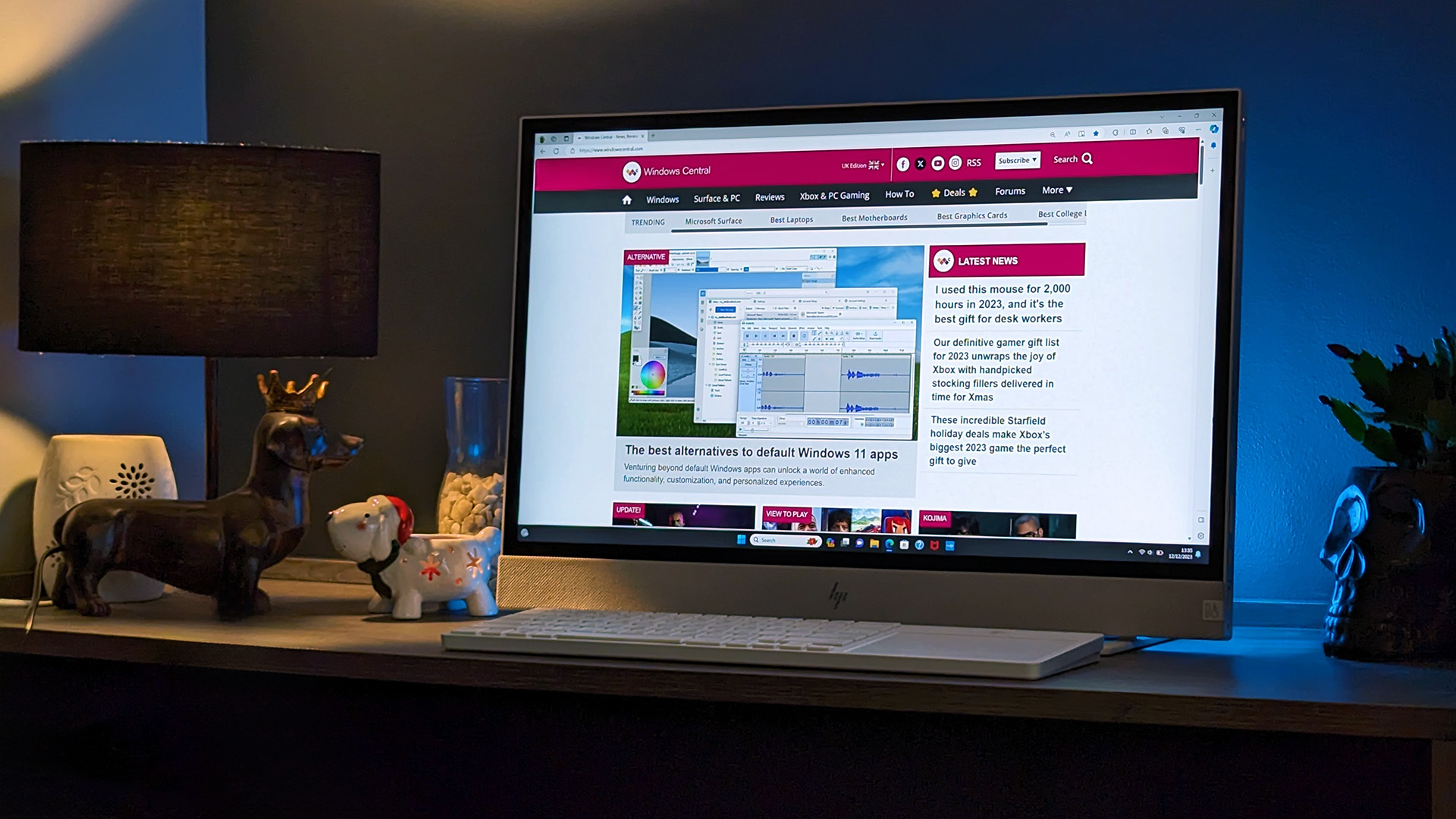
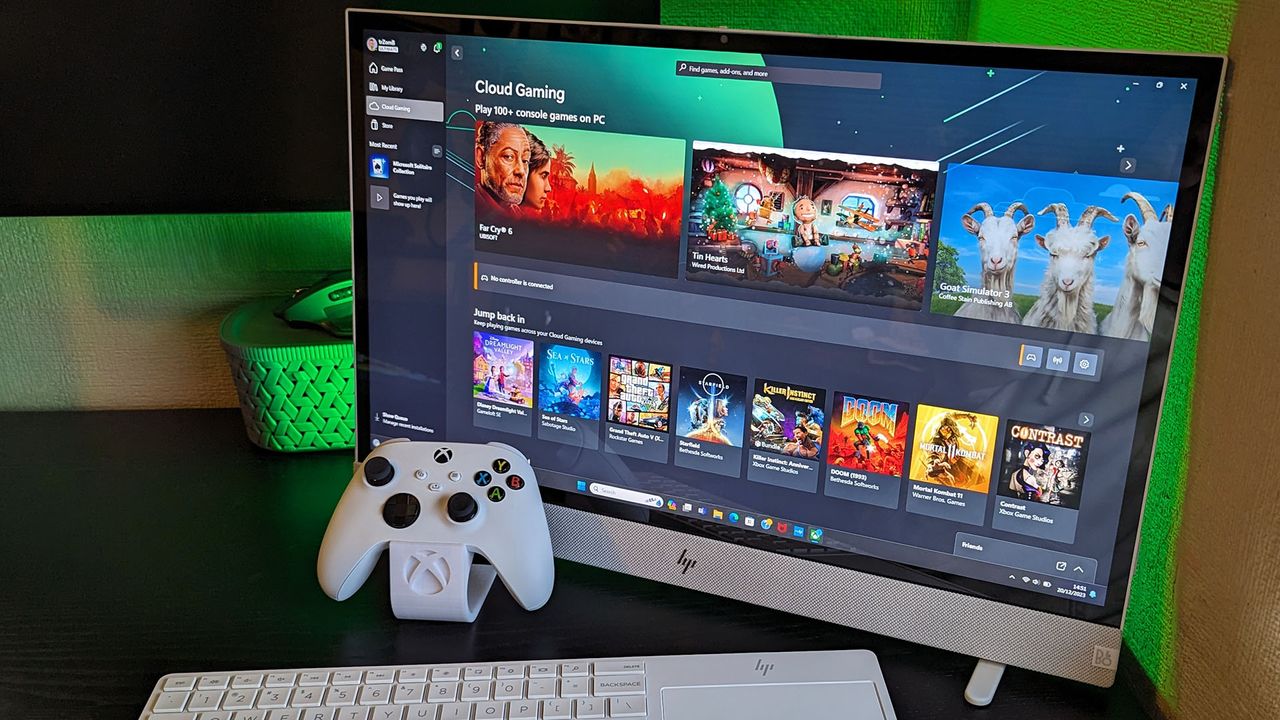
Back in 2023, HP released the Envy Move, an all-in-one (AIO) PC with a clever quirk: It could run wirelessly on battery power. The average lifespan was around 4 hours, but it was enough to watch a movie, join a video call, or have a playful family interaction with its touchscreen on whatever app or website you wanted.

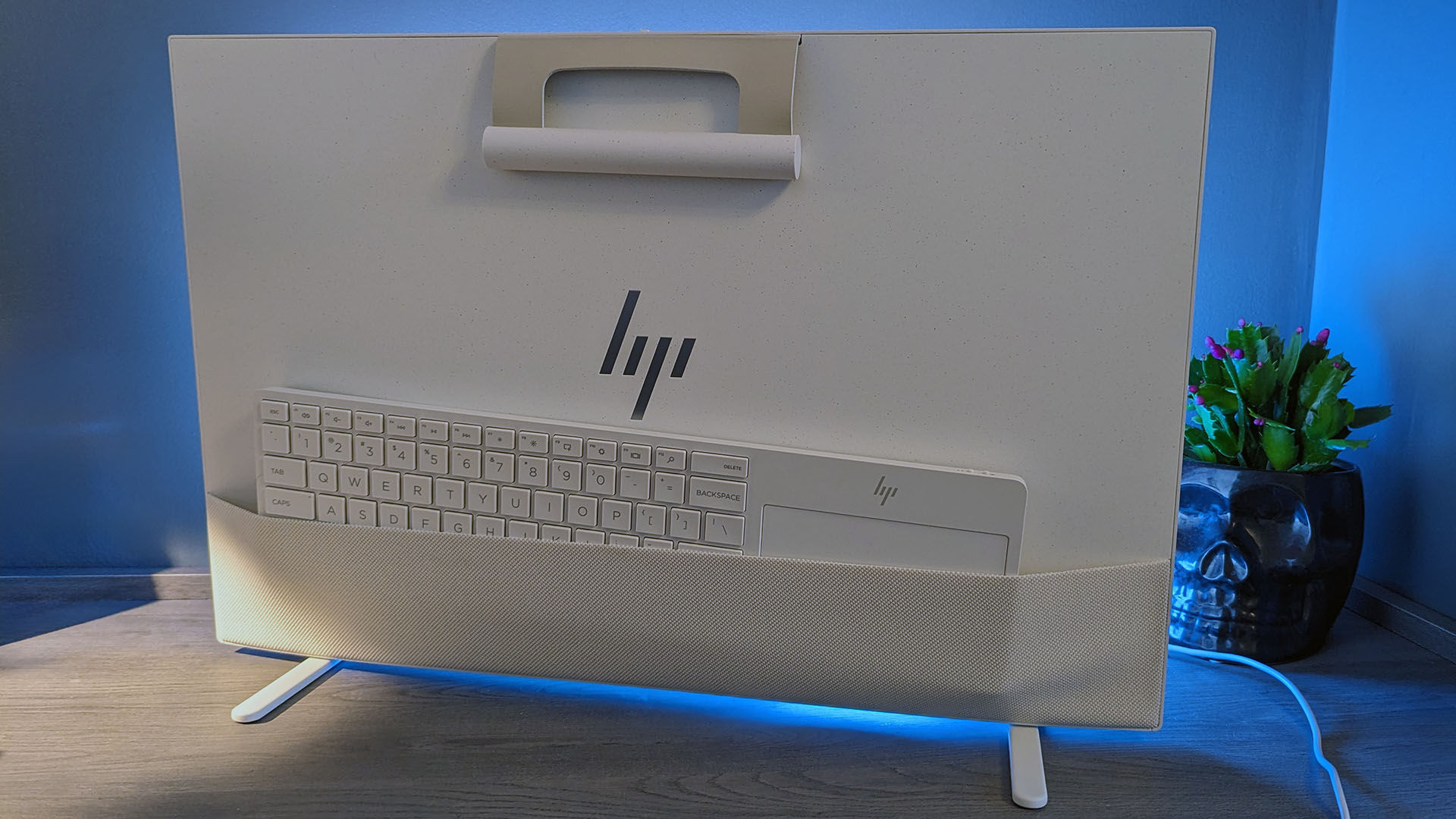
To make it even more portable, HP included a built-in handle attached to a flexible loop on its top side, pop-out feet on its underside, and a rear pouch that held a keyboard with an included touchpad. It was genius; a 24-inch touchscreen PC with great speakers that moved wherever you needed it.

Its design could have used some tweaks, but its downsides didn't feel at all severe, resulting in a perfect score in my Envy Move review. It was the most remarkable sample I'd ever tested, but it quickly became evident that consumers weren't interested enough to choose it over a traditional laptop or desktop.

This portable PC deserved more

HP Envy Move

Not quite a desktop, but certainly more than a laptop, HP's Envy Move was a unique AIO PC. (Image credit: Ben Wilson | Windows Central)

Following my review in 2023, the Envy Move was later discontinued from HP's official storefront and third-party retailers across the world, while the broader Envy range itself was dropped alongside the Spectre, Pavilion, and Dragonfly names, in favor of a major HP portfolio overhaul that introduced 'Omni' and 'Elite' PCs to replace them.

HP all-in-ones now sit alongside higher-end models like the impressive OmniStudio X, but nothing replaced the Envy Move, leaving any remaining stock with its already modest Core i7-1355U mobile processor from Intel's 13th generation. It was never intended to be a high-performance machine, but I'm sure modern, efficiency-centric Intel chips would have supercharged it perfectly.

Then again, if previous-generation components could maintain the ~$900 price tag on an Envy Move with 16GB of RAM and 512GB of storage, I'd let it slide. Frankly, I doubt many customers in HP's target audience would care to scrutinize its specific choice of processor, especially when the experience is great nonetheless, but future models could have been even better.

Too quirky to live, too clever to die

HP Envy Move

Its wireless keyboard and touchpad tucked away for transport in a cute pouch. (Image credit: Ben Wilson | Windows Central)

In the following summer, HP's Envy Move made a few appearances at my family gatherings and various parties, watching UEFA Euro 2024 matches in a shaded garden during BBQs in the best weather. At one point, I even connected an old Guitar Hero controller to its built-in Bluetooth receiver and turned it into a type of arcade machine; it was so much fun.

Everyone who would listen was impressed by what I could demonstrate, but nobody was particularly interested in replacing their long-lasting laptops or self-built desktop PCs. Its appeal should have been clear; anyone looking to share a family PC with their children would surely love its touchscreen and a general theme of collaboration, but it still fizzled out.

It's just the way she goes. Sometimes, brands take a risk and let something unusual escape the concept phase, but it never comes with a guarantee that enough people will buy it. I've seen plenty of oddities at conventions like CES, but they usually come with the understanding that it's just brands flexing their manufacturing muscles, showing what they could do if they wanted to.

The Envy Move felt different, but it ultimately doesn't matter how much I admired it, at least not compared to the sales figures that PCs need to pull in to stand a chance. Instead, I just keep my fingers crossed that it could make a comeback someday, or that the people who helped the Envy Move earn a Good Design award would at least know how much I admired what they made.

To be clear, the only reason I suddenly felt all nostalgic and bubbly about an AIO PC is that I started seeing bizarre knockoffs popping up on TikTok and Instagram Reels. Strange, Android-based screens lampooning the same kind of unique selling point as the Envy Move, pulling in frustratingly positive comments about how good the idea is — I know it's a good idea.

Laptops are great, and custom-built desktop PCs are even more rewarding when you can afford it, but all-in-one PCs still have their place. HP tried something unique with the Envy Move, and it's something I'll still praise in the hopes that it tries again when the timing is right (if that ever happens). Let's see what turns up at CES in 2027.

Click to join us on r/WindowsCentral

Join us on Reddit at r/WindowsCentral to share your insights and discuss our latest news, reviews, and more.

HP Envy Move

<p>A free Xbox Game Pass Ultimate trial immediately unlocks the opportunity to try out cloud gaming.</p>

  •  

I test Windows laptops for a living, and these are the 7 features I can't pass up

I've used Windows PCs for most of my life, and I've tested some of the latest laptops from the most reliable brands for the last half-decade. Even before that, I worked in retail, specifically advising on laptops and helping people spend their money where it makes the most sense. So, despite spending most of my time on desktop PCs, I'm savvy with laptops.

For the most part, my criteria for choosing a laptop relate to how well it travels with me. I take regular trips by plane, train, and car to work from hotels and conventions, all with their own limitations and considerations, which has narrowed my list of must-haves to seven non-negotiables. If you're considering a new Windows laptop, this is what matters the most to me.

1. An OLED display for better contrast

An ASUS Zenbook A14 on a wooden surface displays artwork featuring a stylized Windows Central logo surrounded by flowing ribbons. Behind the laptop is a textured blue background resembling ice.

ASUS Zenbook A14 (2026) (Image credit: Ben Wilson | Windows Central)

I was a skeptic for a long time, but OLED laptops have won me over when I'm looking for a new daily driver. Offering better contrast with deeper blacks than traditional IPS screens, many of these color-rich panels also deliver higher-than-average max brightness, though I generally keep mine at around 250 nits. Most of my apps are in dark mode, too, so my average experience looks great.

You can go even more advanced with a mini LED screen, such as the one I tried in Lenovo's Slim Pro 9 a few years ago that reached an incredible 615 nits, but it's far and above anything I've ever needed. OLED is a noticeable improvement over LCD, and many, myself included, will find that anything beyond that yields diminishing returns if you aren't a professional image or video creator.

2. 14-inch chassis (and lightweight)

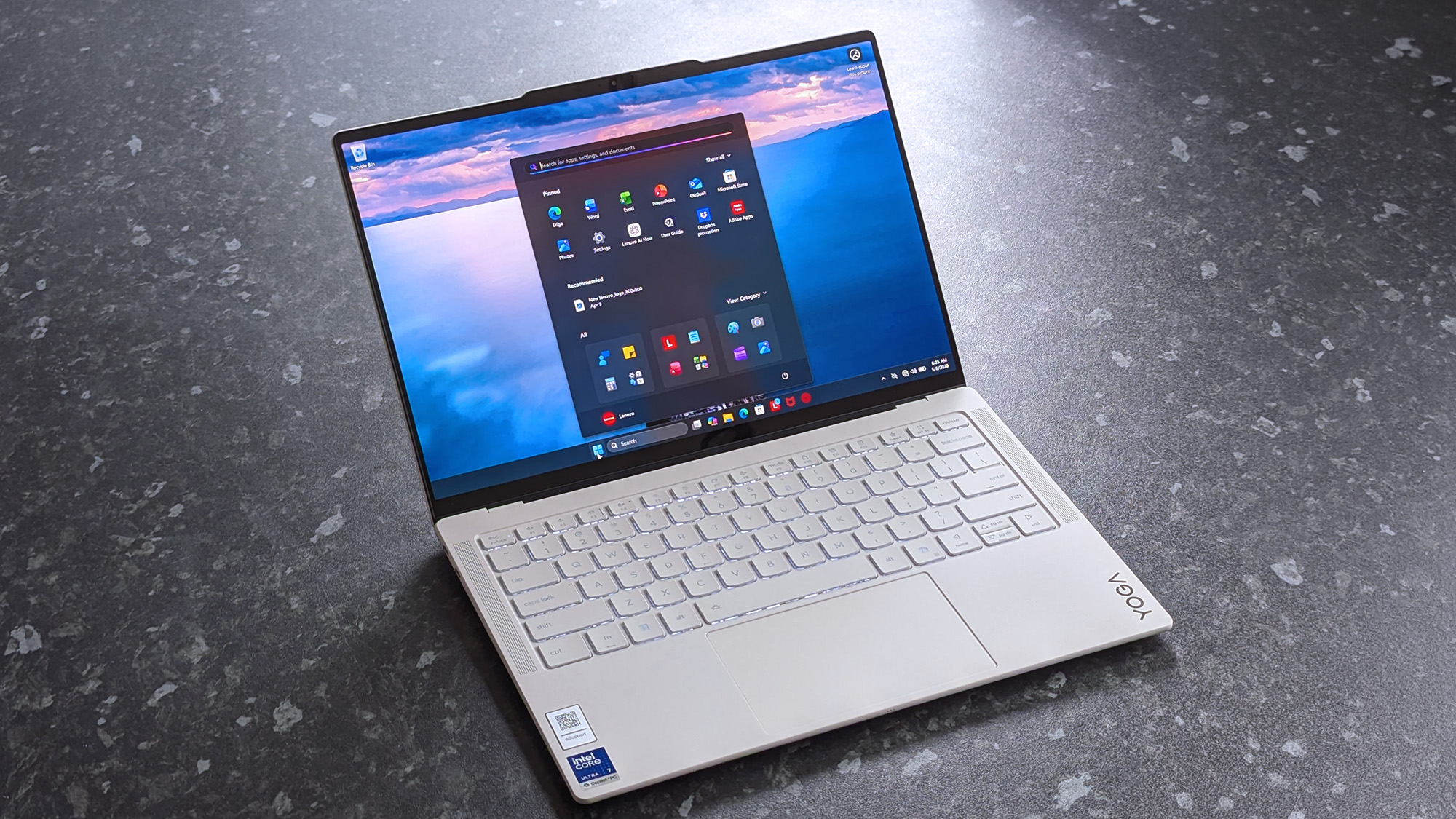
A Lenovo Yoga Slim 7i Ultra (Gen 11) Aura Edition laptop with a sleek design is open on a speckled gray surface. The screen displays a desktop with icons, set against a calming ocean background.

Lenovo Yoga Slim 7i Ultra (Gen 11) Aura Edition (Image credit: Ben Wilson | Windows Central)

It sounds unusually specific, but after traveling with laptops, I found that 14-inch models with 16:10 ratio displays offered me the best experience. They fit perfectly in cramped travel environments with tray tables and tiny tables, yet still feel spacious enough in a hotel room when I can connect an external mouse. A 13.8-inch Surface Laptop 7 with a 3:2 screen also passes.

Anything around or below 2.65 lbs (1.20 kg) is a bonus, as I'm regularly throwing these compact laptops into rucksacks or whatever carry-on I'm lumped with at the time. However, the lightest laptops are rarely the most affordable, as Lenovo's Yoga Slim 7i Ultra Aura Edition I tested clearly demonstrated with its 2.15-lb (975 g) chassis. The trick is to find something within that ideal window.

3. At least 512GB of storage

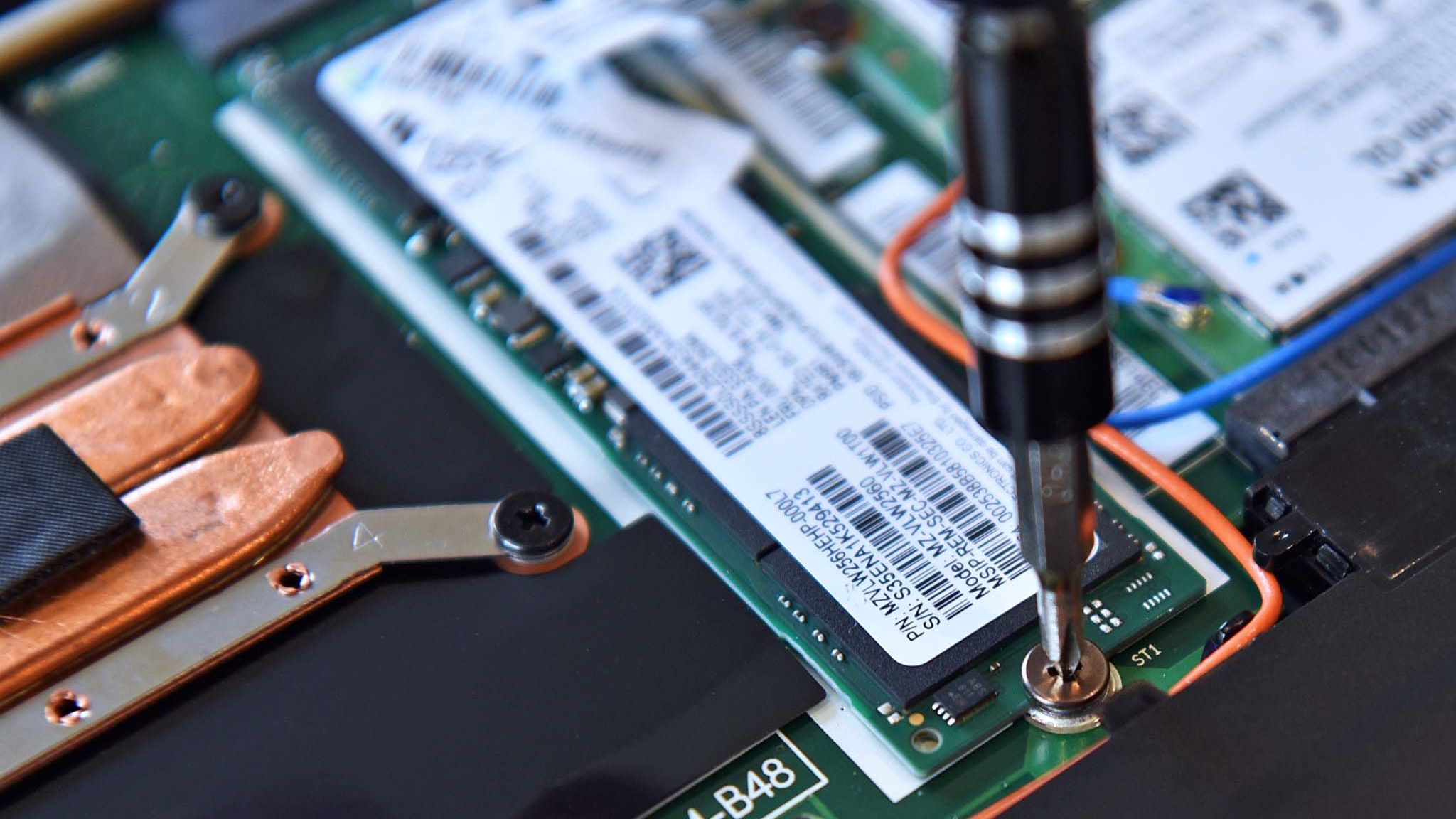
Screwing an M.2 SSD into a Lenovo ThinkPad X1 Carbon laptop

M.2 SSD in a Lenovo ThinkPad X1 Carbon (Image credit: Cale Hunt | Windows Central)

Plenty of Windows laptops are listed by major retailers with 256GB of storage, particularly in budget models. That kind of entry-level drive is aimed firmly at casual users who mostly stick to web browsing, but it's never enough for me. Images and video files build up in my workflow, and I'm often hovering around half capacity on a 512GB drive.

To be transparent, my desktop PC has twin 1TB drives, but that's mostly for games and other gigantic software that I'd never need on the road. Plus, if I tried hard enough, I'm sure I could offload some of my largest files onto external drives, but I'd rather not travel with extra gadgets if I don't have to. 512GB has been perfect for years, and I don't see that changing.

4. At least one USB-A port

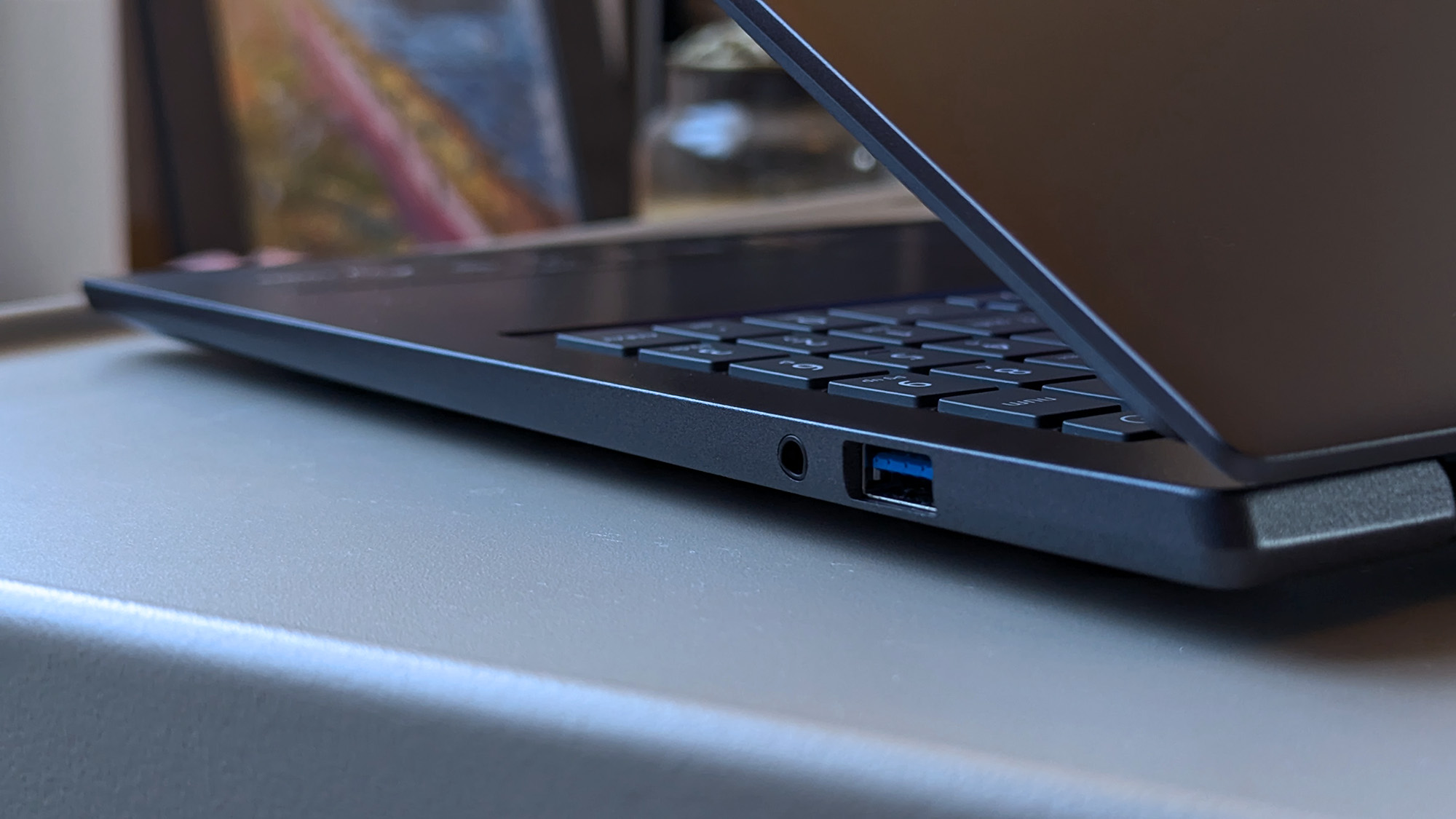
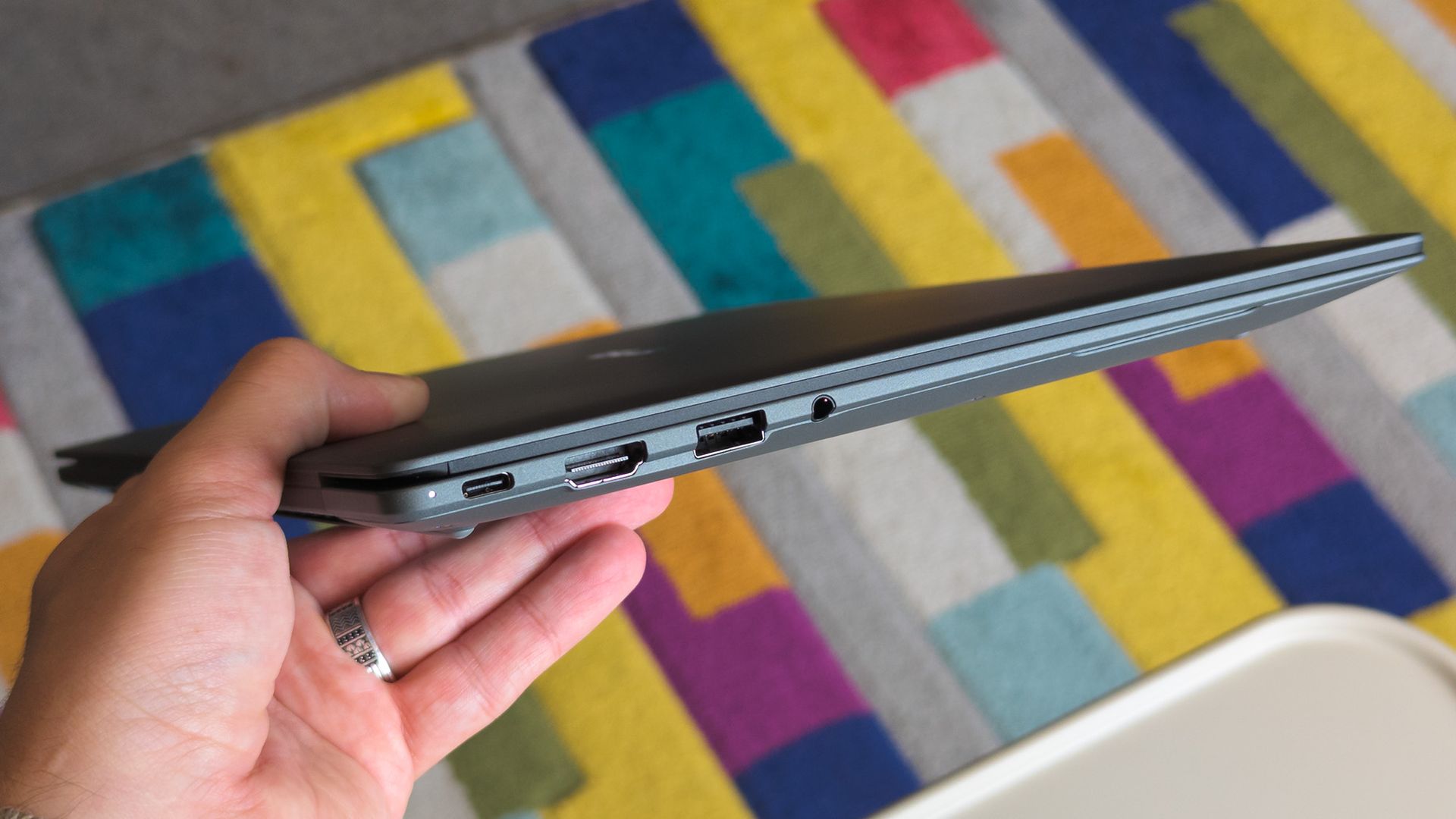
A close-up of a partially open Acer Swift laptop highlighting a USB port and audio jack on the right side. The keyboard and slightly tilted screen are visible, with blurred décor in the background.

Acer Swift Go 16 AI (Image credit: Ben Wilson | Windows Central)

My dinosaur bones are showing. This is mostly about me hanging on to hardware for as long as possible, including my most-used flash drives and dongles for an older mouse. USB-C variants are out there and becoming quite common, but I have too many USB-A accessories that show no sign of wearing out, and I'm keeping them.

If you narrow your search to the absolute thinnest possible laptops, you'll find that USB-A ports disappear. Not a big deal if you have modern peripherals compatible with USB-C ports using popular standards like Thunderbolt 4 and USB4, but at least one full-size offering is a traditional mainstay that I'll always look out for. Wired headphone jacks are a bonus, too.

5. Legitimately all-day battery life

ASUS Zenbook S 14 with Intel Core Ultra (Series 2)

ASUS Zenbook S 14 (UX5406S) (Image credit: Ben Wilson | Windows Central)

Leaving my house without an AC adapter in my carry-on became a realistic option when Intel's impressive "Lunar Lake" mobile processors, more officially known as Core Ultra Series 2, launched in 2024 as part of a new wave of "AI PCs". Putting aside the initial hype around NPUs, Intel's chips made a much more impactful efficiency improvement over their "Meteor Lake" predecessors.

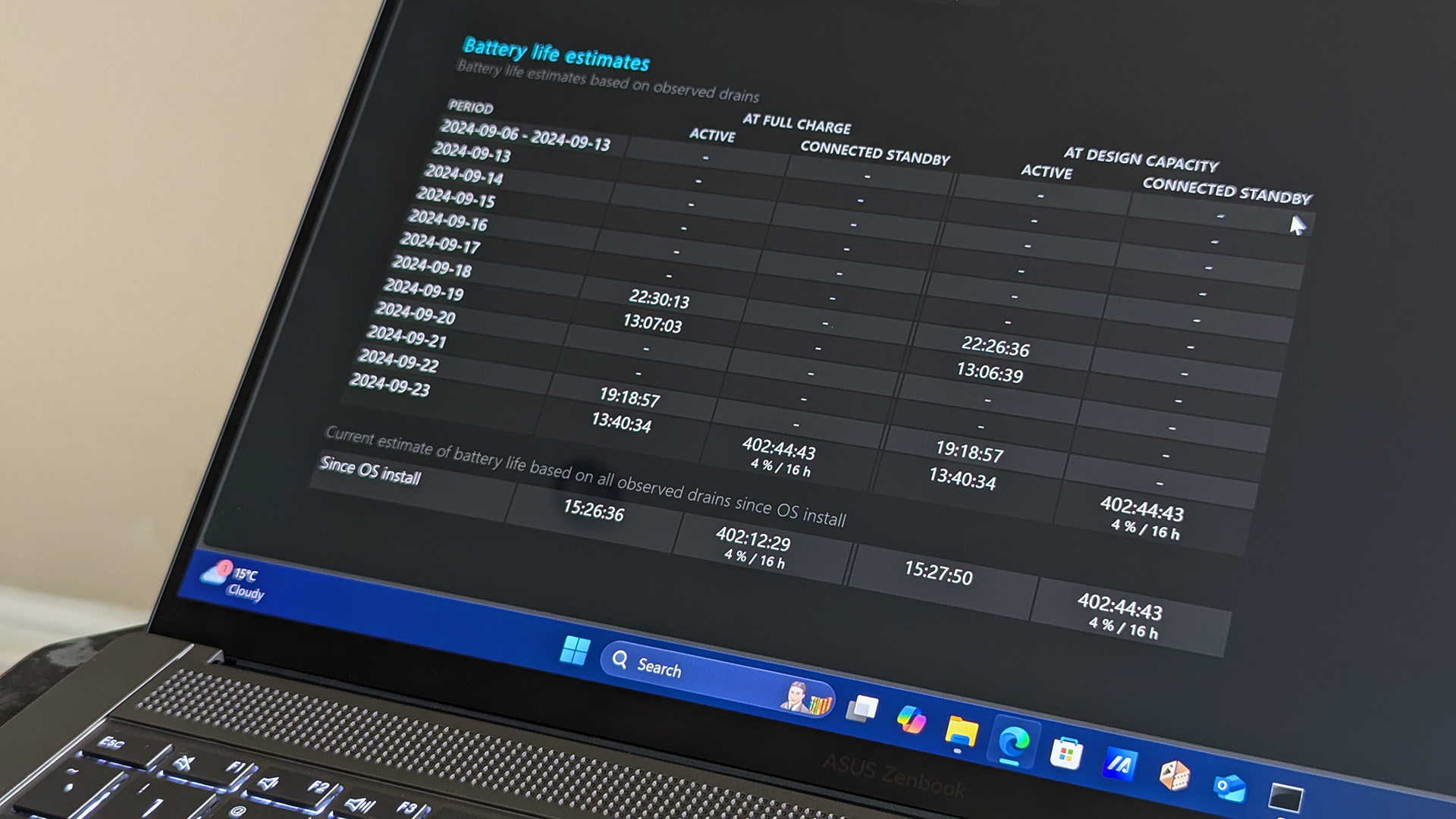
Essentially, the major x86-64 chip manufacturers escalated a back-and-forth rivalry over battery-life claims around the time Qualcomm launched its first-generation Snapdragon X processors, and consumers have generally been better off for it in recent years. Testing ASUS' Zenbook S 14 proved to me that all-day battery life is now a reasonable expectation that doesn't cost the Earth.

6. Backlit keyboard

Close-up of a Lenovo Yoga Slim 7i Ultra (Gen 11) Aura Edition laptop keyboard showing keys like

Lenovo Yoga Slim 7i Ultra (Gen 11) Aura Edition (Image credit: Ben Wilson | Windows Central)

Typing in the dark has become a pretty regular occurrence at trade shows, whether I'm seated for a glorified PowerPoint presentation in a dim theater or traveling to the event itself on a red-eye flight. To be clear, I've been able to touch type since I was a teenager, but the nuances of switching between US and UK keyboard layouts can still catch me out.

At home, I have desk lamps and plenty of other comfortable light sources, but since my laptops are primarily for travel, I always prefer a backlit keyboard. This generally isn't a difficult criterion to meet, as only entry-level laptops would be likely to sacrifice the backlight to save money, though using the Surface Laptop Go 2 for a few years really made me realize how much it matters.

7. No proprietary chargers!

Close-up of a Lenovo Yoga Slim 7i Ultra (Gen 11) Aura Edition laptop resting on a dark surface, highlighting two USB-C ports on the side.

Lenovo Yoga Slim 7i Ultra (Gen 11) Aura Edition (Image credit: Ben Wilson | Windows Central)

I've seen a huge improvement in this area since USB-C chargers became more mainstream, and I have a growing collection of 65W plugs suited for various countries. Even the 45W AC adapter from my Steam Deck is a reliable backup in a pinch, and I don't mind that it charges my laptops more slowly. It's much better than a proprietary barrel jack.

Gaming laptops often sit in limbo between USB-C, tethered to a gigantic power brick, and the old-school barrel jack, because they draw so much power. It's similar with higher-end laptops for creators, as the more powerful CPUs and GPUs inside thirst for the extra juice. I just want to travel with a single USB-C adapter that charges my laptop, phone, and everything else.

My perfect laptop is quite common, actually

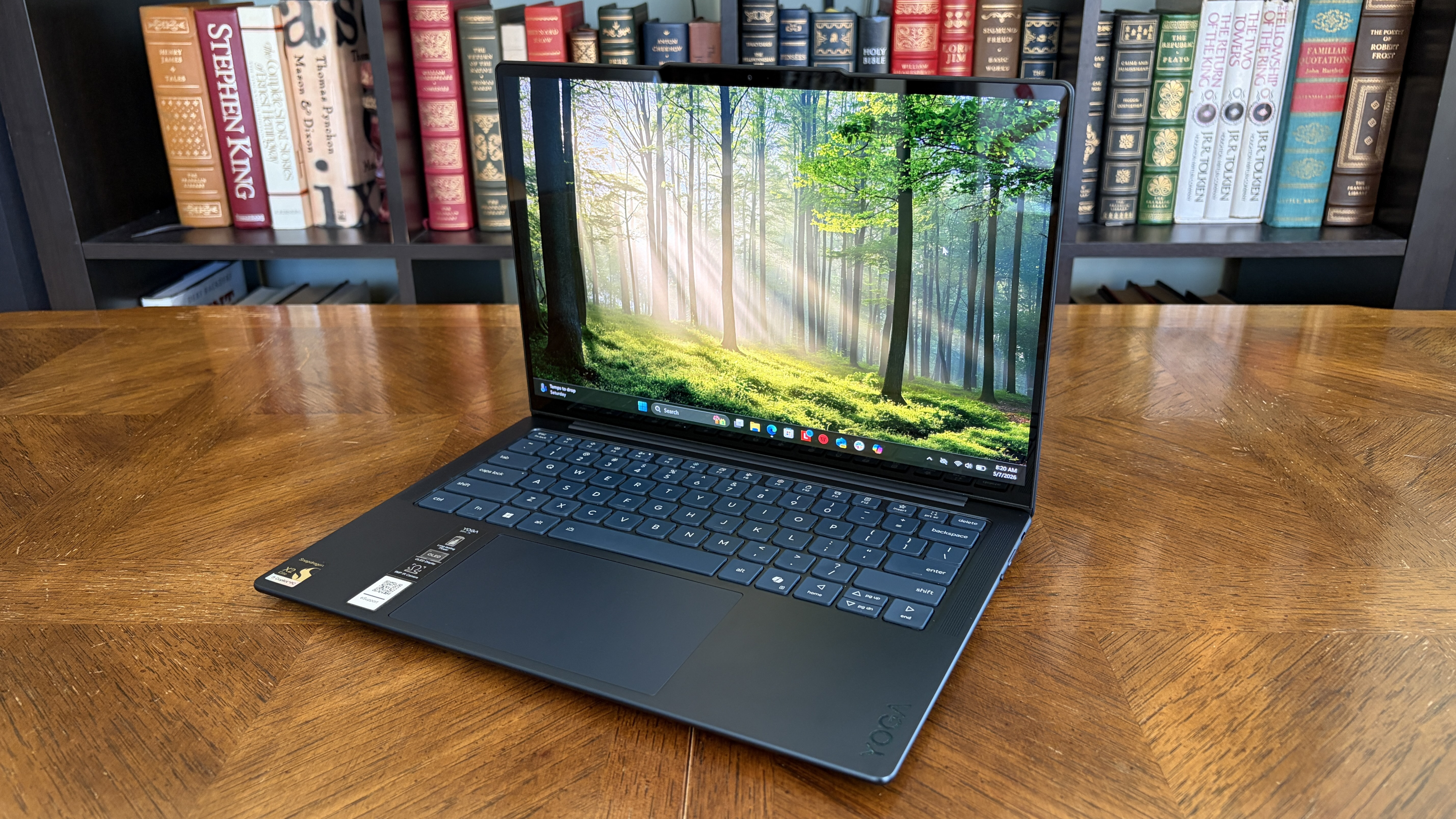
A sleek laptop with a forest wallpaper on the screen sits on a wooden table, surrounded by shelves filled with colorful books, creating a serene, studious ambiance.

Lenovo Yoga Slim 7x (Gen 11) (Image credit: Future)

So, my ultimatum isn't actually that unreasonable, as plenty of brands offer all of the above. Then again, some might start disappearing soon, since USB-A ports and headphone jacks will probably be seen as fossils in a few years. At least those two aren't too difficult to adapt to, as I've owned pairs of wireless headphones that can connect to multiple Bluetooth devices simultaneously.

Still, these are all problems that can only be solved by spending money, which is a big ask when the laptops themselves are creeping up in price, snared by the ongoing memory crisis affecting RAM and storage availability. As it stands, my taste traps me into a laptop price bracket of at least ~$1,000. Any less than that, and I start to notice some parts of my list disappearing.

For now, it's easy to recommend an ASUS Zenbook 14 ($1,199.99 at Best Buy) in one of its Intel/AMD configurations, or a Zenbook A14 ($1,349.99) for a Snapdragon X2 Elite variant running Windows on ARM. Storefronts regularly offer filters for my favorite features, which also makes it easier to search for laptops from other brands, and I'm always looking out for discounts.

Click to join us on r/WindowsCentral

Join us on Reddit at r/WindowsCentral to share your insights and discuss our latest news, reviews, and more.
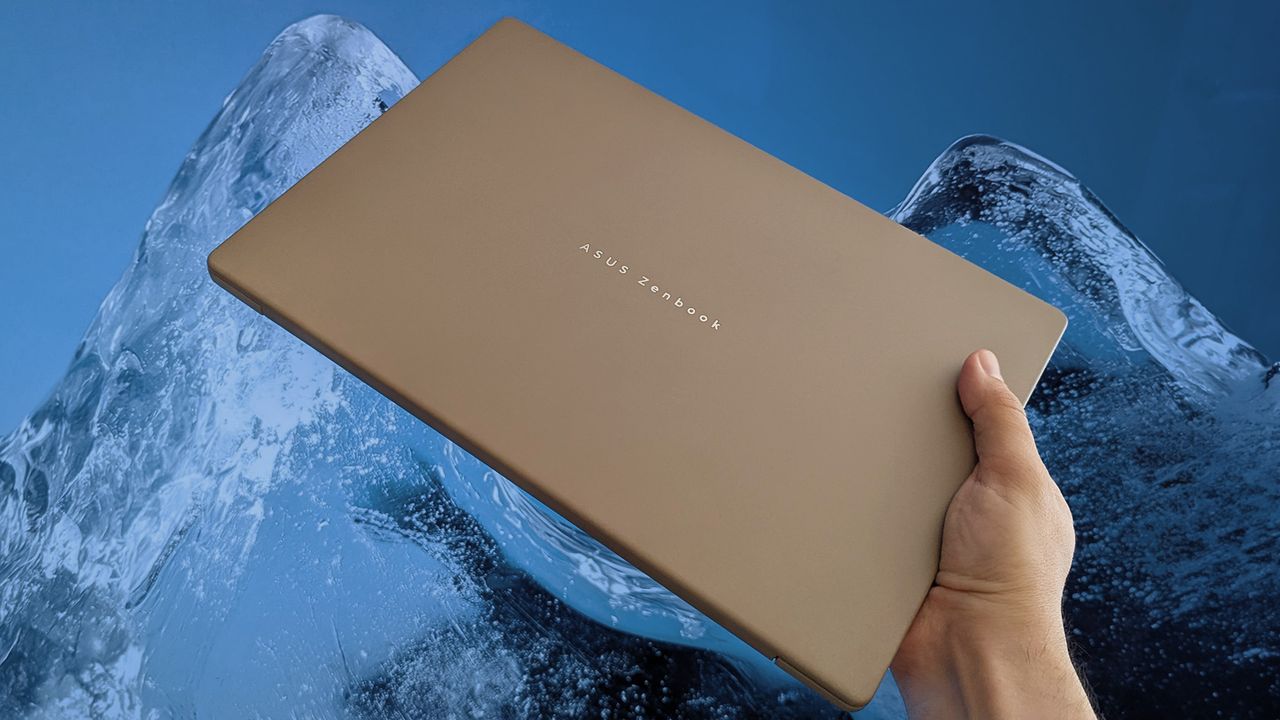
A hand holds a closed ASUS Zenbook A14 with a beige finish, positioned against a dramatic blue ice formation that contrasts with the laptop’s warm color and sleek design.

ASUS' Zenbook range regularly impresses, but it's not the only brand to tempt me.

  •  

Windows XP was released to manufacturing 25 years ago, preparing a launch of arguably the most iconic OS that Microsoft ever made

On August 24, 2001, Microsoft released Windows XP to manufacturing (RTM), shipping its finished product to brands (OEMs) to begin implementing it in brand-new PCs. General availability wouldn't begin until October of that same year, when most of us had the chance to try the operating system previously known as "Neptune" for the first time.

25 years later, Windows XP's influence is still felt worldwide, even internally, as Microsoft repeatedly referenced its style in ugly holiday sweaters with its logo and, again, with a follow-up featuring its legendary "Bliss" wallpaper of rolling green hills and a blue cloudy sky. XP was the best-selling version of the operating system to date and had a cultural impact that will likely survive for decades.

Official social channels haven't thrown any specific celebrations (yet), with @Windows and @Microsoft presumably remaining quiet to treat the later October release date with more significance. Nevertheless, the impact of Windows XP can't be overstated, and enthusiasts (including myself) still feel nostalgic for the colorful OS as it becomes a relic with a quarter-century legacy.

Windows XP was my gateway to the internet, and it certainly made the PC feel like more than a simple word processor with games.

My family-owned desktop PCs started with Windows 3.1, followed by an upgrade to Windows 95 and a later migration to Windows 98 SE. I remember the fascination of seeing the likes of Program Manager being replaced with Explorer and its teal-colored default desktop, but none of it compared to the leap to Windows XP when we finally paid for an internet connection at home.

Bill Gates holding up a copy of Windows XP operating system in New York's Times Square.

Microsoft co-founder Bill Gates with Windows XP in Times Square during an undoubtedly expensive marketing campaign. (Image credit: Getty Images)

Suddenly, MSN Messenger became my most-used program as our household set up proper profiles for each family member, all customized with our own icons and themes that were even better than everything I'd seen on "Microsoft Plus!". Indeed, Windows XP was my gateway to the internet, and it certainly made the PC feel like more than a simple word processor with games.

Still, I'm fully aware of what nostalgia does to me, and my rose-tinted glasses surely make Windows XP seem so much better simply because it arrived during my most formative years. Then again, I know many feel the same way, so I'm keeping my fingers crossed that October comes with a real celebration from Microsoft, so we can collectively look back and compare notes.

For now, I'm reminiscing about grouping up for games of Counter-Strike and Unreal Tournament via mIRC, between posting in opinionated threads on phpBB forums while diving into the fascinating world of Macromedia Flash animations. It might seem outdated and overrated now, but Windows XP was special to me, and I often miss reading Encarta instead of browsing Wikipedia.

Click to join us on r/WindowsCentral

Join us on Reddit at r/WindowsCentral to share your insights and discuss our latest news, reviews, and more.
The Microsoft Windows XP log-in screen is displayed on a laptop computer.

Windows XP hit RTM 25 years ago, prepping the launch of Microsoft's most iconic OS, which became a bestseller with a lasting cultural impact.

  •  

Xbox's "OG Green" Series X25 console might cost nearly $900, with rumors aligning the $100 premium with a Black Friday launch.

A limited-edition translucent green Series X console was unveiled earlier this year at the Xbox Showcase as the "Xbox Series X25", planned for release in November with no confirmed pricing, alongside a matching Series X|S wireless controller.

Fans who attended the show were told they'd receive one for free, but regular consumers have been left in the dark until an apparent €899.99 European price and November 27 release were revealed by "billbil-kun" via Dealabs' High-Tech magazine earlier today.

According to the data in our possession, we are able to say that the price of the XBOX Series X25 limited edition console will be €899.99 in France and Europe.

billbil-kun, Dealabs (Translated)

It's connected to a previous rumor that potential pre-orders for the translucent controller could start during Gamescom 2026, but billbil-kun couldn't confirm whether that aligns with listings for the Series X25 console. Interestingly, Black Friday lands on November 27 this year, kicking off the holiday shopping season.

How much will the Series X25 cost in the US?

Transparent green Xbox Series X and controller, text reads

(Image credit: Xbox)

Right now, a standard Xbox Series X "1TB Disc Drive Carbon Black" on the official Xbox Store costs €799.99 in France and $799.99 in the US. The same currency-symbol switch applies in the same way to the "1TB All-Digital Robot White" at €749.99/$749.99, so it's reasonable to assume that the limited-edition Xbox Series X25 could cost $899.99.

Dealabs rightly assumes the same, with another translation explaining, "the equivalent of this price is expected to be $899.99 in the US," putting what is otherwise a functionally identical Xbox Series X console at $100 above its standard variant for the benefit of its "OG Green" shell and green-tinted light on its power button.

It all follows Microsoft's earlier hardware price hike announcement, which increased the Xbox Series X price from $649.99 to its current $799.99. That $150 increase was already unpopular among Xbox fans, and particularly so with our readers, who voted that "Xbox consoles are too expensive now." If the price leak is true, asking for another $100 will presumably be equally shunned.

Since the start of its 25th-anniversary celebrations, I've been more interested in the translucent green controller. The original console is special to me, but I can't justify spending hundreds of dollars on something like a build-your-own OG Xbox console. I'm keeping my fingers crossed for an affordable X25 joypad.

Click to join us on r/WindowsCentral

Join us on Reddit at r/WindowsCentral to share your insights and discuss our latest news, reviews, and more.

Xbox Series X25

Rumors hint that Xbox's translucent green Series X25 console will launch on November 27 for $100 more than its standard, disc-based counterpart.

  •  

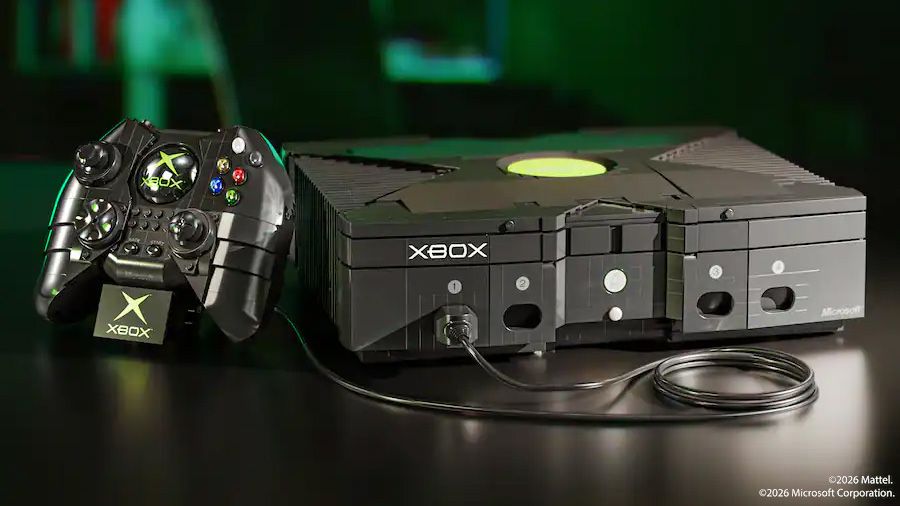
A build-your-own OG Xbox has Morrowind and Psychonauts secrets hidden inside its not-LEGO bricks — and it costs over $300

A buildable recreation of the original Xbox from 2001 is coming from Mattel Brick Shop, technically under the same brand umbrella as the MEGA-branded 3:4 scale Xbox 360 from 2023. Listing the "Microsoft Xbox Building Toy Kit For Collectors" without a firm release date for $329.99 at Best Buy, and even less information at Amazon, the pricey set hides some nostalgic dioramas inside.

Wanna build gaming history? 🎮Get your hands on the Original XBOX Console Collector Building Set from Mattel Brick Shop: https://t.co/LoL6GTj5xm pic.twitter.com/kcBnKNGADUAugust 19, 2026

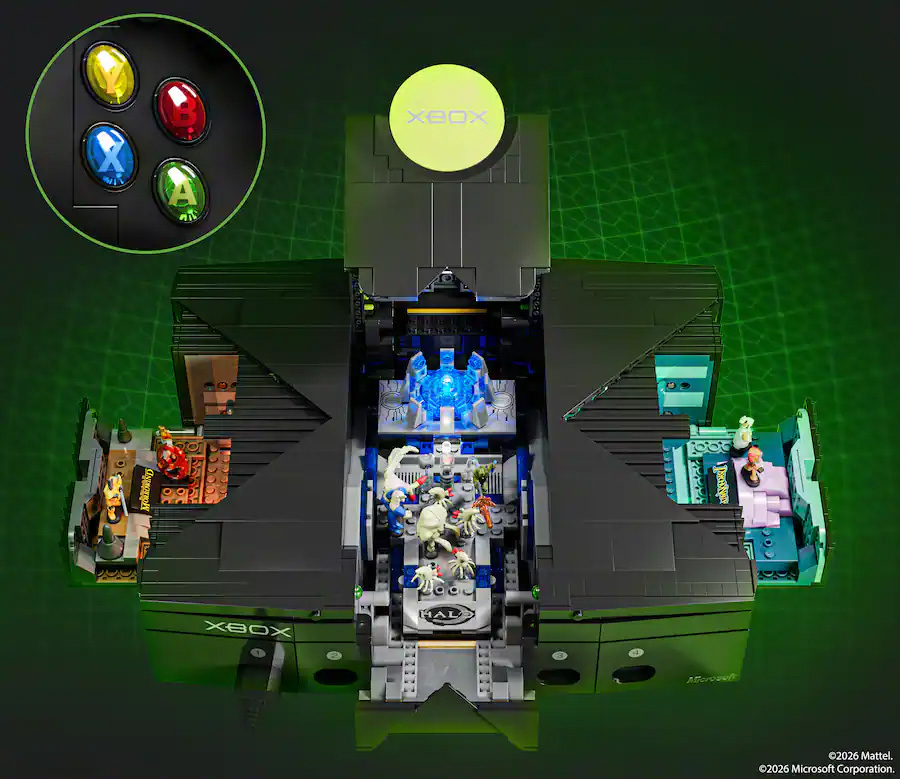
Alongside the chunky console itself is a close-enough representation of the original "Duke" controller, and three internal displays based on popular titles from the console's lifespan. Miniature set pieces from Halo, Psychonauts, and The Elder Scrolls III: Morrowind have built-in lighting that's activated by the Duke joypad and fit comfortably inside this 1:1 set with 3,509 pieces.

Slightly bigger, but a lot more expensive

Mattel Brick Shop original Xbox model opened to show Halo, Fable, and Psychonauts dioramas, with close-up Xbox controller buttons and a green grid background.

(Image credit: Mattel | Microsoft)

I'm admittedly the target audience for this sort of thing; a total sucker for nostalgia. I already own LEGO models of the SEGA Mega Drive (Genesis) console and its controller, displayed on shelves alongside other happy memories from my childhood. A full-sized, 1:1 recreation of the gigantic original Xbox wouldn't fit with it, but I'm sure I'd find somewhere else.

This isn't LEGO, though. It's the other brand, and it's asking a lot more money for this more complicated representation of Microsoft's hardware than Mattel's bricked-up Xbox 360 set that launched for $150 — one I already skipped. Asking over $300 for a follow-up toy feels steep, especially when many of us could find the real console on eBay for less.

OH MY GOD that price!I could get a real original Xbox in great condition with those 3 games and way more for much less.

@stok54, X

On the other hand, the cute Morrowind feature appeals to a very specific part of my nostalgic heart, and ditto for Psychonauts. Still, to show off those parts and have them all visible, I'd need some serious display space. At that point, I'd rather buy the dioramas separately and show those off instead of a set that just looks like the real thing from a distance.

It's a neat way to celebrate Xbox's 25th anniversary, but I'm still patiently waiting for that translucent green Series X|S joypad instead. Rumor has it we'll see controller reservations opening at Gamescom for an October 20 release (via @eXtas1stv). Fingers crossed. I only have so much disposable income to burn on nostalgic accessories before my family starts getting concerned.

Click to join us on r/WindowsCentral

Join us on Reddit at r/WindowsCentral to share your insights and discuss our latest news, reviews, and more.
Mattel Brick Shop original Xbox console with green logo and wired Duke controller on a dark reflective surface, lit with green highlights.

Mattel Brick Shop's buildable OG Xbox is a 1:1 recreation with a steep price.

  •  

I tried GeForce NOW on Firefox as NVIDIA and Mozilla team up for 1440p at 120 FPS — Yeah, it's still the best for cloud gaming.

NVIDIA's self-made cloud gaming platform, GeForce NOW, has added official support for Mozilla's Firefox web browser. Firefox users with a paid subscription to NVIDIA's service can now play supported PC titles from their Steam, PC Game Pass, GOG, Epic Games Store, or Ubisoft Connect libraries at up to 1440p and 120 FPS by navigating to play.geforcenow.com.

Firefox earned its place on our list of supported browsers by delivering the first-class experience GeForce NOW players expect.

Andrew Fear, NVIDIA GeForce NOW Director

GeForce NOW has an ad-supported free 'Basic Rig' tier that's limited to 1-hour sessions at 1080p, while paid 'Performance' and 'Ultimate' tiers offer 6 hours at up to 1440p and 8 hours at up to 5K, respectively. The GeForce NOW update is already playable with the latest version of Firefox, though Mozilla says it will share "what this partnership means for gamers" at Gamescom on August 25.

Is NVIDIA GeForce NOW worth it?

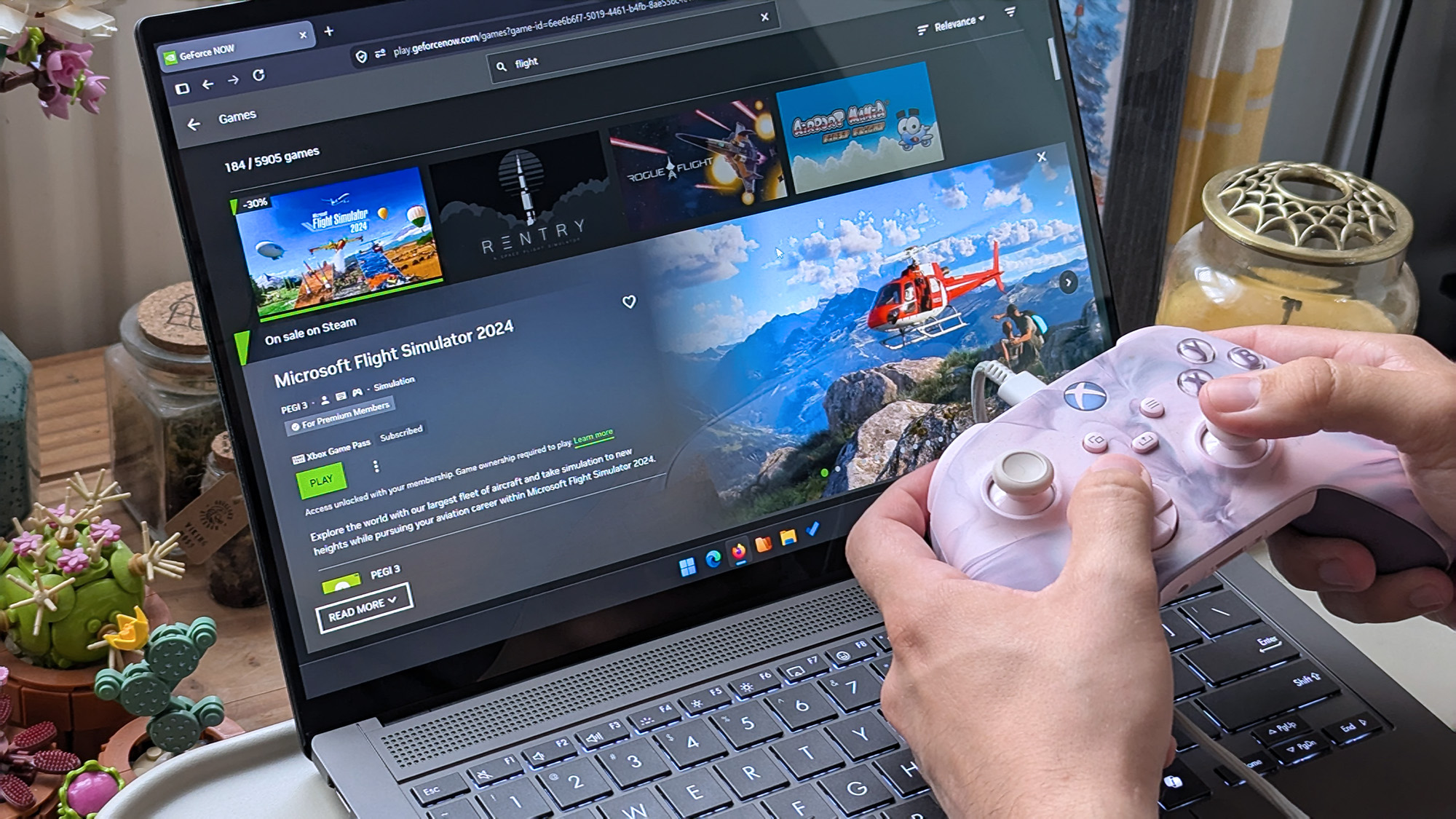
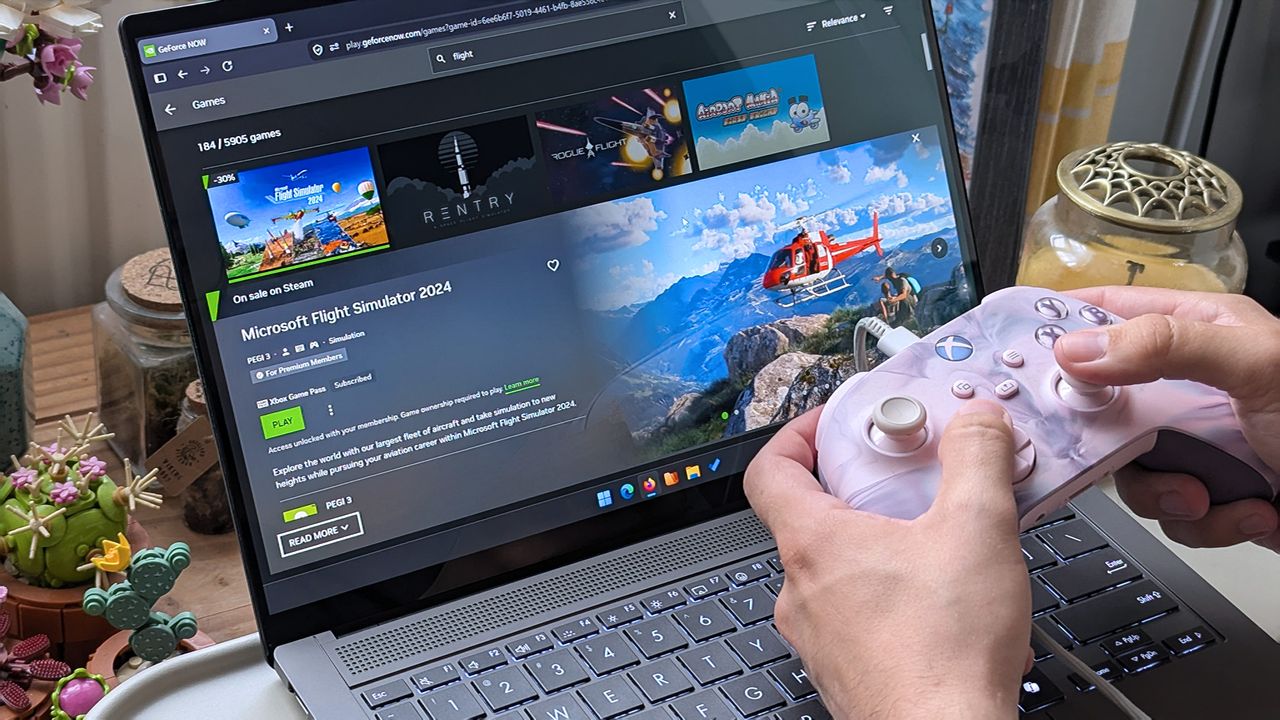
Hands holding a pink‑and‑white Xbox controller in front of an ASUS laptop displaying the GeForce NOW page for Microsoft Flight Simulator 2024, showing a green “Play” button.

GeForce NOW comes in handy for playing bigger PC games that usually take a long time to install. (Image credit: Ben Wilson | Windows Central)

GeForce NOW cloud streaming saw updates and new games unveiled at GDC earlier this year, which piqued my interest as someone who generally sticks with Xbox Cloud Gaming — something I can access with my Game Pass Ultimate subscription. It's a clever option for high-end titles that are too demanding for my beloved Steam Deck, but I have a somewhat unusual setup.

I'm lucky enough to have a Gigabit internet connection with relatively low latency, powered by TP-Link's Deco XE75 Pro mesh setup on Wi-Fi 6E, which keeps my wireless devices running at their fastest. When I tell you that I happily enjoy a wealth of slower-paced games on GeForce NOW with insignificant latency, that's with a privilege delivered by my home network.

Nevertheless, I've always had a generally positive experience with GeForce NOW, because I've already built a gigantic Steam library, and my Epic Games Store isn't too far behind (mostly made up of freely claimed titles). There is absolutely unavoidable input delay with cloud gaming, and pretending it doesn't exist is disingenuous, but I've never been interested in streaming fast-action games.

As for Firefox, I tested it out and sure enough, the experience is great. It'll probably come as good news to anyone who jumped ship after losing their favorite ad blocker in Chromium browsers, but Mozilla still holds only around 2.45% browser share with Firefox, and it hasn't tempted me away from Microsoft Edge to date. Still, it's good news for cloud gaming fans.

Click to join us on r/WindowsCentral

Join us on Reddit at r/WindowsCentral to share your insights and discuss our latest news, reviews, and more.
Hands holding a pink‑and‑white Xbox controller in front of an ASUS laptop displaying the GeForce NOW page for Microsoft Flight Simulator 2024, showing a green “Play” button.

GeForce NOW adds official Firefox support, with up to 1440p/120 FPS cloud gaming available to anyone who subscribes to NVIDIA's paid tiers.

  •  

Everything you need to head back to school with a new Dell PC is here — fast Windows laptops with essential accessories on sale

It's about time for a new semester, and upgrading your PC can make the process much easier. You don't need anything excessive to access most of the Windows software and cloud apps you'll need in school or college, and Dell's official store has already reduced prices on some of its best hardware.

Back to school deals up to $900 off PCs and more at Dell

Some of Dell's deals go into the weeds (who knew they sold robot vacuums?), so I've handpicked a collection for practically anyone who needs portable tech for studies or even works from home. We've tested hundreds of processors found in its laptops, and traveled the world with devices just like this.

New XPS 13 (Core 5 320, 8GB RAM, 512GB SSD): was $699.99 now $599.99 at Dell.com (with Student pricing)

Dell returns to its iconic branding with the "thinnest & lightest XPS laptop ever," and its choice of Intel processor delivers up to 17 hours of battery life.

👉 Standard pricing: $699.99 at Dell.comView Deal

Pro 7 Rechargeable Compact Keyboard and Mouse: was $94.99 now $89.99

An external mouse and keyboard are much more comfortable for extended sessions, and this pairing is compact enough for travel.View Deal

Pro 14-16 Plus EcoLoop Backpack: was $54.99 now $49.99

Technically designed for 14-inch laptops and above, this affordable backpack just offers extra space for your laptop's AC adapter and more study materials.View Deal

Is the new Dell XPS 13 a good laptop?

Dell XPS 13

Dell's new XPS 13 impressed us. (Image credit: Zac Bowden / Windows Central)

We saw the revival of Dell's XPS 13 laptop appear at Computex earlier this year, and went hands-on while we attended Taiwan's popular technology convention. There's no denying it's the Windows-centric alternative to Apple's MacBook Neo, but as Dell explained to us in person, it was in development before the Neo ever launched. In that, it stands as more of an affordable flagship than a compromise.

After spending some time with the XPS 13, Senior Editor Zac Bowden said it "still feels every bit as premium and nice to use as the $1,000 XPS 13 before it", which tracks, because this used to be placed as a much more expensive laptop. If you pick one up, you'll get a 120Hz display for a smooth refresh rate on a bright, 2.5K touchscreen, in the thinnest and lightest XPS yet.

I don't think there's another laptop on the market right now that is as good a deal as this new Dell XPS 13 is at $699. It's so much better than the MacBook Neo that it's not even really a contest.

Zac Bowden, Senior Editor

As the name suggests, the XPS 13 offers a 13.4-inch screen in a 2.2-lb chassis, powered by a relatively standard 65W USB-C AC adapter rather than a proprietary cable-and-brick setup. Yes, it's smaller than the EcoLoop backpack was designed for, but the extra inch leaves space for extras like the Pro 7 mouse and keyboard combo.

However, Zac did make it clear that the XPS 13 has "an amazing keyboard and excellent trackpad", so you'll still be able to rely on it in any situations where an external set of peripherals isn't as viable, and they stay in your backpack instead. Plus, the built-in webcam supports Windows Hello face unlock for faster logins, and its powered USB-C 3.2 Gen 2 ports support external displays.

You'll need to verify your education status with Dell to be eligible for the XPS 13's $599.99 student pricing, but $699.99 is still a great price if you're looking for a work companion instead. Otherwise, for students heading back to school for a new semester, this portable PC combo for under $740 is a steal.

Click to join us on r/WindowsCentral

Join us on Reddit at r/WindowsCentral to share your insights and discuss our latest news, reviews, and more.
Dell XPS 13

Back‑to‑school Dell deals are offering the bargain new XPS 13 laptop, along with essential accessories, and standout value for students.

  •  

The Witcher 3 will leave Xbox Game Pass this month, barely half a year after joining — as an indie-heavy wave enters instead

If you're subscribed to Xbox Game Pass, you'll have a wave of new games hitting your app over the next few days — with titles coming to Series X|S consoles, PC, and devices that support the ever-expanding Xbox Cloud Gaming platform — with new picks hitting Ultimate and Premium tiers.

It starts with Egging On launching today, August 18, which you might recognize from last year's ID@Xbox showcase. If you ever played "A Difficult Game About Climbing" on Steam, or any of its many rage-inducing derivatives, you'll know what to expect from this, and how much patience to bring with you.

You can see more after the jump, but the less exciting news is the expiration of The Witcher 3: The Wild Hunt Remastered Edition — leaving Game Pass for cloud and consoles on August 31. The successful and nonlinear monster slayer's "Complete Edition" had only joined Game Pass in February this year, so if you abandoned a half-finished save, your time is running out (via Xbox Wire).

Goodbye Geralt, and shoutout to Starsand

Screenshot of The Witcher 3: Wild Hunt on Xbox Series X.

The Witcher 3: Wild Hunt offers a gorgeous adventure, and it's easy to recommend. (Image credit: Windows Central)

The Witcher 3: Wild Hunt is one of those gigantic role-playing games with a 50+ hour story, and even more on offer for completionists. It's just huge. The game's Remastered Edition was only recently offered up to xCloud and console players, so I hadn't been tempted by it as a primary PC Game Pass player, but it's a shame to see it leave relatively quickly.

When I had played it, I became so distracted by collecting flowers, herbs, and other busybody side quests that I never actually finished the mainline story. Nevertheless, I know I enjoyed the game and loved roaming its world and listening to its quality voice acting (and noting the interesting accent choices for certain comical NPCs), so try it before it's gone.

I'll get around to it one day. For now, I'm intrigued by the Ghibli-esque life sim, Starsand Island, as it fits the kind of cozy co-op time drainers that my wife and I enjoy playing on a quiet evening. It's definitely different from The Witcher's world, but paying for Game Pass gives us a chance to try it out on PC or console with our Ultimate subscription.

Game Pass in August 2026

  • Available today
    • Egging On (August 18)
  • Coming soon
    • Vapor World: Over the Mind (August 19)
    • BlazBlue Entropy Effect X (August 19)
    • Relooted (August 19)
    • Starsand Island (August 20)
    • Aerial_Knight's DropShot (August 25)
    • Blood Dungeon (August 25)
    • Resonance: A Plague Tale Legacy (August 27)
    • Young Suns (August 31)
    • Shelldiver (September 1)
  • Leaving August 31
    • Another Crab's Treasure
    • I Am Your Beast
    • Neon Abyss
    • One Lonely Outpost
    • The Witcher 3: The Wild Hunt Remastered Edition
  • Leaving September 6
    • NBA 2K26

Click to join us on r/WindowsCentral

Join us on Reddit at r/WindowsCentral to share your insights and discuss our latest news, reviews, and more.
The Witcher 3: Wild Hunt Korean Swords

The Witcher 3: The Wild Hunt Remastered Edition leaves Game Pass on August 31 after only joining in February, while indie titles arrive.

  •  

I replaced File Explorer on my Windows 11 laptop with this app — and it's still one step ahead of Microsoft's optimization plans

Built as an alternative to the standard File Explorer in Windows 11, Files is an open-source project that always seems to stay one step ahead of Microsoft. Its latest update to Files v4.2.7 is a perfect example, as it focuses on improving the speed and overall responsiveness of the right-click menu before the official context menu upgrade comes to Windows.

The optimization trend extends to multitasking in Files, as v4.2.7 also improves its memory cleanup habits when any tabs are closed. Efficient tabs are a headline feature of the app, even if the experience feels quite similar to File Explorer — including its support for keyboard shortcuts — but Windows PC enthusiasts will undoubtedly appreciate any efforts to lower memory usage.

The context menu is improving in multiple ways

We already knew that plans to fix Windows 11's slow context menus are coming with a major overhaul, and it certainly feels overdue, but it's a step in the right direction for Microsoft. Nevertheless, some of our YouTube audience certainly share this sentiment, and I wouldn't be surprised if Files sees broader adoption among like-minded PC users with updates like this.

I'm not going to praise Microsoft for doing what they should have done a few years ago, but I'm glad I can finally see a decent context menu coming.

@bogdan.p, YouTube Viewer

I first started using the Files App on my primary laptop shortly after v4.0 launched, when it added more flexibility for the right-click context menu. It isn't installed on all of my PCs, but on my travels I find it quite useful alongside my portable mainstays like PowerToys Run. Anything that lowers my RAM usage is a winner in my eyes, whether it comes from Microsoft or elsewhere.

You can try Files — and even make it your default file manager in Windows 11 without uninstalling File Explorer or damaging your OS in any way — to see if you prefer the experience over Microsoft's default implementation. If you don't, it's no big deal; you can revert to the standard experience by uninstalling it, as you would with any other app. Give it a shot.

View the full changelog ↴

Files v4.2.7 changelog

  • What’s New in Files v4.2.7
    • Improved context menu performance
      • Opening the right-click context menu is now noticeably faster and more responsive.
    • Open a new tab by middle-clicking the tab strip
      • You can now open a new tab by middle-clicking an empty area of the tab strip, giving you a quick way to add tabs without reaching for the new tab button.
    • Select items opened from other apps
      • When you open a file’s location from another application, Files now selects that item in the folder automatically.
    • Reduced memory usage after closing tabs
      • Files now frees up more memory when tabs are closed, helping keep the app lightweight during long sessions.
  • Fixes
    • Fixed issue with the filter text box being cleared.

Files App: was $12.99 now $11.69 at Microsoft Store

👉 Alternatively: Free at GitHub

"Purchasing Files through the Microsoft Store helps support the developers and allows us to continue updating the app with new features and improvements."View Deal

Click to join us on r/WindowsCentral

Join us on Reddit at r/WindowsCentral to share your insights and discuss our latest news, reviews, and more.
Files 4.0 app promotional images on an ASUS Zenbook laptop screen.

Files v4.2.7 speeds up Windows 11's sluggish context menu and improves memory use, ahead of Microsoft's own planned File Explorer optimizations.

  •  

Stop putting off your monitor upgrade — our favorite Dell and Alienware displays just made it an easy choice for the new semester

Monitors generally last so long that I often forget how significant an upgrade can be, but seeing some of the 4K displays and OLED panels in our recent reviews always proves they're among the best investments you can make. After all, you're looking at your PC monitor most of the time, so it's worth it.

Back to school deals up to $900 off PCs and more at Dell

Sure enough, Dell is offering generous discounts on some of the best monitors we've tested, including a gaming variant in its Alienware subbrand. If you're thinking about a screen upgrade for your new semester, now's the right time to buy. Here's my curated collection of Dell monitors that are easy to recommend.

32 Plus 4K QD-OLED (S3225QC): was $799.99 now $599.99

Dropping below $600 makes this an easy choice for anyone who has the space. You get built-in audio with 5 speakers and a gorgeous, color-accurate 4K QD-OLED panel.

Windows Central review: ⭐⭐⭐⭐½View Deal

UltraSharp 27 4K Thunderbolt Hub (U2725QE): was $849.99 now $699.99

At a more "standard" size, Dell gives you a 4K IPS LCD panel running at 120Hz, a Thunderbolt 4 hub, and extra USB ports for all your peripherals.

Windows Central review: ⭐⭐⭐⭐½View Deal

34 240Hz QD-OLED Gaming (AW3425DW): was $799.99 now $749.99

For the gamers — and it's a beast. A curved QD-OLED 1440p (not 4K) panel running at 240Hz, with a 0.03ms response time, alongside HDR and G-Sync support.

Windows Central review: ⭐⭐⭐⭐½View Deal

Does Dell make good monitors?

Image of the Dell 32 Plus 4K QD-OLED Monitor (S3225QC).

Dell 32 Plus 4K QD-OLED Monitor (S3225QC). (Image credit: Windows Central | Zachary Boddy)

Dell has consistently impressed my team and me with each monitor that we've sampled — and in some cases permanently adopted — with accurate color representation on sharp panels with good contrast. Their construction is consistently above average, too, often with a toolless setup and included stands offering plenty of tilt and swivel adjustment options.

The Dell S3225QC's 5-speaker system easily sounds better than the majority of monitors with built-in audio.

Zachary Boddy, Former Staff Writer

With its $200 saving, the 32 Plus 4K QD-OLED (S3225QC) stands out as the best deal, and we particularly praised its five-speaker array for delivering "some of the best audio you'll hear in a monitor or TV". Indeed, it includes a two-piece toolless stand for a straightforward setup and affordable access to a Quantum Dot OLED (QD-OLED) panel with "perfect" contrast.

Image of the Dell UltraSharp 27 4K Thunderbolt Hub Monitor (U2725QE).

Connectivity is bountiful on the UltraSharp 27. (Image credit: Windows Central | Zachary Boddy)

One of the most important considerations is connectivity and whether your existing PCs and devices can connect to the monitor you buy. For example, the S3225QC offers a gorgeous panel, but it's limited to a single HDMI port and two USB-C ports — one of which supports DisplayPort 1.4 output — but there's nothing for a traditional full-sized DisplayPort cable.

The opposite side of that coin is the UltraSharp 27 4K (U2725QE) with its Thunderbolt Hub and two DisplayPort options, HDMI, alongside a positively huge array of USB-A and USB-C ports. For gamers, responsiveness matters more, and the Alienware AW3425DW dominates with a 240Hz refresh rate and a 0.03ms response time built into a 21:9 (3440 x 1440) panel.

Overall, our own testing proved that Dell monitors are great picks for practically anyone. Nevertheless, you should always consider your needs, including which display size best fits your desk setup (or whether you'll use a mounting arm over the included stands). Right now, availability is healthy at Dell's US store, with fast delivery times.

Click to join us on r/WindowsCentral

Join us on Reddit at r/WindowsCentral to share your insights and discuss our latest news, reviews, and more.
Image of the Dell UltraSharp 27 4K Thunderbolt Hub Monitor (U2725QE).

Dell's UltraSharp 27 is a discounted winner.

  •  

I tested a CPU cooler that looks like a V8 engine — and this air-powered monster performs like one, too

I've generally leaned towards all-in-one (AIO) liquid cooling for my own custom PC builds for the past decade or so, but air cooling is practically forcing its way back into my habits because it keeps proving its worth via reviews like these. The Cooler Master V8 ACE 3DHP caught my eye mostly because of its "V8 engine" throwback gimmick, but there's a clever secret hiding inside its fins — something that Hyper 212 3DHP cooler owners will recognize.

Cooler Master provided a sample but did not see, nor did it have any input on, the contents of my article before publishing.

How much does the V8 ACE 3DHP cost?

The Cooler Master V8 ACE 3DHP Black CPU cooler box sits on a wooden desk, showing the product image, branding, and specifications. Other PC components are visible in the background.

Built separately for AMD and Intel, each base plate has a specific design, but brackets are included for both. (Image credit: Ben Wilson | Windows Central)

At the time of writing, the best place to buy the Cooler Master V8 ACE 3DHP designed for AMD (AM4/AM5) processors is Newegg at $119.99, or Amazon for the same price via Newegg Business. I also found it sold above MSRP by third parties at Best Buy, which could be a last resort.

Otherwise, the Intel (LGA 1851/1700/1200/115X) variant isn't listed on the official Cooler Master US store, Newegg, or other third-party stores. For now, availability is skewed towards the AMD side, and though you do get an Intel bracket inside the box, it isn't perfectly optimized for those chips.

Cooler Master V8 ACE 3DHP (AMD) specifications

Component

Spec

Socket support

AMD AM4/AM5
Intel LGA LGA 1851/1700/1200/115X (with included bracket)

Dimensions

138.95 x 136.47 x 167.3mm

Weight

2.57 lbs (1.17 kg)

Fans

120 x 120 x 30mm, 89.6 CFM (front)
120 x 120 x 30mm, 61.0 CFM (rear)

Thermal paste

Cooler Master CryoFuze

Warranty

6 years

V8 ACE 3DHP: $119.99

Newegg is, so far, the best place to buy.

👉 Also available: £111.59 at Newegg UKView Deal

Is the V8 ACE 3DHP a good CPU cooler?

Close‑up of the Cooler Master V8 ACE 3DHP CPU cooler showing its engine‑inspired top shroud with “V8 3DHP” and “V8 ACE Air Cooler” branding.
Those aren't the heatpipes on top; it's just a plastic cover, but I dig it.Ben Wilson | Windows Central
The Cooler Master V8 ACE 3DHP CPU cooler sits on a wooden desk, displaying its dual‑fan layout, heat pipe array, and black shroud with “V8 3DHP” labeling.
It's tall, wide, and heavy, but surprisingly easy to install.Ben Wilson | Windows Central
The Cooler Master V8 ACE 3DHP CPU cooler stands upright on a desk, displaying its heat pipes. Graphics cards, product boxes, and other hardware fill the background of the workspace.
A glimpse through the dense fins reveals the extra "3D" heatpipes.Ben Wilson | Windows Central
A hand holds a metal CPU cooler mounting bracket labeled for Intel LGA sockets. Screws, cables, a fan, and thermal paste are scattered across the desk behind it.
Despite its AMD-first design, this variant still comes with an Intel bracket.Ben Wilson | Windows Central
A hand holds a Cooler Master CryoFuze thermal paste syringe above a V8 ACE 3DHP Black CPU cooler on a desk.
I'll never turn my nose up at a free tube of thermal paste.Ben Wilson | Windows Central

Before I ever installed this cooler onto a motherboard, I loved the way it looked. It isn't quite as extreme as Cooler Master's V8 GTS from 2013 — which almost resembled an alien motorbike engine — opting for a single-tower setup this time with incredibly dense fins on the heatsink. It's still a chunky air cooler, just like its ancestor, but now it actually looks more like a V8 car engine.

The V8 ACE 3DHP offers separate fine-tuned versions for AMD and Intel, though you still get mounting brackets for both.

Aesthetics aside, the hype centers on the setup of 4x traditional heatpipes plus 2x "3D heatpipes" (3DHP) that run vertically from the base plate through the heatsink. It's all about pulling as much heat away from your chosen CPU as possible, which is why the V8 ACE 3DHP offers separate fine-tuned versions for AMD and Intel, though you still get mounting brackets for both.

Cooler Master V8 ACE 3DHP installed on a test bench with RAM, power supply, and graphics card visible with various motherboard power cables.
Even on an open-air test bench, this is an imposing air cooler.Ben Wilson | Windows Central
Cooler Master V8 ACE 3DHP installed on a test bench with RAM, power supply, and graphics card visible.
Nevertheless, I didn't experience any RAM clearance issues.Ben Wilson | Windows Central
Cooler Master V8 ACE 3DHP CPU cooler installed inside a test bench with running fans above RGB RAM
There's no RGB, and I don't see any reason to raise the cost further by including it.Ben Wilson | Windows Central
Close‑up of the Cooler Master V8 ACE 3DHP CPU cooler installed inside a test bench, showing its engine‑inspired shroud, curved heat pipes, and fin stack.
This is the part you'll want to show off, so make sure your PC case has a clear side panel.Ben Wilson | Windows Central

Installation was a breeze. The V8 ACE 3DHP attaches to the standard AM5 backplate with four thumbscrews, two plates, and four more screws to hold it in place. The fans slide off the heatsink, so I can attach the two threads and tighten everything up. Finally, the fans are reattached and daisy-chained together, connecting to the CPU_FAN header.

Clearance is slim, but it fits cleanly over my RAM and the Gigabyte X870E Aorus Master X3D ICE SSD heatsink, with a slight amount of breathing space over G.Skill Trident Z5 Neo RGB modules. Running an AMD Ryzen 7 9850X3D on my open-air test bench at around 5.2GHz for 15 minutes kept an average temperature of 81.5°C, peaking at 83.5°C.

Unsurprisingly, it maintains a lower temperature on this powerful chip than my ~$35 Thermalright Peerless Assassin 120 SE — and our sister site goes deeper into V8 ACE 3DHP benchmarks over at Tom's Hardware if you're craving more specific test results — while its fans thankfully showed no signs of rattles or other unwanted motor noise.

Does the V8 ACE 3DHP have any issues?

A hand lifts the Cooler Master V8 ACE 3DHP CPU cooler, showing its large heatsink, multiple heat pipes, and mounted fan. Another fan, product box, and PC parts are arranged on the desk below.
They won't slip off without a firm pull, but the heatsink's weight alone can dislodge the fans.Ben Wilson | Windows Central
Handheld sound level meter readings of 44.4 dBA and 55.8 dBA positioned near an open PC test bench, measuring acoustic output from the Cooler Master V8 ACE 3DHP cooler.
It isn't the loudest cooler in the world, but remember, my open setup had plenty of space to breathe.Ben Wilson | Windows Central

Being such a chunky cooler with a performance focus, the V8 ACE 3DHP is heavy — around 2.57 lbs (1.17 kg) — and it'll need plenty of cool, strong intake airflow to feed its thick, 30mm PWM fans, which generate at least 55 dBA of noise under load. PC builders tempted by this cooler will surely take its dimensions and clearance considerations into account, but it's still surprisingly big.

The V8 ACE 3DHP is heavy — around 2.57 lbs (1.17 kg) by my estimate — and it'll need plenty of cool, strong intake airflow to feed its thick, 30mm PWM fans.

Because those fans slide into place on rails, you'll also want to be careful when handling this cooler. Although I'd mostly held it by the center section, I had once shifted my grip to one of its fans, which slipped down before I quickly caught it. I think my heart fell further than the cooler physically did, but it was a lesson learned. Nice feature, but be safe handling those detachable fans.

Should you buy the V8 ACE 3DHP?

The Cooler Master V8 ACE 3DHP Black CPU cooler rests inside its open box, revealing its dual‑fan design and dense fin stack. Surrounding PC parts and tools sit on a desk with a green cutting mat.

If you're going all out on a high-end CPU, then the V8 ACE 3DHP could replace the usual AIO liquid setup. (Image credit: Ben Wilson | Windows Central)

You should buy this if ...

✅ You want to cool a powerful, high-performance CPU

✅ You're building in a PC case with plenty of airflow

You should not buy this if ...

❌ You're planning a compact gaming PC

The V8 Ace 3DHP is an impressive feat, but it demands a constant source of cool air moving through its thick heatsink. As long as you're planning ahead with a PC case that supports healthy airflow with a proper setup of intake and exhaust fans, then this'll be a great pairing for a higher-end, high-TDP processor.

Push it close to a demanding GPU, and there's a chance you'll see less-than-optimal CPU performance if the ambient temperature inside grows unchecked. However, if you're certain you know what you're doing, it wouldn't be impossible to keep this cooler happy in a miniature case with the right airflow setup.

Cooler Master V8 ACE 3DHP CPU cooler render

Cooler Master
V8 Ace 3DHP CPU Air Cooler

Built for AMD AM4/AM5 sockets, Cooler Master includes thermal paste and optional mounting brackets for Intel LGA.

Close‑up of the Cooler Master V8 ACE 3DHP CPU cooler installed inside a test bench, showing its engine‑inspired shroud, curved heat pipes, and fin stack.

Cooler Master's V8 ACE 3DHP CPU is expensive, but I'm impressed nonetheless.

  •  

Quote of the day by NVIDIA CEO Jensen Huang: "Moore's law is dead. It's completely over" — Will GPUs ever be affordable again?

Mourning the concept of affordability in the custom PC-building scene isn't a new trend; on the contrary, the eulogy for "Moore's law" was read years ago, around when hardware like NVIDIA's high-end GeForce RTX 40 Series graphics cards came with astronomical prices, and possibly even earlier than that.

Moore's law is dead [...] the ability for Moore's Law to deliver twice the performance at the same cost, or at the same performance and half the cost, every year and a half is over. It's completely over.

Jensen Huang, NVIDIA CEO, 2022

If you've never heard of the term — named after Intel co-founder Gary Moore — it's a prediction (not really a law) of how computing power increases every few years by doubling transistor counts without a severe cost impact. Anyone who follows graphics card, RAM, or storage prices knows that dream is over.

On a more widely known subject, the demands of generative AI quickly became obvious as more models were widely adopted, and building them on local hardware is how that all gets started. Since then, our sister site, Tom's Hardware, has watched GeForce RTX 50-series GPU prices spike by up to 39%. Sure, MSRP always felt like a suggestion rather than a rule with GPUs, but it's getting worse.

Today's GPU for the price of yesterday's PC

A Newegg product page displaying the GIGABYTE Gaming GeForce RTX 5070 graphics card. The listing is priced at $839.99, alongside ratings, reviews, edition options, and trade‑in credit details.

What should be a mid-range RTX 50 Series GPU now costs hundreds of dollars over its intended MSRP. (Image credit: Newegg)

As it stands, encouraging novices to build their first custom Windows rig is particularly difficult because it usually means settling for the absolute bare-bones, entry-level GPU to stand a chance of keeping your build under $1,500. No matter how many advancements NVIDIA puts into DLSS — which I maintain is still the best graphics upscaler on the scene — it can't solve everything.

The idea that a chip is going to go down in cost over time, unfortunately, is a story of the past.

Jensen Huang, NVIDIA CEO, 2022

Plus, all these GPU headaches come before you start the painful process of finding a storage drive and suitable RAM modules to pair with it. Once you start approaching $2,000, I generally nudge people toward high-end gaming handhelds like the MSI Claw 8 EX AI+ for something more entertaining. Then again, nothing beats the satisfaction of building your own rig from scratch.

Of course, the reality is that Moore's Law has its scientific limits. We can only go so far into microscopic process nodes before manufacturing hits the borders of what's currently possible. That doesn't excuse inflated prices, and a commercial obsession with artificial intelligence still pulls the brunt of that blame, but why isn't there any AI-free hardware for the rest of us?

Would any brand go against the grain?

Lip-Bu Tan, chief executive officer of Intel Corp., during a news conference on the sidelines of the Computex conference in Taipei, Taiwan, on Monday, May 19, 2025.

Could Intel's CEO, Lip-Bu Tan push his company into funding more desktop graphics cards? (Image credit: Getty Images | Bloomberg)

Realistically, practically any functional computer can run a local AI model on its CPU, GPU, NPU, or a combination of the three on a single SoC processor. Much like the crypto-mining fad that saw graphics cards scalped for their usefulness in Bitcoin earnings, modern components are at the mercy of AI, and it's a bubble that shows no signs of bursting (whether I like it or not).

Since the advent of Intel's Arc graphics hardware, particularly the first-generation "Alchemist" A750, which powered my wife's gaming PC for years with gradually improving performance, I've become an advocate for what the brand is trying to do. It's a similar story on AMD's Radeon graphics side, as both have an opportunity to steal the entry-level market away from NVIDIA.

After all, if NVIDIA isn't under enough threat from its competition, why would there be any incentive to lower prices? Intel has made impressive advancements in its own XeSS upscaling tech, which is part of what makes Intel Arc G3-powered handhelds so appealing. If it could commit to more affordable discrete GPUs with its long-awaited "Celestial" range, it could shake up the game.

Then again, Intel's CEO, Lip-Bu Tan, seems more interested in a return to the memory business (via Tom's Hardware), which would push Intel's desktop graphics even further down the list of priorities. It's much the same story as NVIDIA's minuscule — if utterly dominant — consumer GPU business compared to its monstrous data center and artificial intelligence side.

Could gigantic desktop graphics cards even seem ridiculous a decade from now, when NVIDIA's RTX Spark chips become its main priority? Doubtful, but who knows? Either way, Moore's Law is seemingly dead, and regular consumers are eating the costs passed on from major manufacturers as the march towards AI psychosis continues. I'll keep my eyes peeled for any signs of that changing.

Click to join us on r/WindowsCentral

Join us on Reddit at r/WindowsCentral to share your insights and discuss our latest news, reviews, and more.
Jensen Huang, co-founder and chief executive officer of Nvidia Corp., speaks while holding one of the company's new GeForce RTX 50 series graphics cards during the 2025 CES event in Las Vegas, Nevada

NVIDIA's CEO Jensen Huang called it years ago: Chip production costs will never go down.

  •  

Students finally have real Windows laptop options that don't break the $1,000 barrier — head back to school with the right PC

There's a lot of debate around minimum memory requirements for Windows laptops at the moment, and that often comes with the discussion of rising costs for the same components. It could be confusing for students looking for a new portable PC as they head back to school, but there are genuinely great options out there.

Back to school deals up to $900 off PCs and more at Dell

Dell's latest XPS 13 offers student pricing starting at $599, and comes with the absolute latest "Wildcat Lake" processors from Intel. Yes, it sticks with an entry-level 8GB of RAM — though it is high-speed (7,467 MT/s) LPDDR5x memory — but at 2.2 lbs, it's still one of the most lightweight and portable options available right now. Need more? I have some options.


Dell returns to its iconic branding with the "thinnest & lightest XPS laptop ever," and its choice of Intel processor delivers up to 17 hours of battery life.

👉 Standard pricing: $699.99 at Dell.comView Deal


This previous-generation model doubles its SSD capacity and adds a larger display, powered by a traditional x86-64 AMD CPU and DDR4-3200MT/s RAM.View Deal


Go even larger with this 16-inch touchscreen display and a last-generation "Hawk Point" CPU from AMD, paired with 16GB of DDR5-5600MT/s RAM.View Deal

How much RAM does Windows really need?

Dell XPS 13

Dell's new XPS 13 (right) is essentially the Windows equivalent of Apple's MacBook Neo (left). (Image credit: Zac Bowden / Windows Central)

There's no doubt that manufacturers like Dell started flexing their design muscles even harder after Apple launched its MacBook Neo for $599 — later rising to $699 —and it's arguably led to better choices for Windows PC consumers on a budget. We saw the new XPS 13 at Computex, a technology convention held earlier this year in Taiwan, and learned more about its choice of Intel Wildcat Lake processors.

Dell's Konstantin Tuv described it as "a great student device" [...] we want this to be their first XPS", and revealed that it was in production far before the Neo ever appeared, so it certainly isn't some knee-jerk reaction to rush an affordable laptop to market. Indeed, the XPS 13 was designed from the beginning to be a featherweight companion for students and workers alike. Still, its release didn't suddenly remove its in-house alternatives from sale.

Everyone [in the PC industry] is getting more aggressive and trying to redefine what 'good' looks like.

Konstantin Tuv, Dell VP, Head of Product

Microsoft itself is committed to optimizing Windows 11 for 8GB of RAM, as CVP Marcus Ash told us directly: "We're relentless at reducing the memory footprint." However, if you're certain you need more memory (RAM) or storage (SSD space), Dell still offers its 15-inch and 16-inch laptops with modern DDR5 and previous-generation DDR4 modules, so you can choose a variant that suits you.

Ultimately, the $599.99 Dell 16 comes closest to satisfying each category, albeit with a larger display (though you'll have access to its touchscreen) and increased weight at 4.18 lbs, but you get 16GB of RAM and the same sensible 512GB of storage as the $599/$699 XPS 13. Otherwise, if you're prioritizing portability, the $549.99 Dell 15 doubles the SSD to 1TB, giving you more space for your files.

Whatever you choose, it's refreshing to see Dell pushing its capable laptops below $1,000, even if it takes back-to-school-themed sales to do it. If you've been holding out for a new Windows PC, there are still brief moments of savings happening like this where it's smart to shop.

Click to join us on r/WindowsCentral

Join us on Reddit at r/WindowsCentral to share your insights and discuss our latest news, reviews, and more.
Dell XPS 13

Dell's new XPS 13 laptop offers a $100 discount for students.

  •  

Valve's shipping partner leaks shipping data in a cyberattack — including the names, addresses, and phone numbers of Steam Machine and Steam Controller buyers

If you ordered any of Valve's products within Europe, such as its Steam Machine gaming PC or the modern Steam Controller, there's a chance your private information may have been compromised. This morning, an email detailed "a note about a security incident at our shipping partner in Europe" involving a cyberattack on Valve's EU shipping partner, CEVA Logistics, on August 7.

Expect fake messages - email, SMS or phone - that mention your hardware order and appear to come from Steam, Valve or a delivery company.

Valve

I bought the Steam Controller in May, though I skipped the Steam Machine pre-order queue, and still received the notice as a customer in the United Kingdom. Crucially, Valve clarifies that this attack on CEVA and its subsequent data breach does not affect "your payment information, passwords, Steam Guard codes or other information."

Your Steam account should remain safe, and right now, there's no reason to change your password or change any account settings. However, Valve warns that customers could "expect fake messages" from bad actors asking for money or other information. Personal details that "may have been compromised" include:

  • Your name
  • Your street address, postal code and city
  • Your country
  • Your phone number
  • Your email address — the same one your Steam account uses
  • The type and price of the ordered product

How did the CEVA Logistics breach happen?

Steam Machine for 2026

Steam Machine buyers report receiving the same email, presumably affecting all European hardware shipments. (Image credit: Valve)

Valve says that it is "pressing CEVA for the full scope of what was taken and how, and we are in the process of notifying the data protection authorities in the countries affected", and clarifies that the affected system has been taken offline and isolated from further leaks, but there is currently no confirmation on which customers have been affected or exactly how this happened.

For now, Valve invites anyone with concerns or questions to reach out to its support team at help.steampowered.com or to write to its contact point at Artana Digital GmbH, Alstertwiete 3, 20099 Hamburg, Germany.

Fake messages from convincing impersonators are unfortunately common, and bad actors will go through extreme lengths to make their text messages, emails, and phone calls appear genuine. If you're new to Steam, remain vigilant but remember that Valve only handles account issues via its dedicated support site, and "never by email, Steam Chat, or Discord — Anyone who contacts you elsewhere claiming to be Steam Support is not."

Comment
 from r/steammachine

I'd also caution anyone who might be at risk that, while Valve implies that your credit card information is safe, bad actors can use other personal information to attempt various identity fraud and access accounts elsewhere. It's important to stay vigilant as data breaches like this happen, and scrutinize every message you receive from delivery companies asking for money: "Treat all of them as fake", Valve says.

Customers based in the United States and, in turn, anywhere outside CEVA Logistics' operating area in Europe shouldn't be affected by this breach. Nevertheless, it should come as an important lesson in customer privacy and data security. Keep using strong passwords that are unique to each platform, and protect yourself as much as possible.

Click to join us on r/WindowsCentral

Join us on Reddit at r/WindowsCentral to share your insights and discuss our latest news, reviews, and more.
Valve Steam Controller (2026) in its retail box, displayed on a magenta card background

Bought a Steam Controller recently? Time to check your inbox.

  •  

I went hands-on with this portable and compact gaming PC case — and now I'm planning my first mini ITX build

Desktop gaming PCs have a reputation for being huge, and, to be honest, a lot of them are. However, if you're confident enough to dive into the twisted world of cable management, then a compact build could be a fantastic challenge that pays off as a space-saving monster rig. When the Cooler Master Qube 340 case appeared at Computex earlier this year, I was immediately intrigued, even if I can't afford the full gamut of parts to build inside of it just yet.

Cooler Master provided a sample but did not see the contents of my article before publishing. I'm also refraining from assigning a traditional review score to this case until I can complete a build with a full set of components.

How much does the Qube 340 cost?

The front of a Cooler Master Qube 340 case features a large mesh panel, visible internal components, and top handles, with front I/O ports along the upper edge.

I wouldn't say it looks exactly like that infamous Apple Mac Pro, but there's definitely a resemblance. (Image credit: Ben Wilson | Windows Central)

For now, the best place to buy the Cooler Master Qube 340 is Newegg at $54.99. It's currently listed by Newegg itself, rather than any third-party sellers, and is in stock at the time of writing. A listing for the Qube 340 in black on Amazon US lists "Newegg Business" as a reseller at $59.49, which isn't worth the extra money. At the time of writing, the white variant of this case is "currently unavailable" on Amazon and is outright missing from Newegg.

Qube 340 sample specifications

Component

Spec

Motherboard support

Mini-ITX
Micro-ATX

Power supply support

ATX

Fan support

2x 120mm / 2x 140mm (top/front)
1x 120mm / 1x 140mm (rear/bottom)

Radiator support

240mm/120mm (top/front)
120mm (rear)
N/A (bottom/side)

I/O

2x USB-A 3.2 Gen1
1x USB-C 3.2 Gen2x2
1x 3.5mm combo audio

Clearances

CPU cooler: 178mm
GPU: 365mm (without front fan)
PSU: 200mm/100mm (with/without bottom fan)

Dimensions

386.1 x 230 x 429.4 mm (including handles, feet)


The exact model I tested is available on Newegg at its intended price, with good availability and options for free shipping, depending on your location.View Deal

What I like about the Qube 340

A Cooler Master Qube 340 case rests on a desk with its tempered glass side panel attached, revealing the empty interior and rear cooling fan behind the transparent panel.
Compact and portable, the Qube 340 instantly had me planning a build.Ben Wilson | Windows Central
The rear of a Cooler Master Qube 340 case shows ventilation holes, expansion slots, and top carry handles, with a tempered glass side panel.
Micro ATX or Mini ITX, you have enough expansion slots to choose from.Ben Wilson | Windows Central
A compact Cooler Master Qube 340 case sits on a desk with a mesh bottom and tempered glass side, showing the rear expansion slots and ventilation layout.
Dust shields cover the whole case, but they can all be removed easily.Ben Wilson | Windows Central

Ever since the RAM crisis ruined any prospect of affording Valve's Steam Machine gaming PC, I've thought about how I could repurpose some of the spare components I have in storage — and even then, it isn't a huge pile. Still, I knew I'd never manage anything quite as purposefully tiny, but I could come close with a mini ITX build, and the Qube 340 looked perfect on paper.

The removable handles (are) ideal for what I've planned: A desktop that I can set up and take away at a moment's notice.

It came in a huge box, but it feels as compact in person as I'd hoped. The removable handles are also ideal for what I've planned: A desktop that I can set up and take away at a moment's notice, rather than leaving something permanently underneath our TV. Sure, I'll need to buy some more niche parts, like a compatible motherboard, but Cooler Master impressed me out of the box.

Cooler Master Qube 340 PC case with an ASRock Radeon graphics card inserted without other components

A 290mm ASRock Challenger Radeon RX 9070 XT GPU fits with room to spare for front-mounted fans. (Image credit: Ben Wilson | Windows Central)

My most important consideration was whether the ASRock Challenger Radeon RX 9070 XT graphics card I have would fit, depending on my front-fan decisions. I could also use an AIO radiator, but the cheesegrater-esque design of the Qube 340 feels better suited to a traditional air cooler — even if only in aesthetics — plus there's a 140mm 'DF1402512RFLN' fan pre-installed at the rear.

At a glance, there's nothing to worry about, as the 290mm GPU fits with around 78mm to spare. My immediate idea is to have a single 140mm intake fan mounted at the top, pulling cool air into the case and pushing it through a CPU air cooler before exhausting it out the back. Still, I have options, including adding an even longer card, as long as everything is measured correctly.

A Cooler Master Qube 340 case sits on a desk with its side panels removed, showing the empty interior, rear fan, and a small bag of screws inside the chassis.
Undoubtedly geared towards airflow, the Qube 340 is absolutely covered in holes.Ben Wilson | Windows Central
Cooler Master Qube 340 PC case front I/O panel showing USB-C, USB-A, and headphone port with power button
The front I/O panel can be moved, which is ideal because I prefer a top-mounted power button.Ben Wilson | Windows Central

Next up are cable management and routing options. Like most hobbyists, I prefer to take my time with my own builds and get everything as clean as possible, which is more of a mandatory requirement in a compact case than a preference. While there aren't any dedicated trunking channels, there are a few mounting points for zip ties, so I just need to plan everything carefully.

The front-mounted I/O plate is also removable, so I can move it to the top of the case for easier access and re-route the attached cables from the start. It all depends on my motherboard of choice and how it determines the shortest route for each component, but it's fantastic to have the option. I'll always prefer my power button and front ports to be at the top of the case.

What I don't like about the Qube 340

Cooler Master Qube 340 PC case internals showing motherboard tray with standoffs and a detached SSD mounting tray
Internally, some of the metal is thin and somewhat flexible.Ben Wilson | Windows Central
Cooler Master Qube 340 PC case glass side panel tab photographed close up with a triple-fan graphics card in the background
The glass side panel is held in place by a protruding tab, which could pose an issue during transit if it were accidentally released.Ben Wilson | Windows Central

The build quality is generally great on the outside, with those sturdy carry handles and rubberized feet keeping it steady in a vertical position and similarly when laid flat for construction and upgrades. However, the metal on the inside — particularly around the motherboard tray — is quite thin with some flex, but I doubt I'd ever accidentally bend it in any permanent way.

Being mostly toolless also raises some concern about the glass side panel, which holds well but is secured only by a single protruding tab.

I found the removable 2.5/3.5-inch drive tray similarly skinny and flexible, but it hardly has to do anything beyond holding my storage in place, and it at least removes with a single thumbscrew. It would likely take a heavy dent from an accidental drop to twist this case out of shape, and though it's well padded in its box, it's still worth checking everything over as soon as you buy one.

Concerns about missing rubber grommets are tempered by the fact that this is a $55 PC case. Not to excuse any internal mishaps that might happen, but again, it feels unlikely given how solid the outer shell is overall. Otherwise, being mostly toolless also raises some concern about the glass side panel, which holds well but is secured only by a single protruding tab.

Should you buy the Qube 340?

Cooler Master Qube 340 PC case in cardboard shipping box on a wooden desk

Thankfully, the shipping box for the Qube 340 is so huge, it helps protects it against concerns of bent metal. (Image credit: Ben Wilson | Windows Central)

You should buy this if ...

✅ You want to build a portable mini ITX gaming PC

✅ You're prioritizing airflow with dust protection

You should not buy this if ...

❌ This is your first-ever rig; compact builds are tricky

You can go smaller, but for my first planned adventure into a mini-ITX build, the Qube 340 is exactly what I wanted it to be. If, like me, you're toying with the idea of a compact gaming PC that's easier to move around than a full-sized desktop, I think you'll be quite happy with this incredibly affordable case. Some of my opinions might change once I have enough parts to build inside it, but that won't affect the overall praise I have for Cooler Master on this occasion.

Cooler Master Qube 340 render

Cooler Master
Qube 340

Compact and cool with a design built entirely around airflow, this portable case is a bargain.

A Cooler Master Qube 340 case sits on a desk with its side panels removed, showing the empty interior, rear fan, and a small bag of screws inside the chassis.

A Cooler Master Qube 340 case sits on a desk with its side panels removed, showing the empty interior, rear fan, and a small bag of screws inside the chassis.

  •  

I've avoided OLED screens for a while, but this ASUS ROG Strix gaming monitor is convincing me to finally switch

The ROG Strix OLED XG32UQWMS gaming monitor is planned for release in September 2026. ASUS provided a sample, but the company had no input on the article nor saw its contents before publishing.

OLED gaming monitors have been around for a while, but concerns about text clarity and burn-in left me less excited to buy something like the ASUS ROG Strix OLED XG32UQWMS. Given the chance to test an upcoming model from its range shown at Computex earlier this year, I couldn't resist, and my review could be the moment that helps me overcome my apprehension. Here's what I learned.

How much does the 32-inch Strix OLED cost?

ASUS ROG Strix OLED XG32UQWMS monitor displays a vivid Hong Kong Victoria Harbor lock screen with the time, date, and descriptive text, surrounded by a desk setup.

4K looks fantastic in Windows 11, and UHD is perhaps better suited to gaming if you don't want to stress your PC. (Image credit: Ben Wilson | Windows Central)

The ROG Strix XG32UQWMS is targeting a September launch for $899, with specific US retailers to be confirmed. In the United Kingdom, that converts to £819, with planned third-party resellers including Amazon UK, Currys, and Very. In the meantime, you can sign up for availability notifications on the monitor's official ASUS listing for your region.

ROG Strix XG32UQWMS sample specifications

Component

Spec

Display type

WOLED

Resolution

UHD (3840 x 2160)
FHD (1920 x 1080)

Refresh rate

240 Hz (UHD)
480 Hz (FHD)

Brightness

330 cd/m² (typical)
Up to 1,500 cd/m² (peak)

Viewing angle

178°/ 178° (vertical/horizontal)

Response

0.03 ms (Gray-to-Gray)

Dimensions

28.27" x 22.13" x 7.40" (71.8 x 56.2 x 18.8 cm)

Weight

10.64 – 14.46 lbs
(4.83 – 6.56 kg)


Originally announced at Computex 2026, ASUS targets a September launch in the United States at $899, with sign-ups offered for availability notifications.View Deal

Is the 32-inch Strix OLED easy to set up?

Back of the ASUS ROG Strix OLED monitor showing the ROG logo, mounting area, and labeled HDMI, DP, USB, and power ports.
The chunky middle section makes it much easier to move this monitor around.Ben Wilson | Windows Central
Underside of the ASUS ROG monitor stand mount displaying certification labels and product markings.
This push-button release system is inspired and makes the stand easy to attach.Ben Wilson | Windows Central
ASUS ROG Strix OLED stand mounting arm with the ROG logo and push-release button in view.
The height-adjustable table stand is heavy, but it's definitely sturdy.Ben Wilson | Windows Central
ASUS ROG Strix OLED rear mounting bracket with the central ROG logo and four‑point screw mount.
If you prefer a VESA mount, you'll have to provide your own screws.Ben Wilson | Windows Central
Hand tightening the ASUS ROG monitor stand screw, with the cable‑management section visible.
The footplate fixes tight with a simple thumbscrew and feels secure.Ben Wilson | Windows Central

I'm a big fan of toolless setups wherever they appear, and ASUS ROG wins points for delivering a straightforward process here. Everything hinged on a push-button release mechanism that either gripped the stand or the VESA mount; I used the former and attached the footplate with a simple thumbscrew.

I'm a big fan of toolless setups wherever they appear, and ASUS ROG wins points for delivering a straightforward process here.

The display alone weighs 9.92 lbs (4.5 kg), and adding the VESA mount brings the total to 10.64 lbs (4.83 kg) in a mounted setup. Otherwise, the foot plate and strut together weigh 4.54 lbs (2.06 kg), controlling height with a sturdy but not overly stiff response. On my desk, the monitor is 14.46 lbs (6.56 kg) overall.

Close-up of the ASUS ROG Strix OLED monitor’s I/O panel featuring power, HDMI, DisplayPort, USB upstream/downstream, and headphone jack.
Ports aplenty, but you only get a DisplayPort cable and AC power in the box.Ben Wilson | Windows Central
Close‑up of the ASUS ROG Strix OLED monitor’s front sensor module attached beneath the display.
The proximity sensor helps the monitor automatically dim when I move away, preventing burn-in.Ben Wilson | Windows Central
ASUS ROG Strix OLED monitor accessories arranged on a desk, including stand parts, cables, a carrying case, and setup materials.
ASUS throws in a cute pouch for spare parts I won't use.Ben Wilson | Windows Central
ASUS ROG Strix OLED monitor on a workspace desk, powered off, with crafting tools, organizers, and a second display visible in the background.
A big, satisfying peel of a protective plastic film under the advertisements is all that remains.Ben Wilson | Windows Central

Attaching the stand gave me a clear view of the ports and navigation via the multi-function button (MFB) located behind the bottom-mounted ASUS ROG logo and its accompanying "Neo" proximity sensor. It's a pretty standard affair that matches rival brands, and its controls should feel familiar to most people.

While there are two HDMI 2.1 ports, a pair of USB-A 3.2 Gen 1 with a hub port, and a headphone jack, there's only a single DisplayPort cable in the box for its matching DP 1.4 port, along with the AC cord. Bundling a free USB-B cable shouldn't be too expensive, and I'm disappointed to see it missing here.

Does the 32-inch Strix OLED look good?

ASUS ROG Strix OLED XG32UQWMS monitor shows Euro Truck Simulator 2 hauling a yellow bulldozer along a mountain road, with delivery details and route information visible on‑screen.

Now that I've played on an OLED monitor, it'll be hard to go back to my IPS screen. (Image credit: Ben Wilson | Windows Central)

Moving from a 27-inch IPS Alienware monitor to an OLED panel made its benefits immediately obvious, with an experience similar to the one I get from my LG C2 TV in the living room. High contrast, deep blacks, and crisp visuals come with its 4K resolution and that smooth 240Hz refresh rate. Windows 11 adjusted my settings accordingly, and the monitor looks great out of the box.

The UHD @ 240Hz mode looks fantastic, and I'm left wondering who would ever want to switch to 1080p for the sake of 480Hz on a 32-inch display.

In motion, the UHD @ 240Hz mode looks fantastic, and I'm left wondering who would ever want to switch to 1080p for the sake of 480Hz on a 32-inch display. I know it has its place in ultra-competitive shooters like Counter-Strike 2 and its many rivals, but 240Hz still feels like plenty to me. If you're the target audience, I think you'll be happy, because FHD gameplay still looks quite good.

The ASUS ROG Strix OLED XG32UQWMS monitor shows its on‑screen display open to gaming settings, highlighting Variable Refresh Rate and AdaptiveSync options.
There are plenty of visual tweaks to make in the OSD, primarily balancing brightness, if you need them.Ben Wilson | Windows Central
A close‑up of the ASUS ROG Strix OLED XG32UQWMS monitor showing a Windows desktop with Recycle Bin, Microsoft Edge, and Discord icons against a light blue background.
Text looks fine, aided mostly by the sheer clarity offered by 4K in the first place.Ben Wilson | Windows Central

Up close, the clarity of on-screen text looks fine; nothing particularly groundbreaking, but nothing looks noticeably fringed when I sit at a comfortable distance in UHD mode. Adjusting ClearType in Windows 11 might give results that better suit you, but I didn't feel like anything looked out of place during my usual daily work and gaming.

The OSD is at least easy to navigate, and I could install the DisplayWidget Center if I really wanted to use a mouse to tweak several settings at once. Otherwise, the "TrueBlack Glossy" panel looks significantly darker at a glance than the other screens in my office, which certainly helps with the deep blacks OLED is famous for, and I found the visible room reflections were tolerable.

Testing the display

ASUS ROG Strix OLED XG32UQWMS gaming monitor test results with SpyderX colorimeter

Out of the box, the XG32UQWMS defaults to "Racing mode", hitting 99% of the DCI-P3 color gamut as advertised, and sRGB accuracy earns a perfect score, while Adobe RGB maxes out at 93%. Without changing settings, a 100% brightness level reached around 306 to 311 nits, so getting it to 330 nits will require a bit of tweaking. On the whole, I'm satisfied with its stock settings.

Should you buy the 32-inch Strix OLED?

ASUS ROG Strix OLED XG32UQWMS monitor displays Forza Horizon 6 racing with an orange sports car drifting on a rural road, showing timers, drift objectives, convoy players, and speed indicators.

At this price, it's certainly considered an investment, but burn-in prevention tools make it much easier to recommend. (Image credit: Ben Wilson | Windows Central)

You should buy this if ...

✅ You want an OLED monitor built for preventing burn-in

✅ You're a competitive gamer who thrives on high refresh rates

You should not buy this if ...

❌ You want an out-of-the-box USB hub monitor

A built-in presence sensor probably sets off alarm bells for some gamers, but the proximity detection is literally there to help protect this OLED panel by switching off when you walk away. That, along with adjustments to uniform brightness and pixel-cleaning settings, helps prevent burn-in, which was my biggest concern with monitors like these. ASUS definitely could have thrown in a free upstream USB cable for its hub, but the display itself is solid, so it still wins praise.

ASUS ROG Strix OLED XG32UQWMS gaming monitor render

ASUS ROG
Strix OLED XG32UQWMS

Due for release in September 2026, this OLED gaming monitor should be at the top of your considerations if you're shopping around.

Windows Central's Ben Wilson wearing a black cap sits at a desk playing Euro Truck Simulator 2, with the ASUS ROG Strix OLED XG32UQWMS monitor showing a DAF truck interior.

Euro Truck Simulator 2 never looked so good.

  •  

I never thought I'd call a Razer gaming keyboard a bargain, but the wired Huntsman V3 Pro is a steal right now

Razer's gaming keyboards have consistently ranked as some of the best you could buy, and, of course, they double up as generally excellent options for work and studies. Because let's be honest, if a keyboard doesn't feel good for actual typing, then is it even doing its job?

Crush the new semester with Razer keyboards

We already praised the Huntsman V3 Pro as "the world's most advanced gaming keyboard", and for now, the downside of its high price has been solved as the tenkeyless (TKL) model drops to $124.99 at Best Buy. Compared to its original MSRP of $219.99, it's instantly a much more tempting pick.

That $95 price drop stands alongside a discount on the full-size variant that we tested, bringing that to $180.74 with a much more specific $69.25 discount. Either way, you'll gain access to Snap Tap, Razer's solution for perfect counter-strafing in FPS games that prioritizes the most recently pressed button.

Personally, I prefer to ditch the numberpad for more desk space, so the TKL is perfect for me. It's also enjoying a bigger discount right now, making it even better value.View Deal

No compromises for larger desks; this gives you everything.
"The Huntsman V3 Pro is one of the best keyboards I've ever used." — Zachary Boddy, Former Staff Writer
Windows Central review: ⭐⭐⭐⭐View Deal

What makes the Huntsman V3 Pro so good?

Image of the Razer Huntsman V3 Pro gaming keyboard.

Razer throws in a wrist rest alongside its wealth of extra keys. (Image credit: Windows Central | Zachary Boddy)

Adjustable actuation is one of those phrases that crops up around keyboards, and it's a feature that shines when you have the time to dig into it. Essentially, you can change the depth at which the optical switches underneath the keys detect a valid press, usually opting for shallow pushes during gaming and more deliberate, deeper pushes for typing.

If you're into tweaking and personalization, you'll get a lot out of it by fine-tuning the actuation and saving it to one of the on-board memory profile slots. That, paired with its brushed aluminum chassis and double-shot PBT textured keys for more durable lettering, makes for a comfortable typing experience.

On the flip side, we noted in our (full-size) Razer Huntsman V3 Pro review that the leatherette wrist rest isn't perfect, but it is magnetic, so if you'd rather use it only for typing and remove it for a night of gaming, it's easy to detach. I'd recommend giving it a fair try, as it's generally better to use something to support your wrists than nothing at all, but your mileage may vary.

Overall, this discount makes the Huntsman V3 Pro, whether TKL or full-size, an absolute bargain. Even if you don't make use of all the extra dials at first, diving into customization would help you assign them to your most-used features soon after. It's a quality wired keyboard that works just as hard for daily typing, so you could probably argue it's a back-to-school expense if you tried.

Frequently Asked Questions

Is the Huntsman V3 Pro wired or wireless?

This is a wired gaming keyboard with a braided USB Type-C to USB Type-A cable. It can be detached and replaced with a longer variant, but the keyboard will not operate wirelessly.

What's the difference between full-size and TKL?

A full-size keyboard includes a number pad and is what you might think of as a "standard" model. TKL stands for tenkeyless, and it drops the numeric keypad to save space while retaining the arrow keys and the home/end keys.

Is this a mechanical keyboard?

The Huntsman V3 Pro does not use mechanical switches; instead, it features optical key switches that operate like magnetic Hall-Effect sensors found in popular joypads to support its adjustable actuation.

Click to join us on r/WindowsCentral

Join us on Reddit at r/WindowsCentral to share your insights and discuss our latest news, reviews, and more.
Image of the Razer Huntsman V3 Pro gaming keyboard.

Razer's discounted Huntsman V3 Pro is built for gaming performance but offers a superb typing feel.

  •  

DOOM runs inside Paint on Windows, built by a Microsoft executive: "The spreadsheet-tier framerate is part of the charm."

Mark Russinovich is the CTO of Microsoft Azure, and as it seems, a big fan of id Software's classic 1993 FPS, DOOM. I've seen the game running on practically every imaginable piece of hardware with a screen and any semblance of buttons, but I hadn't expected it to be playable inside Paint — until I installed it on my own PC earlier this morning.

"Playable" is being generous, because as Russinovich explains in his documentation for DoomPaint on GitHub: "Every frame is placed on the Windows clipboard and pasted into Paint's canvas as a genuine document edit", so Microsoft Paint is acting like more of a monitor than anything else, but it's still a sight to behold.

Performance ranges from quite smooth to snail's pace, but "the spreadsheet-tier framerate is part of the charm", and this is hardly the kind of medium I'd expect anyone to beat the entire game in. Nevertheless, it's real, and stands as the latest example of DOOM running in weird places. You'll need to install Python to run it, but that's all — alternatively, you could just watch my video.

It's a particularly bizarre crossover featuring two of my special interests, retro boomer shooters and classic Windows apps, with the icing on the cake being its creator. Sure, looking at the contributors section of DoomPaint shows generous commits from Anthropic's Claude and Microsoft's GitHub Copilot, so we're definitely dealing with a vibe-coded project here, but this is still a fascinating look into the downtime of a Microsoft executive.

Paint renders the game but does not compute it. Paint computes nothing. Paint has never computed anything. That's the joke.

Mark Russinovich, CTO and Technical Fellow for Microsoft Azure

Plus, there's working sound and music in this oddity, which is a step beyond what I expected from using Paint as a DOOM renderer. Again, though, this is more of a visual trick than an engine conversion, as Russinovich reiterates, "Paint renders the game but does not compute it. Paint computes nothing. Paint has never computed anything. That's the joke."

I've spent plenty of hours replaying the classics with source ports like UZDoom, and pulling a legitimate copy of its internal ".WAD" file will make variants like this playable with the complete selection of levels and weapons. If, somehow, you still haven't played DOOM in 2026, this could be one of the strangest ways to get started — but it's probably better to appreciate it from a distance.

— via Tom's Hardware


"The definitive, newly enhanced versions of DOOM + DOOM II are now available as a combined product."View Deal

Click to join us on r/WindowsCentral

Join us on Reddit at r/WindowsCentral to share your insights and discuss our latest news, reviews, and more.
DOOM displayed inside Microsoft Paint on a Windows 11 desktop

DoomPaint essentially pastes constantly overlapping screenshots into Paint, but it's surprisingly playable.

  •  

I still use Microsoft To Do — and I'm hoping one of my favorite daily Windows apps can avoid the graveyard of forgotten software

I'm a big fan of Windows apps that launch quickly and get straight to the point without draining too much of my PC's memory. It might seem like a redundant preference, but when some of Microsoft's most basic software becomes oversaturated with unusual features, like AI writing tools in Notepad (which were later scaled back), performance can feel like an afterthought.

Plus, Windows 11 is regularly under fire for its more unpopular changes and additions, while some genuinely useful inclusions are often overlooked. Even so, it's not like Microsoft To Do is the best in its class, because it really isn't. Plenty of enthusiasts would likely point me towards something like Todoist rather than Microsoft's restructured version of what was Wunderlist.

However, there's nothing inherently wrong with To Do, either. It's lightweight and runs on all my PCs — even my Android phone — with a functional widget I can add to the cover screen of my Samsung Galaxy Z Flip 7 for glanceable reminders. It pulls hints from natural language to set due dates and, more importantly, helps me remember everything in my daily workflow.

I make Microsoft's to-do list work for me

Microsoft To Do app running on Windows 11 with Important tasks highlighted

I could opt for deeper synchronization with my Outlook account, but To Do offers enough to me with just a simple list. (Image credit: Ben Wilson | Windows Central)

I find that a to-do list can either make my day much more manageable by breaking it into chunks, or it can freeze up my brain when I look at a daunting list of deadlines. It all depends on how you use it, but I've certainly found it helps me keep track of recurring tasks that pop up every day. Plus, the little 'ping' sound that plays when I mark a task as complete delivers a nice hit of serotonin.

However, part of the reason I keep Microsoft's own offering around is that it syncs so naturally across my devices. Again, there are probably third-party apps that deliver the same experience — perhaps something even better — but I'm not trying to overcomplicate a list of daily tasks. That, and my brain thinks differently as soon as I walk away from the computer, so reminders really work.

The future of Microsoft To Do seems to have two potential outcomes, though one of them is far more likely than the other. First, it could eventually be abandoned. Microsoft still has the Windows 10 icon on the app's download page, so it's hardly treated as cutting-edge among its portfolio, and its plot in the Microsoft Graveyard might already be reserved.

I just want a chance to be heard by the right person at Microsoft and let them know that their in-house apps are still appreciated.

Second, it goes the way of Microsoft Whiteboard and is absorbed into Microsoft 365, potentially renamed or adapted entirely as a feature in another app. This one feels less likely because it doesn't offer much collaborative substance to lock behind a paywall, but stranger things have happened. I'm trying to remain optimistic, but there's a small chance To Do transforms into something else.

Ultimately, this feels like the same trend as when I recently praised accessible gaming efforts with the XBOX Adaptive Joystick; I just want a chance to be heard by the right person at Microsoft and let them know that their in-house apps are still appreciated — at least when they're done right — and I'll happily use them despite there being alternatives out there.

Click to join us on r/WindowsCentral

Join us on Reddit at r/WindowsCentral to share your insights and discuss our latest news, reviews, and more.

Samsung Galaxy Z Flip 7 smartphone cover screen showing Microsoft To Do app with listed tasks and the Windows equivalent in the background displayed on a PC monitor

Walking away from my PC can be like emptying my brain's Recycle Bin, but keeping Microsoft To Do on my phone helps me stay on track.

  •  

I've used these 7 shortcuts in Windows 11 more than anything else — stop using Ctrl+Alt+Del and learn something better

I've installed various versions of Windows more times than is probably necessary, across hundreds of laptops and desktop PCs that I've built, tested, and reviewed. Even if I narrow it down to Windows 11 alone, I reset devices back to a clean install practically every week, so I've built up a collection of useful commands and shortcuts.

For the most part, they aren't particularly innovative, and some won't even be surprising to enthusiasts, but they're definitely useful in my day-to-day experiences with Microsoft's operating system. Whether you consider yourself anything from a casual PC user to a service-hardened admin, you'll find at least some of these as useful as I do.

And, as with absolutely anything regarding commands copied and pasted into Command Prompt, PowerShell, or any other kind of terminal, you should always practice sensible backups and data protection habits. Keep your most important files in multiple places where possible, and only run high-level commands if you're a confident PC user — though I promise to explain what they all do.

Open Command Prompt during Setup

A Windows Command Prompt window running with administrator privileges, showing the Windows version information and the default `C:\Windows\System32>` prompt on a black background.

(Image credit: Windows Central)

While you're progressing through Windows Setup on either a new PC or a device that was reset to factory settings, you might want to bypass a few of Microsoft's suggested Windows 11 settings, like the mandatory "Let's add your Microsoft account" sign-in section.

  • Press Shift + F10 during Setup to open Command Prompt

There is a little quirk to this one, though. When the Command Prompt window first opens, you'll probably see a flashing caret that suggests you can type, but you'll often (if not always) find that your keyboard inputs are ignored. By default, the Command Prompt window isn't focused, so you'll need to either use a connected mouse to click it or press Alt + Tab if you only have a keyboard.

Create a local account

Windows 11 OOBE local account

(Image credit: Mauro Huculak)

Because I test so many PCs, I certainly don't want to sign into absolutely all of them with my personal Microsoft account. Unfortunately, the options to use a local account are becoming more limited as workarounds are removed, but my preferred Windows 11 ISO (disc image) still works with this method.

  1. Shift + F10 opens Command Prompt
  2. Enter this command: start ms-cxh:localonly
  3. Create a user (passwords are optional)

Bingo. Some apps will still ask you to sign in, and when they do, you'll need to make sure Windows doesn't try to "automatically sign in to all desktop apps." If you're ever prompted with that request, respond with the closest equivalent of "no, sign in to this app only".

Checking battery health

A Windows desktop showing detailed Windows battery report with system specs, battery health information, and capacity statistics.

(Image credit: Ben Wilson | Windows Central)

This one is slightly more niche because it's primarily about how I test battery life on sample laptops. Still, checking your battery health also has a convenient crossover for anyone who might pick up a refurbished or pre-owned model, and seeing your battery cycle count alongside its design capacity is just plain useful.

  1. Open the Start menu
  2. Find CMD (Command Prompt) and Run as administrator
  3. Enter this command: powercfg /batteryreport /output "C:\battery_report.html"

Find the generated file on your C: drive to see helpful details, such as battery life estimates near the bottom of the page, all based on how long your laptop lasted on each charge. I always like to generate one of these reports when I'm using a brand new laptop over a full week during a review. It's good stuff.

Faster Task Manager

The Windows Task Manager “Startup apps” tab displaying a full list of programs set to launch at startup, all marked as **Disabled** with **None** for startup impact.

(Image credit: Ben Wilson | Windows Central)

Now, if anything on this list is liable to pull ire in the comments, it'll be this one. Yes, I know that Task Manager is probably the most widely known feature of Windows, but plenty of people still think you need to press Ctrl + Alt + Delete to access it. However, there are two faster methods that I always use, depending on whether I'm using a keyboard or a mouse at the time.

  • Right-click the Taskbar and click Task Manager
  • (or) Press Ctrl + Shift + Esc to open Task Manager

The more interesting part of accessing the Task Manager is the reason for opening it on a brand new PC: disabling startup apps. On the left side, you'll find the dedicated category, which exposes any unwanted 'bloatware' that might have come pre-installed on your machine. If not, I usually disable msedge.exe (Microsoft Edge) anyway, because it doesn't seem to be necessary.

Clipboard history

A Windows 11 Settings window showing toggles for clipboard history turned on. On the right, the clipboard history panel is open, displaying three recently copied items.

(Image credit: Ben Wilson | Windows Central)

If you head to the Settings app and find System > Clipboard, you'll see the Clipboard history toggle, and I strongly recommend keeping it on. I'm constantly copying and pasting serial keys for licensed software, hex codes for colors, and all kinds of other jargon that happily sits in this pop-up list.

  • Press Windows + V to open Clipboard history

Alternatively, pressing Windows + . (the period key) takes you straight to the emoji picker, which is part of the same floating window as Clipboard history. You can start typing keywords and descriptors as soon as it appears, so finding a tiny laptop for your social posts (or anything else) is easy. 💻

Access your Desktop

Windows 11 Desktop with Windows Central ribbons wallpaper, showing Taskbar and Recycle Bin

(Image credit: Ben Wilson | Windows Central)

This is a surprising entry, as I assume everyone knows about both methods. Getting back to your desktop feels like an obvious one to learn, as minimizing individual apps is painfully inefficient. However, even my PC-building colleague Cale Hunt wasn't aware of the second one, and frankly, I don't remember when or how I figured it out.

  • Press Windows + D to access your Desktop
  • (or) Click the blank Taskbar space to the right of the clock

A third, lesser-known shortcut of Windows + , (the comma key) will briefly show your Desktop, but it disappears when you let go of the Windows key. I can't say I ever use that one, but I've been habitually clicking the blank space to the right of the "system tray" (now the clock and notifications area) for years. If I don't have a mouse, the first one works, and pressing it again restores my windows.

Moving off-screen apps on multiple monitors

MSI MAG MT201D

(Image credit: Future)

Finally, I don't need this one as often as the others, but it's still a critical one to remember when I do. Sometimes, when I connect a second (or third) monitor to a desktop or laptop setup, the app I'm using will disappear from view. It's still technically active, but I just can't see it anymore. Thankfully, it's quite an easy fix if you remember this shortcut.

  • Press Windows + an arrow key to move the active app

The arrow key you press depends on how you've organized your screens, both physically and in alignment with what Windows 11 expects. For example, if you want an app to move to a display on your right side, press the right arrow key. If nothing moves around, try pressing Alt + Tab first to ensure your target app is in focus!

There's no doubt that each enthusiast will have their own favorites and likely views these entry-level commands as basic knowledge, but we all start somewhere. Sometimes it feels like muscle memory, but with Windows 11, there's so much going on that it's easy to forget some of the most useful shortcuts aren't as obvious to everyone!

Click to join us on r/WindowsCentral

Join us on Reddit at r/WindowsCentral to share your insights and discuss our latest news, reviews, and more.
Ben Wilson of Windows Central holding a laptop with "MY TOP 7 WINDOWS 11 TIPS AND SHORTCUTS" displayed on the screen

Until they change, these are my current favorite tips for Windows 11 newcomers (and enthusiasts).
  •  
❌