Hier, je suis tombé sur
Carafe
, une application pour Windows qui devrait vous intéresser si vous avez une Nintendo Switch crackée. En effet, son job c'est de transformer le dossier d'un jeu PC en titre compatible pour Nintendo Switch. Une fois installé, le jeu aura son nom et son icône présent dans le menu HOME de la console. Et surtout, il démarrera comme n'importe quel autre jeu Switch. Et tout ça, sans avoir de fichier à copier à la main sur la carte SD.
Mais qu'est-ce donc que cette sorcellerie me direz-vous ?
Eh bien au lancement, Carafe vous propose de choisir le répertoire où se trouve votre jeu ainsi que l'exécutable qu'il faut lancer, puis vous propose ensuite un nom, l'icône qui va bien et une config pour votre manette. Et ensuite il va fabriquer à partir de tout ça un NSP et il ne vous restera plus alors qu'à brancher votre Switch en USB avec DBI lancé dessus. Et Carafe copiera le fichier sur la carte SD ou dans la mémoire de la console directement.
En regardant plus près le contenu du NSP, vous y trouverez le jeu, ses réglages et un runtime construit sur
Autorun
, c'est-à-dire l'ancien Wine-NX qui fait tourner Wine sur le système de la Switch. La compatibilité revient donc à Autorun et n'est pas du fait de Carafe qui est juste un moyen de packager les jeux.
Autorun sait déjà créer un raccourci HOME Menu pour un jeu, mais il faut d'abord copier le dossier du jeu sur la carte SD (ou une clé USB), puis l'ajouter dans son lanceur. Carafe emballe ensuite tout ça dans un seul titre, avec sa propre sauvegarde gérée par la console comme pour un vrai jeu, et un écran de chargement pendant que Windows démarre, au lieu d'un écran noir.
Après, Autorun se déclare lui-même comme étant expérimental. Cela veut dire que certains jeux tournent bien, beaucoup démarrent puis s'arrêtent, et les jeux 3D gourmands ne tourneront peut-être jamais sur votre console de 2017 dont les 4 Go de mémoire sont partagés avec le système.
Carafe est un projet encore très jeune, puisqu'il est sorti il y a quelques jours seulement. Donc si vous voulez essayer, je vous conseille de commencer par un jeu un petit peu léger, et surtout d'aller consulter la page
Compatibility
du projet, qui vous permet à la fois de voir un peu ce que les autres ont fait avec cet outil, mais aussi de remonter votre propre expérience.
Côté prérequis, comme je vous le disais, il vous faut une Switch sous Atmosphère avec les sigpatches, DBI sur la console, et un PC sous Windows 10 ou 11 en x64 ou ARM64 (pas de macOS ni de Linux pour l'instant). L'installeur n'est pas encore signé, alors Windows va vous faire peur avec son "éditeur inconnu" (Faites donc "Informations complémentaires" puis "Exécuter quand même").
Et pour le risque côté Nintendo, l'installation de NSP homebrew est en général signal de bannissement immédiat, juste après la piraterie. Donc si vous êtes déjà banni, vous vous en foutez, mais si c'est pas le cas, faites bien attention. Et ça, c'est pour tous les NSP de ce genre, et pas seulement pour ceux de Carafe.
Donc pensez bien à couper le wifi pendant que vous installez ça, et pendant que vous y jouez. Carafe est sous licence GPL-3.0 ou ultérieure, et à récupérer sur
GitHub
pour ceux qui veulent tester !
Pour ceux qui l'avait raté, le concept c'était que sur l'écran qui vous réclame un compte Microsoft, le petit lien "Learn more" présent dans le paragraphe sous les "Sign-in options" pouvait nous envoyer direct sur la création d'un compte local. Comme ça pas de base de registre à bidouiller, ni de Wi-Fi à suspendre...
Comme quoi, une simple erreur peut engendrer beaucoup de bonheur !
Alors, c'est finito pour de bon ?
Parce qu'un correctif côté serveur, ça ne s'évite pas, hein surtout que comme le rappelle
Windows Latest
, l'installation repose sur des composants web, ce qui veut dire que même garder une vieille ISO sous le coude ça ne servira à rien.
Maintenant pour continuer à vous créer un compte local, c'est possible avec le célèbre
Rufus
, où il y a juste une case à cocher et comme ça votre clé USB ne réclamera plus aucun compte.
Bref, si vous avez une installation prévue aujourd'hui, tentez quand même le lien pour voir et me dire car pour le moment, seul Bob Pony a confirmé cette régression.
Windows 11 users and Surface enthusiasts had a busy week. Microsoft held an event to showcase the Surface Laptop Ultra, a new Search experience, and a bunch of AI features and integrations across Microsoft services.
Like the original Surface Pro, this week’s Windows and Surface event tried to be a 2-in-1. Unfortunately, just like the first-gen Surface Pro, the event failed to thrive in either of its two categories.
The first 20 minutes of the event felt like a Build session. That’s not a bad thing. Build is an important event for developers. But it’s not aimed at general audiences and is full of technical jargon.
Biggest News of the Week
Anyone who tuned in to the Windows and Surface event hoping for a closer look at the Surface Laptop Ultra would have glazed over at talks of Llama.cpp and Microsoft Execution Containers.
After watching several speakers focus on the technical aspects of AI and development, I assumed the entire event would be like that. Which made the rest of the event confusing.
After filling our eyes and ears with jargon and likely convincing many to stop watching, Microsoft switched gears and showed off a truly useful feature for Windows 11.
The improved Search experience is a consumer-facing feature that is a breath of fresh air to Windows 11. It looks good, is more functional than what it replaces, and according to Microsoft is more efficient while also performing better.
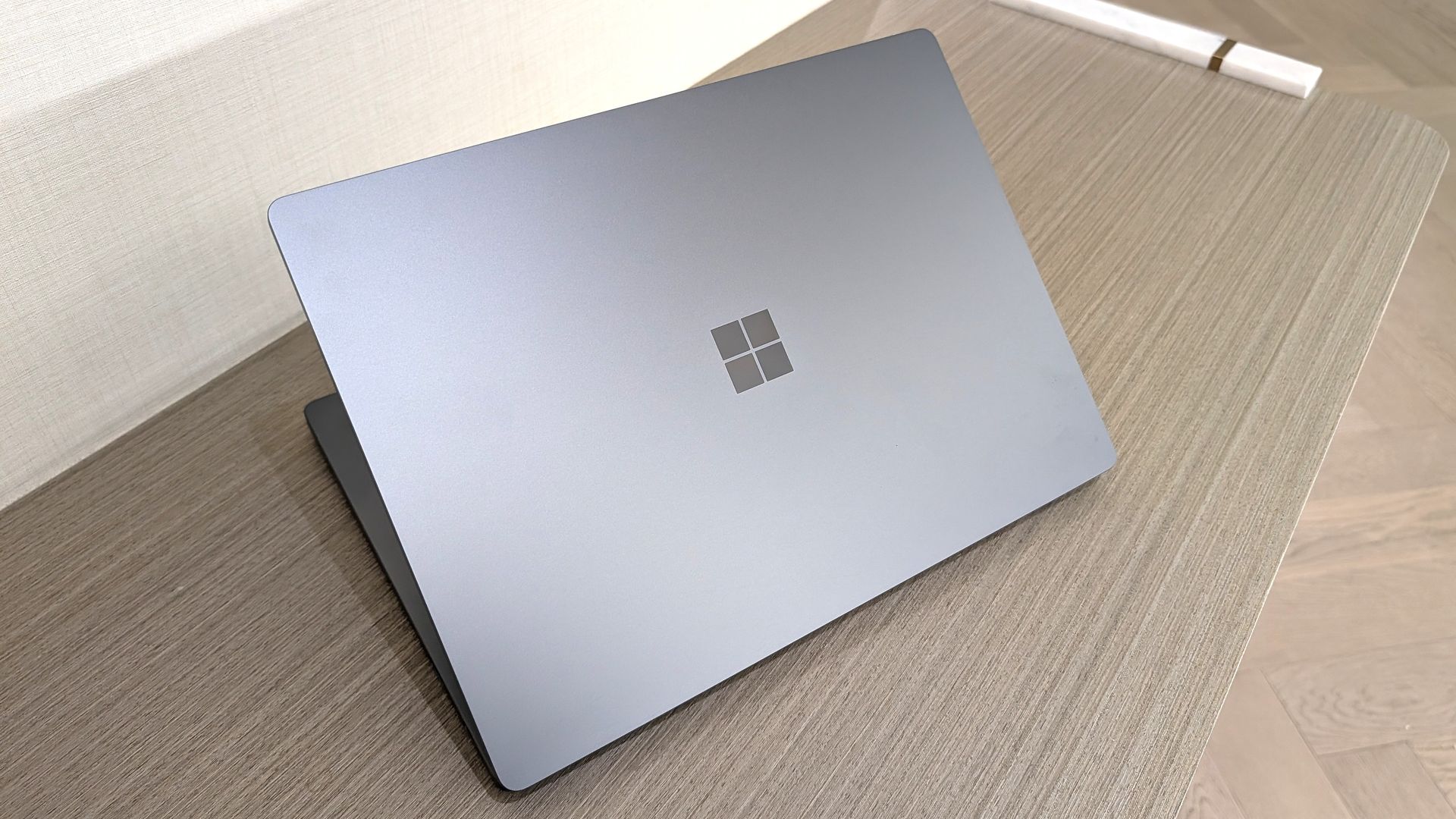
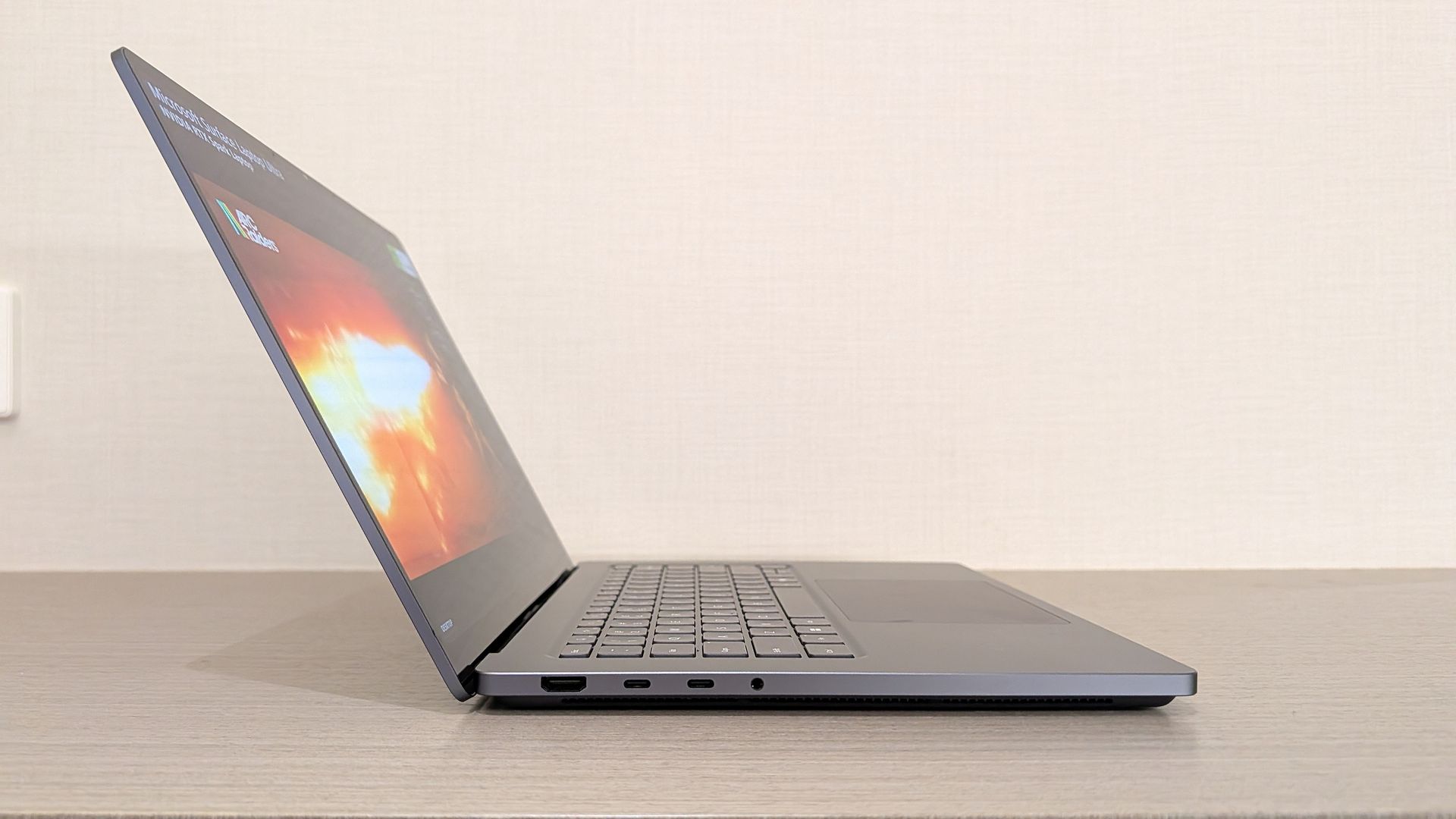
Shortly after unveiling the new Search, Microsoft shared details about the Surface Laptop Ultra. That PC is designed and priced for developers and power users, but it is intriguing to enthusiasts. On top of being the most powerful Surface ever, it has cool features like its magnetic USB-C port.
Microsoft appears confident in the Surface Laptop Ultra. The company’s website now features a banner telling people “break up with your MacBook.”
But the event wasn’t structured in a way that showed the same confidence. The event felt like someone pasted PowerPoint slides from different presentations into a single document.
While I am frustrated, it’s for an entirely different reason than I expected. Microsoft announced interesting things for Windows and Surface. I think the event lived up to its description on YouTube that promised to show "RTX Spark and new experiences designed to unlock more possibilities for developers and builders."
But I don’t think that was shown off in a way that appeals to the masses. The features and devices shown on stage may create buzz, but the event itself did not.
Shopping with Sean
Amazon Prime Big Deal Days came and went, but some of the best tech deals are still live. My top pick is a small discount on the XPS 13 that drops the laptop to $799.99.
"Dell's new XPS 13 is the new best deal in laptops, surpassing the MacBook Neo with a better display, ports, build quality, and performance for the same price." — Zac Bowden, Senior Editor, Windows CentralView Deal
Join us on Reddit at r/WindowsCentral to share your insights and discuss our latest news, reviews, and more.
Microsoft is gradually rolling out the Windows 11 2026 Update (version 26H2) to compatible devices. However, it's an optional install, and if you want to install it early, you'll have to switch manually.
Windows 11 version 26H2 is a small update that doesn't require a full reinstall if your device is already running version 25H2 or 24H2. However, if your hardware is still running version 23H2 (or an older version), you'll need to perform an in-place upgrade with a full reinstallation.
Also, if you plan to upgrade from Windows 10, the computer will go through the full upgrade process as well. In addition, this new version will roll out in phases, starting with devices known to have a good upgrade experience, so not every device will receive the update in the early days.
If you don't want to wait, you can manually trigger the upgrade in at least four ways, including Windows Update, the Installation Assistant, the Media Creation Tool, and an ISO file.
In this how-to guide, I'll outline the steps to upgrade from any previous version to the Windows 11 2026 Update.
Important: Although this is a non-destructive process, something can still go wrong during and after the upgrade. Consider creating a temporary backup before proceeding. You've been warned.
How to install Windows 11 2026 Update from Settings
To install the new version of Windows 11 through the Windows Update settings, use these steps:
Open Settings.
Click on Windows Update.
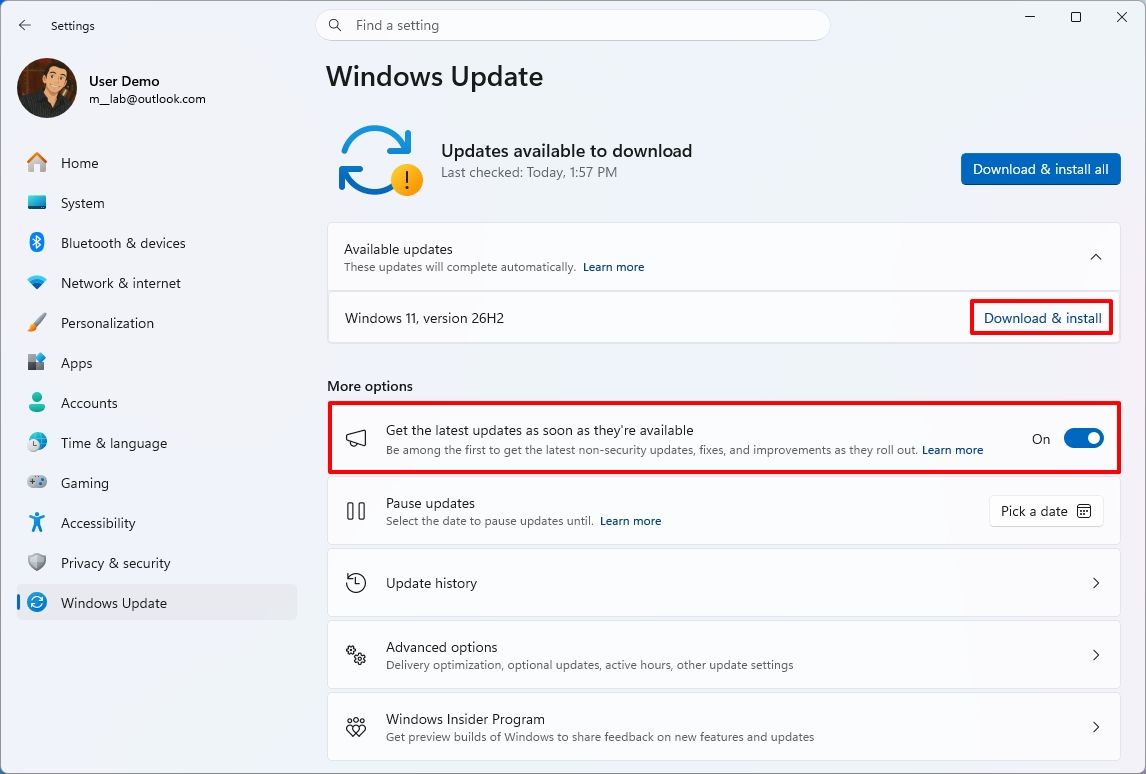
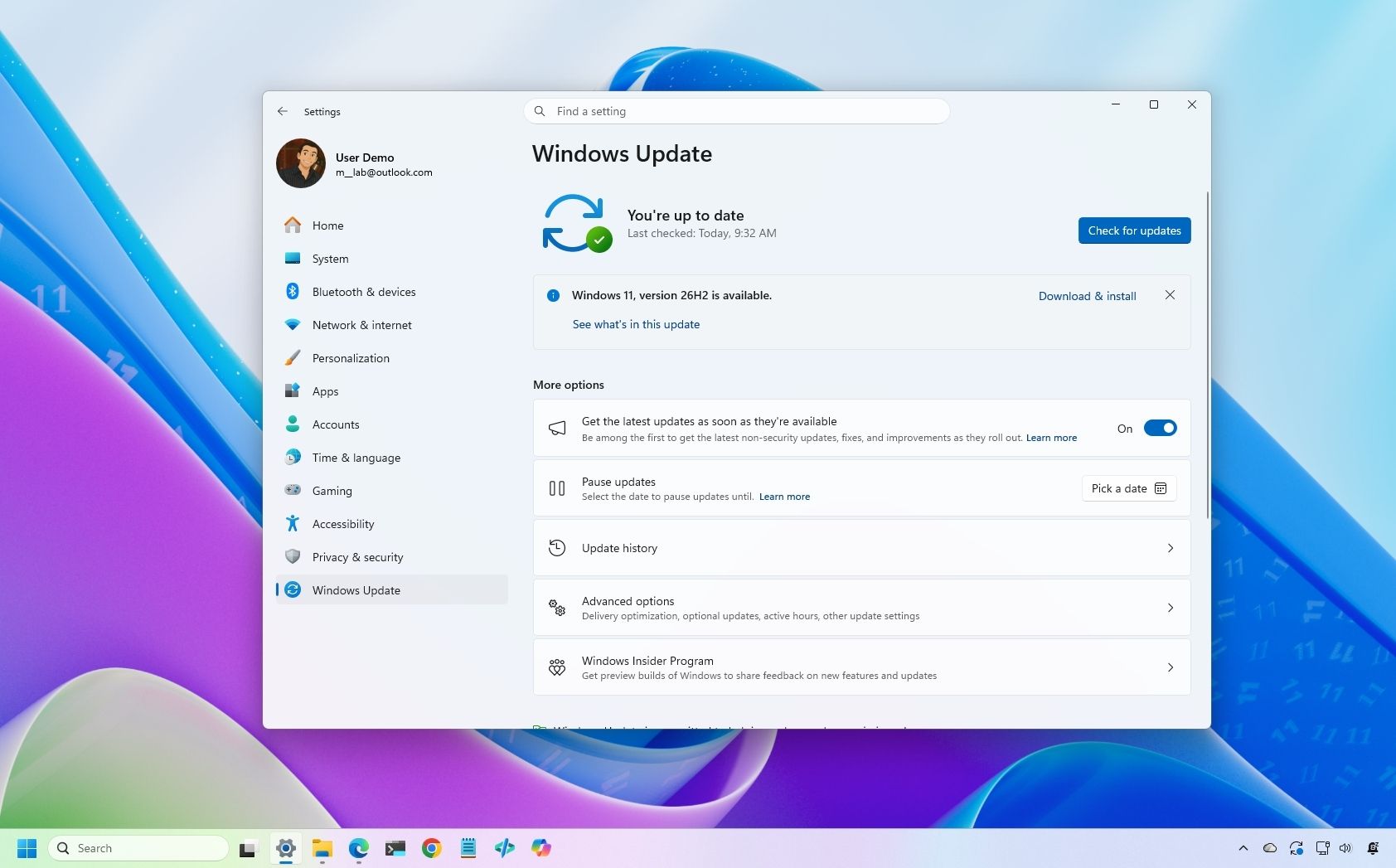
Turn on the "Get the latest updates as soon as they're available" toggle switch.
Click the "Check for updates" button.
Click the "Download and install now" button.
(Image credit: Mauro Huculak)
Click the Restart now button.
After you complete these steps, the installation process will apply the update to the device without requiring a full operating system reinstall.
If the upgrade option isn't available, the update likely isn't ready for your system configuration.
Also, I don't recommend using a different upgrade method, as it may cause issues and require an unnecessary reinstallation.
How to install Windows 11 2026 Update from Installation Assistant
This method should only be used to upgrade a device running version 23H2 or Windows 10. If you use this tool on version 25H2 or 24H2, you'll trigger an unnecessary in-place upgrade.
To upgrade the system to the Windows 11 2026 Update with the Installation Assistant tool, use these steps:
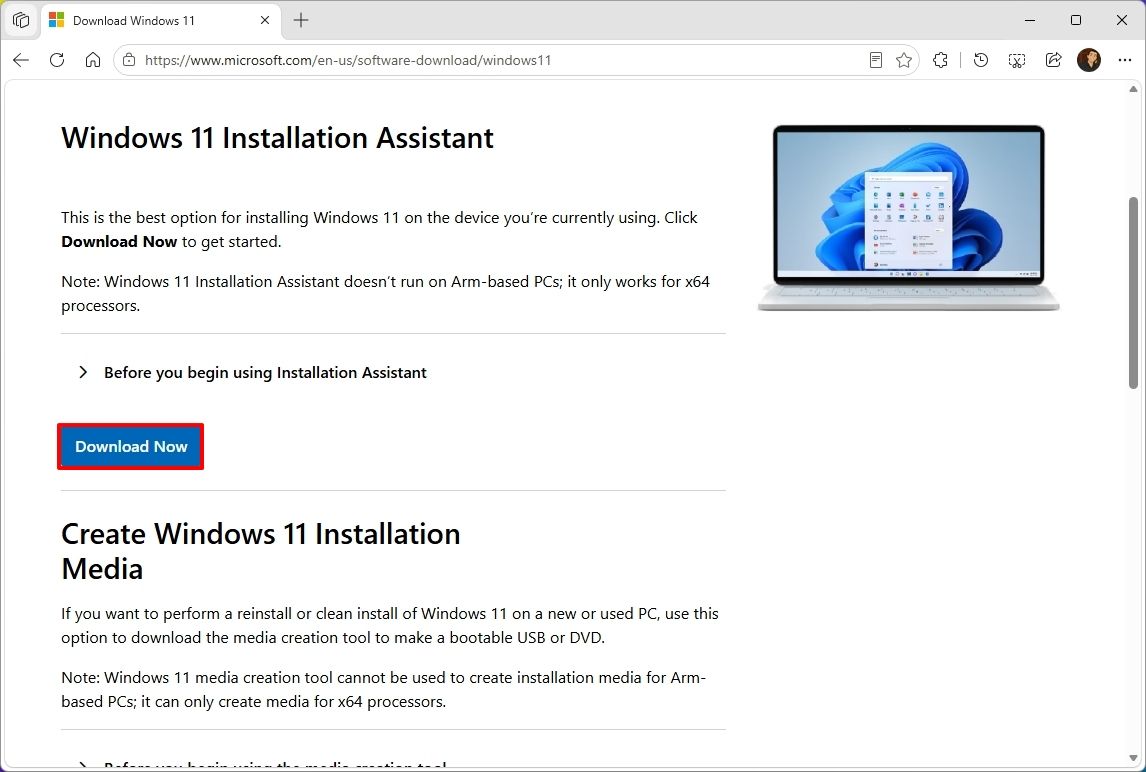
Click the Download Now button under the "Windows 11 Installation Assistant" section.
(Image credit: Mauro Huculak)
Quick tip: If you get a message that the latest version of the operating system is already installed, you likely downloaded an older version of the tool. If so, try downloading the Installation Assistant from this page.
Double-click the Windows11InstallationAssistant.exe file to launch the tool.
Click the "Get PC Health Check app" option to download the tool on the device (if applicable).
Install the Get PC Health app following the easy on-screen directions.
Open the Get PC Health app and click the "Check Now" button.
Click the Refresh button on the Installation Assistant tool.
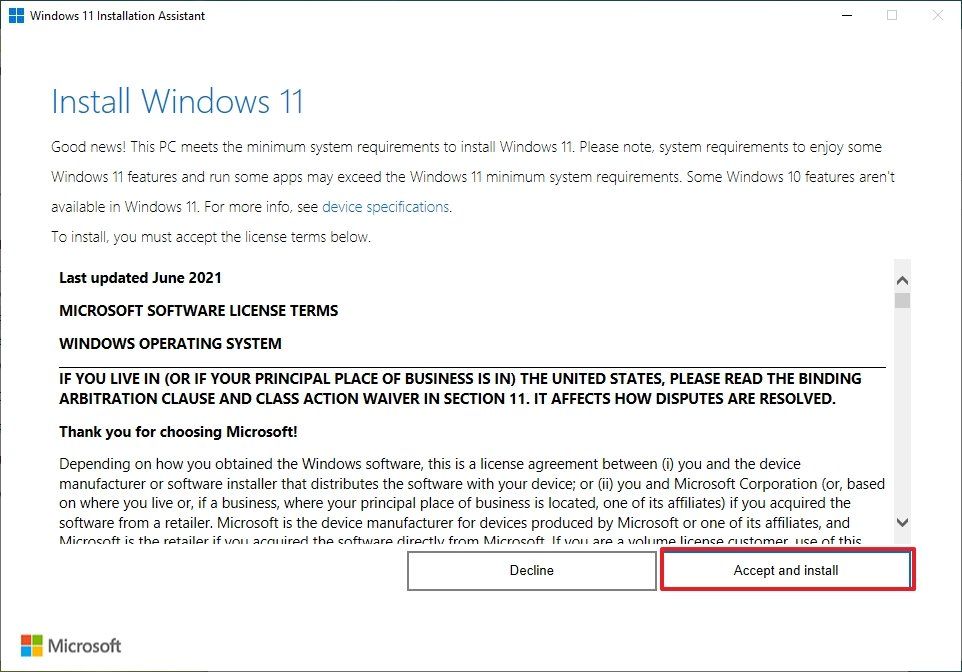
Click the "Accept and install" button.
(Image credit: Mauro Huculak)
Click the "Proceed with installation" button to begin installation.
Click the Restart button.
Once you complete the steps, the tool will download the necessary files and install the new version of Windows 11, preserving your files, settings, and apps.
How to install Windows 11 2026 Update from Media Creation Tool
You should only use this tool when upgrading from an older version, such as 23H2, or Windows 10.
Although you can no longer use the Media Creation Tool to perform an in-place upgrade, you can use it to create bootable USB media to install the new version of the operating system.
This method will perform a complete reinstallation. If you're upgrading from version 25H2 or 24H2, you don't need this method. Instead, upgrade using Windows Update settings.
To use the Media Creation Tool to create a USB drive to upgrade a device, use these steps:
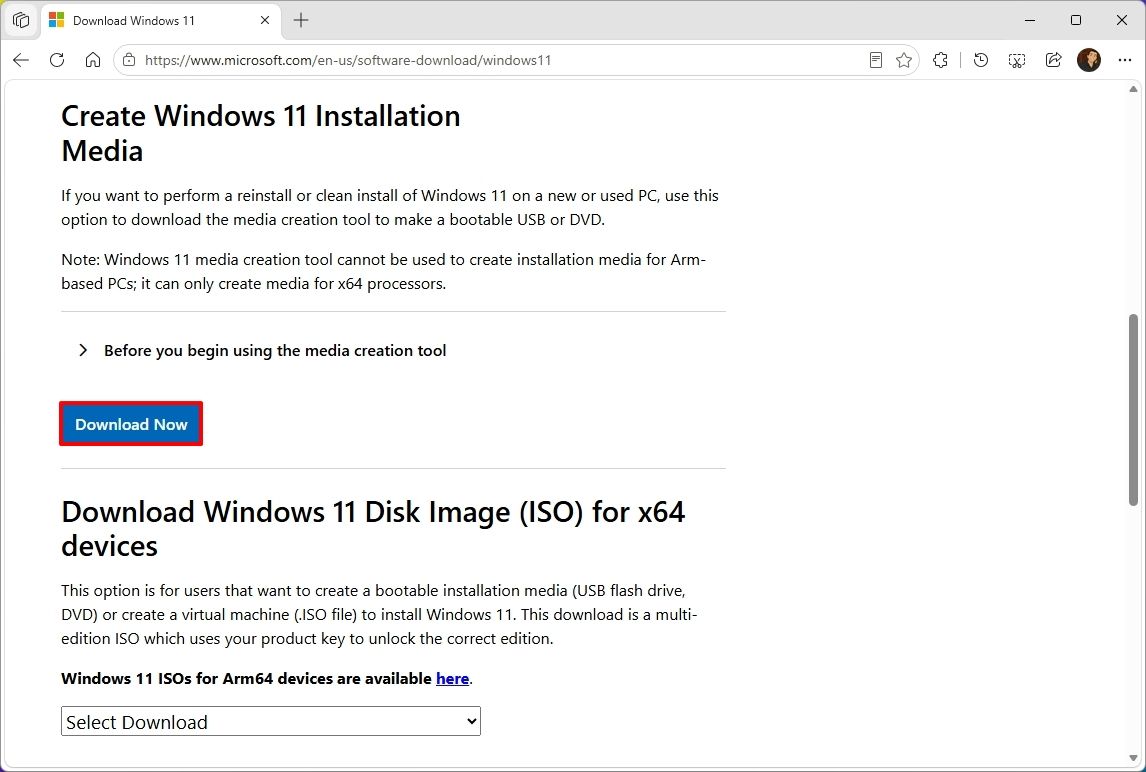
Click the Download Now button under the "Create Windows 11 installation media" section.
(Image credit: Mauro Huculak)
Double-click the MediaCrationTool.exe file to launch the utility.
Click the Accept button.
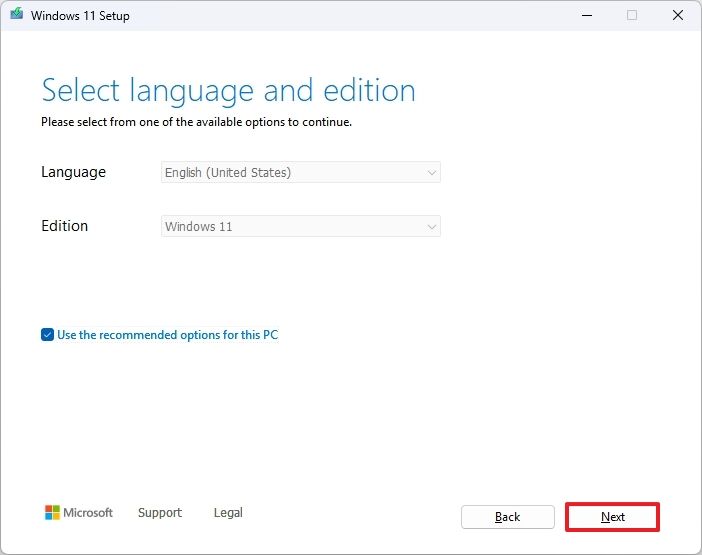
Click the Next button.
(Image credit: Mauro Huculak)
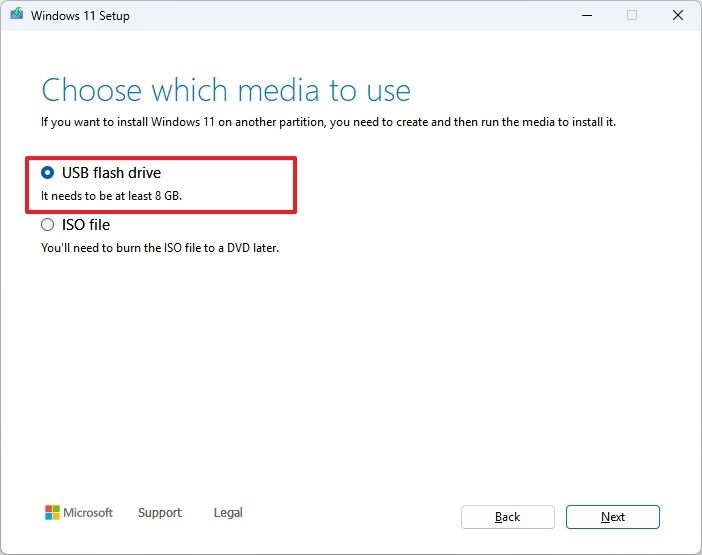
Select the USB flash drive option.
(Image credit: Mauro Huculak)
Quick note: You will need a USB flash drive with at least 8GB of storage. This process will erase the drive, so back up any important information first.
Click the Next button.
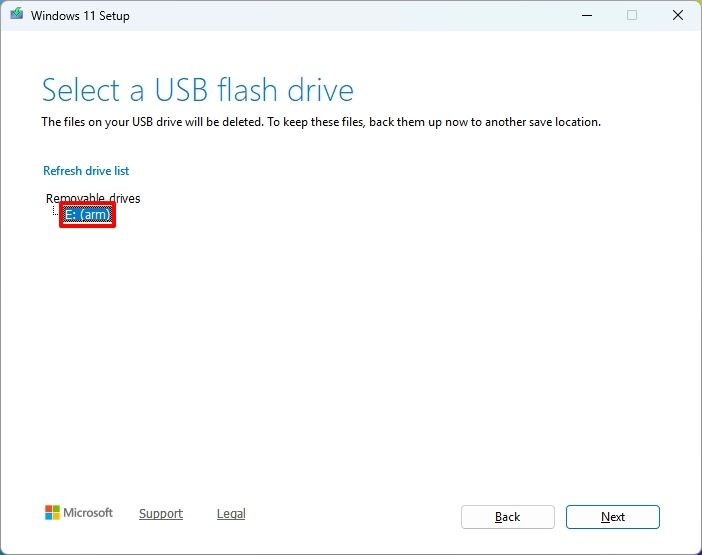
Select the USB flash drive from the list.
(Image credit: Mauro Huculak)
Click the Next button.
Click the Finish button.
Open File Explorer.
Click on This PC in the left navigation pane.
Open the USB drive with the Windows 11 2026 Update installation files.
Double-click the setup.exe file.
Click the Next button.
Click the Accept button to agree to the terms.
(Image credit: Mauro Huculak)
Click the Install button.
After you complete these steps, Windows Setup will proceed with the in-place upgrade to version 26H2 on your device.
How to install Windows 11 2026 Update from ISO file
Finally, you can also download the Windows 11 version 26H2 ISO file to upgrade your system.
To upgrade to Windows 11 2026 Update using the official ISO file, use these steps:
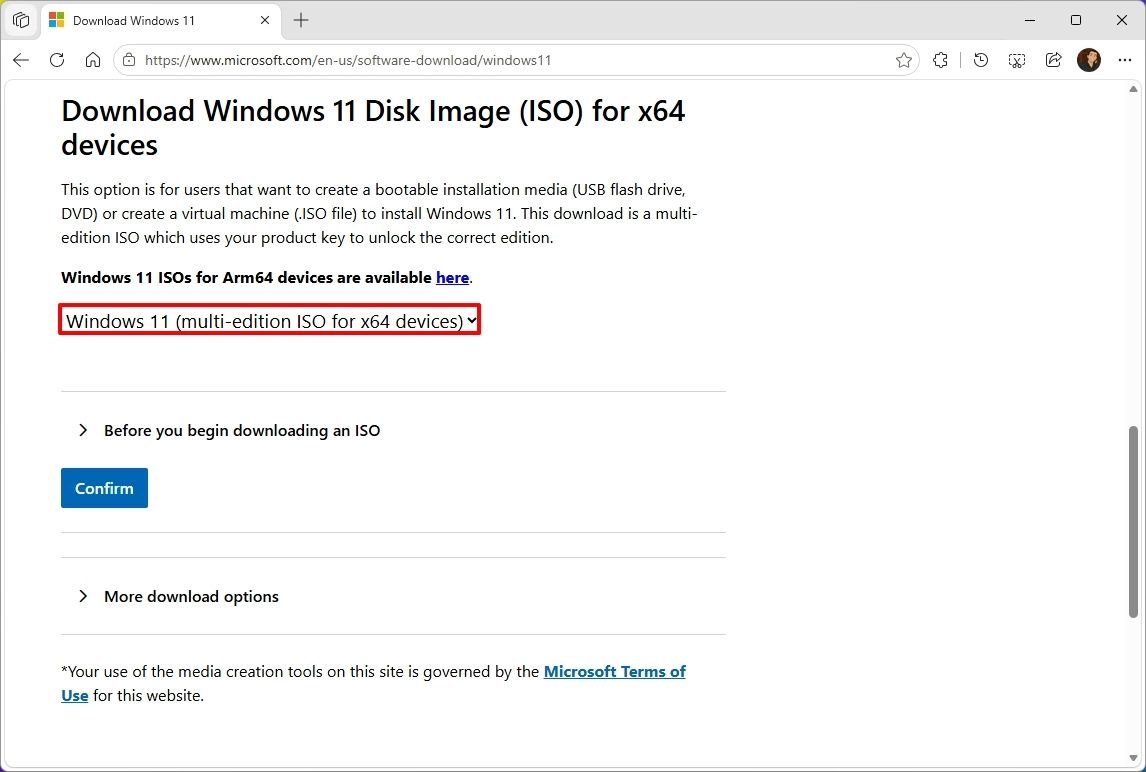
Select the Windows 11 option under the "Download Windows 11 Disk Image (ISO)" section.
Click the Confirm button.
(Image credit: Mauro Huculak)
Select the installation language.
Click the Confirm button.
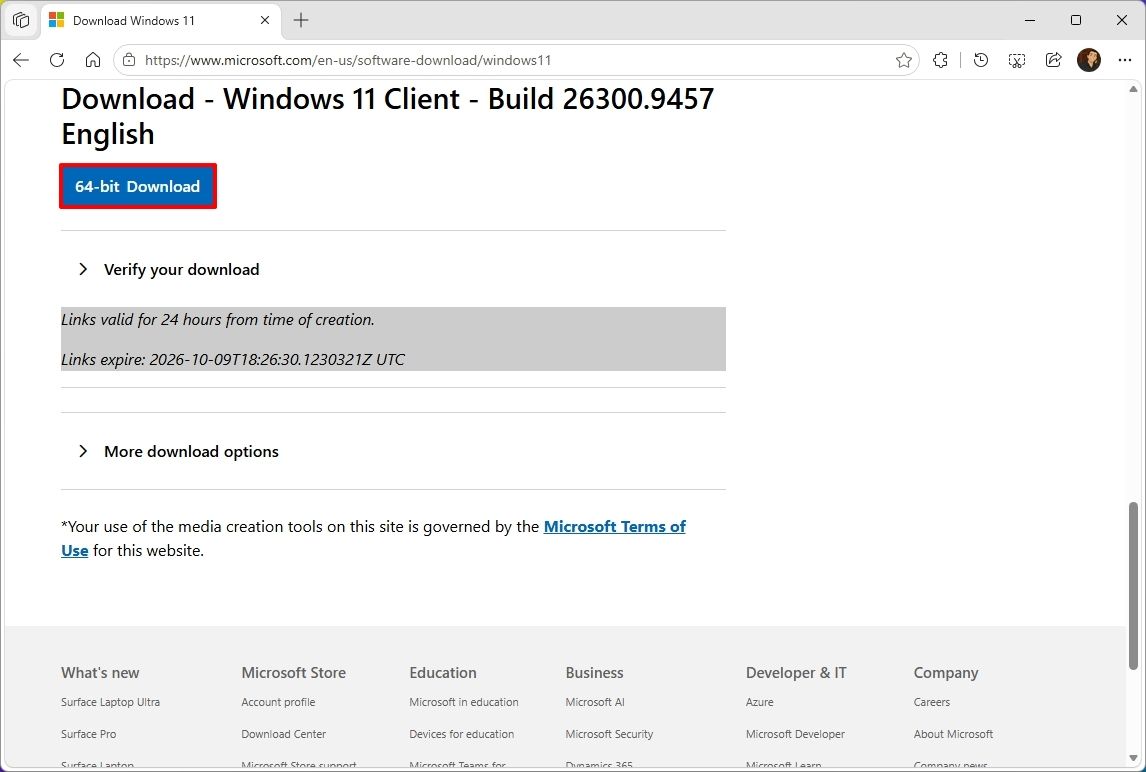
Click the "64-bit Download" button to save the ISO file to the computer.
(Image credit: Mauro Huculak)
Right-click the image file and select the Mount option.
Quick tip: If you don't see the option, another tool is likely managing the ".iso" files.
Select the virtual drive from the left navigation pane (if applicable).
Double-click the setup.exe file to manually launch the setup.
Click the Next button.
Click the Accept button to agree to the terms.
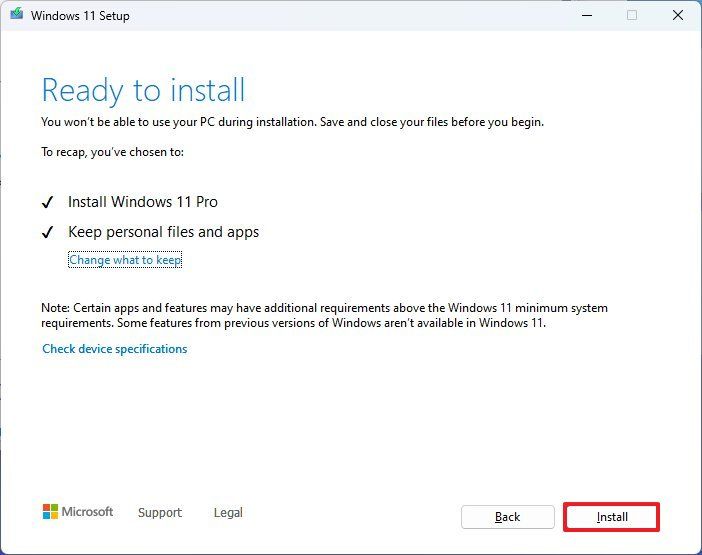
Click the Install button.
(Image credit: Mauro Huculak)
Once you complete the steps, the computer will upgrade to the 2026 Update, preserving your files, settings, and apps.
FAQs about installing Windows 11 2026 Update
These are common questions regarding the installation of version 25H2.
Do I need to reinstall Windows 11 to get version 26H2?
If your computer is already running Windows 11 version 25H2 or 24H2, the 26H2 update will install as a cumulative update without requiring reinstallation. If you're on version 23H2 or older, you'll need to upgrade to version 25H2 first, which does require a complete reinstall.
What are the safest ways to install the latest update?
Microsoft recommends waiting for "Windows Update" to offer the upgrade automatically. If you don't want to wait, you can use the Installation Assistant, the Media Creation Tool, or download the official ISO file.
Will the upgrade process delete my files or apps?
No, if you upgrade using Windows Update, Installation Assistant, or the ISO setup, your files, apps, and settings should remain on the computer. However, it’s always recommended to back up your data before starting the upgrade.
If you perform a clean installation, the process will delete everything on your device.
More resources
Explore more in-depth how-to guides, troubleshooting advice, and essential tips to get the most out of Windows 11 and 10. Start browsing here:
Le P.T. de Kojima, ce "playable teaser" de Silent Hills que Konami a retiré du PlayStation Store en 2015, a maintenant un portage natif pour Windows et Linux et c'est signé Lorean Xavier.
Pour ceux qui ne connaissent pas ce jeu, P.T. est sorti gratuitement sur PS4 en août 2014, sous le nom d'un studio qui n'existait pas, 7780s Studio. On y parcourt un couloir en L qui tourne en boucle, en marchant et en zoomant, pendant que Lisa, un fantôme, nous traque. Et si elle nous attrape, eh bien la boucle infernale recommence encore et encore... Et bien sûr, ce maudit couloir change à chaque tour réussi !
Ensuite, une fois la dernière énigme résolue, on avait droit à un trailer annonçant Silent Hills, réalisé par Hideo Kojima et Guillermo del Toro avec Norman Reedus dans le rôle principal. Le vrai jeu a ensuite été malheureusement annulé, et P.T. n'a survécu depuis uniquement sur les PS4 qui l'avaient conservé ou via l'émulation.
Mais c'était sans compter sur Lorean qui l'a recompilé pour en faire un portage natif, comme
celui d'Animal Crossing
dont je vous parlais en juillet. La logique du jeu a été intégralement reconstruite en C++ à partir du comportement de l'original et le rendu tourne sur Vulkan, alors que les niveaux, les modèles, les textures, les sons et les cinématiques, eux, sont lus lors de l'exécution à l'aide de votre propre copie PS4 (ce qui évite de diffuser du contenu sous copyright donc).
Tout ce que le portage ajoute est désactivé ou calé sur l'original par défaut. On y retrouve donc des upscalers (FSR 3.1 et XeSS sur n'importe quel GPU récent, DLSS 4.5 sur GeForce RTX, sous Windows seulement), un mode photo sur F7 et un dossier de mods qui accepte des scripts Lua.
Côté fidélité, Lance McDonald, le dataminer qui avait fouillé P.T. à l'époque, y voit, autant qu'il puisse en juger, un portage 1:1 de toute la base de code, qui reproduit tous les comportements non documentés qu'il connaît. Et bien sûr, même si le dev de ce portage a dû gérer l'archi du code de A à Z, c'est l'IA qui s'est occupée du dev et du debugging.
Bref, comme je vous le disais, ce portage ne contient aucun fichier de Konami, donc c'est à vous de fournir le jeu. Il vous faudra donc un dossier dump sorti de votre console (ou d'une archive en ligne si vous êtes un affreux criminel ^^), ou un faux PKG fabriqué à partir de ce dump. Un PKG du store ne marchera pas par contre puisqu'il est chiffré pour la console qui le possède. Et bien sûr, seule la version américaine (CUSA01127) a été testée. A tester donc avec les versions européenne et japonaise pour voir si ça passe.
Côté machine, il vous faudra à minima un Windows 10 ou 11 en 64 bits, ou un Linux x86-64 avec glibc 2.38 minimum (Ubuntu 24.04, Debian 13, Fedora 39, Arch ou SteamOS ça passe.), ainsi qu'un GPU compatible Vulkan 1.3. Sur Steam Deck, l'installation se fera depuis le mode bureau, puis faudra ajouter le jeu comme jeu non-Steam.
De son côté, macOS est annoncé pour la 1.0.2, mais ses paquets ne sont pas encore téléchargeables (faudra compiler les amis !). Pour le reste, les menus et les sous-titres sont disponibles en français, mais les voix restent en anglais, et le passage où le jeu a besoin de votre micro peut être joué au clavier quand même, si vous n'avez pas le matos.
Voilà... Je ne m'en souvenais pas, mais en faisant mes recherches, j'ai appris que ce n'est pas la première tentative de portage de P.T. sur PC. Il y a eu un remake de Qimsar, fan de 17 ans, qui est sorti gratos en juillet 2018 et malheureusement, Konami l'a fait fermer quelques jours plus tard pour des raisons légales, tout en lui proposant un stage (beaux joueurs quand même).
On verra à quelle sauce ce projet sous licence MIT se fera manger ou pas.
Sachez que si vous avez déjà votre copie de P.T. sous la main, les installeurs Windows et Linux sont sur la page Releases du
dépôt GitHub
!
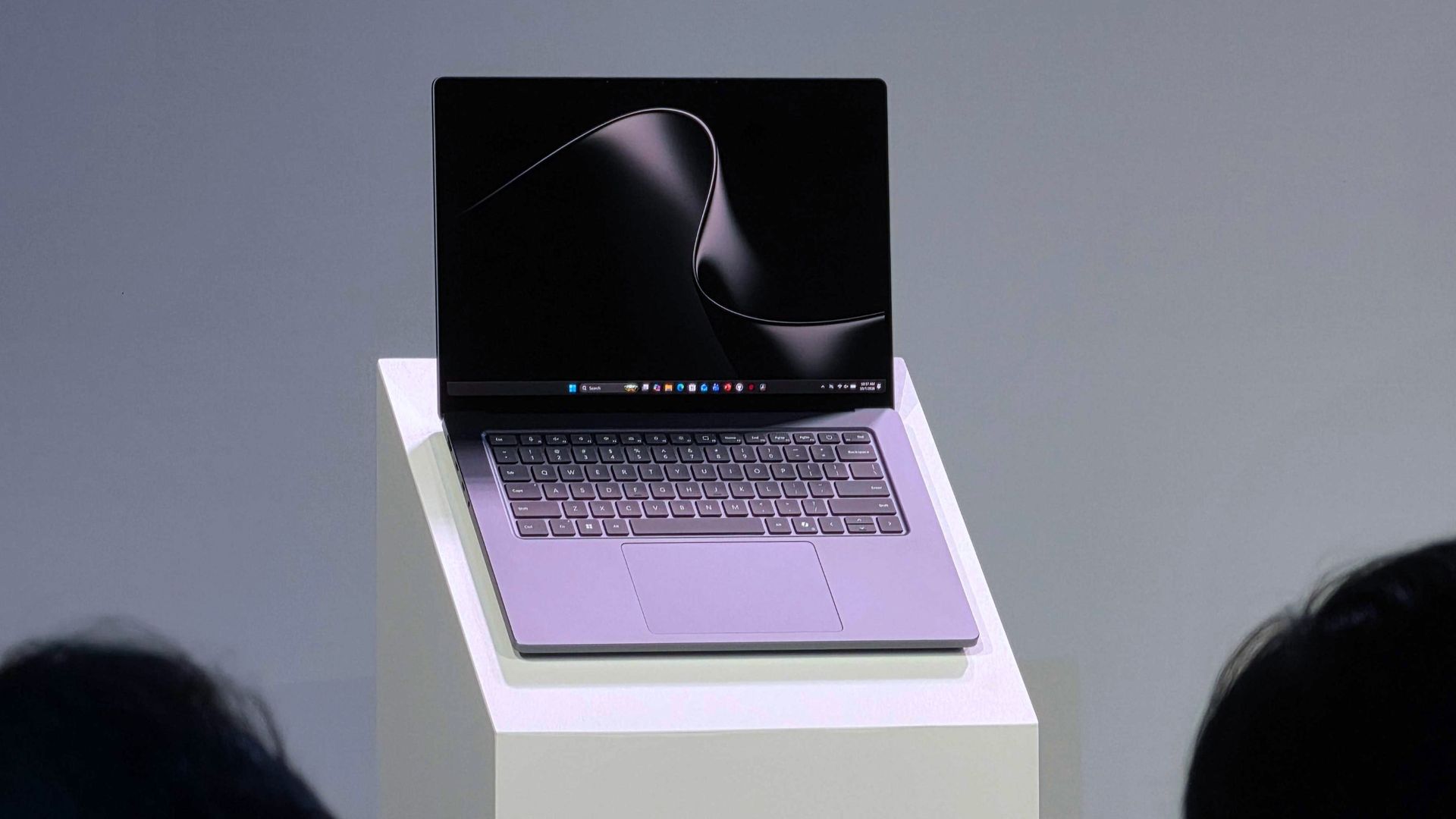
I love a good wallpaper for my PC, and so do many members of the Windows Central community. When our Editor-in-Chief Daniel Rubino shares a review of a laptop, it's normal to see comments asking how to download his wallpaper.
Microsoft has a similar enthusiasm for wallpapers. Windows Spotlight provides an ongoing stream of excellent images that rotate regularly. The tech giant also creates or commissions wallpapers to go along with major product announcements. Windows 10, Windows 11, and Copilot+ PCs all have their own official wallpapers.
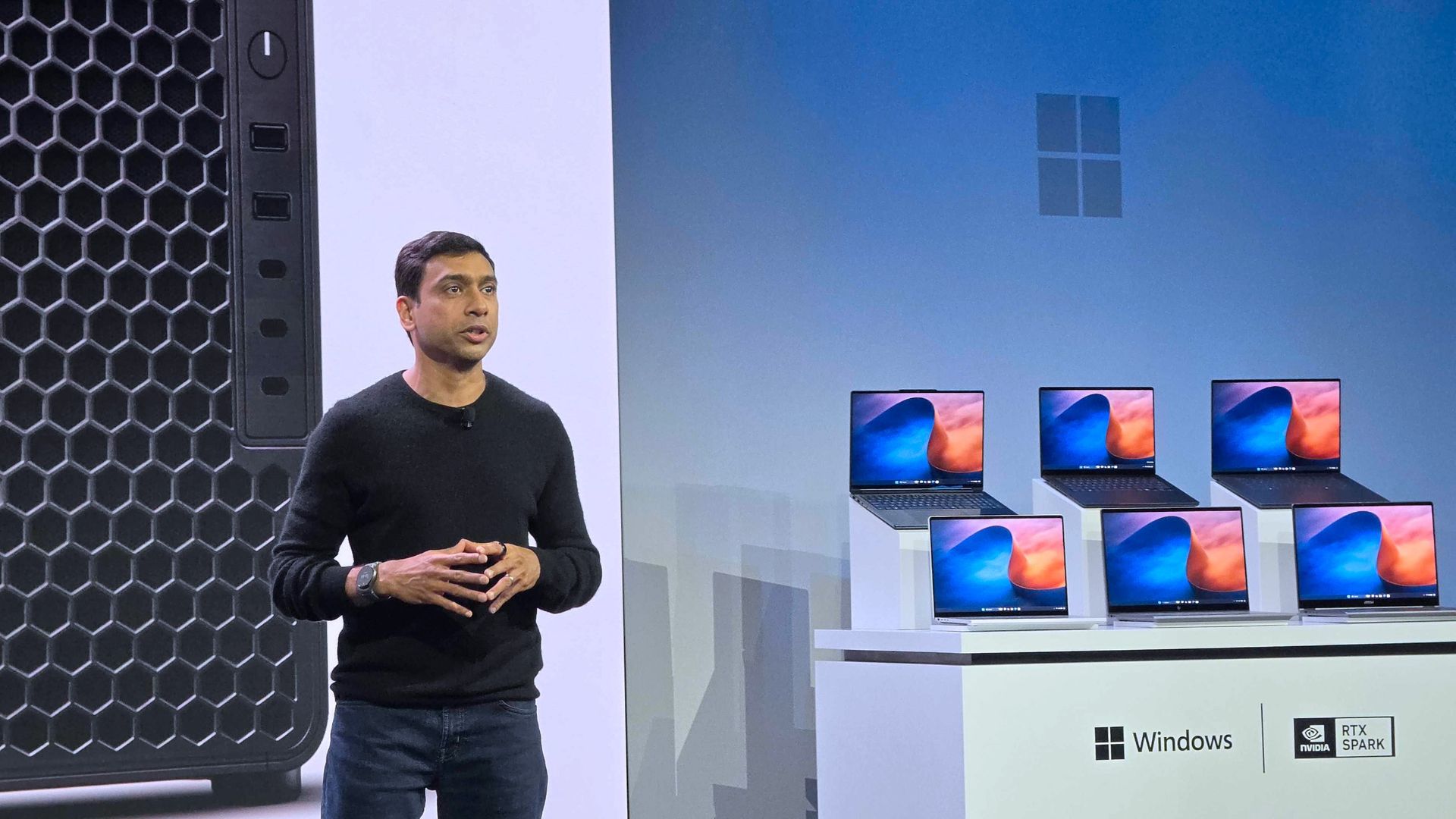
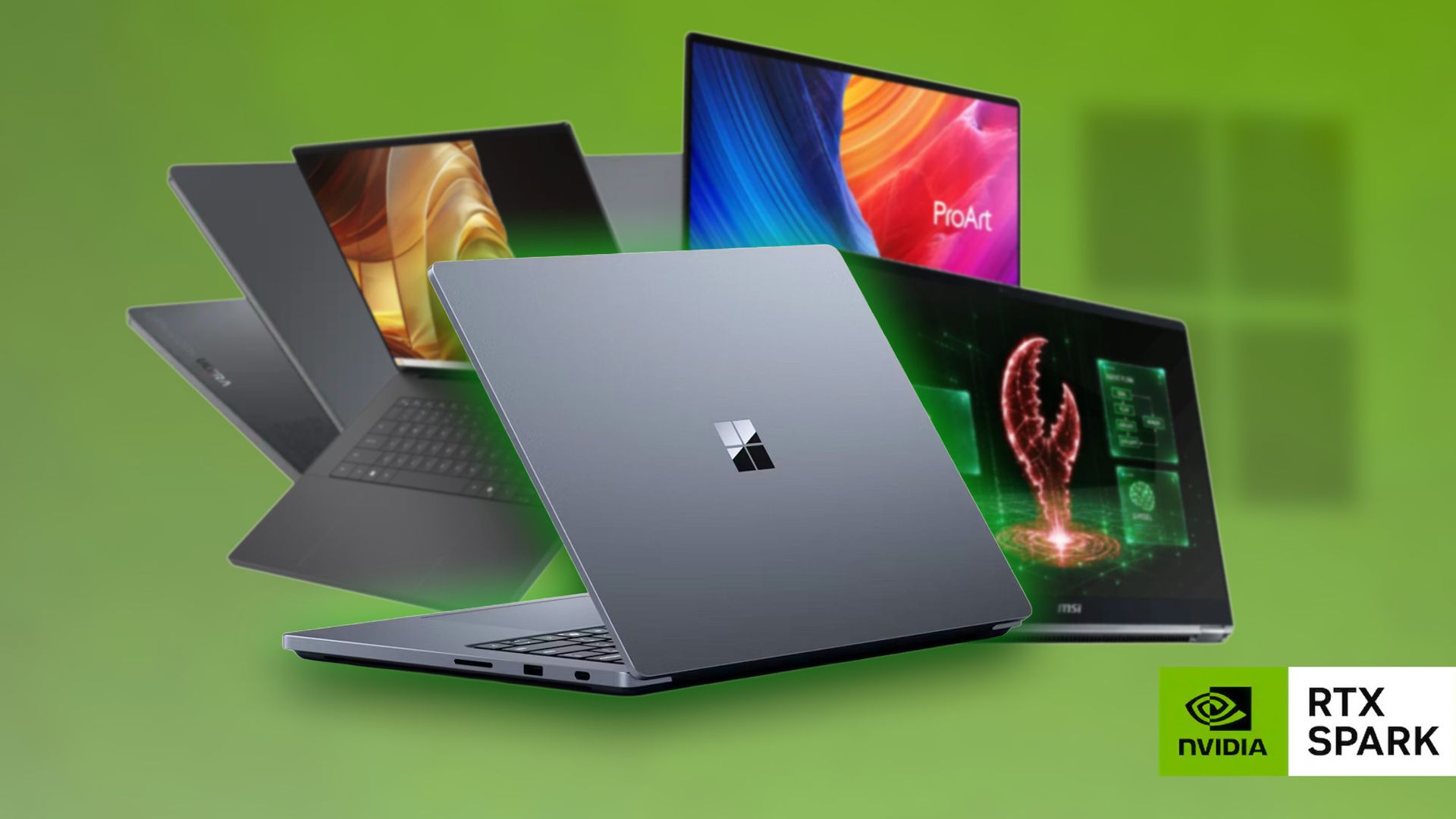
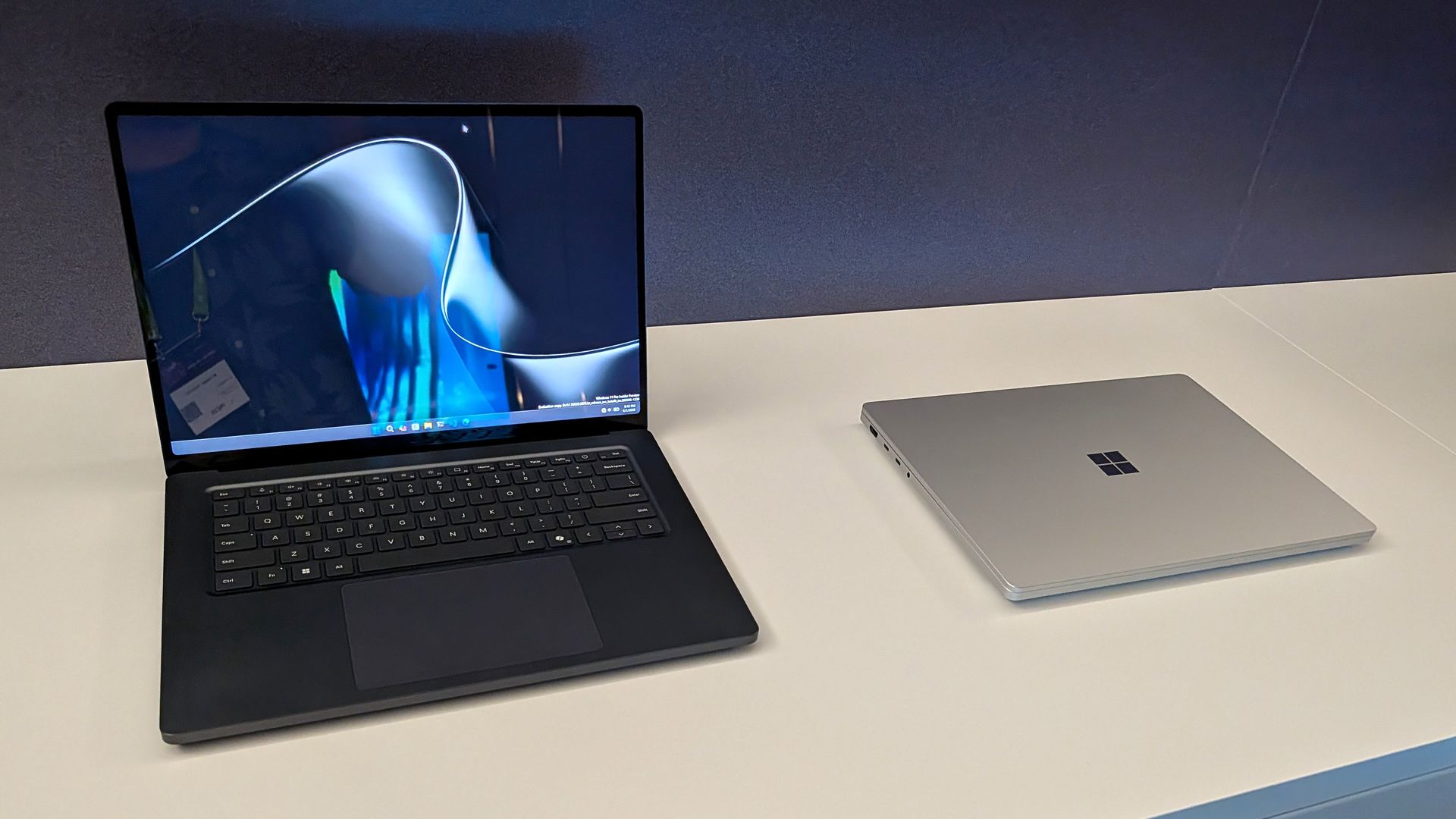
Eagle-eyed viewers of this week's Windows and Surface event spotted what appears to be a new wallpaper from Microsoft. Our Senior Editor was at the event and snapped a shot of the wallpaper displayed across several new RTX Spark laptops.
That recreation seems to do a fair job of replicating Microsoft's image, though I'm sure there are differences that will become clearer once we get hands on the official wallpaper.
We've seen AI used to create or recreate iconic wallpapers before. Our Senior Editor Ben Wilson used Adobe Photoshop's generative AI to expand a collection of Windows wallpapers.
Until Microsoft shares the new wallpaper, we may have to settle for AI recreations. The first wave of RTX Spark laptops are already available for preorder and will start shipping on October 16, 2026, so we may see the files escape into the wild sooner rather than later.
Join us on Reddit at r/WindowsCentral to share your insights and discuss our latest news, reviews, and more.
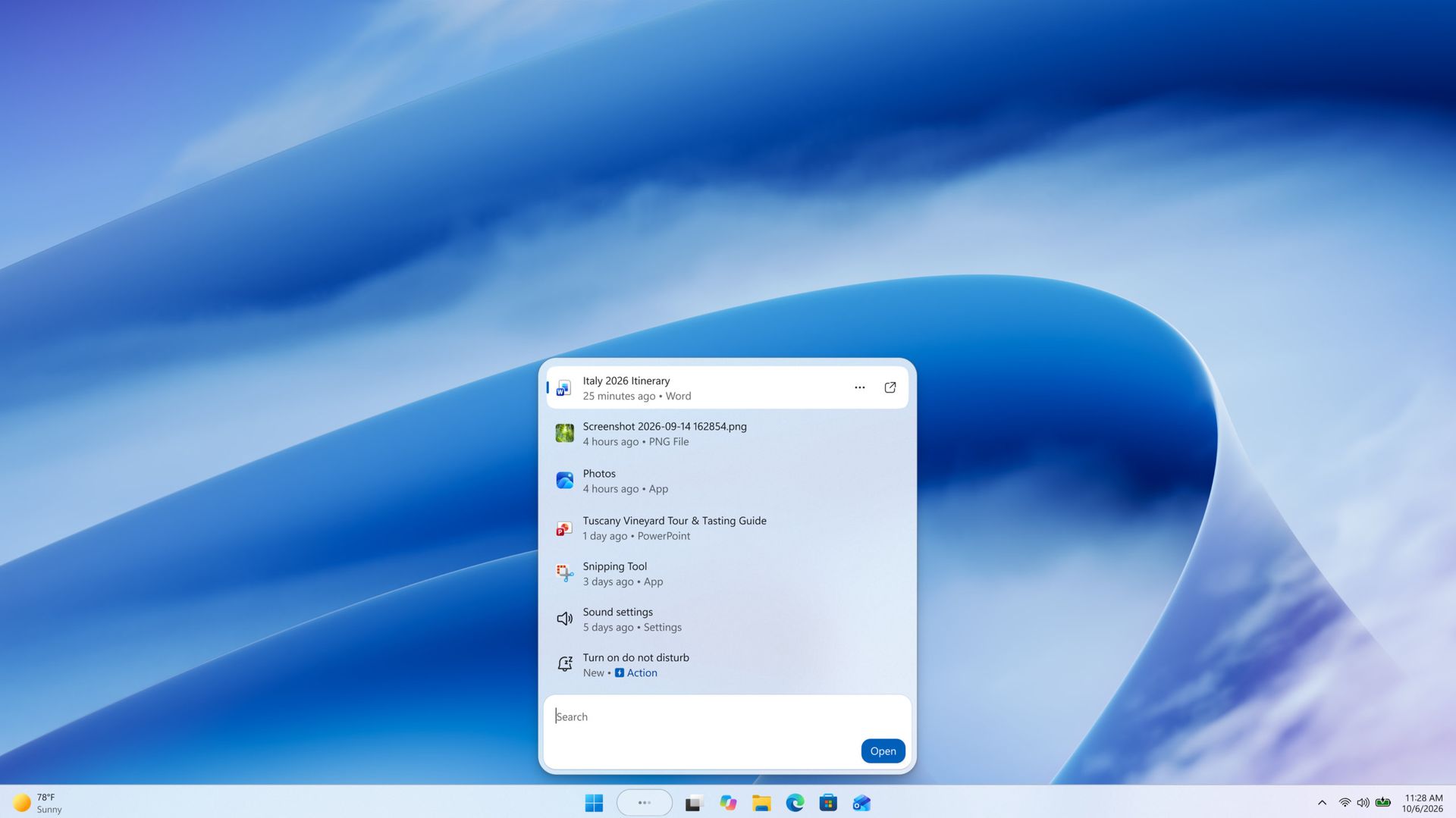
The streamlined Windows Search is about more than finding files or apps, though it can do that. Search can perform tasks, such as switching your PC to dark mode or changing the volume of your computer.
Whether you're more interested in the performance improvements or the new features, there's reason to install the latest builds of Windows 11 that shipped to the Experimental channel and the Experimental channel (26H1). Insiders in those channels can now test the refreshed Search experience with limited support for inline actions.
Microsoft's engineers must have been excited about Windows after its big event, because five Insider builds were released yesterday. Two of them include the refreshed Windows Search. Here's everything that's new across all of the builds.
Windows Search (Experimental, Experimental (26H1))
New Windows Search experience with inline actions: We're beginning to roll out a new Windows Search experience built on WinUI 3 that is faster, more efficient, and features a streamlined design that makes results easier to scan. We're also introducing inline actions, allowing you to quickly complete tasks directly. Turn on dark mode or Bluetooth, adjust your screen brightness, mute your device, or arrange windows from Windows Search.
We're improving how Windows Search understands what you're looking for, including better matching for typos and synonyms. We'll continue fine-tuning these improvements over the coming weeks. For more information detailing the new changes, check out the Windows Insider Blog.
English is the only supported language for this initial release.
After upgrading to this build, restart your device before the New Windows Search Experience feature flag is visible.
Battery status widget (Experimental)
As part of our continued commitment to making Widgets more useful for everyday moments, we're introducing the Battery Status widget for Insiders on newer builds. This widget provides a unified view of battery levels for your PC and peripheral devices, helping you quickly assess power status without hunting through multiple UI locations. Add it by going to Widgets board > Add widgets > Battery Status.
Narrator (Experimental (26H1))
Read and explore math equations with Narrator (see full description in release notes)
Kerberos enhancements (Experimental)
IAKerb is now enabled by default for Windows client. IAKerb is a Kerberos extension that allows Windows authentication to succeed in scenarios where traditional Kerberos can't be used because a direct connection to a domain controller is unavailable. This extension helps reduce reliance on NTLM while improving compatibility for modern authentication scenarios. For additional background, implementation details, and early preview information, see Reducing NTLM Dependency: IAKerb and LocalKDC in Windows Insider Preview.
Task Manager (Experimental)
Task Manager is expanding process grouping to allow apps to combine otherwise separate background processes into a single unified category rather than relying solely on traditional parent-child trees. This makes an app's resource usage easier to understand. Microsoft Defender is the first app to use this capability.
Windows Update (Experimental)
Fixed the issue causing some Insiders with Windows Sandbox enabled to get error 0x80073712 when attempting to install the latest updates.
Security (Experimental)
We've updated the security key PIN entry experience, removing the "other user" icon for a clearer sign-in experience.
Taskbar (Experimental)
Fixed an issue impacting some Insiders recently, which was causing the taskbar app window previews to become slower and noticeably lag over time.
Taskbar (Experimental (26H1))
Improved underlying state persistence of taskbar settings related to multiple monitors across monitor connections and disconnections.
Settings (Experimental)
Removed the backplate from the Settings icon when UAC is invoked from within Settings.
File Explorer (Experimental)
Added support for font preview and installation in the File Explorer and desktop context menus.
Other (Experimental)
Fixed an issue with msmpeg2ac3dec.dll which was leading to some apps and games crashing recently.
General (Experimental (Future Platforms))
Symbols were missing for our previous flight. They should be available for this one.
Widgets (Beta)
As part of our continued commitment to making Windows calmer and higher quality, we’re updating the default lock screen widget experience for Insiders on newer builds. With this change, Weather will be the primary widget shown on the lock screen, reducing recommended widget content and making the experience feel more focused. We're also giving users more control of personalizing the widgets on lock, curating the ones they find most useful for them. Users can access these settings by going to Settings > Personalization > Lock screen.
The new Search experience is the biggest change, but I'm also excited about the Battery Status widget that's now available to more Insiders. Microsoft has largely ignored widgets on Windows 11, so it's nice to see a useful one on its way.
Join us on Reddit at r/WindowsCentral to share your insights and discuss our latest news, reviews, and more.
Une PS5, au fond, c'est juste un PC comme les autres. Elle a un processeur AMD x86-64 (c'est du Zen 2, en gros un Ryzen) ainsi qu'une puce graphique RDNA 2, ce qui est grosso merdo la même came que ce qu'il y a dans votre tour de gamer.
Et pour ça que le pari d'
AnyPS5
est possible ! L'objectif de ce projet c'est qu'au lieu de lancer un n-ième émulateur qui "imite" la console pendant que vous jouez, l'outil prend le code binaire d'un jeu PS5, le décompile et le recompile intégralement sous la forme d'un vrai programme Linux ou Windows, que votre système peut ensuite lancer comme n'importe quel autre.
Pour y parvenir, ce projet repose sur 2 briques. D'abord il y a un "relinker", qui lit l'exécutable du jeu et le reconstruit au format natif de la cible, c'est à dire ELF pour Linux ou PE pour Windows. Mais comme le jeu continue d'appeler des fonctions système PS5 que votre PC ne connait pas, AnyPS5 réimplémente les bibliothèques de Sony, libc, libkernel et toute la famille libSce, en bibliothèques dynamiques que le chargeur de votre OS peut alors lier au programme converti.
Résultat, le jeu tourne comme un processus normal, sans runtime à part... C'est beau non ?
Mais tout n'est pas réécrit d'avance pour autant puisque côté graphique, le jeu envoie ses files de commandes comme s'il causait à la puce AMD de la console, et c'est donc la version maison du projet de libSceAgcDriver qui les interprète pendant l'exécution. Les shaders RDNA, eux, sont recompilés en SPIR-V pour Vulkan quand le jeu les demande, puis rangés dans un cache sur le disque pour les lancements suivants. Donc ça veut dire que certes, le code processeur tourne en natif, mais la partie GPU, elle, est traduite à la volée.
La conversion elle-même, après c'est juste une ligne de commande. Vous indiquez l'exécutable du jeu et son dossier sce_module côte à côte, et vous choisissez le nom du binaire cible (le .exe quoi) :
Sur un processeur Intel, ajoutez le paramètre --to-intel, qui convertira les instructions propres aux puces AMD qu'il connaît.
Et quand le jeu touche à quelque chose que le projet ne gère pas encore, AnyPS5 lève une exception, en affiche la raison dans le terminal et le processus s'arrête. Ça veut dire qu'un jeu qui boote n'est pas forcément un jeu auquel vous pourrez jouer jusqu'au bout.
Et justement, qu'est-ce qui va jusqu'au bout ?
Hé bien la liste de compatibilité officielle est trèèès courte puisqu'elle ne contient qu'un seul jeu : Dreaming Sarah. C'est un jeu de plateforme 2D sorti sur Steam en 2015 et vendu moins de 5 € (1,49 € en promo au moment où j'écris).
Sous Windows, après recompilation, il est noté "in game, playable", à 60 images par seconde sur une GTX 1050 Ti et 36 sur une puce Intel HD 620 et sous Linux, on ne connait pas encore les stats même si l'ELF Linux a été généré.
Bien sûr, comme toujours avec ces projets de recompilation ou d'émulation, aucun firmware, ni jeu, ni clé n'est fourni. Et comme vous le savez, pour déchiffrer un jeu et l'extraire, il faut un exploit du firmware en cours, autrement dit une console débridée. Donc ça limite un peu les ambitions de pas mal de monde. Mais ça n'en reste pas moins possible pour qui a un peu de volonté (et une PS5 jailbreakée).
Sachez que ce projet AnyPS5 nécessite une carte graphique Vulkan 1.1, que les manettes Xbox ou PlayStation reconnues par SDL fonctionnent avec sticks et gâchettes analogiques, et que le clavier se remappe sans souci dans un fichier anyps5-input.ini que vous devez éditer.
Voilà...
Les émulateurs PS5
dont je vous ai parlé, recréent la console autour du jeu alors qu'AnyPS5 tente de recréer le jeu pour n'importe quelle machine. On verra qui y parvient massivement en premier, mais en tout cas, la course à l'émancipation de la PS5 et de ses jeux est lancée !
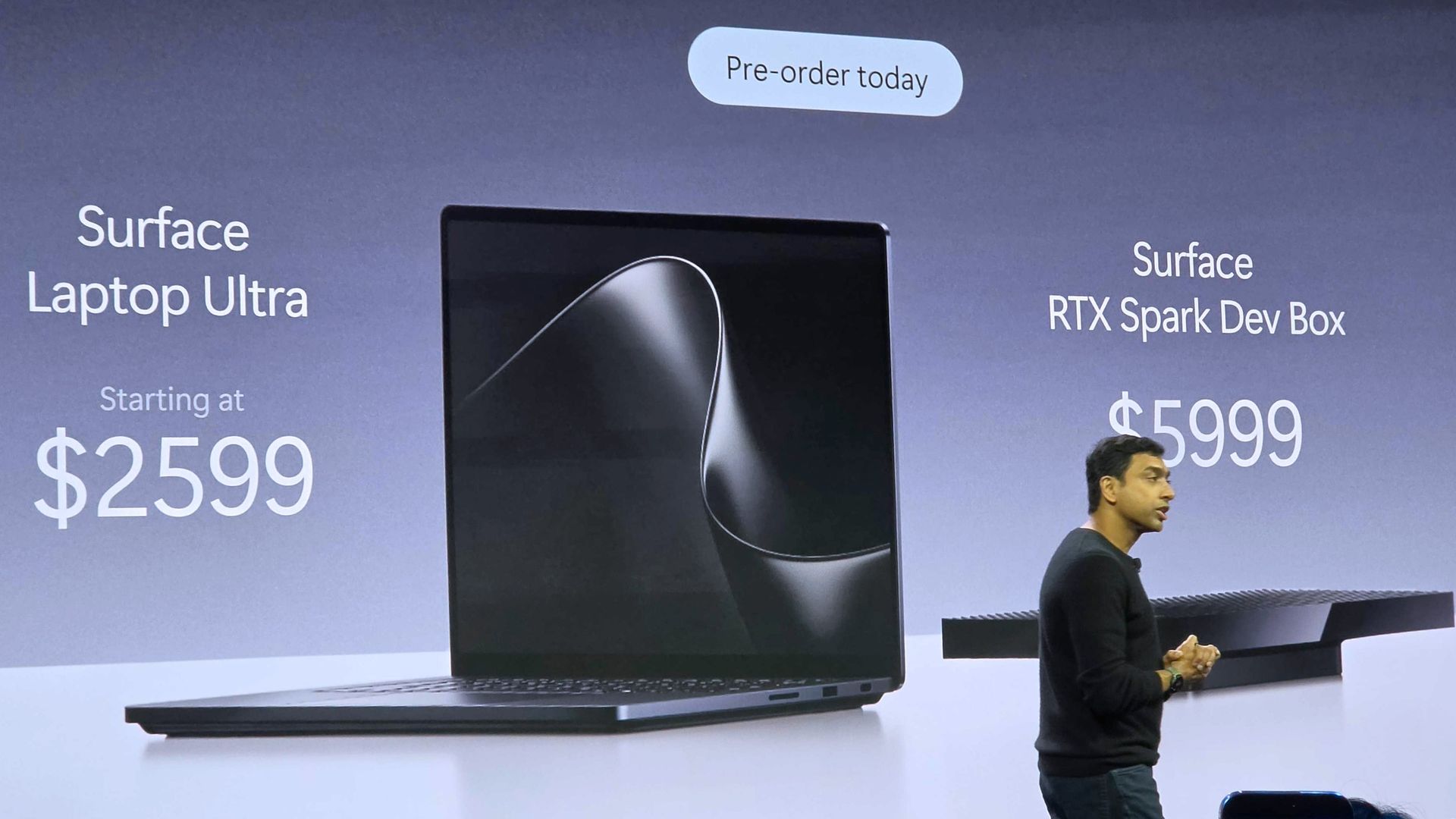
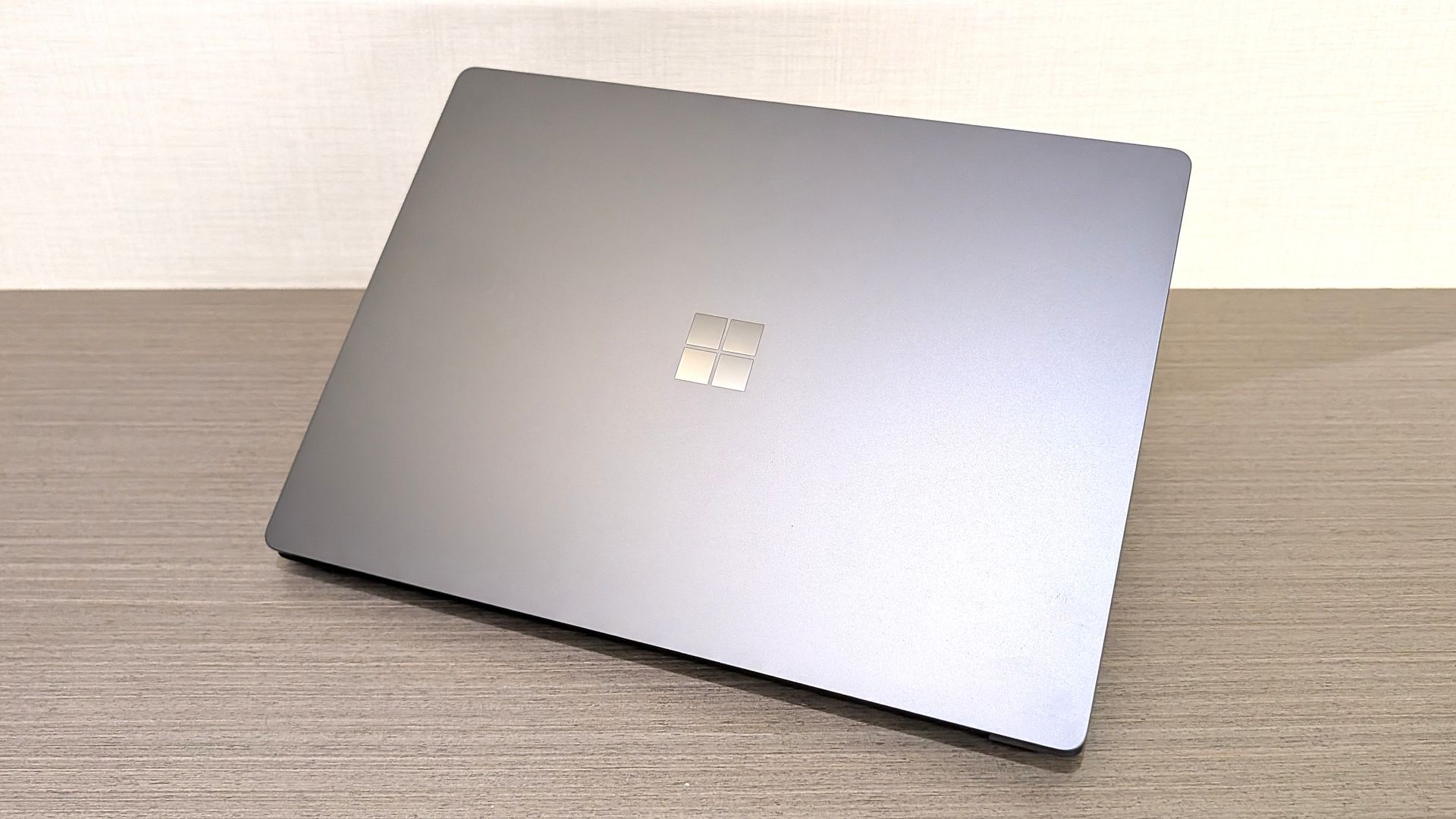
Microsoft’s Surface Laptop Ultra starts at $2,599 with an Nvidia RTX Spark GPU, up to 128GB of memory, and support for running large AI models locally.
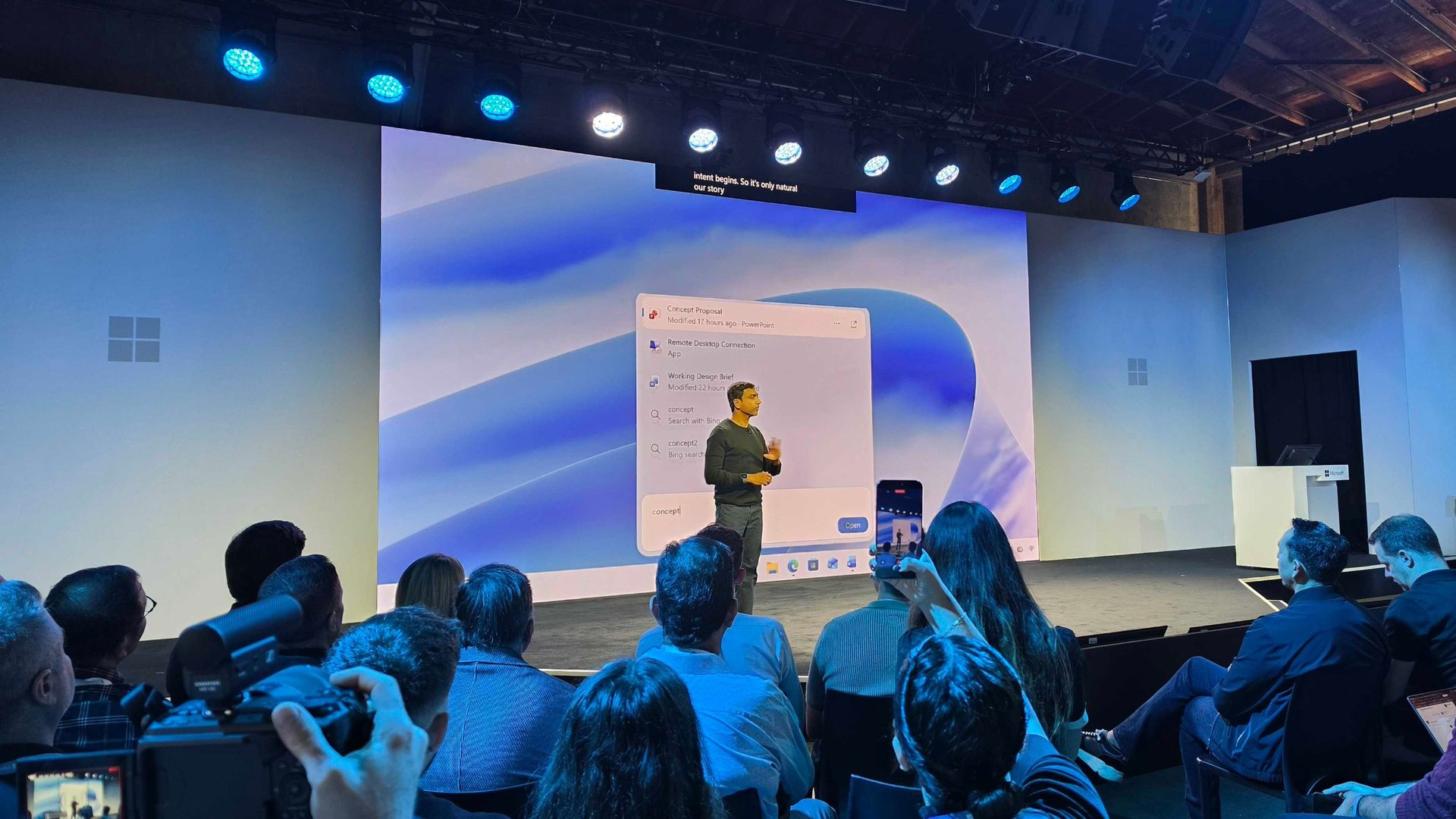
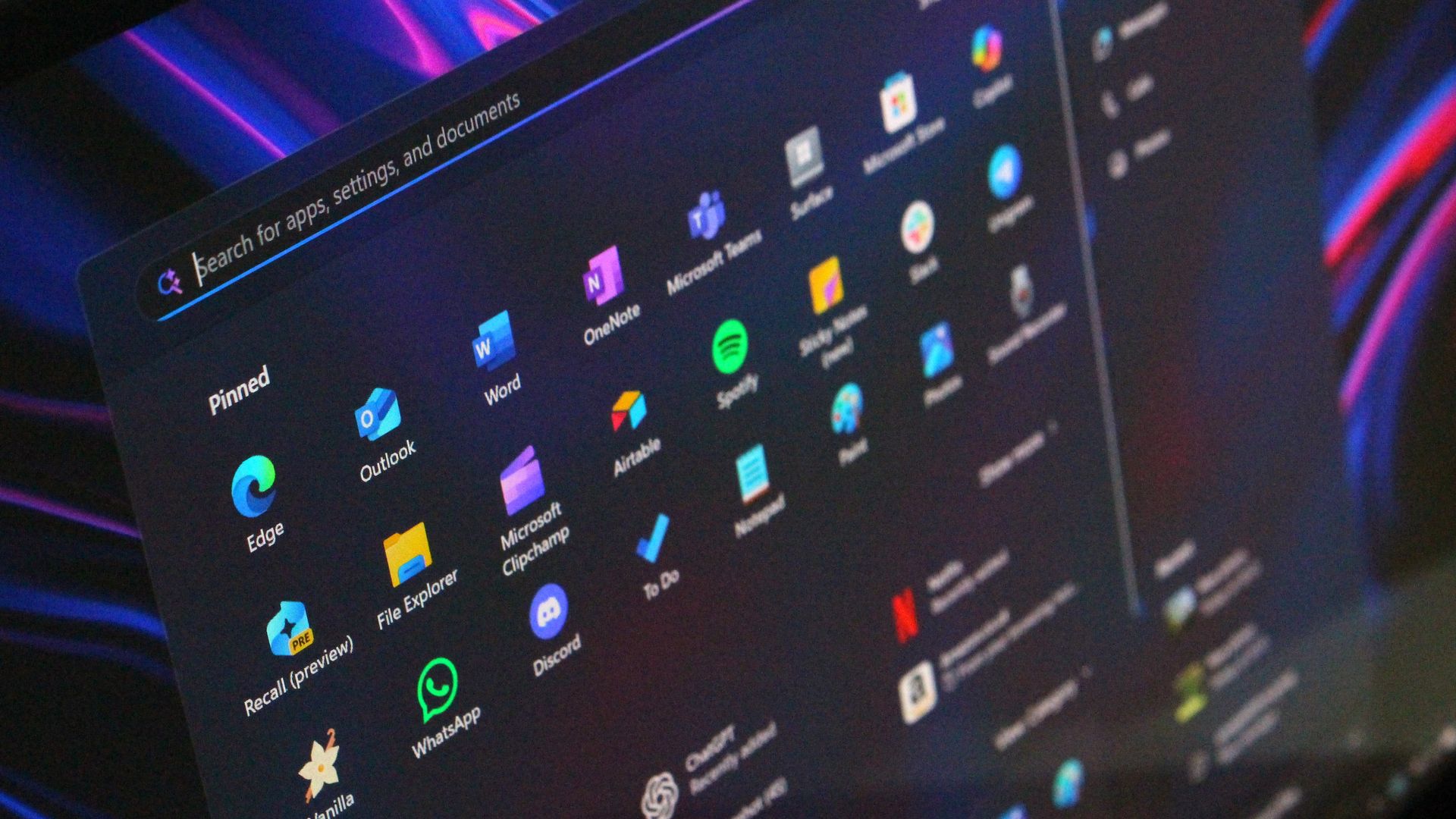
Microsoft just unveiled the new Windows Search experience at its Windows and Surface event. The new Search is more than just a search feature; it's a system composer. That means it can be used to control your PC. Microsoft's Windows lead Pavan Davuluri discussed the new Search experience on stage.
Starting this fall on Windows 11 PCs, users can take thousands of quick actions directly from Search in the Taskbar. For example, you could enable dark mode or switch your PC to Do Not Disturb. You can also adjust your microphone slider through the new Search experience.
You can even use the new Search experience to send a text message through Phone Link.
Microsoft detailed the new Search in a blog post. It also shared some examples of actions you can perform:
Turn something on or off. Try phrases such as “switch to dark mode”, “turn on night light,” or “turn on Bluetooth.”
Make a quick adjustment. Try “dim my screen” or “mute.”
Manage your workspace. Try “minimize all my windows,” or “arrange windows on screen.”
Copilot can be summoned through the new Search as well, showing responses directly within the user interface. You won't have to jump into a separate app to interact with Copilot. If you do want to jump to the full Copilot app, there's a shortcut to do so.
As you'd expect, the new Search experience can also be used to search for things on Windows 11. "At its core, the new Windows search experience is quicker, more efficient, so you can find your files, settings, and apps faster," said Davuluri.
The new Windows Search experience is faster and more efficient with resources because it is built on WinUI 3
(Image credit: Microsoft)
Windows Search will better understand what you're searching for. For example, it will still be able to find items even if your input has a typo.
Microsoft will start testing the new Search experience with Windows Insiders today, October 7, 2026. It will appear first through the Experimental channel.
This piece was written during the live stream of the Windows and Surface event. Microsoft is expected to share more details about the new Search experience and other items discussed at the event. We will update this piece with more information as it becomes available.
The October 2026 Security Update for Windows 11 is expected to begin rolling out as an automatic install on October 13, 2026, with a new wave of features, improvements, and fixes. This release is notable because it also rolls out for version 26H2. In addition, this release marks the last quality update for version 24H2, as this version also reaches the end of support.
In this quality update, Microsoft introduces a new feature that allows you to decide whether your apps always open maximized. File Explorer receives some useful improvements, and the Magnifier gets a small refresh.
In Settings, you can now adjust touchpad controls and reassign the Copilot key to open Right Ctrl or the Context Menu.
Finally, the software giant is adding a new Tips widget, and the Windows Recovery Environment (WinRE) can now reuse your previously configured Wi-Fi credentials.
In this guide, I'll highlight the most significant changes in the October 2026 Security Update for Windows 11 versions 26H2, 25H2, and 24H2, since they are identical.
Windows 11's new features arriving in October
As usual, the company uses Controlled Feature Rollout (CFR) to roll out new improvements gradually, so it may take some time before you see them.
File Explorer changes
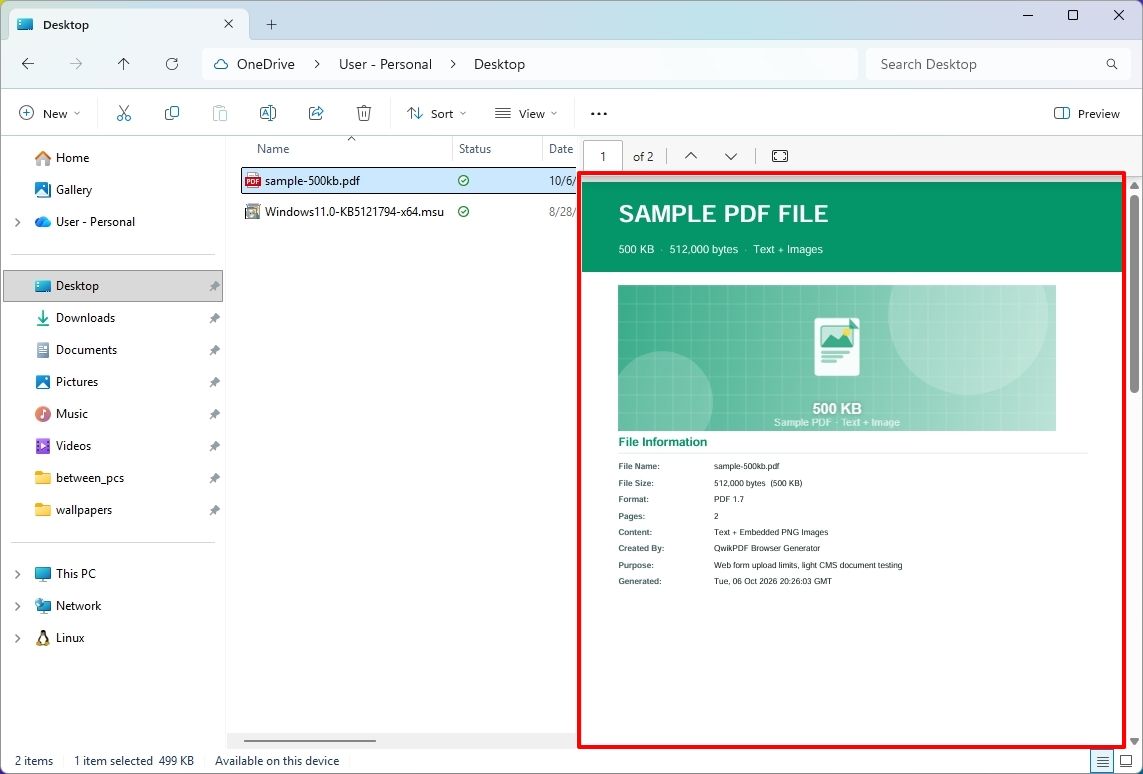
The updated version of File Explorer improves some areas of the experience. For example, the "Preview" pane now lets you preview downloaded HTML files after confirming the internet warning, while PDF files now show a preview automatically.
(Image credit: Mauro Huculak)
The Home page is also getting an update that lets File Explorer remember which sections you expanded or collapsed, so the next time you're on the page, you don't have to reconfigure the layout.
In the "Details" pane, the development team is improving thumbnail reliability for cloud files and reorganizing file properties for easier viewing.
Open apps maximized feature
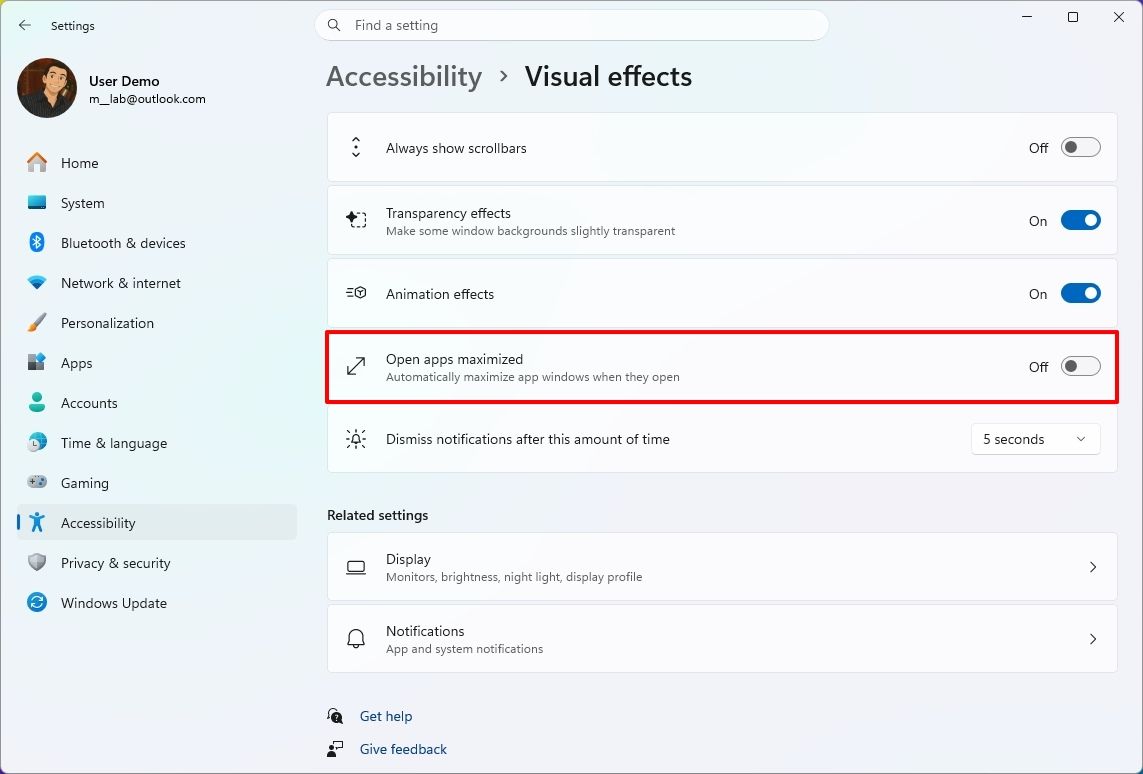
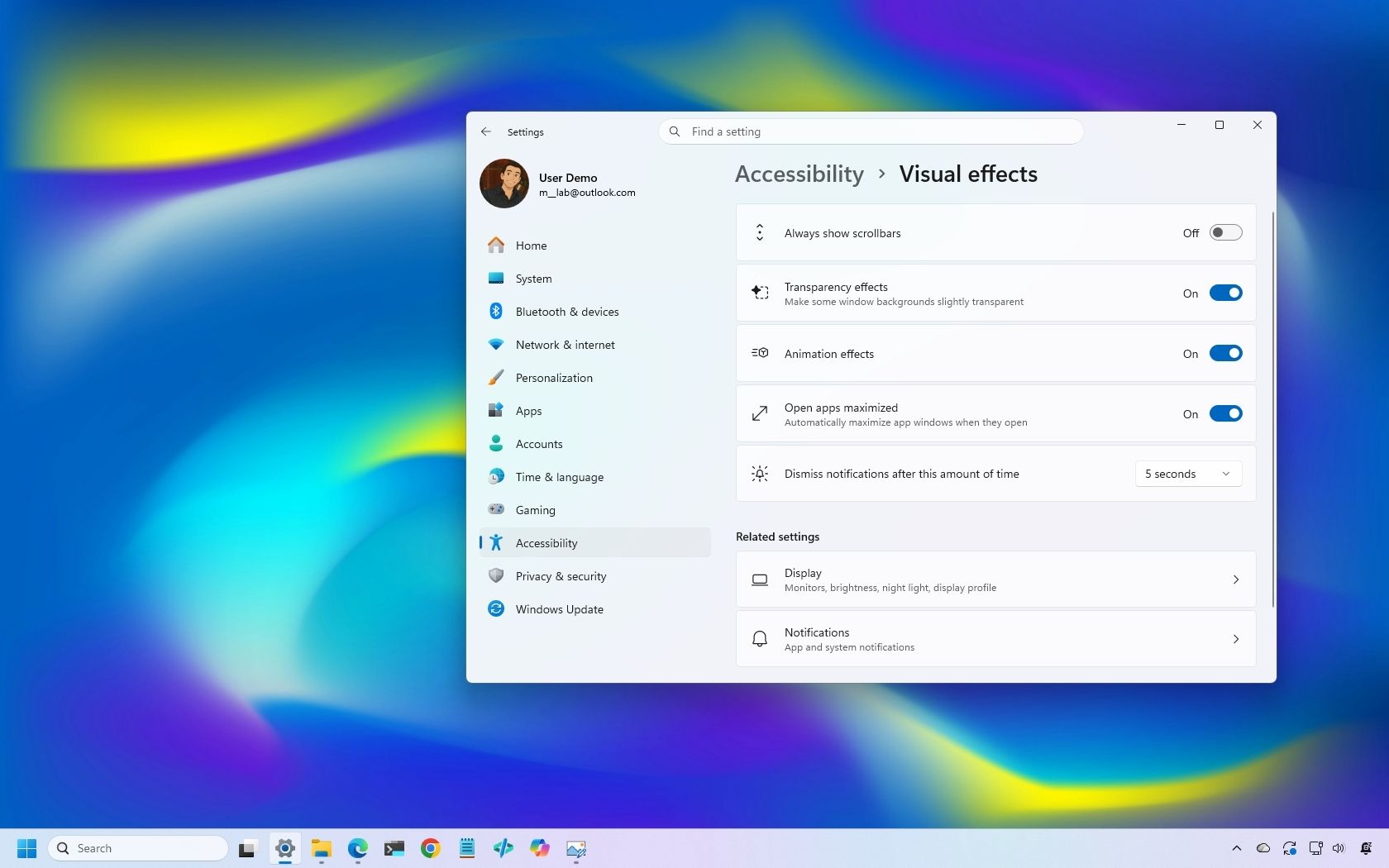
Microsoft is also rolling out a new feature known as "Open apps maximized," an accessibility feature that lets users choose whether apps should always launch maximized.
(Image credit: Mauro Huculak)
The "Open apps maximized" feature is available under Settings > Accessibility > Visual Effects. When you turn it on, the operating system automatically launches apps in maximized mode (not full-screen mode).
Magnifier refresh
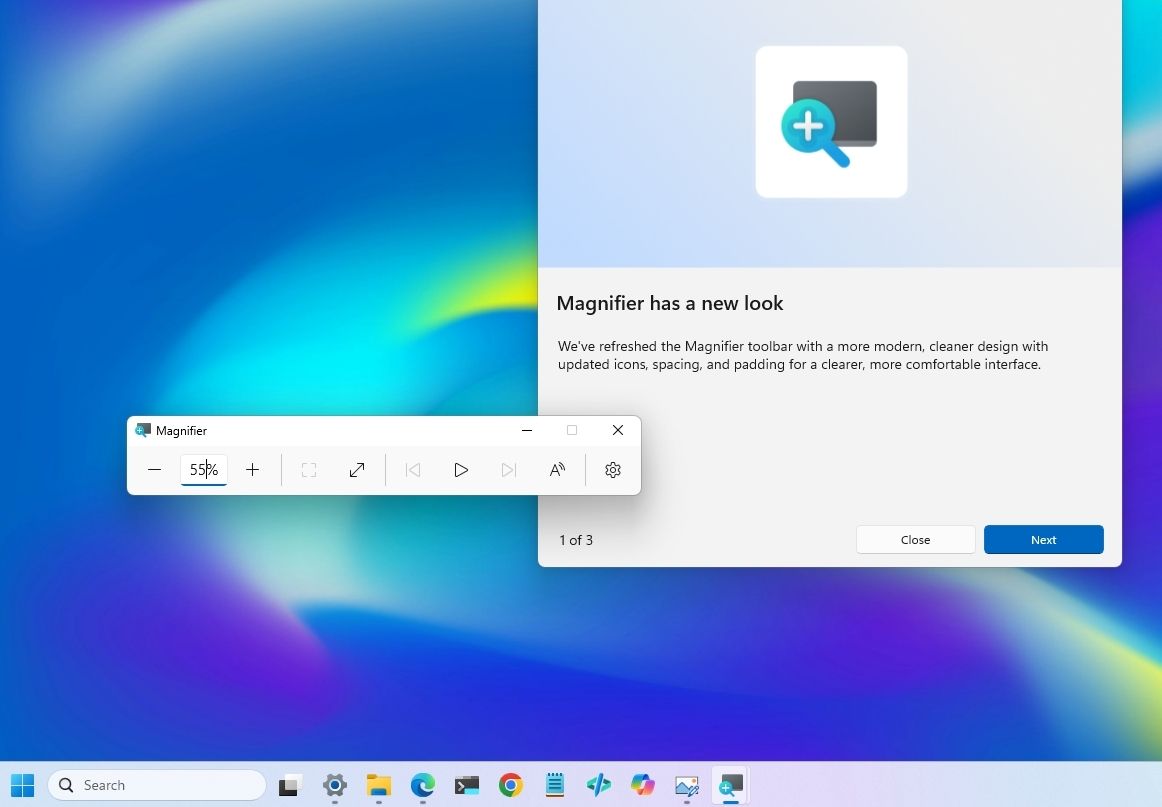
The October update also brings a new version of the Magnifier with visual changes. For example, the toolbar icons now align with the Windows 11 design language.
(Image credit: Mauro Huculak)
In addition, the company is redoing the interface padding to give the experience more spacing across the toolbar for a more consistent layout.
Touchpad controls
In this quality update, if you have a precision touchpad, you'll be gaining two new options.
On Settings > Bluetooth & devices > Touchpad, you can configure the experience to scroll vertically with one finger from the left or right side of the touchpad, or keep scrolling by gesturing your finger upwards without lifting.
Copilot key remap new options
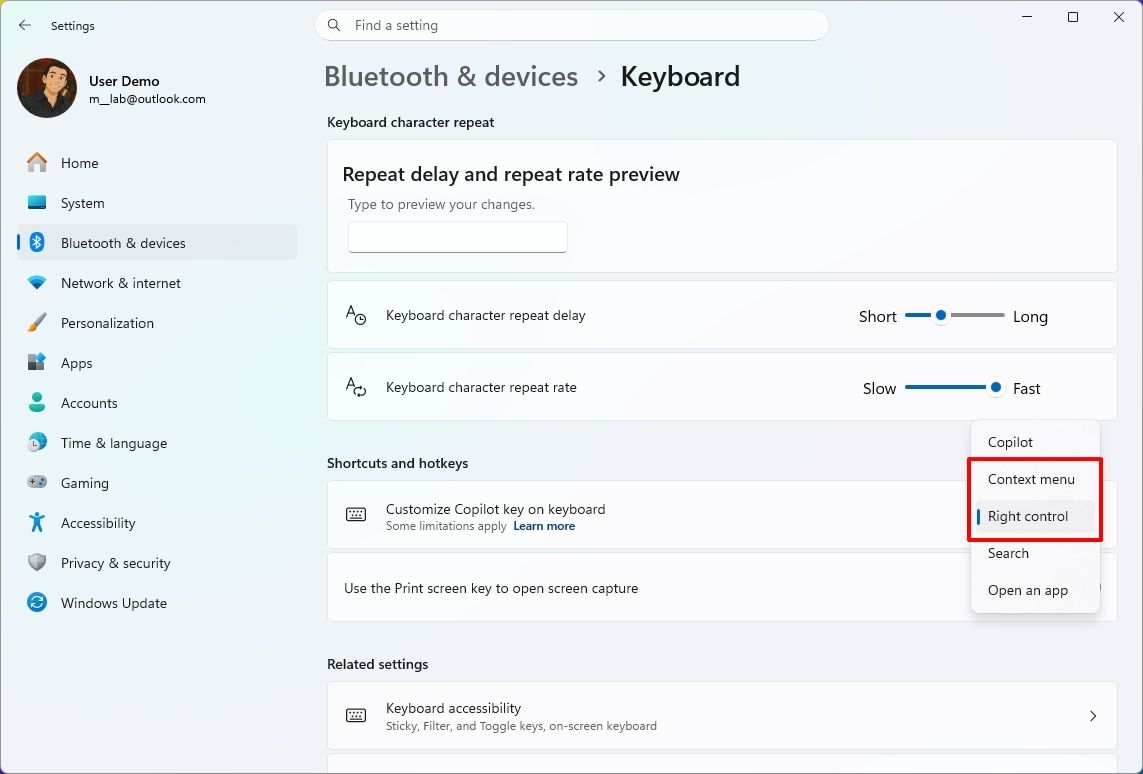
Although you can remap the Copilot key to different actions, this release adds the ability to remap it to "Right control" or the "Context menu" key, bringing Copilot devices to a more familiar keyboard experience.
(Image credit: Mauro Huculak)
You'll find the new "Right control" and "Context menu" options in the "Customize Copilot key on keyboard" setting on Settings > Bluetooth & devices > Keyboard.
Widgets with new Tips widget
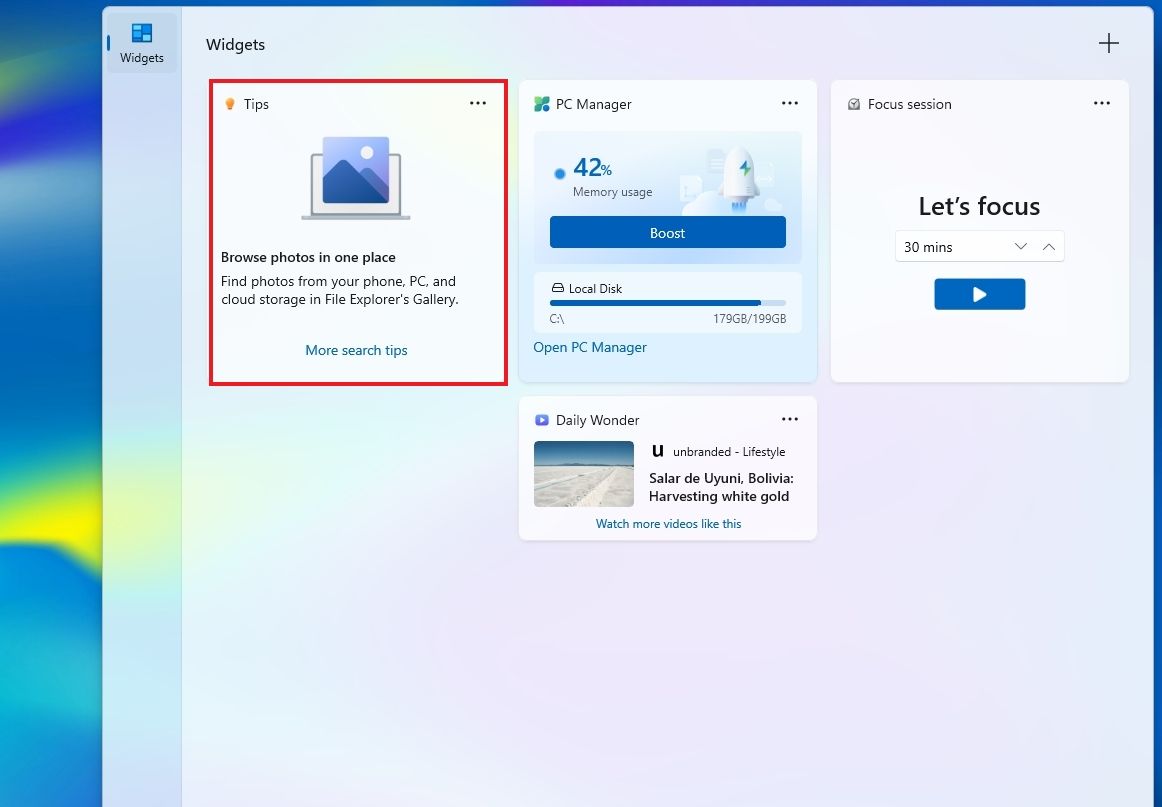
In the Widgets feature, the company is adding a new "Tips" widget that offers short tips about the operating system.
(Image credit: Mauro Huculak)
In the dashboard, you can add the widget from the "Add widgets" option. You can always place it on the Lock screen using the widget settings in Settings > Personalization > Lock screen.
WinRE with Wi-Fi support
As part of this release, Microsoft is also updating the Windows Recovery Environment (WinRE) to reuse Wi-Fi profiles already saved in the operating system.
Before this change, WinRE supported network connectivity only via an Ethernet connection or separately pre-configured Wi-Fi networks.
The change is now enabled by default, allowing the recovery environment to quickly connect to the internet using profiles already configured in the operating system, making it easier to access features like Quick Machine Recovery.
In addition, the company is adding a remote recovery management plugin to WinRE, extending its management features to MDM providers.
Other changes
Alongside the biggest improvements, the October 2026 Security Update includes other smaller changes that are also welcome additions.
For example, in the Personalization experience, Microsoft is improving the background experience with better transitions for changing wallpapers, and the preview now supports higher resolution.
The slideshow option improves transitions and works across multiple desktops.
As part of the Bluetooth changes, the operating system now improves how the system handles connections, audio, microphones, and settings.
In the Settings app, more specifically on the Home or Accounts page, you'll find a new "Camera Roll Backup" option to protect your photos with OneDrive.
The Ebrima font now supports the Garay and Beria Erfe scripts, and Emoji 17.0 is now available on Windows 11.
In Kiosk mode, the system now blocks additional shortcuts, such as the "Windows key + Tab," "Windows key + A," and "Windows key + C."
Finally, the company is removing the PC-to-PC Migration feature that lets users transfer files and settings directly from an old PC when setting up a new PC.
Windows Central's Take
I see this as a solid update because many changes make the operating system easier to use rather than adding another major feature people have to learn. The ability to open apps maximized and the new options to remap the Copilot key are small additions, but they give users more control over how their devices work.
The ability to reuse Wi-Fi connections with WinRE is probably even more useful when something goes wrong. I rarely think about recovery tools when everything is working, but when I need them, having the system connect to an already saved connection without extra setup can save time and make things easier.
I also appreciate the company continuing to make these smaller usability improvements. After years of system updates, the changes I appreciate most are usually the ones that remove a small annoyance rather than add more complexity.
More resources
Explore more in-depth how-to guides, troubleshooting advice, and essential tips to get the most out of Windows 11 and 10. Start browsing here:
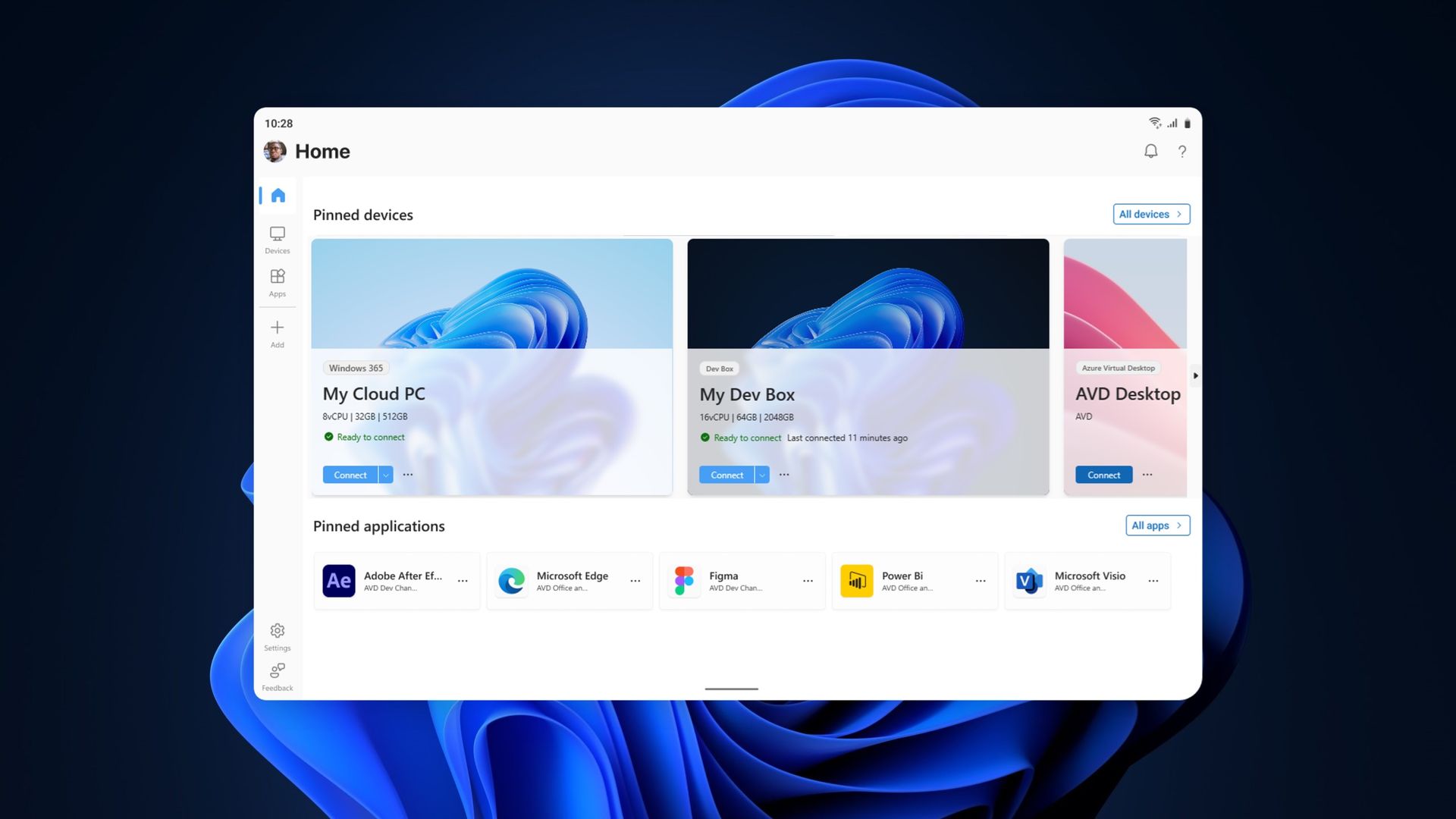
The Windows App on Windows now has a new way to connect to a Windows PC. Remote PC connections are now supported in the app, creating a unified experience for a broad range of connections.
The Windows App already supported Windows 365, Azure Virtual Desktop, and Microsoft Dev Box. Now, it also allows you to connect to a PC remotely.
The ability to connect to a PC remotely arrives in Windows App following the retirement of the Remote Desktop app. The expanded feature set of the Windows App entered testing in March and now remote PC connections are generally available.
This week's news is that remote PC connections are supported in the Windows App on Windows, but it's worth noting that the Windows App is also available on macOS, iPadOS, Android, and web browsers.
Make sure Remote Desktop is enabled on the PC you want to connect to.
Install or update Windows App from the Microsoft Store.
Open Windows App and select Add a Remote PC or select the Add button.
Add your remote PC using its PC name or IP address.
Select Add or Add and Connect.
When I covered the migration to Windows App earlier this year, our readers listed Remote Desktop Connection (the classic mstsc.exe tool) as their preferred way to connect to a PC remotely. That method is still supported, as Microsoft retired the Remote Desktop app from the Microsoft Store rather than the built-in Remote Desktop Connection client. It will be interesting to see whether people transition to the unified Windows App.
If you used another method of connecting to a PC remotely and have switched to the Windows App, please share your experience in the comments.
Join us on Reddit at r/WindowsCentral to share your insights and discuss our latest news, reviews, and more.
Vous ne le savez surement pas mais Sebseba, un membre du forum TeamAAZ, partage depuis juin 2025 un
LivePE 100% en français
. C'est une ISO qui se met sur une clé USB et qui permet de démarrer un LivePE (un Windows Live quoi...), en EFI comme en MBR, avec de quoi sauvegarder, partitionner, récupérer des fichiers ou réparer le boot. Bref, c'est super pratique si vous faites un peu d'admin ou de support technique.
Le bureau du LivePE démarré dans une machine virtuelle, avec ses icônes en français
Il l'a fabriqué avec une base de
Win10XPE
,
SFX Constructor
et
Dism++
, et ça embarque une sacrée liste de programmes.
Par exemple, pour les sauvegardes, vous avez le droit à Acronis True Image 2026, Macrium Reflect X Server, AOMEI Backupper et les outils Hasleo. Pour tout ce qui est partitionnement, c'est MiniTool, EaseUS et AOMEI Partition Assistant. Aussi, pour récupérer des fichiers, GetDataBack Pro et Hasleo Data Recovery et il y a bien sûr AIDA64 Extreme et le Kaspersky Virus Removal Tool.
Maintenant, pour le mettre sur une clé ou un SSD externe, le tuto de Sebseba impose
UltraISO
et rien d'autre, sinon le multiboot EFI + MBR ne marchera pas. Il faut initialiser le support en MBR, puis vous le formatez en FAT32, vous ouvrez TECH.iso dans UltraISO et vous l'écrivez en mode USB-HDD+.
Et ensuite, vous pouvez réduire cette partition et en créer une seconde en NTFS pour y ranger vos ISO Windows. Par contre, attention, WinToHDD ne créera pas la partition MSR quand il installera Windows en GPT/EFI, ce qui posera des problèmes de migration plus tard... Donc préparez bien l'ESP et la MSR avant, avec DiskGenius ou DiskPart GUI Micro.
Le gestionnaire de démarrage de l'ISO, lui, s'affiche en anglais
Cette ISO de LivePE bien frenchy est une adaptation du WinPE de Sergei Strelec, dont l'
historique officiel
liste lui aussi Acronis, Macrium Reflect, AIDA64 et GetDataBack, mais uniquement dans la langue de David Bowie (ouais Shakespeare c'est has-been). Et si vous préférez une clé multiboot montée avec Ventoy,
Medicat
dont je vous ai déjà parlé à de multiples reprises, fait ça très bien depuis longtemps.
Microsoft is holding a special event in San Francisco on October 7, and is remaining tight-lipped about what will be discussed. The company has confirmed that Windows, RTX Spark, and Surface are on all the agenda, but is yet to delve into specifics.
This will be the first dedicated Windows & Surface event since the Copilot+ PC launch event in 2024. That event ended up being a total disaster, generating a wave of negative pushback online around features like Recall, tarnishing the category right out of the gate.
Microsoft will be livestreaming its October 7 event, which means the company believes the news it's planning to announce is worthy of public attention. Both myself and Daniel Rubino will be attending the event in-person, giving us an opportunity to go hands-on with all the new features and hardware as they are announced.
So, what can we expect Microsoft to discuss on October 7? Here's what I know.
Surface Laptop Ultra fully revealed
Unsurprisingly, a big focus on October 7 will be on Microsoft's new RTX Spark hardware. The Surface Laptop Ultra was unveiled back in June, and I'm expecting to hear more about the hardware, capabilities, and availability in San Francisco.
A big part of the keynote will be about how Surface Laptop Ultra and RTX Spark are capable of running local 120B parameter models that enable on-device AI experiences and agentic workflows without requiring the cloud. The laptop will be primarily marketed at AI developers and content creators who frequently use apps like Premiere Pro, Blender, and more.
I also understand that Microsoft will demonstrate how the Surface Laptop Ultra maintains maximum performance even when not plugged in, similar to the MacBook Pro. It'll also highlight the PixelSense Ultra display, which sources tell me will be both sharper and brighter than the display on the upcoming MacBook Pro/Ultra with touch.
Surface Laptop Ultra also features a large haptic trackpad that supports Windows 11's built-in haptic engine system that provides subtle feedback when interacting with apps and UI surfaces. I also expect Microsoft to reveal a unique USB-C port that may feature a breakaway design, similar to Surface Connect.
Component
Specifications
Platform / Silicon
NVIDIA RTX Spark Superchip (integrating NVIDIA Grace CPU and Blackwell RTX GPU) with native CUDA support
Processor Options
18-Core CPU with 5,120-core GPU
20-Core CPU with 6,144-core GPU
Unified Memory (RAM)
18-Core: 24 GB or 32 GB
20-Core: 32 GB, 48 GB, 64 GB, or 128 GB
AI Performance
Up to 1 PetaFLOP AI compute; runs local frontier-class models up to 120B+ parameters
Haptic touchpad (over 30% larger than Surface Laptop 15-inch) with next-gen haptic experience support.
Audio
Dolby Atmos surround sound
Ports & I/O
1x HDMI, 3x USB-C, 1x USB-A, Full-size SD card slot, 3.5 mm headphone jack
Battery & Performance Parity
All-day battery life; maintains 99.6% performance parity whether plugged into wall power or running on battery
Colors
Platinum and Nightfall
Operating System
Consumer: Windows 11 Home on entry SKUs; Windows 11 Pro on higher SKUs
Commercial: Windows 11 Pro across all configurations
Microsoft will also delve into configurations of the Surface Laptop Ultra that customers will be able to buy. According to my sources, Surface Laptop Ultra will be available in two RTX Spark configurations: an 18-core model with 5,120 GPU cores, and a 20-core model with 6,144 GPU cores for higher-end workflows.
The 18-core model will be available with 24GB or 32GB RAM, and the 20-core model will be available with 32GB, 48GB, 64GB, or 128GB RAM. The entry-level 18-core SKUs will ship with Windows 11 Home, and higher-end configs will come with Windows 11 Pro.
Of course, all eyes will be on pricing. Sources haven't been able to confirm exact pricing just yet, but I understand that Surface Laptop Ultra will not be cheap, likely starting well above $2,000 for the entry-level 18-core model with 24GB RAM.
I also wouldn't be surprised if we hear more about the Surface RTX Spark Dev Box, which I suspect will likely start shipping at or around the same time as Surface Laptop Ultra.
Windows K2 recap, and support for agents
(Image credit: Zac Bowden / Windows Central)
In addition to the new RTX Spark hardware, Microsoft has teased that "something new is coming from Windows" at this event. Details around what exactly Microsoft is planning to talk about remain under wraps, but I have a few theories.
Of course, the company will likely spend some time recapping the Windows K2 effort that has been ongoing this year. It'll highlight recent performance, reliability, and feature improvements delivered to the OS, and maybe even discuss how it has tuned the Prism emulation layer to run better on RTX Spark PCs.
I'm also expecting Microsoft to highlight some refreshed user interface and design improvements across the OS. The company has been working to bring WinUI to more areas of Windows, including File Explorer, Start menu, and more, which is expected to improve performance.
Windows is also set to gain new unified memory controls that will allow users to adjust how much memory is reserved for the GPU on RTX Spark. This should help enable more advanced local AI workflows and increased gaming performance when needed.
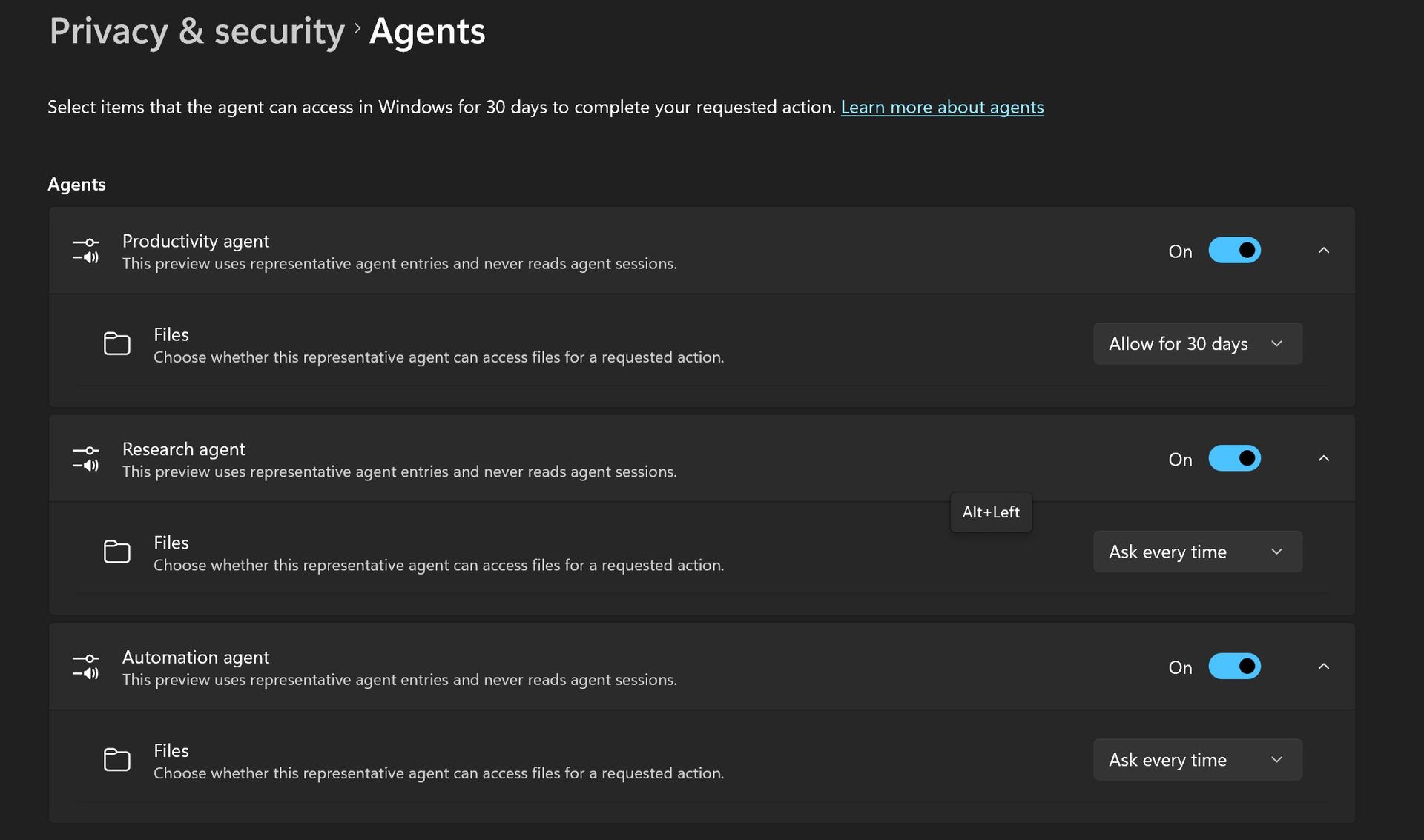
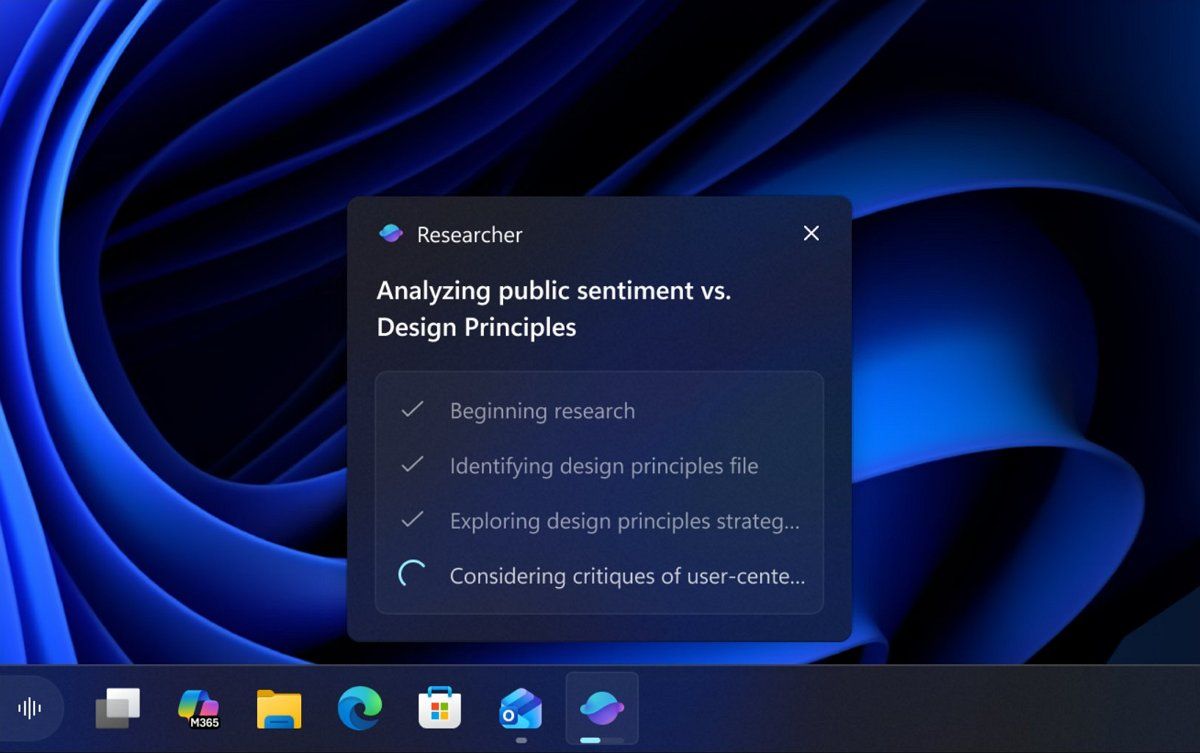
Agents on Windows have been in the works for well over a year. (Image credit: Microsoft)
But the big focus will be on how Windows 11 now supports agents. Microsoft has been working on adding agentic capabilities to the OS over the last year, and I'd be surprised if we don't get a demo showcasing how the platform has been updated to run agentic workflows locally and securely.
At Build 2026, Microsoft unveiled three new in-house language models that are designed to run entirely on-device: Aion Instruct, Aion Plan, and MAI Code Flash. I suspect all three will be highlighted as working great on RTX Spark.
Lastly, I wouldn't be surprised if Microsoft finally takes the wraps off its new voice-enhanced user experience that it has been teasing is in the works over the last year. On multiple occasions, the company has said it's working to adapt and improve voice input across Windows in the wake of AI.
Pavan Davuluri said in July that Microsoft is working to make "voice more natural and fluid to interact across the apps you use every day." We are yet to see this work in action, and so I expect October 7 will be when the company reveals this.
Microsoft's play for the high-end, MacBook Pro AI developer crowd
According to my sources, this event will focus a lot on appealing to the AI developer crowd, a large chunk of which has flocked to the high-end MacBook Pro or Mac Studio for all their on-device language model needs.
The Mac platform has become the default choice for AI development, and Microsoft and NVIDIA are keen to win back those users. Microsoft will use this event to appeal to that audience, along with content creators who have also chosen the Mac for photo and video editing needs.
Hopefully there will be some surprises in the form of Windows announcements, but I fully expect the majority of the event to focus on how Windows is now ready for RTX Spark and local agents.
Join us on Reddit at r/WindowsCentral to share your insights and discuss our latest news, reviews, and more.
Microsoft's Windows 11 and Surface event is only a couple of days away. At the event, we expect to hear a recap of improvements made to the operating system as part of the Windows K2 initiative. But why simply watch people talk about updates when you can test them out yourself?
Many of the biggest changes to Windows 11 have already shipped through Windows 11 version 26H2. But items that are still in the works are being tested among Windows Insiders. A flurry of five builds shipped recently.
Many of the changes are rolling out to multiple builds, such as added support for Unicode 17.0. Below, I've outlined all the updates and improvements rolling out to Windows Insiders. Make sure to check the channels noted below to see what's on the way to your PC.
Unicode (Beta, Experimental)
We've updated Windows text shaping support for Unicode 17.0, helping Windows correctly display and shape newly encoded characters and scripts. Unicode 17.0 added 4,803 characters, including support for four newly encoded scripts: Beria Erfe, Sidetic, Tai Yo, and Tolong Siki.
These updates help keep Windows text support current as the Unicode Standard evolves and improve support for languages and writing systems used by people around the world.
Settings (Beta, Experimental)
We're making performance improvements to the Settings home page, which should result in reduced loading times in certain scenarios.
Settings (Experimental (Future Platforms))
Updated Settings > Apps > Installed apps to show the version number at the top level for packaged apps, as it already does for other apps.
Recovery (Beta, Experimental
We're adding a new entry point for Cloud Rebuild under Settings > System > Recovery, making it easier to access the feature from Settings.
Windows Recovery (Beta (26H1))
We're introducing Cloud rebuild, a new recovery option that restores a Windows 11 PC to a clean, known-good state by performing a full OS reinstall, even when Windows won't boot. Unlike Reset this PC, Cloud rebuild downloads both the target Windows image and the device's drivers from Windows Update, so the device comes back fully functional without USB media, without a custom image, and without depending on the health of the currently installed OS.
In this preview, you can try Cloud rebuild today:
Start it directly from the Windows Recovery Environment (WinRE) by selecting Troubleshoot > Recovery and uninstall > Cloud rebuild.
Connect over wired Ethernet or a Wi-Fi network from within WinRE.
Review the target Windows build, edition, and language, then confirm the data-loss warning before the rebuild begins.
File Explorer (Experimental)
Address Bar now supports '~' , making it quicker to navigate directly to your user profile folder and subfolders (e.g., "~\AppData").
File Explorer (Experimental (Future Platforms))
This update adjusts how the preview pane handles files downloaded from the web. For HTML files, a new Preview anyway button lets you acknowledge the warning and preview the file. Non-HTML files, such as PDFs, are now previewed automatically.
Fixed an issue causing the previews in File Explorer to have an unexpected bar in the middle in recent flights.
File Explorer (Experimental (26H1))
Customizations
Improved File Explorer to keep folder view customizations, such as sorting and icon size preferences, consistent across different access paths and apps.
Address bar improvements
The address bar now supports paths containing double backslashes and quotation marks, for example, C:\Users\user or "C:\Users\user", improving compatibility with a wider range of inputs.
Improved reliability of the address bar suggestion dropdown so it now consistently closes after an item is selected.
Refinements to the rename experience
Fixed an issue where text would be repeatedly selected while renaming items in folder views.
Fixed an issue where updated names with case-only changes weren't immediately reflected in folder views across local and cloud storage.
Windows Magnifier (Experimental (26H1), Beta (26H1))
Magnifier now gives you more control over how you zoom. You can type an exact zoom percentage directly in the Magnifier toolbar to land on precisely the level you need.
We've also added preset step increments (5%, 10%, 25%, 50%, 100%, 150%, 200%, and 400%) to the Settings dropdown, so you can jump to common levels in a single click. Whether you need a subtle boost or a dramatic close-up, Magnifier adapts to how you want to zoom.
Cloud rebuild (Experimental (26H1))
We're updating Cloud rebuild, the recovery option that restores a Windows 11 PC to a clean, known-good state by performing a full OS reinstall, with two additions.
Cloud rebuild can now sanitize the device's drives as part of the rebuild. When you start a rebuild in WinRE, choose Remove files if you're keeping the PC, or Remove & sanitize files before recycling, returning, or reassigning it. The sanitize option uses the storage hardware's erase capability to securely erase data before Windows is reinstalled and is irreversible.
IT administrators can now configure and start a Cloud rebuild remotely through the Recovery CSP, using either the currently installed build or a target build you specify.
Windows Share (Experimental (Future Platforms))
Added the ability to pin your favorite apps in the Windows share window.
Family Safety (Experimental (Future Platforms))
Improved family safety messaging when applications are blocked because of age-restricted parental controls.
Taskbar (Experimental (Future Platforms))
Fixed a few small visual polish issues when using the taskbar in alternate positions.
Audio (Experimental (Future Platforms))
Fixed an issue affecting certain USB Audio Class 1.0 devices, including some multichannel audio headsets, that could prevent the device from working correctly after installing the latest updates.
Remote Desktop (Experimental (Future Platforms))
Fixed an issue causing Remote Desktop to not use the correct window size after recent flights.
Other (Experimental (Future Platforms))
Fixed an issue causing some Insiders to experience extreme lag over time after updating to the last two flights.
These changes aren't as substantial as the new features and upgrades in Windows 11 version 26H2, but they help create a smoother computing experience.
My favorite improvements are those rolling out to Windows Magnifier. Fine-tune controls make it much easier to create the best experience for your specific screen. The presets make it easy to jump incrementally, but I prefer entering the magnification manually.
Join us on Reddit at r/WindowsCentral to share your insights and discuss our latest news, reviews, and more.
It looks like Microsoft is wrapping up its Windows and Surface efforts for 2026 to be able to focus on the future. Last week the company announced refreshes to the Surface Pro 12-inch and Surface Laptop 13-inch. This week, Microsoft rolled out Windows 11 version 26H2.
With a bunch of Surface announcements in the rearview mirror and another update to Windows 11 rolling out, Microsoft can point its followers to the future. The description of the Windows and Surface event next week says, "Join us live... for a look at what's next from Windows, Surface, and NVIDIA."
I hope Microsoft has some exciting news in store for its event. Windows and Surface have been far from exciting lately. It is possible to market boring products, of course, but they have to be reliable.
This week Microsoft announced Windows 11 version 26H2 and called it a "predictable and low-disruption update." If Microsoft wants to win back consumers, it needs to either be cutting edge or actually deliver predictable and low-disruption updates. It feels like for the last few years we've gotten neither.
Biggest News of the Week
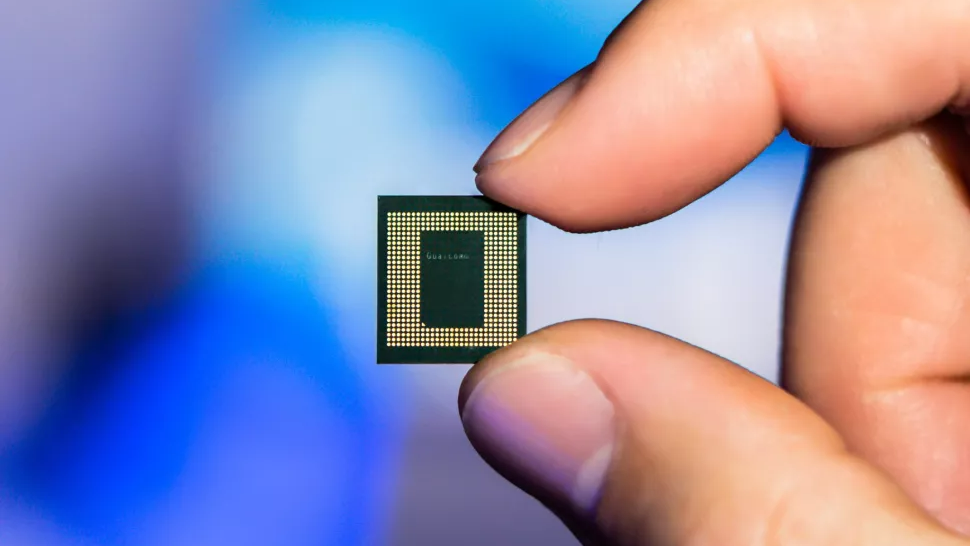
Qualcomm
Microsoft has had to release multiple out-of-band updates in 2026. Some bugs required multiple patches to fix. It's gotten so bad that most of our articles about Windows 11 updates are met with comments asking what will break this time.
Unfortunately, the commenters have been proven right several times. One serious bug made Outlook, OneDrive, Dropbox, and other cloud-backed apps inoperable. Another issue froze Remote Desktop and caused audio failures. At one point users couldn't even install a Windows 11 update, forcing Microsoft to pull that update.
If Microsoft is going to undercut its events and trim down its Surface lineup, it needs to double down on reliability. Next week, we should get some answers about Microsoft's plans.
Windows and Surface event
(Image credit: Windows Central / Zac Bowden)
A boring but bug-free Windows 11 update may be a welcome change of pace, but it makes me curious about what Microsoft will discuss at its Windows and Surface event next week. Considering Windows 11 version 26H2 is already rolling out, the focus is likely the future of Windows.
Does Microsoft have something up its sleeve? Has the tech giant learned a lesson about how to build consumer hype? Or are we due for another on-stage announcement about AI and how new PCs can run models locally?
I'm sure there are developers interested in the potential of the Surface Laptop Ultra and RTX Spark for AI development, but there are hundreds of millions of Windows users who care very little about AI. Microsoft needs to at least throw some scraps our way to keep us interested.
Shopping with Sean
Amazon's October Prime Day is next week, but there are already some great deals live. Competing retailers are trying to beat Amazon to the punch, resulting in big savings.
A trio of laptops are the best deals of the week. I'm partial toward the Lenovo Yoga Slim 7x because of its thin design but the Samsung Galaxy Book6 and Dell 14S are also great choices.
"The Dell 14S is a compelling choice for a variety of users thanks to its long-lasting battery life (and) relatively affordable price." ~ Sean Riley, Freelance Writer, Tom's Guide
"The Slim 7x (Gen 11) is a laptop I can see fitting in perfectly with students, home business pros, and casual users who simply want a laptop for around $1,199 (even less when it's on sale) that feels like it should cost a lot more." — Cale Hunt, Windows CentralView Deal
"I’ve been using the Samsung Book 6 for a while now and honestly it’s been solid. It’s lightweight, looks premium, and the battery easily gets me through most of the day. Performance is smooth for studying, browsing, videos, and everyday work." ~ VALENTIN, customer review
4.8 out of 5 Stars (based on 40 Best Buy customer reviews)View Deal
Join us on Reddit at r/WindowsCentral to share your insights and discuss our latest news, reviews, and more.
Mulderland
, c'est le site bilingue d'un seul mec, qui signe Mulder (vous aurez la ref si vous êtes des vrais ^^), et qui conçoit et diffuse des installeurs pour remettre d'aplomb des jeux PC que vous avez déjà achetés.
Vous lancez l'un de ses exécutables sur votre dossier Steam ou GOG, et il va chercher tout seul le gros tas de correctifs et de mods qu'il faudrait sinon récupérer à la main pour avoir une version du jeu la plus actuelle et pimpée possible. Mulder propose une cinquantaine de titres de Resident Evil à Deus Ex, donc forcément vous allez y trouver votre bonheur !
Par exemple sur 007 First Light, sorti en mai, le pack permet de corriger les cinématiques en ultrawide, de supprimer les vidéos d'introduction et de poser un HUD plus immersif. Sur le Resident Evil de 1996, c'est carrément un autre chantier avec des textures retravaillées par
TeamX et le Seamless HD Project
, les cinématiques et l'audio en haute qualité, le patch
Classic REbirth
, et des traductions en option. Le pack Steam pèse quand même 3,5 Go ce qui est pas mal pour un jeu de 1996, oui...
Après ce pack-là fait plus que poser des mods par-dessus votre jeu, puisqu'il remplace les exécutables de votre version Steam par ceux de l'édition GOG, et que son utilitaire MulderConfig prend la place du lanceur CAPCOM. Et tant mieux, car c'est justement ce lanceur d'origine qui casse l'overlay Steam, et MulderConfig le répare, ainsi que le suivi du temps de jeu et le Steam Input.
Ah et il y a aussi tout ce qui faut pour obtenir le meilleur d'outils et d'OS comme diverses versions de Microsoft Office et de Windows !
Rassurez-vous, rien de tout ça n'est opaque puisque chaque pack est une
recette NSIS publique visible sur GitHub
, qui liste l'URL de chaque fichier avec son empreinte en clair, et les installeurs sont compilés par GitHub Actions depuis ce même dépôt. Comme ça, si une empreinte ne correspond pas au fichier téléchargé, l'installeur s'arrête immédiatement.
Voilà, après que dire... ?
Ah oui, c'est uniquement pour du Windows, et comme les installeurs sont signés avec un certificat auto-signé, Windows va râler sur un éditeur inconnu, donc pensez bien à débloquer ça dans les propriétés du binaire.
Notez que si l'envie vous prend de faire tourner Resident Evil sur Steam Deck et sous Linux, où
Proton a bien progressé sur ces vieux titres
d'ailleurs, le pack vous demandera Proton 9 ou supérieur ainsi que dgVoodoo2. Ensuite y'a plus qu'à coller ça dans les options de lancement du jeu et le tour est joué :
Microsoft officially released Windows 11 26H2 for all users. Windows 11 26H2 brings many new features, along with security improvements and performance enhancements. While Microsoft delivers Windows 11 26H2 to all eligible devices through Windows Update, some features remain dormant until you install the 26H2 Enablement package. This article highlights the new key features and […]

 Connexion









 Microsoft officially released Windows 11 26H2 for all users. Windows 11 26H2 brings many new features, along with security improvements and performance enhancements. While Microsoft delivers Windows 11 26H2 to all eligible devices through Windows Update, some features remain dormant until you install the 26H2 Enablement package. This article highlights the new key features and […]