❌

Vue lecture

ASUS’s Ally X20 is selling out across the board — here’s why it matters

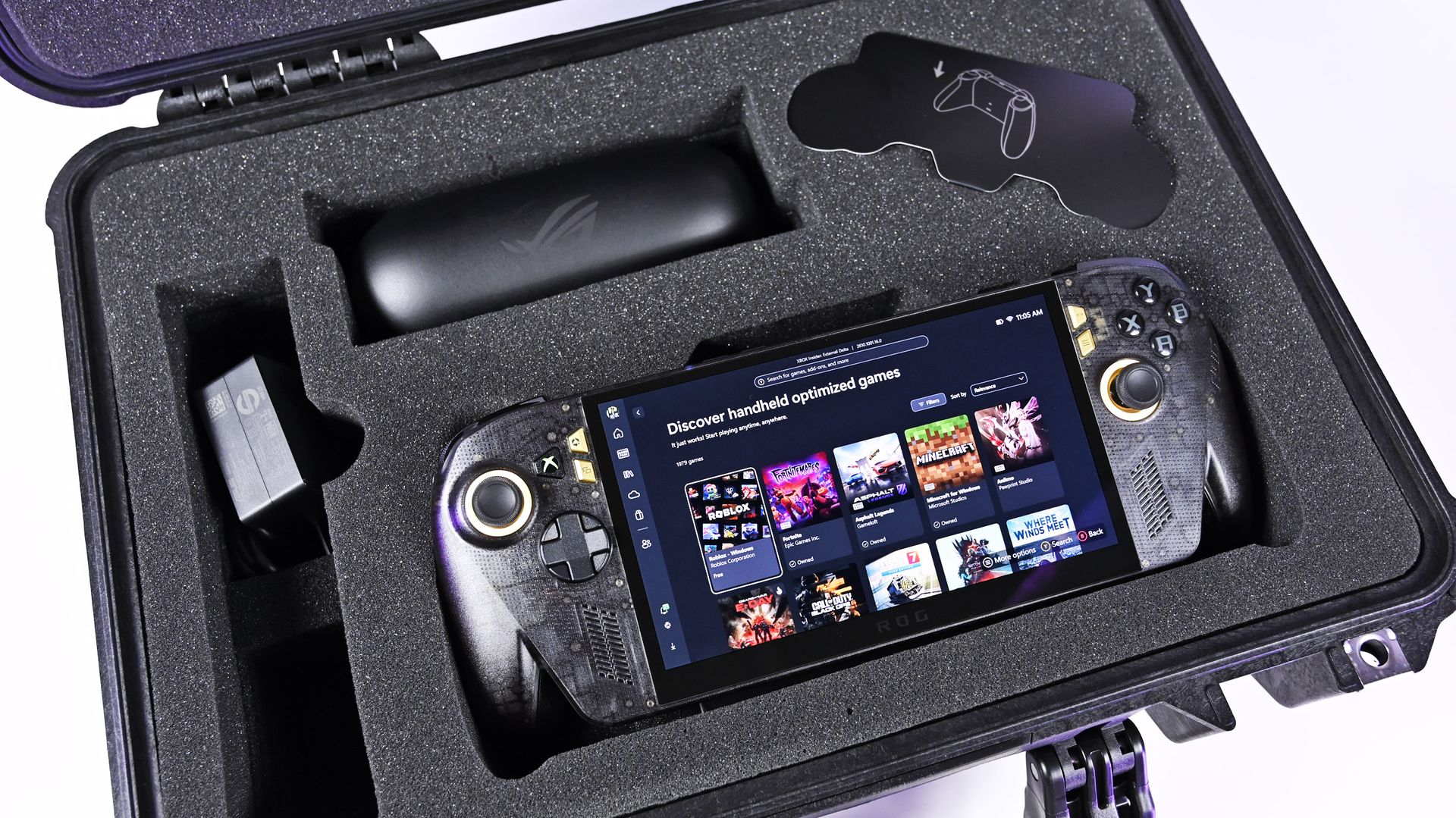
It was just a few days ago that I was unboxing the new ASUS ROG XBOX Ally X20, which went on sale just five days ago on October 15th, and now both the handheld ($1,299) and the $2,499 bundle (handheld + XREAL glasses, dBrand skin) are sold out at both Best Buy and ASUS.com.

Indeed, I'm not even saying they sold out today, but rather that today was the first day I checked to see if there was any inventory left. Going by a Reddit thread, it appears it sold out sometime yesterday or Sunday.

That's a very impressive metric, when you consider the pricing here. The current ROG XBOX Ally X is available for $999, while this refreshed model (which is better in every way) is $300 more. And the $2,500 bundle is also no joke, especially for what many would consider a secondary gaming PC.

Sure, we can attribute this to limited production and a finite inventory on hand, but it’s worth noting that preorders began almost two months ago on August 25th, giving ASUS ample time to prepare for demand.

And we know there was demand. Looking at our internal numbers for click-throughs, we saw back in August an unusually high amount of interest in the ROG XBOX Ally X20, more than you might expect from the most expensive ROG Ally to date.

A lot of this goes back to what I've been saying for years: Gaming is one of the few price-proof areas in tech, practically insulated from the harsh economic realities that many people are facing, on top of the overall higher prices attributed to AI-driven demand for RAM and NAND (storage).
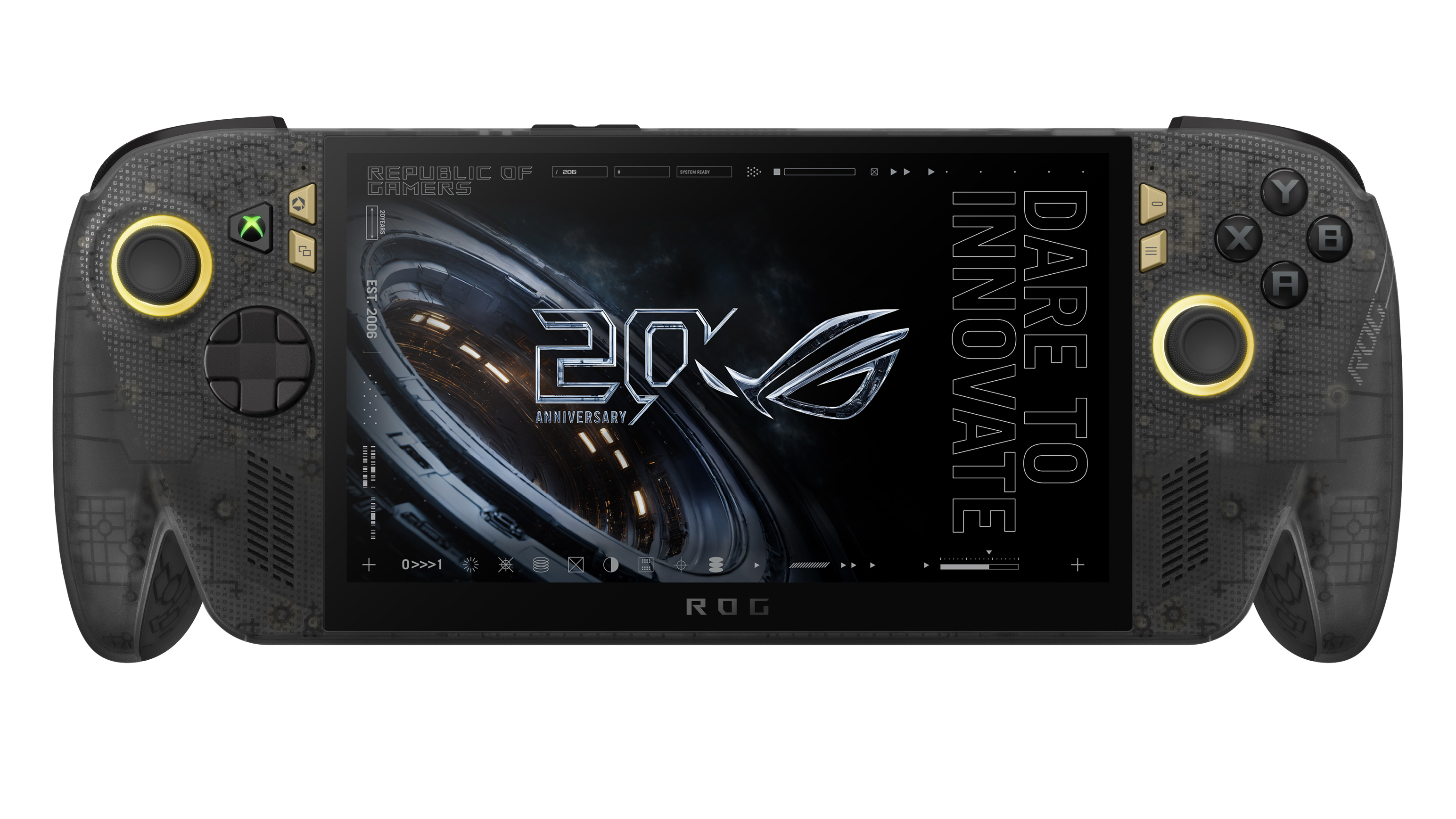
Direct front view of the translucent black ROG Xbox Ally X20 handheld gaming device displaying

ASUS
ROG Xbox Ally X20

A refined celebration of ASUS’s gaming legacy, the Ally X20 Anniversary Edition pairs its upgraded Ryzen AI Z2 Extreme chip with a vibrant 7.4‑inch OLED HDR display and a boosted 80 Wh battery. It’s a sleeker, more efficient Windows gaming handheld built to mark the milestone with sharper visuals, quieter thermals, and longer play sessions.

Whether a recession, a pandemic, a RAM shortage, or a crypto mining craze (remember that?), gamers are almost always willing to fork over big bucks to have the latest gear. It's one reason that, despite some of the doom-and-gloom over PC sales in the last decade, gaming PCs grew year-over-year consistently.

To wit, the MSI Claw 8 EX AI+ has an MSRP of $1,799, and still sold out within days, resulting in resellers on eBay pushing $800 over retail. And people were absolutely buying those, too, as I wrote back in August. That device is still sold out at Best Buy, which raises all sorts of questions about how tight production is on it.

What's the big deal, anyway?
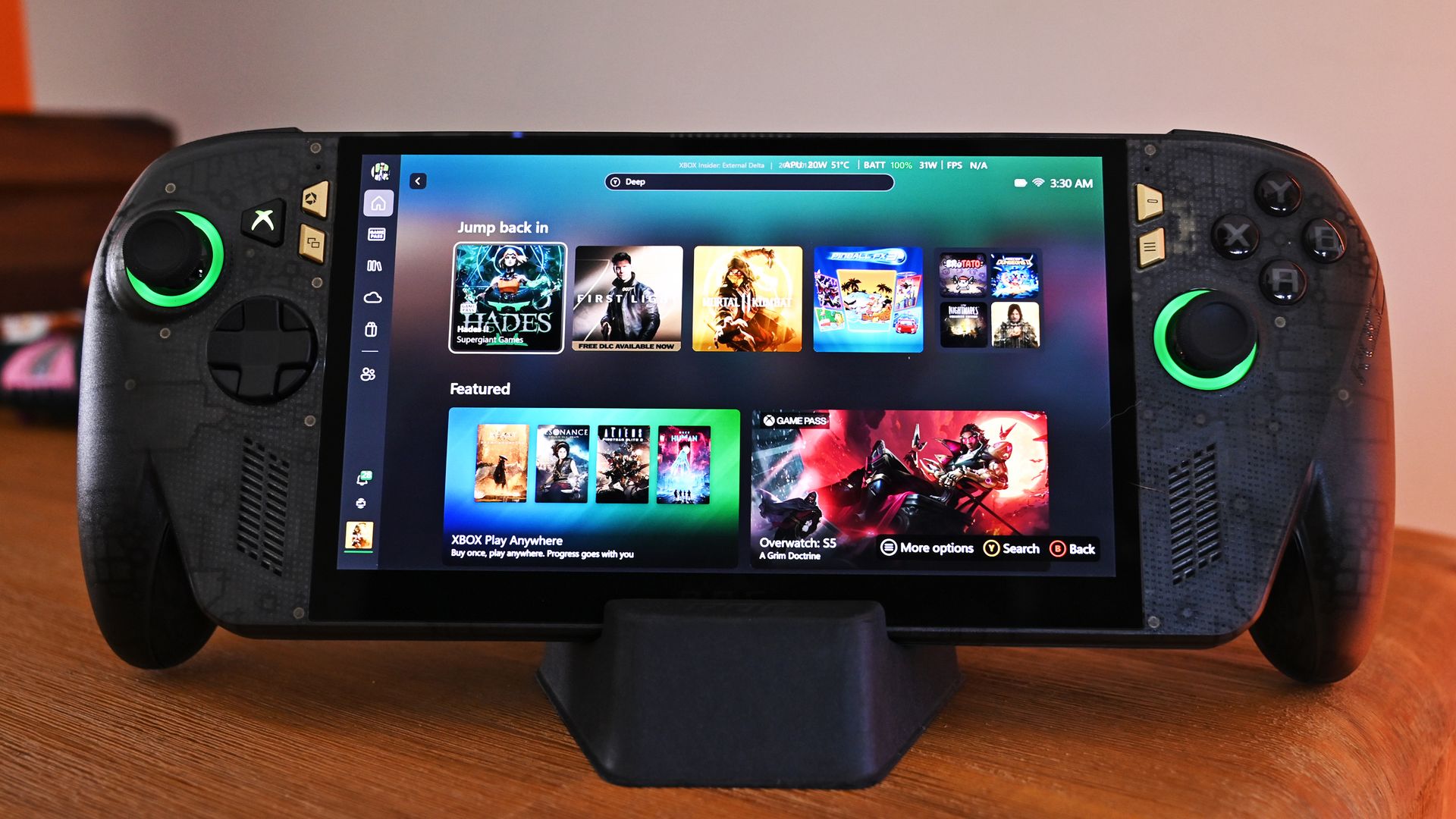
Front view of the ROG Ally X20 handheld resting on a desk dock, showing the Xbox dashboard game tiles and illuminated green joystick rings.

Front view of the ROG Ally X20 handheld, which is in very high demand. (Image credit: Daniel Rubino)

If you haven't followed this story closely, you'd be forgiven for thinking this is just a simple refresh of last year's XBOX Ally X, albeit with an OLED panel replacing the IPS.

That ... would be way oversimplifying it.

Yes, the same AMD Z2 Extreme and 24GB of RAM are here (albeit slightly faster memory), so overall performance is very much the same, but ASUS basically completely rebuilt this entire device with all new components. In fact, I've been documenting all the changes that I've noticed and collected from talking to ASUS and from past press events.

So, here's what's actually new:

  • Larger 7.4-inch OLED panel (up from 7.0 IPS)
  • 1,400 nits peak HDR (no HDR before)
  • 600 nits peak SDR (was 500 before)
  • Dolby Vision support
  • Corning Victus + DXC anti-reflection coating
  • Smaller bezels
  • Redesigned airflow channel specifically for cooling the OLED panel
  • Completely redesigned PCB USB4 ports
  • Upgraded fan and heatsink fins for better cooling
  • Hybrid metal dome switches for a more tactile D-pad
  • Transforming D-pad
  • TMR joysticks (Hall-effect style)
  • LEDs increased from 2 to 4 per stick
  • Quieter, more tactile ABXY buttons
  • Realigned shoulder buttons
  • Smoked black translucent housing
  • Rubberized ergonomic grips
  • Upgraded microSD Express slot (up to ~1 GB/s)

And this translates into a major real-world difference in terms of fit and finish, as well as overall enjoyment of the device, which is why so many people are praising the build quality.

While Intel's G3 Extreme trounces AMD in performance, the overall gaming experience on the ROG XBOX Ally X20 is very likely the best of any handheld. Plus, a faster AMD or newer Intel chip would have driven the price up even further (see MSI's $1,800 Claw).

Of course, the one pain point is still ... Windows 11. At least for the out-of-the-box experience (OOBE), but we'll talk about that another time. Once you're set up, the Ally X20 is top-tier.

ROG XBOX Ally X20 is getting great reviews
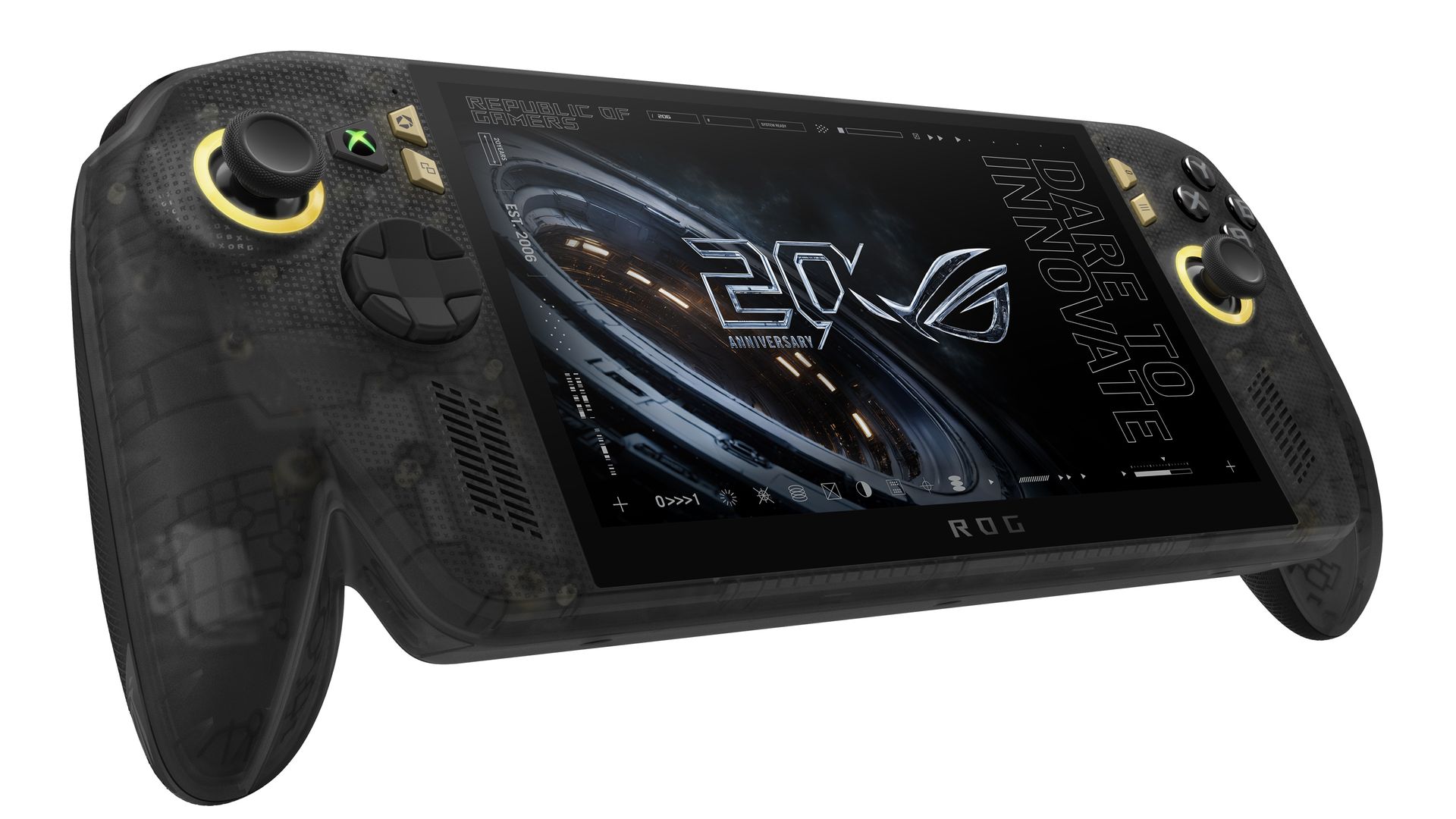
Angled front view of the translucent black ROG Xbox Ally X20 handheld console with gold joystick rings and screen displaying a 20th anniversary graphic.

(Image credit: ASUS)

It's worth noting that reviews, both professional and from consumers, have been near-universal in their acclaim for the ROG XBOX Ally X20.

Yeah, Best Buy only has 10 reviews posted, but it's a solid 5.0 across the board, with some noting, "This is the single most refined PC handheld ... I’ve tried." and "it might be the best quality handheld device in the market," and "ASUS Definitely hit it out of the park with this one."

Going by more professional reviews, IGN says the OLED takes the machine "to a completely new level" and argues that the extra $300 is "absolutely worth it" if you have the cash. Notebookcheck is similarly effusive, calling the OLED a "game changer" and describing the image quality as "simply stunning."

And one of my favorite YouTube channels, 128KB, dedicated to handheld gaming, also gave high praise (you can see the podcast embed above).

That kind of word of mouth goes a long way, and ASUS seems to have quite a hit on its hands despite the current market circumstances.

Of course, my review is coming out shortly, but spoiler alert: I don't differ much from most of the other conclusions. Sure, "The X20 should have been the original Ally X last year" is a common theme, but OLED displays this small with variable refresh were hard to come by in 2025, so ASUS went with what it could mass-produce at the time.

The Ally X20 selling out across every configuration shows just how aggressively ASUS has captured the handheld gaming PC conversation. This launch isn’t a blip or a lucky surge; it’s a clear sign that ASUS understands what Windows handheld buyers want and is willing to push the category forward faster than anyone else.

When a premium bundle disappears instantly, it tells you the audience is hungry, confident, and ready to invest in hardware that feels genuinely next‑gen. ASUS, in my opinion (and others'), set a new bar, and the rest of the industry now has to decide whether it can keep up with the pace ASUS just established.

Now, just give me that AMD FSR 4.1 update!

Anyway, let me know in the comments what you think about the state of handheld gaming in 2026, and whether the ROG XBOX Ally X20 is on your radar (if it comes back in stock).
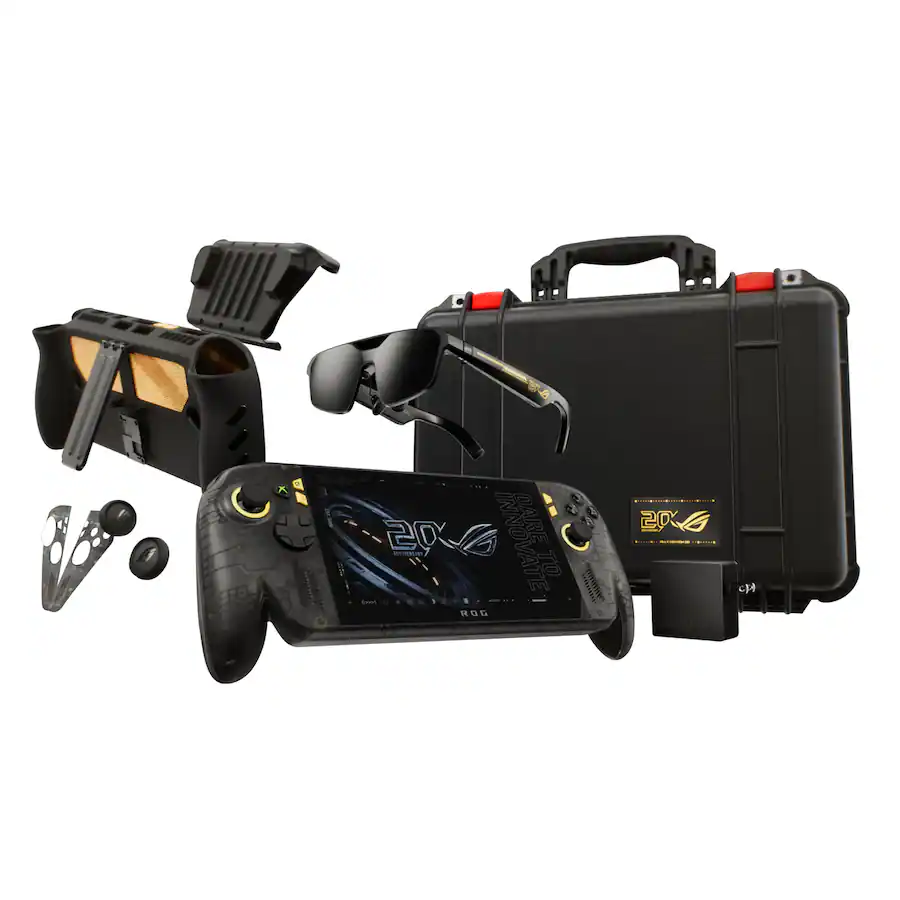
Stock image of the ASUS ROG Xbox Ally X20 Annivesary edition and kit.

ASUS
ROG Xbox Ally X20 Bundle

Twenty years of ROG innovation, marked by the limited ROG Edition 20 lineup in an exclusive colorway. The ROG XBOX Ally X20 Bundle carries that celebration forward, pairing the handheld with the ROG XREAL R1 Edition 20 Gaming AR glasses to create a complete gaming setup that travels with you.

Click to join us on r/WindowsCentral

Join us on Reddit at r/WindowsCentral to share your insights and discuss our latest news, reviews, and more.
  •  

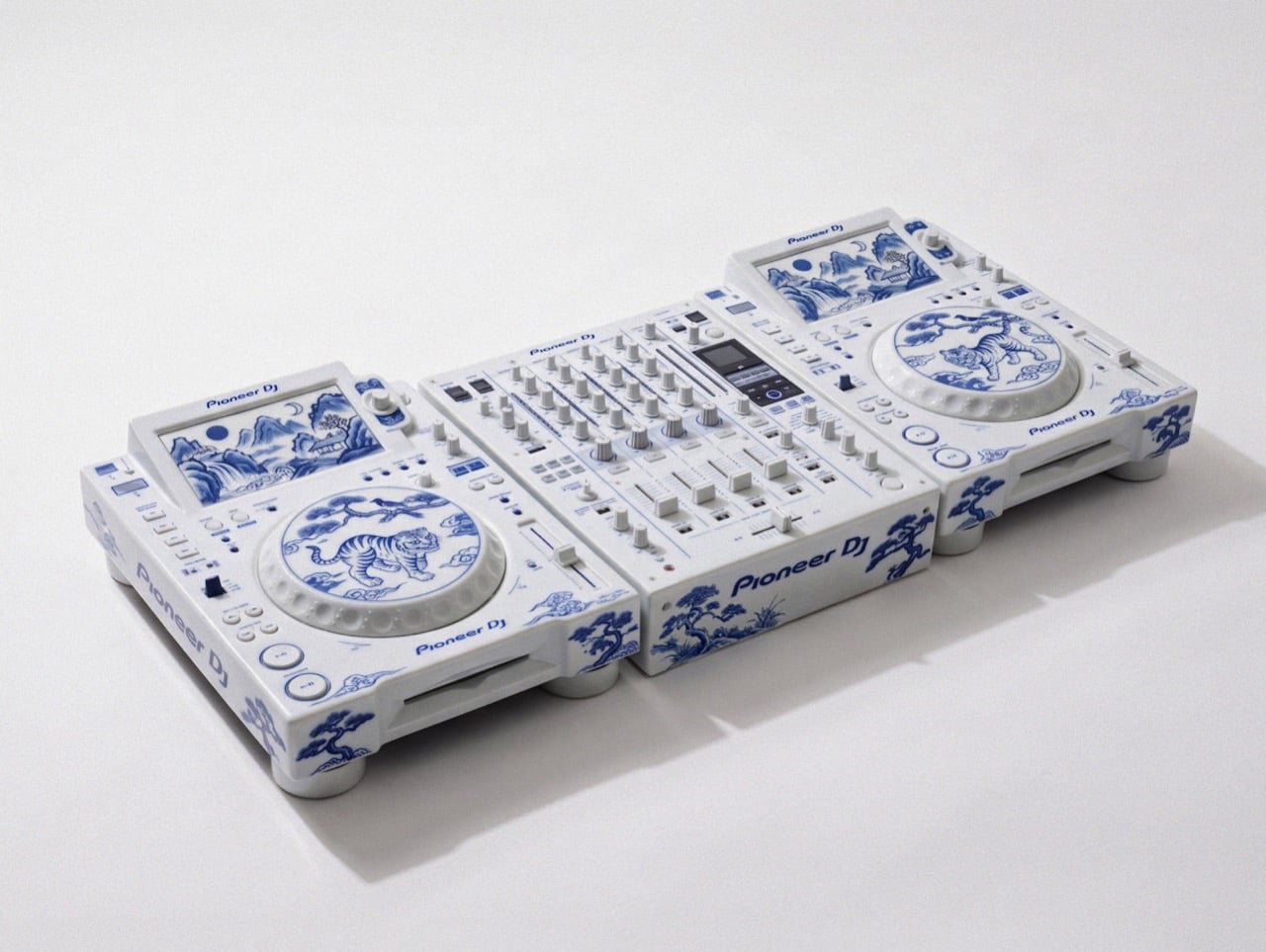
This porcelain Pioneer DJ setup belongs in a museum, not an Ibiza nightclub

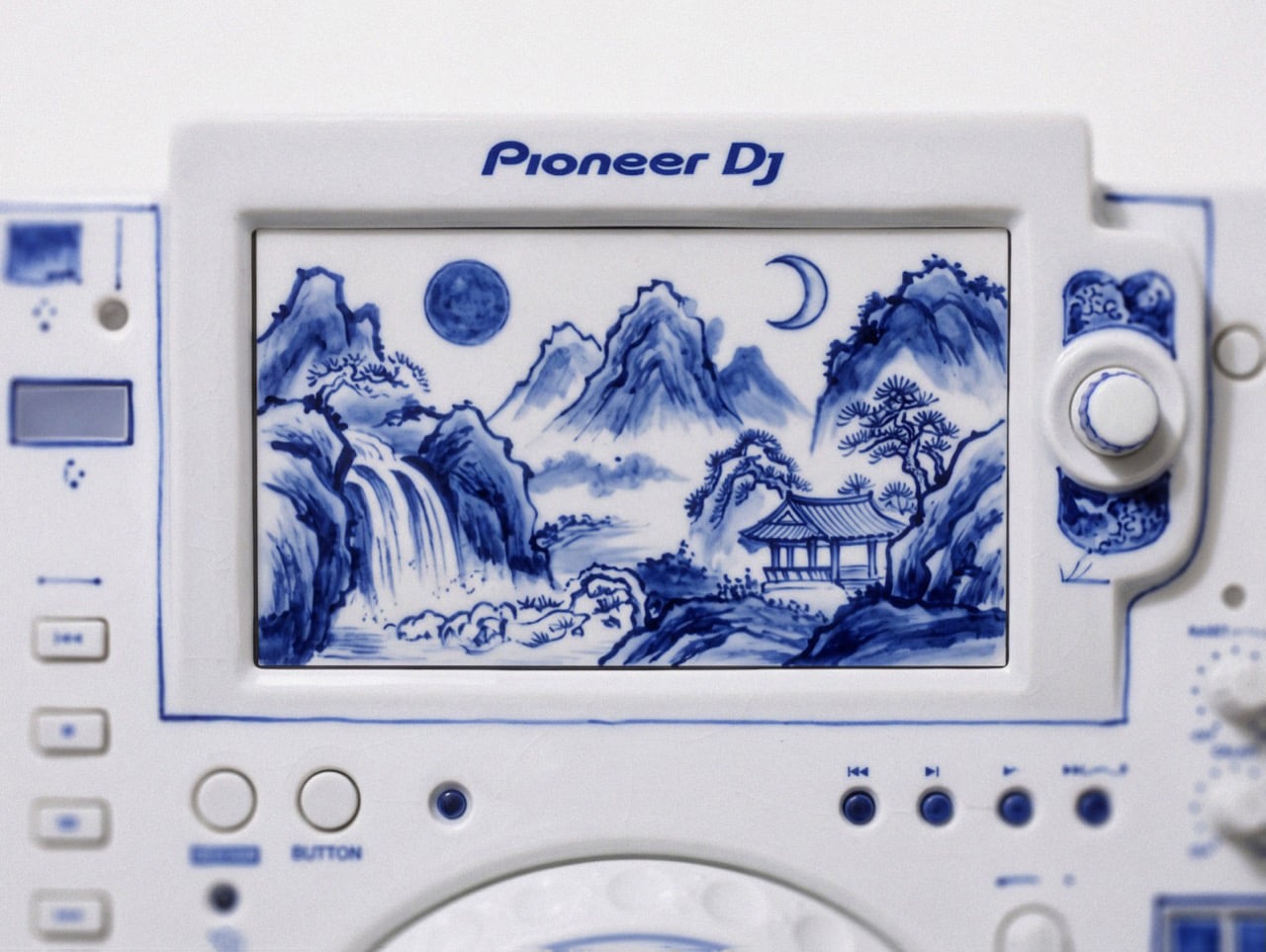
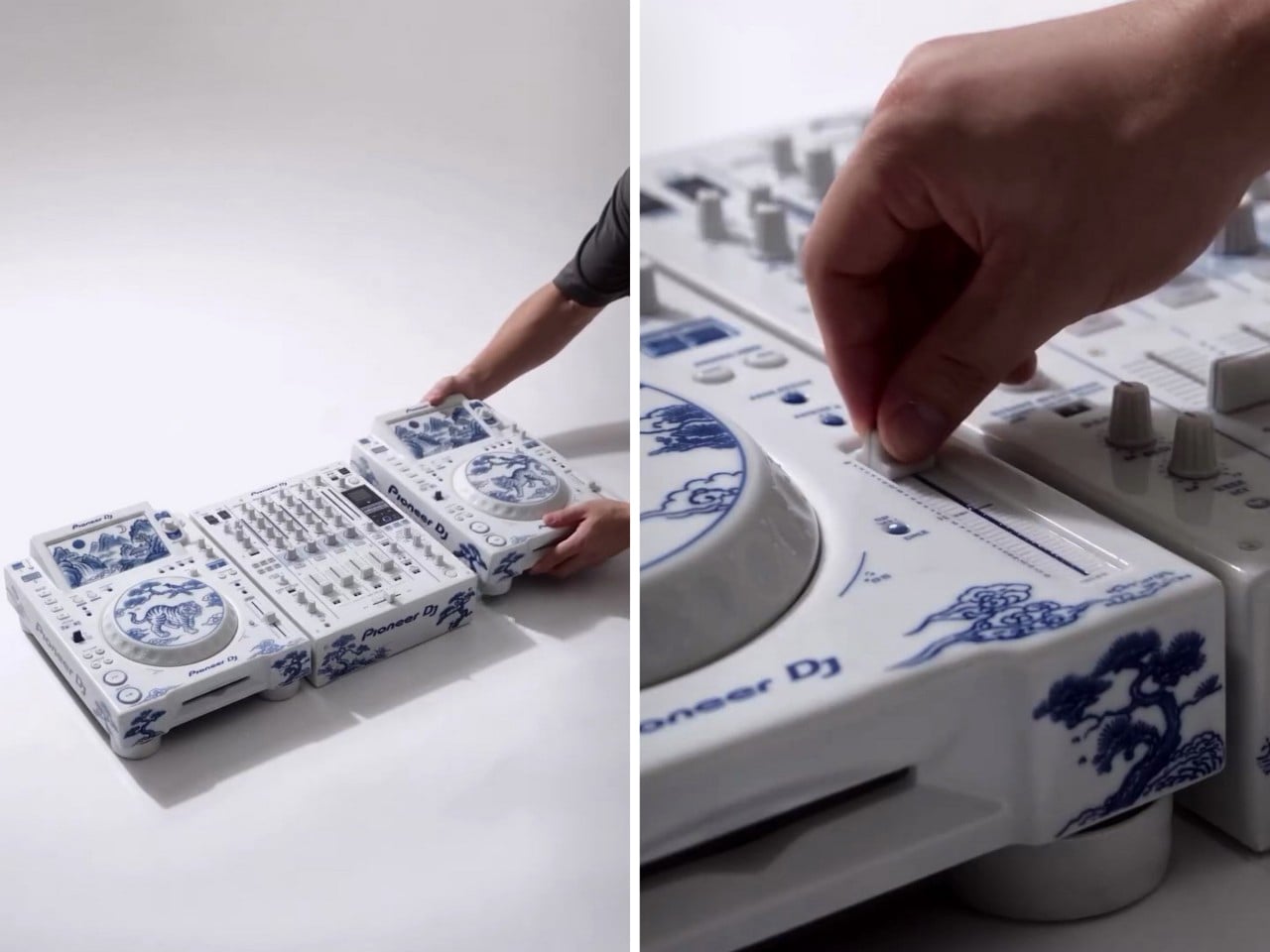
David Guetta just won DJ Mag’s Top 100 DJs poll for a record sixth time, and I have a very specific idea for his trophy shelf. Somebody on the internet has turned a Pioneer DJ setup into Korean blue-and-white porcelain, tigers and all. Two decks and a four-channel mixer, glazed bone white and hand-painted (well, AI-painted) in cobalt blue. It looks like something you’d find behind glass at the Met, right before a security guard asks you to step back. It’s also the most Guetta-coded object I’ve seen all year, because a guy who headlines weekly Ibiza residencies deserves a rig that looks as expensive as the bottle service.

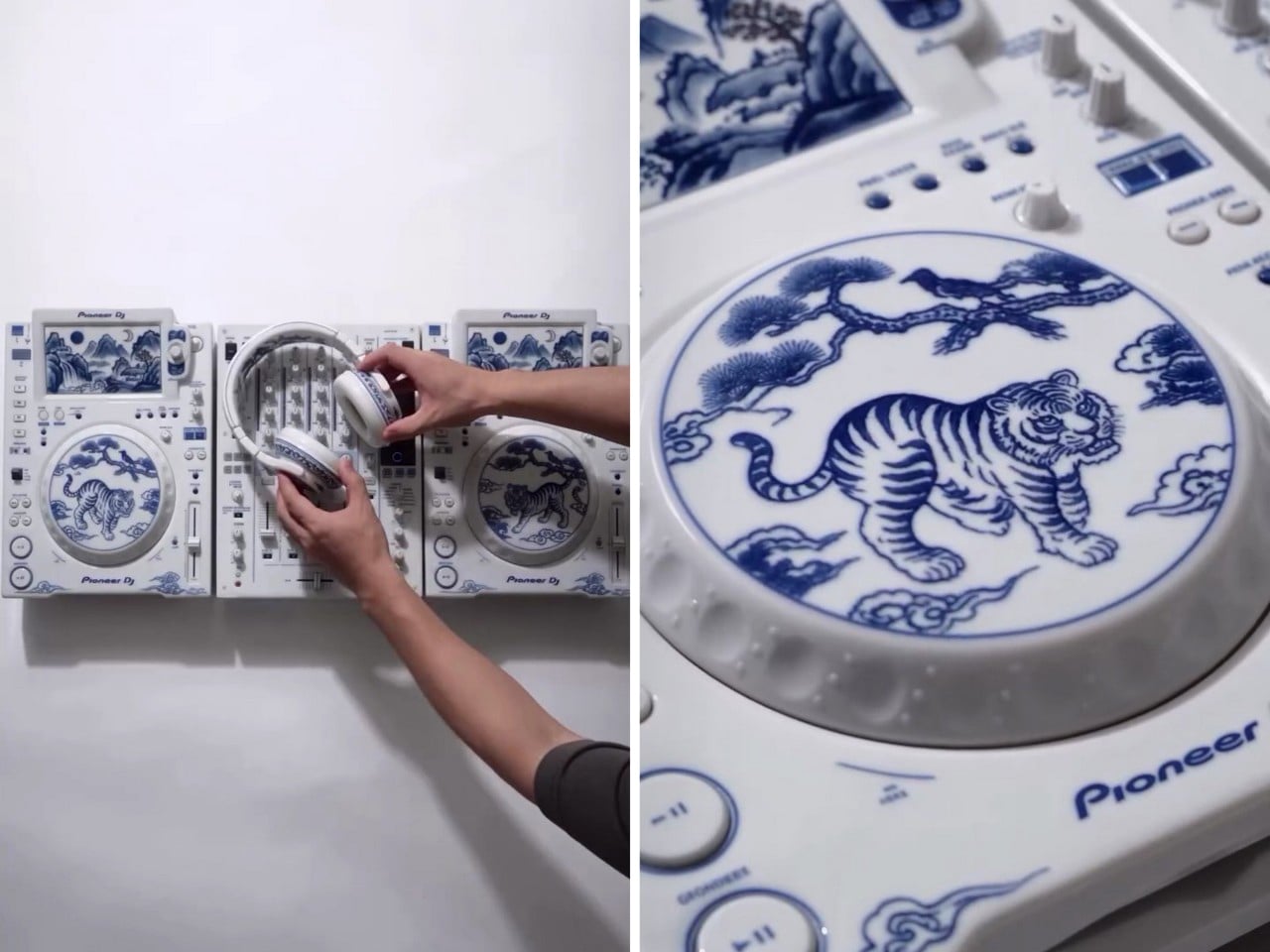
The setup comes from creators patchkims and takitani.lab, who posted it as the “Joseon Baekja Prototype,” complete with a “1 of 1, no restock” caption that reads like a sneaker drop. It’s an AI render, so nobody’s shipping it to Guetta’s villa anytime soon. The idea still lands, though. Each jog wheel carries a tiger and a magpie under a pine tree, lifted straight from Korean folk painting, and the screens swap waveforms for misty mountains and waterfalls. Suddenly your DJ gear graduates from booth equipment to living room centerpiece, which is a fun flex for anyone, let alone the world’s No. 1 DJ.

Designers: patchkims & takitani.lab

Kkachi horangi is a genre of Korean folk painting where a deliberately goofy tiger, nicknamed the idiot tiger, plays the aristocratic yangban, and a smug magpie in a pine tree speaks for the common people. Both jog wheels here carry that exact scene, with the cat prowling below and the bird looking unbothered above. The two decks get different tiger poses, so the platters work like a call and response. Joseon painters used the setup to poke fun at the ruling class, and now it sits under the palms of whoever runs the dance floor. That is either delicious irony or very on-brand for a king of the booth.

The screens trade waveforms for misty peaks, a waterfall, a pavilion, and a pair of moons, echoing Irworobongdo, the sun, moon and five peaks painting that stood behind the king’s throne in Joseon palaces. The sun and moon stood for the king and queen, so the painting doubled as a majesty backdrop. A headliner on a raised stage occupies similar real estate, so the throne comparison writes itself. The original sun burned red, and going cobalt turns it into a second moon, which suits a room that wakes up after midnight. Calling a DJ booth a throne room is a stretch, but watch a stadium crowd hang on a Guetta build-up and the royalty comparison stops feeling silly.

Joseon Korea made white its signature after the green celadon era of Goryeo, and cobalt-painted porcelain sat at the top of the pile. The pigment was rare and imported from China, so when supply dried up, court kilns improvised with iron-brown, and some banquet wares wore painted imitations of blue-and-white called gahwa, literally fake painting. A porcelain Pioneer rig conjured by AI is a 2026 gahwa, a convincing stand-in for an object nobody has actually fired in a kiln. I’m weirdly fine with that, because the Joseon court got there first. Meanwhile, Christie’s has estimated a genuine 15th-century cobalt jar at roughly $2 million to $3 million, so the real thing sets the bar high.

The real-world version of this lineup runs two AlphaTheta CDJ-3000X players at $2,999 each plus a Pioneer DJ DJM-A9 mixer at $2,899, roughly $8,900 in the US. The render looks closer to the older CDJ-2000NXS2 generation, disc slots and all. Pioneer did sell a limited white CDJ-2000NXS2-W run in 2017, so colorway flexes are old news for the brand. I imagine if such a product were to exist, it would probably cost in the hundreds of thousands. That being said, I’m sure an enthusiastic deejay with money to throw could acquire this for their den. Guetta, SHM, heck even Shaq… I’m looking at y’all.

The post This porcelain Pioneer DJ setup belongs in a museum, not an Ibiza nightclub first appeared on Yanko Design.

  •  

Korben Remote Desktop - Contrôlez votre Mac à distance gratuitement

J'ai pas mal de déplacements pro en ce moment, et comme je suis sur plein de projets en même temps, c'est un peu relou. Parce que tout ne tourne pas uniquement sur mon ordi portable. J'ai des traitements un peu plus lourds qui tournent par exemple sur mon Mac Studio et faut dire que je lui en fais vraiment voir de toutes les couleurs à celui-là...

La plupart du temps, j'arrive heureusement à tout gérer à distance en me connectant en SSH à l'ordinateur via mon VPN privé (ça me permet d'avoir toutes mes machines sur le même réseau local virtuel comme ça c'est chiffré et sécurisé) mais il arrive parfois que je doive cliquer sur un bouton ou taper un mot de passe via l'interface de macOS.

Jusqu'à présent pour ce genre de choses, j'utilisais donc l'application Partage d'Écran fournie par Apple, mais je ne sais pas vous, chez moi ça lag furieusement et c'est vraiment pas pratique à utiliser. Bref, j'aime pas.

Je me suis donc rabattu sur des Real VNC et compagnie, mais pareil, ce n'est pas un protocole et des clients que je trouve très efficaces. Et j'avais pas envie non plus de payer un peu au pif une app présentée comme meilleure comme celle-ci d'Apple pour voir ce que ça donne :

Du coup, je me suis créé à l'aide d'agent IA, ma propre application de prise de contrôle à distance en y mettant toutes les fonctionnalités dont j'avais besoin.

Ça s'appelle Korben Remote Desktop et ça fonctionne en deux parties. On a d'un côté un petit agent sur l'ordi à contrôler, qui demande juste les autorisations système "Enregistrement de l'écran" et "Accessibilité" (sans oublier la fonctionnalité de Session à distance activée dans Partage, pour le tunnel SSH au niveau des réglages de macOS), et de l'autre côté le client sur le Mac que vous avez sous les yeux. Les deux se parlent ensuite à travers un tunnel SSH chiffré, sur votre réseau local ou votre VPN privé, sans passer par aucun serveur chez moi ni ailleurs puisque l'appli refuse carrément les adresses IP publiques pour des questions de sécurité.

Voici tout ce que j'ai mis en place dans cette application :

  • Une image fluide, jusqu'en 4K. Capture ScreenCaptureKit, encodage HEVC ou H.264 par la puce du Mac, transport UDP chiffré avec de la parité Reed-Solomon pour encaisser les paquets perdus. Qualité au choix (Automatique, 720p, 1080p, 4K ou Native) et cadence de 30, 60 ou 120 images par seconde.
  • Un Wi-Fi qui coupe n'est plus un drame. Une micro-coupure est traitée comme un retard et pas comme une perte, et trois priorités de présentation (Réactif, Équilibré, Fluide) règlent le tampon selon que vous voulez la latence la plus basse ou aucun gel d'image.
  • Le son aussi. Le son système du Mac distant arrive au format Opus, et si y'a pas de son, aucune bande passante n'est consommée pour ça.
  • Souris, clavier et raccourcis. Défilement précis, boutons latéraux compris, et les raccourcis partent au Mac distant tant qu'il a le clavier (⌘C copie là-bas, pas chez vous). Ceux du client sont donc basculés en ⌃⌥⌘ pour ne pas leur marcher dessus.
  • Un mode jeu. Capturer la souris (⌃⌥⌘G) cache le curseur, envoie le mouvement brut sans le bloquer aux bords de l'image et passe le clavier en touches physiques, donc W reste la touche W quelle que soit la disposition. Les manettes passent aussi, en expérimental.
  • Tous les écrans. Vous passez d'un écran à l'autre, ou vous les affichez tous à la fois (⌃⌥⌘A), rangés comme sur le Mac distant, le pointeur passe de l'un à l'autre et une fenêtre se tire d'un écran à l'autre. Un écran branché ou débranché pendant la session apparaît ou disparaît tout seul.
  • Zoom et plein écran. Un zoom comme celui de macOS (pincement à partir du curseur, déplacement à deux doigts, double toucher) et un plein écran système dont la barre d'outils se range.
  • Les fenêtres des apps distantes, chez vous. Une fenêtre d'une application du Mac distant (un Terminal du Studio, par exemple) peut s'ouvrir comme une fenêtre indépendant sur votre Mac. Vous la déplacez, la redimensionnez, vous tapez et cliquez dedans, et c'est l'application distante qui répond. Quand elle a accès au clavier, la barre des menus de votre Mac affiche même les menus de cette application distante, et un clic droit y ouvre le vrai menu contextuel du Mac distant.
  • Fichiers et presse-papiers. Presse-papiers texte partagé, transfert de fichiers dans les deux sens, y compris en glisser-déposer vers et depuis le Finder distant. Un transfert interrompu peut également reprendre sans tout recommencer. Les fichiers reçus sont ensuite mis en quarantaine, comme n'importe quel téléchargement.
  • Reconnexion automatique. Si le lien tombe, l'image se grise et le client réessaie jusqu'à ce que vous l'arrêtiez, en gardant vos fenêtres déportées. Et si aucune session n'est ouverte sur le Mac distant (après un redémarrage, par exemple), l'appli vous propose alors d'ouvrir le Partage d'écran d'Apple pour taper votre mot de passe, puis reprend la main dès que l'agent est prêt (J'ai pas d'autre choix que de faire comme ça).
  • Un Mac qui ne montre rien pendant que vous bossez dessus. Durant une session, l'écran du Mac distant est noir pour quelqu'un qui passerait devant, son clavier et sa souris sont bloqués et ses haut-parleurs sont coupés (le son, lui, continue d'arriver chez vous). À la déconnexion, l'agent demande au lecteur multimédia de se mettre en pause (s'il peut le faire) et verrouille la session, par défaut.
  • Un accès depuis un simple navigateur. L'agent peut aussi ouvrir un accès web, à démarrer explicitement dans sa fenêtre. Vous copiez un lien à usage unique valable quinze minutes, vous l'ouvrez dans Safari ou Chrome sur votre réseau privé, vous comparez l'empreinte du certificat avec celle affichée par l'agent, et vous retrouvez l'écran, le son, le zoom et le contrôle sans rien installer. Les fichiers et les fenêtres séparées restent réservés au client Mac.
  • Sécurisé par défaut. Tunnel SSH obligatoire pour le client natif (votre compte SSH est la clé, aucun compte à créer nulle part), TLS avec échange de clés ECDHE et ChaCha20-Poly1305 pour le lien de contrôle, AES-256-GCM pour l'image et le son, adresses publiques refusées, et un seul viewer à la fois (le deuxième doit demander la place au premier, qui répond oui ou non).
  • Une vraie app Mac. Barre latérale avec vos Macs, barre d'outils native, fenêtre Réglages, menus complets, mode sombre, français ou anglais selon la langue du système, et les Macs du réseau qui ont la session à distance activée sont trouvés tout seuls par Bonjour. Les statistiques du flux (⌃⌥⌘I) donnent la latence, la gigue, le tampon et les pertes, et une "liaison économe" allège tout d'un coup pour un réseau lent ou compté.

Ce que ça ne fait pas encore par contre, c'est pas de réveil à distance, pas de déverrouillage FileVault après un redémarrage à froid (prévu sur macOS 26, mais pas encore validé), les gestes du trackpad comme la rotation ou le balayage à trois doigts ne passent pas, et le verrouillage des majuscules reste celui du Mac distant. Il faut macOS 14 minimum des deux côtés, et les deux applications sont universelles, Apple Silicon comme Intel (testées sur Apple Silicon, l'Intel et macOS 14 restent à valider).

Maintenant pour pour l'utiliser tous les jours, ce que je peux vous dire c'est que ça marche très bien. Maintenant, j'ai pas eu d'autres testeurs que moi-même pour le moment mais ça fait tout ce dont j'ai besoin.

Et je me suis payé le luxe également d'adapter le code (en version ultra alpha, j'ai pas encore assez testé ça) pour Windows et Linux. Et l'application iOS est également sur les rails.

Maintenant, comme d'hab, j'ai essayé de la mettre sur l'App Store d'Apple mais ils sont tellement casse couilles que je ne sais pas si j'y arriverai. Mais peu importe, je me suis dit que ça vous servirait alors je vous ai fait un petit site ici pour télécharger mon app : remotedesktop.korben.info .

C'est 100% gratuit, y'a aucune télémétrie ni pub dedans et je n'ai pas de plan de carrière avec ce logiciel si ce n'est de l'améliorer par petites touches au fil du temps. Je l'ai créé pour mes besoins et je me suis dit que ce serait dommage de ne pas vous en faire profiter, c'est tout.

Voilà, donc n'hésitez pas à tester. C'est conçu pour macOS mais j'ai décliné ça pour Windows et Linux (je le redis, c'est de l'alpha pour Win et Linux) afin que chaque client puisse prendre le contrôle de n'importe quelle machine peu importe son système d'exploitation.

Enjoy !

  •  

Music Bridge - Pour que les liens musicaux s'ouvrent bien sur votre plateforme favorite

Si vous avez des potes qui vous envoient des liens Spotify trop cools toute la journée alors que vous écoutez tout sur Deezer (ou l'inverse), bah c'est chiant votre vie. Faut copier le titre, ouvrir votre appli, le chercher...etc.

Heureusement, il existe Music Bridge , une extension pour le navigateur signée Simon Duhem (un ancien de Deezer) qui vous permet d'éviter de faire tout ce bordel en ouvrant directement la bonne chanson dans votre application musicale à vous.

Une fois Music Bridge installé, vous réglez votre service favori une fois pour toutes dans les options, et ensuite chaque page de morceau ou d'album ouverte ailleurs vous renvoie automatiquement vers son équivalent chez vous.

Deezer, Spotify, Apple Music, YouTube Music, Amazon Music, Tidal et Pandora se renvoient ainsi la balle dans n'importe quel sens, et YouTube ou SoundCloud peuvent également servir de destination. Et bien sûr si le morceau n'existe pas dans votre catalogue parce que c'est trop niche, bah vous restez sur la page d'origine avec un petit message qui vous prévient.

Maintenant pour ceux qui préfèrent l'appli de bureau plutôt que l'extension navigateur, une option permet également de lancer la musique directement dedans pour Deezer, Spotify et Apple Music, sous Windows et macOS, et une autre s'occupe de refermer l'onglet resté ouvert 5 secondes après l'ouverture de l'appli. Cochez juste "Toujours autoriser" la première fois que le navigateur vous demande s'il peut ouvrir l'appli, sinon l'onglet se fermera avant d'avoir eu votre réponse.

Après, il y a encore quelques trous dans la raquette... Par exemple, il n'y a pas de conversion pour les artistes ou pour les playlists. Et sur Android, quand l'appli de l'autre plateforme est installée, c'est elle qui récupère ses liens avant même que le navigateur ne les voie, et ça malheureusement, l'extension n'y peut rien.

Maintenant, pour retrouver le bon morceau, l'extension envoie l'adresse de la page ainsi que la plateforme de destination choisie à un petit service web que Simon hébergé chez Cloudflare, qui interroge l'API d' Odesli (le moteur de song.link) pour faire le matching.

Le code de cette extension est sous licence BSD et Music Bridge s'installe sur Chrome , Firefox (Android compris) et Edge .

Merci à Simon pour le partage !

  •  
❌