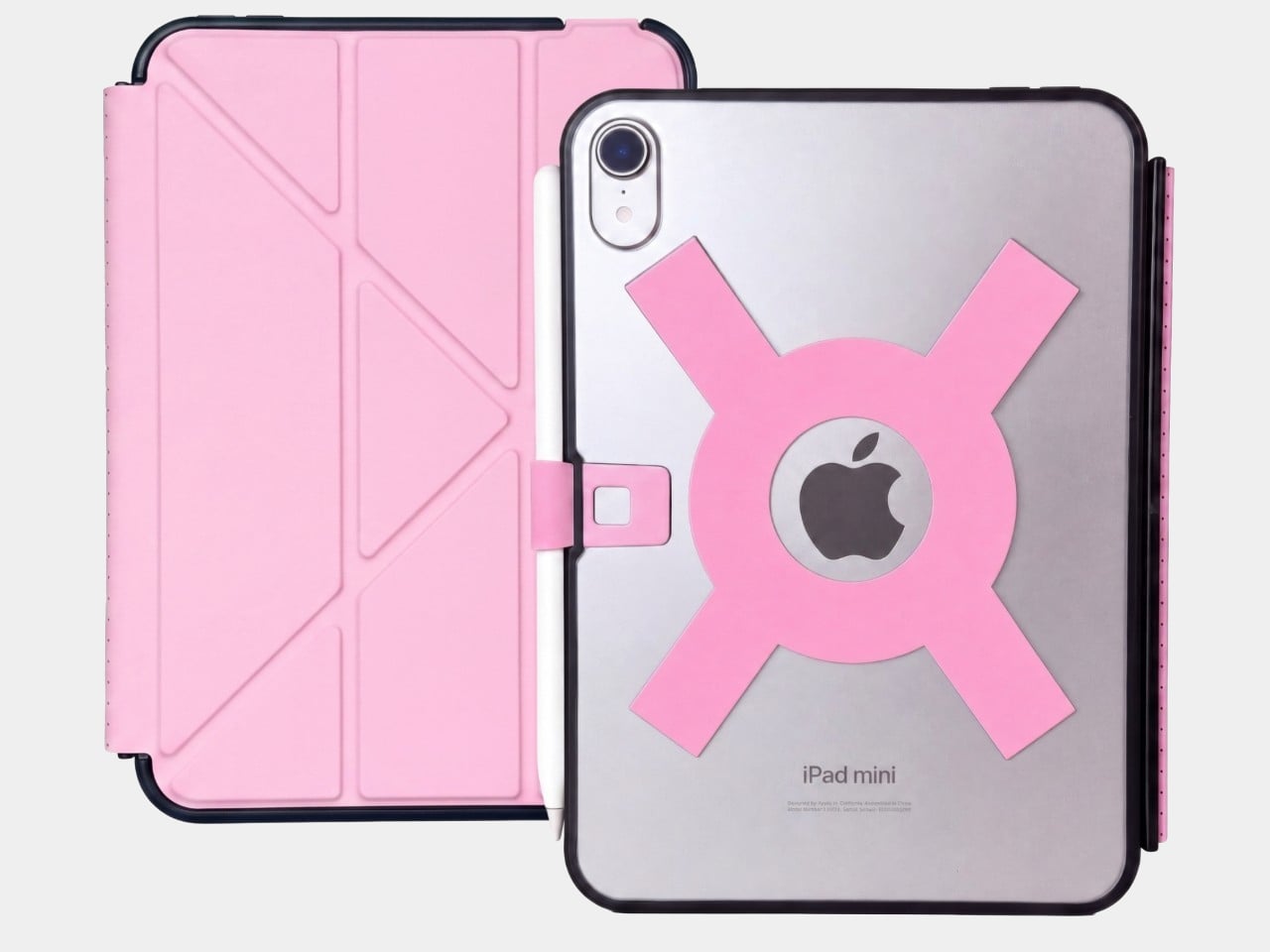
Apple spends plenty of effort making the iPad thin and light, but that doesn’t mean holding one for an entire chapter feels effortless. A protective case can give it more bulk without giving your fingers much help. Strapsicle’s iPad cases take a different approach, adding a silicone strap that lets your hand support the tablet from behind instead of constantly squeezing its edges.
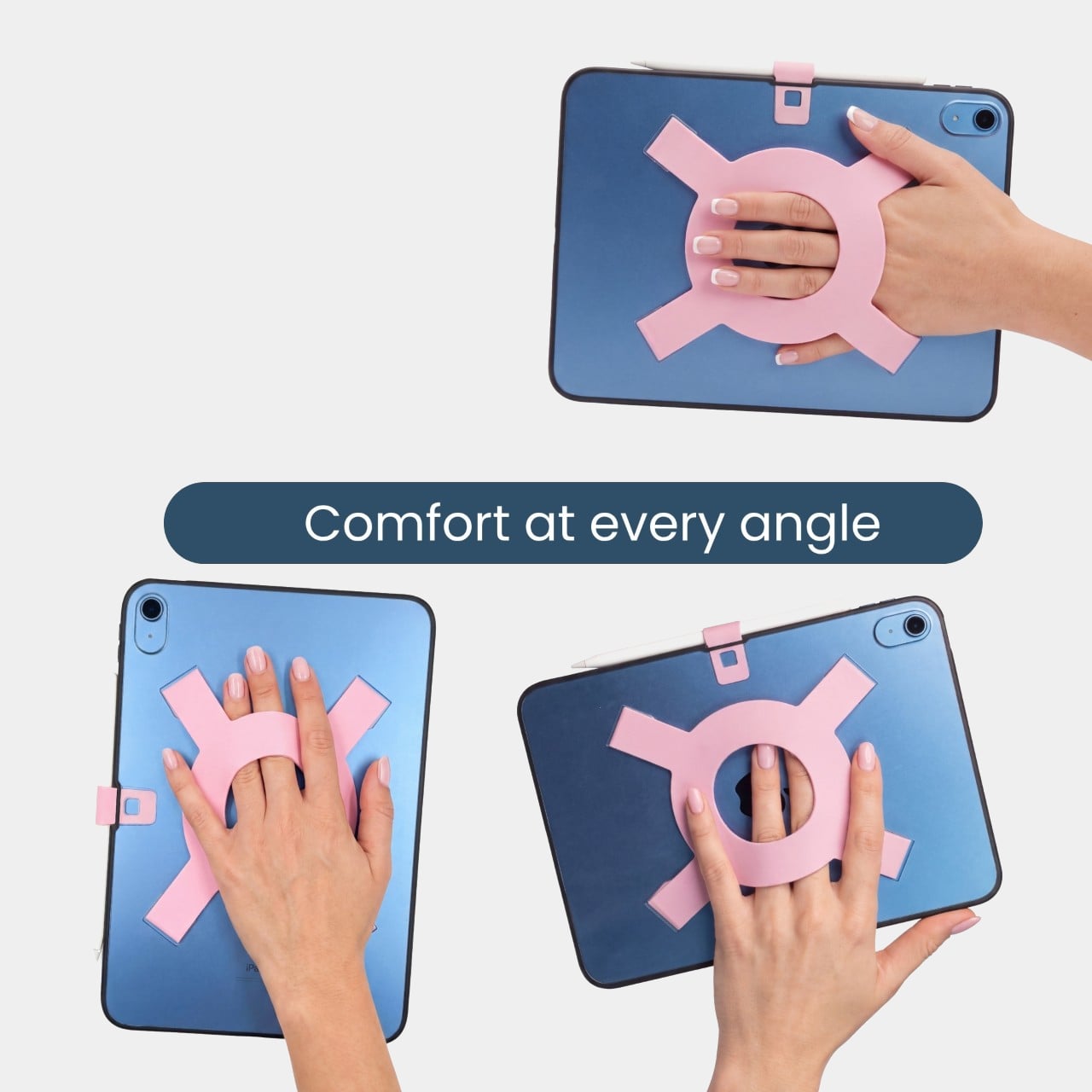
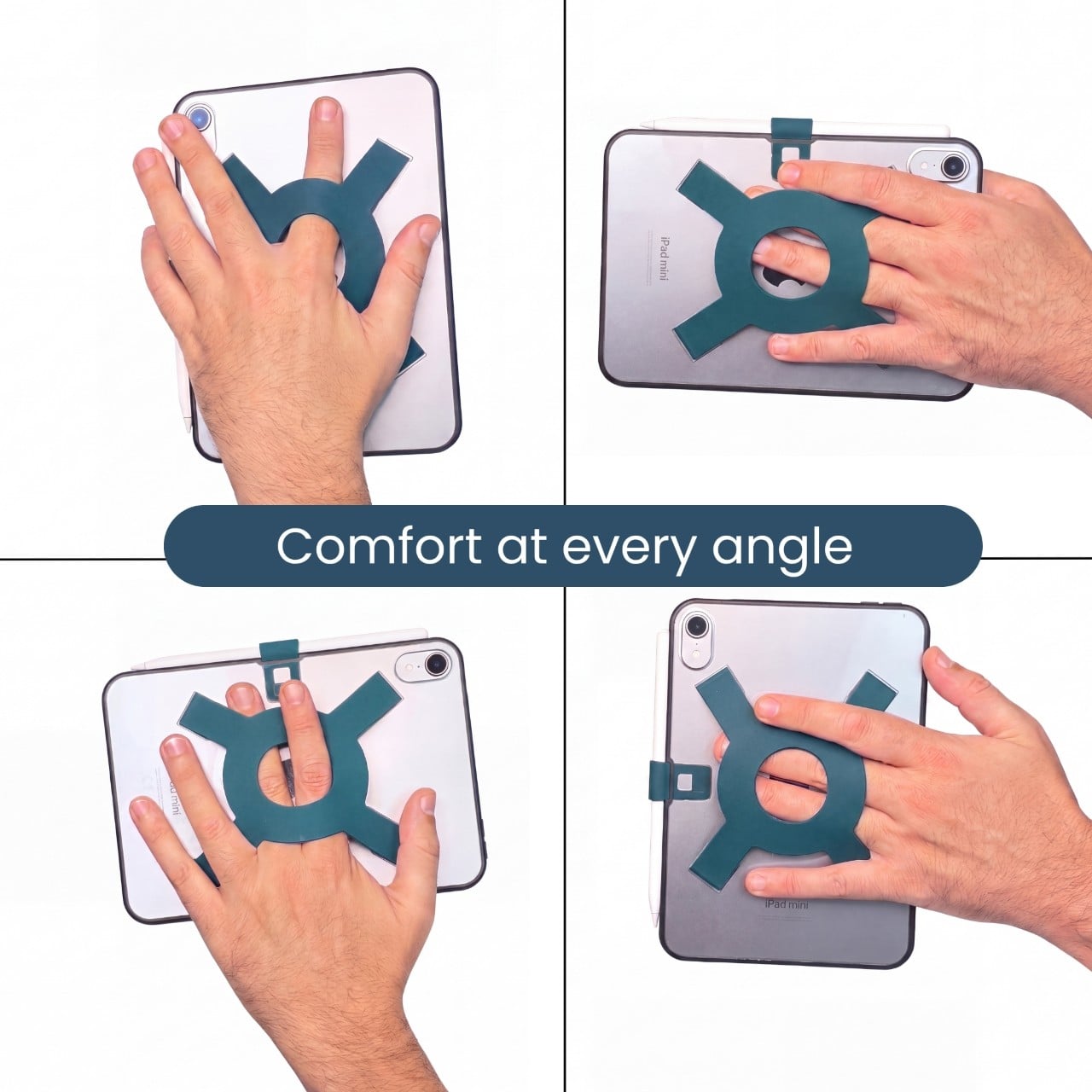
The most conspicuous part of the design is also its most useful idea. Strapsicle calls it the XO strap, a circular center with four diagonal arms attached to the case. Slide your fingers underneath, and the flexible silicone sits across the back of your hand. That gives the iPad another point of support without turning it into something with a bulky carrying handle.
That arrangement also leaves room to change how you hold the tablet. Your fingers can slip under different parts of the strap for portrait reading or landscape browsing, with either hand taking a turn. Of course, the case doesn’t make an iPad weightless. It’s intended to reduce reliance on pinching the edges, not remove the need to support the device at all.
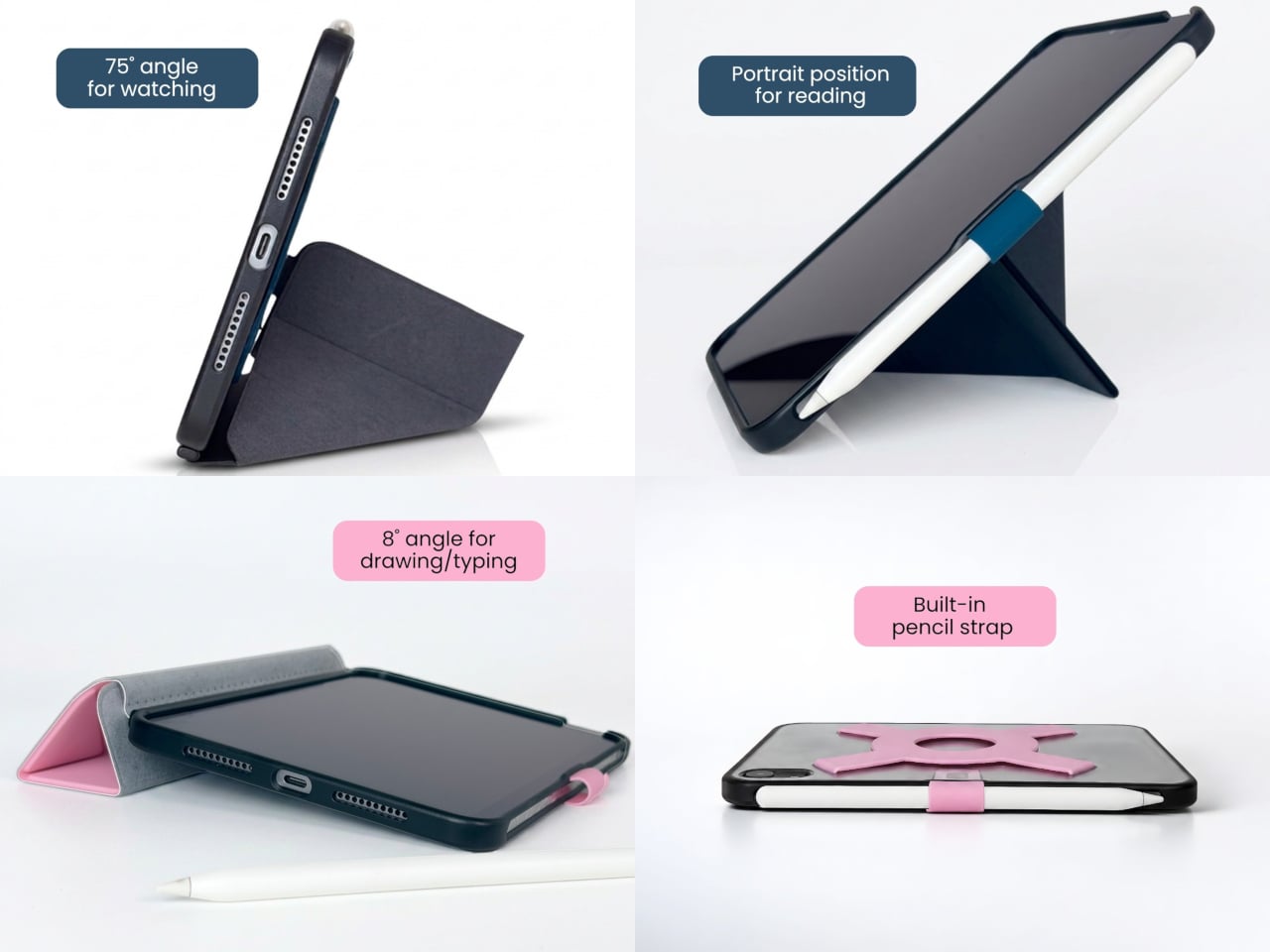
Eventually, though, even the most interesting book has to make way for something else. The front cover folds along its geometric creases to become a stand, offering portrait support for reading and a steeper 75° landscape position for watching videos. There’s also an 8° setup for typing and drawing, bringing the screen closer to the tabletop rather than holding it almost upright.
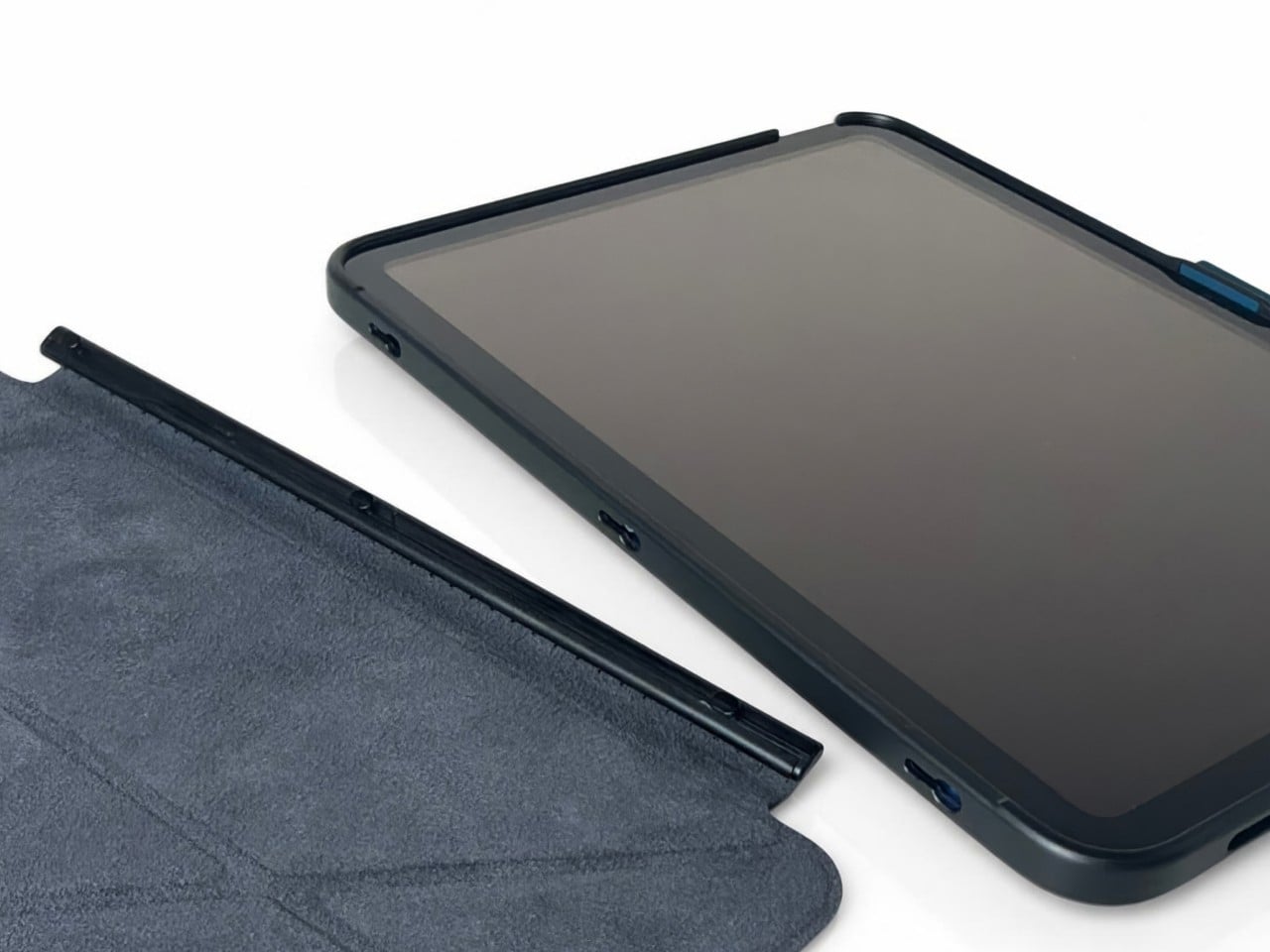
The cover doesn’t have to follow you through every activity, thankfully. It detaches completely, leaving the rear strap accessible without a folded flap competing for space behind your hand. Small pins connect it to the shell rather than magnets, so removing it is a deliberate step. Put it back on when you’re finished, and the screen has a cover for the trip home.
There’s a smaller silicone loop along the edge for an Apple Pencil, keeping the stylus with the tablet instead of loose in a bag. The main straps are interchangeable, too, so changing colors doesn’t require replacing the whole case. Pink, dark teal, and black give that unusual rear shape a little personality, while the transparent back leaves the iPad’s own finish visible.
Strapsicle lists two sizes, fitting the sixth- and seventh-generation iPad mini or the 10th-generation iPad and iPad (A16). Its announced US launch prices are $69.99 for the mini case and $79.99 for the larger version. The company says they’re shipping now, with the October 26, 2026, announcement marking their B&H retail debut. DataVision sales are scheduled to follow in November.
There is a tradeoff to all that extra support, however. Strapsicle lists the complete mini case at about six ounces and the larger version at 9.8 ounces, including their covers and straps. You’re adding weight to something you’ll still have to hold. Taking the cover off for a chapter on the couch makes sense, then, provided you remember to put it back before heading out.
For five years, Arrowmax has been teaching screwdrivers to read people. The SES Pro in 2021 watched your wrist, so a twist left or right told the motor which way to spin. The SES Max added app control, and the M1 Pro stretched output to 10 kgf·cm with a manual fallback for stubborn screws. Its little screen could report torque and battery level all day. Your screwdriver got smarter and you got lazier, in the best possible way. The obvious next question was why the tool still had no idea what screw it was holding.
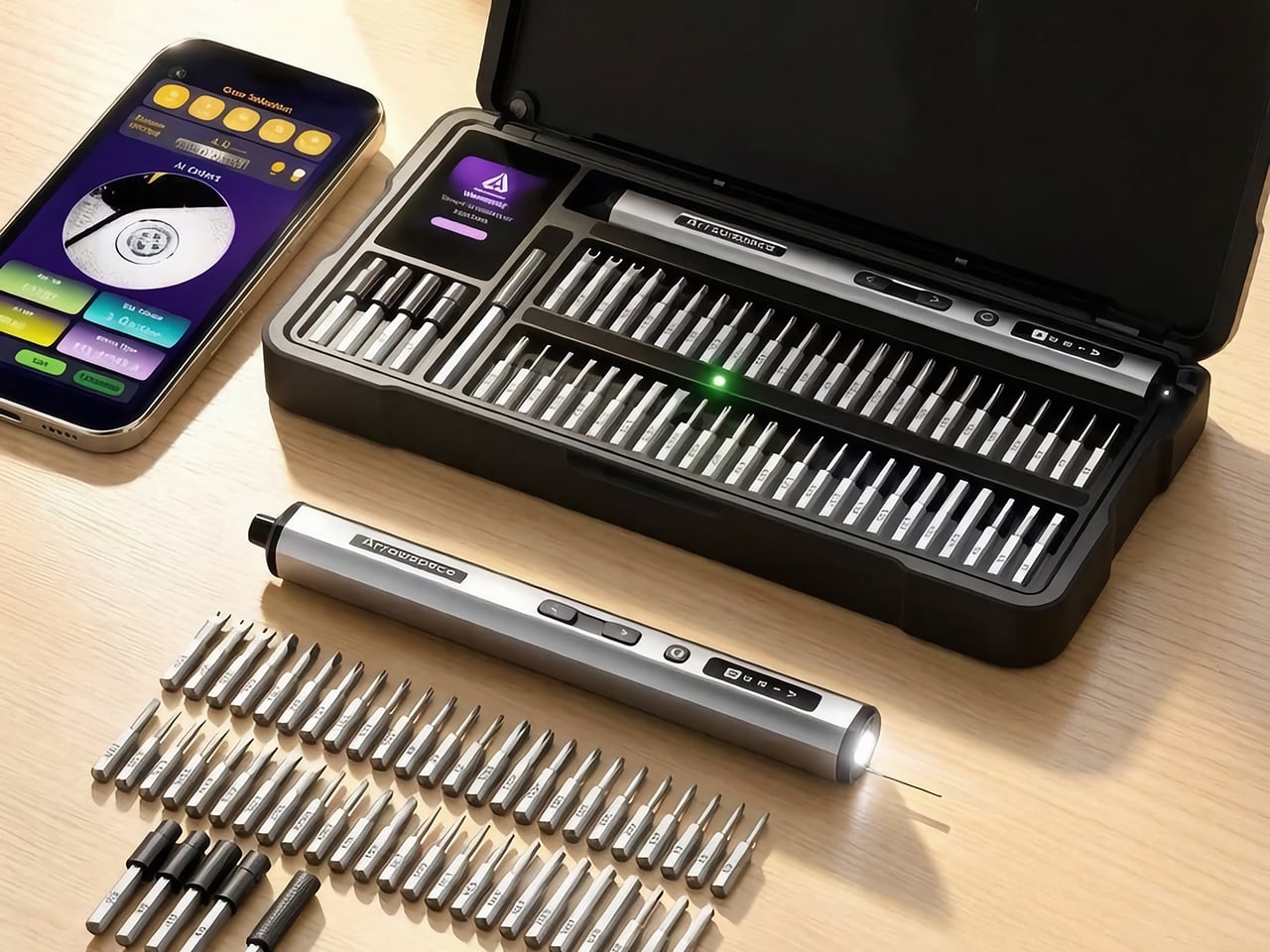
The Arrowspace S1, built by the same team under a new brand name, answers that with a camera on the tail end of the screwdriver. Image recognition names the screw’s drive type and exact size, while a small probe holds the lens at a fixed distance so tiny heads stay sharp. The smart case then lights the slot of the matching bit, and Auto mode picks a safe torque for that fastener. It keeps the 10 kgf·cm ceiling of the M1 Pro, which is plenty for everything from earbuds to e-bike parts. Early pricing starts at $119, and the kit includes the case, 52 S2 steel bits, and a power tip extension.
The camera sits at the rear of the S1, right behind a small contact probe, and the two work as a team. You rest the probe on the screw head, which locks the lens at one fixed distance, so every shot lands sharp. A screw this small turns to mush if the camera drifts even 1mm. Arrowmax fixed that blur problem with a metal pin instead of more code, which is a very hardware-person way to win an argument. I love it, because it means recognition survives a messy bench and shaky hands instead of working only in a demo video.
Once the shot is sharp, the driver sends it to the companion app on your phone, which works out the drive type and exact size. Everything runs locally with no internet involved, so your screw photos stay on your phone. Arrowmax trained the model, a YOLO object detector, on its own collection of tens of thousands of real screw photos, currently covering 12 common head profiles. The app shows the actual camera image next to the verdict, so you can see what the S1 sees and judge the call yourself. Only the reading step needs the phone, since motor control, torque, and the displays all work on their own.
A Case That Points at the Right Bit
The smart case turns the app’s verdict into something you can see across the bench. A 2-inch TFT screen with Arrowspace’s purple interface shows the recognized screw type and size, while an LED glows under the slot holding the matching bit. Reach, grab, done. Compare that with the usual ritual of squinting at tiny codes on dozens of near-identical shafts, and the old way starts to look like a part-time job. It is the same idea as a warehouse pick-to-light shelf, shrunk down to a tray of S2 steel bits.
The 52 bits are S2 steel hardened to HRC60, which keeps the tips from rounding off after repeated use, and extended bits reach screws buried in deep holes. A magnetic holder keeps bits seated while you work. The case itself is a CNC-machined frame in aerospace-grade aluminum with EVA protection inside, a build the M1 Pro’s CNC aluminum box would recognize. That solid metal feel suits a bench that sees daily use. One box ends up holding the driver, the bits, and the answer to which bit you need.
Gentle With Earbuds, Firm With E-Bikes
Electric torque runs from 1 to 10 kgf·cm, roughly 0.1 to 1 N·m, and Arrowspace’s own chart maps that range to real jobs. The low end suits earbuds, smart bands, and glasses. Around 3 you are into laptops and camera bodies, 6 covers RC cars, drones, and game consoles, and the full 10 handles e-bike parts and large appliances. Auto mode matches a conservative preset to the screw it just identified and remembers your last setting between jobs. Prefer to drive? The app lets you tune the torque for each mode yourself.
When electric mode runs out of muscle, the S1 switches to manual on its own, a trick it inherits from the M1 Pro. The mechanism is rated for 30 kgf·cm of hand-twisted force, which handles the factory screw that laughs at motors. A 600mAh LiPo battery covers 900+ screws or about 90 minutes of continuous use, and USB-C refills it in roughly 70 minutes. An OLED on the body shows torque level, spin direction, and battery, and it even animates while charging. A full session of fiddly repairs fits comfortably inside one charge.
The Price of Never Guessing Again
The S1 suits anyone who repairs often enough to own a drawer of bits but not often enough to have a veteran’s eye, meaning RC builders, scale modelers, drone owners, and the friend who gets every laptop question. Arrowspace says the AI handles identification while your hand keeps the control, and that split feels right to me. My one wish is friendlier recognition for oddballs like JIS cross-head screws, the Phillips look-alikes in plenty of Japanese electronics. Arrowmax says updates will keep widening the 12 profiles covered today, so the wish has a path. A screwdriver that learns new screws over time is a fun idea for a tool that used to be a metal stick.
Pricing for a single S1 kit starts at $119, listed at 45% off, with $129 and $149 tiers also available. Every tier includes the driver, the illuminated smart case, 52 S2 steel bits, and a power tip extension. Shipping is an estimated $16 by air freight to anywhere in the world, so US buyers are covered, with delivery expected in April 2027. Two kits run $238 and three run $339, with shipping at $30 and $45. The optional Angle Screw attachment is sold separately, so check the product page for its price. A stripped screw can cost you a whole device, which makes $119 look like cheap insurance.
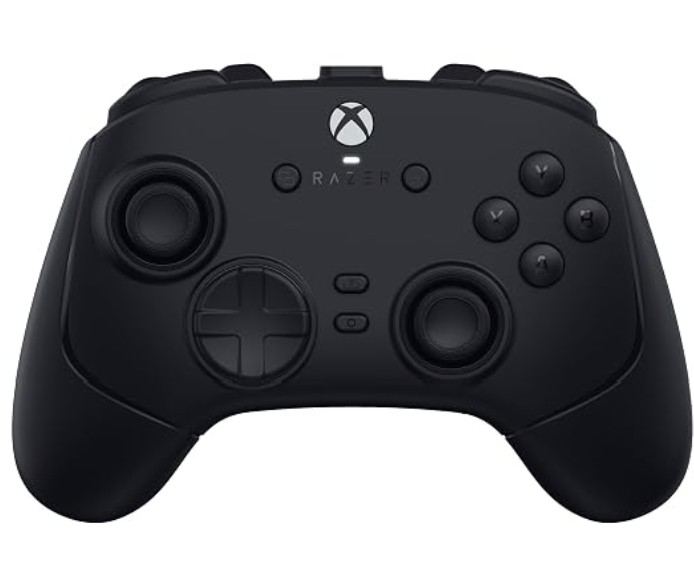
The Razer Wolverine has been the torchbearer for premium alternative Xbox controllers for some time. And now we're on iteration V4, which was released just a few weeks ago.
It comes at an interesting time for the best Xbox controllers. Microsoft relinquished exclusivity over its Xbox Wireless signal. In previous years, all third-party Xbox controllers were wired, which was irritating to say the least, especially since Xbox refused to use new tech like haptics or anti-drift capacitivate thumbsticks.
That might be changing with the Xbox Elite Series 3, rumored to be imminent for release, but it's not here yet. Between then and now, we still have the Razer Wolverine V4 Pro, which might just be the best Xbox controller I've ever used — even if it is missing some crucial features on the convenience side.
But for how long will it remain the king? And is it really worth the cash?
Razer Wolverine V4 Pro — Specs and price
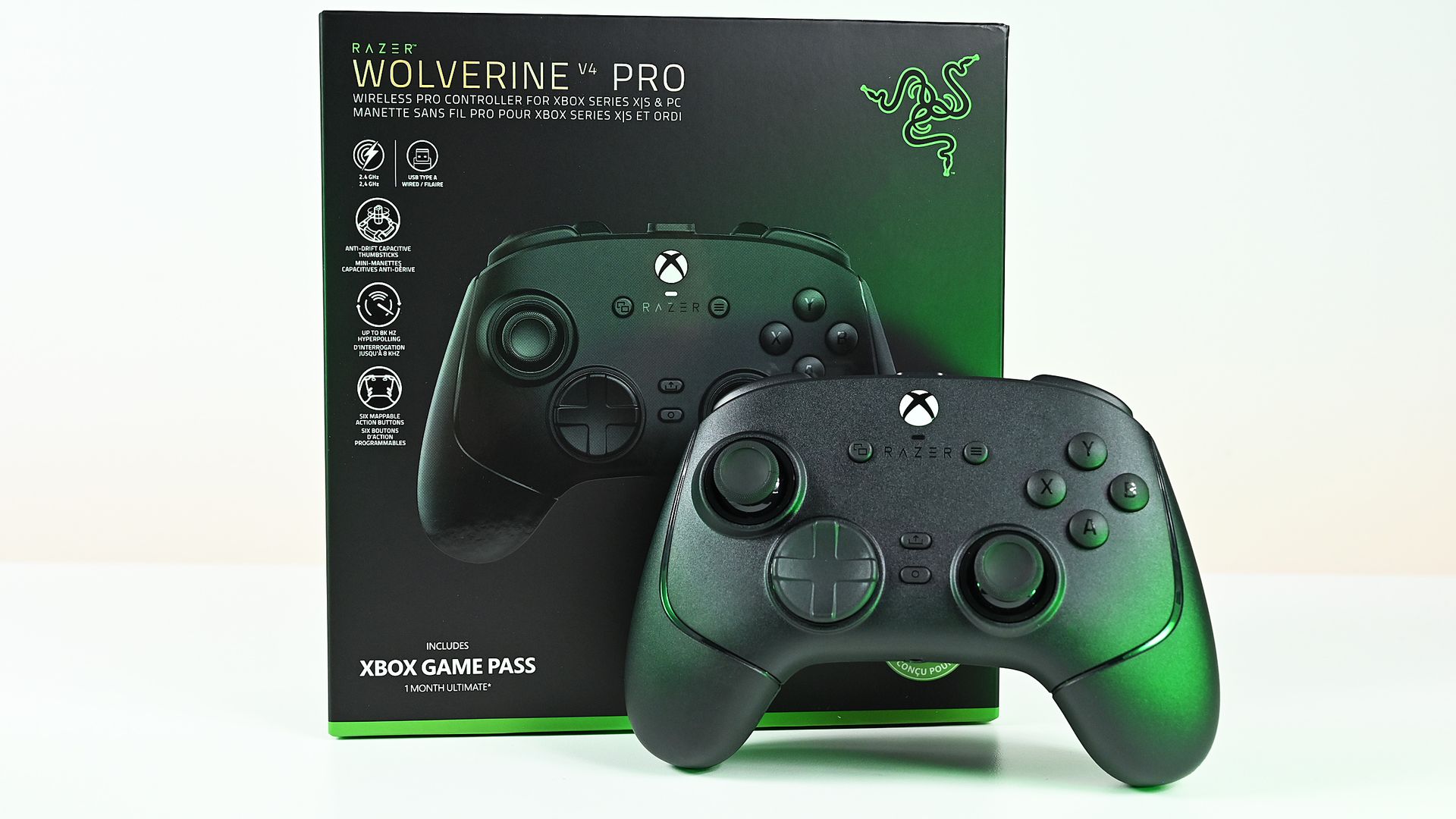
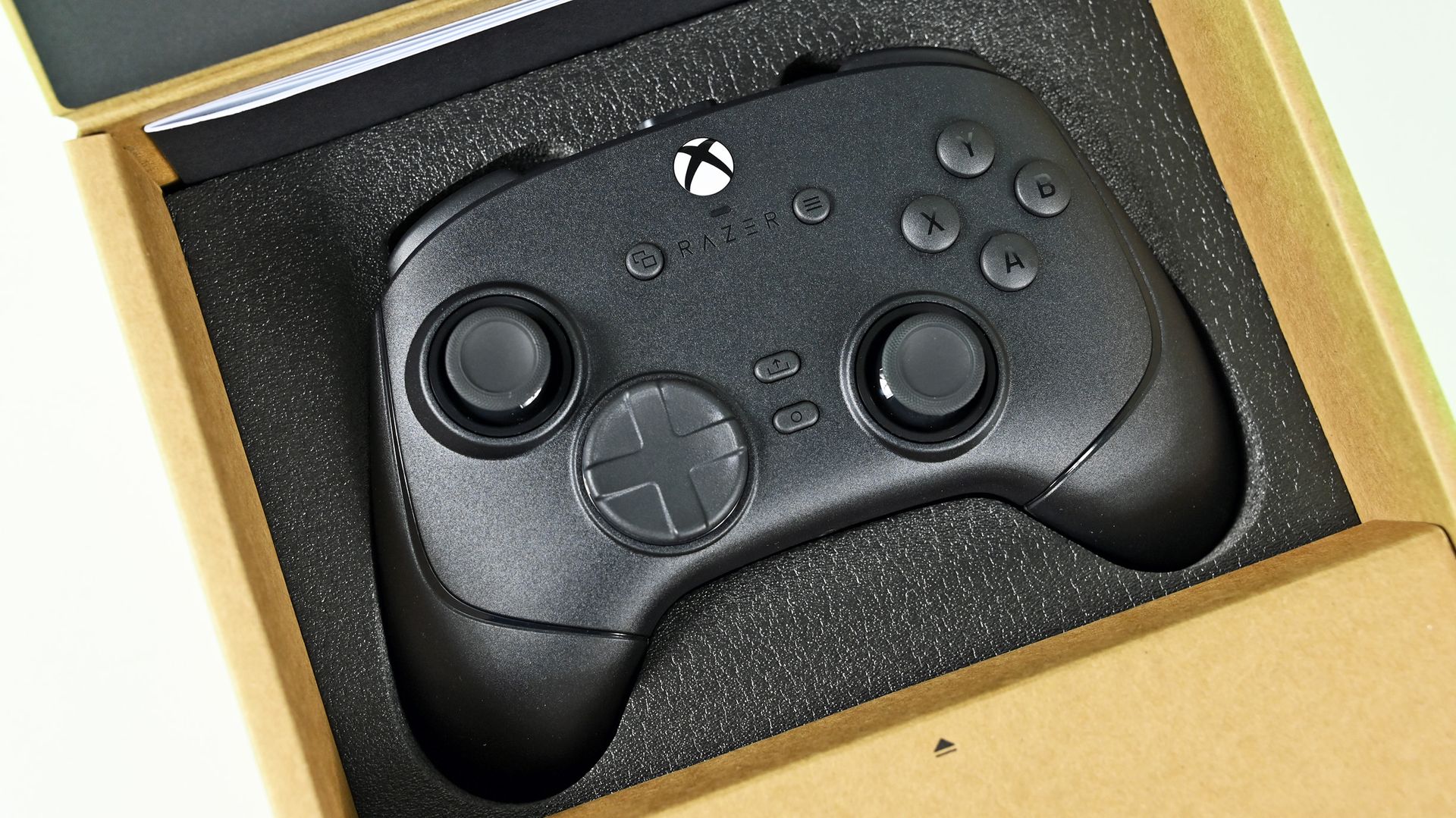
No major frills in the box, but the essentials are thoroughly nailed. (Image credit: Daniel Rubino)
The Razer Wolverine V4 Pro is a powerhouse when it comes to raw specs, offering a truly absurd 8,000 Hz maximum polling rate on PC. It's limited to 250 Hz on Xbox (owing to Microsoft's Xbox Wireless signal), but for those who truly want some e-sports-grade connectivity on Windows PC, you need look no further.
Specification
Razer Wolverine V4 Pro
Compatibility
Xbox Series X|S, Xbox One, Windows PC
Connectivity
Razer HyperSpeed Wireless (2.4 GHz), USB-C wired
Polling Rate
Up to 8,000 Hz on PC, up to 250 Hz on Xbox
Thumbsticks
High-resolution capacitive anti-drift thumbsticks with interchangeable stick caps
Additional Inputs
4 removable rear buttons and 2 claw-grip bumpers (6 extra inputs total)
Triggers
With locks for adjustable short-throw and full-range modes
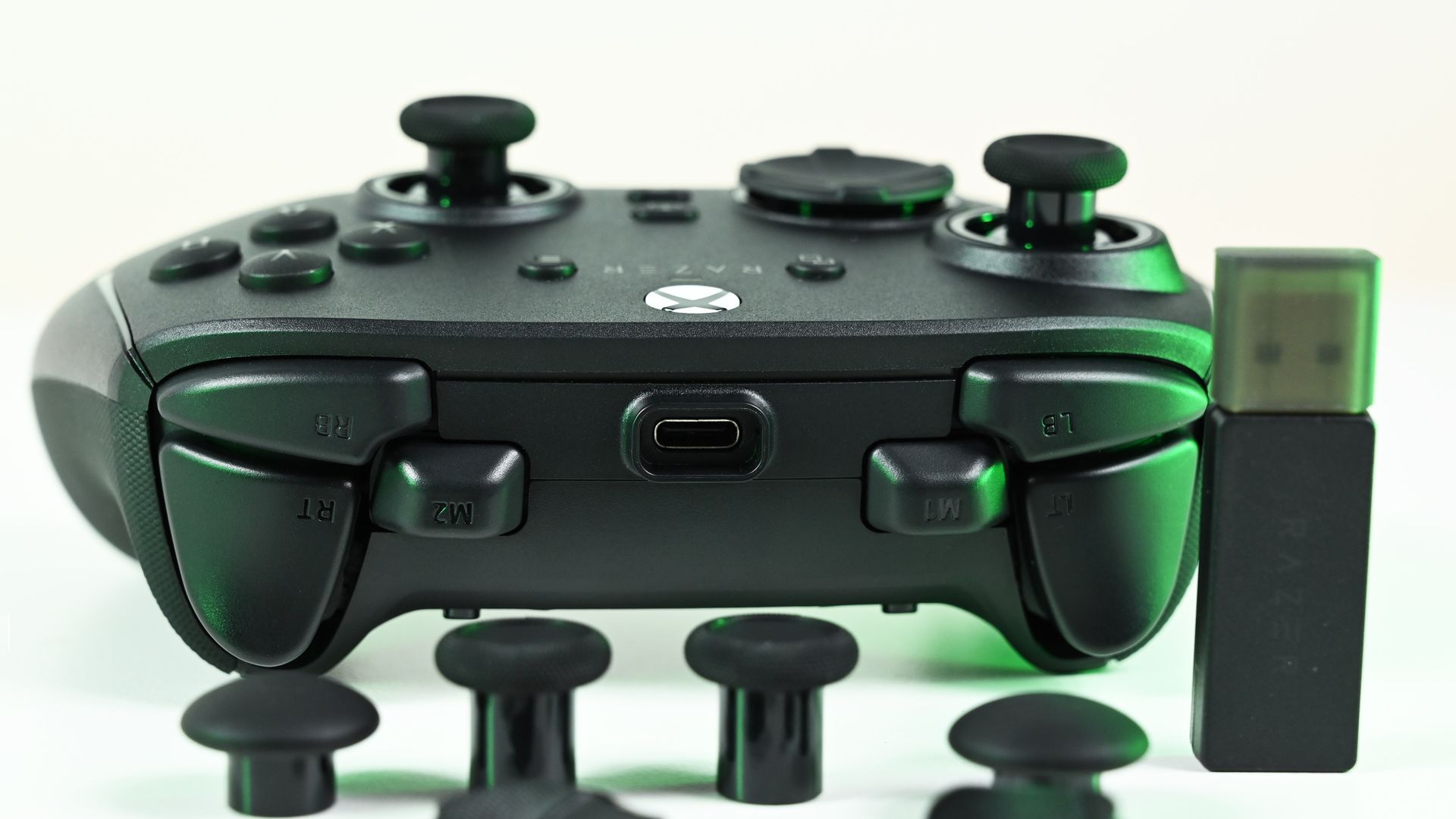
The Xbox version is only compatible with Xbox consoles and Windows PCs, sadly lacking Bluetooth for anyone who wants something compatible with mobile devices on the side. It comes with a USB dongle in the box with Razer's high-spec polling rate capabilities and dynamic switching between Xbox and PC. No need to flip a switch on the dongle itself anymore.
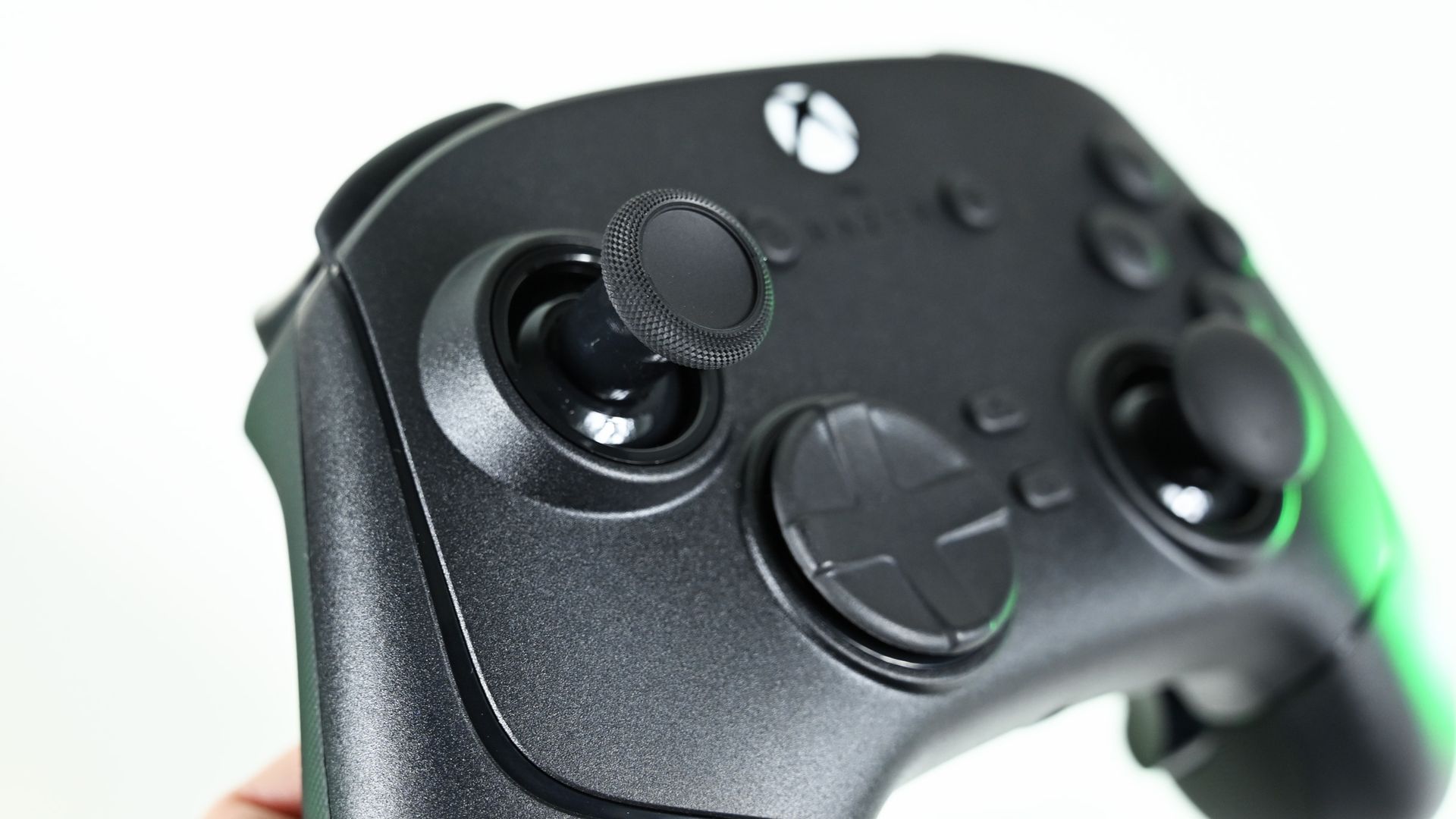
The thumbsticks are capacitive and thus anti-drift (a major issue with all current Xbox controllers), and measures far more steps than typical TMR sticks. They come with programmable "claw" shoulder buttons as well as four removable back buttons, Elite-style.
It sports up to 27 hours of continuous play, is chargeable via USB-C cable, and has a removable faceplate for good measure.
It all comes in at $199.99, however, putting it on par with the Xbox Elite Series 2 controller with its full bundle of accessories. While you do miss out on a charge dock and Bluetooth, you are gaining some serious firepower and a design chassis built to last, rather than fall apart.
Razer Wolverine V4 Pro — Features, software, and ergonomics
A large suite of customization awaits. (Image credit: Daniel Rubino)
The Razer Wolverine V4 Pro is becoming something of a leader in this space. I've been using the Razer Wolverine V3 Pro as my go-to PC gaming controller for some time now, and to say I'm used to it would be an understatement. I would say I've come to prefer it overall, particularly over time, as my Xbox Elite Controller Series 2 has succumbed to stick drift in a big, annoying way. But more on that in a sec.
The Wolverine V4 Pro doesn't reinvent the wheel over its predecessors, but does address some nitpicks and annoyances I've seen some people have.
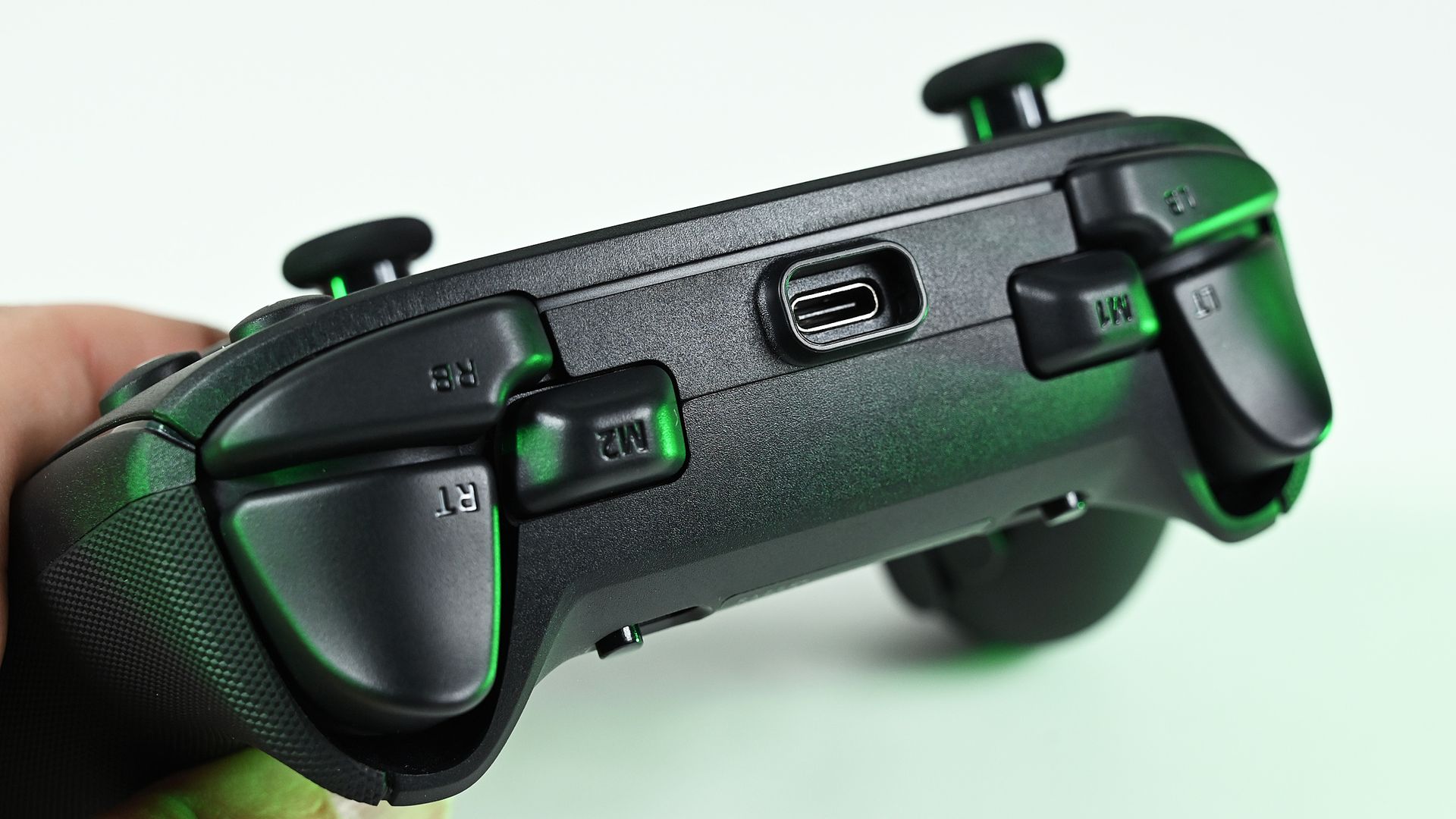
It comes with the same two extra shoulder claw bumpers, which can be programmed to do a variety of additional things. The back paddles can be removed now, for those who prefer to only rock two instead of all four, for example. The buttons and D-pad still have a "clicky" actuation, which I know sometimes gets a mixed reaction. I don't mind it myself, but if you didn't like it, know that it's back here with the V4.
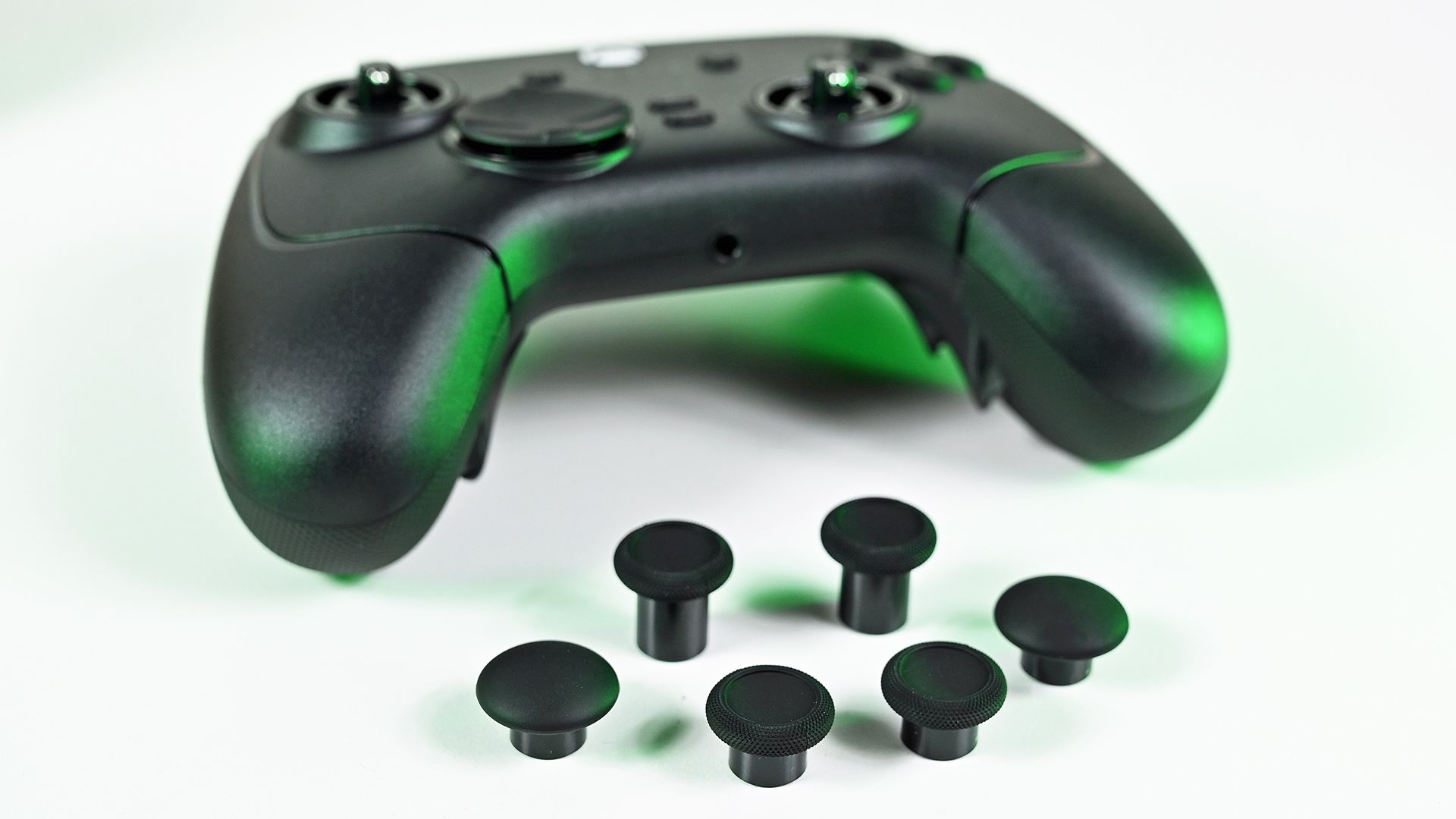
Superior sticks really elevates the package above what Microsoft offers today. (Image credit: Daniel Rubino)
The sticks are capacitive anti-drift, and contactless, and should be utterly resistant against wear and tear. Quality-wise, they feel almost 1:1 with what Xbox offers — minus the inevitable drift, which is a huge plus. Razer includes some swappable options in the box too, and they're easy to swap out. Unlike the magnetic ones on the Elite, though, Razer's won't fall off as easily, as they're held in place with a small clasp. I can't tell you how many times I've dropped my Elite controller only for the thumbsticks to fall off and go hiding somewhere.
Design-wise, the Razer Wolverine V4 Pro is not exactly a huge looker, but it does have a magnetic faceplate that can be swapped out for custom designs. I've not seen any available online yet, but I'm sure they're coming down the pipeline.
I'm not a huge fan of the large USB-C port on the top of the controller, which juts out haphazardly. It's not a big deal, and I guess it helps hold the cable in place for charging, but it isn't a pretty solution.
Speaking of charging, the Razer Wolverine V4 Pro gets around 27 hours on a single charge according to the firm, although I'd say it clocks in a bit less than that in practice, maybe around 20-24 hours when used via Xbox. Coupled with the fact that it has no charge dock unlike other controllers in this price range, I was hoping Razer would look to move beyond cables with the V4 Pro. Alas, we might need to wait for the V5. Again, not a big deal, but it is something worth considering.
More inputs than most people would need. (Image credit: Daniel Rubino)
Razer's software is still among the best third-party solutions for gaming accessories on PC, in my view, with everything bundled in a single place. It's easy to manage the features on the Wolverine V4, assigning buttons and the like, although be wary of using Razer's macros in some competitive games — automation detection can get you banned in some PvP titles like shooters. Offline though, it can be a handy feature, especially in some management and simulation games.
Speaking of shooters, Razer's triggers are also well put together here. The trigger locks make activation more rapid, which can be a boost for pistols and rifle fire. You can disable them with a switch for full motion activation for acceleration in racing games and things like that.
The V4 boasts flawless reception without disconnects or degradation, even in a radio-hostile environment.
Crucially, Razer also seems to have eliminated signal interference issues that came in the box with the V3. Firmware updates fixed those over time, but the V4 boasts flawless reception without disconnects or degradation, even in a radio-hostile environment (i.e., my office with a thousand other radio signals interfering with each other).
All in all, I think this is more of a refinement and iteration over the V3 Pro, improving and polishing the strong fundamentals to a mirror finish.
Razer Wolverine V4 Pro — Competition
I think for many, the Xbox Elite comparison will be top dog. But there's a third Elite around the corner ... (Image credit: Daniel Rubino)
There are many great Xbox controllers from third-party firms these days. As much as I truly adore the convenience of the Xbox Elite charge dock and monstrous, infinite-feeling battery, the sticks and general build quality degrade rapidly over time. It's hard to recommend the Xbox Elite controller these days to most people as a result, even if the dock is the best out there by a mile.
The Razer Wolverine V4 Pro is not cheap at $199, and perhaps is best considered over things like 8BitDo Ultimate 3E if you are looking for something on the higher end for rapid response in multiplayer PvP PC games, like Call of Duty and such. The 8BitDo Ultimate 3E Xbox / PC wireless controller has a charge dock, has Bluetooth, as well as anti-drift sticks and programmable additional buttons. It is also $70 cheaper than the Razer Wolverine V4 Pro, at the cost of a "premium feel" potentially. Razer also rocks that absurd 8000 Hz maximum polling, although the 8BitDo does also go up to 1000 Hz on PC for good measure, albeit with a smaller battery.
I wish Razer would jump on the battery dock train to reduce reliance on cables and charging. I shouldn't need to be scrambling for a cable mid-match in 2026, particularly when so many others are offering them now.
There are also even more premium options out there now too, like the SteelSeries Aeon Pro, which is $50 more expensive, but also offers a charge dock and the ability to connect and switch between two platforms at once. The Razer Wolverine V4 Pro asks you to physically move the dongle between platforms if you're moving between devices, which isn't always ideal either.
Razer Wolverine V4 Pro — Should you buy it?
A great pure controller, but for the price Razer could stand to offer a bit more. (Image credit: Daniel Rubino)
I think the 8000 Hz polling radio does a lot of the heavy lifting on the price here, potentially making this a niche option for esports-grade level play — something other controllers simply don't offer right now. However, for the vast majority of consumers, I would've liked to have seen a bit more on the convenience end. This is branded as a "Pro" controller, though to be fair, i.e. for "Pro" gamers. In that, it does exactly the job it set out to do.
There are other options that might be better value for a regular gamer like those outlined above. There's also the Xbox Elite Controller Series 3 which is probably just weeks away from a reveal, making the decision to grab this even murkier maybe in the near term (as of writing, that is). But one thing is for sure: you won't be disappointed if you do end up picking this controller up.
The Razer Wolverine V4 Pro absolutely nails the fundamentals like few other controllers do, delivering massive performance in a tidy, intuitive package.
Razer
Wolverine V4 Pro
The Razer Wolverine V4 Pro is a stellar controller that every other controller should draw from with regards to the fundamentals. Superb ergonomics, great customizability, and high-quality materials provide a reassuring sense of value for money. As a consumer, I'd probably swap out the 8K polling for something else, but this is for "Pro" gamers, and in that, it surely delivers.

 Connexion