Vue normale

Il y a de nouveaux articles disponibles, cliquez pour rafraîchir la page.
Aujourd’hui — 17 mars 2026Flux principal

Oppo Find N6 Review: The Best Foldable Phone Right Now

Par : Aki Ukita
17 mars 2026 à 12:00

PROS:


  • Excellent multitasking experience

  • Nearly invisible and undetectable crease

  • Slim and light form factor for a book-style foldable

  • Powerful performance

CONS:


  • Camera system is good for a foldable, but not truly flagship-level

RATINGS:

AESTHETICS
ERGONOMICS
PERFORMANCE
SUSTAINABILITY / REPAIRABILITY
VALUE FOR MONEY

EDITOR'S QUOTE:

The OPPO Find N6 is one of the few foldables that trades novelty for genuine polish, delivering a device that feels as complete as it does considered.

The Oppo Find N6 arrives at a moment when foldables can no longer rely on novelty alone to justify their place in the premium market. Buyers now expect these devices to feel as polished and dependable as any top-tier flagship, while still delivering the sense of occasion that only a folding design can offer. That is what makes the Find N6 so interesting, because it is not simply trying to look futuristic. It is trying to feel complete.

That question lands differently for me because the Oppo Find N5 has been my daily driver for most of the time since its launch. Living with that phone has given me a clear sense of what Oppo already does exceptionally well in this category, from hardware refinement to the balance between portability and immersion. It also means I came to the Find N6 with real expectations rather than fresh curiosity alone. More than anything, I wanted to see whether Oppo had merely polished an already strong formula or taken a meaningful step forward.

Designer: OPPO

Aesthetics

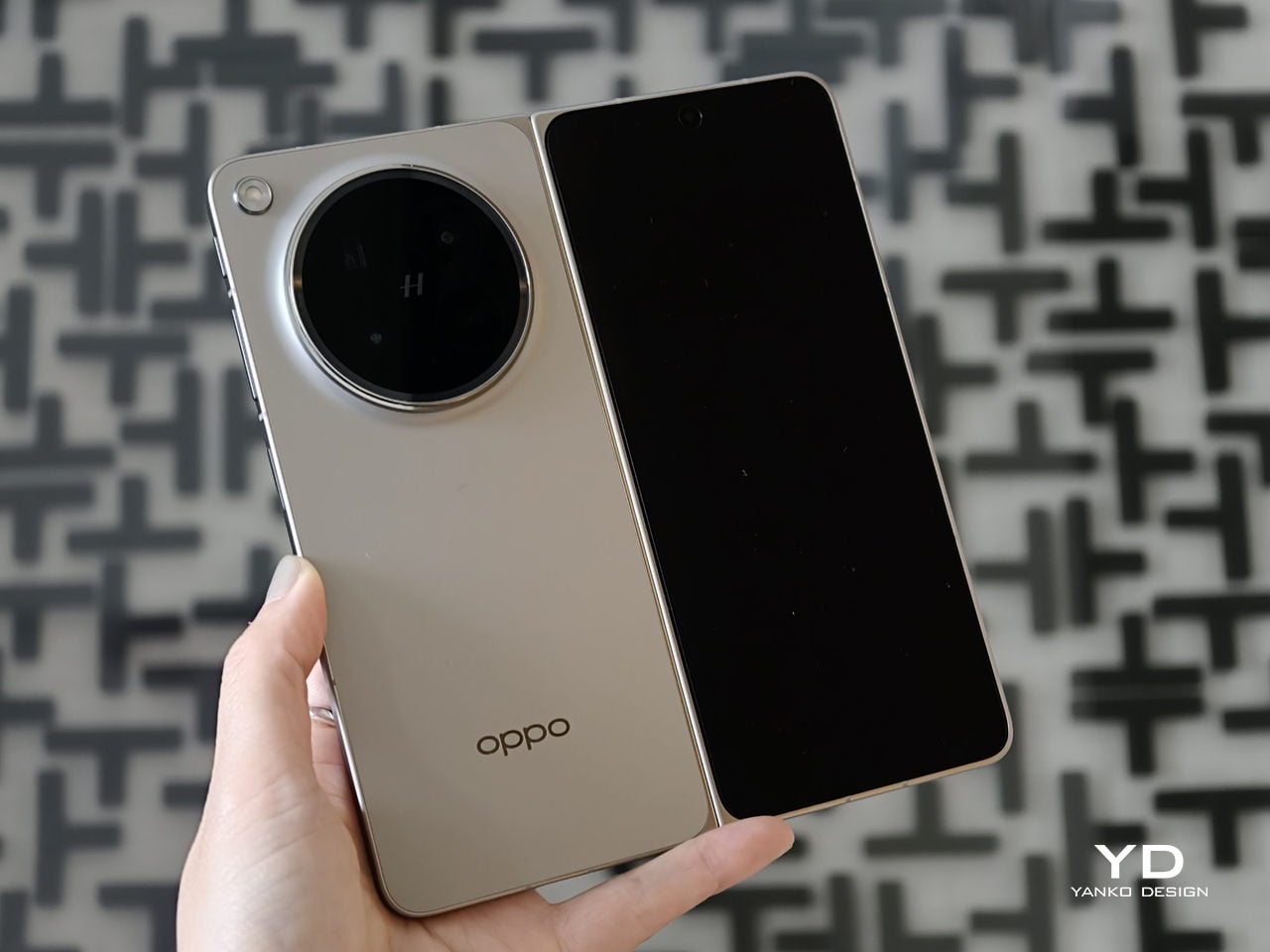
The Oppo Find N6 does not stray far from the design language established by the Find N5, but it feels like a more polished and disciplined evolution of that formula. The overall look is largely unchanged, yet the Find N6 comes across as more minimalistic and more refined, with a cleaner visual identity that feels calmer and more mature. Rather than chasing a dramatic redesign, Oppo has focused on tightening the details, and that gives the phone a stronger sense of cohesion.

The biggest improvement is in the rear camera treatment. The refined Cosmos Ring camera deco looks more elegant and less ornamental, while the individual camera elements feel more integrated into the overall composition instead of standing apart from it. This makes the back of the phone look tidier and more resolved, which suits the Find N6’s more minimal direction. It still has the visual presence expected of a flagship foldable, but it carries that presence with greater restraint.

What also stands out is Oppo’s color choice. For the first time on one of its foldables, the company is offering a much bolder orange finish, which Oppo calls Blossom Orange, alongside a more classic Stellar Titanium, and the timing does not feel accidental. Ever since the iPhone 17 Pro series introduced orange into the flagship conversation, it feels like other brands have been quick to follow Apple’s lead, and the Find N6 is part of that wave. Even so, the orange works well here, giving the phone more personality, while the gray remains the safer and more traditional option.

Ergonomics

The generous screen real estate of a foldable usually comes with familiar compromises. Thickness, weight, and the crease are often treated as the unavoidable price of admission. The Oppo Find N6, however, feels designed to challenge that assumption in a way that is noticeable the moment you pick it up.

At 8.3 mm when folded and 225 g, the Find N6 feels surprisingly close to a premium flagship bar phone in everyday use. It does not come across as awkwardly bulky or excessively heavy, which makes it more approachable than many devices in this category. That balance matters over time, whether you are using it one-handed, slipping it into a pocket, or simply carrying it through a long day.

That does not mean the form factor is free of trade-offs. If I rest some of the phone’s weight on my pinky, the lower edge can still dig in a bit, especially when the device is open. It is less noticeable than on the Find N5, but not completely gone.

Perhaps the most impressive detail, though, is the crease, or more precisely, how little of it remains. I have never been particularly bothered by creases on foldables, and I was already satisfied with the subtle crease on the Find N5. Even so, the Find N6 feels like a meaningful refinement rather than a minor iteration.

Visually, the crease is practically nonexistent in normal use and only becomes noticeable if the screen is off and viewed from a very specific angle. More impressive still, it also feels nearly absent under the finger when swiping across the display. Our fingertips are quick to pick up even slight ridges or shallow dents, which makes the Find N6’s smooth, uninterrupted surface especially impressive in daily use.

That sense of appreciation only grows once you look at how Oppo arrived at this result. The company refined the hinge architecture itself and paired it with state-of-the-art 3D scanning and 3D printing technologies, a combination that helps explain why the Find N6 feels so polished in the hand.

That same attention extends to the physical controls. In place of the OnePlus-style alert slider on the upper left, Oppo now uses the customizable Snap Key, first introduced on the Find X9 series and now positioned on the upper right side. It can be mapped to quick actions such as launching the camera, turning on the flashlight, starting a voice memo, or opening translation, giving it a broader role than the slider it replaces.

Just below sit the fingerprint reader and volume rocker, both placed lower than they were on the Find N5. That may sound like a minor adjustment, but it makes the controls easier to reach and better aligned with the way the phone naturally rests in the hand. It is a subtle refinement, though one that proves genuinely useful in everyday use.

Performance

With foldables, the screens have to justify the form factor. The Find N6 uses a 6.62-inch cover display and an 8.12-inch inner screen, both with 120Hz LTPO panels. That is the expected hardware at this level, so the more interesting part is how Oppo tries to improve the experience around visibility, comfort, and immersion.

According to Oppo, both displays can reach 1,800 nits in outdoor use, with peak HDR brightness topping out at 3,600 nits on the cover screen and 2,500 nits on the inner panel. In practice, both displays are bright enough to remain comfortably usable even under harsh sunlight. They also support Dolby Vision and HDR Vivid, and content looks rich and vibrant across both panels.

The Find N6 is powered by Qualcomm’s Snapdragon 8 Elite, and it has no trouble keeping up with the kind of multitasking a foldable encourages. Apps open quickly, navigation feels immediate, and even with several windows open at once, the phone stayed smooth and responsive. I also edited a short video on the device, specifically an unboxing of the Find N6 and AI Pen Kit, and the experience was smooth and free of noticeable stutter.

That matters because a device like this only really makes sense if it can handle more than the usual phone workload without feeling strained. Oppo’s software does a good job of making that extra screen space feel useful. Free-Flow Window lets you open up to four apps at once in floating windows, and in practice, it feels less fiddly than it sounds.

Boundless View adds even more flexibility, and the gestures linking the two work naturally enough that moving between layouts never feels like a chore. Resizing windows, shifting focus, and juggling multiple apps all feel smooth and seamless, which makes the Find N6 genuinely effective as a productivity device rather than just a phone with a bigger screen.

Even under sustained use, the phone remained smooth and reasonably controlled, and I also did not notice any stutter while playing Genshin Impact. Gaming feels more like a bonus here than the main point of the device, but the large inner display still gives it a more immersive, almost tablet-like feel than a standard phone can offer.

That same focus on utility extends to the AI Pen Kit, which is one of the more interesting hardware additions. The Oppo AI Pen supports 4,096 levels of pressure sensitivity and works on both the inner and outer displays, which makes the Find N6 more versatile for note-taking, annotation, and quick sketching. Because it connects over Bluetooth, the pen can also double as a remote shutter for both photos and video, which adds a genuinely useful layer of flexibility.

Oppo has also handled the practical side fairly well. The dedicated case gives the pen a proper place to live and keeps it charged through reverse wireless charging from the phone itself. That kind of integration is important because accessories like this are only useful if they are easy to carry and ready when you need them.

The software support around the pen is also fairly thoughtful. Quick Note lets you start writing quickly, a double press switches between writing and erasing, and global annotation makes it possible to mark up content across the interface and export it as an image or PDF afterward. There are also a few more specialized tools, including handwriting optimization, a handwriting calculator, and a Laser Pointer mode for presentations. Not all of these will be essential, but together they make the pen feel more genuinely useful than most stylus add-ons tend to.

Camera

The camera system performs well by foldable standards, but it is not on the level of the best camera-focused flagships. In practice, it feels closer to a solid upper mid-range setup, which is respectable enough for a device like this.

The rear camera system includes a 200MP main camera with a 21mm-equivalent focal length, a 1/1.56-inch ISOCELL HP5 sensor, an f/1.8 aperture, and OIS, a 50MP telephoto at 70mm equivalent with an ISOCELL JN5 sensor, an f/2.7 aperture, and OIS, and a 50MP ultra-wide at 15mm equivalent with another ISOCELL JN5 sensor, an f/2.0 aperture, and autofocus.

In daylight, the Find N6 delivers good detail, pleasing dynamic range, and generally accurate color, even if images tend to run slightly bright. The telephoto and ultra-wide are serviceable, while low light is where the limitations become more obvious, especially when there is movement in the scene.

XPan Mode

Oppo does at least include a healthy set of features, including log video recording and XPan mode. There are also two 20MP selfie cameras, one on the outer display and one on the inner screen, though they feel more useful for video calls than for anything else. Video is also fairly capable, with all three rear cameras supporting up to 4K 60fps Dolby Vision HDR, while the main camera can go up to 4K 120fps Dolby Vision.

Battery and charging

The Find N6 packs a 6,000mAh battery, and in practice, it delivers strong battery life. Unless you are using the camera heavily, it can easily last a full day and more, which is a very good result for a foldable with two high-refresh-rate displays.

Charging is strong as well. The phone supports 80W wired and 50W wireless charging, which makes it easier to top up quickly when needed. That only adds to the sense that the Find N6 is easier to live with day to day than many foldables.

Sustainability

For a foldable, the Find N6 makes a fairly strong durability case. It carries IP56, IP58, and IP59 ratings, and Oppo also points to stronger materials and a more robust hinge design as part of the broader durability story. More importantly, it feels reassuringly solid in hand, which goes a long way in making the device seem built to last.

That is matched by fairly solid long-term support. The phone is TÜV Rheinland certified for one million folding cycles and has minimized crease performance after 600,000 folds, while Oppo promises five years of Android updates and six years of security patches. That may not fully define sustainability, but it does give the Find N6 a more convincing case for longevity.

Value

At a starting price of around $1,440 for 12 GB/256GB configuration ($1,580 for 16 GB/512GB and $1,730 for 16 GB/1TB), the Find N6 is firmly in premium territory, but it also makes one of the strongest value cases in the foldable market. The design is slim and polished, the crease is impressively well controlled, battery life is strong, and the multitasking experience makes the larger display feel genuinely useful. More importantly, it feels like a foldable that gets the fundamentals right rather than relying on novelty alone.

The price is still high, and the camera system does not quite match the best camera-focused flagships, so there are limits to how broadly its value can be argued. But within the foldable category, the Find N6 feels unusually complete and easier to justify than many of its rivals if you already know this is the form factor you want.

Conclusion

After spending time with the Find N6, I came away feeling that Oppo has done more than just refine the formula. This is one of the few foldables that feels designed around everyday use rather than the novelty of unfolding into a larger screen. The ergonomics are better than expected, the crease is remarkably well controlled, battery life is strong, and the software makes the larger display feel genuinely useful.

It is still an expensive device, and the camera system does not quite reach the level of the best camera-focused flagships. Even so, the more I used the Find N6, the more complete it felt. There is a level of polish here that remains rare in this category, and it makes a very strong case for itself as one of the best all-around foldables available right now.

The post Oppo Find N6 Review: The Best Foldable Phone Right Now first appeared on Yanko Design.
À partir d’avant-hierFlux principal

Poco Pad X1 & Poco Pad M1 Review: Budget Tablets That Challenge the iPad

Par : Aki Ukita
13 décembre 2025 à 16:20

PROS:


  • Strong display for the money

  • Complete accessory ecosystem

  • Big batteries

CONS:


  • Neither tablet is light enough for comfortable one-handed use

  • Fully kitted-out X1 with Floating Keyboard and Focus Pen gets expensive fast

RATINGS:

AESTHETICS
ERGONOMICS
PERFORMANCE
SUSTAINABILITY / REPAIRABILITY
VALUE FOR MONEY

EDITOR'S QUOTE:

Poco Pad X1 and M1 are not perfect, but together they deliver more screen, battery, and versatility than almost any other budget tablet pair right now.

Poco built its name on phones that punch above their price, and now it wants to do the same on your coffee table. With Poco Pad X1 and Poco Pad M1, the brand is not just throwing out a couple of cheap tablets. It is trying to turn its budget DNA into a fuller ecosystem that covers gaming, work, and everyday media.

You can feel that ambition in how these two models are drawn. The Poco Pad X1 is a slightly more compact, high refresh performance slate, tuned for games and quick multitasking on an 11.2-inch 3.2K display. The Poco Pad M1 steps up to a 12.1-inch 2.5K panel and the largest battery Poco has ever shipped in a global device, aiming to be the big screen that carries you through movies, sketching sessions, and long days away from a charger.

Designer: Poco

If you have been eyeing an affordable Android tablet for gaming, streaming, or light work, should you reach for the sharper, faster Poco Pad X1, or the larger, more relaxed Poco Pad M1? In this review, we will live with both, compare their strengths, and help you decide which one actually fits your desk, your bag, and your budget.

Aesthetics

Poco Pad X1

Poco is not trying to reinvent tablet hardware with Poco Pad X1 or Poco Pad M1. Both follow a familiar rectangle with rounded corners, flat sides, and a camera module that sits quietly in one corner. On Poco Pad X1, the focus is clearly on framing its 11.2-inch display as efficiently as possible. Poco Pad M1 takes the same basic formula and scales it up with a 12.1-inch panel.

Color choices on the Pad X1 and the Pad M1 are simple. They both come in Grey and Blue. Grey leans more gunmetal and understated with a contrasting yellow accent around the camera module, while Blue reads a little more casual and friendly, but neither option is loud or experimental. Both tablets use a metal unibody design for the main shell, with separate parts for the camera island and buttons, and a big Poco logo stamped in the center for instant brand recognition. The Poco Pad X1 uses a square camera island, while the Poco Pad M1 switches to a softer oval, which gives each model a slightly different signature when you flip them over.

Poco Pad M1

Taken together, the two tablets look exactly like what they are meant to be. They are straightforward, modern Android slabs that fade into the background and let their screens and specs do the talking. For budget-friendly hardware, that quiet, functional design approach feels like the right call.

Ergonomics

In the hand, the main ergonomic difference between Poco Pad X1 and Poco Pad M1 is simply size and weight, but neither is a true one-handed tablet for long stretches. The Poco Pad X1, with its 11.2-inch footprint and 500 g weight, is the more compact of the two. It is easier to manage on a sofa or in bed than the larger Poco Pad M1, but you will still want a second hand or some support if you are holding it for a long time. Even though the Poco Pad X1 is relatively slim and light for an aluminum unibody tablet with an 8,850 mAh battery, with dimensions of 251.22 x 173.42 x 6.18 mm, it does not quietly disappear in one hand the way a smaller 8 or 9-inch device might.

Poco Pad M1

Poco Pad M1 stretches that template out to a 12.1-inch diagonal with dimensions of 279.8 x 181.65 x 7.5 mm and a weight of about 610 g, which puts it clearly into big tablet territory. It is still slim, but the larger footprint makes it even less suited to long one-handed use, especially if you are moving around. Instead, it feels more like a tablet you rest on a table, prop up with a cover, or pair with its official keyboard, where the extra screen real estate really pays off for split-screen apps, video, and drawing.

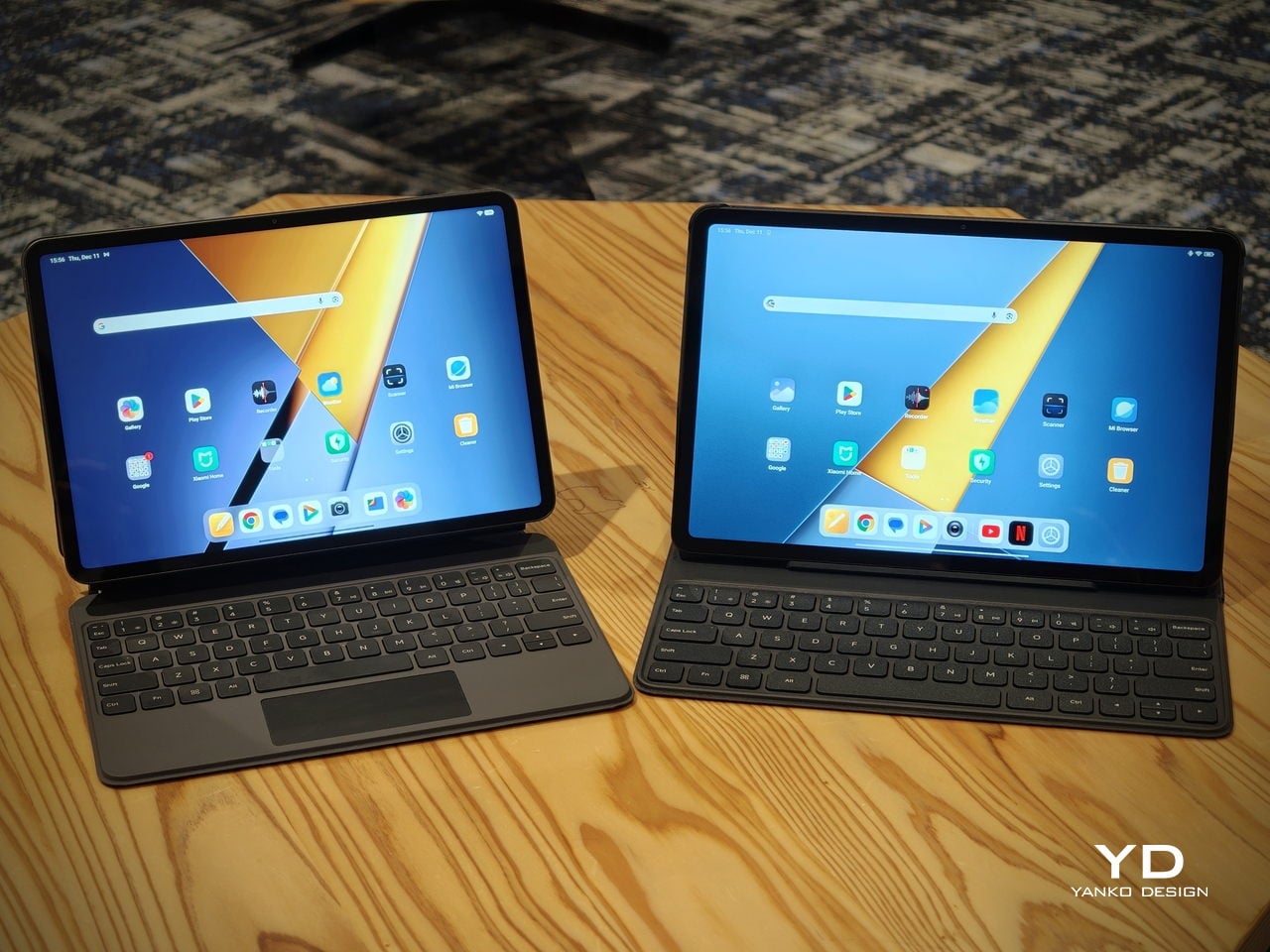
The accessory ecosystem around the Pad X1 and the Pad M1 makes them versatile, but in slightly different ways. Poco Pad M1 is compatible with the optional Poco Pad M1 Keyboard, Poco Smart Pen, and Poco Pad M1 Cover, a trio that turns it into a very capable small-screen workstation. The cover folds into a stand and adds a built-in holder for the pen, which makes it easy to move between bag, desk, and sofa without worrying about where the stylus went. The keyboard is lightweight and easy to carry, but the keys feel a bit plasticky in use, which slightly undercuts the otherwise solid metal body of the tablet.

Poco Pad X1

Poco Pad X1 has its own dedicated set of accessories. It supports the Poco Pad X1 Floating Keyboard, the Poco Pad X1 Keyboard, the Poco Focus Pen, and the Poco Pad X1 Cover, which together give it a surprisingly flexible setup for both work and play. The cover folds like origami and doubles as a stand, letting you enjoy the tablet vertically or horizontally, and for horizontal use, you can choose between two different viewing heights.

The Floating Keyboard is the standout here. It adds some weight and only offers a modest tilt range, but the key feel is excellent for this class, and the trackpad is responsive and accurate enough that you quickly forget you are on a tablet accessory. Clipped together, the Poco Pad X1 and the Floating Keyboard behave much more like a compact laptop than a budget slate with an afterthought keyboard, which makes it far easier to treat this smaller tablet as a real writing and work machine when you need it.
 

Performance

Living with Poco Pad X1 and Poco Pad M1 quickly shows how differently they lean, even though they share a lot of DNA. The Poco Pad X1 is the sharper and faster option, with an 11.2-inch 3.2K display at 3,200 x 2,136 px, around 345 ppi, and refresh up to 144 Hz in supported apps. It can hit about 800 nits peak brightness, supports Dolby Vision and HDR10, and uses a 3:2 aspect ratio that feels very natural for reading, web browsing, and document work, helped by TÜV eye care, DC dimming, and adaptive colors to keep things comfortable.

Poco Pad M1

The Poco Pad M1, on the other hand, trades a bit of sharpness and speed for sheer size and flexibility. Its 12.1-inch 2.5K panel runs at 2,560 x 1,600px with around 249 ppi and up to 120 Hz refresh, plus 500 nits typical and 600 nits in high brightness mode. You still get Dolby Vision, DC dimming, and TÜV certifications for low blue light, flicker-free behavior, and circadian friendliness, along with wet touch support that keeps it usable with damp fingers.

Poco Pad X1

Both tablets use quad speakers with Dolby Atmos and Hi-Res support, so you get surprisingly full sound from either. Crucially, the Poco Pad M1 also adds a 3.5 mm headphone jack and a microSD slot for up to 2 TB of expandable storage, which makes it a much easier media hoarder and a better fit for wired headphones and speakers. The X1 relies on its internal storage and wireless audio instead, which suits its more performance-driven, travel-friendly role.

Poco Pad X1

Poco Pad M1

Performance and gaming clearly favor the Poco Pad X1. It uses the Snapdragon 7+ Gen 3 with 8 GB of RAM and up to 512 GB of storage, and combined with the 144 Hz panel, it feels like a handheld console that also happens to be good at multitasking and productivity. The Poco Pad M1 steps down to the Snapdragon 7s Gen 4 with 8 GB of RAM and 256 GB of storage, which is still more than enough for apps and casual gaming, but clearly tuned more for streaming, browsing, and note-taking than for chasing every last frame. In practice, the Poco Pad X1 is the one you reach for when you care about smooth, high refresh gameplay, while the Pad M1 is the one you leave on the coffee table for everyone to use.

Poco Pad M1

Battery life follows the same logic. The Poco Pad X1 pairs its 8,850 mAh battery with 45 W turbo charging, which Poco says can go from zero to full in about 94 minutes, and my experience matches that claim in day-to-day use. The Poco Pad M1 leans into a 12,000 mAh pack, billed as the largest battery in a global Poco device, with up to 105.36 hours of music playback, around 83 days of standby, 33 W charging, and up to 27 W wired reverse charging so it can top up your other devices.

Poco Pad M1

Poco Pad X1

On the software side, both run Xiaomi HyperOS with Xiaomi Interconnectivity and Google’s AI hooks, so you get shared clipboard, call and network sync, Circle to Search, and Gemini support whichever size you choose. As for cameras, Poco Pad X1 pairs a 13 MP rear camera and an 8 MP front camera, while Poco Pad M1 sticks to 8 MP sensors on both sides. The results are perfectly fine for video calls, document scans, and the odd quick snap, but nothing special, which is exactly what you would expect from tablets at this price bracket.

Poco Pad M1

Poco Pad X1

Sustainability

Poco is not making a big environmental branding play with Poco Pad X1 and Poco Pad M1, but there are a few practical touches that matter if you plan to keep a tablet for several years. The most important one is long-term software support. Both Pad X1 and Pad M1 are slated to receive four years of security updates, which gives you a clearer runway for safe everyday use. For budget tablets, that commitment is still not guaranteed across the market, so it is good to see Poco spell it out.

Poco Pad M1


That longer support window pairs well with the hardware choices. The aluminum unibody shells on both models feel sturdy enough to survive several upgrade cycles, and the generous storage options, plus microSD expansion on the Poco Pad M1, reduce the pressure to replace them early just to fit more apps or media. It is not a full sustainability story with recycled materials and carbon tracking, but if your definition of sustainable starts with buying something that will not feel obsolete or unsafe in two years, these tablets are at least pointed in the right direction.

Value

The Poco Pad X1 and Poco Pad M1 both land in the affordable bracket, but they scale very differently once you add accessories. The Poco Pad X1 with 8 GB of RAM and 512 GB of storage is $399 USD, which feels fair for the Snapdragon 7+ Gen 3 and high-end 3.2K 144 hertz display. Its accessories are priced like mini laptop gear, with the Floating Keyboard at $199 USD, the X1 Keyboard at $129 USD, the X1 Cover at $49 USD, and the Poco Focus Pen at $99 USD. A fully loaded X1 setup quickly pushes past $600 USD, but in return, you get a compact tablet that can genuinely stand in for a small laptop and drawing pad.

Poco Pad X1

The Poco Pad M1 starts cheaper at $329 USD for 8 GB and 256 GB, and its add-ons stay firmly in value territory. The M1 Keyboard is $99 USD, the M1 Cover is $29 USD, and the Poco Smart Pen is $69 USD, so even a complete kit undercuts an equivalently kitted X1 by a healthy margin. Factor in the microSD slot and 3.5 millimeter headphone jack, and M1 clearly aims to be the better deal for big screen media, note-taking, and family use, while X1 makes more sense if you are willing to pay extra for performance, storage, and that excellent Floating Keyboard experience.

Verdict

The Poco Pad X1 and Poco Pad M1 end up serving two somewhat different roles. If you prioritize performance, the Poco Pad X1 is the clear choice. The Snapdragon 7+ Gen 3, 3.2K 144 Hz display, 512 GB storage, and excellent Floating Keyboard make it feel like a serious little work and gaming machine, even if the full setup gets expensive and you give up the headphone jack and SD slot. If you care more about big-screen comfort and value, the Poco Pad M1 quietly wins. The 12.1-inch 2.5K screen, quad speakers, 3.5 mm jack, microSD expansion, huge battery, and cheaper accessories make it a better fit for big-screen media and everyday productivity.

Poco Pad X1

Whichever way you lean, you are getting more tablet than the price suggests. For context, Apple’s base iPad costs $449 with only 64 GB of storage and a 60 Hz screen. The iPad still has a faster processor and a tighter app ecosystem, but Poco gives you bigger batteries, sharper displays, and a lot more storage for less money. Pick the Poco Pad X1 if you want compact power and a great keyboard experience. Pick the Poco Pad M1 if you want maximum screen, battery, and flexibility for the money. Either way, you end up with a tablet that feels more considered than most of what you will find at this price.

The post Poco Pad X1 & Poco Pad M1 Review: Budget Tablets That Challenge the iPad first appeared on Yanko Design.

7 Best Drawing Gifts Every Artist Actually Wants in 2025

Par : Aki Ukita
28 octobre 2025 à 22:30

The search for the perfect drawing gift is like stepping into a gallery of possibilities. Every artist, whether just beginning or already established, dreams of tools that spark creativity and turn everyday practice into pure inspiration. A carefully chosen present can fuel new ideas, add beauty to a workspace, and invite hours of joyful making.

This year, we’ve curated a collection that stands out for its innovation, design, and sheer delight. From show-stopping tools that double as objets d’art to classic essentials that never go out of style, each pick was selected to surprise and satisfy artists of every background and budget. Dive in and discover the creative treasures every artist truly wants right now.

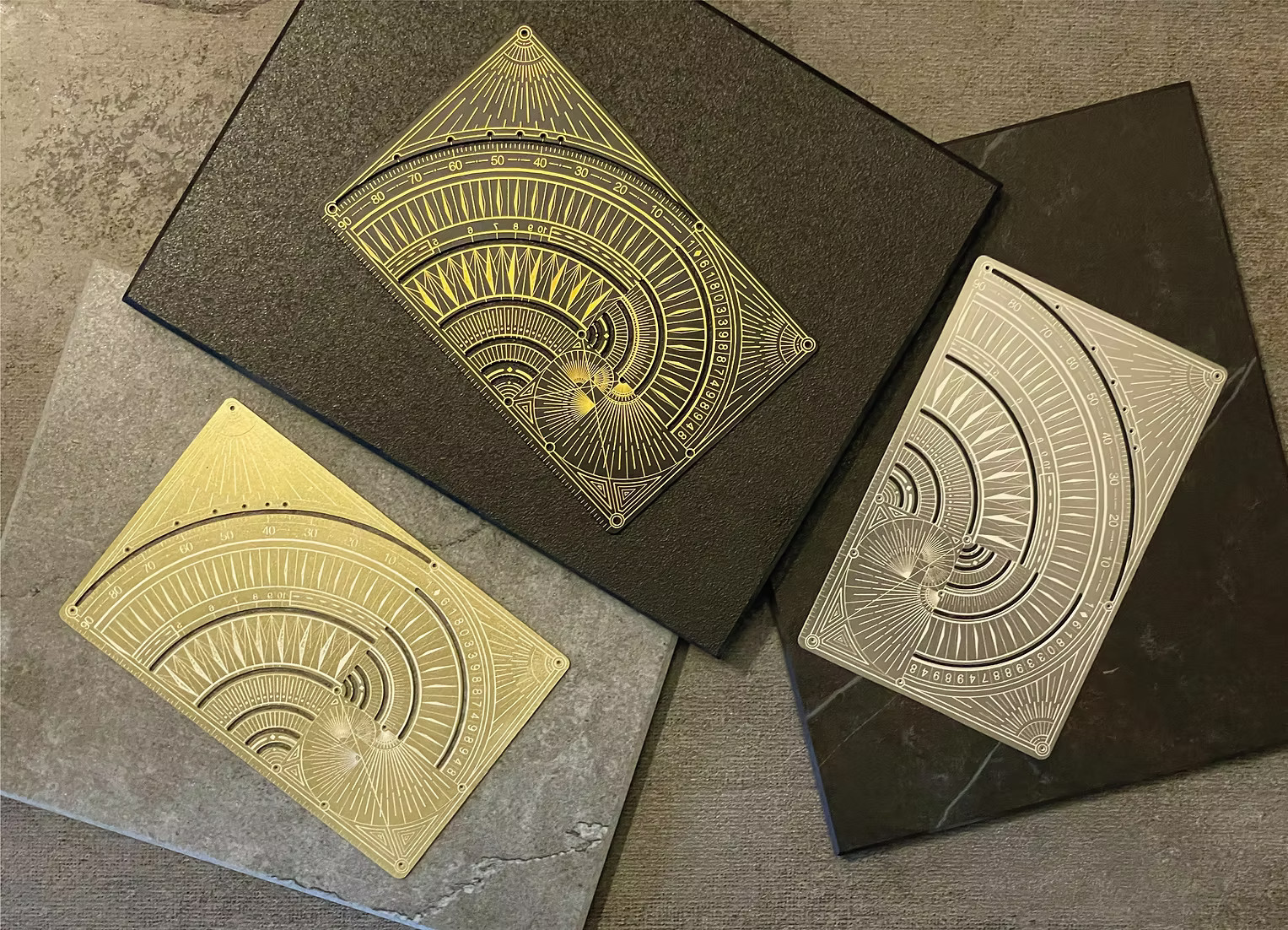
1. Phi Ruler Artistry Edition

The Phi Ruler Artistry Edition is more than just a measuring tool—it’s a masterpiece in its own right. Inspired by the golden ratio, this ruler brings harmony and mathematical elegance straight to the drawing table. Its sculptural design instantly attracts attention, making it a statement piece for anyone who loves both art and precision.

Artists will find themselves reaching for this ruler not just for technical work, but for the sense of inspiration it brings to every project. The unique form and luxe finish add a touch of sophistication to any workspace. For creative minds who thrive on both beauty and structure, the Phi Ruler is an irresistible gift.

What we like

  • Striking, conversation-starting design.
  • Encourages exploration of composition and proportion.

What dislike

  • Niche appeal may not suit every artist.

2. Faber-Castell Polychromos Colored Pencil Set, Wooden case of 120

Few gifts dazzle an artist like the Faber-Castell Polychromos Colored Pencil Set. Housed in a stunning wooden case, this collection boasts some of the world’s most beloved colored pencils. The pigment is lush, the blending smooth, and each pencil feels like a jewel in the hand.

This set is a celebration of color, quality, and tradition. Artists will delight in the spectrum of shades, each chosen for its intensity and staying power. If you’re looking for the ultimate luxury gift that combines beauty with performance, Polychromos pencils are a classic choice that never fails to impress.

What we like

  • Exceptional pigment quality for vivid, long-lasting color.
  • Beautifully presented in a wooden case.

What dislike

  • Bulkier case isn’t travel-friendly.
  • May overwhelm absolute beginners.

3. XP-Pen Magic Drawing Pad, 2025 version

The XP-Pen Magic Drawing Pad is a portable Android tablet that lets artists sketch and create wherever inspiration strikes. Its slim, lightweight build makes it easy to carry, while the matte, paper-like screen brings a familiar and comfortable feel to every stroke. The included pressure-sensitive stylus responds beautifully to your touch, offering satisfying accuracy and giving digital drawing a traditional twist. XP Pen also includes a drawing glove in the box, helping your hand glide smoothly across the surface and keeping your artwork smudge-free right from the start.

Artists can use their favorite Android creative apps and enjoy reduced glare thanks to the matte display. Sharing artwork is easy, whether you’re working solo or collaborating with friends. For anyone who wants digital flexibility with the tactile joy of paper, this tablet is a clever and practical gift.

What we like

  • Lightweight Android tablet with portable form factor.
  • Matte, paper-like screen reduces glare and feels natural.

What dislike

  • Display isn’t as bright or sharp as glossy screens.
  • Not as powerful as some tablets.

4. TRILObyME

The TRILObyME by Egoundesign brings modular creativity and iconic design to artists who value both innovation and responsible materials. At its heart is the CENTO3 multitool, a 3D-printed writing instrument designed by Achille Castiglioni and Gianfranco Cavaglià. The compact case holds a full set of interchangeable refills—HB graphite, black ink, red and blue pastels, and yellow and green highlighters—each with its own slot for easy organization and quick access.

TRILObyME’s commitment to sustainability is clear in its construction. Every case is made from PLA, a biobased material derived from renewable resources like potatoes and cornstarch. Naturally non-toxic and biodegradable, PLA gives the case a low environmental footprint without sacrificing style or function. With 12 colors and options, this creative kit is both eco-friendly and visually appealing—a smart gift for artists who care about design and the planet.

What we like

  • Includes the innovative, 3D-printed CENTO3 multitool.
  • Available in a wide range of colors.

What dislike

  • Limited space for traditional or third-party supplies.

5. Japanese Drawing Pad

Minimalism meets luxury in the Japanese Drawing Pad, now offered in striking White or classic Black to suit any creative mood. Artists can choose from A4, A5, or A6 sizes, making it easy to find the perfect fit for studio work or sketching on the go. The smooth, heavyweight pages are a dream for pencil, pen, and ink, elevating even the simplest sketch into a tactile experience that feels truly special.

The understated cover and quality binding give this pad a timeless elegance that’s a joy to carry and use day after day. Artists who love analog will appreciate the mindful, meditative quality each page inspires. For those who believe that great art starts with great paper, this thoughtfully designed pad is a stylish, practical gift that turns every drawing session into an occasion.

Click Here to Buy Now: $26.00

What we like

  • Exceptional paper quality enhances every medium.
  • Sleek, minimalist visual appeal.

What dislike

  • Not ideal for wet media.

6. Pentel Drafting Mechanical Pencil 60th

Timeless and precise, the Pentel Drafting Mechanical Pencil 60th Anniversary Edition is a workhorse dressed in collector’s clothing. Its balanced weight and fine lead options deliver clean, crisp lines every time. The commemorative design adds a layer of sophistication, making it a coveted addition to any artist’s lineup.

This pencil is perfect for illustrators, designers, or anyone who wants a tool that’s as reliable as it is beautiful. It’s a gift that celebrates artistic heritage and daily craftsmanship, offering a drawing experience that feels both nostalgic and new.

What we like

  • Precise, consistent lines for detailed work.
  • Elegant design with anniversary accents.

What dislike

  • Specific lead size may not suit everyone.

7. Kingart 34pc Sketching Set

The Kingart 34pc Sketching Set is a treasure trove for artists at any stage. Everything needed to experiment and grow packed in a sturdy tin. It holds pencils, charcoals, erasers, and blending tools. It’s the kind of gift that invites creativity and makes starting (or restarting) a drawing habit easy and fun.

Whether for a student, a traveler, or someone rediscovering their love of art, this set is versatile and welcoming. It offers the freedom to try new techniques and materials without a hefty investment. The Kingart set is proof that a great gift doesn’t have to be complicated or costly.

What we like

  • Comprehensive selection for exploring techniques.
  • Great way to encourage beginners.

What dislike

  • Materials are more student-grade than professional.
  • Advanced artists may outgrow some tools.

Gifts That Inspire Every Stroke

Choosing a drawing gift is about so much more than picking a supply off the shelf. It’s about fueling someone’s creative journey and showing you understand their passion. Each pick on this list brings something special, from stunning design and professional performance to everyday practicality and pure creative joy. No matter your artist’s style or experience, you’ll find a gift here that feels personal and exciting.

Every artist deserves tools that inspire them to dream, experiment, and keep growing. With these seven standout gifts, you can give the present of inspiration all year long. Watch their eyes light up and their imagination soar—because the best art always starts with the right tools.

The post 7 Best Drawing Gifts Every Artist Actually Wants in 2025 first appeared on Yanko Design.

5 Unique Japanese Scissors That Redefine Everyday Cutting Tools

Par : Aki Ukita
2 octobre 2025 à 15:20

Scissors are often overlooked as simple, utilitarian tools, but in Japan, they become canvases for design innovation and creative thinking. Japanese designers approach even the most familiar objects with fresh eyes, reimagining everyday tools as pieces of functional art. The result is a lineup of scissors that are as visually captivating as they are practical, each one telling its own design story.

From playful forms that spark conversation to sleek, minimal silhouettes that elevate your workspace, these scissors go far beyond the basics. They’re crafted not just for cutting, but for delighting the senses, making each snip a satisfying part of your daily rhythm. Whether you’re searching for a new desk essential, a clever multitool, or a gift for a fellow design lover, these five Japanese scissors will inspire you to see ordinary objects in an entirely new light.

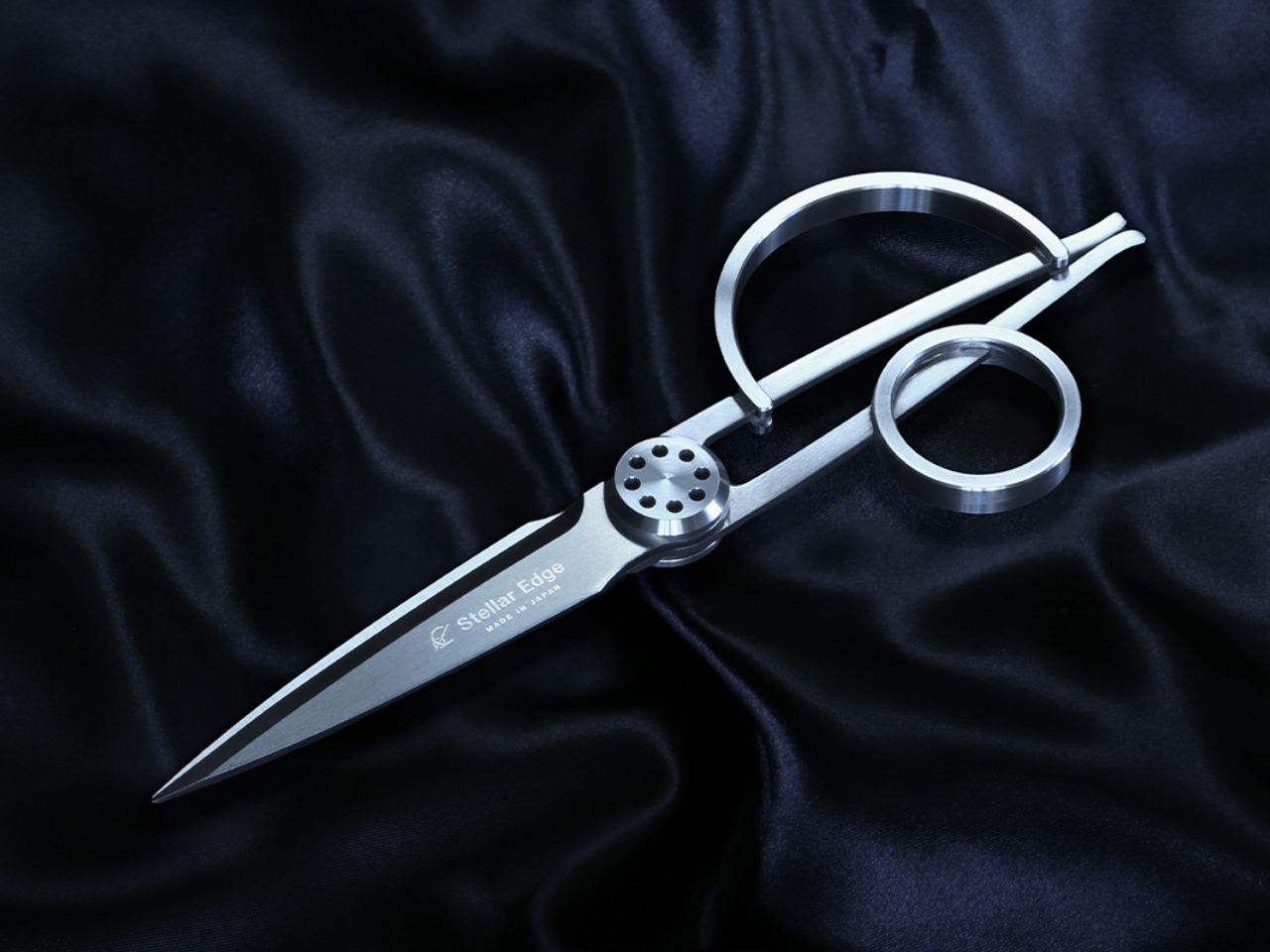
1. STELLAR EDGE SCISSORS

The Stellar Edge Scissors are a masterclass in minimalist engineering. With their gleaming, seamless handles and razor-sharp blades, they look like they belong in a modern art museum rather than an office drawer. Every curve and angle is carefully considered, resulting in a tool that feels as good as it looks. These scissors are crafted from Japanese stainless steel, promising both durability and long-lasting sharpness. Each snip feels almost effortless, making them a joy for daily tasks or creative projects.

The designers have paid special attention to ergonomics, ensuring that the Stellar Edge Scissors fit comfortably in hand. The polished finish and weight distribution give them a premium feel, elevating even the most mundane cutting job into a tactile pleasure. These are scissors for those who appreciate the intersection of form and function.

What we like

  • Striking minimalist design elevates any workspace.
  • High-quality Japanese stainless steel ensures lasting sharpness.
  • Smooth, precise cutting action for a variety of materials.

What we dislike

  • Minimalist handle may not suit those who prefer more grip texture.

2. Rockstar Guitar Scissors

Why settle for ordinary when you can rock your desk with the Rockstar Guitar Scissors? This playful design transforms a desk staple into a miniature electric guitar, complete with dramatic curves and bold styling. Every detail, from the fretboard-inspired handle to the metallic finish, channels the spirit of rock and roll. These scissors instantly become a conversation piece, sparking smiles and curiosity in any workspace.

Despite their whimsical looks, these scissors don’t compromise on function. The blades are sharp and precise, ready to handle everything from paper to packaging. Whether you’re a music lover or just want to add some flair to your office, the Rockstar Guitar Scissors are a perfect match for creative spirits.

Click Here to Buy Now: $25.00

What we like

  • Eye-catching guitar design doubles as desk decor.
  • Makes a memorable gift for music fans and creatives.
  • Sturdy construction and sharp blades for everyday use.

What we dislike

  • Playful shape may not fit traditional office aesthetics.
  • Handle design may take getting used to for precise cuts.

3. 8-in-1 EDC Scissors

Multitasking gets a major upgrade with the 8-in-1 EDC Scissors. This ingenious tool packs a suite of practical features into a compact, portable frame. Alongside precision cutting, you’ll find a bottle opener, screwdriver, nutcracker, wire cutter, and more. Every element is designed for quick, intuitive use, making these scissors a go-to companion for anyone who loves versatility.

The rugged construction means these scissors are ready for adventure, whether you’re at your desk or out in the field. Each component clicks satisfyingly into place, showing off the attention to detail that Japanese design is known for. For those who crave function without sacrificing style, the 8-in-1 EDC Scissors deliver in spades.

Click Here to Buy Now: $59.00

What we like

  • Packs eight functions into a single compact tool.
  • Durable build stands up to travel and daily use.
  • Features are easy to access and use on the go.

What we dislike

  • Some tools may be less comfortable for frequent tasks.

4. Cut & Slice Scissors

Sleek, smart, and surprisingly versatile, the Cut & Slice Scissors are designed for more than just paper. Their unique blade geometry allows them to handle everything from delicate fabric to tough packaging material. The ergonomic handle makes them comfortable for extended use, while the sharp, finely honed blades ensure a clean, precise cut every time.

What sets these scissors apart is their focus on workflow efficiency. The clever design lets you switch between slicing and traditional scissor action with ease. It’s a subtle innovation that makes a noticeable difference, especially for designers or crafters who demand precision and speed.

Click Here to Buy Now: $29.00

What we like

  • Innovative blade geometry for smooth slicing and cutting.
  • Versatile enough for fabric, paper, and packaging.

What we dislike>/h3>

  • Aesthetics are more utilitarian than decorative.

5. Casta Universal Design Scissors

The Casta Universal Design Scissors invite you to enjoy cutting in a whole new way. Their perfectly round handles rest gently in your palm, giving you a sense of comfort and control with every use. Inside each handle, a round concave shape creates a playful effect, producing a cheerful clicking sound that changes depending on the material you cut. This feature brings a bit of joy and mindfulness to even the most routine tasks.

These scissors are designed to be easy to grip, making them just as effective for left-handed users as for right-handed ones. The clever handle shape offers both ergonomic benefits and a touch of whimsy to your workspace. Anyone looking to add a sensory spark or a moment of happiness to their creative routine will appreciate the thoughtful details of these scissors.

What we like

  • Universal handle design suits left- and right-handed users.
  • Castanet-inspired clicks create a cheerful, engaging sound.

What we dislike

  • Handle may feel unusual for users accustomed to traditional grips.
  • May not appeal to those seeking a more traditional look.

Scissors That Cut Above the Rest

Japanese scissors are never just about getting the job done. They transform everyday routines into experiences filled with creativity and joy, all while showcasing the country’s love of thoughtful, innovative design. Each of these five unique pairs brings its own personality to your workspace, from playful shapes that spark conversation to clever features that make life easier and more beautiful.

Choosing any of these scissors means inviting a touch of artistry and delight into your daily rhythm. They remind us that even simple tools can be reimagined and elevated through smart design and a sense of fun. Whether you’re seeking the perfect gift or hoping to brighten up your own desk, these Japanese scissors promise to inspire and surprise every time you reach for them.

The post 5 Unique Japanese Scissors That Redefine Everyday Cutting Tools first appeared on Yanko Design.

❌
❌