❌

Vue normale

Elgato releases new Wave Go wireless microphone — here's how it works

Elgato, the tech company that prides itself on high-quality accessories for streaming, content creation, and gaming, has launched its first wireless microphone called the Elgato Wave Go.

This extension of Elgato's 'Wave ecosystem' is a combined clip-on and handheld microphone system that allows its users to record audio any time, anywhere, on their terms, with studio-level quality, processing, and routing.

Here's everything you need to know about how the Elgato Wave Go works, which you can buy right now on Elgato's official store for $99.99.

The Elgato Wave Go has a convertible design that allows users to record audio in two ways while being connected to a phone via a USB-C receiver.

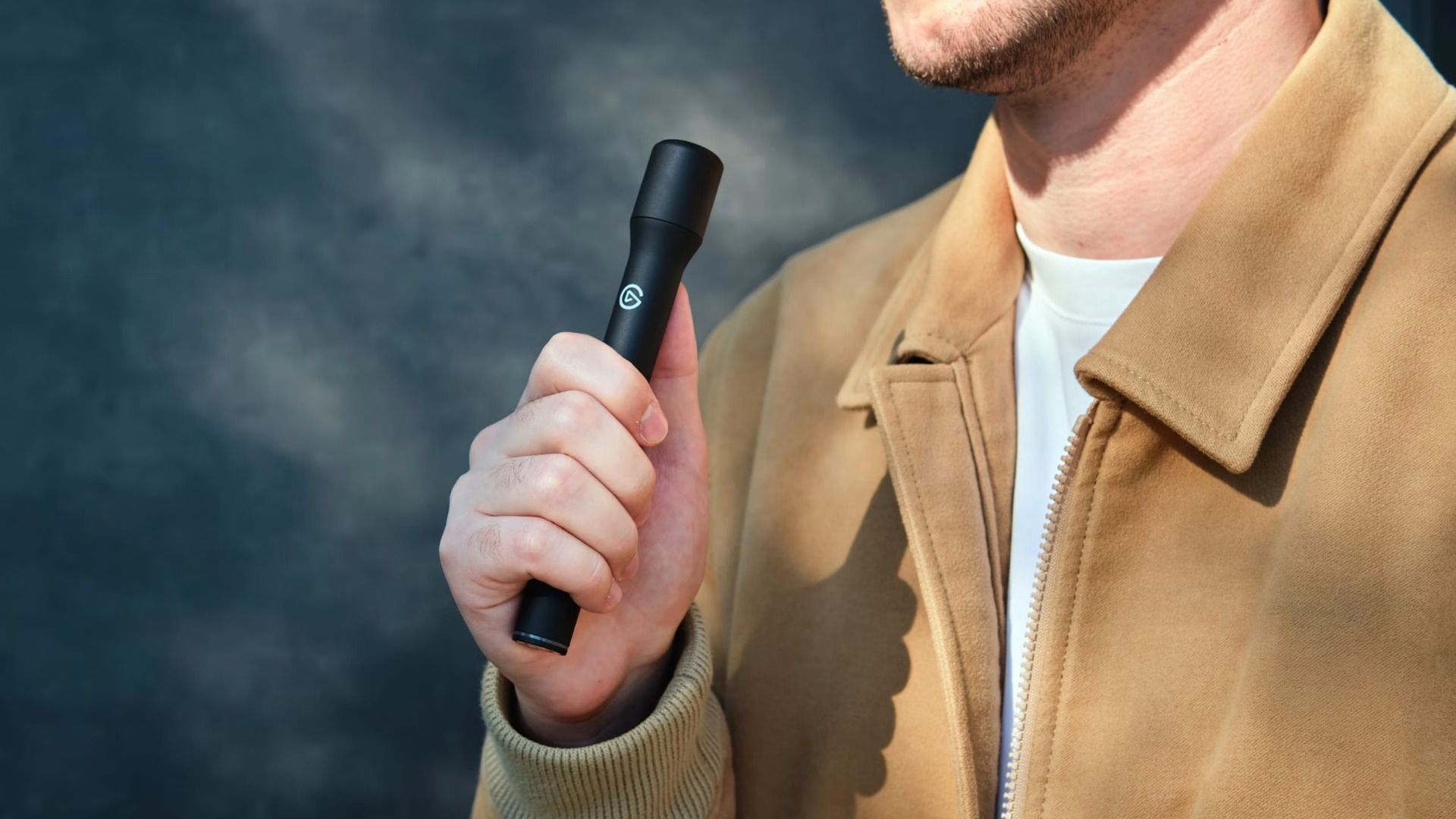
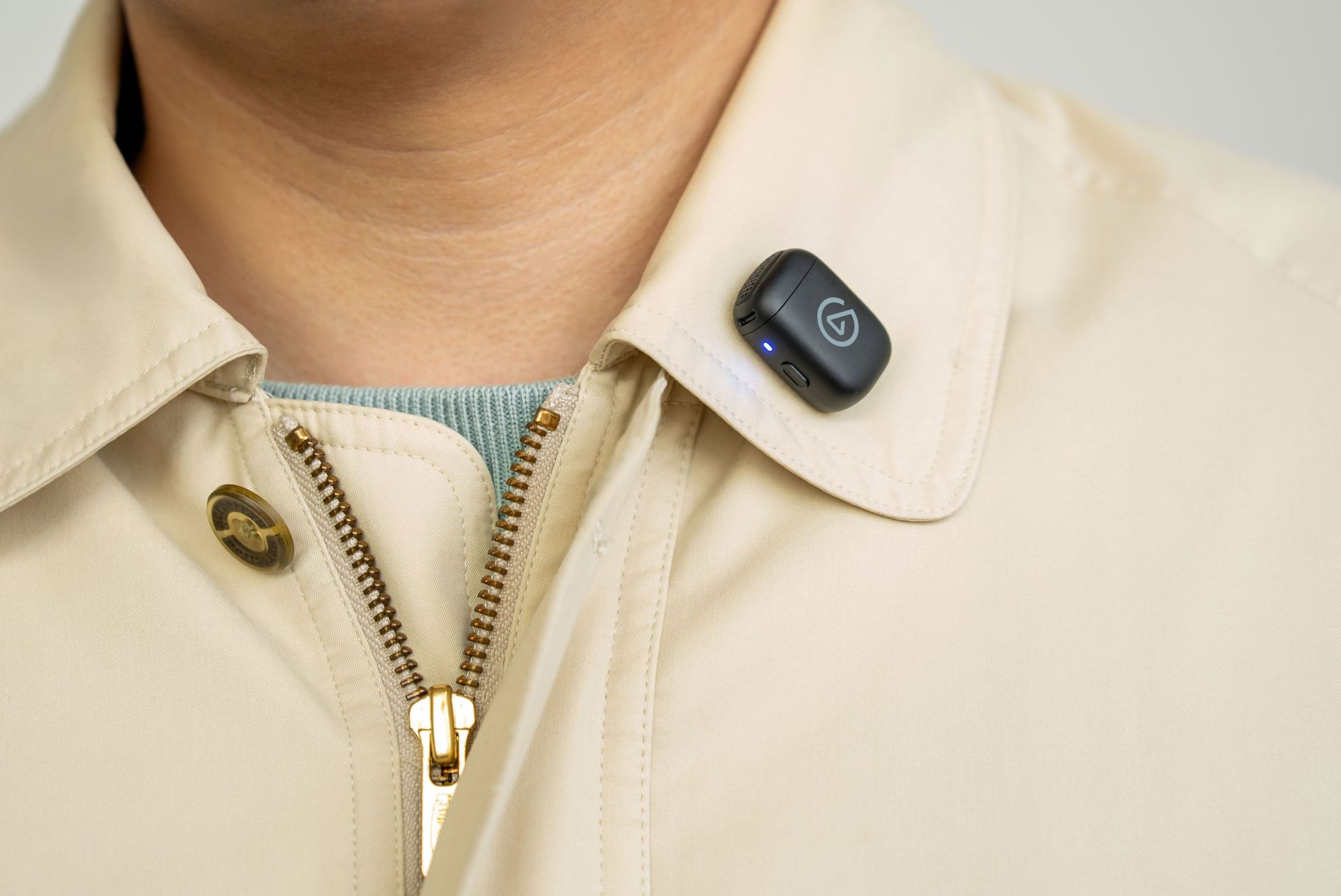
While in Clip-on Mode (which is a 7g transmitter the size of a coin), it can mount magnetically onto clothing with custom tuning that restores clarity and audio presence quality at chest distance.

In Handheld mode, Elgato Wave Go's transmitter fits inside a Smart Handle to become a full-sized interview mic with integrated controls, charging, and a sound profile that's been tuned for warmth and presence audio levels when used close up.

This microphone also features toggleable noise cancellation to block out annoying background noise, automatic EQ Shift and Auto Gain systems to apply different sound profiles and audio gain levels depending on its position and mode (without needing to mess around with its settings), and compatibility with the free Wave Go app on iOS and Android for users to customize these aforementioned features to their preference.

A man interviews a woman outdoors, holding a microphone as she speaks in a stone courtyard with café benches; the scene feels relaxed and conversational.

The Elgato Wave Go in Handheld mode. (Image credit: Elgato)

On top of that, the Elgato Wave Go will last you for a good long session, as its transmitter can run for up to 8 hours on a single charge or a full day while recording audio.

Its Smart Handle can be recharged alongside the transmitters when it's docked inside (even while recording), and it can store up to 5 full recharges so it can operate for at most 48 hours. The Elgato Wave Go can have all its components recharged while inside its carrying case, which can connect to USB-C chargers.

Its USB-C receiver also has pass-through charging, so you can recharge the Elgato Wave Go while connected to your phone.

Close-up of a person wearing a cream jacket over a teal shirt, with a small black wireless microphone clipped to the collar; the scene feels polished and professional.

The Elgato Wave Go in Clip-On mode. (Image credit: Elgato)

Lastly, the Elgato Wave Go can integrate with Elgato's free mixing software called Wave Link. When this mic is used in tandem with the app, users can route audio, apply effects, control its settings via Stream Deck, and unlock Voice Focus, which cleans up reverb and background noise while recording audio indoors.

If this lightweight, convertible microphone with expert sound quality, portability, and customization sounds appealing for your content creation needs, you can buy the Elgato Wave Go on Elgato.com for the MSRP of $99.99 (other retailers will sell it shortly after). The Elgato Wave Go will be available in 40 countries and regions.

Elgato is also offering a Sky Blue variant of the Elgato Wave Go for a limited time on its website. Plus, the microphone will have a second transmitter sold separately for an MSRP of $29.99 (or $14.99 when bought together with the Elgato Wave Go).

Wave Go Convertible wireless mic: $99.99

Let your voice be heard in your content with the Wave Go wireless microphone. It can be used in hand or clipped onto your shirt collar, convey and record your voice with pro-level quality, and last you over 48 hours before needing to recharge.View Deal

Click to join us on r/WindowsCentral

Join us on Reddit at r/WindowsCentral to share your insights and discuss our latest news, reviews, and more.

  • ✇Yanko Design
  • 9 Smartphone Accessories That Solve the Annoying Problems Your Phone Still Has
    Your phone can shoot video, run a demanding game, and carry an entire music library. It can also leave you holding a warm slab of glass, untangling a charging cable, or trying to photograph someone under terrible lighting. Those are the gaps worth designing for. A useful accessory should fix a specific irritation without creating three more, preferably through a mechanism you can understand before opening a thick instruction manual. These nine selections tackle cooling, listening, cable clutter
     

9 Smartphone Accessories That Solve the Annoying Problems Your Phone Still Has

14 octobre 2026 à 07:40

Your phone can shoot video, run a demanding game, and carry an entire music library. It can also leave you holding a warm slab of glass, untangling a charging cable, or trying to photograph someone under terrible lighting. Those are the gaps worth designing for. A useful accessory should fix a specific irritation without creating three more, preferably through a mechanism you can understand before opening a thick instruction manual.

These nine selections tackle cooling, listening, cable clutter, misplaced cards, awkward camera controls, and backup power. Some attach to the phone; others give it a useful companion on your desk or in your bag. Start with the problem that actually bothers you most each day.

1. OnePlus Ice Card Mini

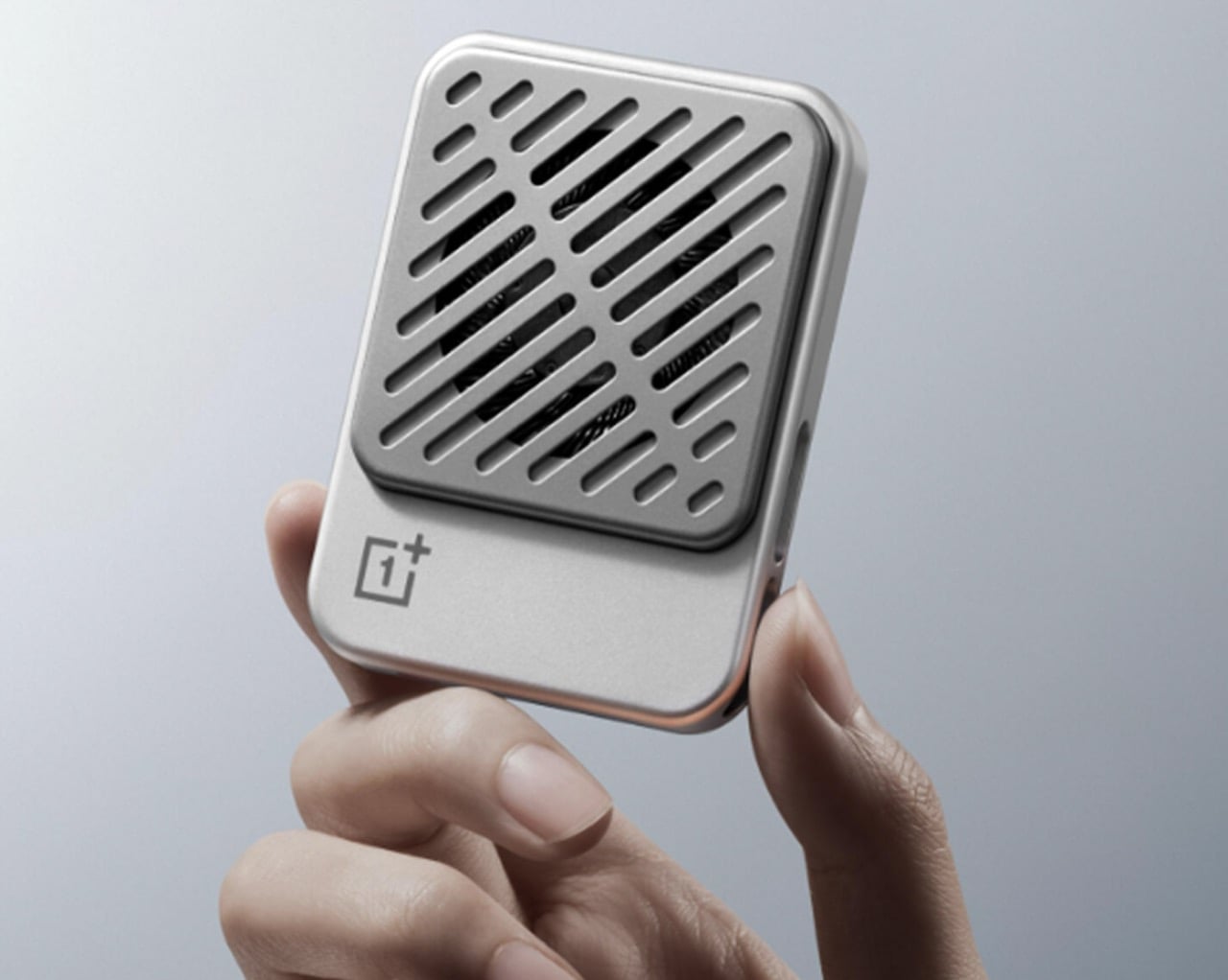
OnePlus has squeezed a phone cooler into a small card footprint rather than a bulky gaming attachment. The Ice Card Mini is listed in OPPO’s China store and described as a 50-gram body measuring 70mm by 53.4mm. Its thermoelectric chip works with an air-cooling system, while magnets hold the accessory against the phone. That compact packaging is the appeal: cooling becomes something you might carry alongside a cable, rather than reserve for a dedicated desktop gaming setup.

The practical tradeoff is power. The Mini draws up to 3.5W through USB-C and can run from a phone, power bank, or wall adapter. An included magnetic plate lets you attach it to phones without built-in magnets. It gives heat-conscious gamers a relatively discreet option, but drawing power from the phone adds another demand on its battery.

What we like

  • Compact, 50-gram magnetic format.
  • USB-C power accepts several sources.

What we dislike

  • Consumes power rather than supplying it.

2. StillFrame Headphones

If earbuds bother your ears, a phone’s music library deserves another way out. StillFrame Headphones, designed by Tatsufumi Funayama, use an on-ear format with a stainless steel headband and magnetically attached fabric cushions. Circular and square geometry share the housings, with circuitry deliberately exposed. The retro reference has a practical point: you can choose headphones that sit against your ears without choosing the bulk of a conventional over-ear design for everyday listening.

Bluetooth 5.4 handles wireless listening, while the supplied USB-C cable supports wired playback. The headphones include 40mm drivers, noise cancellation, and a transparency mode; the maker claims up to 24 hours of playback. Those choices make StillFrame worth considering for desk listening or commuting when you prefer an alternative to in-ear buds. There’s one unusual operating detail: both sides need charging and separate button presses to power on. Light construction also doesn’t prove comfort or effective noise cancellation by itself.

Click Here to Buy Now: $245.00

What we like

  • Low weight and removable magnetic cushions.
  • Both wireless and wired playback.

What we dislike

  • Both sides require charging and separate power-on presses.
  • A full charge takes approximately three hours.

3. SuperCalla Magnetic Charging Cable

A charging cable shouldn’t need its own accessory just to stay organized. SuperCalla builds the organizer into the cable, placing magnets at intervals along its length. Line them up and the cable holds a coil or folded arrangement without a separate tie. The useful distinction is that these magnets manage the cable’s shape; they aren’t detachable charging connectors. For a bag that also carries keys, headphones, and adapters, keeping the loose length contained addresses a very ordinary frustration quite directly.

The manufacturer’s USB-C to USB-C listing separates a 60W, USB 2.0 version from a 100W, USB 3.1 Gen 2 option. That matters because neat storage says nothing about charging speed or file transfer performance. Choose the connector and electrical specification your phone actually needs, then treat the magnetic organization as the bonus.

What we like

  • Magnetic organization without a separate cable tie.
  • Multiple folding and coiling arrangements.

What we dislike

  • Cable variants have different data capabilities.
  • Dated shipping information needs clarification.

4. Battery-free Amplifying iSpeakers

The Battery-free Amplifying iSpeakers take a pleasingly literal approach to phone audio: put the phone in a shaped metal enclosure and let the geometry do the work. Designed by Ooi Masato and made in Japan, the accessory uses duralumin rather than a powered amplifier. There’s no Bluetooth pairing, battery gauge, or charging cable involved. For someone who wants to listen aloud at a desk, it offers a dedicated place for the phone without adding another electronic device to the routine.

The attraction is simplicity, not a promise of room-filling volume. The phone remains the sound source, so this makes more sense as a casual listening accessory than a replacement for powered speakers. Check your phone and case fit before buying, along with the position of the speaker opening. Optional +Bloom and +Jet modules redirect sound and are sold separately. It’s an appealing desk object for people who value avoiding chargers and want their phone to have a permanent desktop home.

Click Here to Buy Now: $179.00

What we like

  • No battery, charging, or wireless pairing.
  • Japanese-made duralumin construction.

What we dislike

  • Phone and case fit need checking.
  • Optional sound-directing modules cost extra.

5. MOFT Trackable Snap-on Phone Stand & Wallet

A magnetic wallet makes leaving the house with less stuff appealing, right up until you detach it and forget where it went. MOFT’s Trackable Snap-on Phone Stand & Wallet builds Apple Find My support into a folding accessory that also serves as a grip and stand. The current product listing specifies two cards and a 6mm thickness. Its usefulness comes from keeping those functions together, rather than asking you to carry a wallet, separate tracker, and stand every single day.

Find My gives the wallet a way to report its location and sound an alert, making it easier to look for when separated from your phone. MOFT claims around six months between wireless charges, and the folding construction supports portrait, landscape, and floating viewing positions. The limitation is equally clear: this is an Apple-oriented solution with room for just two cards. Its tracking battery is built in and nonreplaceable, so rechargeability is welcome but doesn’t resolve eventual battery serviceability concerns.

What we like

  • Find My tracking without a separate tag.
  • Wallet, grip, and stand share one folding structure.

What we dislike

  • Holds only two cards.
  • The tracking battery is not replaceable.

6. WUBEN E1 Magnetic Phone Light

A good phone camera still depends on the light in front of it. WUBEN’s E1 gives you another source to position, combining an adjustable ring light with a magnetic phone mounting arrangement. Brightness is adjustable, and warm, neutral, and cool settings let you choose the color of the light rather than accept whatever the built-in flash provides. The hinged support lets you redirect the light and use the assembly as a stand for your phone too.

This makes the E1 interesting for video calls, close-up filming, and selfies where a small adjustable source is more useful than simply pushing exposure higher. WUBEN rates output at up to 300 lumens, but that specification alone doesn’t establish how flattering the light will look. It recharges through USB-C and needs magnetic phone compatibility or an adapter ring. Check the selected retail bundle carefully: the product page lists the bracket separately among its variants; don’t assume the mount is included.

What we like

  • Adjustable brightness and three color-temperature settings.
  • Hinged mounting adds control over light direction.

What we dislike

  • Adds another battery to recharge.
  • Bracket inclusion requires careful checking.

7. Leica LUX Grip

Touchscreens are wonderfully adaptable until you want a control you can find without looking. Leica’s LUX Grip attaches magnetically to a compatible iPhone and adds a two-stage shutter button, two customizable buttons, and a control dial. Half-press the shutter to focus, then press fully to take the photograph. That physical sequence is the point: it brings a recognizable camera action to a device otherwise dominated by glass, giving regular phone photographers a different way to hold and operate their camera.

The aluminum housing weighs approximately 130 grams, and Leica specifies roughly 1,000 exposures per charge. There’s an important software boundary, though: the grip works with the Leica LUX app, not Apple’s built-in Camera app. Registration includes twelve months of LUX Pro, with paid access afterward if you retain the subscription. It’s a specialized choice for someone happy to adopt Leica’s workflow. It does not change the iPhone’s sensor or optics, and it cannot double as a phone-charging power bank either.

What we like

  • Physical shutter and configurable controls.
  • Supports portrait and landscape attachment.

What we dislike

  • Limited to the Leica LUX app.
  • Pro access becomes paid after the included year.

8. KUXIU D5 Charging Station

The annoyance here lives around the phone: an Apple Watch charger, an earbud cable, and adapters competing for desk space. KUXIU’s D5 gathers three compatible devices into one wireless charging station, with an adjustable phone platform and a motorized Apple Watch module that retracts into the body. The hidden watch charger is an unusually specific design decision. You only need that protrusion when a watch is charging, so the dock needn’t keep it permanently extended across your desk between sessions.

The display shows input voltage, current, and power, plus individual charging status, giving the dock more feedback than a single indicator light. KUXIU also includes an active cooling fan that can be switched off. Phone charging is advertised at up to 25W, but actual speed depends on the handset’s support. The watch module is specifically for Apple Watch, and earbuds need a wireless-charging case. For a compatible trio, the benefit is consolidation, not a guarantee that everything suddenly charges faster.

What we like

  • Three charging positions in one station.
  • Retractable watch module and informative display.

What we dislike

  • Watch charging is Apple Watch-specific.
  • Maximum phone charging speed depends on compatibility.

9. RetroWave 7-in-1 Radio

A smartphone becomes a much less useful companion when the battery runs down, and there’s no outlet nearby. The RetroWave 7-in-1 Radio brings a modest backup battery together with things a phone shouldn’t have to supply indefinitely: a flashlight, an SOS siren, and radio reception. Its 2,000mAh battery can provide a phone top-up, while AM, FM, and shortwave listening work without an internet connection. The tuning dial also provides a direct physical control instead of another screen to navigate.

Bluetooth playback gives RetroWave an everyday role as a phone speaker, while USB and microSD playback let it handle music independently. That matters for an emergency companion: it has reasons to stay accessible rather than disappear into a drawer. Be realistic about its charging options. USB is the primary method, the hand crank is intended for emergencies, and solar charging is supplementary. The small battery won’t replace a substantial power bank, but it offers a useful reserve alongside standalone functions.

Click Here to Buy Now: $89.00

What we like

  • Phone charging alongside independent radio and lighting.
  • Bluetooth and offline music playback.

What we dislike

  • Limited 2,000mAh backup capacity.
  • Solar and crank charging are secondary options.

Buy for the Problem You Actually Have

The sensible way to choose from this collection is to start with the irritation, not the accessory. If cables are your daily nuisance, a more elaborate charging station may be unnecessary. If touch controls interrupt your photography, a grip deserves more attention than another camera specification. Match the mechanism to the task, then check the phone, case, app, and charging requirements that determine whether it will actually work for you.

The less obvious question is where the accessory belongs when you’re finished using it. Something that folds, coils, docks, or stays useful independently has a better chance of fitting into a routine than something you must keep rearranging. There’s no need to buy all nine. A phone already does enough jobs; the right companion should remove one small source of friction without giving you another object to manage every day.

The post 9 Smartphone Accessories That Solve the Annoying Problems Your Phone Still Has first appeared on Yanko Design.

  • ✇Yanko Design
  • HP EliteBoard G2a Hides a Windows PC in an Ordinary-Looking Keyboard
    Desktop computers have become smaller, but even a little box needs somewhere to sit and cables to connect it. HP’s EliteBoard G2a removes that separate enclosure by putting the computer inside a full-size keyboard. This Windows PC keeps the surface you already type on and gives it another job, making a compact workstation easier to carry between home and office. The gray body measures 14.1 by 4.7 by 0.7 inches and weighs about 1.49 pounds, depending on configuration. Low-profile keys, a numeric
     

HP EliteBoard G2a Hides a Windows PC in an Ordinary-Looking Keyboard

Par : JC Torres
14 octobre 2026 à 05:15

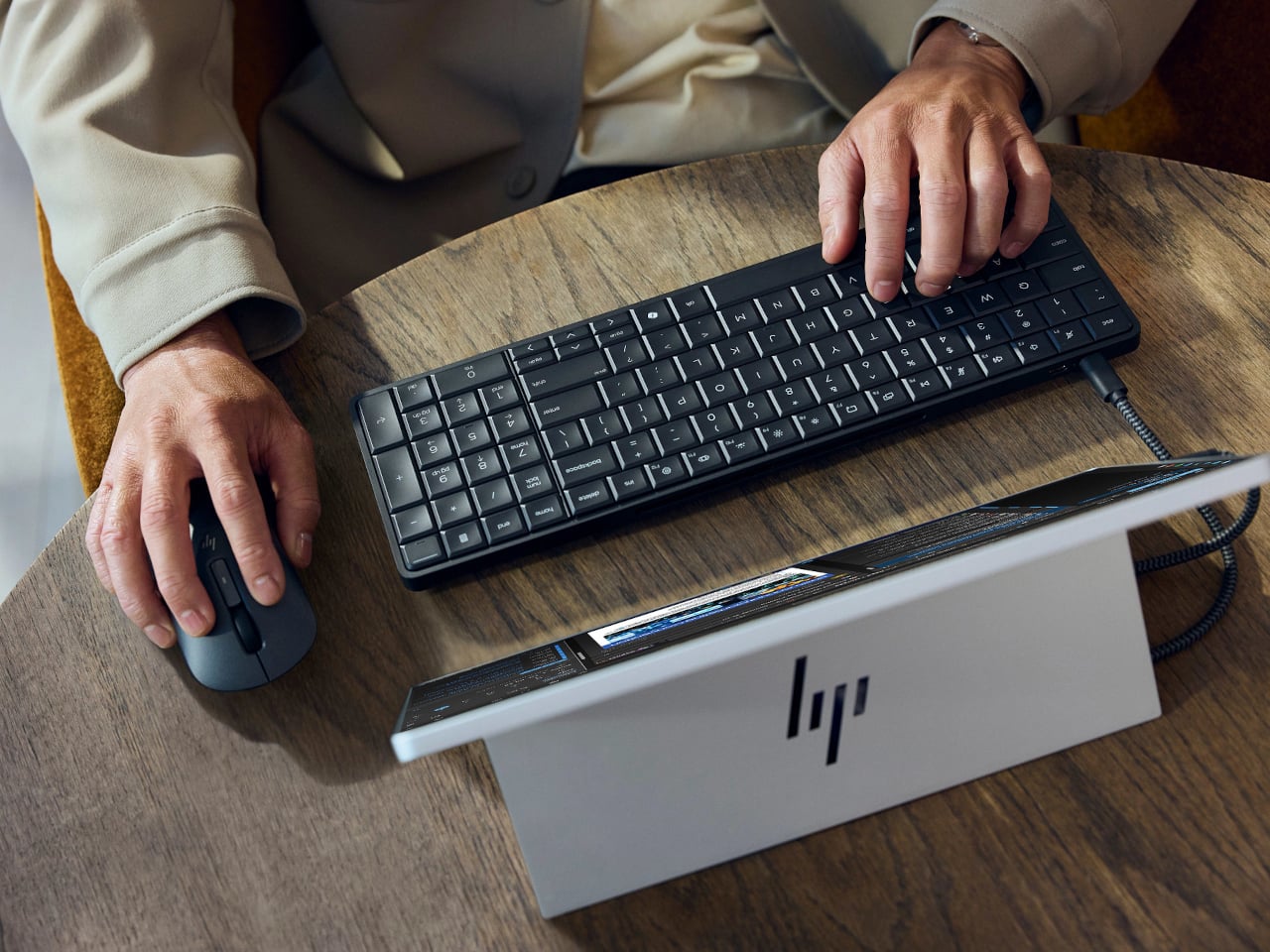
Desktop computers have become smaller, but even a little box needs somewhere to sit and cables to connect it. HP’s EliteBoard G2a removes that separate enclosure by putting the computer inside a full-size keyboard. This Windows PC keeps the surface you already type on and gives it another job, making a compact workstation easier to carry between home and office.

The gray body measures 14.1 by 4.7 by 0.7 inches and weighs about 1.49 pounds, depending on configuration. Low-profile keys, a numeric keypad, and backlighting preserve the familiar business-keyboard layout rather than shrinking everything into a travel accessory. That makes the design’s restraint rather convincing: there’s no separate machine competing for attention, although you’re still setting aside space for a full keyboard.

Designer: HP

Of course, the missing piece is a screen. Connect the G2a to a compatible USB-C monitor and you can bring your computer to a desk where the display already lives. A single cable can carry video, data, and power, provided the monitor supplies the required 65W. Otherwise, the included power adapter is still needed. A USB-C socket alone doesn’t guarantee that tidy arrangement.

The cable itself comes in attached and detachable versions, a small choice with consequences when packing up. An attached lead stays with the machine, so there’s one less item to leave behind. A detachable cable separates from the keyboard for storage or replacement. The second USB-C connection handles accessories, but USB-A devices and wired Ethernet require adapters, adding clutter to the setup.

Underneath, AMD Ryzen AI 5 PRO 435 or Ryzen AI 7 PRO 450 processors distinguish this G2a from the older G1a. Both include a 50-TOPS neural processing unit for compatible local AI software. The listed configurations pair 16GB or 32GB of RAM with a 512GB SSD. These prove the existence of a powerful computer beneath the keys, not a keyboard controlling something hidden behind your monitor.

An optional 32Wh battery gives the arrangement another advantage when you’re changing desks: the computer can stay running while disconnected. That doesn’t turn it into a laptop, since you’ll still need a display when you arrive. Integrated speakers and microphones reduce the peripherals needed for audio calls, and a prepaired wireless mouse completes the controls. Video calls still need a separate camera, of course.

Putting everything beneath the keys could make a damaged keyboard an expensive problem, which is why serviceability matters here. HP makes the top-mounted keyboard replaceable, alongside the RAM, SSD, and optional battery. Two accessible memory slots support upgrades to 64GB. You don’t have to treat the computer as disposable because its most frequently touched part wears out, although repairs still require appropriate skills.

That said, the price is harder to hide than the computer. Listed US configurations start at $3,028, while the attached-cable version with 32GB of RAM is priced at $3,846. A compatible monitor remains a separate purchase. For someone moving between equipped workspaces, carrying a keyboard instead of a desktop makes sense. Paying that much to avoid a separate box, however, is a considerably bigger decision.

The post HP EliteBoard G2a Hides a Windows PC in an Ordinary-Looking Keyboard first appeared on Yanko Design.

Razer wants Pokémon fans to choose their fighter with three new gaming headsets, and I choose Charizard

Pokémon turns 30 this year, which means those of you who remember playing Pokémon Red and Blue on a Game Boy are now old enough to have disposable income. Razer apparently understands the assignment.

Razer has announced three new Pokémon-themed gaming headsets featuring Charizard, Lucario, and Sylveon, expanding a collection that already proves Pokémon merchandise does not have to be confined to plushies, trading cards, and whatever extraordinarily expensive piece of cardboard you just lost an eBay auction for.

Technically, none of these headsets is new. Razer is giving existing models Pokémon makeovers rather than launching new hardware. Charizard and Lucario get versions of the Razer BlackShark V3 X HyperSpeed, while Sylveon adorns the wired Razer Kraken V4 X. They're being released as part of Pokémon's ongoing 30th anniversary celebrations.

That's fine by me. Sometimes I don't need a revolutionary new driver architecture. Sometimes I just want Charizard on my head.

Charizard wins the headset battle, obviously

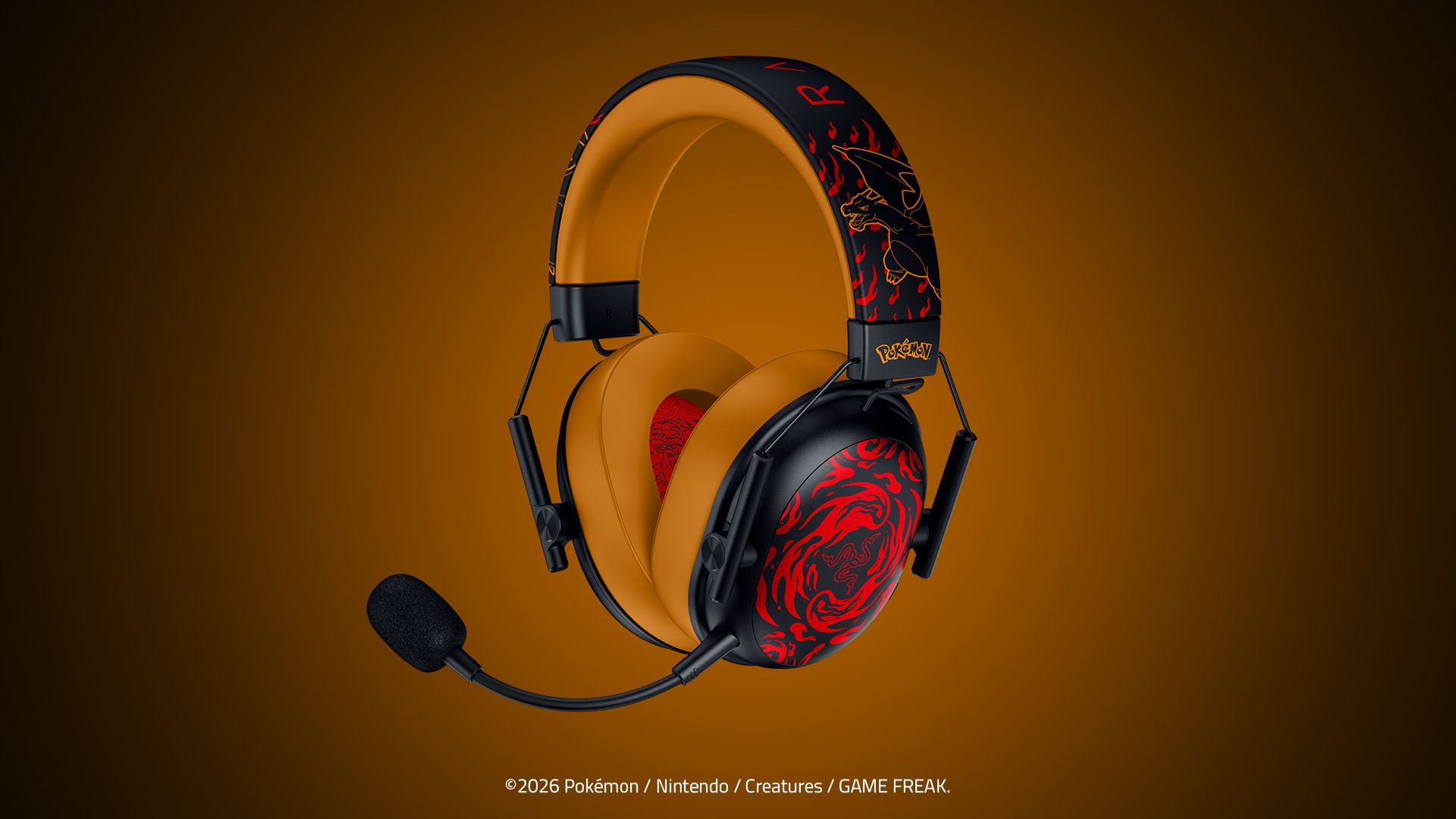
Charizard Edition: Razer BlackShark V3 X HyperSpeed Charizard Edition headset in black and orange, featuring flame graphics on the earcups, a boom mic, and Charizard headband art.

Razer BlackShark V3 X HyperSpeed Charizard Edition headset in black and orange, featuring flame graphics. (Image credit: Razer)

I've got the BlackShark V3 X HyperSpeed Charizard Edition here for photography, and Razer wisely resisted the temptation to simply make the entire thing bright orange.

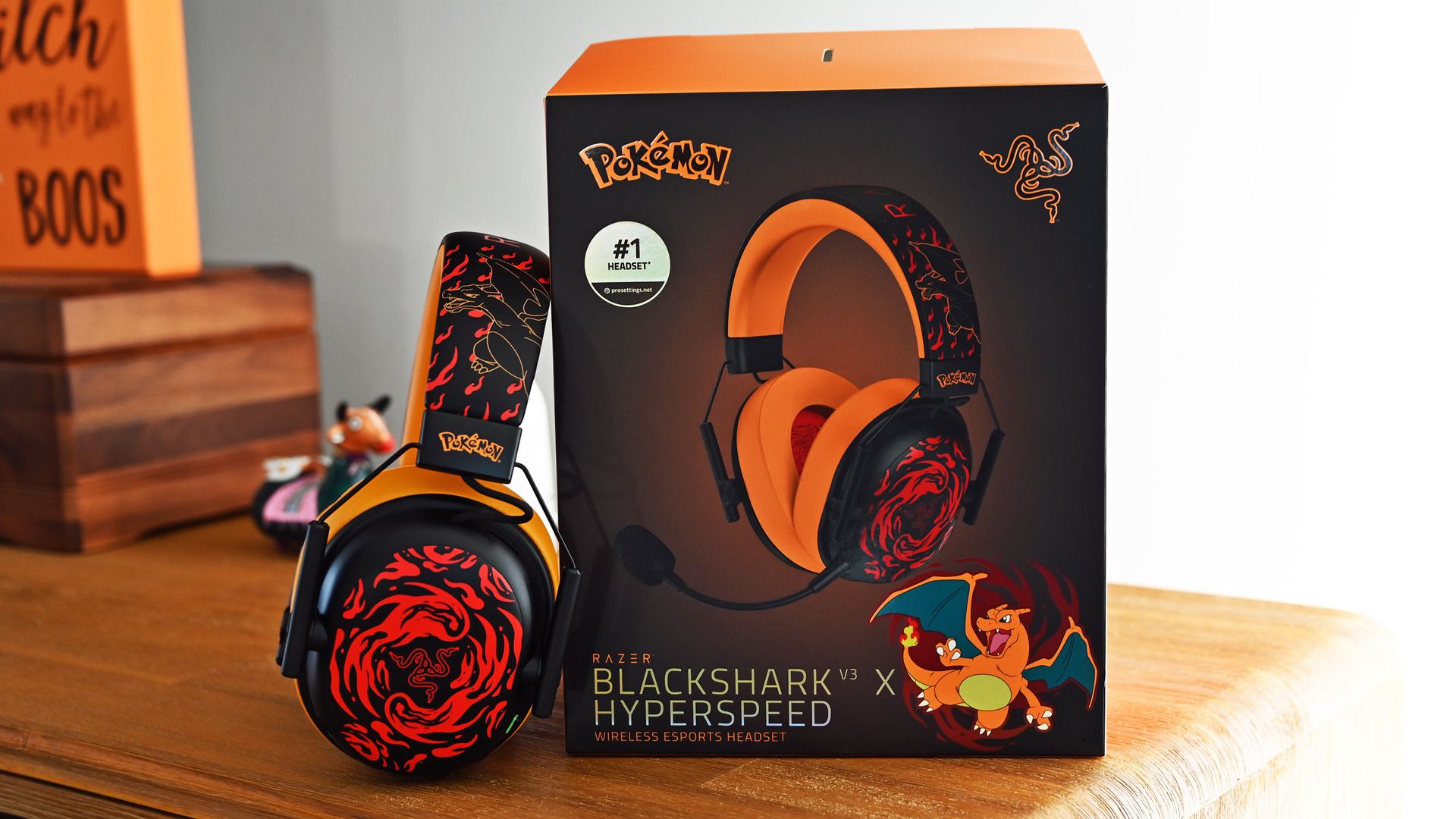
Instead, there's a black exterior with fiery red Charizard artwork across the earcups and headband, contrasting against orange ear cushions and headband padding. The result looks unmistakably Pokémon without resembling something stolen from a ten-year-old's bedroom.

It also helps that Charizard remains one of the most immediately recognizable Pokémon ever created. The original Generation I Pokémon is officially Fire/Flying type, despite decades of childhood logic insisting that the giant fire-breathing dragon surely had to be Dragon type.

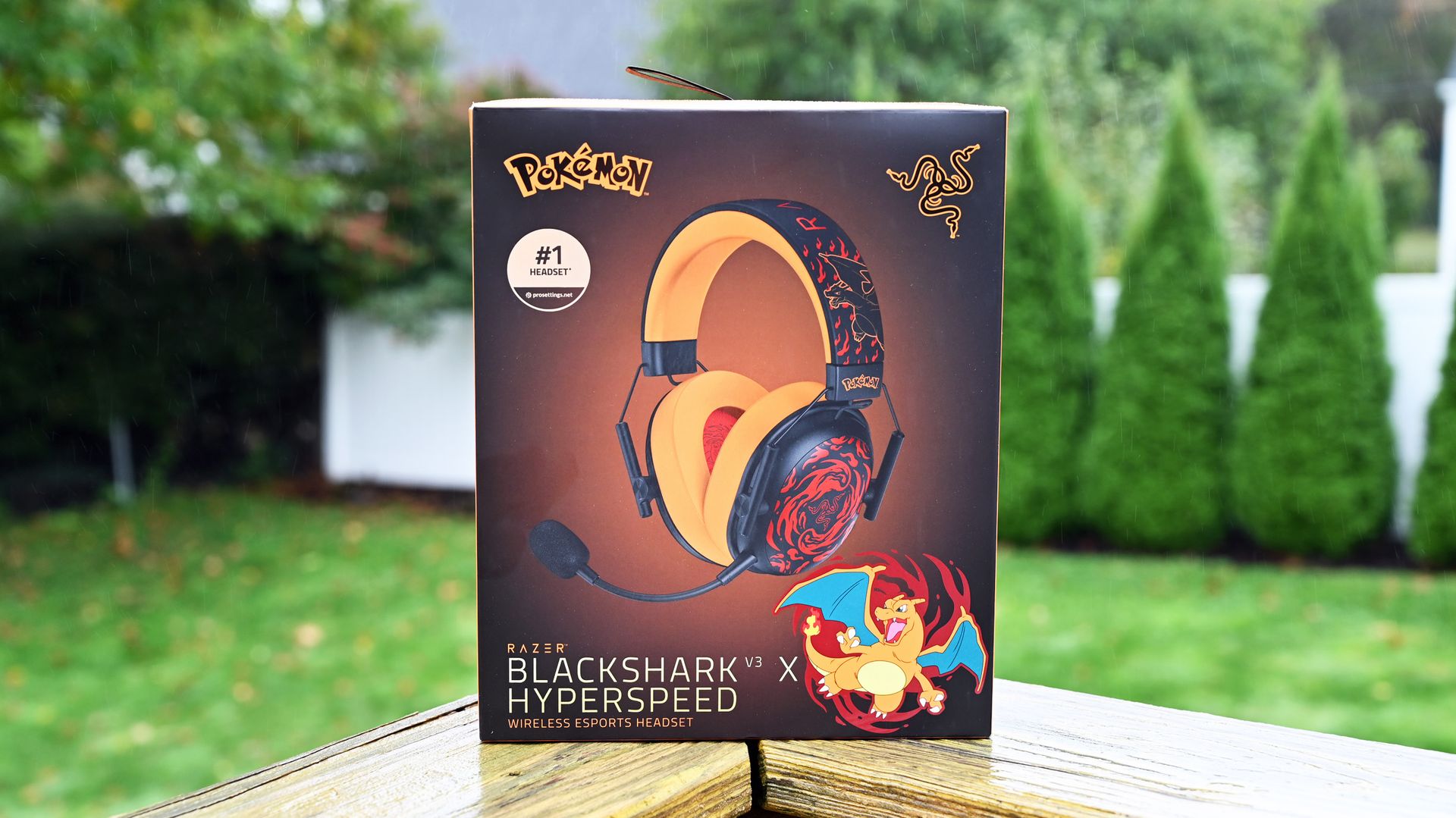
Razer BlackShark V3 X HyperSpeed Charizard Edition retail box on a wood deck with trees in the background.

Razer BlackShark V3 X HyperSpeed Charizard Edition retail box. (Image credit: Daniel Rubino)

Underneath that paint job is the regular Razer BlackShark V3 X HyperSpeed, which starts at $99.99 without the Pokémon treatment. It uses Razer's second-generation TriForce 50mm drivers and 2.4GHz HyperSpeed wireless, with Bluetooth and USB connectivity also available. Razer lists the standard model at just 270g.

The Charizard tax, therefore, works out to $20, with this edition carrying a $119.99 MSRP in the United States. (And for some reason, it's at Target for $139.99, but you can pick it up today, at least!)

If you're still reading this, I'm sure you've paid more for considerably less sensible Pokémon-related things.

Close-up of the black earcup faceplate featuring swirling red flame designs around the Razer logo, framed by a yellow cushion and metal wire slider.
Daniel Rubino
Close-up inside the yellow headset ear cushion, showing the red interior speaker fabric printed with a black line-art illustration of Charizard.
Daniel Rubino
Close-up of the Razer Charizard headset headband featuring red flame graphics, gold line art, and a black hinge piece stamped with the yellow Pokémon logo.
Daniel Rubino
Hand holding the headset earcup, showing bottom controls including a USB-C port, power button, volume dial, and mic mute button against a yellow cushion.
Daniel Rubino

It's worth emphasizing that the V3 X isn't the flagship BlackShark. That distinction belongs to the BlackShark V3 Pro, which Windows Central's Zachary Boddy reviewed last year. He called the V3 Pro "the closest to perfection I've ever seen a gaming headset reach," praising Razer for addressing seemingly every complaint about the previous generation.

Basically, the "X" versions of Razer products are more budget-friendly, as the V3 Pro is $249.99.

If Pokémon isn't enough to dictate your purchasing decision, we've also extensively tested the competition in our best Xbox headsets guide.

Product shot of the Razer Charizard headset.

Pokémon
Razer
BlackShark V3 X Hyper Speed (Charizard edition)

The Razer BlackShark V3 X Hyper Speed – Charizard Edition unleashes Charizard’s fiery determination into an officially licensed Pokémon wireless gaming headset, perfect for staying locked in and ready to roast the competition on PC, console, and mobile.

Team Lucario has entered the chat

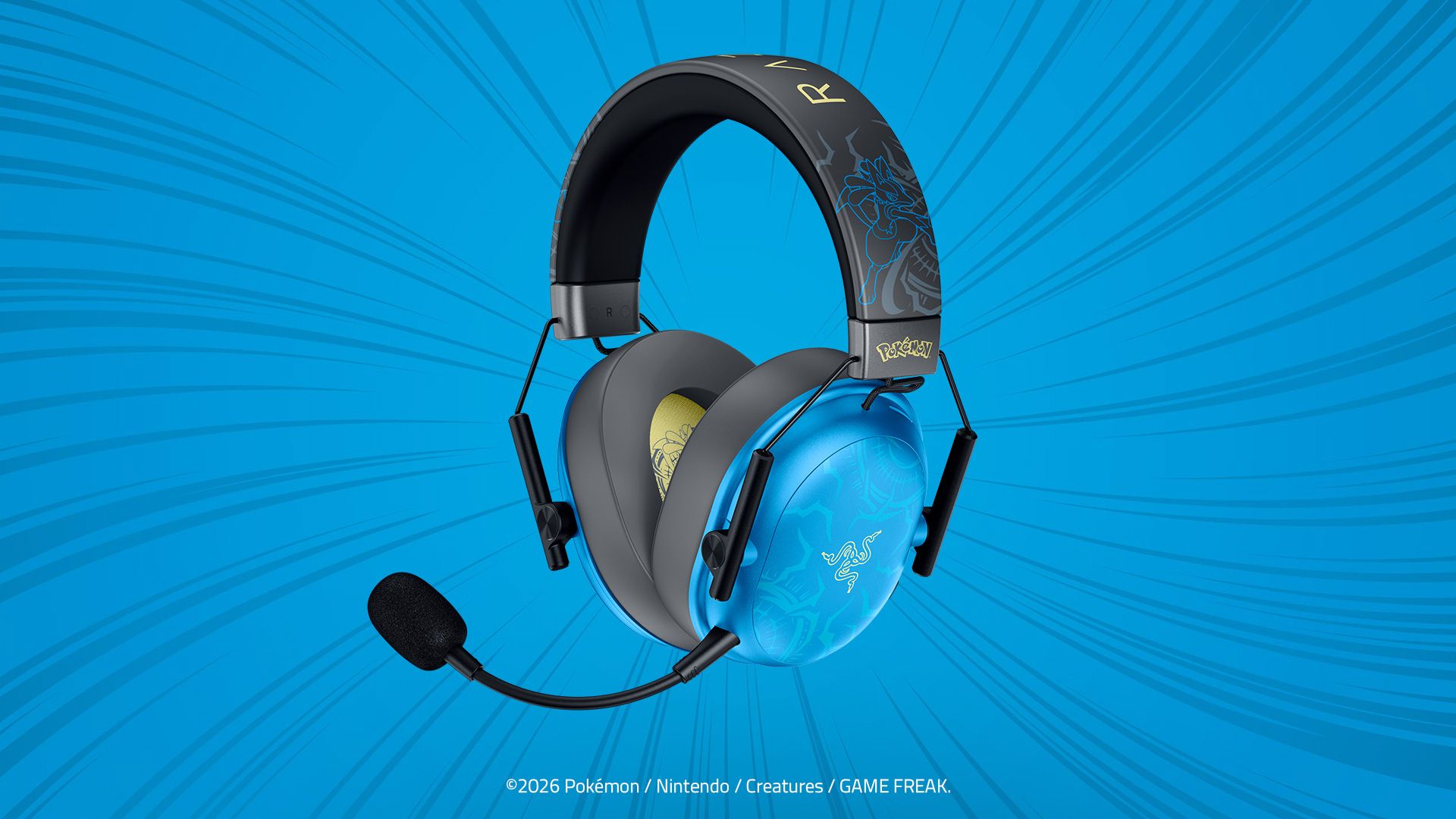
Lucario Edition: Razer BlackShark V3 X HyperSpeed Lucario Edition headset in blue and black, featuring aura designs on cyan earcups, a boom mic, and Lucario headband art.

Razer BlackShark V3 X HyperSpeed Lucario Edition headset in blue and black, featuring aura designs on cyan earcups. (Image credit: Razer)

If Charizard is a little too "look at me, I'm on fire" for your tastes, Lucario gets exactly the same BlackShark V3 X HyperSpeed treatment for $119.99.

Razer describes the design as inspired by Lucario's "calm intensity," and the blue finish certainly makes it the more restrained of the pair. The actual Pokémon is Fighting/Steel type, which makes attaching it to a competitive gaming headset feel appropriately on-brand.

Same headset, same 50mm Gen-2 drivers, same HyperSpeed wireless. Your decision essentially comes down to which monster you'd rather have watching over your K/D ratio.

Lucario gets a slight head start in the US, too. It's available exclusively from Target from October 7, while Charizard launches October 13 through Razer.com and Target. Both are also headed to broader retail in Latin America, Europe, Australia, and New Zealand.

And then there's Sylveon

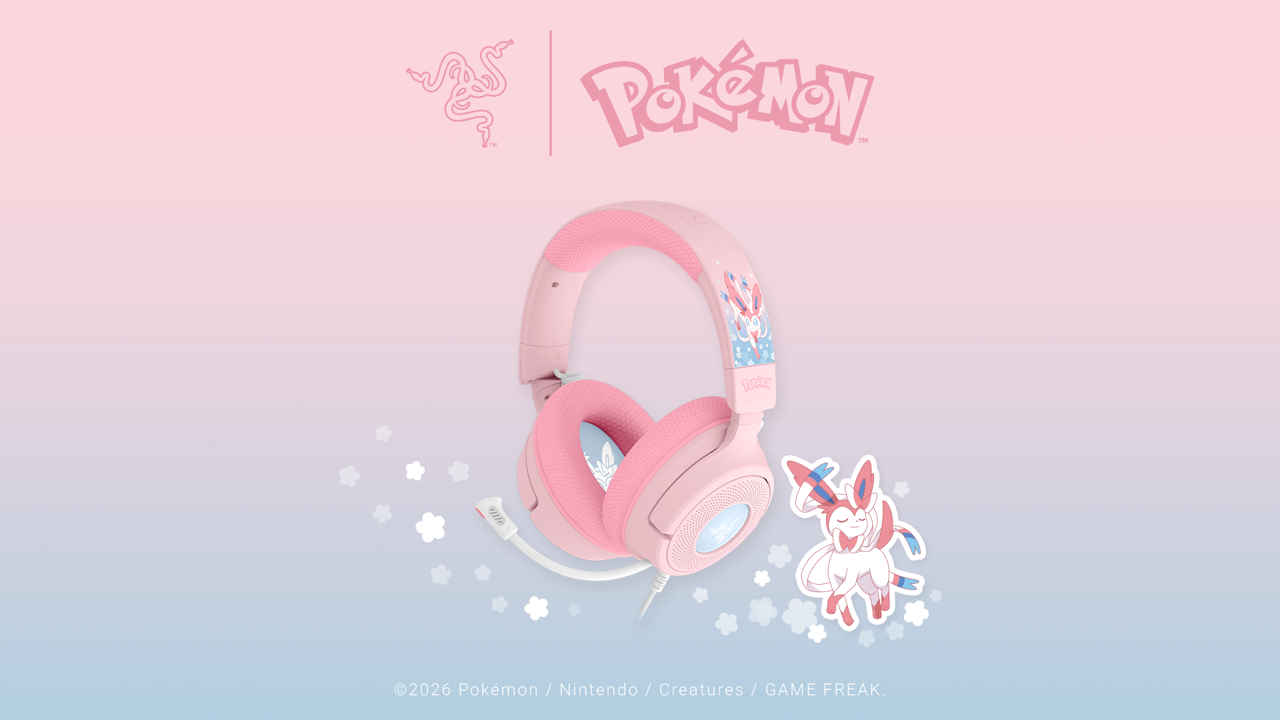
Pastel pink Razer Kraken V4 X Sylveon Edition wired headset with a white microphone, featuring Sylveon headband graphics and a Sylveon character illustration.

The new Pastel pink Razer Kraken V4 X Sylveon Edition wired headset. (Image credit: Razer)

Sylveon goes in an entirely different direction, and not just aesthetically.

The Razer Kraken V4 X Sylveon Edition is a wired headset with 40mm TriForce drivers, a retractable HyperClear cardioid microphone, and Chroma RGB lighting (sweet). It comes decked out in Sylveon's characteristic pink-and-blue color scheme.

It's wonderfully unapologetic.

Sylveon is a Fairy-type Pokémon and one of Eevee's evolutions, officially categorized as the "Intertwining Pokémon." Its ribbon-like feelers can apparently send out a soothing aura that erases hostility, which frankly sounds like technology every Call of Duty voice-chat lobby desperately needs.

The Sylveon Kraken V4 X costs $109.99 and launches October 13 exclusively through Target in the United States, with wider retail availability across Latin America, Europe, Australia, and New Zealand.

I choose you, Charizard

There's obviously no technical reason to replace a perfectly good headset purely because Razer printed a Pokémon on it. This is merchandising. Razer knows it, Pokémon knows it, I know it, and your wallet is about to find out.

But that's also rather missing the point.

The BlackShark V3 X HyperSpeed is already a lightweight wireless headset offering 2.4GHz, Bluetooth, and USB connectivity. For an extra $20, Pokémon fans can get essentially the same hardware dressed as Charizard or Lucario. Sylveon fans have a slightly cheaper, wired alternative with RGB.

And having actually seen the Charizard edition outside Razer's immaculate press renders, I'll say this: it's pretty damn cool.

Sometimes that's enough justification.

Besides, it's Pokémon's 30th anniversary. Treat yourself.

Click to join us on r/WindowsCentral

Join us on Reddit at r/WindowsCentral to share your insights and discuss our latest news, reviews, and more.

❌