

❌

Vue normale

  • ✇Yanko Design
  • DeWalt’s Tool Batteries Can Charge Laptops Without an Outlet
    A charged drill battery and a dying laptop can sit on the same table and still be useless to each other. That feels like an unnecessarily strict division of labor. DeWalt’s DCB094K USB Charging Kit addresses that disconnect by letting compatible tool batteries power USB devices through an attachable adapter. If you already have spare packs in the garage, the appeal is straightforward: stored energy becomes available to something besides the tool it normally clicks into. The better detail is tha
     

DeWalt’s Tool Batteries Can Charge Laptops Without an Outlet

26 octobre 2026 à 09:20

A charged drill battery and a dying laptop can sit on the same table and still be useless to each other. That feels like an unnecessarily strict division of labor. DeWalt’s DCB094K USB Charging Kit addresses that disconnect by letting compatible tool batteries power USB devices through an attachable adapter. If you already have spare packs in the garage, the appeal is straightforward: stored energy becomes available to something besides the tool it normally clicks into.

The better detail is that power can travel the other way, too. The kit’s DCB094 adapter has a bidirectional USB-C port, so it can recharge a DeWalt battery from a suitable USB power supply as well as draw from that battery to charge personal electronics. That solves a second annoyance: needing a dedicated tool-battery charging dock when a compatible USB supply could do the job. It’s this return trip that makes the accessory interesting to me.

Designer: DeWalt

Visually, DeWalt hasn’t tried to disguise it as a sleek desk accessory. The yellow-and-black housing sits on the battery like a smaller piece of power-tool equipment, complete with ventilation slots and a metal belt hook. In the product photograph, the attached battery still accounts for much of the assembly’s bulk. I like that lack of pretense. It looks appropriate beside drill bits and a pencil, even when the cable coming out of it leads to a laptop.

The headline specification deserves a closer look, though. DeWalt rates the USB-C connection for up to 100 watts in either direction, but the kit includes a 65-watt wall supply. You also get a 100-watt-rated USB cable and the belt hook, but no battery. In other words, the adapter’s maximum capability and the supplied wall charger’s output are different numbers. The included charger cannot deliver a 100-watt input simply because the port can accept it. That distinction matters more than the big number on the listing.

Compatibility also needs a little attention. DeWalt lists support for its 20V MAX and FLEXVOLT batteries, while the adapter provides a USB-A output rated at up to 12 watts alongside USB-C. The latter is the connection to consider for a compatible laptop, but check the computer’s charging requirements first. A USB-C socket alone doesn’t establish that a laptop accepts charging through it, and this adapter isn’t a universal substitute for every computer’s power brick.

One interface choice feels less intuitive than the overall idea. The adapter’s indicator lights report charging activity for the DeWalt battery, not the phone or laptop receiving power. DeWalt’s manual specifically notes that the LEDs won’t illuminate while charging personal devices. I’d prefer an obvious output indicator, particularly on an accessory that changes roles depending on what’s connected. As designed, you’ll need to look at the receiving device to confirm that it’s getting power.

The workbench appearance shouldn’t be mistaken for permission to leave it in the weather, either. The manual says to keep the charger out of rain and snow and provide a dry location outdoors. It also instructs owners to detach the battery when the adapter isn’t being used to avoid draining the pack in storage.

Runnings currently lists the kit at $119, which makes this a considered accessory purchase rather than an automatic addition to the cart. I’d find it easier to justify with compatible batteries already on hand. Buying a battery as well would mean paying for an entire setup when the actual need might simply be keeping a phone charged. The useful question is how often those existing packs could cover a charging need away from an outlet.

For someone who moves between DIY projects and laptop work, the two-way charging is the strongest argument. I’d rather add a useful connection to equipment I already own than collect another battery solely for occasional backup duty. The DCB094K makes that possible, provided its price and your device’s requirements line up.

The post DeWalt’s Tool Batteries Can Charge Laptops Without an Outlet first appeared on Yanko Design.
  • ✇Yanko Design
  • This AI Assistant Looks Like a Tiny Monitor but Actually Operates Your Computer
    Copying customer details from a message into a spreadsheet probably isn’t anyone’s idea of a good afternoon. Unfortunately, even a perfectly capable computer still leaves plenty of that work to you. Bvio’s Violoop is a plug-in AI operator designed to handle those repetitive steps, giving your existing computer an assistant without asking you to replace the machine you’re already comfortable using. You can tell Violoop what you need in ordinary language, such as finding customer information in a
     

This AI Assistant Looks Like a Tiny Monitor but Actually Operates Your Computer

Par : JC Torres
24 octobre 2026 à 19:30

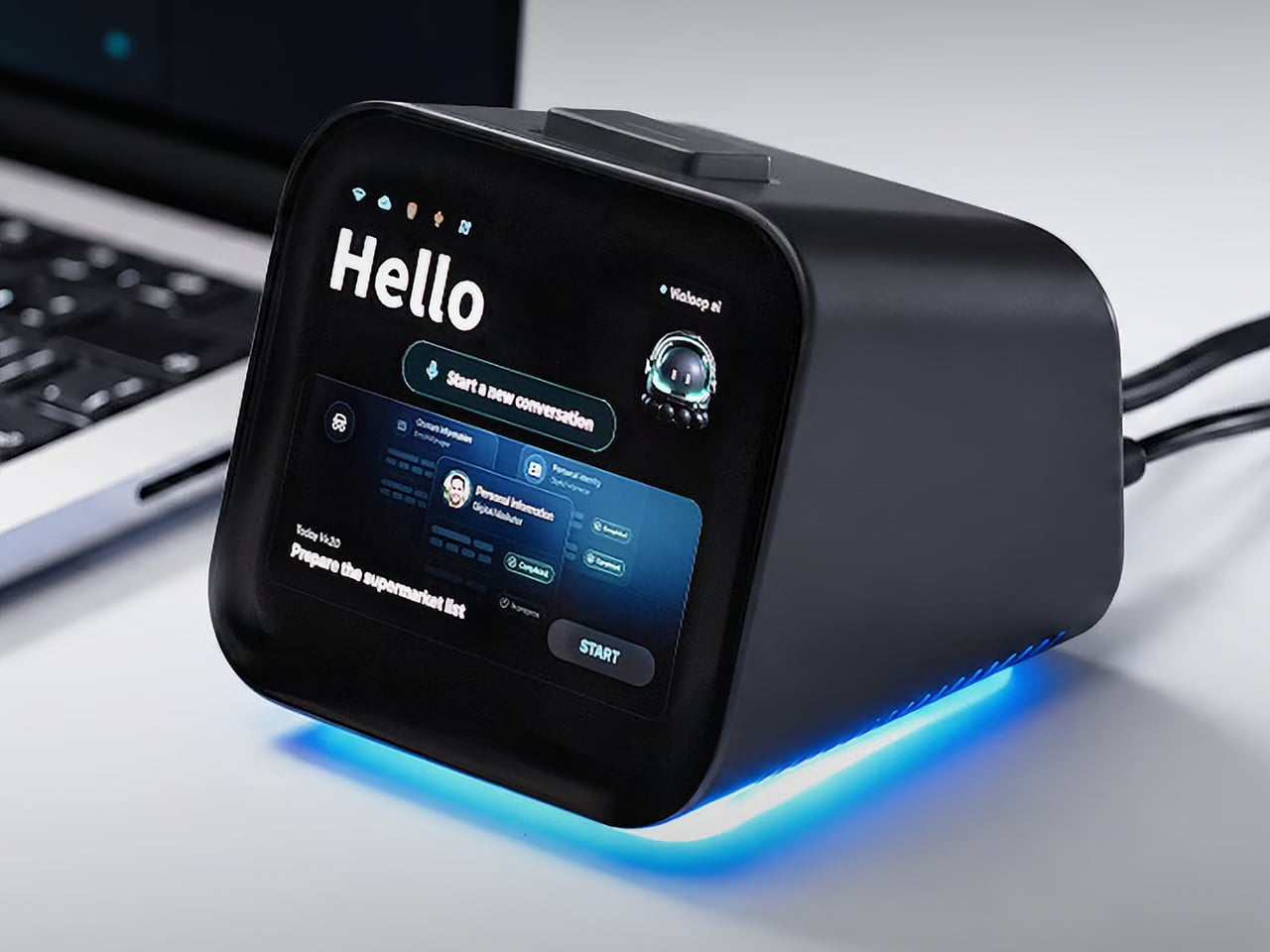
Copying customer details from a message into a spreadsheet probably isn’t anyone’s idea of a good afternoon. Unfortunately, even a perfectly capable computer still leaves plenty of that work to you. Bvio’s Violoop is a plug-in AI operator designed to handle those repetitive steps, giving your existing computer an assistant without asking you to replace the machine you’re already comfortable using.

You can tell Violoop what you need in ordinary language, such as finding customer information in a WhatsApp conversation and entering it into a customer relationship management (CRM) system. That might sound like a small convenience, until you’ve spent an afternoon repeating the same routine. The aim is to let you explain the task instead of manually carrying every detail from one window to another.

Designer: Team Violoop

Click Here to Buy Now: $399 $699 (43% off). Hurry, only a few left! Raised over $2.8 million.

To do that, Violoop interprets what’s on the screen and interacts with applications through keyboard and mouse controls. Its companion software supports Windows, macOS, and Linux, while the screen-based approach means it doesn’t need a dedicated integration for each application. You’re still working with familiar programs, only with assistance intended to bridge the gaps between them, and without the need to learn programming to give it instructions.

Of course, customer records are only part of the paperwork that follows a small business around. Invoice details need entering into spreadsheets, documents need organizing, and files rarely end up where they belong without some encouragement. Violoop is designed to help with that preparation, taking on the repetitive handling while leaving you to check the information and decide what to do with it.

Email offers another familiar example. Having something sensible to edit can be easier than staring at an empty reply box, especially when several messages need similar responses. Violoop can prepare replies as drafts for review, giving you a starting point while keeping the final wording in your hands. You can add the context that a customer relationship or a delicate conversation actually needs.

There’s also a reason this assistant takes up physical space on your desk. Its compact enclosure and angled touchscreen give ongoing tasks a place of their own, rather than burying everything in another software window. Inside, the tiny device packs a punch of up to 26 trillion operations per second (TOPS) of AI processing. That hardware is intended to support local screen understanding and other AI work on Violoop itself.

That local processing also supports a more personal approach to recurring work. Violoop keeps personal memory on the device, retaining preferences and context so you don’t have to explain the same habits every time. Local memory doesn’t mean every task stays offline, however. Depending on the selected mode, Violoop can also connect to cloud services or larger AI models when additional help is needed.

The most interesting control might be the button on top. Violoop separates AI processing from a dedicated security controller, with an approval step for sensitive actions. The physical confirmation button gives that pause a tangible form. Preparing information and committing to an action are different responsibilities, after all, and the design puts a deliberate checkpoint between what the AI proposes and what happens next.

You don’t have to stay beside it to keep an eye on progress, either. Phone access lets you check tasks, send further instructions, and approve sensitive actions while you’re away from the desk, provided the computer remains on and connected. That’s useful when you need to step out but still want to see how things are going, without returning to the keyboard for every update.

An organized spreadsheet won’t decide which project you should take on next, and a drafted reply doesn’t know everything about the person receiving it. Those parts still belong to you. Violoop’s role is to help get the surrounding work ready, using a device that keeps progress visible and approval close at hand. That leaves the final email waiting for something decidedly familiar: your own words.

Click Here to Buy Now: $399 $699 (43% off). Hurry, only a few left! Raised over $2.8 million.

The post This AI Assistant Looks Like a Tiny Monitor but Actually Operates Your Computer first appeared on Yanko Design.

❌