
❌

Vue normale

  • ✇Yanko Design
  • This DIY PlayStation 2 Handheld Gives a Foldable Phone Screen a New Job
    The PlayStation 2 was never something you could casually slip into a bag, unless you planned to bring a screen and controller along for the ride. The PlayStation 2 DUO brings those pieces together in an unofficial DIY handheld with an unusual trick. Its screen actually bends in the middle, letting you fold the console when it’s time to put the game away. There’s plenty of familiar territory around that unfamiliar fold. A purple shell surrounds the display, with a D-pad and the four recognizable
     

This DIY PlayStation 2 Handheld Gives a Foldable Phone Screen a New Job

Par : JC Torres
28 octobre 2026 à 12:20

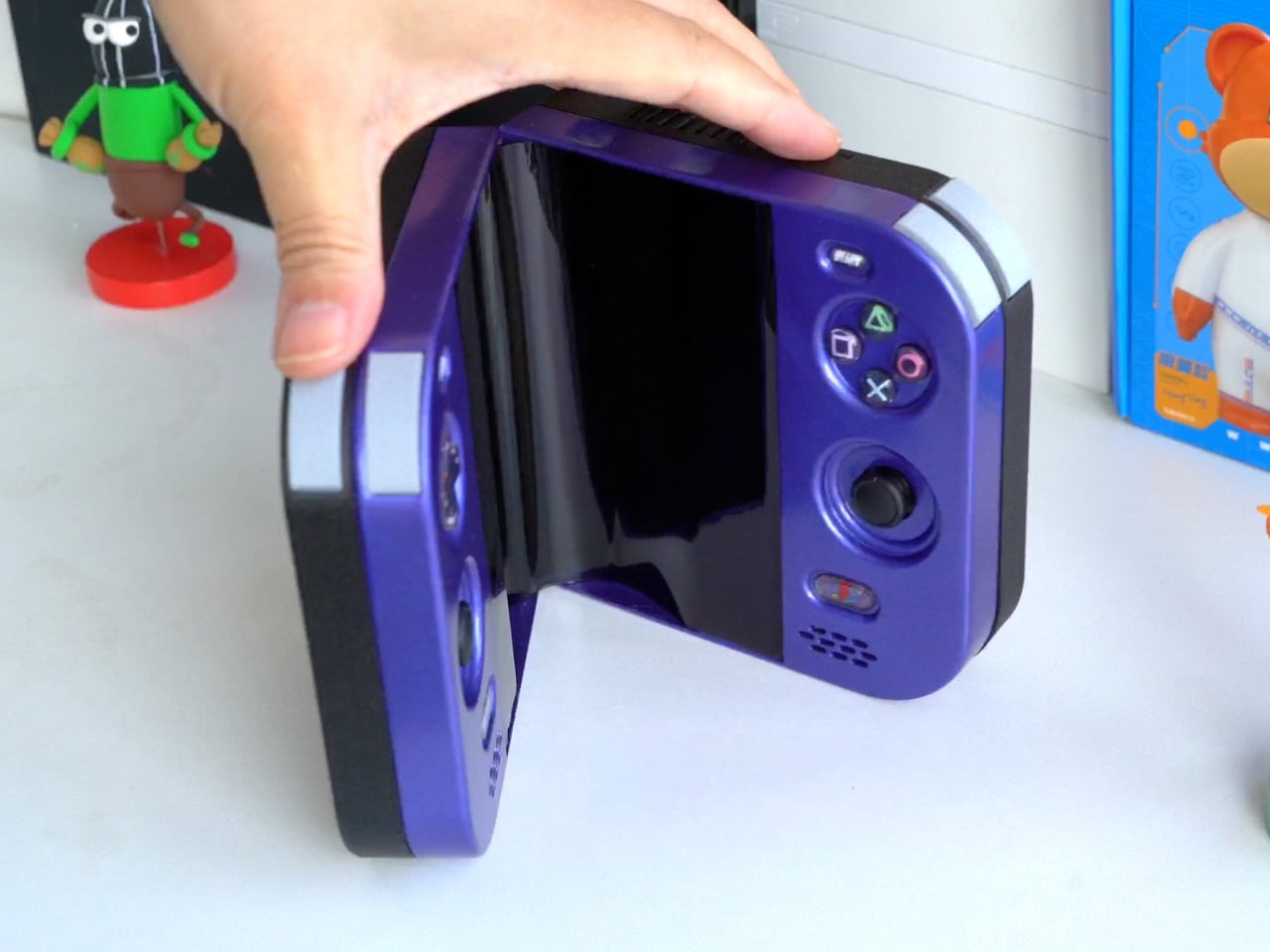
The PlayStation 2 was never something you could casually slip into a bag, unless you planned to bring a screen and controller along for the ride. The PlayStation 2 DUO brings those pieces together in an unofficial DIY handheld with an unusual trick. Its screen actually bends in the middle, letting you fold the console when it’s time to put the game away.

There’s plenty of familiar territory around that unfamiliar fold. A purple shell surrounds the display, with a D-pad and the four recognizable PlayStation symbols sitting above two analog sticks. Start and Select occupy the upper corners, while speaker grilles sit below the controls. The arrangement looks reassuringly conventional, which is probably helpful when the screen between your hands is doing something rather unconventional.

Designer: LCLDIY

That screen is a single flexible panel, rather than two separate displays interrupted by a hinge. The project’s earlier development notes describe a 7.8-inch screen salvaged from a foldable phone. It gives the DUO a generous central canvas when opened, without committing the handheld to that same width inside a bag. Of course, making a screen bend doesn’t make its limitations magically disappear.

The panel needs room to curve, and forcing it into a sharp fold would damage it. That requirement shaped the casing and its hinge, leaving a broad bend instead of squeezing the halves completely flat together. It’s a less tidy package than a closed clamshell might suggest, but the extra space has a practical purpose: keeping that delicate display in one piece.

There’s genuine PlayStation 2 hardware inside as well, rather than a newer computer pretending to be Sony’s console. Getting it to fit required cutting down the original motherboard and rearranging its supporting electronics. A 3D-printed enclosure brings everything together, turning equipment once tethered to a television into something you can hold between both hands. The nostalgia extends beyond the buttons, in other words.

The folding body makes the electronics more complicated, of course. Separate control boards occupy the two sides, with a ribbon cable linking them across the center. The trimmed motherboard also carries a small cooling fan and heatsink. There’s quite a bit happening underneath that playful exterior, particularly for a device whose moving parts include the surface you’re supposed to be staring at.

Folding it up reduces the footprint, but doesn’t automatically make this a pocket console. The published project information doesn’t establish its weight, closed dimensions, or battery runtime, so there’s little reason to start planning an entire flight around it. More importantly, this is a completed hobby build, not an upcoming Sony handheld with a price tag and a place on store shelves.

Enclosure printing files and a PCB archive are available on the project page, although they don’t amount to a complete assembly guide. Recreating the DUO still involves board modification and careful work around a flexible display. That might temper the urge to make one immediately, especially if your experience with PlayStation hardware mostly involves inserting discs rather than cutting up circuit boards.

The post This DIY PlayStation 2 Handheld Gives a Foldable Phone Screen a New Job first appeared on Yanko Design.
  • ✇Yanko Design
  • Logitech’s MX Master 4 Developer Edition Is a Mouse Full of Coding Easter Eggs
    Productivity mice aren’t usually the most expressive things on a desk. Their unusual curves and extra buttons often say more about work than the person doing it. Logitech’s MX Master 4 Developer Edition takes a slightly different approach, covering its familiar shape in programming references. The limited-edition mouse keeps the standard model’s features, but gives developers something a little more personal to reach for. Rather than stick to a single muted color, the mouse pairs light gray but
     

Logitech’s MX Master 4 Developer Edition Is a Mouse Full of Coding Easter Eggs

Par : JC Torres
28 octobre 2026 à 04:15

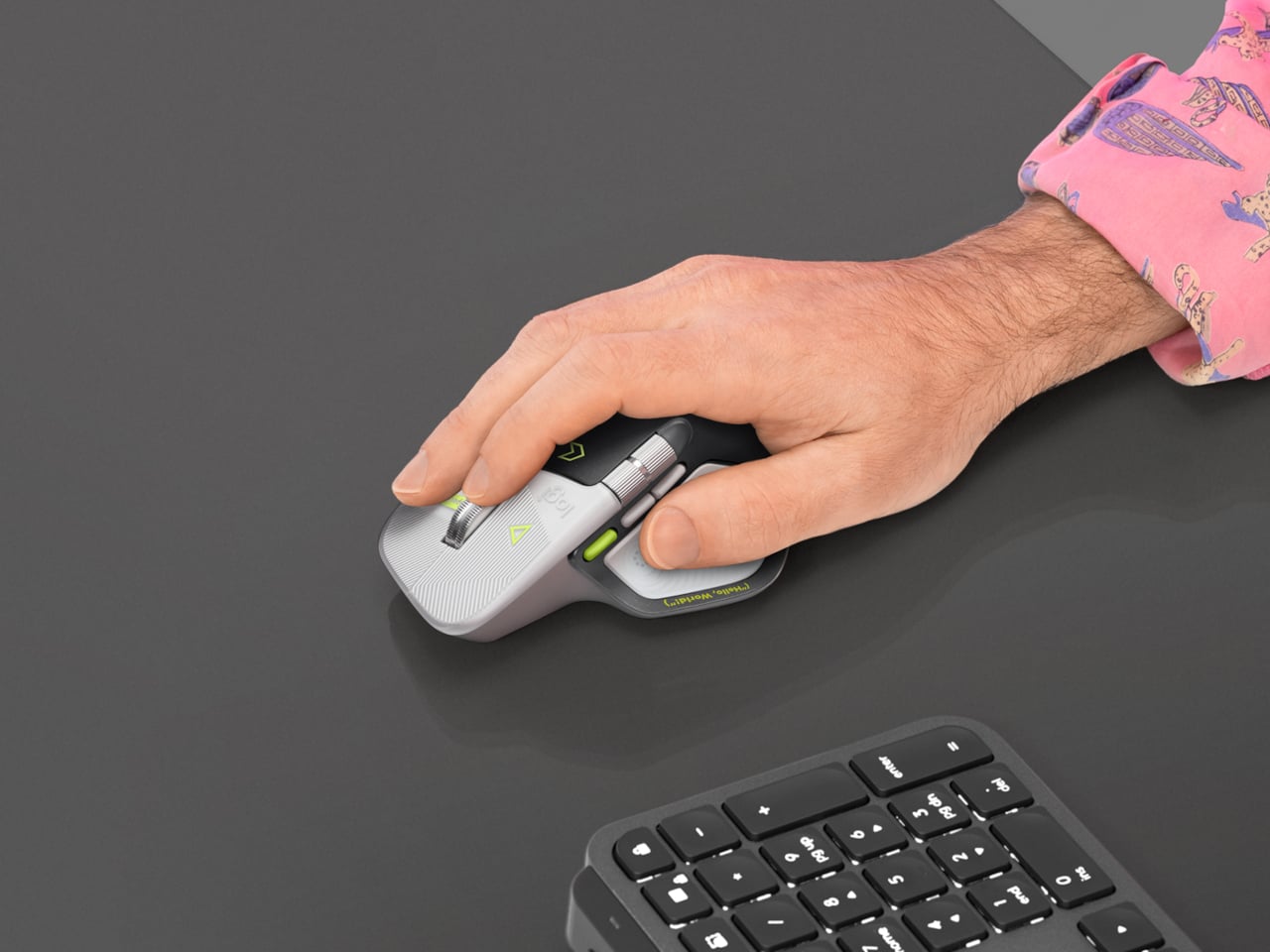
Productivity mice aren’t usually the most expressive things on a desk. Their unusual curves and extra buttons often say more about work than the person doing it. Logitech’s MX Master 4 Developer Edition takes a slightly different approach, covering its familiar shape in programming references. The limited-edition mouse keeps the standard model’s features, but gives developers something a little more personal to reach for.

Rather than stick to a single muted color, the mouse pairs light gray buttons with a dark palm rest and bright yellow-green accents. Fine circuit-like lines spread across the front, while coding symbols sit beside the controls. It’s a busier treatment than the regular version, of course, but the graphics follow the mouse’s existing divisions instead of covering everything in one continuous pattern.

Designer: Logitech

Some references are easier to recognize than others. A Hello, World greeting runs along the thumb rest, while smaller markings include 0xFF + 1 and 09.17. Logitech links those last two to Programmers’ Day and the Linux kernel’s release date. You don’t have to understand them to use the mouse, thankfully, although knowing the references does make its decoration feel rather less random.

Underneath that artwork, the familiar sculpted body remains, including a raised back and a broad platform for your right thumb. That thumb gets quite a few responsibilities, with a horizontal scroll wheel, side buttons, and the Haptic Sense Panel within reach. The asymmetric shape hasn’t become ambidextrous for this edition, so left-handed programmers are still left admiring the graphics from the wrong side.

The MagSpeed wheel handles the more familiar business of moving through long documents and code. It switches between stepped scrolling and free-spinning movement, letting you work line by line or move farther through a page. The thumb wheel provides horizontal navigation, which is useful when the thing you’re working on refuses to fit neatly inside a window, as spreadsheets have a habit of doing.

The ripples on the thumb panel hint at another kind of feedback. Rather than relying entirely on what happens onscreen, the mouse can deliver vibrations for supported actions and notifications. Logitech lets users adjust their intensity and customize app-specific feedback through Logi Options+. That doesn’t mean every application suddenly gains a sense of touch, but compatible interactions can have a physical cue.

Pressing the panel also opens Actions Ring, an onscreen collection of shortcuts arranged around the cursor. You can assign tools and macros through Options+, putting frequently used commands near where you’re already working. There is a small irony here, however. Despite the Linux reference on the shell, Logitech doesn’t provide a Linux version of Options+ for configuring that particular shortcut system.

The Developer Edition is listed for US preorder at $119.99, with shipping scheduled to start October 31, 2026. Since its functions match the standard MX Master 4, the choice comes down to how much personality you’d like under your hand. Existing owners won’t find new capabilities here, though the temptation to coordinate a keyboard, desk mat, and everything else remains.

The post Logitech’s MX Master 4 Developer Edition Is a Mouse Full of Coding Easter Eggs first appeared on Yanko Design.

❌