Vue normale

Il y a de nouveaux articles disponibles, cliquez pour rafraîchir la page.
À partir d’avant-hierFlux principal

Apple's leaked AirPods Ultra already have competition — Razer's Motoko is a PC gaming headset with built-in cameras, and it's no longer just a concept

The next evolution of Apple's AirPods is out in the wild after a leaked video was posted online. Known as AirPods Ultra, the new wireless earbuds look basically the same as regular AirPods, albeit with a thicker stem.

Hiding inside the new AirPods Ultra are discrete cameras that enable something called "Visual Intelligence." According to Tom's Guide, these cameras aren't intended to record live video or snap photos, setting AirPods Ultra apart from the likes of Meta's AI Glasses, which are raising some very serious privacy concerns.

What I wasn't expecting next was an announcement from Razer's Min-Liang Tan explaining that the company's Project Motoko, unveiled as a concept at CES 2026, is actually a real product that's "coming soon."

At CES we unveiled Project Motoko: an AI native headset with dual cameras in the earcups. It sees what you see, hears what you hear. No display needed.Started as a concept. Not staying one. Coming soon.What's the first killer use case for wearable AI? pic.twitter.com/MCmrcnUdZMAugust 19, 2026

Razer's tackling of this idea involves a full wireless gaming headset with cameras built into the earcups. They're certainly not as hidden as the cameras on Apple's leaked implementation, but I don't think they're aimed at the same end goal.

In the leaked Apple video, a person picks up a book and looks at the cover. Siri (or some other assistant) then says that "your world becomes savable" — all you have to do is whisper into your own ear that you'd like to save what you're looking at.

The new AirPods Ultra are expected to show up at Apple's next special event in September, but already there is a lot of backlash regarding privacy. Glasses (or really any tech) that record everything around you are already being banned due to privacy concerns, and I hope that Apple indeed uses some method that captures info without saving actual photos.

Razer's Project Motoko is not like the rest

Razer is taking a different approach to a video-infused audio device. Rather than hiding the cameras in tiny earbuds, it's slapping them onto what appears to be a rather high-end wireless gaming headset.

Each earcup has an FPV camera designed to sit at eye level, allowing it to better quantify what you're actually looking at. Razer says its cameras offer a wider field of view than is humanly possible, and that they can pick up "symbols, text, and details."

Motoko can use a bunch of different AI models (Grok, OpenAI, and Gemini are mentioned), and Razer says it can be a "powerful data collection tool" to train language models. The headset runs on a Snapdragon chip.

A demo video on the Razer website explains that Motoko "hears, interprets, and answers in the moment." The accompanying video certainly seems to show that the headset's cameras are recording the entire time, much like AI glasses.

Razer pegs it as a "personal full-time AI assistant" that "stays keyed into your schedule, preferences, and habits, while adapting effortlessly to anything else you might ask." I'm reminded immediately of Lenovo's Qira AI assistant.

Privacy concerns aside, who's going to wear a gaming headset all day?

A close-up of a hand gripping a black hexagonal dumbbell against a grassy background and a dark yoga mat.

Who the hell wears a gaming headset while they work out? (Image credit: Razer)

Razer makes a lot of concept devices, and not all of them make it into the hands of consumers. The fact that Razer is going ahead with Motoko hot on the heels of the AirPods Ultra leak means the company must truly believe there's something there worth pursuing.

But my first thought was, "Who wants to wear a gaming headset all day?" Never mind the privacy concerns; gaming headsets are great for a few hours at a time, and usually best if you're not active.

Razer's vision for Motoko seems to go against that. A small FAQ section on the official website explains the potential everyday uses for Motoko:

The possibilities are endless. Whether you’re cooking and need step-by-step guidance, traveling and want real-time translations, working and managing tasks hands-free, repairing something with instant audio instructions, or gaming with immersive AI-driven guidance—Motoko adapts to every scenario. Its AI-powered vision and audio awareness make it more than a headset; it’s your always-on companion for smarter living, wherever life takes you.

Razer

Is everyone suddenly going to be wearing a bulky gaming headset everywhere they go? Not likely, especially during any tasks that require a bit of sweat. When Motoko actually launches, it had better be the most comfortable headset ever made if Razer wants it to be successful.

Windows Central's take on Razer Motoko

A top-down view of a person slicing cherry tomatoes on a wooden cutting board, surrounded by bowls of pine nuts, garlic cloves, crumbled cheese, and basil leaves.

A screengrab from the Motoko video showing a livestream running from the gaming headset. (Image credit: Razer)

Razer's Motoko headset probably has the best chance of succeeding amongst PC gamers. It is, after all, a gaming headset. But, speaking from a bit of experience, I can say that a lot of PC gamers couldn't care less about letting AI help with video games. Whether or not Motoko's appeal actually goes mainstream remains to be seen.

I want to know if you'd buy something like Razer's Motoko when it launches. Would you use it for gaming? For something else? Are you concerned about eroding privacy due to the prevalence of these video capture devices? Let me know in the comments section below!

Click to join us on r/WindowsCentral

Join us on Reddit at r/WindowsCentral to share your insights and discuss our latest news, reviews, and more.
A person holds a pair of black Razer Project Motoko wireless headphones, showcasing their design, with a green box visible in the background on a wooden surface.

A person holds a pair of black Razer Project Motoko wireless headphones, showcasing their design, with a green box visible in the background on a wooden surface.

You can dodge rising prices with a discount on one of Razer's best gaming keyboards — and it totally helps with your studies, too

Razer's gaming keyboards rank among the best on the market, whether you're looking to crush the competition in games or type up school reports. However, if you've ever shopped around, you've probably noticed how many are on the higher end of the affordability scale.

Crush the new semester with Razer keyboards

Fortunately, one of Razer's top-rated wired gaming keyboards, the Huntsman V3 Pro 60%, has managed to evade lofty pricing for a limited time, thanks to a 28% discount bringing it to $129.99 at Best Buy, giving you a chance to get a leg up on multiplayer and get a head start on your studies for less.


"Your hands are certainly going to fall in love with the textured keycaps, robust switch feel, and fantastic analog features." — Tabitha Baker, Managing Editor (Hardware) at our sister site, GamesRadar+

GamesRadar+ review: ⭐⭐⭐⭐½View Deal

What buy the Razer Huntsman V3 Pro Mini 60%?

A compact white mechanical keyboard with glowing green backlighting sits on a light brown wooden desk, viewed from directly above in a top-down shot.

A top view of the Razer Huntsman V3 Pro 60% keyboard. (Image credit: GamesRadar (Tabitha Baker) | Razer)

For starters, this keyboard features Razer's Analog Optical Gen-2 switches, which grant it extremely precise and responsive input detection speeds, which can be enhanced further with a Rapid Trigger mode and adjustable actuation that ranges between 0.1 mm and 4.0 mm.

The Huntsman V3 Pro 60% also features textured double-shot PBT keycaps with a keystroke lifespan of 100-million clicks to help it endure many years of intense button mashing.

Other notable features include a sleek and compact 60% form factor that makes it very portable-friendly while saving tons of vital desk space, buttons that double as arrow keys, and a Razer Snap Tap feature, which prioritizes the latest input between two selected keys without letting go of the previous one for near-instant directional movements in action games.

The only noticeable drawbacks of this keyboard are the somewhat noisy switches with no sound dampening (as noted in GamesRadar's review), the lack of wireless connectivity, and its usually steep listing price of $179.99.

So, it's a blessing to see its high price taken down to somewhat more affordable levels thanks to Best Buy's 28% discount, especially during this general RAM crisis where almost everything else in tech has become so insanely expensive.

If you're looking for a high-quality wired gaming keyboard that doubles as a high-speed workhorse keyboard for helping you ace exams or assignments, you can't go wrong with the Razer Huntsman V3 Pro 60%.

Frequently Asked Questions

Is it wireless?

No, this keyboard connects to devices purely through wired connections via a detachable USB-C to USB-A cable.

Is compatible with consoles?

While it can connect other devices via USB connections, the Razer Huntsman V3 Pro Mini 60% keyboard's configuration software is only operable on Windows PCs.

What is it a 60% keyboard?

60% keyboards are 60 percent the size of a standard, full-sized keyboard that removes the numpad, top row function keys (F1-F12), arrow keys (although the Razer Huntsman V3 Pro 60% keys that double as arrow keys), and the navigation cluster, leaving only the main typing key area intact to save desk space and make it more portable-friendly.

Click to join us on r/WindowsCentral

Join us on Reddit at r/WindowsCentral to share your insights and discuss our latest news, reviews, and more.
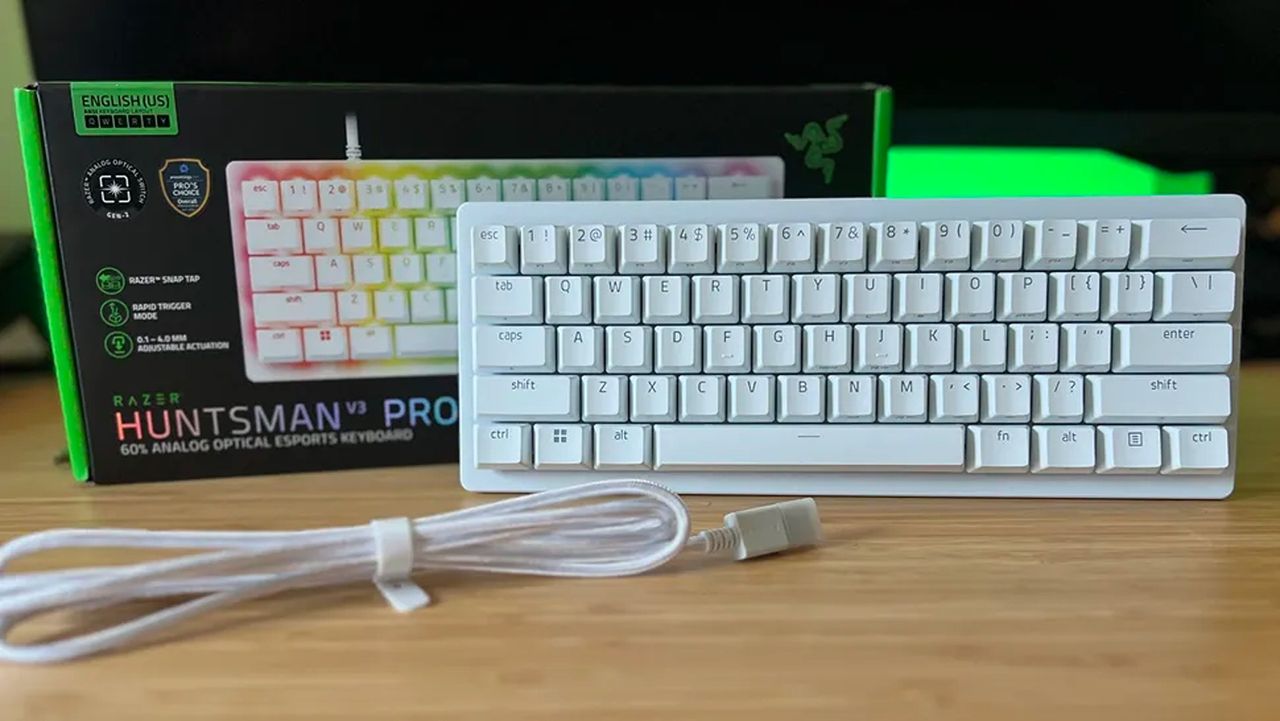
A white Razer Huntsman V3 Pro 60% analog optical esports keyboard sits in front of its black product box on a wooden desk with a coiled white cable.

The Razer Huntsman V3 Pro 60% keyboard with its box and detachable USB cable

I never thought I'd call a Razer gaming keyboard a bargain, but the wired Huntsman V3 Pro is a steal right now

Razer's gaming keyboards have consistently ranked as some of the best you could buy, and, of course, they double up as generally excellent options for work and studies. Because let's be honest, if a keyboard doesn't feel good for actual typing, then is it even doing its job?

Crush the new semester with Razer keyboards

We already praised the Huntsman V3 Pro as "the world's most advanced gaming keyboard", and for now, the downside of its high price has been solved as the tenkeyless (TKL) model drops to $124.99 at Best Buy. Compared to its original MSRP of $219.99, it's instantly a much more tempting pick.

That $95 price drop stands alongside a discount on the full-size variant that we tested, bringing that to $180.74 with a much more specific $69.25 discount. Either way, you'll gain access to Snap Tap, Razer's solution for perfect counter-strafing in FPS games that prioritizes the most recently pressed button.

Personally, I prefer to ditch the numberpad for more desk space, so the TKL is perfect for me. It's also enjoying a bigger discount right now, making it even better value.View Deal

No compromises for larger desks; this gives you everything.
"The Huntsman V3 Pro is one of the best keyboards I've ever used." — Zachary Boddy, Former Staff Writer
Windows Central review: ⭐⭐⭐⭐View Deal

What makes the Huntsman V3 Pro so good?

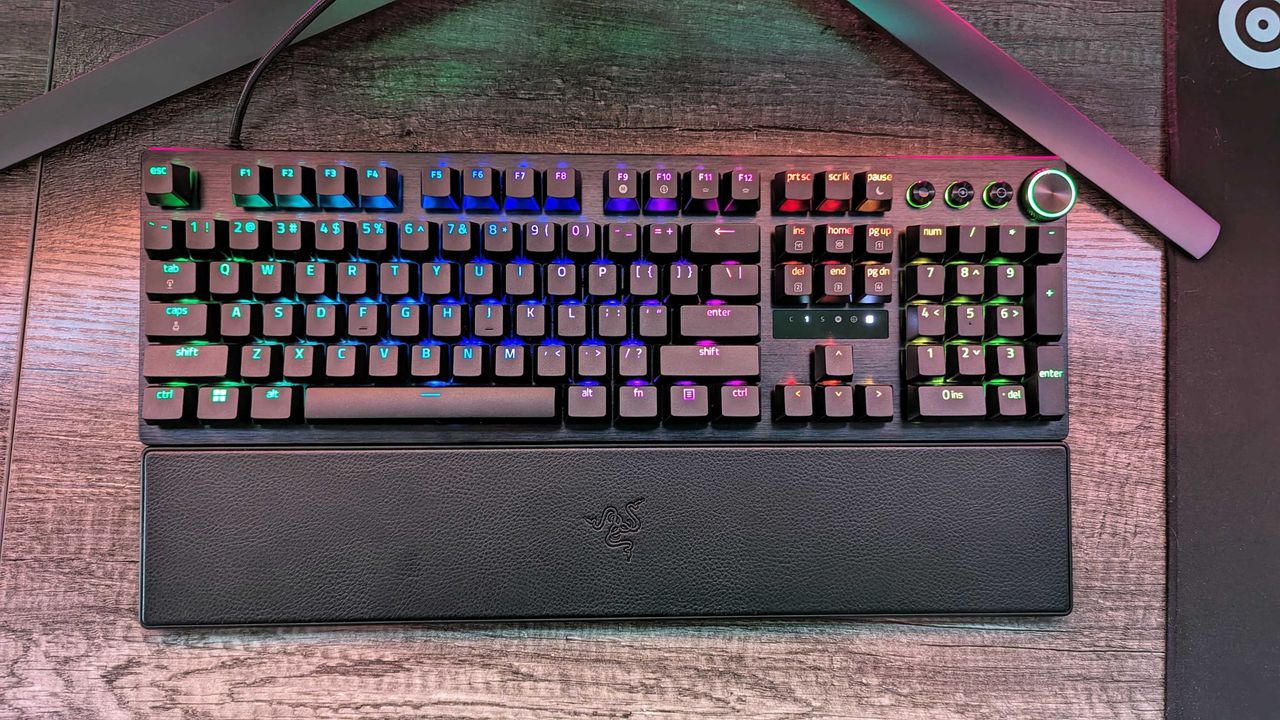
Image of the Razer Huntsman V3 Pro gaming keyboard.

Razer throws in a wrist rest alongside its wealth of extra keys. (Image credit: Windows Central | Zachary Boddy)

Adjustable actuation is one of those phrases that crops up around keyboards, and it's a feature that shines when you have the time to dig into it. Essentially, you can change the depth at which the optical switches underneath the keys detect a valid press, usually opting for shallow pushes during gaming and more deliberate, deeper pushes for typing.

If you're into tweaking and personalization, you'll get a lot out of it by fine-tuning the actuation and saving it to one of the on-board memory profile slots. That, paired with its brushed aluminum chassis and double-shot PBT textured keys for more durable lettering, makes for a comfortable typing experience.

On the flip side, we noted in our (full-size) Razer Huntsman V3 Pro review that the leatherette wrist rest isn't perfect, but it is magnetic, so if you'd rather use it only for typing and remove it for a night of gaming, it's easy to detach. I'd recommend giving it a fair try, as it's generally better to use something to support your wrists than nothing at all, but your mileage may vary.

Overall, this discount makes the Huntsman V3 Pro, whether TKL or full-size, an absolute bargain. Even if you don't make use of all the extra dials at first, diving into customization would help you assign them to your most-used features soon after. It's a quality wired keyboard that works just as hard for daily typing, so you could probably argue it's a back-to-school expense if you tried.

Frequently Asked Questions

Is the Huntsman V3 Pro wired or wireless?

This is a wired gaming keyboard with a braided USB Type-C to USB Type-A cable. It can be detached and replaced with a longer variant, but the keyboard will not operate wirelessly.

What's the difference between full-size and TKL?

A full-size keyboard includes a number pad and is what you might think of as a "standard" model. TKL stands for tenkeyless, and it drops the numeric keypad to save space while retaining the arrow keys and the home/end keys.

Is this a mechanical keyboard?

The Huntsman V3 Pro does not use mechanical switches; instead, it features optical key switches that operate like magnetic Hall-Effect sensors found in popular joypads to support its adjustable actuation.

Click to join us on r/WindowsCentral

Join us on Reddit at r/WindowsCentral to share your insights and discuss our latest news, reviews, and more.
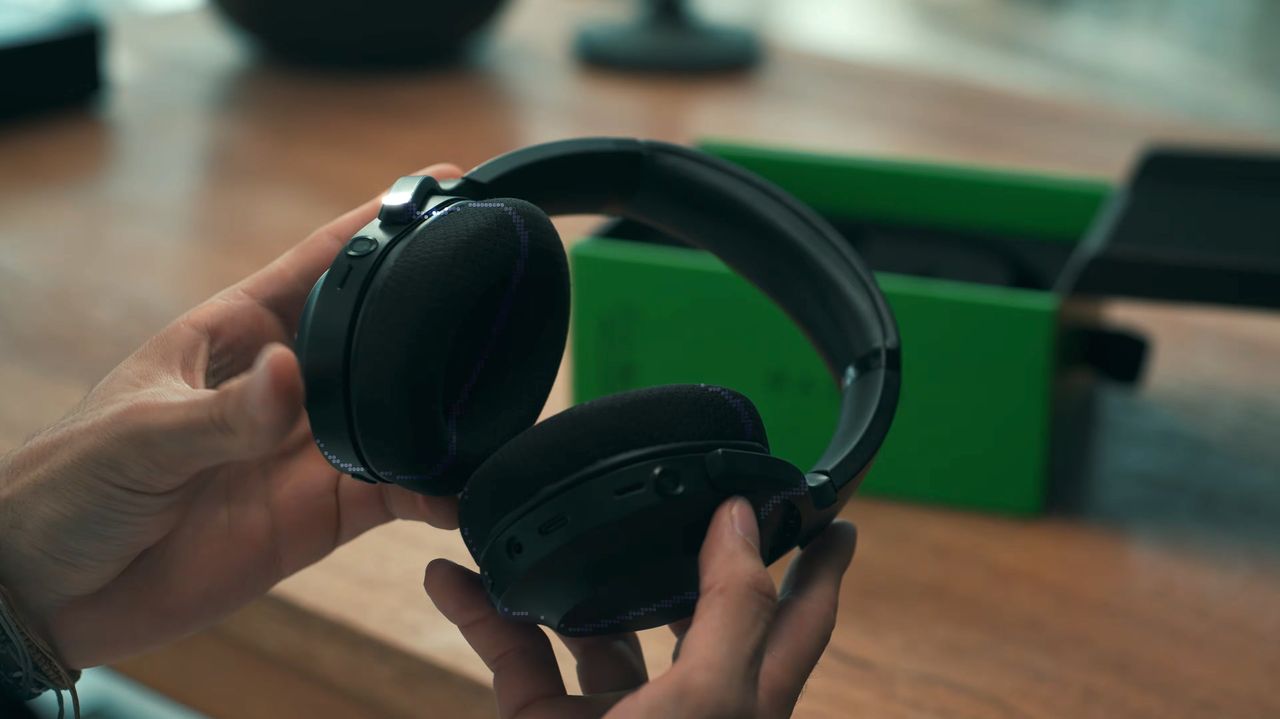
Image of the Razer Huntsman V3 Pro gaming keyboard.

Razer's discounted Huntsman V3 Pro is built for gaming performance but offers a superb typing feel.

Razer's mechanical gaming keyboard offered "endless customization" — and now it comes with a discounted price tag

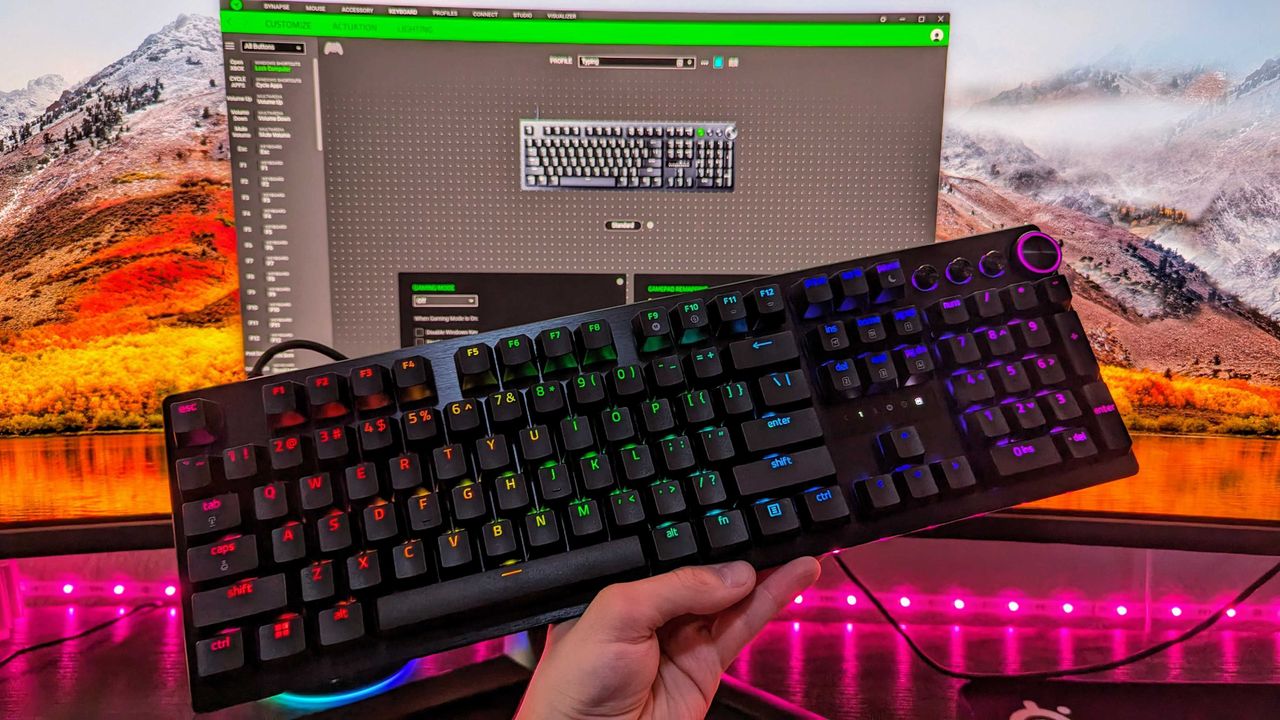
The Razer Huntsman V3 Pro is a highly decorated keyboard with vast customization options, sublime responsiveness for gaming and a little bit of productivity, and a design that's built to withstand wear and tear. If you desire its exceptional qualities without paying full price, it's now on sale for a 32% discount for a limited time.

A mechanical keyboard with RGB backlit keys displaying various colors on a wooden desk. It features a wrist rest and a sleek, modern design.

<p>It's a pretty standard keyboard layout, and it's the most refined typing experience in a Huntsman keyboard yet.</p>

Razer Just Proved Ergonomic Keyboards Don’t Have to Be Miserable

Par : JC Torres
1 avril 2026 à 10:07

Ergonomic keyboards have a reputation problem. They work, technically, but most of them look like they were designed by someone who’d never sat through a full workday. The splits are too wide, the angles too aggressive, and the learning curve steep enough to make you miss the flat keys you’ve always known. Plenty of people give it a try and quietly go back to what they had before.

Razer’s answer is the Pro Type Ergo, its first wireless split ergonomic keyboard, built with that frustration clearly in mind. Rather than throwing you into a radical new layout, it’s tuned to feel approachable from the very first keystroke. The split gently angles your hands into a more natural alignment, easing the sideways reach that makes most forearms ache by mid-afternoon, without asking you to completely relearn how to type.

Designer: Razer

One of the more interesting layout choices is the dual “B” key arrangement, with one on each side of the split, along with an extra backspace tucked between two space bars. The idea is that both thumbs take on common actions, so you’re reaching less and crossing your fingers over each other less throughout the day. It’s a small shift that makes more sense the longer you sit with it.

The keycaps are ultra-low-profile, fitted with subtle spherical indents that nudge your fingertips into the right position without you having to think about it. Sound-dampening layers and tuned stabilizers underneath keep the typing noise low enough for open offices and video calls. Shorter key travel also means less physical effort per keystroke, which doesn’t sound like much until you’ve been at your desk for six hours straight.

The wrist rest is permanently integrated rather than removable, which turns out to be a feature rather than a limitation. It’s just always there, supporting your wrists from the moment you sit down without any extra setup. A 10-degree base slope sets the starting angle, and five tilt positions, from flat to seven degrees forward or back, let you dial in the fit depending on your desk height and preference.

A Razer Command Dial lets you assign up to eight functions, expandable to 100 via Razer Synapse, while five macro keys along the left side keep your most-used shortcuts within easy reach. There’s also a dedicated AI Prompt Master key that handles things like drafting emails, summarizing blocks of text, or kicking off a research query in a single press, without pulling you out of whatever window you’re already in.

Connectivity spans Razer HyperSpeed Wireless at 2.4 GHz, three Bluetooth profiles, and USB-C wired mode, with support for up to five devices total. Razer Chroma RGB backlighting covers 19 customizable zones and can be switched off entirely for offices where animated key lighting might not go over well. The design is clean and understated, a far cry from the aggressively lit gaming keyboards Razer is better known for.

The Pro Type Ergo retails at $189.99, about $30 more than Razer’s conventional Pro Type Ultra from 2021. For anyone who types for a living and has been quietly working around the ache of a standard keyboard layout, that extra cost starts to feel a lot less significant once you’ve spent a full day on something that actually fits how your hands are supposed to sit.

The post Razer Just Proved Ergonomic Keyboards Don’t Have to Be Miserable first appeared on Yanko Design.

Razer's new Blade 16 drops AMD Ryzen for Intel Panther Lake — Brighter OLED display, faster RAM, and Thunderbolt 5 make it better than ever for mixed use

Razer has taken the wraps off its Blade 16 for 2026, and it's a significant refresh that now builds on Intel's Core Ultra Series 3 "Panther Lake" chips. Here's what you need to know (and where you can buy it today).

Razer Blade 16 (2026)

A look at the refreshed Razer Blade 16 for 2026, complete with Intel CPUs and NVIDIA GPUs.

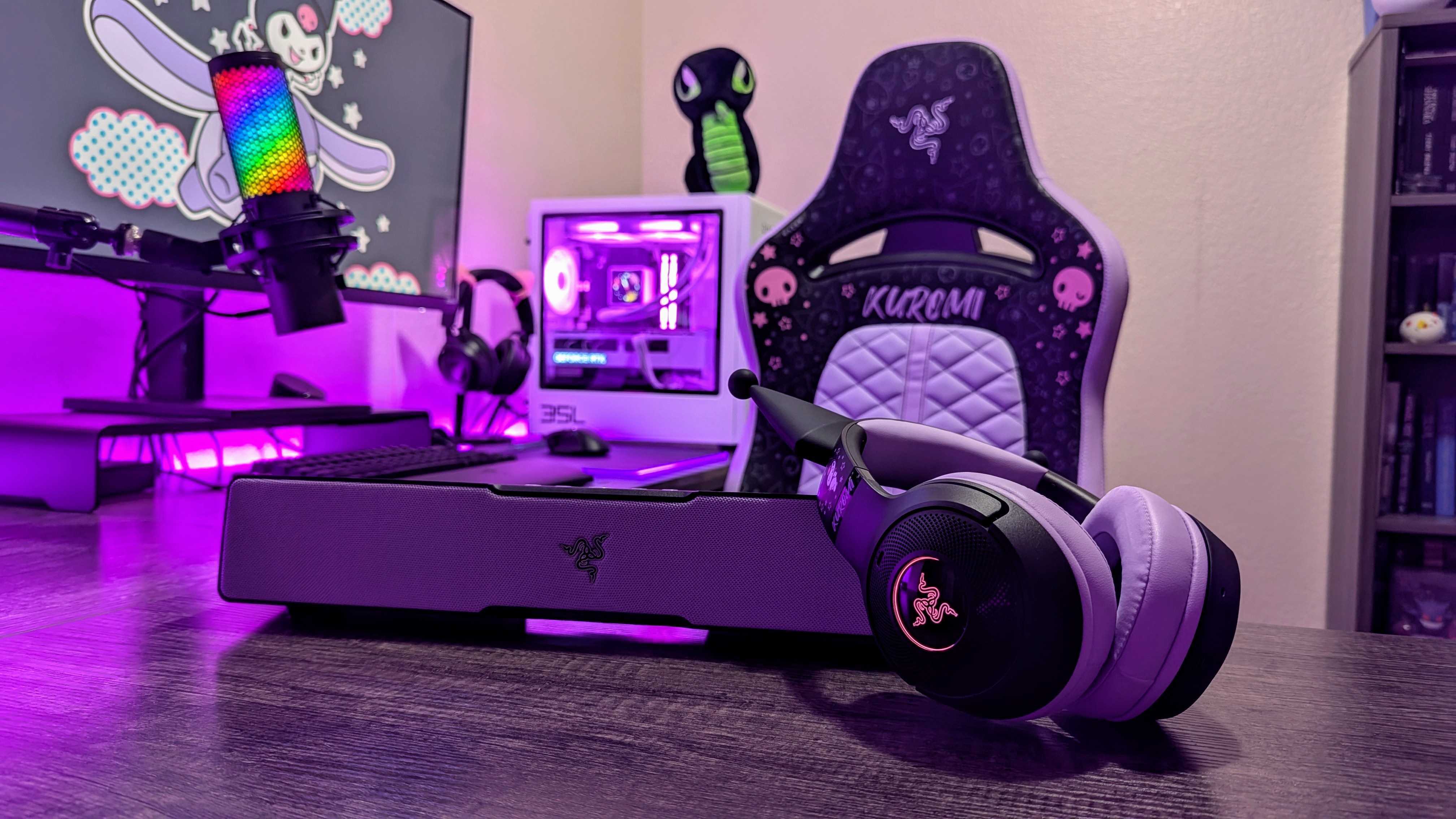
Kuromi got Razer's best collaboration yet, but these aren't the PC gaming accessories I'd use

The new Razer Kuromi collection brings special editions for six of Razer's PC gaming accessories. They're awesome, but this isn't the gear I'd choose to use.

The Razer Kuromi Edition Enki X, Leviathan V2 X, and Kraken Kitty V2 BT.

❌
❌