
Vue normale

Il y a de nouveaux articles disponibles, cliquez pour rafraîchir la page.
À partir d’avant-hierTechs Design

This LEGO VHS Player Actually Has Cassettes You Can Insert and Remove

Par : Sarang Sheth
16 mai 2026 à 00:30

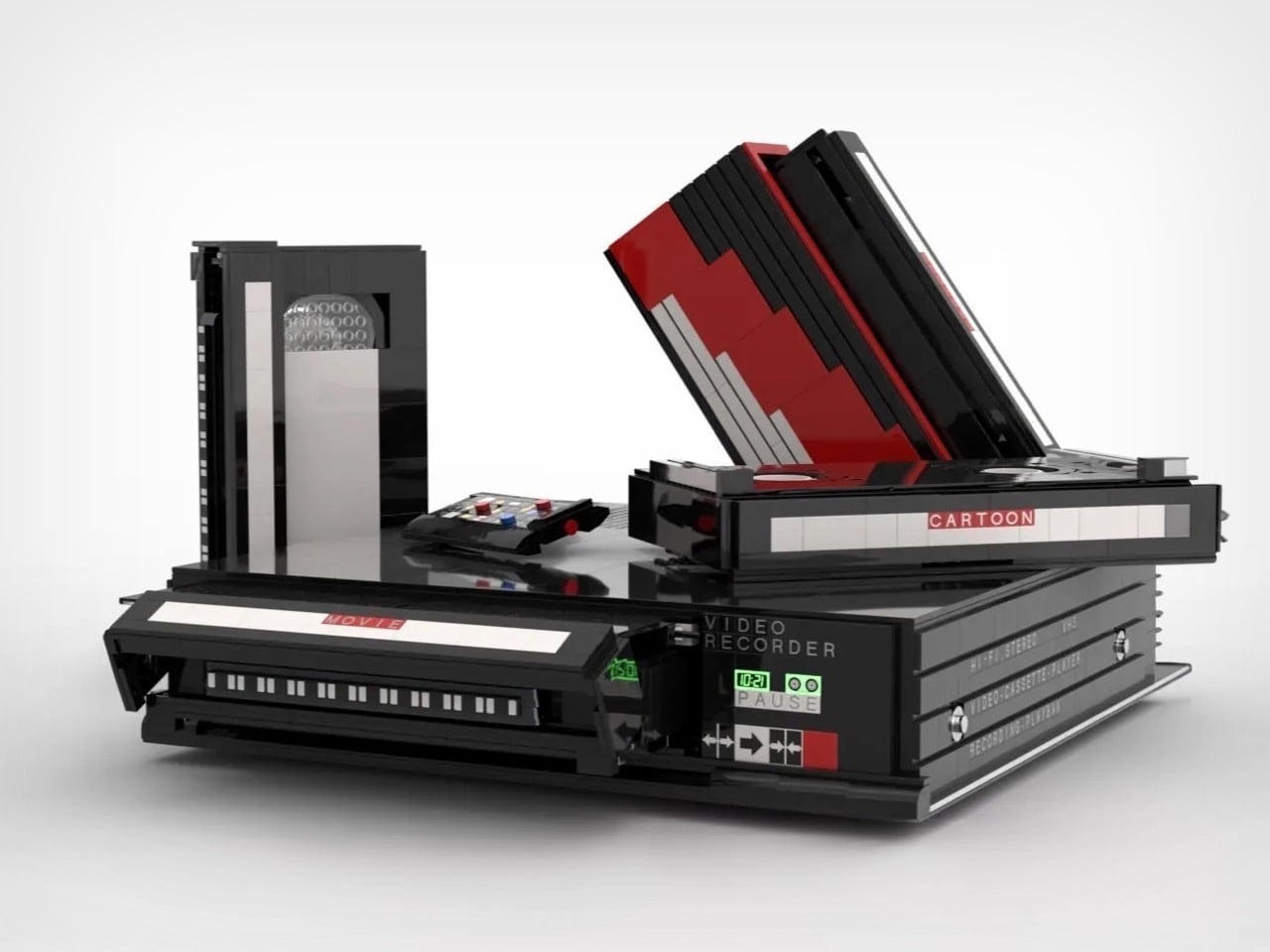
Before streaming queues and binge-watching algorithms rewired how we consume film and television, there was a ritual. You drove to the video store, walked the aisles, made your pick, and came home to slide that chunky black cassette into a slot that swallowed it with a satisfying mechanical thunk. The VCR wasn’t just a piece of consumer electronics. It was the centerpiece of a whole cultural ceremony, the thing that turned an ordinary Tuesday night into a genuine event. Polar-Angel_UA, a LEGO builder and 10K Club Member from Ukraine, has captured exactly that feeling in brick form with the Video Home System.

The build recreates a classic VHS setup with the kind of specificity that only someone who actually lived through the era could pull off. The main unit nails the flat, utilitarian slab aesthetic of a proper 80s or 90s VCR deck, complete with a cassette slot, a row of playback controls, and a PAUSE indicator rendered in green. A top-loading lid flips open to reveal the tape mechanism inside, and the real delight here is in that interaction. The tapes go in. The tapes come out. For a build that’s ostensibly a static display piece, that single interactive element transforms the whole experience.

Designer: Polar-Angel_UA

Four items accompany the main unit: a movie cassette, a cartoon cassette, a remote control, and a VHS case. The distinction between the movie tape and the cartoon tape is a quietly brilliant design decision because if you grew up in that era, you absolutely had a dedicated shelf section for each. Saturday morning cartoons lived in their own plastic sleeve, carefully rewound and stacked away from the movie collection. Polar-Angel_UA understands the taxonomy of the VHS-era household intimately, and it shows.

The MOC’s inherently block-ish nature (thanks to the LEGO bricks) works well for this product. VCRs were not delicate objects. They were heavy, deliberately black, and looked like they meant business sitting under your television set, blinking 12:00 in perpetuity because nobody ever set the clock. This LEGO version carries that same hulking, I-mean-business energy, with the cassettes propped against it like they’re already queued up for a double feature. The remote control sitting casually beside the deck is a small touch that completes the tableau perfectly. You can almost feel the carpet under your feet and smell the takeaway boxes.

The Video Home System is currently gathering votes on the LEGO Ideas platform, where fan-created builds compete for the chance to become official retail sets. Cross the 10,000 vote threshold and LEGO’s internal team reviews the submission for potential production. With 688 supporters on the board right now and 422 days left on the clock, there is plenty of runway here. Head to the LEGO Ideas page and cast your vote!

The post This LEGO VHS Player Actually Has Cassettes You Can Insert and Remove first appeared on Yanko Design.
d64 Just Packed an Entire Dice Collection Into a Tiny 1980s Computer

Par : JC Torres
12 mai 2026 à 09:16

Tabletop roleplaying games have an accessory problem. The dice alone can take over a corner of any gaming table, each one representing a different die type that the rules will inevitably call for at the least convenient moment. Tracking down the right d10 mid-session, or explaining to a new player why there are two different ten-sided dice in the bag, is just one of those small but reliable annoyances that experienced players have long since stopped questioning.

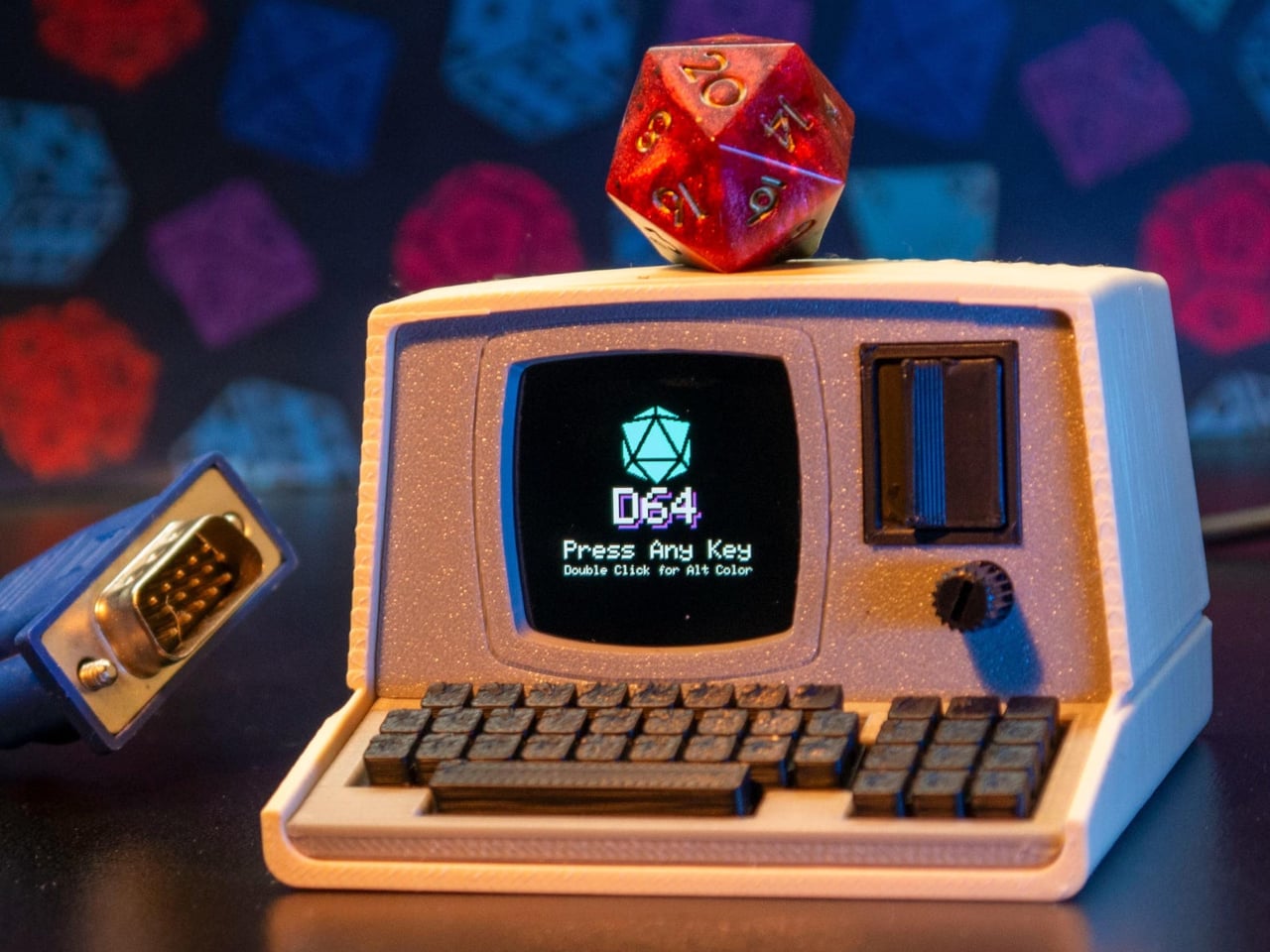
The Console’88 from d64Computing is a compact digital dice roller that handles the entire set from d4 through d100 in a single device, the size of a pocket calculator. What makes it genuinely interesting, though, isn’t just the function; it’s that the designer chose to dress it up as a miniature 1980s computer, complete with a CGA color display, vector graphics, boot-screen text, and the kind of visual language that looks like it was pulled straight out of a 1984 computer catalog.

Designer: d64Computing

Selecting a die type is done through a rotary dial and a button underneath the faux keyboard, which fits the era aesthetically and keeps the interaction simple. Spin it to the die you want, and get your result. The randomness runs at microsecond precision, so the results are genuinely unpredictable rather than cycling through a predictable sequence. For anyone who’s ever side-eyed an app-based roller and wondered about its actual randomness, that’s a meaningful detail.

The sounds are what push it over from clever gadget into something with real personality. The Console’88 plays 1980s video game audio when you roll, and it apparently has dedicated sound effects for critical successes and critical failures, which is the kind of contextually appropriate design decision that’s easy to appreciate at an actual gaming table. A crit that’s announced by a triumphant eight-bit jingle lands differently than a number quietly appearing on a phone screen.

There’s an argument to be made for physical dice that has nothing to do with practicality. Rolling actual dice is tactile, dramatic, and central to the experience for a lot of players. But for anyone who travels frequently to gaming sessions, runs games for beginners without their own dice, or simply wants something that takes up less space on an already crowded table, a single device covering every die type is a reasonable swap to make.

The design commitment here is what separates the Console’88 from a generic electronic dice app. This thing looks like it belongs on a desk next to a Commodore 64, and reviews consistently call out the visual quality of the vector graphics and the charm of the retro computer case. It’s a product that clearly started from an aesthetic vision rather than pure function, and the function turned out to be genuinely good on top of it.

The post d64 Just Packed an Entire Dice Collection Into a Tiny 1980s Computer first appeared on Yanko Design.

Spigen Turned Apple’s Iconic Beige Mouse Into an AirPods Pro 3 Case

Par : JC Torres
17 mars 2026 à 08:45

There’s something quietly odd about the era when Apple products were beige. Not bad, just odd. The Macintosh 128K, the boxy rectangular mouse, the Apple Lisa; they were made from a warm off-white plastic that aged into something stranger, a color that collectors now call “Pantone 453 approximately.” Spigen, a brand that usually channels its energy into clear polycarbonate shells, has decided this particular slice of computing history deserves a second life on your keychain.

The Classic LS AirPods Pro 3 case is the latest piece of Spigen’s retro-Mac collection, which launched in January 2026 with an iPhone 17 case modeled after the Macintosh 128K and Apple Lisa. The AirPods case takes a narrower reference: the original Apple mouse, that flat, single-button input device that became an icon despite being spectacularly simple. It joins a phone strap and a MagFit wallet styled as a floppy disk reader, completing a four-piece set.

Designer: Spigen

The case borrows the mouse’s proportions, its warm stone-colored plastic, and its most tactile feature. Spigen built a “Push to Unlock” locking mechanism into the front, positioned where the mouse button would have been. Press it and the hinged lid releases; snap it shut, and it clicks back into place. It’s a small mechanical gesture, but it makes opening and closing feel deliberate rather than accidental.

That security matters more than it sounds. For anyone who has found a lidless AirPods case rattling loose at the bottom of a bag, the locking mechanism is a genuine practical improvement over standard cases. The AirPods don’t pop out unexpectedly, and the lid doesn’t spring open on its own. An adhesive strip inside connects the lid to the top of the AirPods case, so the whole assembly opens cleanly as one unit.

The shell itself is polycarbonate, reinforced with what Spigen calls Air Cushion Technology, an internal structure designed to absorb impact at the corners and edges. The case wraps the AirPods Pro 3 charging case completely, with a cutout at the bottom for USB-C wired charging and a clear path through the back for wireless charging. Both work without removing the case.

A braided lanyard comes included, threading through a loop on the side. This isn’t just a piece of decoration, as small charging cases have a remarkable talent for disappearing into coat pockets and bags, and a physical tether is a more reliable retrieval system than searching by feel. The Classic LS case retails for $44.99, which places it comfortably in the broader collection alongside the $40 MagFit wallet and well below the $60 iPhone case that started it all.

The post Spigen Turned Apple’s Iconic Beige Mouse Into an AirPods Pro 3 Case first appeared on Yanko Design.

GameMT EX8 debuts as a budget Android handheld tailored for retro gaming

Par : Gaurav Sood
13 mars 2026 à 19:15

The gaming handheld continues to expand with new devices aimed at retro enthusiasts and mobile gamers. One of the latest additions is the GameMT EX8, a portable gaming console designed to deliver a capable Android-based gaming experience while maintaining a relatively affordable price point. With a high-resolution display, a familiar handheld layout, and hardware suited for emulation and mobile gaming, the EX8 represents GameMT’s attempt to compete with other budget-friendly handhelds in the growing retro gaming segment.

The handheld features a 4.88-inch display with a resolution of 1080 × 1620 pixels and a 3:2 aspect ratio. This format is particularly appealing for retro gaming because it better accommodates older console titles that do not match modern widescreen displays. The panel is also noticeably sharper than the screen used in some competing handhelds, such as the Ayaneo Pocket Micro, which uses a smaller 3.5-inch display with a lower resolution. The larger and sharper screen is expected to improve the visual experience when playing classic games from platforms like the PlayStation and PSP. With its combination of a high-resolution 3:2 display, capable mobile processor, and expandable storage, the GameMT EX8 aims to deliver a balanced handheld gaming experience.

Designer: GameMT

Powering the device is MediaTek’s Helio G99 processor, a chipset commonly found in mid-range smartphones. The chip is paired with 6GB of RAM and 128GB of internal storage, providing enough performance for Android gaming and a wide range of emulated titles. The Helio G99 has already proven capable of handling many retro systems and even some more demanding platforms through emulation, making it a practical choice for a handheld of this category. For users with larger game libraries, the EX8 also includes a microSD card slot that allows the storage to be expanded beyond the built-in capacity.

In terms of design, the EX8 adopts a horizontal handheld layout with symmetrical analog sticks positioned on both sides of the display. Each thumbstick is surrounded by an RGB ring light, giving the device a more modern aesthetic. A traditional D-pad and ABXY button arrangement sits alongside the sticks, while shoulder buttons are integrated along the top edge. The device also appears relatively thick compared to some competitors, likely to accommodate its internal hardware and cooling system. Thermal management is supported by an internal cooling fan, which helps maintain stable performance during extended gaming sessions. Audio is delivered through bottom-firing speakers, and the handheld is powered by a 5,000 mAh battery that charges through a USB-C port. These features are designed to ensure the device can sustain longer play sessions without overheating or running out of power too quickly.

The GameMT EX8 will be available in two color options. A black version pairs dark hardware with red D-pad and face buttons, while a white variant features purple buttons and matching accents. This contrast gives the handheld a distinctive visual identity within the crowded retro gaming market.


The post GameMT EX8 debuts as a budget Android handheld tailored for retro gaming first appeared on Yanko Design.

7 Retro Handhelds So Good They Actually Beat Consoles

Par : JC Torres
10 mars 2026 à 17:20

At some point in the last couple of years, something quietly shifted in the gaming world. Not in the blockbuster, billion-dollar-franchise sense, but in the more personal, “why am I actually having more fun with this tiny device than my main console” sense. Search interest in retro gaming handhelds jumped 400% year-over-year, hitting 90,500 monthly searches in January 2026 alone. That’s not a blip. That’s people rediscovering something they forgot they wanted, and then telling everyone they know about it.

What’s driving it isn’t hard to understand. Modern gaming has gotten heavy, with big installs, long tutorials, and games that feel like part-time jobs. A retro handheld sidesteps all of that. You pick it up, you’re playing something in thirty seconds, and it fits in your jacket pocket. The designs themselves have become worth caring about, too, from machined aluminum bodies to translucent clamshells to square screens that look like props from a ’90s anime. These aren’t budget toys. Some of them are genuinely beautiful objects that happen to play games. Here are seven that are worth your attention.

Anbernic RG Cube: The one with the square screen that somehow works

The first thing you notice about the RG Cube is the screen shape, a perfect square, and your brain immediately goes: that can’t be right. Gaming moved to widescreen fifteen years ago. A 1:1 display in 2024 looks like a design mistake, or at best a gimmick. It is neither. The 3.95-inch IPS panel at 720×720 turns out to be native to more retro games than you’d expect, with Game Boy, arcade titles, and Nintendo DS with dual-screen stacking all living here without compromise.

Designer: Anbernic

The broader package is hard to argue with. An octa-core Unisoc T820 processor and 8GB of RAM run Android 13, with emulator support up through PS2 and GameCube, though more demanding titles on those systems will push its limits. The asymmetric thumbstick layout borrows from the Steam Deck playbook, and the Saturn-inspired D-pad is precise without drama. At around $170, it comes in Beige White, Radiant Purple, Black, Grey, and the radiant purple has no right looking as good as it does.

What we liked

  • Square 1:1 screen is genuinely ideal for Game Boy, arcade, and DS emulation
  • RGB lighting and color options make it a genuinely attractive object

What we disliked

  • Widescreen games require letterboxing or aspect-ratio compromise
  • Demanding PS2 and GameCube titles push the processor to its limits

ModRetro Chromatic: The Game Boy Color that Nintendo never made

There’s a version of this product that could have been embarrassing: a magnesium alloy Game Boy Color clone bundled with a new Tetris cartridge, sold at $199. On paper, it sounds like a premium nostalgia trap. In practice, it’s one of the most carefully considered handheld devices released in years. It’s FPGA-based, meaning it reconstructs the Game Boy hardware at the circuit level rather than emulating it in software, which produces zero input latency and a millisecond-accurate match to original hardware behavior.

Designer: ModRetro

The physical design earns its price in ways spec sheets can’t capture. The curved battery compartment gives your hands something to grip. A physical volume wheel, a detail so obvious it’s shocking how rarely it appears on modern devices, lets you kill the sound without touching a menu. Colors run from Inferno and Bubblegum to a very wearable Wave blue, with English or Japanese button labeling as an option. It plays physical Game Boy and Game Boy Color cartridges only, which is either a dealbreaker or a feature, depending on how you think about focus.

What we liked

  • FPGA hardware delivers true zero input lag, not a software approximation
  • Magnesium alloy shell feels premium and genuinely durable
  • Comes bundled with a new Tetris cartridge

What we disliked

  • Plays only Game Boy and Game Boy Color cartridges, no ROMs or other systems
  • AA battery requirement adds ongoing cost; rechargeable Power Core is sold separately

Analogue Pocket: The one photographers keep picking up

The Analogue Pocket is the device that made the retro handheld conversation respectable. It uses an FPGA rather than software emulation and plays Game Boy, Game Boy Color, and GBA cartridges out of the box. Via cartridge adapters, it adds Game Gear, Neo Geo Pocket Color, Atari Lynx, TurboGrafx-16, PC Engine, and SuperGrafx. Via its microSD slot and the OpenFPGA community platform, it loads cores for nearly every retro system that ever existed. The 3.5-inch LCD at 1600×1440 and 615 ppi is, simply, one of the sharpest displays ever put in a handheld.

Designer: Analogue

At $239, it sits at the premium end of this list, and it’s also frequently out of stock. Firmware updates require a microSD card reader, which feels like friction that shouldn’t exist on a $239 device. TV output needs the separately sold $99 Dock. These aren’t dealbreakers so much as signals that Analogue built this for the dedicated enthusiast first. If you want one device to handle everything in your retro library for the next decade, this is probably it.

What we liked

  • OpenFPGA community support covers an enormous range of retro systems
  • Plays GBA in addition to GB and GBC, plus many more with adapters
  • MicroSD slot enables ROM loading
  • Premium aluminum build with a distinctly modern design language

What we disliked

  • Frequently out of stock; restocks sell out within minutes
  • Firmware updates require an external microSD card reader
  • TV output requires a separately purchased $99 Dock

Retroid Pocket Flip 2: The clamshell that brought the GBA SP back with PS2 power

The GBA SP was the handheld that arguably peaked the clamshell form factor: it folded, it protected its own screen, and it had a backlit display before that was standard. The Retroid Pocket Flip 2 arrives in 2025 with that same closing-hinge energy, but with a 5.5-inch 1080p AMOLED screen, a Snapdragon 865 processor, and enough emulation horsepower to run PlayStation 2, GameCube, and Wii. When closed, it has roughly the same desk footprint as a modern smartphone. Closing the lid puts it to sleep; opening it wakes it up.

Designer: Retroid

Color options include a translucent Ice Blue, GameCube Purple, a two-tone 16-bit US, and Black. Retroid clearly understands its audience. The AMOLED panel brings deep blacks and accurate color to games designed for CRTs, and the results are often striking for titles you’ve played a hundred times. At $229 for the Snapdragon variant, there is no meaningful clamshell competitor at this performance level. One persistent note from extended use: the form factor rewards shorter sessions more than marathon ones, which is maybe appropriate for a device meant to live in a bag pocket.

What we liked

  • 5.5-inch AMOLED at 1080p is impressive for the price
  • Handles PS2, GameCube, Wii, and Dreamcast emulation
  • Translucent Ice Blue colorway is a design highlight

What we disliked

  • Thicker than it looks in product photos
  • Extended sessions can feel less comfortable than flat handhelds

AYANEO Pocket Micro Classic: The one that fits in an actual pocket

The Game Boy Micro launched in 2005 as Nintendo’s most polarizing hardware decision. It was tiny, it was beautiful, it only played GBA games, and it was discontinued within a year. Design historians were kinder to it than the market was. The AYANEO Pocket Micro Classic is clearly in conversation with that history. It removes the analog joysticks, uses a CNC-machined aluminum alloy frame with a seamless all-glass front, and produces something that slides into a front jeans pocket without catching on anything.

Designer: AYANEO

The 3.5-inch borderless IPS display at 960×640 in a 3:2 ratio is built for GBA emulation, with 4x pixel-perfect upscaling. Available in Obsidian Black, Charm Red, Vintage Grey, and Gold, each colorway has a different character. The Gold skips “gaming device” and lands somewhere closer to “considered object.” The MediaTek Helio G99 handles everything up through PS1 confidently. If your retro library is 8-bit and 16-bit with a strong GBA presence, the Pocket Micro Classic is probably the most beautiful way to play it.

What we liked

  • CNC aluminum and all-glass build is genuinely premium for the category
  • No joysticks make it notably slimmer and more pocketable
  • Android 13 with Play Store access expands utility beyond emulation

What we disliked

  • No joysticks limit N64, Dreamcast, and PSP playability

TrimUI Brick Hammer: Budget price, luxury aluminum shell

The original TrimUI Brick arrived in 2024 with an unusually sharp 3.2-inch IPS screen at 1024×768, giving it a pixel density of 405 PPI, a number that belongs on a premium smartphone, not a $55 device. The Brick Hammer edition, launched in 2025, replaces the plastic shell with a full CNC-machined aluminum alloy in Gunmetal Gray, Rose Gold, and Fluorescent Green. The metal shell doubles as a heatsink, dropping operating temperatures noticeably. Three interchangeable shoulder button sets ship in the box.

Designer: TRIMUI

The software runs CrossMix OS on a Linux base: clean, fast, minimal overhead. Load your ROMs, pick a game, and play. Battery life lands around four to six hours. The processor handles Game Boy through PS1 without complaint; N64 gets through most titles; Dreamcast is inconsistent. The CNC backplate can be engraved, which no other device at this price point offers. The Rose Gold aluminum version sitting next to a MacBook on a desk looks less out of place than it has any right to, and that’s a strange and interesting thing to say about a $99 handheld.

What we liked

  • CNC aluminum Hammer shell runs noticeably cooler than the original plastic
  • Swappable shoulder buttons and engravable backplate are genuinely rare customization options
  • Rose Gold and Gunmetal colorways punch well above the budget tier

What we disliked

  • No analog joysticks, which limits 3D game compatibility
  • Dreamcast and demanding N64 titles run inconsistently

Miyoo Mini Plus (and Mini Flip): The one that started the whole obsession

If there’s a single device responsible for bringing this category to mainstream attention, the Miyoo Mini Plus is probably it. It weighs 200 grams, fits in a jeans pocket, has a 3.5-inch IPS screen at 640×480, and runs OnionOS, a community-built firmware that turns a modest Cortex-A7 processor into a near-perfect front end for everything from the NES to the original PlayStation. The interface is clean, the emulator library covers over a hundred platforms, and save states work the way save states should.

Designer: Miyoo

The Miyoo Mini Flip takes the same hardware and wraps it in a GBA SP-style clamshell, adding screen protection and an extra wave of nostalgia. Early production runs had hinge concerns, though those appear to have been addressed in more recent batches. At $69-99, this is the gateway to the category that doesn’t feel like a compromise. The honest question isn’t whether this device is worth the money, since it clearly is. It’s whether starting here will satisfy the itch, or simply make you want to own the other six devices on this list as well.

What we liked

  • Genuinely pocketable at 200g, fits in a jeans pocket without bulk
  • Covers NES through PS1 with confident performance
  • Mini Flip clamshell adds nostalgic GBA SP energy and screen protection

What we disliked

  • Not powerful enough for N64, Dreamcast, or PS2
  • 640×480 screen resolution shows its age

The post 7 Retro Handhelds So Good They Actually Beat Consoles first appeared on Yanko Design.

This Does Not Compute Turns Tiny Mac Clock Into Working Raspberry Pi Macintosh

Par : Gaurav Sood
18 février 2026 à 16:20

If you appreciate retro computing and DIY electronics, a new project from This Does Not Compute (YouTube channel) will be the best thing you will see today. The build emulates the 1984 Apple Macintosh, but in a miniaturized version. Not the smallest, but decently small to sit in the corner of your desk and do more than its intended function of a clock.

If that sounds puzzling, here’s a clearer explanation. The modder has actually taken a Maclock, which is a clock that looks identical to the original Mac, but of course considerably smaller, and ripped it open. He replaced the original alarm clock mechanics with a Raspberry Pi, turning it into a homage to the classic Apple computer.

Designer: This Does Not Compute

The project, as the modder himself states, “is just for fun” and doesn’t really reach out to prove anything other than love to toil with anything Mac. With the innards of the clock replaced by Raspberry Pi Zero 2 W, the original display of the clock is also swapped with a 640×480 2.8-in color screen from Wave Share, and the project is interestingly called Wondermac. The name is in reference to Wonder Boy, the Chinese company that makes Maclock.

The modder, as you can see in detail in the video above, starts by cracking open the Maclock case, which has screws, but they are only used to mimic the Macintosh and have no significant usage. Opening the case was “probably the hardest part of the whole project,” he says. The case is clipped together pretty tightly, but he was able to separate the front bezel from the back using a wide metal pry tool. Once the front panel was free, he unplugged the wiring harness and pulled out the main circuit board and the screen to clear up the space inside the Maclock body, which will now have new guts and a new purpose.

“Compact, low power, and relatively inexpensive,” Raspberry Pi Zero 2 W was a clear choice for the Mac’s innards, the modder affirms. It comes with a pin header presoldered and includes a heatsink, which would be a nifty addition to keep this tiny computer cool when it does some computing. The Pi is now connected to the externally purchased screen, and the modder gets down to launching the Raspberry Pi imager app and installing Minivvac on an SD card for the software side of the project.

For powering the Wondermac, the modder doesn’t rely on the Maclock’s built-in battery; instead, they take advantage of the USB-C port on the back housing for power. After some tweaking to power output, some wire soldering, and sticking, he was able to get the power going as required to run the screen. Finally, he designed a 3D printed bracket with black filament to fit the screen in place, and then everything was assembled back into shape. Content with the outcome, he leaves the little Mac on the desk with the Afterdark screen saver.

The post This Does Not Compute Turns Tiny Mac Clock Into Working Raspberry Pi Macintosh first appeared on Yanko Design.

❌
❌