Vue normale

Il y a de nouveaux articles disponibles, cliquez pour rafraîchir la page.
À partir d’avant-hierTechs Design

Cloud AI Means Someone Else Has Your Data, MINISFORUM Fixes That

Par : JC Torres
4 septembre 2026 à 04:00

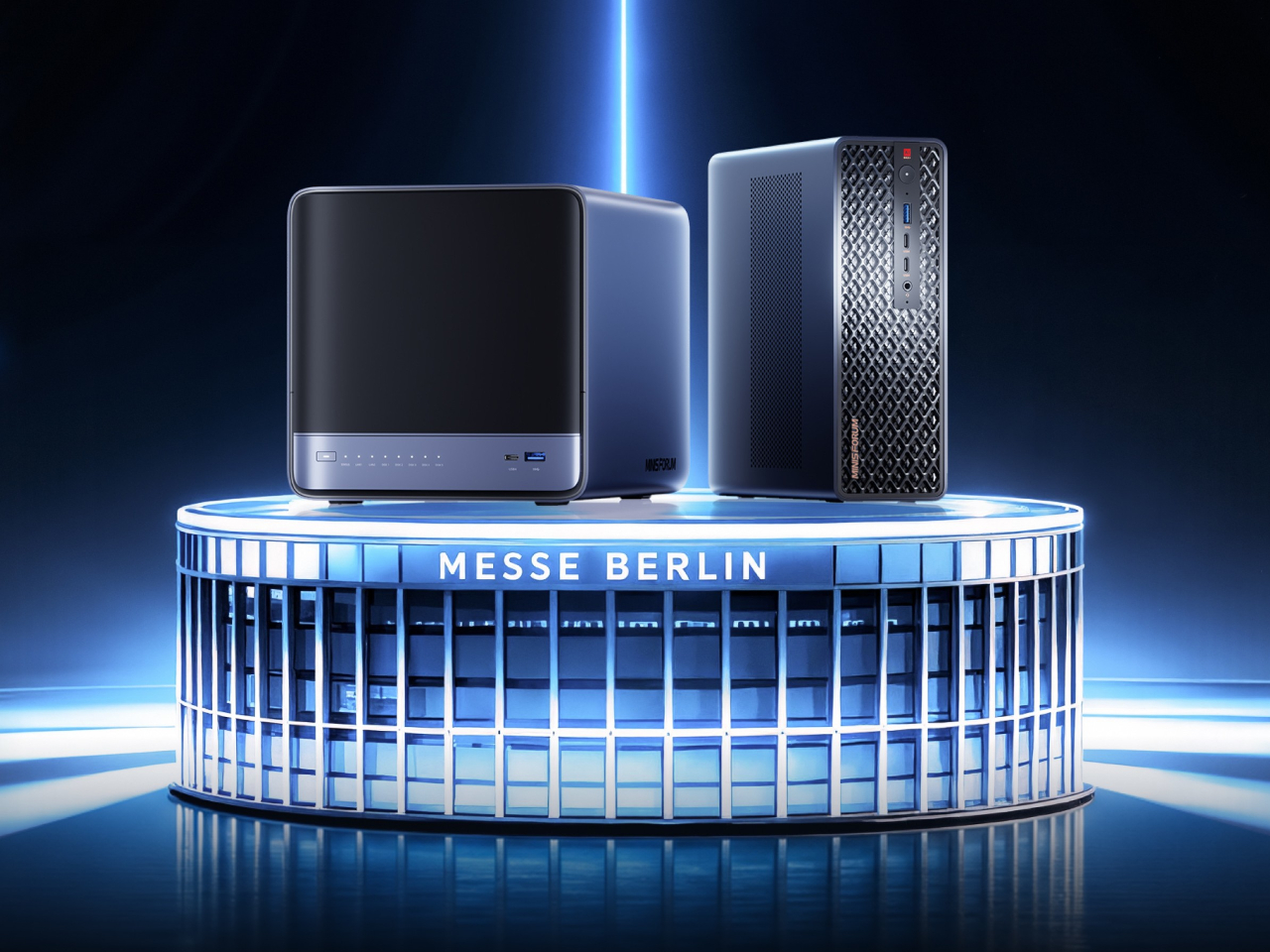
Running a serious AI model at home usually means renting someone else’s cloud server and hoping your data stays private along the way. MINISFORUM built its newest pairing to remove that trade-off entirely. The AI Agent NAS N5 MAX-P495 and AI Mini Workstation MS-S1 MAX-P495 combine for up to 131 TOPS of AI compute performance, 192GB of memory at 8533 MT/s, and up to 160GB of graphics memory, enough headroom to keep the heavy lifting on a desk instead of in a data center.

The N5 MAX-P495 takes the shape of a compact black cube, but what it holds inside matters more than how it looks sitting on a shelf. It combines powerful AI computing with up to 200TB of local storage, enabling users to store, manage, and process large volumes of data within a single AI platform. That capacity turns a spare corner of an office into a private archive large enough to hold years of project files, footage, or research without ever touching a third-party server.

Designer: MINISFORUM

Storage alone doesn’t make an AI system useful, so MINISFORUM built the N5 to run the AI itself. From RAG knowledge bases and AI models to embeddings, databases, and AI agents such as OpenClaw and Hermes, N5 MAX-P495 keeps data and AI workloads local, enabling continuous and private AI operations. A small business could lean on that setup to run its own customer-support agent without routing conversations through an outside company’s servers.

That local-first approach extends to how the N5 fits into a larger setup. Designed to work alongside AI computing devices, N5 MAX-P495 serves as a centralized backend for data, models, knowledge, and long-running AI workloads, bringing storage and computing together at the edge. It’s less a standalone gadget and more a quiet engine room, built to keep working in the background while something faster handles the parts people actually interact with.

That faster half of the pairing is the MS-S1 MAX-P495, a compact tower wrapped in a ventilated, diamond-textured front panel that looks more like a piece of desk sculpture than a workstation. It delivers powerful local AI computing for demanding model inference, AI development, and computationally intensive workloads, built for intensive local AI tasks, engineering, and workflows in an ultra-compact footprint. Developers get workstation-class muscle without giving up desk space to a full tower case.

Speed matters just as much as raw power for certain jobs, and MINISFORUM designed the MS-S1 with that in mind. Designed for low-latency AI workloads, MS-S1 MAX-P495 enables responsive local inference for AI agents, computer vision, generative AI, and other real-time applications. A security camera system or a live creative tool built on generative AI benefits directly from that kind of immediate response instead of waiting on a round trip to the cloud.

Connectivity rounds out the workstation’s role in a larger setup. With extensive connectivity and expansion capabilities, MS-S1 MAX-P495 serves as a powerful AI compute frontend, supporting models, applications, and connected devices across flexible edge AI environments. That flexibility means the same box can sit at the center of a home lab or plug into a small studio’s existing hardware without forcing a rebuild.

Paired together, the two devices split the work the way a good team would. The MS-S1 MAX-P495 and N5 MAX-P495 form a complete edge AI computing system, delivering high-performance AI compute at the frontend while integrating compute, massive storage, data, and AI knowledge at the backend, providing a powerful foundation for real-time inference, persistent AI workloads, and scalable local AI applications. It’s a compact answer to a question more households and small teams are starting to ask: whether AI still needs to live somewhere else at all.

The post Cloud AI Means Someone Else Has Your Data, MINISFORUM Fixes That first appeared on Yanko Design.
This Mod Made a Steam Machine Faceplate Charge Your Steam Controller

Par : JC Torres
6 août 2026 à 17:20

The Steam Machine has swappable faceplates, which is a genuinely good idea that Valve doesn’t appear to have fully exploited. The concept is essentially that the front panel of the console is a blank cosmetic slate, open to third parties and hobbyists to design around. So far, most of what’s been proposed has leaned on that word: cosmetic. Different textures, different graphics, different visual personalities for what is otherwise a matte black gaming cube.

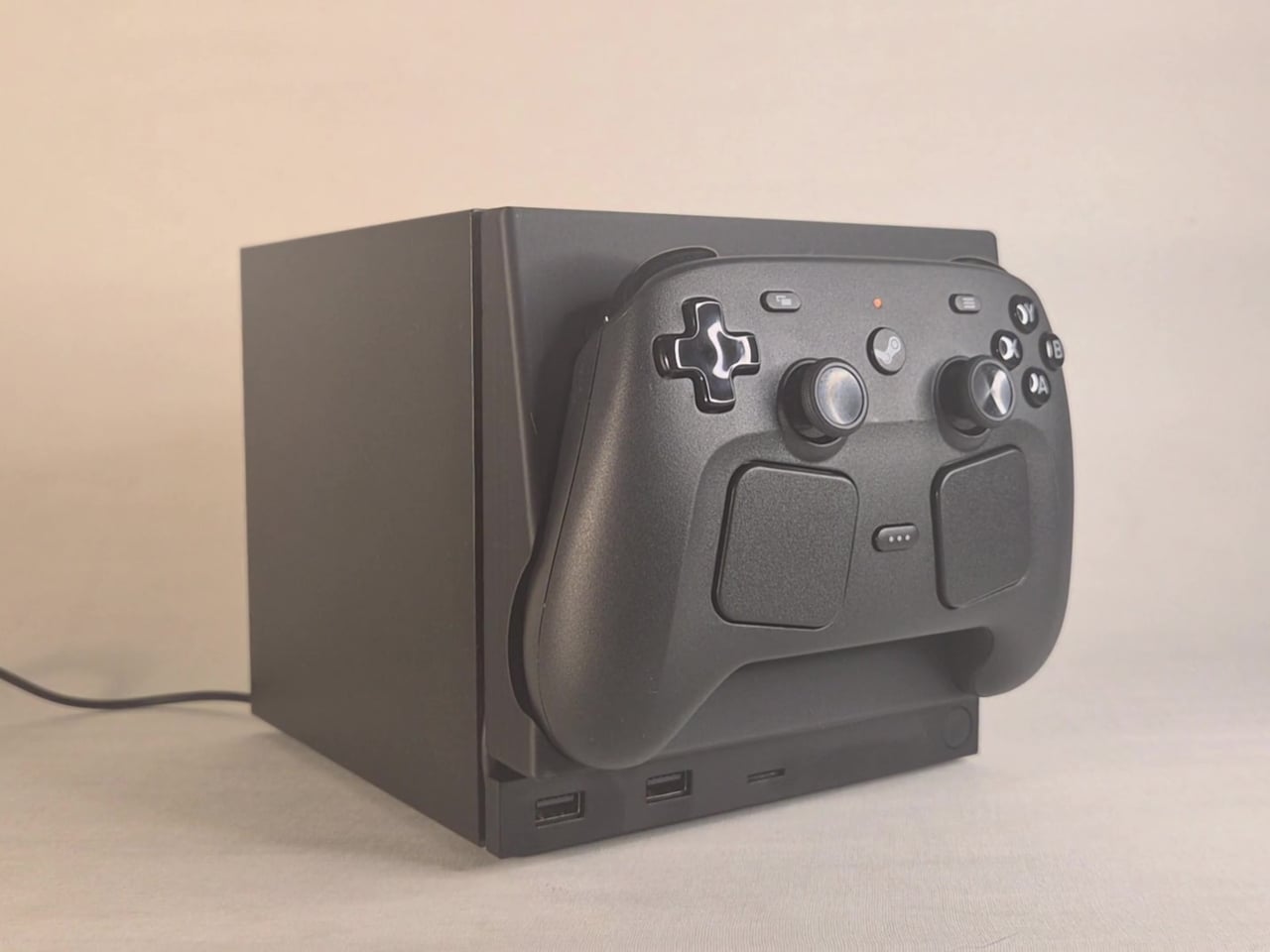
This faceplate mod takes a different approach by asking what the panel could actually do. The result is a replacement front cover that integrates a charging cradle for the Steam Controller directly into the face of the console, turning what would normally be dead real estate into a functional docking station. Set the controller down, it charges. Pick it up, it’s ready. No separate charging puck dangling off to the side.

Designer: NefariousnessWhole25

The charging mechanism uses the Steam Controller’s own wireless puck seated inside the faceplate cradle, with a USB cable routed discreetly around the inside edge of the panel and into one of the Steam Machine’s existing USB ports. It’s a routing solution rather than a rewiring one, which keeps the electrical side simple and reversible. The puck sits in the cradle, the controller sits on the puck, and the whole arrangement slots onto the front of the machine like any other faceplate.

What makes it more than a wall mount with ambition is the kickstand built into the rear of the panel. It folds out from the back of the faceplate, propping the cradle up at an angle, turning the entire assembly into a standalone desk dock that works independently from the Steam Machine. Take the faceplate off the console and prop it up on a table, and it functions as a charging stand on its own terms.

The inspiration came partly from Valve’s own demonstration of an e-ink faceplate, which showed that the panel slot was capable of doing more than holding a decorative cover in place. That demonstration didn’t ship as a product, but it established the idea that the faceplate system had functional potential beyond aesthetics. This mod picks up that thread and takes it somewhere more immediately useful for anyone who has both pieces of Valve’s current hardware sitting on the same desk.

Design files haven’t been released yet, and there are no confirmed plans to sell finished units. The prototype is out, it works, and it raises a question worth asking about Valve’s approach to the faceplate ecosystem: if a single modder can turn the front panel into a functioning charging dock over a weekend, what would a dedicated accessory program actually look like at scale?

The post This Mod Made a Steam Machine Faceplate Charge Your Steam Controller first appeared on Yanko Design.

This $2,999 Device Turns Your Desktop Into A Custom Apparel Printing Factory (With Air Purification)

Par : Sarang Sheth
6 août 2026 à 01:45

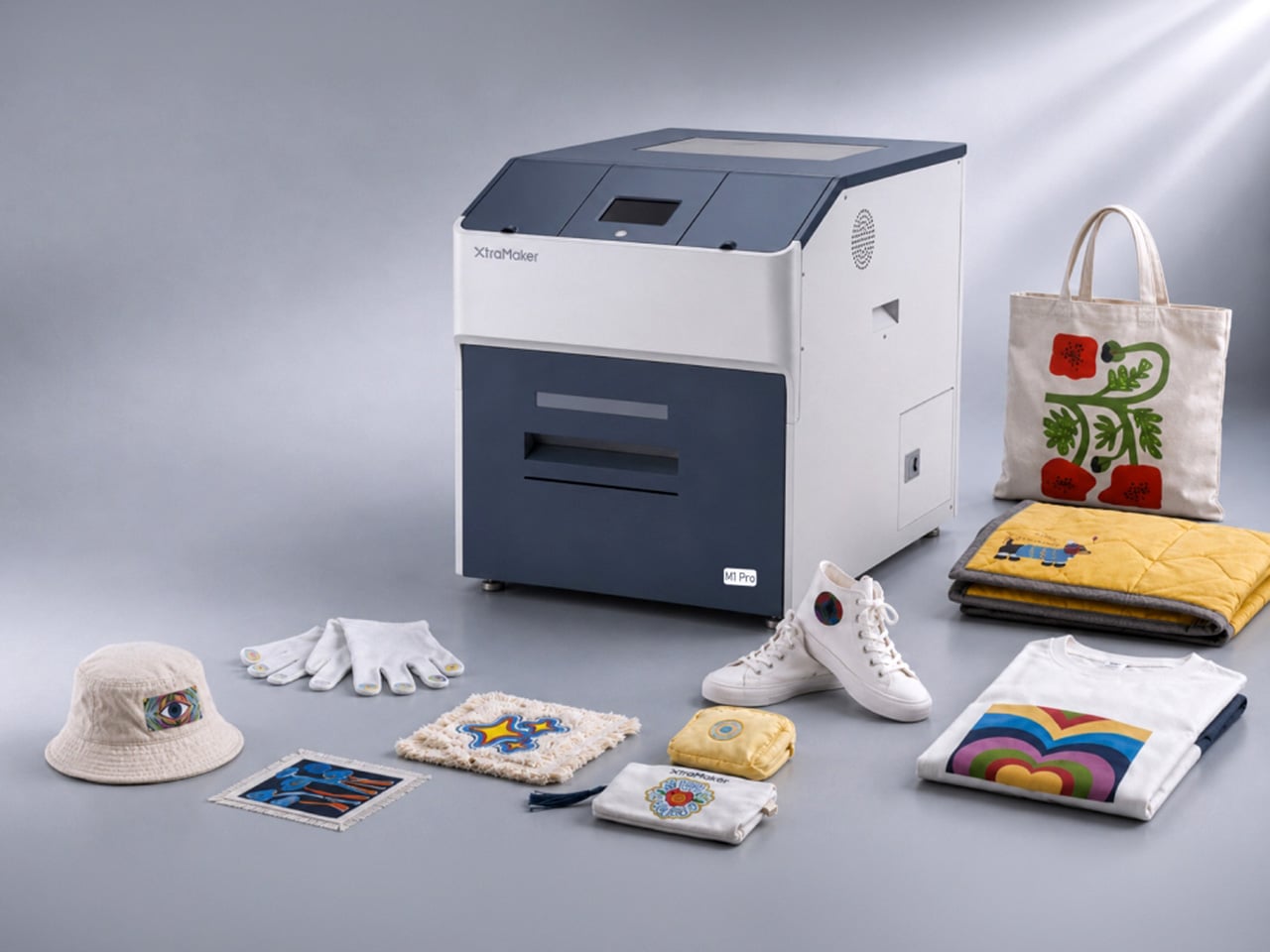
Let’s talk about the math for starting a small apparel brand. You have the designs, the drive, and a growing list of people who want to buy your stuff. Then you look up the gear. Aside from the thousands in hardware, materials, and a good air-purification system (because breathing is generally a good thing), you’re also looking at a massive space investment. Suddenly, you’re nearly $10k in, and need an entire garage for something the XtraMaker M1 Series offers in a tabletop format for a fraction of the price. With a modular printhead design no less, allowing for customization all within the form factor of a large microwave oven.

This is where the XtraMaker M1 Series finally brings apparel creation into the desktop factory era. It takes that sprawling, expensive production line and collapses it into a single, self-contained unit for $2,999. This is the micro-factory for fabric we’ve been waiting for, handling everything from printing the transfer to curing the adhesive inside a fume-filtered system that fits on a desk. It’s the machine that makes the business plan finally make sense, shrinking the startup cost by two-thirds and proving that the next big apparel brand doesn’t need an industrial loan to get started; it just needs a desktop.

Designer: XtraMaker

Click Here to Buy Now: $2999 $6499 ($3500 off). Hurry, only 38/50 left! Raised over $331,000.

The M1’s core innovation is condensing the entire five-step DTF relay race into a single, autonomous sprint. It prints, powders, shakes, cures, and purifies its own air without any manual handoff between stages. This integrated workflow is critical for a desktop machine, as it eliminates the mess and fumes that make traditional DTF printing impossible in a home or small studio. The enclosed system uses a multi-layer filter to capture stray adhesive powder and neutralize the chemical smell from the curing process, keeping the workspace clean and breathable. This turns what was once a multi-machine, garage-only operation into a clean, one-click process you can run from a spare room.

Print quality is anchored to commercial standards, with G7 Master-certified color accuracy ensuring that on-screen RGB designs translate faithfully to the final CMYK print. At a resolution of 1440×1440 DPI, the M1 Series produces sharp, detailed transfers where fine lines and photo-realistic gradients come through cleanly. The resulting prints are just 0.5mm thick, allowing them to blend seamlessly with the fabric’s texture rather than sitting on top like a stiff, plastic patch. This professional-grade output works across a huge range of materials, from cotton, denim, and polyester to more delicate fabrics like silk, giving creators a massive canvas for their ideas.

XtraMaker’s engineers clearly obsessed over reliability, building in a suite of defensive systems to prevent common failures. The most notorious issue in DTF printing, white ink clogging, is addressed by the LoopMaster™ system, which uses automatic 15-minute circulation cycles and continuous cartridge stirring to keep the dense ink from settling and drying in the lines (the white ink circulation system operates with zero ink consumption too). Even more impressive is the built-in UPS battery. If power cuts out, the battery instantly triggers a flush, replacing the ink with a protective fluid to save the printhead from drying out. The UPS battery also powers the printer’s auto-maintenance system while the machine is on standby or powered off. This enables the machine to automatically fill the ink channels with moisturizing liquid and keep the white ink stirring continuously for up to 30 days. Combined with over 20 sensors that monitor the machine’s health and ink levels in real-time, all this creates a system that actively works to prevent the most expensive and frustrating problems before they happen.

The entire package is tailored for small business growth, from the software to the hardware options. The XtraMaker Studios app includes a cost estimation tool that calculates ink and film usage, giving you a precise per-print cost so you can price your products profitably. A 3D preview feature also lets you see how a design will look on a finished garment, saving time and materials. The M1 itself comes in two sizes: the standard M1 for A4-sized prints, perfect for logos and chest graphics, and the larger M1 Pro, which handles A3+ prints for full-back designs on hoodies and jackets. This gives a growing brand a clear upgrade path as their product line and ambitions expand.

XtraMaker’s M1 Series is aimed squarely at the new wave of creators: Etsy sellers, independent streetwear labels, and craft fair operators who need professional output without the industrial overhead. While other desktop DTF printers exist, none integrate the entire five-step workflow, the advanced anti-clog and power-loss protection, and the built-in air purification into a single unit at this price. It’s a machine that understands that for a small business, the real costs are complexity, downtime, and mess.

Click Here to Buy Now: $2999 $6499 ($3500 off). Hurry, only 38/50 left! Raised over $331,000.

The post This $2,999 Device Turns Your Desktop Into A Custom Apparel Printing Factory (With Air Purification) first appeared on Yanko Design.

A $2,699 Gaming PC That Doubles as a Display Case for Figurines

Par : JC Torres
5 août 2026 à 08:45

Cables are the dirty secret of PC building. No matter how carefully chosen the components are, or how expensive the case gets, the tangle of power, data, and fan connectors that crisscross the interior of most gaming desktops eventually undermines every effort at a clean aesthetic. The glass side panel that was supposed to show off the build ends up framing a web of wires that even the most diligent cable manager struggles to fully tame.

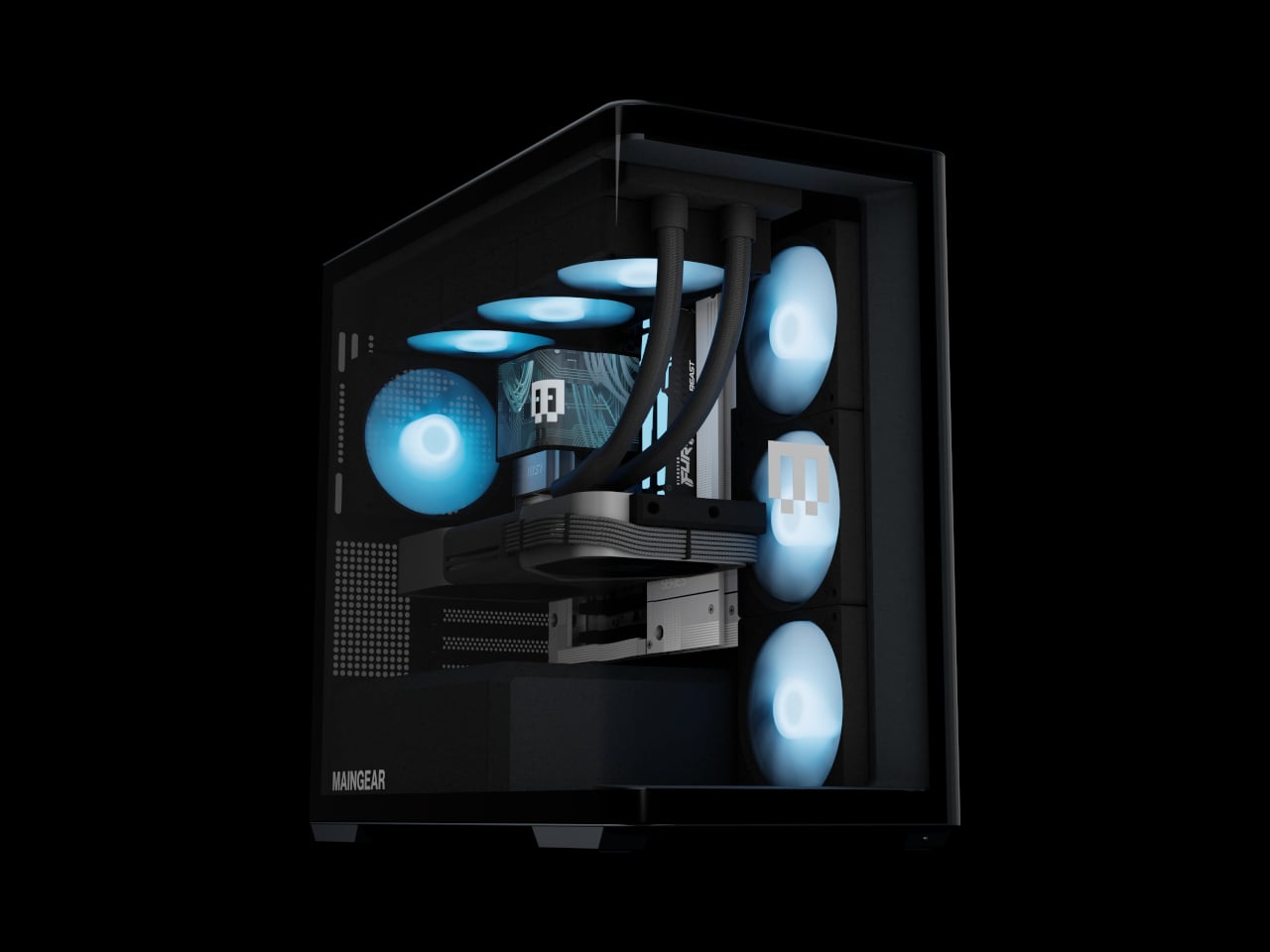
The Maingear Zero treats that problem as the actual design brief. Its patented MG-RC, or Rear Connection, system moves every motherboard connector to the back and underside of the board, clearing the visible interior of cables entirely. Paired with a single, seamless 4 mm tempered glass curve that wraps the front and side of the chassis without a single seam or pillar, the result is a desktop that looks like it has nothing to hide, because it genuinely doesn’t.

Designer: Maingear

Seven fans work to keep the hardware running at full performance without drawing much attention to themselves. A mix of standard and reverse-blade units pushes cool air in through the front and exhausts it out through a 360mm AIO liquid cooler at the top, all following a single front-to-back airflow path. The reverse-blade intakes are specifically designed so the fan blades themselves don’t interrupt the view through the glass, which is a level of detail that most cases simply don’t think to address.

All RGB lighting inside the Zero is diffused rather than sourced from visible diodes, meaning the light saturates the interior without any glowing point of origin to break the illusion. The whole package measures 236mm wide, 421mm tall, and 460mm deep, which is more compact than a traditional mid-tower while still accommodating a full-sized GPU and the 360mm cooler overhead. It doesn’t look like a PC that compromised on size to achieve the aesthetic.

The hardware ceiling is genuinely high. Configurations top out at an NVIDIA GeForce RTX 5090 paired with an AMD Ryzen 7 9850X3D or Intel Core Ultra 7 270K Plus, 32GB of DDR5 memory, and a 2TB NVMe SSD. The chassis uses standardized mATX components throughout, with no proprietary parts, so future upgrades don’t require a trip back to the manufacturer.

Beyond the hardware, the Launch Edition adds a pair of tool-free snap-in display stands inside the chassis, one for figurines and one for brick builds. The stands sit inside the case floor where passive airflow keeps whatever’s displayed inside dust-free. It’s the kind of feature that turns the interior from a hardware showcase into something closer to a display cabinet, which only makes sense given how much effort went into eliminating everything else that wasn’t worth looking at.

Every system is hand-built in New Jersey and ships with no bloatware pre-installed. Pricing starts at $2,699 for the base configuration, with the top-end Launch Edition Champion reaching $6,799. Built around the premise that nothing inside should be hidden, the Zero demonstrates how the best-looking gaming PC doesn’t have to sacrifice anything to get there.

The post A $2,699 Gaming PC That Doubles as a Display Case for Figurines first appeared on Yanko Design.

❌
❌