Vue normale

Il y a de nouveaux articles disponibles, cliquez pour rafraîchir la page.
À partir d’avant-hierFlux principal

Euro-Office veut remplacer Microsoft 365, mais OnlyOffice crie au vol

Par : Korben
1 avril 2026 à 08:07

Une coalition d'entreprises européennes vient de lancer Euro-Office, une suite bureautique open source qui ambitionne de concurrencer Microsoft 365. Le problème, c'est que le projet est un fork d'OnlyOffice, et ce dernier accuse Nextcloud et IONOS de violer sa licence.

Un projet présenté au Bundestag

Euro-Office a été dévoilé le 27 mars à Berlin, directement au Bundestag. Derrière le projet, on retrouve huit organisations européennes : IONOS, Nextcloud, Eurostack, XWiki, OpenProject, Soverin, Abilian et BTactic.

L'idée est de proposer une suite bureautique capable d'éditer documents, tableurs et présentations, avec une compatibilité Microsoft complète, le tout sous contrôle européen.

Plutôt que de repartir de zéro, la coalition a choisi de forker le code open source d'OnlyOffice, jugé plus moderne et performant dans un navigateur que les alternatives dérivées de LibreOffice. Une préversion est d'ailleurs déjà proposée sur GitHub, et la première version stable est annoncée pour cet été.

OnlyOffice accuse de violation de licence

Et voilà que ça se complique. Deux jours après l'annonce, OnlyOffice a publié un billet de blog accusant Nextcloud et IONOS de violer les conditions de sa licence AGPL v3.

Le reproche est précis : Euro-Office aurait supprimé toutes les références à la marque OnlyOffice, alors que la licence impose de conserver le logo et les attributions dans les travaux dérivés. Ces conditions supplémentaires ont été ajoutées en mai 2021 via la section 7 du fichier LICENSE.txt.

Côté Nextcloud, on se défend en affirmant que les forks font partie de l'ADN de l'open source. L'entreprise dit avoir consulté Bradley M. Kuhn, le créateur de la licence AGPL, qui soutiendrait leur position "à 100 %".

La Free Software Foundation serait aussi de leur côté. Nextcloud avance par ailleurs que la collaboration directe avec OnlyOffice était compliquée, la société étant basée en Russie.

La souveraineté numérique en toile de fond

Le timing n'est pas anodin. Partout en Europe, des administrations et des entreprises cherchent à réduire leur dépendance aux outils américains.

Euro-Office arrive avec un argument fort : une suite bureautique développée et hébergée en Europe, sans dépendance vis-à-vis d'acteurs non européens. C'est exactement ce que réclament plusieurs gouvernements depuis des années.

C'est quand même un drôle de démarrage pour un projet censé incarner la souveraineté numérique européenne. On lance une alternative à Microsoft en se basant sur le code d'une entreprise russe, et trois jours plus tard on se retrouve avec une accusation de violation de licence sur les bras.

Le fond du débat juridique est intéressant : est-ce qu'on peut forker un logiciel AGPL et retirer les mentions de la marque originale ?

Source : OnlyOffice.com

Claude Code prend la fuite

Par : Korben
1 avril 2026 à 07:06

60 Mo de source maps (ces fichiers qui permettent de remonter du code minifié à l'original) ont été oubliés dans un paquet npm. Et voilà comment Anthropic a involontairement balancé en public le code source complet de Claude Code, son outil à 2.5 milliards de dollars de revenus annuels.

Alors qu'est-ce qui s'est passé exactement ?

Hé bien hier, la version 2.1.88 du package @anthropic-ai/claude-code sur le registre npm embarquait un fichier .map de 59.8 Mo. Un truc normalement réservé au debug interne, sauf que ce fichier .map contenait les pointeurs vers les 1 900 fichiers TypeScript originaux, en clair. Chaofan Shou, un développeur chez Solayer Labs, a alors repéré la boulette et l'a partagée sur X. Le temps qu'Anthropic réagisse, le code était déjà mirroré partout sur GitHub, avec 41 500+ forks en quelques heures. Autant dire que le dentifrice ne rentrera pas dans le tube !

Pour ma part, j'avais un petit dépôt à moi assez ancien avec quelques trucs relatifs à Claude Code, qui n'avait rien à voir avec tout ça, qui s'est même retrouvé striké... Ils ratissent large avec leur DMCA donc.

Et là, c'est la fête pour les curieux comme moi parce que les entrailles de l'outil révèlent pas mal de surprises. Côté architecture, on découvre environ 40 outils internes avec gestion de permissions, un moteur de requêtes de 46 000 lignes de TypeScript, un système multi-agents capable de spawner des essaims de sous-tâches en parallèle, et un pont de communication entre le terminal et votre éditeur VS Code ou JetBrains. Le tout tourne sur Bun (pas Node.js ^^) avec Ink pour l'interface terminal. Par contre, pas de tests unitaires visibles dans le dump.

Côté mémoire, c'est plutôt bien pensé puisqu'au lieu de tout stocker bêtement dans la fenêtre de contexte du modèle, l'outil utilise un fichier texte MEMORY.md ultra-léger (genre 150 caractères par entrée) qui sert d'index de pointeurs. Les vraies données, elles, sont distribuées dans des fichiers thématiques chargés à la demande, et les transcripts bruts ne sont jamais relus entièrement, mais juste fouillés à la recherche d'identifiants précis. L'agent traite en fait sa propre mémoire comme un "hint" ce qui le force à vérifier toujours le vrai code avant d'agir. En gros, il a une mémoire sceptique, et pour moi c'est clairement le truc le plus intéressant du dump.

Y'a aussi un truc qui s'appelle KAIROS (mentionné 150 fois dans le code) qui est un genre de mode daemon autonome. En fait, pendant que vous allez chercher votre café, l'agent tourne en arrière-plan et fait ce qu'ils appellent autoDream : il consolide sa mémoire dans des fichiers JSON, vire les contradictions et transforme les observations vagues en données structurées. Comme ça, quand vous revenez devant votre écran, le contexte est nettoyé.

Et puis le code balance aussi la roadmap interne d'Anthropic (bon courage au service comm ^^). On y trouve les noms de code des modèles... Capybara pour un variant de Claude 4.6, Fennec pour Opus 4.6, et un mystérieux Numbat qui n'est pas encore sorti. D'ailleurs, les commentaires internes révèlent que Capybara v8 a un taux de fausses affirmations qui tourne autour de 30%, ce qui est une grosse régression par rapport aux 17% de la v4. Y'a même un "Undercover Mode" qui permet à l'agent de contribuer à des repos publics sans révéler d'infos internes (c'est sympa pour les projets open source).

Anthropic a confirmé la fuite : "C'était un problème de packaging lié à une erreur humaine, pas une faille de sécurité. Aucune donnée client n'a été exposée." Mouais, attention quand même, parce que le code est déjà partout et n'en repartira pas. Et même si aucun secret client n'a fuité, exposer l'architecture complète d'un agent IA à 2.5 milliards de revenus, c'est pas rien non plus.

Bon, et maintenant qu'est-ce qu'on peut en faire ? Bah pas mal de choses en fait.

Par exemple, le système de mémoire auto-correcteur est un pattern directement réutilisable pour vos propres agents IA. L'architecture "index léger + fichiers à la demande" résout élégamment le problème de la pollution de contexte qui fait halluciner les LLM sur les longues sessions. Les +40 outils internes permettent aussi de comprendre comment structurer un système de permissions granulaires dans un agent autonome . Et le concept KAIROS/autoDream, la consolidation mémoire pendant l'idle, c'est une idée qu'aucun outil open source n'implémente encore. Autant dire que les alternatives open source à Claude Code ou Codex vont monter en gamme dans les jours qui viennent. Et le code est déjà nettoyé, réécris en Rust et mis sur GitHub si vous voulez fouiller. Bon, pas sûr que le pattern autoDream soit simple à reimplémenter, mais le système de mémoire oui.

Je trouve ça assez marrant que le code proprio d'une boite qui a aspiré tout l'open source du monde voire plus, sans autorisation, pour le revendre sous la forme de temps machine / tokens, devienne lui aussi en quelque sorte "open source" sans qu'on leur demande leur avis ^^. La vie est bien faite.

Maintenant, pour les développeurs qui publient sur npm, la leçon est limpide : Vérifiez votre .npmignore et votre champ files dans package.json. Ou plutôt, lancez la commande npm pack --dry-run dans votre terminal avant chaque publish. Ça prend 2 secondes et ça vous montre exactement ce qui sera inclus dans le paquet. Ça aurait évité 60 Mo de secrets industriels qui partent en public.

Bref, un .npmignore bien configuré, ça coûte 0 euro. Alors qu'une fuite de propriété intellectuelle évaluée à 2.5 milliards... un peu plus !

Source

8 Best Desk Gadgets Every Digital Nomad Quietly Keeps in Their Bag & Finally Deserves a Permanent Home

1 avril 2026 à 11:40

Most desk setups are inherited. The nomad’s is earned. Everything that makes it into the bag has already passed a strict and largely unconscious test — weight, versatility, the ability to make a stranger’s table feel like a place worth working from. Over months and years of moving between cities, time zones, and co-working spaces, the digital nomad ends up with a carefully curated set of tools that are small by necessity but thoughtful by design.

The interesting thing about these objects is what happens when the travel slows down. When a lease gets signed, a proper desk arrives, and the bag starts being unpacked with more intention. The tools that survived the road do not lose their relevance on a permanent surface. Many of them were built with the kind of considered design that rewards exactly this kind of scrutiny. They look better than most things bought specifically for a home office, hold up longer, and carry the kind of personal history that makes a workspace feel genuinely inhabited. This is for that moment. Eight objects that lived in the bag for a reason, and deserve a permanent home for the same one.

1. OrigamiSwift Folding Mouse

The OrigamiSwift is what happens when industrial design takes portability seriously. Weighing just 40 grams and folding flat to a profile thin enough to slip between notebook pages, it removes the usual tension between compact and comfortable. On a desk, it unfolds in under half a second, snapping into a full-sized ergonomic shape that sits naturally in the hand. For anyone who has suffered through the cramped mechanics of a standard travel mouse, this feels like a genuine upgrade.

The Bluetooth connectivity is quick, and the origami-inspired fold keeps the mechanism tactile enough that using it becomes a small ritual rather than a chore. At the desk, it earns a permanent spot not because it compensates for a lack of options, but because the transformation itself is satisfying. It is the kind of tool that makes you reconsider how you work, and then makes the work feel slightly more considered. Portable by design, permanent by choice.

Click Here to Buy Now: $85.00

What we like

  • Folds to near-invisible thinness at just 4.5mm, making it one of the most carry-friendly mice ever built without compromising on ergonomic full-size comfort
  • Activates in under half a second with a single flip, making the transition from travel bag to working mouse feel immediate and effortless

What we dislike

  • At 40 grams, the lightweight build may feel insubstantial for users accustomed to the heft and resistance of a traditional full-sized mouse
  • Bluetooth-only connectivity means no wired fallback for tasks where even minor wireless latency becomes a frustration

2. Fidget Cube

The Fidget Cube arrived at a time when open-plan offices made visible restlessness a liability and invisible anxiety a norm. Antsy Labs built something straightforward in response: a small cube with six distinct tactile surfaces, each mapped to a different kind of fidget. Click. Glide. Flip. Breathe. Roll. Spin. The vocabulary is simple, the execution is precise, and the result is a desk object that earns its keep without demanding attention from anyone but you.

For digital nomads who have spent years suppressing the impulse to tap or spin something through a long layover or tense client call, the Fidget Cube offers quiet permission. On a permanent desk, it sits within reach without asking for attention. The black and graphite colorways blend cleanly into most setups, looking less like a toy and more like a considered detail. It is not a gimmick. It is self-awareness shaped into an object.

What we like

  • Six distinct tactile surfaces cover a wide range of fidgeting behaviors in a single pocket-sized cube, making it genuinely versatile across different stress responses and focus modes
  • Discreet colorways like Midnight Black and Graphite blend seamlessly into professional setups without drawing unwanted attention in shared or client-facing workspaces

What we dislike

  • The clicking surfaces can produce audible sounds that may distract colleagues in quiet, open-plan, or library-style work environments
  • The cube format offers no digital or productivity-tracking integration for users who want data on their focus habits or stress patterns

3. Nothing Power (1) Battery Bank

Nothing built its reputation on the Glyph interface, a grid of LED lights that turned the back of a phone into a notification display and a design statement. The Power (1) carries that language into a battery bank, using transparent layers, bold light paths, and illuminated interactions to make a utilitarian object feel worth looking at. The design philosophy is direct: good design is not just about appearance, it is about how an object makes you feel when you reach for it.

For a nomad who has charged devices from airport benches and café stools, a power bank is rarely a display piece. The Nothing Power (1) challenges that. Sitting on a desk, the Glyph illumination gives charging status a visual presence that feels more like an ambient display than a simple indicator light. It treats the desk as a stage and every object on it as a conscious choice. Few battery banks have ever earned that kind of consideration.

What we like

  • The Glyph interface turns a charging indicator into a visual experience, making it arguably the only power bank designed to look genuinely intentional, sitting on a desk permanently
  • Transparent design layers reflect Nothing’s ethos of honest, open construction, giving the object a premium quality that stands apart from every other battery bank on the market

What we dislike

  • The Nothing Power (1) is currently a concept design and is not yet available as a finished commercial product
  • Exact battery capacity, output wattage, and pricing remain unconfirmed, making direct comparison with available alternatives difficult at this stage

4. HubKey Gen2

Desk clutter tends to accumulate in layers: a dock for the monitor, an adapter for the second screen, a hub for storage. Somewhere between them sits a tangle of cables that each solves a single problem in isolation. The HubKey Gen2 treats that as a design problem worth solving from the inside out. It is an 11-in-1 USB-C hub with a hardware control surface on top, offering programmable shortcut keys, a central dial, 100W power delivery, and 2.5Gbps Ethernet in a compact cube footprint.

The display support is what separates it from a standard hub. Two HDMI ports, each running a 4K display at 60Hz, mean a laptop becomes a proper dual-monitor workstation without extra adapters. For a nomad settling in, that shift from single-screen café work to a dual-screen editing setup is significant. The shortcut keys and central dial bring a physical control layer to software-heavy workflows, keeping hands on the desk rather than hunting through menus on a trackpad.

What we like

  • Dual 4K HDMI outputs at 60Hz eliminate the need for a separate display dock when transitioning from a travel setup to a full home workstation
  • The programmable shortcut keys and central knob return a satisfying physical dimension to digital workflows, reducing time spent navigating software menus

What we dislike

  • The compact cube form factor may feel crowded once all 11 ports are simultaneously in active use, which limits clean cable management around the unit
  • Fully customizing the shortcut keys requires additional software configuration, adding a setup investment before the productivity benefit becomes fully apparent

5. Rolling World Clock

Keeping track of time zones is one of the quieter friction points of nomadic life. The Rolling World Clock solves it most physically: you roll it. A 12-sided form with each face representing a major timezone city, a single hand reads the local time wherever it lands. London. Tokyo. New York. The gesture is intuitive, and the result is a genuinely useful desk object without trying to be more.

Available in black and white, this is the kind of object that earns its place through curiosity rather than scale. Guests pick it up. Colleagues ask about it. It turns a functional necessity into a small conversation. For the nomad who has lived across time zones and built relationships across continents, there is something quietly satisfying about having those cities represented not on a screen, but held in your hand.

Click Here to Buy Now: $49.00

What we like

  • The tactile rolling interaction makes checking international time a deliberate, physical gesture rather than a reflexive phone unlock
  • Covers 12 major timezone cities in a clean, minimalist form that works equally well as a functional desk piece or a shelf object

What we dislike

  • Limited to 12 preset cities, which may not include every timezone relevant to users with contacts in less commonly represented regions
  • The single analog hand offers general time orientation rather than precise minute-level accuracy, which may not suit users with tight cross-timezone scheduling needs

6. Orbitkey Desk Mat Slim

A desk mat either disappears into the background or it becomes the visual anchor of the entire setup. The Orbitkey Desk Mat Slim is built for the second outcome, designed with the restraint of the first. Made from premium vegan leather on top and 100% recycled PET felt underneath, it layers material integrity with practical function. The anti-slip backing holds the mat planted, while the magnetic cable holder keeps wires from drifting toward the edges, where they become a distraction.

Notes, receipts, and napkin sketches are the inevitable artifacts of nomadic work, and they tend to pile up without a clear home. The document hideaway is the detail that tips this mat from surface to organizer. The slim front pocket keeps loose papers horizontal, accessible, and out of sight. For someone accustomed to a shared café counter or a hotel tray table, this level of surface order feels less like a feature and more like a quiet exhale.

What we like

  • The document hideaway pocket reduces visible desk clutter without adding bulk, making it one of the more intelligent storage details found on any desk mat
  • Vegan leather and recycled PET felt construction deliver both a refined visual quality and a material responsibility that most desk accessories still lack

What we dislike

  • The slim format may feel too narrow for users with wide multi-monitor setups who need significant horizontal coverage across their full desk surface
  • The magnetic cable holder works best with a small number of cables and may become less effective in more heavily wired configurations

7. Flow Timer

The Pomodoro method has been around since the late 1980s, and most people who use it rely on a phone timer or a browser tab. Neither is ideal. The Flow Timer replaces that with something solid. Cast in metal, with dual customizable presets for focus and break intervals, it lives on the desk as a functional timer and an object of intention. The visual arc tells you where you are in the session without a notification or a screen unlock.

For nomads who have long been their own productivity managers, a physical timer brings a different quality of commitment than a screen-based one. The act of setting it is deliberate. The focus-to-break transition is automatic. Sitting in a permanent spot, it becomes a small anchor for the rhythm of the day. Available in three colorways, the Flow Timer is one of those rare accessories that improves both how you work and how the desk looks while you do it.

What we like

  • Automatic switching between focus and break intervals removes the friction of resetting a timer mid-session, keeping the workflow continuous and uninterrupted
  • Solid metal construction and three considered colorways make it an aesthetic desk object as much as a productivity tool

What we dislike

  • The absence of a digital display means reading the visual arc requires a brief adjustment period before the feedback becomes truly instinctive
  • As a dedicated single-function device, it competes for surface space against multi-purpose tools in more minimal or compact desk setups

8. Memento Business Card Log

There is a specific quality to the business cards that collect at the bottom of a travel bag. Each one marks a moment, a conversation, a person worth remembering. The Memento Business Card Log was made for exactly this. Designed by Re+g, a Japanese brand with roots in thoughtful stationery craft, it holds up to 120 cards with a dedicated handwriting space beside each one for a characteristic, a date, or a detail that brings the memory back clearly.

The two-point slit system keeps cards secure without sleeves or adhesive, and the special binding allows pages to be easily reordered as professional relationships evolve. For a nomad building a network across cities and industries, this is the kind of object that earns its desk placement not through technology but through intention. It is a record of everywhere you have been and everyone who mattered enough to keep. That is rare, and the design knows it.

Click Here to Buy Now: $35.00

What we like

  • The two-point slit system and reorderable binding make the organization genuinely flexible, allowing the log to grow and shift alongside a professional network over time
  • Handwritten note spaces beside each card transform a simple storage product into a meaningful personal archive of the conversations that shaped a career on the road

What we dislike

  • A maximum of 120 cards may feel limiting for high-volume networkers who accumulate contacts rapidly across multiple cities, conferences, and industries
  • The analog format, while entirely intentional, offers no digital sync or search capability for users who need to cross-reference contacts across devices

These Gadgets Were Never Just for the Bag

There is a moment in every nomad’s life when the bag starts feeling less like freedom and more like a deadline. When the tools that carried you through airports and co-working spaces deserve something more settled. These eight objects were always portable by design, but built with the kind of intention that reads just as well on a permanent desk. Good design does not ask where it is. It just works.

The idea here is not to stop moving. It is to stop treating permanence as a downgrade. A folding mouse, a tactile timer, a rolling clock, a mat that holds your cables and your notes — taken together, they form a desk that feels chosen rather than assembled. The nomad who gives these a home is not giving anything up. They are just finally working somewhere worthy of the tools they already carry.

The post 8 Best Desk Gadgets Every Digital Nomad Quietly Keeps in Their Bag & Finally Deserves a Permanent Home first appeared on Yanko Design.

Tomas Kral Made a Ruler You Can’t Quite Read on Purpose

Par : Ida Torres
26 mars 2026 à 13:20

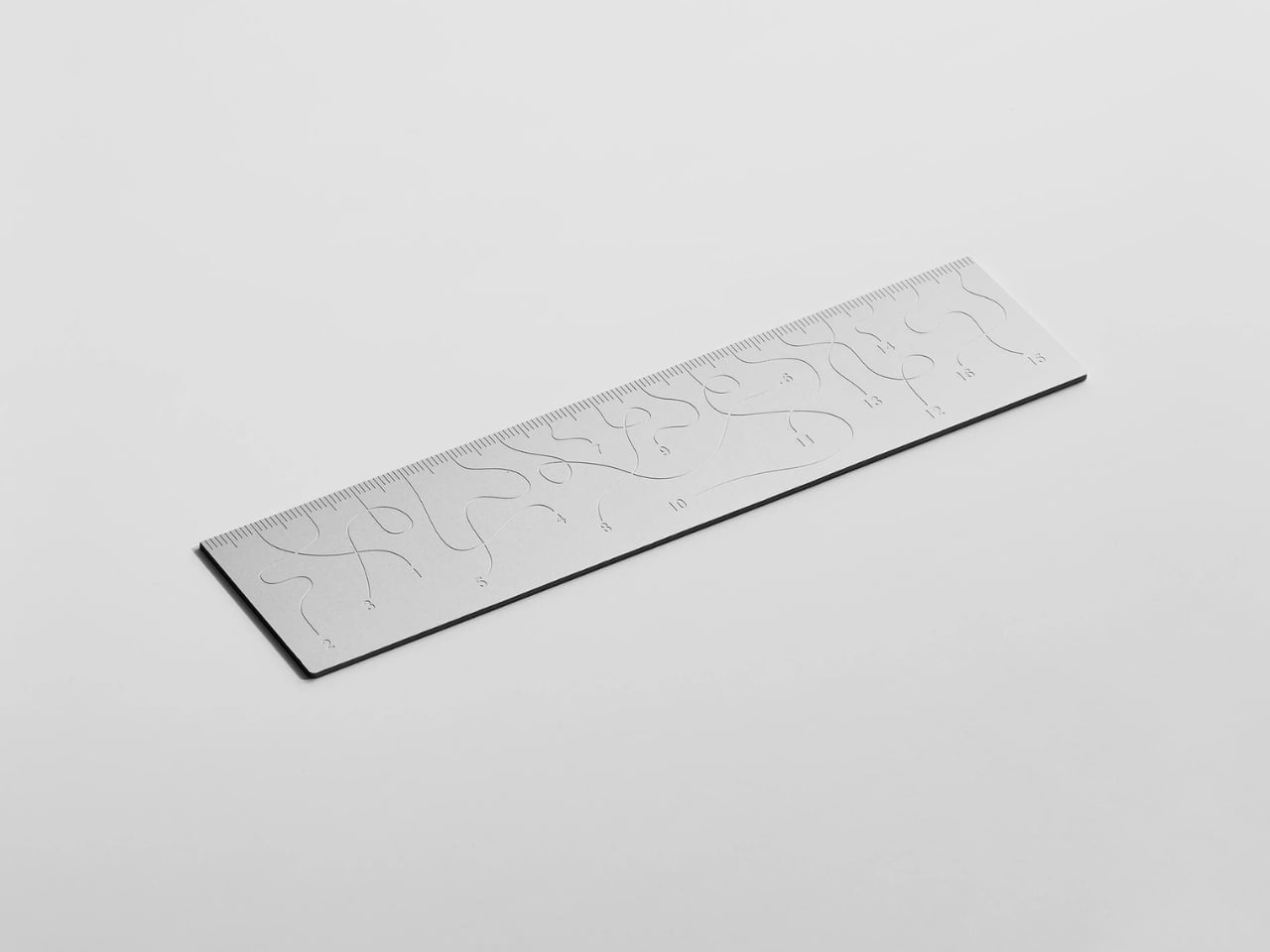
Pick up the WAY ruler and the first thing you notice is that it feels exactly right. It’s small, made from anodized aluminum, and has the kind of weight and finish that signals intention without announcing itself. It’s the sort of object that sits comfortably in a shirt pocket or on the edge of a desk and looks like it belongs in both places. Then you look closer at the markings, and something shifts.

The inscriptions on the WAY don’t run in a clean, predictable line the way ruler markings are supposed to. They wind. They curve and drift across the surface of the aluminum like a path traced through a landscape, referencing, quite literally, the idea of small winding roads and the wandering nature of travel and discovery. The numbers and measurements are there, engraved directly into the material with digital precision, but they’re arranged in a way that asks you to slow down and actually read them rather than glance and move on. It’s legible. Just not immediately.

Designer: Tomas Kral

The engraving itself is worth paying attention to. Kral chose to cut the inscriptions directly into the anodized aluminum rather than printing or applying them as a secondary layer. That decision gives the markings a permanence and a tactility that you don’t get with most production objects at this scale. You can feel the grooves if you run a finger across the surface. The graphic quality of the lettering is considered without being decorative for its own sake. It reads as design that knows exactly what it’s doing, which is what makes the playfulness land rather than feel arbitrary.

The object is small enough to be considered an accessory as much as a tool. Kral has always worked at a scale that pays attention to how things actually live in your hands and in your space, and the WAY is consistent with that. It doesn’t try to be a statement piece in the way that some design objects do, where the visual drama is the whole point. The WAY is quieter than that. The drama is embedded in the detail, in that moment when you realize the markings are doing something unexpected and you have to orient yourself before you can use it.

That slight disorientation is the concept, and it’s a sharp one. There’s a real tension running through modern product design right now, one where the drive to make something visually striking starts to work against the thing it was actually built to do. We’ve all used something that looked incredible but made us work harder than we needed to. Packaging that’s beautiful but impossible to open. Interfaces that prioritize visual elegance over intuitive use. Apps designed to delight that end up frustrating. The WAY ruler doesn’t rail against any of that. It just holds up a small, well-made mirror to it. It’s more of a wink than a manifesto.

The difference between a provocation and a critique matters here. Kral isn’t punishing you for picking up the WAY. The experience of using it is still pleasant. The aluminum feels considered, the engraving is precise, and the object as a whole is genuinely lovely. He’s not making something bad on purpose to prove a point. He’s making something that’s slightly impractical in a very deliberate, very elegant way, and letting you sit with that paradox.

And he followed through on it. The WAY isn’t a prototype or a one-off shown at a design fair and then retired to a shelf. Kral produced a batch and sells them directly through his studio’s website. That matters. It means the object gets to exist in the world the way all good design should, in someone’s hand, on someone’s desk, doing its quiet, considered, slightly inconvenient thing in real life.

At a time when so much product design either chases pure utility or drifts so far toward aesthetics that it forgets what it was originally supposed to do, the WAY ruler manages to be a little bit about both. It’s funny, it’s beautiful, and it makes you think. A ruler, of all things. Leave it to Tomas Kral.

The post Tomas Kral Made a Ruler You Can’t Quite Read on Purpose first appeared on Yanko Design.

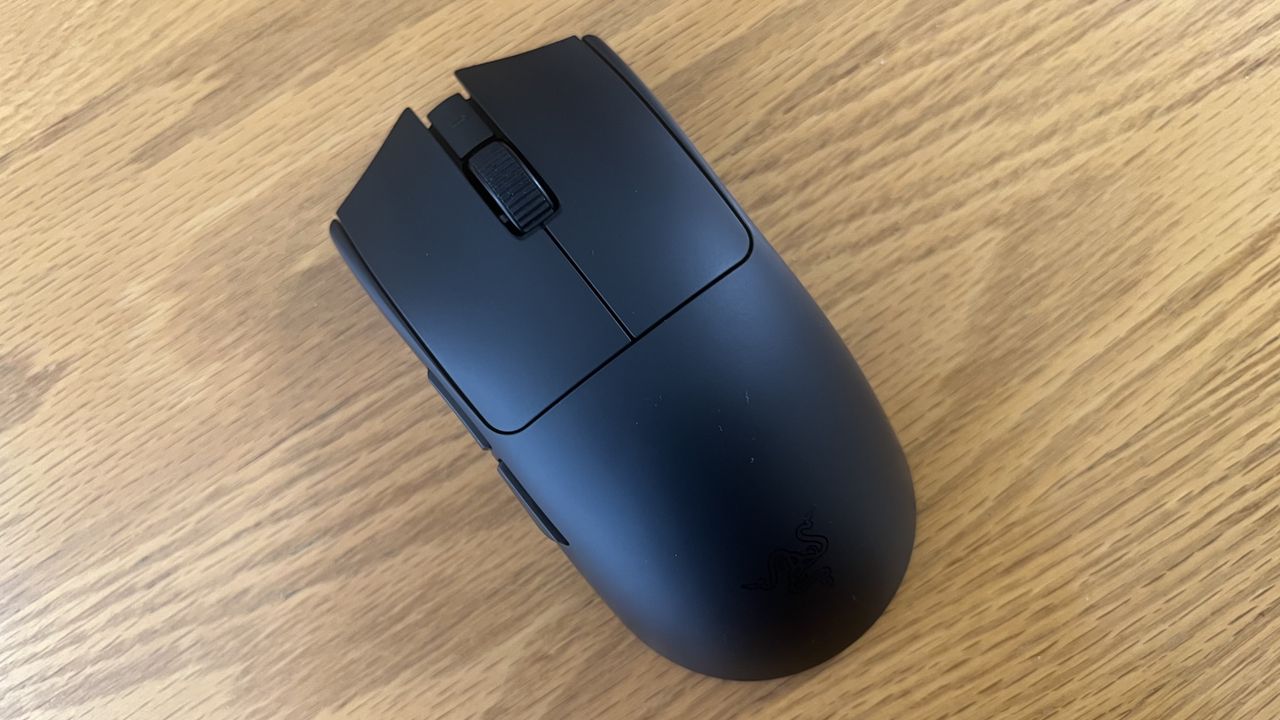
I'm no competitive gamer, but this new top-tier Razer mouse makes me feel like one — the latest version of the industry's favorite is here

Razer's Viper V4 Pro gaming mouse improves upon its predecessor, though it's still very expensive. Even so, it's a top-tier option for competitive players.

The Razer Viper V4 Pro

The Razer Viper V4 Pro is a refresh of its popular predecessor, and improves upon it with a variety of elevated features and functionalities.

Opération Alice : 373 000 sites du dark web fermés, et les acheteurs piégés à leur tour

Par : Korben
25 mars 2026 à 10:30

Europol vient de coordonner un coup de filet massif contre le dark web. En dix jours, 23 pays ont fermé plus de 373 000 sites frauduleux qui proposaient des contenus pédocriminels.

Le plus ironique : l'opérateur n'a jamais livré la moindre donnée, il arnaquait ses propres clients. Et ces clients sont désormais dans le viseur de la police.

Une opération dans 23 pays

L'opération Alice a été lancée le 9 mars et a duré dix jours. Sous la direction des autorités allemandes et avec le soutien d'Europol, des policiers de 23 pays ont participé à ce coup de filet, de la France aux États-Unis en passant par la Suisse, l'Australie et le Royaume-Uni.

L'enquête avait démarré en 2021 autour d'une plateforme baptisée "Alice with Violence CP", qui proposait des contenus pédocriminels à la vente sur le dark web. Au total, 105 serveurs ont été saisis, tous hébergés en Allemagne, et l'opérateur a été identifié : un homme de 35 ans basé en Chine, visé par un mandat d'arrêt international.

L'arnaqueur arnaqué

Le détail qui rend cette affaire si particulière : le suspect n'a jamais livré les contenus qu'il vendait. Il gérait environ 90 000 sites sur le réseau Tor qui proposaient des "packs" de 17 à 215 euros, payables en Bitcoin. Les acheteurs recevaient en échange... rien du tout.

En cinq ans d'activité, il a encaissé 345 000 euros auprès de 10 000 clients qui pensaient acheter des contenus pédocriminels. Un escroc qui arnaque des criminels, en somme.

440 suspects identifiés

Sauf que ces clients, même s'ils n'ont rien reçu, ont quand même tenté d'acheter des contenus illégaux. Europol a donc remonté les paiements en cryptomonnaies et identifié 440 personnes à travers le monde.

Plus de 100 d'entre elles font l'objet d'enquêtes actives. En Suisse, cinq personnes ont été placées en détention. En Allemagne, 14 suspects sont visés par des procédures. La France a mobilisé l'Office de protection des mineurs pour sa part de l'enquête.

On a quand même un type qui a monté 373 000 faux sites depuis la Chine et qui a encaissé 345 000 euros en arnaquant des gens qui voulaient acheter les pires contenus imaginables. Et grâce à lui, la police a maintenant une liste de 440 noms.

Source : Techspot

5 Portable Work Setups That Work Outdoors, in Parks And Even Beaches

22 mars 2026 à 11:40

The line between work and home has blurred into an architectural dialogue. Today’s hybrid living isn’t about working from the kitchen counter but about rethinking how domestic spaces support productivity and calm. Designers now aim to create environments that balance efficiency with ease, where furniture performs multiple roles without sacrificing elegance or comfort.

For high-net-worth homeowners, this shift is about investing in experiences that enhance their lifestyle and property value. Portable chairs and adaptive workstations have evolved into design essentials, dynamic and ergonomic, fluid enough to move with the rhythms of daily life, redefining how we live and work within our spaces.

1. Ergonomic Intelligence and Wellness Value

The strength of any portable workspace lies in its ergonomic foundation. Temporary, low-quality setups often lead to long-term strain and reduced focus. True wellness ROI comes from minimizing physical fatigue through design that supports the body’s rhythm, integrating temperature-responsive materials, balanced support, and kinetic flexibility rather than relying on surface aesthetics alone.

When selecting furniture, prioritize chairs with dynamic lumbar support and workstations with seamless height adjustment. The ideal setup becomes a biophilic cocoon, comforting, adaptive, and attuned to your natural movement, ensuring that even during long digital sessions, productivity and physical harmony remain perfectly aligned.

The Sayl concept chair by Charley reflects the changing ways we live, work, and play. As homes have evolved into hybrid offices, gyms, social spaces, and relaxation zones, our furniture needs have changed too. Charley even considers the hours we spend gaming or binge-watching, recognizing that chairs today must support multiple activities while remaining comfortable and functional. Designed by Herman Miller, the Sayl chair combines high-end design with practical usability, allowing users to maximize their space without sacrificing luxury or ergonomics.

The chair’s muted grey tones ensure it blends effortlessly into any interior, while bright orange accents draw attention to pivotal touchpoints, making it intuitive to use. A foot pedal mechanism allows the chair to collapse easily, providing a convenient, space-saving solution for modern homes. In the post-pandemic era, furniture design has shifted towards modular, flexible, multifunctional, and compact solutions. The Sayl chair embodies all these qualities, offering a versatile, stylish, and practical seating option for today’s hybrid lifestyle.

2. Aesthetic Integrity and Material Authenticity

Every portable unit should carry a strong aesthetic value that complements its architectural surroundings. Materials must feel genuine and timeless, like solid wood, brushed metal, and high-performance textiles that reveal craftsmanship rather than conceal it. This honesty of composition creates visual depth and emotional connection, reinforcing the idea that beauty lies in authenticity, not imitation.

The design should remain sculptural yet understated, integrating seamlessly into curated interiors. Its finish must align with the home’s palette, allowing it to coexist gracefully within the space. When not in use, it should rest as a quiet architectural accent rather than a workplace intrusion.

Working from home has spared many from long commutes and office distractions, yet it has also made work feel more solitary. Sitting by the same wall each day, even in a well-designed home office, can feel disconnected from the world beyond virtual meetings. While folding furniture remains popular for its space-saving benefits, stackable, all-weather alternatives are emerging as a smarter choice. Industrial designer Gökçe Nafak introduces the uuma, a portable table-and-chair combo designed as a single stackable unit that transitions effortlessly between indoor and outdoor settings.

Perfect for those who enjoy working in the garden, on the balcony, or in flexible spaces, the uuma blends convenience with creativity. Made from fibreglass, it is lightweight, durable, and sustainable. Its modular design features a height-adjustable metal frame and detachable parts that assemble easily. The chair transforms into a table within moments, offering comfort, portability, and style in three vibrant, modern colors.

3. Spatial Flow and Footprint Efficiency

The effectiveness of any modern workstation depends on how well it manages spatial flow. In compact urban homes, every inch counts, making footprint reduction a key design priority. A thoughtfully designed system should retract or fold away seamlessly, minimizing its physical presence while supporting the need for adaptable, multi-functional living spaces that evolve throughout the day.

Mobility and refinement define its usability. Tables and desks should transition effortlessly from work to leisure, enabling a quick shift from boardroom mode to family dining. Silent, non-marking wheels and intuitive movement reflect superior engineering and respect for interior balance.

In a shared workspace like WeWork, or a peaceful spot under a tree, flexibility defines modern work culture. Industrial designer Matan Rechter responded to this shift with Shelly, a personal outdoor workspace that combines privacy, shade, and portability for those who prefer working outside. Inspired by the remote work movement, Shelly was designed to bring focus and comfort to outdoor environments like public parks.

Its name comes from its shell-like canopy that folds in and out with ease. Built from lightweight aluminium profiles and durable Cordura fabric, Shelly shields users and electronics from harsh UV rays. The canopy’s retractable design, reminiscent of an armadillo’s shell, provides instant shade and convenience. Compact and portable, Shelly transforms outdoor work into a comfortable, productive, and stylish experience anywhere, anytime.

4. Technological Integration and Power Autonomy

A modern hybrid workstation should function as a self-sufficient ecosystem, anticipating digital needs without visual clutter. True design intelligence lies in seamless connectivity, like built-in charging, concealed wiring, and intuitive access that keeps the workspace both elegant and efficient. Power autonomy ensures independence from fixed outlets, supporting the growing demand for mobility and flexibility in home environments.

Features such as integrated induction charging pads, hidden cable channels, and optional battery packs transform furniture into an adaptive tool. These enhancements merge aesthetics with performance, allowing users to remain connected, productive, and untethered within any architectural setting.

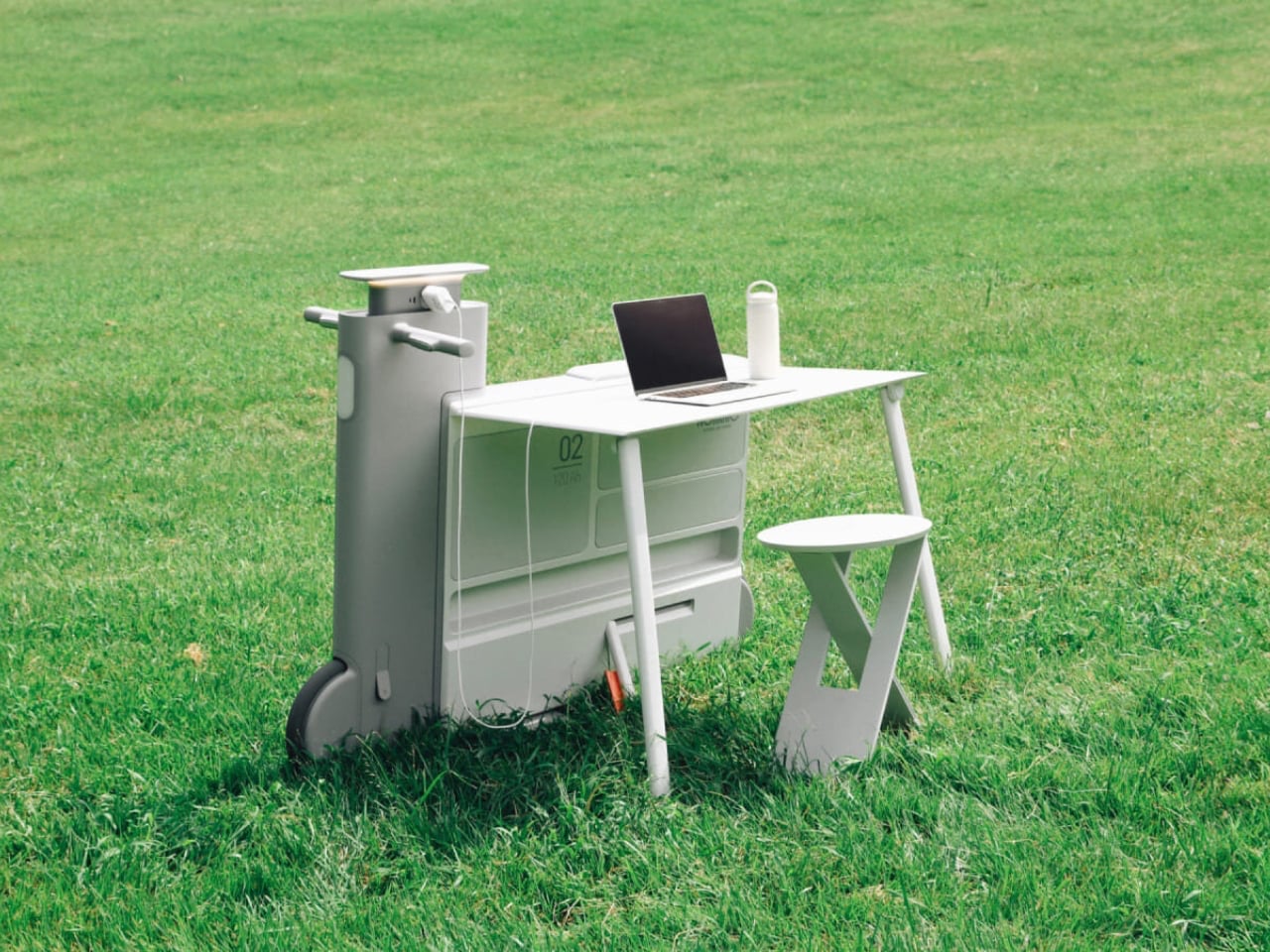
Another standout example is Worknic, a portable desk developed through the Samsung Design Membership program, sponsored by Samsung Electronics. Designed for flexibility, Worknic allows users to set up a functional workspace anywhere, whether in a home, park, or even on the beach, giving them the freedom to change their environment whenever needed.

The desk is built on wheels, making it easy to move and position in the ideal spot. Once in place, it unfolds to reveal a worktable, stands, and a built-in power source, while a pull-out stool completes the setup. Although details about battery life, weight, and additional features are limited, the concept prioritizes mobility, convenience, and adaptability. Worknic offers a creative solution for those who want a portable, fully equipped office that keeps productivity and inspiration in balance.

5. Design Resilience and Longevity Investment

For discerning homeowners, longevity defines true value. A well-crafted workstation should possess design resilience, built to endure daily use while retaining its original elegance and performance. This durability ensures a higher return on investment, setting it apart from fast furniture options that quickly lose both form and function.

Choosing established design houses and proven construction techniques guarantees structural integrity and timeless appeal. A five-to-ten-year warranty offers assurance that the piece is not just a purchase but a long-term architectural companion, blending endurance with refined craftsmanship for years of dependable, sophisticated use.

For those constantly on the move, finding a comfortable place to rest or work can be challenging. Cities often lack public resting areas beyond cafés and restaurants, making it tempting to carry a portable chair, though the idea quickly loses appeal due to its bulk and inconvenience. Recognising this need, designer Tejash Raj created the OmniSeat, a compact and ergonomic seating concept designed for people who stay productive while travelling, commuting, or working outdoors.

The OmniSeat features a lightweight frame, built-in storage, and device holders, all folding neatly into a slim form that fits in a backpack or attaches to a bike rack. A detachable tray accommodates laptops or tablets, with cable clips to keep cords tidy. Combining portability, comfort, and function, the OmniSeat offers a glimpse into the future of mobile workspaces.

The high-design portable workstation redefines the boundaries of work and home, merging productivity with tranquillity. It transforms interiors into fluid, balanced spaces where focus meets ease. Its true value lies in the freedom to work anywhere, capturing sunlight, inspiration, and connection without sacrificing comfort or creativity.

The post 5 Portable Work Setups That Work Outdoors, in Parks And Even Beaches first appeared on Yanko Design.

8 Best Desk Accessories for Men That Don’t Look Like They Came From a Corporate Supply Closet

21 mars 2026 à 11:40

There’s a version of a desk setup that communicates everything about how little thought went into it. A black mesh organizer from the bottom shelf of a supply closet. A mouse pad that came free with something else. A cable clip in beige. The desk functions, technically, and does so with a level of visual enthusiasm that matches a waiting room.

The accessories below were designed by people who thought about this harder. Some carry authentic 1970s Italian design heritage. Some are running AI in the background to actively shape your environment. One contains material roughly 20 million years older than the Earth it now rests on. What they share is a quality of intentionality. Each was built as an object worth keeping on a desk, not just stashing in a drawer, because it earns its surface area through how it works, how it looks, or both at once. For men who have graduated from the corporate supply closet aesthetic, these eight represent a meaningfully different set of options.

1. Lenovo AI Workmate Concept

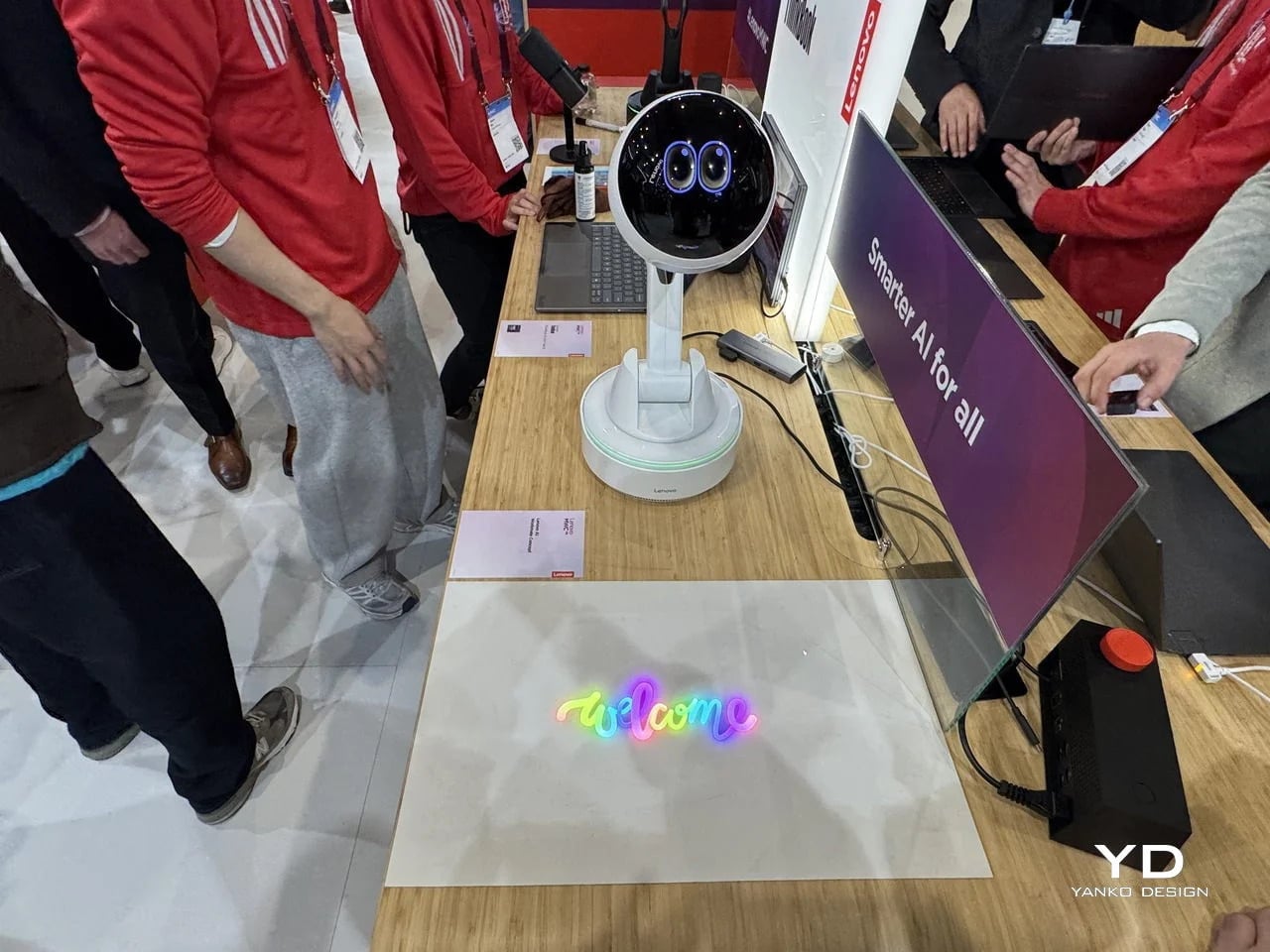
Working alone all day carries a specific kind of friction that most desk setups quietly ignore. Questions accumulate, decisions pile up, and the AI tools meant to support you sit behind a keyboard input that gives nothing back spatially or visually. Lenovo’s AI Workmate Concept, unveiled at MWC 2026, takes that problem seriously enough to build a physical object around it. The result is a desk companion in the most literal sense: a spherical head on an articulated arm mounted on a circular base, with animated eyes on its front display that shift and orient as it processes and responds. The form is compact, the presence is deliberate, and the intent is clear from the first time it moves.

The arm is the most consequential design decision here. Because it moves, the Workmate can orient itself toward whatever holds attention in front of it, a document laid flat on the desk, a person leaning back in their chair, or something happening at the periphery. That range of motion is what separates it from a smart speaker that has been given a screen and called a companion. Spatial awareness is embedded in its posture, not just its software. For men who spend long hours alone at a desk and find text-based AI interaction increasingly impersonal and context-free, the Workmate proposes something more honest about what presence and assistance can look like from an object sharing your workspace.

What We Like

  • Articulated arm gives the device genuine spatial awareness, orienting toward objects and people rather than remaining static
  • Animated eyes on the front display make AI interaction feel more present and less transactional than any screen-based interface

What We Dislike

  • Currently a concept unveiled at MWC 2026, with availability, pricing, and final specs still unconfirmed
  • The novelty of animated eyes may carry more emotional weight than the practical functionality justifies over time

2. Levitating Pen 2.0: Cosmic Meteorite Edition

Most pens sit on a desk and do nothing interesting when they’re not being used. The Levitating Pen 2.0 Cosmic Meteorite Edition refuses that arrangement entirely. It floats at a 23.5-degree angle above its magnetic base, creating a suspension that stops people mid-sentence when they notice it. The design draws from spacecraft aesthetics, specifically the visual language of the USS Enterprise, and the tip incorporates a genuine fragment of Muonionalusta meteorite, a material approximately 20 million years older than the Earth it now rests on. It functions as a working ballpoint pen, which means it is simultaneously a collector’s object, a desk focal point, and a writing tool occupying the same physical form.

What keeps this from reading as pure novelty is how it behaves in your hands. The Levitating Pen is fidget-worthy in the best sense, the kind of object you reach for during a long call or a pause between tasks without consciously planning to. For men who collect objects with a verifiable reason behind them, the meteorite tip offers something most limited editions simply don’t: provenance with a story that doesn’t require a certificate to feel real. You’re holding material from beyond the solar system. That fact changes the weight of the object in your hand when you stop to think about it, and that shift is exactly what separates a desk accessory from a desk object worth keeping.

Click Here to Buy Now: $399.00

What We Like

  • Genuine Muonionalusta meteorite tip connects the pen to a tangible, verifiable piece of cosmic history
  • Magnetic levitation display creates a desk focal point that requires no ongoing maintenance once positioned

What We Dislike

  • The floating display requires a flat, stable surface, limiting where it can sit effectively
  • Limited edition production means restocking after sellout is not guaranteed for future buyers

3. BOB Desk Organizer

Joe Colombo designed BOB in 1970, at a time when desk organizers were either plastic trays with zero intentionality or overengineered systems that looked more complicated than the mess they were supposed to fix. He chose neither direction. BOB is a compact polyurethane gel form, elongated and low-profile, almost pill-shaped when viewed from above, with one end rising into a soft dome and the other tapering nearly flat. B-Line, an Italian label dedicated to reissuing objects from discontinued original molds, brought it back in 2023 across five colorways: terracotta, slate blue, mustard yellow, warm white, and a frosted translucent version called ice. The selection alone suggests a designer thinking about rooms rather than offices.

The top surface divides into three functional zones without any visible partition between them. The dome end opens into a large oval scoop for bulkier items. The center holds a three-by-four grid of individual circular holes, each sized precisely for a single pen or brush. The tapered tail offers two horizontal slot grooves for flat objects like rulers or small notebooks. None of this reads as a feature list in person. It reads as a single continuous gesture that happens to keep things organized along the way. For men who want a desk object with actual design history behind it rather than a branding story retrofitted over generic injection molding, BOB is nearly impossible to improve on.

What We Like

  • Rooted in authentic 1970s Italian design history, reissued from Joe Colombo’s original mold by B-Line
  • Three distinct functional zones are built into one continuous organic form with no visible hardware or dividers

What We Dislike:

  • Polyurethane gel construction may show surface wear or discoloration with extended daily use
  • The low-profile form works best for lighter objects and may not support heavier desk tools effectively

4. DEEP

DEEP operates on a premise most desk lamps don’t bother with: the working environment around you should configure itself to match what you are about to do, rather than waiting for you to adjust it manually. Switch it on with a spinning-top-inspired power button, tell it whether you’re studying, coding, reading, or doing creative work, and it adjusts both light quality and ambient sound before you’ve had to think about either. A camera positioned at eye level monitors your focus state in real time, functioning like a built-in productivity coach without requiring a separate app or a separate device taking up additional surface area.

What separates DEEP from a connected lamp with a smart home feature set is what it does across repeated sessions. The system saves your manual adjustments over time, builds a personal profile from the conditions that consistently work best for you, and begins applying them automatically without being prompted. Side buttons allow precise overrides for days when the default doesn’t fit. For men whose desks have become cluttered with single-function devices that each do one thing adequately, DEEP represents a genuine consolidation. It folds a lamp, an ambient sound environment, and a passive focus monitor into a single object that becomes more attuned to how you work the longer it stays on your desk.

What We Like

  • AI builds a personal focus profile across sessions and applies your optimal working conditions automatically over time
  • Combines lighting, ambient sound, and real-time focus monitoring without requiring any additional hardware

What We Dislike

  • Camera-based focus tracking may feel uncomfortable for users sensitive to passive environmental monitoring
  • Ambient sound adjustment effectiveness varies significantly based on an individual’s working environment and noise tolerance

5. Rolling World Clock

Every desk clock tells you one thing. This one tells you twelve. The Rolling World Clock is a 12-sided object with a single hand and an operation that couldn’t be more direct: set it on any face, and the hand reads the correct local time for the city printed on that side. The twelve cities span the major global time zones, including London, Paris, Cape Town, Moscow, Los Angeles, Karachi, Mexico City, New York, Shanghai, Tokyo, Sydney, and New Caledonia. For men who manage work across multiple time zones or simply have family spread across continents, the mental arithmetic of figuring out what time it is somewhere else is one of the more persistent small irritations in a working day, and this object removes it without adding a screen.

The design decision that makes this worth keeping on a desk rather than just owning is the total absence of anything unnecessary. No digital display. No charging cable. No app. Just a tactile, rollable object you turn to the city you need and set down. Available in black and white, it occupies desk or shelf space without reading as a gadget or demanding attention it hasn’t earned. There’s a quiet pleasure to the interaction that most clocks don’t provide: the act of picking it up, choosing a place in the world, and reading the time. There is a physical engagement with global time that a phone screen never manages to replicate.

Click Here to Buy Now: $49.00

What We Like

  • Covers twelve major time zones in a single tactile object with no digital display, no app, and no charging required
  • Minimal form reads equally well on a desk or shelf without visually registering as a tech accessory

What We Dislike

  • A single clock hand requires slightly more reading attention than a digital display for precise timekeeping
  • The 12-city selection covers major zones well, but may not include every specific time zone a user needs regularly

6. Fidget Cube

The case for keeping a dedicated fidget object on a desk is more rational than it sounds from the outside. Restless hands during long calls, slow-loading processes, or decisions you’re turning over without fully committing to are a real and recurring part of working at a desk, and the Fidget Cube was built precisely for that condition. Six sides offer six different tactile surfaces: a cluster of clickable buttons, a gliding joystick, a row of flip switches, a smooth surface designed for the thumb’s natural breathing motion, a rolling ball set into one face, and a spinning disc. The variety means your hands will find a preferred surface quickly and return to it across the session without thinking about it.

What keeps this from reading as a toy is the restraint built into how it was designed. It doesn’t look out of place on a desk or conference table, particularly in the Midnight black colorway, which sits visually neutral among the standard dark objects that populate most professional environments. For men who have noticed that physical repetitive movement genuinely sharpens how they think through a problem, this is one of the more honest tools available at any price point. It takes a real behavioral truth seriously and gives your hands a quiet, clean way to act on it without disrupting anyone around you or drawing attention to what you’re doing.

What We Like

  • Six distinct tactile surfaces address a wide range of fidgeting habits within one compact, pocketable object
  • Discreet colorways, particularly Midnight black, keep it visually neutral in professional desk environments

What We Dislike

  • Some click mechanisms can produce an audible sound in quiet rooms or during video calls
  • Serves no secondary organizational function on a desk, occupying surface space with a purely tactile purpose

7. MOFT Z Sit-Stand Desk

Sit-stand desks have spent years being expensive, physically large, or permanently locked to a specific room. The MOFT Z takes a completely different approach, collapsing to something closer to a slim notebook in thickness while delivering a full ergonomic range through an origami-inspired Z-structure. It provides one standing mode and three seated position angles, which is enough postural variety to meaningfully shift how you feel across a long working session. For men who divide their time between home, a co-working space, a client’s office, or anywhere other than a fixed desk, the ability to carry a sit-stand setup in a bag removes an ergonomic compromise that most standing desk products are structurally incapable of solving.

The weight is what makes it a genuine solution rather than a clever concept. Ergonomic equipment that stays home because it’s too heavy or awkward to transport defeats the purpose of improving how you work across different locations. The MOFT Z doesn’t have that problem. Unfold it in seconds, set your laptop on the surface, and you’ve built the same ergonomic posture you’d have at a standing desk that costs several times more and cannot leave the floor it occupies. For anyone who has watched their posture decline steadily across a long afternoon of flat laptop work, this is a practical correction that goes where you go and requires no tools, no assembly, and no installation to use.

What We Like

  • Origami Z-structure provides one standing mode and three seated positions with no setup tools required
  • Ultra-lightweight, paper-thin folded profile makes it genuinely portable across different working locations

What We Dislike

  • Surface area restricts how much additional equipment can sit alongside a laptop in standing mode
  • Stability may be reduced under heavier setups or on surfaces that aren’t completely flat and firm

8. LEGO-Style Silicone Cable Organizer

Cable management has a way of being solved temporarily and then quietly abandoned. The solution works for a week, then a new cable enters the setup, or the organizer shifts position, or it turns out the adhesive left a mark on the desk. This silicone cable organizer approaches the problem differently. Shaped after a lozenge pack, it uses peg-topped cylindrical columns to wrap and hold individual cables in separate, stable positions. Multiple units can be stacked or arranged in rows, and three sizes cover the range from a single charging cable to a full multi-device setup: a 2×2 mini, a 3×3 medium, and a 2×5 large, with the option to place two cables on top of each other within the same row.

The design was born from a specific personal frustration: cables tangling with other items inside a bag, the kind of small recurring annoyance that accumulates into a genuine grievance over time. That origin shows in how focused the solution is. There’s no overengineering, no branded clip mechanism, no custom routing system that only works with certain cable gauges. The micro suction tape base grips the desk surface firmly without permanent adhesion, meaning it moves when the setup changes and holds when it doesn’t. For men who have gone through two or three cable management products and quietly abandoned all of them, the directness here is precisely the argument for this being the last one you need.

What We Like

  • Three modular sizes cover setups from a single cable to a full multi-device workspace without custom parts
  • Micro suction tape base holds securely without permanent adhesion, leaving the desk surface undamaged

What We Dislike

  • Silicone material collects lint and dust more readily than hard plastic alternatives
  • The LEGO-inspired visual style reads as playful and may not suit every desk aesthetic preference

The Best Desk Is One You Actually Thought About

A desk says something whether you intend it to or not. It communicates how seriously you take the hours you spend there, what kind of work you believe deserves a proper environment, and whether the objects around you were chosen or simply accumulated. The eight accessories above represent a different kind of accumulation, one where every item on the surface has a reason to be there, a story worth telling, or a function that genuinely improves how the day moves.

None of them require a complete overhaul. One rolling clock, one floating pen, one lamp that learns how you work — any single object from this list shifts the energy of a desk in a direction worth going. The corporate supply closet aesthetic isn’t inevitable. It just tends to win by default when no one pays attention. These eight are the case for paying attention.

The post 8 Best Desk Accessories for Men That Don’t Look Like They Came From a Corporate Supply Closet first appeared on Yanko Design.

Quand la publicité ciblée devient un outil de surveillance pour le gouvernement américain

Par : Korben
20 mars 2026 à 09:16

Des documents obtenus par la presse révèlent que les douanes américaines ont utilisé les données de localisation issues du système publicitaire en ligne pour pister des téléphones. Et ce, sans mandat.

Le mécanisme repose sur les enchères publicitaires en temps réel, qui diffusent vos coordonnées GPS à des milliers d'entreprises chaque jour. Apple a limité la casse sur iPhone, mais ça ne suffit pas.

Comment vos applications vous trahissent

Le système est assez redoutable dans sa simplicité. À chaque fois qu'une publicité s'affiche dans une application sur votre smartphone, une enchère se joue en quelques millisecondes.

Votre téléphone envoie ce qu'on appelle une requête d'enchère, qui contient votre identifiant publicitaire, vos coordonnées GPS, votre adresse IP, le type d'appareil utilisé, et même vos centres d'intérêt supposés. Ces informations sont envoyées simultanément à des milliers d'annonceurs potentiels, et tous les participants reçoivent ces données, qu'ils remportent ou non l'enchère.

Des courtiers en données se font passer pour des acheteurs publicitaires et récoltent ces informations à grande échelle. Mobilewalla, par exemple, a collecté les données de plus d'un milliard de personnes, dont 60 % provenaient de ces enchères publicitaires selon la FTC (le gendarme du commerce américain).

Gravy Analytics, un autre courtier, a vu fuiter des données qui référençaient des milliers d'applications : Candy Crush, Tinder, Grindr, MyFitnessPal, des applications de grossesse ou religieuses. Beaucoup de développeurs ne savaient même pas que leurs applications alimentaient cette collecte.

Des agences fédérales clientes depuis des années

Entre 2019 et 2021, les douanes américaines ont mené un programme pilote pour tester si ces identifiants publicitaires pouvaient servir à reconstituer les déplacements de personnes sur le territoire. Le service de l'immigration (la célèbre ICE) et le FBI ont aussi acheté de la donnée de localisation auprès du courtier Venntel, et s'en sont servis pour identifier des immigrés ensuite arrêtés.

L'ICE a aussi acquis un outil appelé Webloc, qui collecte la position de millions de téléphones chaque jour et permet de lancer des recherches par zone géographique.

En mars 2026, 70 parlementaires américains ont demandé l'ouverture d'une enquête par l'inspecteur général du département de la sécurité intérieure. Le Montana est devenu le premier État à interdire aux autorités l'achat de données sensibles qui nécessiteraient normalement un mandat. Au niveau fédéral, une loi portée par le sénateur Ron Wyden a été votée par la Chambre en 2024, mais n'a pas passé le Sénat.

Ce que vous pouvez faire, et ce qu'Apple a déjà fait

Bonne nouvelle quand même pour les utilisateurs d'iPhone : depuis 2021, Apple demande systématiquement si vous autorisez le suivi publicitaire via la fonction "Demander à l'app de ne pas me suivre".

Résultat : 96 % des utilisateurs américains ont refusé le suivi, ce qui désactive l'identifiant publicitaire sur la plupart des iPhone. Une étude a même montré que les utilisateurs d'iPhone avaient subi moins de fraudes financières après cette mesure.

Côté Android, il est aussi possible de désactiver l'identifiant publicitaire, mais la démarche est bien moins visible. L'EFF (Electronic Frontier Foundation) recommande dans tous les cas de vérifier les permissions de localisation accordées à vos applications et de les limiter au strict minimum.

On savait que la publicité en ligne aspirait pas mal de données, mais là on parle quand même d'agences gouvernementales qui achètent tranquillement votre position GPS sans passer par un juge. Pour protéger sa vie privée , il ne suffit plus de refuser les cookies.

Le fait que par exemple, Apple, ait mis en place la transparence du suivi publicitaire sur iOS en 2021, et que 96 % des gens aient dit non, montre bien que personne ne souhaite être pisté. On ne peut pas vraiment conclure que le problème est réglé pour autant, car tout le système d'enchères publicitaires continue de fonctionner en arrière-plan, avec ou sans identifiant.

Source : Gizmodo

En toute décontraction, Casio lance une calculatrice à 600 euros

Par : Korben
19 mars 2026 à 15:53

Casio vient de dévoiler la S100X Urushi, une version laquée à la main de sa calculatrice haut de gamme. Produite en 650 exemplaires par des artisans japonais, elle sera disponible le 9 avril pour 99 000 yens, soit environ 600 euros. Un petit budget donc. Mais pourquoi est-elle si chère ?

À cause de la laque pardi !

Allez je vous dis tout. Cette S100X Urushi est recouverte de laque urushi, une technique japonaise vieille de plusieurs siècles. La laque est appliquée à la main par les artisans de Yamakyu Shikko, un atelier de laquerie qui a presque 95 ans d'existence. Le procédé prend environ un mois par unité, entre les couches de laque, le séchage et l'inspection finale.

Le résultat est un reflet quasi miroir sur le boîtier noir, avec de légères variations d'une pièce à l'autre puisque chaque application est unique. Casio indique d'ailleurs que la laque vieillit bien avec le temps, ce qui est plutôt logique et bien heureux, vu la réputation de cette technique au Japon.

Une base déjà très haut de gamme

La S100X qui sert de base à cette édition n'est pas n'importe quelle calculatrice. Elle est fabriquée à l'usine Yamagata Casio, la seule unité de production de la marque au Japon, et utilise un corps en aluminium usiné avec des bords diamantés.

L'écran LCD incliné affiche 12 chiffres dans un bleu-noir qui rappelle l'encre de stylo-plume, et le clavier à structure pantographe offre des touches basses avec un retour tactile précis. Le tout pèse 265 grammes pour 183 x 110,5 x 17,8 mm. La version standard est vendue elle 38 500 yens au Japon, soit environ 235 euros, mais votre comptabilité vaut mieux que ça non ?

650 exemplaires dans le monde

La S100X Urushi sera mise en vente le 9 avril 2026 au prix de 99 000 yens, soit à peu près 600 euros. Elle est livrée dans un coffret avec des détails dorés et le logo Casio en feuille d'or. La production est limitée à 650 unités dans le monde, et on imagine bien que les collectionneurs japonais vont se ruer dessus.

Bon, 600 euros pour une calculatrice, ça fait quand même lever un sourcil. Mais on n'est clairement pas dans le même registre qu'une Casio de bureau à 10 balles. L'angle artisanal est sincère : un mois de travail par pièce, de la laque naturelle posée par des artisans avec presque un siècle de savoir-faire, ça a un prix.

Casio fait ici ce que les horlogers japonais comme Seiko pratiquent depuis longtemps, appliquer un savoir-faire ancestral à un objet technique. Reste que 650 exemplaires à ce tarif, ça va partir très vite, même si on aime bien l'idée.

Source : Hypebeast

Stop Adjusting Your Office Chair. The LiberNovo Omni Adjusts to You Instead

Par : Sarang Sheth
19 mars 2026 à 01:45

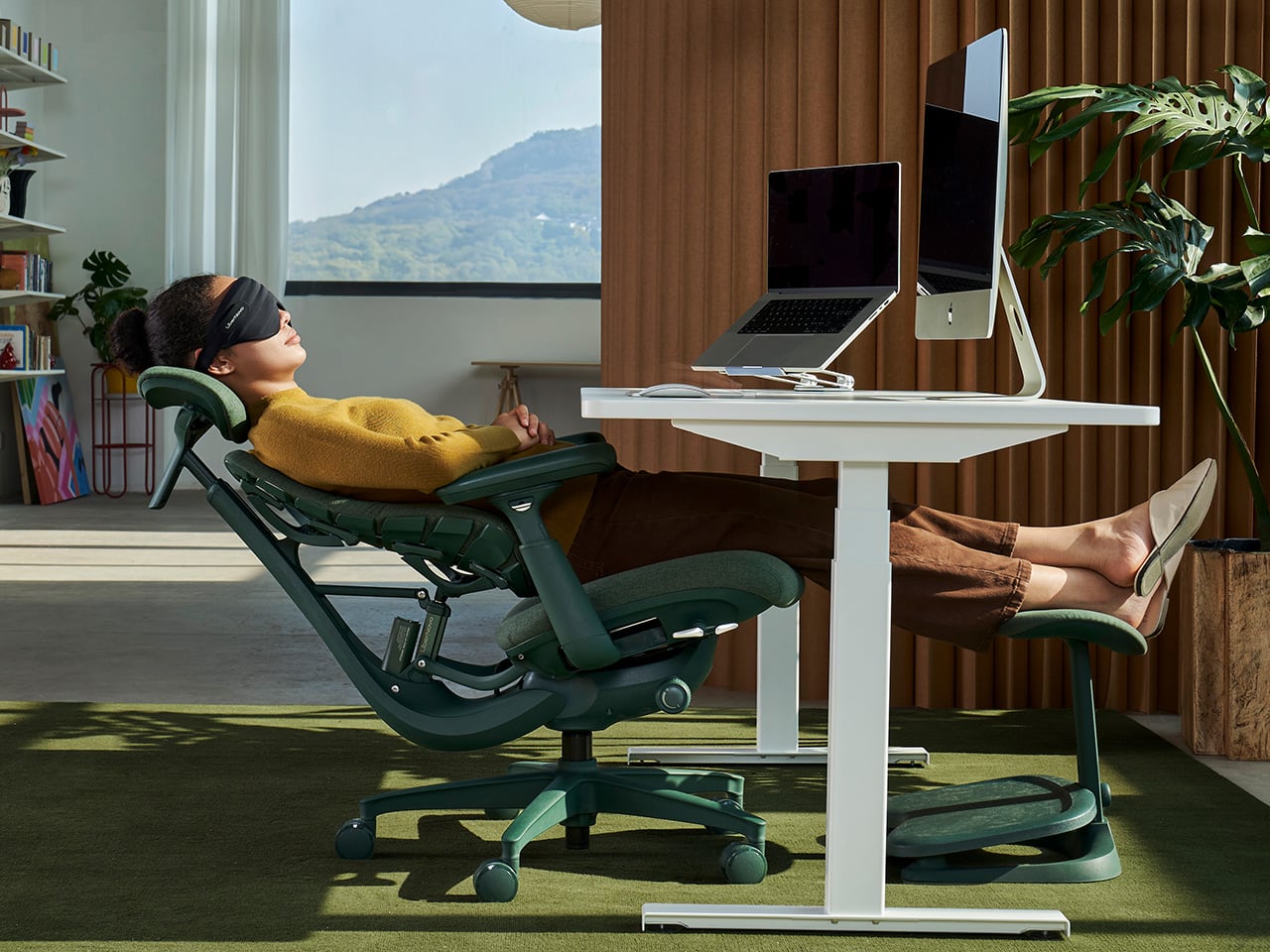
Spring cleaning has a branding problem. Every year, the ritual circles back to the same tired playbook: declutter the shelves, reorganize the desk, maybe splurge on a new monitor arm. What never makes the list is the thing your body has been arguing with for eight hours a day, five days a week. The chair. It sits there, static and indifferent, while you shift and squirm through another afternoon of accumulated spinal resentment. LiberNovo’s Spring Refresh campaign, running now through April 15 across North America, is built on a premise the rest of the furniture industry still hasn’t internalized: the most important thing in your workspace is the one holding your skeleton together.

We’ve been fans of the LiberNovo Omni pretty much since day one (and the chair even secured an iF Design Award this year) because it rejected the foundational assumption behind almost every ergonomic seat on the market. Traditional chairs treat sitting as a problem to be solved with the right fixed position. The Omni treats it as a continuous, dynamic event. Its Bionic FlexFit backrest uses 16 spherical joints and eight elastic panels to create a responsive S-curve that maintains full spinal contact as you move, lean, and fidget through your day. Rather than locking you into an ideal posture and hoping for the best, it follows you. LiberNovo calls this “Support by Motion,” and after three rounds of coverage, it remains the most honest description of what the chair actually does.

Designer: LiberNovo

Click Here to Buy Now: $848 $1099 ($251 off). Hurry, deal ends in 48-hours!

What the Spring Refresh edition brings into focus is the Moss Green colorway, and the design rationale runs deeper than seasonal window dressing. Office furniture has defaulted to clinical grays and matte blacks for decades because they read as serious and professional, but that palette does nothing for the visual fatigue that compounds over a long work session. The Moss Green option is a low-saturation, earth-toned hue informed by biophilic design principles, which connect sustained exposure to natural tones with measurable psychological restoration. The short-pile velvet surface introduced with this variant reinforces that effect tactilely, rated to withstand over 50,000 wear cycles while remaining breathable against skin. It is a quieter, more grounded presence than the existing Midnight Black and Space Grey options, and it suits the growing cohort of professionals who want their workspace to feel less like a server room.

The four recline modes map to distinct cognitive and physiological states that anyone logging long creative or technical sessions will recognize. The 105° Deep Focus position keeps the body alert and slightly forward, suited for concentrated output where posture and attention run in parallel. The 120° Solo Work setting is where most of a professional day actually happens, steady and supported without any sense of being locked in place. At 135°, the chair shifts into active recovery territory, appropriate for long calls or the kind of diffuse thinking that does not look like work but frequently is. The 160° Spine Flow position, combined with the OmniStretch motorized stretch function, delivers a five-minute spinal decompression cycle that reframes the mid-afternoon energy crash as something addressable rather than just inevitable.

The Spring Refresh pricing is tiered across both US and Canadian markets for the duration of the campaign. In the US, the Omni starts at $848, with Spring Refresh bundles discounted up to 30% off. Orders over $800 receive a $15 instant checkout discount, orders above $900 include the Eco Comfort Set comprising a silk eye mask, eco tote bag, and StepSync mat, and orders over $1,000 unlock the Ultimate Perks Pack with a branded cap, sticker set, tote bag, and limited-edition fridge magnet. Canadian pricing starts at CA$1,292, with bundles up to 34% off and parallel tier thresholds at CA$1,200, CA$1,400, and CA$1,500 respectively. The promotion runs through April 15 in both regions.

The broader argument LiberNovo is making this season is worth sitting with. Most workspace upgrades stop at the surface: a new desk pad, better cable management, the kind of organization that photographs well but does not change how your body feels at 4pm. The Omni, particularly in the Moss Green edition, pushes toward a different category of improvement, one that treats the workspace as health infrastructure rather than aesthetic backdrop. That is a less immediately gratifying pitch than a fresh coat of paint on the home office, but for anyone who has spent enough time in a bad chair to understand what a good one actually costs, it is the more compelling one.

Click Here to Buy Now: $848 $1099 ($251 off). Hurry, deal ends in 48-hours!

The post Stop Adjusting Your Office Chair. The LiberNovo Omni Adjusts to You Instead first appeared on Yanko Design.

Reconnaissance faciale en open bar pour la police

Par : Korben
17 mars 2026 à 14:45

Depuis 2022, TOUS les policiers et gendarmes français ont accès à un logiciel de reconnaissance faciale directement sur leur téléphone de service. En vous prenant en photo lors d'un contrôle (chiiiiiz 😀), ils peuvent ensuite, en quelques secondes, consulter un énooOoorme fichier contenant 9 millions de portraits.

Tu parles d'un trombinoscope !!

Voilà, c'est ce que révèle une enquête impressionnante du média Disclose , documents internes du ministère de l'intérieur à l'appui.

En bref, les forces de l'ordre sont équipées d'un gros smartphone baptisé NEO, un genre de pavé noir rectangulaire qui ressemble à une tablette de poche et dessus, y'a une appli avec accès direct au TAJ (traitement d'antécédents judiciaires), un fichier qui couvre plus d'un quart de la population française. Nom, date de naissance, adresse, profession... et parfois des infos sensibles comme l'appartenance politique ou religieuse.

Ce logiciel, développé par l'allemand Cognitec (surement la contraction du mot "tech" et du mot "cogner"... rooooh) , affiche les 200 photos les plus ressemblantes en moins d'une minute. C'est comme la reco faciale de Yandex mais en encore plus facile ! On ouvre l'appli sur l'écran, on sélectionne la photo dans l'album, on clique sur le bouton "rapprocher", et le serveur crache ses résultats. C'est dingue.

Sauf que OH BIZARRE l'utiliser lors d'un contrôle d'identité, c'est totalement illégal ! En effet, le code de procédure pénale limite l'accès au TAJ à des agents "individuellement désignés et spécialement habilités", dans le cadre strict d'enquêtes judiciaires (et aux hackers qui font fuiter les datas ^^). Hé oui c'est pas fait pour scanner des gamins assis sous un platane sur une place à Marseille. Déso, hein.

Et pourtant ! Disclose a recueilli les témoignages de six personnes photographiées et identifiées entre 2021 et 2025, à Marseille, Paris et Lyon. Un gamin de 18 ans contrôlé sans même sortir sa carte d'identité... sa photo prise avec le téléphone a suffi. Un manifestant pro-Palestine forcé physiquement à faire face à la caméra, des mains gantées sur le visage.

Et un flic montre même la manip à Disclose sur son NEO, tranquille, en expliquant que "tout le monde y a accès dès la sortie de l'école de police". Hop, le portrait tombe en moins d'une minute. C'est chouette pour pour connaitre le prénom des gens sur Tinder, suffit de prendre en photo l'écran de son smartphone perso, hein.... bah quoi ?

L'IGPN elle-même le sait. En effet, dans son rapport 2023, la police des polices écrivait noir sur blanc que le TAJ est "très fréquemment utilisé sur la voie publique". Ah bah ça va, s'ils sont au courant, on est rassuré parce qu'ils ont surement dû faire quelque chose pour empêcher ça... ah bah non en fait parce que les consultations ont plus que doublé en 5 ans : 375 000 en 2019, près d'un million en 2024 !! Waaaaah, ça fait environ 2 500 tirage de portrait par jour, c'est fou !! Le problème, c'est que personne ne contrôle qui consulte quoi. Les accès sont tracés sur les serveurs, mais bon... tracer sans vérifier, ça sert pas à grand-chose. Et c'est pas forcément par manque de moyens car chaque consultation est horodatée et conservée trois ans, donc y'a le temps. Non, faut croire que c'est la flemme en fait.

Et là, Noémie Levain, juriste à La Quadrature du Net, pose les mots qui font mal : "Quand des policiers peuvent photographier qui ils veulent pour savoir qui est qui, c'est un renversement de l'État de droit."

Elle rappelle en effet, qu'en 1940, il a suffi d'un, je cite, "tout petit changement de curseur" dans les fichiers de police pour aller chercher les gens chez eux. Le parallèle fait froid dans le dos, mais il est factuel.

Et surtout c'est la deuxième fois, à vrai dire, que Disclose prend le ministère en flagrant délit sur ce sujet. En 2023, c'était Briefcam , un logiciel israélien de vidéosurveillance déployé illégalement. Le ministre avait dû le faire désactiver dans les semaines qui ont suivi. Hé bien, croyez le ou non, cette fois, le ministère n'a même pas daigné répondre aux questions de Disclose. Va savoir pourquoi... C'est trop bizaaaarre.

Maintenant si vous voulez savoir quels sont vos droits face à cette pratique, La Quadrature du Net a publié un guide en accès libre qui explique ce que la police peut et ne peut pas faire lors d'un contrôle. Franchement, c'est à lire et à partager !

Par contre, n'oubliez pas que cette technologie ne marche pas toujours. Par exemple, cette américaine vient de passer près de six mois en prison à cause d'un faux positif avec une technologie à la con de ce genre. Donc bon...

Bref, allez lire l'enquête complète de Disclose, c'est du journalisme d'investigation en accès libre et ça concerne directement vos libertés. Et si le cœur vous en dit, soutenez-les .

Source

Z80 Sans, la police de caractères qui désassemble du code machine toute seule

Par : Korben
17 mars 2026 à 13:56

Un développeur a créé une police OpenType capable de convertir des opcodes hexadécimaux du processeur Z80 en instructions assembleur lisibles.

Il suffit de coller le code machine dans un traitement de texte, de changer la police, et les mnémoniques s'affichent en clair. Le projet, disponible sur GitHub, détourne les tables de substitution de glyphes de manière plutôt rigolote.

Une police, pas un logiciel

L'idée est en fait assez simple. Vous balancez une suite de caractères hexadécimaux dans LibreOffice Writer, puis vous sélectionnez cette police, Z80 Sans donc, et sous vos yeux ébahis, le texte se transforme en instructions assembleur.

Pas besoin d'installer un désassembleur, pas besoin de ligne de commande. La police fait tout le travail.

Derrière cette apparente simplicité, le développeur nevesnunes a exploité deux composants du standard OpenType que l'on retrouve habituellement dans des usages bien plus classiques : la table de substitution de glyphes (GSUB) et la table de positionnement (GPOS).

Ce sont les mêmes mécanismes qui permettent d'afficher correctement l'arabe ou de fusionner deux lettres en une ligature comme le "æ". Ici, ils servent à reconnaître des séquences hexadécimales et à les remplacer par les mnémoniques Z80 correspondants.

458 752 combinaisons à gérer

Le Z80 est un processeur 8 bits qui accepte des adresses sur 16 bits et plusieurs registres comme opérandes. Résultat : une seule instruction peut donner jusqu'à 458 752 combinaisons possibles.

Et comme les octets hexadécimaux sont encodés dans un ordre différent de celui dans lequel ils doivent être affichés en assembleur, le problème se corse vite. Les adresses en little-endian et les offsets signés en complément à deux ajoutent encore une couche de difficulté.

Pour s'en sortir, nevesnunes a construit un parseur par descente récursive qui génère automatiquement toutes les règles de substitution nécessaires. Chaque quartet (0 à f) dispose de ses propres glyphes, soit 96 au total pour la partie numérique.

Le tout repose sur une édition directe des fichiers .ttx, la représentation XML des données de police, à partir de Noto Sans Mono et Droid Sans Mono.

Du détournement de police à l'art de la bidouille

Z80 Sans n'est pas le premier projet à détourner les capacités des polices OpenType. On a déjà vu Fontemon, un jeu vidéo complet caché dans une police, ou encore Addition Font, capable d'additionner deux nombres rien qu'avec le rendu typographique.

Il y a même eu Llama.ttf, qui embarquait un modèle d'IA directement dans un fichier de police. Mais un désassembleur complet pour un jeu d'instructions entier, c'est quand même autre chose en termes de complexité.

Visiblement, le projet comporte encore quelques petits bugs d'affichage sur certaines instructions complexes, et le code est qualifié par son propre auteur de "qualité CTF", ce qui veut dire bidouille assumée.

Mais bon, on parle d'un type qui a réussi à faire rentrer un désassembleur Z80 dans une police de caractères. Les puristes de l'assembleur apprécieront le côté complètement absurde de la démarche, et les fans de rétro-informatique vont adorer.

Source : Lobste.rs

Une grand-mère américaine passe six mois en prison à cause d'une erreur de reconnaissance faciale

Par : Korben
17 mars 2026 à 09:13

La reconnaissance faciale vient encore de montrer ses limites aux États-Unis. Angela Lipps, 50 ans, grand-mère du Tennessee, a passé près de six mois en prison après qu'un algorithme l'a désignée à tort comme suspecte dans une affaire de fraude bancaire au Dakota du Nord.

Ses relevés bancaires ont prouvé qu'elle se trouvait à 2 000 kilomètres des faits. Elle attend toujours des excuses.

Un algorithme, une arrestation

Le 14 juillet 2025, des agents fédéraux américains débarquent chez Angela Lipps au Tennessee. Ils l'arrêtent sous la menace d'une arme, alors qu'elle garde quatre enfants. La police de Fargo, dans le Dakota du Nord, à environ 2 000 kilomètres de là, la soupçonnait d'avoir utilisé une fausse carte d'identité militaire pour retirer des dizaines de milliers de dollars dans plusieurs banques entre avril et mai 2025.

Pour identifier la suspecte filmée par les caméras de surveillance, les enquêteurs ont passé les images dans un logiciel de reconnaissance faciale. Le système a désigné Angela Lipps. Un détective a ensuite comparé la photo avec le permis de conduire et les réseaux sociaux de la quinquagénaire, et a validé l'identification. Sauf que ce n'était pas du tout elle.

108 jours sans la moindre audition

Classée comme fugitive, Angela Lipps est restée quatre mois en prison au Tennessee, sans caution et sans possibilité de se défendre. Elle n'a été transférée dans le Dakota du Nord que le 30 octobre, soit 108 jours après son arrestation.

Sa première comparution devant un tribunal a eu lieu le lendemain. Et c'est seulement le 19 décembre, cinq mois complets après l'arrestation, que la police de Fargo l'a interrogée pour la première fois.

Son avocat, Jay Greenwood, avait entre-temps obtenu ses relevés bancaires. Les documents montraient qu'Angela achetait des cigarettes et déposait ses chèques de sécurité sociale au Tennessee au moment même où la police la plaçait à Fargo. Les charges ont été abandonnées le 24 décembre, la veille de Noël. Cinq mois et dix jours d'incarcération pour une erreur de machine.

Tout perdu, zéro indemnisation

À sa sortie, Angela Lipps n'avait plus rien. Pas de manteau, pas d'argent, pas de moyen de rentrer chez elle. Pendant sa détention, elle a perdu sa maison, sa voiture et son chien. La police de Fargo n'a pris en charge aucun frais.

Ce sont des avocats de la défense locaux qui lui ont donné de quoi payer une chambre d'hôtel et de la nourriture le soir de Noël. Le lendemain, Adam Martin, fondateur de l'association F5 Project, l'a conduite en voiture jusqu'à Chicago pour qu'elle puisse regagner le Tennessee.

Un habitant de West Fargo, Michael Nessa, a depuis lancé une cagnotte GoFundMe en son nom, qui a récolté près de 20 000 dollars. Angela Lipps attend toujours des excuses de la police.

Ce n'est pas la première fois qu'une personne se retrouve derrière les barreaux à cause d'un faux positif de reconnaissance faciale aux États-Unis. Et dans la grande majorité des cas rendus publics, les victimes sont des femmes ou des personnes issues de minorités.

Côté procédure, qu'un détective ait "confirmé" l'identification en comparant une photo de surveillance avec un permis de conduire, ça en dit quand même long sur la rigueur du processus.

Si vous pensiez que ce genre de technologie était encadré par des garde-fous solides, l'affaire Lipps prouve le contraire. Six mois de prison, une vie brisée, et pas la moindre excuse. Franchement, on espère que ça fera réagir là-bas, mais on n'y mettrait pas notre main à couper. Un grand merci à Skribascode de nous avoir envoyé cette info !

Sources : Upper Michigan Source , KVRR

Microsoft 365 is paywalling most of Copilot in Office apps — what's changing?

Microsoft is stripping Copilot Chat from Office sidebars for non-licensed users on April 15, 2026, rebranding the included version as "Copilot Chat (Basic)."

The Microsoft 365 Copilot logo appears on a smartphone screen in the Apple app store

Copilot Chat users will need to use the Microsoft 365 Copilot app rather than rely on an integrated version of Copilot in Office.

❌
❌