
Vue normale

Il y a de nouveaux articles disponibles, cliquez pour rafraîchir la page.
À partir d’avant-hierFlux principal

This E Ink Foldable Phone Concept Punishes Doomscrolling by Design

Par : JC Torres
21 mars 2026 à 17:20

Most smartphones are designed to be impossible to put down. The screen faces up on every table, the display lights up for every notification, and the cost of checking it one more time is exactly zero. That’s not an accident. The hardware removes friction from compulsive use because removing friction is what makes these devices feel indispensable. The tinyBook Flip concept asks a different question entirely: what if the phone were designed to get out of the way?

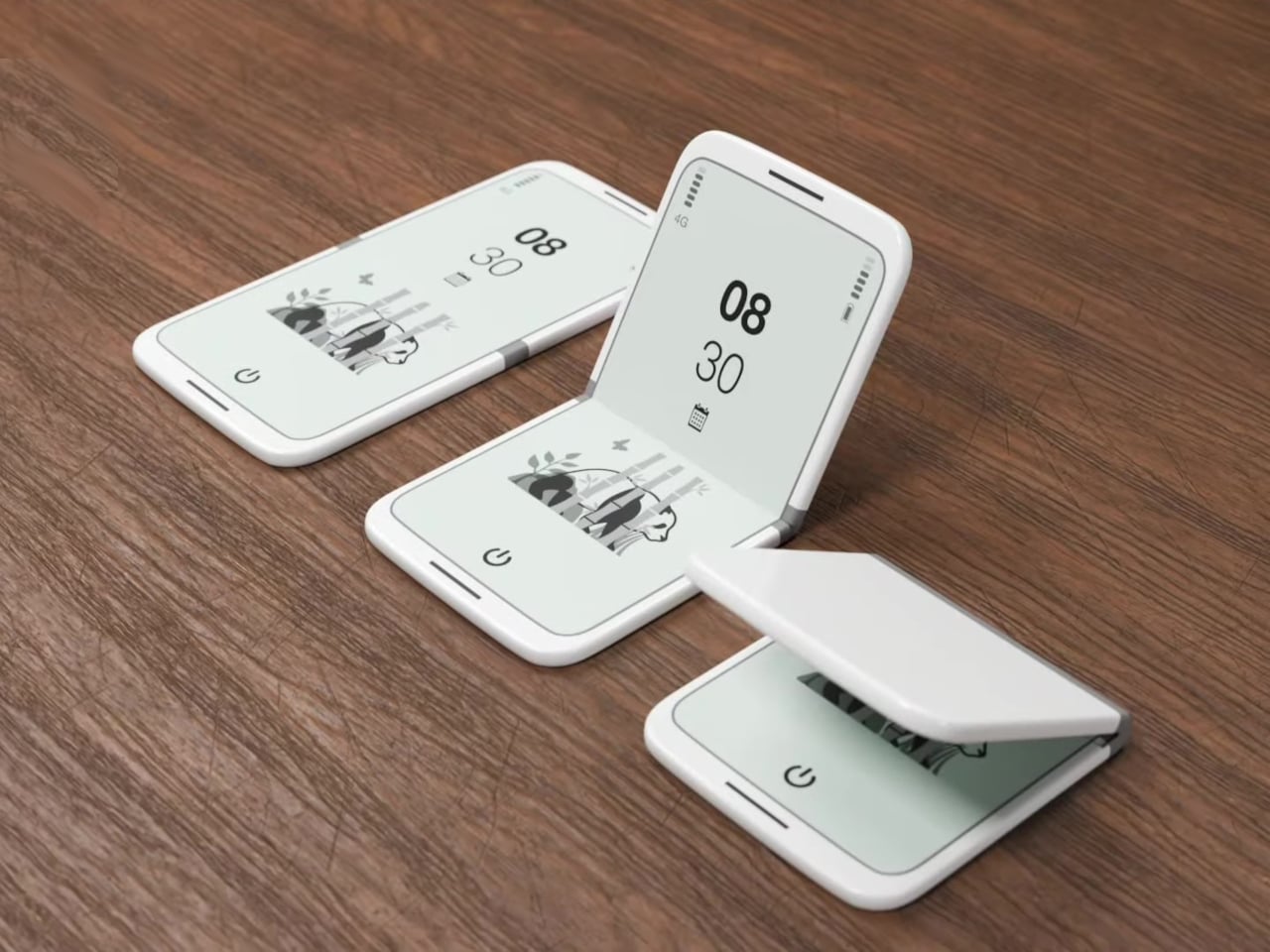
The tinyBook Flip is a vertical foldable phone concept built around a 6.1-inch E Ink display. Closed, it collapses into a compact, near-square form with rounded corners and a matte white finish, something closer in proportion to a folded notecard than a smartphone. The screen disappears entirely when the device is closed shut. No glowing rectangle sitting face-up on the desk, no ambient reminder that there are things to check. Just a small, quiet object.

Designer: Pixel Dynamics

That folded form is doing more work than it might seem. Opening the phone requires a deliberate physical action, and that small added step changes the behavioral math. A reflexive grab becomes a conscious decision. The friction is minimal in absolute terms, maybe two seconds, but two seconds of resistance is often enough to interrupt the loop. The concept treats that interruption as a design feature, which puts it in genuinely different territory from most phones.

The E Ink display adds a second layer of resistance, and this one is less subtle. E ink refreshes slowly, renders in grayscale or muted colors, and handles fast-moving content poorly. Social media feeds become tedious. Short-form video becomes unwatchable. Anything built around color, motion, and rapid visual feedback stops working the way it was designed to. This is precisely the point. The screen’s limitations aren’t engineering compromises left over from an earlier era of display technology; they’re structural properties that make certain behaviors genuinely unpleasant to sustain.

What E Ink handles well is a shorter list, but a coherent one. Text reading, messaging, calendars, and static interfaces are all comfortable at E Ink’s native pace. The renders of the tinyBook Flip show a UI built around exactly these strengths: a large clock face, a calendar widget, and a grayscale illustrated wallpaper. The interface doesn’t reach for capabilities the display can’t support. The phone isn’t trying to do everything; it’s trying to do a narrower set of things without apology.

Foldable E Ink panels aren’t a speculative technology. The hardware exists at the component level and has already appeared in experimental e-readers, though no consumer phone has shipped with one in any meaningful volume. The tinyBook Flip isn’t imagining impossible components; it’s proposing a form factor that manufacturers haven’t yet committed to producing. The distance between those two things is largely commercial, not technical.

There’s also something worth noticing about how the device reads as a physical object in social space. Closed, the tinyBook Flip looks like almost nothing. No visible screen, no status indicators, no glow. A phone that carries no visual weight when it’s not in use sends a different signal than one that’s always broadcasting its presence. Putting it down means it actually disappears from the environment, not just from your hand.

That said, the concept leaves some real friction points unaddressed, and not the intentional kind. E Ink handles camera use, live navigation, video calls, and authentication apps poorly. A foldable hinge adds mechanical complexity and thickness that clean renders tend to obscure. The tinyBook Flip looks resolved in this form, but a production version would have to make tradeoffs that these images don’t show and the concept doesn’t acknowledge.

Still, the more interesting question isn’t whether this specific device could ship. It’s whether a phone that makes itself harder to misuse is a reasonable design goal at all, or whether that’s just a way of describing a phone that most people wouldn’t actually want. The tinyBook Flip lands firmly on one side of that question. Whether the market agrees is a different problem entirely.

The post This E Ink Foldable Phone Concept Punishes Doomscrolling by Design first appeared on Yanko Design.

This Circular Shelf Solved the Rental Damage Problem in 30 Seconds

Par : JC Torres
10 mars 2026 à 16:20

Most shelving solutions ask you to commit before you can even start. Drill a hole here, anchor a bracket there, then live with the consequences if you change your mind six months later. The TAB, designed by Berlin-based architect Michael Hilgers for housewares brand Purstahl, takes a different approach entirely. It clamps onto any vertical panel up to 38mm thick, no drilling, no damage, and releases just as easily when you want to move it.

The form itself is the most unexpected part. Where most clip-on accessories default to a rectangle, the TAB is a circle, a 30cm disc of 2mm aluminum with a fine-textured powder coating. That’s a small but meaningful choice; a circular shelf sitting against the side of a bookcase or cabinet reads more like a deliberate design detail than a functional add-on. It comes in two versions, TAB_left and TAB_right, which simply determine which direction the shelf extends from the clamp.

Designer: Michael Hilgers for Purstahl

The thinness of the aluminum is doing more work than it looks like. At 2mm, the shelf sits flush and close to the panel face rather than jutting out awkwardly, which matters in tighter rooms. The powder coating adds color without bulk, and Purstahl offers enough options to match or contrast with the furniture underneath. That flexibility is part of the appeal: the TAB can read as an accent piece or disappear into the background, depending on the color you pick.

What makes it genuinely interesting is how widely the word “panel” applies. Hilgers frames his approach as “pragmatic design,” meaning objects that work with what already exists rather than replacing it. The TAB clamps onto a bookshelf side, the edge of a wardrobe, a balcony railing, a freestanding room divider, anywhere a flat vertical surface falls within that 38mm thickness range. That’s a broader set of possibilities than a 30cm disc might initially suggest.

The one thing Purstahl doesn’t mention is a maximum load rating, which is a fair thing to wonder about at €79 per unit. A small plant, a few magazines, or an espresso cup are probably fine. A heavy ceramic pot or a stack of hardcovers is a less certain proposition, and it would help to know the limits before buying. The screw clamp mechanism does allow for repositioning, so there’s room to adjust if the shelf shifts under load.

Hilgers has built a consistent body of work around the idea that existing furniture doesn’t need replacing, only rethinking. The TAB fits neatly into that logic. It’s a small, unhurried intervention in a room you already have, and the more interesting question is less about whether it works and more about how many panels around your home you’d actually want to put it on once you start looking at them differently.

The post This Circular Shelf Solved the Rental Damage Problem in 30 Seconds first appeared on Yanko Design.

5 Best Desk Accessories That Turn Your Workspace Into a Minimalist Studio

19 février 2026 à 12:40

Your desk says more about you than you think. It isn’t just a surface—it’s a quiet reflection of how you work, how you think, and how seriously you take the space where ideas are born. The minimalist studio aesthetic isn’t about stripping everything bare; it’s about choosing objects that genuinely earn their place. Every piece should serve a purpose and feel entirely deliberate. A considered desk doesn’t just organize—it inspires.

From gravity-defying pens to waterproof notebooks built to outlast everything you throw at them, the design world is quietly rethinking what it means to be at your desk. This list gathers five accessories that don’t just look good—they change how you work. Whether you’re a freelancer building a mobile studio, a creative professional craving calm, or someone who simply believes tools should match the quality of their thinking, these picks deliver.

1. Levitating Pen 2.0: Cosmic Meteorite Edition

The Levitating Pen 2.0 Cosmic Meteorite Edition isn’t the kind of thing you tuck away in a drawer. Balanced at a precise 23.5-degree angle on a spacecraft-inspired pedestal, it hovers in place as it belongs behind glass—and arguably, it does. Crafted from aircraft-grade aluminum, shaped from a single block of material, it’s as tactile as it is visually appealing. A flick sends it spinning for up to 20 seconds, which sounds like a trick until you realize it genuinely helps you think and refocus between tasks.

What sets this edition apart from any other writing instrument is its tip—a genuine fragment of the Muonionalusta meteorite, one of the oldest ever discovered, predating Earth itself. Writing with it carries a strange, grounding quality that’s difficult to explain until you’ve held it. The premium Schmidt ink cartridge inside delivers a smooth, reliable experience, and the magnetic cap snaps shut with quiet, satisfying precision. The entire object settles into a minimalist desk layout with an authority that only truly considered design can project naturally.

Click Here to Buy Now: $399.00

What We Like

  • The meteorite tip connects the act of writing to a material that predates the planet itself.
  • The spin function delivers genuine cognitive value, supporting creative focus between tasks.

What We Dislike

  • At $399, this is collector territory—a significant ask for everyday stationery.
  • The pedestal demands dedicated desk real estate, which works against ultra-minimal setups.

2. Dynamic Folio

If your iPad has become your primary creative tool, the MOFT Dynamic Folio is the stand it’s been waiting for. Built as a single-piece structure that folds into a workstation, lifting the iPad two full inches off the surface, it shifts posture meaningfully without requiring any complicated setup procedure. What separates it from comparable stands is how smoothly it transitions between modes—one flip moves you from active creation to relaxed viewing without the clunky two-handed repositioning that most alternatives demand of you.

For anyone logging serious hours at a creative desk, neck strain is a quiet but compounding tax on productivity that accumulates gradually across sessions. The Dynamic Folio addresses this directly, reducing neck strain by at least 50 percent in both creation and entertainment positions. The angle adjustment is icon-guided: two circles for a flatter, reclined position and two lines for a steeper working angle. When the session ends, it folds flat and disappears into any bag without resistance. For the mobile creative, this is a quietly essential kit.

What We Like

  • The single-piece structure sets up in one motion with no extra components to manage.
  • A 50 percent reduction in neck strain is an ergonomic improvement that compounds meaningfully over time.

What We Dislike

  • The icon-guided angle system has a short but real learning curve for first-time users.
  • Its value is closely tied to iPad-centric workflows and doesn’t adapt well to mixed-device setups.

3. M NOTE

Sticky notes have a quiet design problem nobody talks about: they curl. The moment a note starts peeling at its corner, the information it holds becomes harder to read and easier to lose, which defeats the entire point of having written it down. M NOTE from Bravestorming solves this with a dual-material approach that combines a magnetic backing with a reusable adhesive layer, keeping notes flat and secure against whiteboards, glass panels, and wooden desks alike. No unfolding, no repositioning—just consistently readable information exactly where you left it.

What makes M NOTE genuinely useful in a minimalist workspace is its adaptability across surface types. On metal, the magnetic backing does the adhesion work entirely. On non-metal surfaces, the reusable adhesive steps in—releasing cleanly, leaving no residue, and repositioning without damaging what it’s applied to. Notes can be written on, cleared, and reused, which cuts the paper waste that most desk setups generate almost invisibly. Bravestorming has taken one of the most throwaway items in any modern office and built something designed to stay indefinitely.

What We Like

  • The dual magnetic and adhesive backing works across metal, glass, and wood surfaces without accommodation.
  • Flat, curl-free notes keep information consistently visible throughout the working day.

What We Dislike

  • Reusable adhesive degrades gradually with heavy, repeated repositioning over time.
  • The magnetic backing only activates on metal surfaces, limiting one of its two core functions.

4. Orbitkey Desk Mat

Most desks don’t have a clutter problem—they have a structure problem. The Orbitkey Desk Mat addresses this with quiet intelligence, creating a defined visual zone that makes the act of organizing feel natural rather than forced. Available in Black and Stone across two sizes, it suits both compact setups and expansive studio tables without demanding that you rethink the whole room around it. The toolbar keeps stationery and small accessories within immediate reach, while the overall layout keeps everything purposeful and within the logic of a genuinely considered workspace.

What makes the Desk Mat more than a surface upgrade is the document hideaway built beneath the top layer. Loose papers, reference notes, and half-finished ideas slide underneath and stay flat, accessible, and out of visual range until you actually need them. It’s an elegant solution to a problem every desk accumulates quietly over time—the slow migration of paper that eventually surrounds the work instead of supporting it. With two colors and two sizes to choose from, the Desk Mat earns its place not just as a design object but as the organizing logic your workspace has been missing.

What We Like

  • The document hideaway keeps loose papers accessible without letting them visually take over the desk.
  • Two sizes and two colorways make it adaptable to almost any workspace scale and aesthetic.

What We Dislike

  • The defined toolbar space may feel restrictive for users with a larger collection of daily-use desk tools.
  • Its impact is most pronounced on consistently active desks—minimal users may find less need for the full feature set.

5. Nuka Eternal Stationery

The Nuka Eternal Stationery set begins with a simple question: What if your notebook never had to end? The answer is a waterproof, tear-proof notebook paired with a metal alloy pencil tip that writes with the smooth consistency of a traditional pencil but requires no sharpening and never breaks. Pages clear completely with the Nuka Magic Eraser and accept fresh writing immediately. For a minimalist desk, this is precisely the kind of object that earns permanent residency without asking for maintenance, restocking, or replacement in return.

Beyond the environmental logic, the Eternal Stationery has a tactile appeal that’s hard to convey without handling it. The metal alloy tip writes consistently across the notebook’s waterproof surface, and the notebook itself handles spills, rough commutes, and outdoor sessions without registering them as damage worth acknowledging. It suits a specific type of person: someone who values fewer objects doing more, who finds calm in not constantly replacing what they depend on, and who wants tools that stay as capable on day one hundred as they were on day one.

What We Like

  • The write-erase-repeat system eliminates paper waste and removes the need to restock entirely.
  • Waterproof and tear-proof construction means this notebook works as hard as you do without extra care.

What We Dislike

  • Losing the Nuka Magic Eraser disables the reusable function with no common alternative to substitute.
  • Ink-dependent writers will need time to adjust to the feel of the metal alloy tip in practice.

Every Object Earns Its Place

A minimalist desk isn’t built by accident. It’s built through deliberate choices—objects selected as much for what they do as for how they sit in the space around them. The five accessories on this list share that quality. None of them asks for attention. They earn it through function, through material honesty, and through design that respects the surface it occupies. That’s the distinction between a cluttered desk and a curated one, and it sharpens every time you sit down to work.

Whether you start with the levitating pen’s quiet theatre or the Eternal Stationery’s unassuming permanence, each of these pieces shifts something in how your desk feels to work at. The best studio setups don’t come together when you add more—they come together when every object you keep is one you’d choose again without hesitation. These five make that case without announcing it. They simply belong there, and in a minimalist workspace, belonging without noise is exactly the point.

The post 5 Best Desk Accessories That Turn Your Workspace Into a Minimalist Studio first appeared on Yanko Design.

Magicbrake - Handbrake en mode facile

Par : Korben
19 novembre 2025 à 08:34

HandBrake c’est un chef-d’œuvre open source qui fait, en gros, tout ce qu’on peut rêver en terme de conversion vidéo…

Ainsi, si vous voulez juste transformer une vidéo en MP4 qui marche sur votre téléphone, HandBrake est capable de vous proposer 147 options, 23 presets différents, des onglets pour les codecs, les sous-titres, les filtres, l’audio multi-pistes. Ensuite, vous cliquez sur OK en priant pour que le preset par défaut fasse le taf !

Et c’est ça le problème car c’est un super outil mais pour le maitriser, faut faire 18 formations ;-). Heureusement Magicbrake dit stop à cette folie !

Car Magicbrake c’est une app macOS qui ne permet de faire qu’UNE chose. Vous glissez une vidéo dessus, vous cliquez sur le bouton, et vous récupérez un MP4. Y’a pas de menu, pas d’options et encore moins de documentation à lire et ça c’est cool !

Techniquement, c’est un wrapper GUI qui utilise HandBrakeCLI avec le preset “Very Fast 1080p30” préconfigué. C’est con mais ça fera plaisir aux gens qui n’ont pas envie de se prendre la tête avec l’interface d’Handbrake qui ressemble à un cockpit d’Airbus.

Voilà, Magicbrake c’est juste un problème réel résolu avec le moins de code possible et également un bon rappel que des fois, la meilleure solution c’est la simplicité.

Bref, pour la majorité des gens qui veulent juste convertir une vidéo de leur GoPro, leur drone, ou récupérer un vieux fichier AVI des années 2000, Magicbrake fera bien le taf. Après vous voulez vous lancer dans le choix d’un bitrate ou l’incrust de sous titres, pas le choix, faudra aller sur Handbrake.

Le site officiel Magicbrake est ici !

Ambi - Du bruit blanc sous iOS sans débourser un centime

Par : Korben
20 octobre 2025 à 09:12

J’aime bien les bruits blancs pour me concentrer ou taper une petite sieste dans un endroit pas adapté pour ça :). Mon préféré c’est tout ce qui est bruit de cabine d’avion de ligne et je sais que d’autres préfèrent les effets genre feu qui crépite, bruit de la pluie…etc. Y’a des playlists entières de ça sur Spotify et même des applications même si en général elles sont un peu nazes.

Ces apps, ça démarre toujours avec une version gratuite limitée à 5 minutes, puis un vieux paywall pour débloquer les sons, et une notification tous les soirs à 22h pour vous rappeler de méditer. Sans parler des pubs qui cassent l’ambiance toutes les 10 minutes. Bref, c’est tellement relou qu’on finit par chercher “bruit de pluie 10 heures” sur YouTube comme un sauvage.

Mais y’en a quand même une qui sort du lot. Elle s’appelle Ambi et elle fait… du bruit. De la pluie, des vagues, des oiseaux, du bruit brun…etc. Y’a pas de coach virtuel à la con, pas de communauté à rejoindre, pas d’abonnement à payer… Elle fait juste du bruit et ça c’est cool car c’est plutôt rare de nos jours.

L’app fonctionne 100% offline. Tous les sons sont embarqués, et vous pouvez mixer plusieurs sons ensemble avec des volumes individuels pour chaque piste. Genre pluie + vagues + oiseaux si vous voulez recréer une plage tropicale sous l’orage. Vous avez aussi un timer qui va de 5 minutes à 10 heures, ou infini si vous voulez juste laisser tourner toute la nuit.

Puis comme c’est gratuit et sans tracker pourquoi s’en priver ?

Vous pouvez la télécharger ici sur l’ App Store .

Source

Vous vous souvenez du web d'avant ?

Par : Korben
2 octobre 2025 à 15:39

Mais siiii, celui où on cliquait sur un lien et hop, la page s’affichait. Sans popup de cookies, sans overlay “Abonnez-vous à notre newsletter”, sans ce message agaçant “Désactivez votre bloqueur de pub pour continuer” ou “Abonnez-vous pour lire cet article”. Bref, l’époque bénie où internet était juste… internet.

Le RGPD devait nous sauver de la surveillance mais le résultat c’est qu’on passe notre vie à cliquer sur des bouton “Tout refuser” ou à chercher le bouton caché derrière 47 onglets de paramètres. L’enfer est pavé de bonnes intentions réglementaires, il parait… Mais heureusement, des extensions comme PopUpOFF existent pour réparer ce que cette loi a cassé.

Ce que fait cette extension pour Chrome et Firefox, c’est virer les popups, les overlays, les bannières de cookies et toutes ces merdes qui transforment la navigation en parcours du combattant. RomanistHere, le dev derrière le projet, a créé ça tout seul dans son coin et son extension est dispo en open-source sur GitHub .

PopUpOFF propose donc 3 modes de blocage : agressif, modéré et délicat. Le mode agressif, c’est le rouleau compresseur… il dégomme tout ce qui bouge. C’est super pratique quand vous êtes pressé.

Le mode modéré quant à lui fait le tri entre les popups légitimes (genre, celles de votre banque) et les overlays parasites. Et le mode délicat, lui, intervient uniquement quand vous le décidez manuellement.

Ainsi, vous gardez le contrôle total, ce qui change des extensions qui décident de tout ça à votre place.

Alors bien sûr, tout n’est pas parfait et l’extension peut parfois rater des overlays invisibles ou péter l’affichage de certains sites, notamment les PWA (Progressive Web Apps), mais pour 90% des cas d’usage, ça fait le job impeccable.

À l’opposé des mastodontes type Ghostery ou uBlock Origin (qui sont excellents, ne me faites pas dire ce que je n’ai pas dit…), RomanistHere a misé sur le minimalisme radical. Pas de filtres à mettre à jour toutes les semaines, pas de liste de 50 000 domaines à bloquer, pas de consommation RAM de malade. Non, c’est juste un script intelligent qui détecte les patterns d’overlays et les neutralise.

Notez qu’en bonus, l’extension peut parfois débloquer du contenu payant sur certains sites qui utilisent des overlays pour bloquer la lecture. Ce n’est pas son objectif principal, mais vu que beaucoup de paywalls reposent sur des overlays CSS basiques, bah… PopUpOFF les vire aussi. Je dis pas que vous devriez l’utiliser pour contourner les abonnements (soutenez vos médias préférés, toussa toussa), mais sachez que techniquement, ça peut arriver.

À noter que PopUpOFF n’est pas seul sur ce créneau. Il y a aussi “ I Don’t Care About Cookies ” (racheté par Avast, ce qui a refroidi pas mal de gens), ou encore la fonction “ Never-Consent ” de Ghostery qui auto-rejette les cookies via les CMP (Consent Management Platforms). Ces alternatives ont chacune leurs forces, mais PopUpOFF reste le champion du rapport efficacité/poids.

Bref, si vous en avez marre de perdre 15 secondes par page à fermer des popups de merde, PopUpOFF mérite clairement sa place dans votre navigateur. C’est léger, c’est open-source, c’est gratuit, et ça fait exactement ce qu’on lui demande…

Arrival Radar - 128 pixels pour découvrir le contrôle aérien

Par : Korben
19 septembre 2025 à 09:30

Si vous avez déjà joué avec des simulateurs de contrôle aérien, vous savez à quel point ça peut vite devenir un super casse-tête… Des écrans remplis d’informations, des interfaces complexes, des dizaines de paramètres à gérer… Et puis, il y a Arrival Radar , un petit jeu de simulation qui tient dans un carré de 128x128 pixels et qui vous fait comprendre l’essence même du métier d’aiguilleur du ciel en quelques minutes.

Ce jeu, créé par xkqr, c’est tout le contraire de ce qu’on pourrait attendre d’un simulateur moderne. Y’a pas de graphismes photoréalistes, pas d’interface bourré de boutons, pas de tuto de 45 minutes. Non, y’a juste l’essentiel, la base de la base à savoir faire atterrir des avions en évitant qu’ils se rentrent dedans.

Arrival Radar tourne sur PICO-8 , cette fameuse “console fantasy” qui imite volontairement les limitations techniques des années 80. En gros si vous ne connaissaient pas, PICO-8 c’est un petit univers clos où les développeurs s’imposent des contraintes drastiques telles qu’une palette de 16 couleurs, une résolution de 128x128 pixels, une mémoire limitée…etc

Mais alors comment on joue à Arrival Radar ? Hé bien comme je vous le disais, votre boulot, c’est de guider les avions qui arrivent vers leur approche finale. Et comme vous ne pouvez pas donner de cap ou d’altitude aux pilotes, à la place, vous assignez chaque avion à une route d’arrivée standard.

Les commandes tiennent en quelques touches : les flèches gauche/droite pour sélectionner un avion, haut/bas pour choisir sa route d’arrivée, X pour confirmer l’instruction et Z pour ajuster le point d’entrée sur cette route. Vous pouvez même accélérer le temps en maintenant X enfoncé. C’est tout. Pas de menus cachés, pas de raccourcis clavier chelou à mémoriser. Le développeur a passé seulement quelques heures à créer ce simulateur, mais pourtant il capture parfaitement l’essence du métier.

Et l’interface vous montre des lignes grises qui projettent la trajectoire de chaque avion pour la minute suivante,c e qui en fait un peu votre boule de cristal pour anticiper les croisements dangereux. Le jeu recommande de maintenir au moins 30 secondes d’écart entre les appareils, et croyez-moi, ça paraît simple dit comme ça, mais quand vous avez 6 avions qui convergent vers le même aéroport… C’est chaud, de fou.

Bref, Arrival Radar c’est de la créativité contrariée, qui permet de se concentrer sur l’essentiel : le gameplay pur. Pas de surcharges graphiques pour masquer un game design bancal, pas d’effets spéciaux pour compenser un manque d’inspiration… Juste une idée brute, mise en forme avec les moyens du bord.

Et vous verrez comme les bonnes bornes d’arcade des années 80, Arrival Radar s’apprend en 30 secondes mais demande des heures pour être maîtrisé…

A vous de jouer maintenant !

Uxn - La machine virtuelle de 100 lignes qui fait tourner des apps sur votre Game Boy

Par : Korben
12 août 2025 à 07:33

C’est l’histoire d’un couple d’artistes développeurs qui largue les amarres pour vivre sur un voilier dans le Pacifique Nord. Pas de connexion internet stable, pas d’électricité illimitée, juste l’océan et quelques panneaux solaires…

C’est dans ces conditions que Devine Lu Linvega et Rek Bell de 100 Rabbits ont créé Uxn, une machine virtuelle qui tient en 100 lignes de C et qui fait tourner des applications graphiques complètes sur à peu près n’importe quoi, de votre vieille Game Boy Advance à votre Raspberry Pi Pico.

Le truc vraiment génial avec Uxn, c’est qu’elle ne prend que 64KB en RAM. Pour vous donner une idée, c’est environ 65 000 fois moins que ce que Chrome bouffe juste pour afficher cette page. Et pourtant, avec ces 64KB, vous pouvez faire tourner un éditeur de texte complet, un logiciel de dessin, un environnement de livecoding musical, et même des jeux comme Oquonie ou Donsol.

Sorcellerie me direz-vous ? Et bien non, c’est tout à fait possible en revenant aux fondamentaux de l’informatique et en appliquant les principes du permacomputing.

L’idée du permacomputing, c’est de créer des systèmes informatiques résilients et durables. Au lieu de racheter un nouveau PC tous les 3 ans parce que le dernier Windows rame, vous créez des logiciels qui tourneront encore dans 20 ans sur le matériel d’aujourd’hui. C’est une philosophie qui maximise la durée de vie du hardware et minimise la consommation énergétique. Et Uxn incarne parfaitement cette approche.

Pour programmer sur Uxn, vous devez utilise Uxntal, un langage assembleur basé sur une stack machine avec notation postfixe. Par exemple, au lieu d’écrire 3 + 4, vous écrivez 3 4 +. Ça peut paraître bizarre au début, mais c’est redoutablement efficace. Et contrairement à ce qu’on pourrait penser, Uxntal supporte même des concepts avancés comme les fonctions lambda et la programmation fonctionnelle.

Ce qui est vraiment cool avec cet OS, c’est sa portabilité. Le même fichier ROM Uxn peut tourner sur votre PC Linux avec SDL2, sur une Nintendo DS, sur un navigateur web, sur DOS, sur une PlayStation Vita, et même sur des trucs complètement barrés comme un télétypographe ou un STM32. C’est exactement comme les ROMs des vieilles consoles en fait… Vous créez votre programme une fois, et il tourne partout où il y a un émulateur Uxn.

Les applications disponibles sont d’ailleurs impressionnantes. Il y a Left, un éditeur de texte graphique, Noodle qui permet de dessiner, Orca qui est un environnement de livecoding pour créer de la musique, Nasu qui édite des sprites, Turye qui crée des polices de caractères. Et tout ça dans des fichiers de 10 à 15KB maximum.

L’écosystème Uxn est aussi super accessible pour les développeurs. La documentation sur GitHub liste des dizaines d’émulateurs, d’outils et de tutoriels. Il y a même des compilateurs comme Dotal et Funktal qui permettent d’écrire dans des langages de plus haut niveau et de compiler vers Uxntal. La communauté est aussi très active sur IRC (#uxn sur libera.chat) et Discord, et les workshops d’introduction sont excellents pour débuter.

Maintenant, pour installer Uxn sur votre machine, c’est super simple. Sur Linux, vous installez SDL2 (sudo apt install libsdl2-dev sur Ubuntu), vous téléchargez l’émulateur, et vous lancez vos ROMs. Vous pouvez même développer directement sur Uxn avec Bicycle, un REPL interactif, ou Dexe, un éditeur hexadécimal.

Ce que j’adore avec Uxn, c’est que ça remet en question tout ce qu’on considère comme acquis dans le développement moderne. On n’a pas besoin de 8GB de RAM et d’un framework JavaScript de 500MB pour faire une calculatrice. On peut créer des outils puissants et élégants avec des contraintes extrêmes. Et le fait que tout ça vienne de deux personnes vivant sur un bateau, alimentées par de l’énergie solaire, ça rajoute une dimension poétique au projet.

Donc si vous cherchez une alternative radicale à la course à la puissance, si vous voulez explorer ce qu’on peut faire avec des systèmes minimaux, ou si vous êtes juste curieux de voir comment on peut faire tenir un OS complet dans moins de mémoire qu’une photo Instagram, Uxn vaut vraiment le détour.

Car parfois, c’est bon d’en enlever un peu pour retrouver l’essentiel.

❌
❌