❌

Vue normale

  • ✇Yanko Design
  • Edge & Pop pairs a tiny Damascus knife with a bottle opener
    Small jobs have a habit of sending us looking for bigger tools. A package arrives, the tape won’t budge, and suddenly you’re searching a drawer for something sharp. Carrying a large knife for these little interruptions feels a bit excessive, though. Lunark’s Edge & Pop takes a more modest approach, combining a folding pocket knife and bottle opener in one compact, wood-handled design. At 2.7 inches long when open, with a 1.6-inch handle and a 1.1-inch blade, Edge & Pop keeps its ambitio
     

Edge & Pop pairs a tiny Damascus knife with a bottle opener

Par : JC Torres
23 octobre 2026 à 21:45

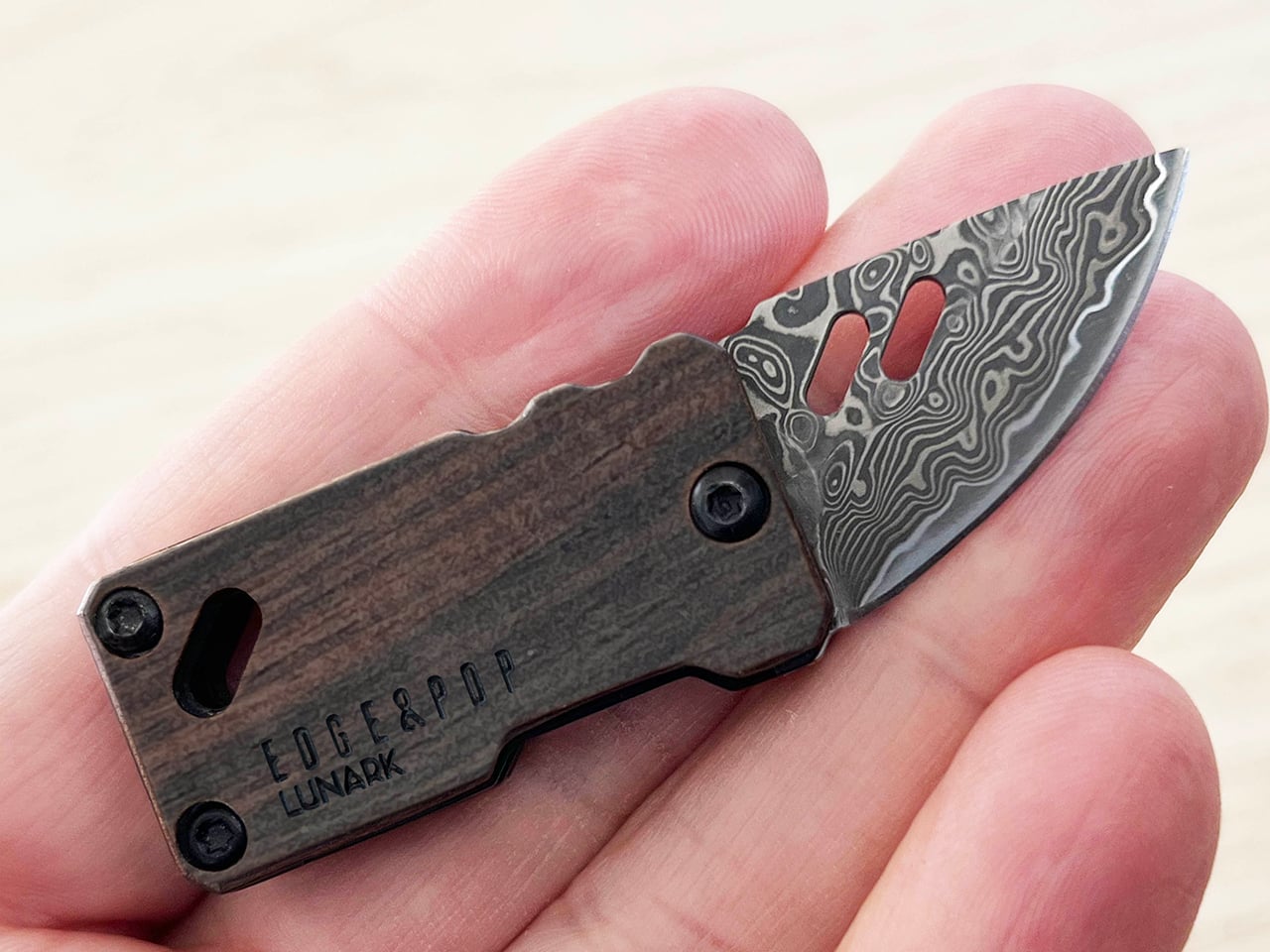
Small jobs have a habit of sending us looking for bigger tools. A package arrives, the tape won’t budge, and suddenly you’re searching a drawer for something sharp. Carrying a large knife for these little interruptions feels a bit excessive, though. Lunark’s Edge & Pop takes a more modest approach, combining a folding pocket knife and bottle opener in one compact, wood-handled design.

At 2.7 inches long when open, with a 1.6-inch handle and a 1.1-inch blade, Edge & Pop keeps its ambitions fairly small. And at one ounce, it’s quite lightweight, too. That’s useful when your pockets already have a phone, wallet, and keys competing for space. There’s little reason for a tool meant for occasional cutting to take over the rest of your everyday carry.

Designer: Allan Ospina, Founder of Lunark

Click Here to Buy Now: $39.20 $59 (33% off, use coupon code “YD’). Hurry, deal ends in 48-hours!

The drop-point blade brings a curved cutting edge and a tip that slopes down from the spine. It’s intended for modest tasks, such as opening envelopes, slicing packing tape, or trimming cord. You don’t need to invent a camping trip to find a reason to carry it. A delivery on the doorstep or a stubborn bit of packaging is a less dramatic place to start.

Of course, a tiny knife doesn’t have to look like anonymous hardware. The blade is made of Damascus steel with 67 layers of high-carbon 9Cr18MoV, while the winding patterns give its surface a character of its own. The lines resemble the contours on a map, bringing detail to a small area. That pattern is an aesthetic attraction that makes the knife feel more considered than your typical cutting tools.

The ebony handle gives that patterned steel a quieter companion. Dark wood grain sits alongside black fasteners and softened corners, keeping the shape simple without making it plain. It’s an appealing departure from tools that turn every surface into exposed metal. The grain varies between pieces, so some of the object’s personality comes from the material rather than an added color scheme.

The bottle opener, meanwhile, becomes useful when a capped drink calls for something better than an improvised trick. It sits at the rear of the blade and becomes accessible when the cutting edge folds into the handle. There’s no separate implement to swing out first. Moving between the two jobs means changing the blade’s position, keeping the arrangement compact without adding another folding tool.

That little opener has another job as well. Pressing its end helps rotate the blade outward, making it part of the opening mechanism rather than a feature sitting idle between drinks. A liner lock holds the blade in its extended position, so you won’t have to worry about the blade folding back in accidentally. It’s a small but critical detail you’ll be thankful for when facing a stubborn box.

An attachment opening in the handle provides another way to keep the tool nearby. Paired with the included mini carabiner, it can join a keychain or hang from a bag rather than occupy a pocket. Whether in a pocket or hanging from a belt or bag, having a choice of carry arrangements is useful for an object meant to tag along.

Beneath the ebony handle, a heat-treated 420 stainless steel frame gives the tool a neatly defined outline. The exposed metal traces the wood’s edges, while black fasteners keep the assembly visually restrained. It’s a considered way to bring several materials into such a small object. There’s detail to appreciate up close, yet the overall shape stays simple enough to read at a glance.

A taped box on the kitchen counter and a capped drink at the end of the day make a good case for keeping these two functions together. Edge & Pop answers both with a compact shape and materials that reward a closer look. The pleasure is in that combination, having something useful within reach that feels as thoughtfully designed as the objects you choose to display.

Click Here to Buy Now: $39.20 $59 (33% off, use coupon code “YD’). Hurry, deal ends in 48-hours!

The post Edge & Pop pairs a tiny Damascus knife with a bottle opener first appeared on Yanko Design.

  • ✇Yanko Design
  • Abxylute’s $65 smartphone gamepad packs Hall Effect triggers, clickable sticks, and gyro aiming
    Valve raised the price of the 512GB Steam Deck OLED to $789 this May, a number that makes anyone want to close the browser tab out of spite. Blame the AI boom, which has data centers swallowing memory chips faster than factories can make them, leaving handhelds to fight over the scraps. Now look at the phone in your hand. It runs native console ports like Resident Evil, streams entire Xbox and PlayStation libraries, and emulates most of the consoles a millennial grew up with. All it lacks is a
     

Abxylute’s $65 smartphone gamepad packs Hall Effect triggers, clickable sticks, and gyro aiming

23 octobre 2026 à 19:30

Valve raised the price of the 512GB Steam Deck OLED to $789 this May, a number that makes anyone want to close the browser tab out of spite. Blame the AI boom, which has data centers swallowing memory chips faster than factories can make them, leaving handhelds to fight over the scraps. Now look at the phone in your hand. It runs native console ports like Resident Evil, streams entire Xbox and PlayStation libraries, and emulates most of the consoles a millennial grew up with. All it lacks is a pair of real thumbsticks and triggers, which is a far cheaper problem to solve.

Hong Kong-based abxylute solves that problem with the M5 and M6, two sliding controllers that magnetically snap to the back of your phone. Closed, they sit behind it like a chunky case. Slide the phone up and a full gamepad appears underneath, Xperia Play style, with sticks, triggers, and rumble. The M5 is the slim one, plugging in over USB-C with zero pairing and pass-through charging. The M6 goes wireless over Bluetooth, adding clickable capacitive sticks, Hall Effect triggers, gyro aiming, and a 10-hour battery. Both retail under $90, roughly one-ninth of a Steam Deck these days, and for anyone whose gaming happens on commutes and couches, that math is hard to argue with.

Designer: abxylute

Click Here to Buy Now: $65 $84.99 (24% off) Hurry! Only limited units available.

A slider rail from the Nokia era, rebuilt for modern phones

Sliding rails nearly went extinct when touchscreen slabs replaced slider phones, and so did most of the factories that made them. abxylute eventually tracked down a manufacturer that once built rails for Nokia and Sony, then asked it to do something those phones never needed. A slider from 2010 only had to carry a lightweight screen half, while the M5 and M6 have to hold a phone and case weighing up to around 10.6 ounces (300g). The resulting bidirectional damped rail glides smoothly both ways, with magnets snapping it into the fully open and closed positions. That makes for a calmer motion than the spring-loaded slide on the OhSnap MCON, which fires the phone open at a button press.

The phone attaches through an adjustable magnetic mount rated at 4,098 gf, roughly 9 pounds of pull and comfortably above the 2,500 to 3,500 gf abxylute quotes for Apple’s MagSafe. Both mounts clear camera bumps up to 0.28 inches (7mm), and the plate shifts to suit different phone sizes. Supported phones include the iPhone 18 series, Galaxy S26, Pixel 11, OnePlus 15, and Xiaomi 17, with a magnetic adhesive ring in the box for anything lacking MagSafe. Thick cases will sap some of that grip, so slimmer cases make the safer pairing. Lightning iPhones sit out the M5 entirely, since that model needs a USB-C port to work.

The M5 goes wired and thin for pocket duty

The M5 began life as a DIY build by Jinjiang, an independent maker who handled the 3D modeling, PCB design, and programming himself before abxylute partnered with him to engineer it for mass production. Its connection is wired USB-C, which means no Bluetooth pairing, no battery to charge, and pass-through charging so your phone can top up mid-session. The sticks are low-profile carbon-film sliders modeled on the PSP, PSP Go, and Nintendo 3DS, recessed nearly flat to keep the controller slim. Because sliders can’t click, abxylute added dedicated LS and RS buttons that double as programmable macro keys. Micro-switch triggers with short travel and a crisp click round out the inputs.

Those choices produce a controller that weighs about 6 ounces (170g) and measures 0.91 inches (23mm) thick with the mount, thinning to 0.45 inches (11.5mm) at the grip area. It spans 5.9 inches (149.5mm) wide, about the width of a large phone, so it slips into a jacket pocket easily. I appreciate a product that commits this fully to one idea, and the M5 commits to portability. Slider sticks offer less throw than full-size ones, so they favor retro titles and platformers over twitchy shooters. A limited M5 Founder’s Edition, capped at 1,000 units, comes in translucent retro green with a customizable two-letter badge replacing the abxylute logo.

The M6 packs full-size controller features into the slide

The M6 took nearly three years to develop, long enough to earn the internal nickname “little Nezha,” and most of that effort went into the controls. Its capacitive sticks, developed with component maker K-Silver, tilt 20 degrees against the roughly 23 degrees of a full-size controller stick, and they click for L3 and R3. abxylute also built them to resist magnetic interference, a smart call given the strong magnet array sliding a few millimeters above them. Instead of sinking the sticks into deep wells, a stepped surface around each one frees up room for your thumbs. Stick output switches between circular and square modes, handy for racing games and emulators.

Hall Effect linear triggers with 0.22 inches (5.5mm) of travel handle racing games, and a Fast Trigger Mode shortens actuation for shooters. A face-mounted Z button takes remaps and multi-button macros, so a fighting game special move or a jump-and-shoot combo fits under one thumb. There’s also a 6-axis gyroscope for motion aiming, and Bluetooth 5.3 backed by a 500mAh battery rated for up to 10 hours. The lighting is diffused, bouncing off the controller’s surface instead of shining at your eyes, and its color changes with each mode. All this comes in at 6.7 ounces (191g) and 1.02 inches (26mm) thick, a modest premium over the M5.

Shared features, the abxy app, and what each model costs

Both controllers share a physical mode switch that flips between NS, XInput, and PS layouts, covering Switch emulators, Android and cloud gaming, and iPhone titles respectively. Each gets dual Z-axis linear vibration motors with four intensity levels, plus a Turbo function paired to the M button. The free abxy Game App doubles as a launcher for emulators and cloud services, and it handles remapping, dead zones, macros, lighting, and vibration. Virtual touch mapping lets you assign on-screen controls to physical buttons for games that never bothered with controller support. Detachable magnetic grips, held by magnets plus a mechanical shear lock, add full-size handles for longer sessions, though they aren’t listed among the box contents.

Kickstarter pricing currently sits at $65 for the M5 and $69 for the M6, against retail prices of $84.99 and $89.99, both well under the $169.99 Backbone Pro. A bundle with one of each costs $119, down from $174.98. The M6 is estimated to ship in November 2026 and the M5 in December 2026, with worldwide delivery. The M5 box adds a USB-C cable to the controller, adhesive ring, and manual that both models share. Valve wants $789 for a handheld. abxylute wants $69 to upgrade the one you already own.

Click Here to Buy Now: $65 $84.99 (24% off) Hurry! Only limited units available.

The post Abxylute’s $65 smartphone gamepad packs Hall Effect triggers, clickable sticks, and gyro aiming first appeared on Yanko Design.

  • ✇Yanko Design
  • These Japanese-Made Guitar Scissors Come With Their Own Mini Stand
    Even though I already have drawers and boxes of various stationery items, I’m always on the lookout for things that are cute and unique but still useful for work and my hobbies. Scissors are one of those things you can never have too many of, especially if they serve different functions. There are pairs for everyday cutting, for journaling, for cutting things into cute shapes, and some that are just highly decorative. If you love stationery and music, the Rockstar Guitar Scissors may be your ne
     

These Japanese-Made Guitar Scissors Come With Their Own Mini Stand

23 octobre 2026 à 16:30

Even though I already have drawers and boxes of various stationery items, I’m always on the lookout for things that are cute and unique but still useful for work and my hobbies. Scissors are one of those things you can never have too many of, especially if they serve different functions. There are pairs for everyday cutting, for journaling, for cutting things into cute shapes, and some that are just highly decorative.

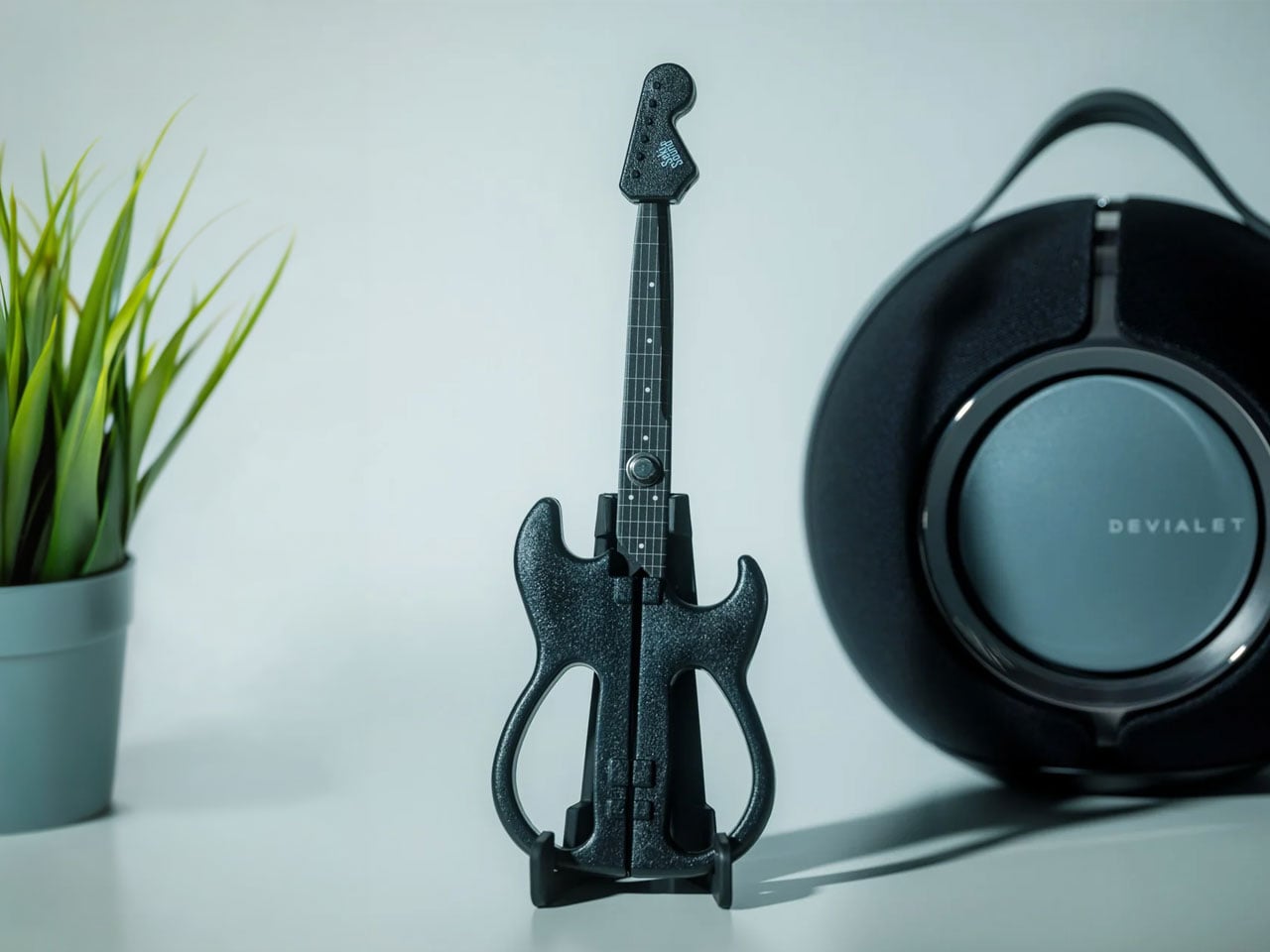
If you love stationery and music, the Rockstar Guitar Scissors may be your next tiny purchase. As the name suggests, it’s a pair of scissors shaped like an electric guitar. But more than just being uniquely shaped, the design itself has a role in storing and using the scissors. It’s the kind of item you might want to keep out of your office drawer, and it could also make a small gift or stocking stuffer this upcoming holiday season.

Click Here to Buy Now: Starting at $30

A lot of differently shaped stationery items can just be novelty things that are good to display on your desk. This one, though, has parts that were thought out to match the theme while making it a functional piece for everyday use. So forget about guitar graphics slapped onto a pair of conventional scissors. This one takes the idea further. Well, it still can’t play actual music, of course.

The guitar body separates into the handles, with the finger openings as part of the lower body of the instrument it’s imitating. The narrow neck of the “guitar” separates into the cutting blades. It even has a removable ABS cap that completes the headstock when the scissors are closed. According to the store’s description, the cap also covers the sharp point and prevents the scissors from opening while it’s in place. That gives a decorative detail a useful job when you’re putting the scissors away.

The scissors have stainless steel blades, while the handles and cap use ABS plastic and the stand is made from elastomer. You can choose from three color options: black, metallic blue, and pearl white. They measure about 7.8 inches overall, and the YD Select lists black at US$30; metallic blue and pearl white at US$40 each.

They even come with a stand that holds up your closed scissors like an actual guitar at rest on an instrument stand. For anyone who tends to lose smaller tools among notebooks and pen cases, having a dedicated spot could make them easier to find. Of course, the stand takes up some desk space, so this isn’t really a space-saving solution. It’s more about giving a useful item a place where you’ll actually notice it.

Made in Japan by Nikken Cutlery, the scissors are also known as Seki Sound. Nikken says craftspeople in Seki individually sharpen the blades, and it describes a fluorine-coated finish intended to reduce adhesive sticking when cutting tape. That’s a relevant feature if your stationery projects involve tape, although it shouldn’t be read as a promise that the blades will never need cleaning. The guitar detailing also includes six strings and frets, rather than relying only on the outline.

Compared with options from a big brand like Fiskars, the Rockstar Guitar Scissors put more emphasis on their display-ready shape. Fiskars offers SoftGrip handles, Easy Action spring-assisted opening, and nonstick models, while its MoMA collection puts artwork on familiar scissor handles. The Rockstar design instead turns the whole tool into a miniature instrument, complete with a cap and stand. There isn’t enough evidence to say it cuts better or feels more comfortable than those alternatives; its clearest distinction is how the guitar shape carries through to storage.

I wouldn’t expect the Rockstar Guitar Scissors to replace every specialty scissor in my drawers. What appeals to me is having something with a recognizable personality that still has a reason to be on my desk. For a stationery lover who also loves music, it could make a good holiday gift or stocking stuffer, especially if you’d rather give something useful than another ornament that just sits there. At least this little guitar has a job between its imaginary performances.

The post These Japanese-Made Guitar Scissors Come With Their Own Mini Stand first appeared on Yanko Design.

  • ✇Yanko Design
  • The 8 Best Audio Designs for People Who Want to Own Their Music
    An album can be a folder you keep, a disc you lend, or a cassette you record yourself. That is a useful starting point for choosing audio equipment: what happens to the music after you press stop? The most interesting designs here give a collection a place to live, a way to travel, or a reason to come off the shelf. Their appeal starts with what you want to play. These eight picks approach ownership from different directions, from carrying digital files to displaying album artwork and making re
     

The 8 Best Audio Designs for People Who Want to Own Their Music

23 octobre 2026 à 07:40

Tangerine Sudo music player shown from front and back, with playlists menu on screen and tactile wheel below

An album can be a folder you keep, a disc you lend, or a cassette you record yourself. That is a useful starting point for choosing audio equipment: what happens to the music after you press stop? The most interesting designs here give a collection a place to live, a way to travel, or a reason to come off the shelf. Their appeal starts with what you want to play.

These eight picks approach ownership from different directions, from carrying digital files to displaying album artwork and making recordings. You don’t need to abandon streaming to appreciate any of them. The selection includes an upcoming player alongside established products, chosen for their documented features and design decisions rather than hands-on sound testing. The question throughout is simple: what does this object let you do with the music you have chosen to keep?

1. Sudo Music Player

Silver Sudo music player held in one hand, thumb resting on the tactile wheel

Three silver Sudo players side by side showing the menu, a song list, and the now-playing screen

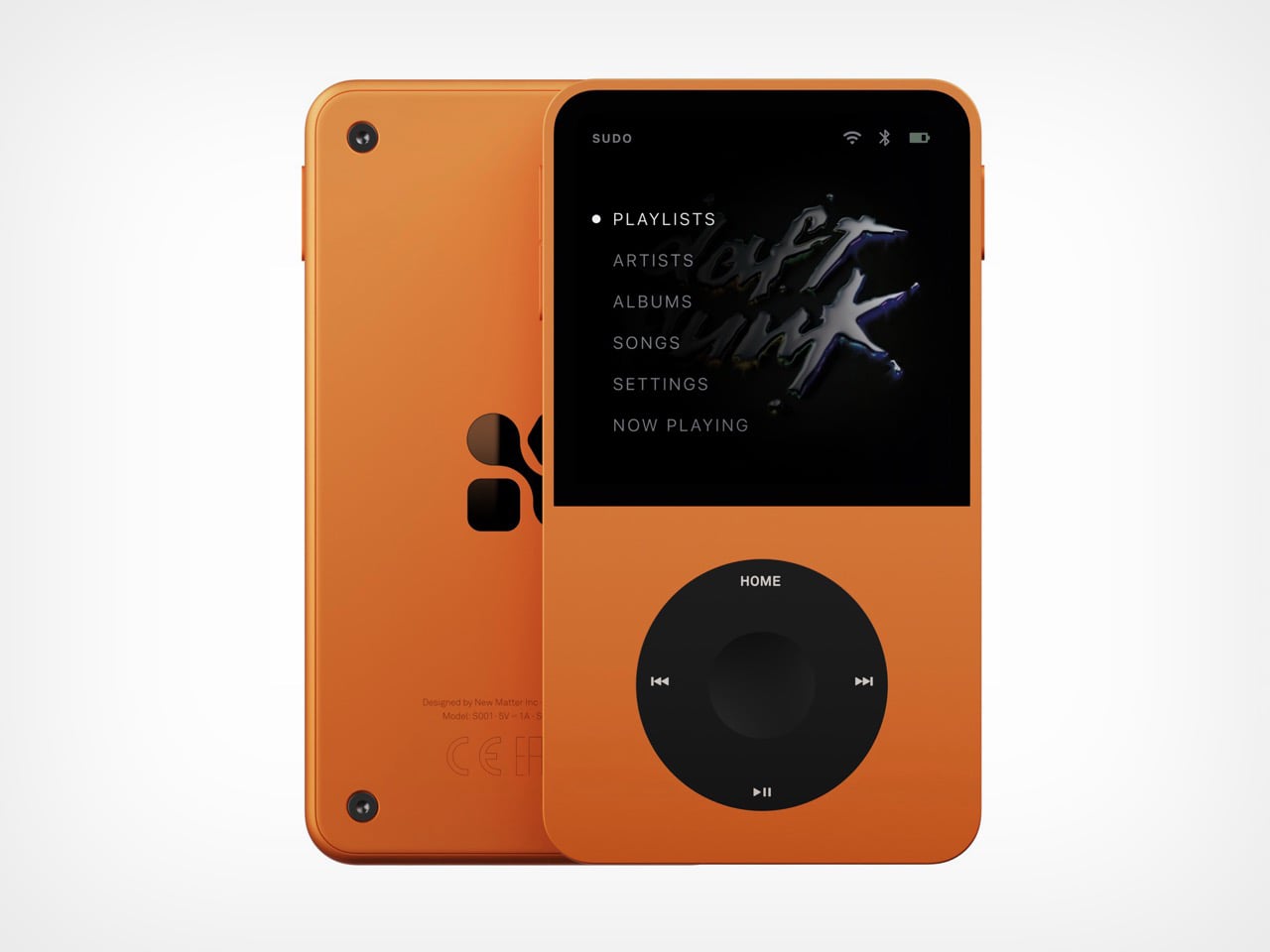
New Matter’s Sudo puts an iPod wheel beneath a small touchscreen, giving a familiar interaction a contemporary home. The upcoming player has an expected price of $ 249 and a straightforward appeal: carry your library on an object dedicated to listening. In the Tangerine version, black controls interrupt the orange body, making the wheel the obvious focal point. The layout gives playback its own physical territory, rather than asking a touchscreen to handle every interaction. It’s a promising starting point for a pocket music player.

New Matter lists 64GB of storage, microSD expansion up to 1TB, a 3.5mm jack, Bluetooth, and USB-C charging. It also lists streaming, so this isn’t a strictly offline machine. The reservation terms deserve equal attention: a refundable $50 deposit goes toward the expected purchase price, with shipping projected for the beginning of Q4 2027. Sudo leads this collection because of its design proposition, not proven performance. It remains something to watch, rather than a player to buy for immediate listening.

What we like

  • A dedicated wheel gives playback a clear physical interface.
  • Expandable storage accommodates a growing personal library.

What we dislike

  • Shipping is still projected for Q4 2027.
  • The $249 price is an estimate, not final pricing.

2. CD Jacket Player

The CD Jacket Player gives album packaging a job after you’ve removed the disc. Its frame accommodates the jacket artwork, letting the record you’re listening to become the player’s face. That makes particular sense for a collection assembled with some affection for sleeves, typography, and photography. Instead of letting those details disappear into a storage rack, the design brings one album forward. It turns choosing what to hear into choosing what to display, without requiring a separate picture frame.

The player offers Bluetooth output for wireless speakers or headphones and a 3.5mm jack for wired listening. A rechargeable battery and USB-C charging let it move between listening spots, while the shop includes a wall bracket. You’ll still need headphones or a speaker, and the display stand is sold separately. For someone who already owns a suitable listening setup, the attraction is the frame itself: the player gives an existing CD collection a visible place in the room.

Click Here to Buy Now: $170.00

What we like

  • Album artwork becomes part of the player’s appearance.
  • Wired and Bluetooth outputs provide listening flexibility.

What we dislike

  • It requires separate headphones or speakers.
  • The display stand costs extra.

3. FiiO DM15 R2R

FiiO’s DM15 R2R has a useful answer to the divide between collecting CDs and carrying digital files: it can rip tracks to external storage in WAV format while you listen. That makes it more than a destination for a disc. It can also be a step toward building a portable library from albums already on your shelf. For a collector who wants both formats, this is a more consequential feature than simply giving an old playback format a new enclosure.

Physical buttons and a volume knob keep the main operations accessible, with 3.5mm and balanced 4.4mm headphone outputs accommodating different wired setups. The copying workflow has boundaries worth knowing before buying. FiiO specifies FAT32 storage, recommends a USB-C flash drive of 32GB or smaller, and requires external power for ripping. Its support documentation also excludes Enhanced CDs from that function. Think of it as a disc player with a specific copying facility, rather than a replacement for every part of managing a digital collection.

What we like

  • WAV ripping connects a CD collection with digital playback.
  • Physical controls and two headphone outputs broaden its usefulness.

What we dislike

  • Ripping requires external power and compatible storage.
  • Enhanced CDs aren’t supported for ripping.

4. Side A Cassette Speaker

The Side A Cassette Speaker borrows the appearance of a mixtape, but its place here comes from a less conspicuous feature: microSD playback. Put MP3 files on a card, and the speaker can play your selection without using a phone as the source. The transparent shell and Side A graphics supply the visual joke, while the included clear case doubles as a stand. At $49, it’s an approachable way to give a small, personally assembled collection its own playback object.

Its limits are worth stating plainly. This is a cassette-shaped digital speaker, not a machine that plays tapes, and card playback supports MP3 files only. Bluetooth offers another source option when you want it. The case becoming a stand is the more thoughtful detail: something needed for storage also supports the speaker on a desk. It suits a deliberately edited selection of tracks, although the format restriction makes it less appropriate for someone hoping to play an existing library of lossless files unchanged.

Click Here to Buy Now: $49.00

What we like

  • microSD playback gives personal files a phone-free route.
  • The protective case doubles as a display stand.

What we dislike

  • Card playback is limited to MP3.
  • Despite its appearance, it cannot play cassettes.

5. Audio-Technica Sound Burger AT-SB727

Audio-Technica’s Sound Burger makes a compelling case for keeping a record player small without pretending records themselves are small. Its narrow clamshell body leaves much of the disc exposed during playback, creating an unmistakable silhouette. The regular-line AT-SB727 follows the limited anniversary model, bringing the design into the company’s continuing lineup. A belt-driven platter plays 33⅓ and 45 RPM records, while a spring applies stylus pressure through the tonearm. The compact mechanism is the story here, not merely the retro colors.

Bluetooth and a wired line output let it connect to suitable listening equipment, and Audio-Technica rates the rechargeable battery for up to 12 hours of playback. Portability needs a little interpretation: you can carry it between places, but the manual requires a level surface and warns against moving it while playing. You’ll also need an external listening device. For a smaller home, that tradeoff can make sense. The player is compact enough to put away, while your record collection remains the substantial part of the arrangement.

What we like

  • A distinctive compact mechanism accommodates full-size records.
  • Bluetooth and line output support different listening setups.

What we dislike

  • It needs external audio equipment.
  • Portable doesn’t mean usable while moving.

6. Shanling Q2

Shanling’s Q2 concentrates the personal-library argument into an 83g player measuring 80 by 50 by 13.5mm. Its microSD slot supports cards up to 2TB, giving a substantial collection somewhere to travel without requiring a phone. The rounded body, small touchscreen, and circular control make it visually approachable, but the interaction deserves clarification. Shanling identifies the touchscreen as the navigation interface and the touch wheel as a volume control. That distinction matters if its appearance has you expecting the full browsing behavior of an old iPod.

The Q2 includes both 3.5mm and balanced 4.4mm headphone outputs, making it relevant to listeners who already own wired headphones. It also supports network features, including Tidal streaming, so owning files and accessing a service aren’t mutually exclusive here. Shanling specifies that Tidal playback is online only, without offline downloads. For this collection, the microSD slot remains the reason to choose it: the player provides a compact home for music files you manage yourself, with streaming sitting alongside that function rather than replacing it.

What we like

  • Up to 2TB of card storage suits large libraries.
  • Two headphone outputs accommodate different wired connections.

What we dislike

  • The wheel controls volume rather than full menu navigation.
  • The 2.09-inch screen gives browsing limited space.

7. We Are Rewind GB-001 Blaster Curtis

The GB-001 Blaster Curtis brings recording into a collection otherwise dominated by playback. We Are Rewind’s boombox plays and records Type I and Type II cassettes, with backlit VU meters helping you monitor levels. The design puts the cassette mechanism between substantial speaker sections and adds dedicated controls for volume, bass, treble, and balance. It gives tape an appropriately physical interface. For someone interested in making recordings as well as collecting releases, the deck has a purpose that its retro appearance alone couldn’t supply.

A stereo line input and microphone input provide routes for recording, while Bluetooth allows the unit to work as a speaker for another source. The rechargeable battery is replaceable, a worthwhile provision in such a substantial object. And substantial it is: the manufacturer lists 6.81kg, or roughly 15 pounds. At $579, this is a deliberate commitment to cassette listening and recording. The carrying handle makes it transportable, but the weight suggests choosing its everyday home with more care than you would a pocket player.

What we like

  • Recording makes it useful beyond playing purchased tapes.
  • The rechargeable battery is replaceable.

What we dislike

  • Roughly 15 pounds limits casual portability.
  • The $579 price demands a serious interest in tape.

8. ClearFrame Speaker CD Player

ClearFrame lets the owner decide how much of the player to reveal. Insert album artwork into its included tray and the sleeve becomes its face; leave it out, and the clear body exposes the disc, circuitry, and mechanism. That choice gives it a different emphasis from the CD Jacket Player earlier in this list. The artwork can take center stage, but the hardware is also allowed to be interesting. At 27mm thick, the player makes those layers visible within a relatively shallow enclosure.

The built-in speaker is the practical distinction, allowing CD playback without a separate audio setup. It lists a 40mm driver with a bass diaphragm and up to 3W output, alongside a headphone jack and Bluetooth transmission. That last word matters: ClearFrame sends CD audio to compatible headphones or speakers but cannot receive music from a phone. Starting at $240, it offers a self-contained place to play and display discs, although the upright stand and wall-mount hardware are optional purchases rather than standard equipment.

Click Here to Buy Now: $240.00

What we like

  • Built-in audio avoids a separate speaker setup.
  • Artwork and exposed mechanics offer two distinct appearances.

What we dislike

  • Bluetooth cannot receive audio from a phone.
  • The display stand and wall mount cost extra.

Choose for the Music You Already Own

Start with the collection you actually have, rather than the format you feel you ought to love. A drawer of CDs calls for a different purchase from a carefully tagged folder of downloads. Think about where listening happens, too. Headphones on a train, a shelf beside a desk, and a shared living room ask different things of an object. Choose for the place where you’ll actually press play most often.

Leave room for the less photogenic parts of the decision: organizing files, keeping backups, finding suitable headphones, or making space for the media itself. Those tasks are part of maintaining a collection, and no attractive enclosure removes them. Good audio design should make that effort feel worthwhile by keeping the music within reach. Buy the object that helps you use your collection, rather than one that merely matches its aesthetic.

The post The 8 Best Audio Designs for People Who Want to Own Their Music first appeared on Yanko Design.

  • ✇Yanko Design
  • INMO GO3 AI Glasses Review: Putting Information in Your Line of Sight
    PROS: Interchangeable batteries offer near-uninterrupted use Familiar frame styling keeps the design approachable Adjustable temples and nose pads help personalize the fit In-view translation into 98 languages reduces the need to check a phone CONS: Swapping batteries require a 5-second reboot Optional prescription lenses don't support hyperopia (farsightedness) RATINGS: AESTHETICSERGONOMICSPERFORMANCESUSTAINABILITY / REPAIRABILITYVALUE FOR MONEYEDITOR'S QUOTE:T
     

INMO GO3 AI Glasses Review: Putting Information in Your Line of Sight

Par : JC Torres
22 octobre 2026 à 21:45

PROS:


  • Interchangeable batteries offer near-uninterrupted use

  • Familiar frame styling keeps the design approachable

  • Adjustable temples and nose pads help personalize the fit

  • In-view translation into 98 languages reduces the need to check a phone

CONS:


  • Swapping batteries require a 5-second reboot

  • Optional prescription lenses don't support hyperopia (farsightedness)

RATINGS:

AESTHETICS
ERGONOMICS
PERFORMANCE
SUSTAINABILITY / REPAIRABILITY
VALUE FOR MONEY

EDITOR'S QUOTE:

The INMO GO3 AI Glasses pair familiar eyewear styling with practical translation tools and the convenience of swappable batteries.

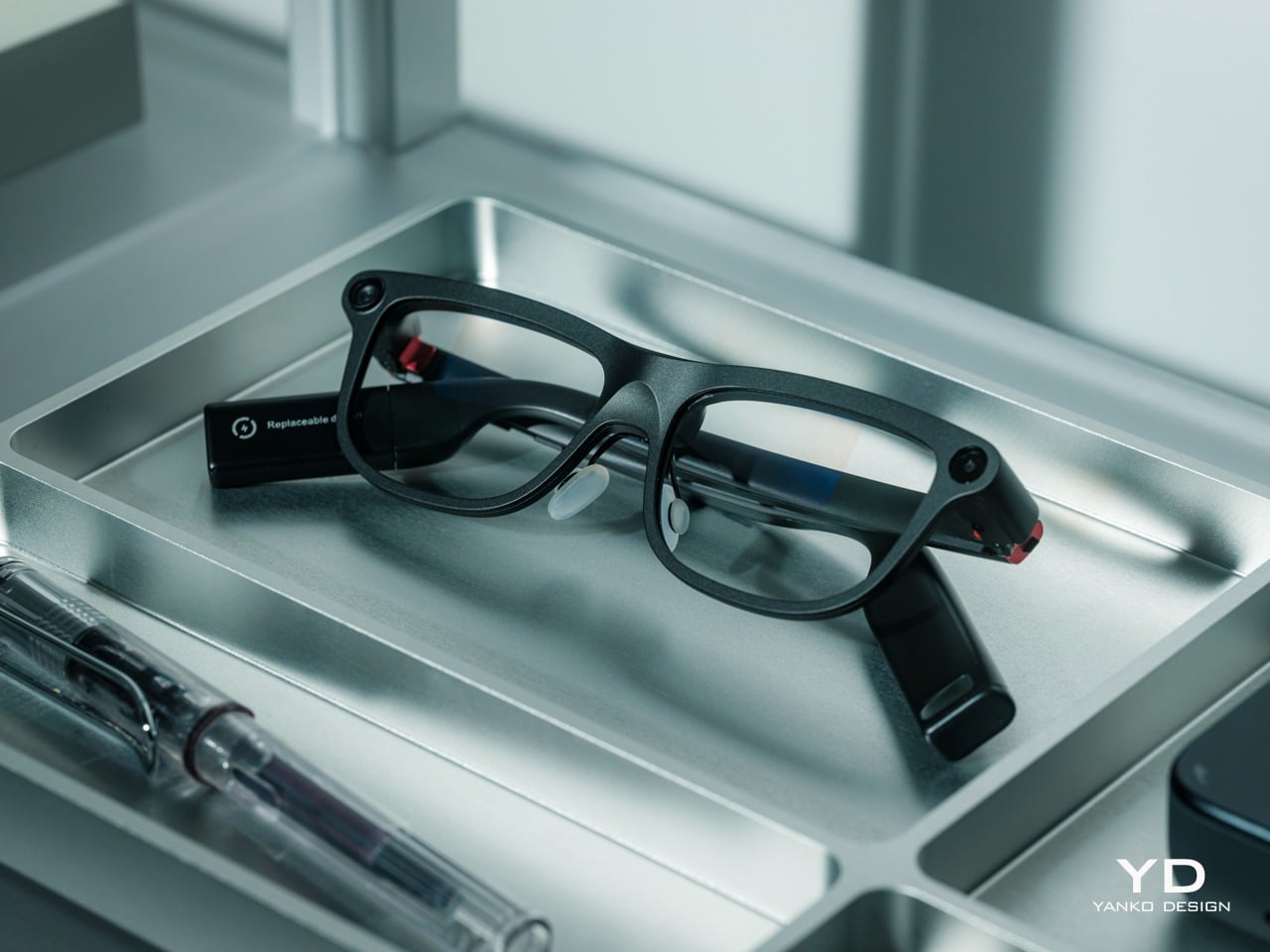
Looking down at a phone to translate a conversation can interrupt the exchange it’s supposed to help. Reading presentation notes creates a similar problem, pulling attention away from the people in front of you. The INMO GO3 AI Glasses bring those words into view instead, putting translation and presentation tools inside a familiar rectangular frame that doesn’t require a dramatic change in personal style.

That familiar shape is only part of the appeal, though. Adjustable contact points, discreet controls, and, most importantly, a replaceable battery give the GO3 a practical foundation beyond its display. Together, they suggest an approach to smart glasses that puts everyday wear on equal footing with software features. How convincingly the GO3 brings those priorities together comes down to a few details, starting with the frame itself.

Designer: INMO

Click Here to Buy Now: $509 $699 ($190 off). Hurry, deal ends in 48-hours!

Aesthetics

The INMO GO3’s rectangular lenses and softened corners give it the outline of conventional eyewear, although the frame has more substance than a pair of reading glasses. That’s a reasonable visual compromise, of course, given what it packs inside. The thicker brow provides room for the display hardware while giving the front a confident shape, rather than leaving its components looking like something awkwardly attached afterward.

The dark matte finish does much of the visual work. It gives the broad surfaces a quieter presence than glossy plastic would, while the small red accents around the hinges add a bit of personality. Thankfully, the color doesn’t spread across the frame. There’s enough contrast to make the details interesting without making the glasses look like equipment borrowed from a gaming setup.

The GO3 utilizes aluminum alloy and polyamide for the construction with a CNC-finished, fingerprint-resistant surface. It’s not an entirely metal object, which makes sense when you consider that the electronics also add their own weight to the equation. The frame and temples share a restrained finish instead of competing for attention through contrasting textures.

The slim temples measure around 8mm, keeping the side profile from becoming an oversized box. The curved ends retain the familiar outline of glasses, even with additional hardware inside. It isn’t dainty eyewear, admittedly, but the shape avoids the visor treatment that would make a business lunch feel like a technology demonstration.

The camera is integrated into the front rather than perched above it, and the controls follow the temples. These details help the INMO GO3 read as a somewhat fashionable object instead of gadgets sharing a frame. A supplied camera cover also provides a way to obscure the lens when recording isn’t appropriate, especially given the current conversations around smart glasses.

Ergonomics

At approximately 58 grams, the INMO GO3 has the weight of electronics to accommodate as well as the frame itself. Comfort depends on more than the number on the specification sheet. The relationship between the nose pads, temples, and ears matters as much. There’s a focus on those contact points, rather than relying on a lightweight label to explain away the fitting process.

Air-cushion nose pads support the front, while the temples offer 15 degrees of adaptive movement, at least on paper. That flexibility gives the frame room to accommodate differences in head shape. Naturally, there will be cases when the head shape just won’t fit, but INMO has tried to accommodate as many head sizes as possible.

Given we’re talking about glasses, prescription support is another important piece of that everyday equation. The GO3 uses an insert system, with INMO’s current lenses supporting nearsightedness and astigmatism, though not farsightedness. That won’t cover every prescription, but it gives supported wearers a way to combine vision correction and the display.

Operating the glasses doesn’t have to depend on talking to them. Temple touch controls and physical power and GO buttons provide alternatives, while the companion app handles setup and settings. When you’re around people or somewhere that requires a degree of silence, a discreet gesture is often preferable to a spoken command, and familiar controls help make the wearable format a little less foreign.

Performance

Two-Way Dialogue Translation – Read translations directly through the glasses, while the other person sees or hears your translated response on the phone.

The INMO GO3’s binocular green Micro-LED display uses optical waveguides, with a 640×480 resolution and a 30-degree field of view. Adjustable brightness is listed up to 1,500 nits, which is plenty even for the bright outdoors. That said, those specs clearly mark it as something more for text and guidance rather than a miniature cinema. Green lettering has a slightly retro character, but a translation or the next line of a speech doesn’t need a full-color backdrop to be useful.

Translation, of course, is the primary use case for these glasses, and the numbers are admittedly impressive. INMO lists 78 source languages and 98 target languages online, with subtitles appearing in view rather than on a phone held between speakers. Offline support covers nine languages on Android and 13 on iOS, and future updates promise even more. The phone still needs to stay paired to a phone, of course, but a missing internet connection needn’t end every supported conversation.

Built-In Teleprompter – Follow your script directly through the glasses.

For presentations, the teleprompter moves the script from a desk into the speaker’s field of view, allowing for a more natural-looking stage presence. There’s automatic voice-following advancement in 17 languages (including English, Mandarin, Cantonese, Japanese, Korean, German, French, Thai, Russian, Spanish, Portuguese, Polish, Arabic, Indonesian, Vietnamese, Dutch, and Italian), alongside manual scrolling from the temple. Other languages will be displayed, depending on the document uploaded by the user, but the pages for unsupported languages can’t be automatically turned by voice. Very few will be sitting close enough to realize you’re not exactly looking at them, but at least you won’t be spending half of the presentation staring down at your notes.

Photo Translation – Point the camera at written text and read its translation directly through the glasses.

The GO3 also offers features better used in meetings, such as recording, transcription, and AI summaries for later review. Walking and cycling directions, an AI assistant powered by ChatGPT and Gemini, and photo translation extend the same idea beyond work scenarios: put a useful answer nearby without making a phone screen the center of every activity.

Admittedly, many AI smart glasses offer similar features, but the INMO GO3’s killer feature is its interchangeable battery system. One 270mAh battery is installed in the glasses, with one spare included. Continuous use yields around 3 hours on a full charge, which is probably more than enough for most use cases. The 1,300mAh battery charging case offers three to four more charges, so you practically get a full day’s worth in total.

Where it gets interesting is how you can swap out the dead battery on the tip of the GO3 with the spare in the charging case. It’s quick and convenient, but not entirely seamless. The glasses will shut down when you pull out the battery, but plugging a fresh one in boots it up in just a few seconds. It does mean you have to briefly stop what you’re doing or make sure you’re not in the middle of something critical, but it’s better than waiting for minutes for the glasses to charge up.

Sustainability

The replaceable battery has a longer-term benefit beyond getting through a busy afternoon. An aging power cell doesn’t automatically have to take the entire pair of glasses out of service. INMO lists a replacement battery at $49, making that component a separate ownership expense. That’s a useful piece of product design: the part expected to wear with repeated charging doesn’t have to remain permanently sealed inside.

That doesn’t establish a complete sustainability story, and there’s no need to pretend otherwise. The reviewed specifications don’t establish recycled material content, comprehensive component repairability, or an end-of-life program. The more defensible advantage is the ability to keep the same frame in service when its battery needs replacing. Thoughtful care still matters, particularly for the lenses and hinges, but accessible power replacement is a concrete place to start.

Value

At $699, currently discounted to $509, the INMO GO3 asks for a commitment beyond casual curiosity. The standard package includes the glasses, installed battery, single spare, and battery charging case. That’s a coherent starting point, with the power system already accounted for. The value comes from using the display repeatedly, rather than paying for a collection of functions that remain untouched save for a few presentations or travels abroad.

The useful comparison is between priorities, rather than a contest over the longest feature list. Camera-and-audio glasses answer a different need from eyewear that puts text in view, while entertainment-focused displays serve another purpose again. For someone moving between multilingual conversations and presentations, the GO3’s combination is easier to justify. That it can also be your travel companion and AI assistant brings added value to the table, especially when you don’t look like a walking technology advertisement.

Verdict

The INMO GO3’s most appealing quality is how its design keeps returning to recognizable habits. Wear glasses, follow a conversation, glance at a script, and change a battery when necessary. The technology adds steps of its own, of course, but the physical form doesn’t ask for an entirely new routine. Its familiar outline and adaptable contact points give the translation and presentation tools a sensible place to live.

Travelers, presenters, and people working across languages have the clearest reasons to appreciate that combination. A paired phone remains part of most workflows, and battery changes belong between tasks, but neither qualification takes away the appeal of information placed closer to the conversation. There’s something refreshingly practical about glasses that leave room for ordinary interactions, even when a little green text is helping them along.

Click Here to Buy Now: $509 $699 ($190 off). Hurry, deal ends in 48-hours!

The post INMO GO3 AI Glasses Review: Putting Information in Your Line of Sight first appeared on Yanko Design.

❌