
Vue normale

Il y a de nouveaux articles disponibles, cliquez pour rafraîchir la page.
Aujourd’hui — 3 mai 2026Flux principal

A Mouse You Can Squeeze Like a Stress Ball While You Work

Par : JC Torres
2 mai 2026 à 22:30

The computer mouse hasn’t changed much in decades. Still mostly hard plastic, still shaped like a bar of soap, still asking your hand to grip something that gives absolutely nothing back. The rest of the desk setup has evolved, ergonomic chairs, standing desks, wrist rests, but the one device your hand touches for eight hours straight has remained stubbornly rigid and deeply uninteresting.

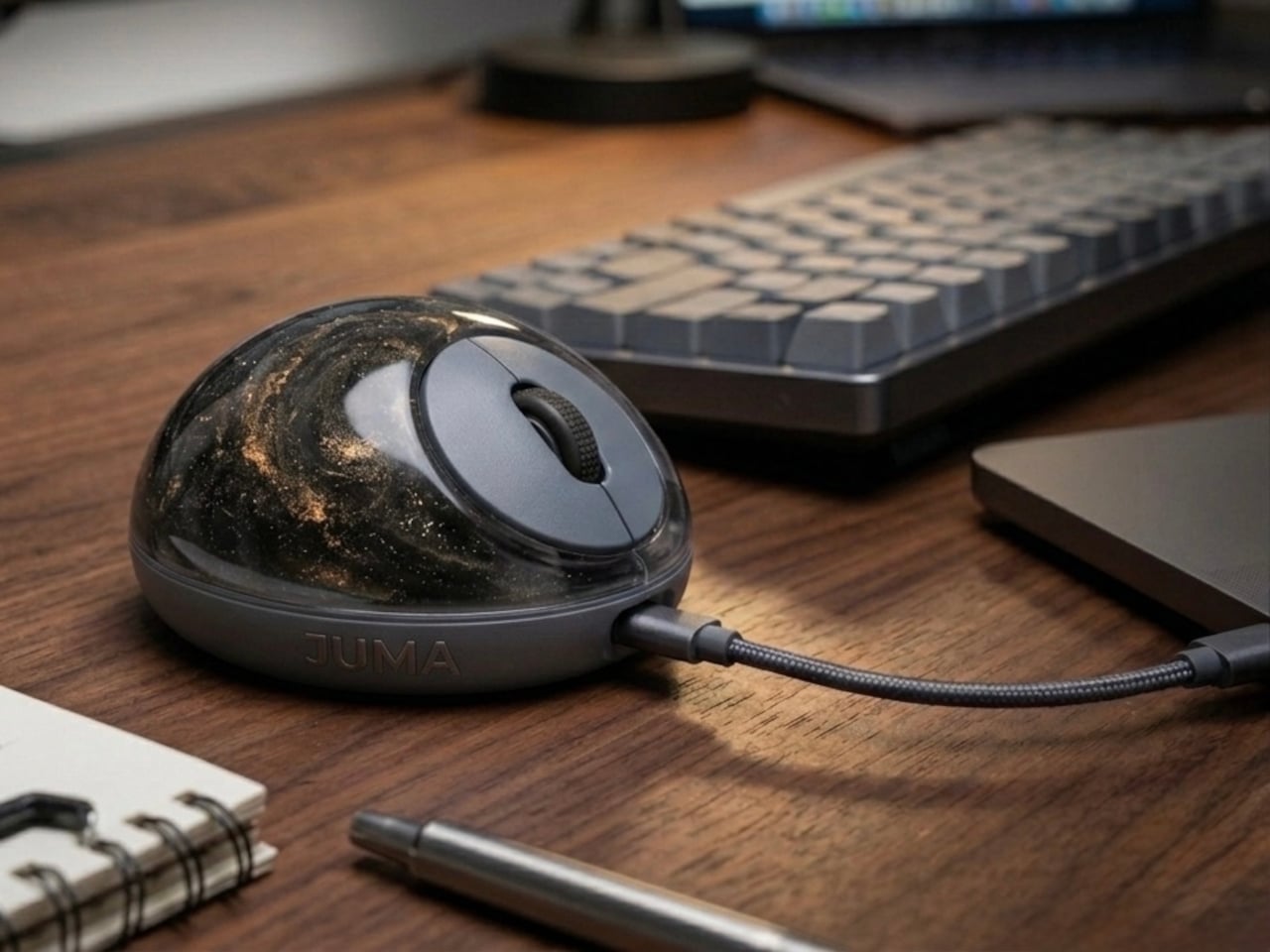
The PILLIGA mouse concept makes a fairly obvious argument for why that should change. Instead of hard plastic, the entire upper chassis is a squishy, flexible membrane packed with a viscous, translucent gel. It’s the same basic impulse that makes people reach for a stress ball mid-meeting, except it’s also the thing you need to get any work done.

Designer: Guillermo Gonzalez

The thinking behind it is straightforward enough. Deadline pressure builds, calls run long, and the urge to fidget becomes almost impossible to ignore. Rather than keeping a stress ball in the desk drawer as a separate ritual, the mouse folds that habit directly into the tool that’s already in your hand. You can squeeze, press, or knead the gel without ever lifting your hand off your workflow.

The dome shape isn’t just for show, either. It follows the natural arch of your palm rather than forcing your hand flat against a hard surface, and the gel underneath absorbs the kind of low-level muscular strain that builds up quietly over hours of clicking and scrolling. It’s the sort of ergonomic consideration that usually requires its own dedicated accessory, not just a different material.

The controls themselves are sensibly laid out. A flat circular interface sits embedded in the front of the mouse, cleanly split for left and right clicks, with a textured, rubberized scroll wheel running between them. A USB-C port at the front handles charging, keeping the wireless design intact without the inconvenience of a separate charging dock. The bottom carries the optical sensor and power switch.

What makes the PILLIGA mouse concept genuinely interesting is how far it extends color as a design element. The gel comes in several variants, from vivid green with gold flecks and a blue version scattered with purple glitter, to darker, more subdued options that look considerably more at home on a professional desk. Each colorway pairs with a matching base and click interface, making the whole thing feel deliberate.

That range matters. The more reserved colorways hint that this isn’t a novelty item for a niche corner of the internet; it works just as comfortably on a professional desk as it does on a creative’s workstation. The gel doesn’t make it look cheap. It makes it look like something designed by someone who gave serious thought to what a mouse should feel like.

Concepts like the PILLIGA are more useful as provocations than promises. Computer mouse design has been coasting on the same assumptions for decades, and the idea that your primary input device could also be physically satisfying to hold hasn’t come up often enough. The gel-filled body raises the question, and that’s honestly more than most peripheral design manages to do.

The post A Mouse You Can Squeeze Like a Stress Ball While You Work first appeared on Yanko Design.
À partir d’avant-hierFlux principal

Razer Just Proved Ergonomic Keyboards Don’t Have to Be Miserable

Par : JC Torres
1 avril 2026 à 10:07

Ergonomic keyboards have a reputation problem. They work, technically, but most of them look like they were designed by someone who’d never sat through a full workday. The splits are too wide, the angles too aggressive, and the learning curve steep enough to make you miss the flat keys you’ve always known. Plenty of people give it a try and quietly go back to what they had before.

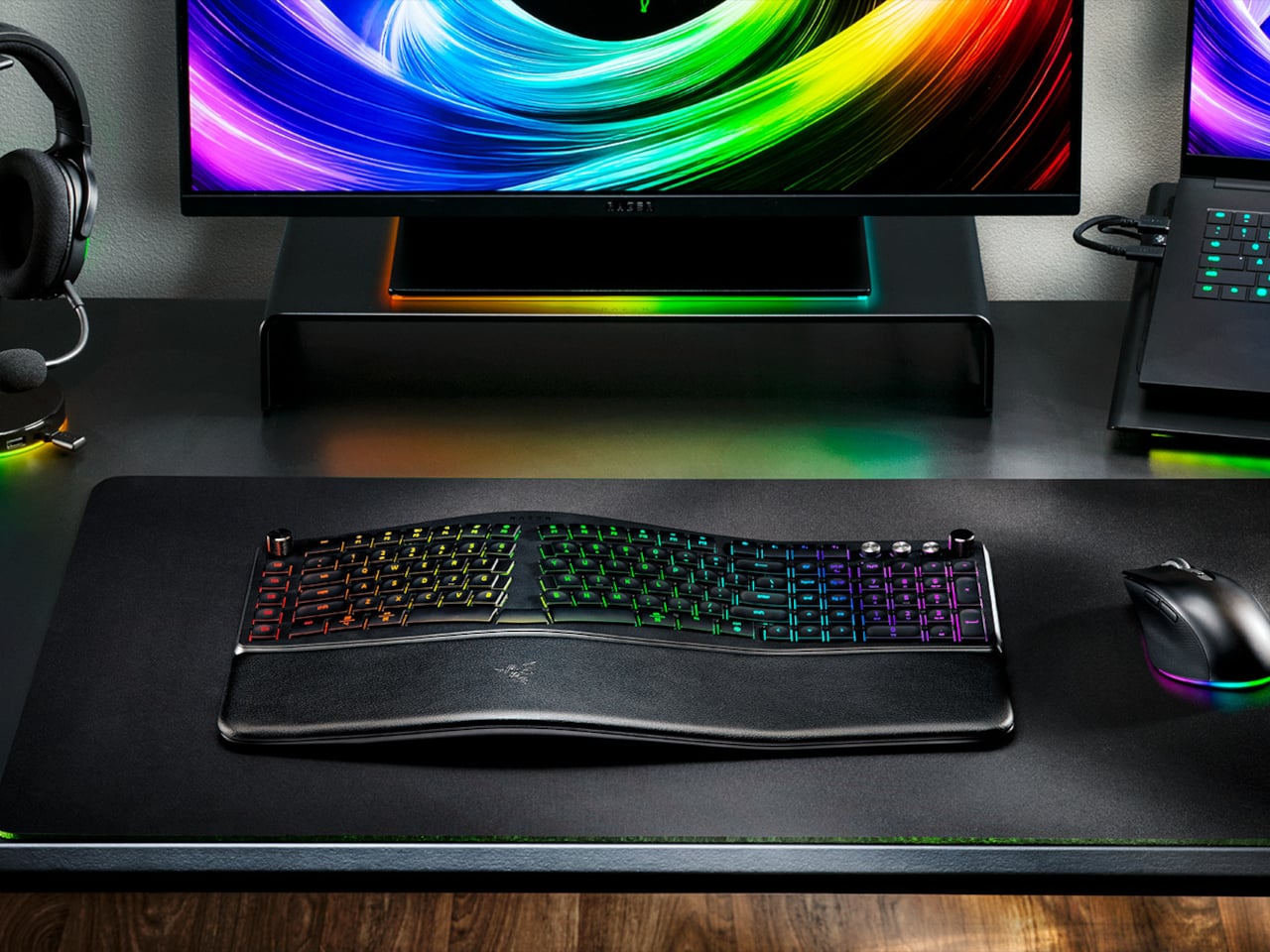
Razer’s answer is the Pro Type Ergo, its first wireless split ergonomic keyboard, built with that frustration clearly in mind. Rather than throwing you into a radical new layout, it’s tuned to feel approachable from the very first keystroke. The split gently angles your hands into a more natural alignment, easing the sideways reach that makes most forearms ache by mid-afternoon, without asking you to completely relearn how to type.

Designer: Razer

One of the more interesting layout choices is the dual “B” key arrangement, with one on each side of the split, along with an extra backspace tucked between two space bars. The idea is that both thumbs take on common actions, so you’re reaching less and crossing your fingers over each other less throughout the day. It’s a small shift that makes more sense the longer you sit with it.

The keycaps are ultra-low-profile, fitted with subtle spherical indents that nudge your fingertips into the right position without you having to think about it. Sound-dampening layers and tuned stabilizers underneath keep the typing noise low enough for open offices and video calls. Shorter key travel also means less physical effort per keystroke, which doesn’t sound like much until you’ve been at your desk for six hours straight.

The wrist rest is permanently integrated rather than removable, which turns out to be a feature rather than a limitation. It’s just always there, supporting your wrists from the moment you sit down without any extra setup. A 10-degree base slope sets the starting angle, and five tilt positions, from flat to seven degrees forward or back, let you dial in the fit depending on your desk height and preference.

A Razer Command Dial lets you assign up to eight functions, expandable to 100 via Razer Synapse, while five macro keys along the left side keep your most-used shortcuts within easy reach. There’s also a dedicated AI Prompt Master key that handles things like drafting emails, summarizing blocks of text, or kicking off a research query in a single press, without pulling you out of whatever window you’re already in.

Connectivity spans Razer HyperSpeed Wireless at 2.4 GHz, three Bluetooth profiles, and USB-C wired mode, with support for up to five devices total. Razer Chroma RGB backlighting covers 19 customizable zones and can be switched off entirely for offices where animated key lighting might not go over well. The design is clean and understated, a far cry from the aggressively lit gaming keyboards Razer is better known for.

The Pro Type Ergo retails at $189.99, about $30 more than Razer’s conventional Pro Type Ultra from 2021. For anyone who types for a living and has been quietly working around the ache of a standard keyboard layout, that extra cost starts to feel a lot less significant once you’ve spent a full day on something that actually fits how your hands are supposed to sit.

The post Razer Just Proved Ergonomic Keyboards Don’t Have to Be Miserable first appeared on Yanko Design.

LiberNovo Omni Just Won the iF Design Award 2026 for Wellness Design

Par : JC Torres
16 mars 2026 à 01:45

Most office chairs operate on a quiet assumption that sitting is something your body should adapt to, not the other way around. You adjust the height, nudge the lumbar support into roughly the right position, and then spend the rest of the day subtly fighting the chair anyway. The ache between your shoulders, the stiffness in your lower back by mid-afternoon, that’s just part of the deal, apparently, and most of us have accepted it without much argument.

LiberNovo decided not to accept it. The result is the Omni, a chair the company calls a Dynamic Ergonomic Chair, and it just picked up the iF DESIGN AWARD 2026 in the Product Design – Beauty/Wellness category. The iF Design Award has been one of the most internationally respected design recognitions since 1954, with this year’s cycle drawing more than 10,000 entries from over 60 countries. That’s a serious field to stand out in

Designer: LiberNovo

Click Here to Buy Now: $929 $1099 (15% off). Hurry, deal ends in 48-hours!

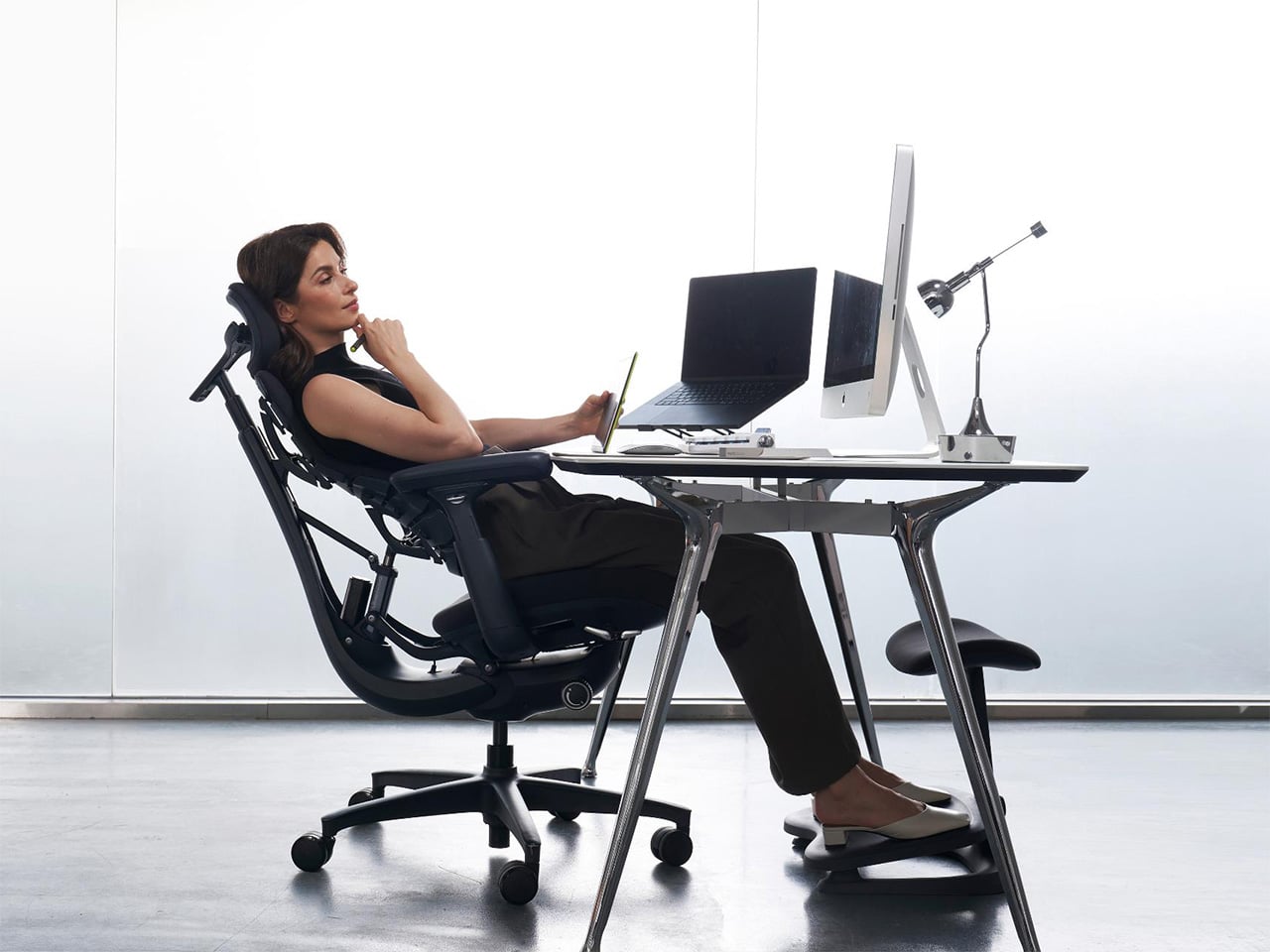
The core idea behind the Omni is that your posture doesn’t stay fixed throughout a workday, so your chair probably shouldn’t either. The Bionic FlexFit Backrest is built around that logic, using 16 spherical pivot points, 8 adaptive flexible panels, and 14 dual-connection points to follow the natural curve of your spine as it shifts. It covers you from the hips up through the shoulders, spreading pressure across the whole back rather than piling it onto one fixed lumbar point.

What makes this work in practice is the Dynamic Support system, which adjusts automatically to changes in your posture without you having to reach for anything. Lean forward during a focused stretch of work, sit back when you’re thinking something through, the chair tracks those shifts, and responds in real time. It’s the kind of feature that sounds modest until you realize how much of your day you’ve spent adjusting a chair that couldn’t do this.

Then there’s OmniStretch, which is where the Omni starts to feel like something genuinely different. Sitting for long hours compresses the lower spine gradually, and most chairs just let that happen. OmniStretch is a guided decompression feature that gently stretches the lower spine during the workday, designed to actively relieve pressure rather than simply tolerate it. It’s probably why the iF jury placed the Omni in the Beauty/Wellness category: this chair isn’t just holding you up, it’s doing a bit of recovery work along the way.

The Omni also offers four recline positions running from 105 to 160 degrees. The shallower end is built for focused, upright work, while the deep 160-degree Spine Flow position is designed for full spinal decompression between sessions. The two intermediate angles cover the range in between, which gives the chair a kind of daily rhythm that matches how most people actually move through their hours rather than sitting rigidly in one position all day.

The chair was developed by LiberNovo’s team in Shenzhen alongside industrial design firm Kairos Innovation, also based there. Winning an iF award is meaningful external confirmation that the design thinking behind the Omni translates beyond the product brief. For a chair that started from the premise that desk work doesn’t have to hurt, that’s a pretty good place to land.

Click Here to Buy Now: $929 $1099 (15% off). Hurry, deal ends in 48-hours!

The post LiberNovo Omni Just Won the iF Design Award 2026 for Wellness Design first appeared on Yanko Design.

❌
❌