Vue normale

Il y a de nouveaux articles disponibles, cliquez pour rafraîchir la page.
À partir d’avant-hierFlux principal

Portable monitor with 12,000+ five‑star reviews is back on sale — compact, reliable, and easy to recommend

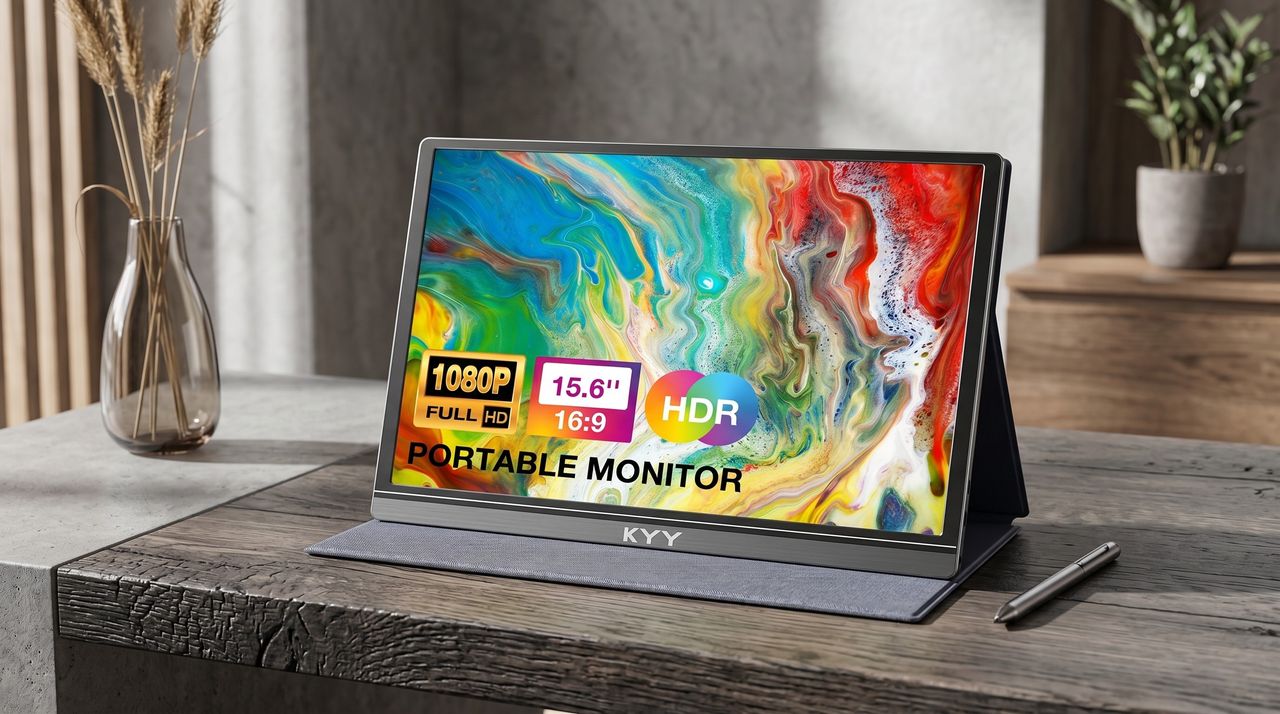
The KYY Portable Monitor is a pretty popular display on Amazon that's loved for its above-average performance rates and FHD resolutions, and it's now back on sale with a 34% discount.

Portable KYY monitor displaying vibrant abstract art. Features include 1080p resolution, 15.6" screen, HDR, and 16:9 aspect ratio. Set on a wooden desk with a stylus and vase nearby.

The KYY Portable Monitor is a pretty popular display on Amazon, and it's now back on sale with a 34% discount.

GNU TeXmacs - Écrivez vos équations comme dans Word

Par : Korben ✨
23 avril 2026 à 09:30

Ah, LaTeX...

Si vous avez un jour essayé de poser 3 équations dans un document sérieux, vous voyez le genre de galère que c'est. Le rendu est magnifique, les maths sont propres, mais faut d'abord digérer son langage de markup avant de réussir à imprimer la moindre intégrale. Heureusement, c'est là qu'arrive GNU TeXmacs , un éditeur scientifique libre qui fait pareil mais en WYSIWYG.

Ça tourne sur Linux, macOS et même des OS du passé comme Windows ^^ et ça devrait ravir étudiants en sciences, thésards, chercheurs, enseignants, ou autres curieux qui veulent voir à quoi ressemble un éditeur scientifique vraiment libre. Faut vous imaginer un Google Docs avec un mode maths natif, dans lequel vous tapez directement votre équation comme dans un bon vieux Word avec du gras (c'est bon le gras ^^ !), de l'italique, des fractions, ou encore des racines carrées que vous pouvez faire à la souris ou via des raccourcis clavier. Et le moteur vous sort alors une typographie de niveau publication académique. Comme ça, pas besoin de "recompiler" votre document à chaque correction car tout s'affiche en direct !

Une formule rendue directement dans l'éditeur, sans recompilation

Le truc qu'il faut comprendre, c'est que TeXmacs n'est PAS un frontend graphique pour LaTeX. C'est un moteur de typographie complètement indépendant, qui s'inspire des idées de TeX sans en recycler le code. Vous pouvez donc exporter vers du .tex si un collègue en a besoin, mais ce n'est pas ce qui tourne sous le capot pendant que vous écrivez.

L'autre truc sympa, c'est que TeXmacs sert aussi d'interface pour de nombreux systèmes de calcul formel libres tels que Maxima, Sage, Pari ou Axiom qui peuvent balancer leurs résultats directement dans votre document, formatés proprement. R et Octave sont aussi de la partie pour le côté stats et numérique.

TeXmacs servant d'interface à un système de calcul formel, le résultat tombe déjà formaté

Derrière le projet, y'a Joris van der Hoeven, un mathématicien néerlandais et Directeur de recherche au CNRS. Il bosse sur TeXmacs depuis la fin des années 90, et maintient en parallèle Mathemagix, un système de calcul formel libre qui se marie forcément bien avec. Le projet est sous licence GPL et fait partie du projet GNU . Ce n'est donc pas un truc vibe codé en un weekend just 4 fun !

TeXmacs reste quand même un logiciel de niche. Et gaffe en particulier à l'import depuis LaTeX, qui laissera tomber les fichiers de style custom et ne gèrera qu'un sous-ensemble du langage. L'interface a aussi un côté très années 2000 assumé, et la communauté est plus petite que celle de LaTeX.

Mais peu importe, moi ce qui me plaît dans la démarche, c'est cette indépendance assumée vis à vis de TeX avec un moteur refait à zéro et pas une surcouche contraignant comme LyX. Alors oui forcément, on perd un peu de compatibilité mais ça rend tellement service que c'est pas très grave.

Voili voilou, si vous êtes amateur de maths et de formules ou que vous voulez voir à quoi ressemble un éditeur scientifique vraiment WYSIWYG, ça vaut son petit téléchargement. Puis c'est gratuit alors foncez !

Une faille IndexedDB permettait de relier toutes vos identités Tor

Par : Korben ✨
23 avril 2026 à 06:12

Bon, les amis, si vous utilisez Tor Browser pour faire du sérieux, faut que vous sachiez un truc. Le bouton "New Identity", censé vous donner une nouvelle identité vierge à chaque clic... bah il laissait filer, jusqu'à il y a peu de temps, un identifiant stable tant que Firefox tournait.

Deux chercheurs de Fingerprint ont en effet trouvé comment une fonction toute bête du navigateur se transformait en empreinte unique de votre browser, partagée entre tous les sites que vous visitiez.

Il faut donc dès à présent faire la mise à jour vers Firefox 150 ou l'ESR 140.10.0 (la version long-terme utilisée par Tor Browser), ainsi que la dernière version de Tor Browser qui récupère le patch. Si vous voulez en savoir plus, la CVE c'est CVE-2026-6770 , classé comme sévérité modérée par Mozilla.

Le truc marche en vase clos mais traverse les murs.

Mais avant, IndexedDB c'est quoi ?

En gros c'est une mini-base de données que les sites web peuvent créer dans votre navigateur, pour stocker des trucs en local (du cache, des données offline, l'état d'une app web). Chaque site peut y ranger plusieurs bases nommées, et une petite fonction JavaScript indexedDB.databases() permet au site de demander la liste de ses bases.

Rien de foufou sur le papier. Sauf que dans Firefox en navigation privée, le navigateur renomme en coulisse chaque base avec un identifiant aléatoire (UUID), et range tout ça dans une seule grosse table interne. Et le gros problème, c'est que cette table est partagée entre tous les sites ouverts, et pas cloisonnée site par site.

Et là, ça devient croustillant puisque quand un site redemande la liste de ses bases, Firefox la renvoie sans la trier, dans un ordre qui dépend de la structure interne de cette table partagée. Du coup, deux sites totalement différents qui créent chacun seize bases dans le même ordre récupèrent exactement la même suite en retour. Pas l'ordre de création donc mais une permutation bizarre, genre g,c,p,a,l,f,n,d,j,b,o,h,e,m,i,k.

Je vous passe les détails mais ça fait dans les 17 000 milliards de combinaisons possibles. Donc largement de quoi distinguer votre navigateur parmi des millions, comme une empreinte digitale qui colle au doigt !

Et ce qui pique vraiment c'est que cet identifiant survit à la fermeture de toutes vos fenêtres privées. Tant que le process Firefox tourne en arrière-plan, l'ID reste. Un site peut donc vous reconnaître après que vous ayez fermé vos onglets privés, rouvert une session pensée comme neuve, et revisité le site. Pour le user, c'est une session fraîche alors que pour le serveur c'est clairement le même navigateur qu'il y a dix minutes.

Côté Tor Browser c'est pire puisque le bouton "New Identity" a pour mission explicite de couper tout lien avec ce que vous faisiez avant. Il ferme les onglets, efface l'historique, vide les cookies, tire de nouveaux circuits Tor. La promesse officielle, c'est "empêcher votre activité future d'être liée à ce qui précède".

Sauf que cette fameuse table interne, elle, ne bouge pas. Le New Identity reset donc tout sauf ce qu'il ignore. C'est comme changer de fringues dans le même ascenseur... en gardant le même parfum. Techniquement vous êtes différent, mais reconnaissable en deux secondes. Bref, c'est assez grave car un site capable d'exploiter la faille peut lier votre session avant-New-Identity à votre session après-New-Identity.

Tant qu'on n'a pas redémarré Firefox complètement, l'ID persiste.

Les chercheurs disent avoir fait une divulgation responsable, directement à Mozilla et au Tor Project avant publication donc c'est nickel, et les deux équipes ont poussé les patches avant de communiquer sur quoi que ce soit. Donc les utilisateurs à jour sont tout simplement protégés contre cette faille précise.

Après si vous êtes du genre parano, pensez à redémarrer complètement votre Tor Browser entre deux sessions vraiment sensibles. Ça coupe le process Firefox, ça vide cette fameuse table, et ça évite ce genre de surprise pour d'autres leaks similaires qu'on n'aurait pas encore trouvés.

A bon entendeur, salut !!

Source

The All-Black Kitchen Is 2026’s Hottest Design Trend — Here Are 8 Products That Nail It

17 avril 2026 à 11:40

Black has always carried weight in design. Authority, restraint, a quiet elegance that needs no announcement. In 2026, the all-black kitchen has shifted from a bold statement to a genuine design movement. What once felt too dramatic for the most-used room in the home now feels precisely considered. Designers and homeowners alike are gravitating toward the palette for its ability to make a space feel curated, intentional, and deeply sophisticated when executed well.

The shift runs deeper than cabinetry and countertops. It lives in the tools, the cookware, the lighting, every touchpoint that shapes how a kitchen performs and how it looks doing it. Finding pieces that commit to the aesthetic without sacrificing function is the real challenge. These eight products do exactly that, from carbon graphite cookware rooted in Japanese craft to a precision pour-over kettle engineered for serious brewing.

1. ANAORI Kakugama

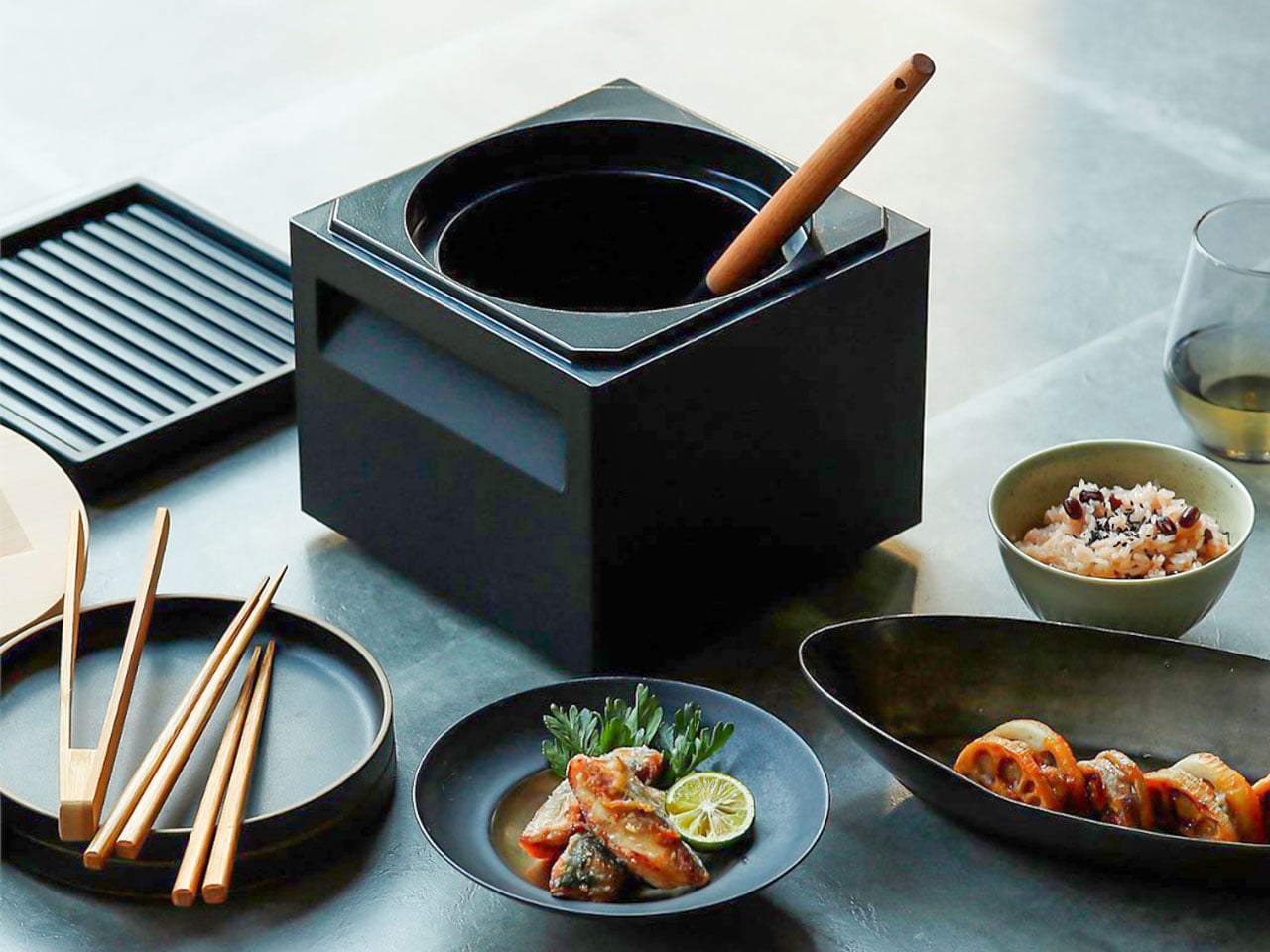
Carbon graphite isn’t a material you encounter in the kitchen, which is precisely what makes the ANAORI Kakugama so compelling. Crafted from solid carbon graphite, this Japanese cooking vessel carries a physical and conceptual weight that coated pans simply can’t match. Its matte black surface distributes heat with uncommon efficiency, significantly reducing the risk of scorching while preserving the natural flavors and nutrients of whatever is being prepared. This is cookware that approaches food with genuine respect.

The kakugama’s range is quietly impressive. Designed to steam, poach, simmer, grill, and fry, it handles each technique without compromise, making it the kind of piece that earns a permanent position in the kitchen. The fragrant Japanese cypress lid adds something unexpected: as it heats, it releases a subtle, earthy aroma that transforms an ordinary cooking session into something closer to ritual. For the design-conscious cook who values craft as much as performance, this vessel is essentially irreplaceable.

What We Like

  • Carbon graphite construction delivers exceptional, even heat retention across every cooking method
  • The Japanese cypress lid adds a rare aromatic quality to cooking that no synthetic material can replicate

What We Dislike

  • The premium material and craftsmanship place this vessel at a significant price point above conventional cookware
  • Carbon graphite requires more attentive handling and care than standard kitchen materials

2. Obsidian Black Precision Chopstick Tongs

There’s a particular satisfaction in a kitchen tool that commits fully to its concept. Part of the Obsidian Black Kitchen Collection, the Precision Chopstick Tongs take their form directly from traditional Japanese chopsticks and engineer it for the demands of a modern kitchen. Made from SUS821L1 stainless steel, they’re light enough to handle delicate pieces of sushi yet durable enough for daily stovetop use. The result is a utensil that genuinely bridges the line between cooking instrument and tableware.

What sets these tongs apart from anything else in the drawer is the finish. A special metal processing technique ensures the obsidian’s black color resists scratching and peeling, maintaining its appearance through repeated use and washing. They work just as confidently plating sashimi at the table as they do flipping proteins in a pan. That dual-purpose quality is rare, and it’s exactly what earns a piece a permanent place in a kitchen where aesthetics and performance are equally weighted.

Click Here to Buy Now: $25.00

What We Like

  • The obsidian black finish is scratch and peel-resistant, holding its appearance through sustained daily use
  • Designed to function as both a cooking utensil and tableware, bridging the kitchen and dining with a single tool

What We Dislike

  • The chopstick form may require a brief adjustment period for those accustomed to conventional tong grips
  • The precision-focused design is less suited to tasks requiring wide or bulky gripping

3. Samsung Bake Ultra Concept

Concept appliances rarely look this resolved. Designed by Octavio Leon Villareal, the Samsung Bake Ultra approaches the compact electric oven with a formal discipline that separates considered design from merely clever design. Its two-tone composition, a soft gray body anchored by a black glass front, achieves a visual balance that reads as both contemporary and enduring. This isn’t minimalism for its own sake. It’s a deliberate formal decision that allows the Bake Ultra to feel entirely at home in kitchens ranging from industrial-chic to warm and considered.

The rounded edges are doing significant work. By softening what could easily have read as an overly boxy silhouette, Villareal gives the Bake Ultra an approachability that most compact ovens lack entirely. It doesn’t demand attention, but it consistently earns it. In an all-black kitchen where every object contributes to the room’s visual tone, an appliance this compositionally assured is genuinely valuable. The Bake Ultra wasn’t designed just to function. It was designed to belong.

What We Like

  • The two-tone design with black glass front integrates cleanly into an all-black kitchen without disrupting the visual flow
  • Rounded edges give the compact form an approachability that’s rarely achieved in kitchen appliance design

What We Dislike

  • As a concept design, the Bake Ultra is not yet available for consumer purchase
  • The soft gray body, while elegant, slightly departs from a fully committed all-black aesthetic

4. Iron Frying Plate

The Iron Frying Plate operates on a beautifully simple premise: eliminate the plate. Made from 1.6mm-thick mill scale steel, this uncoated, rust-resistant piece of cookware is designed to go from stove to table without interruption. There’s no ceramic coating to chip, no synthetic surface to question, just raw, well-engineered steel that builds character and natural seasoning with every use. The matte black mill scale finish slots into an all-black kitchen without any deliberate effort at all.

Its detachable wooden handle is one of those small design decisions that reveal serious thought about every moment of use. Attach it for cooking, remove it for serving, one-handed, no tools required. That seamless transition from cooking vessel to serving piece is exactly the kind of dual-function thinking that earns a product permanent space in a curated kitchen. JIU doesn’t try to be more than it is. It’s a frying plate, and it’s an excellent one.

Click Here to Buy Now: $69.00

What We Like

  • The uncoated mill scale steel surface develops natural seasoning over time, building flavor with every use
  • The one-handed detachable wooden handle enables a smooth transition from stovetop cooking directly to table service

What We Dislike

  • An uncoated steel surface requires regular seasoning and more attentive care than nonstick alternatives
  • The minimal form is best suited to simple preparations rather than sauce-heavy or complex dishes

5. HA1 Expert Hard Anodized Nonstick 10-Piece Set

If the all-black kitchen needs a workhorse, the All-Clad HA1 Expert set fills that role without compromise. Ten pieces of hard anodized, scratch-resistant nonstick cookware finished in a deep, uniform black that holds up to both heavy daily use and visual scrutiny. The anodized aluminum construction is reinforced with a stainless-steel base, delivering warp resistance and the kind of even, consistent heat distribution that makes routine cooking genuinely more reliable. This is a set built for people who cook seriously and care deeply about how their kitchen looks.

The range covers everything a fully functioning kitchen demands: two fry pans, two saucepans, a sauté pan, and a stockpot, each paired with a matching lid. Oven-safe to 500°F and induction-compatible, very little is left unaddressed. Double-riveted stainless steel handles hold securely through extended use, while tempered glass lids allow for monitoring without lifting. As a complete, coherent system in black, this set reads less like a collection of pots and more like an intentional design decision.

What We Like

  • Hard-anodized, scratch-resistant construction paired with long-lasting PTFE nonstick delivers durable, professional-grade performance
  • Fully induction compatible and oven safe to 500°F, covering virtually every cooking scenario without exception

What We Dislike

  • Glass lids are only oven safe to 350°F, considerably lower than the pans themselves
  • PTFE nonstick requires careful utensil choice and hand washing to preserve its surface longevity

6. Precision Chef Kitchen Scissors

Kitchen scissors rarely receive the design attention they deserve. The Precision Chef Kitchen Scissors are a deliberate exception. The oxidation-colored black finish isn’t cosmetic; it’s a durable surface treatment that resists deterioration, holding its appearance through years of regular use. The curved serrated blade is engineered specifically for cutting meat, reducing effort while improving both control and safety. In a kitchen where every object is chosen with intention, a pair of scissors is considered a meaningful detail that most kitchens quietly overlook.

The ergonomic structure goes beyond grip comfort. When laid flat, the blade is designed to avoid contact with the counter surface, a small but precise detail that speaks to the level of thought invested in this tool. Cutting through steaks, portioning pizza, or trimming vegetables, these scissors approach each task with the same quiet authority that an all-black kitchen demands. They are scissors genuinely designed to be seen as well as used, and they meet that standard on both counts.

Click Here to Buy Now: $95.00

What We Like

  • Oxidation coloring creates a durable black finish that resists fading and surface deterioration through sustained use
  • The curved serrated blade is purpose-engineered for meat cutting, improving control and reducing the effort required

What We Dislike

  • The specialized curved blade may feel less versatile for tasks that go beyond protein and general food prep
  • Ergonomic scissors with complex geometry can be more difficult to sharpen at home than straight-bladed alternatives

7. Melrose Pendant Light

Lighting in an all-black kitchen isn’t merely functional; it’s structural. The Steel Lighting Co. Melrose pendant operates as both. The 18-inch industrial dome in matte black is proportioned specifically for kitchen island use, casting a wide, even wash of light across the work surface below. American-made and UL-approved for both indoor and outdoor installation, this is a pendant built to perform as well as it looks. At 300 watts, it carries the capacity to anchor a kitchen island with genuine visual authority.

What makes the Melrose particularly thoughtful is its configurable interior. Available in white, matte black, or brass, the interior color shapes both the quality of reflected light and the overall tone of the fixture without altering its profile. In a black kitchen, a brass interior introduces a warm, considered counterpoint that prevents the space from reading as flat or one-dimensional. The matte black exterior remains constant throughout: commanding, clean, and entirely at home in a kitchen built around the same commitment to the color.

What We Like

  • Configurable interior color options in white, matte black, or brass allow for subtle tonal customization within a consistent exterior
  • American-made with indoor and outdoor UL approval, signaling a meaningful commitment to build quality and longevity

What We Dislike

  • At 12 pounds, installation may require additional structural consideration, depending on the ceiling construction
  • The industrial farmhouse silhouette may not suit kitchens with a strictly contemporary or ultra-minimal design direction

8. Fellow Stagg EKG Pro Electric Pour-Over Kettle

The Fellow Stagg EKG Pro is the kind of object that reframes where coffee fits in the morning. Its signature gooseneck spout delivers precise control over flow rate and stream consistency, the kind of control that produces a measurable difference in pour-over extraction. To the degree, temperature control heats and holds water exactly as programmed, while a high-resolution color display allows complete customization of brewing schedules, altitude adjustments, and temperature units. This is a kettle engineered with the seriousness typically reserved for professional brewing equipment.

The EKG Pro’s WiFi connectivity and scheduling capabilities are where it shifts from impressive to genuinely integrated into daily life. Program brewing schedules that adapt to your routine so the kettle is ready precisely when you are, no preheating, no guesswork. The sleek industrial design holds its own on a countertop alongside thoughtfully chosen cookware and tools. The hold function maintains brewing temperature for extended periods without wasting energy. In an all-black kitchen, this kettle earns its visible place every single morning.

What We Like

  • To-the-degree temperature control, combined with a gooseneck spout, delivers precision that measurably improves pour-over coffee quality
  • WiFi connectivity and programmable scheduling mean the kettle is ready exactly when needed, without any manual preheating

What We Dislike

  • Advanced features like WiFi and the color display come at a price point that significantly exceeds basic kettle alternatives
  • The gooseneck form is optimized for pour-over brewing and is less suited to general-purpose boiling tasks

The Kitchen Finally Got the Design Treatment It Deserved

The all-black kitchen doesn’t ask for compromise. Every product here demonstrates that designing in black means choosing objects with a strong point of view, ones crafted carefully, finished deliberately, and considered at every stage. The color is what makes the curation visible. It’s a shared language between objects that have little else in common except that they were each made to last, made to perform, and made to matter in the space they occupy.

What’s striking about 2026’s black kitchen movement is how completely it spans every category. Cookware, utensils, lighting, kettles: the commitment runs through the entire room. When each element carries the same visual weight, a kitchen stops being a collection of appliances and tools and becomes a genuinely designed space. That’s the standard these eight products are held to, and without exception, it’s the standard each one meets.

The post The All-Black Kitchen Is 2026’s Hottest Design Trend — Here Are 8 Products That Nail It first appeared on Yanko Design.

Rimowa Just Made the Classiest Excuse to Never Unpack

Par : Ida Torres
17 avril 2026 à 10:07

Most people treat their Rimowa suitcase like a very expensive houseguest: it arrives looking spectacular, gets shoved in a closet, and stays there until the next trip. Rimowa, apparently, has thoughts about this. And so does Lehni.

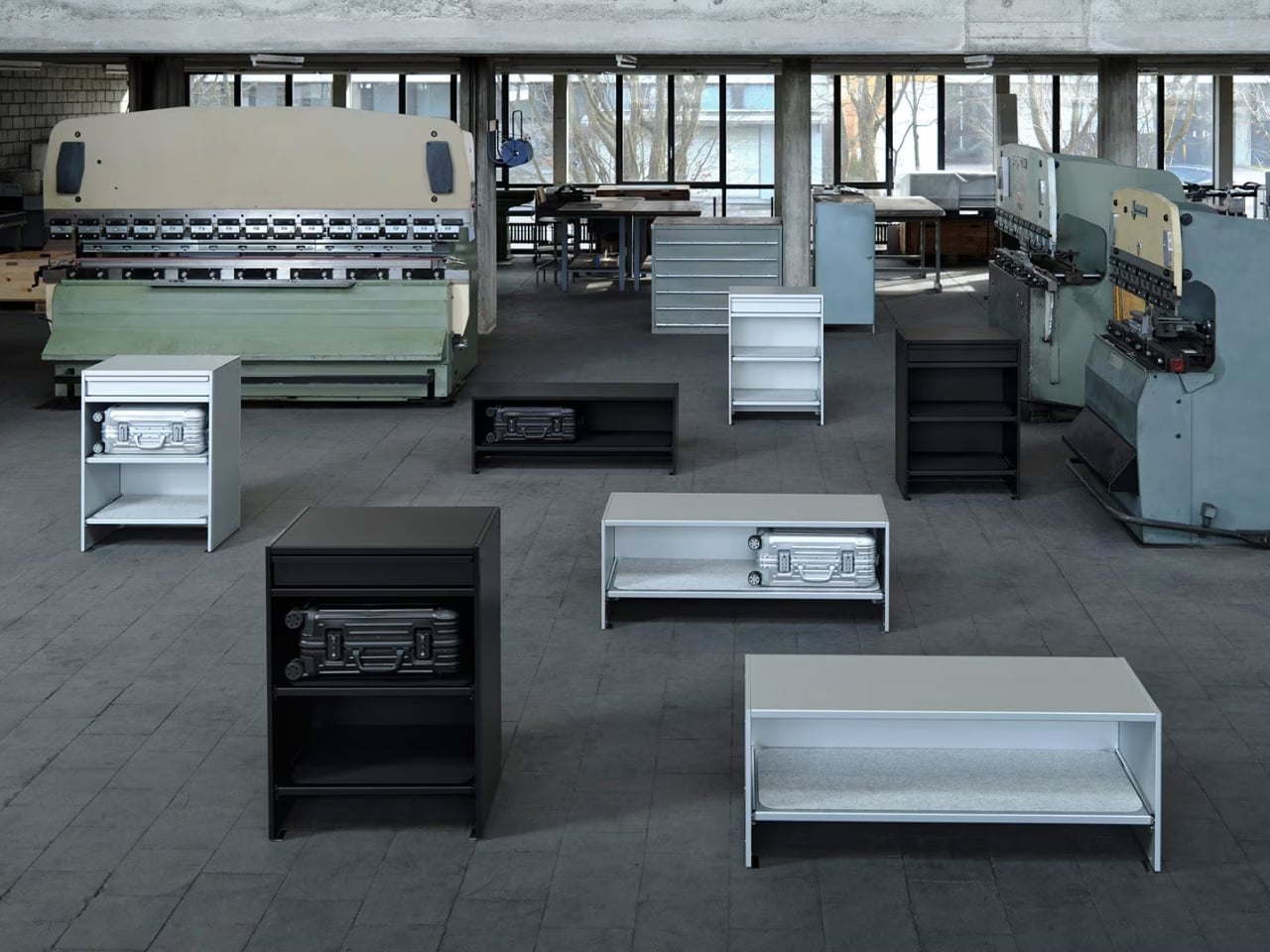
The two brands have just unveiled a limited-edition furniture collaboration at Salone del Mobile 2026 in Milan, and it might be the most quietly audacious thing either brand has done in recent memory. The collection consists of two pieces: a Bench and a Drawer, both crafted in anodized aluminum, both designed to hold cabin-sized Rimowa suitcases inside your home. Not in a storage room. Not under your bed. On display, like they were always meant to be there. Which, if you’ve ever owned a Rimowa, you’d know they kind of were.

Designers: Rimowa x Lehni

The Bench is an open-shelving unit that holds two cabin-sized suitcases side by side. It is clean, low-slung, and just architectural enough to look at home next to a mid-century credenza or a spare Scandinavian sofa. The Drawer offers a different kind of storage: a sculptural, closed-frame unit with a built-in drawer for smaller items. Both pieces come in silver and black anodized aluminum, and both carry the embossed Grid pattern that echoes the grooved exterior of a classic Rimowa Original. That detail is not accidental. It’s the kind of material continuity that makes a collection feel cohesive rather than like a brand licensing deal gone slightly off the rails.

The craft side of this is worth paying attention to. Lehni has been working with aluminum since 1922, when Rudolf Lehni opened a sheet metal workshop in Zürich that quickly became a gathering place for artists and architects. That legacy still shows. Today, the company is run by the fourth generation of the Lehni family out of Dübendorf, and every piece is handmade in their Zurich factory. Each shelf on the Bench, for instance, is lined with a specially developed scratch-resistant felt mat to protect the cases stored on it. You notice that kind of thinking. These are small decisions that add up to something much larger than the sum of their parts.

Rimowa, for its part, has been on a quiet but consistent streak of repositioning itself as something more than a travel brand. The aluminum suitcase has already crossed over into fashion and streetwear culture through collaborations with names like Dior, Supreme, and Porsche. Moving into furniture feels like the next logical step, and frankly, it makes more sense than most luxury crossovers I’ve seen. The material language stays the same. The level of craft stays the same. The only thing that changes is the context, which is exactly what makes this feel like a genuine design idea rather than a marketing exercise.

That said, let’s be real: this is not furniture for everyone. The Bench is priced at $4,275, the collection is limited-edition, and in the US it’s only available in the continental states by contacting Rimowa’s client services directly. There’s no add-to-cart button. That purchasing friction is intentional, and it’s the kind of intentional that has a very specific audience in mind: the person who already owns the suitcase, already loves it, and wants their home to reflect the same aesthetic sensibility. I don’t think that’s a bad audience to build for. Niche, yes. But well-defined.

My honest take is that the Rimowa Lehni collection succeeds because it doesn’t try to explain itself too hard. It doesn’t need to. Two brands that both work in aluminum, both care about precision, and both have long histories with good design sat down and made something that looks exactly like what you’d expect from that pairing. The result is a bench and a drawer that feel less like a product launch and more like an obvious conclusion. Sometimes the best collaborations aren’t the surprising ones. They’re the ones that make you wonder why it took this long.

The post Rimowa Just Made the Classiest Excuse to Never Unpack first appeared on Yanko Design.

VitaLink Just Put a 13-Inch Screen and Keyboard Into One Foldable Slab

Par : JC Torres
17 avril 2026 à 01:45

Working on the go rarely looks as tidy as productivity-tool adverts suggest. Most people who travel with serious work needs end up carrying at least two or three things that don’t quite fit together: a tablet or laptop, a compact keyboard if the touchscreen isn’t enough, maybe a portable monitor, and a cable situation that somehow multiplies every time you pack.

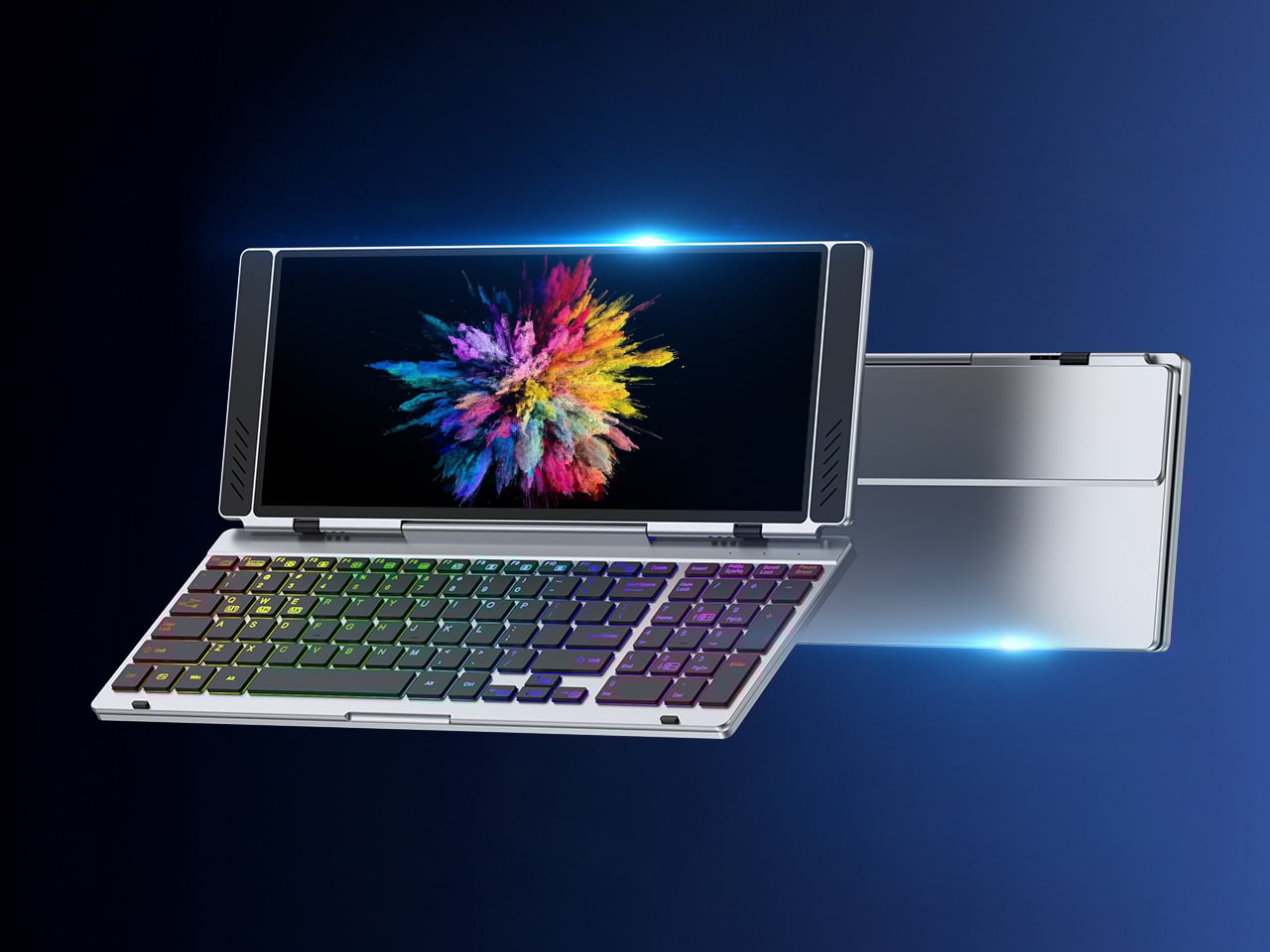
VitaLink is trying to simplify that. The concept combines a full-size keyboard and a large touch display into one foldable object in a CNC aluminum shell. Connect it to any USB-C device and your workspace expands immediately, without a separate stand, a monitor arm, or a bag pocket devoted to adapters. It folds down to 20mm and opens into something that feels genuinely designed.

Designer: VitaLink

Click Here to Buy Now: $279 $658 (58% off). Hurry, only 491/600 left! Raised over $37,000.

The integrated 13-inch display sits directly above the keyboard in what amounts to a compact laptop form factor. The screen runs at a 3840×1600 pixel resolution, a 2.4:1 ultra-wide format rather than a standard 16:9 panel, giving it an unusual amount of horizontal room. There’s enough space to keep two apps open side by side without either feeling squeezed into a corner.

The 180-degree hinge is what makes the compact form actually practical. When you’re done, everything closes into a flat 20mm slab that slips into a laptop sleeve without awkward bulk. The open footprint sits at around 34 × 15 cm, compact enough for a plane tray table, a crowded café counter, or a hotel desk that never seems to fit anything comfortably.

The panel supports 10-point touch, runs at 60 Hz, and delivers 298 PPI pixel density with 100% sRGB color coverage. Touching a screen this size changes how you interact with content. You can swipe, drag, and tap directly on the display while still using the keyboard below, which means managing layers in an editor, scrubbing a timeline, or pulling up references doesn’t require switching between input modes.

The keyboard uses scissor-switch mechanisms with 0.8mm of key travel and wider-than-typical spacing. That added spacing sounds like a minor detail until you’ve spent an hour trying to type accurately on a portable board that prioritizes size above everything else. Three RGB backlight modes let you set the visual tone, and the keys are designed to stay quiet enough for cafés and shared offices.

Two USB-C ports handle video, data, and power delivery through a single cable, and the plug-and-play setup works across Windows, macOS, Linux, iOS, and Android without requiring additional drivers. That compatibility extends to mini PCs, tablets, and handheld gaming consoles, so VitaLink isn’t tied to one kind of device. You’re not locked into a single workflow or a single ecosystem, which is most of the appeal.

Think about what that actually means. You’re in a hotel room with just your iPad and need a proper keyboard and enough screen space to write, edit, and reference something at once. Or you’re at a café with a mini PC and want a setup that doesn’t take over the whole table. Those are the moments where having the keyboard and the display in one object makes a real difference.

The aluminum body does more than keep things thin. CNC-machined aluminum with a frosted anodized finish gives it a rigidity that plastic travel accessories rarely have, protecting the display in transit and keeping the keyboard deck from flexing during typing sessions. It carries more like a slim hardcover notebook than a peripheral, which is a meaningful difference for anyone who’s dealt with a flimsy portable monitor in a crowded bag.

There’s something worth noting in the fact that portable work setups have gotten faster without necessarily getting more cohesive. The bag is still a loose collection of things that don’t quite belong together. VitaLink is at least making a case that the keyboard and the display belong in a single intentional object, built from the start for people whose work doesn’t stay in one place.

Click Here to Buy Now: $279 $658 (58% off). Hurry, only 491/600 left! Raised over $37,000.

The post VitaLink Just Put a 13-Inch Screen and Keyboard Into One Foldable Slab first appeared on Yanko Design.

"Truly one of the best gaming monitors": 480Hz at 1080p or 240Hz at 4K — there's no game this discounted display can't handle

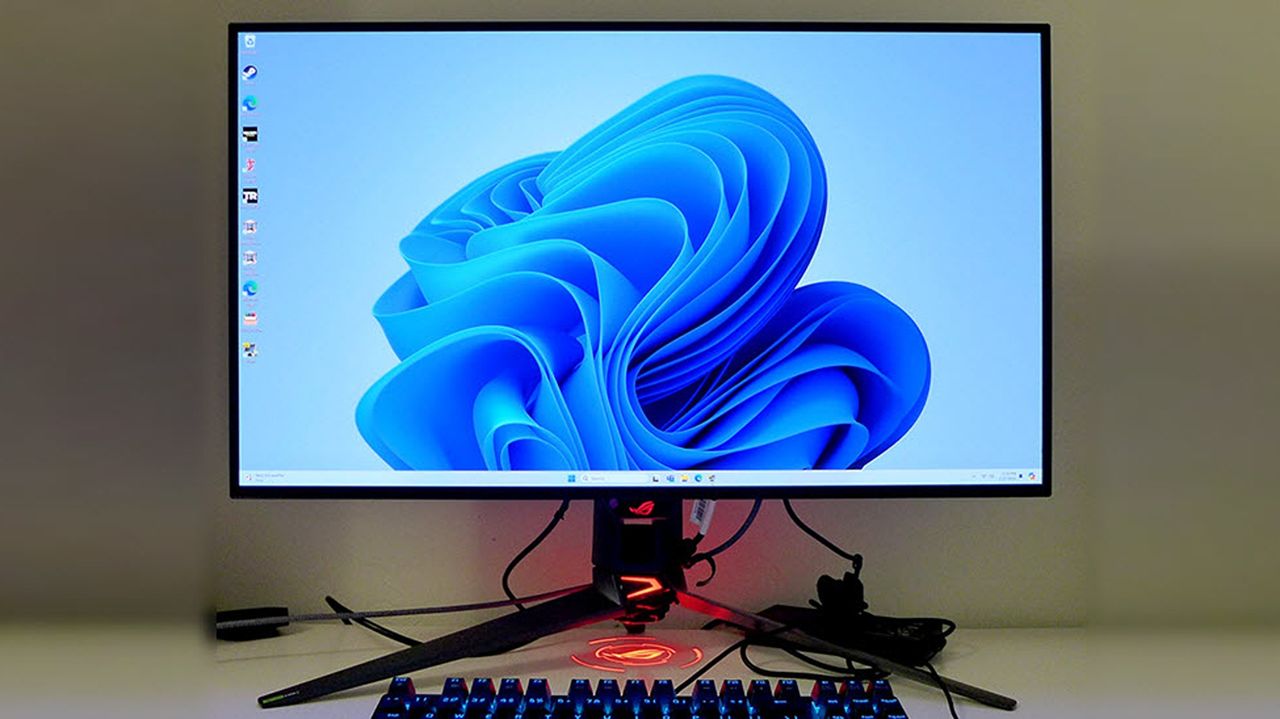
The ASUS ROG Swift 32" 4K OLED Gaming Monitor (PG32UCDP) is a perfect fit for both cinematic single-player and competitive multiplayer games, thanks to its dual-mode with 480Hz refresh rates, and it's now on a 31% discount.

Photograph of an ASUS ROG Swift 32" OLED Gaming Monitor (PG32UCDP)

ASUS ROG Swift 32" 4K OLED Gaming Monitor (PG32UCDP) on display

Someone discovered Seagate's Xbox Storage Expansion cards can be used on PC — which has made their value more meaningful with these discounts

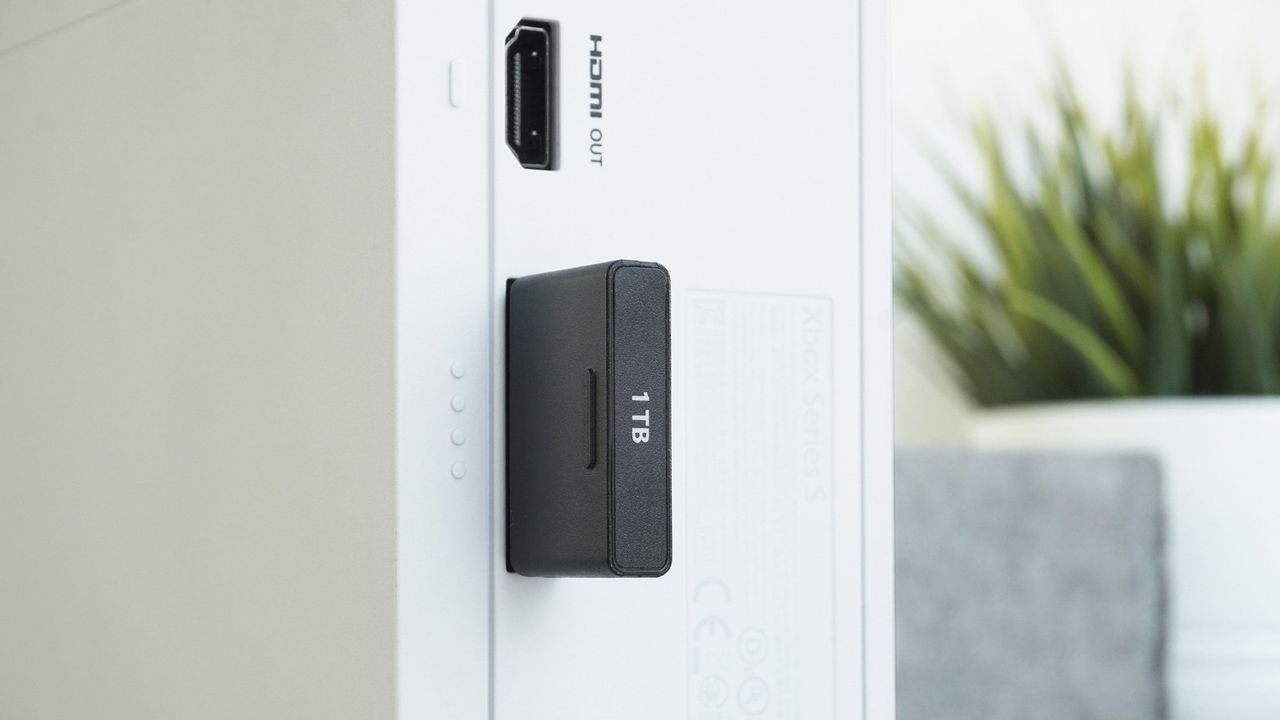
Several discounts have been discovered for the Seagate Storage Expansion Cards for Xbox, giving people a chance to increase the storage space of their Xbox's (and PC's via a special peripheral) for less.

Photograph of an Seagate Expansion Card being used on a Xbox Series S

A Seagate Expansion Card being used on a Xbox Series S

Tank Pad Ultra is a rugged tablet that doubles as a short throw projector

Par : Gaurav Sood
8 avril 2026 à 15:20

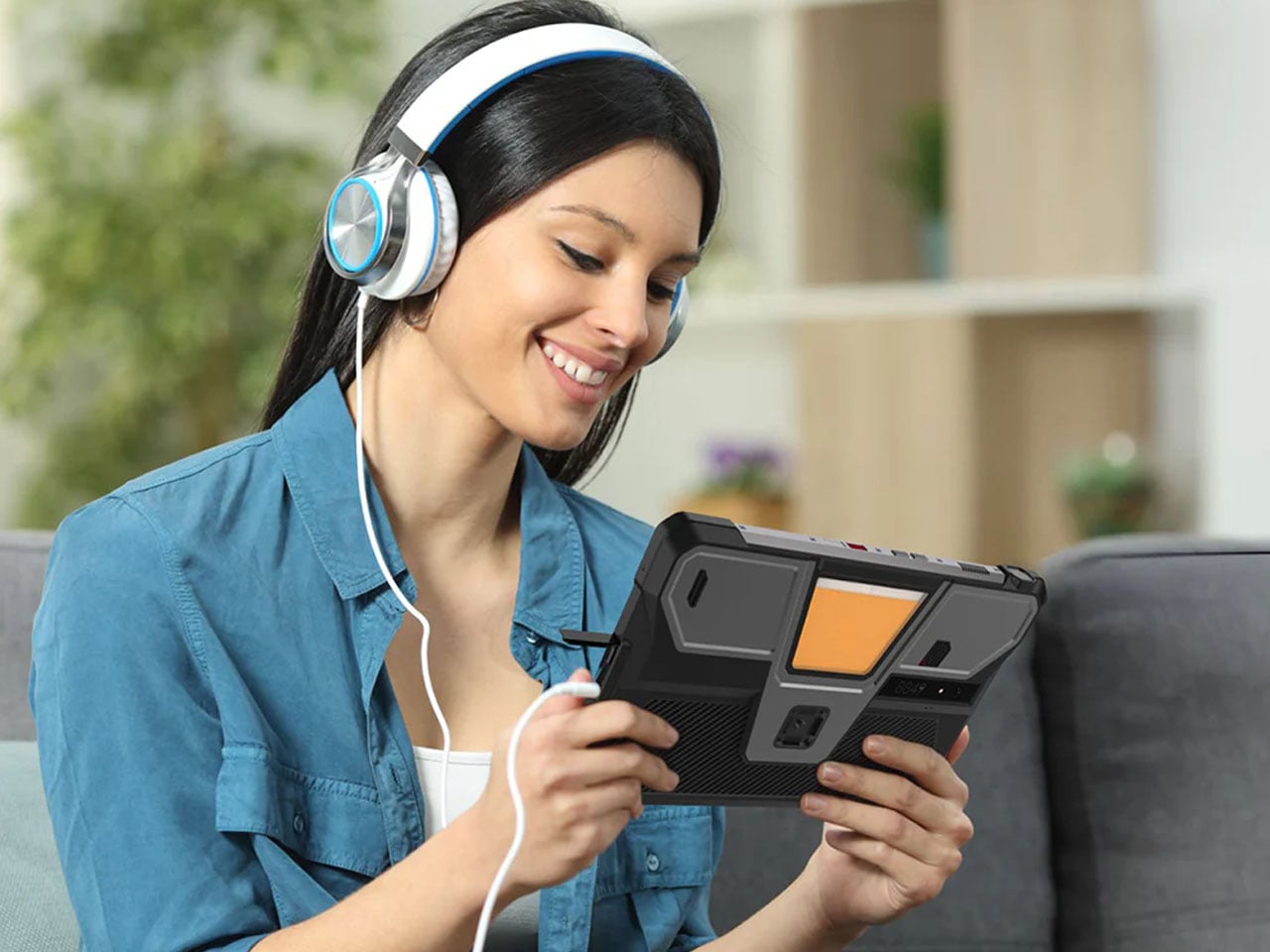
8849tech introduced the Tank Pad last year, leaving the tech world in awe. With the ability to double as a projector, the rugged tablet leapt beyond the already highlighted multitasking capabilities of a normal tablet. Now the beast is back in an improved version to polish out the kinks of the OG version, adding more capabilities for users who demand that little extra.

The Tank Pad Ultra has the same promise of all-weather performance, reliability, and durability as its predecessor. If you’re hoping to buy a sleek, lightweight tablet, this one, weighing 1,345 grams and measuring 170.3×268.3×23.6 mm, is not for you. The device is targeted towards professionals and power users who are constantly exposed to challenging environments. Slated to launch two days from now, the rugged tablet is designed for a niche audience with a specific set of needs.

Designer: 8849tech

Specifications are the key here as the tab boasts a 10.95-inch, 1920 x 1200 pixel display, which is better than the previous version. Powering the gut is a MediaTek Dimensity 8200 processor, which is a tad slower than the Tank Pad, which has a Dimensity 8300 processor. To support multiple open apps, the 16GB RAM and storage capacity of 512GB (expandable via a microSD card) make things easy for users. Coming onto the integrated DLP projector, it has a 1920 x 1080 pixel resolution. 260 lumens of brightness and auto-focus support. These numbers are technically better than the Tank Pad, which has a 854 x 480 pixel resolution and 100 lumens maximum brightness.

The battery also gets a bump up to 23,400 mAh from the previous 21,000 mAh in the original model. However, both have support for 66W charging, which should be enough to juice up the device for short bursts or power usage in case charging options are limited out in the wild. The Tank Pad Ultra comes with a USB 2.0 Type-C port and the ability to reverse charge your other gadgets. For people who are all-in for a wired multimedia experience, the 3.5mm audio jack is a welcome addition. Since the tablet is going to be used out in unknown environments, it comes loaded with a gyroscope, accelerometer, compass, ambient light sensor, and distance sensor. It also comes with an independent camping light built in to explore in the dark hours.

Of course, a mobile device needs to have shooting capabilities, so the Tank Pad Ultra has a 50MP primary camera (with Sony IMX766 sensor) for daylight shooting and a 64MP night vision camera (OV64B) for more awareness of the environment in the dark hours. In the mix is a 32MP front-facing camera (IMX616 sensor), which is potent enough to take video calls in high quality. 8849 has included dual nano SIM card slots with support for 5G NR and 4G LTE networks, which is essential in inhospitable conditions. For a more laid-back connectivity when you arrive back home, the tab has WiFi 6, Bluetooth 5.3, and NFC support.

There’s no word yet on the pricing of this rugged tablet, but going by the price of the previous model, it should be around $550. That information should present itself in a couple of days when the tablet is finally launched.

The post Tank Pad Ultra is a rugged tablet that doubles as a short throw projector first appeared on Yanko Design.

Archives de Korben - Plus de 20 ans d'articles en un clic

Par : Korben
7 avril 2026 à 15:30

Retrouver un vieil article sur korben.info, c'est pas toujours simple. La home s'arrête à 5 pages (site statique oblige) et après, fallait se débrouiller avec les catégories ou le moteur de recherche. Alors pour vous faciliter un peu la vie, je vous ai mis à dispo des pages d'archives accessibles via le footer.

Ainsi, vous scrollez en bas de n'importe quelle page, vous cliquez sur "Archives" ou sur une année, et vous tombez sur un index chronologique complet. Chaque mois est listé avec tous ses jours, et pour chaque jour, un petit nombre entre parenthèses vous indique combien d'articles ont été publiés ce jour-là. Vous cliquez, vous avez tout.

C'est vrai qu'avec plus de 19 000 articles publiés depuis août 2004, soit 22 ans de blog, autant dire que les catégories seules, c'était un peu l'aiguille dans la botte de foin ! Vous verrez d'ailleurs que le rythme varie pas mal... certains jours y'a 1 seul article, d'autres y'a carrément 25 (genre mars 2026, c'était dense).

Ma meilleure année c'était 2008 avec 1668 articles ! Suivi de 2011 avec 1487 articles, 2012 avec 1410 article et plus récemment 2025 avec 1318 articles. C'est pour ça que quand je poste à peine 5 articles par jours et que les commentateurs habituels chouinent à base de "Sans IA tu pourrais jamais faire ça c'est pas possible humainement", je rigole fort ^^

Par contre attention, y'a pas de recherche par mot-clé sur cette page mais pour ça y'a toujours le champ de recherche du site .

Bref, c'est dans le footer. Allez fouiller !

This Color E Ink Monitor Runs at 60Hz: Real Work, No Eye Strain

Par : JC Torres
7 avril 2026 à 15:20

Spending hours in front of a glowing screen is unavoidable for most people, and the toll it takes on the eyes is a problem the monitor industry hasn’t truly solved. E Ink displays offer a gentler, paper-like alternative that’s far easier to stare at for long stretches, but most of them are painfully slow, limited in resolution, and not really up to the demands of daily computing.

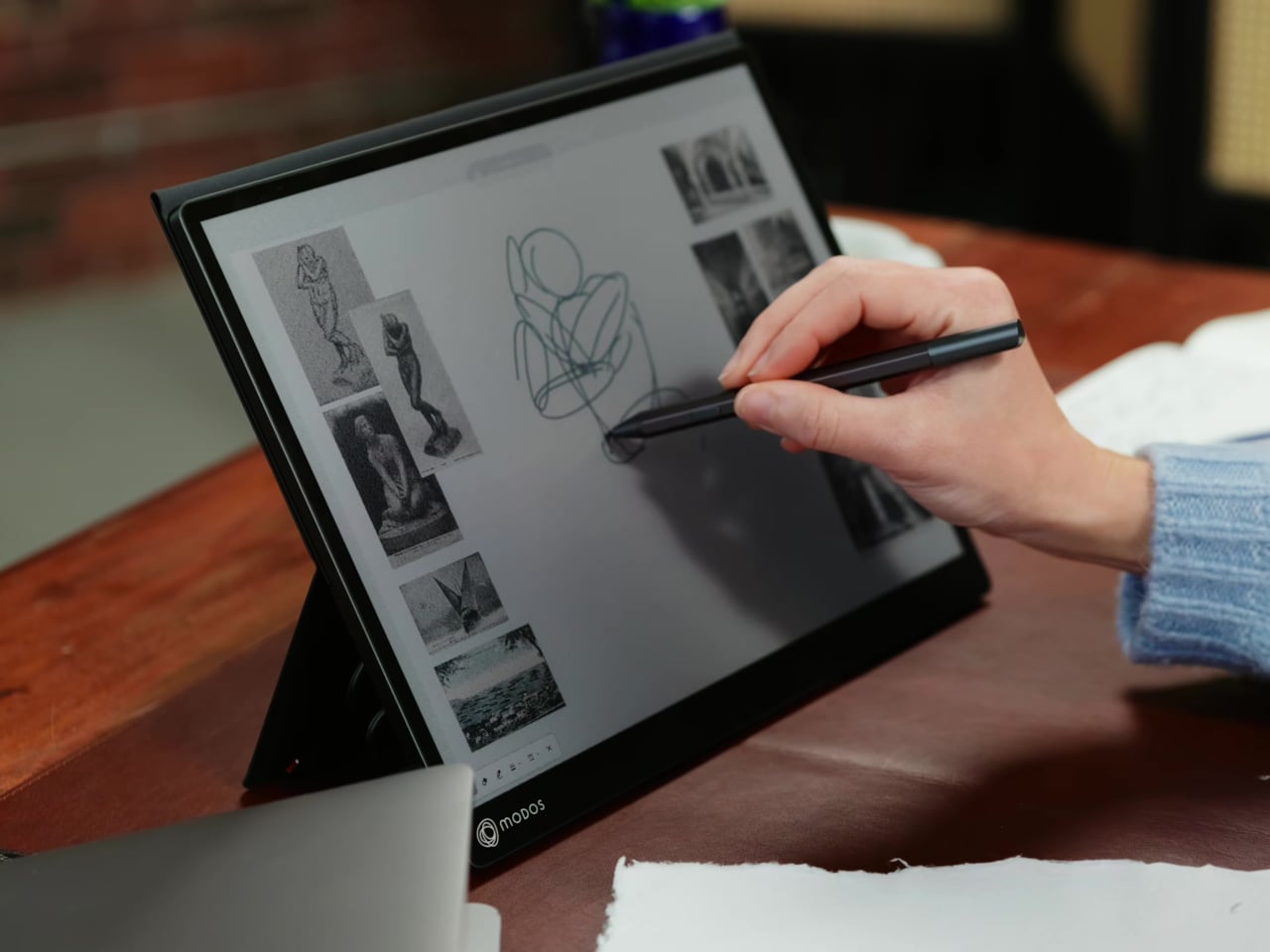
The Modos Flow is Modos Tech’s answer to that problem. Built by a Boston-based hardware startup, it’s a 13.3-inch E Ink portable monitor designed not just for casual reading but for all-day, focused work. It targets the kind of person who needs a real secondary screen but wants to spend less time squinting and more time actually getting things done.

Designer: Modos Tech

Most E Ink monitors struggle as daily drivers because of their refresh rate. Traditional panels tend to crawl, making anything beyond static document reading a frustrating experience. The Modos Flow uses a custom board with open-source firmware to push its display to 60 Hz, enough to scroll through pages, type without noticeable lag, and use the screen as a functional everyday monitor rather than a glorified e-reader.

Resolution is also where the Modos Flow separates itself. In black-and-white mode, it renders at 3,200 x 2,400 pixels with a pixel density of 300 PPI, making text crisp enough to satisfy anyone used to retina-grade displays. Color mode brings the resolution down to 1,600 x 1,200 pixels at 150 PPI, which is a fair trade given how rarely E Ink panels offer color at all.

Touch and stylus support round out what’s becoming a surprisingly versatile display. Modos brought the latency down to under 100ms, so annotating a document, sketching ideas, or jotting notes with a stylus actually responds the way you’d want it to. It won’t replace a dedicated drawing tablet, but for someone who routinely works between a laptop and a secondary screen, having that input option without swapping devices is genuinely useful.

Its physical design is straightforward and practical. A built-in cover doubles as a stand and folds flat for travel, while VESA mounting holes on the back make it easy to attach to a monitor arm or desk mount. Three side buttons let you adjust brightness, contrast, and display mode without touching your computer. Connectivity runs through USB-C with DisplayPort Alt-Mode support, which keeps the setup clean with a single cable.

One of the quieter advantages of E Ink over LCD or OLED is power consumption, and that matters here. When connected to a laptop via USB-C, the Modos Flow draws significantly less power than a conventional secondary monitor, meaning your battery isn’t taking nearly the hit it normally would. It works with Windows, macOS, and Linux out of the box, so there’s no particular setup hurdle to clear. Pricing hasn’t been confirmed yet, but Modos has indicated it should be comparable to other portable monitors.

The post This Color E Ink Monitor Runs at 60Hz: Real Work, No Eye Strain first appeared on Yanko Design.

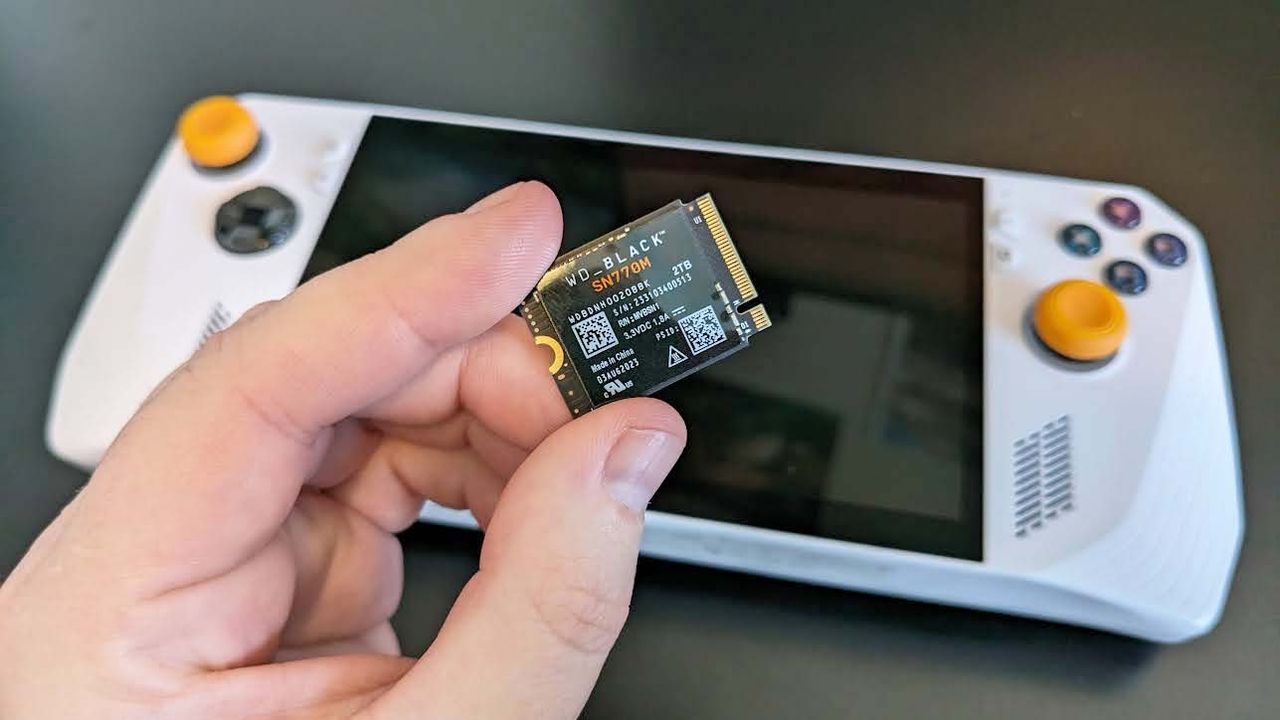
The RAM Crisis is price-gouging storage units, but the "definitive" 1TB SSD for gaming handhelds is sideswiping them with this sweet 25% discount

Amazon is hosting a special 25% discount for the vaunted WD_Black SN770M SSD in honor of World Backup Day, allowing portable gamers to upgrade their handheld console's storage size for less.

WD_BLACK SN770M SSD and ROG Ally gaming handheld.

<p>The ROG Ally 2 could really benefit from offering a larger SSD capacity than the first gen did. </p>

Hister - Un vrai moteur de recherche pour votre historique web

Par : Korben
3 avril 2026 à 09:14

Bon, j'ai la crève et y'a du bricolage qui m'attend, du coup aujourd'hui y'aura pas des centaines d'article. Mais faut quand même que je vous parle de Hister , le nouveau projet d'Adam Tauber (le créateur de Searx ) qui indexe localement tout ce que vous visitez sur le web pour le retrouver en texte intégral.

Vous installez l'extension Chrome ou Firefox, vous lancez le binaire Go sur votre machine (ça tourne sous Linux, macOS et Windows), et hop, chaque page que vous visitez est indexée en full-text. Du coup, quand vous cherchez ce tuto que vous aviez lu y'a 3 semaines mais dont vous avez zappé l'URL, vous ouvrez l'interface web locale de Hister, vous tapez un mot qui était dans le contenu de la page et ça ressort ! Si vous aviez testé Deeper History à l'époque, c'est le même concept mais en beaucoup plus costaud.

L'interface de Hister - sobre mais efficace

Sous le capot, Hister utilise blevesearch, un moteur d'indexation en Go qui gère le fuzzy matching et les requêtes booléennes. En gros, vous tapez "configuration nginx reverse proxy" et ça vous ressort cette page de doc que vous aviez consultée y'a un mois, même si vous ne vous souvenez que de 2 mots. Efficace donc. Et l'outil capture les pages telles qu'elles étaient au moment de votre visite donc si un site modifie son contenu ou si un article disparaît, vous aurez toujours la version d'origine. Y'a même un mode aperçu hors-ligne pour consulter ces snapshots sans connexion !

Côté vie privée (forcément, quand ça vient du mec qui a pondu Searx déjà en 2013... le temps file les amis ^^), tout reste sur votre machine. Et pour les domaines sensibles comme votre banque ou votre mutuelle, une blacklist permet même d'exclure certains sites de l'indexation. Enfin pour ceux qui ont déjà des années de navigation derrière eux, la commande hister import aspirera votre historique Chrome ou Firefox existant, comme ça pas besoin de repartir de zéro.

Pour installer ça, téléchargez le binaire depuis les releases GitHub , puis lancez le serveur et installez l'extension ( Firefox ou Chrome) qui va bien. Y'a aussi un Docker Compose pour ceux qui préfèrent tout conteneuriser. Prévoyez aussi quelques Go sur le disque pour la base d'index car ça se rempli vite...

Tauber dit avoir réduit sa dépendance à Google de moitié en un mois et demi juste avec ça. Et je trouve ça logique parce que quand vous avez déjà visité la bonne page une fois, ça ne sert plus à rien de redemander à Google de vous la remonter entre 3 pubs et une réponse IA à côté de la plaque. Autant récupérer ce que vous aviez déjà !

Voilà, je suis sûr que ça va vous plaire... Et si vous voulez tester avant d'installer quoi que ce soit, une démo tourne en ligne.

Allez, je retourne bricoler...

❌
❌