
❌

Vue normale

  • ✇Yanko Design
  • Oppo Find X10 Pro Max Review: Stunning Imaging, Well-Balanced Flagship, Big Price
    PROS: Industry-first triple 200MP camera system Natural, consistent photo colors across all cameras Strong video capability Bright, immersive AMOLED display with thin bezel Excellent battery life CONS: High price Optional teleconverter kit limits lens options while in use RATINGS: AESTHETICSERGONOMICSPERFORMANCESUSTAINABILITY / REPAIRABILITYVALUE FOR MONEYEDITOR'S QUOTE:With standout cameras and top-tier hardware, the Find X10 Pro Max nails nearly every mark. Just be ready
     

Oppo Find X10 Pro Max Review: Stunning Imaging, Well-Balanced Flagship, Big Price

Par : Aki Ukita
21 octobre 2026 à 11:00

PROS:


  • Industry-first triple 200MP camera system

  • Natural, consistent photo colors across all cameras

  • Strong video capability

  • Bright, immersive AMOLED display with thin bezel

  • Excellent battery life

CONS:


  • High price

  • Optional teleconverter kit limits lens options while in use

RATINGS:

AESTHETICS
ERGONOMICS
PERFORMANCE
SUSTAINABILITY / REPAIRABILITY
VALUE FOR MONEY

EDITOR'S QUOTE:

With standout cameras and top-tier hardware, the Find X10 Pro Max nails nearly every mark. Just be ready to pay for the privilege

In 2026, nearly every major phone maker is eager to add “Pro Max” to their flagship lineups. Oppo is now joining this trend with its Find X10 Pro Max. Whether you see the naming as bold or just another industry move, one thing is hard to ignore. Even when manufacturers like Oppo pack their phones with leading-edge hardware and arguably superior imaging, they still face the ongoing challenge of measuring up to Apple’s influence at the top of the market.

This device brings a massive 6.78-inch AMOLED display and debuts the industry’s first trio of 200-megapixel cameras. Its battery is also among the largest found in any mainstream smartphone. Oppo claims this phone stands out for both design and capability. After spending time with the Find X10 Pro Max, I set out to discover if this “Pro Max” truly lives up to its name or simply chases a label.

Designer: OPPO

Aesthetics

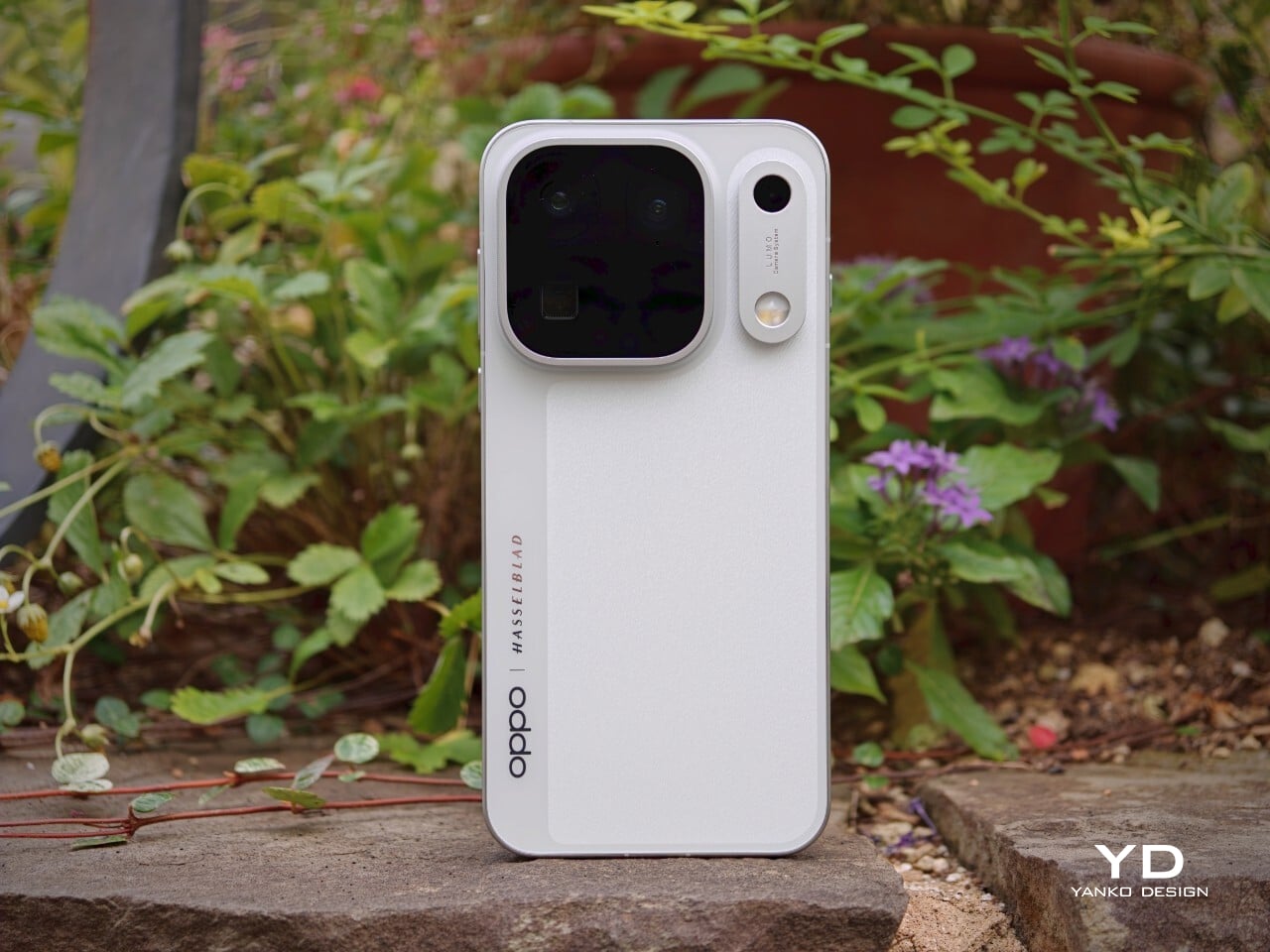
The Oppo Find X10 Pro Max carries forward some of the Find X9 Pro’s most recognizable design elements, including its signature square camera bump, now paired with an oval accent for the color sensor and LED. Oppo offers this flagship in two finishes. The Titanium Grey edition features a single sculpted piece of glass with contours that flow seamlessly into the camera area, softening the visual impact and giving the phone an understated, professional vibe. The grey itself is subtle, with hints of mauve appearing under certain lighting conditions.

For this review, I received the Luna White edition, which channels inspiration from classic cameras and reimagines the look for a contemporary audience. The camera island sports a matte silver metallic finish with knurled detailing, highlighted by Hasselblad’s signature orange accent ring. The back showcases a subtle fabric-inspired pattern, with Oppo and Hasselblad branding on the side. While both colors exude sophistication, those who prefer darker tones or bolder shades may find themselves wishing for greater variety in the color lineup.

Ergonomics

Despite its impressive size and powerful hardware, the Oppo Find X10 Pro Max manages to feel thoughtfully balanced in hand. My review unit is the global version, which comes with a substantial 8000mAh battery and weighs 235 grams (about 8.29 ounces) in Titanium Grey or 233 grams (about 8.22 ounces) in Luna White. The EU version features a slightly smaller 7150mAh battery and is a bit lighter at 228 grams (about 8.04 ounces) for Titanium Grey and 226 grams (about 7.97 ounces) for Luna White. Measuring 161.32 x 76.57 x 8.40 mm, or approximately 6.35 x 3.02 x 0.33 inches, this phone clearly fits into the large flagship category, yet its slim profile keeps it manageable.

The weight of the Find X10 Pro Max is certainly noticeable each time you pick it up, although the distribution helps maintain comfort during longer use. Both color options have a matte back and frame that do an excellent job resisting fingerprints and smudges, while also offering a velvety texture that is genuinely pleasant to touch. The device maintains a clean look throughout the day and feels luxurious with every interaction. The edges are only slightly curved, almost flat and straighter than on many other flagships, so they do not dig into your hand but may affect comfort depending on how you hold the phone over time.

Performance

The Oppo Find X10 Pro Max delivers the kind of fluid, responsive experience you expect from a flagship. Powered by the Dimensity 9600 Pro, the phone handles daily tasks, multitasking, and demanding apps without any noticeable lag or slowdowns. ColorOS 17 brings a polished feel with more refinement than revolution, ensuring that every interaction is smooth and intuitive. Everything from app launches to switching between tasks happens with impressive speed and reliability.

The large 6.78-inch LTPO AMOLED display stands out with a sharp 2772 × 1272 resolution and vibrant colors, thanks to BT.2020 coverage and 10-bit color support. Bezels measure just 1.15mm and are perfectly symmetrical, which makes the screen feel even more expansive. With up to 3,600 nits peak HDR brightness, visibility outdoors is excellent. The adaptive refresh rate ranges from 1 to 120Hz for smooth scrolling, while 144Hz is available in select gaming scenarios for extra fluidity. The speakers provide plenty of volume, though sound quality does not really stand out.

Hasselblad Hi-Res (50MP) mode, main camera, 1x

Main Camera, 1x

Over the past few years, smartphone cameras have leaned heavily on computational processing to overcome the limitations of small lenses. Sometimes the results are impressive, but too much digital magic can leave photos looking punchy or even artificial. With the Find X10 Pro Max, Oppo takes a different route by aiming for images that genuinely match what you saw in real life. The brand continues its collaboration with Hasselblad to fine-tune color science, and this generation introduces the LUMO True Image Engine, which keeps colors believable and resists the urge to overdo sharpening or saturation.

Oppo debuts the industry’s first triple 200-megapixel camera system in the Find X10 Pro Max. You get a 200MP main camera (Samsung ISOCELL HPC, 1/1.3″, f/1.5 with OIS), a 200MP ultra-wide (Samsung ISOCELL HP5, 1/1.56″, f/2.2 with autofocus), and a 200MP periscope telephoto (Samsung ISOCELL HP5, 1/1.56″, f/2.1 with OIS). Flip the phone around and you’ll find a 50MP front camera (Samsung ISOCELL JN5, 1/2.75”, autofocus, 100° FOV).

Ultrawide, 0.5x

Telephoto, 3x

Telephoto, 6x

The headline megapixel count is only part of the story. The main sensor leverages DeepPix technology, redesigning each pixel to improve light-gathering efficiency and preserve detail even in challenging conditions. It delivers up to 17 stops of dynamic range for images full of nuance from shadow to highlight. Daylight photos are crisp and vibrant, and low-light shots stay clear and accurate.

Most flagships treat ultra-wide cameras as a weak spot, but Oppo breaks that trend by using the same large sensor in both its ultra-wide and telephoto modules as in the main camera. The ultra-wide’s 13mm-equivalent focal length provides an expansive 124-degree field of view and captures sharp images across the frame. There is still some noticeable lens distortion at the edges, which is common for lenses this wide, but overall image quality remains impressively crisp. Color consistency is another area where Oppo truly excels. Tones stay remarkably uniform across all three lenses, so your shots always look cohesive.

Ultrawide, 0.5x

Main Camera, 1x

Main Camera, 1x

Telephoto, 3x

Personally, I love shooting with the telephoto camera on the X10 Pro Max. It is genuinely a treat for anyone who enjoys zoom photography. Hasselblad Master mode is another highlight because it delivers a more natural, less processed look that gives images a classic photographic character rather than an overdone “smartphone” feel. For those who want total control, Pro mode within Hasselblad Master mode allows for granular manual adjustments.

For users seeking more flexibility, Oppo offers a Hasselblad Teleconverter Kit in Luna White that includes a MagSafe-compatible case, lens adapter plate, teleconverter lens, lens bracket, shoulder strap, and pouch, all in silver or white with orange accents to match the Luna White phone version. While I love how visually unified the kit appears, attaching the lens adapter plate blocks both the main and ultra-wide lenses at once, just like on the Find X9 Pro teleconverter. This can limit your photo options when using the kit.

Telephoto Converter, 20x

Telephoto Converter, 40x

Oppo’s camera app supplies a nice set of filters. The selection is not as broad as Vivo’s catalog but still offers plenty of creative and customizable choices. Each filter lets you tweak tonality, saturation, and intensity to match your style preferences. My main gripe is with how OPPO lays out these filters: instead of small thumbnails along the bottom edge like most brands use, you only see one filter preview filling the UI at a time. This makes it tougher to quickly browse options and can slow down creative experimentation.

Filter UI

Open Gate Mode

Video performance keeps pace with stills. All three rear cameras support up to 8K at 30fps, 4K at 60fps, and even 4K at 120fps for dramatic slow motion. The front camera supports up to 4K at 60fps for sharp selfies and vlogs. If you apply creative filters during recording, output is capped at 1080p at 30fps. Open Gate recording is available on all rear cameras as well, so creators can leverage every pixel for flexible cropping in post-production.

My global review unit features a massive 8000mAh battery, while the EU version is equipped with a still-impressive 7150mAh cell. Both models support fast charging, with 80W SUPERVOOC wired charging making it easy to top up quickly and 50W AIRVOOC wireless charging for added convenience. Battery life is outstanding. It easily lasts more than a full day of heavy use and can reach two days with moderate usage.

Main Camera, 1x, Night

Sustainability

Oppo positions the Find X10 Pro Max as a durable and future-proof flagship, but most of its claims align with what’s now expected at the high end. The phone comes with IP66, IP68, and IP69 ratings, so it stands up well to dust and water in a wide range of scenarios. Both the front and back are protected by OPPO Crystal Guard Glass, co-developed with Corning, promising solid scratch and drop resistance. SGS Five-Star Drop Resistance Certification adds further reassurance, though these certifications have become standard for premium smartphones.

Oppo also states that the battery should retain over 80% of its original capacity after five years of typical use, which is consistent with leading brands but does not set a new bar. The promise of five years of major Android OS updates and six years of security patches is definitely good news for long-term owners and matches current flagship expectations. That said, it would be great to see Oppo take additional steps in sustainability, such as using more recycled materials in construction and offering easier repair options, to truly stand out in this space.

Value

Official pricing was unavailable at the time of writing this review, but the Oppo Find X10 Pro Max is rumored to launch at €1,799 (about $1,900) for the 16GB+512GB EU version. This firmly places it among the highest-priced flagships on the market and marks a clear jump from last year’s Find X9 Pro (€1,299, or around $1,370) and even the Find X9 Ultra (€1,699, or about $1,790). A significant part of this price hike likely comes from soaring RAM and storage costs, driven by increased demand from the AI boom and broader tech trends.

If these figures are correct, Oppo will face an uphill battle. Even with top-of-the-line hardware and some of the best mobile imaging features available, nearly two thousand dollars is a serious investment, especially as many consumers are feeling economic pressure. The EU version of the Find X10 Pro Max is even more expensive than both the iPhone 18 Pro Max with 512GB of storage and the Samsung Galaxy S26 Ultra 512GB model in the U.S. For Oppo to justify this price point, buyers will need to be truly convinced by its unique camera system and design philosophy. Otherwise, many may find more value in established alternatives from Apple or Samsung.

Verdict

The Oppo Find X10 Pro Max stands out as a well-balanced flagship that gets almost everything right and, at times, feels nearly flawless. What really sets it apart is its excellent mobile photography, from the industry-first triple 200-megapixel camera system to the natural color science developed in partnership with Hasselblad. Everyday performance is smooth, build quality is unquestionably premium, and battery life ranks among the best available in any flagship.

On the flip side, the high price tag puts the Find X10 Pro Max in direct competition with industry giants. While it delivers top-tier hardware and leading imaging capability, buyers must be willing to stretch both their expectations and their budgets. For those who put a premium on cutting-edge camera features and want an alternative to Apple or Samsung, Oppo’s latest is a compelling choice. For everyone else, especially those mindful of budget, there are several strong alternatives on the market that may offer a more accessible fit.

The post Oppo Find X10 Pro Max Review: Stunning Imaging, Well-Balanced Flagship, Big Price first appeared on Yanko Design.

Samsung One UI 9 vs Nothing OS 5.0: Which Is Better?

21 octobre 2026 à 09:31

Compare Samsung One UI 9 and Nothing OS 5.0 on Android 17, including AI, privacy, customization, multitasking, compatibility, and our winner.

The post Samsung One UI 9 vs Nothing OS 5.0: Which Is Better? appeared first on TechRepublic.

Android 17 QPR3 Beta 2 Targets Pixel Crashes and Connectivity Bugs

21 octobre 2026 à 09:16

Google’s Android 17 QPR3 Beta 2 addresses Pixel crashes, calling and Bluetooth bugs. Check supported devices and what to know before joining the beta.

The post Android 17 QPR3 Beta 2 Targets Pixel Crashes and Connectivity Bugs appeared first on TechRepublic.

Galaxy A56 One UI 9 Update Expands Globally: What’s New and What’s Missing?

20 octobre 2026 à 04:38

Samsung's Galaxy A56 One UI 9 update has expanded beyond South Korea, bringing Android 17 and new customization features, but not every Galaxy AI capability.

The post Galaxy A56 One UI 9 Update Expands Globally: What’s New and What’s Missing? appeared first on TechRepublic.

  • ✇Korben
  • Keepsweeper - Un Démineur avec des péons et des dragons
    Keepsweeper , c'est la célèbre grille toute grise du Démineur de Windows, qui sous ses cases numérotées ne cache pas des mines mais tout un royaume à faire évoluer en temps réel. Ce jeu est signé Michael Flarup, un designer danois à qui on doit aussi les App Icon Books, qui m'a écrit après être passé sur mon article consacré à UnDUNE II . Charger la vidéo depuis YouTube Ce clic autorise une connexion à Google : adresse IP transmise et tra
     

Keepsweeper - Un Démineur avec des péons et des dragons

19 octobre 2026 à 04:32

Keepsweeper , c'est la célèbre grille toute grise du Démineur de Windows, qui sous ses cases numérotées ne cache pas des mines mais tout un royaume à faire évoluer en temps réel. Ce jeu est signé Michael Flarup, un designer danois à qui on doit aussi les App Icon Books, qui m'a écrit après être passé sur mon article consacré à UnDUNE II .

Ce clic autorise une connexion à Google : adresse IP transmise et traceurs possibles. En savoir plus Voir cette vidéo sur YouTube

Le principe de Keepsweeper ne dépaysera pas les emplois fictifs sous Windows que vous êtes, puisque chaque chiffre compte ce qui se cache dans les 8 cases alentour, diagonales comprises. Seulement ici, c'est la couleur qui indique ce qui se passe... Si c'est doré, c'est un trésor, si c'est bleu, c'est un repaire d'ennemis qui peut abriter des gobelins ou un troll, et si c'est rouge, alors là, aïe aïe aïe, c'est un repaire de DRAGONS !!! Et bien sûr, le chiffre baisse quand vous détruisez ce qu'il comptabilise ou que vous vous emparez de son trésor.

Par contre, ce n'est pas à vous de retournez les cases. En bon roi, vous désignez celles à creuser et ce sont vos ouvriers qui s'en occuperont. Les soldats quand à eux, défendront les alentours, et quand un repaire apparaîtra, vous pourrez les envoyer le détruire en 1 clic. La seule règle à vraiment respecter c'est de protéger absolument votre Donjon "quoiqu'il en coûte" comme dirait notre pervers narcissique national, car le perdre mettrait alors immédiatement fin à la partie.

Les chiffres bleus, dorés et rouges autour du Donjon, pendant qu'un ouvrier creuse la case encadrée

Et ce que vous déterrez servira ensuite à bâtir des fermes, des maisons et des défenses, avec des bâtiments qui pourront se "soutenir" les uns les autres. Par exemple les moulins soutiennent les fermes, les forges équipent les soldats et les chapelles permettent de garder l'armée debout. C'est fou de se dire que tout ce gameplay tient dans une stupide fenêtre de Démineur avec ses boutons en relief qui sentent bon le Windows 95.

Côté contenu, il y a pour le moment 4 quêtes, dont une chasse au dragon, des expéditions aléatoires dans les Terres sauvages, et un Siège où il faut tenir face à des vagues d'ennemis toujours plus nombreux. Ensuite, les Sceaux royaux gagnés en route débloqueront des bâtiments, des améliorations et des récompenses permanentes qui vous serviront pour les parties suivantes.

Sachez également que vous pouvez jouer en solo bien sûr (et donc mettre en pause pour cogiter quand ça devient chaud) mais aussi jouer en ligne de deux à quatre joueur, et même fabriquer ses propres cartes dans l'éditeur.

Sur iPhone et iPad l'app est gratuit pour les 2 premiers niveau de chaque quête et après faudra débourser un peu moins de 6 euros pour acheter le jeu (c'est un achat unique, y'a pas d'abonnement à la con). Et bonne nouvelle, la version web quand à elle est entièrement gratuite ! Le jeu existe aussi sur Android, une version Steam est annoncée pour bientôt !

Merci à Michael pour le partage, et bonne chasse au dragon à tous !

Source : Keepsweeper

Google Makes It Easier to Put Your Own AI-Built App on Android

14 octobre 2026 à 16:07

Google lets eligible users run AI-built Android apps through Google Play without a developer account. Learn who can use it and what limits to check.

The post Google Makes It Easier to Put Your Own AI-Built App on Android appeared first on TechRepublic.

Nothing OS 5.0 Android 17 Rollout Begins: Which Phones Get It Next?

14 octobre 2026 à 12:12

Nothing OS 5.0 brings Android 17 to 10 phones. See the full rollout schedule, eligible Nothing and CMF devices, new features, and when to expect the update.

The post Nothing OS 5.0 Android 17 Rollout Begins: Which Phones Get It Next? appeared first on TechRepublic.

iQOO Neo12 Pairs 185Hz Display With 9,000 mAh Battery

14 octobre 2026 à 10:23

iQOO reveals Neo12 specs, including a 185Hz display, 9,000 mAh battery and cooling fan. Here’s what buyers should weigh before its expected China launch.

The post iQOO Neo12 Pairs 185Hz Display With 9,000 mAh Battery appeared first on TechRepublic.

WhatsApp Tests Scheduled Messages That Send Even When You’re Offline

14 octobre 2026 à 09:31

WhatsApp is testing scheduled messages for Android beta users, allowing texts and media to be delivered later even when the sender's phone is offline.

The post WhatsApp Tests Scheduled Messages That Send Even When You’re Offline appeared first on TechRepublic.

Samsung Galaxy S26 Ultra Cheat Sheet: New Price, Specs, Features, and More

13 octobre 2026 à 15:21

Samsung Galaxy S26 Ultra prices have increased. Explore the latest pricing, specs, cameras, AI features, and whether the flagship is worth buying.

The post Samsung Galaxy S26 Ultra Cheat Sheet: New Price, Specs, Features, and More appeared first on TechRepublic.

  • ✇Korben
  • gbos-vm - Pour vous amuser dans Googlebook OS depuis votre Mac
    Vous avez envie de voir à quoi ressemble Googlebook OS , mais pas du tout envie de dégainer +1000 balles pour un ordi bridé ? Ça tombe bien, un développeur a codé gbos-vm , un outil open source sous licence MIT qui lance sur un Mac Apple Silicon l'image de recovery de Google (conçu à l'origine pour le Dell Googlebook), dans une machine virtuelle boostée par le GPU. Ce n'est donc pas un Android générique habillé en Googlebook mais un script qui télécharge l'image off
     

gbos-vm - Pour vous amuser dans Googlebook OS depuis votre Mac

9 octobre 2026 à 04:54

Vous avez envie de voir à quoi ressemble Googlebook OS , mais pas du tout envie de dégainer +1000 balles pour un ordi bridé ? Ça tombe bien, un développeur a codé gbos-vm , un outil open source sous licence MIT qui lance sur un Mac Apple Silicon l'image de recovery de Google (conçu à l'origine pour le Dell Googlebook), dans une machine virtuelle boostée par le GPU.

Ce n'est donc pas un Android générique habillé en Googlebook mais un script qui télécharge l'image officielle (la build 16471258, ARM64, Android 17), en vérifiant l'empreinte, puis la fait démarrer sous QEMU avec Vulkan traduit vers Metal. Et rien de chez Google n'est redistribué dans le dépôt (pas de Playstore de base donc...).

Côté Mac, il vous faut donc un Mac avec archi Silicon, Homebrew, les outils en ligne de commande de Xcode, un JDK et le SDK Android (plateforme API 34 minimum) avec son NDK. Et comptez 16 Go de RAM en pratique car la VM en squatte 4 mais les compilations successives en auront besoin d'un peu plus. Et le script installera de lui-même tout ce qui vous manquera côté Homebrew, sans jamais vous demander un accès via sudo. Comptez environ 9 Go pour le download de tout ça et minimum 60 Go de libre pour la VM.

git clone https://github.com/skylartaylor/gbos-vm.git
cd gbos-vm
./install.sh

Ensuite, vous ouvrez l'application construite (dispo dans work/host/Googlebook VM.app), dont la mission est de lancer la VM et de l'éteindre proprement quand vous la quittez.

Le premier boot prendra environ 45 secondes sur un MacBook M5 et si un sélecteur d'utilisateur s'affiche, cliquez juste sur "User" et y'a pas de mot de passe. Notez que la souris est capturée par défaut, et que le raccourci ⌃⌥ la libèrera.

Voilà, c'est pas encore parfait car le bluetooth peut crasher, on est limité à 60 images par seconde max et que les échanges entre la VM et l'hôte (le mac) sont un peu instables mais j'imagine que tout ceci se bonifiera avec le temps...

Googlebook Adds Samsung Galaxy Support: Here’s What Changes for Users

12 octobre 2026 à 15:24

Googlebook adds Samsung Galaxy support with app casting, file sharing, and notification syncing. Here's what Galaxy owners need to know about compatibility.

The post Googlebook Adds Samsung Galaxy Support: Here’s What Changes for Users appeared first on TechRepublic.

Google Adds Android Enterprise AI Controls: What IT Teams Can Manage

12 octobre 2026 à 11:19

Google has announced new Android Enterprise policies for controlling AI automation, alongside stronger work-profile protections and additional device-management features.

The post Google Adds Android Enterprise AI Controls: What IT Teams Can Manage appeared first on TechRepublic.

Microsoft Tests Hidden Windows XP Feature in Windows 11: What to Know

9 octobre 2026 à 15:47

Microsoft is testing a Windows XP-style taskbar feature in Windows 11, along with new Android phone controls. Here's what users need to know.

The post Microsoft Tests Hidden Windows XP Feature in Windows 11: What to Know appeared first on TechRepublic.

Google October Update Fixes Pixel Bugs as Pixel 6 Nears End of Support

7 octobre 2026 à 10:46

Google’s October 2026 update patches critical Pixel flaws, fixes VoIP and keyboard bugs, and may mark the end of regular support for Pixel 6.

The post Google October Update Fixes Pixel Bugs as Pixel 6 Nears End of Support appeared first on TechRepublic.

  • ✇Korben
  • Googlebook - Le débloquer oui, mais le rooter pas encore
    J'sais pas si vous avez vu, mais Google vient de mettre en ligne une page d'aide qui explique comment déverrouiller le bootloader d'un Googlebook ! Je pensais pas écrire ça un jour. Les Googlebook, ce sont des portables mi-Android mi-ChromeOS qui sont commercialisé en France depuis hier, pour la modique somme de 1 099 euros. Perso, je ne vois toujours pas l'intérêt d'acheter ce truc... Je vois vraiment ça comme un PC bridé, ou un Android avec un gros clavier et je pense que c'est
     

Googlebook - Le débloquer oui, mais le rooter pas encore

6 octobre 2026 à 03:08

J'sais pas si vous avez vu, mais Google vient de mettre en ligne une page d'aide qui explique comment déverrouiller le bootloader d'un Googlebook ! Je pensais pas écrire ça un jour. Les Googlebook, ce sont des portables mi-Android mi-ChromeOS qui sont commercialisé en France depuis hier, pour la modique somme de 1 099 euros.

Perso, je ne vois toujours pas l'intérêt d'acheter ce truc...

Je vois vraiment ça comme un PC bridé, ou un Android avec un gros clavier et je pense que c'est bien se compliquer la vie que d'acheter ce truc plutôt que de prendre un vrai PC ou un petit Macbook. Sauf, évidemment, si on est une personne qui n'a pas envie de s'emmerder la vie à apprendre quoique ce soit de nouveau, et qu'on veut juste aller sur le site de La Poste consulter le prix des timbres, ou faire un Mappy pour savoir comment se rendre au bureau de vote le plus proche.

Mais grâce à cette "possibilité" de déverrouillage, John Wu, le créateur de Magisk , a annoncé travailler sur une version de Magisk pour ces machines.

Pour déverrouiller le Googlebook, vous devez donc activer le déverrouillage OEM dans les options pour développeurs, vous passez ensuite en mode récupération avec Échap + F2 puis le bouton d'alimentation, et l'option "Unlock bootloader" se trouvera dans les options avancées. Google précise également que ça efface toutes les données, que ça désactive la sécurité de l'appareil, que les modifications ne sont pas supportées et que la garantie peut y passer.

Et côté root, Wu a posté dans la nuit du 4 au 5 octobre "Magisk on Googlebook", en promettant du code et des instructions dans les jours suivants.

Son profil indique d'ailleurs qu'il bosse sur Android chez Google, et il voit dans le Googlebook la plateforme idéale pour bidouiller ! En effet, sur un téléphone rooté, les applis bancaires et de paiement cassent, alors qu'ici vous pouvez y accédez depuis le navigateur, comme sur n'importe quel portable.

Le blocage, selon lui, vient du mode utilisateur du système. Googlebook OS fait tourner Android en Headless System User Mode, c'est-à-dire que l'utilisateur 0 reste en arrière-plan et que vous travaillez sur un compte secondaire, alors que Magisk part du principe qu'il n'y a qu'un utilisateur principal. Le support de ce mode a été fusionné dans la branche principale du dépôt dans la nuit du 5 au 6 octobre, par contre, aucun commit ne cite pour le moment le Googlebook.

Reste que rien n'est livré officiellement encore... La dernière version stable de Magisk, la 30.7, date de février et donc aucune version stable ne contient ce code. Sans oublier que pour flasher la machine, Wu explique que le fastboot par USB ne marche pas sans câbles spécialisés. Cependant, il dit avoir trouvé une solution, sans la détailler.

Donc voilà... aujourd'hui, le root d'un Googlebook n'a aucune méthode publique, et le déverrouiller maintenant en suivant la technique de Google, revient à couper la sécurité de la machine sans rien pouvoir en faire de plus côté root. Donc autant attendre les instructions de Wu pour Magisk qui devraient arriver dans les jours qui viennent.

Source : 9to5Google

Galaxy Tab S12 Ultra vs iPad Pro With M5: Which Premium Tablet Gives You More?

2 octobre 2026 à 14:25

Samsung's Galaxy Tab S12 Ultra offers a larger display, included S Pen, and expandable storage, while the iPad Pro with M5 leads in performance and battery life.

The post Galaxy Tab S12 Ultra vs iPad Pro With M5: Which Premium Tablet Gives You More? appeared first on TechRepublic.

  • ✇Korben
  • PipePipe - Un fork de NewPipe qui zappe les pubs
    PipePipe est un client Android libre qui permet de regarder YouTube, mais aussi les plateformes asiatiques comme NicoNico et BiliBili. Vous l'aurez compris, c'est un fork de NewPipe que son auteur a sorti début 2022 pour le développer de son côté avec les trucs dont il avait envie. Comme PipePipe ne reprend pas les mises à jour de NewPipe et ne lui en envoie pas non plus, cela veut dire qu'un changement fait dans NewPipe n'arrive pas forcément dans PipePipe et vice versa. Ceci ét
     

PipePipe - Un fork de NewPipe qui zappe les pubs

29 septembre 2026 à 03:06

PipePipe est un client Android libre qui permet de regarder YouTube, mais aussi les plateformes asiatiques comme NicoNico et BiliBili. Vous l'aurez compris, c'est un fork de NewPipe que son auteur a sorti début 2022 pour le développer de son côté avec les trucs dont il avait envie. Comme PipePipe ne reprend pas les mises à jour de NewPipe et ne lui en envoie pas non plus, cela veut dire qu'un changement fait dans NewPipe n'arrive pas forcément dans PipePipe et vice versa.

Ceci étant dit, ce qui va vous intéresser, c'est qu'il intègre avant tout le fameux SponsorBlock , une base collaborative qui recense les passages sponsorisés des vidéos pour les sauter tout seul comme un grand. Ça fonctionne aussi bien sur YouTube comme sur BiliBili.

Vous avez aussi Return YouTube Dislike qui ne sert pas à grand chose mais qui permet de retrouver l'ancien compteur de pouces baissés de Youtube, ainsi que les titres d'origine visible à la place des titres "traduits" de Youtube (beurk).

Et vous pouvez aussi y masquer les (poom poom) Shorts, les vidéos payantes ou tout ce qui contient un mot-clé de votre choix ou en provenance d'une chaîne dont vous ne voulez plus entendre parler !! Et pour ceux qui écoutent plus qu'ils ne regardent, il y a même un mode lecteur de musique en arrière-plan avec, s'il vous plait, minuteur de sommeil, histoire que ça ne tourne pas toute la nuit.

Le panneau SponsorBlock de PipePipe, avec les segments repérés dans la vidéo et l'interrupteur pour les sauter

Alors peut-être que ça ne vous touche une sans faire bouger l'autre, mais par exemple SponsorBlock, l'équipe de NewPipe n'en veut pas afin de ne pas pénaliser les créateurs de contenu.

Après, attention si vous filtrez la pub au niveau du DNS, avec un Pi-hole, un AdGuard Home ou NextDNS. Ces trucs-là bloquent parfois les domaines googleapis.com / google.com, ce qui fait planter la lecture de YouTube. Donc, il faut les mettre dans votre liste d'exceptions, plutôt que de stopper tout le filtrage si ça ne marche pas la lecture sur votre téléphone. Et si ça foire toujours le wiki du projet liste d'autres causes, comme le blocage anti-bot de YouTube.

Côté compte, PipePipe n'en demande aucun et ne synchronise absolument rien vers un cloud quelconque. Tous vos abonnements, votre historique et vos playlists restent stockées bien au chaud sur votre smartphone. Et surtout, ce que j'apprécie, c'est que la connexion à YouTube est facultative. En fait, il n'est conseillé de l'activer que lorsque vous rencontrez des blocages IP ou une limite liée à votre âge, ah et aussi pouvoir extraire de l'audio à partir des vidéos de ce que j'ai compris.

Voilà, pour ceux qui utilisent des Tubular qui, malheureusement, est à l'arrêt , c'est peut-être une bonne alternative, tout comme BravePipe qui intègre lui aussi SponsorBlock.

Voilà, pour installer BravePipe, il vous faudra Android 6 minimum et vous rendre sur la fiche F-Droid ou directement télécharger l'APK sur GitHub .

Googlebook Cheat Sheet: Price, Models, Gemini Features, and Everything to Know

25 septembre 2026 à 17:19

Googlebook combines Android, Gemini AI, and premium laptop hardware. See prices, models, specs, features, compatibility, and release dates.

The post Googlebook Cheat Sheet: Price, Models, Gemini Features, and Everything to Know appeared first on TechRepublic.

❌