Vue normale

Il y a de nouveaux articles disponibles, cliquez pour rafraîchir la page.
Aujourd’hui — 14 mars 2026Flux principal

Apple corrige une grosse faille de sécurité sur les anciens iPhone et iPad

Par : Korben
12 mars 2026 à 13:24

Apple vient de publier iOS 16.7.15 et iOS 15.8.7 pour les anciens iPhone et iPad. Ces mises à jour corrigent des failles activement exploitées par Coruna, un kit d'espionnage qui combine 23 vulnérabilités pour compromettre un appareil simplement en chargeant une page web, je vous en parlais ici. Si vous avez encore un iPhone 6s, 7, 8 ou X, la mise à jour est urgente.

D'où vient Coruna ?

Google et iVerify ont rendu public le kit Coruna le 3 mars. Il regroupe 23 failles en cinq chaînes d'exploitation et cible les iPhone sous iOS 13 à iOS 17.2.1. L'outil aurait été conçu par une filiale de L3Harris Technologies, un sous-traitant de défense américain, et vendu à des agences gouvernementales alliées des États-Unis.

Sauf que voilà, le kit a fini par circuler bien au-delà de ce cercle. Un groupe d'espionnage russe l'a utilisé en juillet 2025 contre des cibles ukrainiennes, et un acteur chinois s'en est servi fin 2025 via de faux sites de cryptomonnaies et de paris en ligne. Plus de 50 domaines de distribution ont été identifiés.

Quels sont les appareils concernés ?

Les mises à jour publiées par Apple couvrent deux générations d'anciens appareils. iOS 15.8.7 concerne les iPhone 6s, iPhone 7, iPhone SE première génération, l'iPad Air 2, l'iPad mini 4 et l'iPod touch septième génération. iOS 16.7.15 vise les iPhone 8, 8 Plus et iPhone X, ainsi que l'iPad cinquième génération et les premiers iPad Pro.

Les quatre CVE corrigées touchent le noyau et le moteur WebKit. Le kit exploite ces failles sans aucune interaction de l'utilisateur : il suffit de charger une page web piégée pour que l'appareil soit compromis.

Des portefeuilles crypto ciblés

Une fois l'appareil compromis, le malware PlasmaLoader s'attaque aux portefeuilles de cryptomonnaies comme MetaMask, Exodus ou Bitget Wallet. Google a qualifié Coruna de première exploitation de masse connue contre iOS.

Le kit détecte le modèle d'iPhone et la version d'iOS avant de choisir la bonne chaîne d'exploitation. Il évite aussi de s'exécuter si le mode Isolement est activé ou si la navigation est en mode privé.

Apple fait quand même bien le job en patchant des appareils qui ont jusqu'à dix ans, et c'est plutôt rassurant !

Source : The Hacker News

À partir d’avant-hierFlux principal

Lockdown Mode - La fonction d'Apple qui a mis le FBI en échec

Par : Korben
6 février 2026 à 07:46

Le Lockdown Mode d'Apple, vous en avez déjà entendu parler non ? C'est cette fonctionnalité un peu planquée dans les réglages de votre iPhone qui permet de transformer votre téléphone en véritable forteresse. Et enfin, on vient d'avoir la preuve que ça marche pour de vrai.

En effet, le FBI a perquisitionné le domicile d'une journaliste du Washington Post, Hannah Natanson, en janvier dernier. L'objectif c'était de récupérer ses appareils électroniques dans le cadre d'une enquête sur des fuites d'informations classifiées. Les agents ont donc saisi entre autres un MacBook Pro, un iPhone, un enregistreur audio et un disque dur externe.

Sauf que voilà, l'iPhone était en mode isolement...

Du coup, le CART (l'équipe d'analyse forensique du FBI) s'est retrouvé comme des cons devant l'écran verrouillé. Et 2 semaines après la saisie, toujours rien. Impossible d'extraire la moindre donnée. D'habitude, avec un Cellebrite UFED Premium ou un GrayKey, c'est l'affaire de quelques heures... mais là, que dalle.

Et perso, ça me fait bien marrer.

Parce que pour ceux qui débarquent, ce mode isolement c'est un bouclier qu'Apple a conçu à la base pour protéger les utilisateurs ciblés par des spywares type Pegasus . Ça bloque la plupart des pièces jointes dans les messages, ça charge les pages web différemment et surtout, ça empêche toute connexion USB à un accessoire tant que l'appareil n'est pas déverrouillé. Et c'est justement ce dernier point qui est intéressant car les outils forensiques type GrayKey ou Cellebrite ont aussi besoin de se brancher physiquement au téléphone pour faire leur boulot.

Faut savoir que les mandats de perquisition autorisaient même les agents à appuyer les doigts de la journaliste sur ses appareils ou à les placer devant son visage pour les déverrouiller par biométrie. Sympa l'ambiance aux USA...

Et ça a d'ailleurs fonctionné sur son MacBook Pro. Pas de chance.

Mais l'iPhone, lui, a tenu bon. C'est assez rare d'avoir une confirmation aussi directe de l'efficacité de cette protection via un document judiciaire. D'habitude, on reste dans le flou total sur ce que les forces de l'ordre arrivent ou n'arrivent pas à cracker.

Voilà alors petit rappel pour ceux qui veulent blinder leur iPhone . Pour activer le mode isolement, c'est dans Réglages > Confidentialité et sécurité > Mode Isolement > Activer.

Attention quand même, votre iPhone va redémarrer et certaines fonctionnalités seront limitées (messages, navigation web, FaceTime avec des inconnus), donc c'est un peu handicapant au quotidien. Faudra choisir entre confort et blindage, y'a pas de magie. Mais si vous avez des trucs sensibles à protéger, le choix est vite fait. Combiné avec les protections d'iOS 18 qui font passer automatiquement votre iPhone en mode "Before First Unlock" après 72 heures d'inactivité, ça commence à faire une sacrée forteresse.

Bref, si vous êtes journaliste, activiste, ou juste un peu parano (aucun jugement), activez-le. Ça marche !

Source

6 Reasons Why Apple Needs to Build a Clamshell iPhone Flip (And 1 Reason It Shouldn’t)

Par : Sarang Sheth
9 février 2026 à 02:45

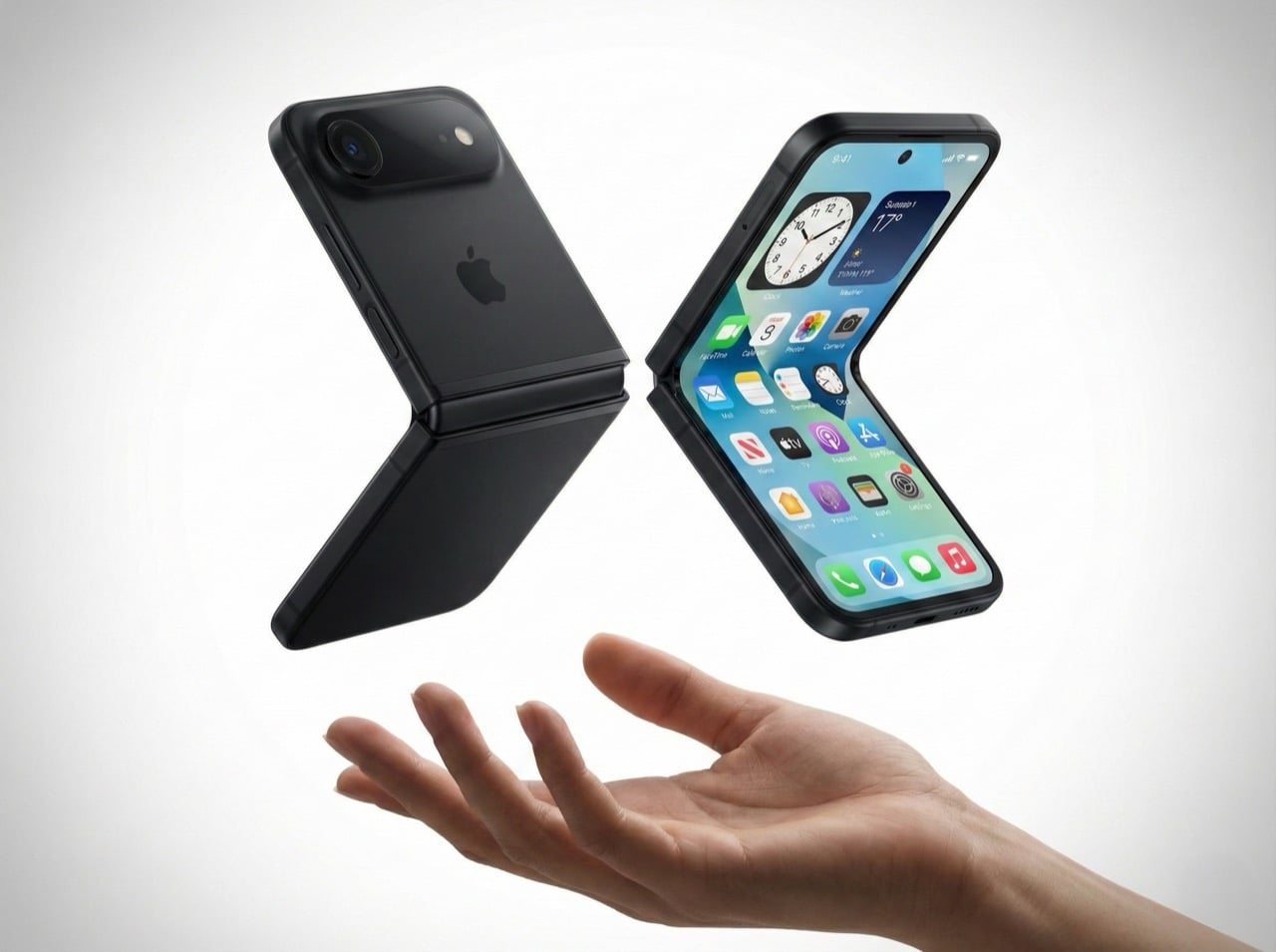
Remember when phones got smaller? The iPhone 13 Mini had a cult following, but Apple killed it because most people wanted bigger screens. Here’s the plot twist: a clamshell foldable iPhone could bring back that beloved compact size without sacrificing screen real estate. You get a full-size display when you need it, and a pocketable square when you don’t. It’s the best of both worlds, and Apple knows it.

Mark Gurman’s latest report suggests Apple is seriously exploring this form factor. It wouldn’t be their first foldable (a larger model is rumored for later this year), but it might be their smartest. A clamshell iPhone makes sense for reasons that go way beyond nostalgia. It’s cheaper to build than a book-style fold, it doesn’t compete with the iPad Mini, and it opens up a market where Samsung is basically the only serious player. There are six solid reasons why Apple should do this, and one big reason why it might not work. Let’s dig in.

The iPhone Mini lives on (just folded in half)

Apple discontinued the iPhone 13 Mini because the sales numbers didn’t justify keeping it around. Turns out most people prefer bigger screens, even if it means carrying a brick in their pocket. But the Mini’s fans were passionate, and they’ve been vocal about wanting a truly compact iPhone ever since. A clamshell solves this problem in the most elegant way possible.

When folded, it’s roughly the size of the Mini, maybe even smaller depending on how thick the hinge is. When unfolded, you get a full 6.1-inch or 6.7-inch display, same as the regular iPhone or Pro Max. The people who loved the Mini weren’t asking for a smaller screen, they were asking for a phone that didn’t dominate their pocket or require two hands for basic tasks. A clamshell gives them that portability without forcing them to squint at a 5.4-inch display.

This isn’t just about bringing back a discontinued product. It’s about proving that compact phones can exist in 2026 without compromising on screen size. The form factor itself becomes the feature.

It doesn’t murder the iPad Mini

Here’s the uncomfortable truth about book-style foldables: they’re iPad killers. If Apple released an iPhone that unfolds into an 8-inch display, who’s buying an iPad Mini? The overlap would be brutal. You’d have a device that fits in your pocket, runs iOS, makes calls, and gives you a tablet-sized screen when you need it. The iPad Mini’s entire value proposition collapses.

A clamshell doesn’t have this problem. Even at its largest, a clamshell iPhone would max out at maybe 6.9 inches unfolded. That’s still firmly in phone territory, not tablet territory. The iPad Mini’s 8.3-inch display remains the smallest “real” iPad you can buy, and it stays relevant for people who want that in-between size for reading, note-taking, or media consumption.

Apple’s product lineup is carefully segmented, and a clamshell iPhone slots in without disrupting the hierarchy. It’s a phone that folds smaller, not a tablet that folds into a phone. That distinction matters when you’re trying to sell both devices to the same customer.

Samsung owns this space, but they’re beatable

The Galaxy Z Flip has been around since 2020, and Samsung’s refined it through multiple generations. They’re the dominant player in the clamshell category, but “dominant” doesn’t mean “unbeatable.” Motorola’s putting up a fight with the Razr, but Google hasn’t touched this form factor yet. No Pixel Flip. No Nothing Flip. No OnePlus Flip. It’s basically Samsung’s game, and that’s an opportunity for Apple.

Apple doesn’t need to be first. They need to be better. And in a market where there’s only one major competitor, “better” is achievable. Samsung’s Z Flip 6 is solid, but it’s not perfect. The cover screen still feels like an afterthought, the crease is visible, and the software experience is classic Samsung (which is to say, inconsistent). If Apple can deliver a smoother hinge, a more useful outer display, and that signature iOS polish, they could own this category within a generation.

The fact that Google isn’t competing here is huge. The Pixel is Apple’s biggest threat in terms of owning both hardware and software (plus Gemini is vastly more superior than any AI Apple’s managed to roll out), and if there’s no Pixel Flip to compete with an iPhone Flip, Apple has a clear shot at Android users who want this form factor but don’t want Samsung’s ecosystem.

Smaller hinge, lower risk

Building a book-style foldable is expensive and complicated. You’re engineering a hinge that supports a massive, fragile display. You’re solving durability issues that Samsung and others have been wrestling with for years. You’re creating an entirely new product category that might flop. The R&D costs are enormous, and if it doesn’t sell, you’ve burned a ton of money.

A clamshell is cheaper to prototype, cheaper to manufacture, and cheaper to fail with. The display is smaller, the hinge mechanism is simpler, and the overall engineering challenge is less daunting. If Apple wants to dip their toes into foldables without betting the farm, a clamshell is the way to do it.

This also means Apple can price it more competitively. A book-style iPhone Fold would probably start at $1,799 or higher. A clamshell could reasonably launch at $1,199, maybe $1,299. That’s still premium, but it’s within reach of people who’d normally buy a Pro model. The lower price point expands the potential customer base, and if it sells well, Apple can use that momentum to justify a larger foldable later.

Hands-free everything

The half-folded “laptop mode” is one of the best features of clamshell foldables, and it’s criminally underrated. You can prop the phone up on a table, angle the screen however you want, and suddenly you’ve got a hands-free setup for FaceTime, vlogging, watching videos, or taking photos. No tripod required. No awkward propping it against a water bottle. It just works.

Apple’s been positioning the iPhone as a serious content creation tool for years. ProRes video, Cinematic Mode, all those camera upgrades, they’re aimed at people who make stuff. A clamshell iPhone would give those creators a built-in tripod mode that’s actually useful. Imagine shooting a cooking tutorial, a makeup video, or a product unboxing without needing extra gear. The phone holds itself at the perfect angle, and you’re free to use both hands.

This isn’t a niche use case. Every vertical video you’ve ever seen on TikTok or Instagram could’ve been easier to shoot with a clamshell. Apple knows this, and they know it’s a selling point that most mobile brands haven’t fully capitalized on yet.

Big screen, small pocket

Here’s the paradox of modern smartphones: people want huge screens, but they hate carrying huge phones. The iPhone 15 Pro Max is a phenomenal device, but it’s a slab that dominates your pocket, your bag, and your hand. A clamshell solves this in the most obvious way possible: make the screen big, then fold it in half.

When unfolded, you get all the screen real estate of a Pro or Pro Max. When folded, it’s a compact square that sits comfortably in any pocket. You’re not sacrificing display size, you’re just rearranging it. This is especially appealing for people who want big screens but don’t want to upgrade their wardrobe to accommodate a 6.7-inch rectangle.

The folded form factor also changes how you carry the phone. It’s less likely to slide out of a pocket, it doesn’t create that awkward bulge in tight jeans, and it’s easier to grip when you’re pulling it out. These are small quality-of-life improvements, but they add up. A clamshell makes the big-screen experience more portable, and that’s a real advantage.

The one problem: MagSafe doesn’t love squares

Here’s where things get tricky. Apple’s entire MagSafe ecosystem is built around vertical rectangles. Wallets, battery packs, car mounts, wireless chargers, they all assume your iPhone is shaped like, well, an iPhone. A clamshell changes that. When folded, it’s a square. When unfolded, it’s a normal phone shape. But MagSafe accessories are designed to stick to the back of a phone that’s always the same shape.

How does a MagSafe wallet work on a folded clamshell? Does it attach to the outer cover, which is probably glass or plastic? Does Apple redesign the entire accessory lineup to accommodate a square form factor? Do they create clamshell-specific MagSafe products? None of these solutions are great.

This isn’t a dealbreaker, but it’s a complication. Apple’s accessory ecosystem is a huge part of their strategy, and a clamshell iPhone disrupts that in ways a book-style fold wouldn’t. You could argue that a book-style fold, when closed, is still roughly phone-shaped, so MagSafe accessories might work. A clamshell is just different enough to break compatibility.

Apple could solve this with clever engineering. Maybe the MagSafe ring is on the outer screen side, and accessories attach there. Maybe they introduce a new “MagSafe Flip” standard with different magnets. Or maybe they just accept that clamshell buyers won’t use traditional MagSafe accessories and move on. Either way, it’s a problem that doesn’t exist with their current lineup, and it’s worth considering.

So, is this happening?

Gurman’s report is credible, but it’s not a product announcement. Apple explores lots of things that never ship. They’ve been prototyping foldables for years, and we’ve seen patents dating back to 2016. The fact that they’re actively working on a clamshell now doesn’t mean it’ll hit shelves in 2027 or even 2028.

But the logic is there. A clamshell iPhone solves more problems than it creates. It brings back the Mini’s form factor without shrinking the screen. It enters a market where Apple could actually win. It’s cheaper and less risky than a book-style fold. And it gives Apple a foothold in foldables without cannibalizing their other products.

If Apple does this right, a clamshell iPhone could be the foldable that finally makes sense for people who aren’t early adopters. It’s practical, it’s pocketable, and it’s exactly the kind of product Apple excels at making. The only question is whether they’re willing to rethink MagSafe to make it work.

(Images via AI)

The post 6 Reasons Why Apple Needs to Build a Clamshell iPhone Flip (And 1 Reason It Shouldn’t) first appeared on Yanko Design.

Stash - Synchroniser vos notes Apple Notes avec Markdown

Par : Korben
1 février 2026 à 08:15

Si vous êtes comme moi et que vous vivez dans Apple Notes parce que c'est fluide, synchronisé partout, et que ça marche sans qu'on ait à se poser de questions, cet outil va vous plaire.

Parce que oui, voilà, le jour où vous voulez bidouiller vos notes en ligne de commande, les exporter en Markdown, ou simplement éviter de vous retrouver coincé dans votre prison dorée Apple... Et bien c'est la galère. J'ai longtemps cherché une solution propre. Je me suis même dit à un moment que j'allais coder un script Python foireux pour scrapper la base SQLite locale, mais j'ai vite abandonné l'idée.

Pourquoi ? Parce que j'ai découvert Stash , un petit outil en ligne de commande qui fait le pont entre vos notes Apple et des fichiers Markdown.

Et le truc cool, c'est que ça marche dans les deux sens. Vous pouvez exporter vos notes Apple en Markdown (comme ici : Exporter pour vos backups ), mais aussi éditer vos fichiers Markdown et renvoyer les changements directement dans Apple Notes. C'est une vrai synchro bidirectionnelle qui vous rend vraiment maître de vos données.

J'ai testé ça sur macOS Tahoe avec un dossier de notes en vrac. J'ai lancé le bousin, et ça m'a fait plaisir de voir mes fichiers .md popper proprement dans le terminal, prêts à être commités ensuite sur un GitHub ou édités dans VS Code.

L'installation est toute bête, via Homebrew :

brew tap shakedlokits/stash https://github.com/shakedlokits/stash
brew install shakedlokits/stash/stash

Et ensuite, c'est juste 2 commandes. Pour exporter une note Apple vers Markdown, c'est

stash pull "Ma Super Note"

Stash va chercher la note dans Apple Notes, la convertit en Markdown propre via Pandoc, et vous la balance dans un fichier local Ma Super Note.md.

Et la seconde commande c'est pour faire l'inverse (éditer votre Markdown et pousser les changements vers Apple Notes). Là faut faire

stash push "Ma Super Note.md"

Et là, magie !! Vos modifs se retrouvent dans l'app Notes, synchronisées sur tous vos appareils Apple (iPhone, iPad, Mac). C'est dommage que ça soit pas natif ce truc.

Stash c'est chouette (Oula pas facile à prononcer vite celle là) parce qu'il utilise du YAML front-matter pour lier chaque fichier Markdown à une note Apple spécifique (via un ID unique). Quand vous faites stash push, le contenu du fichier écrase la note. Quand vous faites stash pull, la note écrase le fichier.

Attention toutefois car c'est là que ça se corse... Stash écrase sans pitié !! Si vous modifiez votre note sur l'iPhone ET votre fichier Markdown en même temps, c'est le dernier qui parle qui a raison. Y'a pas de fusion intelligente à la Git, donc gaffe aux conflits. C'est un peu brut de décoffrage, mais au moins c'est clair et prévisible.

Bref, pour ceux qui veulent scripter leurs notes, automatiser des backups, ou simplement bosser en Markdown avec leur éditeur préféré, c'est le chaînon manquant. J'avais testé Obsidian et Joplin par le passé, mais la synchro iCloud ou WebDAV m'avait saoulé. Là, c'est le bon compromis avec l'interface Apple pour la saisie, le Markdown pour le stockage long terme.

J'ai testé les AirTags 2... ça vaut le coup ? Et sous Android on fait comment ?

Par : Korben
28 janvier 2026 à 16:19

– Article invité, rédigé par Vincent Lautier, contient des liens affiliés Amazon –

Après cinq ans sans mise à jour, Apple sort enfin la deuxième génération de ses traqueurs Bluetooth. Je les ai reçus ce matin, et je les ai testés dans la foulée. Le verdict ? Des améliorations bienvenues, mais pas de quoi jeter vos anciens AirTags.

Ils ont quoi de neuf ?

Apple a franchement pris son temps pour sortir cette nouvelle version, et les nouveautés se comptent sur les doigts d'une petite main à laquelle il manquerait pas mal de doigts. La puce Ultra Wideband passe à la dernière génération (celle des iPhone 17). Sur le papier, la fonction de localisation précise fonctionne 1,5 fois plus loin qu'avant. Dans les faits, chez moi ça détecte à 24 mètres au lieu de 19 mètres. Pour retrouver vos clés sous un coussin de canapé, ça ne change pas grand-chose. Pour un sac dans un aéroport bondé, c'est déjà un peu plus utile, mais ça ne changera pas la face du monde.

Le haut-parleur gagne, lui, 50 % de volume. Qu’est-ce que ça veut dire ? Eh bien ça veut en fait dire qu’on entend le son à environ deux fois la distance. J'ai testé chez moi, l'ancien AirTag devenait à peine audible à travers deux murs, le nouveau s’entend un peu plus. C'est la seule amélioration vraiment perceptible au quotidien.

Alors il y a aussi cette fonction de recherche précise qui arrive sur les versions récentes d'Apple Watch. C'est vaguement pratique quand on n'a pas son iPhone sous la main. On peut retrouver ses affaires directement depuis le poignet avec la flèche directionnelle. Mais bon, clairement, c’est très niche comme besoin, et pour être très honnête avec vous, j'ai été infoutu de la faire fonctionner haha.

Design et compatibilité

Et sinon, bah absolument aucun changement côté design. C'est toujours le même petit galet blanc et acier, il a juste gagné 1 gramme sur la balance**.** La batterie reste une CR2032 standard. On aurait aimé une batterie intégrée et une recharge sans fil, mais on attendra visiblement 5 ans de plus pour ça.

On achète ?

L'AirTag 2 coûte 35 euros à l'unité ou 120 euros le pack de quatre en France. Bon, ok. Sauf que voilà : les AirTags 1 sont régulièrement en promotion. En ce moment, on trouve le pack de quatre à 100 euros sur Amazon, et 30 euros pour une seule unité . Eh bien vous savez quoi ? Même moi qui adore tous les derniers trucs de chez Apple, je ne vous recommanderais pas ces AirTags 2. Trouvez plutôt les 1 en promotion, et si vous êtes sur Android, vous prenez ceux-là qui sont très bien !

Article invité publié par Vincent Lautier . Vous pouvez aussi faire un saut sur mon blog , ma page de recommandations Amazon , ou lire tous les tests que je publie dans la catégorie "Gadgets Tech" , comme cette liseuse Android de dingue ou ces AirTags pour Android !

iPhone 5s - La mise à jour qui lui refuse le droit de mourir dans la dignité

Par : Korben
28 janvier 2026 à 15:52

Alors là les amis, c'est le moment de vous accrocher à vos vieux chargeurs Lightning de la guerre ! Parce que si vous avez un vieil iPhone 5s qui traîne dans un coin ou dans votre poche et que vous refusez catégoriquement de le foutre à la benne par pur respect pour le design de ce bon vieux Jony Ive, j'ai une nouvelle qui va vous redonner le smiiiiile.

Vous ne l'avez pas encore vu parce que la vie est un tourbillon qui vous emporte chaque jour loin de tout ça, mais sachez qu'Apple vient tout juste de sortir iOS 12.5.8. Hé oui, en 2026 la firme à la pomme a balancé un patch pour un téléphone sorti il y a plus de 12 ans. Je rappelle quand même que ce vieux machin a été déclaré officiellement « obsolète » par Cupertino en 2024.

Alors POURQUOI ?

Et bien c'est tout simple ! C'est en réalité une question de vie ou de mort pour les services de base sur le smartphone. En effet, sans cette mise à jour, vos certificats de sécurité allaient expirer et s'en était terminé de FaceTime, d'iMessage, et même de la possibilité d'activer le téléphone après une réinitialisation. En gros, votre iPhone 5s allait se transformer en cale porte.

Heureusement qu'ils ont réagi !

Grâce à ce patch (qui concerne aussi l'iPhone 6 et l'iPad Air 2 via iOS 15.8.6 et 16.7.13), les services essentiels vont donc continuer de ronronner jusqu'en janvier 2027 au moins. Même si ça devrait être la norme, c'est tellement rare de voir un constructeur s'occuper de son matériel si longtemps après la sortie qu'on est tous étonné ! Ça nous change de l'époque où on devait braver l'obsolescence programmée avec du ruban adhésif !

Après si vous sentez que l'autonomie de votre vieux smartphone décline , c'est peut-être le moment de lui offrir une petite batterie neuve pour fêter ça. Parce que faire tourner un OS de 2026 sur une puce A7, c'est un peu comme essayer de faire courir un marathon à votre grand-père... Faudra de la glace à l'arrivée !

Voilà, vous savez ce qu'il vous reste à faire concernant cet appareil !

D'ailleurs si vous voulez suivre mes découvertes tech au quotidien, je poste aussi des trucs sur ma page Facebook .

Source

This Case Fixes iPhone’s Weak Selfie Camera with a Second Screen

Par : JC Torres
22 décembre 2025 à 11:07

The iPhone’s rear cameras keep getting better, but selfies still rely on a smaller, lower-resolution front sensor, and storage upgrades cost considerably more than a microSD card. People who shoot a lot of photos and video feel squeezed on both fronts, choosing between spending hundreds on internal storage or dealing with blurry front-camera selfies. Selfix is a case for the iPhone 17 Pro that tackles both problems at once.

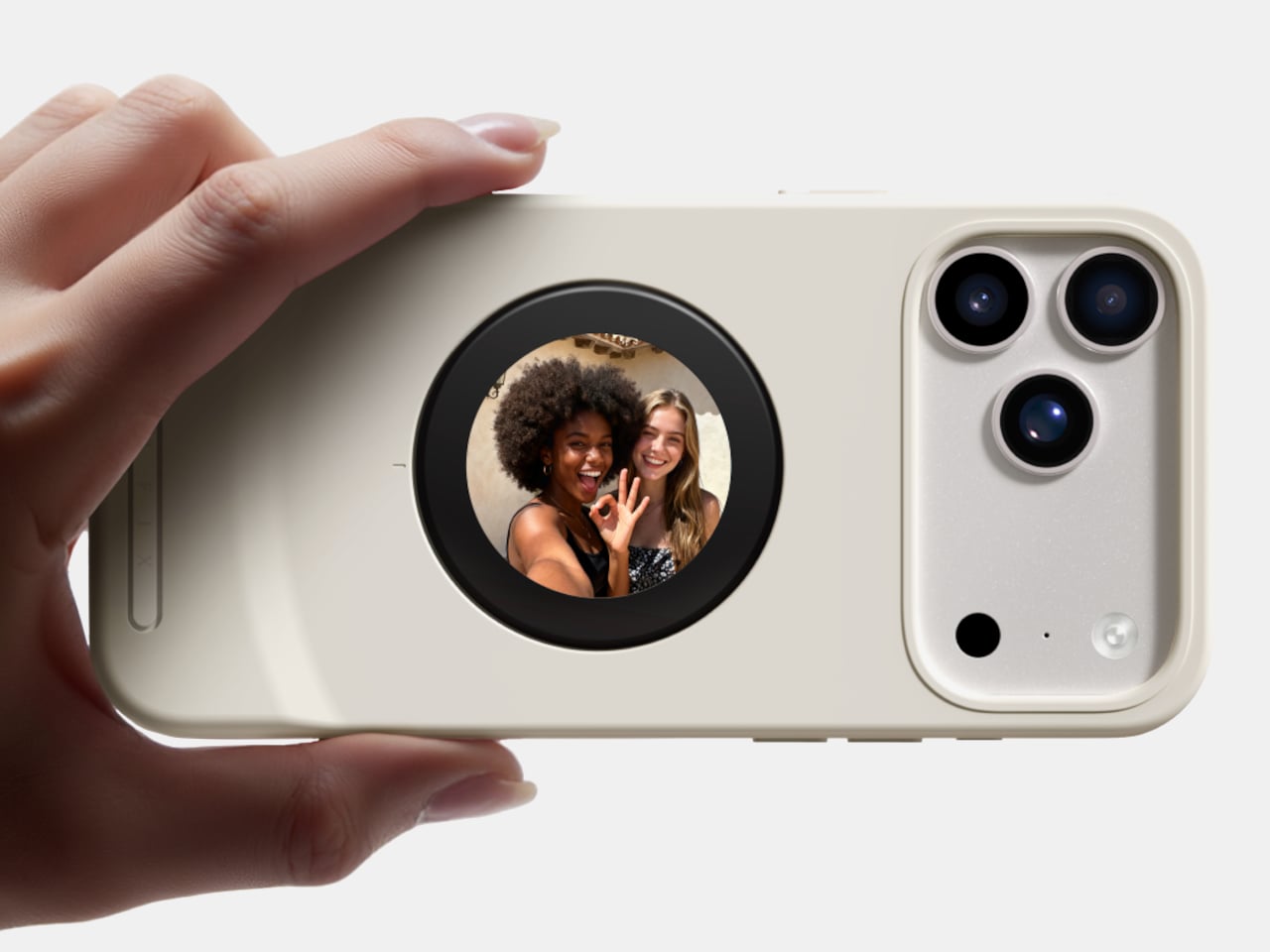
Selfix is a case for the iPhone 17 Pro and Pro Max that adds a circular 1.6-inch AMOLED screen to the back and hides a microSD slot inside. The rear screen acts as a tiny viewfinder so you can use the 48 MP rear cameras for selfies, while the card slot lets you add up to 2 TB of storage without touching Apple’s upgrade menu or monthly cloud fees.

Designer: Selfix

The rear display mirrors the camera view so you can frame yourself, adjust in real time, and pick any of the rear lenses, from ultra-wide group shots to telephoto portraits. You get the main sensor’s larger 1/1.28-inch glass, Night Mode, and up to 8× optical zoom for selfies, instead of guessing with a cropped front camera and hoping everyone fits into the narrower field of view.

Selfix connects through the phone’s USB-C port and does not need a separate app. You snap the case on, open the camera, and the rear screen wakes up. A dedicated button on the case lets you turn the display off when you are not using it to save battery. The idea is to feel like a built-in second screen, not another gadget that needs pairing, permissions, and a drawer full of instructions.

The case includes a microSD slot that supports cards up to 2 TB, using the same USB-C connection to integrate with the phone. A 512 GB card costs around $50, while Apple’s $200 jump for the same capacity makes swappable storage a compelling alternative. Heavy shooters can archive trips or projects without paying monthly cloud fees or deleting older work to make room for new sessions.

Selfix is made from high-quality TPU and comes in Oat White, Blush Pink, and Midnight Black, sized to match the 17 Pro and Pro Max. It adds some thickness, bringing the total to 17mm, but in return, you get a grippy shell, a second screen, and a hidden storage bay. The design aims to look like a natural extension of the phone rather than a bolt-on camera rig or accessory that screams afterthought.

Selfix is aimed at people who care enough about image quality to use the rear cameras for everything, and who are tired of juggling storage or paying the upgrade tax. A case that quietly turns the iPhone into a dual-screen shooter with expandable memory makes you wonder why the phone did not ship this way, especially when the rear cameras already outclass the front by a significant margin, and storage remains artificially expensive.

The post This Case Fixes iPhone’s Weak Selfie Camera with a Second Screen first appeared on Yanko Design.

iPhone ‘Lock Screen Mirror’ feature lets you quickly check your hair/teeth without opening the camera

Par : Sarang Sheth
18 novembre 2025 à 21:30

Never have I seen something so audaciously brilliant I actually summon a CEO to help make it a reality but Tim Cook… if you’re reading this, this lock-screen mirror definitely needs to ship on the next iOS build. Put together by Jakub Zegzulka, an ex-Apple, Meta, and OpenAI fellow, this tiny little feature is perhaps more important than FaceID itself!

How many times have you stepped out for a meeting with friends or for an interview, having no idea what you look like… or whether you’ve got food stuck in your teeth? You unlock your phone, open the camera app, and flip to the front-facing camera to do a quick vibe-check. It’s a 3-step process that absolutely doesn’t need to be a 3-step process. Instead, Zegzulka’s solution involves just long-pressing on the camera icon on the bottom right of your lock screen. That brings up a tiny window emerging off the dynamic island, giving you a quick preview of yourself. You can check your hair, fix your make-up, adjust your specs, run your tongue across your teeth, or just quickly check out that annoying zit that appeared at the wrong place and wrong time.

Designer: Jakub Zegzulka

Zegzulka didn’t outline much, except a quick video demo of this feature on Threads. Although that was enough to gather nearly 2K likes in just over a day. The Lock Screen Mirror isn’t an app. It’s just a quick interaction that lets you open the camera’s viewfinder right on your lock screen for checking your appearance. The tiny circular window is almost exactly the size of a make-up mirror, and the feature is legitimately handy, even for me as a guy who has fairly curly hair that needs to just be ruffled before I step out.

Heck, imagine going an entire hour on a date with spinach stuck in your teeth and them being polite enough to not point out. Instead, you just do a quick check, get that pesky piece of green stuck on your pearly whites, and you’re good to go. It’s such a tiny-yet-life-enhancing feature that Apple could totally ship with their next build. You’re NOT opening your camera app with this lock screen mirror function, just a preview. You could drag your finger up and have the app open like it traditionally does, but a feature like this would probably eliminate the need to, if all you need to do is see if you look good right before you meet your friends, your future boss, or the potential love of your life.

The post iPhone ‘Lock Screen Mirror’ feature lets you quickly check your hair/teeth without opening the camera first appeared on Yanko Design.

Apple’s Liquid Glass Eliminates Interface Chaos Without Clean Design Compromise

15 septembre 2025 à 22:30

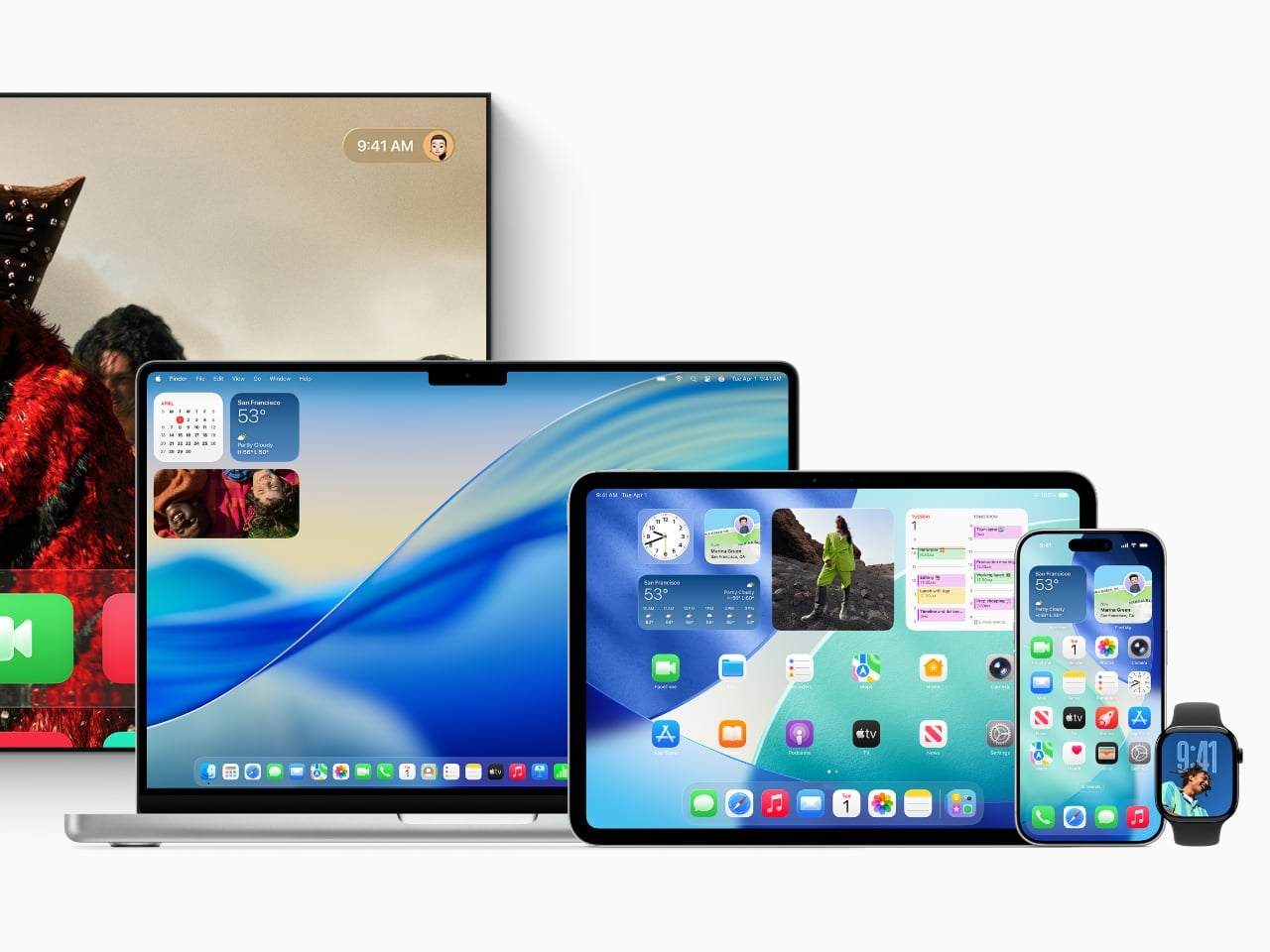
Apple’s new Liquid Glass design language refracts light, adapts to context, and, for the first time, makes iPhone, iPad, Mac, Watch, TV, and Vision Pro feel like one family instead of six separate worlds. Today’s announcement of iOS 26, iPadOS 26, macOS Tahoe, watchOS 26, tvOS 26, and visionOS 26 finally addresses the fundamental interface problem that overwhelms users when every app competes for attention simultaneously.

Designer: Apple

Liquid Glass Design Philosophy Transforms How Interfaces Feel

For the first time, Apple has coordinated visual changes across all six platforms simultaneously while preserving what makes each operating system unique. This unified approach eliminates the jarring disconnection between devices that forces users to mentally readjust interfaces constantly.

Liquid Glass works as a translucent material inspired by visionOS that uses real-time specular highlights for depth and reflections while dynamically transforming to prioritize content over interface chrome. The system affects controls, navigation, app icons, widgets, and typography, not just window decoration.

Adaptive numerals shift based on context. Tab bars and sidebars resize intelligently as users scroll. Lock screen text adapts to underlying imagery for optimal readability. When reading articles, controls fade gracefully. During video editing, timeline tools become prominent while other elements recede naturally.

The philosophy demonstrates sophisticated restraint, recognizing that people switch between iPhone, iPad, and Mac throughout their workday constantly. Visual consistency reduces cognitive friction while platform-specific optimizations preserve each device’s core strengths.

However, this beauty comes with trade-offs. The GPU-intensive rendering means older hardware shows simplified effects. More critically, transparency looks gorgeous indoors but reduces contrast in direct sunlight. On iPhone 17 Pro, the translucency feels alive, though outdoors contrast sometimes slips, a fundamental tension between aesthetic appeal and practical usability that runs throughout Apple’s implementation.

Apple Intelligence Live Translation in iOS 26 Tackles Communication Barriers

International conference calls and travel create genuine language barriers that slow down professional work. Apple Intelligence introduces Live Translation across Messages, FaceTime, Phone calls, and AirPods without the awkward delays that plague existing translation tools.

The implementation supports English, French, German, Portuguese, Spanish, Chinese, Japanese, and Korean in beta, with additional language support rolling out throughout 2025. Visual intelligence gains ChatGPT integration for screenshot analysis plus search connections to Google, Etsy, and other supported applications for finding similar images and products.

Genmoji creation lets users combine multiple emoji for more precise expression than settling for approximate matches. Workout Buddy brings personalized spoken motivation to Apple Watch, iPhone, and AirPods during exercise sessions using generative voices built from Apple Fitness+ trainer data.

Developer Integration Expands Intelligence Ecosystem

New developer APIs let third-party apps integrate directly with on-device Apple Intelligence models. Apps like Streaks now intelligently suggest and categorize to-do items, while CARROT Weather provides unlimited conversational weather insights. Detail: AI Video Editor helps creatives by generating teleprompter scripts from outlines or existing text.

The on-device foundation model enables privacy-protected features that work offline, positioning Apple Intelligence as enhancement rather than replacement for human capabilities.

Liquid Glass in iOS 26 Eliminates Daily Phone Frustrations

Robocalls and customer service holds remain unnecessarily stressful despite decades of smartphone evolution. Call Screening automatically handles unknown numbers while Hold Assist waits on line until live agents become available, finally automating the tedious aspects of phone communication.

Lock Screen customization includes adaptive time presentation that adjusts to imagery and delightful 3D spatial scenes that respond to lighting conditions and usage patterns. The adaptive design ensures readability across different wallpapers and times of day.

Enhanced Communication and Media Features

Messages gains screening for unknown senders, poll creation, and conversation backgrounds. Apple Music adds Lyrics Translation and Pronunciation features for select songs across multiple language pairs. Apple Maps introduces Visited Places tracking while Apple Wallet expands order tracking capabilities in beta.

The new Apple Games app creates a personalized gaming destination for discovering and reconnecting with favorite titles. CarPlay users get a compact view for incoming calls, Tapbacks in Messages, plus widgets and Live Activities.

AirPods receive significant updates allowing creators to record high-quality content and remotely control Camera app capture, bridging professional and consumer workflows.

iPadOS 26 Desktop-Class Windowing Maintains Touch Simplicity

Professional iPad users have complained about windowing limitations for years without adequate solutions. iPadOS 26 introduces an entirely new windowing system that organizes and switches between apps while maintaining iPad’s signature simplicity, the biggest iPadOS release ever.

Multiple windows cooperate intelligently without the chaos that plagues traditional desktop environments. A new menu bar appears with a swipe down from the top or cursor movement to the edge, bridging touch and cursor interfaces elegantly without compromising either interaction method.

Home and lock screen widgets plus app icons gain a new “clear look” that integrates seamlessly with Liquid Glass principles. The aesthetic maintains visual hierarchy while reducing interface noise.

Professional Workflow Enhancements

The supercharged Files app offers new organization capabilities and folder customization. Dock folders provide convenient access to downloads and documents from anywhere. The Preview app arrives on iPad with Apple Pencil Markup and AutoFill integration, making document workflows seamless instead of requiring third-party workarounds.

Journal comes to iPad for capturing everyday moments and special events using Apple Pencil or touch. Creative professionals gain Background Tasks, enhanced audio input control, and high-quality local recording capabilities that bring iPad closer to desktop-class content creation.

On iPad M4, the new windowing system finally feels intuitive, but older models show lag when managing multiple windows simultaneously. It shows Apple’s design ambition outpacing its hardware support, a reminder that innovation always moves faster than compatibility.

macOS Tahoe Transparent Menu Bar Transforms Desktop Experience

Desktop search hasn’t fundamentally changed since the 1990s despite massive computing power increases. macOS Tahoe delivers Spotlight’s biggest update ever with new browsing views, enhanced search, and action capabilities for sending emails or creating events through quick keys.

Search transforms from file finding into a command center for everything. Shortcuts integrate with Apple Intelligence models for complex task automation. The updated Control Center offers new personalization options alongside extensive customization choices.

Visual Customization Meets Functional Design

Folder icons can be customized with color, symbols, or emoji. Wallpapers and tints interact directly with Liquid Glass elements, creating cohesive visual experiences that adapt to user preferences. The menu bar becomes completely transparent, expanding visual space without hardware changes.

Live Activities from iPhone now appear directly on Mac for real-time event tracking. Continuity brings iPhone Phone app features including Recents, Favorites, Voicemails, Call Screening, and Hold Assist directly to Mac, dissolving device boundaries.

On MacBook, the transparent menu bar is elegant at night but chaotic against a messy desktop, another example of the aesthetic versus practicality tension running throughout Liquid Glass implementation.

watchOS 26 Predictive Health Monitoring Gains FDA Validation

Fitness tracking has focused on reactive data collection rather than proactive health insights. Apple Watch gains a sleep score feature for understanding sleep quality and taking steps toward more restorative rest.

FDA-cleared hypertension notifications represent a significant medical advancement, alerting users when signs of chronic high blood pressure are detected so they can begin potentially lifesaving behavioral changes or treatment. The feature uses machine learning algorithms validated in large clinical studies but remains limited to Apple Watch Series 9 and later, Apple Watch Ultra 2 and later.

Enhanced Interaction and Productivity

watchOS 26 introduces two new watch faces: Flow and Exactograph. Smart Stack hints offer proactive prompts for actionable suggestions that appear when most relevant. Live Translation in Messages automatically translates texts into preferred languages.

A new wrist flick gesture dismisses notifications, silences alarms, and returns to the watch face on Series 9 and later models. On Apple Watch, wrist flick works instantly, while hypertension alerts inspire trust but raise accuracy questions. It positions Apple as both a lifestyle brand and a quasi-medical provider, which raises trust and liability questions. The Notes app finally arrives on Apple Watch, completing the productivity suite across Apple’s ecosystem.

Workout Buddy provides personalized, motivational audio insights during workouts with dynamic generative voices, while the Workout app debuts its biggest layout update since introduction.

Apple TV Social Features Transform Living Room Entertainment

Apple TV has lacked genuine social capabilities despite being shared household devices. Sing-along sessions reach new levels through Sing in Apple Music, transforming iPhones into wireless microphones for Apple TV with friends joining to queue songs or react with onscreen emoji.

Real-time lyrics and visual effects bring performances to life on the biggest screen in the home, making group entertainment interactive instead of passive consumption. Contact Posters on FaceTime simplify video calling from the living room while profile updates allow users to quickly return to personalized recommendations, playlists, and watchlists.

Vision Pro Persistent Spatial Computing Enables Collaboration

visionOS 26 brings powerful spatial experiences including widgets that integrate seamlessly into users’ spaces and persist across sessions instead of resetting each time. More expressive, realistic Personas and spatial scenes offer lifelike depth for photos.

Spatial browsing transforms Safari articles and lets developers embed 3D objects directly into web pages. Users can share Vision Pro experiences with people in the same room for collaborative movie watching or work sessions. iPhone unlocking while wearing Vision Pro plus hand and eye data saving makes sharing easier than ever.

A new interactive Jupiter environment lets users accelerate time to observe the planet’s massive storms swirling across its surface. Native playback support arrives for 180-degree, 360-degree, and wide field-of-view content from action cameras including Insta360, GoPro, and Canon models.

Comprehensive Accessibility Features Expand User Access

New accessibility features bring comprehensive customization to the Apple ecosystem. Accessibility Nutrition Labels on the App Store inform users of supported accessibility features before downloading apps, improving discoverability for users with disabilities.

The Magnifier app for Mac connects to external cameras for users with low vision to zoom in and interact with surroundings. Accessibility Reader offers systemwide reading mode with extensive font, color, and spacing options plus Spoken Content support.

Braille Access provides powerful interaction methods for braille users with connected displays. Live Listen controls come to Apple Watch with real-time Live Captions for users who are deaf or hard of hearing, ensuring the design revolution includes comprehensive user access.

Historical Context Reveals Design Evolution Strategy

Liquid Glass represents Apple’s most significant design evolution since the iOS 7 transformation from skeuomorphic to flat design in 2013. This latest pivot toward adaptive translucency aims to solve the interface chaos created by decades of feature accumulation across multiple platforms.

The simultaneous rollout across six platforms signals Apple’s confidence in unified design language while acknowledging the performance and usability trade-offs. GPU-intensive rendering limits older devices to simplified effects, and contrast issues in bright environments reveal the ongoing tension between beauty and functionality.

All updates are available today as free software downloads. Apple Intelligence launches in beta with expanding language support throughout 2025. Some features remain region-limited, particularly hypertension notifications which require specific hardware and regulatory approval.

This coordinated approach demonstrates how thoughtful design philosophy can unify technical capabilities across an entire ecosystem while maintaining each platform’s unique identity, a balance that will define Apple’s interface evolution for years to come.

The post Apple’s Liquid Glass Eliminates Interface Chaos Without Clean Design Compromise first appeared on Yanko Design.

❌
❌