One of the things that I’d like to explore more in 2027 is taking more photos of the things around me and the things I’ll be experiencing in the new year. I’m still not good enough to warrant getting a DSLR camera, but I would be willing to try out digital cameras where I can experiment and play around with filters and textures while also being able to make the photos live outside of my camera roll.
Fujifilm’s Instax Mini Evo 2 is one such camera, with tactile controls, a large touchscreen, 10
One of the things that I’d like to explore more in 2027 is taking more photos of the things around me and the things I’ll be experiencing in the new year. I’m still not good enough to warrant getting a DSLR camera, but I would be willing to try out digital cameras where I can experiment and play around with filters and textures while also being able to make the photos live outside of my camera roll.
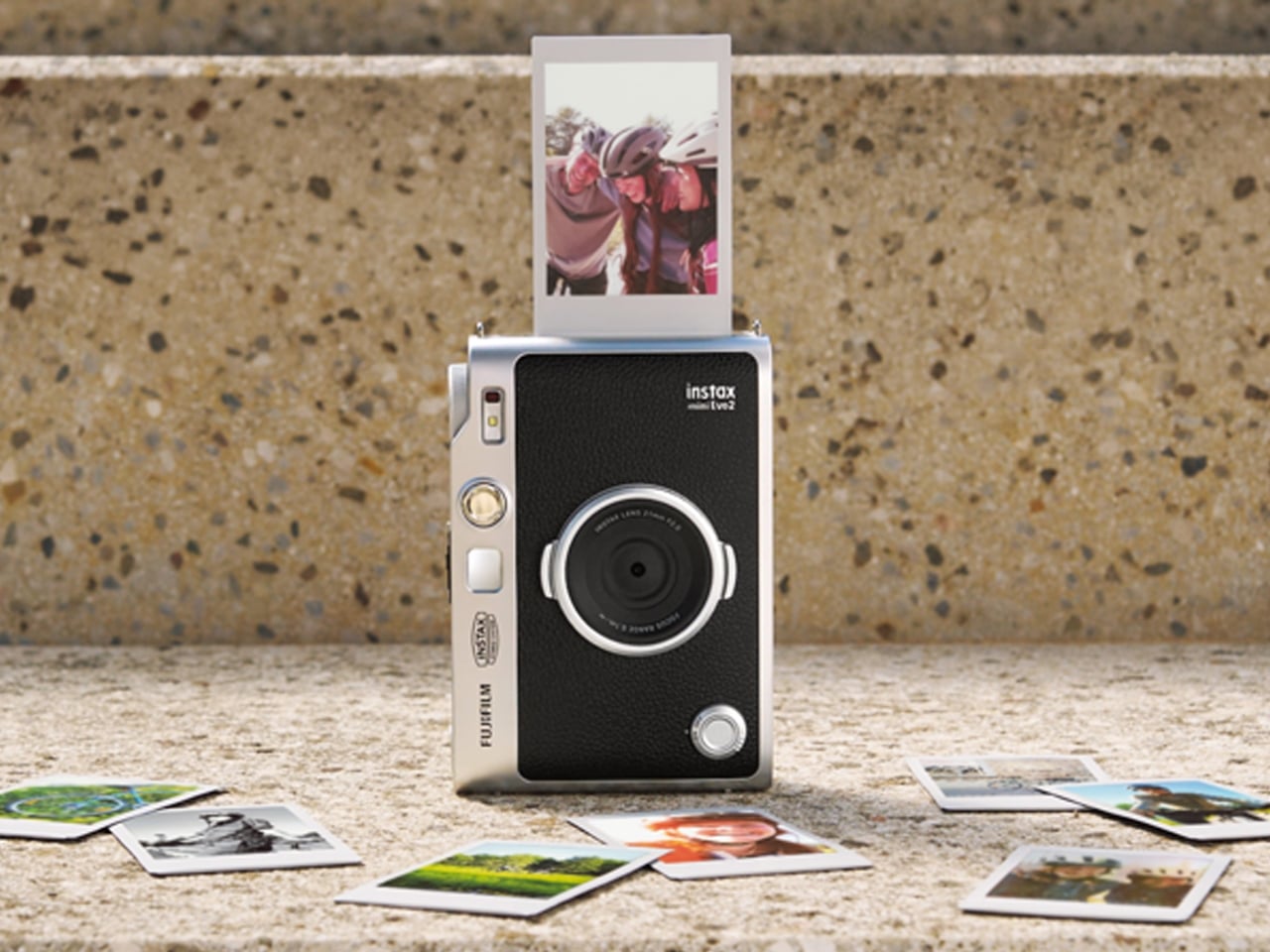
Fujifilm’s Instax Mini Evo 2 is one such camera, with tactile controls, a large touchscreen, 10 lens effects and 10 film effects to create 100 combinations, and, of course, the ability to print photos. This second generation of the hybrid instant camera and photo printer keeps its predecessor’s retro feel and range of creative combinations while adding some modern conveniences.
Designer: Fujifilm
The camera’s tactile controls add a tangible interface to this digital camera, giving it an analog-inspired way of operating. You have a lens dial to change from one lens effect to another, while the film-effect dial lets you go through the 10 different film effects. There’s also a lever that you pull to print out the photo, making printing a separate, deliberate action.
The 4.5-inch touchscreen is larger than the original Mini Evo’s display. Its Expanded View mode displays the area outside your intended print frame. You get a framing guide to show you what the photo will actually include, giving you an added layer of compositional awareness. This could be useful when you’re waiting for a moving subject to enter the frame. The touchscreen complements the dials by handling settings, image browsing, and editing, including cropping and adjustments to brightness, contrast, and saturation. You can make those changes on the camera before deciding which pictures deserve a print.
The Mini Evo 2 also now has an Immersive Movie feature that captures the four seconds leading up to your photo, producing a five-second silent clip that includes the shutter moment. It requires a separately sold microSD card. Rather than reducing the still photo to a smaller size, Fujifilm lists separate recording resolutions: 2144 × 2860 pixels for normal still images and 560 × 992 pixels for video. The short clip gives you a little more of what happened around the photograph, although it isn’t a replacement for recording longer videos.
For still photos, the camera can also record at approximately 13 megapixels when a microSD card is inserted and Expanded View is turned off. That gives you a higher-resolution option, but it isn’t the default for every shot. It’s worth knowing the conditions rather than assuming that every image you take will have the same resolution.
What appeals to me most is having a dedicated digital camera that encourages a little more playing around. I’d like to spend more time choosing how a photo looks before taking it, rather than scrolling through editing options afterward. The combination of physical dials and a touchscreen feels like an interesting way to approach that, with familiar digital controls alongside something you can actually turn.
The built-in printer adds to the appeal of having two devices in one. It works with photos taken on the camera and pictures from your smartphone through the Instax Mini Evo app. The app also supports remote shooting, so you can join a group photo instead of always being the person behind the camera. Your phone still has a role, but it doesn’t have to handle every part of taking the picture. Combining a digital camera and printer isn’t new for Fujifilm, so the novelty here is more about how the pieces work together. The larger touchscreen and new shooting modes give me more reasons to be interested in the camera itself, beyond the photographs it can print.
For my 2027 photography plans, I’d like a camera that makes me curious enough to keep picking it up. Trying a different effect or paying closer attention to what enters the frame seems like a manageable place to start. I don’t need every picture to become a keepsake; I’d be happy to develop a habit of noticing more. Fujifilm announced the Mini Evo 2 on October 27, 2026, with availability scheduled to begin November 27, 2026.
Amazon introduces five Blink security cameras with 4K video, long-range wireless connectivity, and new viewing features. Compare prices and key limitations.
The post Amazon’s New Blink Cameras Offer 4K Video and Up to 7,000 Feet of Wireless Range appeared first on TechRepublic.
Amazon introduces five Blink security cameras with 4K video, long-range wireless connectivity, and new viewing features. Compare prices and key limitations.
Keychain cameras have a certain appeal for those who love to carry a bit of nostalgic charm with them. Well, technically, they’re still digital cameras, but there’s a retro feel to them that appeals to those who remember taking photos before smartphones. They’re cute and tiny enough to carry as accessories, but they still let you take photos and videos to add to your collection.
Kenko Tokina has released another tiny camera to add to the fun. The Kenko Pieni III is an ultra-small digital toy ca
Keychain cameras have a certain appeal for those who love to carry a bit of nostalgic charm with them. Well, technically, they’re still digital cameras, but there’s a retro feel to them that appeals to those who remember taking photos before smartphones. They’re cute and tiny enough to carry as accessories, but they still let you take photos and videos to add to your collection.
Kenko Tokina has released another tiny camera to add to the fun. The Kenko Pieni III is an ultra-small digital toy camera designed to be worn as a necklace or an accessory. It comes with a neck strap for that purpose. It’s not meant to replace your bigger camera, of course, but it offers another way to take photos and videos.
Manufacturer: Kenko Tokina
This version of the Pieni camera is just over two inches wide and weighs approximately 18 grams, excluding the memory card and accessories. It comes in a classic camera-style design, so it can also serve as a camera-shaped accessory or a decorative display. But when you want to use it as an actual camera, it can capture still images at 1440 × 960 pixels and videos with audio at 720 × 480 pixels and 30 frames per second.
There’s an important detail behind those photo dimensions, though. The sensor has only 320,000 effective pixels, or 0.32 megapixels, and the camera interpolates the images to create larger files. That doesn’t give you the detail of a higher-resolution sensor. It’s worth keeping your expectations in toy-camera territory rather than expecting crisp images suitable for large prints. But I think this lo-fi aesthetic is part of the appeal of using these toy cameras as a secondary way to capture moments.
It doesn’t have a screen or a viewfinder, so you can’t preview your framing or immediately review what you’ve taken. It can be a way to enjoy capturing a spontaneous moment without worrying about making it perfect, although aiming without a preview may be a challenge for some. There’s also a difference between accepting an imperfect photo and accidentally leaving someone out of the frame, so that uncertainty is part of the trade-off.
The controls are simple in number, with just two buttons. One handles power and the shutter or video recording, while the other switches between photo and video modes. LEDs indicate which mode you’re using. There aren’t many controls to navigate, although you’ll still need to learn the button presses and signals. The camera also has an integrated rear magnet, so you can attach it to compatible magnetic surfaces, such as a refrigerator or a suitable metal railing. This could be useful for recording yourself when you don’t want to hold the camera. You’ll still need to find a secure position and judge where it’s pointing, especially since there’s no screen to help you set up the shot.
Photos and videos are saved to a separately purchased microSDHC card, with supported capacities ranging from 4 GB to 32 GB. There’s no user-accessible internal storage, so the card is something you’ll need before you start shooting. That’s a small but important extra purchase if you’re planning to give the camera as a gift. To see the results, you can connect the camera to a computer or transfer files directly to a compatible USB-C smartphone using the included USB-C-to-USB-C cable. Kenko Tokina cautions that it doesn’t guarantee compatibility with every smartphone. The USB connection also handles charging, keeping the basic setup fairly compact.
The Pieni III is available in four colors: Soda, Strawberry, Milk, and Black. There are also five character versions in the separate Sanrio Character Toy Camera STREET line, which has the same basic performance as the Pieni III. The range includes Hello Kitty, My Melody, Kuromi, Cinnamoroll, and Hangyodon.
For moments you absolutely need to capture correctly, the lack of framing and immediate review may be frustrating. But if you’re happy to take a few chances, there’s something appealing about putting the camera away without checking every shot. You get to find out later which pictures worked—and which ones missed what you were aiming for.
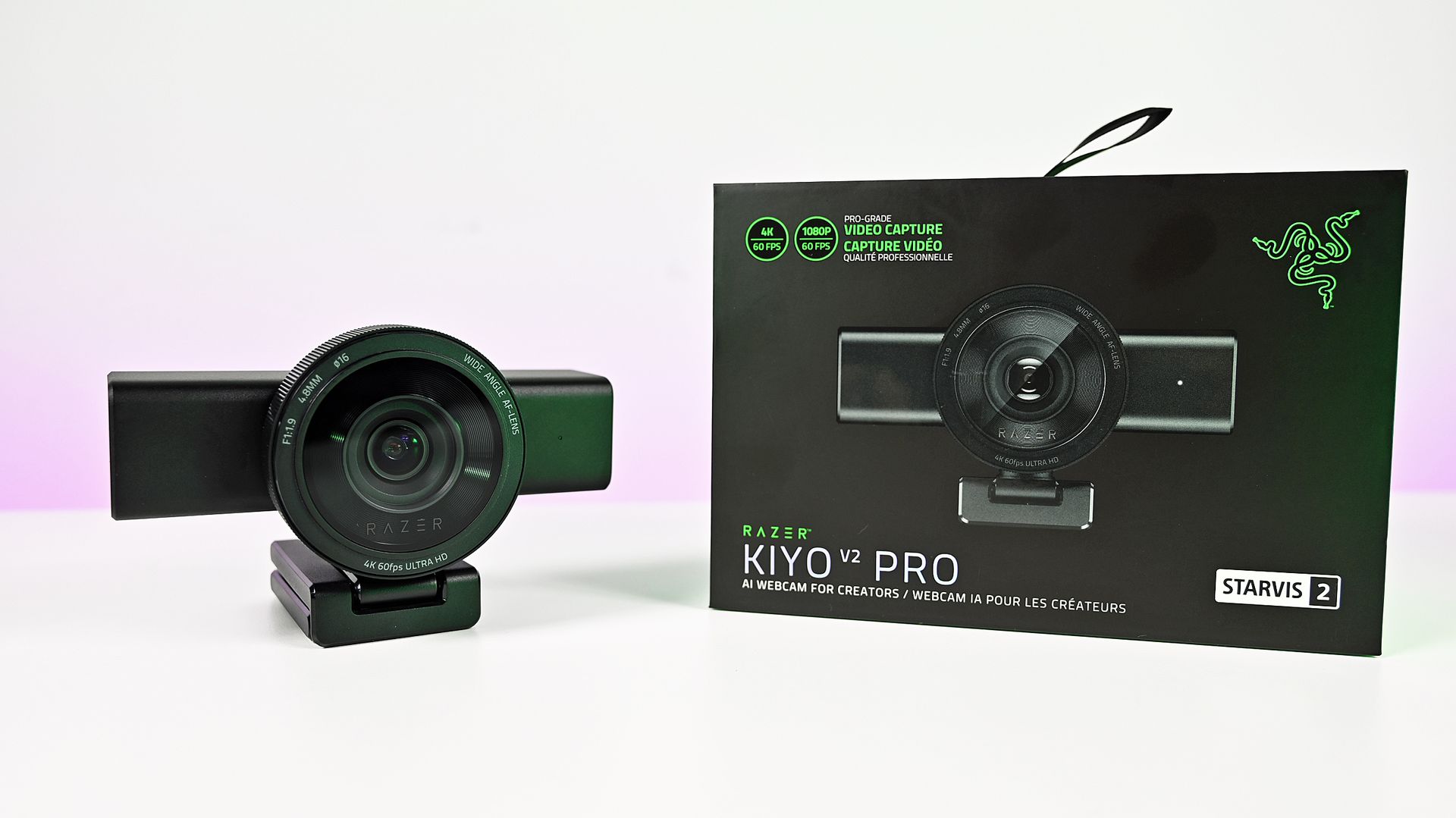
Razer's original Kiyo webcam was the first I ever tried where content creators were the target audience. While its video quality didn't stand out, its built-in ring light was something unique and genuinely useful.Fast forward to late 2026, and I'm again looking at a Razer webcam: the Kiyo V2 Pro. This is 100% a webcam designed for content creators, and at $300, it's a pretty serious investment, though it's still less than a good mirrorless camera and easier to us
Razer's original Kiyo webcam was the first I ever tried where content creators were the target audience. While its video quality didn't stand out, its built-in ring light was something unique and genuinely useful.
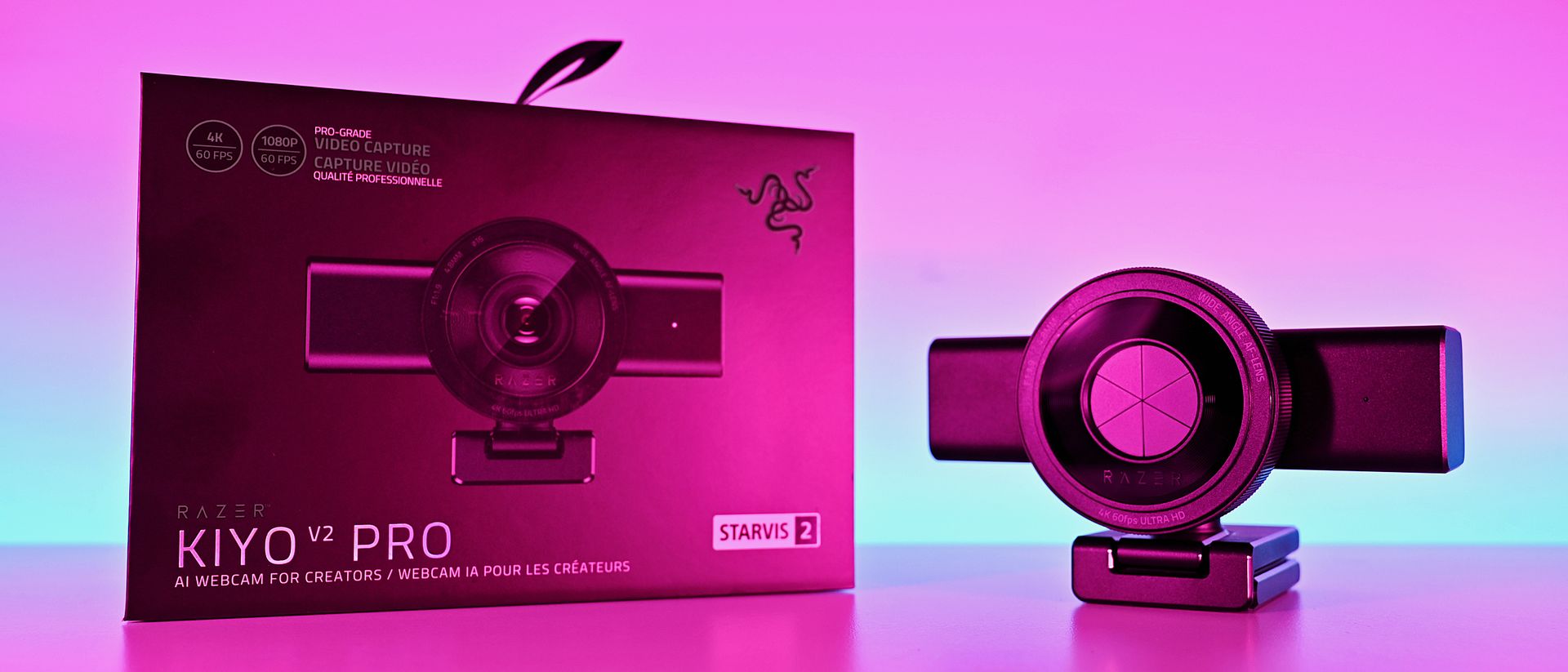
Fast forward to late 2026, and I'm again looking at a Razer webcam: the Kiyo V2 Pro. This is 100% a webcam designed for content creators, and at $300, it's a pretty serious investment, though it's still less than a good mirrorless camera and easier to use.
It's a product I was immediately interested in, not because I'm some big-time streamer, but because I was such a fan of what the Kiyo has done in the past. It looks impressive, and it boasts some top-end specs.
But having spent some time getting to grips with the Kiyo V2 Pro, my opinions are mixed. It's a good webcam, of that there's no doubt, but given its price and how it's been to use, it's harder to give a blanket recommendation. It says Razer on the box, but it doesn't feel completelylike the Razer product experience I'm used to.
Razer Kiyo V2: Specifications
Specification
Details
Video Resolution
4K 60 / 30 FPS
1440p 60 / 30 FPS
1080p 60 / 30 / 24 FPS
720p 60 / 30 FPS
Video Formats
MJPEG up to 4K 60 FPS, 1080p 60 FPS
H.264 up to 4K 60 FPS, 1080p 60 FPS
NV12 up to 4K 30 FPS, 1080p 60 FPS
Image Sensor
8.3 MP Sony STARVIS™ 2
Field Of View
86° (wide angle, configurable)
Focus Type
Auto / Manual
Focal Length
4.8 mm (24 mm for full-frame equivalent)
HDR Support
Yes (at 30 FPS)
Image Customization
Fine image customization with Razer Synapse software
Mounting Options
Fixed L-shape mount (with ¼” thread to mount on tripods)
Built-In Privacy Shutter
Yes
Connection Type
USB Type C to USB Type C (Supporting USB 3.0)
Cable Length
2 m / 6.56 ft
Built-In Microphone Type
None
Polar Patterns
None
Noise Cancellation
None
Audio Codec
None
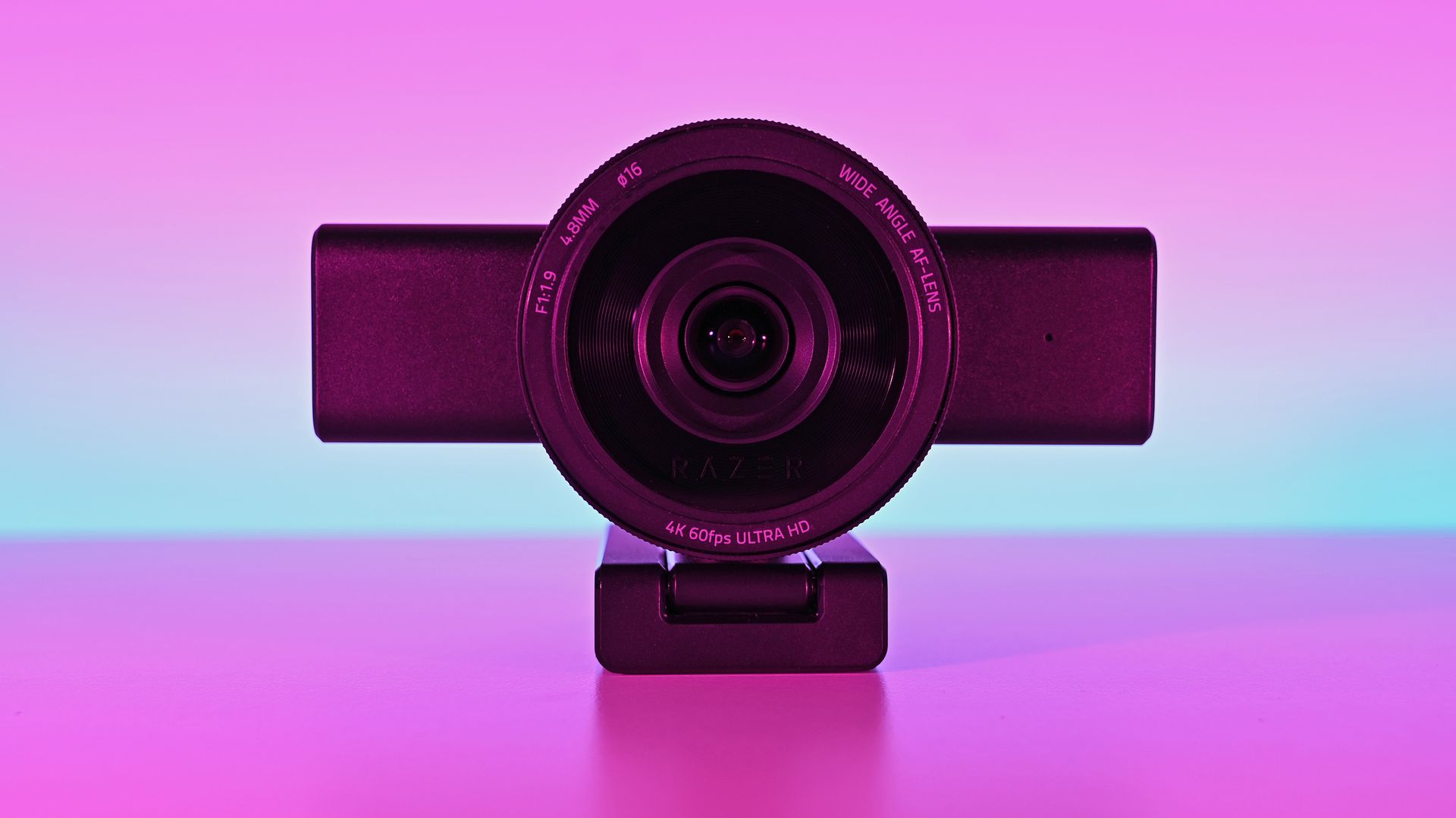
The Kiyo V2 Pro is a serious (and large) piece of hardware
This is the Big Show of webcams. (Image credit: Daniel Rubino)
There's no other way of saying it — the Razer Kiyo V2 is enormous. It has a clip on its base to hang it on the top of a monitor, but unless you have a giant monitor, don't even try it.
I slapped it on the top of one of my 24-inch monitors, and it wasn't very stable up there. There's absolutely no chance you can use this attached to a laptop lid. Realistically, you'll need to do as I have and mount it on a tripod.
That's fine, though; after all, it's targeted at content creators. The sort of person who takes their setup seriously enough to have all manner of things mounted around their setup. It does make it less portable, though. Even one of the renders I saw during a pre-brief showed a laptop user with the Kiyo V2 Pro at the side on a tripod.
But it's not exactly portable.
It's also not for you if you need a microphone to use for video calls, because it doesn't have one. The Kiyo V2 Pro is purely a camera. You'll have to supply the audio. Again, given the target audience, it's not necessarily a dealbreaker, but it's something to be aware of.
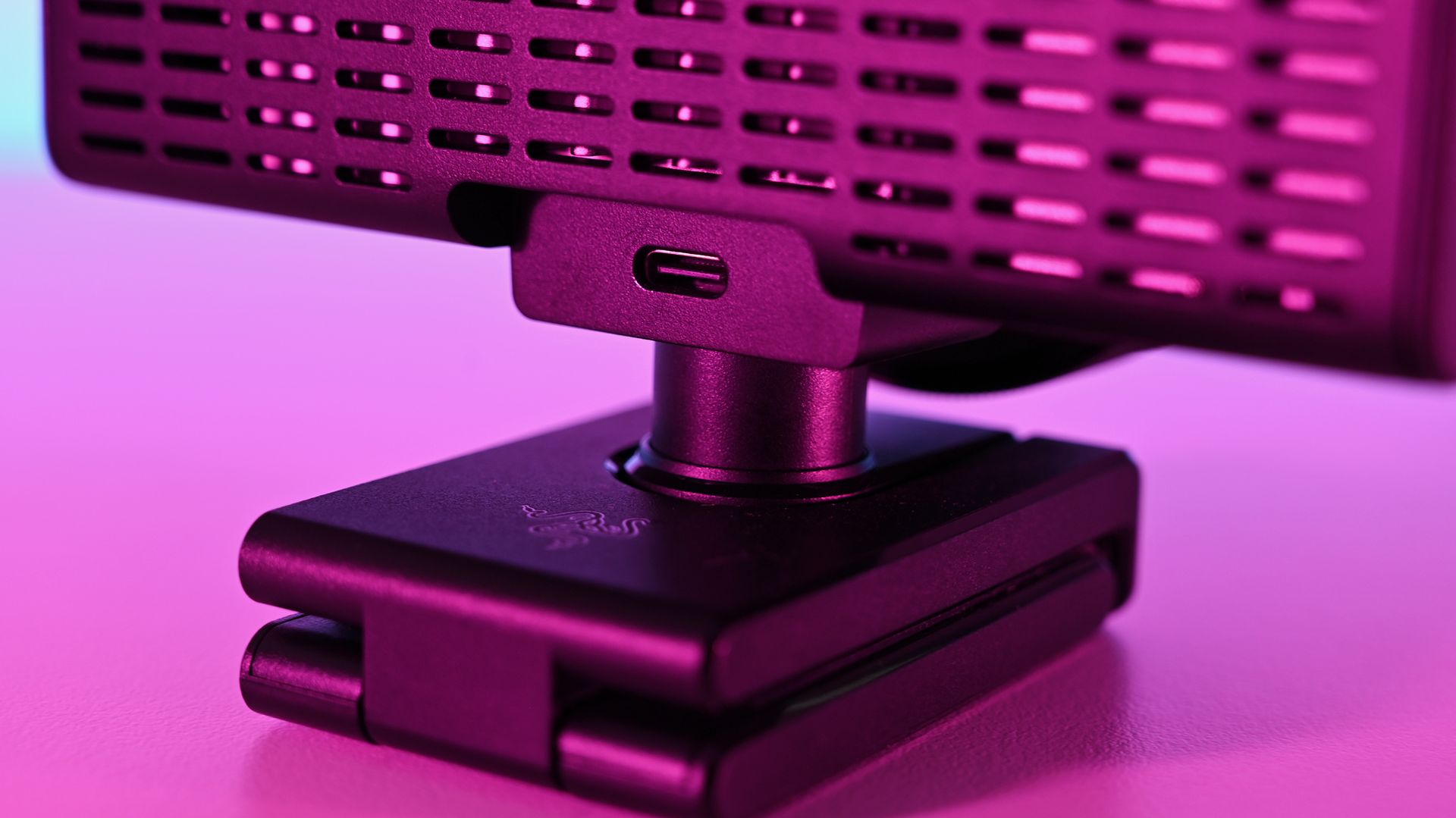
It's definitely a sizeable webcam. Daniel RubinoIt does get warm under long use, but the ventilation is ample. Daniel RubinoThe privacy shutter is immensely satisfying. Daniel Rubino
Despite the size, I do like the design, and I love the physical privacy shutter. You twist the ring on the front of the webcam, and the blades come across. Most satisfying.
The size also means some pretty serious hardware stuffed inside. Including, because it's 2026, AI. In this case, it refers to pretty basic stuff like auto framing, but it's all done on the camera, not in software, and as such doesn't use any of your PC's resources for it.
Also crammed inside and not remotely related to AI is an 8.3 MP Sony STARVIS 2 sensor with a 24 mm full-frame-equivalent focal length. In video terms, it means you can shoot 4K footage at up to 60 FPS, and you'll be well framed even without applying any zoom or crop. It's wide enough to include your well-designed streaming backdrops, but not so wide that you look lost.
The L-frame base also gives you some easy adjustments to its position, without having to faff about tweaking a tripod. It's far easier to raise and tilt a little with this, and it's sturdy enough to hold the hefty 380 g body securely.
There may be some problems eminating from here... (Image credit: Daniel Rubino)
I do have one fairly pressing concern, though. Our Editor-in-Chief, Daniel Rubino, and I have this webcam, and both of us have experienced the same issue with making it work at all.
The long and short seems to be that it works fine with the Razer cable that comes in the box. But with others, it's not as simple. The webcam will fire up for a short period of time and then disable. Synapse won't see it, and Camo Studio gives an error message that the USB port isn't delivering enough power.
I've tried it with every suitable cable I have, and it's the same result every time. Razer has confirmed to me that it should work fine with a minimum USB 3.2 spec USB-C cable that can handle 5 Gbps data and above. But the USB-C cable lottery seems to be a thing, so look after the one it comes with for sure.
The Kiyo V2 Pro needs software to get the best from it (but not Razer's)
Away from the hardware is where the experience falls a little flat for me. I use a lot of Razer products, and I'm used to having all the customizations I need inside the Synapse app. Set it up, close it, and forget about it.
The Kiyo V2 Pro isn't like that, though. It is supported by Synapse, but with only a very basic feature set (despite what the spec sheet may say). To get the best from this webcam, you need to use third-party software, such as Camo Studio, which you get an included lifetime Pro license for with the Kiyo V2 Pro.
On one hand, it operates a little like the camera on your smartphone. It's a piece of hardware with an app, but it also has lots of things that other apps can tap into. Normally, Razer makes a full package to stand out; in this instance, it relies on others to make its hardware shine.
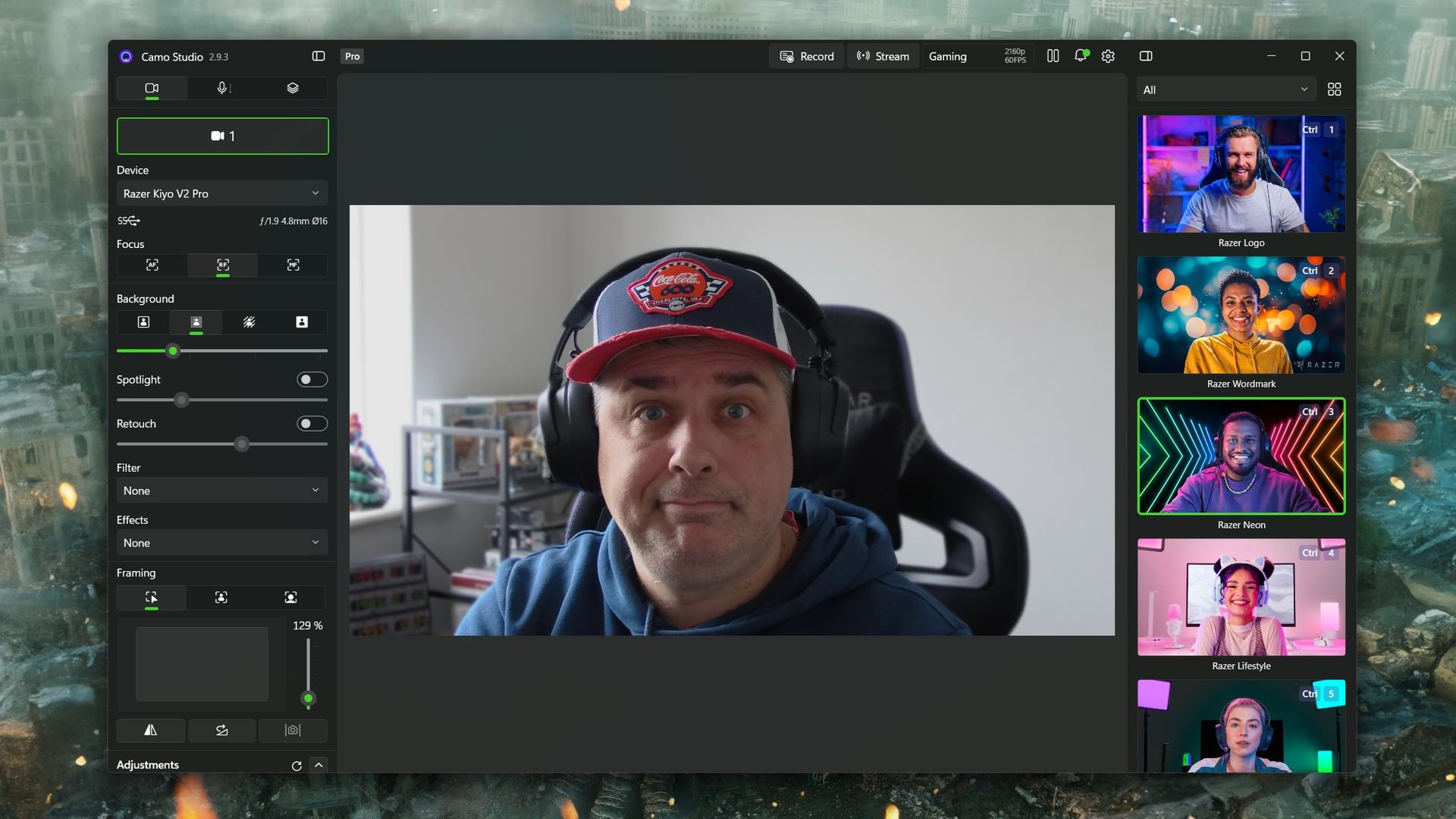
Camo Studio is included with the Kiyo V2 Pro, and you'll need it (or another app of your choice) to really get the most from the webcam. (Image credit: Windows Central)
Camo Studio is a good app, and it's one I already used to make a far lesser-quality webcam, slightly less terrible. There are a ton of options to tweak, including ISO, exposure, zoom, white balance, and saturation — basically anything you'd want to adjust on a regular camera. It is fantastic, and all you need to do is select "Camo" as your webcam in OBS Studio or any other app.
You can also build out your own profiles for different purposes. For example, I use the 1080p profile for work calls because Google Meet doesn't seem to support 4K, so it's wasted. When I capture game content in OBS, I record at 1440p because that's what I play at, so it makes sense to have a matching webcam profile. Whatever you need, you can build, and your visual customizations will automatically apply to whichever you have selected.
But you really do need to spend some time dialing it in. Out of the box, it'll just look like video from any webcam. Compared to my ancient Logitech C922, default settings make it hard to tell which is which. The Kiyo V2 Pro has better colors and is sharper, but it's not a slam dunk. I still haven't really perfected it, but there's no shortage of tweaks that can be made.
Should you buy the Razer Kiyo V2 Pro?
It's good, despite some flaws, but it also might not be right for you. Which is fine. (Image credit: Daniel Rubino)
So, should you buy a Razer Kiyo V2 Pro? It's not a simple yes or no and depends on what you really want from your camera.
A couple of years ago, it would have been an easy "yes." But there's a lot of competition out there (some of which we'll be featuring on the site soon enough), and it's priced at the highest end.
Some may see Razer's passing off of software duties as a plus for the best manual control, but others may lament that there's less plug-and-play aspect to it. Unless you're prepared to get in the weeds a bit, you won't get the result you're looking for.
But where it does stand apart from much of the competition is that the Kiyo V2 Pro can not only do 4K, but it can do it at 60 FPS. A lot of 4K webcams top out at 30 FPS, and for content creators, that might just be the edge they need. The Kiyo V2 Pro has the same sensor Elgato uses in the Facecam 4K but with a wider aperture and handles low light better.
So the answer to whether you should buy it leaves me saying that you shouldn't avoid the Kiyo V2 Pro. It's very deliberately a niche product, and if you're looking for a camera that can give you 4K60 video straight into your PC, then go for it. Likewise, if you're looking for manual controls, jump right in. You'll be very happy.
It won't look as good as a mirrorless camera, say, but it's less expensive and easier to live with. And that last part gets my vote every single time.
4K60
Razer
Kiyo V2 Pro
"Capture ultra-sharp, fluid video with reduced motion blur using an 8.3MP Sony STARVIS 2 sensor, ideal for streaming, content creation, gaming broadcasts, and professional video calls".
Join us on Reddit at r/WindowsCentral to share your insights and discuss our latest news, reviews, and more.
Apple's new $200 indoor camera automatically turns away when residents return home. Here's how its privacy feature works and what remains unconfirmed.
The post Apple’s New $200 Indoor Camera Turns Away When You’re Home — for Privacy appeared first on TechRepublic.
We compare current Ring, Nest, Arlo, and Eufy outdoor security cameras by video quality, AI features, storage, subscriptions, and long-term cost.
The post Best Smart Home Security Cameras for 2026: Ring, Nest, Arlo and Eufy appeared first on TechRepublic.
Apple and LG are reportedly developing smart home locks, cameras and other accessories. Here’s what buyers should know about compatibility and timing.
The post Apple and LG Reportedly Develop Smart Home Locks, Cameras and More appeared first on TechRepublic.
Hackers physically compromised a Flock camera and found an encryption key, 27,000 clips, and 1.6 million images generated in 21 days.
The post Hackers Crack Flock Camera, Expose 1.6M Images in 21 Days appeared first on TechRepublic.
Camera design spent the last two decades chasing thinner phones and bigger screens, so a company deciding to revive a boxy, finger-length shape from the 1970s sounds like a step backward. The Camp Snap 110D proves otherwise. It borrows its elongated, pocketable body from the old 110 film format, then strips out the one feature every digital camera has trained us to expect: a screen for checking the shot you just took.
That missing screen isn’t a cost-cutting shortcut. It’s the entire point. Sma
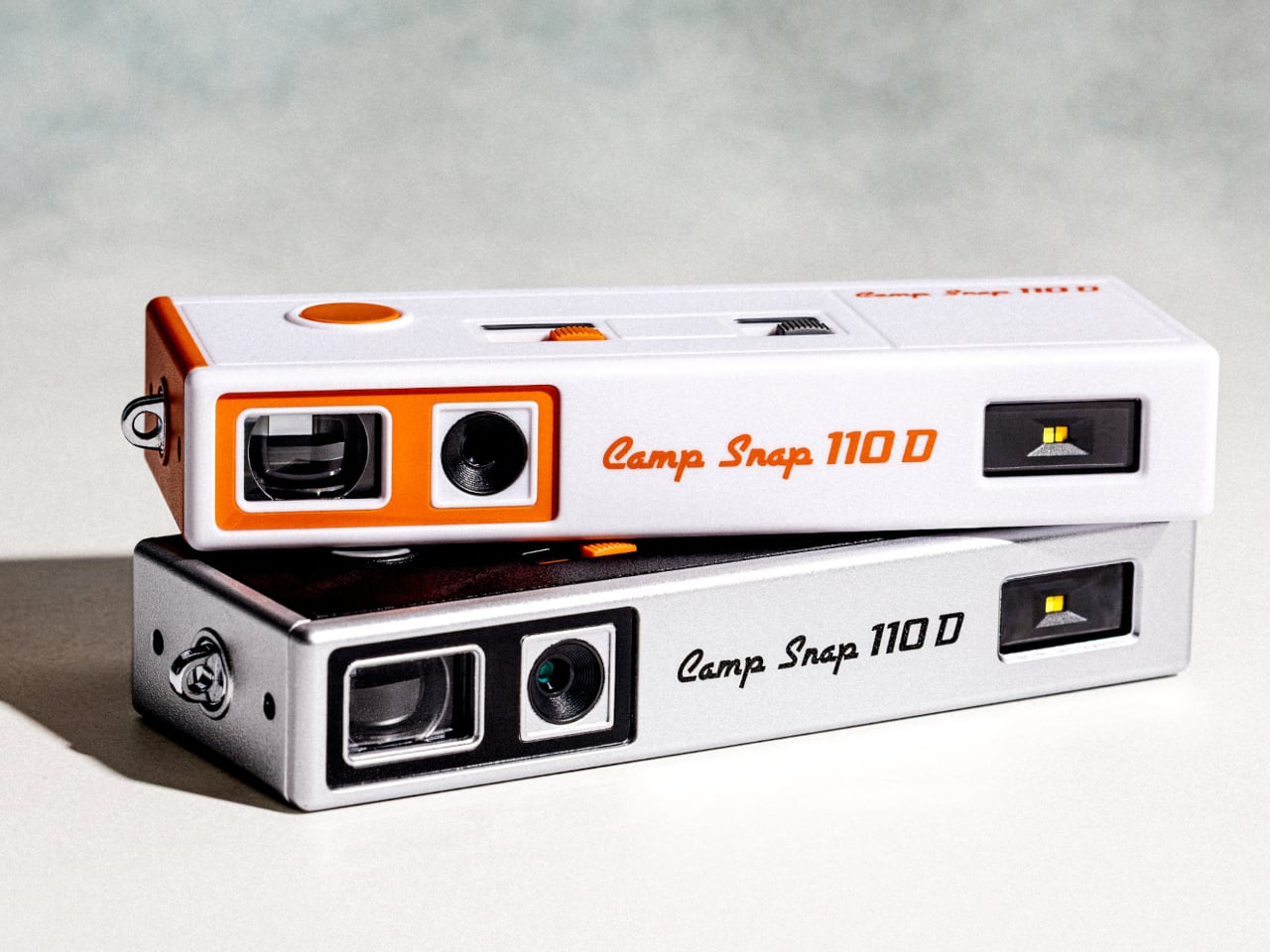
Camera design spent the last two decades chasing thinner phones and bigger screens, so a company deciding to revive a boxy, finger-length shape from the 1970s sounds like a step backward. The Camp Snap 110D proves otherwise. It borrows its elongated, pocketable body from the old 110 film format, then strips out the one feature every digital camera has trained us to expect: a screen for checking the shot you just took.
That missing screen isn’t a cost-cutting shortcut. It’s the entire point. Smartphone photography turns every outing into a loop of shooting, reviewing, deleting, and reshooting until a moment gets buried under a dozen nearly identical takes. The 110D breaks that loop by design, letting a photo exist the instant it’s taken and staying invisible until you plug the camera in later and actually look at what you captured.
Living without a review screen also solves a problem the original 110 format never had to think about: battery life. Screens are usually the single biggest power drain in a compact camera, so removing one frees up room for improvements elsewhere. The 110D pairs that saved power with QuickDraw sleep and wake functionality, letting the camera snap awake fast enough to catch a moment instead of fumbling through a slow startup.
Inside that slim shell sits an 8-megapixel sensor, modest by phone camera standards on purpose, since chasing sharper resolution would work against the whole idea of embracing a lower-fidelity, more film-like result. Five built-in filters let a shooter pick a mood before pressing the shutter rather than fixing it afterward in an app, pushing the entire editing decision to before the photo exists instead of after.
Storage runs on a microSD card, and images transfer out through a USB-C port, a small detail that keeps the retro shape from turning into an actual hassle to use. Charging works the same way, so nobody’s hunting for a proprietary cable or a dead battery with no replacement in sight. The vintage silhouette stays purely visual, while the internals stay entirely current.
Two colorways round out the release: a black variant and a cream-and-orange combination that leans harder into the ’70s reference than the shape alone already does. Both ship with a wrist lanyard and a small carrying pouch, treating the camera less like a serious tool tucked into a bag and more like something meant to hang off a wrist at a party or a weekend trip without a second thought.
At $74.99, the 110D undercuts most instant cameras and plenty of higher-end toy cameras while offering something neither fully provides: a shape borrowed from actual photographic history rather than a generic plastic body built to look vaguely retro. That’s a specific kind of nostalgia, aimed at people who remember what a 110 camera looked like even if they never touched the film it used.
Picture a courier walking up your driveway while someone else quietly tries your side gate. A normal pan-tilt camera picks one of them and forgets the other exists. Reolink’s OMVI 2i Ultra handles it by carrying two cameras at once: a fixed 4K wide lens on top that never stops watching the full scene, and a 5MP pan-tilt ball below that spins 355 degrees to lock onto whatever the wide lens flags. Both feeds record at the same time, and you can tap anywhere on the wide view to slew the turret str
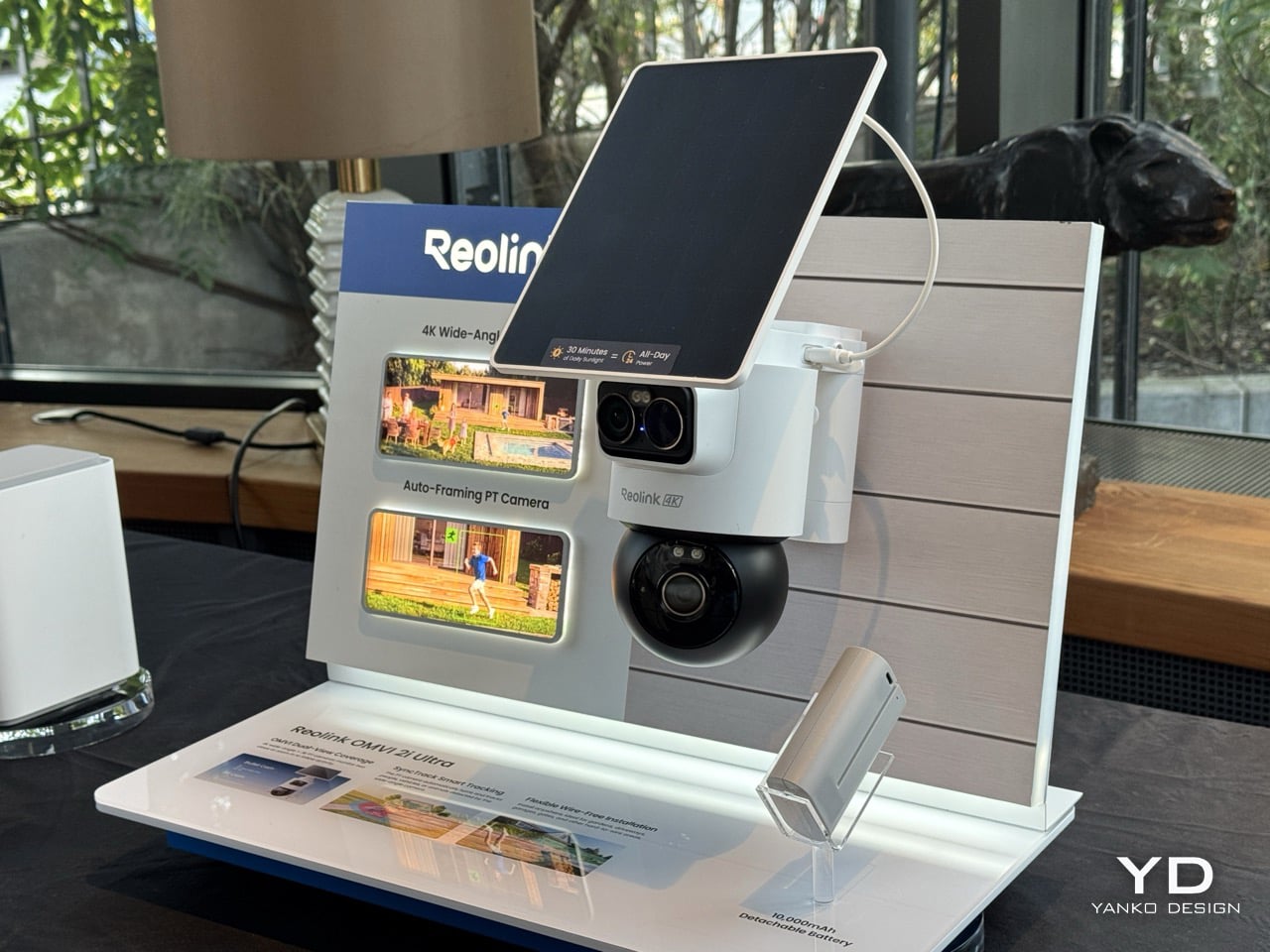
Picture a courier walking up your driveway while someone else quietly tries your side gate. A normal pan-tilt camera picks one of them and forgets the other exists. Reolink’s OMVI 2i Ultra handles it by carrying two cameras at once: a fixed 4K wide lens on top that never stops watching the full scene, and a 5MP pan-tilt ball below that spins 355 degrees to lock onto whatever the wide lens flags. Both feeds record at the same time, and you can tap anywhere on the wide view to slew the turret straight to that spot. It debuted at IFA 2026 in Berlin, ships late October, and costs between $200 and $250.
A detachable 10,000mAh pack claims six months per charge, and the 6W SolarEase panel says it needs about thirty minutes of daily sun to stay topped up, against the one to two hours Reolink quotes for rivals like Eufy’s S340 and the Tapo C675D. Those are Reolink’s own numbers, so hold them loosely until somebody leaves one on a north-facing wall through a British winter. The rest is easier to verify. Wi-Fi 6 across both bands, up to 512GB of local microSD with no subscription attached, colour night vision from twin spotlights, a siren, and IP65 sealing. At a kilogram with the bracket, it is a proper lump of hardware rather than something you tuck on a shelf.
Designer: Reolink
Pan-tilt cameras have quietly lied to buyers since the format existed. Sell someone a camera that turns to follow motion and you have also sold them a camera that stops watching everywhere else the instant it does. Reolink’s fix is embarrassingly simple once you see it. Stop asking one lens to be both the guard and the chaser, and give it a second lens that only guards. The wide 4K unit up top runs at 110 degrees horizontal and never rotates, so the scene it opened on is the scene it keeps recording no matter where the PT ball below it wanders off to. Reolink calls this SyncTrack, but the actual idea is closer to division of labour than any clever algorithm. One camera commits to context, the other commits to pursuit, and neither has to compromise for the sake of the other.
This is the third time Reolink has built this exact idea in 2026, and each version has been a slightly different argument about what matters most. The X16 landed at CES in January as a 24MP full metal flagship with 16x optical zoom, but it needs an ethernet run to function, which puts a hard ceiling on where it can live. The 3i followed in June with PoE and wired Wi-Fi options at $319.99, still asking for a nearby outlet even in its most flexible form. The 2i Ultra drops the combined resolution to 8MP plus 5MP and, in exchange, cuts the cord entirely. The trade-off is the clever bit, because being able to pop a camera on a fence or a backyard without worrying about wiring is much more convenient than haggling over megapixels.
A squared-off dual-lens head sits above a separate motorized ball, with a solar panel tilting on its own hinge overhead, and the whole assembly weighs a full kilogram once the bracket is attached. Compare that to Reolink’s own Argus MagiCam, a 108-gram cube you stick to a fridge with a magnet, and the difference in ambition is obvious at a glance. This is not a camera trying to disappear into a bookshelf. It reads more like a small piece of maritime equipment bolted under an eave, and that visible mechanical presence is doing some of the deterrence work before the siren ever gets involved.
That dual-lens design is quite literally baked into the name. OMVI reads like omni-vision, a camera built to watch in every direction at once instead of picking a lane. Arlo’s Ultra flagship still wants a wall plug or a proprietary base station to unlock its best tricks, and Nest’s outdoor cameras have quietly stayed wired-first for years now, which makes the 2i Ultra’s fully wire-free build feel like it is actually catching up to how people install things rather than how manufacturers wish they would. No drilled conduit, no hub tucked in a closet, just a battery, a solar panel, and a spot on the fence you actually wanted the camera to go.
That is the real flex against the flagships twice its price. You are not paying for a wall socket you have to plan your whole install around, and you are not paying for a bulky base station eating an outlet indoors either. You get two lenses doing genuinely different jobs, a battery that outlasts most of the category on paper, and a name that finally means something instead of just sounding techy. At $200 to $250, the OMVI 2i Ultra is the version of omni-vision security that shows up ready to mount anywhere the moment you take it out of the box.
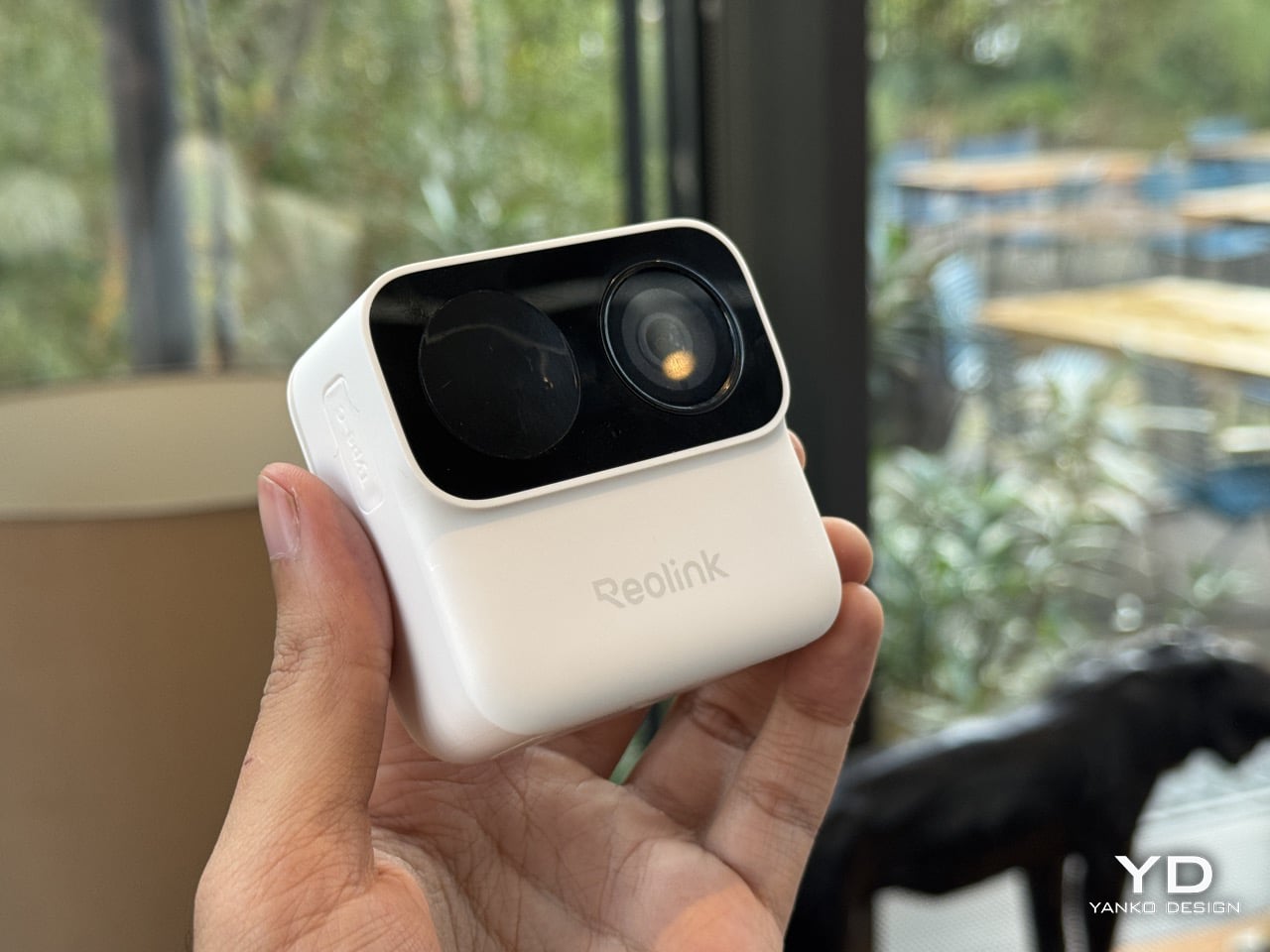
The worst part of owning a security camera has never been the camera. It is the ladder, the drill, the wall plug, and the moment you realize you aimed the thing eight degrees too far left. Reolink’s Argus MagiCam deletes all of that with a magnet. The 68mm GoPro-looking cube slaps onto any metal surface in about two seconds, or onto an included magnetic puck with a swivel arm for everything else, turning any surface into a security surveillance monitor (you can even mount it in your car as a d
The worst part of owning a security camera has never been the camera. It is the ladder, the drill, the wall plug, and the moment you realize you aimed the thing eight degrees too far left. Reolink’s Argus MagiCam deletes all of that with a magnet. The 68mm GoPro-looking cube slaps onto any metal surface in about two seconds, or onto an included magnetic puck with a swivel arm for everything else, turning any surface into a security surveillance monitor (you can even mount it in your car as a dashcam)… and here’s the kicker. It runs up to nine months on two AA lithium batteries. Nine. Whole. Months. I repositioned it three times in under a minute at IFA 2026, which is three more times than I have ever moved a camera bolted to a wall.
Sixty-five dollars buys 1080p, IP67 weatherproofing, dual-band Wi-Fi, on-device person detection, and local microSD storage with no monthly fee attached. Flip the cube over and the back panel detaches to a bay holding two ordinary AAs, the SD slot and the reset button, all serviceable with a coin and a spare hand. Reolink built it around Qualcomm’s QCC730 micro-power Wi-Fi chip for its Power Efficient Series, shown in Hall 1.2 next to the OMVI 2i Ultra. A USB-C port hides under a rubber flap for 24/7 recording when you want it wired. Three colours: black, white, and a mint green that has no business looking this good.
Designer: Reolink
A matte PIR dome sits on the left, a glossy ringed lens sits on the right, and a pinhole mic hides between them, the whole cluster raised on a squared-off black module that reads more like a GoPro’s lens housing than anything borrowed from traditional security hardware. Security cameras have spent two decades pretending they belong on a parking structure, all bullet housings and matte black anonymity. This one borrows its language from action cameras instead, small, chunky, built to be picked up and repositioned rather than mounted once and forgotten, which is exactly why the mint colorway makes sense sitting on a bookshelf instead of bolted above a garage. That GoPro reference is not incidental either. It signals a camera meant to be handled, not just installed.
The battery bay is the real argument here. Somewhere along the way, the smart home industry decided sealed rechargeable packs looked cleaner on a spec sheet, and quietly handed every camera, doorbell, and earbud an expiry date measured in a couple of years. Reolink went the other direction, and the QCC730 chip is what makes that reversal viable rather than nostalgic, since its whole job is sipping power in standby instead of gulping it. Blink has claimed two years off two AA lithiums since its Outdoor 4 launched, though independent testing has repeatedly landed closer to a few months once real motion traffic gets involved. Nine months against a heavier five minutes of daily recording, verified in Reolink’s own side by side tests, reads like the more honest number in the room.
What you give up for all that convenience is resolution, and it barely registers as a cost. This is a 1080p sensor at a moment when 4K battery cameras exist, sure, but 1080p is still plenty sharp for spotting a face at the door or a raccoon in the bin, and the fixed bitrate keeps file sizes sane on a modest microSD card. Night vision runs through a single mono IR LED instead of anything approaching colour, which is standard fare at this tier, not a shortfall specific to Reolink. For a camera this cheap, this easy to place, and this forgiving on power, trading a few thousand pixels feels like a fair swap rather than a compromise. The MagiCam was never trying to be the sharpest eye on your property. It is trying to be the one you actually keep charged, and on that specific promise, the AA drawer you have been ignoring for a decade just became a legitimate accessory again.
Explore the Honor Robot Phone’s 200MP gimbal camera, flagship specs, China pricing, key trade-offs, and whether this experimental phone is worth buying.
The post Honor Robot Phone Cheat Sheet: Specs, Price and Who Should Buy It appeared first on TechRepublic.
Explore the Honor Robot Phone’s 200MP gimbal camera, flagship specs, China pricing, key trade-offs, and whether this experimental phone is worth buying.
OnePlus 16 camera leaks point to a 200MP main sensor, larger 50MP 3x telephoto and new ultrawide, but global availability remains unclear.
The post OnePlus 16 Camera Leak Reveals 200MP Main Sensor and New 3x Telephoto appeared first on TechRepublic.
A new leak claims Honor’s Robot Phone will feature two 200MP cameras, a motorized gimbal, a 7,060mAh battery, and 120W charging.
The post Honor Robot Phone Specs Leak Ahead of Aug. 12 Debut: What Users Can Expect appeared first on TechRepublic.
Samsung’s rumored Galaxy S27 Pro may share several premium features with the S27 Ultra, but new leaks suggest clear differences in zoom cameras, display size, S Pen support, batteries, and regional processors.
The post Samsung Galaxy S27 Pro May Not Be the Smaller Ultra Buyers Expect appeared first on TechRepublic.
Samsung’s rumored Galaxy S27 Pro may share several premium features with the S27 Ultra, but new leaks suggest clear differences in zoom cameras, display size, S Pen support, batteries, and regional processors.

 Connexion