❌

Vue normale

Galaxy Tab S12 Ultra vs iPad Pro With M5: Which Premium Tablet Gives You More?

2 octobre 2026 à 14:25

Samsung's Galaxy Tab S12 Ultra offers a larger display, included S Pen, and expandable storage, while the iPad Pro with M5 leads in performance and battery life.

The post Galaxy Tab S12 Ultra vs iPad Pro With M5: Which Premium Tablet Gives You More? appeared first on TechRepublic.

Samsung Raises US Galaxy S26 Prices by Up to $200

2 octobre 2026 à 09:33

Samsung has raised US prices for the Galaxy S26, S26 Plus, and S26 Ultra by up to $200. See the new pricing and what buyers should compare before upgrading.

The post Samsung Raises US Galaxy S26 Prices by Up to $200 appeared first on TechRepublic.

  • ✇Yanko Design
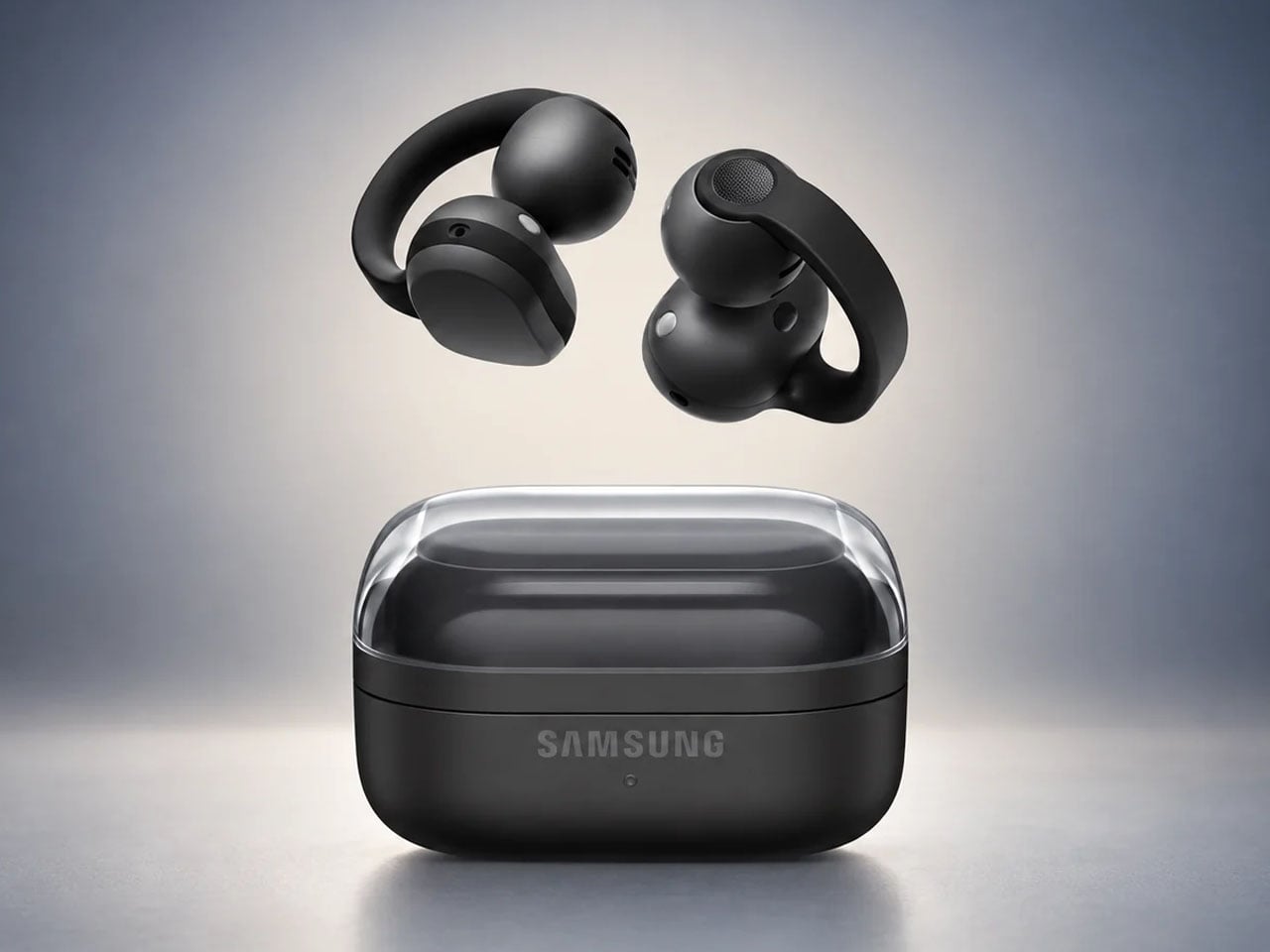
  • Samsung Galaxy Buds On let you listen to music without blocking your ears
    Clip-on earbuds have arrived in a big way, giving another versatile way to enjoy music whether you’re in the gym or making your way to the busy metro station. Rather than shoving the eartips deep down the ear canal, these buds are more comfortable and keep you aware of the environment at all times. Huawei FreeClip 2 arrived late last year to turn up music lovers’ interest in this form factor, followed by the swanky CMF Clip Pro’s. Sennheiser jumped on the bandwagon with the Accentum Clip, and r
     

Samsung Galaxy Buds On let you listen to music without blocking your ears

1 octobre 2026 à 14:20

Clip-on earbuds have arrived in a big way, giving another versatile way to enjoy music whether you’re in the gym or making your way to the busy metro station. Rather than shoving the eartips deep down the ear canal, these buds are more comfortable and keep you aware of the environment at all times.

Huawei FreeClip 2 arrived late last year to turn up music lovers’ interest in this form factor, followed by the swanky CMF Clip Pro’s. Sennheiser jumped on the bandwagon with the Accentum Clip, and recently Bose came up with their second generation clio-ons. Predictably, Samsung has pulled the trigger with its first-ever clip-on wireless earbuds dubbed Galaxy Buds On, and they look impressive.

Designer: Samsung

So how are the Galaxy Buds On different from the other flagship clip-on buds in the tightly contested market? Do they have what it takes to bring to the active audio community what they desire out of such open-ear earbuds?

Clip-on design that takes comfort seriously

Samsung’s approach for this form factor is focused on rethinking how the bud sits on the ear. The Galaxy Buds On use an open-ear clip design that leaves the ear canal unobstructed, allowing wearers to listen to music while staying connected to conversations, traffic, or other sounds around them.

Samsung says it studied different ear shapes and ran simulations to determine the positioning of the speakers and battery. A larger contact area helps distribute pressure, while the elasticity of the connecting band is tuned to keep the buds stable during movement. That makes the design particularly relevant for walking, commuting and workouts where awareness matters as much as audio.

Bass that packs a punch

The audio hardware is also more considered than the unusual silhouette might suggest. Samsung has fitted the Buds On with TwinBoost speakers designed to emphasize lower frequencies, addressing one of the perennial challenges of open-ear audio – producing convincing bass without sealing the ear canal. An Audio Leakage Reduction system is intended to keep music from spilling excessively into the surroundings.

In conjunction, the automatic volume control adjusts playback according to the environment. Samsung claims up to 9.5 hours of continuous music playback from the earbuds, which puts the focus firmly on everyday usability rather than making the clip form factor a novelty.

Galaxy AI adapted for the open-ear formula

The more interesting bit happens when the Buds On are paired with a compatible Galaxy device. Samsung has integrated several Galaxy AI features, turning the earbuds into something closer to a hands-free interface. Users can launch Gemini Live through a voice command, while Quick Voice Memo allows a long press on the earbud to start recording without reaching for the phone. Those recordings can subsequently be searched through Bixby, provided the required Galaxy AI-supported device, Voice Recorder, and Bixby setup is in place.

Head Gestures take the hands-free idea further. Nodding or shaking the head can be used for actions such as answering or ending calls, dismissing alarms, or interacting with message notifications. For calls, the Buds On use three microphones alongside a bone-conduction-based Voice Pickup Unit and machine learning to isolate the wearer’s voice from surrounding noise. They are powered by Qualcomm’s Snapdragon S7 Gen 1 Sound Platform and a Class-D amplifier.

Samsung will launch the Galaxy Buds On in South Korea on October 27 in black for 299,000 won (roughly $220). A wider international rollout is planned, although regional pricing and availability have not yet been announced.


The post Samsung Galaxy Buds On let you listen to music without blocking your ears first appeared on Yanko Design.

  • ✇Yanko Design
  • Samsung’s SmartTag3 Refuses to Die at 790 Days Battery Life
    I’m the kind of person who can set down my keys, turn around, and immediately forget where they went. Wallets, earbuds, and bags have a way of disappearing at the least convenient moment, too. A smart tracker can spare you a frantic search, but only if its battery is working and its location can still be found. That makes battery life and the ability to locate an item beyond your phone’s immediate range just as important as a good-looking design. Designed by Samsung, the Galaxy SmartTag3 aims t
     

Samsung’s SmartTag3 Refuses to Die at 790 Days Battery Life

1 octobre 2026 à 13:20

I’m the kind of person who can set down my keys, turn around, and immediately forget where they went. Wallets, earbuds, and bags have a way of disappearing at the least convenient moment, too. A smart tracker can spare you a frantic search, but only if its battery is working and its location can still be found. That makes battery life and the ability to locate an item beyond your phone’s immediate range just as important as a good-looking design.

Designed by Samsung, the Galaxy SmartTag3 aims to address those everyday frustrations in a smaller package. Its rounded, nearly square shape gives it a clean look, while its reduced size should make it less noticeable on the things you carry. That matters more than it might seem. A tracker attached to a set of keys needs to be easy to live with every day, not just useful on the rare occasion those keys go missing.

Design: Samsung

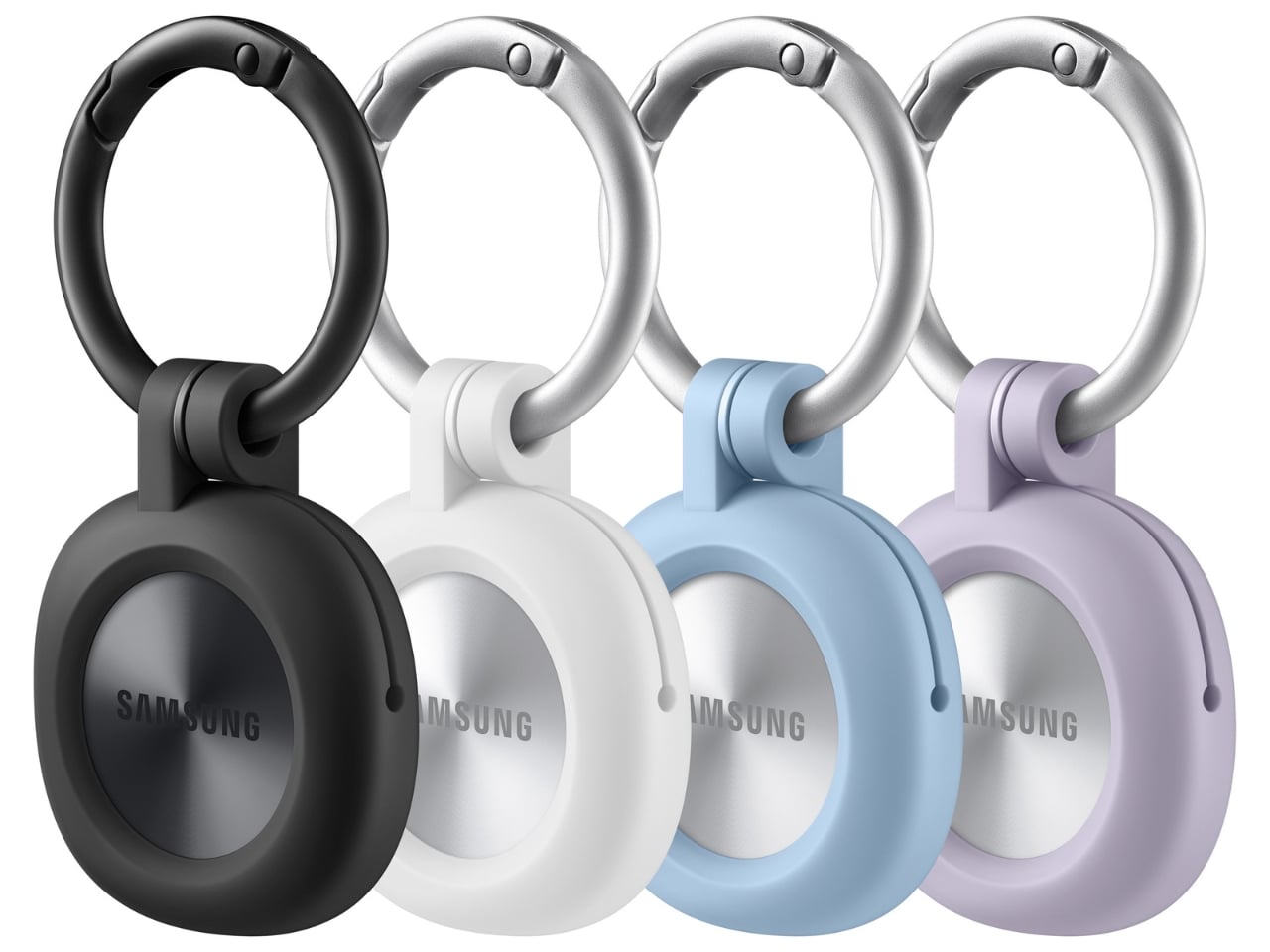
The change in shape also raises a practical question: how will you attach it to your belongings? Samsung offers a silicone case with an integrated keyring and a loop case, giving users different ways to secure the tracker to keys or a bag. The smoother outline may look better on its own, but anyone buying one for their keys should consider which attachment will work best.

Samsung says the SmartTag3 is 35% smaller by volume and 33% lighter than its predecessor. It also retains an IP67 rating, indicating resistance to dust and water under specified test conditions. That offers reassurance if the tag gets caught in the rain, though it does not mean the device is waterproof in every situation.

Battery life may be the more meaningful upgrade for anyone who has discovered a dead tracker while looking for a lost item. Samsung says the SmartTag3 can run for up to 550 days under standard usage or up to 790 days in Power Saving Mode. Those figures are based on Samsung’s testing, not a promise that every user will get the same result. Still, a tracker that needs attention less often is less likely to let you down because you forgot to check its battery.

Finding something nearby should be easier, too. Compass View uses Bluetooth 6.0 Channel Sounding to provide distance and directional guidance from up to 60 meters away, about three times farther than on the previous model, according to Samsung. It could help you narrow down where to look before you’re close enough to spot the missing item. Compass View is not available on iOS.

The other finding features are intended to help in different situations. If you leave a tagged bag behind, a Left Behind Alert could prompt you to go back for it, although that feature is also unavailable on iOS. Place Notification is designed to alert you when a tagged item enters or leaves an area you define. Location History and Movement Detection Alert may provide additional clues about where an item has been or whether it has moved. Together, these tools could help you notice a problem sooner and narrow down where to look.

Lost Mode addresses a different problem: helping someone return an item they find. With a compatible phone, a finder can scan the tag using NFC to see the contact information or short message you have registered. That could be useful for a bag left at a café or luggage separated from you during a trip. When an item is beyond your phone’s range, however, location updates depend on nearby participating Galaxy devices. The SmartTag3 should not be treated as a continuous, real-time GPS tracker.

The SmartTag3’s appeal is the combination of a compact design, long claimed battery life, and features that help at several stages of a search. It cannot prevent you from leaving your keys behind, and its alerts will not replace paying attention to your belongings. But if it helps you catch a forgotten bag before you get home, or gives you a useful clue when something disappears, it has done what a well-designed tracker should: made a small, stressful problem easier to manage.

The post Samsung’s SmartTag3 Refuses to Die at 790 Days Battery Life first appeared on Yanko Design.

Samsung’s New Patent Reveals How a Galaxy Watch Could Measure Blood Sugar

18 septembre 2026 à 10:32

A new Samsung patent reveals how wearable glucose measurement could work as the company continues researching noninvasive blood sugar monitoring.

The post Samsung’s New Patent Reveals How a Galaxy Watch Could Measure Blood Sugar appeared first on TechRepublic.

  • ✇Yanko Design
  • 5 Things the iPhone Duo Got Right That Samsung Still Hasn’t
    Samsung has had the folding phone conversation to itself for six years now, tweaking hinges, shrinking creases, and figuring out what a cover screen is even for. Apple waited, watched, and let its rival make every mistake first. That patience shows in the iPhone Duo, a first-generation foldable that skipped straight past problems Samsung’s Galaxy Z Fold8 still hasn’t fully solved. None of that comes cheap, though. The Duo starts at $1,999 and costs more than the Fold8’s $1,899.99, weighs in at
     

5 Things the iPhone Duo Got Right That Samsung Still Hasn’t

Par : JC Torres
12 septembre 2026 à 08:10

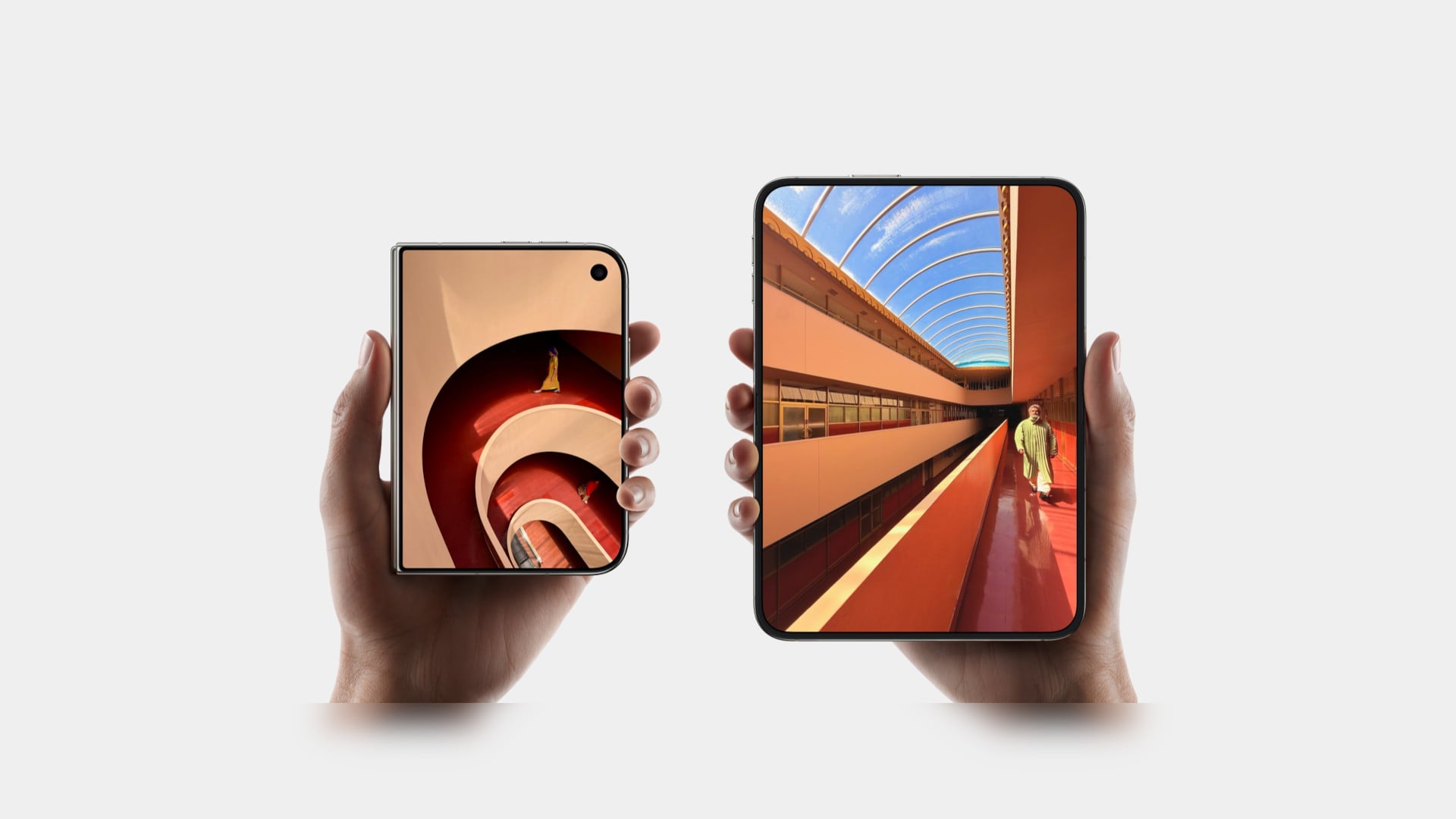
Samsung has had the folding phone conversation to itself for six years now, tweaking hinges, shrinking creases, and figuring out what a cover screen is even for. Apple waited, watched, and let its rival make every mistake first. That patience shows in the iPhone Duo, a first-generation foldable that skipped straight past problems Samsung’s Galaxy Z Fold8 still hasn’t fully solved.

None of that comes cheap, though. The Duo starts at $1,999 and costs more than the Fold8’s $1,899.99, weighs in at roughly nine ounces against the Fold8’s seven, and folds up thicker in your pocket, besides. Samsung still wins those arguments outright, and we’ll get back to that later. But set weight and price aside, because here are five places where Apple’s first foldable actually beat Samsung’s eighth attempt.

Designer: Apple

The Camera That Disappears

A foldable phone’s whole pitch is the screen, one continuous surface that opens up into something closer to a small tablet. Every notch or punch-hole cut into that surface breaks the illusion a little, reminding you that the software is still working around a sensor buried in the glass. Samsung’s Galaxy Z Fold8 has never quite escaped that compromise, even eight generations in.

The Galaxy Z Fold8 carries a 10-megapixel camera punched into both the inner and cover displays, a hole you notice every time the screen lights up. The Duo takes a different route entirely, tucking its inner selfie camera under the panel itself so nothing interrupts the display when you’re watching a movie or scrolling through photos with both halves open. The outer screen keeps a single, smaller cutout.

A Stylus Samsung Gave Up On

Samsung built its whole Note legacy around the S Pen, then carried that stylus into the first few generations of the Galaxy Z Fold before quietly dropping it this cycle. Neither the Galaxy Z Fold8 nor the Galaxy Z Fold8 Ultra bring it back, leaving a gap for anyone who used to sketch, sign, or jot notes onto that big inner display. It’s a strange retreat for a company built on that exact feature.

Samsung Galaxy Z Fold6

Apple Pencil support changes that, working on both the 5.4-inch cover screen and the 7.6-inch inner display, once it arrives. Dual-screen support lands through a software update later this year rather than at launch, so early buyers will have to wait a bit for the full experience. Still, it means signing a document or sketching an idea won’t require unfolding the phone first, something Samsung’s lineup can no longer offer.

Built to Survive the Mess

Dust is the part of durability testing everyone forgets about until it’s too late, and a folding hinge is the worst possible place for grit to sneak into. Water resistance ratings get all the marketing attention, but the dust half of an IP rating tells you whether sand at the beach or fine construction dust will actually make it past the seals and start scratching at the mechanism underneath.

The iPhone Duo carries an IP68 rating, meaning the seal is dust-tight; nothing gets through, full stop. The Galaxy Z Fold8 only manages IP48, which covers water fine but leaves that dust digit low enough that fine particles, sand, and powder aren’t actually kept out. For anyone who takes their foldable to a beach, a workshop, or just a dusty backpack, that gap matters more than it looks.

Room for Everything You Shoot

A foldable’s bigger inner screen practically begs you to shoot more video and drag around heavier files, whether that’s 4K footage, a stack of RAW photos, or a library of apps you’d never bother installing on a regular phone. Storage stops being an afterthought pretty quickly once you’re using the extra screen real estate the way it’s meant to be used, for actual creative work instead of just bigger icons.

Apple tops out the iPhone Duo at 2TB of storage, double what the Galaxy Z Fold8 offers at its 1TB ceiling. That’s the difference between planning around your camera roll on a long trip and simply forgetting storage exists as a problem. For anyone who treats their foldable as a mobile production tool rather than a bigger email client, that extra headroom ends up mattering more than the megapixel count.

Fighting the Fold’s Oldest Flaw

The crease down the middle of a folding screen has been the one problem no manufacturer has fully cracked, Samsung included, no matter how many generations they’ve shipped. Apple’s approach to the Duo’s hinge stacks a nano-texture matte layer over glide-adhesive glass and backs the whole assembly with a titanium plate, an engineering answer to a problem that’s mostly been treated as unavoidable elsewhere in the industry.

Early impressions from outlets with briefing access suggest the crease is still visible. Nobody’s claiming otherwise, but it doesn’t catch your finger or your attention the way it does on most rivals, the Galaxy Z Fold8 included. That’s worth flagging as an early read rather than a verified result, since neither phone has landed in reviewers’ hands yet. Outdoor glare handling gets similar praise, though the real test comes once these ship.

What Samsung Still Gets Right

None of this makes the Galaxy Z Fold8 a bad phone, and Samsung still wins the arguments that matter most to plenty of buyers. It’s $99.01 cheaper, noticeably lighter at roughly seven ounces against the Duo’s nine, and thinner whether it’s folded shut in your pocket or opened flat on a desk. Those are real, measurable advantages, not consolation prizes.

Apple iPhone Duo

Samsung Galaxy Z Fold8

What you’re really choosing between is a phone that’s been refined for eight generations and one making its very first attempt, price and weight included. A first try that already beats its rival on a camera, a stylus, a durability rating, storage, and a hinge design is a strong opening argument, whatever it costs to get there. Samsung’s turn to respond comes next year.

The post 5 Things the iPhone Duo Got Right That Samsung Still Hasn’t first appeared on Yanko Design.

Samsung Ends Galaxy Z Fold 3 and Flip 3 Updates: Is It Time to Upgrade?

11 septembre 2026 à 14:14

Samsung has ended guaranteed security updates for the Galaxy Z Fold 3 and Z Flip 3. Here’s what owners should know and whether it’s time to upgrade.

The post Samsung Ends Galaxy Z Fold 3 and Flip 3 Updates: Is It Time to Upgrade? appeared first on TechRepublic.

iPhone Duo vs Galaxy Z Fold8: Which Foldable Should You Buy?

11 septembre 2026 à 12:05

Apple’s first foldable meets Samsung’s eighth-generation Fold. Here’s which makes more sense for Apple loyalists, multitaskers, and other premium buyers.

The post iPhone Duo vs Galaxy Z Fold8: Which Foldable Should You Buy? appeared first on TechRepublic.

Samsung Taps Mistral AI for On-Premises Chip Manufacturing

10 septembre 2026 à 14:59

Samsung is bringing Mistral AI into its semiconductor operations through on-premises models designed to detect defects and optimize chip production.

The post Samsung Taps Mistral AI for On-Premises Chip Manufacturing appeared first on TechRepublic.

  • ✇Articles on TechRepublic
  • 4 Best Wear OS Smartwatches for 2026
    Pixel Watch 5 leads overall, while Galaxy Watch9, OnePlus Watch 3, and Galaxy Watch Ultra2 offer better fits for Samsung users, battery life, or outdoor use. The post 4 Best Wear OS Smartwatches for 2026 appeared first on TechRepublic.
     

4 Best Wear OS Smartwatches for 2026

10 septembre 2026 à 06:49

Pixel Watch 5 leads overall, while Galaxy Watch9, OnePlus Watch 3, and Galaxy Watch Ultra2 offer better fits for Samsung users, battery life, or outdoor use.

The post 4 Best Wear OS Smartwatches for 2026 appeared first on TechRepublic.

Amazon, Walmart, and Best Buy Labor Day Deals: 7 Tech Picks

4 septembre 2026 à 11:42

Find the best Labor Day tech deals for 2026 at Amazon, Walmart, and Best Buy, with savings on laptops, phones, smartwatches, and headphones.

The post Amazon, Walmart, and Best Buy Labor Day Deals: 7 Tech Picks appeared first on TechRepublic.

Samsung’s IFA 2026 Pitch: Bringing AI Across TVs, Appliances and Galaxy Devices

3 septembre 2026 à 07:41

Samsung is showcasing an AI ecosystem at IFA 2026 that connects TVs, appliances, Galaxy devices and wearables across the smart home.

The post Samsung’s IFA 2026 Pitch: Bringing AI Across TVs, Appliances and Galaxy Devices appeared first on TechRepublic.

Samsung One UI 9 Puts Warranty Checks and Repair Support Right in Settings

25 août 2026 à 08:32

Samsung’s One UI 9 puts warranty checks, diagnostics, repair estimates, and service booking in Settings on the latest Galaxy foldables.

The post Samsung One UI 9 Puts Warranty Checks and Repair Support Right in Settings appeared first on TechRepublic.

Pixel 11 Pro Fold vs. Galaxy Z Fold8: Which $1,900 Foldable Is Better for Work?

25 août 2026 à 08:01

Google’s Pixel 11 Pro Fold and Samsung’s Galaxy Z Fold8 take different approaches to productivity, portability, durability, and everyday use.

The post Pixel 11 Pro Fold vs. Galaxy Z Fold8: Which $1,900 Foldable Is Better for Work? appeared first on TechRepublic.

Galaxy Users Hit RCS Error 3100: What Google Recommends

24 août 2026 à 14:09

Galaxy users report Google Messages RCS error 3100 after changing phones or carriers. Learn Google’s recommended steps and why they may not work.

The post Galaxy Users Hit RCS Error 3100: What Google Recommends appeared first on TechRepublic.

  • ✇Korben
  • Son imprimante HP imprime enfin sur Mac - Merci Claude Code
    Hier, je suis tombé sur ce tweet : Kuber, un développeur de 19 ans a demandé à Claude Code, de lui pondre un pilote pour sa vieille imprimante pour macOS. Et visiblement, ça a intéressé pas mal de monde puisque le tweet a fait +3 millions de vues. Il a ensuite publié le dépôt sur Github et la transcription complète de la session. Et ce que ça raconte c'est surtout un bras de fer avec macOS, et un montage bidouillesque au possible qui finit par tenir sur un
     

Son imprimante HP imprime enfin sur Mac - Merci Claude Code

19 août 2026 à 02:50

Hier, je suis tombé sur ce tweet :

Kuber, un développeur de 19 ans a demandé à Claude Code, de lui pondre un pilote pour sa vieille imprimante pour macOS. Et visiblement, ça a intéressé pas mal de monde puisque le tweet a fait +3 millions de vues.

Il a ensuite publié le dépôt sur Github et la transcription complète de la session. Et ce que ça raconte c'est surtout un bras de fer avec macOS, et un montage bidouillesque au possible qui finit par tenir sur une machine virtuelle Linux et un daemon root.

Pour la petite histoire, son imprimante est une HP Laser 1008a. C'est en réalité une Samsung rebrandée car HP a racheté la division impression de Samsung , il y a une dizaine d'années. Et ces machines parlent un langage un peu niche qui est le SPL3. C'est un langage maison qui n'est ni du PostScript ni du PCL standard. Et comme vous vous en doutez, HP n'a jamais sorti de pilote macOS pour cette gamme. Donc officiellement, cette imprimante ne peut pas imprimer depuis un Mac.

La mission a donc consisté à recompiler SpliX, un pilote libre qui parle le SPL3 et à se battre avec macOS pour qu'il puisse causer via l'interface USB de l'imprimante déclarée en IPP-over-USB. Il a fallu ensuite ruser en mettant en place une VM Linux afin de faire tourner h24 un codec de HP uniquement dispo sous Linux. Et voilà ! La file d'impression envoie le travail sur un port local, un daemon root le récupère, le fait passer par le codec dans cette VM, et écrit le résultat directement sur l'USB.

Bref, ça marche et ça imprime maintenant depuis n'importe quelle application.

Alors vous l'aurez compris, ce n'est pas vraiment un dev de pilote pour macOS mais plutôt une espèce d'assemblage de différents éléments pour la plupart libres, afin de réussir à imprimer sous macOS avec ce modèle d'imprimante. Mais ce qui est intéressant, c'est que le mainteneur de SpliX a débarqué sur le dépôt de Kuber avec une archive de fichiers de test et une série de questions. Cela veut dire que si lui et Kuber trouvent l'octet qui diffère, la VM Linux et le daemon root vont disparaître et il ne restera plus qu'un paquet tout ce qu'il y a de plus classique à installer.

Voilà c'est finalement la seule partie de l'histoire où on répare vraiment quelque chose. Mais ça reste quand même une belle histoire où l'IA permet de s'affranchir des limites techniques imposées par les fabricants et éditeurs de logiciels. Et ça, moi j'adore !

Source : le fil de Kuber sur X , avec la transcription intégrale de la session et le dépôt du projet .

Samsung Galaxy S26 FE: The Next Phone Reveal Is Almost Here

21 août 2026 à 12:31

Samsung will unveil a new Galaxy S26 device Aug. 27, with leaks pointing to the Galaxy S26 FE, a $799 price and several flagship features.

The post Samsung Galaxy S26 FE: The Next Phone Reveal Is Almost Here appeared first on TechRepublic.

Turn an Android Phone Into a Desktop PC: What Actually Works

17 août 2026 à 13:03

Android phones can now power real desktop-style setups, but supported desktop modes and extreme hardware mods are very different beasts.

The post Turn an Android Phone Into a Desktop PC: What Actually Works appeared first on TechRepublic.

Samsung Galaxy H1 Leak Points to New Over-Ear Headphones: What We Know

17 août 2026 à 07:10

Samsung may be preparing a return to full-size wireless headphones with a device reportedly known as Galaxy H1. App code offers the first clues, but key details remain unconfirmed.

The post Samsung Galaxy H1 Leak Points to New Over-Ear Headphones: What We Know appeared first on TechRepublic.

❌