❌

Vue normale

OnePlus 13 Gets Android 17 Early: Rollout Hits Four Phones

28 octobre 2026 à 15:11

OnePlus rolls out Android 17-based ColorOS 17 early to four phones, including the OnePlus 13 and 13R. See what's new, supported devices, and US availability.

The post OnePlus 13 Gets Android 17 Early: Rollout Hits Four Phones appeared first on TechRepublic.

Apple Skips M5 With New M6 iMac: What’s Changed

28 octobre 2026 à 09:29

Apple's new M6 iMac skips the M5 generation, adding faster AI processing, Wi-Fi 7, and optional 2.5Gb Ethernet. Here's what buyers should know.

The post Apple Skips M5 With New M6 iMac: What’s Changed appeared first on TechRepublic.

Samsung Galaxy A18 and A08: AI Features, Specs, and Prices

28 octobre 2026 à 06:45

Samsung unveils the Galaxy A18 and A08 with AI features and six years of security updates. Compare specs, Philippine prices, and availability.

The post Samsung Galaxy A18 and A08: AI Features, Specs, and Prices appeared first on TechRepublic.

Vietnam and India Push AI, Cybersecurity, and Cross-Border Payments at Tech Forum

28 octobre 2026 à 05:57

Vietnam and India are advancing AI, cybersecurity, and digital payments partnerships, but key projects and cross-border payment services remain in development.

The post Vietnam and India Push AI, Cybersecurity, and Cross-Border Payments at Tech Forum appeared first on TechRepublic.

  • ✇Yanko Design
  • Apple’s new M6 iMac is faster, not different
    Apple’s October has turned into a full-on home makeover. First came HomeView, a $299 smart display for the kitchen with a generous helping of iMac nostalgia baked into its design. Now the iMac itself is back with the M6 chip, which feels a bit like the original star showing up after the spinoff already aired. The two aren’t rivals at all, because a 7-inch hub and a 24-inch desktop live very different lives. They play for the same team, with HomeView running the house while the iMac sits on the
     

Apple’s new M6 iMac is faster, not different

27 octobre 2026 à 17:30

Apple’s October has turned into a full-on home makeover. First came HomeView, a $299 smart display for the kitchen with a generous helping of iMac nostalgia baked into its design. Now the iMac itself is back with the M6 chip, which feels a bit like the original star showing up after the spinoff already aired. The two aren’t rivals at all, because a 7-inch hub and a 24-inch desktop live very different lives. They play for the same team, with HomeView running the house while the iMac sits on the desk handling homework, taxes, and the occasional late-night gaming session.

The new iMac skips the M5 generation and goes straight to Apple’s 2nm M6 chip, with two more CPU and GPU cores than before. It starts at $1,499 for the 10-core, two-port model, while $1,699 gets you 12 cores, four Thunderbolt ports, and 2.5 Gigabit Ethernet living inside the power brick. Apple also swapped in its own N1 wireless chip for Wi-Fi 7, Bluetooth 6, and Thread, which fits neatly with all that smart home energy. Those prices match what the M4 iMac cost after June’s price hike, so the extra cores are basically a free upgrade. Pre-orders open October 28, and the first deliveries land November 6.

Designer: Apple

The iMac skipped M5 and went straight to 2nm

The M6 is built on TSMC’s first-generation 2nm process, swapping the M4’s FinFET transistors for gate-all-around nanosheets that leak less power at these tiny sizes. The $1,499 model gets a 10-core CPU split into two super cores, three performance cores, and five efficiency cores. The $1,699 model bumps that to 12 cores, with two super, four performance, and six efficiency cores. Both get a matching GPU with a Neural Accelerator in every core, plus two 16-core Neural Engines totaling 32 cores. Memory bandwidth climbs from 120GB/s to up to 170GB/s, and the SSD now supports PCIe 5.0 for up to twice the read and write speed.

Apple’s own numbers put the M6 iMac up to 1.5 times faster than the M4 in Microsoft Excel and up to twice as fast for photo editing in Affinity. Ray-traced gaming performance doubles too, which is great news for anyone secretly using the family computer as a gaming rig. The biggest jump is on-device AI, with prompt processing in LM Studio up to five times faster than M4. Apple’s press release even name-drops vibe coding as an iMac use case, a very 2026 thing to say about a computer that comes in pink. If you’re coming from an Intel iMac, Apple claims up to 18 times faster performance, which should feel like time travel.

The Ethernet port lives in the power brick now

The $1,699 model comes with a 2.5 Gigabit Ethernet port as standard, and the $1,499 model can add one for $30. Apple builds that jack into the power adapter instead of the computer itself. That keeps the iMac’s 11.5mm-thin body free of a chunky network port, and your cable clutter ends up under the desk where it belongs. The previous model used the same brick trick, but it topped out at 1 Gigabit. At 2.5 Gigabit, pulling a giant photo library off a home server should feel a lot less like waiting for a kettle to boil.

Apple’s own N1 wireless chip replaces Broadcom, bringing Wi-Fi 7, Bluetooth 6, and Thread, the low-power mesh network behind a lot of Matter smart home gear. External display support gets generous on the four-port model, which can drive two 6K screens at 60Hz, two 4K screens at 165Hz, or a single 4K panel at 240Hz. It can even run both external displays off a single Thunderbolt port. Everything you see and hear stays the same, from the 24-inch 4.5K Retina display at 500 nits to the 12MP Center Stage camera and six-speaker system. The seven colors carry over too, along with color-matched keyboards and mice that charge over USB-C.

Same $1,499 price, two more cores

The M4 iMac launched at $1,299 back in 2024, then jumped to $1,499 in June when Apple raised prices across the Mac lineup to cope with soaring memory and storage costs. The M6 model keeps that $1,499 starting price, but the base chip now has 10 CPU and GPU cores instead of eight. Compared to yesterday, that’s two extra cores of each for the same money. Compared to two years ago, the cheapest iMac costs $200 more. The four-port model at $1,699 is the one I’d point most people toward, since it bundles Ethernet, more display options, and the full 12-core chip.

If you bought an M4 iMac, enjoy it, because the display, camera, speakers, and design are identical and your browser tabs won’t notice the difference. Families still running an Intel or M1 iMac are the real audience here, and the jump will feel enormous. Pre-orders open October 28, with deliveries starting November 6. That makes it the third new Apple product in two days, after the iPad mini and alongside the M6 MacBook Pro, with touchscreen Macs still on deck. HomeView may have gotten the nostalgic looks this month, but the iMac is still the one doing the family’s homework.

The post Apple’s new M6 iMac is faster, not different first appeared on Yanko Design.

SIMBA Could Lose Singapore Telecom Licence: What Customers Should Know

26 octobre 2026 à 11:34

Singapore's SIMBA faces potential licence suspension after alleged spectrum violations. Here's what the investigation means for mobile customers.

The post SIMBA Could Lose Singapore Telecom Licence: What Customers Should Know appeared first on TechRepublic.

Meta AI Glasses Now on Sale in Malaysia: Which Ray-Ban or Oakley Model Should You Buy?

23 octobre 2026 à 07:36

Meta's Ray-Ban and Oakley AI glasses are now available in Malaysia. Compare four models, their prices, features, and prescription compatibility.

The post Meta AI Glasses Now on Sale in Malaysia: Which Ray-Ban or Oakley Model Should You Buy? appeared first on TechRepublic.

China’s Unitree Shows Off H2-X Robot With Kung Fu Moves and Rescue Skills

22 octobre 2026 à 10:23

China's Unitree unveils the H2-X humanoid robot with kung fu moves and rescue demonstrations, but questions remain about its autonomy, safety and endurance.

The post China’s Unitree Shows Off H2-X Robot With Kung Fu Moves and Rescue Skills appeared first on TechRepublic.

Australia Prepares to Sue Meta, TikTok Over Under-16 Social Media Ban

21 octobre 2026 à 09:53

Australia is preparing legal action against Meta, TikTok, Snap, and Google over alleged breaches of its under-16 social media ban. Here's what could happen next.

The post Australia Prepares to Sue Meta, TikTok Over Under-16 Social Media Ban appeared first on TechRepublic.

Southeast Asia’s Digital Economy to Reach $368B in 2026, but Data Rules Pose a Challenge

21 octobre 2026 à 08:26

Southeast Asia's digital economy is set to reach $368 billion in 2026 as AI investment grows, but fragmented data rules complicate regional operations.

The post Southeast Asia’s Digital Economy to Reach $368B in 2026, but Data Rules Pose a Challenge appeared first on TechRepublic.

Apple’s 512GB Mac Studio Is Almost Here: What Buyers Should Know

20 octobre 2026 à 14:12

Apple's 512GB Mac Studio is coming in late October 2026. Here's what to know about its M5 Ultra chip, AI capabilities, pricing, and availability.

The post Apple’s 512GB Mac Studio Is Almost Here: What Buyers Should Know appeared first on TechRepublic.

China’s MiniMax Says Its New AI Model Cuts Agent Costs by 70%

20 octobre 2026 à 10:34

MiniMax launches M3.1 Flash with claims of faster, cheaper AI agents. See how its pricing, benchmarks, and reliability compare with enterprise requirements.

The post China’s MiniMax Says Its New AI Model Cuts Agent Costs by 70% appeared first on TechRepublic.

  • ✇Korben
  • Korben Remote Desktop - Contrôlez votre Mac à distance gratuitement
    J'ai pas mal de déplacements pro en ce moment, et comme je suis sur plein de projets en même temps, c'est un peu relou. Parce que tout ne tourne pas uniquement sur mon ordi portable. J'ai des traitements un peu plus lourds qui tournent par exemple sur mon Mac Studio et faut dire que je lui en fais vraiment voir de toutes les couleurs à celui-là... La plupart du temps, j'arrive heureusement à tout gérer à distance en me connectant en SSH à l'ordinateur via mon VPN privé (ça me permet d'avoir tout
     

Korben Remote Desktop - Contrôlez votre Mac à distance gratuitement

19 octobre 2026 à 06:04

J'ai pas mal de déplacements pro en ce moment, et comme je suis sur plein de projets en même temps, c'est un peu relou. Parce que tout ne tourne pas uniquement sur mon ordi portable. J'ai des traitements un peu plus lourds qui tournent par exemple sur mon Mac Studio et faut dire que je lui en fais vraiment voir de toutes les couleurs à celui-là...

La plupart du temps, j'arrive heureusement à tout gérer à distance en me connectant en SSH à l'ordinateur via mon VPN privé (ça me permet d'avoir toutes mes machines sur le même réseau local virtuel comme ça c'est chiffré et sécurisé) mais il arrive parfois que je doive cliquer sur un bouton ou taper un mot de passe via l'interface de macOS.

Jusqu'à présent pour ce genre de choses, j'utilisais donc l'application Partage d'Écran fournie par Apple, mais je ne sais pas vous, chez moi ça lag furieusement et c'est vraiment pas pratique à utiliser. Bref, j'aime pas.

Je me suis donc rabattu sur des Real VNC et compagnie, mais pareil, ce n'est pas un protocole et des clients que je trouve très efficaces. Et j'avais pas envie non plus de payer un peu au pif une app présentée comme meilleure comme celle-ci d'Apple pour voir ce que ça donne :

Du coup, je me suis créé à l'aide d'agent IA, ma propre application de prise de contrôle à distance en y mettant toutes les fonctionnalités dont j'avais besoin.

Ça s'appelle Korben Remote Desktop et ça fonctionne en deux parties. On a d'un côté un petit agent sur l'ordi à contrôler, qui demande juste les autorisations système "Enregistrement de l'écran" et "Accessibilité" (sans oublier la fonctionnalité de Session à distance activée dans Partage, pour le tunnel SSH au niveau des réglages de macOS), et de l'autre côté le client sur le Mac que vous avez sous les yeux. Les deux se parlent ensuite à travers un tunnel SSH chiffré, sur votre réseau local ou votre VPN privé, sans passer par aucun serveur chez moi ni ailleurs puisque l'appli refuse carrément les adresses IP publiques pour des questions de sécurité.

Voici tout ce que j'ai mis en place dans cette application :

  • Une image fluide, jusqu'en 4K. Capture ScreenCaptureKit, encodage HEVC ou H.264 par la puce du Mac, transport UDP chiffré avec de la parité Reed-Solomon pour encaisser les paquets perdus. Qualité au choix (Automatique, 720p, 1080p, 4K ou Native) et cadence de 30, 60 ou 120 images par seconde.
  • Un Wi-Fi qui coupe n'est plus un drame. Une micro-coupure est traitée comme un retard et pas comme une perte, et trois priorités de présentation (Réactif, Équilibré, Fluide) règlent le tampon selon que vous voulez la latence la plus basse ou aucun gel d'image.
  • Le son aussi. Le son système du Mac distant arrive au format Opus, et si y'a pas de son, aucune bande passante n'est consommée pour ça.
  • Souris, clavier et raccourcis. Défilement précis, boutons latéraux compris, et les raccourcis partent au Mac distant tant qu'il a le clavier (⌘C copie là-bas, pas chez vous). Ceux du client sont donc basculés en ⌃⌥⌘ pour ne pas leur marcher dessus.
  • Un mode jeu. Capturer la souris (⌃⌥⌘G) cache le curseur, envoie le mouvement brut sans le bloquer aux bords de l'image et passe le clavier en touches physiques, donc W reste la touche W quelle que soit la disposition. Les manettes passent aussi, en expérimental.
  • Tous les écrans. Vous passez d'un écran à l'autre, ou vous les affichez tous à la fois (⌃⌥⌘A), rangés comme sur le Mac distant, le pointeur passe de l'un à l'autre et une fenêtre se tire d'un écran à l'autre. Un écran branché ou débranché pendant la session apparaît ou disparaît tout seul.
  • Zoom et plein écran. Un zoom comme celui de macOS (pincement à partir du curseur, déplacement à deux doigts, double toucher) et un plein écran système dont la barre d'outils se range.
  • Les fenêtres des apps distantes, chez vous. Une fenêtre d'une application du Mac distant (un Terminal du Studio, par exemple) peut s'ouvrir comme une fenêtre indépendant sur votre Mac. Vous la déplacez, la redimensionnez, vous tapez et cliquez dedans, et c'est l'application distante qui répond. Quand elle a accès au clavier, la barre des menus de votre Mac affiche même les menus de cette application distante, et un clic droit y ouvre le vrai menu contextuel du Mac distant.
  • Fichiers et presse-papiers. Presse-papiers texte partagé, transfert de fichiers dans les deux sens, y compris en glisser-déposer vers et depuis le Finder distant. Un transfert interrompu peut également reprendre sans tout recommencer. Les fichiers reçus sont ensuite mis en quarantaine, comme n'importe quel téléchargement.
  • Reconnexion automatique. Si le lien tombe, l'image se grise et le client réessaie jusqu'à ce que vous l'arrêtiez, en gardant vos fenêtres déportées. Et si aucune session n'est ouverte sur le Mac distant (après un redémarrage, par exemple), l'appli vous propose alors d'ouvrir le Partage d'écran d'Apple pour taper votre mot de passe, puis reprend la main dès que l'agent est prêt (J'ai pas d'autre choix que de faire comme ça).
  • Un Mac qui ne montre rien pendant que vous bossez dessus. Durant une session, l'écran du Mac distant est noir pour quelqu'un qui passerait devant, son clavier et sa souris sont bloqués et ses haut-parleurs sont coupés (le son, lui, continue d'arriver chez vous). À la déconnexion, l'agent demande au lecteur multimédia de se mettre en pause (s'il peut le faire) et verrouille la session, par défaut.
  • Un accès depuis un simple navigateur. L'agent peut aussi ouvrir un accès web, à démarrer explicitement dans sa fenêtre. Vous copiez un lien à usage unique valable quinze minutes, vous l'ouvrez dans Safari ou Chrome sur votre réseau privé, vous comparez l'empreinte du certificat avec celle affichée par l'agent, et vous retrouvez l'écran, le son, le zoom et le contrôle sans rien installer. Les fichiers et les fenêtres séparées restent réservés au client Mac.
  • Sécurisé par défaut. Tunnel SSH obligatoire pour le client natif (votre compte SSH est la clé, aucun compte à créer nulle part), TLS avec échange de clés ECDHE et ChaCha20-Poly1305 pour le lien de contrôle, AES-256-GCM pour l'image et le son, adresses publiques refusées, et un seul viewer à la fois (le deuxième doit demander la place au premier, qui répond oui ou non).
  • Une vraie app Mac. Barre latérale avec vos Macs, barre d'outils native, fenêtre Réglages, menus complets, mode sombre, français ou anglais selon la langue du système, et les Macs du réseau qui ont la session à distance activée sont trouvés tout seuls par Bonjour. Les statistiques du flux (⌃⌥⌘I) donnent la latence, la gigue, le tampon et les pertes, et une "liaison économe" allège tout d'un coup pour un réseau lent ou compté.

Ce que ça ne fait pas encore par contre, c'est pas de réveil à distance, pas de déverrouillage FileVault après un redémarrage à froid (prévu sur macOS 26, mais pas encore validé), les gestes du trackpad comme la rotation ou le balayage à trois doigts ne passent pas, et le verrouillage des majuscules reste celui du Mac distant. Il faut macOS 14 minimum des deux côtés, et les deux applications sont universelles, Apple Silicon comme Intel (testées sur Apple Silicon, l'Intel et macOS 14 restent à valider).

Maintenant pour pour l'utiliser tous les jours, ce que je peux vous dire c'est que ça marche très bien. Maintenant, j'ai pas eu d'autres testeurs que moi-même pour le moment mais ça fait tout ce dont j'ai besoin.

Et je me suis payé le luxe également d'adapter le code (en version ultra alpha, j'ai pas encore assez testé ça) pour Windows et Linux. Et l'application iOS est également sur les rails.

Maintenant, comme d'hab, j'ai essayé de la mettre sur l'App Store d'Apple mais ils sont tellement casse couilles que je ne sais pas si j'y arriverai. Mais peu importe, je me suis dit que ça vous servirait alors je vous ai fait un petit site ici pour télécharger mon app : remotedesktop.korben.info .

C'est 100% gratuit, y'a aucune télémétrie ni pub dedans et je n'ai pas de plan de carrière avec ce logiciel si ce n'est de l'améliorer par petites touches au fil du temps. Je l'ai créé pour mes besoins et je me suis dit que ce serait dommage de ne pas vous en faire profiter, c'est tout.

Voilà, donc n'hésitez pas à tester. C'est conçu pour macOS mais j'ai décliné ça pour Windows et Linux (je le redis, c'est de l'alpha pour Win et Linux) afin que chaque client puisse prendre le contrôle de n'importe quelle machine peu importe son système d'exploitation.

Enjoy !

Google and Singapore Develop AI Scam Detector That Works Entirely on Your Phone

15 octobre 2026 à 05:54

Google and Singapore have developed an AI scam detector that analyzes private chats on smartphones, with public availability still unconfirmed.

The post Google and Singapore Develop AI Scam Detector That Works Entirely on Your Phone appeared first on TechRepublic.

Nothing OS 5.0 Android 17 Rollout Begins: Which Phones Get It Next?

14 octobre 2026 à 12:12

Nothing OS 5.0 brings Android 17 to 10 phones. See the full rollout schedule, eligible Nothing and CMF devices, new features, and when to expect the update.

The post Nothing OS 5.0 Android 17 Rollout Begins: Which Phones Get It Next? appeared first on TechRepublic.

Use HomePod mini 2 as a Mac Speaker: What Apple Says

14 octobre 2026 à 09:54

HomePod mini 2 can serve as a Mac speaker for movies, gaming, and video calls. Here's what Apple confirms about compatible Macs, stereo pairing, setup, and microphone limitations.

The post Use HomePod mini 2 as a Mac Speaker: What Apple Says appeared first on TechRepublic.

Bitdeer Secures 67 MW for Nvidia AI in Malaysia, but No Customer Deal Announced

14 octobre 2026 à 08:40

Bitdeer is expanding its AI infrastructure footprint in Malaysia with a new 67 MW facility designed for NVIDIA Blackwell systems. Here's what's confirmed about its rollout and customer commitments.

The post Bitdeer Secures 67 MW for Nvidia AI in Malaysia, but No Customer Deal Announced appeared first on TechRepublic.

Honor Unveils Dual-Fan Gaming Phones: What Buyers Should Know

14 octobre 2026 à 03:36

Honor's WIN 2 phones bring dual cooling fans, with a fan-equipped gaming tablet set for an October 21 launch in China. See the features and buyer trade-offs.

The post Honor Unveils Dual-Fan Gaming Phones: What Buyers Should Know appeared first on TechRepublic.

  • ✇Yanko Design
  • CleanMyMac just made a Screen Cleaning Perfume for your MacBook that smells like a pine forest
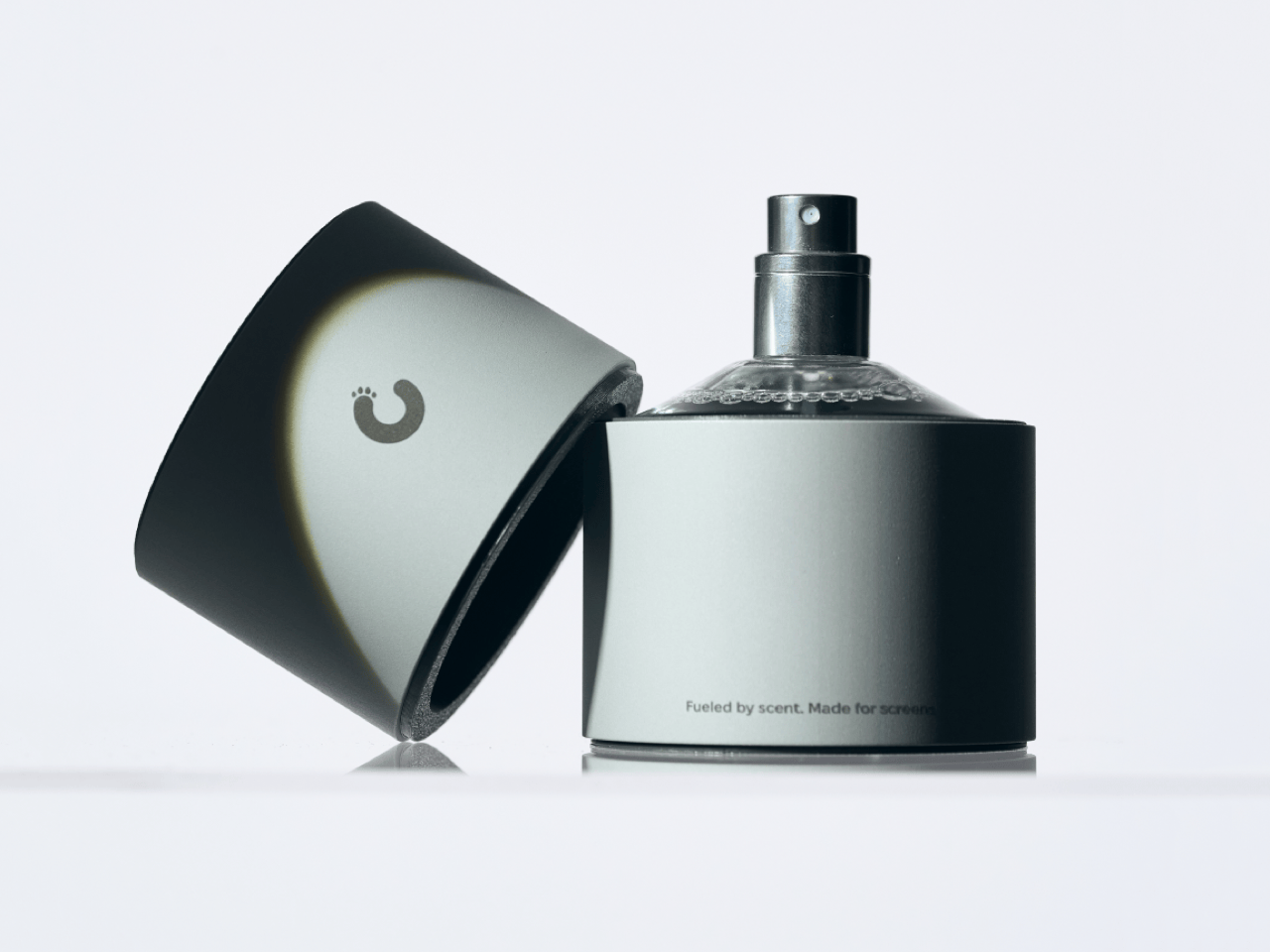
    Apple’s official answer to a smudgy MacBook screen is a $9 Polishing Cloth, which, to be fair, is ten bucks cheaper than the version everyone roasted in 2021. MacPaw has a more extravagant answer. The Ukrainian company behind CleanMyMac just revealed CleanMyMac Mist, its first physical product, a screen and keyboard cleaner dressed up as a bottle of designer fragrance. One spritz on a microfiber cloth is meant to lift the fingerprints and leave your laptop smelling like a frosty pine forest. Yo
     

CleanMyMac just made a Screen Cleaning Perfume for your MacBook that smells like a pine forest

12 octobre 2026 à 16:30

Apple’s official answer to a smudgy MacBook screen is a $9 Polishing Cloth, which, to be fair, is ten bucks cheaper than the version everyone roasted in 2021. MacPaw has a more extravagant answer. The Ukrainian company behind CleanMyMac just revealed CleanMyMac Mist, its first physical product, a screen and keyboard cleaner dressed up as a bottle of designer fragrance. One spritz on a microfiber cloth is meant to lift the fingerprints and leave your laptop smelling like a frosty pine forest. Your candles, your hand soap and your car already have signature scents, so honestly, the MacBook was overdue.

MacPaw calls the scent Frosted Juniper, picked because juniper grows both in Ukraine, where the company was founded, and in California, where the Mac was born. That’s a little sentimental, and I’m completely here for it. The notes run from camphor, ozone and citrus up top to fir needle, cedar leaf and green apple at the base, and the brief was to smell clean without smelling like a cleaning product. Pole, a design and small-batch production studio in Ivano-Frankivsk, made the glass atomizer, its metal case, and a pink box loud enough to see from across the office. Only 100 bottles exist, and they’re up for grabs via a CleanMyMac Instagram and TikTok giveaway until October 23, so don’t go hunting for a price tag.

Designers: MacPaw & Pole

Every design choice here borrows from the perfume counter instead of the cleaning aisle. A slim glass atomizer sits inside a cylindrical metal case, and its silver-and-gray finish would sit happily next to any MacBook. The box flips the mood entirely, with a hot pink tray holding the Mist, a microfiber cloth, a small brush and a scent card, which is basically a perfume blotter for your laptop. The whole package is designed to live on your desk in plain view, far away from the Windex under the kitchen sink. Le Labo pulled a similar trick with its hand-cast concrete diffuser, treating a fragrance gadget as decor first.

Apple’s own cleaning guide warns against aerosol sprays, so the Mist uses a pump atomizer, and you spritz the cloth instead of the screen. That small habit change tackles a real problem, since one in three US Mac owners in MacPaw’s survey admitted to damaging their machine while cleaning it. The product site names the usual culprits: glass cleaners that strip anti-reflective coatings, paper towels that leave micro-scratches, and the hoodie sleeve that only feels like it’s doing something. Apple Stores reportedly keep their display units spotless with WHOOSH!, so dedicated screen formulas are nothing new. MacPaw’s twist is making the formula something you’d happily smell on your fingertips afterward, though nano-texture displays should still stick to Apple’s dry cloth.

As a longtime CleanMyMac user, I find the whole thing delightfully on the nose. The app launched in 2008, has racked up 29 million downloads sweeping caches, logs and leftover app files out of Macs, and MacPaw says it cleans a million machines a day. For 18 years, “clean” was a metaphor for digital housekeeping, and now the metaphor has a nozzle and a note pyramid. MacPaw handed the physical side to Pole, a design and production center in Ivano-Frankivsk with metal, wood, ceramics and biolab workshops under one roof. Pole specializes in runs of 1 to 500 units and built elements for Ukraine’s pavilion at Expo 2025 in Osaka, so a 100-bottle drop sits right in its comfort zone.

The Mist isn’t for sale, and the only way to get a bottle is a giveaway on CleanMyMac’s Instagram and TikTok that closes at 11:59 PM EST on October 23. MacPaw will pick 10 winners on Instagram and 5 on TikTok, so the odds are slim, but every entrant still gets a 20% CleanMyMac coupon. The full scent breakdown and entry details live at cleanmymacmist.com. Millions of Mac owners already trust MacPaw with the inside of their machines, and I suspect plenty of them would buy a refill to keep the outside smelling like a snowy forest. Frosted Juniper makes a great first edition, though I’m already lobbying for a cozy sandalwood one by December.

The post CleanMyMac just made a Screen Cleaning Perfume for your MacBook that smells like a pine forest first appeared on Yanko Design.

  • ✇Korben
  • SAMDUO propose une batterie domestique ultra fine
    D'habitude, une batterie domestique, c'est un gros bloc qu'on planque à la cave ou au garage. SAMDUO prend le contre-pied avec sa gamme Nex, présentée cette semaine à Amsterdam, et veut en faire un objet qu'on assume de laisser à la vue de tous. Le modèle E6000 ressemble à un grand cadre fixé au mur, 11,9 cm d'épaisseur seulement, soit la plus fine du monde d'après la marque. Sa variante E6000H abandonne le mur pour un cube de la taille d'un micro-ondes, à glisser dans un coin. Même capacité. De
     

SAMDUO propose une batterie domestique ultra fine

20 juin 2026 à 05:47

D'habitude, une batterie domestique, c'est un gros bloc qu'on planque à la cave ou au garage. SAMDUO prend le contre-pied avec sa gamme Nex, présentée cette semaine à Amsterdam, et veut en faire un objet qu'on assume de laisser à la vue de tous.

Le modèle E6000 ressemble à un grand cadre fixé au mur, 11,9 cm d'épaisseur seulement, soit la plus fine du monde d'après la marque. Sa variante E6000H abandonne le mur pour un cube de la taille d'un micro-ondes, à glisser dans un coin. Même capacité. Deux façons de la ranger.

Derrière SAMDUO se cache un industriel chinois quasi inconnu il y a encore six mois, qui arrive en Europe avec de gros moyens. Les deux E6000 stockent 6 kWh et visent le tarif de 1999 euros, avec une sortie française au troisième trimestre.

Vient ensuite la question du branchement. Pas besoin de toucher à vos panneaux, la batterie se greffe sur le circuit électrique de la maison et récupère le surplus produit dans la journée. On appelle ça du couplage en courant alternatif, et le bon côté, c'est que ça fonctionne avec à peu près n'importe quelle installation déjà posée.

Côté France, le souci, c'est que la batterie doit savoir en temps réel ce que consomme la maison. SAMDUO a prévu un petit boîtier pour ça, mais il est pensé pour les compteurs néerlandais pour le moment. Chez nous, il faudra ajouter un module dans le tableau électrique.

Pour ceux qui partent de zéro, il y a aussi la P2800 Pro, plus petite avec ses 2,73 kWh extensibles jusqu'à 16,41 kWh, mais qui se relie directement aux panneaux par quatre entrées dédiées. Une approche plus classique, au tarif encore tenu secret.

On a pu jeter un oeil à l'application, et c'est propre. Elle affiche en direct ce qui entre et ce qui sort, jongle avec les heures creuses chez 800 fournisseurs européens dont EDF, mais l'API ouverte n'est pas encore prête.

Si tout le monde se précipite sur ces batteries, c'est que revendre son électricité est de moins en moins rentable, même en France. Les Pays-Bas, eux, où nous étions pour le lancement de la marque avec l'ami Korben, suppriment leur système de revente avantageux dès 2027.

En tous cas le pari du design est réussi. À 2000 euros pièce, par contre, il faudra quelques années avant de le rentabiliser.

❌