Vue normale

Il y a de nouveaux articles disponibles, cliquez pour rafraîchir la page.
À partir d’avant-hierTechs Design

This pocket-sized cyberdesk built inside Altoids Tin is a portable workstation for geeks

Par : Gaurav Sood
12 mai 2026 à 15:20

What do you do with your Altoids tins after devouring the mints? Maybe for keeping your coins, hand it over to your mom for storing the sewing accessories, for keeping handy a first aid, or perhaps keep the watercolor paint for your little niece. DIYer “Exercising Ingenuity,” however, has a very unique use for the aluminium container.

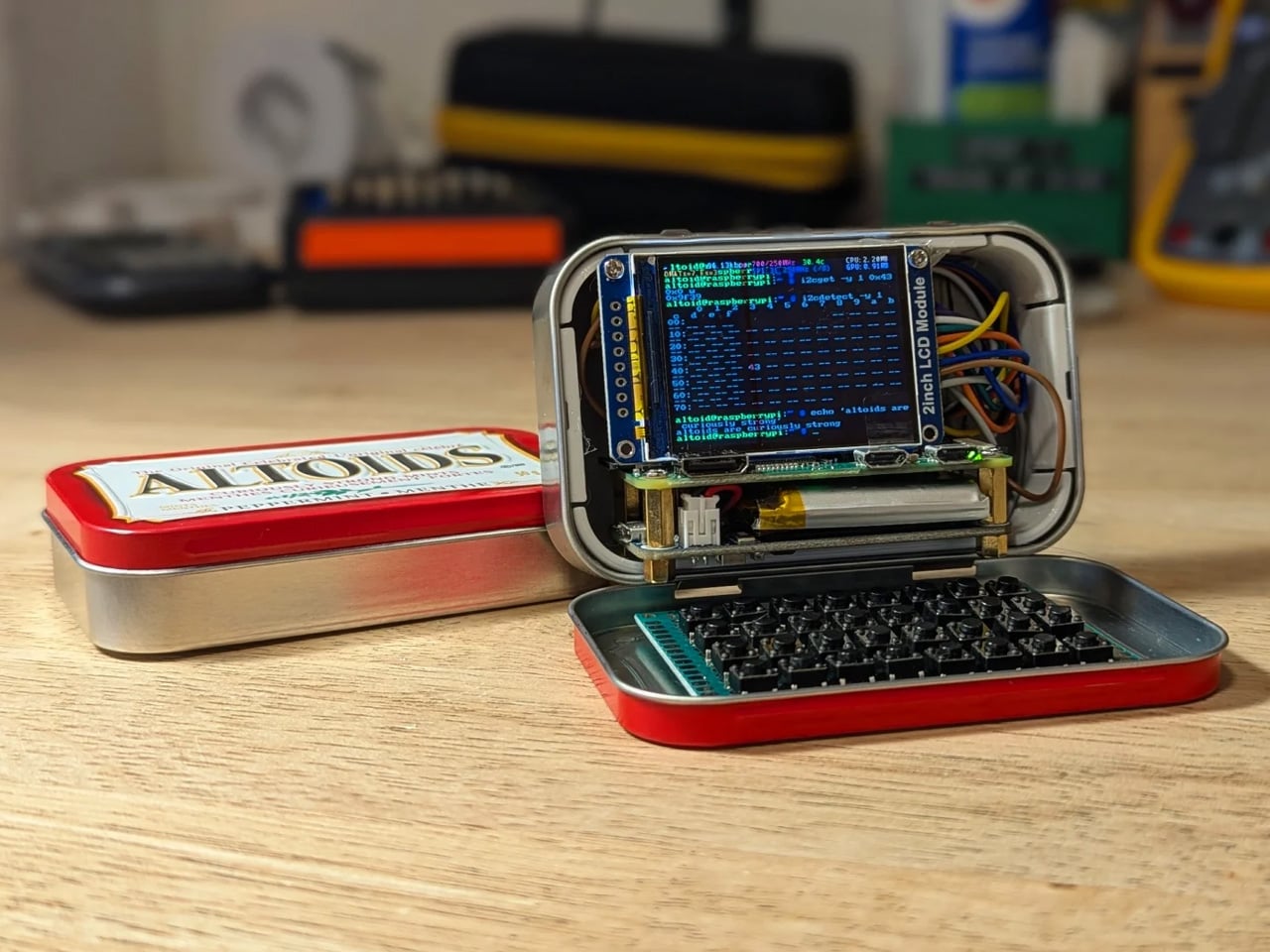
The inventive YouTuber wanted to build a fully functional Cyberdesk inside of the Altoids tin. Sounds bizarre? Surely it is, given the size of the thing. In his video, he asked himself, “That looks like a tiny computer?” It was clear from the outset that the assembly would require the utmost level of detail and sourcing all the hardware inside the tiny housing. While it might not be the most powerful machine you can own, it surely is ultra-portable and quite nice nonetheless.

Designer: Exercising Ingenuity

Normally, Cyberdesks are built inside ammo cans, rugged Pelican cases, or anything that has a boxy form factor. The machines piqued in popularity during the 1980s after the science fiction novel Neuromancer. Altoid tins have all these attributes, just the smaller size makes them a very odd proposition in the Cyberdesk world. That said, he set out anyway on putting together the hardware. For the CPU, he used the Raspberry Pi Zero W he had lying around, and a 2-inch LCD from another unfinished project. The power comes from a 750mAh lithium-ion polymer battery.

The real challenge was to find the tiny mechanical keyboard and fit it inside the small space. According to him, this was the most enjoyable part of the project, even though the video suggests it was a difficult one. It required learning how to construct the diode matrix for configuring the input, along with the assembling and soldering methodology of each of the keys. The final step here involved painting the keys with a white ink pen. Once this bit was taken care of, the DIY headed into the moderate level difficulty (at least for us). The next step was to create a 3D-printed frame to keep all the components inside the tin in place.

Wiring had to be kept to a minimum, and soldering of other components had to be done efficiently, as space was a premium. As a last step to make more room for components like the UPS HAT board and the display, the original hinge was extended with another Altoids tin hinge for a makeshift, slightly bigger replacement. Once all the hardware components were secured properly inside the tin, it was just a matter of running the system using the software. To make the thing look and feel like a vintage desktop computer, the DIYer painted the front panel beige.

The post This pocket-sized cyberdesk built inside Altoids Tin is a portable workstation for geeks first appeared on Yanko Design.
This classic 1979 LEGO computer brick hides a fully functional Mac mini workstation inside

Par : Gaurav Sood
18 mars 2026 à 19:15

Retro designs often carry a sense of nostalgia, but occasionally they evolve into something more functional and imaginative. The M2x2 workstation by Watt IV is a good example with the inventive reinterpretation of a classic LEGO element transformed into a fully working desktop computer. Created by Dutch designer Paul Staal, the device takes inspiration from the iconic sloped LEGO computer brick introduced in 1979 and scales it up into a practical workstation powered by a modern Mac mini.

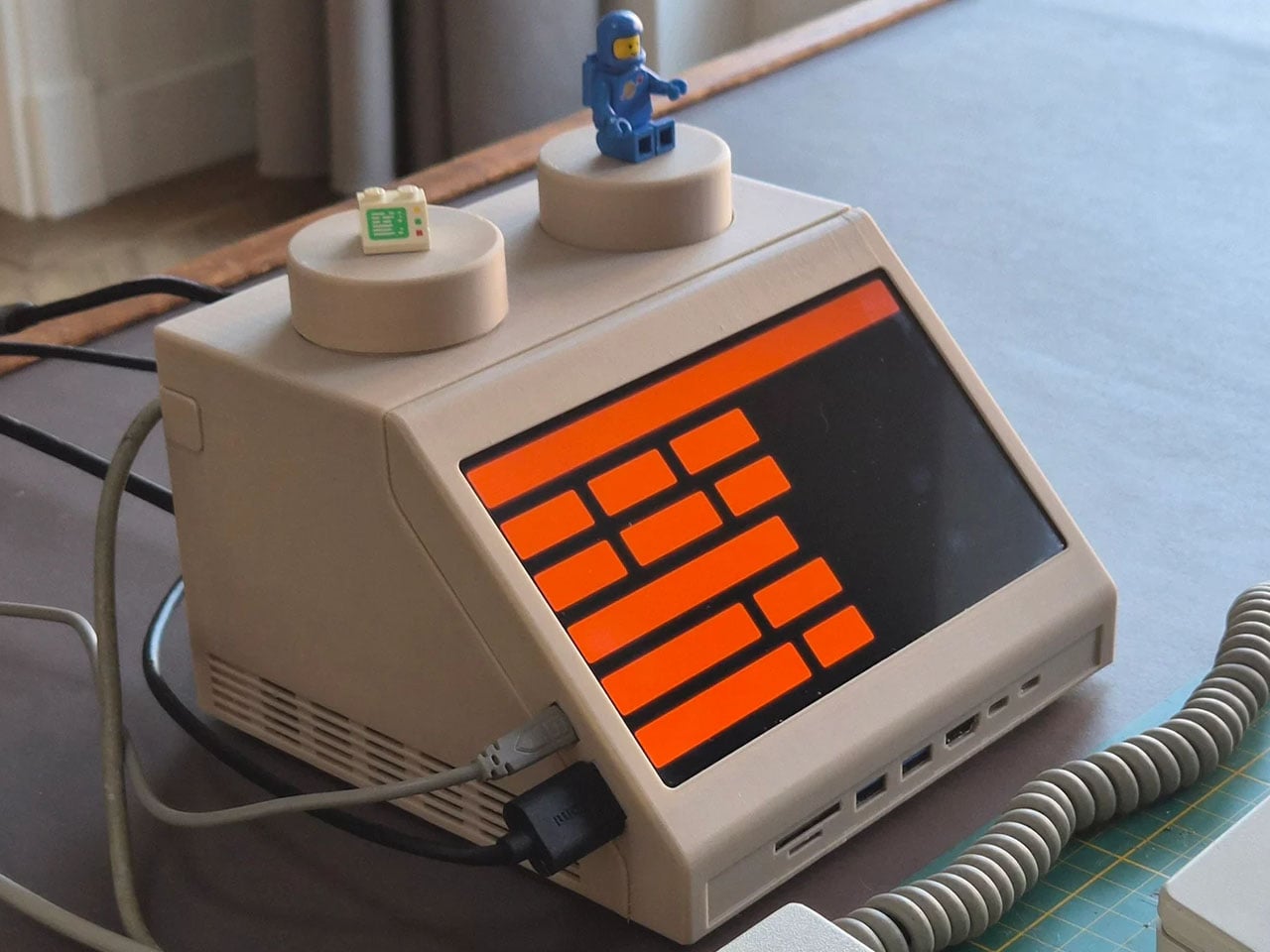
The DIY centers around the familiar wedge-shaped Slope 45 2×2 LEGO piece, a part historically used in LEGO space-themed sets as a representation of computer terminals inside spacecraft cockpits. Staal enlarged this element to roughly ten times its original size, turning it into a functional housing that blends retro toy aesthetics with contemporary computing power. Inside the oversized brick sits an Apple Mac mini equipped with Apple’s M4 chip, transforming the playful concept into a capable desktop system.

Designer: Paul Staal

Rather than serving as a simple decorative shell, the M2x2 integrates several practical features that enhance its usability as a workstation. A slanted 7-inch IPS touchscreen is embedded in the front face of the structure, echoing the display graphic printed on the original LEGO piece while providing real functionality. The compact screen acts as a secondary interface, often used for quick system information or dashboards. Staal, for instance, uses it primarily to monitor and control his smart home through a Home Assistant interface while working on a larger external display.

The case includes front-facing ports enabled through a USB-C hub, along with an SD card reader for easy access to external storage and accessories. This arrangement ensures the device remains practical for everyday use despite its playful form factor. The system also retains portability elements inspired by early Apple computers, including a built-in handle at the back that makes the unit easy to move around a desk or workspace. While the M2x2 works as a self-contained computer, it is typically paired with a larger external monitor for full productivity. In everyday use, the Mac mini handles the heavy computing tasks while the built-in display functions as a control panel or status screen.

Perhaps the most creative detail lies in the oversized LEGO studs on top of the case. Instead of being purely decorative, these studs are designed to perform useful functions. One of them operates as a rotary control that can adjust volume or media playback, while the other conceals a wireless charging bay capable of powering devices such as AirPods or an Apple Watch. The studs themselves remain compatible with standard LEGO elements, allowing users to attach minifigures or bricks for a playful finishing touch.

The M2x2 is largely built from 3D-printed components, making it accessible to enthusiasts who want to build their own version. Staal modeled the structure in CAD software and designed it as a modular system consisting of multiple printable parts. Aside from the Mac mini itself, the required materials are relatively simple, including PLA filament, a small touchscreen display, screws, and a USB-C hub. Assembly instructions and downloadable files are available, allowing makers to replicate or modify the design to suit their needs.

The post This classic 1979 LEGO computer brick hides a fully functional Mac mini workstation inside first appeared on Yanko Design.

This Foldable DIY Cyberdeck Has Breadboards Built In and Runs Doom

Par : JC Torres
13 mars 2026 à 13:20

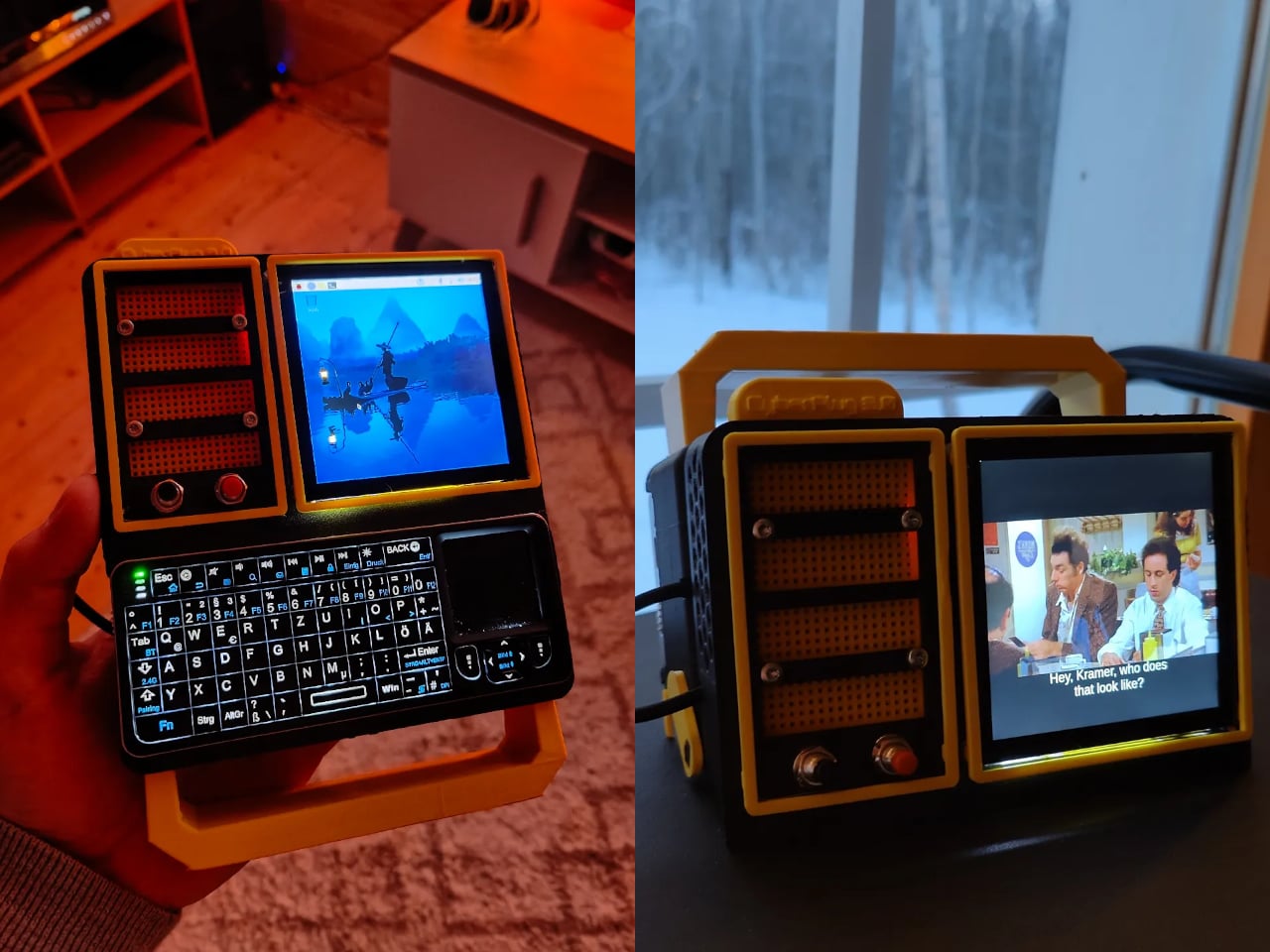
Most portable computers are sealed boxes, which is exactly what makes them frustrating for anyone who wants to experiment with electronics. You can run code on a laptop, but try wiring a temperature sensor or an infrared transmitter directly to it, and you’ll realize that consumer hardware was never designed for that kind of access. A maker who goes by PickentCode got tired of that gap and built something to close it.

The CyberPlug 3.0 is the third iteration of a personal cyberdeck project, the earlier two having usability problems that sent PickentCode back to Blender to redesign. The final build packs a Raspberry Pi 4 Model B, a 4-inch IPS touchscreen, a Rii K06 mini keyboard with a built-in touchpad, and a 5,000 mAh USB-C power bank into a 3D-printed hinged body that folds flat for handheld use or props open at a desk-friendly angle.

Designer: PickentCode

What separates this from a standard Raspberry Pi build is the pair of breadboards soldered directly to the GPIO pins, seated inside the case, and accessible through a removable back panel. Connecting a sensor no longer means hunting for a separate breadboard and a tangle of jumper wires. PickentCode plugged in a temperature and humidity sensor and had it reading live data within minutes, then built an infrared setup that records remote control signals and replays them as single-button macros.

The two form factors each have a distinct locking mechanism rather than just flopping into position. In handheld mode, twin magnets pull the two halves together. In desktop mode, a metal ring on the back grabs the MagSafe-style power bank magnetically, holding the whole thing at a stable upright angle. Both the keyboard and the power bank slide out independently, and the deck keeps working on a desk without either of them.

Extensions are where the project gets more interesting. PickentCode added a PWM-controlled external fan that reads CPU temperature and adjusts speed automatically, and a small speaker module that opened the door to YouTube and older games. Doom, Half-Life, and GTA: Vice City all ran on it, better with an external setup in desktop mode, though workable in handheld after some button remapping.

PickentCode frames this plainly as a testbed for learning electronics, not a replacement for a phone or a real computer. The 3D files are free on Printables, so the main cost is filament, time, and the components. For anyone who has ever stared at a sealed laptop wishing they could just plug something into it, that framing is probably the most relatable thing about it.

The post This Foldable DIY Cyberdeck Has Breadboards Built In and Runs Doom first appeared on Yanko Design.

A Maker Just Built A Polaroid Camera for 100x Cheaper Using Thermal Receipt Paper

Par : Ida Torres
10 mars 2026 à 22:30

Remember when instant cameras were magic? You pressed a button, a mechanical whir filled the air, and moments later you were shaking a photo like it owed you money. Polaroid made photography feel like alchemy, turning light into physical memory right in your hands.

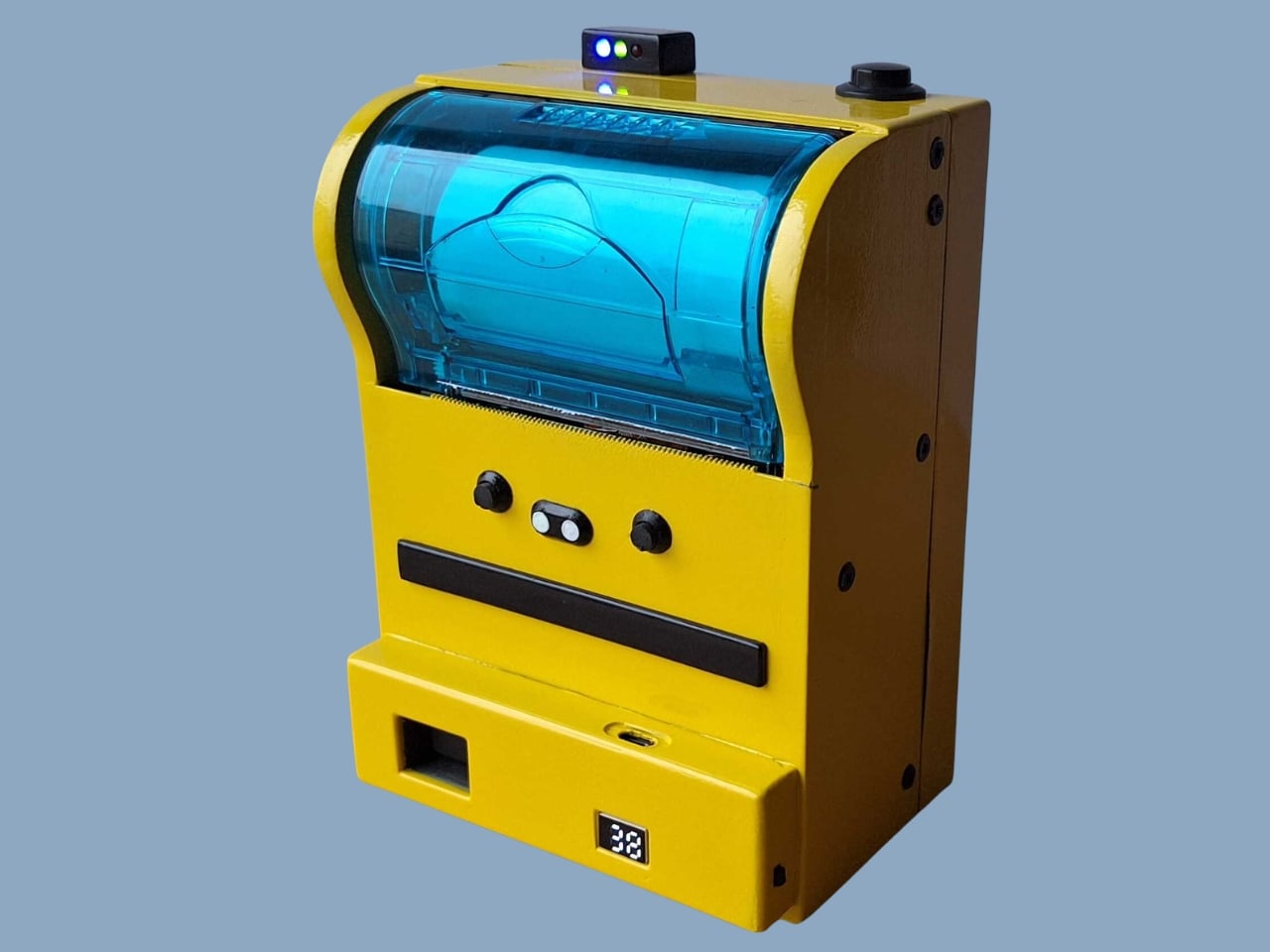
The Poor Man’s Polaroid by Boxart brings that instant gratification back using a thermal printer (the same kind that spits out your CVS receipts) and costs less than a cent per print compared to roughly a euro for each Polaroid picture. The name is a bit tongue-in-cheek since the parts actually cost more than the cheapest Polaroid cameras, but the creator clarifies it’s a “fun DIY project, possibly made by poor hands”.

Designer: Boxart

The whole setup is beautifully straightforward. A Raspberry Pi Zero and camera drive a receipt printer, all housed in a 3D-printed case with the guts of a power bank providing juice. Press the button, wait a beat, and out slides your photo on thermal paper. No film cartridges to buy, no wondering if you loaded it correctly, no accidentally exposing your entire pack to light.

Does the image quality match a real Polaroid? Not even close. The photos aren’t the same quality as self-developing film, but they have some charm to them. You get a not-very-good grayscale image on curly paper. But that’s kind of the point. The beauty of instant photography was never really about pristine resolution. It was about immediacy, about physicality, about having something tangible to pin on your wall or slip into someone’s hand.

This project lives in that sweet spot between nostalgia and practicality. Thermal paper might fade over time and the images might look like they came from a 1990s fax machine, but you can shoot hundreds of photos without bankrupting yourself. The economics are almost absurd when you compare it to authentic instant film, which has climbed to luxury pricing in recent years.

I love that this exists because it reminds us that the tools we carry don’t always need to be the most advanced or expensive. Sometimes the joy is in the making itself, in cobbling together a Raspberry Pi, a webcam, and a thermal printer to recreate something that used to cost hundreds of dollars and came from a factory. It’s technology as craft project, gadgetry as personal expression.

The curling thermal paper and grainy output might not win photography awards, but they capture something else: the spirit of experimentation that made instant cameras revolutionary in the first place. Edwin Land didn’t perfect the Polaroid overnight. He iterated, tinkered, and eventually changed how we thought about photography. Boxart’s version might use Python code instead of complex chemistry, but the impulse is the same.

What makes this project particularly appealing is its accessibility. The parts are 3D printed and the code is in Python, meaning anyone with basic maker skills can attempt it. You’re not locked into a proprietary ecosystem or dependent on a company that might discontinue your film stock. You own the entire chain of production, from capture to print.

Sure, you could buy cheap instant print cameras from import sites for less money. But where’s the story in that? Where’s the satisfaction of building something yourself, of understanding exactly how it works, of being able to modify and improve it over time? This isn’t just a camera. It’s a statement about what technology can be when we strip away the branding and the markup and the planned obsolescence.

The Poor Man’s Polaroid won’t replace your smartphone camera or even a proper instant camera if image quality is your priority. But it offers something more valuable: proof that with a little ingenuity and some off-the-shelf components, you can recreate the magic of instant photography on your own terms. And sometimes that curly thermal paper printout means more precisely because you built the machine that made it.

The post A Maker Just Built A Polaroid Camera for 100x Cheaper Using Thermal Receipt Paper first appeared on Yanko Design.

This Does Not Compute Turns Tiny Mac Clock Into Working Raspberry Pi Macintosh

Par : Gaurav Sood
18 février 2026 à 16:20

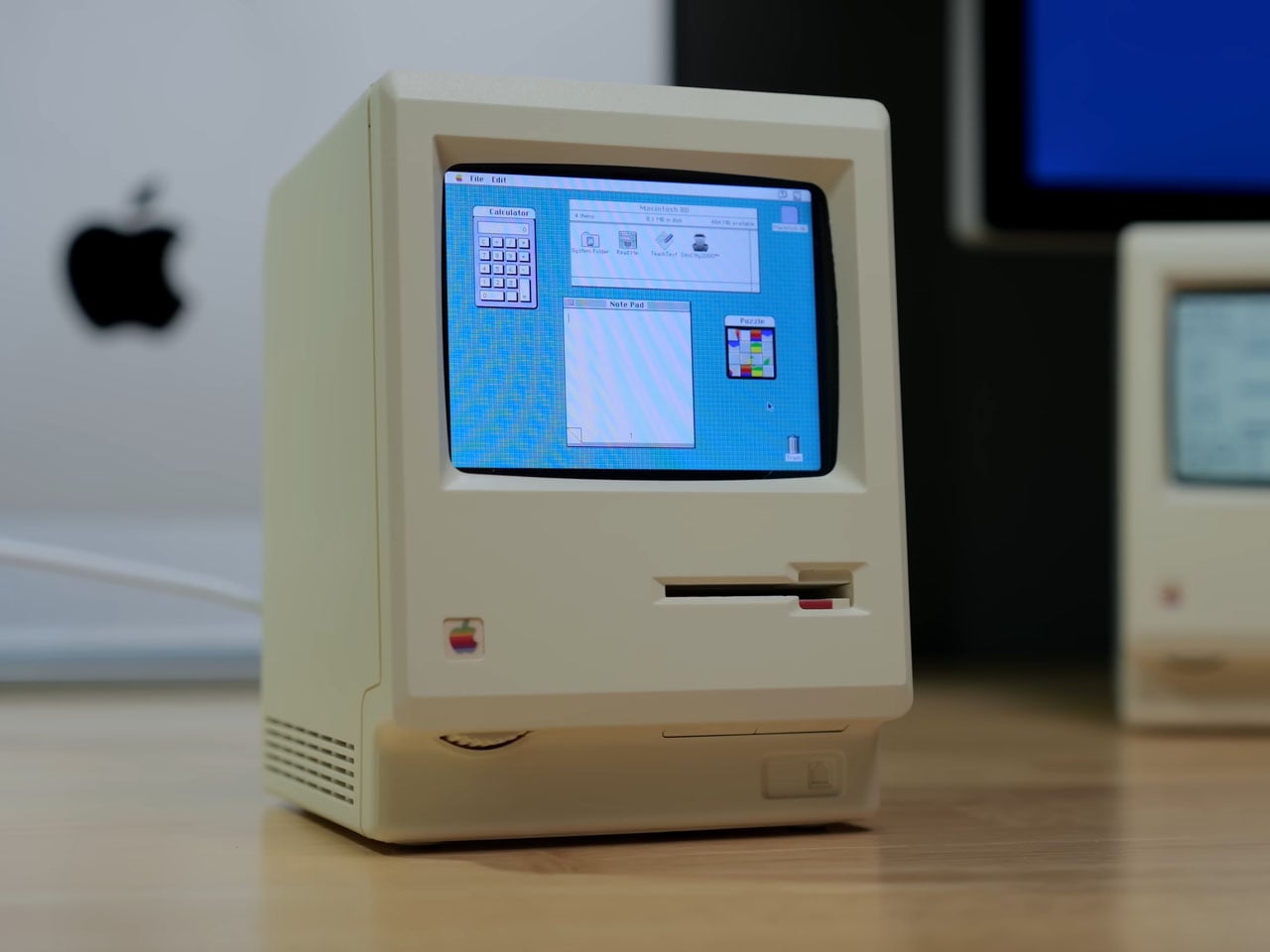
If you appreciate retro computing and DIY electronics, a new project from This Does Not Compute (YouTube channel) will be the best thing you will see today. The build emulates the 1984 Apple Macintosh, but in a miniaturized version. Not the smallest, but decently small to sit in the corner of your desk and do more than its intended function of a clock.

If that sounds puzzling, here’s a clearer explanation. The modder has actually taken a Maclock, which is a clock that looks identical to the original Mac, but of course considerably smaller, and ripped it open. He replaced the original alarm clock mechanics with a Raspberry Pi, turning it into a homage to the classic Apple computer.

Designer: This Does Not Compute

The project, as the modder himself states, “is just for fun” and doesn’t really reach out to prove anything other than love to toil with anything Mac. With the innards of the clock replaced by Raspberry Pi Zero 2 W, the original display of the clock is also swapped with a 640×480 2.8-in color screen from Wave Share, and the project is interestingly called Wondermac. The name is in reference to Wonder Boy, the Chinese company that makes Maclock.

The modder, as you can see in detail in the video above, starts by cracking open the Maclock case, which has screws, but they are only used to mimic the Macintosh and have no significant usage. Opening the case was “probably the hardest part of the whole project,” he says. The case is clipped together pretty tightly, but he was able to separate the front bezel from the back using a wide metal pry tool. Once the front panel was free, he unplugged the wiring harness and pulled out the main circuit board and the screen to clear up the space inside the Maclock body, which will now have new guts and a new purpose.

“Compact, low power, and relatively inexpensive,” Raspberry Pi Zero 2 W was a clear choice for the Mac’s innards, the modder affirms. It comes with a pin header presoldered and includes a heatsink, which would be a nifty addition to keep this tiny computer cool when it does some computing. The Pi is now connected to the externally purchased screen, and the modder gets down to launching the Raspberry Pi imager app and installing Minivvac on an SD card for the software side of the project.

For powering the Wondermac, the modder doesn’t rely on the Maclock’s built-in battery; instead, they take advantage of the USB-C port on the back housing for power. After some tweaking to power output, some wire soldering, and sticking, he was able to get the power going as required to run the screen. Finally, he designed a 3D printed bracket with black filament to fit the screen in place, and then everything was assembled back into shape. Content with the outcome, he leaves the little Mac on the desk with the Afterdark screen saver.

The post This Does Not Compute Turns Tiny Mac Clock Into Working Raspberry Pi Macintosh first appeared on Yanko Design.

❌
❌