❌

Vue normale

OpenAI Launches Virtual Try-On for Clothes and Accessories in ChatGPT

2 octobre 2026 à 12:14

ChatGPT adds virtual clothing try-ons and product Favorites. Learn how the tools work, what the previews cannot confirm, and how to manage photo privacy.

The post OpenAI Launches Virtual Try-On for Clothes and Accessories in ChatGPT appeared first on TechRepublic.

Amazon’s New Kindle Lineup Compared: Kindle vs Paperwhite vs Colorsoft

2 octobre 2026 à 12:00

Amazon’s 2026 Kindle refresh brings new Kindle, Paperwhite, and Colorsoft models with different prices, displays, battery life, and features.

The post Amazon’s New Kindle Lineup Compared: Kindle vs Paperwhite vs Colorsoft appeared first on TechRepublic.

  • ✇Yanko Design
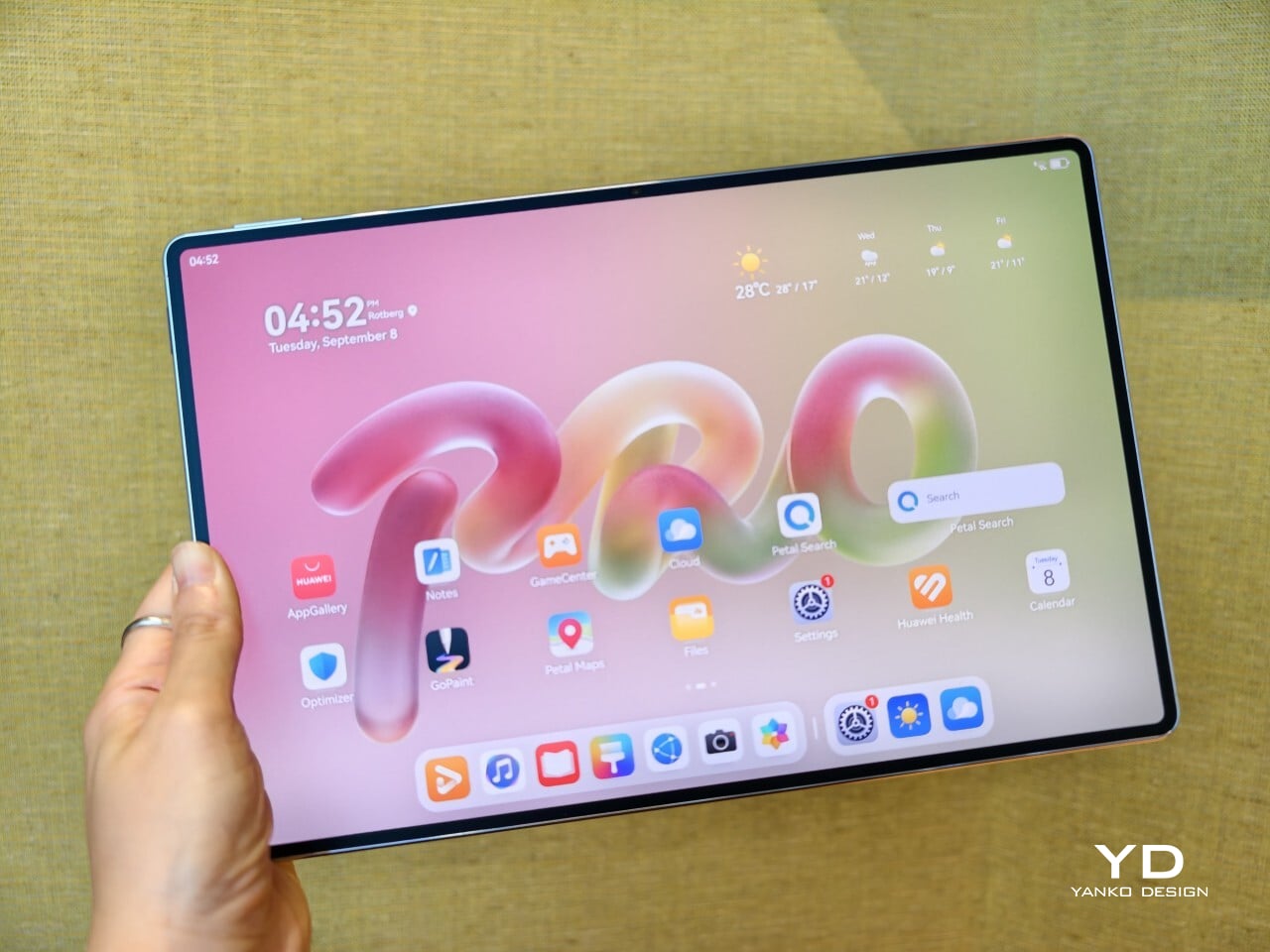
  • Huawei MatePad Pro 12” Review: Stunning Hardware, One Familiar Caveat
    PROS: Gorgeous PaperMatte display Very thin and light formfactor Big battery Good speaker CONS: No built-in Google Play Store Long-term software support remains unclear RATINGS: AESTHETICSERGONOMICSPERFORMANCESUSTAINABILITY / REPAIRABILITYVALUE FOR MONEYEDITOR'S QUOTE:The MatePad Pro 12" is stylish, light, and lovely to use, with a PaperMatte display that does a lot of the heavy lifting. Huawei’s tablet lineup is not doing itself many favors right now. The names suggest one
     

Huawei MatePad Pro 12” Review: Stunning Hardware, One Familiar Caveat

Par : Aki Ukita
2 octobre 2026 à 11:20

PROS:


  • Gorgeous PaperMatte display

  • Very thin and light formfactor

  • Big battery

  • Good speaker

CONS:


  • No built-in Google Play Store

  • Long-term software support remains unclear

RATINGS:

AESTHETICS
ERGONOMICS
PERFORMANCE
SUSTAINABILITY / REPAIRABILITY
VALUE FOR MONEY

EDITOR'S QUOTE:

The MatePad Pro 12" is stylish, light, and lovely to use, with a PaperMatte display that does a lot of the heavy lifting.

Huawei’s tablet lineup is not doing itself many favors right now. The names suggest one thing, the products suggest another, and if you are just a normal person trying to work out which model is which, the whole range can feel oddly muddled. The MatePad Air sounds like it should be the lighter, breezier option, yet the MatePad Pro 12″ is actually the one that feels lighter and more effortless in the hand.

The MatePad Pro Max, by contrast, is much easier to understand. It is the big brother in the family, and it looks the part too, with a very similar design language to the MatePad Pro 12″. That makes this tablet feel like the middle child in Huawei’s lineup, not in a bad way, but in the sense that it sits between the easy-to-place Max and the more confusingly named Air.

Designer: Huawei

The good news is that the product itself is much easier to understand than the naming. The MatePad Pro 12″ is a slim, striking tablet that clearly wants to be useful as well as beautiful. It aims to cover work, entertainment, note-taking, and creative play in one polished package, and for the most part, it succeeds by being pleasant to use rather than merely impressive on paper.

Aesthetics

The MatePad Pro 12″ looks a lot like a smaller MatePad Pro Max, which is no bad thing. The two share the same slim, polished design language, and that gives the Pro 12″ an immediately premium feel. If anything, this size makes the look more approachable. It still has that high-end flagship polish, just in a form that feels a little less dramatic and easier to live with.

Both tablets come in Blue and Space Gray, and the Blue version I received is especially attractive. It has a soft shimmer finish that catches the light nicely without tipping into anything too flashy or fussy. There is also a nice contrast between the shimmer back panel and the glossy side frame, while the slightly rounded edges keep the tablet from feeling too sharp or severe. Together with the circular camera bump, these details give the design a bit more warmth and character without taking away from its clean, premium feel.

Ergonomics

For a 12-inch tablet, the MatePad Pro 12″ is impressively easy to handle. It measures about 10.4 x 6.8 inches (264.2 x 172.9 mm) and is just 0.19 inches thick (4.7 mm), but at 454g, or about 1 pound, it feels lighter in the hand than its size suggests. That makes a real difference in daily use. It is easy enough to hold one-handed for short stretches, and it never feels as cumbersome as some larger tablets do.

Just as importantly, it does not feel flimsy. Despite how thin and light it is, the MatePad Pro 12″ still feels solid and premium in the hand. That balance matters, because a tablet this slim could easily have tipped into feeling delicate. Instead, it feels refined without feeling fragile.

I also received the optional Huawei Glide Keyboard, which weighs 399g, or about 14.1 ounces, and turns the tablet into something much closer to a compact laptop. The typing experience is good, and one detail I especially appreciated is the way the keyboard neatly nests the stylus. It gives the pen a proper place to sit, which means there is less chance of it going missing while you are carrying the tablet around. Small touches like that make the whole setup feel more thought through.

That said, the keyboard is not perfect. The touchpad is a little too easy to trigger, and I often found myself accidentally brushing it while typing, so I ended up turning off Tap to Click. There is also only one viewing angle, which limits flexibility a bit, and the keyboard is not backlit. None of these issues are deal-breakers on their own, but together they make the accessory feel a little less polished than the tablet itself.

Performance

The display of the MatePad Pro 12″ is the obvious star. Huawei’s PaperMatte screens remain one of the company’s best ideas, and that is true here as well. The 12-inch OLED panel looks sharp, bright, and vibrant, while the slim 3.5mm bezels help give it a more immersive feel. Huawei has also embedded the front camera neatly into that thin border, which keeps the front looking clean and uninterrupted rather than broken up by a notch or thicker framing.

What really makes the screen stand out, though, is the PaperMatte finish. Huawei’s PaperMatte displays have impressed me before, and this one is no exception. The matte treatment cuts down on glare without making the panel look flat or dull, which is not always easy to pull off. Huawei says anti-reflection performance is 30 percent better than the previous generation, and that feels believable in everyday use. Even in bright environments, the screen comes remarkably close to reflection-free, and with up to 1600 nits of peak brightness, it stays comfortable for reading, browsing, and longer work sessions without constantly fighting the light.

The speakers are another pleasant surprise. The MatePad Pro 12″ uses a four-speaker setup, and for something this thin and light, it gets plenty loud and has more bass presence than you might expect, which gives music, dialogue, and video a bit more body than a device this slim really ought to manage. It never quite feels like the sound is coming from such a small and thin tablet. The audio can get a little sharp at times, especially at higher volume, but for casual listening and streaming, it still does a very good job.

Battery life has been solid in my use. The MatePad Pro 12″ packs a 10,400mAh battery, and in a fairly normal day of writing, emails, keeping up with my team on Slack, web browsing, and YouTube, it got through to the end of the day without me worrying too much about battery. Huawei rates it for up to 14.7 hours of local video playback, and there is also 40W reverse charging if you need to top up another device.

Software is where the MatePad Pro 12″ becomes a more conditional recommendation. The tablet runs Harmony OS 4.3 out of the box, and there is no built-in support for the Google Play Store or Google Mobile Services here, and while there are workarounds, there is no guarantee every app you rely on will work exactly as expected. That is the main thing potential buyers need to understand going in. The hardware is easy to appreciate straight away. The software side asks for a bit more patience and flexibility.

Huawei’s AppGallery does offer options like GBox, which can help you access apps that depend on Google services, but the experience is not always seamless. In my testing, GBox did not support split-screen, which felt limiting on a tablet that is otherwise clearly built for multitasking. I had better luck with apps downloaded through Aurora, which did work in split-screen, but that still leaves you deciding how comfortable you are relying on third-party app sources. For some people, that will be a manageable compromise. For others, it will be reason enough to hesitate.

On the plus side, Huawei’s own built-in apps for productivity and creativity are genuinely quite capable. GoPaint, in particular, feels feature-rich, with a wide variety of brushes and granular control over how they behave. There are also more ambitious tools like animation, which appears to build movement from your layers, and a timelapse feature that lets you replay a drawing from start to finish. Even if not everyone will use those tools seriously, they help the app feel more than just a token extra.

The Notes app is also packed with features, including AI handwriting-to-text. In my case, the results were not always perfectly accurate, but that may say as much about my handwriting as it does about the software. Either way, it is another example of Huawei putting real effort into its own app ecosystem. So while the lack of built-in Google support remains the bigger issue, the tablet’s first-party software is stronger than you might expect.

Sustainability

Sustainability is not the strongest part of Huawei’s pitch here, at least not from the information currently available. There is plenty of talk about thinness, portability, and productivity, but much less about things like recycled materials, repairability, or broader environmental commitments. More notably, Huawei has not made any official statement about how long the MatePad Pro 12″ will receive software support, which makes it harder to judge the tablet’s long-term value from a sustainability point of view.

What Huawei does emphasize is durability. The company says the MatePad Pro 12″ offers 50 percent better bend resistance than the previous generation, which is a meaningful improvement for a device this thin. A tablet that is less likely to flex or fail in everyday use is at least more likely to stay in service longer. That is not the same thing as a full sustainability strategy, but it still counts for something.

Value

Value is where the MatePad Pro 12″ becomes more complicated. Pricing starts at €1,199, or about $1,330, for the 12GB and 256GB model with a folio cover, rises to €1,299, or roughly $1,440, with the Glide Keyboard, and reaches €1,449, or around $1,610, for the 12GB and 512GB version with the keyboard. For context, Apple’s 11-inch iPad Pro with 256GB of storage starts at $1,199 in the U.S., so Huawei is clearly pricing this in direct flagship territory.

Judged purely on hardware, the MatePad Pro 12″ feels convincingly premium. It is slim, light, beautifully made, and fitted with an excellent display. The problem is that the software caveats do not disappear just because the hardware is this polished. The lack of built-in support for the Google Play Store or Google Mobile Services still makes this a more selective recommendation than the price might suggest. If you are already comfortable with Huawei’s ecosystem, the value makes more sense. If not, the asking price may feel harder to justify.

Verdict

The Huawei MatePad Pro 12″ makes its strongest case through hardware. It is slim, light, beautifully made, and fitted with a PaperMatte display that remains one of Huawei’s real strengths. The speakers are better than you might expect from something this thin, battery life has been solid in my use, and the overall experience feels properly premium. It is the kind of tablet that makes a strong first impression and, for the most part, keeps earning it.

What stops it from being an easy recommendation is software. There is no built-in support for the Google Play Store or Google Mobile Services, and while workarounds exist, they are still workarounds. For buyers already comfortable with Huawei’s ecosystem, that may be manageable. For everyone else, it adds friction to a tablet that is otherwise polished and appealing. The MatePad Pro 12″ is a very good piece of hardware, but it is not the most straightforward premium tablet to buy.

The post Huawei MatePad Pro 12” Review: Stunning Hardware, One Familiar Caveat first appeared on Yanko Design.

  • ✇Yanko Design
  • Mobvoi TicNote smartwatch has one button, and it’s built to remember what you often forget
    I know you will relate to one of these telltale moments. A meeting ends, someone gives you three useful details, and by the time you reach your desk, only one remains. The same thing happens after an interview, a doctor’s appointment, a lecture, or when someone rattles off directions while you’re already trying to keep up. We like to think we remember conversations better than we actually do. Mobvoi’s TicNote Watch is designed to cover that very human failure. Instead of asking you to open an a
     

Mobvoi TicNote smartwatch has one button, and it’s built to remember what you often forget

2 octobre 2026 à 09:20

I know you will relate to one of these telltale moments. A meeting ends, someone gives you three useful details, and by the time you reach your desk, only one remains. The same thing happens after an interview, a doctor’s appointment, a lecture, or when someone rattles off directions while you’re already trying to keep up. We like to think we remember conversations better than we actually do.

Mobvoi’s TicNote Watch is designed to cover that very human failure. Instead of asking you to open an app, find a recorder, or reach for your phone, it gives the watch a dedicated physical recording button. Press and hold it to start recording. The recording can happen without a phone and even works offline. To me, the idea seems pretty interesting for capturing my team’s briefing.

Designer: Mobvoi

Mobvoi TicNote does the heavy lifting for you


Most smartwatches are defined by everything they can do. Notifications, workouts, calls, apps, payments, music, health tracking – the list keeps getting longer. TicNote Watch is different though, as its most important interaction is deliberately narrow. Just press a button and remember what just happened. That makes the hardware control more interesting than it might initially seem. There is something satisfying about a product that behaves more like a lighter, a film camera’s shutter, or a staple gun than another miniature touchscreen computer. The action is physical and doesn’t require you to navigate an interface while somebody is still talking.

In a world where dedicated controls have increasingly disappeared behind glass, putting one back on the wrist becomes a design statement. This smartwatch isn’t trying to make every interaction smarter; rather, it aims to make one interaction nearly impossible to mess up. The double-press gesture adds a smaller version of the same idea, letting users capture a quick thought of up to 60 seconds.

Simple input, surprisingly busy output

What happens after the button press is where the AI kicks in. TicNote Watch can transcribe conversations on the wrist, with live text supporting 17 languages, and users can tap to highlight important statements while a conversation is happening. Once the recording ends, the system can generate an AI summary and mind map. The intended audience for the wearable can be a journalist leaving an interview, a recruiter moving between candidates, a consultant bouncing between meetings, or a graduate student sitting through a campus lecture. For someone spending much of the day listening rather than typing, removing the act of note-taking can be genuinely useful.

There is, however, an obvious social wrinkle. A recorder that lives on your wrist is easy to reach for, but that doesn’t mean everyone around you will be comfortable being recorded. Consent and workplace etiquette matter, particularly in meetings or shared spaces. Mobvoi also claims more than 24 hours of continuous recording and up to 200 hours of local storage, so this isn’t unlimited memory in literal terms. At $249, with a limited-time introductory price of $199, TicNote Watch isn’t really competing on how many smartwatch features it can squeeze onto your wrist. It is built around a premise that doesn’t try to replace your phone, your notebook, and your entire day.


The post Mobvoi TicNote smartwatch has one button, and it’s built to remember what you often forget first appeared on Yanko Design.

Claude for Government Adds Spending Controls, Audit Logs, and FedRAMP High

2 octobre 2026 à 08:23

Anthropic has made Claude for Government generally available with FedRAMP High authorization, spending controls, audit logs and early Microsoft 365 access.

The post Claude for Government Adds Spending Controls, Audit Logs, and FedRAMP High appeared first on TechRepublic.

  • ✇Yanko Design
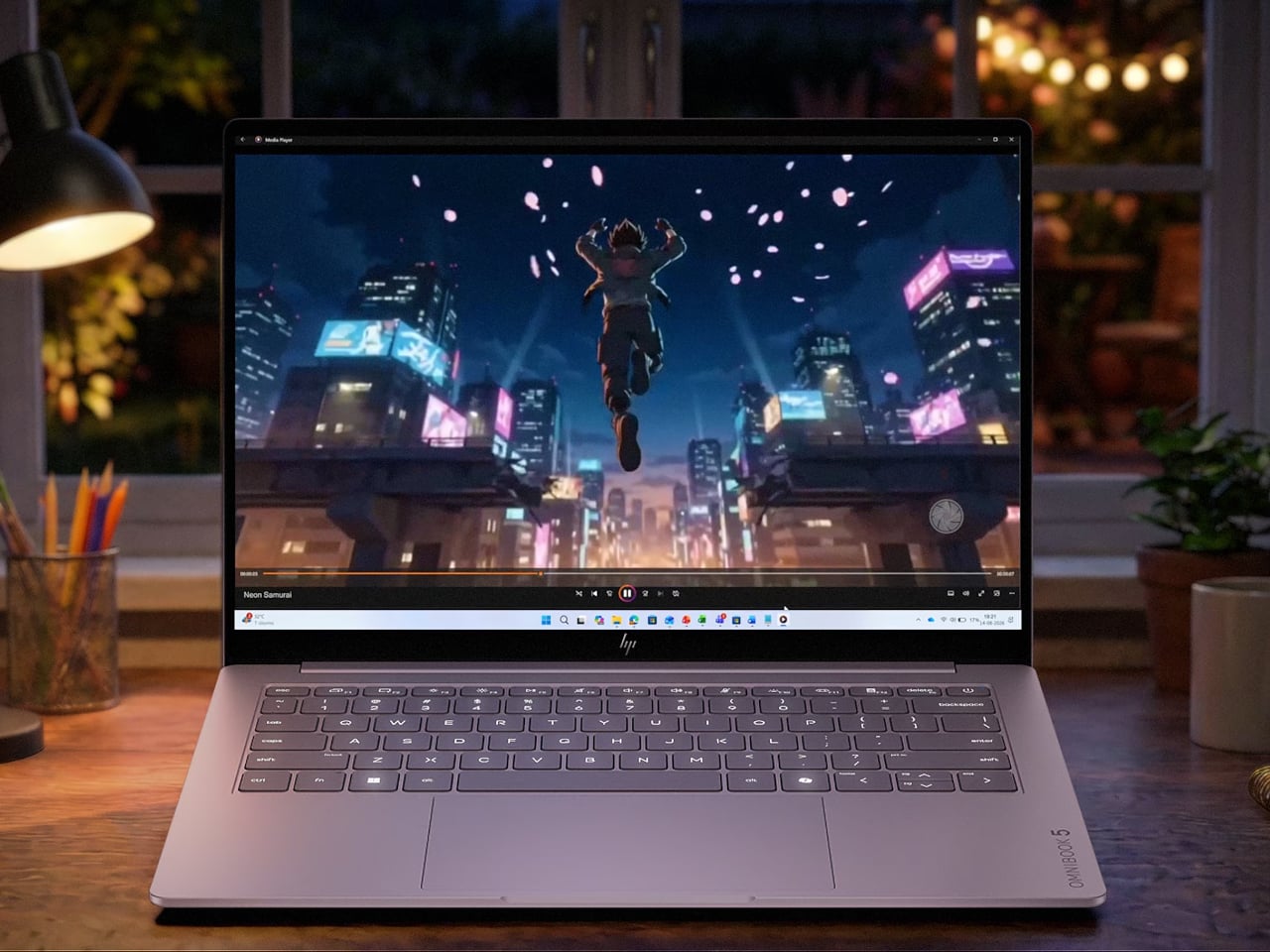
  • HP’s $699 OmniBook 5 Has the One Thing the MacBook Neo Doesn’t
    Affordable laptops often make you choose between a nice screen and a machine you’d want to carry. HP’s $699.99 OmniBook 5 14 makes a different pitch against Apple’s MacBook Neo: an OLED touchscreen wrapped in a slim, colorful aluminum body. It’s an appealing combination for someone moving between classes, work, and a movie, though the price doesn’t buy every specification HP advertises for the series. HP treats color as part of the laptop, rather than something to add with a sticker. Starlit Bl
     

HP’s $699 OmniBook 5 Has the One Thing the MacBook Neo Doesn’t

Par : JC Torres
2 octobre 2026 à 06:07

Affordable laptops often make you choose between a nice screen and a machine you’d want to carry. HP’s $699.99 OmniBook 5 14 makes a different pitch against Apple’s MacBook Neo: an OLED touchscreen wrapped in a slim, colorful aluminum body. It’s an appealing combination for someone moving between classes, work, and a movie, though the price doesn’t buy every specification HP advertises for the series.

HP treats color as part of the laptop, rather than something to add with a sticker. Starlit Blue, Peony Pink, Soft Honeydew, and Smoke Silver give the aluminum chassis some character, with a tone-on-tone keyboard to keep the look together. At 2.6 pounds and 0.46 inches thick, it could slip into a bag without looking like an anonymous office machine when it comes back out.

Designer: HP

Open the lid and the 14-inch OLED touchscreen becomes the reason to look twice. Its 16:10 proportions leave more vertical room for a document or editing tools, while touch makes a quick tap feel natural. But the $699.99 model has a 1920×1200 resolution and a 300-nit brightness rating, not the up-to-2.5K, 620-nit display mentioned in HP’s broader launch announcement.

The 180-degree hinge is a smaller detail, but it might be the one you appreciate when sharing a draft across a cafe table. Lay the laptop flat, turn it toward a friend, and neither of you has to hunch over the keyboard. The backlit keys make a difference when that conversation stretches into the evening, although this isn’t a tablet you can fold backward.

HP also makes room for an HDMI 2.1 port, two USB-C connections, and a headphone jack. If you need to show a presentation on a meeting room display or connect a monitor at work, you might not need to hunt for an adapter. The catch is that there’s no USB-A port listed, so an older mouse or flash drive could still send you looking.

Underneath the colorful shell, this configuration has an Intel Core 5 320 processor, 8GB of onboard memory, and a 256GB SSD. Those numbers should keep expectations in check if you juggle large creative files and a dozen browser tabs. There’s a 512GB storage option, but it shouldn’t be confused with what the starting price includes.

Battery life deserves careful reading. HP touts up to 42 hours for the series, but that figure comes from local video playback, not a day of calls, spreadsheets, and multitasking. The listed 60Wh battery and a claimed 50% charge in about 30 minutes are useful details when you’re planning a day out. Neither tells you when you’ll need an outlet.

The HP OmniBook 5’s challenge to the MacBook Neo isn’t about winning every specification. It offers a different set of priorities: a touchscreen, OLED contrast, cheerful colors, and ports that could save you from carrying an adapter. The modest memory and storage are harder to overlook. Still, it’s good to see an affordable laptop make its strongest argument the moment you open it.

The post HP’s $699 OmniBook 5 Has the One Thing the MacBook Neo Doesn’t first appeared on Yanko Design.

  • ✇Yanko Design
  • Google’s Fix for One-Handed Typing Is a Rolling Belt of Letters
    Typing with one hand usually means stretching a finger across a keyboard while the other hand holds a drink or works a mouse. Google’s Gboard team has a wonderfully impractical fix: put the keys on a conveyor belt and let them come to you. Its Rotating Keyboard stands upright on a desk, asking your finger to stay put while the letters keep moving. Regular keyboards assume your hands will travel between stationary keys, a reasonable arrangement that has survived decades of typing. Google reverse
     

Google’s Fix for One-Handed Typing Is a Rolling Belt of Letters

Par : JC Torres
2 octobre 2026 à 05:15

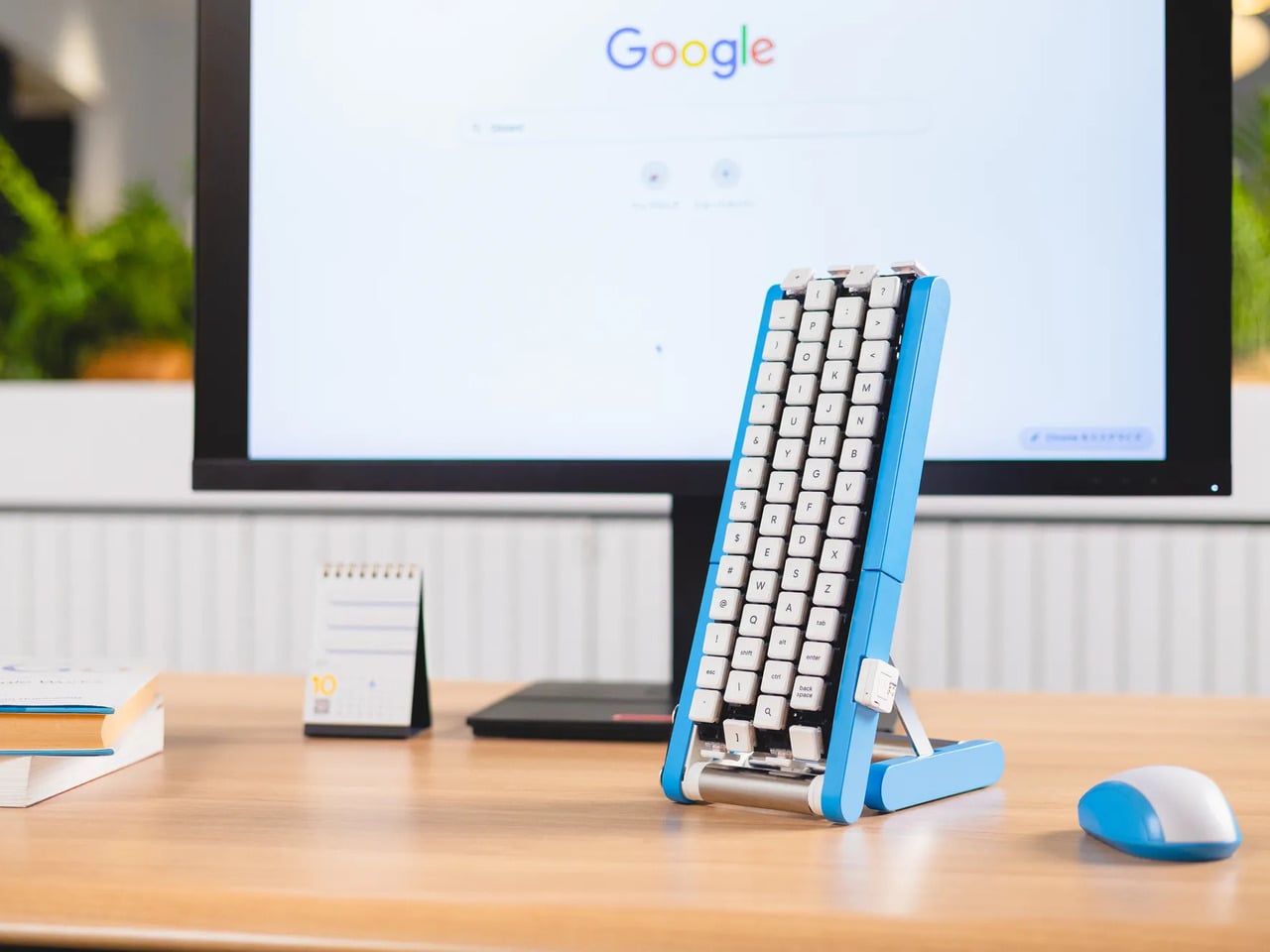
Typing with one hand usually means stretching a finger across a keyboard while the other hand holds a drink or works a mouse. Google’s Gboard team has a wonderfully impractical fix: put the keys on a conveyor belt and let them come to you. Its Rotating Keyboard stands upright on a desk, asking your finger to stay put while the letters keep moving.

Regular keyboards assume your hands will travel between stationary keys, a reasonable arrangement that has survived decades of typing. Google reverses that relationship by mounting rows of keycaps on loops that travel around rollers. The tall blue frame and angled stand make the moving assembly feel closer to a miniature factory machine than a computer peripheral, which is probably part of the joke.

Designer: Google Japan

Instead of looking down for a letter, you watch for the right key to arrive and press it as it passes. Google says each belt carries 29 keys and can input both uppercase and lowercase letters. That might let one hand stay near the same spot, though it also turns typing into a timing exercise, especially when the next letter takes its time coming around.

Imagine answering an email with a cup of tea in your free hand. On a conventional keyboard, you’d either put the cup down or hunt for letters one finger at a time. Here, the moving keys do the traveling while you wait at the front of the machine. Google also suggests using your free hand on a mouse, which sounds suspiciously like extra work.

There’s an oddly earnest design lesson underneath the silliness. Questions about ergonomics often begin with who a familiar object was made for, and Google has taken that thought to a ridiculous extreme. The upright arrangement might use less horizontal desk space than a full keyboard, but it trades that footprint for height, moving parts, and the need to watch every passing key.

Google plays along with its own premise, floating ideas for faster movement, longer belts with more characters, shorter versions for phones, and different colors. None of those variations is a promised product. Even the keyboard itself isn’t headed for stores; the team has released open-source plans for a similar device instead. That keeps the joke open to anyone curious enough to build one.

The date is part of the gag, too. Google chose October 1 as a nod to the familiar 101-key keyboard, rather than waiting for April Fools’ Day. It’s the team’s 15th keyboard proposal, continuing a habit of treating ordinary typing as a problem that needs an absurdly elaborate solution. A conveyor belt is hardly the first thing most people would try.

You’re unlikely to write a novel by chasing letters around this contraption, and that isn’t really the point. Google has built a physical answer to a question no keyboard maker was asking: what if the keys did all the moving? It’s a ridiculous way to type an email, but an effective way to notice how much we expect our fingers to do.

The post Google’s Fix for One-Handed Typing Is a Rolling Belt of Letters first appeared on Yanko Design.

US Army Evaluates Armored Humanoid Robot Alex for Dangerous Tasks

2 octobre 2026 à 04:40

The US Army evaluated armored humanoid Alex for dangerous tasks. Explore its capabilities, supporting technologies and limits before field deployment.

The post US Army Evaluates Armored Humanoid Robot Alex for Dangerous Tasks appeared first on TechRepublic.

  • ✇Yanko Design
  • Amazon Gave Kindles Their Missing Buttons Back, as Accessories
    Kindles once let your thumb turn pages, but physical buttons disappeared from most of Amazon’s newer readers. That might not seem like a big loss until you’re holding a Kindle and trying not to disturb your comfortable grip. Amazon’s Kindle Click remote and Page Turn Cover offer two ways to bring that familiar press back, without adding buttons to the Kindle itself. Of the two, Kindle Click makes the most sense when the device isn’t in your hands at all. Prop your Kindle on a pillow or a stand,
     

Amazon Gave Kindles Their Missing Buttons Back, as Accessories

Par : JC Torres
2 octobre 2026 à 04:15

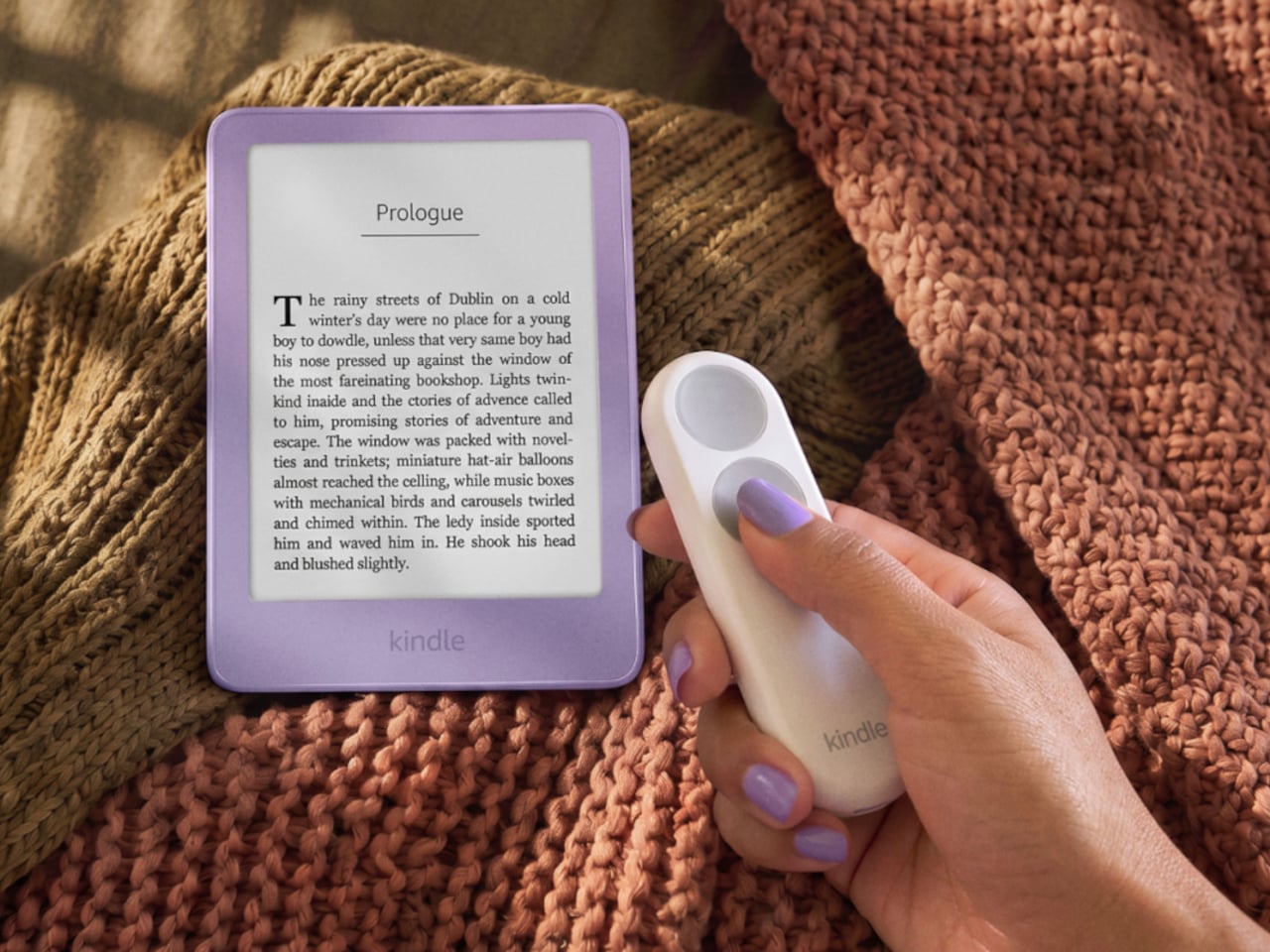
Kindles once let your thumb turn pages, but physical buttons disappeared from most of Amazon’s newer readers. That might not seem like a big loss until you’re holding a Kindle and trying not to disturb your comfortable grip. Amazon’s Kindle Click remote and Page Turn Cover offer two ways to bring that familiar press back, without adding buttons to the Kindle itself.

Of the two, Kindle Click makes the most sense when the device isn’t in your hands at all. Prop your Kindle on a pillow or a stand, pull a blanket over your shoulders, and the next page is a button press away. Other e-reader brands, including Boox, have already explored remotes, but Amazon’s Bluetooth version works without clipping a mechanical gadget onto the screen.

Designer: Amazon

The $34.99 Kindle Click has two large, tactile buttons for moving forward or back, with smaller controls on the side for changing the screen brightness. Press both side buttons to put the Kindle to sleep, or change which main button turns forward in the settings. Its rounded body fits either hand, and a woven wrist lanyard keeps it nearby when you get up.

There’s still a little maintenance involved. Amazon says the rechargeable battery lasts for weeks, but the USB-C cable and adapter aren’t included. More importantly, Kindle Click only pairs with models released in 2024 or later. That leaves out plenty of readers who might want it most, including owners of the 2022 Kindle and 11th-generation Paperwhite. At least it doesn’t demand a particular cover.

The Page Turn Cover takes the opposite approach. Instead of leaving the Kindle propped up, you hold it like any other folio-covered reader, with page-turn buttons built into the case. Fold the front back flat, and those controls remain part of your grip. The cover attaches magnetically and uses pogo pins to connect, so there’s no separate battery, Bluetooth pairing, or charging routine.

That simplicity carries through to the materials. The cover opens and closes to wake or sleep the Kindle, while a microfiber lining sits against the screen. Amazon says its plant-based leather contains more than 70% renewable biomaterials, with polyurethane making up the remainder. Graphite, Seaglass Green, and Fig offer three different looks, and both the cover and compatible Kindles carry an IPX8 water-resistance rating.

But the buttons come with a rather narrow invitation. The $79.99 cover fits only the 2026 Paperwhite Signature Edition and Colorsoft Signature Edition, so older Kindles and the standard models are out. That’s a considerable price for something that won’t fit most Kindles already in use. If you prefer reading without a case, the extra layer might also feel like an awkward trade.

Amazon hasn’t put physical page-turn buttons back on the readers themselves, and that distinction matters. The remote keeps your hand warm under the blanket while the Kindle stays put; the cover gives your thumb somewhere familiar to land when you’re holding it. Neither approach will suit every Kindle owner, but it’s nice to choose where the buttons belong instead of reaching for the screen again.

The post Amazon Gave Kindles Their Missing Buttons Back, as Accessories first appeared on Yanko Design.

Apple Faces $5.7 Billion Verdict Over iPhone and Watch Haptics

1 octobre 2026 à 15:06

Apple plans to appeal a $5.7 billion jury award over Taptic Engine patents used in iPhones and Apple Watches. Learn what the verdict means for buyers.

The post Apple Faces $5.7 Billion Verdict Over iPhone and Watch Haptics appeared first on TechRepublic.

  • ✇Yanko Design
  • Samsung’s SmartTag3 Refuses to Die at 790 Days Battery Life
    I’m the kind of person who can set down my keys, turn around, and immediately forget where they went. Wallets, earbuds, and bags have a way of disappearing at the least convenient moment, too. A smart tracker can spare you a frantic search, but only if its battery is working and its location can still be found. That makes battery life and the ability to locate an item beyond your phone’s immediate range just as important as a good-looking design. Designed by Samsung, the Galaxy SmartTag3 aims t
     

Samsung’s SmartTag3 Refuses to Die at 790 Days Battery Life

1 octobre 2026 à 13:20

I’m the kind of person who can set down my keys, turn around, and immediately forget where they went. Wallets, earbuds, and bags have a way of disappearing at the least convenient moment, too. A smart tracker can spare you a frantic search, but only if its battery is working and its location can still be found. That makes battery life and the ability to locate an item beyond your phone’s immediate range just as important as a good-looking design.

Designed by Samsung, the Galaxy SmartTag3 aims to address those everyday frustrations in a smaller package. Its rounded, nearly square shape gives it a clean look, while its reduced size should make it less noticeable on the things you carry. That matters more than it might seem. A tracker attached to a set of keys needs to be easy to live with every day, not just useful on the rare occasion those keys go missing.

Design: Samsung

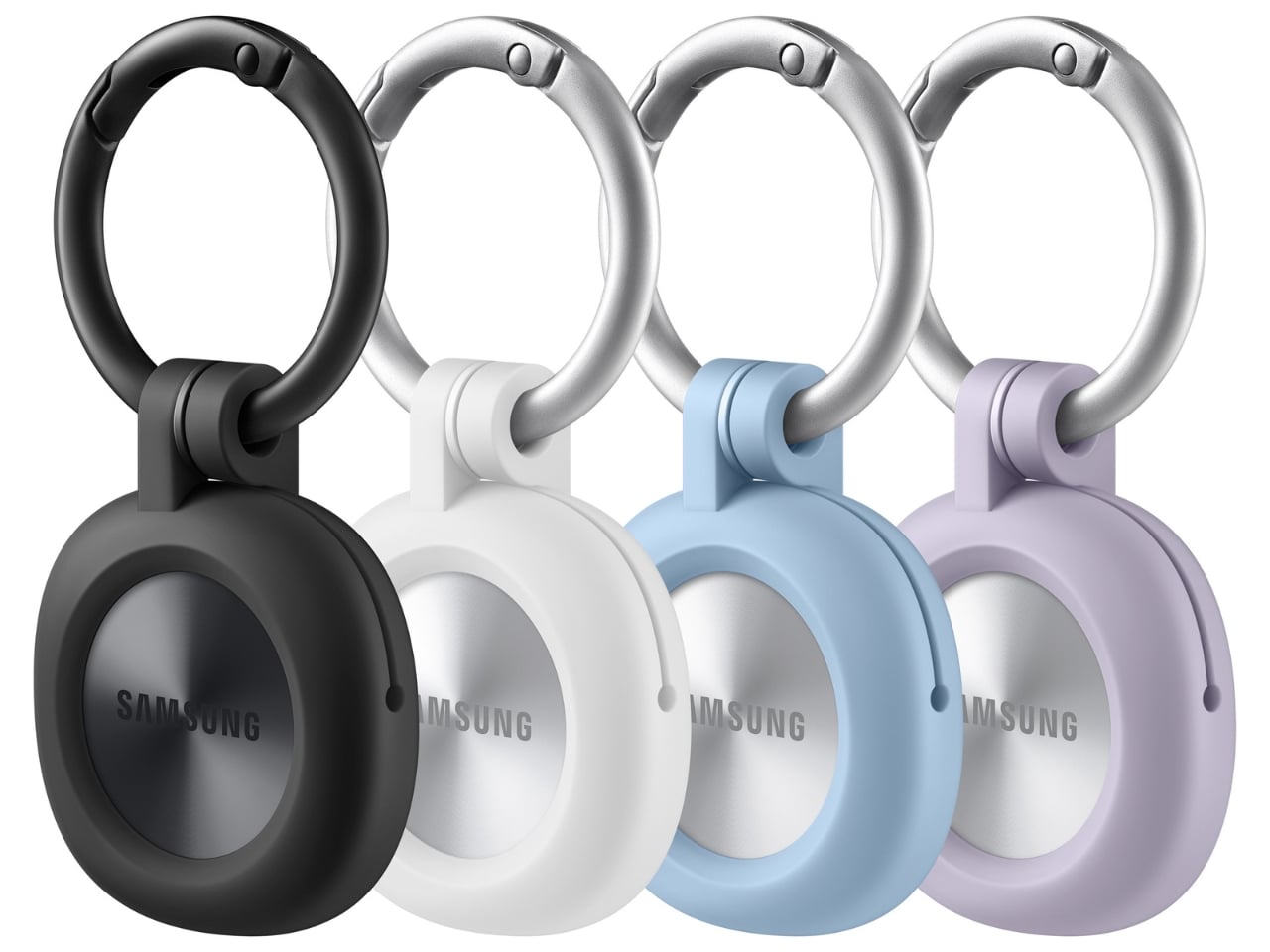
The change in shape also raises a practical question: how will you attach it to your belongings? Samsung offers a silicone case with an integrated keyring and a loop case, giving users different ways to secure the tracker to keys or a bag. The smoother outline may look better on its own, but anyone buying one for their keys should consider which attachment will work best.

Samsung says the SmartTag3 is 35% smaller by volume and 33% lighter than its predecessor. It also retains an IP67 rating, indicating resistance to dust and water under specified test conditions. That offers reassurance if the tag gets caught in the rain, though it does not mean the device is waterproof in every situation.

Battery life may be the more meaningful upgrade for anyone who has discovered a dead tracker while looking for a lost item. Samsung says the SmartTag3 can run for up to 550 days under standard usage or up to 790 days in Power Saving Mode. Those figures are based on Samsung’s testing, not a promise that every user will get the same result. Still, a tracker that needs attention less often is less likely to let you down because you forgot to check its battery.

Finding something nearby should be easier, too. Compass View uses Bluetooth 6.0 Channel Sounding to provide distance and directional guidance from up to 60 meters away, about three times farther than on the previous model, according to Samsung. It could help you narrow down where to look before you’re close enough to spot the missing item. Compass View is not available on iOS.

The other finding features are intended to help in different situations. If you leave a tagged bag behind, a Left Behind Alert could prompt you to go back for it, although that feature is also unavailable on iOS. Place Notification is designed to alert you when a tagged item enters or leaves an area you define. Location History and Movement Detection Alert may provide additional clues about where an item has been or whether it has moved. Together, these tools could help you notice a problem sooner and narrow down where to look.

Lost Mode addresses a different problem: helping someone return an item they find. With a compatible phone, a finder can scan the tag using NFC to see the contact information or short message you have registered. That could be useful for a bag left at a café or luggage separated from you during a trip. When an item is beyond your phone’s range, however, location updates depend on nearby participating Galaxy devices. The SmartTag3 should not be treated as a continuous, real-time GPS tracker.

The SmartTag3’s appeal is the combination of a compact design, long claimed battery life, and features that help at several stages of a search. It cannot prevent you from leaving your keys behind, and its alerts will not replace paying attention to your belongings. But if it helps you catch a forgotten bag before you get home, or gives you a useful clue when something disappears, it has done what a well-designed tracker should: made a small, stressful problem easier to manage.

The post Samsung’s SmartTag3 Refuses to Die at 790 Days Battery Life first appeared on Yanko Design.

  • ✇Yanko Design
  • Standard TVs Filter Their Color, the Hisense UR8 Creates Its Own
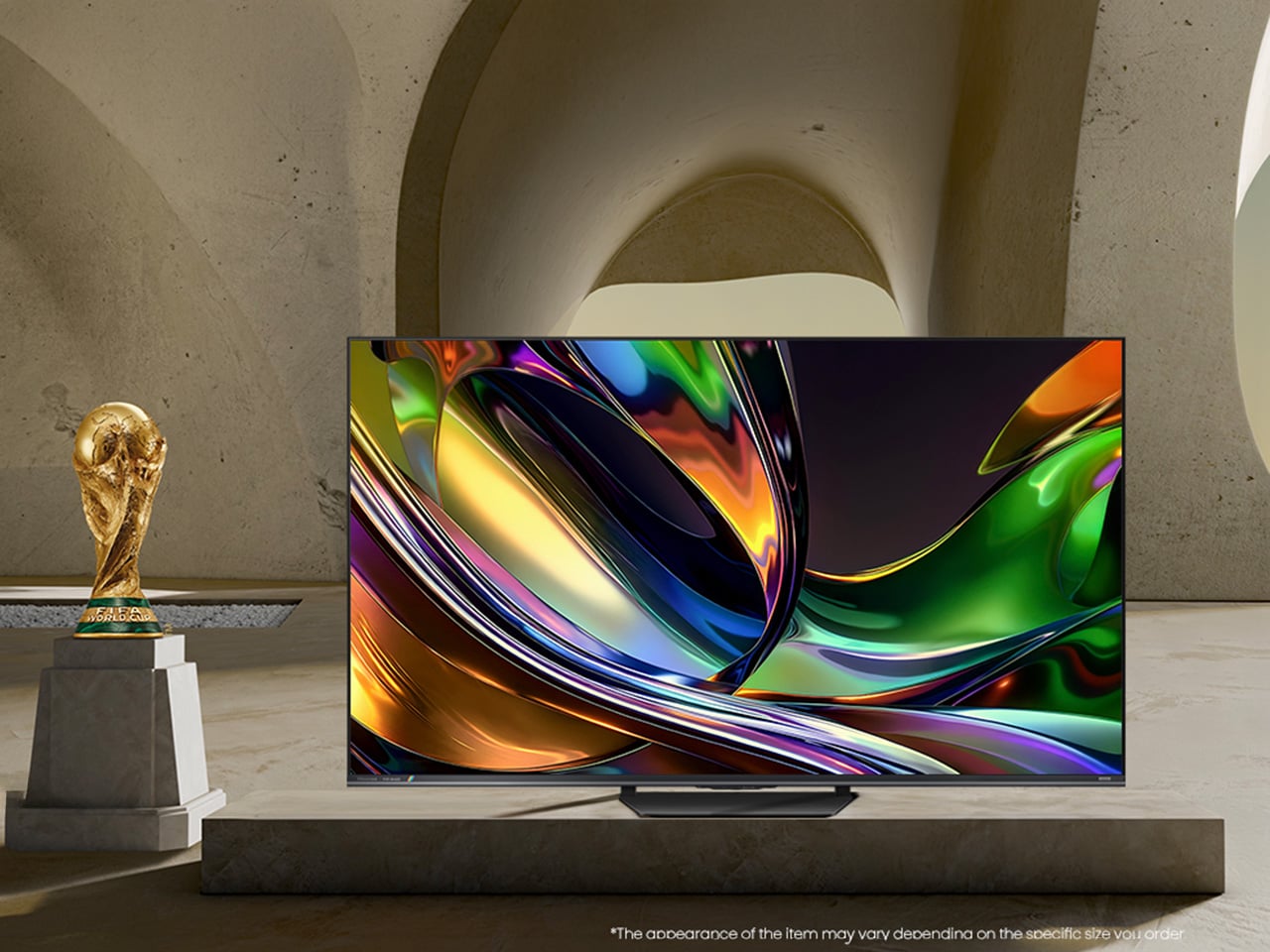
    For decades, every television has made color the same way, filtering a single blue light down into red, green, and blue until something resembles a picture. The Hisense UR8 ditches that habit. Instead, it creates red, green, and blue light individually, right at the source, through what Hisense calls Chromagic display technology built on its RGB MiniLED architecture. UR8’s RGB MiniLED, powered by Chromagic display technology, builds color differently, using red, green, and blue light individual
     

Standard TVs Filter Their Color, the Hisense UR8 Creates Its Own

Par : JC Torres
28 septembre 2026 à 19:30

For decades, every television has made color the same way, filtering a single blue light down into red, green, and blue until something resembles a picture. The Hisense UR8 ditches that habit. Instead, it creates red, green, and blue light individually, right at the source, through what Hisense calls Chromagic display technology built on its RGB MiniLED architecture. UR8’s RGB MiniLED, powered by Chromagic display technology, builds color differently, using red, green, and blue light individually to deliver natural and real color that looks closer to life. It’s a real design shift, overdue by a few decades.

Conventional MiniLED TVs work by shining a single blue light and filtering it into color, a process that removes light rather than creating it. The brighter and richer the scene, the more that filtering process quietly throws away. It’s not exactly a flaw, just a limitation baked into how these screens have always been built. Hisense decided to rebuild that process instead of tweaking around it.

Designer: Hisense

Click Here to Buy Now: $1899.99 $2499.99 ($600 off). Hurry, deal ends in 48-hours!

The UR8 swaps that single-source filtering for up to nearly 15,000 individual RGB LEDs working independently across the panel. Instead of dimming zones guessing at brightness, each LED produces its own hue and intensity without needing a filter to correct it later. It’s a quiet redesign most viewers won’t think about, even while doing most of the work behind a different picture.

What that translates to on screen is surprisingly specific. Sunsets look warm, skin tones look natural rather than processed, and viewing feels easier on your eyes. Hisense backs this up with a claimed 100% BT.2020 color coverage and Pantone-validated accuracy, though you don’t really need the certifications to notice it.

All of that is pointless if the screen turns into a mirror the second you flip on a lamp, which is where the UR8’s Obsidian panel comes in. The Ultra-Low Reflection Obsidian Panel dramatically reduces reflection so the picture stays clear in any room. Dark scenes are up to 3x darker for rich and deep blacks, never gray, never washed out. That’s a practical call for people who watch TV in living rooms, not theaters.

Gaming is where the UR8’s engineering choices show off. Native 180Hz motion processing reduces blur in fast-moving content so you can follow the action clearly, whether it’s a live game or a quick-cut sequence. Game Booster 330 with the Enhanced Game Bar supports VRR up to 330 and AMD FreeSync Premium Pro certification for smooth, tear-free gameplay. Four HDMI 2.1 ports mean a console or gaming PC doesn’t fight for bandwidth.

That same motion handling pays off during live sports, when a fast break or a corner kick doesn’t turn into a blur of jerseys. Pair that with color that looks closer to what you’d see in person, and the UR8 becomes the kind of screen that naturally holds a room’s attention. A television already sits at the center of most living spaces, planned or not.

There’s a quieter benefit in this RGB engineering. Because RGB MiniLED creates natural and real color directly rather than filtering light, it wastes less energy and uses 40% less overall. Hisense says the UR8 also delivers nearly 50% less harmful blue light than standard MiniLED displays, independently certified by TÜV Rheinland. It’s a rare case where a design choice made for better color also means an easier bill and easier eyes.

The software side keeps pace with the hardware. Google TV with Gemini lets you chat with a conversational AI assistant, discover what to watch with personalized recommendations across 10,000-plus apps, or find content by simply describing what you want. Sound comes from a built-in 2.1.2 multi-channel speaker system tuned by Devialet, with Dolby Atmos support, so the audio doesn’t feel bolted onto an otherwise impressive screen.

The UR8 lineup spans 55, 65, 75, 85, and 100 inches, with pricing starting at $1,299 and available at Best Buy, backed by a two-year warranty. That range matters because it puts a genuinely different approach to color inside apartments and larger family rooms, not just showroom displays. Good engineering ideas usually take years to trickle down to accessible prices. This one arrived a little faster than expected, and it shows.

Click Here to Buy Now: $1899.99 $2499.99 ($600 off). Hurry, deal ends in 48-hours!

The post Standard TVs Filter Their Color, the Hisense UR8 Creates Its Own first appeared on Yanko Design.

Huawei Watch GT 7 Pro Review: Refined, Not Reinvented

Par : Aki Ukita
28 septembre 2026 à 11:20

Verdict 3.8 out of 5 Average of 5 criteria
Aesthetics
4.0 out of 5
Ergonomics
4.0 out of 5
Performance
4.0 out of 5
Sustainability / Repairability
3.0 out of 5
Value for money
4.0 out of 5

What works

  • Distinctive octagonal design with a premium look
  • Strong battery life
  • Bright, sharp AMOLED display
  • Board health and fitness tracking

What doesn't

  • Limited third-party app support
  • Proprietary pinned strap design
The Watch GT 7 Pro 46mm shows Huawei sticking to a proven formula and sharpening it further. It is not a bold leap, but it is a confident and well-rounded one.

Huawei has spent the last few years turning wearables into one of the strongest parts of its consumer business. The company has performed especially well in China, with that momentum also carrying into overseas markets. As a result, Huawei has grown into one of the biggest names in smartwatches, offering a lineup that covers different styles, price points, and user needs.

Within Huawei’s smartwatch lineup, the GT series is the company’s sports-focused range. The new GT 7 series stays true to that identity, building on the formula that has made the lineup popular. The GT 7 Pro is not a major leap over the GT 6 Pro, but it feels like a more polished and refined take on the same core idea.

Designer: Huawei

Aesthetics

The Watch GT 7 Pro 46mm stays largely in line with the design language of its predecessor, keeping the same sporty character that defined the GT 6 Pro. Its octagonal case continues to give it a distinctive look, helping it stand out from the many conventional round smartwatches on the market. At the same time, Huawei balances that sportier shape with a polished finish, so the watch still feels premium rather than overtly rugged.

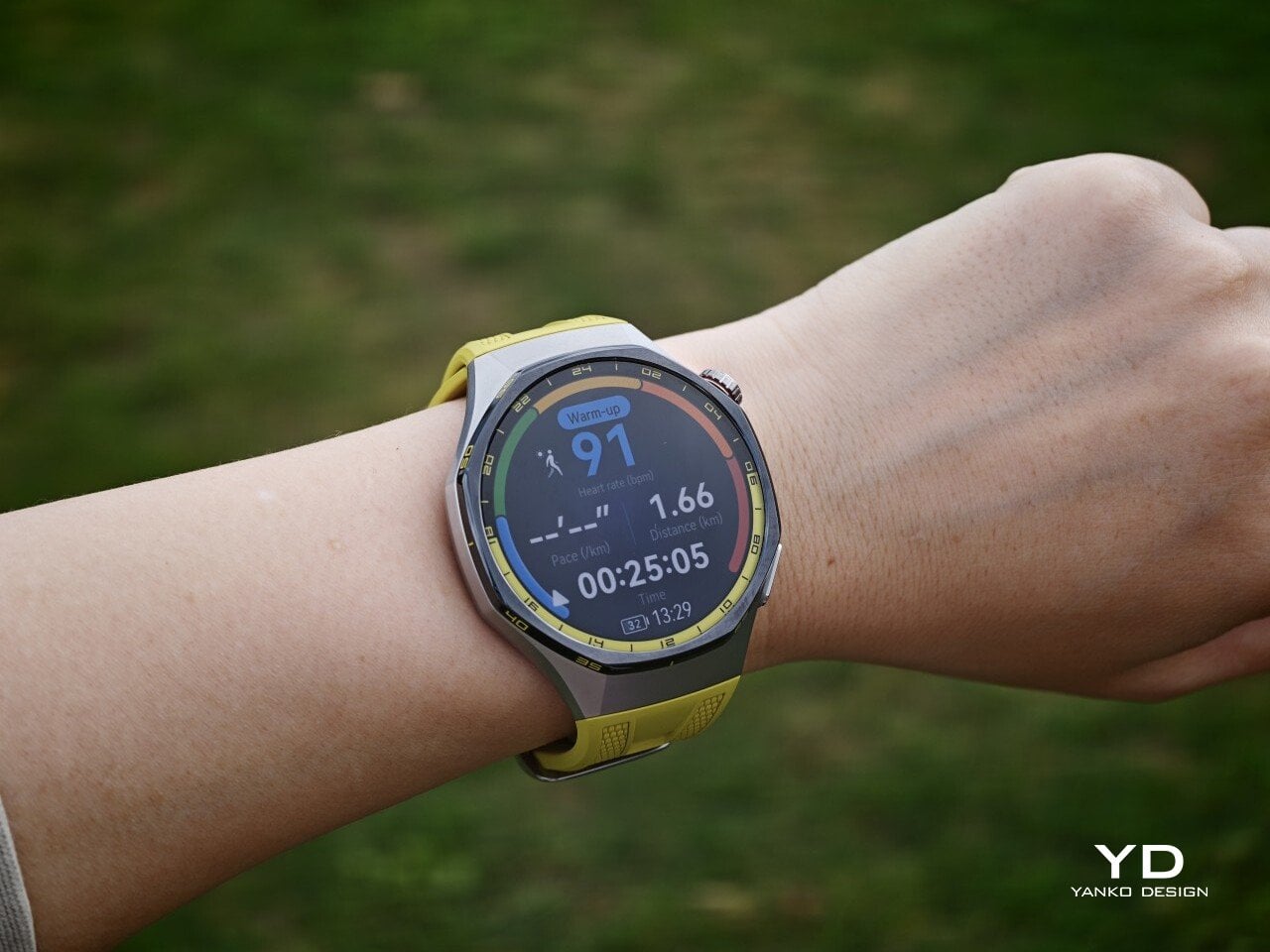
The front of the watch keeps that same balance. Its 1.47-inch AMOLED display sits beneath sapphire glass, which adds a more upscale touch while also improving durability for everyday wear. Around the display, Huawei uses 24-hour markings that strengthen the watch’s sporty identity and give the face a more instrument-like look.

Huawei is offering the GT 7 Pro 46mm in yellow, green, and black, and each one gives the watch a distinct personality. The yellow version I received is easily the boldest of the three, pairing a silver case with a black bezel and a bright lime yellow strap. Matching yellow accents around the bezel and on the watch face make it feel the most energetic and overtly sporty of the lineup.

The green version takes a more outdoorsy approach. It keeps the same overall design but swaps in a muted green strap and matching accents, giving the watch a look that feels active without being as loud as the yellow model. The black version, by contrast, is the most understated. With its darker finish and strap combination, it gives the GT 7 Pro a stealthier and more versatile appearance that should appeal to buyers who prefer something cleaner and easier to wear every day.

Ergonomics

Despite its sporty, fairly bold design, the Watch GT 7 Pro 46mm is comfortable to wear for long stretches. At 56g and 11.2mm thick, it has enough presence to feel substantial on the wrist, but it never comes across as overly bulky in daily use. Huawei has also done a good job with weight distribution, which matters more than raw dimensions when you are wearing the watch through workouts, sleep tracking, or a full day out.

The strap has also been revised. Huawei calls it the Easy Cross Strap, and the key change is that the loose end tucks underneath instead of threading through a traditional belt loop. According to Huawei, this makes the watch easier to wear day to day while also creating a snugger fit that can help improve the consistency of health tracking. The elastomer strap feels soft enough for extended wear while still staying secure during exercise. It is detachable and uses a 22mm fitting, but because it is secured with pins, swapping it out is less straightforward than with a standard third-party strap.

Huawei’s control layout is familiar and easy to get used to. The buttons sit within easy reach, and the rotating crown adds a more tactile way to move through menus. That makes the watch feel more natural to use when you are on the move and do not want to rely entirely on touch input. Combined with the curved case and integrated strap design, the GT 7 Pro feels built not just to look sporty, but to wear like it too.

Performance

The Watch GT 7 Pro 46mm features a 1.47-inch AMOLED display, and it is one of the first things that stands out about the watch. Huawei claims a peak brightness of 3,000 nits, and in use the panel looks sharp, bright, and vibrant. Watch faces have plenty of visual punch, while menus and health data remain easy to read at a glance. Huawei has been consistently strong in this area, and that continues here with a screen that feels right at home on a watch in this class.

Out of the box, the GT 7 Pro runs HarmonyOS 6.1 and supports both Android and iOS devices, which immediately makes it more flexible than some ecosystem-bound alternatives. The software itself is easy to navigate, with clean menus, smooth animations, and a layout that does not take long to learn. It is not trying to overwhelm you with complexity, and that works in its favor on a smartwatch that is meant to balance fitness features with everyday usability.

Health and fitness remain at the heart of the experience, which is exactly where the GT series has built much of its appeal. Huawei includes a broad set of tracking features here, covering the usual essentials such as heart rate, sleep, blood oxygen, stress, and workout monitoring, while also adding more unusual tools like the Diabetes Risk Study and Coronary Heart Disease Study. The latter, however, was not available on my test unit during the review period.

On the fitness side, the watch offers more than 100 workout modes, reinforcing its role as a serious sports-focused smartwatch. Huawei has also expanded its support for winter sports, with dedicated indoor and outdoor skiing as well as snowboarding modes. These can track data such as maximum speed, average incline, total descent, and run count, making the watch more useful for users who want something beyond basic activity logging. It also supports downloads for more than 3,000 ski resort maps worldwide, complete with details such as slope names, difficulty ratings, and lift station locations.

Since ski season is still months away where I live, I was not able to test those winter sports features properly. My hands-on time was limited to more routine activities like outdoor walks, yoga, and casual cycling. Even within that narrower scope, the watch performed well. GPS tracking was accurate in my testing, even when I passed under railway bridges and near buildings, where signals can sometimes become less stable.

Battery life is one of the GT 7 Pro’s biggest strengths. Huawei rates it for up to 21 days at the upper end, up to 12 days under typical use, up to 7 days with the always-on display (AOD) enabled, and as much as 51 hours in trail running mode. Those are ambitious figures, but in my time with the watch, its endurance was genuinely impressive.

I took it with me on a nine-day trip after charging it to 100 percent, and by the end of the trip it still had 19 percent battery remaining. During that time, I had all health tracking features on, AOD turned on, and used it for a couple of indoor and outdoor walking sessions as well. That makes the result more impressive, because the watch was not simply sitting idle for most of the trip. In day-to-day use, that kind of endurance makes a real difference, especially on a sports-focused smartwatch where frequent tracking can drain smaller batteries much more quickly.

Charging is handled through a proprietary magnetic wireless charger included in the box, and it is fairly quick. Because of the watch’s shape, though, it does not sit flat on the charger, which can be a mild annoyance in everyday use. It hovers slightly, and I often found myself checking to make sure it was still charging after the initial confirmation screen disappeared. It also feels like time for Huawei to move from USB-A to USB-C, as the included cable already feels a bit dated.

Sustainability

The Watch GT 7 Pro also puts some emphasis on durability. It carries both IP69 and 5ATM ratings, giving it a solid level of protection against dust and water exposure. That makes sense for a watch positioned around sports and outdoor use, where it is more likely to be exposed to sweat, rain, splashes, and more demanding day-to-day conditions.

Huawei also uses sapphire glass over the display, which adds another layer of reassurance. Sapphire is known for its strong scratch resistance, and it also helps the watch feel more premium in the process. Taken together, these details give the GT 7 Pro a tougher, more dependable character without pushing it fully into rugged-watch territory. That said, sustainability is less of a focus, with no clear mention of recycled materials or other environmental measures.

Value

At £379, or roughly $510, the Watch GT 7 Pro is priced like a premium smartwatch, so it has to offer more than just a nice design. For the most part, it does. You are paying for a watch that gets the basics right, with strong battery life, a durable build, a comfortable fit, and a health and fitness feature set that feels broad enough for most users.

The value proposition really comes down to what you want from a smartwatch. If you care most about app support and deeper smart features, there are rivals that make a stronger case. But if your priorities are battery life, fitness tracking, and a watch that looks and feels good on the wrist, the GT 7 Pro makes more sense. It is not a dramatic step up from the GT 6 Pro, so current owners may not feel much pressure to upgrade. Still, for anyone coming from an older device, it feels like a well-rounded package that knows exactly what it is.

Verdict

The Watch GT 7 Pro 46mm is not the kind of upgrade that changes everything, but it does not need to be. Huawei has taken a formula that already worked and polished it further, keeping the GT series focused on the things it has consistently done best. The result is a smartwatch that looks distinctive, wears comfortably, lasts a long time on a charge, and offers more than enough health and fitness features for most users.

It is not without trade-offs. Third-party app support remains limited, and Huawei’s pinned strap design also cuts down your band options compared with a standard 22mm quick-release system. Still, if you want a premium sports-focused watch that feels dependable, lasts well beyond a few days, and fits easily into everyday use, the GT 7 Pro gets a lot right. It is not a radical step forward, but it is a solid and well-rounded one.

The post Huawei Watch GT 7 Pro Review: Refined, Not Reinvented first appeared on Yanko Design.

  • ✇Yanko Design
  • iFi Audio UP Play Max lets you enjoy high-end wireless headphones in lossless when connected to iPhone
    Being an audiophile and owning an Apple phone can be a strained relationship at times. While owning Apple’s AirPods 5 or the AirPods Max 2 ties you deep into the ecosystem of AAC and SBC codecs that produce respectable sound quality, stepping out of the ecosystem for better options usually comes with a big caveat. Choosing Bluetooth headphones or earbuds that support high-resolution codecs like LDAC or aptX Adaptive doesn’t make sense since the Apple device playing the music doesn’t support the
     

iFi Audio UP Play Max lets you enjoy high-end wireless headphones in lossless when connected to iPhone

28 septembre 2026 à 10:20

Being an audiophile and owning an Apple phone can be a strained relationship at times. While owning Apple’s AirPods 5 or the AirPods Max 2 ties you deep into the ecosystem of AAC and SBC codecs that produce respectable sound quality, stepping out of the ecosystem for better options usually comes with a big caveat.

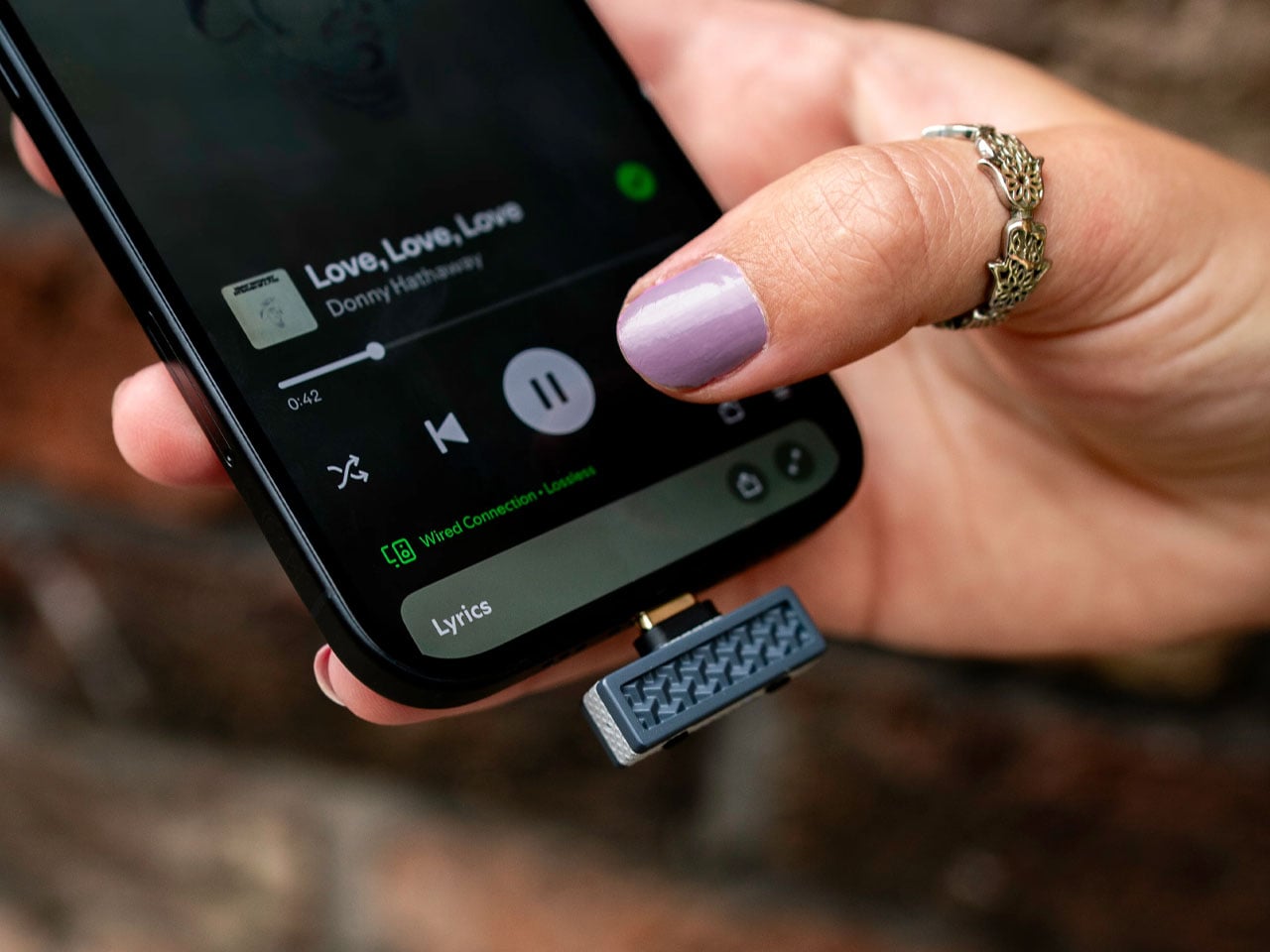
Choosing Bluetooth headphones or earbuds that support high-resolution codecs like LDAC or aptX Adaptive doesn’t make sense since the Apple device playing the music doesn’t support the codecs and defaults to the normal codecs that are lossy. iFi Audio wants to eliminate the frustration Apple device users have lived with for ages when enjoying wireless audio with the $89 UP Play Max dongle.

Designer: iFi Audio

By getting the source device (iPhone 18 Pro Max, for instance) and the audio playing accessory (Sony WH-1000XM6) to have the desired handshake, you finally have the option to break free from the predatory Apple ecosystem and open up to the world of high-resolution lossless audio. The iFi Audio UP Play Max USB-C Bluetooth transmitter overlays the device’s default codec support and lets you connect high-end audio listening accessories and play the music in HD. That means if you have LDAC-supported headphones, you’ll be listening to music with 24-bit/96kHz at a maximum bitrate of 990 kbps when connected via Bluetooth.

The UP Play Max dongle plugs directly into the iPhone’s USB-C port, and using the compatible Nexis app, you can pair wireless headphones or earbuds from brands like Edifier, Sennheiser, Technics, Sony, or Bose. The transmitter comes with the proprietary K2HD processing tech that restores the track’s original resolution for listening to favorite music without any underlying compromises. It can also restore any harmonic information lost during the digital processing, which is great for audiophiles who love to go into the technicalities of the output sound.

Stepping beyond this native functionality, the dongle comes with low-latency mode for competitive gaming where lag is a strict no-no. Everyday usage is also kept in mind with the built-in mic for taking calls just in case your headphones or IEMs don’t have the calling feature. UP Play Max comes with an interesting feature that lets two headphones connect to a single device, which is great for shared listening with buddies. However, in this function, the codec is defaulted to SBC. A future update will let Auracast-compatible headphones or earphones connect seamlessly with as many headphones as desired.

Weighing just 3 grams and measuring no more than a compact memory stick, this audio accessory is a must-have for music lovers who have to always juggle around, or even worse, live with a pair of high-end headphones with no option to play the music in high resolution wirelessly. Beyond Apple connectivity, you can also plug the dongle into your tablet, computer, or any other compatible device to enjoy high-res wireless audio that otherwise wasn’t possible.

The post iFi Audio UP Play Max lets you enjoy high-end wireless headphones in lossless when connected to iPhone first appeared on Yanko Design.

5 Best Surface Pro Alternatives for 2026: ASUS, iPad, Galaxy and More

28 septembre 2026 à 07:03

ASUS, Apple, Samsung, and Lenovo offer five credible Surface Pro alternatives with different strengths in performance, portability, software, and price.

The post 5 Best Surface Pro Alternatives for 2026: ASUS, iPad, Galaxy and More appeared first on TechRepublic.

  • ✇Yanko Design
  • This Color E-Paper Clip Is the Polaroid That Digital Photos Never Had
    A photo you love rarely leaves the phone it was taken on, fading into a camera roll the moment the screen goes dark. TICKEY tries to pull that image back into physical space, using a 3.7-inch color e-paper panel housed in a 3.8mm aluminum shell that clips onto a bag, sits on a desk, or hangs from a badge lanyard. It’s a small object built around one simple idea: that a picture worth keeping deserves a life outside a glowing rectangle. The panel itself is the real engineering story here. Most e-
     

This Color E-Paper Clip Is the Polaroid That Digital Photos Never Had

Par : JC Torres
28 septembre 2026 à 06:07

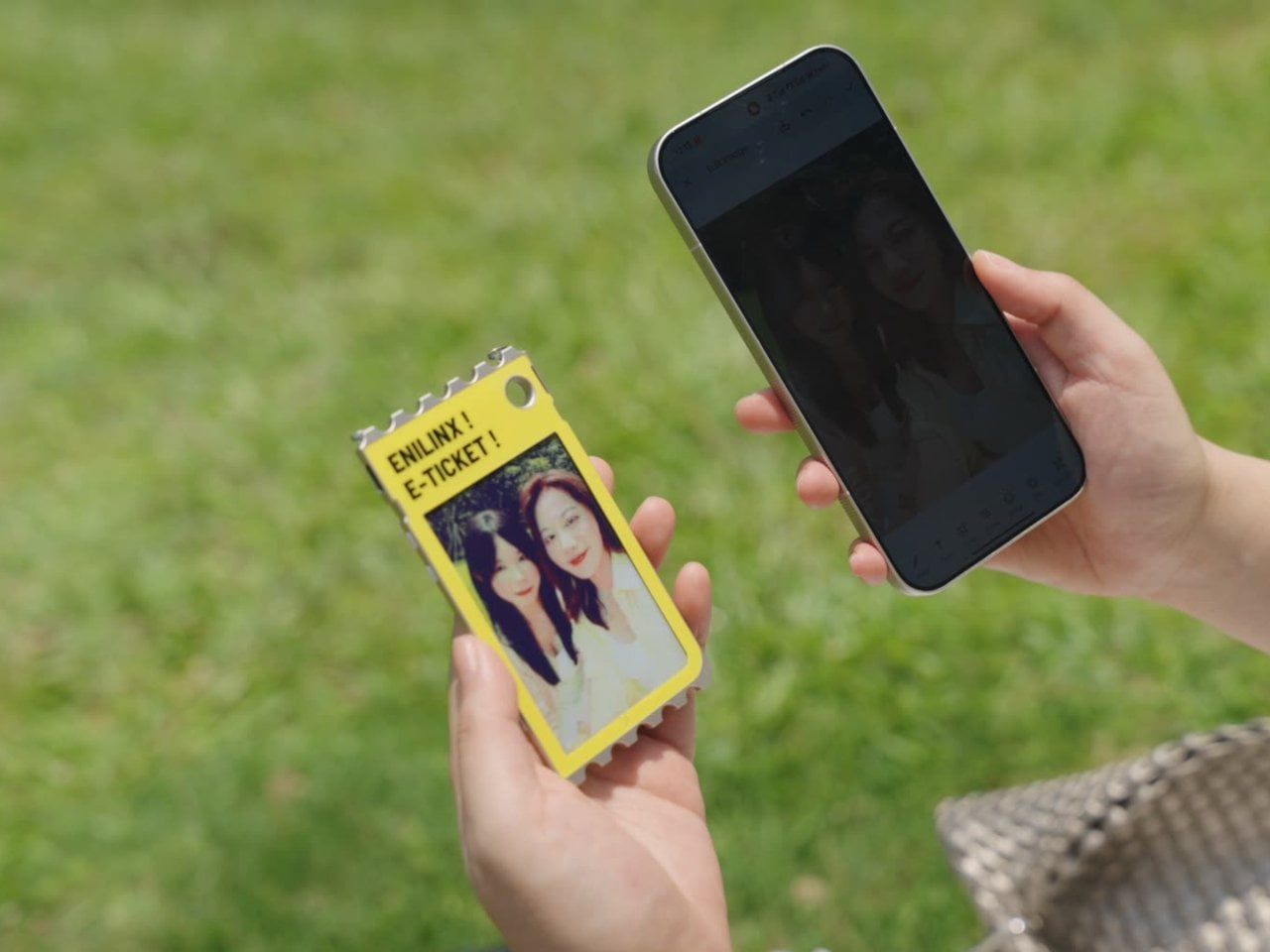
A photo you love rarely leaves the phone it was taken on, fading into a camera roll the moment the screen goes dark. TICKEY tries to pull that image back into physical space, using a 3.7-inch color e-paper panel housed in a 3.8mm aluminum shell that clips onto a bag, sits on a desk, or hangs from a badge lanyard. It’s a small object built around one simple idea: that a picture worth keeping deserves a life outside a glowing rectangle.

The panel itself is the real engineering story here. Most e-paper displays settle for a handful of muted tones and refresh rates measured in long, patient seconds. TICKEY runs on a Modos-developed driver that pushes past 48 native colors while cutting a full-quality refresh down to 13 seconds, with a faster 3-second mode available when precision matters less than speed. That gap between older e-ink hardware and this driver is wide enough to notice immediately.

Designer: ENIAC (Enilinx)

An ESP32-S3 chip handles the processing underneath, paired with Wi-Fi, Bluetooth, and NFC for getting content onto the screen without a cable in sight. A companion app lets someone edit a design on a phone and push it over wirelessly, and templates can be shared between users rather than built from scratch every time. Since the firmware is open, developers get a mature platform to build custom behavior instead of a sealed black box.

Clip it to a backpack strap before a conference, and it becomes a badge showing a name, a QR code, or contact details, updated the moment plans change instead of printed once and stuck for the day. Set it on a desk, and the same hardware turns into rotating art, swapped whenever the mood calls for something new. A magnet on the back means it holds onto a fridge door just as easily as a bag.

The 45g weight matters more than it sounds on paper, since anything heavier turns a clip-on badge into something that tugs at fabric or slides out of place by midday. Aluminum gives the shell enough rigidity to survive being tossed into a bag alongside keys and a water bottle, while staying thin enough to disappear against a jacket lapel or a laptop sleeve without adding visible bulk.

None of this asks for constant power once an image is set, since e-paper only draws current while actually changing what’s displayed. A finished screen sits there fully visible in direct sunlight, legible without a backlight fighting glare, and idle without draining a battery meant to last through a full day of moving between contexts. That’s the quiet advantage e-paper has always held over LCD, now paired with color depth that used to be out of reach.

TICKEY deliberately skips video and animation, treating that restriction as a feature rather than a compromise. A static image asks less of your attention than a screen that never stops moving, sitting calm on a bag strap or a windowsill until someone chooses to change it. Photos, event badges, or a fridge note showing today’s grocery list all fit that same quiet template, an object built to be looked at rather than constantly checked.

The post This Color E-Paper Clip Is the Polaroid That Digital Photos Never Had first appeared on Yanko Design.

  • ✇Yanko Design
  • A Fan Imagined Nokia’s Comeback With One Feature Worth Stealing
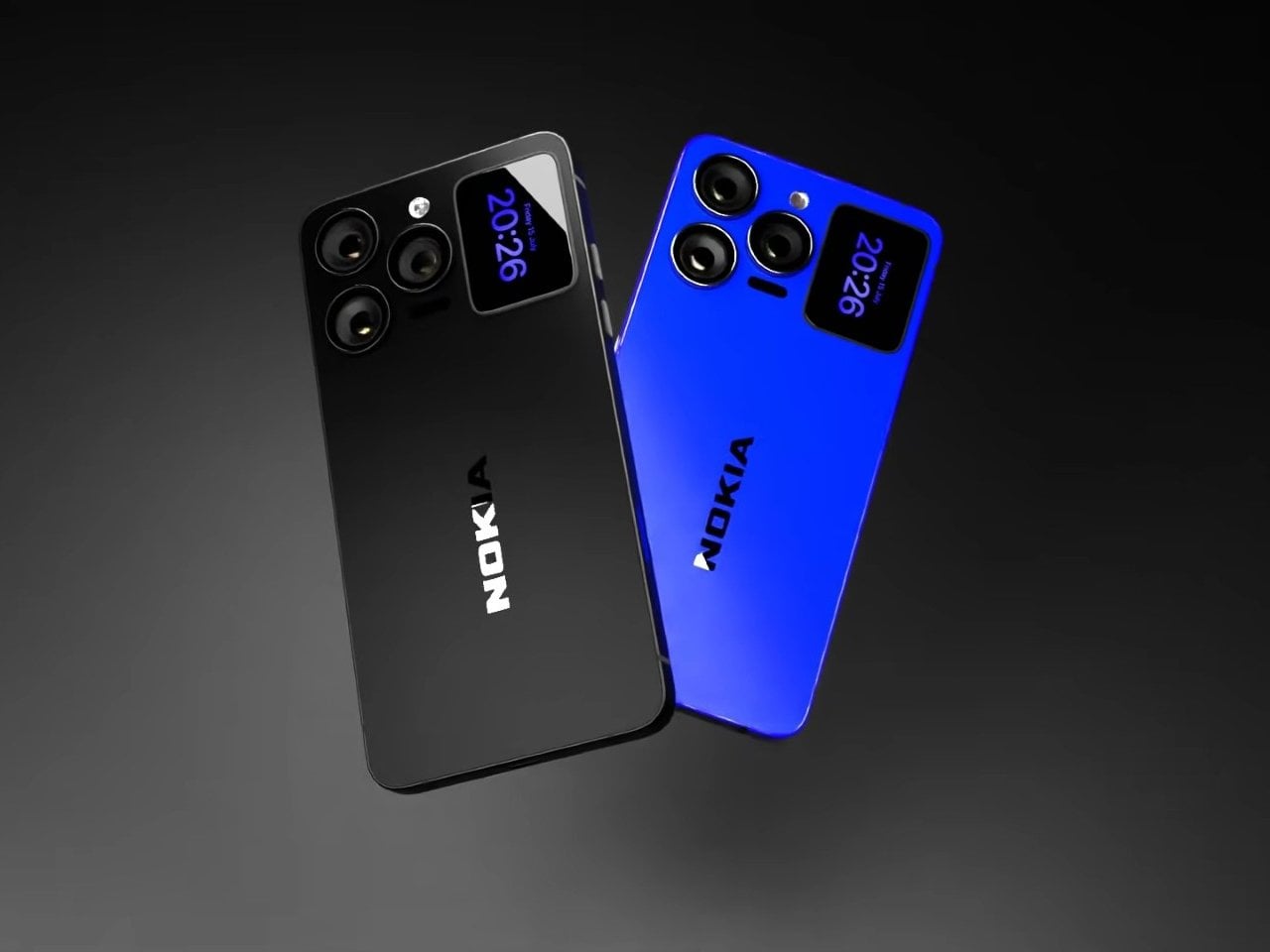
    Nokia’s phone business has been fading for years, reduced mostly to budget handsets sold under license, so a concept calling itself the N90 Ultra was never going to become a real product. It’s a fan-rendered video, not a leaked roadmap, and it borrows a legendary name attached to a swivel-barrel camcorder phone from 2005. What it does get right is a smaller, more interesting idea already spreading across actual flagships: a second screen living on the back of the phone. That rear panel holds a
     

A Fan Imagined Nokia’s Comeback With One Feature Worth Stealing

Par : JC Torres
28 septembre 2026 à 04:23

Nokia’s phone business has been fading for years, reduced mostly to budget handsets sold under license, so a concept calling itself the N90 Ultra was never going to become a real product. It’s a fan-rendered video, not a leaked roadmap, and it borrows a legendary name attached to a swivel-barrel camcorder phone from 2005. What it does get right is a smaller, more interesting idea already spreading across actual flagships: a second screen living on the back of the phone.

That rear panel holds a titanium alloy frame finished in a glossy cobalt blue or a graphite silver, with a raised visor housing three lens rings alongside a small rectangular display. Instead of sitting blank until a camera app opens, that mini-screen shows the time, the date, and glanceable notifications, all without waking the main display. It’s a small addition, but it changes how often a phone actually needs to come out of a pocket.

Designer: AndroidLeo (Concept)

A phone left face down on a desk during a meeting no longer has to stay silent about the time or a new message. A glance at the back shows both, then nothing more demanding follows, no bright wake screen lighting up a quiet room. That’s the appeal secondary displays have chased since Xiaomi and Meizu first tried the format years back, trimming how often the front screen needs to switch on at all.

The concept pushes its camera claims further than any current phone can back up, listing a 200 MP main sensor with 8K recording and a 200x zoom figure that would require optics no slim smartphone body can physically fit without an extending lens barrel. Two different Snapdragon chipsets get listed side by side too, a sign the spec sheet reads more like a wish list than an engineering plan. None of that undermines what’s genuinely worth noticing here.

The mini-display sitting flush against the camera visor is the detail carrying real design weight, because it reflects a question phone makers keep circling back to: how much information really needs a full screen turned on. Some phones use that rear space purely for decoration, a small strip showing a logo or a battery percentage and nothing else. Others, like this concept, treat it as a working display capable of running widgets, a clock face, or quick status checks.

Nokia returning to flagship phones remains unlikely no matter how sharp a fan render looks, and the camera math here falls apart well before any of these specs reach a factory floor. What holds up is the smaller premise underneath all of it, that a phone’s back panel can carry its own useful screen instead of sitting there as blank glass. That idea keeps showing up across the industry, with or without a Nokia badge attached to it.

The post A Fan Imagined Nokia’s Comeback With One Feature Worth Stealing first appeared on Yanko Design.

Huawei Watch D3 Reaches Europe: What Changes With the New Blood Pressure Watch

25 septembre 2026 à 14:54

Huawei Watch D3 reaches the UK and Europe with an inflatable wrist cuff for blood pressure checks, a slimmer design, and guidance on who could benefit.

The post Huawei Watch D3 Reaches Europe: What Changes With the New Blood Pressure Watch appeared first on TechRepublic.

❌