❌

Vue normale

  • ✇Yanko Design
  • This $899 golf launch monitor tracks your swing in 3D and tells you how to fix it
    A decent golf lesson can cost anywhere from $80 to $200 an hour, but the bigger issue usually kicks in after the lesson ends. You leave with a fix, spend the next two weeks practicing on your own, and somehow manage to rehearse the exact mistake you were trying to get rid of. Golf has a funny way of doing that. More practice does not always mean better practice. Launch monitors helped by giving everyday golfers access to shot data that used to live in pro fittings, but numbers alone can still
     

This $899 golf launch monitor tracks your swing in 3D and tells you how to fix it

19 septembre 2026 à 21:45

A decent golf lesson can cost anywhere from $80 to $200 an hour, but the bigger issue usually kicks in after the lesson ends. You leave with a fix, spend the next two weeks practicing on your own, and somehow manage to rehearse the exact mistake you were trying to get rid of. Golf has a funny way of doing that. More practice does not always mean better practice. Launch monitors helped by giving everyday golfers access to shot data that used to live in pro fittings, but numbers alone can still feel like homework. NeoPace’s G10 Pro tries to close that gap by pairing launch monitor stats with an AI coaching layer that explains what happened and what to work on next.

NeoPace, based in Irvine, California, built the G10 Pro around a triple-camera system and a 24 GHz Doppler radar. Two cameras capture the impact zone at up to 480 frames per second, while a third records the full swing at 120fps. The setup feeds into what NeoPace calls TrainerIQ™, an AI system that traces a bad shot through a Body to Club to Ball chain, connecting ball flight to club delivery and then back to the body movement that caused it. That matters because most golfers do not need more raw data, they need help turning data into action. The G10 Pro also rebuilds each swing in 3D, so you can replay it from multiple angles instead of squinting at a flat video and pretending you know what your hips are doing.

Designer: Neopace

Click Here to Buy Now: $899 $1499.99 (40% off). Hurry, only 875/1000 left! Raised over $286,000.

The G10 Pro tracks 22 ball and club metrics, plus 27 body-related metrics covering chest rotation, pelvis movement, wrist angles, elbow flexion, knee sway, and more. That is a pretty wild amount of information for a portable unit that costs $899, especially when most devices in this range focus mainly on ball flight and club numbers. NeoPace also made setup refreshingly simple, with auto alignment and support for both face-on and down-the-line placement. So whether you’re practicing at home, on the range, in the backyard, or sneaking in some swing diagnostics before a round, the G10 Pro feels built for golfers who want coaching-grade feedback without hauling around a tour van full of gear.

Every swing gets captured and rebuilt in full 3D, replayable from any angle, at any moment, from face-on, top-down, and down-the-line, all from a single device you placed once before you started. Most launch monitors give you flat video from a single fixed angle. The stereo camera pair locks the ball at 480 frames per second while the third follows the swing at 120fps, double the impact capture rate of most competing devices. Seeing your own swing from directly above mid-follow-through is the kind of analysis angle instructors have always wanted to show students but rarely had a clean portable way to deliver. NeoPace claims the 3D Replay™ is a first in portable consumer launch monitors at any price, and from everything visible in the current market, that claim holds up.

TrainerIQ™ analyzes your swing and body movement, identifies the likely cause of a miss, and suggests a targeted drill to help you improve. It does not just flag that the face was open at impact and leave you to figure out why. The analysis goes deeper: face 2 degrees open, heel contact, smash factor 1.35, and the root cause is that the body stopped rotating so the hands stepped in to carry the load. That kind of layered breakdown is exactly what a teaching pro walks you through after watching your swing, and the G10 Pro compresses it into automated real-time output after each shot. Golfers can also directly ask TrainerIQ™ questions about their swing and receive personalized, actionable guidance on what to work on next, which makes the system feel less like a stat engine and more like an interactive training partner. TrainerIQ™ then prescribes specific drills based on the diagnosis, closing the loop between data, understanding, and actual practice.

Twenty-seven body-related metrics track how your body moves through every swing, turning posture, timing, and rotation into data you can act on. The tracked parameters span the chest and pelvis in five axes each, lead and trail knee sway and flexion, mid-hands sway and lift, head movement, X-Factor and Sway Gap, lead and trail elbow flexion, wrist angle, shaft angle, and kinetic sequencing factors: Core Gain, Shoulder Gain, Wrist Gain, and Release Factor. Any coach reading that list will recognize it as the full biomechanical picture that motion capture setups in pro training facilities chase. Inside TrainerIQ™, it becomes the evidence base connecting a ball that lands 13 yards short and right to a chest that stopped rotating halfway through the downswing. That translation from raw biomechanics to actionable coaching is where the G10 Pro genuinely earns its price.

Getting the G10 Pro into a session takes three steps: set it down, auto align, and take your shot. That might sound like marketing language, but auto-alignment is a genuine quality-of-life upgrade over monitors that require precise manual positioning every single time. The pan-and-tilt gimbal covers a 120-degree pan range and a 40-degree tilt range, so near-correct placement is close enough. The unit itself measures 217.5 × 47.25 × 44.5 mm without the tripod, compact enough to slide into a range bag without reorganizing everything else in it. The 3,300mAh/7.2V battery runs for four hours with a 1.5-hour fast charge at 15W, which covers a full morning session with room to spare. For golfers who want to practice or play indoors, the G10 Pro is compatible with GSPro and Creative Golf, with additional major simulator platforms currently in development.

NeoPace also says there is no unlock fee or subscription required for simulator connectivity itself, though third-party simulator software fees may still apply. The companion app works with iOS (14.0 and above) and Android (10.0 and above) smartphones and tablets. NeoPace also says the core feature set does not require a subscription. D Swing Analysis and TrainerIQ™ Analysis share an allowance of up to 5 AI-analyzed shots per month, while Premium AI increases the shared allowance to up to 1,000 shots per month and adds features such as Ask TrainerIQ™, Performance Insights, Personalized Drills, Practice Goals, and Cloud Storage.

At $899, the G10 Pro goes toe to toe with the Rapsodo MLM2PRO, its most direct camera-based competitor at the same price. The MLM2PRO does solid work on ball flight data and video, but offers no body tracking, no 3D reconstruction, no AI coaching chain, and face-on-only placement. Stepping further up the market, ball/club/body motion analysis at this depth typically lives in systems costing several times more, usually requiring separate wearables or dedicated motion capture rigs. Honestly, the fact that NeoPace has packed 3D reconstruction, 27 body metrics, and an AI coaching brain into a $899 portable device feels like it should be harder to pull off than it apparently is, and that is the most compelling thing about the G10 Pro.

Click Here to Buy Now: $899 $1499.99 (40% off). Hurry, only 875/1000 left! Raised over $286,000.

The post This $899 golf launch monitor tracks your swing in 3D and tells you how to fix it first appeared on Yanko Design.
  • ✇Yanko Design
  • This $21 Charger Powers Your iPhone, Apple Watch, and AirPods at Once
    Most of us have two or more gadgets that need constant charging, plus several chargers and cables to keep them all juiced up. That’s probably fine if you have an entire outlet strip at home or in the office, but when you’re working with a small space, or you’re traveling and on the go, it can be a real challenge to charge multiple devices at once. You end up with a tangle of cords and charging heads, or sometimes you even have to take turns charging your gadgets. If you mostly own Apple devices
     

This $21 Charger Powers Your iPhone, Apple Watch, and AirPods at Once

19 septembre 2026 à 16:45

Most of us have two or more gadgets that need constant charging, plus several chargers and cables to keep them all juiced up. That’s probably fine if you have an entire outlet strip at home or in the office, but when you’re working with a small space, or you’re traveling and on the go, it can be a real challenge to charge multiple devices at once. You end up with a tangle of cords and charging heads, or sometimes you even have to take turns charging your gadgets.

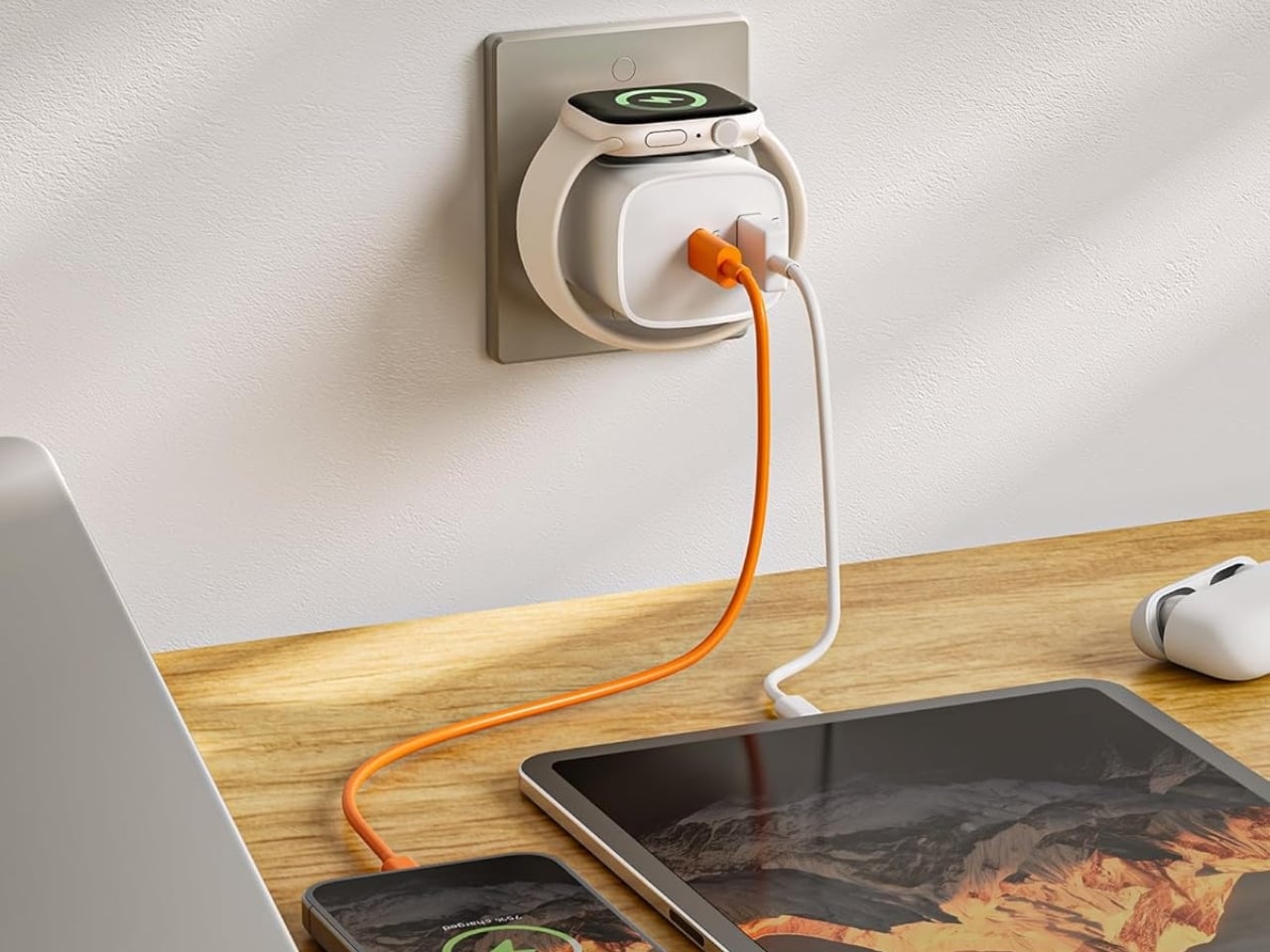
If you mostly own Apple devices or other USB-C-powered gear, the TESSAN 3-in-1 USB-C Charger may actually solve that problem for you. It’s a compact wall charger with a USB-C port, a USB-A port, and a built-in magnetic Apple Watch dock, so you only need one outlet to power up three devices at the same time.

Designer: TESSAN

This 3-in-1 charger is especially handy when you only have one outlet available but need to power up three different devices. A few years ago, this wouldn’t have been much of an issue, since most of us only had one phone to worry about. But now that owning multiple devices is the norm, charging has become an everyday hassle. What do you do when you’ve got a phone, a pair of AirPods, and a smartwatch that all need power at the same time?

TESSAN’s charger features fast charging through its 20W USB-C port, so you can get a device like the iPhone 15 up to 55 percent battery in just 30 minutes. At the same time, its 18W USB-A port can juice up an accessory simultaneously while your main device charges. It also offers broad compatibility, working with everything from the latest iPhone models to AirPods and other USB-powered devices. The real star of the show, though, is the built-in magnetic charger for your Apple Watch. There’s no separate puck or cable needed here. Instead, you get a self-aligning dock, so you won’t have to fuss with positioning your watch every time you need to charge it.

The charger comes in four finishes (white, black, pink, and blue) and is clearly designed to double as a small desk-aesthetic item, though it will likely still read as “just a charger” to most people, especially in the white colorway. Where it really shines is portability: it’s a travel-friendly device you can toss in a bag without a second thought, instead of hauling around three separate chargers that eat up space and weight in your carry-on.

How does it stack up against the competition? The most obvious comparison is Belkin, whose 3-in-1 MagSafe charging stands are the gold standard in this category. Belkin’s BoostCharge Pro and UltraCharge Pro docks charge an iPhone, Apple Watch, and AirPods wirelessly and look considerably more premium sitting on a nightstand, but they also run anywhere from $95 to $150 and require more desk real estate. TESSAN’s charger, at $20.99, skips the wireless charging bells and whistles in favor of a compact, plug-in design that’s built more for function and travel than for a styled bedside setup. If you want a showpiece charging stand for your living room, Belkin is still hard to beat. But if you want something inexpensive, pocketable, and fast enough to get you out the door in the morning, TESSAN makes a compelling case for itself as the budget-friendly, travel-first alternative.

At the end of the day, this isn’t a charger trying to be a lifestyle centerpiece. It’s a charger trying to solve a genuinely annoying, everyday problem: too many devices, not enough outlets, and not enough patience to wait in line for your turn at the power strip. For $20.99, the TESSAN 3-in-1 USB-C Charger delivers fast charging, broad compatibility, and a clever built-in Apple Watch dock in a package small enough to disappear into a laptop bag or a nightstand drawer. It won’t turn heads the way a sleek charging stand might, but it will quietly keep your phone, watch, and earbuds powered up without the usual cord chaos. For anyone juggling multiple Apple devices on a daily basis, or packing for a trip and dreading the tangle of cables, this little charger earns its spot on the “actually useful” list.

The post This $21 Charger Powers Your iPhone, Apple Watch, and AirPods at Once first appeared on Yanko Design.

  • ✇Yanko Design
  • 5 Camping Gear Picks Built for the Last Warm Weekends of the Year
    September camping arrives with a specific quality that July doesn’t have. The mornings carry an edge, the light sits lower, and every good weekend feels like one of the last ones worth using properly. What earns a spot in the car changes. It stops being about what’s most impressive and starts being about what actually works when the temperature drops and the fire needs to stay going longer than planned. This list covers five pieces of gear built for car camping and overlanding weekends: a radio
     

5 Camping Gear Picks Built for the Last Warm Weekends of the Year

19 septembre 2026 à 07:40

September camping arrives with a specific quality that July doesn’t have. The mornings carry an edge, the light sits lower, and every good weekend feels like one of the last ones worth using properly. What earns a spot in the car changes. It stops being about what’s most impressive and starts being about what actually works when the temperature drops and the fire needs to stay going longer than planned.

This list covers five pieces of gear built for car camping and overlanding weekends: a radio, a grill, a shelter, a power source, and a pillow. Each one was chosen for the same reason — not because it leads its category on a spec sheet, but because it solves a specific friction point that camping has quietly accepted for too long as part of the deal.

1. Camp Napper

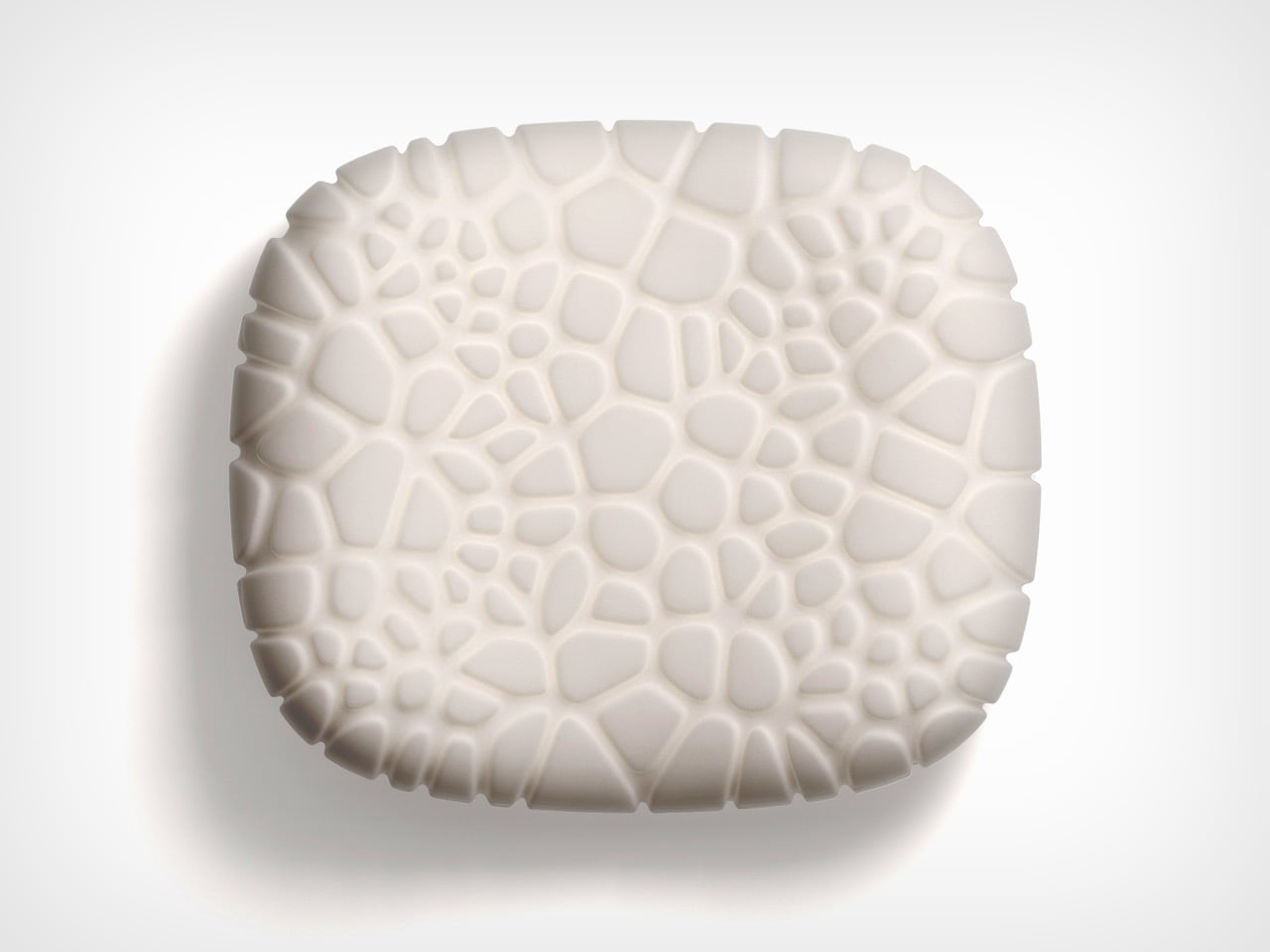
Inflatable camping pillows fail in a consistent pattern: they sound like pool floats each time you shift, lose pressure by 3 a.m., and pack into a shape that takes up more space than it deserves. Designer Chen Xu, working for RestBase, treated the camping pillow as an engineering problem instead. The Camp Napper’s surface geometry is derived from fungal spore texture, mapped through Voronoi polygon modelling across real pressure data from volunteer sleepers. Trypophobia alert: the surface is visually distinctive.

The internal structure mirrors hollow plant stem geometry, shedding mass without losing the ability to hold form under repeated compression. Total weight is 400 grams. Packed size is roughly the dimensions of a water cup. Memory foam conforms to different sleepers without nightly pressure adjustments, and anti-slip rubber particles on the base keep it in place across sleeping pads, camp chairs, and car seats equally. Note: retail price was not confirmed at time of writing — verify before purchasing.

What we like

  • Voronoi-modelled surface and bionic internal structure represent engineering at a level the camping pillow category hasn’t previously applied
  • 400 grams compressed to water-cup dimensions is genuinely packable, not just marketed as such

What we dislike

  • The cellular surface texture warrants a trypophobia alert before gifting or introducing to someone who hasn’t seen it
  • Retail price was unconfirmed at the time of writing; verify availability before purchasing

2. RetroWave 7-in-1 Radio

The RetroWave earns its place not through specifications but through atmosphere. It’s a 7-in-1 radio with solar charging and a hand-crank backup, both of which keep it running off-grid without a charged battery or a Bluetooth pairing screen. It simply works when it’s turned on, which is a lower bar than it sounds and one that a surprising amount of audio gear fails to clear by the second day of a trip.

The solar panel handles afternoon charging on any reasonable day. The hand crank handles everything else. Shortwave reception varies with terrain, so dense forest or mountain valleys will limit broadcast range — worth knowing before the trip rather than during it. For weather, local stations, and background sound that makes a campsite feel inhabited rather than silent, it performs without hesitation.

Click Here to Buy Now: $89.00

What we like

  • Solar and hand-crank charging eliminate any dependency on outlets or other devices’ battery reserves
  • Seven band frequencies in one object requiring no phone, no app, and no pairing sequence to operate

What we dislike

  • Shortwave reception degrades noticeably in heavily forested or mountainous terrain
  • The retro form tends to read as decorative to first-time buyers who haven’t yet used it in the field

3. Puffer Tent

The standard camping shelter setup involves a sequence of separate problems: tent, sleeping pad, sleeping bag, and then the 2 a.m. realignment when everything shifts. The Puffer tent collapses that sequence into a single bag. It’s an inflatable A-frame with the mattress built into the structure — shelter and bed arriving together, packed into 10 × 25 × 10 inches, with firmness adjustable from soft to firm to hard.

Founder Sam Peery spent five years prototyping this, which explains why the details feel intentional rather than approximate: valve placement, pressure labeling, pump connection. At 18.2 pounds, it’s a car camper and overlander’s tent, not a backpacker’s — a distinction the brand makes honestly. Priced at $649.99 with the electric pump included, the more instructive comparison is against a rooftop tent setup, not a $40 nylon shelter from a big box store.

What we like

  • Tent and mattress in a single integrated system removes the multi-piece setup sequence that opens most camping trips
  • Adjustable firmness from soft to hard gives sleepers real control over the sleeping surface

What we dislike

  • At 18.2 pounds, it’s unsuitable for backpacking trips where pack weight is a primary constraint
  • The $649.99 price requires genuine commitment from anyone who already owns a functional shelter

4. All-in-One Grill

Skewers of meat and green onions grilling on a small portable charcoal grill with a metal insert holding a glass bottle.

Bar grates collect residue from the first meal and carry it into every meal that follows. Cleaning them properly requires time and water that aren’t always conveniently available between the fire and the food. The All-in-One Grill’s flat tabletop surface removes that problem entirely — no gaps, no angles, nothing for debris to settle into. On a two-day trip with multiple meals, that difference compounds into something genuinely useful by Sunday morning.

Surface area fits two people cleanly, which covers the most common camping scenario without unnecessary bulk. Cooking for four or more requires staggering meals, adding real time to every camp dinner. There’s also no heat source included — this is a cooking surface that sits above a fire or stove, not a replacement for one. Within those parameters, it does its job at $449 with the kind of simplicity that makes a camp kitchen feel considered.

Click Here to Buy Now: $449

What we like

  • Flat surface cleans in a fraction of the time a traditional bar grate requires, a gain that compounds across a multi-meal trip
  • Tabletop sizing matches the most common two-person camping scenario without adding unnecessary pack weight

What we dislike

  • Cooking for groups larger than two requires staggering meals, adding real time to every camp dinner
  • No integrated heat source means it functions as a companion to a fire or stove, not a standalone cooking solution

5. Blavor PN-W43 Power Station + Camping Lantern

Most power stations are rectangular, featureless, and indifferent to the environment they’re meant to operate in. The Blavor PN-W43 builds a 4W LED lantern directly into the body, producing a 64,000mAh device barely larger than a tall water bottle that covers light and power from a single object. Five charging pathways — solar, AC, car adapter, USB-C, and micro USB — handle both off-grid and in-transit scenarios without adapter juggling.

At $135, it replaces two separate items, a lantern and a power bank, that together would cost more and occupy more space. It pairs naturally with the RetroWave Radio in this list: the radio’s solar charging handles daytime audio independently, while the Blavor manages device charging and nighttime light without overlap. At 236.8Wh, it’s sized for a weekend trip, not an extended off-grid expedition — which is exactly the use case this article is built around.

What we like

  • Integrated 4W lantern eliminates a separate light source without adding meaningful size or weight to the kit
  • Five charging pathways, including solar and AC, cover off-grid and in-transit scenarios without separate adapters

What we dislike

  • 236.8Wh capacity suits two to three night trips; longer off-grid expeditions will need more headroom than this provides
  • The cylindrical form sits awkwardly alongside flat gear in a structured pack and requires deliberate placement

The Trips You Actually Remember Are the Ones You Showed Up For

September has a way of making outdoor trips feel more deliberate than they do in the middle of summer. The season is moving and the weekends are numbered, which concentrates attention on what actually matters about being outdoors. The gear that earns a place in that context isn’t the most technically advanced option in its category. It’s the piece that makes the trip slightly better without making it harder to plan.

Each of these five picks does something specific. The RetroWave sets the tone without needing a phone. The All-in-One Grill removes the cleanup that makes cooking feel like a chore by day two. The Puffer Tent reduces setup to a single bag. The Blavor handles light and power as one object. The Camp Napper delivers actual sleep. None of them require the whole kit to change. Any one of them is enough of a reason to go.

The post 5 Camping Gear Picks Built for the Last Warm Weekends of the Year first appeared on Yanko Design.

  • ✇Yanko Design
  • MAKERphone 2.0 Assembles Like LEGO, Calls Like a Real 4G Phone
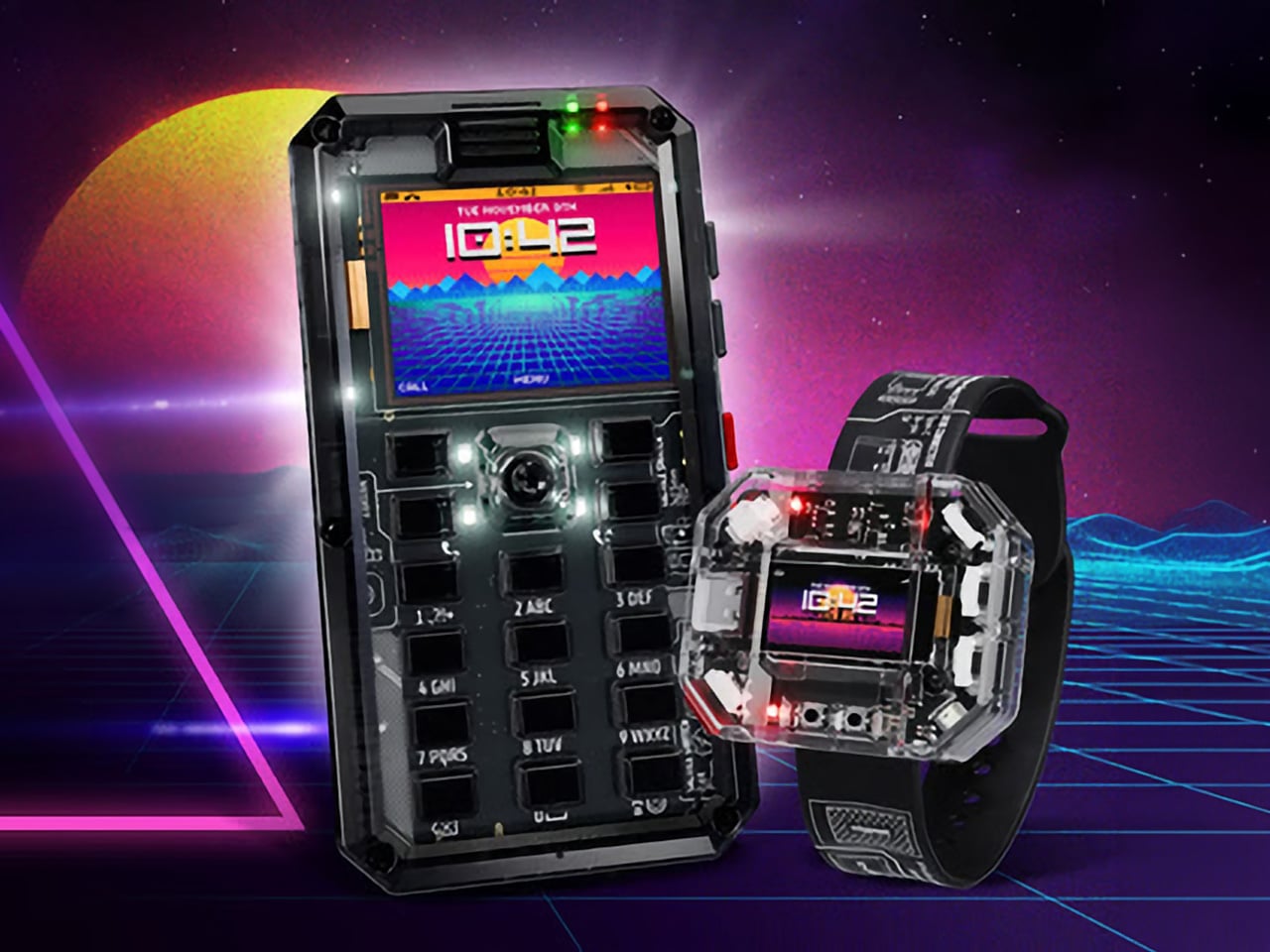
    Most phones arrive finished, sealed behind glass before you open the box. MAKERphone 2.0 flips that script. It ships as loose parts that only become a phone once you build it yourself: no soldering iron, no electronics background, just a screwdriver and about two hours. Once assembled, it’s a working 4G device that makes real calls and sends texts over a live network. The build is what really sells the design. Every piece, from the board to the display to the numpad and to the joystick, clicks
     

MAKERphone 2.0 Assembles Like LEGO, Calls Like a Real 4G Phone

Par : JC Torres
18 septembre 2026 à 21:45

Most phones arrive finished, sealed behind glass before you open the box. MAKERphone 2.0 flips that script. It ships as loose parts that only become a phone once you build it yourself: no soldering iron, no electronics background, just a screwdriver and about two hours. Once assembled, it’s a working 4G device that makes real calls and sends texts over a live network.

The build is what really sells the design. Every piece, from the board to the display to the numpad and to the joystick, clicks or screws into place. The entire endeavor is guided by an illustrated manual that reads like a LEGO instruction booklet, with video walkthroughs for anyone who gets stuck. By the time you finish, you’ve seen the processor, the modem, and the battery close, not used them.

Designer: CircuitMess

Click Here to Buy Now: $129 $160 (24% off). Hurry, only a few left! Raised over $300,000.

Pop in a nano-SIM and the phone comes alive on 4G networks, handling calls and texts like any device off a shelf. There’s a music player, a photo and video gallery, a calendar, notes, and a handful of retro games loaded onto that small color screen. What’s missing says as much: no app store, no social feed, nothing designed to keep anyone scrolling past bedtime.

That absence is the whole appeal for anyone shopping for a kid’s first phone. It calls and texts the people a child needs to reach, without opening the door to an internet’s worth of distraction. When a kid wants a new app or game, the answer isn’t downloading one; it’s building it. Screen time stops being something to limit and starts being something to spend making.

That building happens inside VibeBoy, the phone’s companion coding studio that runs on a computer. Describe an idea in plain English, like a taco dodging falling pickles, and the AI writes code sent to the phone with one click. The goal isn’t to let AI do all the thinking but to let VibeBoy teach users to read that code, question it, and eventually rewrite it.

That teaching happens across four stages built into the same app. Beginners describe what they want and watch it appear on-screen, before moving on to reading and tweaking the Python code the AI generates. Eventually, they write their own Python and C++ from a blank file. Nobody stays at one skill level long; the ladder is designed so most people climb it faster than expected.

Six snap-on modules turn the phone into something closer to a small hardware platform than a single-purpose device. A camera module captures pixelated stills and video, a bigger speaker adds volume, and a flashlight adds utility. An environment sensor reads temperature and humidity, an infrared module controls other devices, and a bare perforated board lets anyone solder a custom circuit and plug it in.

A companion smartwatch called MAKERband follows the same idea, arriving as a kit to assemble rather than a sealed gadget. Once built, it pairs with the phone over Bluetooth and also works with iOS and Android, running 15 watchfaces and five mini-games out of the box. It connects to VibeBoy, so a custom watchface, say, a pixel cat that naps after 9 PM, is a prompt away.

The company behind it, CircuitMess, has spent years building kits like this from a small studio in Croatia. It has shipped hundreds of thousands of units to customers across more than 100 countries, developed dozens of products, and earned coverage from outlets like Wired and The Verge. Just as important, the MAKERphone 2.0 isn’t a rendering or an early prototype: the hardware is finished and ready for production.

What sticks with you isn’t any single spec but the sequence. A pile of components turns into a working phone, and that phone turns into whatever its owner decides to code next. Somewhere between the last screw and the first successful call, the device stops feeling like something you bought and starts feeling like something you actually built, one working call at a time.

Click Here to Buy Now: $129 $160 (24% off). Hurry, only a few left! Raised over $300,000.

The post MAKERphone 2.0 Assembles Like LEGO, Calls Like a Real 4G Phone first appeared on Yanko Design.

  • ✇Yanko Design
  • Razer’s New Gaming Keypad Puts 31 Customizable Controls Right Under Your Hand
    A keyboard can give you plenty of keys, but when you’re gaming, you rarely use all of them. What matters is having the right controls exactly where your hand needs them. That is the idea behind Razer’s new Tartarus V2 Pro, a one-handed gaming keypad that packs 31 programmable controls into a much smaller footprint while adding a proper analog thumbstick, something most keypads don’t have. The thumbstick is one of the more interesting bits of the accessory. It uses TMR technology with anti-drift
     

Razer’s New Gaming Keypad Puts 31 Customizable Controls Right Under Your Hand

18 septembre 2026 à 20:30

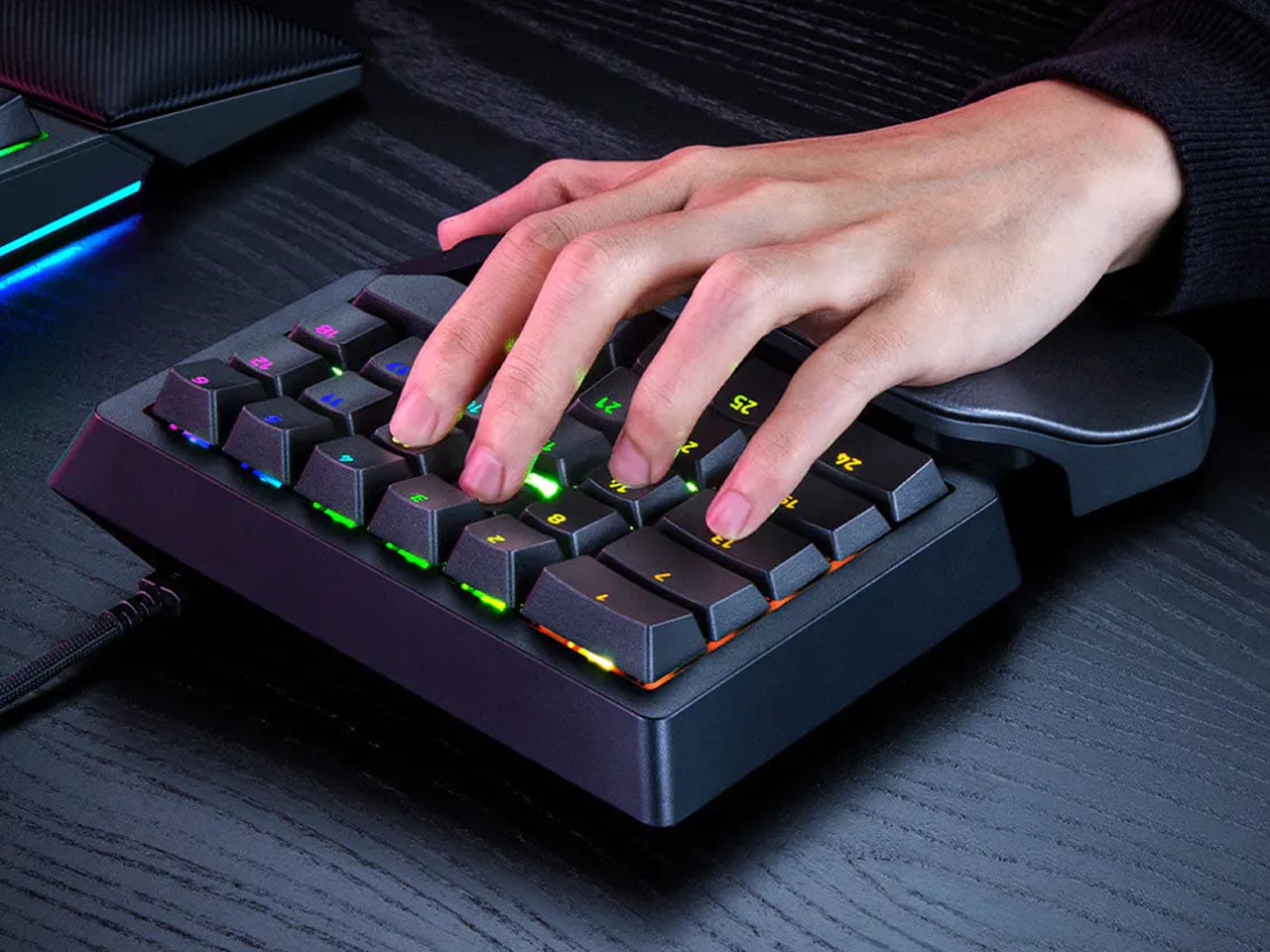
A keyboard can give you plenty of keys, but when you’re gaming, you rarely use all of them. What matters is having the right controls exactly where your hand needs them. That is the idea behind Razer’s new Tartarus V2 Pro, a one-handed gaming keypad that packs 31 programmable controls into a much smaller footprint while adding a proper analog thumbstick, something most keypads don’t have.

The thumbstick is one of the more interesting bits of the accessory. It uses TMR technology with anti-drift positioning and sits alongside three dedicated thumb buttons, giving the left hand a combination of keyboard and controller-style controls. The stick can handle movement, but it can also be assigned to other commands, making it useful for games that rely heavily on shortcuts, radial menus, or multiple simultaneous inputs.

Designer: Razer

Razer has also moved beyond the usual mechanical-switch approach, as Tartarus V2 Pro uses second-generation Analog Optical Switches that can recognize how far a key is pressed. Their actuation point can be adjusted anywhere between 0.1 and 4.0 mm, allowing the keys to be tuned for either quick, light presses or a more deliberate response. Rapid Trigger goes further by detecting upward movement as small as 0.1 mm, which can make repeated inputs feel considerably more immediate. Razer rates the switches for up to 100 million keystrokes.

There is plenty of control over how those inputs behave as well. Razer’s Advanced Input Control features include Snap Tap, Snap Flex, Dual-Keypress Priority, and Dynamic Keystroke. These allow players to change the way directional inputs work, prioritize simultaneous key presses, or assign different actions depending on how far a key is pressed. The wrist rest can slide outward and rotate from side to side, so the position of the hand can be adjusted instead of forcing it into one fixed angle. The keypad uses textured doubleshot PBT keycaps and a 5052 aluminum alloy top plate, with Chroma RGB lighting adding the familiar Razer touch.

True 8000 Hz HyperPolling is built in, while Razer Synapse handles deeper customization. Players can create up to 24 keymaps across three onboard profiles, with actuation and Rapid Trigger settings adjustable to suit different games. An onboard LED array also provides visual feedback without needing the software open.

At 211 × 159 × 49 mm and 486 grams, Tartarus V2 Pro takes up far less desk space than a conventional keyboard. Priced at $199.99, the gaming accessory changes how the player’s hand interacts with a game. Instead of reaching across a keyboard for commands, movement, and shortcuts, the controls are gathered into one compact surface designed specifically around that hand.

The post Razer’s New Gaming Keypad Puts 31 Customizable Controls Right Under Your Hand first appeared on Yanko Design.

OpenAI Launches Interactive Sponsored Agents for ChatGPT Ads

18 septembre 2026 à 19:00

OpenAI unveils Sponsored Agents for ChatGPT ads, letting users chat directly with brand AI agents. Learn about new Shopify and HubSpot integrations.

The post OpenAI Launches Interactive Sponsored Agents for ChatGPT Ads appeared first on TechRepublic.

  • ✇Korben
  • Shuffle Drummer - FL Studio n'a qu'à bien se tenir
    Mani Deïz m'a écrit il y a quelques mois pour m'annoncer qu'il avait sorti un super truc. Si vous ne connaissez pas Mani, c'est un beatmaker du rap indépendant français, du collectif Kids of Crackling. Et voilà que le monsieur débarque avec Shuffle Drummer , une boîte à rythmes gratuite vraiment géniale qui tourne dans le navigateur. C'est lui qui l'a conçue, et son compère Olivier Kauffman qui l'a programmée. Ils ont été accompagné également de Romain Mithault qui
     

Shuffle Drummer - FL Studio n'a qu'à bien se tenir

16 septembre 2026 à 09:33

Mani Deïz m'a écrit il y a quelques mois pour m'annoncer qu'il avait sorti un super truc. Si vous ne connaissez pas Mani, c'est un beatmaker du rap indépendant français, du collectif Kids of Crackling.

Et voilà que le monsieur débarque avec Shuffle Drummer , une boîte à rythmes gratuite vraiment géniale qui tourne dans le navigateur. C'est lui qui l'a conçue, et son compère Olivier Kauffman qui l'a programmée. Ils ont été accompagné également de Romain Mithault qui l'a designée et de François Frimont qui également filé un gros coup de main au passage.

Le séquenceur après un appui sur la molette : kick, caisse claire et charleys posés sur seize mesure, swing à 58 % et c'est parti pour poser... ^^

Alors certes, des boîtes à rythmes dans le navigateur, je vous en ai déjà montré, à commencer par l'émulateur de la TR-808 et de la TB-303 de Roland. Sauf que celle de Mani ne s'arrête pas aux pads et aux faders, mais dispose de deux petites nouveautés.

La première c'est le timing. Vous avez votre séquenceur seize mesure, le moteur de shuffle et de swing, et surtout un mode TIMING qui vous laisse attraper une mesure allumée et la tirer hors de la grille, au tick près. Caisse claire en retard, charleys bourrés, kick poussé devant... C'est exactement ce qu'un beatmaker passe sa vie à faire à la main pour que ça ne sonne pas trop robotique, trop "quantifié".

La deuxième, c'est le sampler. Vous balancez une boucle dedans, vous la découpez, et il y a un bouton qui retire la batterie du sample pour ne garder que la mélodie et la basse. Du coup, vous pouvez poser vos propres drums par-dessus, ce qui est également l'une des base du métier de beatmaker.

Attention quand même, c'est de la séparation harmonique-percussive à l'ancienne, et pas un gros modèle IA entraîné pour l'occasion. Le bruit se répartit donc entre les deux composantes, et ça embarque souvent les voix au passage. Du coup, sur un morceau un peu chargé, vous risquez donc de retrouver des restes...

Pour le reste, il y a de quoi vous amuser avec 16 effets sur le bus master que vous chaînez par 4, une émulation du magnéto à bande Ampex ATR-102 pour coller du grain sur l'ensemble, et une vraie chaîne de mastering derrière, compresseur, limiteur et mesure LUFS. Le MIDI fonctionne aussi, mode MPC compris, si vous avez un clavier sous la main ( moi j'ai celui-là ) lien affilié.

Et ensuite, quand vous vous serez bien amusé avec, vous aurez peut-être l'envie pressante de cliquer sur le bouton "Save" pour sauvegarder votre beat et l'exporter, soit en wav, soit exporter les stems ou le master. Et pour ça, il faudra donc vous créer un compte avec votre email.

J'ai aussi regardé l'onglet réseau pendant que je chargeais un sample, pour vérifier que tout tournait en local, et je vous confirme donc que c'est le cas.

Bref, allez poser un beat et voyez ce que ça donne.

Bravo à Mani et ses collègues pour ce chouette outil créatif !

  • ✇Korben
  • TP-Link Deco BE25-5G - Le routeur qui garde la maison
    Article en partenariat avec TP-Link - Quand on déménage, il y a ce moment bizarre où la maison est encore à vous mais où vous n'y êtes plus. L'alarme doit continuer de tourner, les caméras aussi, sauf que la ligne Internet, elle, s'en va avec le reste. Et c'est exactement ce petit souci que ce routeur est venu arranger chez moi. Le Deco BE25-5G (lien affilié) est un routeur mesh Wi-Fi 7 avec un modem cellulaire dans le ventre. Je l'ai posé dans mon ancienne maison, branc
     

TP-Link Deco BE25-5G - Le routeur qui garde la maison

15 septembre 2026 à 04:00
  • Article en partenariat avec TP-Link -

Quand on déménage, il y a ce moment bizarre où la maison est encore à vous mais où vous n'y êtes plus. L'alarme doit continuer de tourner, les caméras aussi, sauf que la ligne Internet, elle, s'en va avec le reste. Et c'est exactement ce petit souci que ce routeur est venu arranger chez moi.

Le Deco BE25-5G (lien affilié) est un routeur mesh Wi-Fi 7 avec un modem cellulaire dans le ventre. Je l'ai posé dans mon ancienne maison, branché sur un onduleur, avec une carte SIM dedans... et c'est tout. Comme ça j'ai pas eu besoin de garder mon abonnement fibre ouvert pendant des mois pour trois caméras et ma centrale d'alarme.

La nano SIM Bouygues engagée sous le boîtier, numéro de série et QR code masqués

Pour la mise en route, y'a rien à raconter, et c'est un compliment. On glisse la nano SIM dans la fente sous l'appareil, on lance l'app Deco, on suit le process d'install et c'est plié. Et si vous avez déjà des Deco, c'est encore plus rapide puisque celui-ci se marie très bien avec tous les modèles de la gamme.

Du coup, j'ai ressorti certains de mes vieux Deco pour les mettre en satellite et pousser le signal jusqu'au fond du terrain, là où une caméra ne captait pas grand-chose. Ça a très bien fonctionné !

Le dos de l'emballage, avec le détail des ports et du tiroir nano SIM

Côté connectique, on y trouve deux ports 2,5 Gbps et un port 1 Gbps qui basculent entre WAN et LAN tout seuls, plus un port USB dont je n'ai rien fait mais sur lequel j'aurais pu brancher une clé ou un disque pour avoir un peu de stockage partagé. Ensuite, dedans, on trouve pas moins de 8 antennes 5G/4G/3G et trois antennes Wi-Fi. Hé oui, tout ça rentre dans le cylindre blanc de 118 × 118 × 198 mm et ne consomme que 25 W au maximum.

Le constructeur, lui, annonce 4,67 Gbit/s en descendant côté cellulaire, et 2 882 Mbit/s sur le 5 GHz plus 688 Mbit/s sur le 2,4 GHz côté Wi-Fi. Alors comme d'habitude, ces chiffres-là sont des plafonds de classe de modem et personne ne les verra jamais sur son écran. Mais ce que j'ai constaté, moi, c'est que ça a tenu durant tout mon déménagement, que les vidéos en live des caméras étaient clean et que je n'ai donc pas eu besoin d'y retourner en urgence.

TP-Link annonce quand même une connexion combinée, sans fil + filaire en même temps pour mutualiser la 5G et la fibre chez vous... sauf que la fonction n'est pas encore prise en charge par la version actuelle du firmware, donc faudra attendre encore un peu.

Le boîtier a aussi deux prises d'antenne externe à l'arrière, du coup si votre maison est dans un creux et que la 5G y arrive à peine, vous pourrez lui adjoindre des antennes en plus ! Ils ont vraiment pensé à tout !

Un mot encore pour ceux qui voudraient monter le même bricolage de surveillance alarme + caméra en remote. Derrière une SIM mobile, vous n'avez pas d'adresse IP publique, donc oubliez la redirection de port vers un enregistreur local. Mes caméras passaient donc par le cloud de leur constructeur et c'est pour ça que ça a fonctionné. Surveillez aussi votre forfait, parce que des caméras qui poussent de la vidéo en continu, ça peut avaler des gigas bien plus vite qu'on ne croit.

Reste le prix... 399,99 € sur la boutique officielle (lien affilié), en promotion donc (le prix d'origine étant de 429,99 €). C'est cher pour un routeur, c'est vrai mais nettement moins que le BE65-5G que j'avais testé , et si vous avez une maison à garder connectée parce que la fibre ne passe pas ou parce que vous n'en aviez pas spécialement besoin, c'est un super boîtier avec les dernières techno Wi-Fi, des tas de paramètres super cools (contrôle parental, QoS, portail captif, VPN local...etc) sur lequel tous les appareils de la maison pourront se connecter en totale transparence.

  • ✇Korben
  • Test Thermal Master P3 : voir ce qui chauffe avec son smartphone
    - Contient des liens affiliés Amazon - Vous savez ce que c'est une caméra thermique ? Oui, probablement, mais au cas où, c'est un appareil qui affiche les écarts de température sous forme de couleurs, pour chercher un défaut d'isolation autour d'une fenêtre par exemple ou repérer un composant qui chauffe trop. Avec la Thermal Master P3, cette image apparaît sur votre téléphone, grâce à un petit module branché à sa prise USB-C. Il faut d'abord install
     

Test Thermal Master P3 : voir ce qui chauffe avec son smartphone

14 septembre 2026 à 11:10
- Contient des liens affiliés Amazon -

Vous savez ce que c'est une caméra thermique ? Oui, probablement, mais au cas où, c'est un appareil qui affiche les écarts de température sous forme de couleurs, pour chercher un défaut d'isolation autour d'une fenêtre par exemple ou repérer un composant qui chauffe trop. Avec la Thermal Master P3, cette image apparaît sur votre téléphone, grâce à un petit module branché à sa prise USB-C.

Il faut d'abord installer l'application du fabricant, puis connecter la caméra à un smartphone Android ou à un iPhone compatible. L'adaptateur Lightning est dans la boîte pour les anciens iPhone, et l'alimentation passe par le téléphone : la P3 n'a aucune batterie à recharger avant de s'en servir. C'est franchement pratique.

Son boîtier en métal mesure environ six centimètres de long, avec un étui de protection pour le rangement. J'aime bien la présence d'une rallonge USB-C de 50 cm dans le paquet, parce qu'on peut tourner la caméra vers un coin difficile d'accès tout en gardant le téléphone dans une position confortable.

La bague dorée autour de l'objectif règle la netteté. Vous la tournez jusqu'à distinguer correctement ce que vous regardez, avec la possibilité d'approcher la caméra très près de n'importe quel appareil, pour observer ses petits composants. C'est clairement intuitif, même si vous n'avez jamais utilisé ce genre de truc avant.

Le capteur de 256 x 192 pixels fournit 25 images par seconde. L'image permet de localiser les zones chaudes sans trop de difficulté, et vous pouvez afficher la température d'un point ou rechercher les valeurs les plus chaudes et les plus froides dans une zone sélectionnée.

Il y a aussi un mode X3 qui agrandit l'image à 512 x 384 pixels par traitement logiciel, sans augmenter la résolution du capteur, et peut ralentir l'affichage selon le téléphone utilisé. C'est moins indispensable mais ça peut dépanner.

La plage de mesure annoncée s'étend de -20 à 600 °C, mais attention, la caméra mesure la température des surfaces, elle ne voit pas à travers les murs.

Une zone froide est donc une bonne piste pour rechercher un problème d'isolation, mais il faut comprendre son origine avant de décider de travaux, en comparant les différentes zones du logement plutôt qu'en interprétant une seule image.

En ce moment le produit est à 299 euros sur Amazon , contre 349 euros en général, si vous avez déjà considéré de vous équiper, c'est le bon moment. C'est par ici .

  • ✇Korben
  • Antro pique ?
    - Article rédigé par l'ami Remouk (DansTonChat) - Merci à lui - Un univers dystopique contrôlé par un gouvernement totalitaire. Des robots, drones et caméras de surveillance qui épient les faits et gestes de la population. Heureusement il ne s'agit pas du futur de notre société (quoi que ?) mais de celui du jeu ANTRO que je voulais vous présenter. Parce qu'au-delà de l'univers plutôt cool à la Blade Runner, c'est un petit jeu au gameplay plut
     

Antro pique ?

Par : Remouk
14 septembre 2026 à 09:33
- Article rédigé par l'ami Remouk (DansTonChat) - Merci à lui -

Un univers dystopique contrôlé par un gouvernement totalitaire. Des robots, drones et caméras de surveillance qui épient les faits et gestes de la population. Heureusement il ne s'agit pas du futur de notre société (quoi que ?) mais de celui du jeu ANTRO que je voulais vous présenter.

Parce qu'au-delà de l'univers plutôt cool à la Blade Runner, c'est un petit jeu au gameplay plutôt original et super fun. Basiquement, c'est un jeu de plate-forme type "runner", dans lequel il faut courir et éviter les obstacles. L'originalité vient du fait que 1) l'univers et les décors sont bien travaillés avec pas mal de choses qui se passent en arrière plan, 2) les mouvements sont calés sur la musique.

Ce clic autorise une connexion à Google : adresse IP transmise et traceurs possibles. En savoir plus Voir cette vidéo sur YouTube

C'est fluide et c'est juste trèèès satisfaisant. :D Les musiques en question sont vraiment cools, et taillées sur mesure pour les différents niveaux (ou alors c'est l'inverse ?). L'histoire n'est pas révolutionnaire mais on s'attache à notre petit livreur / graffeur. Ajoutez à cela un peu d'exploration avec notamment quelques secrets bien planqués, quelques mini-jeux et énigmes, et vous devriez passer, comme moi, un bon moment.

Sachez tout de même que ce moment est de courte durée : comptez environ 1h20 pour faire l'aventure de bout en bout. Ce n'est pas un défaut en soi mais il vaut mieux le savoir en avance. 😅 Je vous conseille donc de l'attraper quand il sera en promo, car le prix initial de 15€ me semble un peu exagéré.

Antro est disponible sur Steam , mais aussi XBOX et Playstation

  • ✇Korben
  • Tomb Raider peut tourner sur un ESP32-P4
    Tomb Raider tourne désormais sur une carte de développement équipée d'un ESP32-P4, un microcontrôleur destiné à piloter des appareils électroniques. Le développeur Alejandro Villegas Alonso, connu sous le pseudo alexkid77, y a adapté OpenLara, le moteur libre qui permet de faire fonctionner le premier jeu avec ses données d'origine. Pas d'émulateur PlayStation ici. Le programme ne cherche pas à reproduire le fonctionnement complet de la console : il exécute une version du moteur adaptée à cette
     

Tomb Raider peut tourner sur un ESP32-P4

14 septembre 2026 à 05:14

Tomb Raider tourne désormais sur une carte de développement équipée d'un ESP32-P4, un microcontrôleur destiné à piloter des appareils électroniques. Le développeur Alejandro Villegas Alonso, connu sous le pseudo alexkid77, y a adapté OpenLara, le moteur libre qui permet de faire fonctionner le premier jeu avec ses données d'origine.

Pas d'émulateur PlayStation ici. Le programme ne cherche pas à reproduire le fonctionnement complet de la console : il exécute une version du moteur adaptée à cette puce, avec le calcul des images assuré par le processeur. Le travail porte donc sur le jeu lui-même et sur son utilisation des ressources disponibles.

Ce clic autorise une connexion à Google : adresse IP transmise et traceurs possibles. En savoir plus Voir cette vidéo sur YouTube

La carte retenue s'appelle ESP32-P4-Function-EV-Board. La configuration documentée dispose de deux cœurs à 400 MHz, de 16 Mo de mémoire flash pour stocker le programme et de 32 Mo de mémoire de travail externe. Il faudra ce matériel ou un sérieux travail d'adaptation, pas simplement ressortir n'importe quel ESP32 oublié dans un tiroir.

L'image est calculée en 320 x 240 pixels, puis agrandie pour remplir un écran de 1 024 x 600 pixels. Cette seconde opération utilise le PPA, l'accélérateur de traitement des pixels intégré à la puce, ce qui évite de demander au moteur de dessiner toute la scène dans la définition de l'écran.

Le dépôt annonce 30 images par seconde. Le résultat est assez réjouissant pour une carte qui n'a pas été conçue comme une console de salon.

L'adaptation prend aussi en charge le son, les sauvegardes sur carte microSD et un compteur d'images par seconde que l'on peut afficher avec F12. Un clavier USB est nécessaire pour jouer : les flèches servent aux déplacements, et la barre d'espace permet de sauter.

Pour préparer la carte, le développeur indique d'utiliser ESP-IDF, l'environnement de développement d'Espressif, en version 5.4 ou plus récente. Il faut compiler le projet, puis transférer le programme sur le microcontrôleur. Du coup, ce téléchargement vise surtout ceux qui aiment déjà bricoler du matériel.

Les fichiers du jeu doivent être ajoutés séparément dans un dossier data sur la microSD. OpenLara fournit le moteur, pas les niveaux et les images du Tomb Raider commercial, et le portage ne fonctionne pas sans ces données. La documentation précise aussi que les sauvegardes et le cache sont écrits sur cette carte.

Perso j'aime bien ces projets qui donnent un nouveau terrain de jeu aux vieux moteurs.

Source : Hackaday

  • ✇Korben
  • CanoFlash - Du Wi-Fi sur votre GBA (mais pas pour jouer, snif)
    Un développeur espagnol, Emilio Cano Pérez, vient de publier le SDK de son CanoFlash, un petit boîtier monté sur un XIAO ESP32-S3 qui se branche sur le port Link d'une Game Boy Advance. Cela ne nécessite aucune modification de la console, ni de fer à souder (cool !), et une fois branché, ça permet à la console de récupérer la connexion Wi-Fi qu'elle n'a jamais eue ! Alors comment ça fonctionne ? Hé bien le truc démarre en mode Multiboot et pousse sa propre application dans la RAM de la console.
     

CanoFlash - Du Wi-Fi sur votre GBA (mais pas pour jouer, snif)

14 septembre 2026 à 03:42

Un développeur espagnol, Emilio Cano Pérez, vient de publier le SDK de son CanoFlash, un petit boîtier monté sur un XIAO ESP32-S3 qui se branche sur le port Link d'une Game Boy Advance. Cela ne nécessite aucune modification de la console, ni de fer à souder (cool !), et une fois branché, ça permet à la console de récupérer la connexion Wi-Fi qu'elle n'a jamais eue !

Alors comment ça fonctionne ? Hé bien le truc démarre en mode Multiboot et pousse sa propre application dans la RAM de la console. Ensuite c'est lui qui se coltine la gestion de tout le réseau, pendant que la GBA se contente d'échanger avec lui des paquets de taille fixe. En clair, un jeu n'a pas à connaître l'existence du Wi-Fi. Il parle juste au boîtier à travers le SDK dispo sur GitHub, qui lui apporte le matchmaking public, les salons privés et des parties jusqu'à huit joueurs.

Ce clic autorise une connexion à Google : adresse IP transmise et traceurs possibles. En savoir plus Voir cette vidéo sur YouTube

Sauf qu'avant de sortir votre Game Boy du tiroir, il faut lire la FAQ du créateur parce qu'il y écrit que le jeu en ligne fonctionnera uniquement dans les jeux qui intègrent son SDK, et qu'il ne transforme pas automatiquement le multijoueur Link des jeux existants en multijoueur Internet. Roooh, c'est dommage quand même. Ça veut donc dire que votre cartouche collante de Pokémon Rubis ne fonctionnera pas via le Wi-Fi... Pour jouer, il vous faudra donc des homebrews compilés avec le kit, plus un boîtier et une console par joueur.

Maintenant, si c'est vraiment vos vieilles cartouches que vous voulez faire jouer à distance, l'appareil qui fait ça, c'est le GB-Link USB dont je vous ai parlé en juin . Lui se fait passer pour un câble Link, se relie en USB-C à un ordinateur ou à un smartphone Android, et un client web différent parle le protocole de chaque jeu : les échanges Pokémon des trois premières générations, les parties d'Advance Wars. Dans le même genre, ChisLink est un projet à monter soi-même dont le relais transporte les paquets des jeux compatibles avec l'adaptateur sans fil de Nintendo.

Cette limite du CanoFlash n'est d'ailleurs pas une bizarrerie de conception, parce que l'adaptateur sans fil sorti par Nintendo en 2004, c'était exactement pareil. Il était fonctionnel avec seulement à 46 jeux compatibles, tous sortis entre 2004 et 2006. Ça ne remplaçait pas non plus le câble Link.

Du coup, le CanoFlash, son vrai métier, c'est surtout de vous permettre de parcourir vos homebrews et vos sauvegardes personnelles via Wi-Fi, de flasher le jeu de votre choix sur votre cartouche réinscriptible et de synchroniser les sauvegardes, le tout sans PC.

Par contre, cette cartouche réinscriptible compatible dont je vous parle, à base de S29GL256, elle est indispensable et elle n'est ni incluse ni vendue dans la campagne Kickstarter CanoFlash. Même chose pour la batterie, même si le boîtier accepte de tourner sur USB-C. Donc comptez le prix de la cartouche en plus avant de vous emballer, et sachez aussi que la campagne Kickstarter n'est toujours pas lancée à l'heure où j'écris ces lignes.

Le SDK, lui, est déjà là , et il se compile sans avoir le moindre boîtier sous la main. Bref, de quoi préparer votre jeu tranquillement en attendant que le matériel existe...

Source : XDA Developers

  • ✇Yanko Design
  • ELEGOO DAY 2026 Invites the World to Create, Share, and Grow With Nexprint
    Every idea deserves somewhere to go, and for a lot of 3D printing hobbyists, that place has been missing. ELEGOO wants to change that with ELEGOO DAY 2026, launching September 10, its annual celebration built around bringing creators together on Nexprint. This year folds in a creator fund, a design contest, new model generators, and a sale, all pointing toward one goal: getting more people to create, share, and be part of a growing community. Most of that action happens on Nexprint, ELEGOO’s op
     

ELEGOO DAY 2026 Invites the World to Create, Share, and Grow With Nexprint

Par : JC Torres
13 septembre 2026 à 21:45

Every idea deserves somewhere to go, and for a lot of 3D printing hobbyists, that place has been missing. ELEGOO wants to change that with ELEGOO DAY 2026, launching September 10, its annual celebration built around bringing creators together on Nexprint. This year folds in a creator fund, a design contest, new model generators, and a sale, all pointing toward one goal: getting more people to create, share, and be part of a growing community.

Most of that action happens on Nexprint, ELEGOO’s open-source 3D model platform, built on the belief that creation should be open to anyone with an idea. Think of it as the hub tying everything together: models get uploaded, tools get discovered, and creators get a real reason to keep contributing. That shift is slowly turning ELEGOO from a printer maker into a community built around making.

Designer: ELEGOO

Click Here to Submit Now | Click Here To Buy Now.

The centerpiece is the new $1,000,000 Creator Fund, ELEGOO’s way of recognizing and rewarding people for sharing 3D models on Nexprint, not just paying for output but investing in the community itself. Rewards start with your very first submission, no waiting for likes or rankings to climb first. Individual models can earn up to $100, and stacking incentives push that ceiling to $300 per model.

There’s more structure built in too. Extra rewards unlock at 3, 5, 10, 20, and 50 submissions, so consistency pays off as much as any single hit model. Monthly rankings hand exclusive prizes to the top five creators, including actual ELEGOO printers, while a new bonus-card mechanism can push individual payouts even higher. It feels less like a marketing gimmick and more like a system built to grow alongside its creators.

From September 10 to October 30, ELEGOO runs the MakeItReal contest on Nexprint, and the premise couldn’t be simpler: take a flat idea, in whatever form it takes, and give it dimension, no design background required. There’s no theme to chase, just that shift from flat to physical. Winning entries will be picked and announced on November 20, each earning up to $300 in ELEGOO coupons for the trouble.

The idea behind it is almost sentimental for a hardware company, echoing ELEGOO’s belief that 3D printing works best as a creative outlet, not a manufacturing shortcut. A photo on your phone or a doodle in a notebook can end up as something you actually hold, not just imagine. Creators don’t need advanced modeling skills to compete, either. Nexprint’s upcoming Text and Image to 3D Generator lets anyone shape a contest entry straight from a photo or a written description, no CAD needed.

That generator is one of three new tools ELEGOO just added to Nexprint, alongside a Vase Generator and a Nameplate Generator, each built to make creation easier for beginners and veterans alike. All three do the same basic job: they take a drawing, a photo, or a few typed words and turn it into a printable model within minutes. None of it replaces real design skill, but it removes the blank-page problem that stops many from starting.

Put it together, and the loop makes sense. Someone sketches an idea, runs it through a generator, shares the result on Nexprint, enters it into MakeItReal, and picks up Creator Fund rewards along the way. None of those steps demand deep technical skill. This is the connected ecosystem ELEGOO keeps referencing, not a slogan, but an actual sequence anyone can walk through starting today.

All this activity lines up with the ELEGOO DAY Sale, with discounts of up to 54% on selected products, running September 8 through 29 with regional pricing, ELEGOO’s way of putting that ecosystem into more hands. The Saturn 4 Ultra 16K brings high-resolution resin printing for detailed sculptures, jewelry prototypes, and miniatures. The Centauri Carbon 2 Combo handles multicolor prints for home décor and personalized gifts. The Mars 5 Ultra offers a smaller resin option with sharp detail for tight workspaces.

What stands out about ELEGOO DAY 2026 isn’t any single feature; it’s the shape of the whole thing. A hardware company built its business on printers, then quietly built systems for sharing, competing, and earning that turn a machine into a habit. For ELEGOO, that’s what building an ecosystem means: more chances for people to create, connect, and turn ideas into something real.

Click Here to Submit Now | Click Here To Buy Now.

The post ELEGOO DAY 2026 Invites the World to Create, Share, and Grow With Nexprint first appeared on Yanko Design.

  • ✇Yanko Design
  • This Supercharged Grand Tourer Was Built Using a 90-Year-Old Metal-Shaping Tool
    There is a tool called an English wheel that has been shaping aluminum car panels since roughly the 1930s. It is a big metal hoop with a roller in the middle, and you push sheet metal through it by hand until it curves the way you want. It sounds like something you would find in a blacksmith’s shed, not in the workshop of a car aiming for 1,200 horsepower. Yet that is exactly the tool Coventry Metalcraft used to hand-form the body of the new Jensen Interceptor GTX, alongside laptops running com
     

This Supercharged Grand Tourer Was Built Using a 90-Year-Old Metal-Shaping Tool

13 septembre 2026 à 13:20

The GTX in Riviera blue, all splitter, vents, and a rear wing that towers over the roofline.

There is a tool called an English wheel that has been shaping aluminum car panels since roughly the 1930s. It is a big metal hoop with a roller in the middle, and you push sheet metal through it by hand until it curves the way you want. It sounds like something you would find in a blacksmith’s shed, not in the workshop of a car aiming for 1,200 horsepower. Yet that is exactly the tool Coventry Metalcraft used to hand-form the body of the new Jensen Interceptor GTX, alongside laptops running computational fluid dynamics software. Old-world muscle meets new-world math, and somehow both sides showed up to the same car without arguing.

Jensen International Automotive unveiled the GTX in early September, and it is a strange beast by design. It is Jensen’s first ever clean-sheet car, built to preview a whole new Interceptor lineup, and it gets there using ten English wheels worked by more than 30 artisans, alongside digital design data from studio Avant Design and mixed-reality checks nobody in 1966 could have dreamed of. The result is a 960 bhp supercharged V8 grand tourer wearing hand-beaten aluminum panels shaped partly by algorithms. Britain’s oldest car-forming trick just got a very modern wingman.

Designer: Avant Design

Under the hood: a 6.8-liter supercharged V8 from Late Model Engines, wrapped in carbon and gold foil.

Long bonnet, fastback roofline, and a wing that ruins the original Interceptor's silhouette on purpose.

Avant Design, based out of Royal Leamington Spa, is the studio responsible for translating the original 1966 Interceptor’s proportions into something that reads as contemporary rather than costume. The long bonnet survives, the tightly drawn greenhouse survives, and the wraparound rear glass that made the original such a distinctive shape is still there, even if a towering rear wing now partially blocks the view of it. What is new is the front end, with slim horizontal LED lighting and enormous carbon intakes replacing the old car’s chrome-heavy face. Interestingly, this is not Avant’s first crack at reimagining this exact silhouette. Back in 2023, the studio quietly published a concept called the E-Ceptor, an electric take on the Interceptor with reworked rear glazing and a fresh grille graphic. The GTX effectively took that speculative sketch and gave it a supercharged V8 instead of a battery pack.

Diffuser, quad exhausts, and a wing built for lap times.

A full-width taillight and a wing pulled straight from GT3 territory.

The aluminum decision, both for the chassis and the body, was not driven by sentiment. David Duerden, Jensen International’s managing director, put it plainly when explaining why the GTX skipped carbon fiber entirely. He does not want the car riding like “a skateboard,” which is a fair concern given how punishing a stiff carbon tub can feel on a road built for a Sixties grand tourer, not a modern track special. Aluminum chassis structures are also considerably cheaper to produce in small batches, since they avoid the expensive tooling that carbon fiber demands before a single panel gets made. For a car expected to sell in the dozens rather than the thousands, that economic math matters more than bragging rights about carbon weave.

No screen, just a MoTeC dash, roll cage, and switchgear built for business.

That economic logic is exactly why the English wheel earns its keep here. Hand-forming panels sidesteps the tooling costs that would sink a low-volume carbon fiber program before it ever reached a customer. Coventry Metalcraft’s artisans still shape every piece the old-fashioned way, but they are working from digital surfaces that Avant Design refined using CFD modeling, chasing the 350 kilograms of downforce the GTX needs to behave itself at speed. It is a genuinely odd combination of a seventy-year-old forming technique and simulation software that did not exist when the original Interceptor left the Kelvin Way factory. Jensen is betting its entire comeback on that combination holding together, and so far, from what we have seen, it seems to be working rather beautifully.

The post This Supercharged Grand Tourer Was Built Using a 90-Year-Old Metal-Shaping Tool first appeared on Yanko Design.

  • ✇Yanko Design
  • The Bali Sculpture That Finally Makes Overshot Views Feel New
    Bali has a photo problem. Not a bad one, exactly, but a familiar one: the same rice terrace, the same infinity pool angle, the same swing shot dangling over the same jungle canopy, reposted by a few million travelers who all found the identical spot through the same map pin. When a landscape gets photographed enough times, it starts to flatten out in your memory before you’ve even seen it in person. You arrive, and it feels like déjà vu instead of discovery. That’s the quiet problem Vincent Ler
     

The Bali Sculpture That Finally Makes Overshot Views Feel New

13 septembre 2026 à 11:20

Bali has a photo problem. Not a bad one, exactly, but a familiar one: the same rice terrace, the same infinity pool angle, the same swing shot dangling over the same jungle canopy, reposted by a few million travelers who all found the identical spot through the same map pin. When a landscape gets photographed enough times, it starts to flatten out in your memory before you’ve even seen it in person. You arrive, and it feels like déjà vu instead of discovery.

That’s the quiet problem Vincent Leroy’s new installation seems to answer, even if he’d probably never put it in those terms. Tucked into the hills of Munduk, “Eccentric Lenses” is a field of Fresnel lenses mounted on posts, catching the wind and spinning on axes that aren’t centered, so nothing ever settles into a repeatable frame. Point a camera at it in the morning and again at dusk and you won’t get the same picture twice, not because the location changed, but because the lenses never stop rearranging it for you.

Designer: Vincent Leroy

Fresnel lenses are the flat, ridged discs you’d recognize from old lighthouses or projector screens, built to bend light without the bulk of a curved glass lens. Leroy has been experimenting with them for years, but this piece feels like his most site-specific use of the idea. Instead of distorting a studio backdrop, he’s pointed the lenses at Bali’s actual terrain, its rice fields, its distant volcanic peaks, its low clouds, and let the wind do the editing. Every gust nudges a lens a few degrees, and the mountain behind it splits, doubles, or slides sideways for a second before reassembling.

What I appreciate here is the restraint. There’s no motor, no app, no LED strip pretending to be magic. It’s just optics and weather, working together in a way that feels almost stubbornly analog for 2026. We’ve spent the better part of a decade being told that wonder needs a screen attached to it, that a landscape only becomes interesting once it’s been filtered, looped, or turned into a Reel. Leroy’s installation goes the opposite direction. It takes the one thing every travel photo tries to eliminate, unpredictability, and makes it the entire point.

There’s a reason kinetic art tied to natural forces keeps resurfacing right now, from wind-driven sculptures to mirror installations chasing the sun across a field. People are a little exhausted by content that behaves exactly the way it’s supposed to. A piece that changes because the wind decided to pick up speed is refreshing precisely because nobody, including the artist, can fully predict what it’ll look like an hour from now. That unpredictability used to be considered a flaw in outdoor art. Here it’s the mechanism.

It also helps that Leroy didn’t ask Bali’s landscape to hold still for him. The lenses don’t compete with the rice terraces or try to outshine the mountains; they just keep reintroducing you to them. That’s a small but telling choice. So much of contemporary installation art wants to be the main event, the thing you drove out to see. This piece works because it insists the actual landscape was always worth a second look, it just needed a nudge to prove it.

I don’t think “Eccentric Lenses” is trying to solve tourism fatigue or fix anyone’s relationship with their camera roll. But it’s hard not to read it that way anyway, especially watching footage of a single mountain peak splintering into five overlapping versions of itself, then quietly reforming into one. For a moment, an overexposed view of Bali stops feeling used up. It just feels new again, which might be the most useful trick any piece of art can pull off right now.

The post The Bali Sculpture That Finally Makes Overshot Views Feel New first appeared on Yanko Design.

  • ✇Yanko Design
  • RHYTHM Is the Walkman the Smartphone Era Forgot to Build
    Smartphones turned music into just another notification competing for attention, a song interrupted by a text, an album broken up by a calendar alert. RHYTHM exists to undo that arrangement entirely, building a dedicated listening device from real audio components instead of borrowing a phone’s guts and bolting on a headphone jack. It’s a from-scratch digital audio player designed around one job: playing music properly, without a screen demanding anything else from you. That commitment starts w
     

RHYTHM Is the Walkman the Smartphone Era Forgot to Build

Par : JC Torres
12 septembre 2026 à 06:30

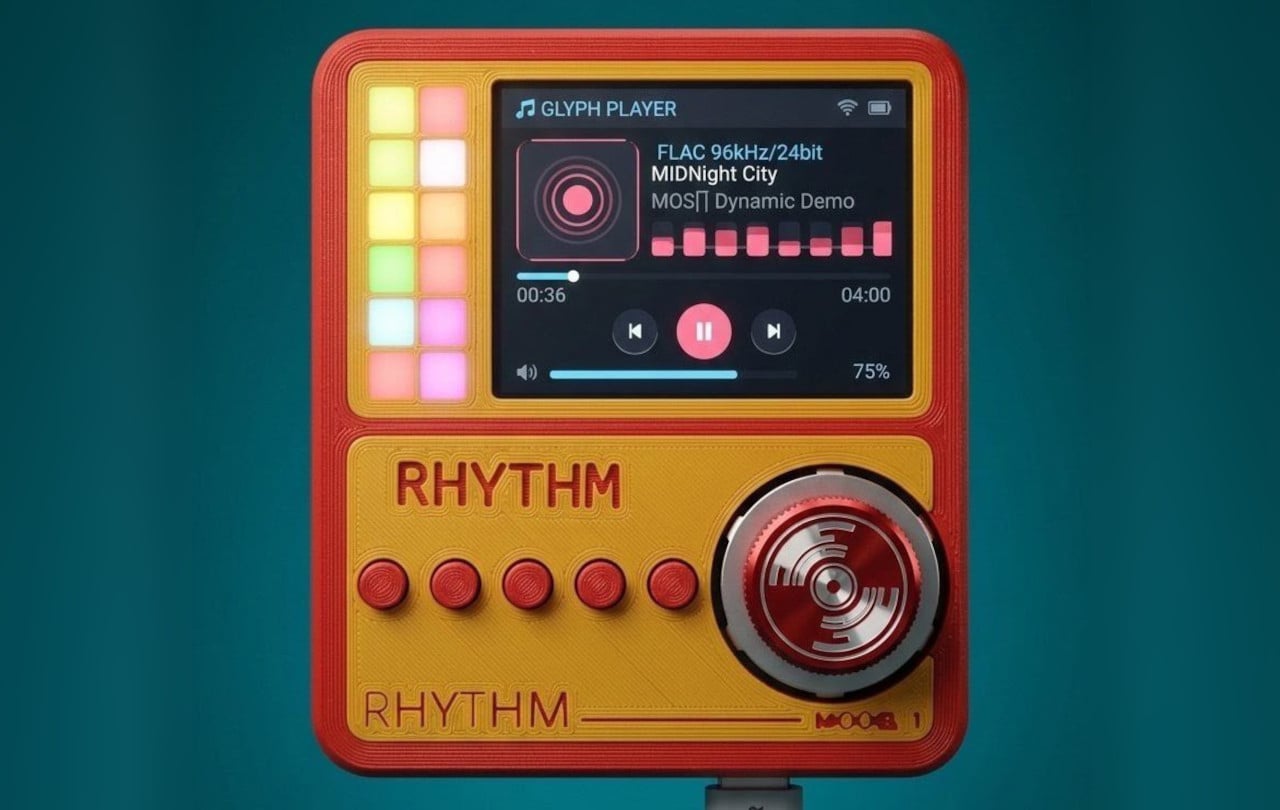
Smartphones turned music into just another notification competing for attention, a song interrupted by a text, an album broken up by a calendar alert. RHYTHM exists to undo that arrangement entirely, building a dedicated listening device from real audio components instead of borrowing a phone’s guts and bolting on a headphone jack. It’s a from-scratch digital audio player designed around one job: playing music properly, without a screen demanding anything else from you.

That commitment starts with what’s actually driving the sound. Rather than leaning on an all-in-one audio codec chip the way most budget players do, RHYTHM routes music through a genuine ESS SABRE DAC, the same category of chip found in dedicated hi-fi gear, paired with a discrete amplifier stage rather than a shortcut solution. An ESP32-S3 handles the file parsing and processing, but the actual sound reproduction runs through hardware built specifically for that job alone.

Designer: Mithilesh Gupta Konda

The headphone output makes the clearest case for why any of this matters. Instead of splitting one internal signal across a single jack, RHYTHM runs two completely independent, actively buffered 3.5mm outputs, each driven by its own dedicated amplifier chip. Two people can plug in two entirely different pairs of headphones, and each gets a full, uncompromised signal, no shared circuit quietly degrading whichever connection came second.

Keeping that signal clean required rethinking the power supply as much as the audio path. RHYTHM physically separates its digital logic and high-frequency switching lines from the analog circuitry that actually shapes the sound, regulating each side through its own dedicated, ultra-low-noise power regulator. It’s an unglamorous decision that never shows up in a spec sheet screenshot, but it’s exactly the kind of choice that determines whether quiet passages in a recording stay quiet.

Physical control gets the same attention. A precision mechanical rotary encoder handles navigation alongside a set of tactile buttons, giving the whole interface a hands-on quality that a touchscreen simply can’t replicate. Paired with a compact 2-inch color display, the device reads less like a shrunken phone and more like a purpose-built instrument, something meant to be operated by feel in a pocket or a bag without needing to look at it.

A microSD slot rounds out the practical side, storing lossless files locally rather than depending on a streaming connection or app ecosystem. That local-first approach extends the project’s entire philosophy: RHYTHM isn’t trying to replace a phone’s convenience. Instead, it’s opting out of that convenience on purpose, trading constant connectivity for a listening experience built around a single, uninterrupted task.

The post RHYTHM Is the Walkman the Smartphone Era Forgot to Build first appeared on Yanko Design.

  • ✇Korben
  • Le Deathray - Le shader WebGPU qui fait redémarrer votre Mac
    Auberon López vient de publier sur son blog un bouton qui freeze complètement les Mac à partir d'un simple clic dans un navigateur. Il a baptisé ça le Deathray (le rayon de la mort quoi...) et c'est un shader WebGPU diffusé via une page web des plus ordinaires, qu'il suffit d'ouvrir d'un simple clic sur un lien. Ce qui arrive ensuite change d'une fois sur l'autre : Vous aurez le doit à la roue multicolore, ou la souris qui se fige, ou encore parfois des saletés magenta sur une pa
     

Le Deathray - Le shader WebGPU qui fait redémarrer votre Mac

11 septembre 2026 à 05:52

Auberon López vient de publier sur son blog un bouton qui freeze complètement les Mac à partir d'un simple clic dans un navigateur. Il a baptisé ça le Deathray (le rayon de la mort quoi...) et c'est un shader WebGPU diffusé via une page web des plus ordinaires, qu'il suffit d'ouvrir d'un simple clic sur un lien.

Ce qui arrive ensuite change d'une fois sur l'autre : Vous aurez le doit à la roue multicolore, ou la souris qui se fige, ou encore parfois des saletés magenta sur une partie de l'écran. Le reste de l'ordinateur, lui, va très bien et vous pouvez vous y connecter en SSH depuis une autre machine sans souci. C'est juste l'affichage qui ne répond plus, et il ne reviendra pas sauf si vous rebootez.

Le fait est que macOS surveille également son WindowServer, le processus qui dessine tout ce que vous voyez. S'il ne répond plus pendant deux minutes, le chien de garde déclenche un kernel panic et la machine redémarre ensuite toute seule. Mais vous pouvez aussi appuyer sur le bouton d'alimentation si vous êtes pressé, mais en croisant les doigts pour que votre navigateur ne rouvre pas l'onglet au redémarrage...

Le truc tient dans un seul fichier HTML, et histoire de vous expliquer un peu plus, un compute shader part dans une boucle écrite sans incrément, donc elle ne se termine jamais, et recopie indéfiniment le même vecteur en mémoire. À côté, le vertex shader qui dessine l'image lit alors cette même zone, et comme le premier ne lâche jamais la main, le second ne peut pas avancer d'un pouce.

Sauf que l'embouteillage ne reste pas cantonné au navigateur. Tous les processus qui veulent le GPU se retrouvent alors à patienter derrière, WindowServer compris, d'où l'écran figé. López dit avoir reproduit la chose dans Chrome, Firefox et Safari, sur des MacBook à puce M tournant sous macOS Tahoe. Après sur les autres systèmes testés, l'onglet rame un bon coup, puis tout rentre dans l'ordre dès qu'on ferme la page.

Mais alors pourquoi eux et pas les autres OS comme Windows ?

Hé bien parce que Windows embarque un mécanisme appelé TDR , qui repère qu'une carte graphique met plus longtemps que prévu à répondre et qui la réinitialise pour éviter que tout le système se bloque. Deux secondes par défaut, et le shader qui déconne se fait éjecter.

Alors que sur Apple Silicon, c'est un coprocesseur maison, l'ASC, qui pilote le GPU avec un firmware Apple et qui s'occupe de tout : énergie, ordonnancement des commandes, préemption des tâches. Asahi Lina , qui a retourné la puce M1 pour écrire un pilote Linux , a d'ailleurs relevé que si ce firmware plante, il n'y a qu'un moyen de s'en sortir. La seule solution c'est de redémarrer complètement la machine.

López a signalé le problème à Apple Security fin juillet. Apple a reproduit le bug, annoncé un correctif et donné un calendrier (confidentiel, donc on ne le connaîtra pas). Puis le 26 août, revirement complet d'Apple qui explique ne voir "aucune implication de sécurité dans ce rapport", lequel n'entraînera donc aucun changement dans ses produits. Le dossier est ensuite parti vers une autre équipe pour d'éventuelles "considérations d'amélioration".

En 2023 pourtant, Ron Masas d'Imperva avait déjà fait planter des Mac, des iPhone et des iPad avec un shader, en WebGL cette fois. Apple avait alors sorti le CVE-2023-40441 , noté 6,5 sur 10, et l'avait bouché en renforçant la validation des entrées pour mieux repérer les boucles folles.

Seulement voilà, sa boucle à lui était énorme mais finie, donc détectable, alors que celle du Deathray tourne pour toujours. Et une boucle infinie, la repérer à coup sûr, c'est le problème de l'arrêt ... donc personne ne sait faire.

López l'écrit d'ailleurs sur son site, les chercheurs en sécurité avec qui la question a été discutée donnent plutôt raison à Apple. Pour la firme, le résultat n'est qu'un plantage, un gel ou une perte de données récupérable, et ça ne constitue pas un réel problème de sécurité. Et sur le principe, ça se défend. Sauf que dans la vraie vie, si vous avez oublié de sauvegarder vos fichiers et que vous cliquez sur ce lien, vous l'avez dans l'os (et pas dans le "MacOS"... roh roh roh).

Donc non, il n'y a rien à installer pour empêcher ça et rien à attendre de Cupertino pour le moment. Voilà, sachez juste que n'importe quel couillon qui aura lu cet article pourra vous envoyer un petit lien par mail, façon rickroll des enfers, ce qui aura pour effet de freezer et faire redémarrer votre Mac.

Désolé !! 🤷‍♂️

Source : le billet d'Auberon López .

  • ✇Korben
  • Pluton - Le backup chiffré qui se pilote depuis le navigateur
    Restic chiffre bien vos sauvegardes, rclone sait parler à 70 services de stockage, mais connecter les deux ensemble demande d'écrire des scripts et surtout de les surveiller. Eh bien bonne nouvelle, Pluton est l'interface web qui fait ce travail à votre place. Vous y décrivez un plan de sauvegarde via un formulaire, avec une source, une destination, une fréquence, une politique de rétention, et Pluton fabrique les commandes restic derrière. Les sauvegardes restent ainsi incrément
     

Pluton - Le backup chiffré qui se pilote depuis le navigateur

11 septembre 2026 à 03:00

Restic chiffre bien vos sauvegardes, rclone sait parler à 70 services de stockage, mais connecter les deux ensemble demande d'écrire des scripts et surtout de les surveiller. Eh bien bonne nouvelle, Pluton est l'interface web qui fait ce travail à votre place.

Vous y décrivez un plan de sauvegarde via un formulaire, avec une source, une destination, une fréquence, une politique de rétention, et Pluton fabrique les commandes restic derrière. Les sauvegardes restent ainsi incrémentielles et chiffrées avant l'envoi. La destination peut être un disque local, un bucket S3, un Backblaze B2 ou un Google Drive, et le même plan peut se répliquer vers plusieurs stockages pour respecter la fameuse règle 3-2-1.

L'installer

Je vous ai préparé un petit kit IA pour ceux qui ne jurent que par leur agent :

Un dossier, deux fichiers, et c'est parti. Le docker-compose.yml d'abord, dans lequel vous montez ce que vous voulez sauvegarder en lecture seule et le dossier qui recevra les sauvegardes en écriture. Si vous êtes sur Mac, lisez l'avertissement plus bas avant de monter quoi que ce soit, car ce montage-là m'a joué un tour :

services:
 pluton:
 image: plutonhq/pluton:latest
 container_name: pluton
 restart: unless-stopped
 ports:
 - "5173:5173"
 volumes:
 - pluton-data:/data
 - ./mes-documents:/mnt/documents:ro
 - ./mes-sauvegardes:/mnt/backups
 environment:
 ENCRYPTION_KEY: ${ENCRYPTION_KEY}
 USER_NAME: ${USER_NAME}
 USER_PASSWORD: ${USER_PASSWORD}
 NODE_ENV: production
 IS_DOCKER: "true"

volumes:
 pluton-data:

Puis le .env à côté, avec vos trois secrets. Générez-les, ne les inventez pas :

printf 'ENCRYPTION_KEY=%s\nUSER_NAME=korben\nUSER_PASSWORD=%s\n' \
 "$(openssl rand -hex 16)" "$(openssl rand -hex 10)" > .env

Par contre, attention à cette ENCRYPTION_KEY, c'est le point à ne pas rater. Le compose officiel la documente comme la clé de chiffrement des snapshots restic et rclone, et c'est bien ça. Il s'agit du mot de passe de vos dépôts, c'est la même clé pour tous vos plans. Et donc la perdre, c'est perdre vos sauvegardes, et la changer rendra illisible tout ce qui a déjà été écrit. Bref, copiez-la dans votre gestionnaire de mots de passe avant d'aller plus loin, parce que le jour où vous en aurez besoin, personne ne pourra vous la redonner.

Puis faites un :

docker compose up -d

L'interface répond alors sur le port 5173 et vous demande directement les identifiants du .env. Pas d'assistant de première configuration, pas de compte à créer... en fait quand les variables sont bien configurées, Pluton s'installe tout seul au démarrage. Chez moi, entre le up -d et l'écran de connexion, il s'est donc passé moins d'une minute.

Créer le premier plan de backup

Le bouton "+ New" de l'interface ouvre un assistant en quatre écrans. Vous nommez le plan, vous gardez la stratégie "Incremental Backup" (les trois autres sont grisées, elles appartiennent à l'offre Pro), vous pointez /mnt/documents comme source et /mnt/backups comme destination, puis vous réglez la fréquence et la rétention. Le dernier écran laisse le chiffrement et la compression activés et propose de lancer la sauvegarde tout de suite, ce que j'ai fait.

Chez moi, trois fichiers de test de quelques octets sont partis en quelques secondes. Et c'est là qu'il faut regarder la bonne chose pour vérifier que ça fonctionne... Non, c'est pas la pastille verte, mais plutôt le nombre de fichiers et leur taille.

Le plan Documents juste après sa première sauvegarde.

En fait, si je vous dis ça, c'est parce que sur mon Mac, avec Docker Desktop, restic n'arrivait pas à lire les dossiers montés depuis l'hôte, et sort en erreur d'entrée/sortie sur chaque fichier. Et pourtant, Pluton affichait quand même la sauvegarde en vert avec le statut "Complete". Les colonnes disaient bien 0 fichier et 0 octet, mais le statut, lui, semblait correct... Donc si vous êtes sur Mac, prenez plutôt l'installeur de bureau, qui existe aussi pour Windows et Linux, et dans tous les cas vérifiez que les chiffres sont OK après votre première sauvegarde.

Vérifier et répéter une restauration

Votre dossier de destination contient maintenant un config, un data/, un index/, un keys/ et un snapshots/, tous illisibles en clair. C'est un dépôt restic standard, et ça se vérifie sans Pluton, avec le binaire embarqué dans le conteneur :

docker exec -e RESTIC_PASSWORD=votre_cle -e RESTIC_REPOSITORY=/mnt/backups \
 pluton restic snapshots

Vous obtenez la liste de vos snapshots avec leur taille, et avec une mauvaise clé, restic répondra "wrong password or no key found" et s'arrêtera là. Faites les deux essais car ça prouve en une fois que le chiffrement travaille, et que vos données restent récupérables même si Pluton disparaît demain.

Le menu d'une sauvegarde propose ensuite "Browse", qui ouvre le snapshot comme un explorateur de fichiers, avec la taille de chacun et un bouton pour le télécharger ou le restaurer seul.

Le contenu du snapshot, fichier par fichier, avec le téléchargement et la restauration à droite de chaque ligne

Et le "Restore" lancera un assistant qui vaut le détour puisqu'il sait restaurer vers un chemin différent de l'original. Il vous laisse choisir quoi faire des fichiers déjà présents, et surtout il génère un aperçu en dry run (à blanc quoi...) avant de toucher au disque. J'ai restauré mes trois fichiers vers un dossier séparé, puis comparé avec les originaux, et c'était identique. Faites-le une fois, tranquillement, pendant que vous n'en avez pas besoin.

Voilà, tout ça, c'est la version gratuite, pour la machine où elle tourne. Maintenant, si vous voulez piloter les sauvegardes de plusieurs machines depuis la même interface, ça passera par l'offre Pro à 59 dollars par an. Si vous voulez comparer avec un autre truc, sachez aussi que Zerobyte joue dans la même cour.

Amusez-vous bien !

Source : Pluton

❌