❌

Vue normale

  • ✇Yanko Design
  • Edifier’s $52 gaming soundbar lets you ditch your headset without losing voice chat
    Gaming soundbars became popular in the 2017s, but the trend faded; in the last couple of years, this category of audio accessories has seen renewed interest. Razer kicked off the new wave, with several mainstream brands and some offbeat makers releasing their own versions. Creative recently launched their B3 soundbar for gamers at a very affordable price, and now Edifier is upping the ante with an even sweeter deal. The China-based audio accessories maker, known for high-end bookshelf speakers,
     

Edifier’s $52 gaming soundbar lets you ditch your headset without losing voice chat

12 octobre 2026 à 11:20

Gaming soundbars became popular in the 2017s, but the trend faded; in the last couple of years, this category of audio accessories has seen renewed interest. Razer kicked off the new wave, with several mainstream brands and some offbeat makers releasing their own versions. Creative recently launched their B3 soundbar for gamers at a very affordable price, and now Edifier is upping the ante with an even sweeter deal.

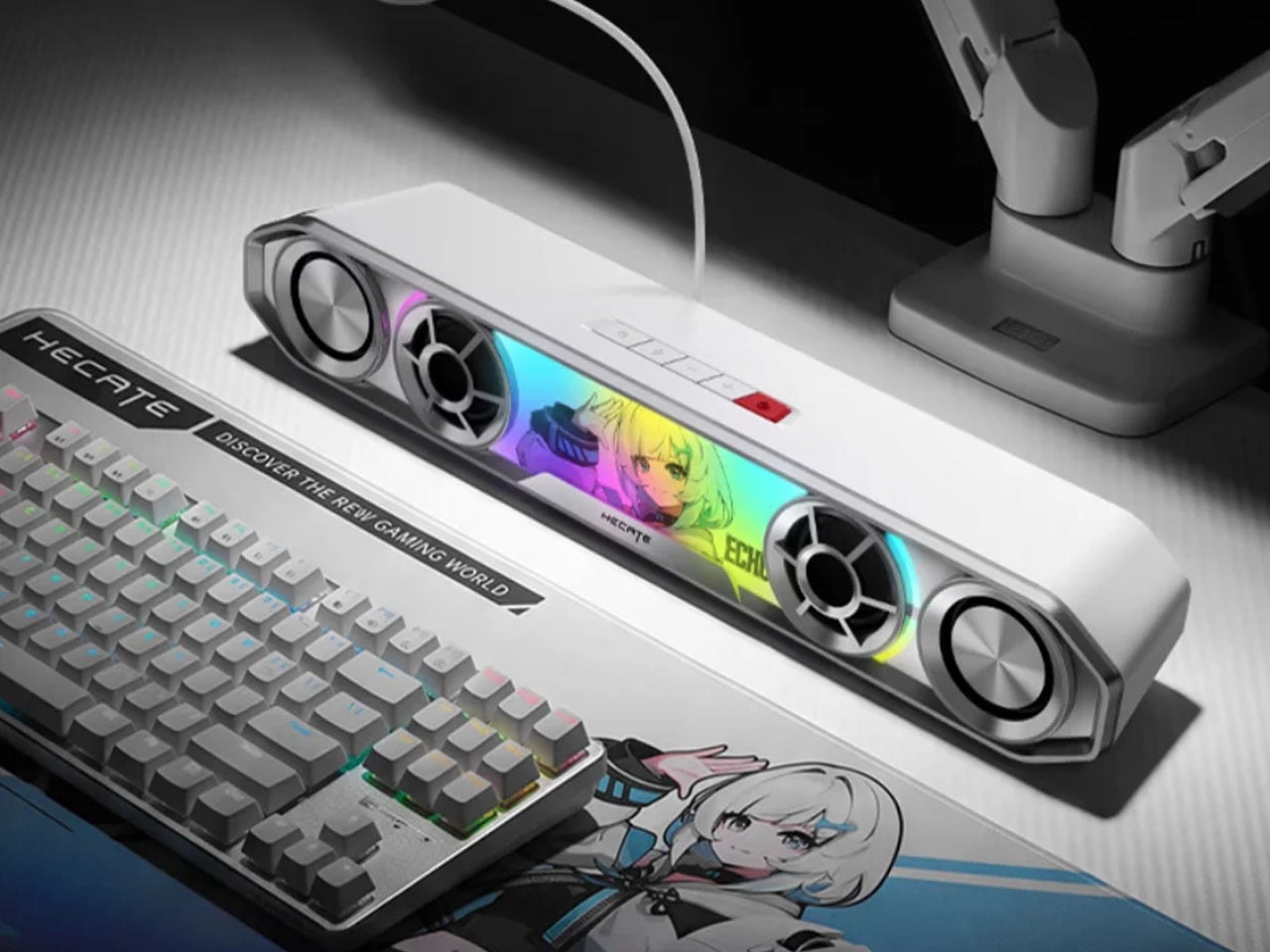
The China-based audio accessories maker, known for high-end bookshelf speakers, has come up with a very cool-looking soundbar for gamers. Dubbed the Hecate G2000 Bar, the desktop audio boomer is all set to be available from 16 October onwards for a price tag of 349 yuan ($52), which is an introductory price slashed from the normal price of 387 yuan ($58).

Designer: Edifier

The G2000 Bar combines a compact footprint with an angular, mecha-inspired design intended to fit into a gaming setup without taking up much desk space. It will be available in black and white, with a built-in five-degree upward tilt that directs sound toward the listener rather than across the desktop. Five interchangeable themed stickers let users customize the front panel, while 12 RGB lighting effects, including rainbow and flowing-light patterns, add some visual flair. Lighting can be adjusted via the Edifier Connect mobile app or Hecate PC software.

Under the hood, the soundbar uses two 56mm full-range drivers with copper-clad aluminum wire voice coils, paired with two 60mm passive radiators. The arrangement is designed to deliver fuller audio and reinforce low frequencies without requiring a separate subwoofer. Output is rated at 3W per channel, or 6W in total, with peak power reaching 12W. The stated frequency response spans 67Hz to 20kHz.

For gaming, the G2000 Bar supports THX 7.1.4 spatial audio processing, which aims to create a more immersive, surround-like listening experience from a desktop soundbar. Six dedicated audio presets cater to different gaming genres, including first-person shooters, role-playing games, and racing titles. These modes give players a way to tailor the sound to different types of gameplay without manually adjusting equalizer settings.

The other notable addition is a detachable microphone mounted on top. It uses AEC 2.0 acoustic echo cancellation, a dedicated digital signal processor, and AI-assisted noise reduction to limit background sounds and reduce audio feedback from the speakers. This could make voice chat more convenient for players who prefer open speakers to a gaming headset, although performance will depend on the surrounding environment.

Connectivity includes Bluetooth 6.0 and USB sound-card input, allowing the soundbar to work with compatible PCs, laptops, mobile devices, and consoles. An independent 9V DC power adapter supplies power, while physical controls on the top metallic panel provide access to volume adjustment, microphone muting, and audio-mode switching.

With its compact design, customizable lighting, spatial audio processing, and integrated voice-chat features, the Hecate G2000 Bar brings several gaming-focused conveniences to an affordable desktop soundbar. Its initial pricing makes it an interesting option for players looking to simplify their setup without committing to a separate speaker system and microphone.

The post Edifier’s $52 gaming soundbar lets you ditch your headset without losing voice chat first appeared on Yanko Design.
  • ✇Yanko Design
  • Divoom Astrotoo Is a Desktop Speaker Dressed as a Retro Computer
    Desktop speakers usually have a pretty straightforward job and an equally straightforward appearance. That makes sense when all you want is music, but it doesn’t leave much room for personality. Divoom’s Astrotoo takes a different approach, putting a display and oversized physical controls into a speaker that looks like a tiny computer terminal. It definitely gives your desk something playful and personal, and your friends something to be jealous of. The rounded housing and recessed side panels
     

Divoom Astrotoo Is a Desktop Speaker Dressed as a Retro Computer

Par : JC Torres
12 octobre 2026 à 06:07

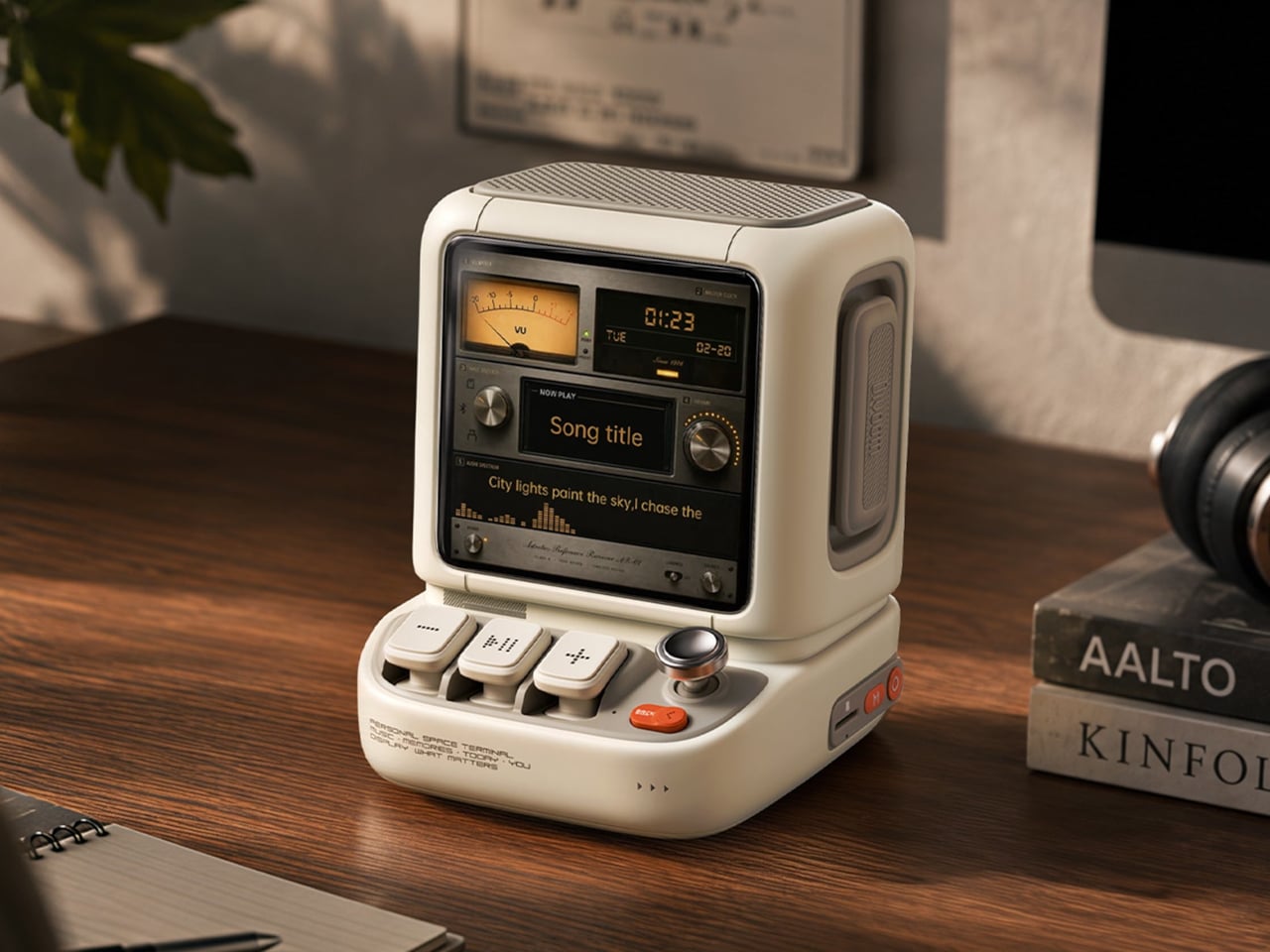
Desktop speakers usually have a pretty straightforward job and an equally straightforward appearance. That makes sense when all you want is music, but it doesn’t leave much room for personality. Divoom’s Astrotoo takes a different approach, putting a display and oversized physical controls into a speaker that looks like a tiny computer terminal. It definitely gives your desk something playful and personal, and your friends something to be jealous of.

The rounded housing and recessed side panels give Astrotoo the appearance of equipment from an imagined future, albeit one with chunky buttons. White, pink, and green finishes offer different levels of restraint. At roughly 4.2 by 4.3 inches across its base, it won’t need the space of a computer, although its upright screen certainly makes it harder to overlook than a conventional speaker.

Designer: Divoom

Of course, those buttons aren’t simply there to complete the retro disguise. Three raised mechanical keys, a joystick, and an orange Back button handle music and display functions. You can reach over to control playback without opening another app, though customizing the display still involves your phone. It’s a familiar division of labor, with physical controls for everyday actions and software for the changes.

Despite the pixel art theme, Astrotoo doesn’t limit you to blocky characters and low-resolution graphics. Its 3.95-inch IPS display has a 480×480 pixel resolution, accommodating photographs and detailed clock faces as well. That means you can keep a family photo beside your monitor without making room for another frame. Music visualizations are also available, if you’d rather have your speaker put on a show.

The Divoom app lets you change visual content and clock faces, giving the device something to do when the music stops. Weather and stock information bring a more practical side to that small screen. That said, another dashboard isn’t necessarily what a busy desk needs. A favorite picture might be a better companion than financial numbers quietly competing for your attention all afternoon.

Divoom positions the 20W speaker for listening nearby, so the desktop proportions aren’t entirely about appearance. Playing music while answering emails or listening to a podcast during a break fits that purpose. Of course, the power rating doesn’t tell us how balanced the sound will be. The styling is easier to judge than the audio, which needs listening rather than a specification sheet.

Bluetooth 6.0 handles wireless audio, while microSD playback lets you bring a collection of stored music along without keeping a phone connected. Wi-Fi supports the connected display features. There’s also a battery, with Divoom claiming up to six hours of operation. That’s enough to move it between rooms for a while, but don’t expect it to stay unplugged through an entire workday.

The $199.99 US price makes this a considered desk accessory rather than a casual decoration. Divoom lists approximately 3.5 hours for USB-C charging, so it probably makes sense to leave a cable nearby. You can dress the screen as a futuristic control panel, but there’s nothing futuristic about discovering that your tiny computer needs plugging in before the afternoon playlist.

The post Divoom Astrotoo Is a Desktop Speaker Dressed as a Retro Computer first appeared on Yanko Design.

  • ✇Yanko Design
  • Habity’s E-Paper Bedside Clock Makes a Case for a Phone-Free Nightstand
    Smartphones have become rather good at convincing us they belong beside the bed, if only because we need an alarm in the morning. Unfortunately, that also puts every source of distraction within reach the moment you open your eyes. To fight that, Habity’s E-Paper Bedside Clock takes over the alarm, sleep sounds, and nightlight duties with physical controls and a display that doesn’t glow continuously, giving your phone fewer reasons to stay. The clock has a rounded rectangular body and a slight
     

Habity’s E-Paper Bedside Clock Makes a Case for a Phone-Free Nightstand

Par : JC Torres
12 octobre 2026 à 05:15

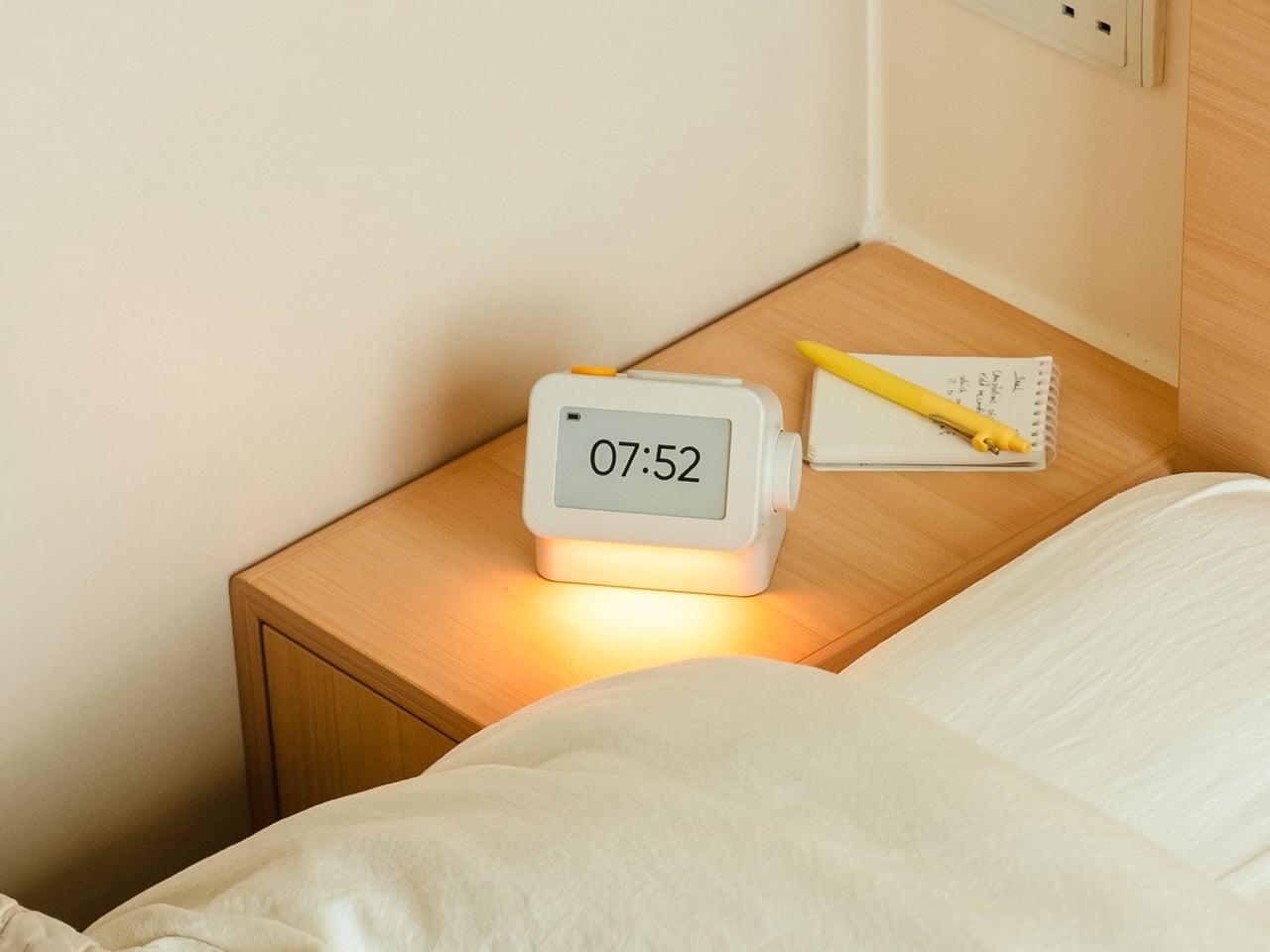
Smartphones have become rather good at convincing us they belong beside the bed, if only because we need an alarm in the morning. Unfortunately, that also puts every source of distraction within reach the moment you open your eyes. To fight that, Habity’s E-Paper Bedside Clock takes over the alarm, sleep sounds, and nightlight duties with physical controls and a display that doesn’t glow continuously, giving your phone fewer reasons to stay.

The clock has a rounded rectangular body and a slightly tilted face, but its most useful details are the ones your fingers encounter. A large side dial handles settings and volume through turning and pressing. On top, a yellow stop button sits beside a broad snooze key. Their different shapes separate two decisions you probably don’t want to confuse when you’re half asleep.

Designers: Peter Arvad, Jesper Westendahl

Of course, the screen is where Habity really parts ways with your phone. Its 3.7-inch e-paper display reflects ambient light rather than relying on continuous illumination. That means darkness calls for a little help. Interacting with the clock activates a warm frontlight for 10 seconds, enough for a quick check without leaving the time glowing beside your pillow all night long.

There’s also a built-in speaker for sleep sounds, which don’t need an app or subscription. Rain and ocean waves are familiar choices, but a sleeping dog and dishwasher bring a surprisingly domestic touch to the collection. Double-press the snooze button to start playback and turn the dial to change volume. Sessions can last up to eight hours, without borrowing your phone for the soundtrack.

Mornings get a little more flexibility than a single repeating alarm. Habity lets you choose weekday schedules or different wake-up times for individual days, although you’re limited to one wake-up alarm per day. The built-in light can gradually brighten up to 30 minutes beforehand. Once the alarm sounds, that broad snooze button grants another five minutes, as many times as you care to negotiate.

Perhaps the most curious detail is what happens when you stop touching the clock. After 10 minutes, an optional idle screen introduces an illustrated face and shrinks the time. The hour is still there, just less prominent. It’s a small concession for people who don’t want a constant reminder of how late it’s getting, and you can disable it if you’d rather keep watching the, er, watch.

Despite those straightforward controls, Habity hasn’t completely shut the door on connected features. Optional Wi-Fi provides automatic time setting and integrations with Philips Hue Bridge, Home Assistant, and Homey. That requires USB-C power, however. Leave it offline and the alarms and sounds still work, so your morning routine doesn’t need to depend on whether the router is having a good day.

Habity estimates two weeks of battery life, depending on use, but a full recharge can take up to 24 hours. You’ll want to plan that USB-C top-up rather than squeeze it in before bedtime if you’re using it unplugged. Getting one won’t move your phone to another room, of course, so you’ll still have to decide where it spends each night.

The post Habity’s E-Paper Bedside Clock Makes a Case for a Phone-Free Nightstand first appeared on Yanko Design.

  • ✇Yanko Design
  • Razer Wolverine V4 Pro has four back buttons, but none have to stay
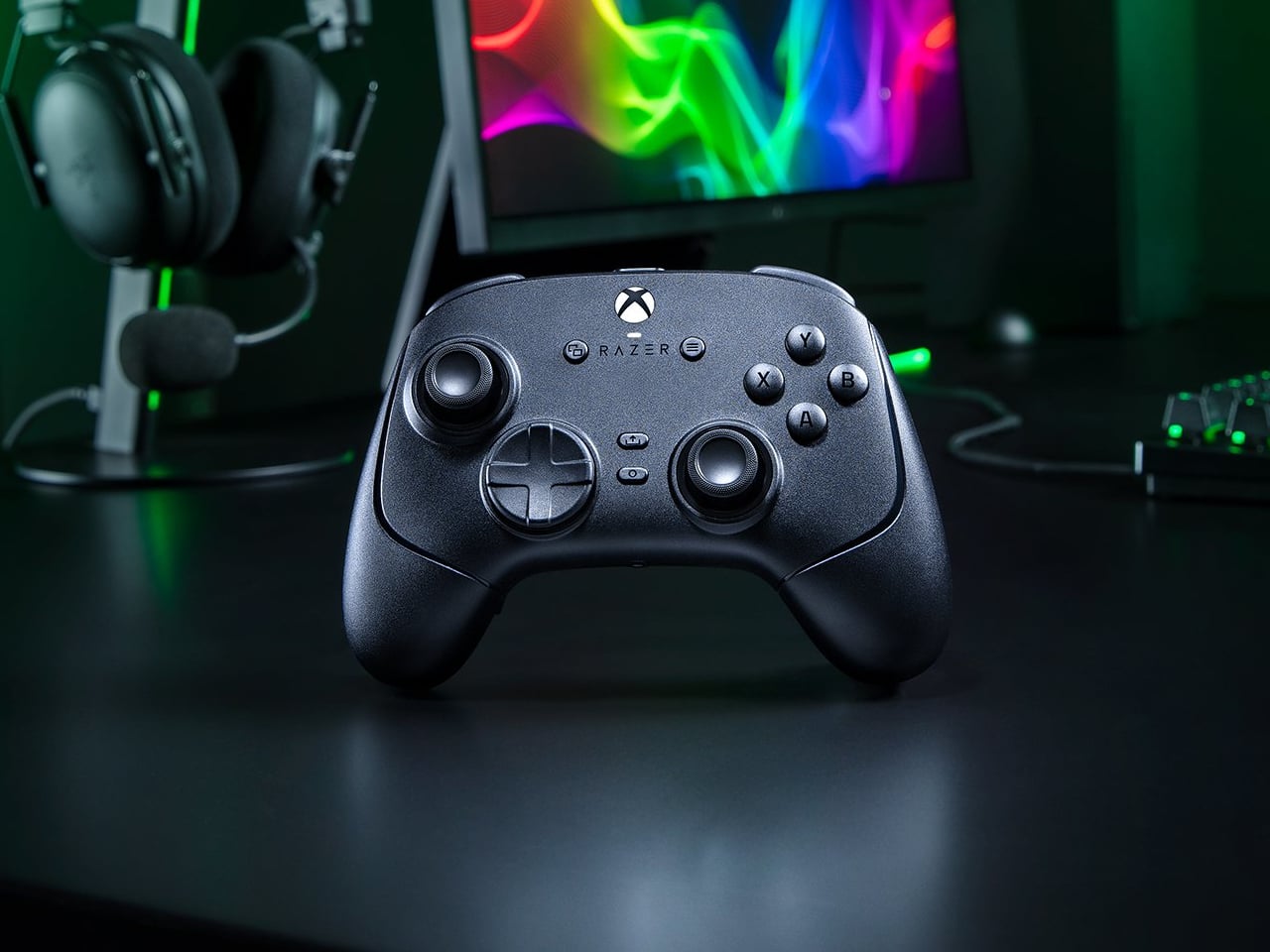
    Extra buttons on a game controller can be handy, at least until they get in the way of holding it. Razer’s Wolverine V4 Pro gives players a little more say in that arrangement, with magnetic back buttons you can remove instead of simply ignoring them. Available for Xbox and PC, the wireless controller also lets you change its thumbstick caps and even take off its faceplate. The four rear buttons come off without tools, making it possible to keep all of them, use only a pair, or clear the back e
     

Razer Wolverine V4 Pro has four back buttons, but none have to stay

Par : JC Torres
12 octobre 2026 à 04:15

Extra buttons on a game controller can be handy, at least until they get in the way of holding it. Razer’s Wolverine V4 Pro gives players a little more say in that arrangement, with magnetic back buttons you can remove instead of simply ignoring them. Available for Xbox and PC, the wireless controller also lets you change its thumbstick caps and even take off its faceplate.

The four rear buttons come off without tools, making it possible to keep all of them, use only a pair, or clear the back entirely. Blank inserts replace the unwanted controls, following the controller’s contours rather than leaving little gaps behind. It’s a small detail, but an important one when that surface is where your fingers spend most of their time during a game.

Designer: Razer

Of course, keeping those buttons attached makes sense when you’re juggling several actions at once. Their mouse-click switches can handle commands such as jumping or reloading, letting your thumbs stay on the sticks while your other fingers do the work. Two additional shoulder buttons bring the total to six remappable inputs, giving frequently used actions somewhere to go besides the familiar face buttons.

The thumbsticks get their own set of options, changing both their height and the surface beneath your thumbs. Short convex caps provide a rounded surface, while tall concave versions give your thumb a recessed resting spot and more height to work with. Razer recommends the taller caps for precise aiming. You can mix the supplied options, but swapping caps doesn’t mean you’re replacing the sensors underneath.

That flexibility continues with the triggers, which can switch between a short mouse-click action and a full analog pull using rear-mounted locks. The shorter setting suits firing in a shooter, while the longer travel lets you ease onto the throttle in a racing game. Through Razer Synapse, you can also adjust each trigger’s activation point to suit how you play.

Even the exterior is open to a little tinkering, thanks to a magnetic faceplate that lifts off without tools. Personalize that panel, or leave it off entirely to reveal the translucent housing underneath. The working components remain enclosed, so you’re changing the controller’s outer appearance rather than exposing its electronics. It’s an option for people who prefer seeing a bit of machinery.

The software takes care of the changes you can’t make with magnets. Four onboard profiles hold different button assignments and sensitivity settings, so a racing setup doesn’t have to overwrite your shooter preferences. You can also adjust thumbstick dead zones, deciding how much movement registers as input. That said, greater sensitivity can pick up tiny thumb movements you didn’t intend.

At $199.99 in the US, this level of customization doesn’t come cheap, and there’s no included carrying case to keep the removable pieces together. You’ll have to find your own place for spare caps and unused buttons. After spending that much on a controller you can rearrange, a dedicated home for the bits you’ve removed would have been rather welcome.

The post Razer Wolverine V4 Pro has four back buttons, but none have to stay first appeared on Yanko Design.

Apple HomeView Expected in November: What Buyers Should Know

12 octobre 2026 à 15:42

Apple HomeView is reportedly due in November. Explore its expected designs, colors and Siri features, plus the compatibility questions buyers should ask.

The post Apple HomeView Expected in November: What Buyers Should Know appeared first on TechRepublic.

PC Prices Could Stay High Through 2027: What Buyers Should Know

12 octobre 2026 à 14:27

PC prices could stay high through 2027 as IDC forecasts an 18.3% increase in average selling prices. Here's what PC buyers and IT teams should know.

The post PC Prices Could Stay High Through 2027: What Buyers Should Know appeared first on TechRepublic.

5 Google Chrome Features for Studying, Including Gemini Quizzes

12 octobre 2026 à 13:53

Google Chrome offers five tools for studying, from Gemini-generated quizzes and podcast summaries to split view and reading mode. Here's what works and where.

The post 5 Google Chrome Features for Studying, Including Gemini Quizzes appeared first on TechRepublic.

Tesla Drops Full Self-Driving Name in Europe Amid Regulatory Scrutiny

12 octobre 2026 à 10:53

Tesla has renamed Full Self-Driving in Europe as regulators question its branding and safety. Here's what the change means for drivers and EU approval.

The post Tesla Drops Full Self-Driving Name in Europe Amid Regulatory Scrutiny appeared first on TechRepublic.

Elon Musk’s Tesla Optimus Timeline: Robots Targeted for 2027 Launch

12 octobre 2026 à 04:15

Tesla's Optimus robot production reportedly increased in 2026. Here's what to know about Elon Musk's 2027 sales target, manufacturing challenges, and rollout.

The post Elon Musk’s Tesla Optimus Timeline: Robots Targeted for 2027 Launch appeared first on TechRepublic.

  • ✇Articles on TechRepublic
  • Top ERP Software Vendors in 2026
    The best ERP vendors are SAP S/4HANA for large enterprises, Oracle Fusion Cloud ERP for large data volumes, Microsoft Dynamics 365 for Windows users, Epicor Kinetic for SMBs, and Deltek Costpoint for government contractors. The post Top ERP Software Vendors in 2026 appeared first on TechRepublic.
     

Top ERP Software Vendors in 2026

12 octobre 2026 à 01:00

The best ERP vendors are SAP S/4HANA for large enterprises, Oracle Fusion Cloud ERP for large data volumes, Microsoft Dynamics 365 for Windows users, Epicor Kinetic for SMBs, and Deltek Costpoint for government contractors.

The post Top ERP Software Vendors in 2026 appeared first on TechRepublic.

  • ✇Yanko Design
  • Garmin’s New Watches Go 320 Hours Without Dying on You
    The most frustrating moment for a sports watch to fail is when you need it most: halfway through a long route with no easy way to recharge, or standing over a golf shot on an unfamiliar course with no clear sense of the distance. Garmin’s Enduro 4 and Approach S72 tackle different versions of that problem. One is built to keep working deep into an adventure. The other puts more useful information within reach before and after every swing. They make an interesting pair because neither treats des
     

Garmin’s New Watches Go 320 Hours Without Dying on You

8 octobre 2026 à 09:20

The most frustrating moment for a sports watch to fail is when you need it most: halfway through a long route with no easy way to recharge, or standing over a golf shot on an unfamiliar course with no clear sense of the distance. Garmin’s Enduro 4 and Approach S72 tackle different versions of that problem. One is built to keep working deep into an adventure. The other puts more useful information within reach before and after every swing.

They make an interesting pair because neither treats design as decoration. The Enduro 4 favors battery life, low weight and quick access to maps. The Approach S72 gives golfers a brighter, more visual way to understand the course and their game. Both have premium materials and comfortable fabric bands, but their real appeal is how those choices serve the person wearing them.

Designer: Garmin

Garmin Enduro

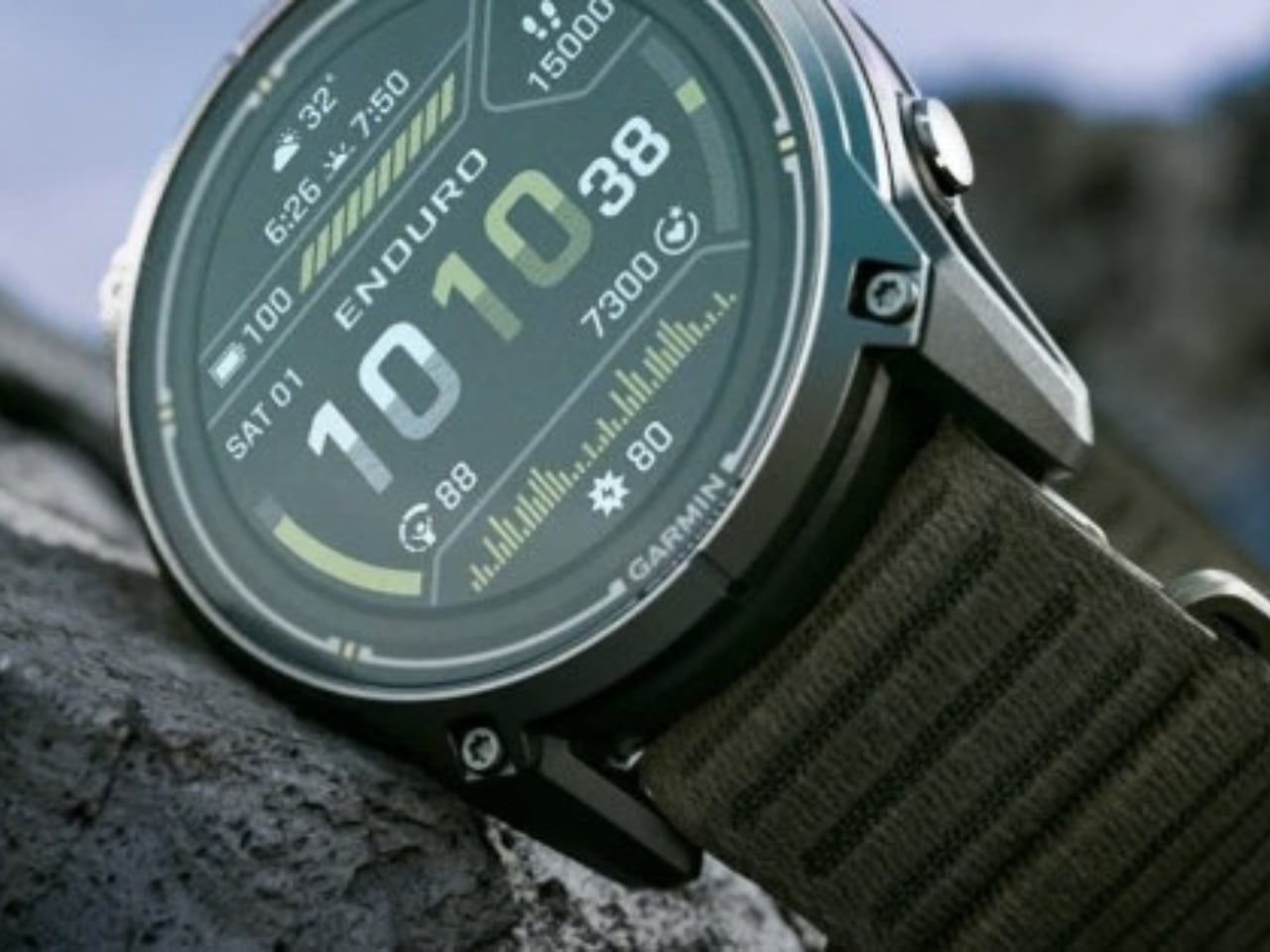
For the Enduro 4, battery life is the headline. Garmin rates it for up to 320 hours in activity mode or up to 90 days in smartwatch mode, with solar charging under the conditions behind those estimates. That is a meaningful promise for someone planning an ultramarathon, a backpacking trip or several days away from an outlet. I would still treat those numbers as best-case figures, but the design priority is clear: spend less time managing the watch and more time moving.

Its 51mm case is substantial, yet Garmin says the watch weighs 66 grams. A titanium bezel and scratch-resistant Power Sapphire lens bring durability, while a fiber-reinforced polymer case helps keep the weight down. The 1.4-inch MIP display is less showy than a vivid AMOLED screen, but paired with the solar lens, it suits a watch built around endurance. The fabric band and white-and-red LED flashlight are thoughtful details for long days that may turn into nights.

The improvements are not limited to how long the watch lasts. Garmin says the Enduro 4 has 50% more RAM than the Enduro 3 and map panning that is 30% faster. Grade-adjusted pace tools offer a better way to judge effort on hills, while stamina features help athletes see how their endurance changes during training. Garmin Epic can group activities across multiple days. Together, those features address a familiar problem: plenty of data, but not always enough context to use it.

Garmin Approach S72

The Approach S72 takes the opposite visual approach. Available in 43mm and 47mm sizes, it has a bright AMOLED display, a titanium bezel, a sapphire lens and a lightweight ComfortFit fabric band. I like the choice of two sizes here. A golf watch needs enough screen space to make a hole legible at a glance, but it also has to feel comfortable through a round and look at home afterward.

Its most intriguing idea is connecting golf performance to what is happening with the player. The watch can show heart-rate trends alongside a completed round, while swing metrics include hand speed, backswing length and wrist rotation. On the driving range, golfers can log practice sessions rather than leaving that work outside their broader activity record. None of this guarantees a lower score, but it could make practice feel more purposeful than guessing which part of a swing went wrong.

The course tools are more immediate. Green reading uses contour data to help golfers judge a line on select courses, while aerial imagery provides a clearer look at the hole ahead. Post-round putting analytics can reveal tendencies in speed, direction and make rate. These are the features that could save a few uncertain decisions during play, then give someone a specific thing to work on afterward. Some require a Garmin Golf membership, a detail worth checking before buying.

Battery life matters here, too, though on a different scale. Garmin rates the 47mm S72 for up to 20 hours of golf activity or 16 days in smartwatch mode; the 43mm model is rated for up to 15 hours and 10 days, respectively. Add heart-rate, stress and sleep tracking, and it becomes easier to see why Garmin designed this as an everyday watch rather than a device you pull out only for tee time.

Neither watch is trying to do everything for everyone. The Enduro 4 makes the strongest case for people whose plans regularly outlast ordinary battery life; the S72 is for golfers who want clearer decisions and better feedback. What connects them is a useful design principle: the best sports technology should reduce the little uncertainties that distract you from the activity you came to enjoy.

The post Garmin’s New Watches Go 320 Hours Without Dying on You first appeared on Yanko Design.

  • ✇Yanko Design
  • PocketBook Gave Its $198 E-Reader the One Trick Old Nokia Phones Had
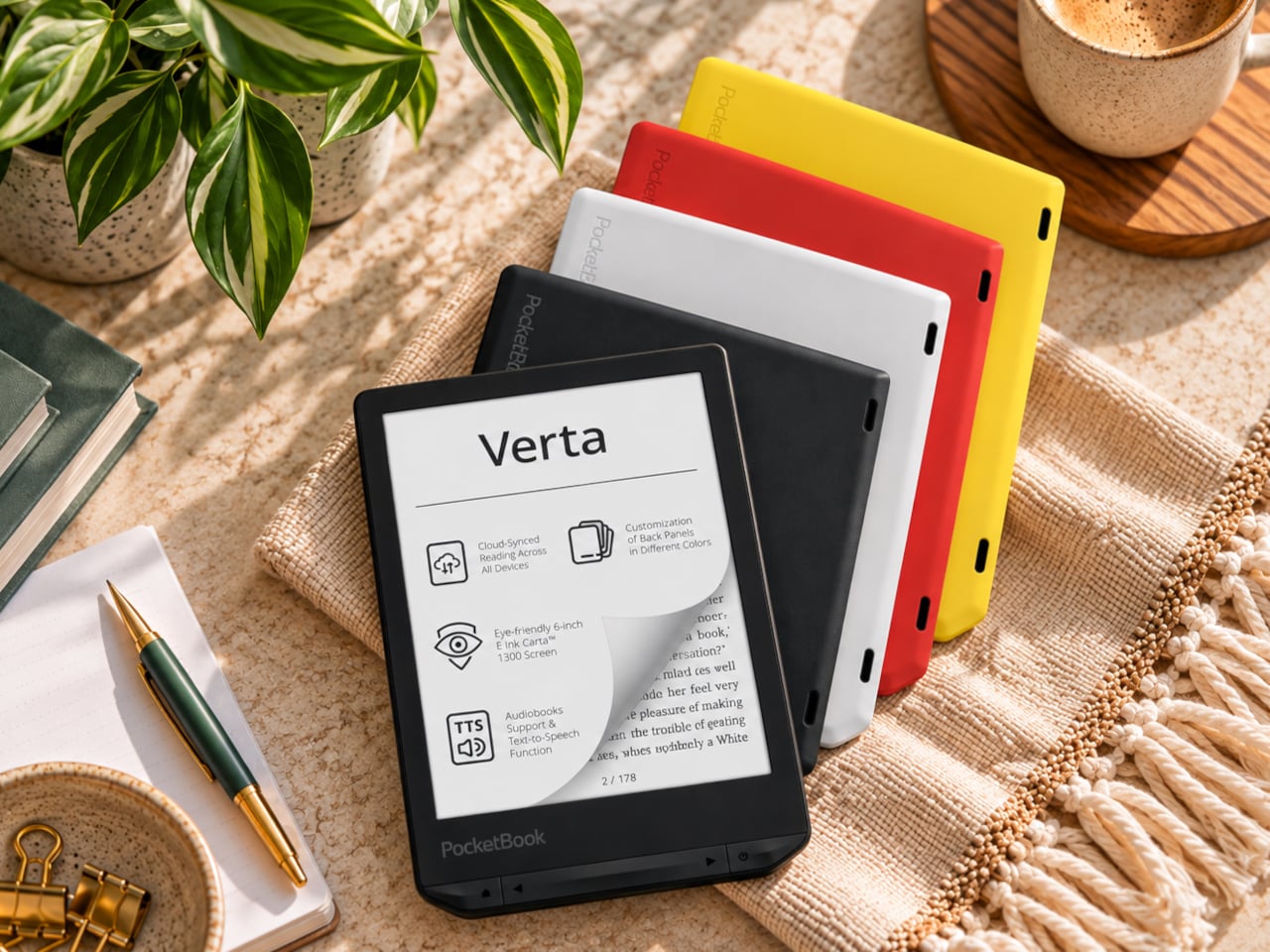
    E-readers are supposed to replace physical books, but they strangely come mostly in black or gray, unlike colorful and distinctive book covers. Although not a complete design overhaul, Pocketbook’s new Verta and Verta Color e-readers offer a simple fix, and no, it doesn’t require slapping on a case. You can change the color of the e-reader by swapping the back panel while maintaining its slim shape and keeping the screen and page-turn buttons uncovered. That’s a rather different approach to per
     

PocketBook Gave Its $198 E-Reader the One Trick Old Nokia Phones Had

Par : JC Torres
8 octobre 2026 à 06:07

E-readers are supposed to replace physical books, but they strangely come mostly in black or gray, unlike colorful and distinctive book covers. Although not a complete design overhaul, Pocketbook’s new Verta and Verta Color e-readers offer a simple fix, and no, it doesn’t require slapping on a case. You can change the color of the e-reader by swapping the back panel while maintaining its slim shape and keeping the screen and page-turn buttons uncovered.

That’s a rather different approach to personalization than slipping on a protective cover. The interchangeable panels are sold separately, so you can keep a few colors around and switch when your taste changes. More importantly, they replace the back rather than wrapping over the front. There’s no extra flap to fold behind the reader when you settle into a chair with a book.

Designer: PocketBook

The front stays familiar in the best way. Both readers have a 6-inch touchscreen and enlarged page-turn buttons beneath it, giving your thumb another way forward when the screen is smudged or your hands are occupied. Each measures just 0.28 inches thick and weighs about 4.9 ounces, a size that suits a jacket pocket or an overstuffed bag on the commute.

Choose the regular Verta, and you get a 6-inch E Ink Carta 1300 display at 300 pixels per inch, built for the sort of long novel that makes you miss your stop. SMARTlight lets you adjust brightness and warmth as daylight disappears. It also offers Dark Mode, so you can keep reading in bed without a bright white page facing the person beside you.

The Verta Color is for readers who want their covers, illustrated pages, and comics to retain some color. Its E Ink Kaleido 3 screen renders monochrome text at 300 pixels per inch, but color drops to 150 pixels per inch. Those numbers matter if you read fine print in graphic novels; the color option gives illustrations some life, not the punch of a tablet.

Both have 16GB of storage, Wi-Fi for downloading books, and Bluetooth audio for audiobooks or text-to-speech, though you’ll need headphones or another compatible listening device. PocketBook also supports a broad range of file formats and borrowing through library apps. That flexibility comes in handy when the next book you want isn’t sitting in a single company’s store waiting for you.

An IPX4 rating gives the pair protection against splashes, not an invitation to use them in the bath. Their 1,500mAh batteries are meant to last up to two months, depending on how you read, although that figure comes from PocketBook rather than an independent test. The removable backs add personality, but they’re not a replacement for a protective case if the reader needs one.

PocketBook plans to release both in November 2026, pricing the Verta at €169 (about $198) and the Verta Color at €179 (about $209). Both are marked as coming soon on its storefront. The cleverest trick, though, is letting you change the color of something you hold for hours on end without asking a protective case to do the decorating for you.

The post PocketBook Gave Its $198 E-Reader the One Trick Old Nokia Phones Had first appeared on Yanko Design.

  • ✇Yanko Design
  • A $249 Smart Lock That Still Opens When You’ve Forgotten to Charge It
    Smart locks sound like the future until you’re standing outside with groceries and the lock won’t wake up because of a dead battery. Although there are different methods to address that, Ring’s first-ever Smart Lock has a rather ingenious solution: an almost literal crank. Simply turn a dial a few times to power the keypad just long enough to key in your code. It’s simple yet effective, and it doesn’t require you to fumble for a cover to replace the battery. The knurled dial sits beneath the b
     

A $249 Smart Lock That Still Opens When You’ve Forgotten to Charge It

Par : JC Torres
8 octobre 2026 à 04:15

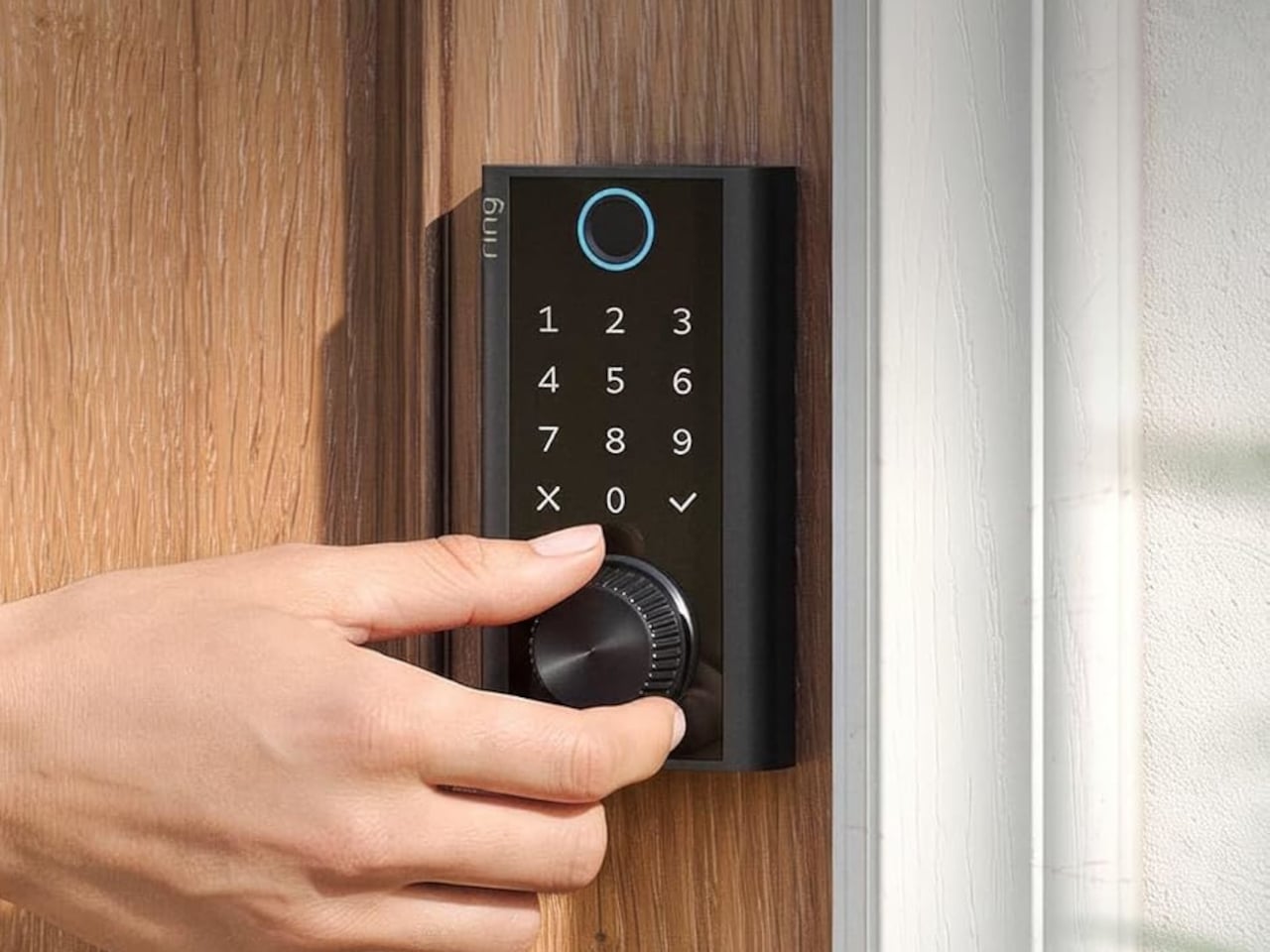
Smart locks sound like the future until you’re standing outside with groceries and the lock won’t wake up because of a dead battery. Although there are different methods to address that, Ring’s first-ever Smart Lock has a rather ingenious solution: an almost literal crank. Simply turn a dial a few times to power the keypad just long enough to key in your code.

It’s simple yet effective, and it doesn’t require you to fumble for a cover to replace the battery. The knurled dial sits beneath the backlit touchscreen keypad, with a circular fingerprint reader topping them all. All in all, the design looks more like a stack of controls instead of a deadbolt with electronics just bolted on.

Designer: Amazon

On regular days or nights, you can simply touch the fingerprint reader instead of digging for keys in your bag or pocket. You can also give a visitor a PIN that only works during a set time window. The Ring app also offers yet another way to let you in, and it also allows you to check the lock remotely, including Alexa voice control. These are the typical features you’d expect from a smart lock, but Ring does one better.

Most keyless locks require a cable or a spare battery before they even wake up, which isn’t exactly the fastest or the easiest when you only have one hand free. Ring puts that backup in that same free hand, figuratively. Simply turn the dial to “charge” the lock, almost like cranking some lever for power. It’s an almost comical analogy, but it gets the job done.

Of course, you don’t charge the Ring Smart Lock by turning the dial endlessly. That’s what the Quick Release Ultra Battery Pack is for. That battery is rechargeable, which means you don’t need to worry about extra wiring or hardware when installing the Smart Lock. It works with a standard single-cylinder deadbolt, making it immediately compatible with many doors.

One thing to note is that remote features depend on Amazon Sidewalk rather than your home Wi-Fi. That could spare you a trip back to check whether the door locked, or let you admit someone while you’re away, provided there’s coverage where you live. Ring says unlocking at the door happens locally, but Sidewalk remains a requirement for the connected functions. It’s a condition beneath the promise of convenience.

The lock can share the Ring app’s activity feed with Ring’s other products such as doorbell, cameras, and alarms, so you get a more holistic view of everything that happens at home even when you’re away. That said, it doesn’t have a camera of its own, which is a subtle nudge to get a Ring doorbell, too.

Black, silver, and brass finishes are planned, with a $249 price and U.S. availability expected in early 2027, pending regulatory authorization. For now, some details about the Ring Smart Lock have yet to be fully disclosed, including battery life. Regardless, it’s an interesting and low-tech solution to a high-tech problem that makes you feel you’re in control, even in such an emergency.

The post A $249 Smart Lock That Still Opens When You’ve Forgotten to Charge It first appeared on Yanko Design.

Apple Watch Series 12 Cheat Sheet: What’s New, What It Costs, and Which Model to Choose

8 octobre 2026 à 04:06

Get the key details on Apple Watch Series 12, including health features, AI tools, battery life, pricing, compatibility, and which model may suit you best.

The post Apple Watch Series 12 Cheat Sheet: What’s New, What It Costs, and Which Model to Choose appeared first on TechRepublic.

  • ✇Yanko Design
  • This $175 Wii-style Smart paddle turns your TV into a pickleball court
    Pickleball has officially escaped the court. At some point in the last two years, it stopped being ironic and became a lifestyle: parking lots of suburban rec centers filled up, TikTok feeds followed, then came the celebrity investors, the professional leagues, the branded paddle drops, and the kind of mainstream saturation that tells you a sport has officially graduated from niche to undeniable. Getting turned into a Wii-style digital pastime is, at this point, a rite of passage for any sport
     

This $175 Wii-style Smart paddle turns your TV into a pickleball court

7 octobre 2026 à 21:45

Pickleball has officially escaped the court. At some point in the last two years, it stopped being ironic and became a lifestyle: parking lots of suburban rec centers filled up, TikTok feeds followed, then came the celebrity investors, the professional leagues, the branded paddle drops, and the kind of mainstream saturation that tells you a sport has officially graduated from niche to undeniable. Getting turned into a Wii-style digital pastime is, at this point, a rite of passage for any sport that has truly made it. Tennis got there. Golf got there. Boxing, baseball, bowling. MegaShot Pickl+ is the moment pickleball collects that particular badge, and it does so with an actual sensor-embedded pickleball racket for authentic gameplay, not some generic rectangular controller.

The smart paddle pairs with your phone, tablet, or laptop over Bluetooth and sends the game to your TV (via an included cable) for big-screen play, mimicking your real swing movements on screen and firing haptic feedback through the handle on every hit. A split-screen mode lets you play multiplayer on the same screen too, making it a great family entertainer. No court reservation, no weather to negotiate with. The Wii taught an entire generation that swinging something in your living room could feel surprisingly real. Pickl+ is betting that a generation raised on that premise is ready to do it again, this time for the sport that has genuinely taken over the world, and without an extra console to add to the mix. The Starter Edition is on Kickstarter now for $175, down from a planned retail price of $249 and the campaign has been backed 500% in just 24 hours! Pickl+ will be compatible with sports like tennis, ping pong, and badminton with more racket sports planned for the same smart-paddle platform.

Designer: MegaShot

Click Here to Buy Now: $175 $249 (30% off). Hurry, only a few left!

Under the hood, Pickl+ is built around a 9-axis sensor that reads the angle, speed, and arc of every swing for precise motion tracking. The haptic feedback responds distinctly to different kinds of hits, making the on-screen action feel genuinely tied to what your arm is actually doing. The paddle weighs around 300 grams, carries a 2000 mAh battery rated for up to five hours of continuous play, and charges over USB-C. Bluetooth 5.2 handles the wireless pairing, while an MHL cable connects your phone to the TV when the living room demands a proper screen. The app runs on Android 14+, iOS 18+, Windows, and macOS. Setup is as minimal as it sounds: download, charge, pair, connect, play. Unlike the Wii, Switch, or the Meta Quest, no extra console or hardware needed.

Most gaming hardware asks you to adapt to the machine: learn the buttons, the gestures, the control scheme. Pickl+ goes the other direction. You know how to hold a paddle, and you know what a swing feels like. Rather than turning a conventional controller into a sports accessory, Pickl+ turns the sports object itself into the controller. The technology is essentially trying to disappear into the physical experience, which is part of what makes it a more interesting object than just a clever game controller.

Ten-plus game modes ship at launch, including Streak, Practice, Split Mode, Career, Local Multiplayer, Target, and Beach Mode, with more already in the pipeline. VIP unlocks exclusive virtual courts, daily bonus challenges, glowing paddle effects, custom ball trails, and profile cosmetics.

Before the Kickstarter campaign went live, the beta version of the paddle was showcased at New York Toy Fair, where people across different age groups, including gaming enthusiasts and industry experts, got hands-on time with the motion tracking, gameplay, etc. It gave MegaShot an early real-world read on how quickly people understood and enjoyed the experience. Motion gaming can look impressive in a controlled demo; the real test is whether someone can pick up the paddle, understand what to do, and immediately have fun. New York Toy Fair gave MegaShot that read before asking anyone to back the campaign.

MegaShot arrived at this with receipts. Before Pickl+, the company built a smart bat, which sounds hyperlocal until the numbers land: 100,000+ units sold worldwide, 2,700+ Amazon reviews, and ratings above 4.5 across Google, Amazon, the Play Store, and iOS. The Smart Bat earned the team a spot on Shark Tank India, coverage across major publications, and placement on Walmart shelves. Cricket was a demanding proving ground, the kind of sport where precision hardware lives or dies by real player feedback. That foundation gave MegaShot a validated tech stack, a battle-tested supply chain, and the track record that earns trust going into a bigger, more globally ambitious launch.

Pickleball is the entry point for something larger. The same paddle hardware is designed to eventually support tennis, badminton, table tennis, and squash, with the VIP Pass carrying across sports as they are added. That roadmap turns Pickl+ from a single-sport product into a platform for multiple racket-sport experiences, which changes the value calculation considerably. The most globally accessible racket sport of this decade is also, as it turns out, the perfect vehicle for a company that built its credibility in one market and is now ready to find out how far a smart paddle can travel.

The Starter Edition, one smart paddle and an MHL cable, is available at its $175 Kickstarter launch price, versus a planned $249 retail price. Duo packs start at $275 for two paddles with a cable, while the Starter VIP Duo Pack, which throws in a VIP Pass, runs $315.

The Signature Edition, the premium single-paddle option, comes in at $349. The Signature Duo Edition bundles two premium paddles with cables, a VIP Pass, and protective sleeves for $499. Worldwide shipping begins in early 2027, covering the US, Canada, the UK, Germany, Australia, New Zealand, UAE, and India.

Click Here to Buy Now: $175 $249 (30% off). Hurry, only a few left!

The post This $175 Wii-style Smart paddle turns your TV into a pickleball court first appeared on Yanko Design.
Apple and LG Reportedly Develop Smart Home Locks, Cameras and More

7 octobre 2026 à 13:26

Apple and LG are reportedly developing smart home locks, cameras and other accessories. Here’s what buyers should know about compatibility and timing.

The post Apple and LG Reportedly Develop Smart Home Locks, Cameras and More appeared first on TechRepublic.

XtalPi Details Kodexia AI Platform for siRNA Drug Discovery

7 octobre 2026 à 13:25

XtalPi’s Kodexia combines generative AI and automated lab testing for siRNA drug discovery. Explore its workflow, reported results and preclinical limits.

The post XtalPi Details Kodexia AI Platform for siRNA Drug Discovery appeared first on TechRepublic.

Dutch Tax Agency Reverses Microsoft 365 Cloud Migration Over Data Risks

7 octobre 2026 à 09:34

The Dutch Tax and Customs Administration is reversing a planned Microsoft 365 cloud migration as officials seek greater control over sensitive government data.

The post Dutch Tax Agency Reverses Microsoft 365 Cloud Migration Over Data Risks appeared first on TechRepublic.

  • ✇Yanko Design
  • 5 Gadgets Gen Z Actually Wants to Own Right Now
    Something shifted. The generation that grew up with every song, show, and photo living inside a glass rectangle is now buying CD players, handheld consoles, and standalone cameras that do exactly one thing. It is not purely nostalgia driving this. It is the particular relief of owning something that does not send notifications, update itself overnight, or ask for your location. These are objects that simply work. What connects these five is not a shared aesthetic or price point but a shared res
     

5 Gadgets Gen Z Actually Wants to Own Right Now

5 octobre 2026 à 07:40

Something shifted. The generation that grew up with every song, show, and photo living inside a glass rectangle is now buying CD players, handheld consoles, and standalone cameras that do exactly one thing. It is not purely nostalgia driving this. It is the particular relief of owning something that does not send notifications, update itself overnight, or ask for your location. These are objects that simply work.

What connects these five is not a shared aesthetic or price point but a shared resistance. Each gives your hands something real to do, something that clicks, spins, or frames a shot without a screen mediating the exchange. Gen Z did not fall out of love with technology. They fell out of love with technology that treats their attention as the product. These five objects treat it as something worth protecting.

1. Syitren R400 Bluetooth CD Player

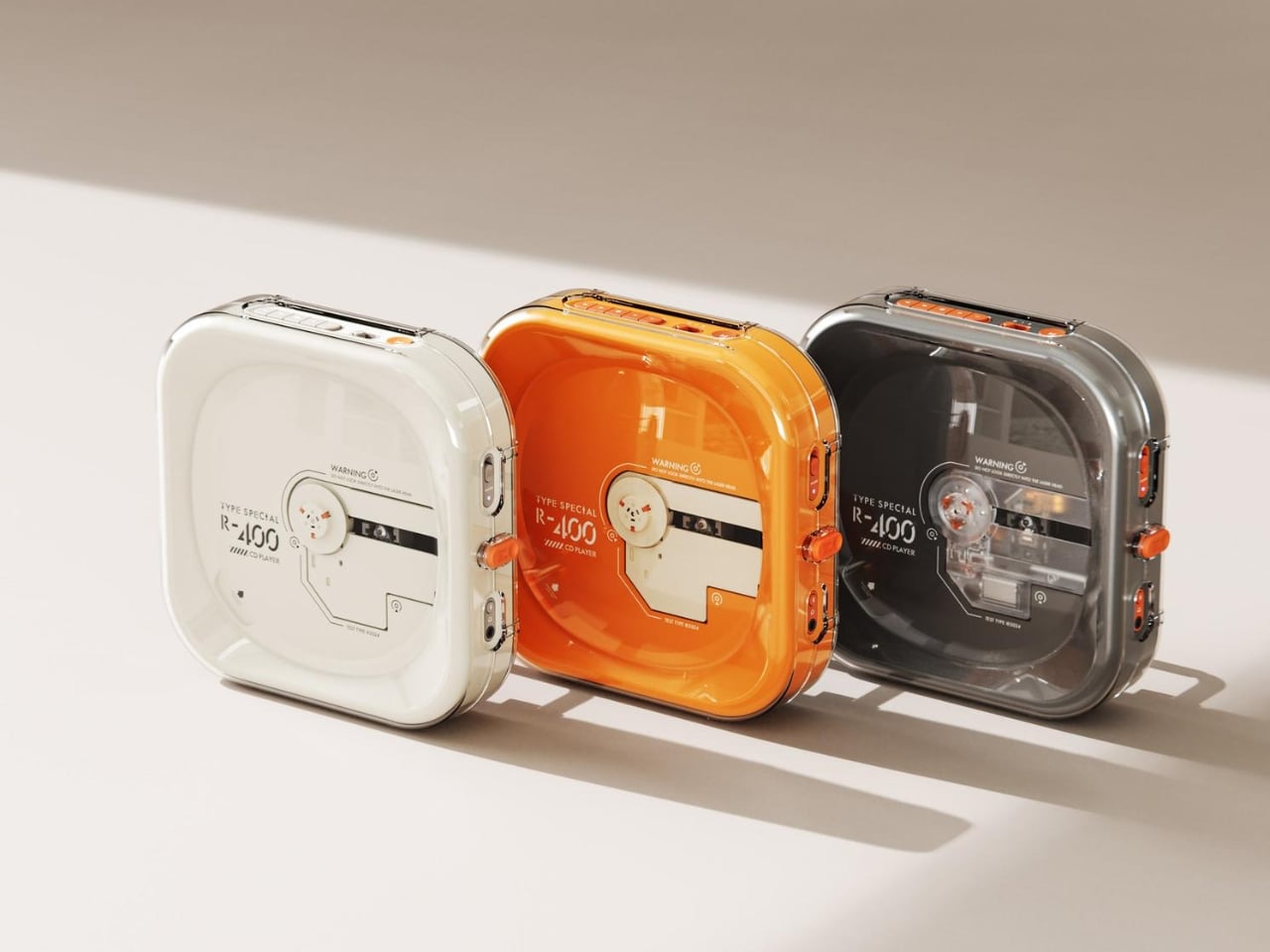
Portable CD players never disappeared, but they did stop trying. For years, the category was defined by bulky Sony boomboxes built around FM radio and cassette tapes as much as CDs. The R400, designed by ORGDOT for Syitren, is the first player in a long time that feels built for how people actually listen today. It is compact, Bluetooth 5.3-first, and designed to look as good on a desk or shelf as it does in your hand on a commute.

Under the shell, a custom Syitren pure CD core delivers a 70dB signal-to-noise ratio for clean, high-fidelity sound. Anti-vibration engineering keeps things skip-free while commuting or walking around. The shell is detachable and customizable, and a sunken charging compartment with a built-in wire groove keeps the cable from bending or fraying over time. Bluetooth or wired, car stereo or headphones, four-plus hours of continuous playback per charge, at a price that doesn’t make you choose between good design and good sound.

What we like

  • The detachable, customizable shell makes it something you can call your own, not just another piece of consumer electronics sitting on a desk.
  • Anti-vibration engineering means it is genuinely designed to be carried around, not just displayed.

What we dislike

  • Four hours of battery covers a workday comfortably but cuts short anything longer without access to a charge.
  • Sony has been quietly pulling back from portable CD players, meaning the R400 steps into a space with almost no competition to pressure it on price or performance.

2. Game Bub

The Game Boy Advance’s design patents expired years ago, and most of what followed has been cheap emulation boxes wearing a familiar shape. Game Bub from Crowd Supply is different. It uses FPGA technology rather than software emulation, recreating the original Game Boy, Game Boy Color, and Game Boy Advance hardware at a circuit level with accuracy that emulators cannot match. The transparent shell, available in Purple and White, makes the whole thing look exactly as it should.

The horizontal GBA form factor is a deliberate choice in a market that keeps going vertical. Button placement feels natural; the shoulder buttons are where your fingers expect them, and dual one-watt stereo speakers handle classic soundtracks properly. USB-C charging, a headphone jack, a microSD slot for firmware updates, display output for big-screen play, Bluetooth Low Energy, 2.4GHz Wi-Fi, and a 3000mAh battery round out a device that earns the word ambitious.

What we like

  • FPGA accuracy means your cartridge collection plays exactly as it was designed to, not approximately as software emulation allows.
  • The horizontal form factor respects what made the GBA comfortable for long sessions, which most of the competition has quietly abandoned.

What we dislike

  • Hardware-level FPGA accuracy comes at a price point that locks out buyers who would otherwise be genuinely interested.
  • Open-source FPGA handhelds tend to have longer firmware update timelines, which requires patience from anyone buying early.

3. Clip&Go Radio

A radio that clips to your backpack and plays FM stations does not sound like a gadget Gen Z would want. The Clip&Go reframes the premise. It is compact enough to attach directly to your gear without thinking about it, built around the idea that the best emergency tool is one already useful before anything goes wrong. A built-in flashlight, hand crank, and solar panel mean it carries more utility than the dial on top suggests.

The physical radio format fits the same logic as the CD player and the handheld. It is a single-purpose device with no algorithm, no autoplay, and no recommendations. You tune a station, clip it on, and go. In a landscape where every device competes for your attention, a radio that does not know you exist feels quietly radical. At $60, it is also the most immediately ownable thing on this list.

Click Here to Buy Now: $60.00

What we like

  • The built-in hand crank and solar panel mean it works when other devices cannot, giving it a utility case that goes well beyond aesthetics.
  • The clip attachment means it genuinely travels with you rather than waiting in a bag pocket to be pulled out.

What we dislike

  • FM signal quality is location-dependent, making the listening experience inconsistent wherever coverage is thin.
  • At $60, it competes with Bluetooth speakers that do more on paper. The case for owning it rests on the single-purpose philosophy, not the spec sheet.

4. Camera (1)

The impulse to pick up a standalone camera again is not about megapixels. It is about separating the act of taking a photograph from the act of being on your phone. Camera (1) is a concept by designer Rishikesh Puthukudy that imagines what a modern compact could feel like if built around physical controls rather than touchscreen menus. Metal body, softly rounded corners, every main control reachable without shifting your grip or glancing away from the scene you are trying to capture.

All the main controls live on one edge: a shutter, a circular mode dial with a dot-matrix glyph display showing simple icons for stills and video, and a D-pad your thumb can reach without looking down. A light strip around the lens pulses for the self-timer, confirms focus, and signals when recording is live, replacing multi-layer software navigation with immediate, readable feedback. The design language pulls from Nothing’s transparent, hardware-forward aesthetic and pushes it into something you would actually want to carry.

What we like

  • Every main control sits within reach of one thumb and index finger, keeping your eyes on the subject rather than hunting through a menu.
  • The light strip communicates camera state through peripheral vision, a smarter solution than burying status information inside a touchscreen.

What we dislike

  • Camera (1) is a concept with no confirmed manufacturer, production timeline, or pricing, which is a real limitation for anyone wanting to own one today.
  • The visual language is closely referential to Nothing’s established aesthetic, which may read as derivative to anyone already familiar with that design direction.

5. elrow miniphone

Full smartphones feel like overkill for a generation quietly walking back from maximalism. The Apple Watch on your wrist handles glances but stays awkward for anything more deliberate, and wearing both a smartwatch and an analog watch on the same arm is its own kind of compromise. The elrow miniphone is a 3D-printed case that turns an Apple Watch into a narrow, palm-sized device worn on a lanyard. The Standard fits the 46mm Series 10 and 11. The Ultra fits Apple Watch Ultra 1, 2, and 3.

Both stand around 95mm tall with textured translucent bodies and visible screws that do not attempt to hide how they were built. The back stays open so you can charge without disassembling the case. What elrow industries built is less a gadget and more a posture, a way to carry connectivity without wearing it on your wrist, freeing that space for the mechanical or analog watch you actually want to wear while keeping notifications, Apple Pay, and quick replies within reach.

What we like

  • The open back lets you charge without disassembly, removing the most frustrating everyday friction of any case.
  • Wearing connectivity on a lanyard rather than your wrist opens the door to the analog watch you have been quietly sidelining.

What we dislike

  • As a 3D-printed case, it depends entirely on which Apple Watch model you already own and is not a standalone device.
  • A lanyard-worn device requires real behavioral change to make useful day-to-day rather than just conceptually interesting.

Ownership Is the Point

What this list describes is not a generation running from technology. It is a generation learning to be selective about which technology gets to run on them. A CD player that skips the algorithm. A handheld that plays cartridges at hardware level. A camera built around a shutter click. A lanyard device that frees your wrist. A radio that does not know your name. Five objects. Five things that simply work.

The broader shift is less about any individual product and more about what owning something actually means. Streaming everything is convenient right up until nothing feels like yours. A CD on a shelf, a cartridge in a slot, a photo taken with a camera you held in your hand: these are forms of possession the subscription model quietly erased. Gen Z is taking them back, one physical object at a time.

The post 5 Gadgets Gen Z Actually Wants to Own Right Now first appeared on Yanko Design.

❌