❌

Vue normale

  • ✇Yanko Design
  • This palm-sized robot dog has a Nokia battery and a customizable LEGO-compatible back
    Petoi has been shrinking Boston Dynamics down to desk size for almost a decade now. Dr. Rongzhong Li started the company in his dorm lab in 2016, after a video of his open-source robot cat prototype went viral. That cat became Nybble, a laser-cut wooden kitty, and it was followed by Bittle, a palm-sized robot dog that ended up in classrooms, research labs, and a surprising number of home offices. Petoi says it has shipped more than 30,000 robots to over 60 countries, all running its open-source
     

This palm-sized robot dog has a Nokia battery and a customizable LEGO-compatible back

28 octobre 2026 à 14:20

Petoi has been shrinking Boston Dynamics down to desk size for almost a decade now. Dr. Rongzhong Li started the company in his dorm lab in 2016, after a video of his open-source robot cat prototype went viral. That cat became Nybble, a laser-cut wooden kitty, and it was followed by Bittle, a palm-sized robot dog that ended up in classrooms, research labs, and a surprising number of home offices. Petoi says it has shipped more than 30,000 robots to over 60 countries, all running its open-source OpenCat framework. Each new model has gotten smaller, smarter, and easier to build, which brings us to the newest pup in the litter.

Meet Quaddle, a palm-sized robot dog that walks, glides, spins, and does backflips using just four servos. That’s half what Bittle uses in its legs and roughly a third of what most quadrupeds need, thanks to a spring-loaded linkage Petoi calls the MinDoF leg, which lets one motor drive both the shoulder and the knee. It weighs about 6 ounces, snaps together without screws, and takes LEGO bricks on its back. You can teach it tricks by physically moving its legs, chat with it, or code it in anything from beginner blocks to ROS. Prices start at $179, which is pretty reasonable for a dog that never needs walking.

Designer: Petoi

How one servo runs an entire leg

Each of Quaddle’s legs hangs off a single servo, with a spring and a four-bar linkage doing the job a second motor normally would. As the servo swings the upper leg, the linkage folds the knee up and straightens it again, turning one rotating shaft into a proper step. Petoi calls this the MinDoF leg, short for Minimal Degrees of Freedom, a degree of freedom being one independent way a joint can move. The spring clips onto different anchor points, changing how stiff or bouncy each leg feels. In Petoi’s tabletop tests, Quaddle walks about one body length per second, turns 90° in a single step cycle, and climbs onto a ledge as tall as its own knee.

Walking machines driven by a single crank go back to Pafnuty Chebyshev, the Russian mathematician whose 1870s linkage turned rotation into a surprisingly lifelike stride. Theo Jansen’s wind-powered Strandbeests on Dutch beaches run on the same basic idea, and Quaddle feels like their tiny, battery-powered cousin. Petoi added one more trick by fitting small bearings to the tips of the feet. Angle the legs just right and those bearings become wheels, letting Quaddle glide across a smooth desk at around three body lengths per second without a single extra motor. Fewer motors also means less weight, less cost, and less battery drain, which is how the whole dog comes in at roughly 6 ounces.

Teach it tricks by hand, then teach it in code

On the Buddy and Scout models, every leg servo reports its position back to the robot, so you can teach Quaddle a move by simply grabbing its legs. Tap to start recording, guide the legs through whatever silly dance you have in mind, and tap again to have it play the motion back. There’s no app or code involved, and Petoi says you can teach it a basic walk in about ten seconds. Recorded moves can be pulled into Petoi’s Skill Composer software for fine-tuning and shared with other Quaddle owners. For a kid, this is probably the fastest route from “I wonder if” to a robot actually doing the thing.

Buddy and Scout split their thinking across two ESP32-S3 chips, one for motion and balance and one for voice chat and smart home control. A physical slide switch cuts power to the AI chip entirely, which is great for privacy and for days when your robot dog gets a bit too chatty. Coding starts with drag-and-drop blocks, moves to Python or MicroPython, and eventually reaches the Arduino C++ firmware. Bigger projects can mount a Raspberry Pi Zero on its back or plug into ROS, the software framework most research robots run on. A browser-based simulator runs the same code as the real robot, so you can test ideas on a laptop or even a phone with no robot in sight.

LEGO bricks, a Nokia battery, and three Quaddles to pick from

The top of Quaddle’s shell takes LEGO bricks, and Petoi will publish printable shells and mounts for anyone with a 3D printer. Petoi’s own demos have turned it into a walking LEGO AT-AT, a waddling biped called the NanoDuck, and a rover on Mecanum wheels, which use angled rollers to slide sideways. Power comes from a swappable Nokia-format phone battery, the same BL-5C shape that lived inside Nokia’s famously indestructible early-2000s handsets. Quaddle ships with the bigger 1,800 mAh BL-10C cell, good for roughly 1 to 1.5 hours of walking depending on the model. Plug it into USB-C while you code and it charges as it runs, so marathon debugging sessions are fair game.

Builder PLUS ($179) handles walking and coding, Buddy ($219) adds AI chat and teach-by-hand, and Scout ($269) adds a sensor head that detects gestures, light, distance, and people. All three are priced at $144, $175, and $215, with deliveries starting in December. For context, Petoi’s own Bittle X lists at $279, Unitree’s Go2 starts around $1,600, and Sony’s Aibo launched in the US at $2,900. Petoi spent a decade shrinking big robots down to desk size, and Quaddle shows the smartest way to shrink one further is to give it fewer parts.

The post This palm-sized robot dog has a Nokia battery and a customizable LEGO-compatible back first appeared on Yanko Design.

  • ✇Yanko Design
  • This Tiny Home Wraps Its Living Room in Glass and Keeps the Main Bedroom Downstairs
    Tall, divided windows wrap around Leah’s living room, giving this small home the appearance of a glazed garden pavilion. Offered by Swedish builder Vagabond Haven, the modular design combines an open living area with a separate downstairs bedroom and a sleeping loft. The company’s illustrations show a cottage-like interior, with white paneling, pale wood tones, and space for conventional furniture. Leah measures 12 meters long and 3.45 meters wide, with a stated living area of 52 square meters,
     

This Tiny Home Wraps Its Living Room in Glass and Keeps the Main Bedroom Downstairs

28 octobre 2026 à 13:20

Tall, divided windows wrap around Leah’s living room, giving this small home the appearance of a glazed garden pavilion. Offered by Swedish builder Vagabond Haven, the modular design combines an open living area with a separate downstairs bedroom and a sleeping loft. The company’s illustrations show a cottage-like interior, with white paneling, pale wood tones, and space for conventional furniture.

Leah measures 12 meters long and 3.45 meters wide, with a stated living area of 52 square meters, approximately 560 square feet, including the loft. It accommodates four sleepers. This isn’t a towable retreat: its timber structure sits on a steel chassis without wheels, and transportation requires a low-bed truck and crane. Choosing a site means planning for that delivery.

Designer: Vagabond Haven

The exterior uses vertical Thermopine siding beneath a steel-sheet roof. Vagabond Haven specifies 20 centimeters of mineral wool insulation in the walls and roof, alongside triple-glazed windows. Visually, the most consequential decision is concentrating the largest windows around the living area. That treatment gives the shared space a distinct identity, while smaller openings punctuate the more private rooms.

Inside, the illustrated kitchen follows an L-shaped arrangement, with a sink beneath a window and cabinetry extending around the corner. A freestanding dining table seats four beside the tall glazing. Keeping the table separate from the counter provides a dedicated eating surface, though it also occupies circulation space. Appliances and furnishings are configurable, so the pictured arrangement shouldn’t be mistaken for the base specification.

A corridor connects the communal area to the bathroom and main bedroom at the opposite end. That separation is useful: the bed doesn’t have to share the same open room as dinner, television, or visitors. The bedroom illustration includes a double bed, wardrobes, shelving, and a desk. Crucially, the primary sleeping space is downstairs, making the staircase optional for an owner’s nightly routine.

Upstairs, the loft is reached by stairs with integrated cabinets. The illustrated arrangement places a low bed beneath the pitched ceiling, with a desk nearby. Headroom remains the compromise here, particularly toward the roof edges. Roof windows are optional. Downstairs, bathroom choices include a glazed shower, washing machine provision, and flushing, composting, or incinerating toilets.

Leah costs approximately $66,300 unfurnished, $77,500 fully furnished, or $93,100 fully off-grid, excluding VAT. Those distinctions matter when budgeting: the lowest figure isn’t the illustrated, equipped interior. Leah’s strongest spatial choice is giving everyday living and the main bedroom proper downstairs rooms, while reserving the low-ceilinged loft for whoever actually wants to climb upstairs.

The post This Tiny Home Wraps Its Living Room in Glass and Keeps the Main Bedroom Downstairs first appeared on Yanko Design.

  • ✇Yanko Design
  • This DIY PlayStation 2 Handheld Gives a Foldable Phone Screen a New Job
    The PlayStation 2 was never something you could casually slip into a bag, unless you planned to bring a screen and controller along for the ride. The PlayStation 2 DUO brings those pieces together in an unofficial DIY handheld with an unusual trick. Its screen actually bends in the middle, letting you fold the console when it’s time to put the game away. There’s plenty of familiar territory around that unfamiliar fold. A purple shell surrounds the display, with a D-pad and the four recognizable
     

This DIY PlayStation 2 Handheld Gives a Foldable Phone Screen a New Job

Par : JC Torres
28 octobre 2026 à 12:20

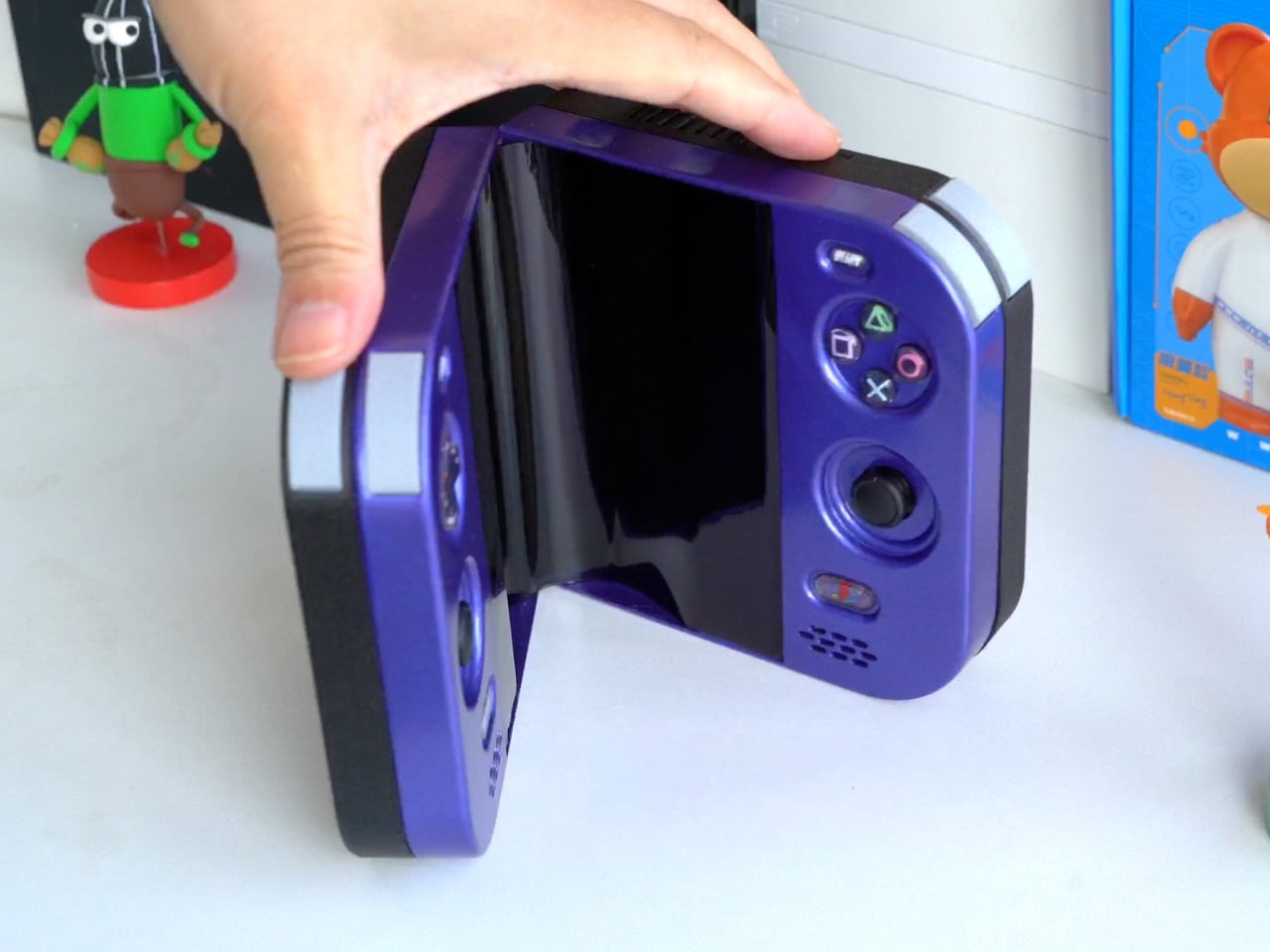
The PlayStation 2 was never something you could casually slip into a bag, unless you planned to bring a screen and controller along for the ride. The PlayStation 2 DUO brings those pieces together in an unofficial DIY handheld with an unusual trick. Its screen actually bends in the middle, letting you fold the console when it’s time to put the game away.

There’s plenty of familiar territory around that unfamiliar fold. A purple shell surrounds the display, with a D-pad and the four recognizable PlayStation symbols sitting above two analog sticks. Start and Select occupy the upper corners, while speaker grilles sit below the controls. The arrangement looks reassuringly conventional, which is probably helpful when the screen between your hands is doing something rather unconventional.

Designer: LCLDIY

That screen is a single flexible panel, rather than two separate displays interrupted by a hinge. The project’s earlier development notes describe a 7.8-inch screen salvaged from a foldable phone. It gives the DUO a generous central canvas when opened, without committing the handheld to that same width inside a bag. Of course, making a screen bend doesn’t make its limitations magically disappear.

The panel needs room to curve, and forcing it into a sharp fold would damage it. That requirement shaped the casing and its hinge, leaving a broad bend instead of squeezing the halves completely flat together. It’s a less tidy package than a closed clamshell might suggest, but the extra space has a practical purpose: keeping that delicate display in one piece.

There’s genuine PlayStation 2 hardware inside as well, rather than a newer computer pretending to be Sony’s console. Getting it to fit required cutting down the original motherboard and rearranging its supporting electronics. A 3D-printed enclosure brings everything together, turning equipment once tethered to a television into something you can hold between both hands. The nostalgia extends beyond the buttons, in other words.

The folding body makes the electronics more complicated, of course. Separate control boards occupy the two sides, with a ribbon cable linking them across the center. The trimmed motherboard also carries a small cooling fan and heatsink. There’s quite a bit happening underneath that playful exterior, particularly for a device whose moving parts include the surface you’re supposed to be staring at.

Folding it up reduces the footprint, but doesn’t automatically make this a pocket console. The published project information doesn’t establish its weight, closed dimensions, or battery runtime, so there’s little reason to start planning an entire flight around it. More importantly, this is a completed hobby build, not an upcoming Sony handheld with a price tag and a place on store shelves.

Enclosure printing files and a PCB archive are available on the project page, although they don’t amount to a complete assembly guide. Recreating the DUO still involves board modification and careful work around a flexible display. That might temper the urge to make one immediately, especially if your experience with PlayStation hardware mostly involves inserting discs rather than cutting up circuit boards.

The post This DIY PlayStation 2 Handheld Gives a Foldable Phone Screen a New Job first appeared on Yanko Design.

  • ✇Yanko Design
  • Strapsicle’s iPad Cases Trade Gripping the Edges for a Silicone Hand Strap
    Apple spends plenty of effort making the iPad thin and light, but that doesn’t mean holding one for an entire chapter feels effortless. A protective case can give it more bulk without giving your fingers much help. Strapsicle’s iPad cases take a different approach, adding a silicone strap that lets your hand support the tablet from behind instead of constantly squeezing its edges. The most conspicuous part of the design is also its most useful idea. Strapsicle calls it the XO strap, a circular
     

Strapsicle’s iPad Cases Trade Gripping the Edges for a Silicone Hand Strap

Par : JC Torres
28 octobre 2026 à 11:20

Apple spends plenty of effort making the iPad thin and light, but that doesn’t mean holding one for an entire chapter feels effortless. A protective case can give it more bulk without giving your fingers much help. Strapsicle’s iPad cases take a different approach, adding a silicone strap that lets your hand support the tablet from behind instead of constantly squeezing its edges.

The most conspicuous part of the design is also its most useful idea. Strapsicle calls it the XO strap, a circular center with four diagonal arms attached to the case. Slide your fingers underneath, and the flexible silicone sits across the back of your hand. That gives the iPad another point of support without turning it into something with a bulky carrying handle.

Designer: Strapsicle

That arrangement also leaves room to change how you hold the tablet. Your fingers can slip under different parts of the strap for portrait reading or landscape browsing, with either hand taking a turn. Of course, the case doesn’t make an iPad weightless. It’s intended to reduce reliance on pinching the edges, not remove the need to support the device at all.

Eventually, though, even the most interesting book has to make way for something else. The front cover folds along its geometric creases to become a stand, offering portrait support for reading and a steeper 75° landscape position for watching videos. There’s also an 8° setup for typing and drawing, bringing the screen closer to the tabletop rather than holding it almost upright.

The cover doesn’t have to follow you through every activity, thankfully. It detaches completely, leaving the rear strap accessible without a folded flap competing for space behind your hand. Small pins connect it to the shell rather than magnets, so removing it is a deliberate step. Put it back on when you’re finished, and the screen has a cover for the trip home.

There’s a smaller silicone loop along the edge for an Apple Pencil, keeping the stylus with the tablet instead of loose in a bag. The main straps are interchangeable, too, so changing colors doesn’t require replacing the whole case. Pink, dark teal, and black give that unusual rear shape a little personality, while the transparent back leaves the iPad’s own finish visible.

Strapsicle lists two sizes, fitting the sixth- and seventh-generation iPad mini or the 10th-generation iPad and iPad (A16). Its announced US launch prices are $69.99 for the mini case and $79.99 for the larger version. The company says they’re shipping now, with the October 26, 2026, announcement marking their B&H retail debut. DataVision sales are scheduled to follow in November.

There is a tradeoff to all that extra support, however. Strapsicle lists the complete mini case at about six ounces and the larger version at 9.8 ounces, including their covers and straps. You’re adding weight to something you’ll still have to hold. Taking the cover off for a chapter on the couch makes sense, then, provided you remember to put it back before heading out.

The post Strapsicle’s iPad Cases Trade Gripping the Edges for a Silicone Hand Strap first appeared on Yanko Design.

  • ✇Yanko Design
  • Instax Mini Evo 2 Brings Retro Fun Without Giving Up Digital
    One of the things that I’d like to explore more in 2027 is taking more photos of the things around me and the things I’ll be experiencing in the new year. I’m still not good enough to warrant getting a DSLR camera, but I would be willing to try out digital cameras where I can experiment and play around with filters and textures while also being able to make the photos live outside of my camera roll. Fujifilm’s Instax Mini Evo 2 is one such camera, with tactile controls, a large touchscreen, 10
     

Instax Mini Evo 2 Brings Retro Fun Without Giving Up Digital

28 octobre 2026 à 10:20

One of the things that I’d like to explore more in 2027 is taking more photos of the things around me and the things I’ll be experiencing in the new year. I’m still not good enough to warrant getting a DSLR camera, but I would be willing to try out digital cameras where I can experiment and play around with filters and textures while also being able to make the photos live outside of my camera roll.

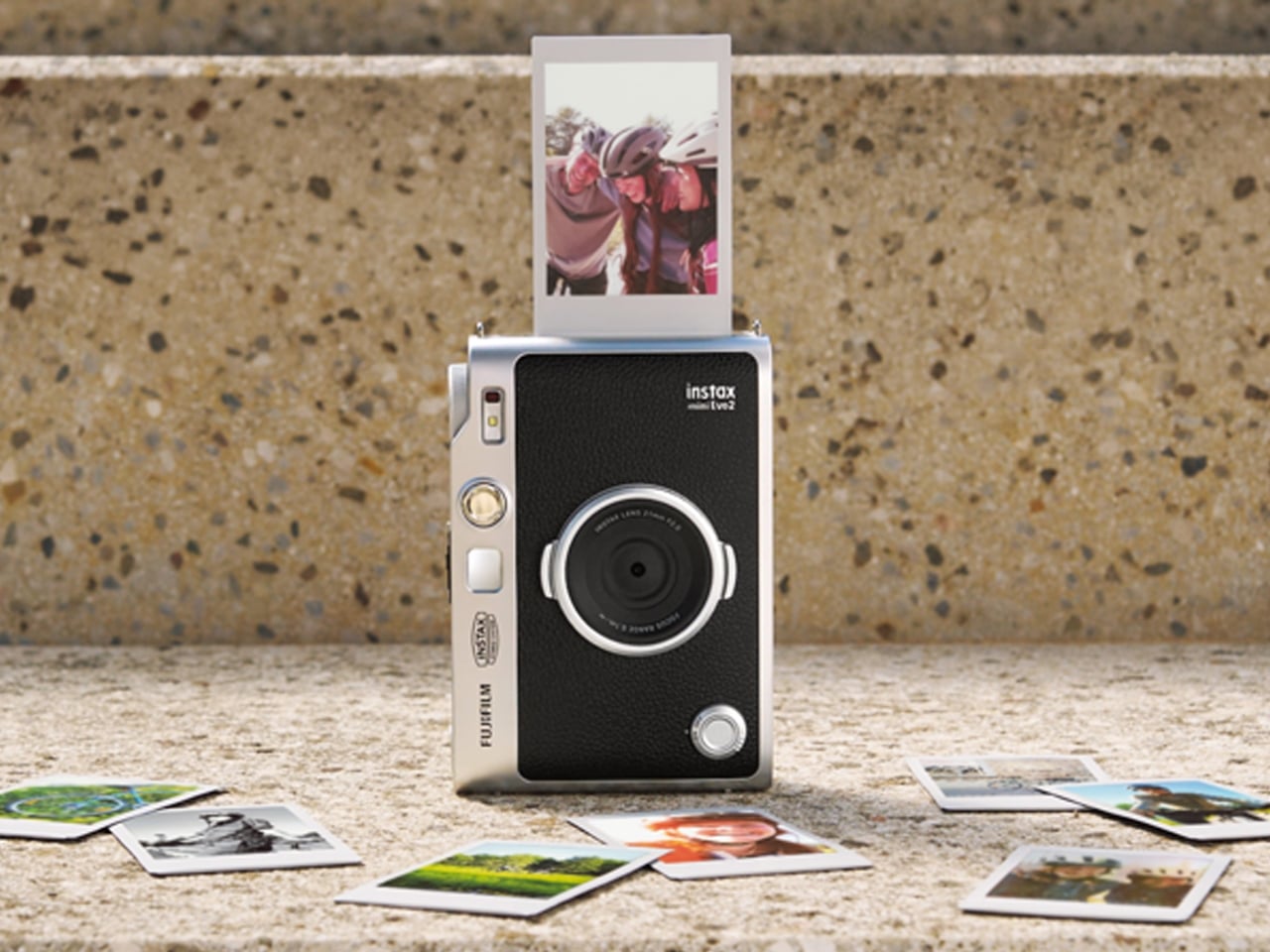
Fujifilm’s Instax Mini Evo 2 is one such camera, with tactile controls, a large touchscreen, 10 lens effects and 10 film effects to create 100 combinations, and, of course, the ability to print photos. This second generation of the hybrid instant camera and photo printer keeps its predecessor’s retro feel and range of creative combinations while adding some modern conveniences.

Designer: Fujifilm

The camera’s tactile controls add a tangible interface to this digital camera, giving it an analog-inspired way of operating. You have a lens dial to change from one lens effect to another, while the film-effect dial lets you go through the 10 different film effects. There’s also a lever that you pull to print out the photo, making printing a separate, deliberate action.

The 4.5-inch touchscreen is larger than the original Mini Evo’s display. Its Expanded View mode displays the area outside your intended print frame. You get a framing guide to show you what the photo will actually include, giving you an added layer of compositional awareness. This could be useful when you’re waiting for a moving subject to enter the frame. The touchscreen complements the dials by handling settings, image browsing, and editing, including cropping and adjustments to brightness, contrast, and saturation. You can make those changes on the camera before deciding which pictures deserve a print.

The Mini Evo 2 also now has an Immersive Movie feature that captures the four seconds leading up to your photo, producing a five-second silent clip that includes the shutter moment. It requires a separately sold microSD card. Rather than reducing the still photo to a smaller size, Fujifilm lists separate recording resolutions: 2144 × 2860 pixels for normal still images and 560 × 992 pixels for video. The short clip gives you a little more of what happened around the photograph, although it isn’t a replacement for recording longer videos.

For still photos, the camera can also record at approximately 13 megapixels when a microSD card is inserted and Expanded View is turned off. That gives you a higher-resolution option, but it isn’t the default for every shot. It’s worth knowing the conditions rather than assuming that every image you take will have the same resolution.

What appeals to me most is having a dedicated digital camera that encourages a little more playing around. I’d like to spend more time choosing how a photo looks before taking it, rather than scrolling through editing options afterward. The combination of physical dials and a touchscreen feels like an interesting way to approach that, with familiar digital controls alongside something you can actually turn.

The built-in printer adds to the appeal of having two devices in one. It works with photos taken on the camera and pictures from your smartphone through the Instax Mini Evo app. The app also supports remote shooting, so you can join a group photo instead of always being the person behind the camera. Your phone still has a role, but it doesn’t have to handle every part of taking the picture. Combining a digital camera and printer isn’t new for Fujifilm, so the novelty here is more about how the pieces work together. The larger touchscreen and new shooting modes give me more reasons to be interested in the camera itself, beyond the photographs it can print.

For my 2027 photography plans, I’d like a camera that makes me curious enough to keep picking it up. Trying a different effect or paying closer attention to what enters the frame seems like a manageable place to start. I don’t need every picture to become a keepsake; I’d be happy to develop a habit of noticing more. Fujifilm announced the Mini Evo 2 on October 27, 2026, with availability scheduled to begin November 27, 2026.

The post Instax Mini Evo 2 Brings Retro Fun Without Giving Up Digital first appeared on Yanko Design.

  • ✇Yanko Design
  • $229 Galaxy Buds On arrive with hands-free AI operation and smooth gestures
    The clip-on buds form factor is here to stay and not merely a fad. Samsung has joined the bandwagon with its first-ever clip-ons that compete in the flagship segment. The South Korean giant’s Buds4 Pro earbuds have already impressed us with their excellent call quality, ANC, and comfort. So we expect the same from the new Galaxy Buds On. With Bose Ultra Open, Sony LinkBuds, Huawei FreeBuds 6, Nothing Ear (open), and CMF Clip Pro giving outdoor audio lovers plenty of options, the Samsung clip-on
     

$229 Galaxy Buds On arrive with hands-free AI operation and smooth gestures

28 octobre 2026 à 09:20

The clip-on buds form factor is here to stay and not merely a fad. Samsung has joined the bandwagon with its first-ever clip-ons that compete in the flagship segment. The South Korean giant’s Buds4 Pro earbuds have already impressed us with their excellent call quality, ANC, and comfort. So we expect the same from the new Galaxy Buds On.

With Bose Ultra Open, Sony LinkBuds, Huawei FreeBuds 6, Nothing Ear (open), and CMF Clip Pro giving outdoor audio lovers plenty of options, the Samsung clip-ons have a strong case with the features on offer. Their first-ever clip-on wireless buds sit inside the ear, while the ergonomic shape comfortably hugs the ear for a snug fit even while working out. According to Samsung, the buds were developed after analyzing different ear shapes to optimize speaker placement and the built-in battery.

Designer: Samsung

Galaxy Buds On are focused on spatial awareness without losing out on the music quality, thanks to the TwinBoost speakers that deliver low-frequency performance. The automatic volume control toggles the audio level depending on the outside ambient noise, so that you don’t miss out on any of the important audio streams or call conversations. The introductory video clearly highlights the fact that the buds seamlessly integrate into daily life and personal listening space. Unlike some buds that have left and right distinction, these don’t have one, which is both a downside and an advantage when it comes to freedom of use.

The IP54 buds are powered by the Snapdragon S7 Gen 1 Sound platform paired with the high-efficiency Class-D amplifier, which optimizes things at the hardware level for final performance. This ensures a nonstop 9.5 hours of continuous music playback after a single charge. The buds come with a bone conduction vibration sensor that helps detect if the wearer is speaking to someone, so that the transparency mode can be enhanced and background noise reduced. As seen in the launch video, the buds can be triggered hands-free with the “Hey Google, let’s talk live” command for natural AI conversations.

Head gestures are also a part of the mix and more reliable given the bone conduction tech is at the helm. You can take or reject calls, read message notifications, dismiss alarms, or even adjust volume or equalizer on Galaxy devices. Samsung has also addressed the audio leakage issue, which is common to most clip-ons, with the Audio Leakage Reduction tech. The accompanying case brings the total battery life to an impressive 38 hours. With each of the buds weighing 6.65g and the case at 41g, the Buds On have a strong case for people in the Galaxy ecosystem. For a price of $229, they are flush in the flagship dominance race, and it will ultimately boil down to the real-world performance of the buds.


The post $229 Galaxy Buds On arrive with hands-free AI operation and smooth gestures first appeared on Yanko Design.

  • ✇Yanko Design
  • The 8 Best Halloween Designs for a Delightfully Spooky October
    Halloween decorating can start small, with something like a skeleton on the porch. A strange little object on the dinner table, a lamp that reveals something unexpected, or a pair of shoes with eyes on the heels can be enough. The most interesting seasonal designs give familiar things a new personality, leaving room for a little mischief without turning the entire house into a haunted attraction overnight. These eight picks approach the season through miniature storytelling, everyday utility, a
     

The 8 Best Halloween Designs for a Delightfully Spooky October

28 octobre 2026 à 07:40

Halloween decorating can start small, with something like a skeleton on the porch. A strange little object on the dinner table, a lamp that reveals something unexpected, or a pair of shoes with eyes on the heels can be enough. The most interesting seasonal designs give familiar things a new personality, leaving room for a little mischief without turning the entire house into a haunted attraction overnight.

These eight picks approach the season through miniature storytelling, everyday utility, and atmospheric details. Some are unmistakably Halloween, while others suggest a darker mood without wearing a pumpkin on their sleeve. This is an editorial selection rather than a tested ranking or a collection of new releases. It includes retail products, an older lighting design, and a LEGO fan proposal, with those distinctions kept clear as we explore each one below.

1. Halloween Snow Globe

The Brick Artist’s Halloween Snow Globe puts a graveyard where you would normally expect a snowman. Published as a LEGO Ideas fan proposal, rather than an official retail set, it gathers a twisted tree, a floating ghost, and a pumpkin-headed scarecrow beneath a transparent dome. Its proposed hand crank rotates the scene, bringing a skeleton and spider into view from behind the tombstones. That gives the mechanism a storytelling purpose beyond simply displaying the same arrangement from another angle.

The published renders make the strongest case for its inclusion here. Orange leaves interrupt the black and gray palette, while a vampire on the base greets anyone approaching the miniature scene. It would be an appealing centerpiece for someone who prefers examining tiny details to hanging oversized decorations. The construction is less convincing from behind, where the moon exposes its studs, but that also reveals the theatrical thinking: this is a small stage with a carefully arranged opening view.

What we like

  • Rotation reveals hidden characters.
  • The dome contains an entire miniature Halloween scene.

What we dislike

  • It is a fan proposal, not an official retail set.
  • The rear view exposes some scenic construction.

2. Nike Dunk Low “Shibuya Halloween”

Nike’s Dunk Low Premium Halloween takes a quieter approach to dressing for October. The leather upper has a scaly appearance, with dark green and black keeping the daytime palette restrained. The more theatrical detail sits behind you: eyes on the heel tabs glow in the dark, accompanied by an outsole with the same effect. Nike also includes a Shibuya city tongue label, connecting the shoe’s familiar nickname to a specific detail rather than relying on Halloween colors alone.

For anyone who wants a seasonal accessory without committing to a costume, that restraint is the attraction. The familiar sneaker silhouette remains intact, and the monster character emerges through texture and small graphic interventions. It is a more flexible wardrobe proposition than footwear covered in pumpkins, at least aesthetically. The limitation is that much of the Halloween effect depends on darker surroundings. Nike describes the glowing elements but does not specify their duration, so treat them as decoration, not illumination.

What we like

  • Heel eyes give a familiar sneaker an unexpected character.
  • The dark palette is less overtly seasonal than orange graphics.

What we dislike

  • The Halloween effect is subdued in daylight.
  • Nike does not specify how long the glow lasts.

3. Skeleton Wine Glasses

Pottery Barn’s Skeleton Wine Glasses let a tiny skeletal figure do the lifting. Instead of decorating the bowl with a printed Halloween motif, the design incorporates the skeleton into the stem, with raised arms reaching toward the glass above. The manufacturer specifies a handmade zinc alloy embellishment and a bowl made from mouth-blown soda lime glass. It is a satisfying change of scale: something normally imagined standing in a doorway becomes the character supporting a drink at dinner.

This is a particularly useful direction for a Halloween table because the decoration participates in the meal rather than occupying another patch of tabletop. Set against plain plates and napkins, the figure could carry most of the seasonal theme on its own. The practical compromise comes afterward. Pottery Barn calls for washing by hand with mild soap and warm water, and the glass cannot be removed from its skeleton. These are entertaining pieces that ask for a little extra cleanup.

What we like

  • The skeleton becomes part of the glass’s structure.
  • One piece supplies both drinkware and table decoration.

What we dislike

  • Cleaning requires washing by hand.
  • The glass does not detach from the skeleton.

4. Elizabat Kitchen Scissors

Elizabat turns a pair of kitchen scissors into a bat without hiding what the tool is supposed to do. The wings form the handles, and a small face sits between them, giving the silhouette a character that becomes especially clear when the scissors open. OTOTO combines stainless steel blades with plastic and rubber components. The tool also incorporates a bottle opener and a nutcracker, putting several kitchen jobs inside a shape that would otherwise be easy to dismiss as novelty.

Something is appealing about letting Halloween enter through food preparation instead of adding another ornament to a shelf. Elizabat can remain in the kitchen after the decorations come down, assuming the bat aesthetic suits your everyday tools. OTOTO lists the scissors as dishwasher-safe, which is a useful distinction from the more demanding glassware in this collection. The wing shape is still a stylistic commitment, and the friendly expression should not obscure the fact that these are sharp kitchen scissors.

What we like

  • The handles give the bat silhouette a functional role.
  • Scissors, bottle opener, and nutcracker share one tool.

What we dislike

  • The winged handles are visually busy.
  • The playful appearance can obscure the sharp blades.

5. Angela Deane Incense Smoker

West Elm’s collaboration with Angela Deane brings a pair of small ceramic ghosts to the tabletop. Their uneven heights, dark eyes, and draped forms make them look more like curious visitors than threatening apparitions. The object is an incense smoker, giving the sculpture a role beyond standing on a shelf. Its soft, pale silhouette offers a useful alternative to the black metal, orange plastic, and deliberately distressed finishes that can make a Halloween display feel visually crowded before anything happens.

For a smaller seasonal arrangement, the ghost pair could sit beside a stack of books or become the focus of an otherwise ordinary side table. The ceramic form remains legible without needing a large surrounding display, which is part of its appeal. Incense introduces another layer of atmosphere, though smoke and fragrance will not suit every space or preference. West Elm recommends wiping the piece with a soft, dry cloth, so its upkeep is closer to caring for a sculpture than washing tableware.

What we like

  • Two ghost figures create a charming sculptural composition.
  • It combines seasonal decoration with an incense function.

What we dislike

  • Incense smoke will not suit every space.
  • Care requires wiping with a soft, dry cloth.

6. Agatha Spoon Holder & Steam Releaser

Agatha’s joke becomes clear as soon as a spoon passes through her hands: the utensil becomes a witch’s broomstick. Designed by OTOTO in collaboration with Uli Ben Israel, the purple silicone character works as a spoon holder and steam releaser. Her pointed hat and flowing outline make the Halloween reference immediate, but the cooking connection gives the character a reason to exist. A witch beside a pot is a more convincing piece of visual storytelling than a random seasonal graphic.

The appeal is strongest for someone who enjoys the season while doing ordinary things. Preparing dinner becomes the setting for the design, with the pot standing in for a cauldron and the spoon completing the scene. OTOTO lists the silicone as dishwasher-safe and resistant to boiling water. Fit still deserves attention, since a useful holder needs to work with your particular spoon and cookware. Agatha is a small accent rather than a decoration that changes the mood of an entire room.

What we like

  • The spoon completes the witch’s broomstick silhouette.
  • One silicone character serves two cooking roles.

What we dislike

  • Compatibility needs checking against your utensils and cookware.
  • Its decorative impact stays mostly around the stove.

7. King Edison Ghost Pendant Lamp

A dark pendant shade is not an obvious Halloween decoration until it reveals the chandelier hidden inside. Designed by Young & Battaglia for Mineheart, the King Edison Ghost contains a miniature brass chandelier within a shade of hand-blown black glass. According to the manufacturer, the interior becomes visible when the light is switched on. The result borrows the visual language of an old drawing room, then compresses it into an object whose exterior initially gives very little away.

This is the collection’s most permanent approach to creating an eerie atmosphere. There are no cartoon ghosts or seasonal slogans, just an illuminated object appearing through dark glass. It could appeal to someone who prefers a suggestion of haunted architecture to literal party decor. It also demands a different commitment: this is a ceiling pendant with a ceiling rose, not a lamp to unpack for one evening. Mineheart’s page currently offers availability notifications, so immediate purchase should not be assumed.

What we like

  • Switching it on reveals an unexpected miniature chandelier.
  • The ghostly effect does not depend on seasonal graphics.

What we dislike

  • Ceiling installation makes it a longer-term commitment.
  • The manufacturer currently directs shoppers to availability notifications.

8. Miniature Bonfire Wood Diffuser Set

Shinchi Ringyo’s Miniature Bonfire Wood Diffuser Set takes its seasonal cue from campfire stories rather than haunted houses. The Japanese design arranges miniature firewood on a stainless steel stand, using the wood to disperse aromatic oil. The stand measures about 2.1 by 2.7 by 2.3 inches, making this a tiny campsite rather than a conventional centerpiece. Its appeal lies in recognizing a familiar outdoor arrangement at a scale intended for a desk or shelf.

The Halloween connection is atmospheric, so this is the pick for anyone who would rather suggest a woodland evening than display another pumpkin. The shop lists cedar and Hakusan scent options, with the latter combining cedar, cypress, and lindera umbellata. Fragrance preferences are personal, and the set’s $99 price makes this a considered purchase for such a small object. Its role here is as an aroma diffuser; the listing’s separate stove claims are not the basis for recommending it.

Click Here to Buy Now: $99.00

What we like

  • The miniature campsite offers a quieter autumnal mood.
  • Its woodland theme can remain relevant after Halloween.

What we dislike

  • At $99, it is expensive for a small decorative diffuser.
  • The Halloween connection is indirect.

A Little Halloween Goes a Long Way

A good starting point is to choose the moment you want to change rather than the number of decorations you want to own. A dinner table needs something different from an entryway, and a kitchen tool earns attention differently from a display piece. Give one object enough space to be noticed. A distinctive silhouette or unexpected reveal can lose its effect when surrounded by too many competing seasonal props nearby.

It is also worth deciding how much Halloween you want to keep after October. Literal ghosts and skeletons can become an annual ritual, while darker lighting or woodland references may suit the room for longer. Neither approach needs to dominate the house. The pleasure is in finding a design whose particular joke, detail, or small surprise still makes you look twice when you pass it during an otherwise ordinary day.

The post The 8 Best Halloween Designs for a Delightfully Spooky October first appeared on Yanko Design.

  • ✇Yanko Design
  • km5’s Sp1 Speaker and Mp1 Mixer Give CD Listening a DJ-Style Twist
    There’s something satisfying about choosing a CD, even if most of us have become accustomed to tapping a screen instead. The trouble is finding audio equipment you’d actually want to leave on display. km5’s newly announced Sp1 speaker and Mp1 mixer give its Cp1 CD player some equally minimalist company, letting you listen to favorite albums or try your hand at mixing them. Both borrow the Cp1’s flat, frame-like format, with black or white finishes that let the pieces sit together without lookin
     

km5’s Sp1 Speaker and Mp1 Mixer Give CD Listening a DJ-Style Twist

Par : JC Torres
28 octobre 2026 à 06:07

There’s something satisfying about choosing a CD, even if most of us have become accustomed to tapping a screen instead. The trouble is finding audio equipment you’d actually want to leave on display. km5’s newly announced Sp1 speaker and Mp1 mixer give its Cp1 CD player some equally minimalist company, letting you listen to favorite albums or try your hand at mixing them.

Both borrow the Cp1’s flat, frame-like format, with black or white finishes that let the pieces sit together without looking like an assortment of unrelated electronics. The Sp1 puts a perforated grille where the player displays its disc, while the Mp1 fills that space with knobs and sliders. They share the same size, but each makes its purpose clear through its front surface.

Designer: km5

The speaker has a few surprises behind that otherwise quiet appearance. A dot-matrix display sits beneath the grille, showing the time and playback information without carving out a separate screen on the front. Physical buttons occupy the top edge alongside a retractable metal antenna. That last detail gives away the Sp1’s other role as an FM radio that doesn’t need to borrow your phone.

Inside are two 1.77-inch full-range drivers and two passive radiators, though their presence alone doesn’t tell us how convincing the bass will be. Bluetooth and microSD playback offer other ways to listen, and you can record radio programs, too. Pairing two Sp1 units provides stereo playback, letting a single speaker become part of a larger arrangement rather than something you’ve outgrown.

The Mp1, meanwhile, invites you to do something with the music beyond pressing play. Its two channels have separate level sliders, with a crossfader below for blending between sources. Three-band EQ controls adjust the bass, midrange, and treble, while filters change the sound further. Loop buttons repeat sections of a track, giving a favorite passage permission to stick around a little longer.

Two Bluetooth inputs let the mixer receive music from sources such as a Cp1 and a smartphone, then send the combined sound wirelessly to a compatible speaker. You aren’t required to own an entire matching set, thankfully. Line inputs and outputs also accommodate wired connections, though the published information doesn’t establish how much delay the completely wireless arrangement introduces when you’re trying to mix.

Built-in batteries make it easier to move the arrangement away from a desk, with km5 quoting approximately 12 hours for the speaker and six for the mixer. Optional wall-mount accessories offer another way to free up a surface. The mixer can even be operated on the wall, an unusual invitation to get up from the sofa and fiddle with the music yourself.

Preorders are scheduled to open on November 16, 2026, with km5 expecting shipments in February 2027 or later, though pricing remains unconfirmed. There’s also a practical limit to that portable party setup. The speaker’s quoted battery life is twice the mixer’s, so it might be ready for another album when your DJ booth is looking for a charger.

The post km5’s Sp1 Speaker and Mp1 Mixer Give CD Listening a DJ-Style Twist first appeared on Yanko Design.

  • ✇Yanko Design
  • RAY’s 3D Print Scraper Concept Refuses to Be Another Rectangle
    The little rectangular blade gives RAY away. Without it, Marija Kucurski’s stingray-shaped design could pass for a small sculpture, all sweeping fins and a curling tail. It’s actually a concept for a 3D print scraper, a tool meant to help release stubborn plastic from a printer’s build surface. Presented through renderings on Render Weekly, it gives an unglamorous workshop accessory a silhouette I’d happily leave out on the bench. The practical problem is straightforward: a print needs to stay
     

RAY’s 3D Print Scraper Concept Refuses to Be Another Rectangle

28 octobre 2026 à 05:15

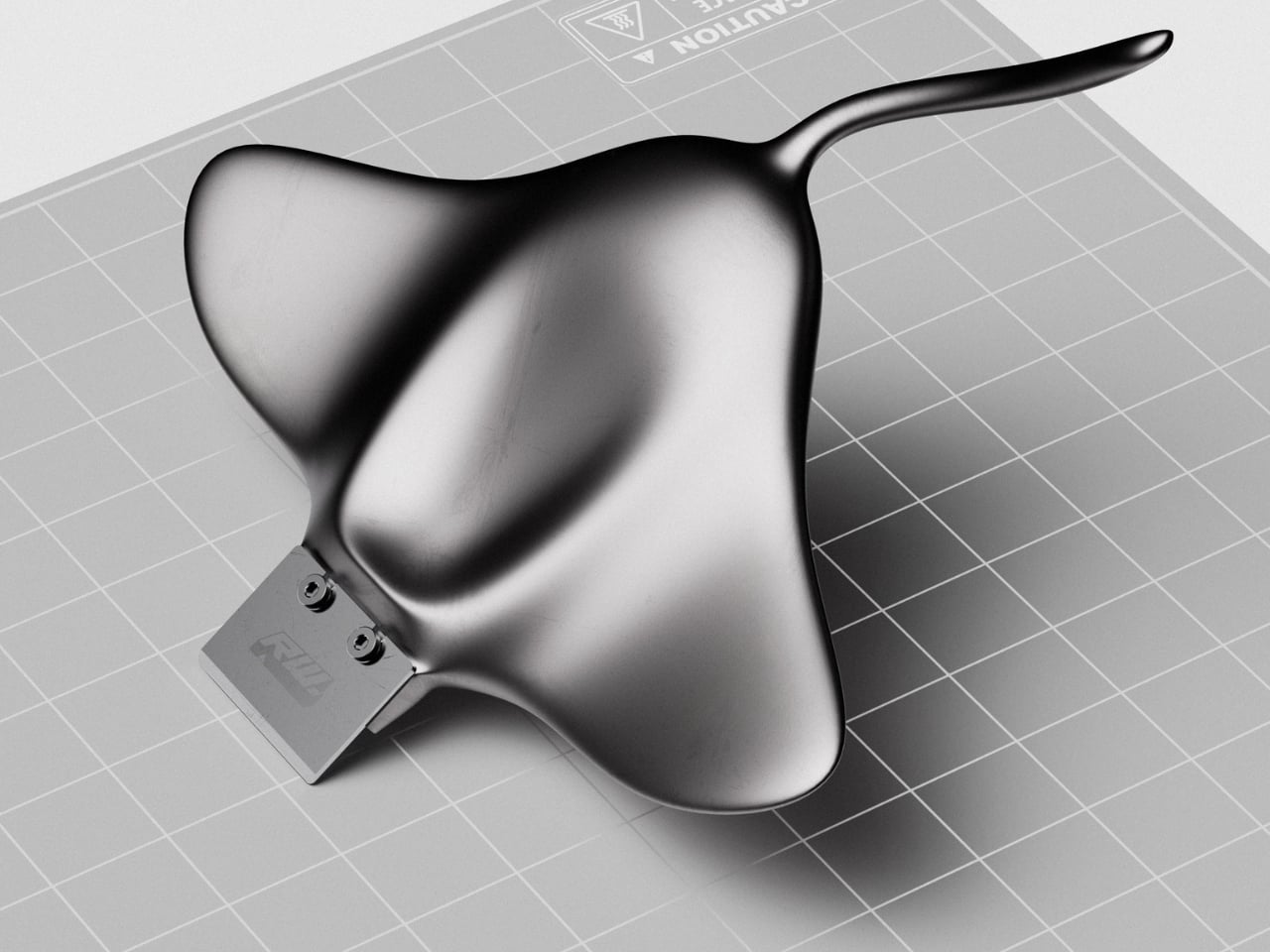
The little rectangular blade gives RAY away. Without it, Marija Kucurski’s stingray-shaped design could pass for a small sculpture, all sweeping fins and a curling tail. It’s actually a concept for a 3D print scraper, a tool meant to help release stubborn plastic from a printer’s build surface. Presented through renderings on Render Weekly, it gives an unglamorous workshop accessory a silhouette I’d happily leave out on the bench.

The practical problem is straightforward: a print needs to stay attached while it’s being made, but removing it afterward can take care. Prusa recommends letting its flexible steel sheets cool before bending them to release a print, sometimes using a spatula for assistance. RAY explores a handle for that scraping job while tackling a second, more personal frustration. Kucurski wanted to get away from the cubes, rounded rectangles, and racetrack shapes that had started to feel repetitive.

Designer: Marija Kucurski

In her project description, Kucurski compares working with SubD to playing with pizza dough or clay. That experimentation led her toward a stingray. I like how modest that explanation is. There’s no elaborate story about the ocean teaching us to scrape plastic more efficiently. She wanted to try a different shape, followed the modeling process, and arrived at an animal whose broad body gives the tool a recognizable identity. Sometimes that’s a perfectly worthwhile starting point.

Seen from above, RAY spreads outward into two rounded wings, with a raised central body flowing into a slender, curved tail. The dark, metallic-looking surface catches light across those changes in curvature, making the body feel more sculpted than assembled. That’s a visual effect in the renderings, not confirmation of a particular material. The blade sits at the front, interrupting those soft contours with a plain rectangle and two exposed fasteners.

A separate visualization makes the proposed grip clearer. A hand cradles the broad body, with the thumb resting near the center and fingers supporting the wings from underneath. The tail extends back toward the wrist rather than serving as a conventional narrow handle. That arrangement suggests a different relationship between hand and tool: more of a palm-supported object than something held by a stick. I’d be curious to see how that translates when applying pressure close to the build plate.

The blade attachment is a useful visual anchor. Two visible screw heads keep the business end legible, so the animal reference doesn’t completely swallow the tool’s purpose. I appreciate that decision. A perfectly uninterrupted stingray would make a cleaner sculpture, but the exposed hardware gives RAY a little workshop credibility. It also draws attention to the connection that would need to hold up during use.

My hesitation is mostly about the tail. It completes the stingray immediately, and removing it would make the design less memorable. But I’d want to know whether it contributes anything to handling or simply asks for extra space in a drawer. The wide wings raise a similar question about storage. Neither concern ruins the idea. They’re the ordinary negotiations that make a playful concept interesting once you imagine it sharing a bench with other tools.

The available presentation doesn’t establish grip comfort, scraping performance, or compatibility with particular build surfaces. Those details would matter more than the silhouette if RAY moved toward production. Even a beautiful scraper needs to respect the surface underneath it. Prusa specifically cautions against damaging the sheet when using a spatula and recommends slipping it beneath the model while the sheet is slightly bent, rather than digging into a flat surface.

Still, I’m glad Kucurski followed the less predictable shape. I don’t need every tool to resemble a sea creature, but I do enjoy a design that makes its maker’s curiosity visible. RAY earns attention through the sweep of its body and the almost comically practical blade attached to its front. The next step would be putting that expressive form to work, finding out which curves help the hand and which ones are simply along for the ride.

The post RAY’s 3D Print Scraper Concept Refuses to Be Another Rectangle first appeared on Yanko Design.

  • ✇Yanko Design
  • Logitech’s MX Master 4 Developer Edition Is a Mouse Full of Coding Easter Eggs
    Productivity mice aren’t usually the most expressive things on a desk. Their unusual curves and extra buttons often say more about work than the person doing it. Logitech’s MX Master 4 Developer Edition takes a slightly different approach, covering its familiar shape in programming references. The limited-edition mouse keeps the standard model’s features, but gives developers something a little more personal to reach for. Rather than stick to a single muted color, the mouse pairs light gray but
     

Logitech’s MX Master 4 Developer Edition Is a Mouse Full of Coding Easter Eggs

Par : JC Torres
28 octobre 2026 à 04:15

Productivity mice aren’t usually the most expressive things on a desk. Their unusual curves and extra buttons often say more about work than the person doing it. Logitech’s MX Master 4 Developer Edition takes a slightly different approach, covering its familiar shape in programming references. The limited-edition mouse keeps the standard model’s features, but gives developers something a little more personal to reach for.

Rather than stick to a single muted color, the mouse pairs light gray buttons with a dark palm rest and bright yellow-green accents. Fine circuit-like lines spread across the front, while coding symbols sit beside the controls. It’s a busier treatment than the regular version, of course, but the graphics follow the mouse’s existing divisions instead of covering everything in one continuous pattern.

Designer: Logitech

Some references are easier to recognize than others. A Hello, World greeting runs along the thumb rest, while smaller markings include 0xFF + 1 and 09.17. Logitech links those last two to Programmers’ Day and the Linux kernel’s release date. You don’t have to understand them to use the mouse, thankfully, although knowing the references does make its decoration feel rather less random.

Underneath that artwork, the familiar sculpted body remains, including a raised back and a broad platform for your right thumb. That thumb gets quite a few responsibilities, with a horizontal scroll wheel, side buttons, and the Haptic Sense Panel within reach. The asymmetric shape hasn’t become ambidextrous for this edition, so left-handed programmers are still left admiring the graphics from the wrong side.

The MagSpeed wheel handles the more familiar business of moving through long documents and code. It switches between stepped scrolling and free-spinning movement, letting you work line by line or move farther through a page. The thumb wheel provides horizontal navigation, which is useful when the thing you’re working on refuses to fit neatly inside a window, as spreadsheets have a habit of doing.

The ripples on the thumb panel hint at another kind of feedback. Rather than relying entirely on what happens onscreen, the mouse can deliver vibrations for supported actions and notifications. Logitech lets users adjust their intensity and customize app-specific feedback through Logi Options+. That doesn’t mean every application suddenly gains a sense of touch, but compatible interactions can have a physical cue.

Pressing the panel also opens Actions Ring, an onscreen collection of shortcuts arranged around the cursor. You can assign tools and macros through Options+, putting frequently used commands near where you’re already working. There is a small irony here, however. Despite the Linux reference on the shell, Logitech doesn’t provide a Linux version of Options+ for configuring that particular shortcut system.

The Developer Edition is listed for US preorder at $119.99, with shipping scheduled to start October 31, 2026. Since its functions match the standard MX Master 4, the choice comes down to how much personality you’d like under your hand. Existing owners won’t find new capabilities here, though the temptation to coordinate a keyboard, desk mat, and everything else remains.

The post Logitech’s MX Master 4 Developer Edition Is a Mouse Full of Coding Easter Eggs first appeared on Yanko Design.

  • ✇Yanko Design
  • Arrowspace’s $119 screwdriver identifies screws and lights up the matching bit
    For five years, Arrowmax has been teaching screwdrivers to read people. The SES Pro in 2021 watched your wrist, so a twist left or right told the motor which way to spin. The SES Max added app control, and the M1 Pro stretched output to 10 kgf·cm with a manual fallback for stubborn screws. Its little screen could report torque and battery level all day. Your screwdriver got smarter and you got lazier, in the best possible way. The obvious next question was why the tool still had no idea what sc
     

Arrowspace’s $119 screwdriver identifies screws and lights up the matching bit

27 octobre 2026 à 21:47

For five years, Arrowmax has been teaching screwdrivers to read people. The SES Pro in 2021 watched your wrist, so a twist left or right told the motor which way to spin. The SES Max added app control, and the M1 Pro stretched output to 10 kgf·cm with a manual fallback for stubborn screws. Its little screen could report torque and battery level all day. Your screwdriver got smarter and you got lazier, in the best possible way. The obvious next question was why the tool still had no idea what screw it was holding.

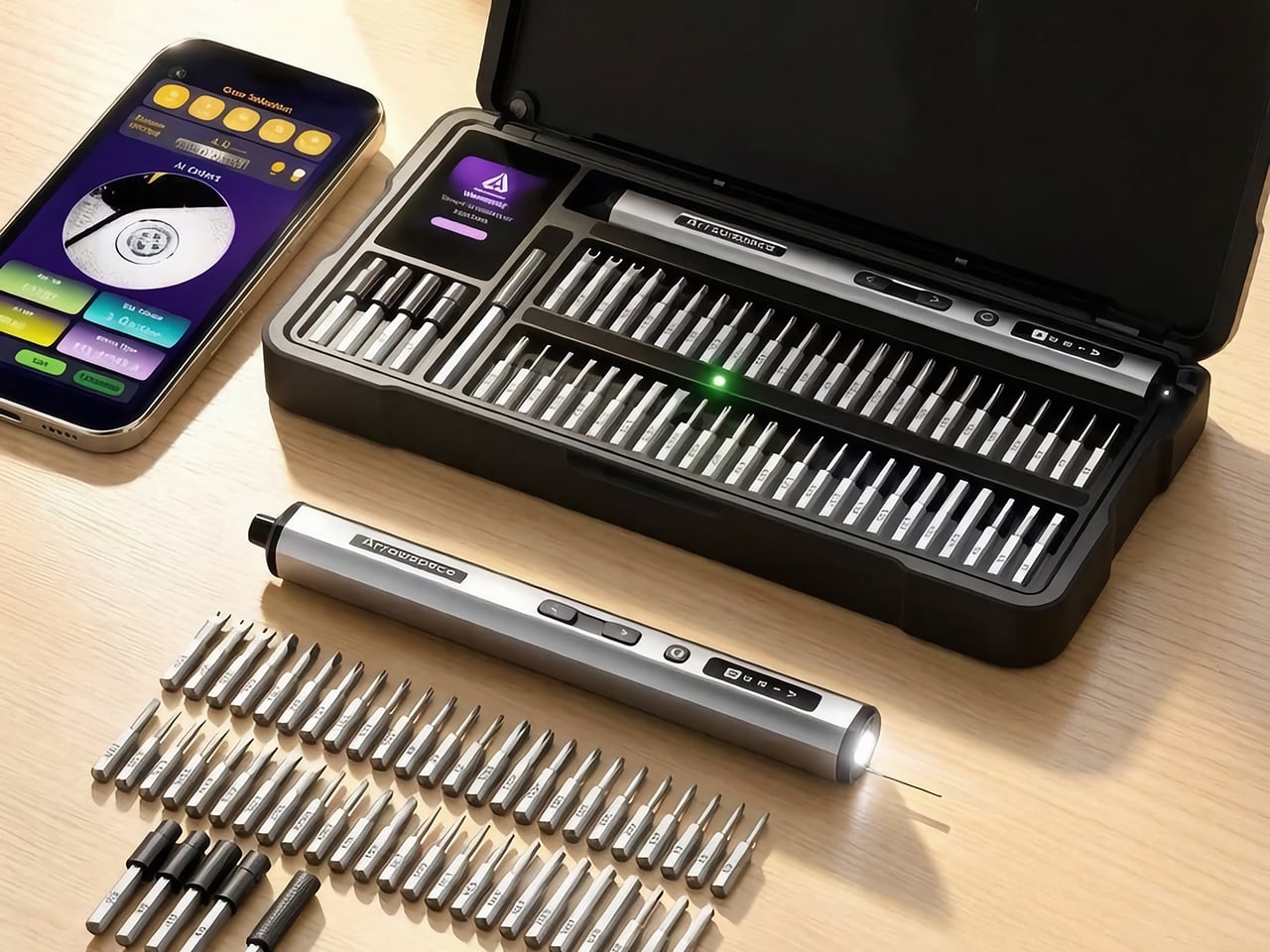
The Arrowspace S1, built by the same team under a new brand name, answers that with a camera on the tail end of the screwdriver. Image recognition names the screw’s drive type and exact size, while a small probe holds the lens at a fixed distance so tiny heads stay sharp. The smart case then lights the slot of the matching bit, and Auto mode picks a safe torque for that fastener. It keeps the 10 kgf·cm ceiling of the M1 Pro, which is plenty for everything from earbuds to e-bike parts. Early pricing starts at $119, and the kit includes the case, 52 S2 steel bits, and a power tip extension.

Designers: LAU YIN / XU YU

Click Here to Buy Now: $129 $215 (40% off). Hurry, only 40/400 left! Raised over $119,000.

The Screwdriver That Squints So You Don’t Have To

The camera sits at the rear of the S1, right behind a small contact probe, and the two work as a team. You rest the probe on the screw head, which locks the lens at one fixed distance, so every shot lands sharp. A screw this small turns to mush if the camera drifts even 1mm. Arrowmax fixed that blur problem with a metal pin instead of more code, which is a very hardware-person way to win an argument. I love it, because it means recognition survives a messy bench and shaky hands instead of working only in a demo video.

Once the shot is sharp, the driver sends it to the companion app on your phone, which works out the drive type and exact size. Everything runs locally with no internet involved, so your screw photos stay on your phone. Arrowmax trained the model, a YOLO object detector, on its own collection of tens of thousands of real screw photos, currently covering 12 common head profiles. The app shows the actual camera image next to the verdict, so you can see what the S1 sees and judge the call yourself. Only the reading step needs the phone, since motor control, torque, and the displays all work on their own.

A Case That Points at the Right Bit

The smart case turns the app’s verdict into something you can see across the bench. A 2-inch TFT screen with Arrowspace’s purple interface shows the recognized screw type and size, while an LED glows under the slot holding the matching bit. Reach, grab, done. Compare that with the usual ritual of squinting at tiny codes on dozens of near-identical shafts, and the old way starts to look like a part-time job. It is the same idea as a warehouse pick-to-light shelf, shrunk down to a tray of S2 steel bits.

The 52 bits are S2 steel hardened to HRC60, which keeps the tips from rounding off after repeated use, and extended bits reach screws buried in deep holes. A magnetic holder keeps bits seated while you work. The case itself is a CNC-machined frame in aerospace-grade aluminum with EVA protection inside, a build the M1 Pro’s CNC aluminum box would recognize. That solid metal feel suits a bench that sees daily use. One box ends up holding the driver, the bits, and the answer to which bit you need.

Gentle With Earbuds, Firm With E-Bikes

Electric torque runs from 1 to 10 kgf·cm, roughly 0.1 to 1 N·m, and Arrowspace’s own chart maps that range to real jobs. The low end suits earbuds, smart bands, and glasses. Around 3 you are into laptops and camera bodies, 6 covers RC cars, drones, and game consoles, and the full 10 handles e-bike parts and large appliances. Auto mode matches a conservative preset to the screw it just identified and remembers your last setting between jobs. Prefer to drive? The app lets you tune the torque for each mode yourself.

When electric mode runs out of muscle, the S1 switches to manual on its own, a trick it inherits from the M1 Pro. The mechanism is rated for 30 kgf·cm of hand-twisted force, which handles the factory screw that laughs at motors. A 600mAh LiPo battery covers 900+ screws or about 90 minutes of continuous use, and USB-C refills it in roughly 70 minutes. An OLED on the body shows torque level, spin direction, and battery, and it even animates while charging. A full session of fiddly repairs fits comfortably inside one charge.

The Price of Never Guessing Again

The S1 suits anyone who repairs often enough to own a drawer of bits but not often enough to have a veteran’s eye, meaning RC builders, scale modelers, drone owners, and the friend who gets every laptop question. Arrowspace says the AI handles identification while your hand keeps the control, and that split feels right to me. My one wish is friendlier recognition for oddballs like JIS cross-head screws, the Phillips look-alikes in plenty of Japanese electronics. Arrowmax says updates will keep widening the 12 profiles covered today, so the wish has a path. A screwdriver that learns new screws over time is a fun idea for a tool that used to be a metal stick.

Pricing for a single S1 kit starts at $119, listed at 45% off, with $129 and $149 tiers also available. Every tier includes the driver, the illuminated smart case, 52 S2 steel bits, and a power tip extension. Shipping is an estimated $16 by air freight to anywhere in the world, so US buyers are covered, with delivery expected in April 2027. Two kits run $238 and three run $339, with shipping at $30 and $45. The optional Angle Screw attachment is sold separately, so check the product page for its price. A stripped screw can cost you a whole device, which makes $119 look like cheap insurance.

Click Here to Buy Now: $129 $215 (40% off). Hurry, only 40/400 left! Raised over $119,000.

The post Arrowspace’s $119 screwdriver identifies screws and lights up the matching bit first appeared on Yanko Design.

  • ✇Yanko Design
  • Do yourself a favor and buy a power station now, before the energy crisis gets worse
    Every crisis has its panic buy. In 2020 it was toilet paper and N95 masks, in 2021 it was graphics cards, in 2025 it was RAM chips, and in 2026 my money is on lithium iron phosphate. With Iran attacking tankers in the Strait of Hormuz, gas sitting at a record-for-October $4.36 a gallon, and heating oil bills forecast to climb 21% this winter, the case for keeping your own stash of electrons has never been stronger. A portable power station from Anker, EcoFlow, or Jackery keeps your fridge cold
     

Do yourself a favor and buy a power station now, before the energy crisis gets worse

27 octobre 2026 à 20:30

Every crisis has its panic buy. In 2020 it was toilet paper and N95 masks, in 2021 it was graphics cards, in 2025 it was RAM chips, and in 2026 my money is on lithium iron phosphate. With Iran attacking tankers in the Strait of Hormuz, gas sitting at a record-for-October $4.36 a gallon, and heating oil bills forecast to climb 21% this winter, the case for keeping your own stash of electrons has never been stronger. A portable power station from Anker, EcoFlow, or Jackery keeps your fridge cold and your lights on when the grid gives up. It also runs indoors without trying to poison you, and it never needs a trip to the gas station.

Stockpiling toilet paper made you look a little unhinged. Owning a power station makes you the neighbor everyone suddenly wants to befriend during an outage. Black Friday could knock a few more dollars off, sure, but fall sale prices are already the best we’ve seen this season, and winter storms rarely wait for a coupon code. I’ve narrowed the field to one value pick from each brand, all hovering around the 2kWh mark, enough to keep a fridge humming for well over a day. Anker gets first crack, because its S2000 squeezes 2,010Wh into a 35.7-pound body that costs less than a decent espresso machine.

[Editor’s Pick] Anker S2000 2,010Wh Portable Power Station: $699.99

Anker announced at IFA 2026 that its SOLIX power station brand is folding into the Anker name, so you’ll still spot “SOLIX” on boxes and Amazon listings while the switch plays out over the next couple of years. Same company, same warranty, simpler logo. The S2000 makes a great poster child for the new identity, because it looks like it wandered over from the home appliance aisle. At 8.2 x 11.1 x 12.7 inches (208 x 282 x 323mm) and 35.7 pounds (16.2kg), it takes up roughly the counter space of a coffee maker. That makes it nearly 4 pounds lighter than Jackery’s Explorer 2000 v2 and 9 pounds lighter than EcoFlow’s DELTA 3 Max.

Inside are 314Ah lithium iron phosphate cells rated for 6,000 cycles to 80% capacity and 10,000 to 60%, the same chunky format used in grid-scale storage. Anker estimates a 15-year design life, so this thing could easily outlast your fridge. Output tops out at 1,500W continuous with a 3,000W surge, plenty for a fridge, router, lights, laptops, and a CPAP. The real magic is efficiency, with idle draw of just 6W, which helped it keep a fridge running for 34 hours and 15 minutes in GearJunkie’s testing. At $599.99 for subscribers, that works out to roughly $300 per kilowatt-hour, the cheapest of our three picks by a wide margin.

Click Here to Buy Now

What we like

  • At 35.7 pounds, it’s the lightest 2kWh station you can buy right now, and compact enough to live on a kitchen counter.
  • A UPS switchover of 10ms or less keeps your router and desktop online the moment the grid drops.
  • Long-life cells and roughly $300 per kWh make it the best value of the three.

What we dislike

  • Solar input caps at 400W, which means about five hours of ideal sunshine to refill, and winter rarely delivers ideal.
  • It isn’t expandable, so 2kWh is your ceiling.
  • 1,500W of output rules out running a space heater alongside much of anything else.

Jackery Explorer 2000 v2 2,042Wh Portable Power Station: $899

Jackery’s orange-trimmed Explorers were the default power station for years, long before Anker, EcoFlow, and Bluetti started crowding the category. The Explorer 2000 v2 keeps that familiar look but trims the bulk, measuring 13.2 x 10.4 x 11.5 inches (335 x 264 x 292mm) and weighing 39.5 pounds (17.9kg). Its proportions are squatter and more cube-like than the Anker’s, which makes it easier to tuck under a desk or beside a fridge. Jackery marketed it as the lightest and most compact 2kWh LiFePO4 station around, a crown the S2000 snatched this year by shedding nearly four more pounds. The two brands are basically locked in a very nerdy weight-loss competition.

Output is where the Jackery pulls ahead of the Anker, with 2,200W continuous and a 4,400W peak spread across three AC outlets. That’s enough headroom for a sump pump, a fridge compressor, or a microwave without the station breaking a sweat. Jackery’s ChargeShield 2.0 system layers in 62 protection mechanisms, and Silent Charging Mode keeps noise under 30dB, roughly a whisper, which is handy if it ends up in your bedroom during an outage. The cells are rated for 4,000 cycles and a 10-year lifespan, fewer than Anker promises but still plenty for daily use well into the 2030s. At $899, you’re paying about $440 per kilowatt-hour, dropping to $416 when it dips to $849.

Click Here to Buy Now

What we like

  • 2,200W of continuous output handles bigger appliances than the Anker can.
  • Silent Charging Mode stays under 30dB, so it won’t keep you up at night.
  • A 3-year standard warranty plus a 2-year extension covers you for five years total.

What we dislike

  • Only three AC outlets, so a power strip becomes part of the kit.
  • It isn’t expandable, and solar input maxes out at 400W.
  • It won’t charge below 32°F (0°C), so an unheated garage in January is a bad home for it.

EcoFlow DELTA 3 Max 2,048Wh Portable Power Station: $899

EcoFlow’s DELTA family is the brand’s bread and butter, and the DELTA 3 Max is the 2kWh sweet spot of the current lineup. It’s also the chunkiest of our three picks, measuring 19.45 x 9.41 x 12.01 inches (494 x 239 x 305mm) and weighing 44.8 pounds (20.3kg). That long, low, suitcase-like shape belongs on the floor next to the fridge, and you’ll want two hands whenever you move it. EcoFlow spends that extra bulk on muscle, and the trade feels fair once you see the output numbers. The Halloween sale has it at $899, down from $1,199, which puts it neck and neck with the Jackery on price.

You get 2,400W continuous across four AC outlets, the most of our three picks, plus EcoFlow’s X-Boost mode for resistive appliances up to 3,400W. X-Boost works by dropping the voltage, so a kettle or hair dryer runs a little slower instead of tripping the station. That’s enough headroom to run a 1,500W space heater with the fridge and router still plugged in. EcoFlow also rates it at 25dB or less when charging or discharging at 600W, which is quieter than a library. At $899, it lands at about $439 per kilowatt-hour, essentially tied with the Jackery, so the choice comes down to extra watts versus a lighter box.

Click Here to Buy Now

What we like

  • 2,400W continuous output, with X-Boost up to 3,400W, makes it the most powerful of the trio.
  • Four AC outlets, one more than the Jackery.
  • It stays under 25dB at moderate loads, so it’s easy to live with indoors.

What we dislike

  • At 44.8 pounds, it’s the heaviest of the three, roughly 9 pounds more than the Anker.
  • The long footprint eats more floor space than its boxier rivals.

The post Do yourself a favor and buy a power station now, before the energy crisis gets worse first appeared on Yanko Design.

  • ✇Yanko Design
  • This 484-Square-Foot Tiny Home Fits Two Bedrooms Without a Loft
    The Helena makes a straightforward case for keeping a tiny home on one floor: both bedrooms are reached through ordinary doors, with no loft ladder involved. Offered by Swedish manufacturer Vagabond Haven, this configurable modular home provides 45 square meters, roughly 484 square feet, of living space. Its layout gives sleeping, cooking, and relaxing their own clearly defined places. Measuring 9.2 meters long and 5.98 meters wide, Helena occupies a broader footprint than its compact appearanc
     

This 484-Square-Foot Tiny Home Fits Two Bedrooms Without a Loft

27 octobre 2026 à 19:30

The Helena makes a straightforward case for keeping a tiny home on one floor: both bedrooms are reached through ordinary doors, with no loft ladder involved. Offered by Swedish manufacturer Vagabond Haven, this configurable modular home provides 45 square meters, roughly 484 square feet, of living space. Its layout gives sleeping, cooking, and relaxing their own clearly defined places.

Measuring 9.2 meters long and 5.98 meters wide, Helena occupies a broader footprint than its compact appearance might suggest. There are no wheels underneath its steel base. Delivery requires a low bed truck and a crane, and the house needs a foundation. That makes it a home to settle into, rather than something to hitch up for a weekend away.

Designer: Vagabond Haven

Vagabond Haven’s illustrations show pale vertical timber siding beneath a shallow pitched metal roof. Large glazed sections punctuate the facade, while a proposed terrace wraps around the exterior. The relatively plain rear elevation makes the contrast noticeable: Helena directs its biggest openings toward the outdoor living areas. The images are illustrative, so finishes and details can vary with the order.

Inside, the floor plan divides the house into a shared living zone and two enclosed bedrooms. The bathroom sits between the lounge and primary bedroom, while the entrance opens beside the smaller bedroom. This arrangement keeps the lounge out of the main arrival route. A dining table occupies the glazed corner near the kitchen, giving meals a dedicated spot without introducing another room.

The kitchen follows an L-shaped arrangement, with cabinetry defining its edge rather than a separate partition. Buyers can specify induction or gas cooking, an oven, a built-in dishwasher, and a tall integrated refrigerator. These are configuration choices, not equipment to assume comes with the starting price. The illustrated dining setup seats four, despite the home’s stated three sleeping places.

The primary bedroom accommodates a double bed, with optional lifting frames offering storage beneath the mattress. The smaller room can combine a single bed with a desk and wardrobe, making its footprint useful beyond sleeping hours. Bathroom choices include a glazed corner shower, washing machine provision, and several toilet systems. Underfloor heating is optional too, rather than a standard inclusion.

Vagabond Haven lists mineral wool insulation measuring 20 centimeters in the walls and 25 centimeters in the roof, alongside triple glazing. Helena starts at approximately US$91,200 unfurnished, rising to US$102,400 fully furnished or US$117,500 for the off-grid version, all excluding VAT. Helena’s appeal rests in its allocation of space: two private bedrooms without sacrificing the ground-floor living area. The cost is a wider, permanently sited footprint.

The post This 484-Square-Foot Tiny Home Fits Two Bedrooms Without a Loft first appeared on Yanko Design.

  • ✇Yanko Design
  • The Auk Mini 2 brings your grocery store’s herb aisle to your kitchen counter (with zero human effort)
    During World War II, Americans planted millions of victory gardens in backyards, vacant lots, and rooftops, and by most estimates those plots supplied roughly 40% of the country’s fresh vegetables. Today’s enemy is the grocery receipt, which now runs roughly 35% higher than it did in 2019. Prices have cooled lately, but they never came back down, and the herb aisle still charges luxury rates for a handful of leaves. Norwegian brand Auk has a counterattack in the Mini 2, a countertop garden that
     

The Auk Mini 2 brings your grocery store’s herb aisle to your kitchen counter (with zero human effort)

27 octobre 2026 à 18:30

During World War II, Americans planted millions of victory gardens in backyards, vacant lots, and rooftops, and by most estimates those plots supplied roughly 40% of the country’s fresh vegetables. Today’s enemy is the grocery receipt, which now runs roughly 35% higher than it did in 2019. Prices have cooled lately, but they never came back down, and the herb aisle still charges luxury rates for a handful of leaves. Norwegian brand Auk has a counterattack in the Mini 2, a countertop garden that takes the victory garden indoors and shrinks it to fit beside the coffee maker. Your war effort is now four pots of basil, and honestly, I respect it.

The Mini 2 is the sequel to Auk’s best-selling Auk Mini, and it comes from a team in Oslo, where December daylight is more rumor than fact. Lead designer Johan Schreiner and his team just took home a 2026 European Product Design Award in the Kitchen Appliances category. That’s a jury-judged international competition with more than 800 categories, so call it a solid nod rather than an Oscar. The pitch is simple: herbs, salad greens, even chilies and tomatoes, grown from seed on your counter all year. It’s 12% smaller than the first model, holds 25% more water, and starts at $239.

Designers: Johan Schreiner, Jostein Kvitvang, Magnus Bjørnstad & Didrik Dimmen

A Grow Light That Stops Turning Your Kitchen Into a Nightclub

Anyone who has shared a kitchen with a grow light knows the deal: the plants get their sunshine, and so does everyone trying to eat dinner. The Mini 2 fixes that with an optical lens system that aims light down at the leaves instead of spraying it across the room. Auk’s spec sheet lists output between 300 and 1,000 µmol/m²/s of PPFD depending on mode, which is the number plants actually care about. Average power draw runs from about 5 W in slow mode to 17 W in fruit and vegetable mode. That’s somewhere between a night light and a modest LED bulb, so your electric bill barely flinches.

Scandinavian designers have been fighting glare since Poul Henningsen’s PH lamps for Louis Poulsen in the 1920s, which hid the bulb behind layered shades so light landed where people needed it. The Mini 2 carries that instinct into horticulture, and it makes a neat contrast with Lettuce Grow’s Counterstand and Glow Lamp, which tames its grow light by tuning the color temperature until it looks warm and livable. Auk controls where the light goes, while Lettuce Grow controls what the light looks like when it arrives. Henningsen was Danish, so Norway gets a polite asterisk on the heritage claim. Either way, nobody has to live under a purple haze anymore.

Walnut, Oak, and Ash: A Garden Dressed Like Furniture

Pull the Mini 2 out of the box and it reads as furniture first, appliance second. A wraparound sleeve of FSC-certified, oil-treated European wood (walnut, oak, beech, or ash) rolls around softly radiused corners, and Auk keeps the seams flush so nothing catches the eye or your sleeve. Two slim wooden dowels, 0.63 in thick, hold up a light bar made from 100% recycled Norwegian aluminum, its ribbed top borrowing the look of heat sink fins. The base and pots are recyclable ABS plastic. Even the 5.9 ft braided USB-C cable comes in green, so the wire looks like it belongs to the plant kingdom.

Five colorways run from Espresso Walnut to Sage Ash, so the Mini 2 can slip into a moody dark kitchen or a pale Scandinavian one without making a scene. The footprint shrinks from the original’s 17.5 x 8.5 in to 16.9 x 7.5 in, and Auk’s own math calls the whole unit 12% smaller. Yet the tank holds 0.9 gallons on the first fill, 25% more water than before, which means fewer refill trips and fewer “oops, I forgot” moments. Longer dowels and wider Big Plant Pots, bundled in a chili and tomato kit, let the Mini 2 grow fruiting plants too. Smaller box, bigger ambitions.

Does a $239 Garden Actually Beat the Produce Aisle?

A clamshell of basil runs about $3.50, so if you buy one a week, the Mini 2’s $239 price covers roughly 68 of them, or about 16 months of Sunday-night pesto. Power is cheap, with Auk listing 3.6 to 12.2 kWh a month, which works out to a buck or two at typical US electricity rates. Seeds, coco fiber, and nutrients add a little, so treat 16 months as the friendly estimate. Past that point, every snip is free basil with a side of smugness. Better yet, you cut exactly one sprig and leave the rest alive, so the cilantro funeral in your fridge never happens.

Nobody is quitting the grocery store over this, but cutting a few herb runs a month adds up to a real taste of food independence. Pod-based systems like Click & Grow sell you plant capsules, while the Mini 2 grows from any seeds you like in coco fiber, with no pump and no pods. The optional Bluetooth app handles light cycles and modes, and Slow Mode keeps plants from outgrowing the light while you’re away on vacation. The victory gardeners of the 1940s never had it this easy. You can order the Mini 2 at Auk’s site, and the first basil is about four to five weeks out.

The post The Auk Mini 2 brings your grocery store’s herb aisle to your kitchen counter (with zero human effort) first appeared on Yanko Design.

  • ✇Yanko Design
  • Apple’s new M6 iMac is faster, not different
    Apple’s October has turned into a full-on home makeover. First came HomeView, a $299 smart display for the kitchen with a generous helping of iMac nostalgia baked into its design. Now the iMac itself is back with the M6 chip, which feels a bit like the original star showing up after the spinoff already aired. The two aren’t rivals at all, because a 7-inch hub and a 24-inch desktop live very different lives. They play for the same team, with HomeView running the house while the iMac sits on the
     

Apple’s new M6 iMac is faster, not different

27 octobre 2026 à 17:30

Apple’s October has turned into a full-on home makeover. First came HomeView, a $299 smart display for the kitchen with a generous helping of iMac nostalgia baked into its design. Now the iMac itself is back with the M6 chip, which feels a bit like the original star showing up after the spinoff already aired. The two aren’t rivals at all, because a 7-inch hub and a 24-inch desktop live very different lives. They play for the same team, with HomeView running the house while the iMac sits on the desk handling homework, taxes, and the occasional late-night gaming session.

The new iMac skips the M5 generation and goes straight to Apple’s 2nm M6 chip, with two more CPU and GPU cores than before. It starts at $1,499 for the 10-core, two-port model, while $1,699 gets you 12 cores, four Thunderbolt ports, and 2.5 Gigabit Ethernet living inside the power brick. Apple also swapped in its own N1 wireless chip for Wi-Fi 7, Bluetooth 6, and Thread, which fits neatly with all that smart home energy. Those prices match what the M4 iMac cost after June’s price hike, so the extra cores are basically a free upgrade. Pre-orders open October 28, and the first deliveries land November 6.

Designer: Apple

The iMac skipped M5 and went straight to 2nm

The M6 is built on TSMC’s first-generation 2nm process, swapping the M4’s FinFET transistors for gate-all-around nanosheets that leak less power at these tiny sizes. The $1,499 model gets a 10-core CPU split into two super cores, three performance cores, and five efficiency cores. The $1,699 model bumps that to 12 cores, with two super, four performance, and six efficiency cores. Both get a matching GPU with a Neural Accelerator in every core, plus two 16-core Neural Engines totaling 32 cores. Memory bandwidth climbs from 120GB/s to up to 170GB/s, and the SSD now supports PCIe 5.0 for up to twice the read and write speed.

Apple’s own numbers put the M6 iMac up to 1.5 times faster than the M4 in Microsoft Excel and up to twice as fast for photo editing in Affinity. Ray-traced gaming performance doubles too, which is great news for anyone secretly using the family computer as a gaming rig. The biggest jump is on-device AI, with prompt processing in LM Studio up to five times faster than M4. Apple’s press release even name-drops vibe coding as an iMac use case, a very 2026 thing to say about a computer that comes in pink. If you’re coming from an Intel iMac, Apple claims up to 18 times faster performance, which should feel like time travel.

The Ethernet port lives in the power brick now

The $1,699 model comes with a 2.5 Gigabit Ethernet port as standard, and the $1,499 model can add one for $30. Apple builds that jack into the power adapter instead of the computer itself. That keeps the iMac’s 11.5mm-thin body free of a chunky network port, and your cable clutter ends up under the desk where it belongs. The previous model used the same brick trick, but it topped out at 1 Gigabit. At 2.5 Gigabit, pulling a giant photo library off a home server should feel a lot less like waiting for a kettle to boil.

Apple’s own N1 wireless chip replaces Broadcom, bringing Wi-Fi 7, Bluetooth 6, and Thread, the low-power mesh network behind a lot of Matter smart home gear. External display support gets generous on the four-port model, which can drive two 6K screens at 60Hz, two 4K screens at 165Hz, or a single 4K panel at 240Hz. It can even run both external displays off a single Thunderbolt port. Everything you see and hear stays the same, from the 24-inch 4.5K Retina display at 500 nits to the 12MP Center Stage camera and six-speaker system. The seven colors carry over too, along with color-matched keyboards and mice that charge over USB-C.

Same $1,499 price, two more cores

The M4 iMac launched at $1,299 back in 2024, then jumped to $1,499 in June when Apple raised prices across the Mac lineup to cope with soaring memory and storage costs. The M6 model keeps that $1,499 starting price, but the base chip now has 10 CPU and GPU cores instead of eight. Compared to yesterday, that’s two extra cores of each for the same money. Compared to two years ago, the cheapest iMac costs $200 more. The four-port model at $1,699 is the one I’d point most people toward, since it bundles Ethernet, more display options, and the full 12-core chip.

If you bought an M4 iMac, enjoy it, because the display, camera, speakers, and design are identical and your browser tabs won’t notice the difference. Families still running an Intel or M1 iMac are the real audience here, and the jump will feel enormous. Pre-orders open October 28, with deliveries starting November 6. That makes it the third new Apple product in two days, after the iPad mini and alongside the M6 MacBook Pro, with touchscreen Macs still on deck. HomeView may have gotten the nostalgic looks this month, but the iMac is still the one doing the family’s homework.

The post Apple’s new M6 iMac is faster, not different first appeared on Yanko Design.

  • ✇Yanko Design
  • Apple just launched a MacBook Pro 24-hours before its MacBook Pro event
    On Monday, the day the new iPad mini landed, I begged John Ternus to take a break. On Tuesday morning, Apple responded by dropping a brand-new 14-inch MacBook Pro with the M6 chip, roughly 24 hours before its Pro and Tell event in Los Angeles. That’s the event literally named after the MacBook Pro, by the way. It’s like a band releasing a single the night before the album drops, if the single cost $1,999. At this point I’ve stopped asking for rest and started stretching before I open my inbox.
     

Apple just launched a MacBook Pro 24-hours before its MacBook Pro event

27 octobre 2026 à 16:30

On Monday, the day the new iPad mini landed, I begged John Ternus to take a break. On Tuesday morning, Apple responded by dropping a brand-new 14-inch MacBook Pro with the M6 chip, roughly 24 hours before its Pro and Tell event in Los Angeles. That’s the event literally named after the MacBook Pro, by the way. It’s like a band releasing a single the night before the album drops, if the single cost $1,999. At this point I’ve stopped asking for rest and started stretching before I open my inbox.

The new MacBook Pro starts at $1,999 with 16GB of unified memory and 1TB of storage, the same price the M5 model has carried since Apple’s June price hike. Inside sits the M6, a 2nm chip with a 12-core CPU and 12-core GPU, two more cores apiece than before. Apple claims up to 30 percent faster graphics than M5, with Wi-Fi 7 and Bluetooth 6 arriving through its own N1 chip. Pre-orders open October 28, with deliveries starting November 6 in silver and space black. Even funnier, Wednesday’s rumored touchscreen MacBook Pros reportedly run M5 Pro and M5 Max chips, so the cheapest Pro in the lineup now has the newest silicon.

Designer: Apple

Two more cores, 2nm silicon, and a reshuffled CPU

The M6 is built on TSMC’s first-generation 2nm process, and it first showed up in the Mac mini back in August. It swaps the old FinFET transistors for gate-all-around nanosheets, which wrap the gate around the channel on every side so less power leaks away at these tiny sizes. The CPU layout changes too, from four super cores and six efficiency cores to two super, four performance, and six efficiency cores. The GPU climbs to 12 cores, each with its own Neural Accelerator, while the Neural Engine doubles up to a dual 16-core setup totaling 32 cores. Apple claims up to 1.3 times faster Blender ray tracing and Xcode builds than the M5 model.

Apple ditched the M5 model’s Broadcom wireless chip for its own N1, which brings Wi-Fi 7, Bluetooth 6, and Thread support. Thread is the low-power mesh network a lot of Matter smart home gear runs on, which fits neatly with the HomeView push Apple kicked off earlier this month. External displays get a bump as well, with two 4K monitors now running at up to 165Hz instead of 144Hz. Memory bandwidth rises to 170GB/s, though only on the 24GB and 32GB configurations. The base 16GB model stays at 153GB/s, so if you plan on running local AI models, spring for the extra memory.

Same $1,999 price tag, same body, same 24 hours

The M5 model launched at $1,599 with 512GB of storage last October, jumped to $1,699 in March when 1TB became standard, then hit $1,999 in June when Apple raised prices across the Mac lineup. Apple blamed AI data centers hoovering up the world’s memory supply, saying it had never seen component costs climb so far so fast. So the M6 costs exactly what the M5 did yesterday, while sitting $400 above where the 14-inch Pro started a year ago. That 1TB base is generous at this tier, though it also means there’s no 512GB option to save a few bucks. Students and educators can knock the price down to $1,899.

Everything outside the chip carries over from the M5 model. The Liquid Retina XDR mini-LED display still peaks at 1,600 nits in HDR, with a nano-texture option for anyone working beside a sunny window. The 12MP Center Stage camera, six-speaker sound system, HDMI port, MagSafe 3, SDXC slot, headphone jack, and three Thunderbolt 4 ports all return untouched. Battery life holds at up to 24 hours, matching the M5, so Apple’s “longest ever in a Mac” line describes a tie. Coming from a 13-inch M1 MacBook Pro, though, that’s up to four extra hours, plus up to 13 times faster AI prompt processing.

The cheapest MacBook Pro now has the newest chip

According to Bloomberg’s Mark Gurman, Wednesday’s 14-inch and 16-inch MacBook Pros will bring OLED touchscreens, a Dynamic Island in place of the notch, and a lighter build. They’ll also reportedly stick with M5 Pro and M5 Max chips, which means the $1,999 model you can’t touch has a newer chip generation than the flagships you can. Gurman says the mini-LED models stay on sale for now before eventually being phased out. Apple announced the M6 model on October 27, exactly ten years after it unveiled the Touch Bar, its last attempt at putting touch on a MacBook Pro. I refuse to believe that timing is an accident.

For an M5 owner, the M6 is an easy skip, since the design, display, and battery are identical. For anyone still hanging onto an Intel MacBook or an early M1 machine, this is the most sensible Pro you can buy, and it costs $500 less than the $2,499 M5 Pro model. Pre-orders for the 14-inch MacBook Pro with M6 open October 28 at 10:10 a.m. Pacific, with deliveries starting November 6. That’s an iPad mini, an iMac, and a MacBook Pro in two days from the guy I asked to take a break, with touchscreen Macs queued up next. At this rate we’ll get that Apple Car announcement by the end of the week.

The post Apple just launched a MacBook Pro 24-hours before its MacBook Pro event first appeared on Yanko Design.

  • ✇Yanko Design
  • NUS Researchers Turn Electronic Threads Into a Touchscreen Sleeve
    Checking your sleeve usually means looking for a stain, not opening a calculator. Researchers at the National University of Singapore have given that familiar piece of clothing a rather different purpose, threading a working touchscreen into its fabric. The research prototype displays images, responds to presses, and bends around the forearm without relying on a rigid panel strapped on top of it. The interesting part is how the screen becomes part of the garment. Each electronic fiber carries a
     

NUS Researchers Turn Electronic Threads Into a Touchscreen Sleeve

Par : JC Torres
26 octobre 2026 à 10:20

Checking your sleeve usually means looking for a stain, not opening a calculator. Researchers at the National University of Singapore have given that familiar piece of clothing a rather different purpose, threading a working touchscreen into its fabric. The research prototype displays images, responds to presses, and bends around the forearm without relying on a rigid panel strapped on top of it.

The interesting part is how the screen becomes part of the garment. Each electronic fiber carries a row of LEDs and a touch-sensitive layer beneath them, all within a thread about 0.04 inches thick. Pressing the fiber closes a circuit, allowing the system to locate your finger. You aren’t poking through fabric at a hidden glass screen; the thread itself detects the press.

Designers: Heng Fu, Ziang Li, Swetika Chaturvedi, Xiaoyu Zhang, Xiaolong Li, Qianyi Li & Tural Khudiyev (National University of Singapore)

The sleeve combines 54 of those fibers, each carrying 96 LEDs, into a display roughly 6.6 inches by 4.1 inches. Its 96-by-54-pixel resolution isn’t going to replace your phone’s display, although the prototype can show pictures and play video. Large icons make more sense here than tiny menus, giving the interface a chunky character that suits a screen wrapped around a moving arm.

That placement puts simple tools within reach without fishing through a pocket. The team demonstrated a calculator, compass, photo viewer, and voice commands, along with Bluetooth image transfers. Video runs at 30 frames per second, dropping to 25 with synchronized audio. Those aren’t smartphone specifications to brag about, of course, but checking a direction doesn’t demand a miniature movie theater on your sleeve.

Other fibers carry a microphone, speaker, and sensors for movement, light, direction, and temperature. That lets the interface rotate with the arm and adjust its brightness automatically. A temperature-sensing fiber positioned under the arm can send a reading to the sleeve, suggesting how clothing might eventually make personal measurements easier to check. That doesn’t mean it’s ready to replace your thermometer, though.

Of course, clothing has to survive more than a few demonstrations. NUS reports that light output and touch response barely changed after 50 detergent washes and 1,000 bends. The washing procedure used a laundry bag and a gentle cycle, rather than treating the electronics like gym socks. That’s encouraging, though a laundry test isn’t a promise of surviving years of careless washing.

There’s also a difference between making the display flexible and making the entire computer disappear. Separate controller circuits and battery packs still support this prototype, so the electronics haven’t all become yarn. The researchers report breathability comparable to common fabrics, including cotton and denim, but a wearable system also has to account for where its power supply and other hardware sit during use.

For now, this remains a laboratory garment, with no announced retail price or release date. Higher resolution and more integrated electronics are among the challenges ahead. There’s a practical design question underneath the glowing sleeve, too. If the interface lives in your clothes, charging, repairing, and eventually replacing it become wardrobe decisions, alongside the ordinary matter of choosing something that fits comfortably.

The post NUS Researchers Turn Electronic Threads Into a Touchscreen Sleeve first appeared on Yanko Design.

  • ✇Yanko Design
  • DeWalt’s Tool Batteries Can Charge Laptops Without an Outlet
    A charged drill battery and a dying laptop can sit on the same table and still be useless to each other. That feels like an unnecessarily strict division of labor. DeWalt’s DCB094K USB Charging Kit addresses that disconnect by letting compatible tool batteries power USB devices through an attachable adapter. If you already have spare packs in the garage, the appeal is straightforward: stored energy becomes available to something besides the tool it normally clicks into. The better detail is tha
     

DeWalt’s Tool Batteries Can Charge Laptops Without an Outlet

26 octobre 2026 à 09:20

A charged drill battery and a dying laptop can sit on the same table and still be useless to each other. That feels like an unnecessarily strict division of labor. DeWalt’s DCB094K USB Charging Kit addresses that disconnect by letting compatible tool batteries power USB devices through an attachable adapter. If you already have spare packs in the garage, the appeal is straightforward: stored energy becomes available to something besides the tool it normally clicks into.

The better detail is that power can travel the other way, too. The kit’s DCB094 adapter has a bidirectional USB-C port, so it can recharge a DeWalt battery from a suitable USB power supply as well as draw from that battery to charge personal electronics. That solves a second annoyance: needing a dedicated tool-battery charging dock when a compatible USB supply could do the job. It’s this return trip that makes the accessory interesting to me.

Designer: DeWalt

Visually, DeWalt hasn’t tried to disguise it as a sleek desk accessory. The yellow-and-black housing sits on the battery like a smaller piece of power-tool equipment, complete with ventilation slots and a metal belt hook. In the product photograph, the attached battery still accounts for much of the assembly’s bulk. I like that lack of pretense. It looks appropriate beside drill bits and a pencil, even when the cable coming out of it leads to a laptop.

The headline specification deserves a closer look, though. DeWalt rates the USB-C connection for up to 100 watts in either direction, but the kit includes a 65-watt wall supply. You also get a 100-watt-rated USB cable and the belt hook, but no battery. In other words, the adapter’s maximum capability and the supplied wall charger’s output are different numbers. The included charger cannot deliver a 100-watt input simply because the port can accept it. That distinction matters more than the big number on the listing.

Compatibility also needs a little attention. DeWalt lists support for its 20V MAX and FLEXVOLT batteries, while the adapter provides a USB-A output rated at up to 12 watts alongside USB-C. The latter is the connection to consider for a compatible laptop, but check the computer’s charging requirements first. A USB-C socket alone doesn’t establish that a laptop accepts charging through it, and this adapter isn’t a universal substitute for every computer’s power brick.

One interface choice feels less intuitive than the overall idea. The adapter’s indicator lights report charging activity for the DeWalt battery, not the phone or laptop receiving power. DeWalt’s manual specifically notes that the LEDs won’t illuminate while charging personal devices. I’d prefer an obvious output indicator, particularly on an accessory that changes roles depending on what’s connected. As designed, you’ll need to look at the receiving device to confirm that it’s getting power.

The workbench appearance shouldn’t be mistaken for permission to leave it in the weather, either. The manual says to keep the charger out of rain and snow and provide a dry location outdoors. It also instructs owners to detach the battery when the adapter isn’t being used to avoid draining the pack in storage.

Runnings currently lists the kit at $119, which makes this a considered accessory purchase rather than an automatic addition to the cart. I’d find it easier to justify with compatible batteries already on hand. Buying a battery as well would mean paying for an entire setup when the actual need might simply be keeping a phone charged. The useful question is how often those existing packs could cover a charging need away from an outlet.

For someone who moves between DIY projects and laptop work, the two-way charging is the strongest argument. I’d rather add a useful connection to equipment I already own than collect another battery solely for occasional backup duty. The DCB094K makes that possible, provided its price and your device’s requirements line up.

The post DeWalt’s Tool Batteries Can Charge Laptops Without an Outlet first appeared on Yanko Design.

  • ✇Yanko Design
  • The Lamp That Refuses to Need an Outlet or a Charger
    There aren’t a lot of situations that would require me to pull a portable lamp out of my bag. But as someone who likes to journal on the go and read whenever I get the chance, I’ve run into more than a few moments where the available light just wasn’t enough. Even at home, a lamp comes in handy for those times when the main overhead lighting feels like way too much. The Anywhere-Use Lamp is built for exactly those moments. You don’t need an outlet, you don’t need an extension cord, and you don’
     

The Lamp That Refuses to Need an Outlet or a Charger

26 octobre 2026 à 07:40

There aren’t a lot of situations that would require me to pull a portable lamp out of my bag. But as someone who likes to journal on the go and read whenever I get the chance, I’ve run into more than a few moments where the available light just wasn’t enough. Even at home, a lamp comes in handy for those times when the main overhead lighting feels like way too much.

The Anywhere-Use Lamp is built for exactly those moments. You don’t need an outlet, you don’t need an extension cord, and you don’t need to panic if your battery is dead. This lamp works wherever you need it, whether that’s indoors on your desk or nightstand, or outdoors on a picnic table or inside a camping tent.

Click Here to Buy Now: $149

The lamp looks like a mushroom popping up out of the ground, with a soft, rounded cap sitting atop a slim stem base. It reads more like a small sculptural object thanks to its minimalist design, rather than the sleek, tech-forward look most portable gadgets go for. The metal base is “scratch-detailed,” meaning the wear and imperfections it picks up over time become part of its character instead of something you need to constantly wipe down or worry about.

Because it comes in a modular, pack-flat construction, you can assemble and disassemble the lamp quickly and toss it into your bag whenever you’re on the move. There are no dials or switches to fuss with, either. You simply press along any edge of the cap to cycle through brightness levels, and you’ll even feel a satisfying haptic click each time you adjust it, a small but memorable tactile detail that makes the whole interaction feel more considered than your average lamp.

The six high-CRI LEDs are built for light quality over quantity. The warm, soft glow settles gently into your space, functioning more like ambient lighting that supports your surroundings rather than a harsh task light glaring in your face. It runs entirely on AA batteries, so there’s no charging cable to hunt down. As long as you’re carrying a spare set, you can keep the light going for as long as you need.

If you’ve shopped for portable lamps before, you’ve probably come across the Philips Hue Go, one of the biggest names in the battery-powered lighting space. At $179.99, the Hue Go offers smart features the Anywhere-Use Lamp doesn’t try to compete with, including app control, millions of color options, and Alexa or Google Home compatibility. But that convenience comes with strings attached. It relies on a charging base, needs to be recharged every 5 to 48 hours depending on brightness, and works best when you’re connected to Wi-Fi or Bluetooth for full functionality.

The Anywhere-Use Lamp takes the opposite approach. At $149, it skips the smart home ecosystem entirely and leans into pure simplicity: no app, no charging base, no dead battery with nowhere to plug in. If you’re at a campsite, a beach house, or a hotel with an outlet that’s just out of reach, you can swap in fresh AAs and keep going, no Wi-Fi signal required. For readers who want dependable, no-fuss lighting over smart-home bells and whistles, that difference matters.

The true beauty of the Anywhere-Use Lamp is right there in its name. You can use it anywhere you want or need to, thanks to its thoughtful design and practical features. Whether you’re at home looking for a bit of mood lighting or out camping and need a reliable light source to finish up a task, this lamp is ready to be your go-to lighting companion.

At the end of the day, good lighting shouldn’t come with a long list of conditions attached. It shouldn’t require a nearby outlet, a fully charged battery pack, or a phone app just to turn on. The Anywhere-Use Lamp strips all of that away and hands you something refreshingly simple: warm, reliable light that goes exactly where you go. For anyone who values design as much as function, and who’s tired of being tied down by cords and chargers, this little mushroom-shaped lamp might just earn a permanent spot in your bag.

The post The Lamp That Refuses to Need an Outlet or a Charger first appeared on Yanko Design.

  • ✇Yanko Design
  • Statik PowerStand turns a USB-C cable into a folding phone stand
    A phone charging flat on a desk isn’t particularly useful when you want to follow a recipe or join a video call. Statik’s PowerStand gives that familiar cable an extra job, building a folding stand directly into its USB-C connector. The $19.99 retail accessory lets your phone stay propped up while plugged in, without adding a separate cradle to the table. Most of the work happens in a broad connector housing that sits across the phone’s bottom edge. Two legs pivot out from its ends, turning the
     

Statik PowerStand turns a USB-C cable into a folding phone stand

Par : JC Torres
26 octobre 2026 à 06:07

A phone charging flat on a desk isn’t particularly useful when you want to follow a recipe or join a video call. Statik’s PowerStand gives that familiar cable an extra job, building a folding stand directly into its USB-C connector. The $19.99 retail accessory lets your phone stay propped up while plugged in, without adding a separate cradle to the table.

Most of the work happens in a broad connector housing that sits across the phone’s bottom edge. Two legs pivot out from its ends, turning the plug into a little support structure for portrait or landscape viewing. Fold those legs back against the housing when you’re finished, and the stand travels with the cable rather than becoming another loose accessory to forget.

Designer: Statik

That arrangement makes particular sense beside a laptop, where a phone can sit upright for calls while the computer handles everything else. Turn it sideways, and the same support becomes useful for watching a video over lunch. There’s no magnetic ring or special case to attach first, although you do have to plug the stand end into the phone to use it.

The connector’s shape matters even when you aren’t using the stand. Its right-angle layout sends the cord along the phone’s edge instead of straight out into your hand, a useful distinction when holding it horizontally for a game. Statik also extends the plug’s shaft to reach through most cases, though that isn’t a promise that every bulky protective cover will fit.

Putting a wide piece of hardware underneath a phone creates another problem, since that space often contains speakers and microphones. PowerStand’s housing includes molded channels that Statik says direct sound toward the listener while keeping those openings clear. It’s a thoughtful response to the connector’s added width, although the available evidence doesn’t establish a measurable improvement in volume or call quality.

Statik rates the cable for up to 240W using USB Power Delivery 3.1, allowing it to serve compatible laptops when paired with an appropriate charger. That figure describes the cable’s capacity, not what every connected device will receive. Data transfers are limited to USB 2.0’s 480Mbps, making this a charging-first accessory rather than a particularly speedy file-transfer cable for large video projects and backups.

At 6.6 feet, the cord gives you some room between the outlet and whatever patch of desk or kitchen counter you’re using. It has a braided nylon jacket and reinforced strain relief, while the connector combines TPE plastic and aluminum. The rest of the lead remains a conventional cable, with a standard USB-C plug at the opposite end rather than another folding mechanism.

Of course, putting a stand inside a connector means accepting a much wider plug, even on days when you only want to charge. There’s no getting around that tradeoff by folding the feet away. But for someone who regularly props a phone beside a keyboard or hotel bed, though, that extra width buys a more useful resting place than the nearest coffee mug on the nightstand.

The post Statik PowerStand turns a USB-C cable into a folding phone stand first appeared on Yanko Design.

❌