❌

Vue normale

  • ✇Yanko Design
  • Standard TVs Filter Their Color, the Hisense UR8 Creates Its Own
    For decades, every television has made color the same way, filtering a single blue light down into red, green, and blue until something resembles a picture. The Hisense UR8 ditches that habit. Instead, it creates red, green, and blue light individually, right at the source, through what Hisense calls Chromagic display technology built on its RGB MiniLED architecture. UR8’s RGB MiniLED, powered by Chromagic display technology, builds color differently, using red, green, and blue light individual
     

Standard TVs Filter Their Color, the Hisense UR8 Creates Its Own

Par : JC Torres
28 septembre 2026 à 19:30

For decades, every television has made color the same way, filtering a single blue light down into red, green, and blue until something resembles a picture. The Hisense UR8 ditches that habit. Instead, it creates red, green, and blue light individually, right at the source, through what Hisense calls Chromagic display technology built on its RGB MiniLED architecture. UR8’s RGB MiniLED, powered by Chromagic display technology, builds color differently, using red, green, and blue light individually to deliver natural and real color that looks closer to life. It’s a real design shift, overdue by a few decades.

Conventional MiniLED TVs work by shining a single blue light and filtering it into color, a process that removes light rather than creating it. The brighter and richer the scene, the more that filtering process quietly throws away. It’s not exactly a flaw, just a limitation baked into how these screens have always been built. Hisense decided to rebuild that process instead of tweaking around it.

Designer: Hisense

Click Here to Buy Now: $1899.99 $2499.99 ($600 off). Hurry, deal ends in 48-hours!

The UR8 swaps that single-source filtering for up to nearly 15,000 individual RGB LEDs working independently across the panel. Instead of dimming zones guessing at brightness, each LED produces its own hue and intensity without needing a filter to correct it later. It’s a quiet redesign most viewers won’t think about, even while doing most of the work behind a different picture.

What that translates to on screen is surprisingly specific. Sunsets look warm, skin tones look natural rather than processed, and viewing feels easier on your eyes. Hisense backs this up with a claimed 100% BT.2020 color coverage and Pantone-validated accuracy, though you don’t really need the certifications to notice it.

All of that is pointless if the screen turns into a mirror the second you flip on a lamp, which is where the UR8’s Obsidian panel comes in. The Ultra-Low Reflection Obsidian Panel dramatically reduces reflection so the picture stays clear in any room. Dark scenes are up to 3x darker for rich and deep blacks, never gray, never washed out. That’s a practical call for people who watch TV in living rooms, not theaters.

Gaming is where the UR8’s engineering choices show off. Native 180Hz motion processing reduces blur in fast-moving content so you can follow the action clearly, whether it’s a live game or a quick-cut sequence. Game Booster 330 with the Enhanced Game Bar supports VRR up to 330 and AMD FreeSync Premium Pro certification for smooth, tear-free gameplay. Four HDMI 2.1 ports mean a console or gaming PC doesn’t fight for bandwidth.

That same motion handling pays off during live sports, when a fast break or a corner kick doesn’t turn into a blur of jerseys. Pair that with color that looks closer to what you’d see in person, and the UR8 becomes the kind of screen that naturally holds a room’s attention. A television already sits at the center of most living spaces, planned or not.

There’s a quieter benefit in this RGB engineering. Because RGB MiniLED creates natural and real color directly rather than filtering light, it wastes less energy and uses 40% less overall. Hisense says the UR8 also delivers nearly 50% less harmful blue light than standard MiniLED displays, independently certified by TÜV Rheinland. It’s a rare case where a design choice made for better color also means an easier bill and easier eyes.

The software side keeps pace with the hardware. Google TV with Gemini lets you chat with a conversational AI assistant, discover what to watch with personalized recommendations across 10,000-plus apps, or find content by simply describing what you want. Sound comes from a built-in 2.1.2 multi-channel speaker system tuned by Devialet, with Dolby Atmos support, so the audio doesn’t feel bolted onto an otherwise impressive screen.

The UR8 lineup spans 55, 65, 75, 85, and 100 inches, with pricing starting at $1,299 and available at Best Buy, backed by a two-year warranty. That range matters because it puts a genuinely different approach to color inside apartments and larger family rooms, not just showroom displays. Good engineering ideas usually take years to trickle down to accessible prices. This one arrived a little faster than expected, and it shows.

Click Here to Buy Now: $1899.99 $2499.99 ($600 off). Hurry, deal ends in 48-hours!

The post Standard TVs Filter Their Color, the Hisense UR8 Creates Its Own first appeared on Yanko Design.

  • ✇Yanko Design
  • This Tabletop Fireplace Does What Solo Stove Doesn’t: Burn Indoors
    Fall is when the appeal of an open flame reasserts itself. The air turns crisp, and everyone wants that fireplace glow back in their evenings. The trouble is that most homes, especially rentals and apartments, were never built to give it to them. Adding a real fireplace means a gas line, a flue, a permit, and a contractor’s schedule that eats up far more than the one free weekend anybody actually has for it. That gap between wanting fire and being able to install it is exactly what the Harmony
     

This Tabletop Fireplace Does What Solo Stove Doesn’t: Burn Indoors

28 septembre 2026 à 18:30

Fall is when the appeal of an open flame reasserts itself. The air turns crisp, and everyone wants that fireplace glow back in their evenings. The trouble is that most homes, especially rentals and apartments, were never built to give it to them. Adding a real fireplace means a gas line, a flue, a permit, and a contractor’s schedule that eats up far more than the one free weekend anybody actually has for it.

That gap between wanting fire and being able to install it is exactly what the Harmony Flame Lamp solves. It is a brass tabletop fireplace that runs on bioethanol, sits on any flat surface you own, and produces a genuine flame with no ventilation, no gas hookup, and nothing built into a wall. You light it the way you’d light a candle, except what comes back is heat and light with real presence.

Click Here to Buy Now: $240

What sets it apart from most decorative objects claiming craftsmanship is who actually makes it. The Harmony Flame is built by hand by artisans who normally work on brass instruments, the kind of metalworkers who shape tubas and French horns for a living. That background is not a marketing footnote. Instrument-grade brass has to hold precise acoustic properties and structural integrity, and those same qualities happen to make it excellent at containing and reflecting a flame. The polished surface catches the fire and throws it back in shifting patterns of light and shadow, which is a much harder effect to fake than most LED “flame” gadgets ever manage.

Practically, the lamp behaves the way fall entertaining actually works. It moves from the dining table to the patio to a reading corner without any setup beyond a refill of fuel. Bioethanol burns clean, without smoke or odor, so there’s no lingering campfire smell on your jacket the next morning and no soot to wipe off afterward. The brass itself develops a patina with use, which means the lamp you buy in October will look different, and honestly better, by the time next fall rolls around.

It’s worth putting this next to the fire pit most Americans already know, which is Solo Stove. Solo Stove built an entire category around smokeless backyard fires, and it deserves credit for that. But it’s a wood or pellet-burning outdoor unit, sized for a patio and not meant to come inside. The Harmony Flame is working a different scale entirely. It’s small enough for a dinner table, quiet enough for a bedroom, and refined enough that it reads as a design object first and a heat source second. One is built for a backyard gathering. The other is built for the room you’re actually sitting in on a Tuesday night in November.

At $240, it isn’t an impulse buy, and I don’t think it’s trying to be one. You’re paying for hand-finished brass and a fuel system that skips every complication a real fireplace usually demands, and that combination is genuinely rare at this price. Compare it to a high-end bioethanol fireplace from a home goods brand and you’ll often pay two or three times as much for something with none of the instrument-making pedigree behind it.

The part that sold me is how ordinary the ritual feels once you own it. You strike a match, the brass catches the light, and the room changes temperature and mood at the same time. The Harmony Flame Fireplace is the kind of object that quietly becomes the centerpiece of a dinner party without anyone having to point it out. Fall has a way of making people want warmth and atmosphere they can control themselves, and this lamp answers that without asking for a renovation in return. If you’ve spent the last few autumns wishing your apartment had a fireplace, this is about as close as you’ll get without knocking down a wall.

The post This Tabletop Fireplace Does What Solo Stove Doesn’t: Burn Indoors first appeared on Yanko Design.

  • ✇Yanko Design
  • This Zippo case now hides a full DIY micro-toolkit inside
    The Zippo lighter has been in pockets since 1932, surviving wars, road trips, and at least a few questionable life decisions. The iconic snap of that hinged lid is the kind of sound permanently lodged in pop culture. But here’s the thing about that stamped steel shell: pull the guts out and what you’re left with is a surprisingly well-engineered little box. It’s the right size, the right heft, and it already has a hinge that clicks with satisfying authority. Someone on the internet finally noti
     

This Zippo case now hides a full DIY micro-toolkit inside

28 septembre 2026 à 17:30

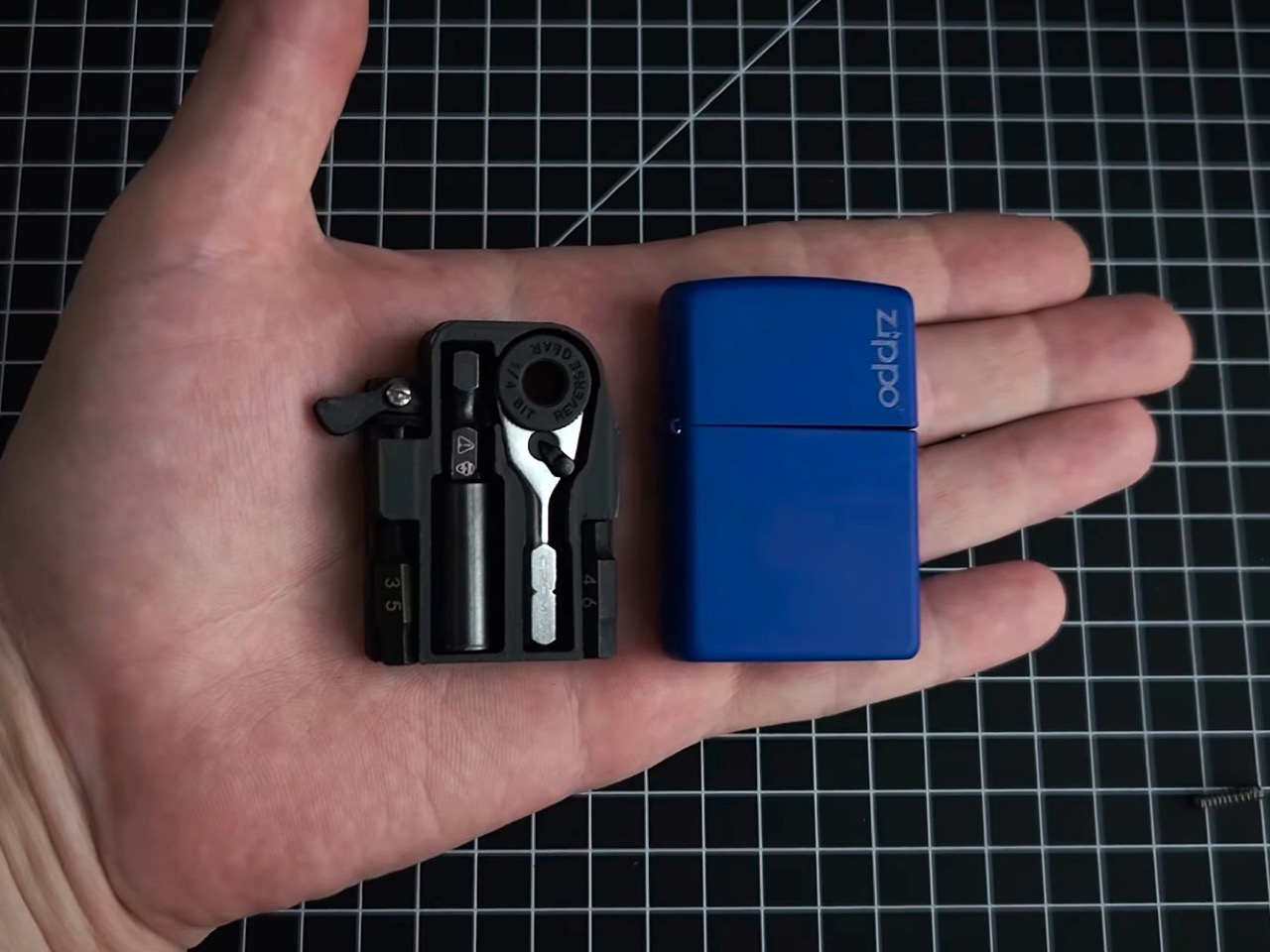
The Zippo lighter has been in pockets since 1932, surviving wars, road trips, and at least a few questionable life decisions. The iconic snap of that hinged lid is the kind of sound permanently lodged in pop culture. But here’s the thing about that stamped steel shell: pull the guts out and what you’re left with is a surprisingly well-engineered little box. It’s the right size, the right heft, and it already has a hinge that clicks with satisfying authority. Someone on the internet finally noticed, and decided to give it a better job.

That job is housing a chrome micro ratchet, one of the smallest 1/4-inch bit drivers in the EDC world, nested inside a custom 3D-printed platform. Two Steinwhale precision bits and a Klein utility knife extension fill out the rest of the space, held in place with eyeglass screws. A spring salvaged from a disposable Bic lighter gives the ratchet its push-out action, popping it through a small hole in the back of the case. Embedded magnets make the whole kit stick to any metal surface, which is a genuinely thoughtful touch. It’s scrappy, it’s clever, and the photos of it sitting open in a palm are almost unfairly satisfying.

Designer: Tiny Tool Shop

The 3D-printed platform is a custom insert that drops straight into the Zippo shell, locked down with eyeglass screws, the kind normally reserved for fixing a bent hinge on your reading glasses. Those same tiny screws appear in two spots across the build, which tells you something about how the maker approaches sourcing. Each component gets its own dedicated slot, keeping the ratchet, bits, and extension snug and rattle-free inside the case. The lid snaps shut over the top, and the result feels tighter than it has any right to be for a DIY project. It’s the kind of thing that makes you instinctively look for a price tag.

The chrome micro ratchet itself ranks among the smallest 1/4-inch drivers you can actually buy, and its scale is genuinely surprising next to almost anything else in a standard tool drawer. It accepts regular hex bits, so it plays well across the broader EDC and hardware ecosystem without needing proprietary accessories. A Bic lighter spring, salvaged presumably from a spent one on the maker’s desk, sits behind the ratchet and pushes it through a small hole in the Zippo’s back panel with just enough resistance to feel intentional. A Klein utility knife extension threads onto the ratchet for added reach in tight spaces, and when it’s not needed, the ratchet stores directly in the Klein knife’s handle instead. Both configurations tuck away cleanly, and the cross-compatibility means the kit pairs naturally with a knife you might already be carrying.

Steinwhale’s micro bits, built from S2 steel and sized specifically for micro ratchets, fill the two bit slots in the platform. The embedded magnets running through the build let the whole kit park on any nearby metal surface, a quality-of-life detail you’d genuinely appreciate halfway through assembling flatpack furniture with both hands occupied. The kit also fits inside a mini Altoids tin if that’s your preferred housing, though the magnets matter a lot more there since there’s no rear hole to push the ratchet out from. In practice, the Zippo remains the better vessel, slimmer, pocketable, and already equipped with a hinge that feels like it belongs. The Altoids option is a nice backup but the Zippo is clearly the intended home.

The whole build likely comes together for under $30 in parts, assuming you have a 3D printer and a spent Zippo shell on hand. The micro ratchet alone runs around $20, which makes this cheaper than most entry-level multitools with considerably less utility for light daily tasks. A Leatherman Skeletool brings pliers, a blade, and a bit driver for around $65 but also weighs 5 ounces and demands real pocket real estate. This kit trades tool variety for pure pocketability, and if your carry already includes a knife, that trade starts looking very reasonable. The one upgrade worth adding is some tactile labeling on the platform slots, so repacking everything in low light doesn’t become a small-scale puzzle.

The post This Zippo case now hides a full DIY micro-toolkit inside first appeared on Yanko Design.

  • ✇Yanko Design
  • Genius ‘Tilted’ Apple Watch Band Makes The Entire Experience 10x More Ergonomic
    Have you noticed tilting always makes things ‘ergonomic’? A laptop stand tilts the keyboard towards you – ergonomic. A vertical mouse tilts your hands into a more natural position – ergonomic. A split keyboard often breaks and tilts the layout in two different directions for your hands – very ergonomic. It’s almost stupidly simple that the human body isn’t designed around perfect right angles. We’re filled with curves, joints, and limitations to how we move – so a simple tilt can often make lif
     

Genius ‘Tilted’ Apple Watch Band Makes The Entire Experience 10x More Ergonomic

28 septembre 2026 à 16:30

Have you noticed tilting always makes things ‘ergonomic’? A laptop stand tilts the keyboard towards you – ergonomic. A vertical mouse tilts your hands into a more natural position – ergonomic. A split keyboard often breaks and tilts the layout in two different directions for your hands – very ergonomic. It’s almost stupidly simple that the human body isn’t designed around perfect right angles. We’re filled with curves, joints, and limitations to how we move – so a simple tilt can often make life a lot easier. The Apple Watch apparently just got the memo.

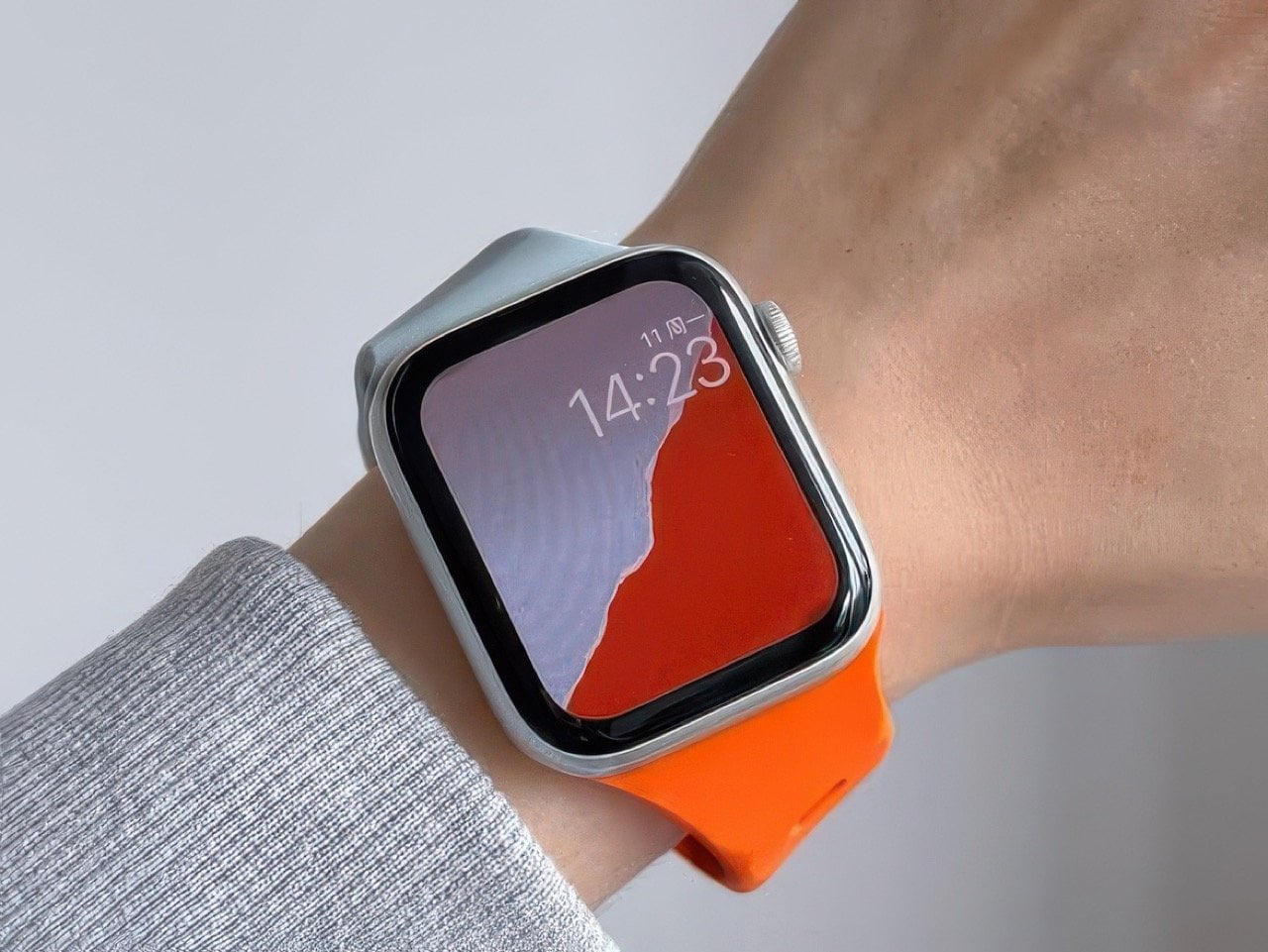
Designed around a very clever 30° tilt, this Tilted Watch Band puts the Apple Watch at a slight slant, so it’s facing you even when your wrist isn’t. Normal protocol is to lift your wrist up perfectly horizontal, so the screen faces you in the right orientation. Tilt the band and you don’t have to make your wrist horizontal anymore – just hold it at a comfortable angle and the Watch screen faces you a lot more naturally, letting you read the time without flexing your hand or your neck too much… perfect for joggers or bikers who don’t have the luxury to orient their hands while mid-activity.

Designer: MXU

Click Here to Buy Now

As ergonomically obsessed as Apple is, I’m surprised nobody from Cupertino thought of building a band like this. Does it mess with the symmetry? Absolutely. Could Apple still elegantly work around it? I have no doubt they could. They did such a brilliant job with the iPhone Duo’s folding animation, a tilted screen feels like child’s play.

The band comes in a variety of colors, although the best thing you could do is buy a bunch of them and mix and match pairs to create a dual-tone design. The silicone construction makes the band perfect for any kinds of sports, or for people with hypoallergenic requirements. One caveat, however, is that this watch’s tilt makes it so that it only works on the left hand. The clockwise tilt means if you wore the watch on the right hand, the tilt would work against you, requiring you to crane your neck even further than you originally would. Also, the crown would press into your forearm a lot more, which isn’t particularly fun considering you’d have to deal with constantly awakening Siri every few minutes.

The solution, however, is elegantly simple, and works better for smartwatches than it does for watches. You see, reading an analog watch at any tilt or angle is fairly easy – reading a notification on a screen while it’s tilted can be a chore. That specific detail makes the Tilted Watch Band pretty useful, as it reduces the strain on your wrist and neck while you glance down at your wearable.

The Tilted Watch Band is available online through retailers like Amazon, and works with all Watch series and sizes, even with the Ultra. So you can buy and keep the band even through all your watch upgrades over the years!

Click Here to Buy Now

The post Genius ‘Tilted’ Apple Watch Band Makes The Entire Experience 10x More Ergonomic first appeared on Yanko Design.

  • ✇Yanko Design
  • One Table, 3 Games, Nobody Needs a Game Room
    Most people who want a pool table and a dining table end up choosing neither. The math never works. A regulation pool table eats up roughly the same square footage as a small bedroom, a ping pong table needs its own dedicated stretch of floor to swing a paddle without hitting a wall, and a proper dining table has to look good enough to survive being seen by dinner guests. Pick two out of three and you’re already stretching a normal house. Pick all three and you need a room nobody actually has.
     

One Table, 3 Games, Nobody Needs a Game Room

28 septembre 2026 à 15:20

Most people who want a pool table and a dining table end up choosing neither. The math never works. A regulation pool table eats up roughly the same square footage as a small bedroom, a ping pong table needs its own dedicated stretch of floor to swing a paddle without hitting a wall, and a proper dining table has to look good enough to survive being seen by dinner guests. Pick two out of three and you’re already stretching a normal house. Pick all three and you need a room nobody actually has.

Sanne’s Department of Play looked at that math and decided it was wrong. The 3-in-1 Table is exactly what it sounds like: lift the top and a dining table becomes a full pool table, swap the surface again and it’s ping pong, complete with a cane-and-leather net that looks like it belongs in a much more expensive living room than most game tables ever see. It collapses three furniture purchases and three separate footprints into one object, which solves the actual problem that has quietly kept most people out of the game-room conversation entirely: there was never enough house for the fun stuff.

Designer: Sanne’s Department of Play (photos by Vitali Grishkov)

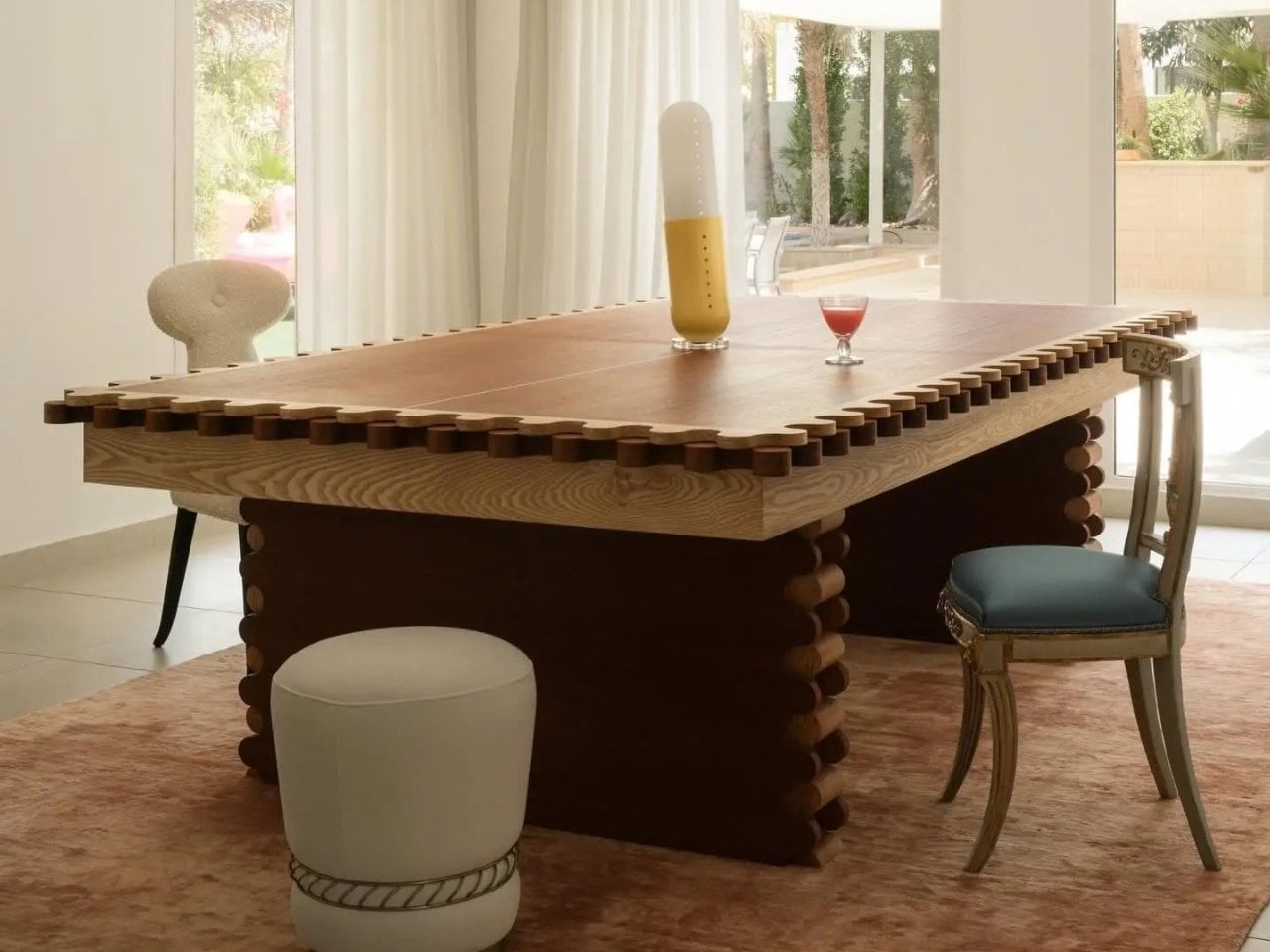
What gets me about this piece is that it doesn’t look like a compromise. Anyone who has shopped for a combo game table before knows the usual result, a pool table with a plywood lid bolted on top so it can technically also be a dining surface, priced around $800 and looking every bit like sports equipment wearing a costume. Sanne’s version starts somewhere else entirely. The scalloped edge running around the perimeter and down the legs, that repeating rounded bump pattern, looks like it was drawn first as a piece of sculpture and only later revealed to double as the ball guard for ping pong. Function followed form here instead of the other way around, and you can feel that order in every photo of it just sitting quietly as a dining table under a chandelier, giving away nothing about its second life.

The material choices back that up. The base is a deep walnut tone against lighter ash detailing, which reads more mid-century furniture than rec room. When it becomes a pool table, the felt is a rust orange rather than the standard casino green, which sounds like a small thing until you realize it’s the difference between a table that argues with your décor and one that sits right at home. Even the accessories got the same treatment. The cue rack is its own scalloped tower that matches the table instead of leaning against a wall wrapped in a canvas cover, the ping pong paddles are hand-painted with little leopards and floral motifs, and the ball tray is dovetailed like a keepsake box. Nobody asked for the ball tray to look nice. They built it that way anyway.

That attention to the parts nobody was going to scrutinize is what actually sells the bigger idea. Pricing puts the crafted-to-order version around $12,500, with a limited floorstock release closer to $7,500, so this sits firmly in collectible design furniture territory rather than impulse purchase territory. That framing matters more than it first appears. It’s less “we made a fun table” and more “we made a serious piece of furniture that happens to also be extremely fun,” and that distinction is the whole reason it works in a home that already has real art on the walls instead of only in a basement.

There’s a bigger shift happening around furniture like this, one where the game room stops being a separate destination and starts becoming part of the main living space instead of something hidden behind a closed door. A pool table tucked in a basement gets used four times a year. A pool table that is also the table where everyone already eats dinner gets used constantly, almost by accident, because nobody has to decide to go play. They just have to clear the plates.

The post One Table, 3 Games, Nobody Needs a Game Room first appeared on Yanko Design.

  • ✇Yanko Design
  • YouTuber builds 8-wheel electric wooden camper that spins 360-degrees and rides like a tank
    Have you been wanting to live out of an all-wooden camper? Driving solo to the pastures you visited with your father as a child but never had the opportunity to spend a night under the stars there, then brace up. You can follow the new 90-odd-minute detailed video from ambitious YouTuber Quiet Nerd, and build yourself an 8-wheel-drive electric tank-style steering wooden camper from scratch. All you will need is tools and supplies. The brain is already applied. So even blindly following the inst
     

YouTuber builds 8-wheel electric wooden camper that spins 360-degrees and rides like a tank

28 septembre 2026 à 14:20

Have you been wanting to live out of an all-wooden camper? Driving solo to the pastures you visited with your father as a child but never had the opportunity to spend a night under the stars there, then brace up. You can follow the new 90-odd-minute detailed video from ambitious YouTuber Quiet Nerd, and build yourself an 8-wheel-drive electric tank-style steering wooden camper from scratch.

All you will need is tools and supplies. The brain is already applied. So even blindly following the instructions can confidently give you a near replica. That’s how elaborately detailed this entire DIY video is. When you’re ready with your cabin on eight wheels, you can, like the modder, steer it into the jungle for a fun-filled night in the wild. He had a night that belonged to him. A night with home-cooked sushi and some flat tires, and a subsequent morning with freshly-made pancakes and a broken front axle rod.

Designer: Quiet Nerd

Hopefully, your experience will be much better, coz you know when too many donuts in this guy are too many. The DIYer didn’t. Anyway! That’s for the fluff; let’s now get the real creation. “This is the most ambitious, complicated, and technically challenging build I have ever attempted,” the creator reveals at the beginning of the video. If you think that’s just said for the sake of it, you can spend some time reading about his previous DIY electric camper created around a wooden bed with tank treads for wheels.

Yes, Quiet Nerd is a genius when it comes to building these electric camping rigs from scratch. He has done it in the past, this time though, this fully electric, 8-wheel-drive micro camper that steers exactly like a tank is way different and above board than what he has created. In fact, I wouldn’t be kidding if I said this camper is definitely one of the most interesting DIY projects in the recent past. If not the camper itself, the video definitely deserves appreciation for its depth.

The build starts with a frame made of square punch tubing, which rests on eight separate 48-volt, 1000-watt brushless differential motors. To ensure a tank-steering mechanism for the cabin, the modder welded the differential gears in all eight gearboxes separately so they didn’t move. This meant the drivetrain on the left and right of the cabin could then work independently, which, when throttled in opposite directions, would allow the camper to perform perfect 360-degree donuts at one place.

Once the frame and the drivetrain were ready, suspensions were added to each of the eight wheels, and the modder then constructed the frame of the camper’s cabin using marine-grade wood. Interlocking pine wood panels were specially created for the siding, and the door was placed at the back. The floor was laid out with interlocking gym foam puzzle mats for comfort, and for ventilation, porthole windows are mounted on each side. On the front, vinyl sheets are used for the windscreen.

The batteries onboard are hooked up to a pair of 200-watt flexible solar panels mounted on the roof, which power the camper when its running or when stationary at the camp. When everything was checked and created, Quiet Nerd took the camper for a ride in the green pastures. Besides a few flat tires and a broken axle rod, most of the time in the woods was awesome, the modder notes in the video. Nighttime donuts are my favorite, but I still believe maybe he can get welded some cutters in the square punch tubing frame and this guy can be an awesome lawn mower. Or get a few ploughs in there and while doing donuts, it can help with ploughing the area.

The post YouTuber builds 8-wheel electric wooden camper that spins 360-degrees and rides like a tank first appeared on Yanko Design.

Huawei Watch GT 7 Pro Review: Refined, Not Reinvented

Par : Aki Ukita
28 septembre 2026 à 11:20

Verdict 3.8 out of 5 Average of 5 criteria
Aesthetics
4.0 out of 5
Ergonomics
4.0 out of 5
Performance
4.0 out of 5
Sustainability / Repairability
3.0 out of 5
Value for money
4.0 out of 5

What works

  • Distinctive octagonal design with a premium look
  • Strong battery life
  • Bright, sharp AMOLED display
  • Board health and fitness tracking

What doesn't

  • Limited third-party app support
  • Proprietary pinned strap design
The Watch GT 7 Pro 46mm shows Huawei sticking to a proven formula and sharpening it further. It is not a bold leap, but it is a confident and well-rounded one.

Huawei has spent the last few years turning wearables into one of the strongest parts of its consumer business. The company has performed especially well in China, with that momentum also carrying into overseas markets. As a result, Huawei has grown into one of the biggest names in smartwatches, offering a lineup that covers different styles, price points, and user needs.

Within Huawei’s smartwatch lineup, the GT series is the company’s sports-focused range. The new GT 7 series stays true to that identity, building on the formula that has made the lineup popular. The GT 7 Pro is not a major leap over the GT 6 Pro, but it feels like a more polished and refined take on the same core idea.

Designer: Huawei

Aesthetics

The Watch GT 7 Pro 46mm stays largely in line with the design language of its predecessor, keeping the same sporty character that defined the GT 6 Pro. Its octagonal case continues to give it a distinctive look, helping it stand out from the many conventional round smartwatches on the market. At the same time, Huawei balances that sportier shape with a polished finish, so the watch still feels premium rather than overtly rugged.

The front of the watch keeps that same balance. Its 1.47-inch AMOLED display sits beneath sapphire glass, which adds a more upscale touch while also improving durability for everyday wear. Around the display, Huawei uses 24-hour markings that strengthen the watch’s sporty identity and give the face a more instrument-like look.

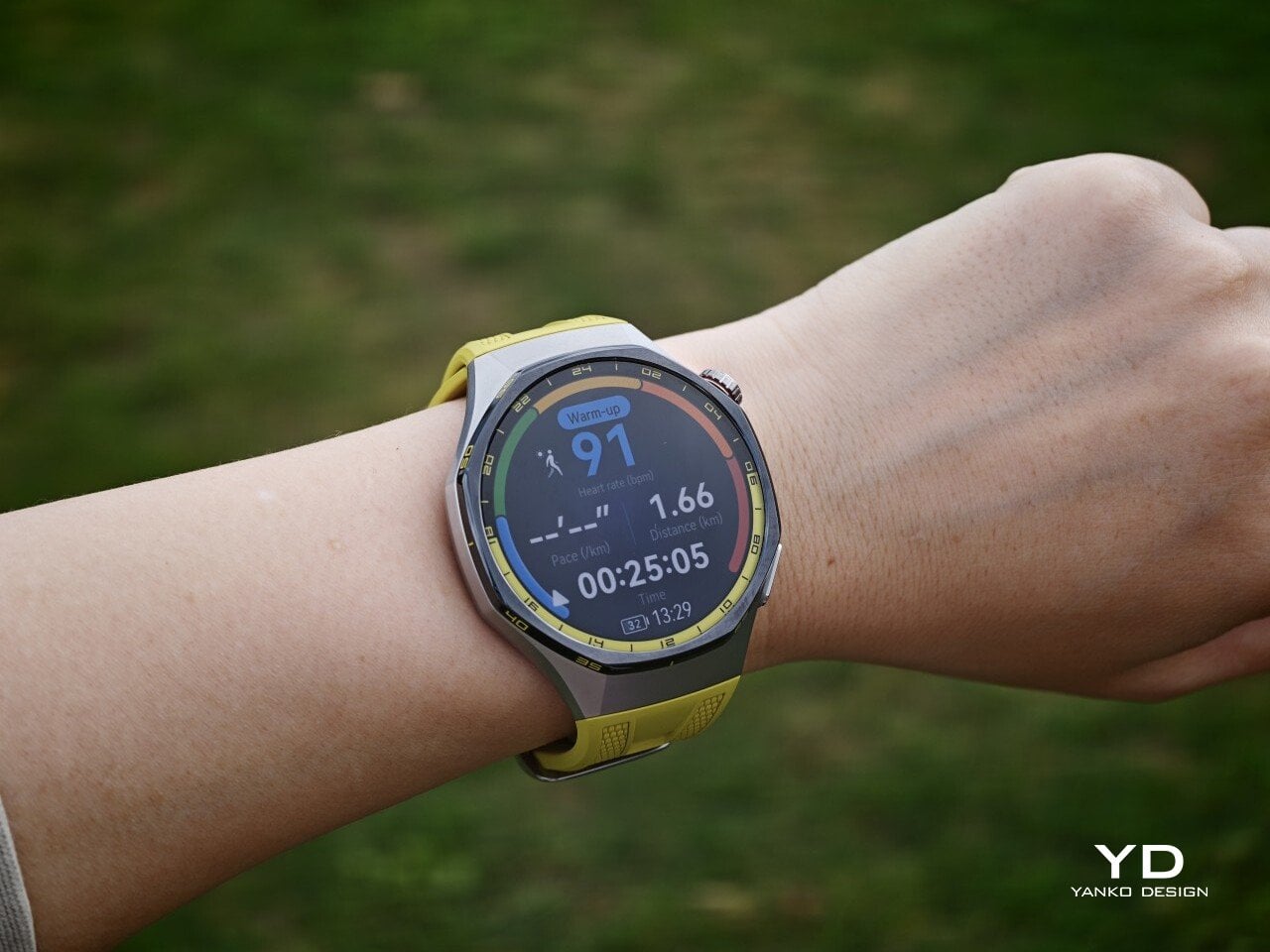
Huawei is offering the GT 7 Pro 46mm in yellow, green, and black, and each one gives the watch a distinct personality. The yellow version I received is easily the boldest of the three, pairing a silver case with a black bezel and a bright lime yellow strap. Matching yellow accents around the bezel and on the watch face make it feel the most energetic and overtly sporty of the lineup.

The green version takes a more outdoorsy approach. It keeps the same overall design but swaps in a muted green strap and matching accents, giving the watch a look that feels active without being as loud as the yellow model. The black version, by contrast, is the most understated. With its darker finish and strap combination, it gives the GT 7 Pro a stealthier and more versatile appearance that should appeal to buyers who prefer something cleaner and easier to wear every day.

Ergonomics

Despite its sporty, fairly bold design, the Watch GT 7 Pro 46mm is comfortable to wear for long stretches. At 56g and 11.2mm thick, it has enough presence to feel substantial on the wrist, but it never comes across as overly bulky in daily use. Huawei has also done a good job with weight distribution, which matters more than raw dimensions when you are wearing the watch through workouts, sleep tracking, or a full day out.

The strap has also been revised. Huawei calls it the Easy Cross Strap, and the key change is that the loose end tucks underneath instead of threading through a traditional belt loop. According to Huawei, this makes the watch easier to wear day to day while also creating a snugger fit that can help improve the consistency of health tracking. The elastomer strap feels soft enough for extended wear while still staying secure during exercise. It is detachable and uses a 22mm fitting, but because it is secured with pins, swapping it out is less straightforward than with a standard third-party strap.

Huawei’s control layout is familiar and easy to get used to. The buttons sit within easy reach, and the rotating crown adds a more tactile way to move through menus. That makes the watch feel more natural to use when you are on the move and do not want to rely entirely on touch input. Combined with the curved case and integrated strap design, the GT 7 Pro feels built not just to look sporty, but to wear like it too.

Performance

The Watch GT 7 Pro 46mm features a 1.47-inch AMOLED display, and it is one of the first things that stands out about the watch. Huawei claims a peak brightness of 3,000 nits, and in use the panel looks sharp, bright, and vibrant. Watch faces have plenty of visual punch, while menus and health data remain easy to read at a glance. Huawei has been consistently strong in this area, and that continues here with a screen that feels right at home on a watch in this class.

Out of the box, the GT 7 Pro runs HarmonyOS 6.1 and supports both Android and iOS devices, which immediately makes it more flexible than some ecosystem-bound alternatives. The software itself is easy to navigate, with clean menus, smooth animations, and a layout that does not take long to learn. It is not trying to overwhelm you with complexity, and that works in its favor on a smartwatch that is meant to balance fitness features with everyday usability.

Health and fitness remain at the heart of the experience, which is exactly where the GT series has built much of its appeal. Huawei includes a broad set of tracking features here, covering the usual essentials such as heart rate, sleep, blood oxygen, stress, and workout monitoring, while also adding more unusual tools like the Diabetes Risk Study and Coronary Heart Disease Study. The latter, however, was not available on my test unit during the review period.

On the fitness side, the watch offers more than 100 workout modes, reinforcing its role as a serious sports-focused smartwatch. Huawei has also expanded its support for winter sports, with dedicated indoor and outdoor skiing as well as snowboarding modes. These can track data such as maximum speed, average incline, total descent, and run count, making the watch more useful for users who want something beyond basic activity logging. It also supports downloads for more than 3,000 ski resort maps worldwide, complete with details such as slope names, difficulty ratings, and lift station locations.

Since ski season is still months away where I live, I was not able to test those winter sports features properly. My hands-on time was limited to more routine activities like outdoor walks, yoga, and casual cycling. Even within that narrower scope, the watch performed well. GPS tracking was accurate in my testing, even when I passed under railway bridges and near buildings, where signals can sometimes become less stable.

Battery life is one of the GT 7 Pro’s biggest strengths. Huawei rates it for up to 21 days at the upper end, up to 12 days under typical use, up to 7 days with the always-on display (AOD) enabled, and as much as 51 hours in trail running mode. Those are ambitious figures, but in my time with the watch, its endurance was genuinely impressive.

I took it with me on a nine-day trip after charging it to 100 percent, and by the end of the trip it still had 19 percent battery remaining. During that time, I had all health tracking features on, AOD turned on, and used it for a couple of indoor and outdoor walking sessions as well. That makes the result more impressive, because the watch was not simply sitting idle for most of the trip. In day-to-day use, that kind of endurance makes a real difference, especially on a sports-focused smartwatch where frequent tracking can drain smaller batteries much more quickly.

Charging is handled through a proprietary magnetic wireless charger included in the box, and it is fairly quick. Because of the watch’s shape, though, it does not sit flat on the charger, which can be a mild annoyance in everyday use. It hovers slightly, and I often found myself checking to make sure it was still charging after the initial confirmation screen disappeared. It also feels like time for Huawei to move from USB-A to USB-C, as the included cable already feels a bit dated.

Sustainability

The Watch GT 7 Pro also puts some emphasis on durability. It carries both IP69 and 5ATM ratings, giving it a solid level of protection against dust and water exposure. That makes sense for a watch positioned around sports and outdoor use, where it is more likely to be exposed to sweat, rain, splashes, and more demanding day-to-day conditions.

Huawei also uses sapphire glass over the display, which adds another layer of reassurance. Sapphire is known for its strong scratch resistance, and it also helps the watch feel more premium in the process. Taken together, these details give the GT 7 Pro a tougher, more dependable character without pushing it fully into rugged-watch territory. That said, sustainability is less of a focus, with no clear mention of recycled materials or other environmental measures.

Value

At £379, or roughly $510, the Watch GT 7 Pro is priced like a premium smartwatch, so it has to offer more than just a nice design. For the most part, it does. You are paying for a watch that gets the basics right, with strong battery life, a durable build, a comfortable fit, and a health and fitness feature set that feels broad enough for most users.

The value proposition really comes down to what you want from a smartwatch. If you care most about app support and deeper smart features, there are rivals that make a stronger case. But if your priorities are battery life, fitness tracking, and a watch that looks and feels good on the wrist, the GT 7 Pro makes more sense. It is not a dramatic step up from the GT 6 Pro, so current owners may not feel much pressure to upgrade. Still, for anyone coming from an older device, it feels like a well-rounded package that knows exactly what it is.

Verdict

The Watch GT 7 Pro 46mm is not the kind of upgrade that changes everything, but it does not need to be. Huawei has taken a formula that already worked and polished it further, keeping the GT series focused on the things it has consistently done best. The result is a smartwatch that looks distinctive, wears comfortably, lasts a long time on a charge, and offers more than enough health and fitness features for most users.

It is not without trade-offs. Third-party app support remains limited, and Huawei’s pinned strap design also cuts down your band options compared with a standard 22mm quick-release system. Still, if you want a premium sports-focused watch that feels dependable, lasts well beyond a few days, and fits easily into everyday use, the GT 7 Pro gets a lot right. It is not a radical step forward, but it is a solid and well-rounded one.

The post Huawei Watch GT 7 Pro Review: Refined, Not Reinvented first appeared on Yanko Design.

  • ✇Yanko Design
  • iFi Audio UP Play Max lets you enjoy high-end wireless headphones in lossless when connected to iPhone
    Being an audiophile and owning an Apple phone can be a strained relationship at times. While owning Apple’s AirPods 5 or the AirPods Max 2 ties you deep into the ecosystem of AAC and SBC codecs that produce respectable sound quality, stepping out of the ecosystem for better options usually comes with a big caveat. Choosing Bluetooth headphones or earbuds that support high-resolution codecs like LDAC or aptX Adaptive doesn’t make sense since the Apple device playing the music doesn’t support the
     

iFi Audio UP Play Max lets you enjoy high-end wireless headphones in lossless when connected to iPhone

28 septembre 2026 à 10:20

Being an audiophile and owning an Apple phone can be a strained relationship at times. While owning Apple’s AirPods 5 or the AirPods Max 2 ties you deep into the ecosystem of AAC and SBC codecs that produce respectable sound quality, stepping out of the ecosystem for better options usually comes with a big caveat.

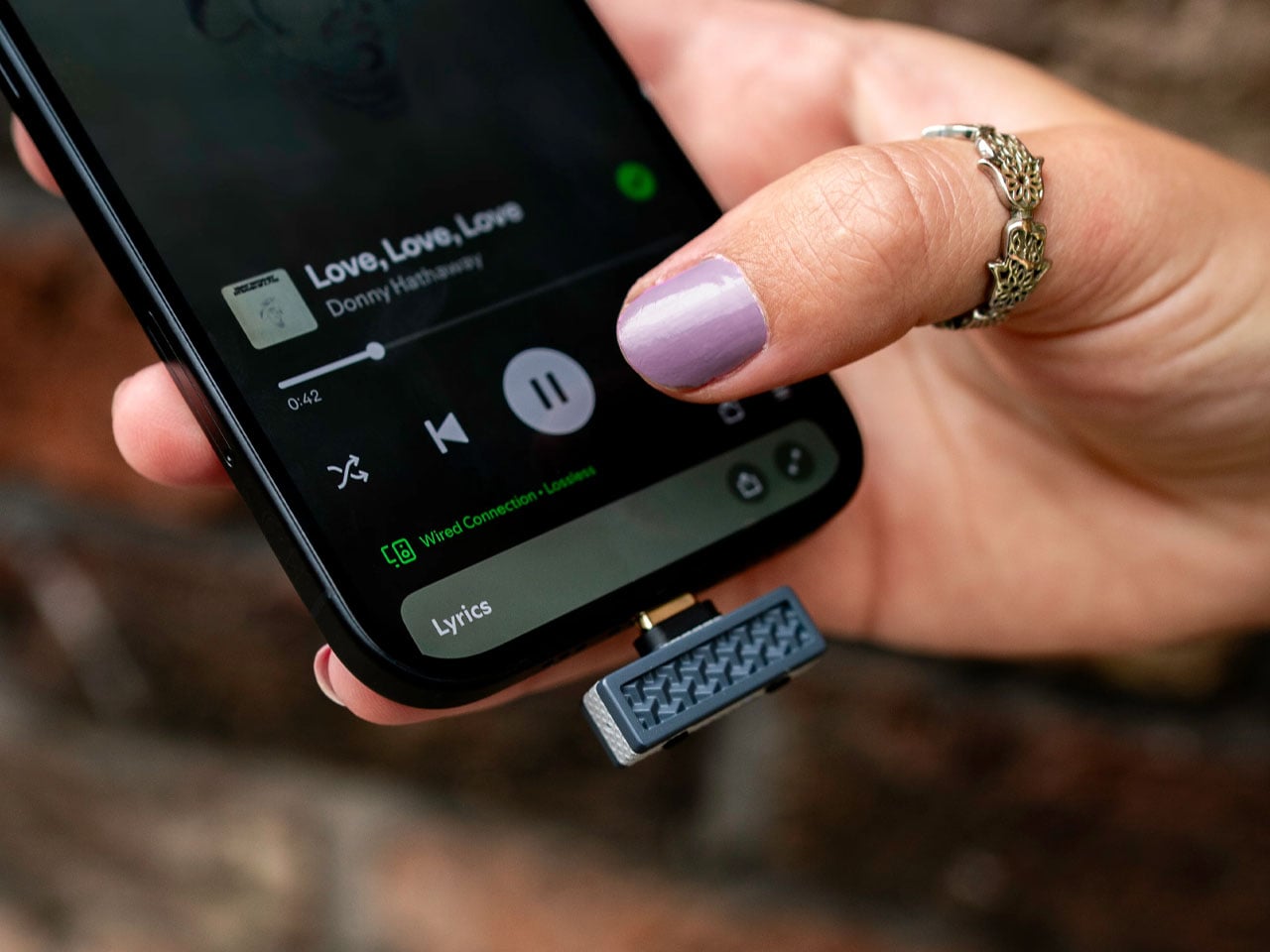
Choosing Bluetooth headphones or earbuds that support high-resolution codecs like LDAC or aptX Adaptive doesn’t make sense since the Apple device playing the music doesn’t support the codecs and defaults to the normal codecs that are lossy. iFi Audio wants to eliminate the frustration Apple device users have lived with for ages when enjoying wireless audio with the $89 UP Play Max dongle.

Designer: iFi Audio

By getting the source device (iPhone 18 Pro Max, for instance) and the audio playing accessory (Sony WH-1000XM6) to have the desired handshake, you finally have the option to break free from the predatory Apple ecosystem and open up to the world of high-resolution lossless audio. The iFi Audio UP Play Max USB-C Bluetooth transmitter overlays the device’s default codec support and lets you connect high-end audio listening accessories and play the music in HD. That means if you have LDAC-supported headphones, you’ll be listening to music with 24-bit/96kHz at a maximum bitrate of 990 kbps when connected via Bluetooth.

The UP Play Max dongle plugs directly into the iPhone’s USB-C port, and using the compatible Nexis app, you can pair wireless headphones or earbuds from brands like Edifier, Sennheiser, Technics, Sony, or Bose. The transmitter comes with the proprietary K2HD processing tech that restores the track’s original resolution for listening to favorite music without any underlying compromises. It can also restore any harmonic information lost during the digital processing, which is great for audiophiles who love to go into the technicalities of the output sound.

Stepping beyond this native functionality, the dongle comes with low-latency mode for competitive gaming where lag is a strict no-no. Everyday usage is also kept in mind with the built-in mic for taking calls just in case your headphones or IEMs don’t have the calling feature. UP Play Max comes with an interesting feature that lets two headphones connect to a single device, which is great for shared listening with buddies. However, in this function, the codec is defaulted to SBC. A future update will let Auracast-compatible headphones or earphones connect seamlessly with as many headphones as desired.

Weighing just 3 grams and measuring no more than a compact memory stick, this audio accessory is a must-have for music lovers who have to always juggle around, or even worse, live with a pair of high-end headphones with no option to play the music in high resolution wirelessly. Beyond Apple connectivity, you can also plug the dongle into your tablet, computer, or any other compatible device to enjoy high-res wireless audio that otherwise wasn’t possible.

The post iFi Audio UP Play Max lets you enjoy high-end wireless headphones in lossless when connected to iPhone first appeared on Yanko Design.

  • ✇Yanko Design
  • The Park Sculpture Nobody Expected to Double as a Basketball Hoop
    Most public sculpture asks you to look and keep walking. You admire the bronze figure, read the little plaque, maybe snap a photo, and move along to wherever you were actually headed. The art stays over there, behind an invisible line, and you stay over here. That gap between viewer and object is the quiet problem a lot of city parks have never solved: they install expensive, meaningful work, and then wonder why nobody lingers. Alexandre Arrechea’s answer, installed this year at Biidaasige Park
     

The Park Sculpture Nobody Expected to Double as a Basketball Hoop

28 septembre 2026 à 09:20

Most public sculpture asks you to look and keep walking. You admire the bronze figure, read the little plaque, maybe snap a photo, and move along to wherever you were actually headed. The art stays over there, behind an invisible line, and you stay over here. That gap between viewer and object is the quiet problem a lot of city parks have never solved: they install expensive, meaningful work, and then wonder why nobody lingers.

Alexandre Arrechea’s answer, installed this year at Biidaasige Park as part of Toronto’s new Lassonde Art Trail, is to remove the line entirely. Orange Functional is a twenty-foot steel tree with basketball hoops sprouting off its branches, and you’re invited to bring your own ball and start shooting. No velvet rope, no “please do not touch” energy. Just a big red tree standing at the park entrance, daring you to play.

Designer: Alexandre Arrechea

I like that the idea took over a decade to get here. Arrechea’s archive traces the concept back to 2010, when the hoop-covered tree existed purely as sculpture, something you’d circle and photograph but never actually use. It wasn’t until a 2022 commission from Art Omi in upstate New York that he reengineered the branches so real basketballs could drop through the nets. That’s a meaningful shift for an artist. Turning a static object into a functional one means giving up some control. Once people can touch the work, they also get to misuse it, argue about it, get bored of it. Arrechea made that trade anyway, and the piece is better for it.

What sells me on the design is how little it explains itself. A basketball hoop is one of the most recognizable objects in American and Canadian public life, sitting outside driveways, gyms, and rec centers everywhere. Arrechea doesn’t reinvent it so much as multiply it until it stops making sense as sport equipment and starts reading as something closer to a fruit tree. Art Omi’s own description leans into that: as people throw the ball and it falls from hoop to grass, it evokes oranges dropping from a branch. The title does double duty, too, pairing the color with the idea of something actually working the way it looks like it shouldn’t.

Placing the sculpture at a park entrance, next to newly planted real trees, feels like the smartest curatorial choice in the whole project. It’s not tucked into a sculpture garden where only people already looking for art will find it. It’s the first thing you see walking in, competing for attention with the skyline behind it. A parent walking past with a kid who has a basketball in their bag doesn’t need to understand Arrechea’s twenty-year interest in public gathering spaces to want to stop and shoot a few hoops. The concept sells itself in about four seconds.

There’s a version of this idea that could have felt gimmicky, a photo-op sculpture built mainly for Instagram. Arrechea avoids that trap by making the interaction the entire point rather than an afterthought bolted onto a finished artwork. He’s spent over two decades returning to the basketball court as a symbol, and this piece is where that research finally gets to be useful instead of just visible. You don’t need the artist statement to enjoy it. You need a ball and about ninety seconds of patience while you figure out which branch to aim for.

Public art has a reputation problem in a lot of cities: expensive, confusing, occasionally resented by the people who live near it. Orange Functional sidesteps all of that by refusing to be precious. It asks for nothing more than a basketball and a little curiosity, and it gives back an actual reason to stop walking. That’s a rarer trade in public space than it should be.

The post The Park Sculpture Nobody Expected to Double as a Basketball Hoop first appeared on Yanko Design.

  • ✇Yanko Design
  • 5 Tailgate Speakers Built to Survive a Full Saturday Outdoors
    A parking lot does not care how good your speaker sounded in the store. Too quiet for an open sky, too fragile for a cooler lid, too generic to earn a second look from anyone walking by. These five are built differently. Each earns its place in the setup before you even hit play, and holds it comfortably long after the sun disappears behind the stadium. The best tailgate speaker is not the loudest one or the most expensive one. It is the one that handles the full arc of a Saturday outdoors with
     

5 Tailgate Speakers Built to Survive a Full Saturday Outdoors

28 septembre 2026 à 07:40

A parking lot does not care how good your speaker sounded in the store. Too quiet for an open sky, too fragile for a cooler lid, too generic to earn a second look from anyone walking by. These five are built differently. Each earns its place in the setup before you even hit play, and holds it comfortably long after the sun disappears behind the stadium.

The best tailgate speaker is not the loudest one or the most expensive one. It is the one that handles the full arc of a Saturday outdoors without asking you to manage it. Good battery life, real weather resistance, and a design identity strong enough to start a conversation are the only criteria that matter when the truck is parked, and the grill is on. These five clear all three.

1. RetroWave 7-in-1 Radio

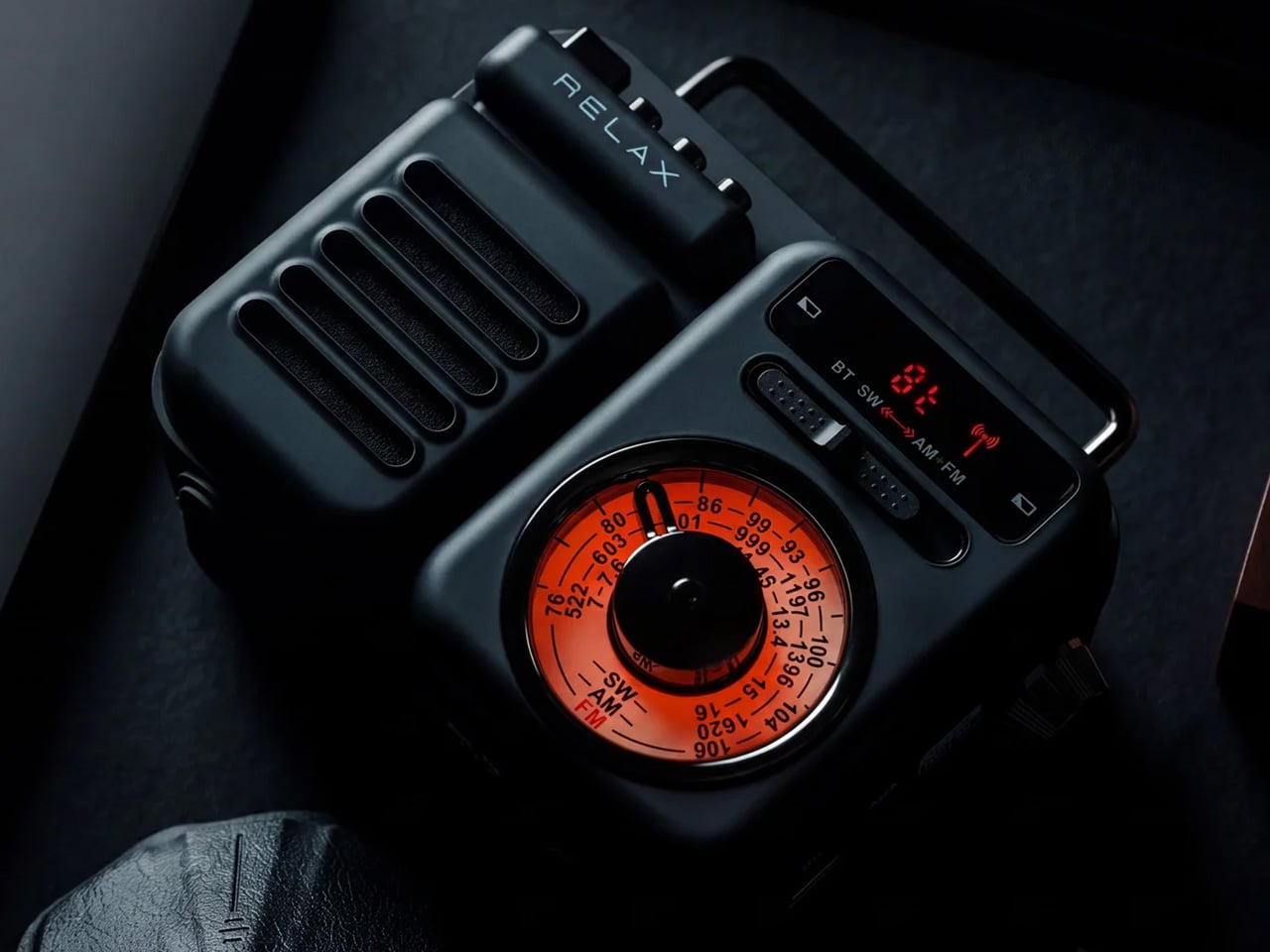
The RetroWave is not trying to look vintage. It simply does, because the people who designed it understood that warm tones and a tactile tuning dial carry a feeling that modern hardware cannot replicate on its own. For you, that distinction matters at a tailgate, where every object on the truck bed shapes the atmosphere of the whole setup whether you intended it to or not. The RetroWave earns its spot before a single note plays.

Seven functions live inside a body that reads as a single cohesive object, not a spec sheet assembled into hardware. AM/FM and shortwave radio, Bluetooth streaming, a USB charging port, and a built-in flashlight all coexist without crowding the design or complicating the interface. For you, that means one piece of gear that moves cleanly from pre-game energy to late-night wind-down without ever needing to swap anything out. It carries the whole day without announcing it.

Click Here to Buy Now: $89.00

What we like:

  • Analog character translates immediately in outdoor settings
  • Seven functions in one body removes the need to bring anything else

What we dislike:

  • The retro aesthetic will not appeal to everyone
  • Battery life under sustained outdoor use has not been independently verified at publication

2. Brane X

Most portable speakers fake their bass. They boost the low end digitally and call it sub-bass, and it fools you indoors but gets swallowed by open air the moment you step outside. The Brane X does not fake anything. Its proprietary Repel-Attract Driver cancels internal air pressure to deliver genuine sub-bass from a body barely nine inches wide. For you, that means a speaker that actually fills a parking lot instead of politely suggesting it could.

Five drivers and four class-D amplifiers push past 200 watts combined, backed by a 72-watt-hour battery rated for twelve hours of runtime. IP57 waterproofing handles rain and the inevitable cooler spill without breaking stride. Wi-Fi streaming and Bluetooth 5.3 cover both strong and spotty signal scenarios across a large lot. For you, the ability to group up to eight units means the sound scales with the size of your crowd rather than capping out at the wrong moment.

What we like:

  • Genuine sub-bass output from a compact enclosure
  • Twelve-hour battery life clears even the longest tailgate

What we dislike:

  • Two hundred-plus watts at full volume will cut into runtime considerably
  • Wi-Fi streaming depends on stable network access in the parking lot

3. Beosound Explore

Bang & Olufsen built the Beosound Explore from hard-anodized aluminum instead of the polycarbonate most competitors default to, and that single decision changes how the speaker ages. Polycarbonate scratches and scuffs into a reading of neglect. Aluminum picks up honest wear and keeps looking considered. For you, that means a speaker that still belongs in your setup on its twentieth outing, rather than one that starts looking disposable before the season is halfway through.

Twenty-seven hours of battery life removes the anxiety that follows every other portable speaker through a long weekend outdoors. Dual full-range drivers produce True360 sound with no preferred listening axis, so there is no bad seat at your tailgate. IP67 water resistance covers submersion up to one meter for thirty minutes, handling every realistic outdoor scenario without fuss. For you, the carabiner strap means it travels without ceremony and arrives looking like it belongs wherever you set it down.

What we like:

  • Twenty-seven hours of runtime covers a full day and night without a second thought
  • Hard-anodized aluminum ages honestly with outdoor use

What we dislike:

  • The Bang & Olufsen premium is real and unavoidable
  • 360-degree output reduces directional volume control in loud open environments

4. Battery-Free Amplifying iSpeakers

The premise sounds like a trick: a speaker that amplifies sound without drawing a single watt of power. The iSpeaker uses passive acoustic geometry instead of electronics, channeling audio through a precisely shaped horn that physically increases volume without a battery or Bluetooth chipset. For you, that means zero charging anxiety at a tailgate where outlets are not a given. It works the moment you set your phone inside it and keeps working until you leave.

The design reads as furniture as much as audio hardware, which earns it a different kind of presence at a tailgate than a traditional plastic cylinder would. It sits on the table as a deliberate object, not a forgettable gadget. For you, that matters because it communicates something about the setup before a single note plays. No cords, no app, no pairing ritual. You place it, drop your phone in, and the afternoon takes care of itself from there.

Click Here to Buy Now: $179.00

What we like:

  • Zero battery dependency removes the most common outdoor-speaker anxiety
  • Passive horn amplification produces real volume with no electronics involved

What we dislike:

  • Output ceiling is physically limited by the horn geometry
  • Works only with phones that fit the cradle dimensions

5. Muzen Wild Mini

The Muzen Wild Mini looks like it was pulled from a gear locker rather than designed for a product page, and that is exactly the point. The all-metal body carries a military character that communicates durability before you ever pick it up. For you, that matters in a setting where gear gets moved, stacked, and occasionally dropped between the cooler and the truck bed. The Wild Mini does not ask to be handled carefully, which means you never have to think about it.

Bluetooth 5.0 handles the streaming, and a built-in flashlight with three lighting modes earns its place once daylight fades on the lot. A single charge delivers six hours of runtime at full volume, covering the core of a game-day schedule without needing a top-up. For you, the clip system means it attaches to a bag, a belt loop, or a tent frame with equal ease, keeping the speaker accessible without requiring a dedicated surface to set it on.

What we like:

  • All-metal build shrugs off drops and rough handling
  • The built-in flashlight adds genuine utility once the sun goes down

What we dislike:

  • Six hours is the shortest runtime in this group
  • The compact body limits total output volume compared to the larger enclosures here

The Right Speaker Makes the Saturday

None of these five ask you to compromise. The RetroWave brings analog warmth to a setting that usually defaults to generic plastic. The iSpeaker removes the charging question entirely. The Brane X delivers the bass a parking lot actually requires. The Beosound Explore brings luxury-grade materials to outdoor conditions they were genuinely built for. The Wild Mini goes anywhere without asking permission. Each pulls its weight differently, and that range is exactly the point.

A good tailgate speaker is the one you stop noticing because it never gives you a reason to worry about it. The battery holds, weather is not a factor, the sound fills the space, and the object earns a second look from whoever walks by. All five of these clear that bar. Pick the one that fits how your Saturdays actually run, and it will handle the rest without asking for much in return.

The post 5 Tailgate Speakers Built to Survive a Full Saturday Outdoors first appeared on Yanko Design.

  • ✇Yanko Design
  • This Color E-Paper Clip Is the Polaroid That Digital Photos Never Had
    A photo you love rarely leaves the phone it was taken on, fading into a camera roll the moment the screen goes dark. TICKEY tries to pull that image back into physical space, using a 3.7-inch color e-paper panel housed in a 3.8mm aluminum shell that clips onto a bag, sits on a desk, or hangs from a badge lanyard. It’s a small object built around one simple idea: that a picture worth keeping deserves a life outside a glowing rectangle. The panel itself is the real engineering story here. Most e-
     

This Color E-Paper Clip Is the Polaroid That Digital Photos Never Had

Par : JC Torres
28 septembre 2026 à 06:07

A photo you love rarely leaves the phone it was taken on, fading into a camera roll the moment the screen goes dark. TICKEY tries to pull that image back into physical space, using a 3.7-inch color e-paper panel housed in a 3.8mm aluminum shell that clips onto a bag, sits on a desk, or hangs from a badge lanyard. It’s a small object built around one simple idea: that a picture worth keeping deserves a life outside a glowing rectangle.

The panel itself is the real engineering story here. Most e-paper displays settle for a handful of muted tones and refresh rates measured in long, patient seconds. TICKEY runs on a Modos-developed driver that pushes past 48 native colors while cutting a full-quality refresh down to 13 seconds, with a faster 3-second mode available when precision matters less than speed. That gap between older e-ink hardware and this driver is wide enough to notice immediately.

Designer: ENIAC (Enilinx)

An ESP32-S3 chip handles the processing underneath, paired with Wi-Fi, Bluetooth, and NFC for getting content onto the screen without a cable in sight. A companion app lets someone edit a design on a phone and push it over wirelessly, and templates can be shared between users rather than built from scratch every time. Since the firmware is open, developers get a mature platform to build custom behavior instead of a sealed black box.

Clip it to a backpack strap before a conference, and it becomes a badge showing a name, a QR code, or contact details, updated the moment plans change instead of printed once and stuck for the day. Set it on a desk, and the same hardware turns into rotating art, swapped whenever the mood calls for something new. A magnet on the back means it holds onto a fridge door just as easily as a bag.

The 45g weight matters more than it sounds on paper, since anything heavier turns a clip-on badge into something that tugs at fabric or slides out of place by midday. Aluminum gives the shell enough rigidity to survive being tossed into a bag alongside keys and a water bottle, while staying thin enough to disappear against a jacket lapel or a laptop sleeve without adding visible bulk.

None of this asks for constant power once an image is set, since e-paper only draws current while actually changing what’s displayed. A finished screen sits there fully visible in direct sunlight, legible without a backlight fighting glare, and idle without draining a battery meant to last through a full day of moving between contexts. That’s the quiet advantage e-paper has always held over LCD, now paired with color depth that used to be out of reach.

TICKEY deliberately skips video and animation, treating that restriction as a feature rather than a compromise. A static image asks less of your attention than a screen that never stops moving, sitting calm on a bag strap or a windowsill until someone chooses to change it. Photos, event badges, or a fridge note showing today’s grocery list all fit that same quiet template, an object built to be looked at rather than constantly checked.

The post This Color E-Paper Clip Is the Polaroid That Digital Photos Never Had first appeared on Yanko Design.

  • ✇Yanko Design
  • A Folding Tiny Home That Refuses to Feel Like Camping
    Camping has always come with a quiet trade-off. You get the freedom of being anywhere, but you give up the comfort of being somewhere. Tents leak, campers feel cramped, and cabins can’t move with you when the season changes. Atelier Lune, a US-based design studio, just built something that refuses to make you choose. It’s called Camping House. The idea is simple to say and genuinely hard to execute: a home that tows behind a standard SUV, unfolds like a tent within a couple of hours, and then b
     

A Folding Tiny Home That Refuses to Feel Like Camping

28 septembre 2026 à 05:15

Camping has always come with a quiet trade-off. You get the freedom of being anywhere, but you give up the comfort of being somewhere. Tents leak, campers feel cramped, and cabins can’t move with you when the season changes. Atelier Lune, a US-based design studio, just built something that refuses to make you choose.

It’s called Camping House. The idea is simple to say and genuinely hard to execute: a home that tows behind a standard SUV, unfolds like a tent within a couple of hours, and then behaves like real architecture once it’s standing. Architect Na Shen, who previously worked at Gensler and Zaha Hadid Architects before starting her own studio, designed the whole structure around that tension between mobility and permanence, and you can feel that intention in every decision she made.

Designer: Atelier Lune

That last part is the actual innovation. Plenty of tiny homes are mobile, but most of them stay rigid once you get them there, basically a smaller box on wheels. Camping House does something different. The structure is a folding shell that fans open on-site into a steep A-frame, then locks into place with weather-sealed joints and insulated panels built to hold up through an actual winter. The A-frame isn’t just an aesthetic choice either. It’s structurally efficient, sheds rain and snow naturally, and creates a dramatic interior volume that reads much larger than the footprint suggests.

The system is built around three modules the studio calls Ports. The Residential Port handles living and sleeping, with furniture that flips from day mode to night mode in seconds. The Utility Port carries a real kitchen and a real bathroom, not a camper-van compromise version of either. The Extended Port clips on when you need a workspace, storage, or room for guests. You arrive, stabilize the base, release the hinges, and the shell swings open into a two-level interior that looks nothing like what fit on the trailer an hour earlier. The joinery and panel system that makes this possible is where most of the real design work lives, hidden in the hinges and seals rather than announced by the exterior.

What makes this feel like it’s arriving at the right moment is who it’s actually for. Remote work untethered a lot of people from a single address, and the appetite for spending real time outdoors, not just weekend camping but seasonal living, has grown alongside it. Camping House is designed with that shift in mind: off-grid solar integration, rainwater harvesting, passive cross-ventilation through a solar chimney, and no permanent foundation required. It leaves the ground beneath it essentially undisturbed, which matters if you’re setting up somewhere ecologically sensitive, or if you just don’t want to explain a poured foundation to a national forest.

There’s a practical honesty to designing for departure instead of designing for permanence. Most residential architecture asks how a building holds its ground. Camping House asks how a building lets go of it. Multiple units can even couple together into small clusters, which opens the door to uses beyond personal travel: disaster relief housing, temporary shelter during regional housing shortages, or small eco-tourism outposts that can be struck at the end of a season without leaving scars.

None of this is on the market yet. It’s a concept, and concepts have a habit of staying concepts. But two people can reportedly assemble it in under two hours, which is a modest ask for what you get in return: a structure with actual dignity, not a glorified pop-up tent with delusions of permanence.

The bigger idea Camping House is testing is whether shelter has to pick a lane between temporary and permanent. For a long time, those felt like separate categories with separate architecture. This project treats them as two settings on the same machine. Whether or not this exact version reaches driveways, the question it’s asking, why should mobility mean sacrificing comfort, feels like one more designers are going to keep chasing.

The post A Folding Tiny Home That Refuses to Feel Like Camping first appeared on Yanko Design.

  • ✇Yanko Design
  • A Fan Imagined Nokia’s Comeback With One Feature Worth Stealing
    Nokia’s phone business has been fading for years, reduced mostly to budget handsets sold under license, so a concept calling itself the N90 Ultra was never going to become a real product. It’s a fan-rendered video, not a leaked roadmap, and it borrows a legendary name attached to a swivel-barrel camcorder phone from 2005. What it does get right is a smaller, more interesting idea already spreading across actual flagships: a second screen living on the back of the phone. That rear panel holds a
     

A Fan Imagined Nokia’s Comeback With One Feature Worth Stealing

Par : JC Torres
28 septembre 2026 à 04:23

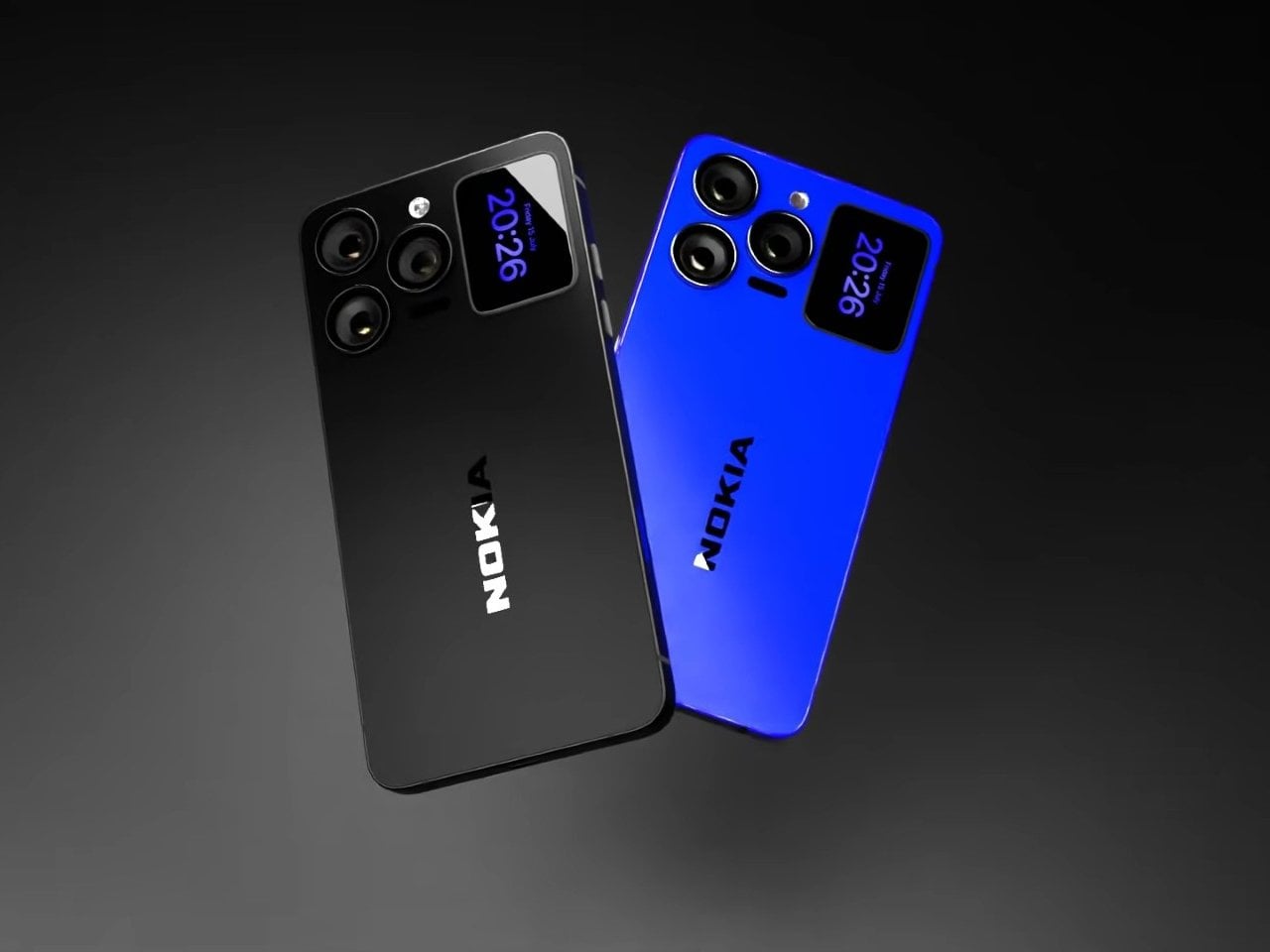
Nokia’s phone business has been fading for years, reduced mostly to budget handsets sold under license, so a concept calling itself the N90 Ultra was never going to become a real product. It’s a fan-rendered video, not a leaked roadmap, and it borrows a legendary name attached to a swivel-barrel camcorder phone from 2005. What it does get right is a smaller, more interesting idea already spreading across actual flagships: a second screen living on the back of the phone.

That rear panel holds a titanium alloy frame finished in a glossy cobalt blue or a graphite silver, with a raised visor housing three lens rings alongside a small rectangular display. Instead of sitting blank until a camera app opens, that mini-screen shows the time, the date, and glanceable notifications, all without waking the main display. It’s a small addition, but it changes how often a phone actually needs to come out of a pocket.

Designer: AndroidLeo (Concept)

A phone left face down on a desk during a meeting no longer has to stay silent about the time or a new message. A glance at the back shows both, then nothing more demanding follows, no bright wake screen lighting up a quiet room. That’s the appeal secondary displays have chased since Xiaomi and Meizu first tried the format years back, trimming how often the front screen needs to switch on at all.

The concept pushes its camera claims further than any current phone can back up, listing a 200 MP main sensor with 8K recording and a 200x zoom figure that would require optics no slim smartphone body can physically fit without an extending lens barrel. Two different Snapdragon chipsets get listed side by side too, a sign the spec sheet reads more like a wish list than an engineering plan. None of that undermines what’s genuinely worth noticing here.

The mini-display sitting flush against the camera visor is the detail carrying real design weight, because it reflects a question phone makers keep circling back to: how much information really needs a full screen turned on. Some phones use that rear space purely for decoration, a small strip showing a logo or a battery percentage and nothing else. Others, like this concept, treat it as a working display capable of running widgets, a clock face, or quick status checks.

Nokia returning to flagship phones remains unlikely no matter how sharp a fan render looks, and the camera math here falls apart well before any of these specs reach a factory floor. What holds up is the smaller premise underneath all of it, that a phone’s back panel can carry its own useful screen instead of sitting there as blank glass. That idea keeps showing up across the industry, with or without a Nokia badge attached to it.

The post A Fan Imagined Nokia’s Comeback With One Feature Worth Stealing first appeared on Yanko Design.

  • ✇Yanko Design
  • MetMo turned a 1912 mechanism into the perfect hands-free tweezers for hobbyists and craftsmen
    If the name MetMo rings a bell, that’s because this small Leeds outfit has built its reputation out of taking old mechanical ideas nobody else bothered reviving and turning them into objects people genuinely want to own. We’ve covered the MetMo Driver reworking the mid-century ratchet screwdriver, the Fractal Vise shrinking industrial clamping logic down to desktop scale, and the Pocket Grip channeling a century-old patent into nearly half a million dollars of Kickstarter support. The catalog r
     

MetMo turned a 1912 mechanism into the perfect hands-free tweezers for hobbyists and craftsmen

27 septembre 2026 à 21:45

If the name MetMo rings a bell, that’s because this small Leeds outfit has built its reputation out of taking old mechanical ideas nobody else bothered reviving and turning them into objects people genuinely want to own. We’ve covered the MetMo Driver reworking the mid-century ratchet screwdriver, the Fractal Vise shrinking industrial clamping logic down to desktop scale, and the Pocket Grip channeling a century-old patent into nearly half a million dollars of Kickstarter support. The catalog reads like a museum of mechanisms reimagined with modern metallurgy and CNC precision. Now they’re circling back to something smaller, more delicate, and more universally frustrating than anything they’ve tackled before. Their next target is the humble tweezer.

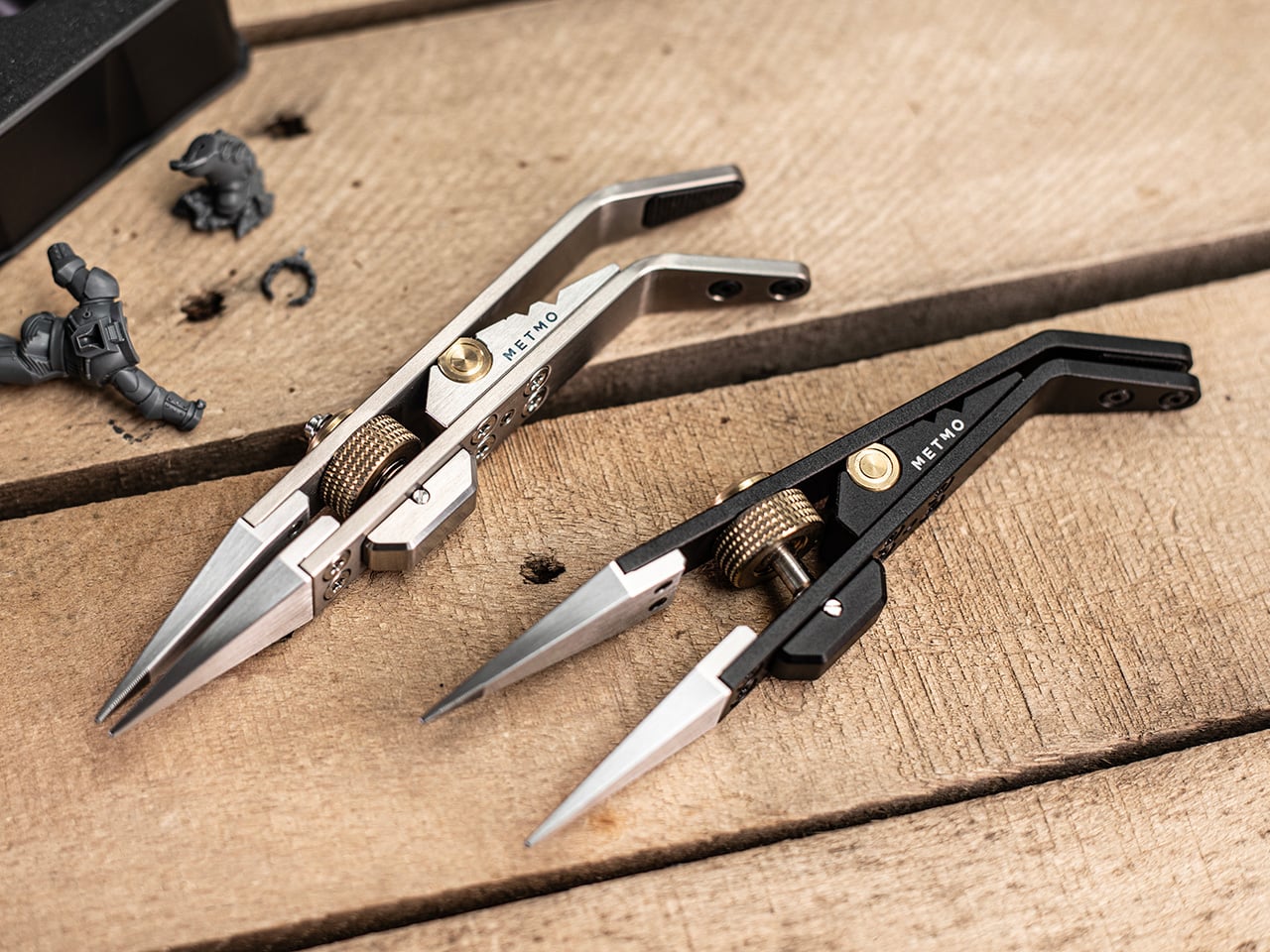
The Precision Grip is calibrated for a different job than MetMo’s earlier clamping tools, the kind of featherlight, controlled pressure needed to hold a model part without crushing it. Where the Pocket Grip chased 21kg of clamping force for daily carry tasks, this one maxes out at 5kg, by design. It runs on a miniaturized drive screw borrowed from precision machining equipment, so you set your grip force once and the jaws hold that position without assistance. That’s the core limitation tweezers can never escape: they hold via sustained finger pressure, and the moment that wavers, the part is gone. For anyone who has ever sacrificed a miniature to the carpet gods, that last sentence is the whole pitch.

Designer: Sean Sykes & James Whitfield (MetMo)

Click Here to Buy Now: $129 $143.33 (10% off). Hurry, only 19/1050 left! Raised over $579,000.

For decades, precision hobbyists have been improvising with tools from completely different disciplines. Jewelers raid surgical supply catalogs. Electronics hobbyists use soldering tongs that launch parts across the room the moment grip pressure drops. Model painters hold tiny figures between their fingers and simply hope for the best. MetMo’s position is that these people deserve something built specifically for the job, and the Precision Grip’s lightly textured jaw tips are designed to grip without marking or damaging delicate surfaces, a distinction that no repurposed dental or electrical tool reliably delivers.

The mechanism at the center of all this is a miniaturized version of the drive screw used in high-precision machining equipment, a category of hardware that lives and dies by tolerance accuracy. A solid barrel hinge keeps both jaws in perfect alignment during clamping, preventing the sideways drift and tip-twist you’d get from a conventional pivot, and that dimensional stability is what makes the needle-nose tips usable for genuinely pinpoint work rather than approximations of it. Turn the knurled screw, the jaws close to exactly where you set them, and they hold there with up to 5kg of clamping force. The underlying mechanism traces back to 1912, which MetMo has made into a design tagline for a reason. It’s a genuinely good mechanism.

The jaw tips carry a patent-pending micro-grip texture that MetMo calls “The Gecko’s Finger,” a name that is slightly ridiculous and also completely on point. Small smooth parts get just enough extra friction at the contact surface to stay put without the jaws needing to clamp any harder, which is the right problem to solve when you’re working on something fragile. Beyond the standard needle-nose stainless steel nibs, the system accepts silicone soft inserts for delicate surfaces, round clamp heads for gripping a part’s inner cavity rather than its outer face, and even custom 3D-printed nippers for shapes no off-the-shelf tip could reach. Individual nibs swap out independently when damaged, without touching the body.

Set the jaws slightly open and a spring-loaded mechanism activates, giving you conventional tweezer behavior for quick sorting tasks without engaging the screw-drive lock every time. When you need both hands free, the Precision Grip clamps into a quick-release mount and becomes a miniature desk vice, holding your part steady while you solder, file, or paint. Three V-grooves machined into the body let you form wire or prop the tool as a makeshift stand, keeping parts right where you left them when you step away. The whole setup is fully ambidextrous, which sounds minor until you’re a lefty who has spent years buying tools that don’t think about you. All of that function lives in a body that measures 134mm (5.3 inches) long, 29mm wide, and 16mm deep.

Aerospace-grade hard-anodized aluminum (70.3g), Grade 5 titanium (83.3g), and surgical stainless steel (114.5g) are the three material variants, and each one maps to a different kind of user. The aluminum is the nimble everyday choice, the titanium balances weight savings and durability for more demanding environments, and the surgical stainless is autoclave-rated and built from high-chromium steel throughout, making it viable for medical and laboratory settings. All three are fully user-serviceable, strippable to individual components for maintenance or repair, with high-tensile screws throughout rather than whatever was cheapest to source. MetMo talks about a 200-year product goal, and the fully serviceable construction is what gives that ambition actual credibility.

Pricing for the Precision Grip runs at £89 ($118 USD) for the Aluminum version, while the Stainless Steel variant is priced at £119 or $157 USD. For serious hobbyists and EDC collectors, the Titanium Precision Grip is priced at £179 or $237 USD. The Precision Grip ships worldwide from the UK and comes with the 200-year repairability guarantee that you could possibly only expect from a company as obsessed with detail and quality as MetMo. MetMo balanced the weight distribution around fine writing instrument ergonomics, giving the body a contour that doesn’t tire your hand across long sessions. It also looks genuinely purposeful doing nothing, like an intricate ornament that earns questions from people passing your desk, which MetMo treats as part of the design brief rather than a happy byproduct.

Click Here to Buy Now: $129 $143.33 (10% off). Hurry, only 19/1050 left! Raised over $579,000.

The post MetMo turned a 1912 mechanism into the perfect hands-free tweezers for hobbyists and craftsmen first appeared on Yanko Design.

  • ✇Yanko Design
  • 7 Reasons Non-Artists Need a Drawing Pad on Their Desk
    I’ve established in my previous articles that I’m not an artist and can only draw stick figures, or maybe follow paint-by-numbers-style sketches. That hasn’t stopped me from buying and collecting drawing pads and notebooks of all kinds, though. Of course, I’m not hoping I’ll eventually learn to draw or become the next Andy Warhol or anything like that. I like having these writing surfaces because I have a lot of things to write down, whether it’s for productivity, as part of my numerous journal
     

7 Reasons Non-Artists Need a Drawing Pad on Their Desk

27 septembre 2026 à 19:30

I’ve established in my previous articles that I’m not an artist and can only draw stick figures, or maybe follow paint-by-numbers-style sketches. That hasn’t stopped me from buying and collecting drawing pads and notebooks of all kinds, though. Of course, I’m not hoping I’ll eventually learn to draw or become the next Andy Warhol or anything like that. I like having these writing surfaces because I have a lot of things to write down, whether it’s for productivity, as part of my numerous journaling tools, or just somewhere to randomly write or sketch things out.

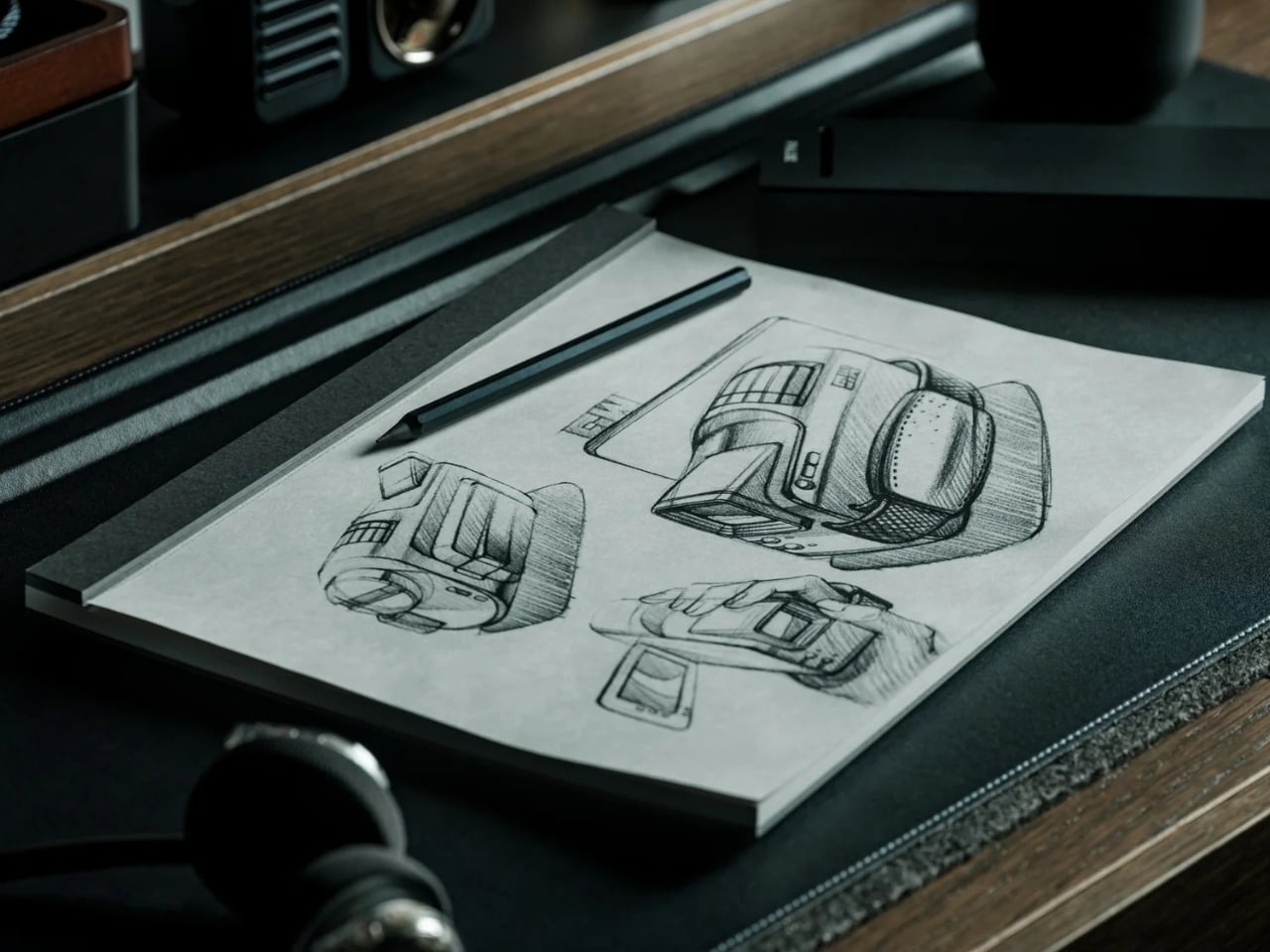
The Japanese Drawing Pad, despite having “drawing” in its name, isn’t just an art tool for artists, architects, and other visual creatives. It’s a blank, tactile surface that can be useful for anyone who likes to write, think, plan, or organize. And in a world that’s becoming an increasingly digital-analog hybrid, having a tool like this by your side whenever you need it is always a plus. It’s not just a regular drawing pad, though. It’s simply designed, but expertly crafted by masters in the bookbinding and papermaking industries, giving you paper that helps you create your own masterpiece, whether visual or written.

Click Here to Buy Now: Starting at $40. Get Everlasting All-metal Pencil Free ($19.95 Value). Hurry, this is a limited-time launch gift.

So if you’re like me and don’t need it for actual drawing, here are a few ways to get your money’s worth out of the Japanese Drawing Pad. No drawing skills needed.

Brain-dump Your To-Do List

For those times when you just need to mindlessly dump out all your tasks, lists, and thoughts, this is the perfect place to do it. It doesn’t have a cover, so you get straight to the blank page you need. The tear-away pages make it easy to toss the list once you’re done, or stick it somewhere you’ll actually see it.

Create a Mood Board

The drawing pad can also serve as your analog Pinterest board. Use it to brainstorm a trip itinerary, visualize an outfit for an upcoming event, or build a vision board for your next few months. The microperforated pages tear easily and cleanly, so you can arrange them side by side on a wall or corkboard.

Take Notes in a Meeting (Without a Boring Notebook)

Meetings can drag on forever, but having a unique tool to take notes with can make them feel a little less like a slog. The Drawing Pad’s gray paper and black base give it a sleeker, more distinctive look than your average notepad, so pulling it out mid-meeting feels less like a chore and more like an upgrade.

Mind-mapping and Brainstorming

Having a freeform space without any lines is ideal for when you need to jot down branching ideas, bubbles, and connections. It also comes in different sizes (A6, A5, and A4), so you can choose how much space you need for these brainstorming sessions, even if the meeting is just with yourself.

Journaling

Whether you need a space for habit tracking, junk journaling, or creative writing prompts, the premium feel of the paper will make your journaling ritual more satisfying. If you tear off the pages, you can attach them to your other journals or use the loose-leaf sheets to build a journal of your own.

Teaching Kids (or Yourself) Letters, Numbers, and Shapes

The pad can also double as a lesson space for kids who are still learning to write their letters, numbers, or shapes, offering a low-pressure surface with no stakes attached. And if you’re learning a new language that uses characters different from what you’re used to, it can be your practice space, too.

Doodling to De-stress

Even if you’re not an artist who can draw well, there may be times when you just want to doodle your stress away. Whether you’re sketching the meal you just ate, dreaming up an imaginary creature to fight off boredom, or scribbling whatever abstract shapes come to mind, the pad puts no pressure on you to be “good.” It’s simply a tactile stress outlet.

Beyond what’s already been covered, the Japanese Drawing Pad has a few more details worth knowing. Every pad is handmade by ITO Bindery, a Japanese bookbindery that’s been at it since 1938. The binding glue is still brushed on by hand, and each microperforation is checked for consistency by trained craftspeople rather than left entirely to machines. The pages themselves are premium paper (81.4 g/m²) mounted on a sturdy, recycled cardboard base, and each sheet tears away cleanly without leaving any strays behind on the page. This particular edition is also limited to just 100 individually numbered pads per size, which makes the pad feel less like a disposable notepad and more like a small, functional collectible.

At the end of the day, you don’t need to be able to draw to justify owning something this well made. A design like the ITO BINDERY × YANKO DESIGN Drawing Pad earns its keep simply by being there, ready on your desk for the next to-do list, doodle, or half-formed idea you don’t want to lose. And that’s really the beauty of building an analog habit into an otherwise digital life: it doesn’t ask much of you, just a pen, a blank page, and a few free minutes. Whether it ends up full of to-do lists, mind maps, or terrible stick-figure doodles, this drawing pad might just become one of those small, everyday objects you didn’t know you needed until it’s part of your routine.

The post 7 Reasons Non-Artists Need a Drawing Pad on Their Desk first appeared on Yanko Design.

  • ✇Yanko Design
  • This Tokyo Furniture Showroom Vanished Into a Traditional Japanese Inn
    A noren hangs at the entrance of Karimoku Commons Tokyo. Step past it and the showroom disappears, replaced by something closer to memory: the quiet hallways, worn timber, and particular warmth of a Japanese inn. That is the premise of Oyado MAS, an exhibition conceived by MAS, Karimoku’s design label, and staged in collaboration with spatial director Wataru Kumano. Running from September 19 to October 20 at the Aoyama venue, the installation moves visitors through a sequence of inn-like settin
     

This Tokyo Furniture Showroom Vanished Into a Traditional Japanese Inn

27 septembre 2026 à 18:40

A noren hangs at the entrance of Karimoku Commons Tokyo. Step past it and the showroom disappears, replaced by something closer to memory: the quiet hallways, worn timber, and particular warmth of a Japanese inn. That is the premise of Oyado MAS, an exhibition conceived by MAS, Karimoku’s design label, and staged in collaboration with spatial director Wataru Kumano. Running from September 19 to October 20 at the Aoyama venue, the installation moves visitors through a sequence of inn-like settings: reception, lounge, sleeping area. Each space is built around MAS furniture rather than placing it on a pedestal.

Kumano’s choice of an oyado over a hotel is deliberate. Oyados carry a distinct cultural intimacy, a slowness that international hotel formats rarely hold. The sleeping area doesn’t mimic an inn so much as distill the feeling of one, using MAS pieces to frame how a body might move through morning light, settle into reading, or reach across a low table. Furniture earns its place through use rather than display.

Designer: Karimoku

The materials follow the same logic. MAS works with Japanese-grown woods, and the exhibition doesn’t conceal the grain. Visible knots, color shifts, and tonal variation across surfaces are left intact rather than sanded away. Where a conventional showroom presents furniture as finished objects defined by flawless surfaces, Oyado MAS treats the wood’s natural character as part of the experience, a quiet reminder of origin.

Collaborators extend the atmosphere beyond furniture. New Light Pottery contributes lighting; Nao Tesuki Washi brings handmade paper to the space. A fragrance developed with Sheep carries notes drawn from Japanese forests, connecting the olfactory layer to the material one. Tea brewed from forest plants is served to visitors, folding touch, scent, and ritual into a single walkthrough.

Among the pieces available for purchase are the WK Stool by MAS and a spoon by Sekisaka. A new fragrance by MAS and Sheep is also on sale. But the exhibition isn’t really a shopping proposition. It’s a sequencing argument: that furniture reveals itself differently when placed inside the rhythm of a stay, experienced through context and time rather than pulled from the neutral floor of a showroom.

The noren at the entrance marks the shift from retail logic to something slower and more considered, where scale, storage relationships, and the texture of Japanese craftsmanship become readable only through the movement of a body through a room. That’s a lesson most showrooms never figure out how to give. Oyado MAS runs Tuesday through Saturday, 13:00 to 18:00, and closes October 20, 2026. Karimoku Commons Tokyo is located in Aoyama.

The post This Tokyo Furniture Showroom Vanished Into a Traditional Japanese Inn first appeared on Yanko Design.

  • ✇Yanko Design
  • This $899 golf launch monitor tracks your swing in 3D and tells you how to fix it
    A decent golf lesson can cost anywhere from $80 to $200 an hour, but the bigger issue usually kicks in after the lesson ends. You leave with a fix, spend the next two weeks practicing on your own, and somehow manage to rehearse the exact mistake you were trying to get rid of. Golf has a funny way of doing that. More practice does not always mean better practice. Launch monitors helped by giving everyday golfers access to shot data that used to live in pro fittings, but numbers alone can still
     

This $899 golf launch monitor tracks your swing in 3D and tells you how to fix it

19 septembre 2026 à 21:45

A decent golf lesson can cost anywhere from $80 to $200 an hour, but the bigger issue usually kicks in after the lesson ends. You leave with a fix, spend the next two weeks practicing on your own, and somehow manage to rehearse the exact mistake you were trying to get rid of. Golf has a funny way of doing that. More practice does not always mean better practice. Launch monitors helped by giving everyday golfers access to shot data that used to live in pro fittings, but numbers alone can still feel like homework. NeoPace’s G10 Pro tries to close that gap by pairing launch monitor stats with an AI coaching layer that explains what happened and what to work on next.

NeoPace, based in Irvine, California, built the G10 Pro around a triple-camera system and a 24 GHz Doppler radar. Two cameras capture the impact zone at up to 480 frames per second, while a third records the full swing at 120fps. The setup feeds into what NeoPace calls TrainerIQ™, an AI system that traces a bad shot through a Body to Club to Ball chain, connecting ball flight to club delivery and then back to the body movement that caused it. That matters because most golfers do not need more raw data, they need help turning data into action. The G10 Pro also rebuilds each swing in 3D, so you can replay it from multiple angles instead of squinting at a flat video and pretending you know what your hips are doing.

Designer: Neopace

Click Here to Buy Now: $899 $1499.99 (40% off). Hurry, only 875/1000 left! Raised over $286,000.

The G10 Pro tracks 22 ball and club metrics, plus 27 body-related metrics covering chest rotation, pelvis movement, wrist angles, elbow flexion, knee sway, and more. That is a pretty wild amount of information for a portable unit that costs $899, especially when most devices in this range focus mainly on ball flight and club numbers. NeoPace also made setup refreshingly simple, with auto alignment and support for both face-on and down-the-line placement. So whether you’re practicing at home, on the range, in the backyard, or sneaking in some swing diagnostics before a round, the G10 Pro feels built for golfers who want coaching-grade feedback without hauling around a tour van full of gear.

Every swing gets captured and rebuilt in full 3D, replayable from any angle, at any moment, from face-on, top-down, and down-the-line, all from a single device you placed once before you started. Most launch monitors give you flat video from a single fixed angle. The stereo camera pair locks the ball at 480 frames per second while the third follows the swing at 120fps, double the impact capture rate of most competing devices. Seeing your own swing from directly above mid-follow-through is the kind of analysis angle instructors have always wanted to show students but rarely had a clean portable way to deliver. NeoPace claims the 3D Replay™ is a first in portable consumer launch monitors at any price, and from everything visible in the current market, that claim holds up.

TrainerIQ™ analyzes your swing and body movement, identifies the likely cause of a miss, and suggests a targeted drill to help you improve. It does not just flag that the face was open at impact and leave you to figure out why. The analysis goes deeper: face 2 degrees open, heel contact, smash factor 1.35, and the root cause is that the body stopped rotating so the hands stepped in to carry the load. That kind of layered breakdown is exactly what a teaching pro walks you through after watching your swing, and the G10 Pro compresses it into automated real-time output after each shot. Golfers can also directly ask TrainerIQ™ questions about their swing and receive personalized, actionable guidance on what to work on next, which makes the system feel less like a stat engine and more like an interactive training partner. TrainerIQ™ then prescribes specific drills based on the diagnosis, closing the loop between data, understanding, and actual practice.

Twenty-seven body-related metrics track how your body moves through every swing, turning posture, timing, and rotation into data you can act on. The tracked parameters span the chest and pelvis in five axes each, lead and trail knee sway and flexion, mid-hands sway and lift, head movement, X-Factor and Sway Gap, lead and trail elbow flexion, wrist angle, shaft angle, and kinetic sequencing factors: Core Gain, Shoulder Gain, Wrist Gain, and Release Factor. Any coach reading that list will recognize it as the full biomechanical picture that motion capture setups in pro training facilities chase. Inside TrainerIQ™, it becomes the evidence base connecting a ball that lands 13 yards short and right to a chest that stopped rotating halfway through the downswing. That translation from raw biomechanics to actionable coaching is where the G10 Pro genuinely earns its price.

Getting the G10 Pro into a session takes three steps: set it down, auto align, and take your shot. That might sound like marketing language, but auto-alignment is a genuine quality-of-life upgrade over monitors that require precise manual positioning every single time. The pan-and-tilt gimbal covers a 120-degree pan range and a 40-degree tilt range, so near-correct placement is close enough. The unit itself measures 217.5 × 47.25 × 44.5 mm without the tripod, compact enough to slide into a range bag without reorganizing everything else in it. The 3,300mAh/7.2V battery runs for four hours with a 1.5-hour fast charge at 15W, which covers a full morning session with room to spare. For golfers who want to practice or play indoors, the G10 Pro is compatible with GSPro and Creative Golf, with additional major simulator platforms currently in development.

NeoPace also says there is no unlock fee or subscription required for simulator connectivity itself, though third-party simulator software fees may still apply. The companion app works with iOS (14.0 and above) and Android (10.0 and above) smartphones and tablets. NeoPace also says the core feature set does not require a subscription. D Swing Analysis and TrainerIQ™ Analysis share an allowance of up to 5 AI-analyzed shots per month, while Premium AI increases the shared allowance to up to 1,000 shots per month and adds features such as Ask TrainerIQ™, Performance Insights, Personalized Drills, Practice Goals, and Cloud Storage.

At $899, the G10 Pro goes toe to toe with the Rapsodo MLM2PRO, its most direct camera-based competitor at the same price. The MLM2PRO does solid work on ball flight data and video, but offers no body tracking, no 3D reconstruction, no AI coaching chain, and face-on-only placement. Stepping further up the market, ball/club/body motion analysis at this depth typically lives in systems costing several times more, usually requiring separate wearables or dedicated motion capture rigs. Honestly, the fact that NeoPace has packed 3D reconstruction, 27 body metrics, and an AI coaching brain into a $899 portable device feels like it should be harder to pull off than it apparently is, and that is the most compelling thing about the G10 Pro.

Click Here to Buy Now: $899 $1499.99 (40% off). Hurry, only 875/1000 left! Raised over $286,000.

The post This $899 golf launch monitor tracks your swing in 3D and tells you how to fix it first appeared on Yanko Design.

  • ✇Yanko Design
  • Poco F9 Ultra Review: Great Sound, Grown-Up Design
    PROS: Bose-tuned speaker remains a genuine standout big , bright 185Hz display Huge 8,050mAh battery Great performance CONS: Relatively large and heavy body will not suit everyone Ultrawide still does not feel especially wide RATINGS: AESTHETICSERGONOMICSPERFORMANCESUSTAINABILITY / REPAIRABILITYVALUE FOR MONEYEDITOR'S QUOTE:The F9 Ultra feels like Poco growing into its strengths, with Bose-tuned sound still leading the experience. The Poco F8 Ultra f
     

Poco F9 Ultra Review: Great Sound, Grown-Up Design

Par : Aki Ukita
19 septembre 2026 à 18:30

PROS:


  • Bose-tuned speaker remains a genuine standout

  • big , bright 185Hz display

  • Huge 8,050mAh battery

  • Great performance

CONS:


  • Relatively large and heavy body will not suit everyone

  • Ultrawide still does not feel especially wide

RATINGS:

AESTHETICS
ERGONOMICS
PERFORMANCE
SUSTAINABILITY / REPAIRABILITY
VALUE FOR MONEY

EDITOR'S QUOTE:

The F9 Ultra feels like Poco growing into its strengths, with Bose-tuned sound still leading the experience.

The Poco F8 Ultra felt like a turning point for Poco. Up to that point, the brand had always been easy to understand. You bought a Poco for speed, sharp pricing, and a bit of swagger. The F8 series added something new to that formula with Bose-tuned speakers, and that changed the feel of the phone in a way a faster chip or brighter screen usually does not.

It was not just about volume or clarity. The whole device felt more built around entertainment. Games had more punch, films had more room to breathe, and even everyday audio felt less like an afterthought. The denim-inspired rear panel helped give the F8 Ultra a bit of tactile identity too, even if the finish was more denim-adjacent than truly fabric-like, but the thing that stayed with you was the sound.

Designer: POCO

The Poco F9 Ultra takes that idea and pushes it further. Rather than treating the Bose-tuned system as a one-off flourish, Poco seems to be building on it with more confidence this time, wrapping that sound-first approach in a package that feels bigger, more polished, and more ambitious. If the F8 Ultra introduced a new side of Poco, the F9 Ultra feels like the phone that tries to make it stick.

Aesthetics

If the Poco F8 Ultra leaned young and fashionable, the Poco F9 Ultra leans sophisticated. It keeps the brand’s taste for visual confidence, but expresses it in a more restrained way, swapping tactile playfulness for cleaner lines, flatter surfaces, and a more polished sense of control.

That shift is obvious the moment you look at the back. The denim-inspired treatment from the F8 Ultra is gone, replaced by a finish that feels more metallic and more architectural. The overall silhouette is simpler, but it does not come across as plain. Instead, it feels like Poco has traded novelty for composure, letting shape and proportion do more of the work.

The camera island design remains largely the same as its predecessor, but it feels more resolved here. A large rectangular module sits across the top portion of the phone, housing three cameras and an LED flash in a neat 2 by 2 arrangement, with the speaker grille set off to the right. It is still a bold layout, but one that now feels less experimental and more like a defining part of the phone’s identity.

New to the F9 Ultra is a dynamic light ring built around the speaker grille. It supports personalized visual effects for incoming calls, games, and music. The effect itself appears to be fairly simple, closer to a clean white LED accent than anything overly flashy, but that may be exactly the point. It feels like Poco’s way of keeping a hint of gaming-phone energy alive without letting it overwhelm the more sophisticated direction of the design.

The two colors also tell slightly different stories. The Dark Cherry finish is the more expressive option, bringing warmth and a bit of drama without tipping into flashiness. The Black version feels more understated and technical, especially with the red side-button accent adding a small but effective point of contrast. Both work, but they speak to different moods. One is richer and more characterful, while the other is cooler and more controlled.

Ergonomics

That more sophisticated look does come with a more substantial physical presence. At 235g, the Poco F9 Ultra is about 15g heavier than the F8 Ultra, and you feel that extra weight immediately. It sits firmly on the heavier side, especially in one-handed use, where its size and mass are hard to ignore.

Its dimensions, 163.49 x 77.94 x 8.74mm, are broadly in line with its predecessor, so the overall footprint will feel familiar if you are coming from the older model. It is still a wide phone, though, and not the easiest to manage with one hand. The curved edges do help soften the grip and make it feel less severe than the numbers suggest, but this is still a device that feels more at home in two-handed use.

The matte finish does its part as well. It feels premium, pleasant to touch, and better at disguising smudges than a glossier surface would be. Add in the familiar button placement and unchanged in-display fingerprint scanner, and the F9 Ultra ends up feeling less like a phone you need to relearn and more like one you simply need to get used to carrying.

Performance

The F9 Ultra runs on Qualcomm’s Snapdragon 8 Elite Gen 5, the same flagship platform used in the F8 Ultra. Poco has also retained the VisionBoost D8, a dedicated chip aimed at improving gaming and video performance. In practice, that makes the F9 Ultra feel less like a leap in raw power and more like a refinement of an already capable performance formula.

The F9 Ultra pairs that gaming focus with a 6.9-inch 1.5K AMOLED display, and it is exactly the kind of panel you would want on a phone built around entertainment. It is large, sharp, and vibrant, with a refresh rate that gives the phone a clear performance edge in games that can actually take advantage of it. Outside of gaming, that same smoothness carries over into scrolling, animations, and general navigation, even if the practical difference becomes less dramatic in everyday use.

Brightness is another clear strength. Poco says this is the first global lineup to use the new M11 luminescent material, which helps the panel reach up to 4,500 nits in peak brightness and as high as 10,000 nits for HDR highlights. The numbers are extreme, but the more practical takeaway is that the screen stays very readable outdoors and gives bright scenes a stronger sense of punch and contrast without losing too much detail.

The F9 series is also Poco’s first to push to 185Hz, with support for 24 games running at a native 185fps. That sounds more dramatic than it always feels in practice, because the benefit depends heavily on the kind of game you are playing. In faster titles like Blood Strike, Crossfire: Legends, and Brawl Stars, the higher refresh rate does make a difference. Motion looks cleaner, visual updates come faster, and the game feels a little more immediate under your fingers. In slower games like Clash of Clans, Clash Royale, or Hearthstone, the gain is much smaller. You still get smoother animations and interface movement, but not the same kind of gameplay advantage.

In an hour-long session of Blood Strike at the highest graphic settings, the F9 Ultra was able to hold 185fps without any obvious frame drops. Just as importantly, it did not get uncomfortably hot, staying at around 40 degrees Celsius on the surface. There is clearly enough cooling here to keep performance from falling off over time, but the more important takeaway is that the phone stays consistent under load.

Main Camera, 1x

Portrait mode, Main Camera, 3.1x

The F9 Ultra is the second phone to come out of Poco’s partnership with Bose, which makes the collaboration feel less like a one-off experiment and more like part of the series identity. The Bose-tuned speaker system remains one of its most distinctive features, and also one of the easiest to appreciate in daily use. Poco says it has redesigned the acoustic port and upgraded the dual speakers for clearer sound and richer bass. It also keeps the sound profile presets and 10-band EQ introduced on the F8 Ultra, which means there is still plenty of room to tailor the sound to your liking.

Telephoto Camera, 5x

Telephoto Camera, 10x

In use, the speakers are easy to like. Just like the F8 Ultra, the F9 Ultra delivers some of the best smartphone audio you can get. The sound is fuller and more open than what most phones manage, with enough bass presence to give games, films, and music a bit more body. Dialogue comes through clearly, and the overall presentation feels less cramped than the average smartphone speaker setup.

Main Camera, 1x

Telephoto Camera, 5x

Telephoto Camera, 10x

The F9 Ultra upgrades the main camera from 50MP on the F8 Ultra to 200MP here, though the sensor itself is smaller, dropping from 1/1.31-inch to 1/1.56-inch. That makes it less a straightforward upgrade and more a different kind of tradeoff. The rest of the setup remains familiar, with a 50MP 5x telephoto, a 50MP ultrawide, and a 32MP front camera.

Poco has also made a subtle but useful change to the focal lengths. The F9 Ultra uses a 24mm-equivalent main camera and a 17mm-equivalent ultrawide, compared with 23mm and 18mm on the F8 Ultra. The shift is small, and the ultrawide still does not feel especially expansive, but the added separation between the two lenses makes the jump from main to ultrawide feel a little more purposeful.

Ultrawide Camera, 0.7x

Main Camera, 1x

Telephoto Camera, 10x

In use, the main camera captures photos with good detail, solid dynamic range, and vibrant color. The 5x telephoto is also capable, though it tends to produce images that look a bit more saturated and contrast-heavy. Video is solid too, with crisp footage and enough consistency to make the camera system feel dependable for everyday shooting.

Night Shot, Ultrawide Camera, 0.7x

Night Shot, Main Camera, 1x

Night Shot, Telephoto Camera, 5x

Night Shot, Telephoto Camera, 10x

Battery life remains one of the F9 Ultra’s biggest strengths. The 8,050mAh battery is enormous even by flagship standards, and it gives the phone a clear advantage in the kind of heavy use it is designed for. In my use, it was easy to stretch the phone across two days on a charge, which suits the F9 Ultra’s media-heavy, gaming-friendly character especially well.

Charging is just as capable, with 100W wired and 50W wireless support, plus 27W wired reverse charging and 22.5W wireless reverse charging. It is a battery setup that feels as well-rounded as the rest of the phone.

Sustainability

The F9 Ultra is not a phone that talks much about sustainability in the material-driven sense, but it does make a decent case for longevity. Its IP68 rating and Corning Gorilla Glass 7i should help it stand up to everyday wear, which is still one of the most practical ways a phone can stay useful for longer.

Poco also promises four major Android OS updates and six years of security patches, which gives the F9 Ultra a fairly credible long-term support story. That matters because software support plays a big role in whether a phone remains worth keeping. Poco may not be leading the conversation around recycled materials or repairability here, but the basics of durability and usable lifespan are in place.

Value

The F9 Ultra starts at $799 for the 12GB/256GB version, which puts it $70 above the F8 Ultra. That is still an increase, but not an especially aggressive one in the current climate, where similar phones have seen price jumps closer to $100. Some of that restraint may come from Poco reusing the same Snapdragon 8 Elite Gen 5 platform, which likely helped balance out the rising cost of RAM and other components.

As an upgrade, though, the case is less convincing. If you already have the F8 Ultra, moving to the F9 Ultra does not make a lot of sense unless you specifically want the new design, the 185Hz display, or the 200MP main camera. As a fresh buy, however, it remains one of the best affordable flagship-level phones around. Poco may be edging upward in price, but it still knows how to deliver a lot of phone for the money.

Verdict

The Poco F9 Ultra feels like Poco settling into a formula that actually works. The design is more mature, the gaming side is still strong, and the Bose-tuned speakers remain one of the best reasons to care about the series in the first place. Add the huge battery and the 185Hz display, and you end up with a phone that feels very sure of what it wants to be.

If you already have the F8 Ultra, I do not think this is the upgrade to chase. The older phone is still good enough that the differences here feel more iterative than urgent. But if you are buying fresh, the F9 Ultra is still one of the better affordable flagship-level phones around, especially if you care as much about sound and gaming as you do about the usual specs.

The post Poco F9 Ultra Review: Great Sound, Grown-Up Design first appeared on Yanko Design.

  • ✇Yanko Design
  • This $21 Charger Powers Your iPhone, Apple Watch, and AirPods at Once
    Most of us have two or more gadgets that need constant charging, plus several chargers and cables to keep them all juiced up. That’s probably fine if you have an entire outlet strip at home or in the office, but when you’re working with a small space, or you’re traveling and on the go, it can be a real challenge to charge multiple devices at once. You end up with a tangle of cords and charging heads, or sometimes you even have to take turns charging your gadgets. If you mostly own Apple devices
     

This $21 Charger Powers Your iPhone, Apple Watch, and AirPods at Once

19 septembre 2026 à 16:45

Most of us have two or more gadgets that need constant charging, plus several chargers and cables to keep them all juiced up. That’s probably fine if you have an entire outlet strip at home or in the office, but when you’re working with a small space, or you’re traveling and on the go, it can be a real challenge to charge multiple devices at once. You end up with a tangle of cords and charging heads, or sometimes you even have to take turns charging your gadgets.

If you mostly own Apple devices or other USB-C-powered gear, the TESSAN 3-in-1 USB-C Charger may actually solve that problem for you. It’s a compact wall charger with a USB-C port, a USB-A port, and a built-in magnetic Apple Watch dock, so you only need one outlet to power up three devices at the same time.

Designer: TESSAN

This 3-in-1 charger is especially handy when you only have one outlet available but need to power up three different devices. A few years ago, this wouldn’t have been much of an issue, since most of us only had one phone to worry about. But now that owning multiple devices is the norm, charging has become an everyday hassle. What do you do when you’ve got a phone, a pair of AirPods, and a smartwatch that all need power at the same time?

TESSAN’s charger features fast charging through its 20W USB-C port, so you can get a device like the iPhone 15 up to 55 percent battery in just 30 minutes. At the same time, its 18W USB-A port can juice up an accessory simultaneously while your main device charges. It also offers broad compatibility, working with everything from the latest iPhone models to AirPods and other USB-powered devices. The real star of the show, though, is the built-in magnetic charger for your Apple Watch. There’s no separate puck or cable needed here. Instead, you get a self-aligning dock, so you won’t have to fuss with positioning your watch every time you need to charge it.

The charger comes in four finishes (white, black, pink, and blue) and is clearly designed to double as a small desk-aesthetic item, though it will likely still read as “just a charger” to most people, especially in the white colorway. Where it really shines is portability: it’s a travel-friendly device you can toss in a bag without a second thought, instead of hauling around three separate chargers that eat up space and weight in your carry-on.

How does it stack up against the competition? The most obvious comparison is Belkin, whose 3-in-1 MagSafe charging stands are the gold standard in this category. Belkin’s BoostCharge Pro and UltraCharge Pro docks charge an iPhone, Apple Watch, and AirPods wirelessly and look considerably more premium sitting on a nightstand, but they also run anywhere from $95 to $150 and require more desk real estate. TESSAN’s charger, at $20.99, skips the wireless charging bells and whistles in favor of a compact, plug-in design that’s built more for function and travel than for a styled bedside setup. If you want a showpiece charging stand for your living room, Belkin is still hard to beat. But if you want something inexpensive, pocketable, and fast enough to get you out the door in the morning, TESSAN makes a compelling case for itself as the budget-friendly, travel-first alternative.

At the end of the day, this isn’t a charger trying to be a lifestyle centerpiece. It’s a charger trying to solve a genuinely annoying, everyday problem: too many devices, not enough outlets, and not enough patience to wait in line for your turn at the power strip. For $20.99, the TESSAN 3-in-1 USB-C Charger delivers fast charging, broad compatibility, and a clever built-in Apple Watch dock in a package small enough to disappear into a laptop bag or a nightstand drawer. It won’t turn heads the way a sleek charging stand might, but it will quietly keep your phone, watch, and earbuds powered up without the usual cord chaos. For anyone juggling multiple Apple devices on a daily basis, or packing for a trip and dreading the tangle of cables, this little charger earns its spot on the “actually useful” list.

The post This $21 Charger Powers Your iPhone, Apple Watch, and AirPods at Once first appeared on Yanko Design.

  • ✇Yanko Design
  • MATE Works Like a Sticky Note That Sets Its Own Alarm When You Write
    Setting a reminder on a phone means unlocking a screen, opening an app, and typing on a keyboard, three steps that break whatever train of thought led to needing the reminder in the first place. MATE skips all of that by reading your own handwriting instead. Write “meeting at 1:00 p.m.” on its E-ink panel with the built-in pen, and the device sets the alarm itself, no app, no unlocking, no menu to dig through. That handwriting recognition is the entire premise, and it works because the device t
     

MATE Works Like a Sticky Note That Sets Its Own Alarm When You Write

Par : JC Torres
19 septembre 2026 à 15:15

Setting a reminder on a phone means unlocking a screen, opening an app, and typing on a keyboard, three steps that break whatever train of thought led to needing the reminder in the first place. MATE skips all of that by reading your own handwriting instead. Write “meeting at 1:00 p.m.” on its E-ink panel with the built-in pen, and the device sets the alarm itself, no app, no unlocking, no menu to dig through.

That handwriting recognition is the entire premise, and it works because the device treats a note and a task as the same object rather than two separate steps. The moment it detects a time written into the text, it quietly converts that scribble into a scheduled alert running in the background. Nothing about the note’s appearance changes. It still just looks like something you jotted down on paper.

Designer: Geonwoo Kang

A thin LED bar along the top edge handles the countdown, giving a glance-able sense of how much time remains without requiring a full screen wake or a swipe through settings. When the set time actually arrives, the alarm sounds and stops the instant you tap the panel, keeping the entire alert cycle contained to the same physical surface where the note was written in the first place.

Because handwritten notes pile up fast, MATE handles multiple pages through a three-stage physical slider running down one side, letting you flip between up to three saved notes with a flick of a finger. That’s a deliberately low-tech solution to a problem most gadgets solve with a touchscreen menu, and it works specifically because a slider takes zero attention to operate correctly on the first try.

The memo pad itself doesn’t have to stay locked into the main body either. It detaches from its dock and relies on built-in magnets to stick onto a partition wall or a metal filing cabinet, turning a handheld notepad into a fixed reminder posted wherever it’s actually needed. A grocery list stuck to a fridge door works the same way a sticky note always has, just with an alarm quietly running underneath it.

Even the pen gets a small, deliberate design decision most styluses skip. It nests into a groove at the top of the device rather than rattling around loose in a bag or a drawer, solving the single most common complaint about any stylus-based gadget: losing the one piece that makes the whole thing work. Reaching for a note and finding the pen missing defeats the entire point of a device built around spontaneous handwriting.

None of MATE’s individual pieces, the E-ink panel, the physical slider, the magnetic pad, would stand out much alone. Put together, they describe a specific kind of object: something meant to sit on a desk quietly doing one job well, catching a thought before it disappears and holding onto it until the moment it’s actually needed.

The post MATE Works Like a Sticky Note That Sets Its Own Alarm When You Write first appeared on Yanko Design.

❌