❌

Vue normale

  • ✇Yanko Design
  • CHEKT’s Chessboard Refuses to Hide Its Layered Design
    The carrying handle on Jess Wiseman’s CHEKT board is the detail that makes the design click for me. Chessboards have an awkward domestic life: leave one out and it claims a chunk of your table; put it away and playing becomes another thing to unpack. CHEKT’s board design considers that friction through a clear enclosure with a handle, while giving the familiar checkerboard a visual personality closer to a desk accessory than a formal game set. It also addresses a smaller, relatable problem: cho
     

CHEKT’s Chessboard Refuses to Hide Its Layered Design

14 octobre 2026 à 10:20

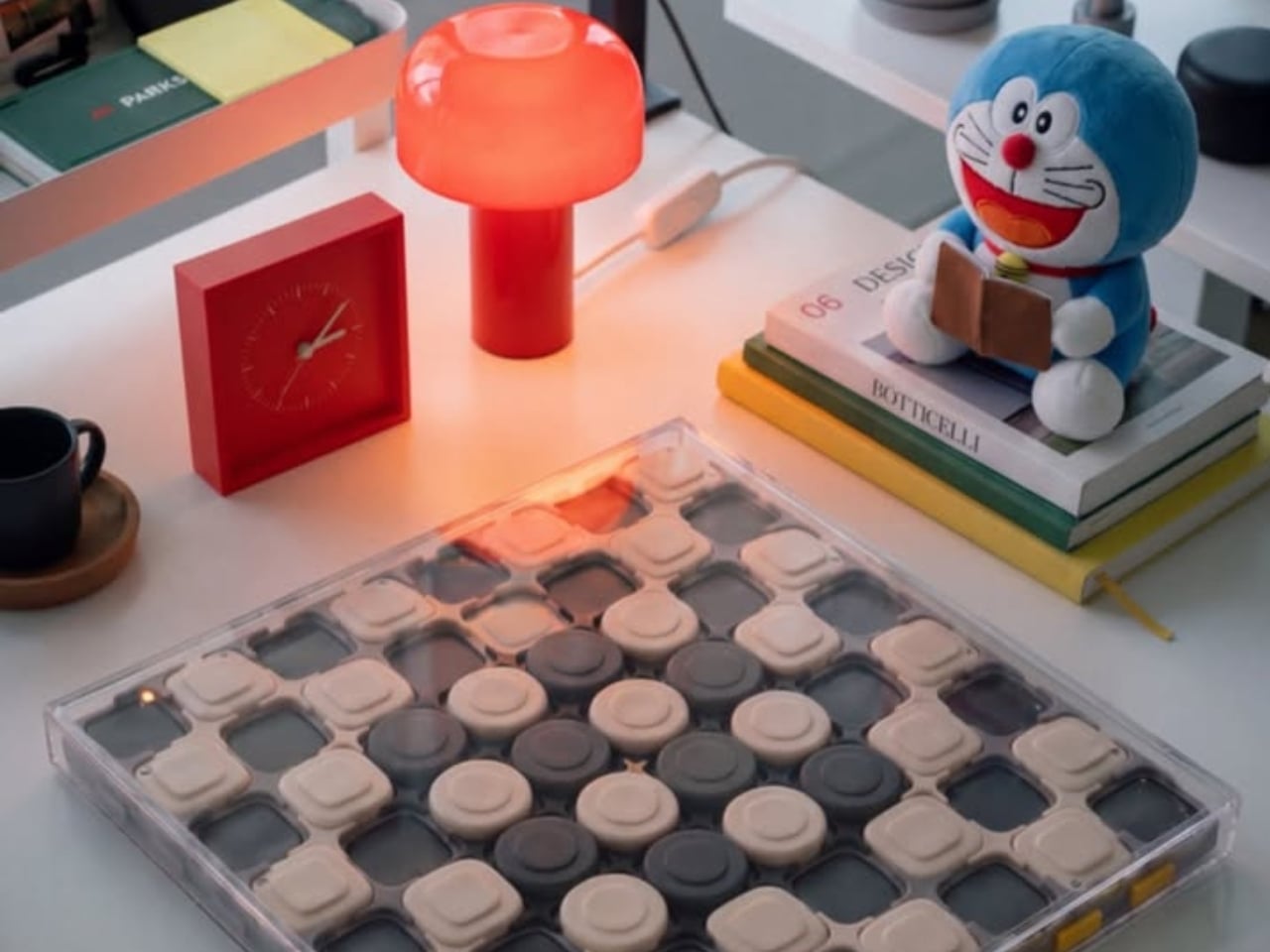
The carrying handle on Jess Wiseman’s CHEKT board is the detail that makes the design click for me. Chessboards have an awkward domestic life: leave one out and it claims a chunk of your table; put it away and playing becomes another thing to unpack. CHEKT’s board design considers that friction through a clear enclosure with a handle, while giving the familiar checkerboard a visual personality closer to a desk accessory than a formal game set.

It also addresses a smaller, relatable problem: choosing a board usually means committing to one look. The supplied images show four transparent shells with different graphic treatments, suggesting a way to change the board’s appearance without replacing the underlying object. That’s a more interesting proposition than another beautifully finished slab. I like objects that leave room for your taste to change, especially when they’re likely to spend as much time sitting around as being used.

Designer: Jess Wiseman

Underneath those shells, CHEKT has an eight-by-eight grid of black and pale peach forms. Rounded corners soften the geometry, and the raised surfaces make it look almost like an oversized keyboard. Circular details occupy the middle area, while square forms dominate elsewhere. The images don’t establish what those individual components do mechanically, so I wouldn’t call them buttons or switches. Visually, though, they give the board depth and rhythm that a printed checkerboard doesn’t have.

The clear outer enclosure makes those layers visible rather than hiding them behind a finished exterior. Small orange details along the edges interrupt the black-and-peach palette, and the slim, silver-colored handle gives the whole thing a faint briefcase quality. It’s playful without relying on a novelty shape. Sitting on a desk beside an orange mushroom lamp in one image, the board looks quite comfortable sharing space with objects chosen for their appearance.

The shell graphics are where the design becomes especially expressive. One uses yellow outlines around the squares, another introduces dark diagonal hatching, and a third has red, dot-built chess-piece illustrations. The fourth features large blue circles and angular linework. They offer different degrees of visual busyness, which matters. A graphic you enjoy looking at across the room might be less welcome when you’re trying to read a complicated position. I’d probably start with the quieter option.

One image shows a hand wiping drawn red arrows from the illustrated shell. That suggests a useful secondary role as a surface for working through moves, explaining a position, or marking an idea before clearing it away. It’s an appealing detail for casual learning because the discussion can happen directly over the board. The specific writing tools and surface compatibility aren’t established here, but the pictured interaction gives the transparent layer a purpose beyond changing the color scheme.

That ability to annotate is arguably more compelling than making a chessboard resemble a collectible gadget. You can imagine two people tracing a possible move rather than trying to explain everything through gestures. It wouldn’t replace learning the rules or recognizing positions, but it could make that conversation easier to follow. For me, this is where the graphic design starts earning its place: the surface becomes something you can use, not merely something to admire.

The packaging carries the same attitude. Oversized yellow CHEKT lettering, blue corner accents, chess-piece drawings, and diagrams of the layered board give the boxes a lively, almost hobby-kit character. The shell package explicitly labels its contents as a set of four, making the customization idea legible before anything is opened. I appreciate that clarity. Attractive packaging is more persuasive when it helps explain what the object is, rather than asking the branding to do all the work.

I’d still want to know how the shells attach, how easily their surfaces scratch, and whether the added graphics complicate play. Those answers would determine whether CHEKT feels practical rather than merely photogenic. But the design’s appeal is already clear: it gives a familiar game a place in a less formal room, with an appearance that doesn’t have to be permanent. A chessboard you can carry, customize, and potentially draw on offers several reasons to take it off the shelf.

The post CHEKT’s Chessboard Refuses to Hide Its Layered Design first appeared on Yanko Design.

  • ✇Yanko Design
  • ASUS ExpertBook A7 Gives the Business Laptop a Sleeker Look
    When I first saw the ASUS ExpertBook A7, I had to double-check that it was really meant for business. This laptop immediately cuts a different silhouette compared to the usual gray rectangles that fill airport lounges and open offices. Instead of relying on harsh edges or a boxy build, the A7 projects an air of modern sophistication that feels more at home next to a designer handbag than lost in a sea of generic briefcases. It is refreshing to see a company put such clear effort into making wor
     

ASUS ExpertBook A7 Gives the Business Laptop a Sleeker Look

Par : Aki Ukita
14 octobre 2026 à 09:00

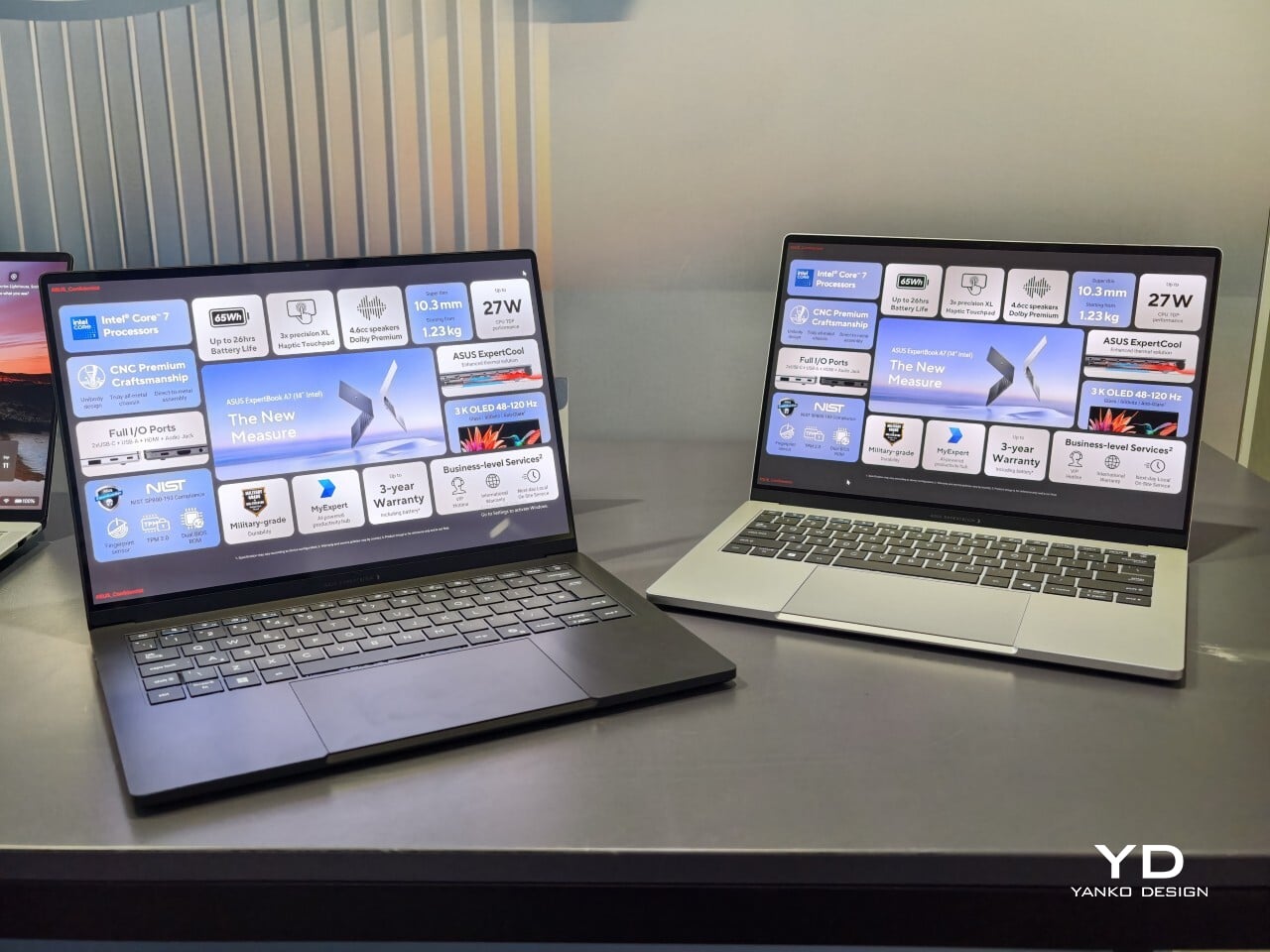
When I first saw the ASUS ExpertBook A7, I had to double-check that it was really meant for business. This laptop immediately cuts a different silhouette compared to the usual gray rectangles that fill airport lounges and open offices. Instead of relying on harsh edges or a boxy build, the A7 projects an air of modern sophistication that feels more at home next to a designer handbag than lost in a sea of generic briefcases. It is refreshing to see a company put such clear effort into making work hardware truly attractive.

With this launch, ASUS introduces an all-new A series to its commercial lineup. Pricing in the US starts at $1,299, which places it among premium options for professionals who care about their tools’ aesthetics as much as their productivity. The combination of an aluminum body with a vivid OLED screen ensures it stands out from the crowd while still promising plenty of business features beneath the surface.

Designer: ASUS

A Work Companion Designed with Intention

From the first touch, you notice how carefully built the ExpertBook A7 feels. ASUS says this device is milled from a single block of 6000 series aluminum alloy, which is better known for its use in airplanes than office cubicles. This construction helps reduce visible seams and eliminates weak points that could otherwise catch on your bag or wear down over time. The result is a chassis that feels reassuringly solid in everyday use.

Sustainability gets its due as well. Nearly all of the aluminum used around the keys and top cover comes from recycled sources, while the bottom case uses 70% recycled material, too. That focus on sustainability does not just make environmental sense; it gives the laptop a cool touch and premium finish that plastic simply cannot match. Color choices remain subtle yet attractive. You can pick either Lunar Silver or Eclipse Black, both of which offer understated style wherever you work or play.

Measuring just under half an inch thick and weighing less than three pounds, this laptop is easy to slip into any bag without adding bulk or strain. Carrying it around feels closer to bringing along a glossy magazine than hauling old-school work equipment. For people who are always on the move, this lightweight build is more than just convenient.

Display That Draws You In

Flip open the lid, and you will immediately notice why ASUS is proud of its screen technology. The 14- inch panel offers 3K resolution at 2880×1800 pixels, using OLED technology for richer colors and true black levels. With a refresh rate of 120Hz, everything from scrolling through presentations to watching videos appears fluid and sharp.

For those who spend time editing photos or creating graphics, full coverage of the DCI-P3 color space means you get accurate color reproduction for creative work as well as daily tasks. Some versions offer an anti-glare coating to help keep reflections at bay if you often work near windows or bright lights. There is no touch input on this model. Instead, all interaction happens through a backlit keyboard and a glass haptic touchpad that gives gentle feedback with every click or gesture.

Thoughtful Features for Real Workdays

The port selection keeps you ready for any meeting or workspace setup without forcing extra adapters into your bag. Two USB-C connectors handle charging and video output while USB-A supports older accessories you might still rely on day to day. HDMI makes connecting to projectors or external monitors simple, and there is also a headphone jack when wireless audio just will not do.

ASUS includes small touches that make daily use easier than expected. For example, you can open the lid with just one hand, thanks to the carefully tuned hinge resistance. This proves surprisingly handy when juggling coffee cups or paperwork during a busy day. In my own hands-on time with the device, I found screen wobble kept nicely under control even while typing quickly.

Performance starts strong out of the box with Intel Core 5 processors available up to Core 7 models depending on your configuration needs. 16GB of memory comes standard along with 512GB of solid-state storage, so multitasking rarely slows things down.

Battery Life and Security That Keep Up

ASUS advertises up to 26 hours of battery life based on controlled video playback tests using their 65 WHr battery pack. In real-world situations filled with conference calls, dozens of browser tabs, and relentless emails, expect something less, but fast charging back up to 50% capacity in 30 minutes can help keep you unplugged longer when needed.

Security features include fingerprint sign-in support along with enterprise-level BIOS protection. Plus, regular updates are promised for five years after purchase. Buyers also receive three years of warranty coverage, which brings extra peace of mind when investing in premium hardware.

The post ASUS ExpertBook A7 Gives the Business Laptop a Sleeker Look first appeared on Yanko Design.

  • ✇Yanko Design
  • 9 Smartphone Accessories That Solve the Annoying Problems Your Phone Still Has
    Your phone can shoot video, run a demanding game, and carry an entire music library. It can also leave you holding a warm slab of glass, untangling a charging cable, or trying to photograph someone under terrible lighting. Those are the gaps worth designing for. A useful accessory should fix a specific irritation without creating three more, preferably through a mechanism you can understand before opening a thick instruction manual. These nine selections tackle cooling, listening, cable clutter
     

9 Smartphone Accessories That Solve the Annoying Problems Your Phone Still Has

14 octobre 2026 à 07:40

Your phone can shoot video, run a demanding game, and carry an entire music library. It can also leave you holding a warm slab of glass, untangling a charging cable, or trying to photograph someone under terrible lighting. Those are the gaps worth designing for. A useful accessory should fix a specific irritation without creating three more, preferably through a mechanism you can understand before opening a thick instruction manual.

These nine selections tackle cooling, listening, cable clutter, misplaced cards, awkward camera controls, and backup power. Some attach to the phone; others give it a useful companion on your desk or in your bag. Start with the problem that actually bothers you most each day.

1. OnePlus Ice Card Mini

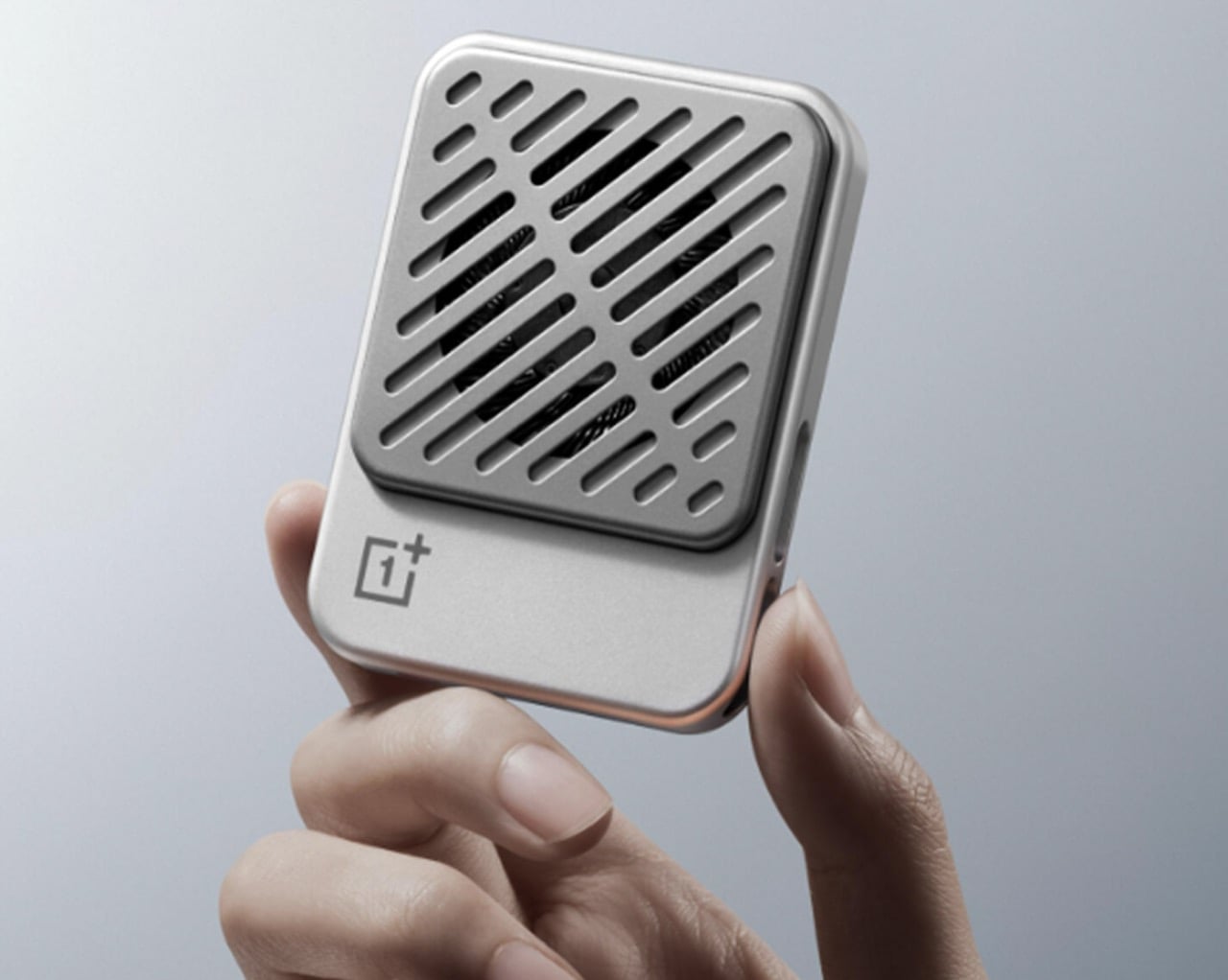
OnePlus has squeezed a phone cooler into a small card footprint rather than a bulky gaming attachment. The Ice Card Mini is listed in OPPO’s China store and described as a 50-gram body measuring 70mm by 53.4mm. Its thermoelectric chip works with an air-cooling system, while magnets hold the accessory against the phone. That compact packaging is the appeal: cooling becomes something you might carry alongside a cable, rather than reserve for a dedicated desktop gaming setup.

The practical tradeoff is power. The Mini draws up to 3.5W through USB-C and can run from a phone, power bank, or wall adapter. An included magnetic plate lets you attach it to phones without built-in magnets. It gives heat-conscious gamers a relatively discreet option, but drawing power from the phone adds another demand on its battery.

What we like

  • Compact, 50-gram magnetic format.
  • USB-C power accepts several sources.

What we dislike

  • Consumes power rather than supplying it.

2. StillFrame Headphones

If earbuds bother your ears, a phone’s music library deserves another way out. StillFrame Headphones, designed by Tatsufumi Funayama, use an on-ear format with a stainless steel headband and magnetically attached fabric cushions. Circular and square geometry share the housings, with circuitry deliberately exposed. The retro reference has a practical point: you can choose headphones that sit against your ears without choosing the bulk of a conventional over-ear design for everyday listening.

Bluetooth 5.4 handles wireless listening, while the supplied USB-C cable supports wired playback. The headphones include 40mm drivers, noise cancellation, and a transparency mode; the maker claims up to 24 hours of playback. Those choices make StillFrame worth considering for desk listening or commuting when you prefer an alternative to in-ear buds. There’s one unusual operating detail: both sides need charging and separate button presses to power on. Light construction also doesn’t prove comfort or effective noise cancellation by itself.

Click Here to Buy Now: $245.00

What we like

  • Low weight and removable magnetic cushions.
  • Both wireless and wired playback.

What we dislike

  • Both sides require charging and separate power-on presses.
  • A full charge takes approximately three hours.

3. SuperCalla Magnetic Charging Cable

A charging cable shouldn’t need its own accessory just to stay organized. SuperCalla builds the organizer into the cable, placing magnets at intervals along its length. Line them up and the cable holds a coil or folded arrangement without a separate tie. The useful distinction is that these magnets manage the cable’s shape; they aren’t detachable charging connectors. For a bag that also carries keys, headphones, and adapters, keeping the loose length contained addresses a very ordinary frustration quite directly.

The manufacturer’s USB-C to USB-C listing separates a 60W, USB 2.0 version from a 100W, USB 3.1 Gen 2 option. That matters because neat storage says nothing about charging speed or file transfer performance. Choose the connector and electrical specification your phone actually needs, then treat the magnetic organization as the bonus.

What we like

  • Magnetic organization without a separate cable tie.
  • Multiple folding and coiling arrangements.

What we dislike

  • Cable variants have different data capabilities.
  • Dated shipping information needs clarification.

4. Battery-free Amplifying iSpeakers

The Battery-free Amplifying iSpeakers take a pleasingly literal approach to phone audio: put the phone in a shaped metal enclosure and let the geometry do the work. Designed by Ooi Masato and made in Japan, the accessory uses duralumin rather than a powered amplifier. There’s no Bluetooth pairing, battery gauge, or charging cable involved. For someone who wants to listen aloud at a desk, it offers a dedicated place for the phone without adding another electronic device to the routine.

The attraction is simplicity, not a promise of room-filling volume. The phone remains the sound source, so this makes more sense as a casual listening accessory than a replacement for powered speakers. Check your phone and case fit before buying, along with the position of the speaker opening. Optional +Bloom and +Jet modules redirect sound and are sold separately. It’s an appealing desk object for people who value avoiding chargers and want their phone to have a permanent desktop home.

Click Here to Buy Now: $179.00

What we like

  • No battery, charging, or wireless pairing.
  • Japanese-made duralumin construction.

What we dislike

  • Phone and case fit need checking.
  • Optional sound-directing modules cost extra.

5. MOFT Trackable Snap-on Phone Stand & Wallet

A magnetic wallet makes leaving the house with less stuff appealing, right up until you detach it and forget where it went. MOFT’s Trackable Snap-on Phone Stand & Wallet builds Apple Find My support into a folding accessory that also serves as a grip and stand. The current product listing specifies two cards and a 6mm thickness. Its usefulness comes from keeping those functions together, rather than asking you to carry a wallet, separate tracker, and stand every single day.

Find My gives the wallet a way to report its location and sound an alert, making it easier to look for when separated from your phone. MOFT claims around six months between wireless charges, and the folding construction supports portrait, landscape, and floating viewing positions. The limitation is equally clear: this is an Apple-oriented solution with room for just two cards. Its tracking battery is built in and nonreplaceable, so rechargeability is welcome but doesn’t resolve eventual battery serviceability concerns.

What we like

  • Find My tracking without a separate tag.
  • Wallet, grip, and stand share one folding structure.

What we dislike

  • Holds only two cards.
  • The tracking battery is not replaceable.

6. WUBEN E1 Magnetic Phone Light

A good phone camera still depends on the light in front of it. WUBEN’s E1 gives you another source to position, combining an adjustable ring light with a magnetic phone mounting arrangement. Brightness is adjustable, and warm, neutral, and cool settings let you choose the color of the light rather than accept whatever the built-in flash provides. The hinged support lets you redirect the light and use the assembly as a stand for your phone too.

This makes the E1 interesting for video calls, close-up filming, and selfies where a small adjustable source is more useful than simply pushing exposure higher. WUBEN rates output at up to 300 lumens, but that specification alone doesn’t establish how flattering the light will look. It recharges through USB-C and needs magnetic phone compatibility or an adapter ring. Check the selected retail bundle carefully: the product page lists the bracket separately among its variants; don’t assume the mount is included.

What we like

  • Adjustable brightness and three color-temperature settings.
  • Hinged mounting adds control over light direction.

What we dislike

  • Adds another battery to recharge.
  • Bracket inclusion requires careful checking.

7. Leica LUX Grip

Touchscreens are wonderfully adaptable until you want a control you can find without looking. Leica’s LUX Grip attaches magnetically to a compatible iPhone and adds a two-stage shutter button, two customizable buttons, and a control dial. Half-press the shutter to focus, then press fully to take the photograph. That physical sequence is the point: it brings a recognizable camera action to a device otherwise dominated by glass, giving regular phone photographers a different way to hold and operate their camera.

The aluminum housing weighs approximately 130 grams, and Leica specifies roughly 1,000 exposures per charge. There’s an important software boundary, though: the grip works with the Leica LUX app, not Apple’s built-in Camera app. Registration includes twelve months of LUX Pro, with paid access afterward if you retain the subscription. It’s a specialized choice for someone happy to adopt Leica’s workflow. It does not change the iPhone’s sensor or optics, and it cannot double as a phone-charging power bank either.

What we like

  • Physical shutter and configurable controls.
  • Supports portrait and landscape attachment.

What we dislike

  • Limited to the Leica LUX app.
  • Pro access becomes paid after the included year.

8. KUXIU D5 Charging Station

The annoyance here lives around the phone: an Apple Watch charger, an earbud cable, and adapters competing for desk space. KUXIU’s D5 gathers three compatible devices into one wireless charging station, with an adjustable phone platform and a motorized Apple Watch module that retracts into the body. The hidden watch charger is an unusually specific design decision. You only need that protrusion when a watch is charging, so the dock needn’t keep it permanently extended across your desk between sessions.

The display shows input voltage, current, and power, plus individual charging status, giving the dock more feedback than a single indicator light. KUXIU also includes an active cooling fan that can be switched off. Phone charging is advertised at up to 25W, but actual speed depends on the handset’s support. The watch module is specifically for Apple Watch, and earbuds need a wireless-charging case. For a compatible trio, the benefit is consolidation, not a guarantee that everything suddenly charges faster.

What we like

  • Three charging positions in one station.
  • Retractable watch module and informative display.

What we dislike

  • Watch charging is Apple Watch-specific.
  • Maximum phone charging speed depends on compatibility.

9. RetroWave 7-in-1 Radio

A smartphone becomes a much less useful companion when the battery runs down, and there’s no outlet nearby. The RetroWave 7-in-1 Radio brings a modest backup battery together with things a phone shouldn’t have to supply indefinitely: a flashlight, an SOS siren, and radio reception. Its 2,000mAh battery can provide a phone top-up, while AM, FM, and shortwave listening work without an internet connection. The tuning dial also provides a direct physical control instead of another screen to navigate.

Bluetooth playback gives RetroWave an everyday role as a phone speaker, while USB and microSD playback let it handle music independently. That matters for an emergency companion: it has reasons to stay accessible rather than disappear into a drawer. Be realistic about its charging options. USB is the primary method, the hand crank is intended for emergencies, and solar charging is supplementary. The small battery won’t replace a substantial power bank, but it offers a useful reserve alongside standalone functions.

Click Here to Buy Now: $89.00

What we like

  • Phone charging alongside independent radio and lighting.
  • Bluetooth and offline music playback.

What we dislike

  • Limited 2,000mAh backup capacity.
  • Solar and crank charging are secondary options.

Buy for the Problem You Actually Have

The sensible way to choose from this collection is to start with the irritation, not the accessory. If cables are your daily nuisance, a more elaborate charging station may be unnecessary. If touch controls interrupt your photography, a grip deserves more attention than another camera specification. Match the mechanism to the task, then check the phone, case, app, and charging requirements that determine whether it will actually work for you.

The less obvious question is where the accessory belongs when you’re finished using it. Something that folds, coils, docks, or stays useful independently has a better chance of fitting into a routine than something you must keep rearranging. There’s no need to buy all nine. A phone already does enough jobs; the right companion should remove one small source of friction without giving you another object to manage every day.

The post 9 Smartphone Accessories That Solve the Annoying Problems Your Phone Still Has first appeared on Yanko Design.

  • ✇Yanko Design
  • LAYER’s Ripple Dining Table Uses a Wavy Plywood Core to Cut Weight
    Large dining tables are useful right up until you need to move one, when their reassuring weight becomes somebody else’s lifting problem. LAYER’s Ripple research table explores a lighter construction by giving thin plywood a corrugated profile instead of relying on a thick slab. That said, the project keeps a flat surface for everyday use while putting the waves underneath, mostly hidden from view. The original table was specified at approximately 8.2 feet long and 39.4 inches wide, weighing ab
     

LAYER’s Ripple Dining Table Uses a Wavy Plywood Core to Cut Weight

Par : JC Torres
14 octobre 2026 à 06:07

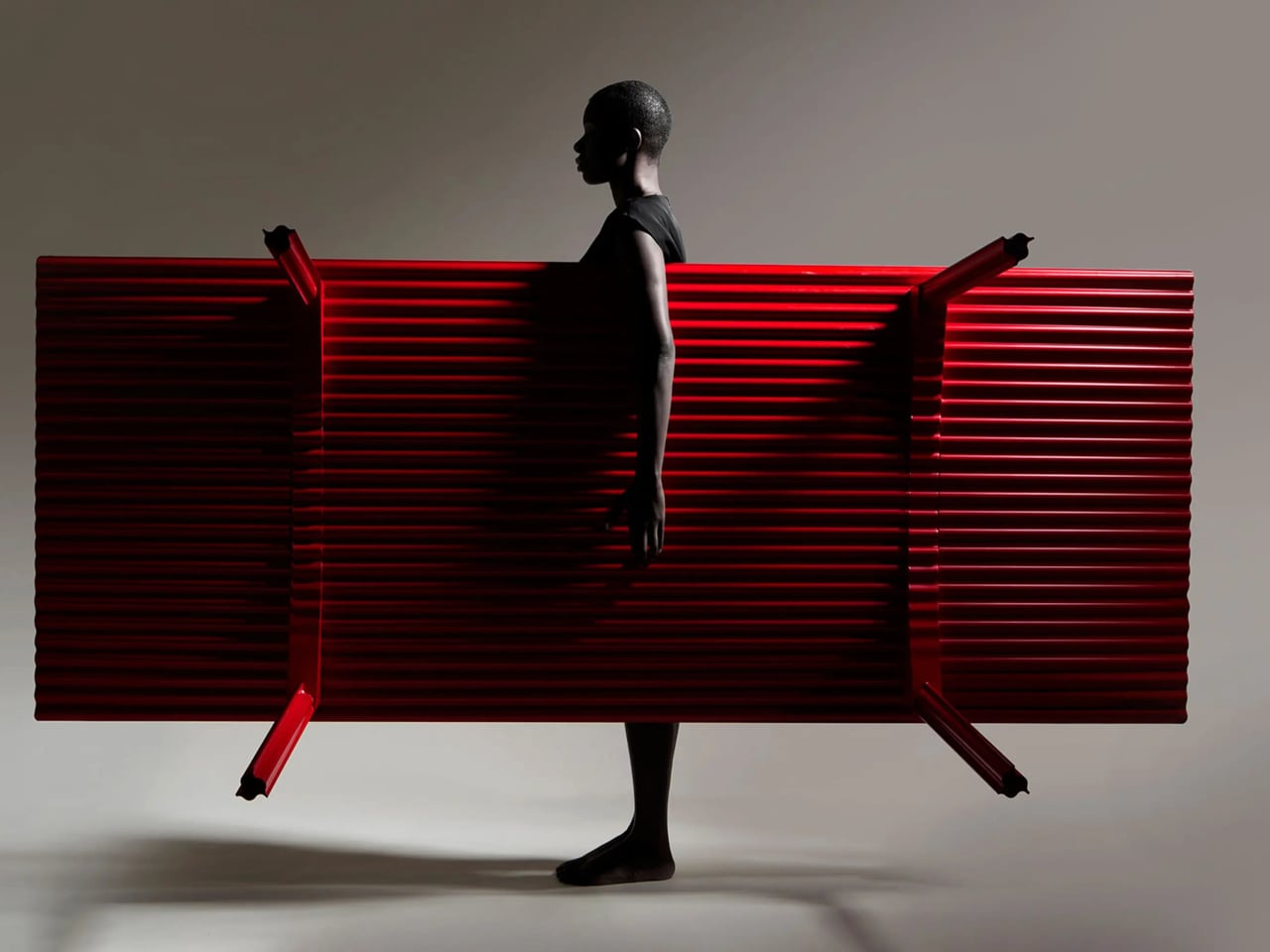
Large dining tables are useful right up until you need to move one, when their reassuring weight becomes somebody else’s lifting problem. LAYER’s Ripple research table explores a lighter construction by giving thin plywood a corrugated profile instead of relying on a thick slab. That said, the project keeps a flat surface for everyday use while putting the waves underneath, mostly hidden from view.

The original table was specified at approximately 8.2 feet long and 39.4 inches wide, weighing about 19.8 pounds. That’s a generous dining surface for something intended to be moved by one person. Bringing it across a room for guests or shifting it away from the wall could become less of a coordinated household event. Its footprint, however, doesn’t shrink along with its weight.

Designer: LAYER

The material comes from a collaboration with Canadian manufacturer Corelam, using pressure lamination to form the repeating curves. LAYER specifies plywood approximately 0.12 inches thick, although that isn’t the overall depth of the assembled tabletop. The distinction matters here: the design gets its structure from a shaped sheet and layered construction, rather than pretending a thin, flat board can do everything alone.

Of course, a wavy dining surface would be a fairly annoying place to balance your coffee. Ripple covers its corrugated structure with a flat plywood sheet, leaving the waves visible below and along the edge. Plates and laptops get the ordinary surface they need, while the underside carries the more unusual geometry. The useful part doesn’t have to look particularly experimental from above.

The legs follow the same preference for shape over bulk. A refined version uses hollow triangular profiles, designed to increase rigidity in two directions. The tabletop’s underside also curves gently across its length and width. Those changes address a fairly obvious concern with lightweight furniture: being easy to pick up is only useful if the table still supports what you put on it.

The red finish keeps Ripple from disappearing into the background, even with such a thin outline. From the side, the top appears almost like a sheet balanced on four narrow supports. Along the short edges, the repeating curves reveal why that impression is misleading. The structure supplies its own ornament, without adding a carved border or a heavier decorative frame.

Using less wood is part of the environmental argument, too. The project’s original documentation claims 70% to 80% less material than a standard timber table, but doesn’t establish a defined comparison for that figure. Less material isn’t automatically a complete environmental assessment, either. Adhesives, finishing, production, and working life still matter, even when the basic idea of doing more with less is appealing.

LAYER presents Ripple as a studio research project, without a current retail price or ordering details. The construction offers an answer for people whose furniture has to move with them, though size remains a constraint. You might no longer need help with the lifting, but you’d still need a clear route through the house before taking that tabletop around a corner.

The post LAYER’s Ripple Dining Table Uses a Wavy Plywood Core to Cut Weight first appeared on Yanko Design.

  • ✇Yanko Design
  • HP EliteBoard G2a Hides a Windows PC in an Ordinary-Looking Keyboard
    Desktop computers have become smaller, but even a little box needs somewhere to sit and cables to connect it. HP’s EliteBoard G2a removes that separate enclosure by putting the computer inside a full-size keyboard. This Windows PC keeps the surface you already type on and gives it another job, making a compact workstation easier to carry between home and office. The gray body measures 14.1 by 4.7 by 0.7 inches and weighs about 1.49 pounds, depending on configuration. Low-profile keys, a numeric
     

HP EliteBoard G2a Hides a Windows PC in an Ordinary-Looking Keyboard

Par : JC Torres
14 octobre 2026 à 05:15

Desktop computers have become smaller, but even a little box needs somewhere to sit and cables to connect it. HP’s EliteBoard G2a removes that separate enclosure by putting the computer inside a full-size keyboard. This Windows PC keeps the surface you already type on and gives it another job, making a compact workstation easier to carry between home and office.

The gray body measures 14.1 by 4.7 by 0.7 inches and weighs about 1.49 pounds, depending on configuration. Low-profile keys, a numeric keypad, and backlighting preserve the familiar business-keyboard layout rather than shrinking everything into a travel accessory. That makes the design’s restraint rather convincing: there’s no separate machine competing for attention, although you’re still setting aside space for a full keyboard.

Designer: HP

Of course, the missing piece is a screen. Connect the G2a to a compatible USB-C monitor and you can bring your computer to a desk where the display already lives. A single cable can carry video, data, and power, provided the monitor supplies the required 65W. Otherwise, the included power adapter is still needed. A USB-C socket alone doesn’t guarantee that tidy arrangement.

The cable itself comes in attached and detachable versions, a small choice with consequences when packing up. An attached lead stays with the machine, so there’s one less item to leave behind. A detachable cable separates from the keyboard for storage or replacement. The second USB-C connection handles accessories, but USB-A devices and wired Ethernet require adapters, adding clutter to the setup.

Underneath, AMD Ryzen AI 5 PRO 435 or Ryzen AI 7 PRO 450 processors distinguish this G2a from the older G1a. Both include a 50-TOPS neural processing unit for compatible local AI software. The listed configurations pair 16GB or 32GB of RAM with a 512GB SSD. These prove the existence of a powerful computer beneath the keys, not a keyboard controlling something hidden behind your monitor.

An optional 32Wh battery gives the arrangement another advantage when you’re changing desks: the computer can stay running while disconnected. That doesn’t turn it into a laptop, since you’ll still need a display when you arrive. Integrated speakers and microphones reduce the peripherals needed for audio calls, and a prepaired wireless mouse completes the controls. Video calls still need a separate camera, of course.

Putting everything beneath the keys could make a damaged keyboard an expensive problem, which is why serviceability matters here. HP makes the top-mounted keyboard replaceable, alongside the RAM, SSD, and optional battery. Two accessible memory slots support upgrades to 64GB. You don’t have to treat the computer as disposable because its most frequently touched part wears out, although repairs still require appropriate skills.

That said, the price is harder to hide than the computer. Listed US configurations start at $3,028, while the attached-cable version with 32GB of RAM is priced at $3,846. A compatible monitor remains a separate purchase. For someone moving between equipped workspaces, carrying a keyboard instead of a desktop makes sense. Paying that much to avoid a separate box, however, is a considerably bigger decision.

The post HP EliteBoard G2a Hides a Windows PC in an Ordinary-Looking Keyboard first appeared on Yanko Design.

  • ✇Yanko Design
  • Pokémon Beats Pill Adds Charms Without Raising the Price
    2026 is the year when Trainers everywhere celebrate Pokémon’s 30th anniversary, so we expected a lot of new merchandise, themed events, and collaborations with other well-known brands. We’ve seen footwear and apparel rollouts with adidas and PUMA, LEGO sets, even a partnership with the European Space Agency, and food collaborations like Pokémon-themed Hershey’s Kisses. If you’re looking for audio equipment featuring your favorite monster, you’re in luck with this newly announced collaboration.
     

Pokémon Beats Pill Adds Charms Without Raising the Price

14 octobre 2026 à 04:15

2026 is the year when Trainers everywhere celebrate Pokémon’s 30th anniversary, so we expected a lot of new merchandise, themed events, and collaborations with other well-known brands. We’ve seen footwear and apparel rollouts with adidas and PUMA, LEGO sets, even a partnership with the European Space Agency, and food collaborations like Pokémon-themed Hershey’s Kisses. If you’re looking for audio equipment featuring your favorite monster, you’re in luck with this newly announced collaboration.

The Pokémon Beats Pill is a Bluetooth speaker announced by audio brand Beats in partnership with The Pokémon Company International. It features two familiar Pokémon characters, the ubiquitous Pikachu and the more mysterious Mimikyu. It brings the bright yellow and minimalist gray associated with these characters to a portable speaker with what Beats calls its signature sound. Both Beats collectors and Pokémon Trainers may want to have this special-edition collaboration to bring their music and other audio content to life.

Designers: Beats x Pokémon

The speaker’s design is a contrast between the electric yellow most identified with Pikachu and a grayscale interpretation of Mimikyu, with the latter hiding beneath a cloth that resembles the former. More than just attaching a logo to the Bluetooth speaker, this is a character-driven design. Both Pokémon appear on the grille, while the speaker itself remains compact and elongated like other Beats Pill devices.

According to Beats, this is also the first Pill release that comes with charms. Trainers who like collecting accessories get the iconic Poké Ball, Pikachu-inspired lightning bolts, and the equally recognizable Beats “b.” The color-matched gray carry lanyard is removable, so there’s a practical carrying accessory alongside the collectible details. It also comes with interactive packaging, which Beats says includes a movable piece, plus special-edition stickers. The exact packaging mechanism isn’t explained in detail on the collaboration page.

The familiar shape has a practical side, too. Its 20-degree upward tilt is designed to direct sound toward your ears when it sits on a table, while the soft-grip silicone backing is intended to make it easier to hold. At 8.6 inches long and 24 ounces, it’s portable enough for a bag, although not pocket-sized. Keeping the existing Pill shape also means the Pokémon treatment doesn’t turn it into a bulky character figurine that needs its own dedicated space.

Specs-wise, the speaker has a bespoke acoustic system that Beats says delivers room-filling sound and deep bass for your favorite tunes, podcasts, or audiobooks. It offers up to 24 hours of battery life and has an IP67 rating for dust and water resistance. That battery figure is a manufacturer claim, not a guarantee for every listening session. You can also charge a compatible phone from the speaker via USB-C, using some of its battery in the process.

You can listen over Bluetooth or plug in a compatible device via USB-C for high-resolution lossless audio. The wired connection matters here; lossless playback isn’t being promised over Bluetooth. You can even pair two Beats Pills together in Amplify Mode or Stereo Mode. The former synchronizes playback across both speakers, while the latter separates the left and right channels. You’ll need a second Pill for either option.

The speaker also supports both iOS and Android devices, so you don’t need an iPhone to use it. One-touch pairing and supported device-location features add to its everyday usefulness. It can also serve as a speakerphone, letting you take calls through the paired speaker rather than reaching for your phone every time. The Pokémon Beats Pill is scheduled to become available in the United States for $149.99 on October 15, 2026, at 8 a.m. PDT, through Apple and Target online and at select Target stores.

For Pokémon fans, the appeal is having a collectible that doesn’t have to stay on a shelf. The collaboration’s announced changes focus on appearance, accessories, and packaging, rather than a Pokémon-specific audio upgrade. If you already own a Pill, the reason to choose this one is mainly the character treatment. For someone looking for a portable speaker, though, Pikachu and Mimikyu give a familiar everyday device some personality.

The post Pokémon Beats Pill Adds Charms Without Raising the Price first appeared on Yanko Design.

  • ✇Yanko Design
  • This glowing modular moss panel system might be the coolest way to fix a boring room
    Moss has been on this planet for around 450 million years, which means it predates dinosaurs, continents as we know them, and the concept of a watering schedule. The plant’s actual trick is that it has no roots and absorbs everything it needs directly through its surface, which makes it one of the most low-maintenance living things you could put in a room. Interior designers figured this out around 2015 and started installing living moss walls everywhere from hotel lobbies to coworking spaces,
     

This glowing modular moss panel system might be the coolest way to fix a boring room

13 octobre 2026 à 21:45

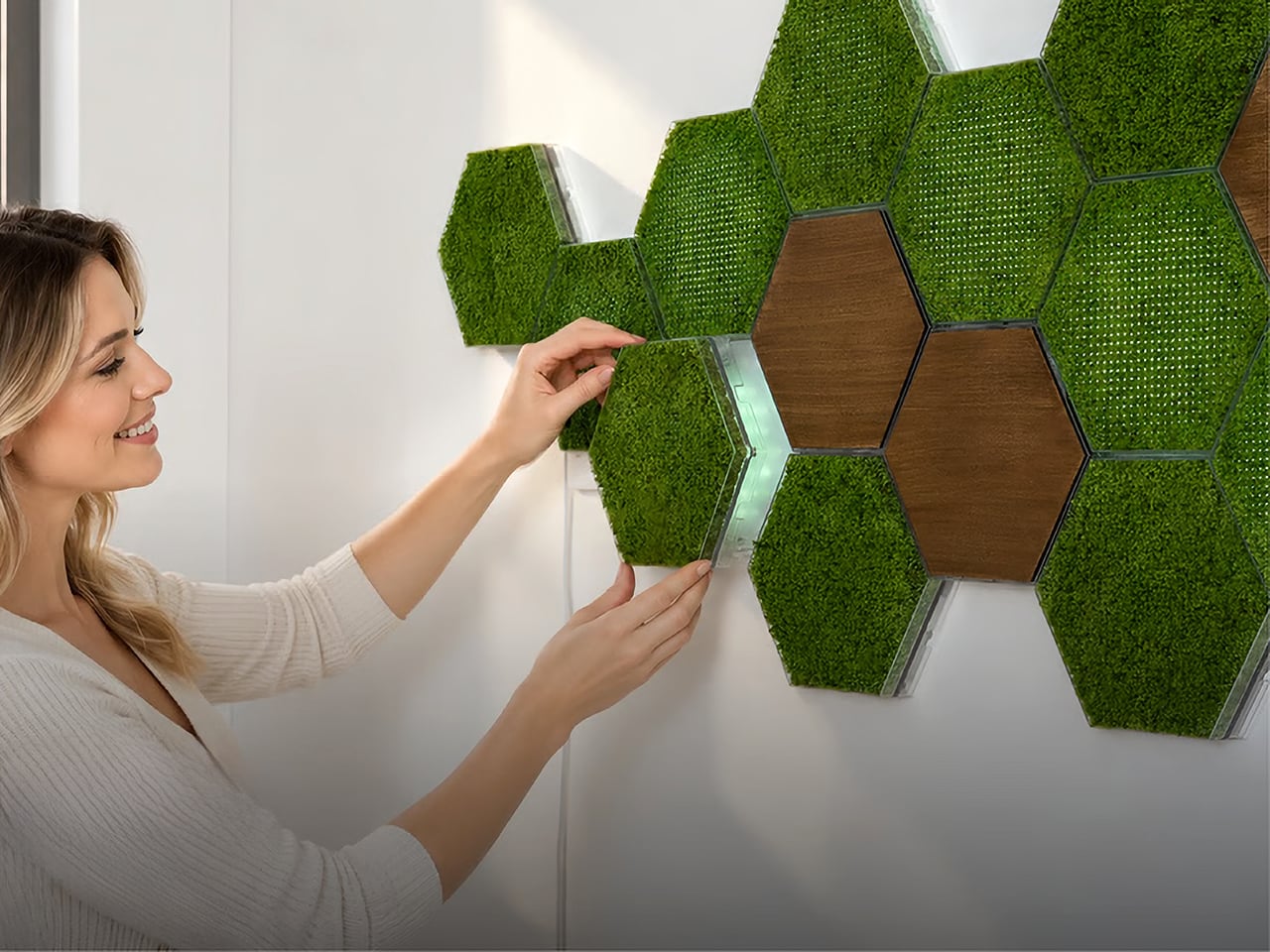
Moss has been on this planet for around 450 million years, which means it predates dinosaurs, continents as we know them, and the concept of a watering schedule. The plant’s actual trick is that it has no roots and absorbs everything it needs directly through its surface, which makes it one of the most low-maintenance living things you could put in a room. Interior designers figured this out around 2015 and started installing living moss walls everywhere from hotel lobbies to coworking spaces, at which point the rest of us learned that professional moss wall installation costs roughly what a decent used car costs. A consumer-friendly version of that idea has been weirdly slow to materialize. MOSSLAB designed Moss Hexa around that natural biology, using a soil-free system that reduces day-to-day care while preserving the texture and presence of real moss.

Moss Hexa is a modular moss system using 100% real moss panels in a hexagonal format, mounting via a proprietary magnetic system called HexaLock that lets you click panels into place, rearrange them, or swap them out without tools. Three panel types handle the main use cases: Basic for pure moss texture and color, Light for integrated LED ambient lighting with an auto-dimming sensor and app control, and Wood for warmth and visual rhythm as an accent. MOSSLAB, the South Korea-based studio behind the award-winning Moss Air and Moss Echo, built all three modules to share the same mounting hardware, making the whole system genuinely expandable over time without disturbing anything already on the wall. Pricing runs from a discounted $59 for the 3-panel Basic Starter Pack, with larger configurations available at campaign-exclusive pricing.

Designer: MOSSLAB

Click Here to Buy Now: $59 $90 ($31 off). Hurry, only a few left!

Hexagonal patterns appear throughout nature because they connect efficiently, repeat beautifully, and expand with minimal wasted space, from honeycomb structures to cellular geometry in biological tissue. MOSSLAB’s choice of the hexagon as Moss Hexa’s base unit is a structural decision that determines how the system scales and how freely it grows, and it pays off. Each panel measures 8.27 × 7.09 × 1.42 inches (210 × 180 × 36 mm), and because hexagons share flat, parallel edges on all sides, tiles can cluster in multiple directions without gaps or forced symmetry. The system offers preset configurations of 3, 9, and 15 panels, but the geometry means there’s nothing stopping you from building something in between. It holds up when you pull everything down six months later and try a completely different arrangement from scratch, which is the whole point.

The Basic panel features 100% real moss that is naturally drought-tolerant, requires no direct sunlight, and needs only occasional light misting to stay at its best. Its frame is made from PC and steel, with magnetic components, and the whole panel weighs just 0.75 lb (338 g). The moss retains its color and three-dimensional texture between mistings, helping preserve the natural depth and organic character that distinguish real moss from artificial alternatives. The Wood panel uses the same HexaLock mounting footprint but replaces moss with a warm wood-finish surface, designed as a compositional accent rather than a primary surface. A mostly-moss arrangement with a few Wood panels breaking the pattern is the right call; the contrast reads as intentional interior design rather than a texture experiment that got away from you.

Each Light panel combines 100% real moss with built-in ambient lighting designed to bring out the moss’s natural depth, color, and texture while changing the atmosphere of the surrounding space. Brightness can be adjusted from 1–100%, with a maximum power draw of 7W per panel, while a built-in ambient light sensor automatically adapts the lighting as the environment changes. Light panels connect directly to one another through USB-C-to-USB-C connections, and one Control Hub & Power Adapter can support up to nine Light Panels. The Hexa App provides manual lighting control, lighting presets, and Natural Daily Rhythm scheduling, giving users more flexibility to shape the atmosphere throughout the day.

Sound absorption performance was independently measured by KCL, a KOLAS-accredited laboratory recognized under the international ILAC-MRA framework, using a Moss Echo installation made with the same real moss material used across MOSSLAB’s Moss product line. Covering nearly 11 m² with approximately 300 moss panels, the installation was tested in a large-scale interior setting. The test recorded sound absorption of 27% at common speech frequencies, increasing to 56% at frequencies associated with keyboard typing and up to 65% at higher frequencies associated with background chatter. Those results add a functional layer to real moss beyond its visual and tactile presence. Because the test was conducted using the same real moss material found in Moss Hexa, the takeaway is not that Hexa replaces dedicated acoustic treatment, but that the material itself brings measurable sound-absorbing properties into a system designed to change how a space feels.

Powered by the HexaLock™ magnetic mounting system, each panel snaps into place with a single click, no complicated measuring, no specialist tools, no installation experience needed. You attach the mounting guide to your chosen surface, and both screws and adhesive mounting options are included. The guide handles alignment automatically, so panels sit consistently without leveling. The key design call is that Basic, Light, and Wood panels all share the same HexaLock™ footprint, meaning you can swap any panel type for any other at any point without touching the wall hardware. You can start with 3 Basic panels, add Light panels as a seasonal upgrade, and work toward a 15-panel Signature Styling set across multiple additions, all from the same original wall installation. The dual mounting option, screws for homeowners and adhesive for renters, is a small detail MOSSLAB got right, and the kind of thing you only think to include if you’ve genuinely considered your customer’s actual living situation.

Moss Air earned a CES Innovation Award, an iF Design Award, and an IDEA Design Award, and MOSSLAB has also participated in an open innovation program with a major Korean conglomerate, and in 2025 was the only international startup chosen among five for Panasonic’s Electric Works accelerator program. These are production-level credentials, not concept-stage accolades, and they matter when evaluating a new product that ships internationally. The Basic Starter Pack (3 panels) will be available for $59 during the first 72 hours of the Kickstarter campaign launch, the Light Starter Pack (3 panels) at $99, and the 9-panel Basic and Light Standard Packs starting at $159 and $229, respectively. The 15-panel Signature Styling Pack, which combines Basic, Light, and Wood panels, starts at $339 during the same launch period. Individual add-ons are available at $25 for a Basic Panel, $40 for a Light Panel, and $24 for a Wood Panel, while an additional Control Hub & Power Adapter Set is $23. Estimated U.S. shipping starts at $25 for a 3-panel configuration, with fulfillment estimated to begin in June 2027.

Click Here to Buy Now: $59 $90 ($31 off). Hurry, only a few left!

The post This glowing modular moss panel system might be the coolest way to fix a boring room first appeared on Yanko Design.

  • ✇Yanko Design
  • This chrome skeleton is the most extra mechanical keyboard ever made
    In 2006, Dutch designer Joris Laarman fed a bone growth algorithm into a computer and got a chair that looked grown rather than built. His Bone Chair became a landmark of generative furniture, and every hollowed out, nature mimicking object since has lived in its shadow. Zaha Hadid’s flowing buildings, Ross Lovegrove’s organic forms, and Neri Oxman’s computational experiments all share that family tree. Chairs, buildings, and lamps have all been invited to the reunion. Keyboards, strangely, nev
     

This chrome skeleton is the most extra mechanical keyboard ever made

13 octobre 2026 à 20:30

In 2006, Dutch designer Joris Laarman fed a bone growth algorithm into a computer and got a chair that looked grown rather than built. His Bone Chair became a landmark of generative furniture, and every hollowed out, nature mimicking object since has lived in its shadow. Zaha Hadid’s flowing buildings, Ross Lovegrove’s organic forms, and Neri Oxman’s computational experiments all share that family tree. Chairs, buildings, and lamps have all been invited to the reunion. Keyboards, strangely, never got the invite.

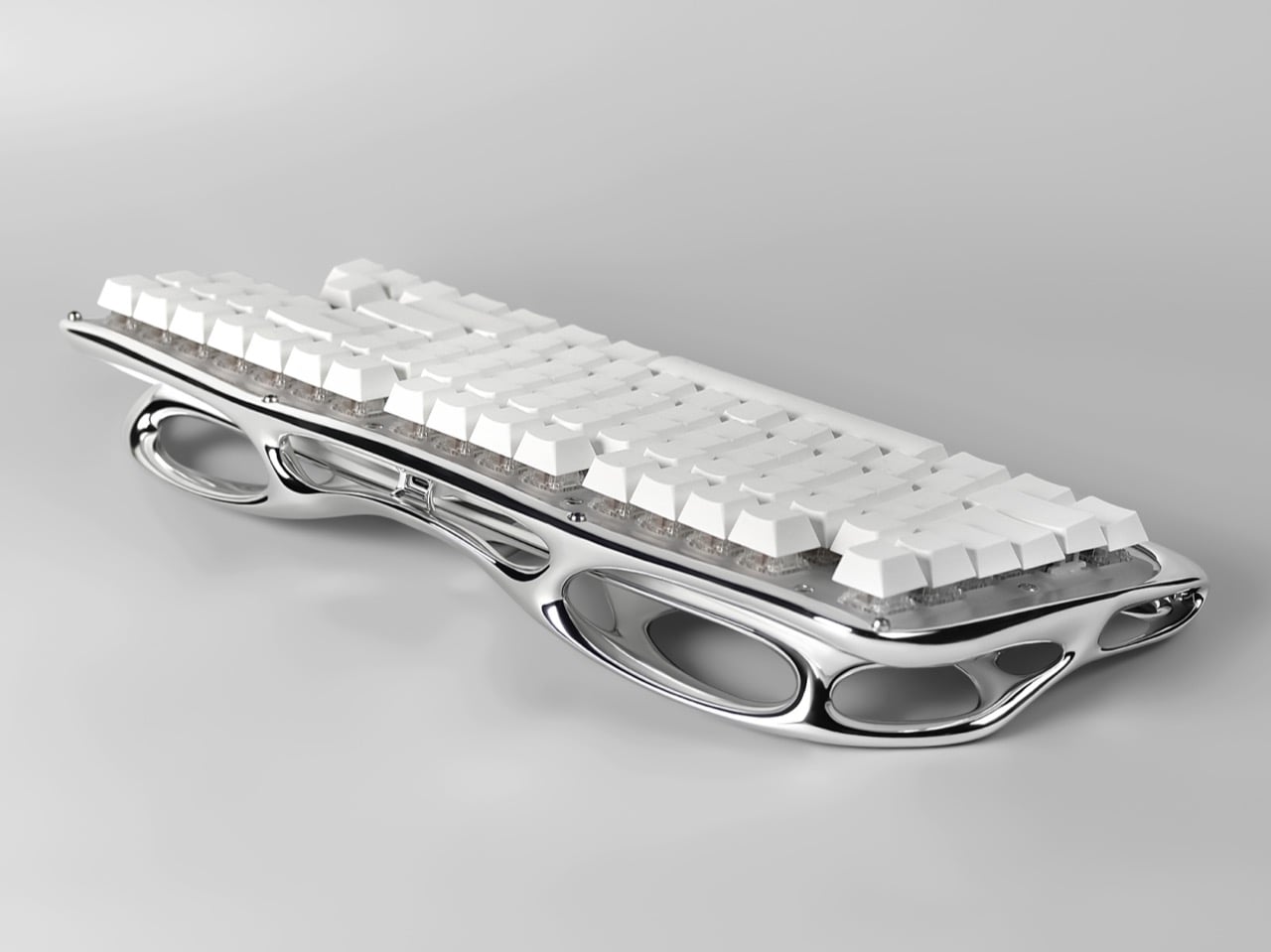
Pulse One, designed by Haoyuan Lu of New York based Pulsekey, is the late RSVP. Its 3D metal printed shell was shaped through generative design and digital sculpting, fusing the palm rest, frame, and bezel into one mirror finish lattice that looks like a skeleton went to a spa. White keycaps float above clear switches, and the board runs wireless. It earned Silver in Consumer Electronics / Computer Accessories at the International Design Awards. This is the most extra keyboard ever made, and I say that with admiration.

Designers: Haoyuan Lu, Hongbin Zhang & Wendi Yu

The closest pop culture cousin is the T-1000, the liquid metal assassin from Terminator 2: Judgment Day in 1991. That movie made flowing chrome terrifying, and designers have been borrowing the look ever since, minus the murder. Pulse One has the same mercury sheen, and every curve catches the light and stretches it into long silver ribbons. Park it on a desk and your monitor suddenly has a reflection to argue with. I would not outrun it, but I would happily let it sit next to my coffee.

Generative design, in general, works by handing a computer a set of goals and letting it propose the shape. The software piles material where a structure needs it and strips it away where it does not, which is why the results look so organic. You can see that logic in Pulse One’s shell, where big elliptical voids sit beside slim, tapering bridges of metal. Lu’s team then refined the form through digital sculpting, which is how a machine’s cold logic ends up looking this graceful. It reads as grown, much like Laarman’s chair did.

Folding the palm rest, frame, and bezel into one piece also cleans up a messy corner of keyboard design. Most boards stack a case, a plate, and a wrist rest, each with its own seams, screws, and opinions about alignment. Pulse One’s shell sweeps all of that into a single form that cradles the switches and tilts them toward your hands. A few small screws are still visible in the photos, so it is not magic, only very tidy engineering. Your wrists get a sculpted perch where a foam strip usually lives.

Under all that sculpture sits a keyboard people can actually live with. The campaign pitches it as wireless, hot-swappable, and good for weeks on a charge. Hot-swap sockets let you pull a switch and drop in another without a soldering iron, and one product photo shows exactly that, a lone switch pulled out beside a stray arrow keycap. The entry also describes the construction as modular, built for maintenance, customization, and renewal. Basically, it looks like a museum piece and behaves like a tinkerer’s board.

The post This chrome skeleton is the most extra mechanical keyboard ever made first appeared on Yanko Design.

  • ✇Yanko Design
  • A Suspended Walkway Leads to This Tiny Cabin Overlooking the Salish Sea
    A cabin this small could easily become an exercise in clever storage. On Blakely Island, Wittman Estes has taken a more interesting approach.  The Seattle-based architecture studio designed a 400-square-foot guest retreat that feels less concerned with proving how much can fit inside and more interested in how little architecture is actually needed to make a place feel complete. Set within Washington’s San Juan Island Archipelago, the cabin occupies a dramatic piece of terrain between a mature
     

A Suspended Walkway Leads to This Tiny Cabin Overlooking the Salish Sea

13 octobre 2026 à 19:30

A cabin this small could easily become an exercise in clever storage. On Blakely Island, Wittman Estes has taken a more interesting approach.  The Seattle-based architecture studio designed a 400-square-foot guest retreat that feels less concerned with proving how much can fit inside and more interested in how little architecture is actually needed to make a place feel complete.

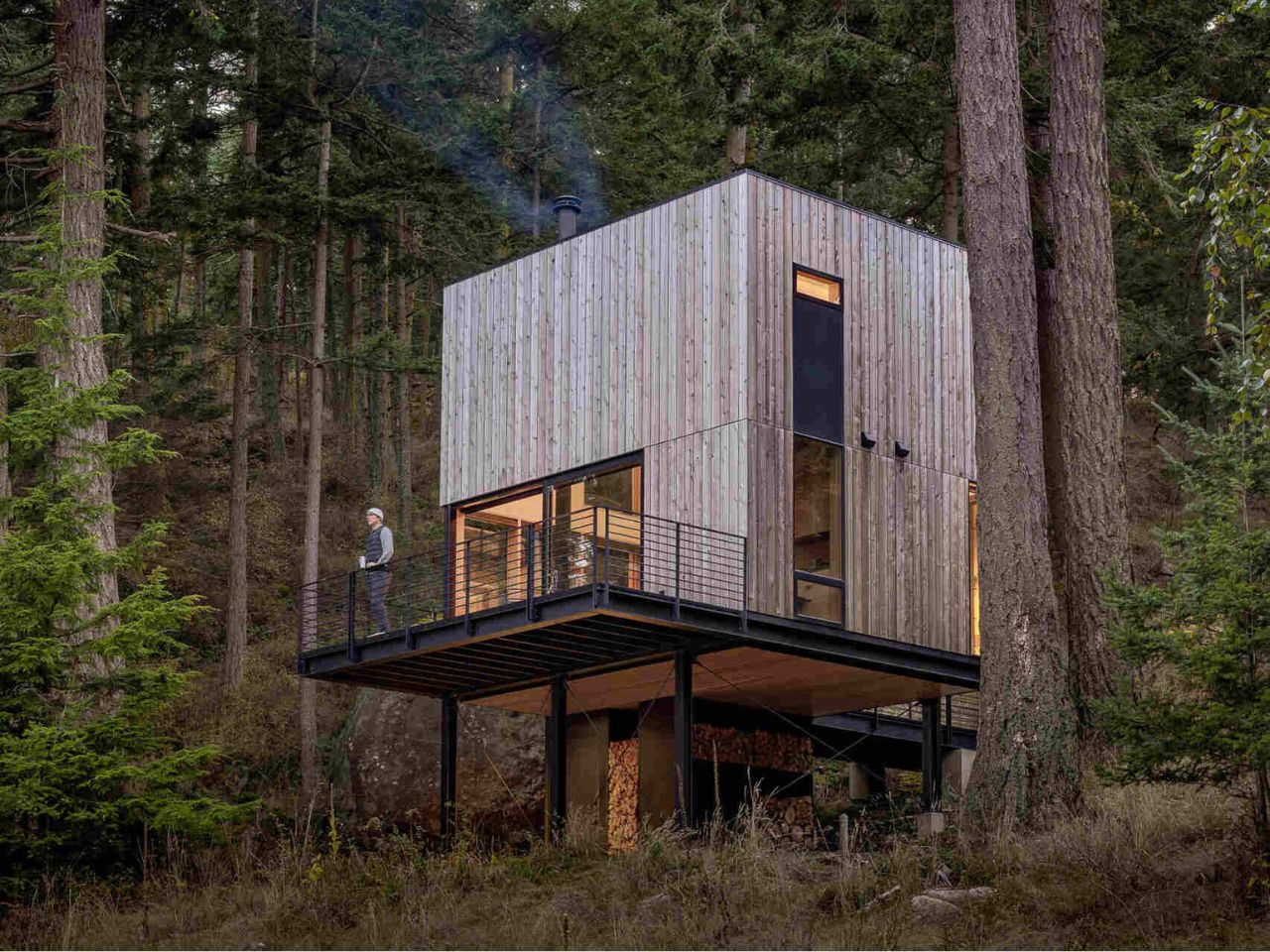
Set within Washington’s San Juan Island Archipelago, the cabin occupies a dramatic piece of terrain between a mature Douglas fir and a large glacial erratic boulder. Beyond the trees lies the Salish Sea. Rather than settling heavily into the rocky shoreline, the structure is lifted above it on slender supports, giving the impression that it has been carefully inserted into the forest rather than constructed over it.

Designer: Wittman Estes

The main studio measures just 16 by 20 feet, drawing from the tradition of simple shelters in the woods, from Thoreau’s Walden Cabin to Le Corbusier’s Cabanon. Yet the interior does not feel particularly austere. A kitchen, bathroom, Murphy bed, living area, and loft with two bunks all occupy the compact volume, each given a precise place within the plan.

The difficulty of the site helped shape the architecture. Blakely Island’s steep, rocky shoreline made conventional construction complicated, particularly if heavy machinery had to pass through the surrounding forest. Many components were therefore fabricated at the contractor’s yard in Everett before being transported to the island by barge. Modular steel frames were then lifted onto a minimal point foundation. Western red cedar siding, milled from trees on the island, was left unfinished so it could gradually weather into the landscape.

That sensitivity continues through the experience of arrival. A narrow suspended metal walkway threads through the trees toward the entrance, allowing views of Thatcher Bay to open gradually between the branches. Powder-coated steel railings line the path and deck, while a simple steel awning shelters the fir entry door.

Inside, the material palette becomes warmer. Birch plywood wraps the walls, fir beams remain exposed overhead, and solid ipe runs underfoot. The restrained finishes allow the view to dominate. Large sliding glass doors face the water, visually extending the living space far beyond its modest footprint.

Near the center of the cabin, a suspended black fireplace rotates through 360 degrees, allowing the fire to face either the interior or the cantilevered deck outside. In warmer weather, the open glass doors effectively turn the deck into another living room. During colder months, the same glazing keeps the forest and water present while the cabin becomes a sheltered place from which to watch the weather change.

Even the fireplace tools have been treated as part of the architecture. Wittman Estes designed a movable steel fire cart that slips neatly into an angled niche nearby. It is a small detail, but an important one in a room where visual clutter could quickly overwhelm the space.

The kitchen follows the same logic. Positioned beneath the sleeping loft, it occupies one of the lowest parts of the cabin, reserving the taller volume for the main living area. A cast-in-place concrete sink and countertop are paired with dark fixtures and discreet integrated appliances. Against the birch plywood and fir, the concrete provides enough contrast to define the kitchen without separating it visually from the rest of the interior.

The living room becomes the primary bedroom when a Murphy bed folds down from the wall. During the day, it nearly disappears, preserving the openness of the studio. At night, the bed faces east toward the morning light, while a felt headboard introduces softness to the otherwise restrained palette of wood, steel, and concrete.

At the northwest corner, the bathroom is given its own relationship with the landscape. A glass corner window looks directly into the surrounding forest, preventing the compact room from feeling enclosed. Above the kitchen, a sleeping loft adds two bunks without expanding the cabin’s footprint, accessed by a custom maple ladder.

This use of vertical space reflects the logic of the entire project. Nothing feels squeezed into an arbitrary corner. Each function occupies the part of the volume where it makes the most sense, while the architecture continues to work around the existing terrain rather than attempting to reorganize it.

What makes the Blakely Island Cabin compelling is not simply how much has been fitted into 400 square feet. Its greater achievement is making those 400 square feet feel secondary to the experience of being there. The folding bed, compact kitchen, and sleeping loft provide efficiency, but the architecture rarely asks you to admire that efficiency.

Instead, it directs attention outward: toward the Douglas fir beside the house, the rock beneath it, the changing weather, and the long stretch of Salish Sea beyond the glass. For a building inspired by the idea of living simply in the woods, that may be its most convincing gesture. The cabin does not try to provide more space than it has. It simply makes the space beyond its walls feel like part of the room.


The post A Suspended Walkway Leads to This Tiny Cabin Overlooking the Salish Sea first appeared on Yanko Design.

  • ✇Yanko Design
  • An Angled Public Bench for Hanging Out Without the Coffee Tab
    A bench can give you a place to sit and still make talking surprisingly awkward. Line up two people facing the street, and conversation requires a sideways turn. Add a third, and someone starts leaning around the person in the middle. Free to Face, a public seating project by Lim Junwoo and Hayoung Kang, addresses that everyday mismatch between having somewhere to sit and having somewhere to spend time together. The designers also frame the project around a larger concern: conversation becoming
     

An Angled Public Bench for Hanging Out Without the Coffee Tab

13 octobre 2026 à 18:30

A bench can give you a place to sit and still make talking surprisingly awkward. Line up two people facing the street, and conversation requires a sideways turn. Add a third, and someone starts leaning around the person in the middle. Free to Face, a public seating project by Lim Junwoo and Hayoung Kang, addresses that everyday mismatch between having somewhere to sit and having somewhere to spend time together.

The designers also frame the project around a larger concern: conversation becoming tied to consumption. Meeting over coffee is lovely, but buying a drink shouldn’t be the entry fee for sitting down with a friend. Free to Face proposes seating that gives people room to gather without a transaction attached. I like that ambition. It makes a modest, understandable request of public space: accommodate people who aren’t necessarily on their way somewhere else.

Designers: Lim Junwoo and Hayoung Kang

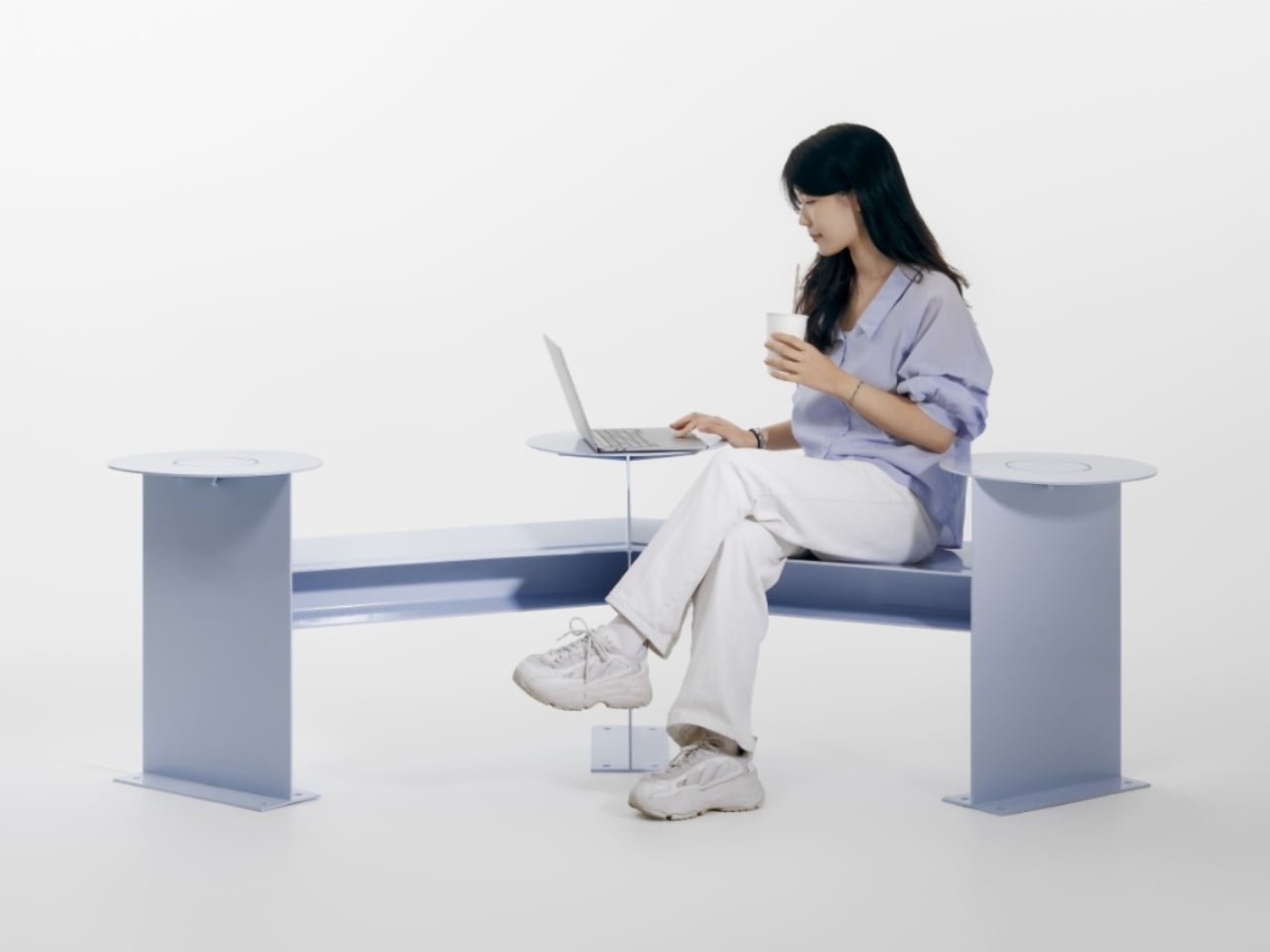
Its clearest design move is visible from above. Instead of a straight bench, the seating follows a shallow, angular bend, with round platforms punctuating the ends and middle. People sitting along the two arms can angle toward each other rather than share a single forward-facing view. The arrangement leaves an open area between them, giving conversation a physical center without enclosing the group or turning the furniture into a miniature booth.

That distinction matters to me. A seating arrangement can invite eye contact without making it compulsory. Free to Face’s photographs show people talking across the bend, but the backless layout also leaves room to choose another orientation. I’d rather have furniture that offers a social possibility than furniture that seems to assign everyone a role. A stranger sitting nearby shouldn’t automatically become your conversation partner, and a public bench shouldn’t feel like an icebreaker exercise.

The different surface heights make the project more interesting than its footprint alone suggests. The supplied description presents those levels as options for choosing a sitting position, with unused areas doubling as places for bags or food. In the photographs, one person occupies a raised circular platform while others sit lower. Elsewhere, a tote rests beside its owner. These are fixed surfaces, not an advertised height-adjustment mechanism, so the flexibility comes from how people occupy the structure.

Those little landing spots feel especially useful. A basic bench leaves your lunch, laptop, and bag competing with your lap or the seat beside you. Here, the circular surfaces provide alternatives, and the images demonstrate a shared meal arranged around the middle platform. I’m particularly fond of that use because it makes the social premise concrete. Two people splitting fries need somewhere to put the fries. Design doesn’t always need a more elaborate explanation than that.

Visually, Free to Face has a pale lavender finish, broad flat supports, and exposed structural geometry. The circular tops soften an otherwise angular assembly. A fabrication photograph shows the metal structure before finishing, although the supplied material doesn’t identify its alloy or coating specification. I like that the form remains readable: you can follow the bench’s bend, identify the raised surfaces, and understand several possible uses without consulting an instruction panel.

The studio setting does leave practical questions unanswered. The photographs establish a full-size physical build, not how it performs through rain, summer heat, or years of public use. Back support, comfortable seat heights, and room for someone using a wheelchair would all deserve attention before installation. I wouldn’t dismiss the design for lacking that documentation, but I also wouldn’t treat a staged lunch as proof of comfort or accessibility. Its strongest evidence is the arrangement itself, demonstrated through several uses.

One photograph shows a woman using a laptop alone, which is a welcome detail for a project about connection. Free public space needs to accommodate solitude, too. Sitting quietly shouldn’t count as using social furniture incorrectly. Free to Face appeals to me because its extra surfaces and angled layout offer choices beyond sitting in a row. I’d be happy to see more benches make that effort, especially if they let people linger without needing to order another coffee.

The post An Angled Public Bench for Hanging Out Without the Coffee Tab first appeared on Yanko Design.

  • ✇Yanko Design
  • This Tiny Home Fits a Downstairs Bedroom and Two Lofts Into 24 Feet
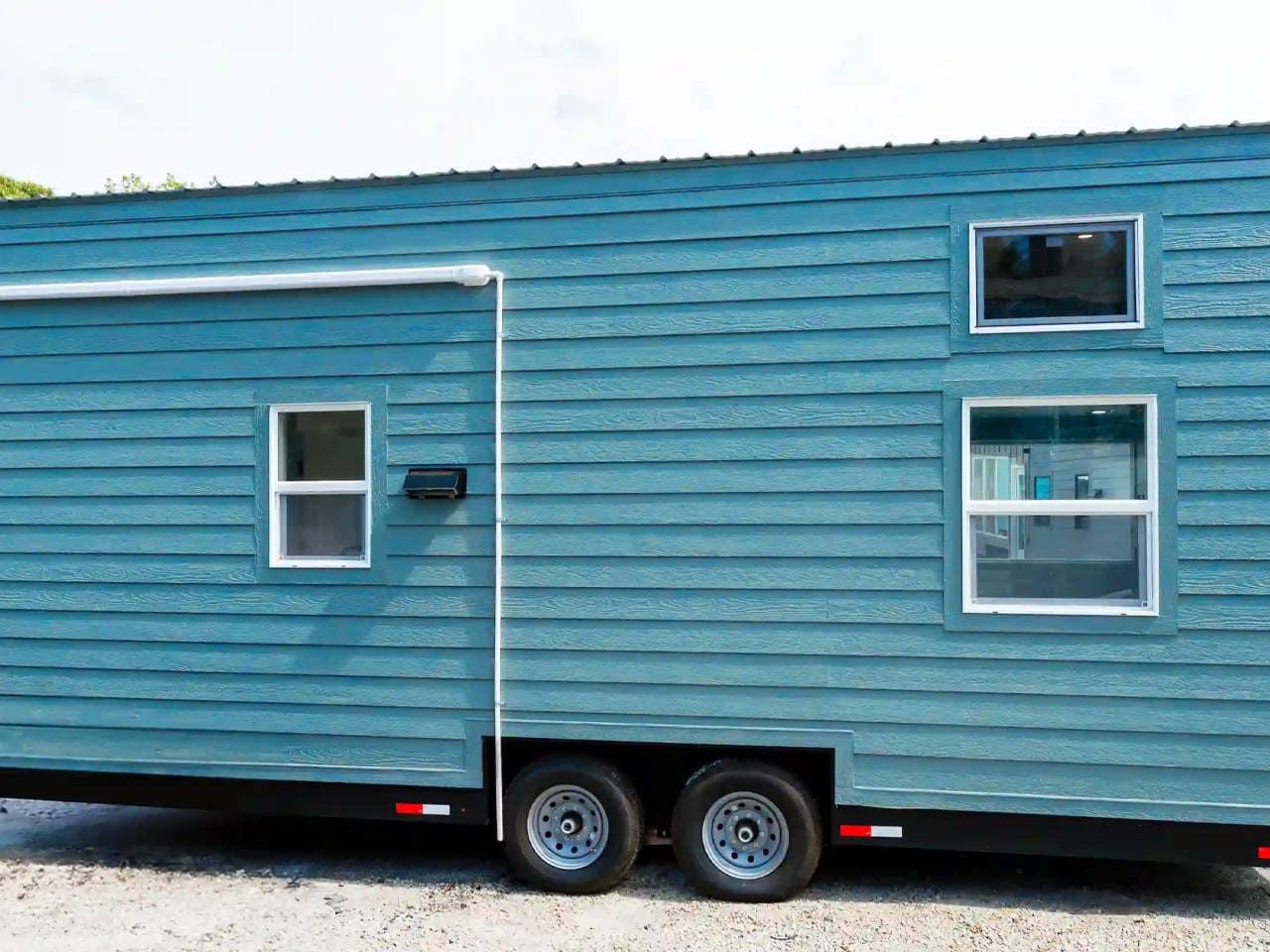
    The updated Avalon 24 gives its most useful space-saving move to the bedroom: it keeps it downstairs. Dragon Tiny Homes pairs that main-level sleeping area with two lofts inside a 24-foot home on wheels, offering 204 square feet of floor space before counting the lofts. The completed, upgraded build is listed for sale, with built-in furniture and storage already fitted. Outside, blue and lavender wood cladding gives this version a cheerful identity, topped by a metal roof and supported by a dou
     

This Tiny Home Fits a Downstairs Bedroom and Two Lofts Into 24 Feet

13 octobre 2026 à 17:30

The updated Avalon 24 gives its most useful space-saving move to the bedroom: it keeps it downstairs. Dragon Tiny Homes pairs that main-level sleeping area with two lofts inside a 24-foot home on wheels, offering 204 square feet of floor space before counting the lofts. The completed, upgraded build is listed for sale, with built-in furniture and storage already fitted.

Outside, blue and lavender wood cladding gives this version a cheerful identity, topped by a metal roof and supported by a double-axle trailer. The color makes a welcome departure from the monochrome finishes common in compact housing, but the more consequential decisions happen inside. Here, sleeping space takes priority over a sprawling lounge.

Designer: Dragon Tiny Homes

The downstairs bedroom accommodates a double bed, a dedicated storage cabinet, and a wall-mounted television. Keeping the primary bed at floor level removes the nightly ladder climb, although the room remains snug. Above it sits the main sleeping loft, while a smaller loft over the bathroom provides another potential sleeping area or storage space. Removable ladders serve both upper levels, so these spaces demand more agility than the downstairs room.

The living area uses a built-in couch platform rather than leaving furniture placement entirely to the owner. Integrated sofa storage adds another place to tuck belongings away, and a large picture window opens the room toward the outdoors. White horizontal wall paneling and dark loft railings keep the interior visually legible, with the upper sleeping platform clearly separate from the space below.

In the kitchen, the upgraded build includes a 7.1-cubic-foot refrigerator housed in cabinetry with three drawers, alongside upper cupboards, a floating shelf, and a range hood. The Avalon’s induction cooktop has two burners, and its quartz surfaces include a bar top intended for dining or work. Laundry space is provided in the layout, though buyers should confirm the appliance package for their particular build. The cabinetry gives everyday objects assigned homes instead of relying entirely on loose shelving.

The bathroom contains a shower, vanity, and flushing toilet, with the upgraded unit adding a mirrored medicine cabinet and accent finishes. Dragon also lists upgraded insulation, a ceiling fan, and LED lighting with a night-light function. Those are useful specification details, though the listing doesn’t establish measured thermal performance or energy savings.

The featured inventory home is advertised at $63,500, including $10,100 in selected upgrades and a $6,600 discount from its configured price. Dragon lists a weight of 14,000 pounds and recommends an F350 or similar towing vehicle. That combination makes the Avalon’s tradeoff clear: its downstairs bedroom is appealing, but moving this small home still requires serious equipment.

The post This Tiny Home Fits a Downstairs Bedroom and Two Lofts Into 24 Feet first appeared on Yanko Design.

  • ✇Yanko Design
  • Twelve New Designs in Six Weeks: Why I Love the new Apple under John Ternus
    For fifteen years, Apple was the friend who shows up to the party an hour late and then insists it brought the best snacks. Tim Cook even had a motto for it, saying Apple was perfectly fine with not being first. Then John Ternus took over on September 1, and the snack table got crowded fast. In six weeks Apple has revealed the foldable iPhone Duo, a HomeView smart display in tabletop and wall-mounted versions, and nine smart home accessories. That makes twelve fresh designs, a wild number for a
     

Twelve New Designs in Six Weeks: Why I Love the new Apple under John Ternus

13 octobre 2026 à 16:30

For fifteen years, Apple was the friend who shows up to the party an hour late and then insists it brought the best snacks. Tim Cook even had a motto for it, saying Apple was perfectly fine with not being first. Then John Ternus took over on September 1, and the snack table got crowded fast. In six weeks Apple has revealed the foldable iPhone Duo, a HomeView smart display in tabletop and wall-mounted versions, and nine smart home accessories. That makes twelve fresh designs, a wild number for a company that used to agonize over one hinge.

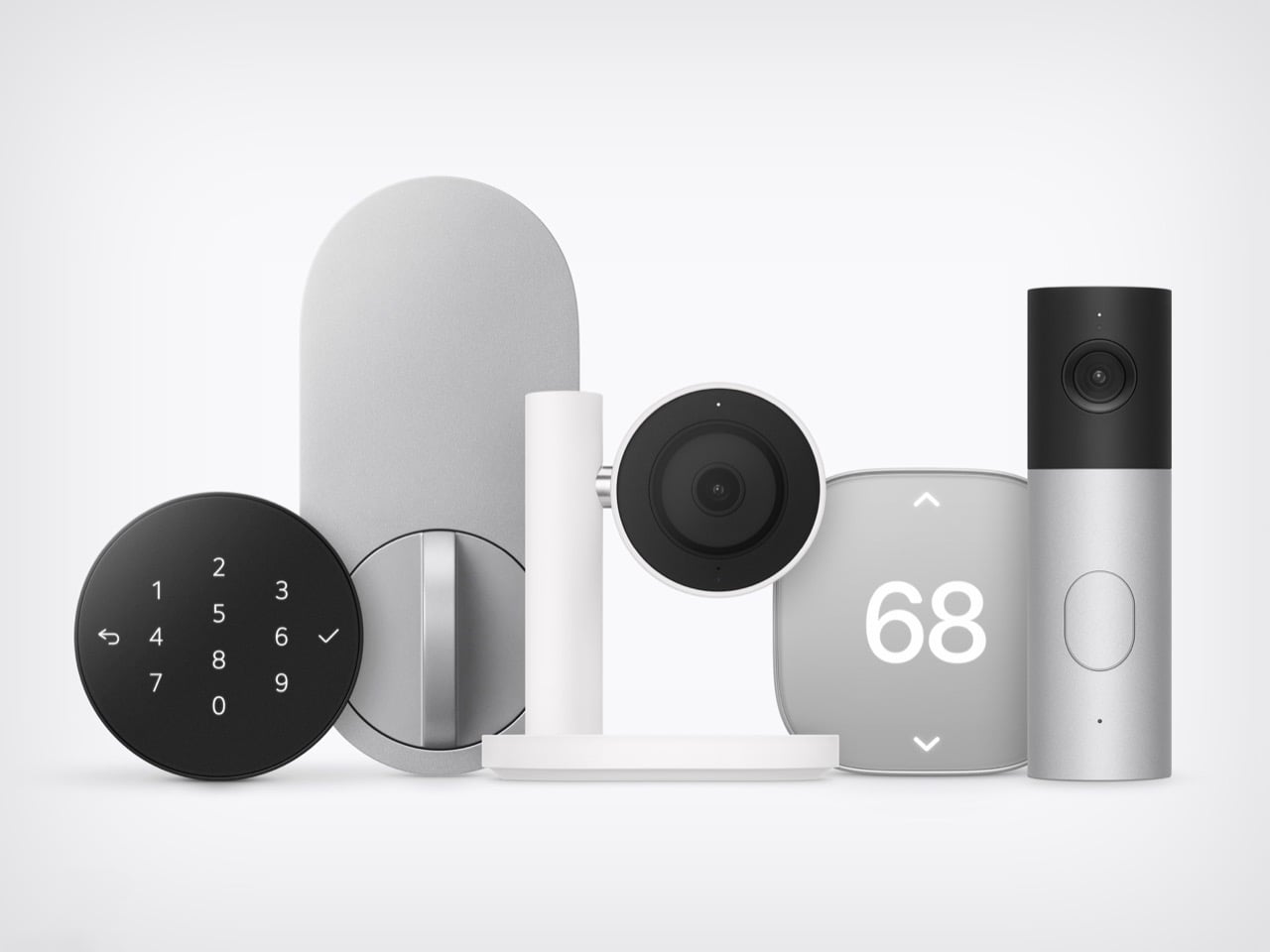
HomeView and the foldable will get the splashy coverage, but the real fun is the smart home gear. LG Electronics and Schneider Electric helped Apple build a video doorbell, a floodlight cam, outdoor and indoor cams, a deadbolt, two thermostats, and two sensors. They start arriving in December, with prices running from $39.95 for a sensor to $399.95 for the floodlight cam. Apple’s fingerprints are all over them, from the aluminum to the black glass to the rounded shapes. I am here to tell you why that deserves a small celebration.

Designers: LG and Schneider for Apple

The ROKR Taught Apple to Keep the Design and Rent the Factory

In September 2005, Steve Jobs launched the Motorola ROKR E1, a rebadged Motorola phone with an iTunes button and a cap of 100 songs. The demo stumbled and the phone flopped. Jobs looked pained onstage, and you can see why, since Apple’s software was riding around in someone else’s hardware. Roughly sixteen months later he unveiled the iPhone. The ROKR was a stepping stone he needed, taken at exactly the moment he needed it.

Ternus gets to run that play with the lesson already learned. Bloomberg reports that Apple shaped the design, features, and engineering of the LG gear, while LG handles manufacturing and support. The ROKR was Motorola’s design wearing Apple’s software. This is Apple’s design wearing LG’s factory. Ternus joined Apple in 2001, so he watched the ROKR saga from the inside, and the LG deal likely began on Cook’s watch but ships under Ternus, which puts it in his column.

Nine Products, One Family Look From Two Different Companies

Line up the lock, camera, thermostat, and doorbell from Apple’s photo and the family resemblance is hard to miss. The Smart Deadbolt pairs a black glass keypad with a pill-shaped aluminum plate, and the Video Doorbell is an aluminum column capped in black glass. The Indoor Cam’s round head swivels on a chrome pivot that echoes the hinge on HomeView. The big 68 on the thermostat belongs to Schneider, yet it shares the same soft rounded-square body. Two companies, one look.

The Indoor Cam physically tilts down to stop watching the moment the first person gets home, which is the friendliest privacy gesture I have seen on a camera. The doorbell carries a 2.5K front camera plus a 1080p lens aimed at the doorstep for packages. The deadbolt uses Ultra Wideband (a precise short-range radio) to unlock as you walk up with your iPhone or Apple Watch, and it keeps working without internet. Everything sets up with one tap on your iPhone. There is no extra app and no extra account.

Ternus Ships What Is Ready Instead of Waiting for Perfect

Cook’s way was to wait until Apple could do it perfectly, and the home hub paid for it, slipping from spring 2025 while Siri caught up. Ternus, per Bloomberg, wants Apple to ship faster, experiment more, and spread launches through the year instead of two big events. HomeView still waited for Siri AI, so the rulebook did not change overnight. What changed is that the wait no longer stalls everything around it. The doorbell, lock, cameras, and thermostats are ready now, and Apple is shipping them.

The Home Collection starts at $39.95 for a sensor, with the lock at $349.95 and the floodlight cam topping out at $399.95. It arrives in December in the U.S. and Canada, the cameras and doorbell are also heading to the UK, and select items slip to early 2027. You can see the full lineup in Apple’s Home Collection announcement. Cook’s Apple was the friend who showed up late with the best snacks. Ternus’s Apple shows up on time, brings the snacks, and even has gluten-free options because he listened to his audience.

The post Twelve New Designs in Six Weeks: Why I Love the new Apple under John Ternus first appeared on Yanko Design.

  • ✇Yanko Design
  • Extra wide street-legal Ford hatchback takes on-lookers by surprise
    The world’s narrowest Fiat Panda caught me off guard the first time I saw it. I had to double-check if this was a vision anomaly, but it was not, and out of pure instinct had to cover it. Now we are going polar opposites with the widest street-legal car, which is the work of Tyler Fever (from the YouTube channel Prop Department), who loves his unique automotive DIY projects. After surprising everyone with the world’s thinnest car, for this one he collaborated with Bamboo Lab to bring the projec
     

Extra wide street-legal Ford hatchback takes on-lookers by surprise

13 octobre 2026 à 15:20

The world’s narrowest Fiat Panda caught me off guard the first time I saw it. I had to double-check if this was a vision anomaly, but it was not, and out of pure instinct had to cover it. Now we are going polar opposites with the widest street-legal car, which is the work of Tyler Fever (from the YouTube channel Prop Department), who loves his unique automotive DIY projects. After surprising everyone with the world’s thinnest car, for this one he collaborated with Bamboo Lab to bring the project to life.

This DIY project kicks off with the acquisition of three old Ford Festiva sub-compact hatchbacks for $200 each. After stripping one of the cars from the dead center with a portable fiber laser, the next step is taking both halves apart. Then the idea is to stretch the vehicle to the width of a truck, but keeping it within street-legal limits. After a bit of figuring out, Tyler went with a 10 feet width to have the best balance of structural integrity and ability to drive it on roads with some special permits.

Designer: Prop Department

To fill in the space between the two halves, he added structural bars to the floor and the roof. On top go the sheet metals – 10 gauge on the floor and 18 gauge on the roof. This makes the structure form into a single solid structure welded together while preserving the original body panels on the sides. One of the challenges was to expand the suspension and drivetrain to cope with the new form factor. For the front-wheel drive side, the CV axle is stretched five feet with precise welding and controlled cooling. He decided to add steering shafts from the other donor Festivas, so that both front seaters can steer the vehicle. Freakin awesome, don’t you think?

Next came the crafting of the car’s parts like the front grille and the stretched-up dashboard parts using the Bambu Lab H2C 3D printer. Now that the car has plenty of space inside, the modifications came in the shape of a big center console with 14 cup holders. Under the hood, there is enough space to put the engine to one side, an air conditioner with a generator (now that’s wild), and all the other mechanical components to make the machine go. The last step involved painting the sunshine yellow paint and installing the plastic windows.

The front angle of this stretched-out Ford is crazy, and so are the ignition buttons on the inside. Driving it out of the garage for the first time makes Tyler go bonkers as he tests the brakes and the limits of the wide body, grazing it against the road limits. The last surprise came in the form of an officially licensed number plate that’s equally wide. The fun part begins when the car rolls on the highway and then on dirt roads for more than two hours of driving. To check the car’s boot space, he loads it with wooden sleepers and whatnot!


The post Extra wide street-legal Ford hatchback takes on-lookers by surprise first appeared on Yanko Design.

  • ✇Yanko Design
  • Meet Apple HomeView: A weirdly genius combination of the iMac, Watch, iPad, and HomePod
    Apple’s design team apparently raided four different family albums and stitched the best bits into one object. HomeView has the iMac G4’s floating-screen silhouette, Apple Watch-style faces, the iPad’s slab of glass, and a speaker base that recalls the HomePod. I have a soft spot for that sunflower-lamp iMac, so seeing a dome and a tilting display make a comeback in 2026 made me unreasonably happy. Somehow the pile of parts works visually. It looks like a lamp, has a tablet’s touchscreen, and d
     

Meet Apple HomeView: A weirdly genius combination of the iMac, Watch, iPad, and HomePod

13 octobre 2026 à 14:20

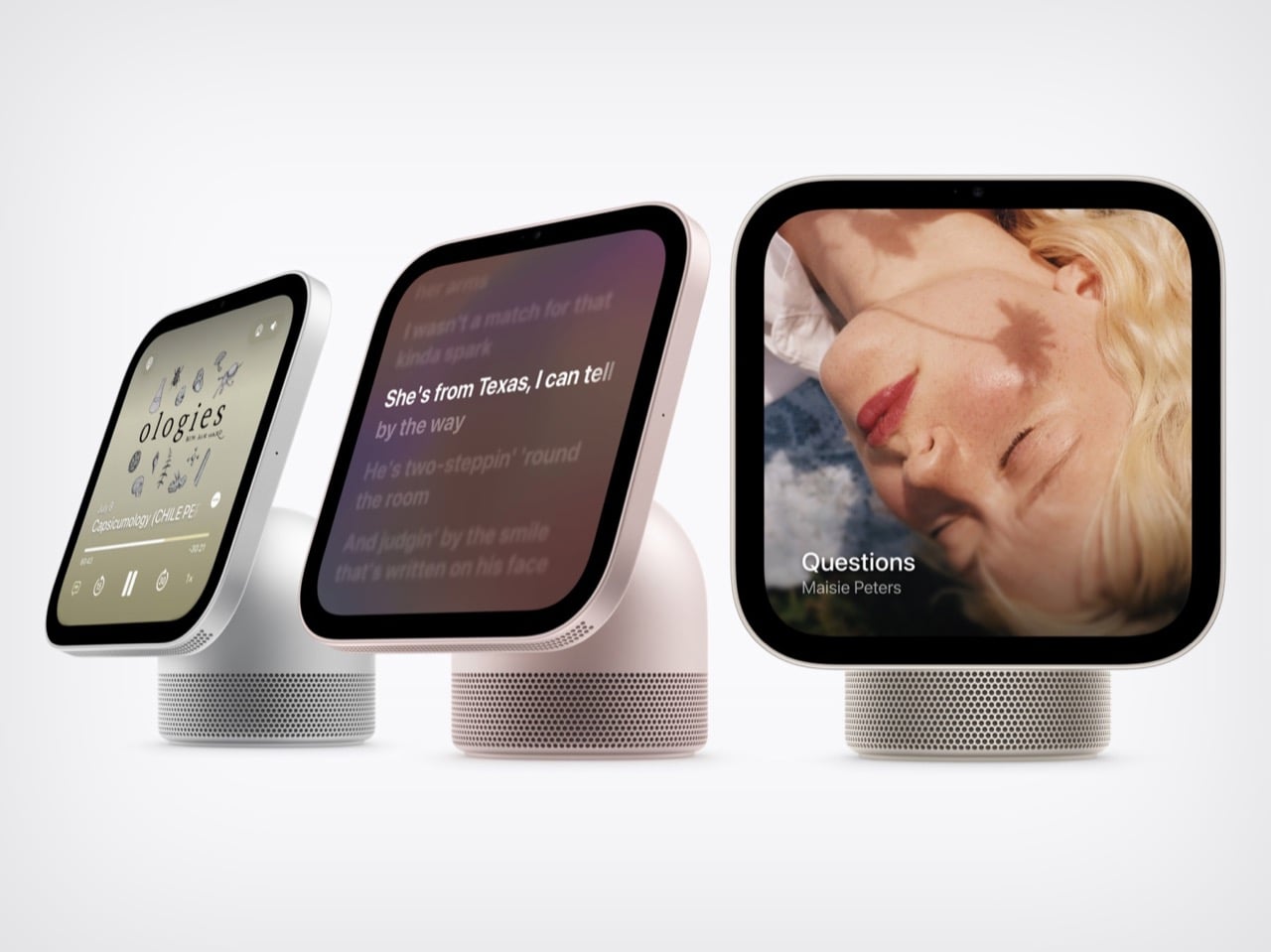
Apple’s design team apparently raided four different family albums and stitched the best bits into one object. HomeView has the iMac G4’s floating-screen silhouette, Apple Watch-style faces, the iPad’s slab of glass, and a speaker base that recalls the HomePod. I have a soft spot for that sunflower-lamp iMac, so seeing a dome and a tilting display make a comeback in 2026 made me unreasonably happy. Somehow the pile of parts works visually. It looks like a lamp, has a tablet’s touchscreen, and doubles as a speaker.

Apple announced HomeView on October 13, 2026. It pairs a 7-inch Liquid Retina screen with a domed aluminum speaker base and a stainless steel hinge that lets you tilt the display. An A18 chip and the rebuilt Siri AI run the show, and Apple says it recognizes up to six enrolled users, each with a personalized experience. A wall-mounted version offers the same screen and core functions, though its speaker hardware differs. Both models cost $299 in the U.S., with preorders open and availability scheduled for November 13, 2026.

Designer: Apple

The iMac G4’s Dome and Personality Make a Comeback

The iMac G4 arrived in January 2002 with a 15-inch flat panel hovering over its base. Its sunflower-inspired form emerged from Steve Jobs and Jony Ive’s design discussions; Walter Isaacson’s account credits Ive with suggesting that the screen be separated from the base like a sunflower. HomeView echoes that silhouette but swaps the long swinging arm for a compact hinge, which suits a counter where nobody wants a lamp neck knocking over the olive oil. The tilt adjustment gives you some latitude on a low nightstand or a tall kitchen island.

The G4 showed how much personality a computer’s shape could carry. HomeView’s similar stance makes a box packed with a camera and microphones look friendlier, at least to my eye. A dome with a head-on-neck posture reads more like a desk pet than a gadget, which is a handy trick for something that recognizes faces. The thick black bezel is a taste call I’m happy to defend: it gives the Photos face a proper picture-frame border.

Apple Watch-Style Faces and iPad Glass Decide What You See

The screen looks like it comes from the iPad side of the family: a square slab of glass with rounded corners and a front camera for FaceTime. Center Stage adjusts the framing as people move or join the call. Apple lists a brightness range from 500 nits down to 0.3 nits, allowing the display to dim substantially at bedtime. True Tone adjusts the white balance to ambient lighting. Selected interface elements also respond to your distance, showing simpler information across the room and more detail as you approach.

The faces feel distinctly Apple Watch-like. Photos offers Portrait-style depth effects, while Flow reacts to movement in the room. Snoopy’s animations respond to the time of day, weather, and sporting events, a very Watch way of being useful and adorable at once. Home Modular puts favorite accessories on one dashboard, and Home Camera can stream up to nine video feeds at once. Fan designers were exploring this territory years ago. Justin Latham’s HomePod Nano concept, which we covered in 2023, imagined a speaker with a display running a proposed watchOS fork. It was a fan concept, not an Apple product or working software announcement. HomeView’s Live Activities surface the current song, an active timer, or an incoming Intercom message, bringing that glance-and-go logic to a household screen.

The Speaker Base Does the Heavy Lifting

The base recalls the HomePod, although Apple’s images show a perforated, color-matched exterior rather than the HomePod’s fabric mesh. Small grille holes also run along the display’s lower edge. A down-firing woofer and two force-cancelling passive radiators sit in the base, while two full-range drivers occupy the display.Apple says computational audio uses its silicon and onboard sensors to adjust loudness and bass response in real time.  The wall-mounted model has two full-range drivers but no base-mounted woofer or passive radiators, so the two versions shouldn’t be treated as acoustically identical. HomeView supports multiroom audio alongside HomePod, HomePod mini, and AirPlay-compatible speakers. Intercom also reaches HomeView and HomePod speakers elsewhere in the house.

The original HomePod was announced in 2017 at $349, when we dubbed it Apple’s “tune-busting Fabergé Egg.” Against that historical price, $299 for a speaker, screen, camera, and face recognition looks tempting on paper. You can pre-order HomeView on Apple’s site now, with both the tabletop and wall-mounted models arriving November 13. The tabletop unit ships with a color-matched USB-C cable, while the wall version relies on Schneider Home’s power mounts, which start at $59.95 and are sold separately. Siri AI launches in beta and in English, and Apple is not selling HomeView in the EU for now. Every ancestor in this object was Apple’s bet on a different decade, and HomeView is the first time they all share one counter.


The post Meet Apple HomeView: A weirdly genius combination of the iMac, Watch, iPad, and HomePod first appeared on Yanko Design.

  • ✇Yanko Design
  • Zook Cabins Fits a Soaking Tub & Separate Shower Into a 470-Square-Foot A-Frame Retreat
    The A-Frame Retreat gives its most dramatic wall to glass, with windows climbing toward the roof’s sharp peak. Behind that familiar triangular silhouette, Zook Cabins has arranged 470 square feet of living space on a single floor, including a bathroom with a freestanding soaking tub. This is an available modular home, with a completed example at Zook Village in Gap, Pennsylvania, documented in March 2026. A black metal roof and thermally modified Lunawood siding establish the exterior’s restrai
     

Zook Cabins Fits a Soaking Tub & Separate Shower Into a 470-Square-Foot A-Frame Retreat

13 octobre 2026 à 13:20

The A-Frame Retreat gives its most dramatic wall to glass, with windows climbing toward the roof’s sharp peak. Behind that familiar triangular silhouette, Zook Cabins has arranged 470 square feet of living space on a single floor, including a bathroom with a freestanding soaking tub. This is an available modular home, with a completed example at Zook Village in Gap, Pennsylvania, documented in March 2026.

A black metal roof and thermally modified Lunawood siding establish the exterior’s restrained palette. The more interesting move is the lower, box-like volume alongside the steep roof. In the company’s exterior rendering, it gives the cabin a vertical side wall and a sheltered entrance, while the glazed gable retains the recognizable A-frame profile. An optional deck extends the space outward without changing the enclosed footprint.

Designer: Zook Cabins

Inside, the published king-bed floor plan reads as a studio rather than a conventional one-bedroom house. Living, dining, sleeping, and kitchen areas share an open room, with the bathroom enclosed at the rear. The bed sits opposite the kitchen, while seating occupies the glazed end. Keeping these functions together avoids carving the compact interior into smaller rooms, though it also means there’s no bedroom door to separate sleep from conversation or cooking.

Cathedral ceilings preserve the roof’s height indoors, while painted cabinet-grade birch plywood covers the walls and ceilings. Vinyl plank flooring runs throughout. The interior rendering pairs these pale surfaces with exposed-looking timber elements and wooden furniture, giving the room visual warmth without covering every surface in wood. Straight wall sections also leave usable edges for cabinetry and furniture beneath the taller central space.

The kitchen takes a modest portion of the plan. Zook specifies painted shaker-style cabinets, quartz countertops, and spaces for a compact refrigerator and microwave. Those provisions deserve attention: space allocated for an appliance doesn’t establish that the appliance is included. The arrangement leaves more of the shared room available for the bed, dining table, and sitting area.

The bathroom receives a surprisingly generous allocation. Alongside the 60-inch freestanding soaking tub, the specifications list a separate glass-doored shower and a 48-inch vanity. The floor plan places these fixtures in their own enclosed room, giving bathing more privacy than sleeping. That’s a revealing priority for a small retreat: floor space goes toward a leisurely bathroom rather than a separate bedroom or another sleeping level. Delivery still requires planning. Zook says the cabin travels in one truckload, with two A-frame roof sections lifted into place on site. Its modern cabins require a permanent foundation and prepared utility connections. The small footprint simplifies the accommodation, but the installation remains a building project.

The post Zook Cabins Fits a Soaking Tub & Separate Shower Into a 470-Square-Foot A-Frame Retreat first appeared on Yanko Design.

  • ✇Yanko Design
  • This Robotic Pavilion Concept Would Change Its Layout Only When Empty
    A public pavilion can give people somewhere to gather, but returning to it usually means finding the same spaces and following the same paths. Self-Assembling Robotic Environments explores a more flexible alternative: mobile architectural sections that could rearrange themselves between visits. This unbuilt public art concept would pause whenever someone enters, letting people explore one arrangement before the space changes for another group. Each section combines a floor, wall, and roof in a
     

This Robotic Pavilion Concept Would Change Its Layout Only When Empty

Par : JC Torres
13 octobre 2026 à 12:20

A public pavilion can give people somewhere to gather, but returning to it usually means finding the same spaces and following the same paths. Self-Assembling Robotic Environments explores a more flexible alternative: mobile architectural sections that could rearrange themselves between visits. This unbuilt public art concept would pause whenever someone enters, letting people explore one arrangement before the space changes for another group.

Each section combines a floor, wall, and roof in a large C-shaped profile, like a little shelter with its sides left open. Two versions stand about 10 and 14 feet tall, both four feet wide. Place several together, and those simple shapes could become passages or covered pockets. Separate them again and the same pieces would offer a different place to wander.

Designer: Michael Jantzen

Of course, rearranging those sections wouldn’t mean asking someone to wheel them into position. Each floor would contain its own computer, sensors, motors, wheels, and battery, allowing the entire unit to travel forward, backward, or sideways. The wall and roof would move with it. The robotics aren’t proposed as equipment that builds the installation and then leaves; they’d remain part of the architecture.

Rather than following one permanent floor plan, the modules would use artificial intelligence to decide on their positions through majority agreement. The proposal doesn’t explain how they would evaluate possible arrangements, though. A gap between two units could become a passage, while several facing one another might define a gathering spot. The same pieces could give visitors different ways to use the space.

The roof would do more than shelter whoever stands beneath it. Solar cells on top would recharge the battery inside the floor, keeping the proposed power supply within each moving section. It’s a sensible place to collect sunlight, but the project doesn’t specify how much energy movement would require. Keeping these large pieces in motion isn’t as simple as putting solar panels overhead.

A black perimeter would mark the robots’ territory, containing their movements within a circular arena. Sensors would watch for people or objects entering that space, pausing every module until the area is clear. You wouldn’t be expected to dodge a moving wall while exploring. The intended sequence is straightforward: the pieces rearrange when empty, then hold their positions while visitors are inside.

That rule still needs engineering before anyone could walk in. Detecting a visitor isn’t the same as stopping safely, and the project doesn’t establish braking distances or structural performance. Raised floor sections also need an accessible way in. These are questions for a working installation, rather than reasons to dismiss the idea, but the concept drawings don’t settle them on their own.

For visitors, the pause could make staying put part of the interaction. Sit inside a sheltered corner for a while, and that particular arrangement would remain available until everyone leaves. A later group might find a different route or gathering spot. Someone lingering to finish a conversation would therefore be doing something rather unusual: keeping a version of the architecture from disappearing yet.

The post This Robotic Pavilion Concept Would Change Its Layout Only When Empty first appeared on Yanko Design.

❌