Vue normale

Il y a de nouveaux articles disponibles, cliquez pour rafraîchir la page.
Hier — 14 mars 2026Flux principal

This $99 Water Jet Remotely Cleans Your Car’s Backup Camera Without You Leaving Your Seat

Par : Sarang Sheth
14 mars 2026 à 01:45

Reverse driving accounts for just 1% of all driving time, yet it’s responsible for roughly 25% of all accidents. A dirty backup camera in winter, mud season, or on dusty country roads is not a hypothetical inconvenience but a genuine safety liability, one that most drivers have resigned themselves to either living with or solving by stepping out of the car every time. Mike Klein, a Vermont-based tinkerer with a characteristically no-nonsense approach to annoying problems, got fed up enough to build a solution in his garage. What started as a Ziploc-bag-and-zip-tie prototype strapped to his license plate has turned into the Lens Lizard, a compact, self-contained, remote-controlled backup camera washer that just hit Kickstarter and has absolutely run away with its funding goal.

The concept is beautifully blunt. Lens Lizard mounts behind your license plate, sandwiched discreetly between the plate and the bumper using your car’s existing screw holes. No drilling, no wiring, no running tubing through door gaps or under trim panels. The whole install takes under five minutes with a standard screwdriver, and once it’s on, it’s invisible. The unit itself houses a fluid reservoir, a battery pack, and a high-pressure nozzle that you aim at your camera once during setup and then never have to touch again. When your backup camera gets caked in snow/ice or road salt on a grey January morning, or buried under a slush splatter from the truck overtaking you on a Vermont highway, you press a wireless remote button from inside the car and a jet of washer fluid blasts the lens clean. Sort of like a lizard or a chameleon striking its prey with a sharp, swift flick of its tongue. Except this time, it’s a concentrated jet of soapy water. Maybe a Pokémon reference would work better but I don’t want Nintendo’s lawyers sending me a cease and desist.

Designer: Mike Klein

Click Here to Buy Now: $99 $149.99 ($50.99 off) Hurry! Only 5 days left.

The engineering philosophy here is aggressively practical. Klein explicitly designed the Lens Lizard for Vermont winters, which means sub-zero temperatures, aggressive road salting, heavy snow, and the kind of freeze-thaw cycling that destroys lesser materials. The housing is sealed and built from automotive-grade materials, and the battery and fluid reservoir are sized to last four-plus months between refills and recharges, meaning you top everything up roughly once per season.

Maintenance is a non-event: open the latch, refill with washer fluid, charge via USB-C, close it back up. Klein’s origin story is worth noting too, because it gives the product a satisfying internal logic. He tried hydrophobic lens covers (they peeled), ceramic coatings (they did essentially nothing), and eventually decided to just build a scaled-down windshield washer system for his license plate. The first prototype was, by his own admission, ridiculous. But it worked, and that was enough to tell him the idea had legs.

Lens Lizard works with any vehicle where the backup camera sits above the license plate, which covers 99% of cars on the road, pickup trucks very much included. The product ships with assorted license plate screws to handle different fastener sizes, and the adjustable nozzle lets you dial in the spray angle for your specific camera position during initial setup. After that, the unit lives its entire life tucked behind the plate, completely out of sight. The wireless remote is puck-shaped and lives wherever you keep it in the cabin, a glove box, a cupholder, the center console.

The Lens Lizard starts at just $99 for the entire kit as an early bird discount off its $149 price tag. A dual bundle costs $189 if you’ve got two cars, and all bundles include the Lens Lizard unit, a wireless remote, a battery pack, and an assortment of screws to help you install the gizmo on your car. Given its specific design (and that every nation has a different license plate), the Lens Lizard only ships to the US and Canada for now, although I’m sure a more universal version is in the works. Production is slated to begin in April 2026, with shipping to backers planned for May. For drivers in cold-weather states, high-dust regions, or anywhere that sees serious road grime, it’s a hard value proposition to argue with. Certain premium vehicles have had integrated camera washers for years, quietly tucked into the bumper plumbing. Klein has simply figured out how to give everyone else the same result for under a hundred bucks, no dealer visit required.

Click Here to Buy Now: $99 $149.99 ($50.99 off) Hurry! Only 5 days left.

The post This $99 Water Jet Remotely Cleans Your Car’s Backup Camera Without You Leaving Your Seat first appeared on Yanko Design.

Ex-BlackBerry Designer Is Calling Out Everything That’s Wrong With Modern Phones

Par : Sarang Sheth
13 mars 2026 à 20:45

Design Mindset is Yanko Design’s weekly podcast, powered by KeyShot, the 3D rendering and visualization software that helps designers test how products feel, not just how they look. Hosted by Radhika Seth, the show goes deep into the philosophy and process behind world-class products, sitting down with the designers and founders who actually built them. Episode 19, premiering this week, is one of the most thought-provoking conversations the series has produced yet.

Joseph Hofer is the founder of Hofer Studio, where he consults with hardware entrepreneurs on building profitable, world-class product portfolios. Before that, he spent over a decade at BlackBerry as senior industrial designer, establishing the look and feel of the iconic Bold family and shaping devices like the Q10, Z10, and the BlackBerry Passport. His work spans over sixty design and utility patents, touching products that have sold over twenty-one million units and generated upward of $3.1 billion in revenue. More recently, he’s been the design force behind the Clicks Communicator, a physical-keyboard phone that launched at CES and challenges the smartphone status quo from the ground up.

Download your Free Trial of KeyShot Here

Designing Within Human Limits and Intentional Use

Joseph opens the conversation with something that sounds almost poetic but lands with the weight of a core design principle, saying that “most of the objects we use every day quietly train us. They teach us how to hold them, how long to focus, how patient we need to be. When design ignores human limits, it drains us. When design respects them, it almost feels like care.” He critiques what he calls “sticky” experiences, the kind that benefit companies at users’ expense, arguing that the real question designers should be asking is whether a product helps people become a better version of themselves, or whether the company simply wins after ten years of draining them.

His case against the modern smartphone is pointed. Everything phones have become reactionary devices, he says, describing the experience of opening one to send an email and somehow finding yourself fifteen minutes deep in a reel, asking yourself how you got there. Big tech, in his view, has deliberately shaped products to increase screen time and sell more through ads. His philosophy runs in the opposite direction: good design should prompt intention before action, not exploit the absence of it.

Integration as Core Design Principle

One of the more revealing details Joseph shares early on is that at BlackBerry, the design team’s official title wasn’t “Industrial Design.” It was Design Integration. That framing stayed with him. “Integration is probably the word, the action that I look to do well in every project I work on,” he says, adding that a product can be really strong in one area but fall flat in others if you’re only focused on a single dimension. Great design, strong UX, and poor profit economics don’t add up to a sustainable company. Economics, manufacturing, cost, and complexity all have to be part of the thinking from the start.

His advice to technical founders reflects the same logic. Many of them start with a breakthrough innovation and then go looking for a market to push it into, which he sees as working in the wrong direction. The better path is to step back, clearly analyze the problem bubbling up from the market, shape an experience that solves it, and then let the technology marry with that. Letting one run too far ahead of the other is how good innovations end up as products nobody uses.

The Clicks Communicator: Intentional Mobile Interaction

The Clicks Communicator is the most direct physical expression of Hofer’s philosophy. It was the first phone he designed in ten years after BlackBerry, and the central idea is a complete inversion of how smartphones currently work. Rather than an app grid that presents notifications and pulls users in reactively, the Communicator prompts users to decide what they want to do first, then acts on it. Physical keys map to intentional shortcuts: pressing K calls a specific contact, pressing I opens Instagram only when the user has consciously chosen to. “It flips it from being reactionary to intentional,” Joseph says simply.

He’s also clear that the product’s appeal isn’t nostalgia. A lot of the customers aren’t even BlackBerry users, he notes; they’re younger people who simply want a different relationship with their mobile device. The Communicator sits within what he sees as a broader 2025 trend of “intentional tech,” products designed to decouple from the everything-phone model and serve one specific purpose well. Adding a 3.5mm headphone jack and a removable SD card wasn’t feature-stacking for its own sake either; those choices are signals to a specific audience that the team is listening and cares about them.

Recognizing Quiet Ideas and Process Discipline

When Radhika points out that the BlackBerry keyboard now feels like it was always inevitable, Hofer pushes back immediately. “Sometimes these quiet ideas that feel obvious or become obvious actually took a lot of effort and iteration to get there,” he says, describing the motto his team lived by: think, build, test. The keyboard’s evolution wasn’t a single stroke of insight; it was a response to real constraints. As iPhones pushed screens larger, BlackBerry faced intense pressure to shrink keypads, which meant switching from oval keys to square ones, losing the tactile separation users relied on. The innovation was subtle: raising a curved edge on each square key to preserve the feeling of the oval, essentially hiding a reference to the old shape inside the new form. Speed tests, accuracy tests, user sentiment on different options, all of that grinding iteration is what produced something that feels natural.

He applies the same thinking to simplicity broadly. Designing for a ten-year-old, he argues, is one of the most useful principles any designer or founder can adopt. If you can’t explain the product to a ten-year-old, it’s too complicated. He tested this literally the night before the recording, sitting down with his eight-year-old daughter to ask about her CD player. Her answer was that it had way too many buttons. Her ideal? Three: power, volume up, volume down. Six identical-feeling buttons with in-mold graphics that disappear in the dark told a clear story about what the designers had gotten wrong.

Restraint as Confidence and Commercial Strategy

The tension between restraint and visibility is something Hofer takes seriously. He doesn’t frame minimalism as a virtue in itself. “Clarity is actually an even stronger word,” he says, arguing that a vanilla product solving a vanilla problem will simply go unnoticed. The goal isn’t to be quiet; it’s to solve a real, specific problem so well that the product becomes the only answer for a particular group of people. A phrase he came up with captures where he’s trying to take the companies he works with: from viral products to vital ones, products that customers genuinely need in their lives because of the difference they’ve made.

That philosophy maps directly onto commercial outcomes. A product that meets the emotional and functional needs of a user, reduces cognitive load, lasts longer, and has lower return rates naturally builds a brand that draws people in without needing to be aggressively sold. “When products are just better,” he notes, “they need to be marketed and sold maybe less. That’s an effect on your bottom line.” His work at Hofer Studio is less about crafting beautiful objects and more about asking founders what commercial success actually means to them and building backwards from that.

When the rapid-fire round asks him to describe restraint in design in a single word, his answer arrives without hesitation: confidence. “What does obviousness create? It creates confidence. I know how to enter this experience. I know how to start this product. I feel more confident with it in my life.” It’s a fitting close to a conversation that consistently returned to the same idea: that the design decisions nobody notices are usually the ones that took the most care to make.


Design Mindset drops every week on Yanko Design. Catch Episode 19 in full wherever you listen to podcasts. For a free trial of KeyShot, visit keyshot.com/mindset.

Download your Free Trial of KeyShot Here

The post Ex-BlackBerry Designer Is Calling Out Everything That’s Wrong With Modern Phones first appeared on Yanko Design.

GameMT EX8 debuts as a budget Android handheld tailored for retro gaming

Par : Gaurav Sood
13 mars 2026 à 19:15

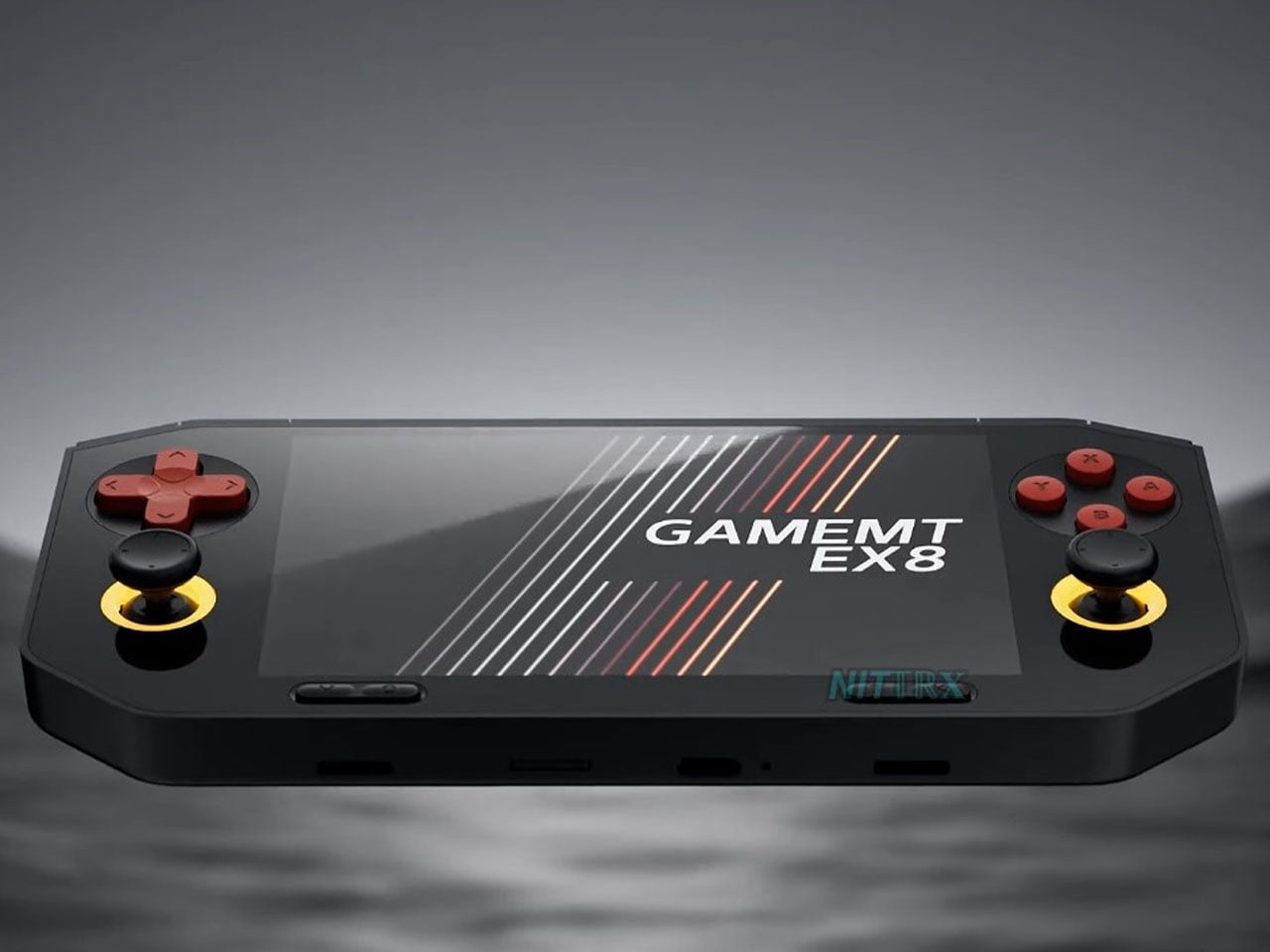
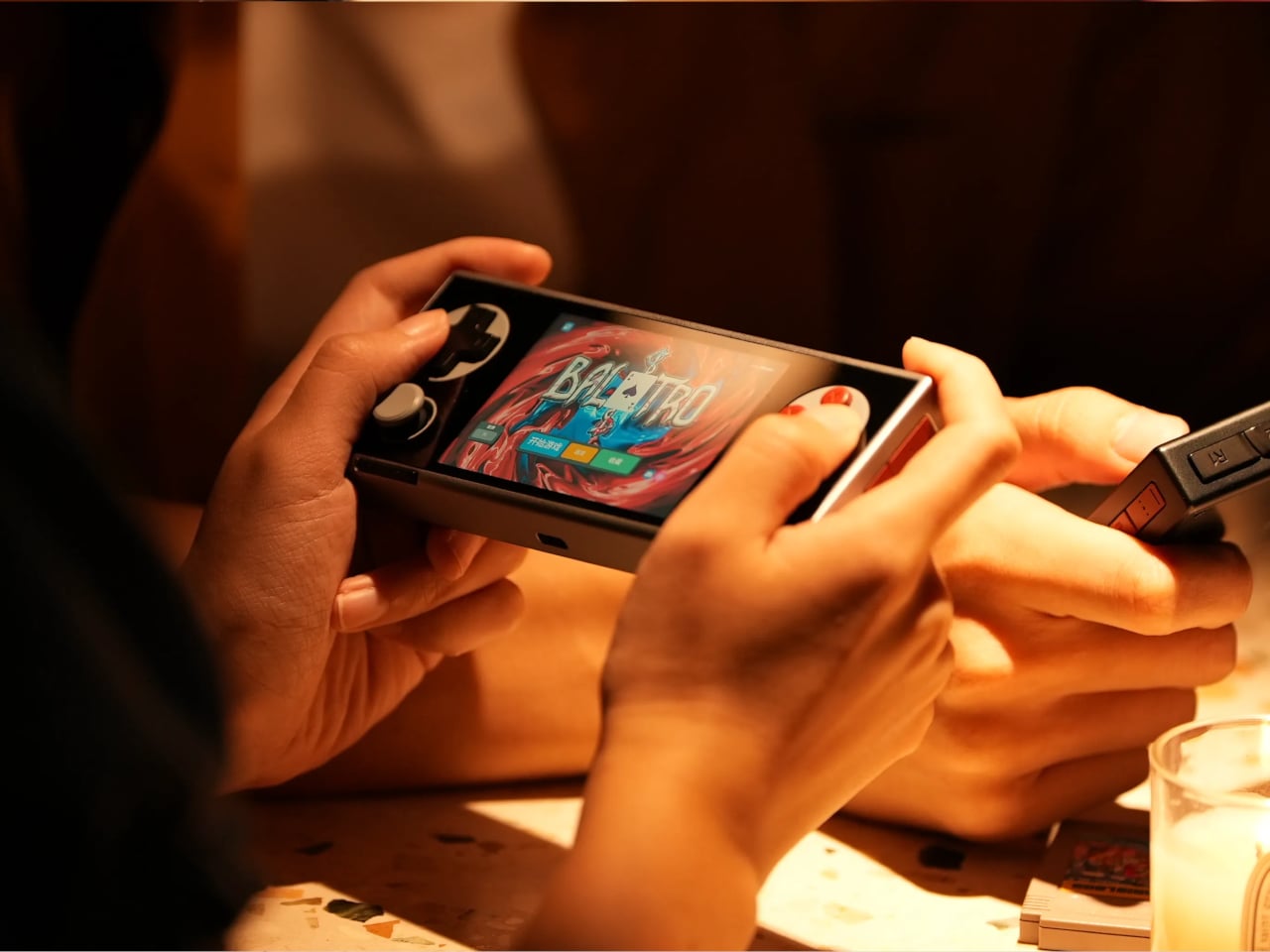
The gaming handheld continues to expand with new devices aimed at retro enthusiasts and mobile gamers. One of the latest additions is the GameMT EX8, a portable gaming console designed to deliver a capable Android-based gaming experience while maintaining a relatively affordable price point. With a high-resolution display, a familiar handheld layout, and hardware suited for emulation and mobile gaming, the EX8 represents GameMT’s attempt to compete with other budget-friendly handhelds in the growing retro gaming segment.

The handheld features a 4.88-inch display with a resolution of 1080 × 1620 pixels and a 3:2 aspect ratio. This format is particularly appealing for retro gaming because it better accommodates older console titles that do not match modern widescreen displays. The panel is also noticeably sharper than the screen used in some competing handhelds, such as the Ayaneo Pocket Micro, which uses a smaller 3.5-inch display with a lower resolution. The larger and sharper screen is expected to improve the visual experience when playing classic games from platforms like the PlayStation and PSP. With its combination of a high-resolution 3:2 display, capable mobile processor, and expandable storage, the GameMT EX8 aims to deliver a balanced handheld gaming experience.

Designer: GameMT

Powering the device is MediaTek’s Helio G99 processor, a chipset commonly found in mid-range smartphones. The chip is paired with 6GB of RAM and 128GB of internal storage, providing enough performance for Android gaming and a wide range of emulated titles. The Helio G99 has already proven capable of handling many retro systems and even some more demanding platforms through emulation, making it a practical choice for a handheld of this category. For users with larger game libraries, the EX8 also includes a microSD card slot that allows the storage to be expanded beyond the built-in capacity.

In terms of design, the EX8 adopts a horizontal handheld layout with symmetrical analog sticks positioned on both sides of the display. Each thumbstick is surrounded by an RGB ring light, giving the device a more modern aesthetic. A traditional D-pad and ABXY button arrangement sits alongside the sticks, while shoulder buttons are integrated along the top edge. The device also appears relatively thick compared to some competitors, likely to accommodate its internal hardware and cooling system. Thermal management is supported by an internal cooling fan, which helps maintain stable performance during extended gaming sessions. Audio is delivered through bottom-firing speakers, and the handheld is powered by a 5,000 mAh battery that charges through a USB-C port. These features are designed to ensure the device can sustain longer play sessions without overheating or running out of power too quickly.

The GameMT EX8 will be available in two color options. A black version pairs dark hardware with red D-pad and face buttons, while a white variant features purple buttons and matching accents. This contrast gives the handheld a distinctive visual identity within the crowded retro gaming market.


The post GameMT EX8 debuts as a budget Android handheld tailored for retro gaming first appeared on Yanko Design.

Apple Finally Rounded the MacBook’s Corners After 18 Years

Par : JC Torres
13 mars 2026 à 17:20

For about 18 years, every aluminum MacBook has looked more or less the same. Silver. Angular. Quietly serious. There’s nothing wrong with that. Apple’s unibody aluminum design, introduced in October 2008 and carved from a single block of metal, was genuinely elegant and set the template for an entire industry. But it also retired something along the way: the idea that a Mac laptop could feel chosen rather than just defaulted to.

The MacBook Neo, announced March 4 and starting at just $599, is the first real crack in that template. It comes in four colors (blush, indigo, silver, and a yellow-green called citrus) with enclosure corners that are noticeably softer than any aluminum Mac in recent memory. Whether that adds up to a proper design statement or just smart positioning is worth thinking through.

Designer: Apple

What happened to Apple’s color confidence

iBook G3 Clamshell (courtesy of Wikipedia)

Apple’s fondness for color didn’t always live inside an iPhone. The iBook G3, launched in 1999, came in tangerine and blueberry, and later in indigo and key lime. It was rounded, slightly toy-like, and completely unapologetic about being a consumer product. When the aluminum unibody arrived in 2008, Apple traded that warmth for precision machining and sharp rectilinear edges. Right call for the MacBook Pro. Default for everything else, apparently, for nearly two decades.

The result was a color drought in aluminum Mac laptops that has lasted until now. Silver, space gray, midnight, starlight: all variations on the same mood of professional restraint. The Neo’s citrus and blush aren’t just options on a spec page. They’re a quiet admission that not every laptop buyer wants a device that looks like it belongs in a boardroom. For Apple, that’s actually not a small thing to say at the product level.

Two different stories about corners

M1 MacBook Pro (2021)

There’s a distinction worth making here, because “rounded corners” gets used loosely when describing the Neo. MacBook displays have had rounded screen corners since 2021, which is a display-level detail and nothing new. What’s different on the Neo is the chassis itself. The physical aluminum enclosure is softer at the edges and corners than any aluminum Mac before it, and Apple’s own press materials describe “soft, rounded corners” specifically in terms of how the device feels to hold and carry.

That’s a real shift in the design language. The 2008 unibody was celebrated for machined sharpness, corners you could feel were engineered. The Neo softens that deliberately. It’s not a revival of the iBook, and it’s not trying to be, but the instinct is similar: a consumer Mac that feels a little more like it belongs to you. The notch is also gone, making this the first notchless MacBook since 2020, which quietly tidies up the one thing that made recent Airs feel slightly unfinished.

The repairability angle is actually a design story too

One thing that got a little buried under the color conversation: the Neo is the most repairable Mac laptop in years, and that’s partly a design decision worth noting. Teardowns showed how the whole machine was disassembled in just a few minutes using standard Torx screws throughout. No tape, no adhesive, anywhere inside. That’s a first for a modern Mac. The USB-C ports, speakers, and headphone jack are all modular. The keyboard can be replaced on its own, without swapping the entire top case, which on the MacBook Air currently costs over $370 in parts.

The internal simplicity isn’t accidental. The A18 Pro chip runs so efficiently that the Neo needs no fan at all, which removes a whole layer of thermal engineering that usually clutters a laptop’s interior. The result is a cleaner, more logical internal layout. Whether Apple arrived here from genuine design philosophy or from regulatory pressure (the EU’s right-to-repair push has been building for years) is an open question, but the outcome is real either way.

What it doesn’t fix, and what might come next

It’s not all sunshine and rainbows, of course. The base model has 8GB of non-upgradable RAM, one USB-C port runs at USB 2.0 speeds, and there’s no backlit keyboard. These are calculated trade-offs for the price point, not mistakes, but they matter depending on what you actually need the machine for. And repairability, for all the justified enthusiasm, is still partial: the RAM and storage are fixed at purchase, just like every other current Mac.

Still, the Neo feels like Apple designing for a specific person it had previously ignored: someone who was never going to spend $1,000 on a MacBook Air and wasn’t particularly well served by anything else Apple made. The color, the softer form, the price, the clean internals, all of it points at the same person. What’s genuinely interesting is whether any of this travels upmarket. If a future MacBook Air gets a color story this confident, the Neo might end up looking less like an entry-level product and more like Apple quietly figuring out what comes next.

The post Apple Finally Rounded the MacBook’s Corners After 18 Years first appeared on Yanko Design.

This Brutalist Lounge Chair Is 3D-Printed From Recycled Water Bottles

Par : JC Torres
13 mars 2026 à 16:20

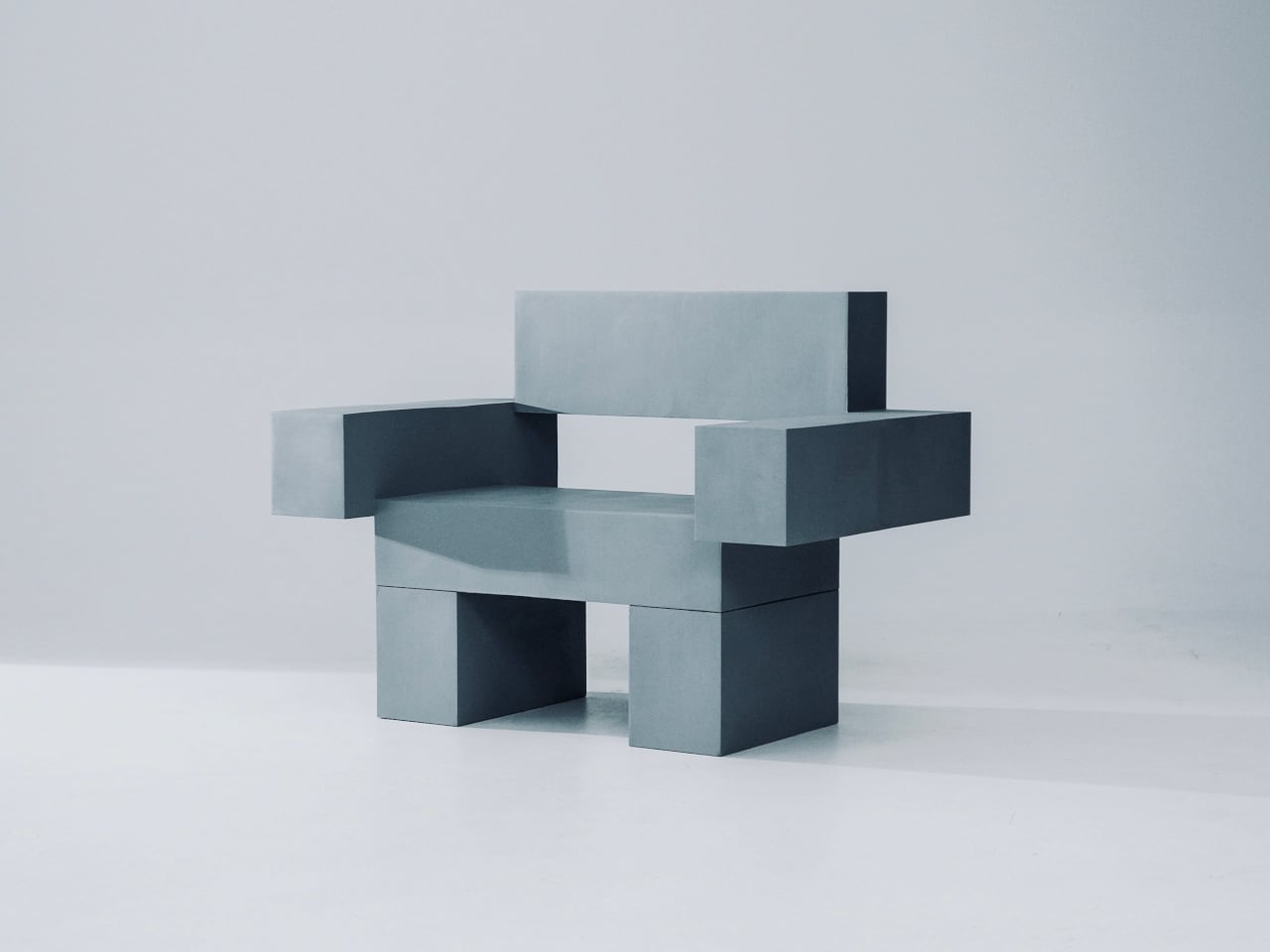
Most furniture sits in a room without saying much. It fills a corner, does its job, and disappears into the background. Nako Baev’s THE OBJECT 01 is not that kind of furniture. The Amsterdam-based designer set out to build a chair that carries the weight of a spatial statement, something that holds its ground without decoration or apology, and in that specific ambition, the object largely delivers.

THE OBJECT 01 is a 3D-printed lounge chair built from recycled PETG, a plastic more commonly found in water bottles than in furniture workshops. At 20kg, it is lighter than its blocky, slab-heavy proportions suggest, though not exactly something you would reposition on a whim. Its dimensions push it closer in scale to a small architectural fragment than to a typical chair, which is likely the whole point.

Designer: Nako Baev

The construction follows a modular panel system, where each 3D-printed block fits into a sequence designed to cut material waste and keep the overall mass structurally lean. Finished in a cold grey Baev calls “Kyoto Fog,” the chair reads somewhere between concrete and matte stone. In a sparse studio or raw loft, it anchors the space with quiet authority. In a more conventional living room, it would likely dominate in ways not every household would welcome.

What makes THE OBJECT 01 genuinely worth attention is how honestly it exposes its own making. The layer-by-layer texture from the printing process is not hidden or smoothed away; it stays visible across the surface, turning the manufacturing method into part of the visual language. That kind of material honesty is far more common in ceramics or cast concrete than in plastic furniture, and it gives the piece a tactile quality that polished renders simply do not convey.

Baev describes the design as sitting between furniture and sculpture, drawing on minimalist brutalism and a quieter Japanese restraint in equal measure. The emotional reference points are more unusual: the designer cites the atmosphere of Silent Hill and Half-Life, those game environments built from silence and abandoned space, as part of what shaped the object’s mood.

The workflow involved AI assistance across early form studies, structural testing, and design refinement, reducing development time considerably. That footnote is becoming standard across the industry, and it doesn’t add or subtract much here. This process might even become the key to sustainable furniture design, as it can help optimize 3D printing, increase efficiency, and reduce waste in the long run.

The post This Brutalist Lounge Chair Is 3D-Printed From Recycled Water Bottles first appeared on Yanko Design.

Airstream Atlas 25RT redefines the classic two-person motorhome

Par : Gaurav Sood
13 mars 2026 à 15:20

Airstream is synonymous with quality. And when that quality meets Mercedes-Benz performance and substance, you get an interesting, adventure-ready motorhome called the Atlas 25RT. From how Airstream puts it – and the photos suggest – this is a luxury-packed touring coach with sophisticated interiors that you would want for a comfortable adventure, whether it’s for a night out or an extended weekend under the stars.

Within the spacious confines of the Airstream Atlas 25RT, you have a convenient layout that supports living, cooking, cleaning, and resting with equal ease. While the space outside, whether under the awning (add-on) or the cavity in the body comprising a pass-through garage, you have ample opportunity to carry gear and live a life outside of the coach.

Designer: Airstream

Atlas 25RT has a sleek, not the most symbolic of an Airstream, but pretty refined in Merc style, while the interior is refined and configured with “best in-class craftsmanship,” the company’s website notes. The interior is nicely configured with a functional living space, a spacious sleeping area furnished with a twin bed, and a separate toilet and wet bath, all designed to elevate living within the Class B+ motorhome.

The Atlas 25RT measures 25 feet in length and has two driver and passenger seats. The facility is designed to sleep two people only and Airstream has chosen to provide the motorhome in a solitary floor plan only. And this is a straightforward but efficient floor plan. You enter first into the galley that is provided with storage cabinetry and upscale to modern luxury requirements. Amber Ridge Décor adds warmth, and the use of palette and premium materials elevates the interior.

The craftsmanship here is notable, especially the way the seating and kitchen spaces are designed. For instance, the induction cooktop can be stored in a drawer when not in use to clear up the surface for maybe working or chit-chatting with a partner over a glass of wine. Interesting sight here is a Garmin multiplex system, which is a central system to control lighting, climate, and other functions of the travel coach. For the audiophiles, Airstream is providing a JBL stereo combined with four speakers and a subwoofer onboard.

Another interesting part of the Atlas 25RT is the split dry bath. Located between the galley and the bedroom is the space divided into two sections, comprising a shower space and a separate toilet and sink. A standing refrigerator resides next to the shower room. At the rear end of the coach is the twin bed layout with thoughtful storage planned in between the beds and beneath them.

If you want to spend a few days in the wilderness with the Airstream Atlas 25RT, you can beef it up with optional 400W rooftop solar panels. The motorhome is pre-wired to take it from there. For the more outdoorsy, Airstream provides a pass-through garage that can be handy for stowing your adventure gear or sporting equipment without much hassle. Atlas 25RT is available at a starting price of $290,000.

The post Airstream Atlas 25RT redefines the classic two-person motorhome first appeared on Yanko Design.

Old Clothes Never Die, They Just Become Flower Pots

Par : Ida Torres
13 mars 2026 à 14:20

Most of us have a box. Or a bag, or a corner of the closet where clothes go to wait for a fate we haven’t quite settled on yet. Not trash, not donation, just quietly pushed aside. The jeans that stopped fitting but once made you feel unstoppable. The sweater that pilled after three washes but somehow survived four more years. Parting with clothes is harder than it sounds, and the fashion industry has largely treated that emotional gap as a non-problem.

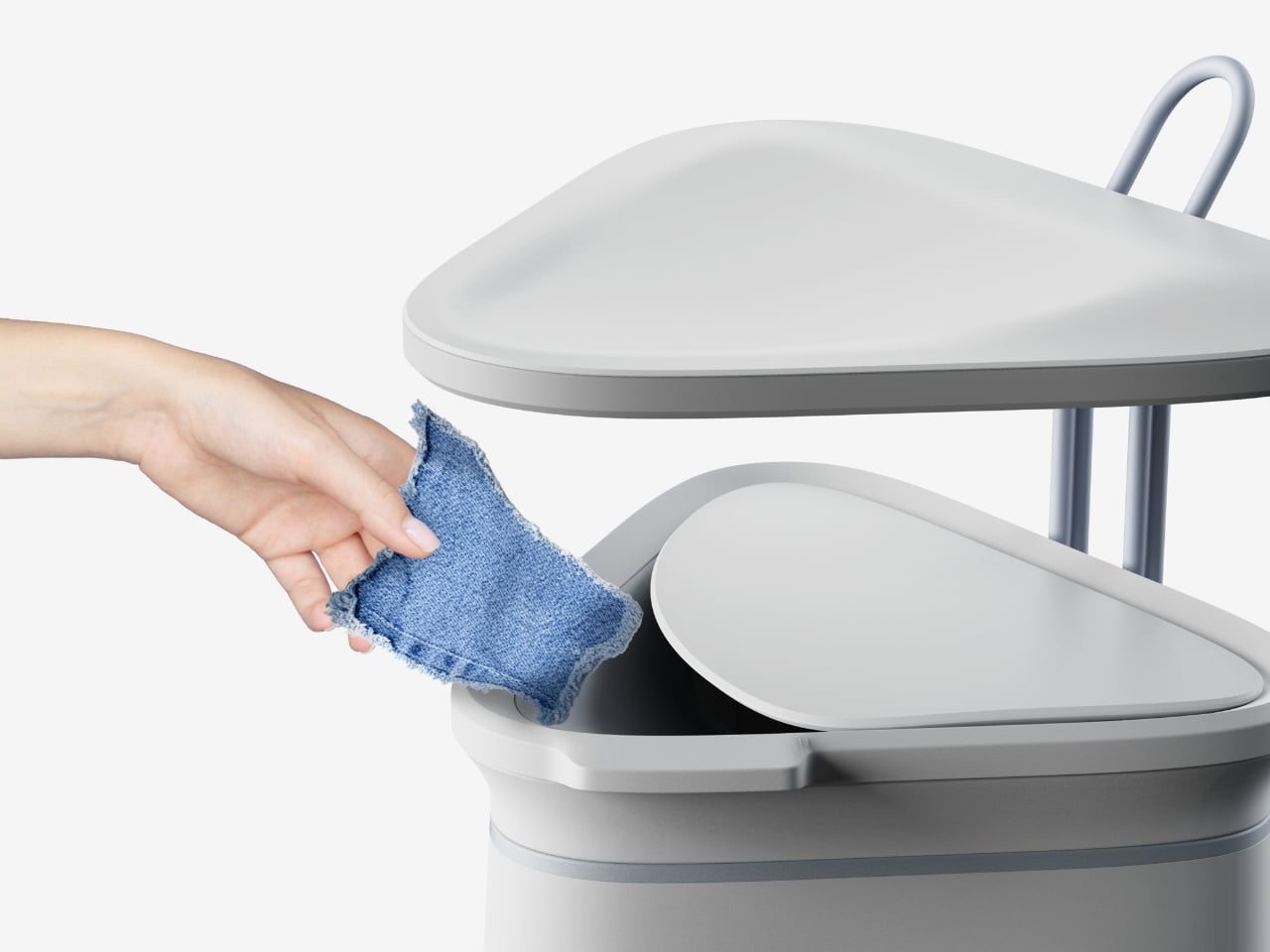
ByBye, a concept designed by Gyeong Wook Kim, Sooa Kim, Gayeon Kim, and Mingyeong Shin, disagrees with that approach in the most literal way possible. It’s a countertop-sized machine that takes your worn and discarded garments and transforms them, through a process of grinding, compression, and heat, into flower pots. Real, usable, actually beautiful flower pots.

Designers: Gyeong Wook Kim, Sooa Kim, Gayeon Kim, Mingyeong Shin

Create your own Aesthetic Render: Download KeyShot Studio Right Now!

I want to sit with that idea for a second, because it’s a genuinely clever reframe of the problem. The designers describe ByBye not as a disposal system but as a “system of reform.” That language matters. When we throw clothes away, the garments disappear. When we donate, we hand off the moral weight to someone else. But ByBye asks you to stay present for the transformation and gives you something physical to show for it.

The mechanics are straightforward but impressively considered. You feed garments into the top opening, which uses a sliding rail mechanism to regulate input and automatically closes once the designated weight is reached. Inside, a shredder breaks the fabric down into fine particles. Those particles are then fed into a flower pot mold, compressed by a pressing plate, and hardened through high-temperature treatment. The finished pots rise up from the molding mechanism. The whole process takes about ten minutes per piece, and a companion app tracks fabric weight, the number of pots produced, and total production time.

What comes out of the machine is genuinely surprising. The pots carry a terrazzo-like texture from the mixed fibers, soft and speckled in muted blues, pinks, and greens depending on the fabric input. They look like something you’d find at a design fair, not something born from a pile of worn-out t-shirts. That aesthetic outcome feels important to the whole concept. If the result were dull or utilitarian, the emotional payoff wouldn’t land. Instead, you end up with an object that holds some trace of the original garment, and then holds a plant on top of that.

The project raises questions I keep turning over. Can the machine handle all fabric types, including synthetic blends that behave very differently under heat and compression? What’s the upper limit on pot durability when working with processed textiles? These feel like the natural next steps for a concept this promising, and I genuinely hope the team is pushing toward them.

What ByBye gets absolutely right is the emotional architecture of the experience. The name alone, a gentle play on “bye bye” and “by” as in made by, signals that this isn’t designed to make you feel guilty about your wardrobe. The copy throughout the project, “Hello? Nice to Wear You,” “Let Your Clothes Begin Again,” reads more like an invitation than an environmental lecture. That tone is rare in sustainable design, which has a tendency to lead with shame rather than possibility.

The designers put it plainly in their project statement: “Not a system of disposal, but a system of reform where clothing is seen again, and made anew.” That’s a design philosophy worth paying attention to. Fashion produces staggering amounts of textile waste every year, and while no home appliance is going to fix that alone, concepts like ByBye shift the conversation in a useful direction. They make the ending feel less like a loss and more like a beginning. Parting with clothes is still going to feel like something. But now it might feel like planting something too.

The post Old Clothes Never Die, They Just Become Flower Pots first appeared on Yanko Design.

This Foldable DIY Cyberdeck Has Breadboards Built In and Runs Doom

Par : JC Torres
13 mars 2026 à 13:20

Most portable computers are sealed boxes, which is exactly what makes them frustrating for anyone who wants to experiment with electronics. You can run code on a laptop, but try wiring a temperature sensor or an infrared transmitter directly to it, and you’ll realize that consumer hardware was never designed for that kind of access. A maker who goes by PickentCode got tired of that gap and built something to close it.

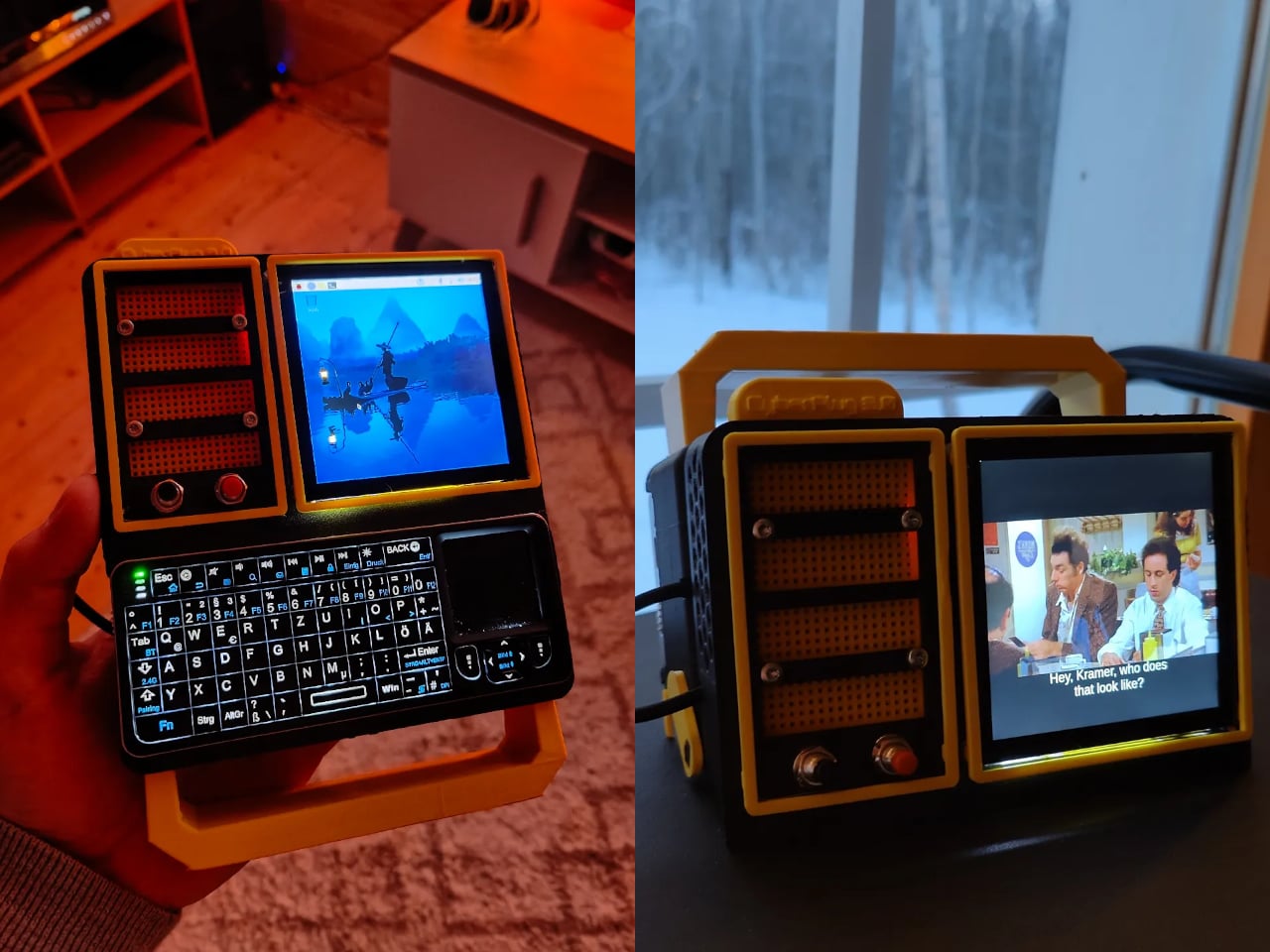
The CyberPlug 3.0 is the third iteration of a personal cyberdeck project, the earlier two having usability problems that sent PickentCode back to Blender to redesign. The final build packs a Raspberry Pi 4 Model B, a 4-inch IPS touchscreen, a Rii K06 mini keyboard with a built-in touchpad, and a 5,000 mAh USB-C power bank into a 3D-printed hinged body that folds flat for handheld use or props open at a desk-friendly angle.

Designer: PickentCode

What separates this from a standard Raspberry Pi build is the pair of breadboards soldered directly to the GPIO pins, seated inside the case, and accessible through a removable back panel. Connecting a sensor no longer means hunting for a separate breadboard and a tangle of jumper wires. PickentCode plugged in a temperature and humidity sensor and had it reading live data within minutes, then built an infrared setup that records remote control signals and replays them as single-button macros.

The two form factors each have a distinct locking mechanism rather than just flopping into position. In handheld mode, twin magnets pull the two halves together. In desktop mode, a metal ring on the back grabs the MagSafe-style power bank magnetically, holding the whole thing at a stable upright angle. Both the keyboard and the power bank slide out independently, and the deck keeps working on a desk without either of them.

Extensions are where the project gets more interesting. PickentCode added a PWM-controlled external fan that reads CPU temperature and adjusts speed automatically, and a small speaker module that opened the door to YouTube and older games. Doom, Half-Life, and GTA: Vice City all ran on it, better with an external setup in desktop mode, though workable in handheld after some button remapping.

PickentCode frames this plainly as a testbed for learning electronics, not a replacement for a phone or a real computer. The 3D files are free on Printables, so the main cost is filament, time, and the components. For anyone who has ever stared at a sealed laptop wishing they could just plug something into it, that framing is probably the most relatable thing about it.

The post This Foldable DIY Cyberdeck Has Breadboards Built In and Runs Doom first appeared on Yanko Design.

À partir d’avant-hierFlux principal

Carrying a USB-C Hub and SSD? ADAM elements Hub S Does Both

Par : JC Torres
11 mars 2026 à 01:45

Modern laptops aren’t short on power, but they’re increasingly short on ports. One USB-C port ends up doing everything: charging, video out, storage, and peripherals, while a small pile of adapters accumulates next to the keyboard. The setup works, but it doesn’t look like the clean, minimal desk you were going for, and it means carrying more pieces than you’d like when you’re working somewhere that isn’t home.

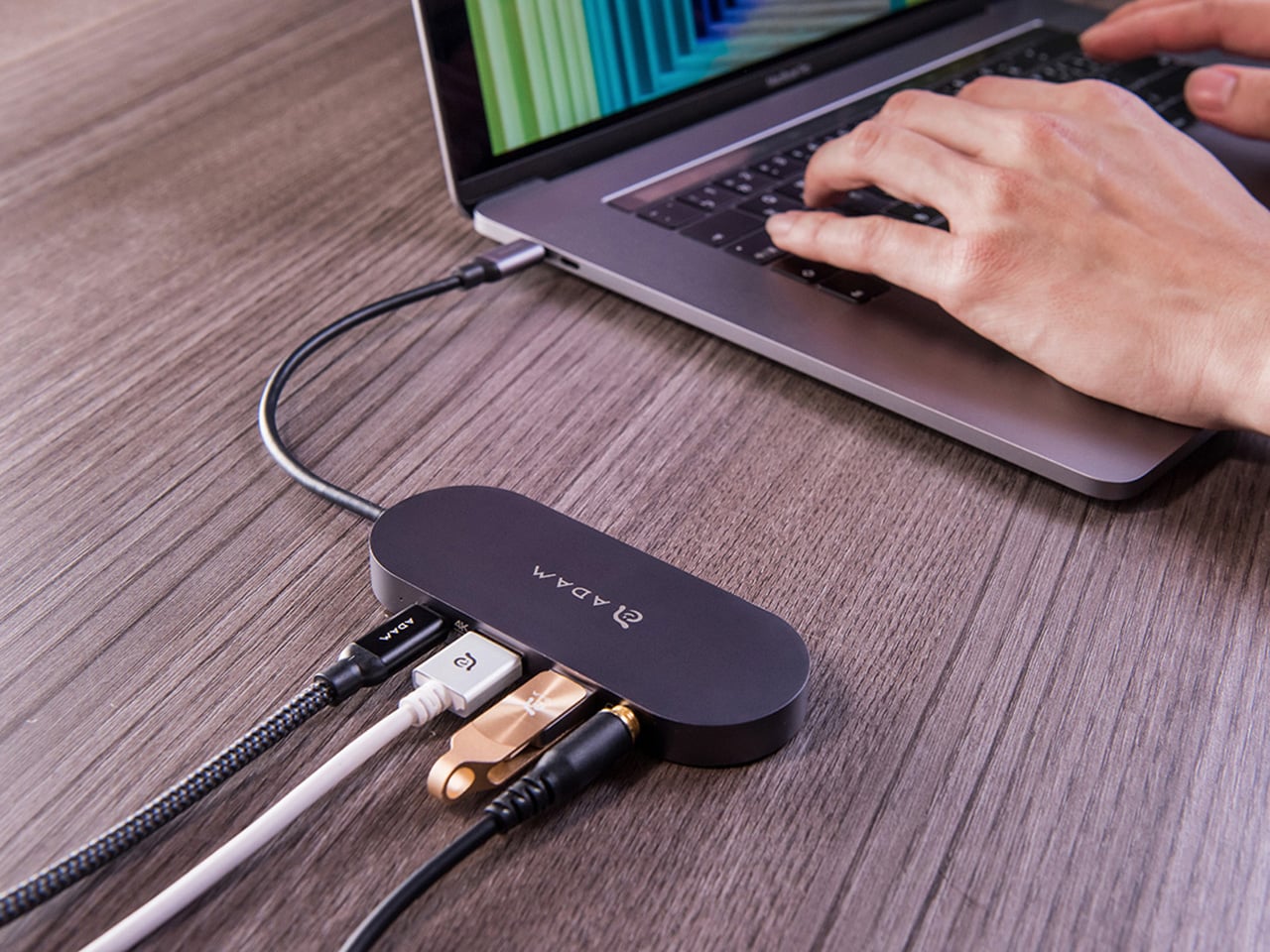
ADAM elements’ Hub S is a USB-C hub with built-in SSD storage, designed around the idea that a hub and an external drive don’t need to be two separate objects. Instead of plugging in one thing for ports and another for files, you plug in one slim aluminum accessory that handles both. It isn’t trying to replace a full docking station, but it’s the right-sized tool for someone who needs the essentials covered without the clutter.

Designer: ADAM elements

Click Here to Buy Now: $69.30 $99 (30% off, use coupon code “30YANKOHBSN”). Hurry, deal ends in 48-hours!

The built-in SSD is available in 240 GB, 480 GB, and 960 GB capacities, so there’s a size for whether you’re keeping a working project library or just enough space for recent shoots and backups. Having storage physically attached to your hub means it’s always there when you need to dump footage, move large project files, or keep a client’s assets close during a session, without remembering to pack a separate drive.

Transfer speeds are rated at up to 520 MB/s read and 456 MB/s write, which makes moving large files feel routine rather than something you schedule around. That kind of speed isn’t just a spec, though. It’s the difference between waiting through a transfer and forgetting it’s happening. For photographers and video editors working on the road, that matters more than it sounds on a product page.

For Mac users, the ADAM elements Hub S is also Apple Time Machine compatible. That means it can act as a rolling backup target every time you plug in, turning a habit that’s easy to forget into something that happens automatically. Backup isn’t exciting, but having it built into the same accessory you’re already using for everything else makes it feel less like a separate job.

The USB-C port on the hub supports PD 3.0 pass-through charging up to 60W, so your laptop doesn’t lose its charge while the hub is handling storage, display, and peripherals. That’s a meaningful consideration when you’re transferring large files and streaming to an external display at the same time, both of which can pull enough power to make a laptop feel like it’s running a sprint.

The HDMI port outputs up to 4K at 30Hz and supports HDCP 2.2, which is the protocol required for streaming 4K HDR content from services like Netflix. A lot of hubs advertise “4K output” but fail on DRM handshakes, so the HDCP 2.2 compliance isn’t a minor footnote. Whether you’re mirroring for a presentation or extending to a monitor for a proper editing session, the connection holds up where it matters.

Rounding out the port selection is a USB-A 3.1 port rated at up to 5 Gbps for peripherals or flash drives, and a 3.5mm headphone jack that supports 48kHz/16-bit audio. Neither is glamorous, but together they cover the inputs that would otherwise require yet another adapter. The aluminum alloy body is designed to sit flush on a desk surface, and the whole thing weighs about 2.5oz, roughly the weight of a single C battery.

The ADAM elements Hub S works best as the kind of accessory you stop thinking about. You plug it in, your files are there, your display is connected, your laptop is charging, and your headphones are plugged in. That’s it. For people who’d rather carry one considered piece of hardware than a small collection of adapters and drives, consolidating all of that into a single slim object that fits in a jacket pocket feels like the more sensible way to work.

Click Here to Buy Now: $69.30 $99 (30% off, use coupon code “30YANKOHBSN”). Hurry, deal ends in 48-hours!

The post Carrying a USB-C Hub and SSD? ADAM elements Hub S Does Both first appeared on Yanko Design.

Nintendo Patented a Dual-Screen Switch and Never Made It. Here’s What It Looked Like.

Par : Sarang Sheth
10 mars 2026 à 20:45

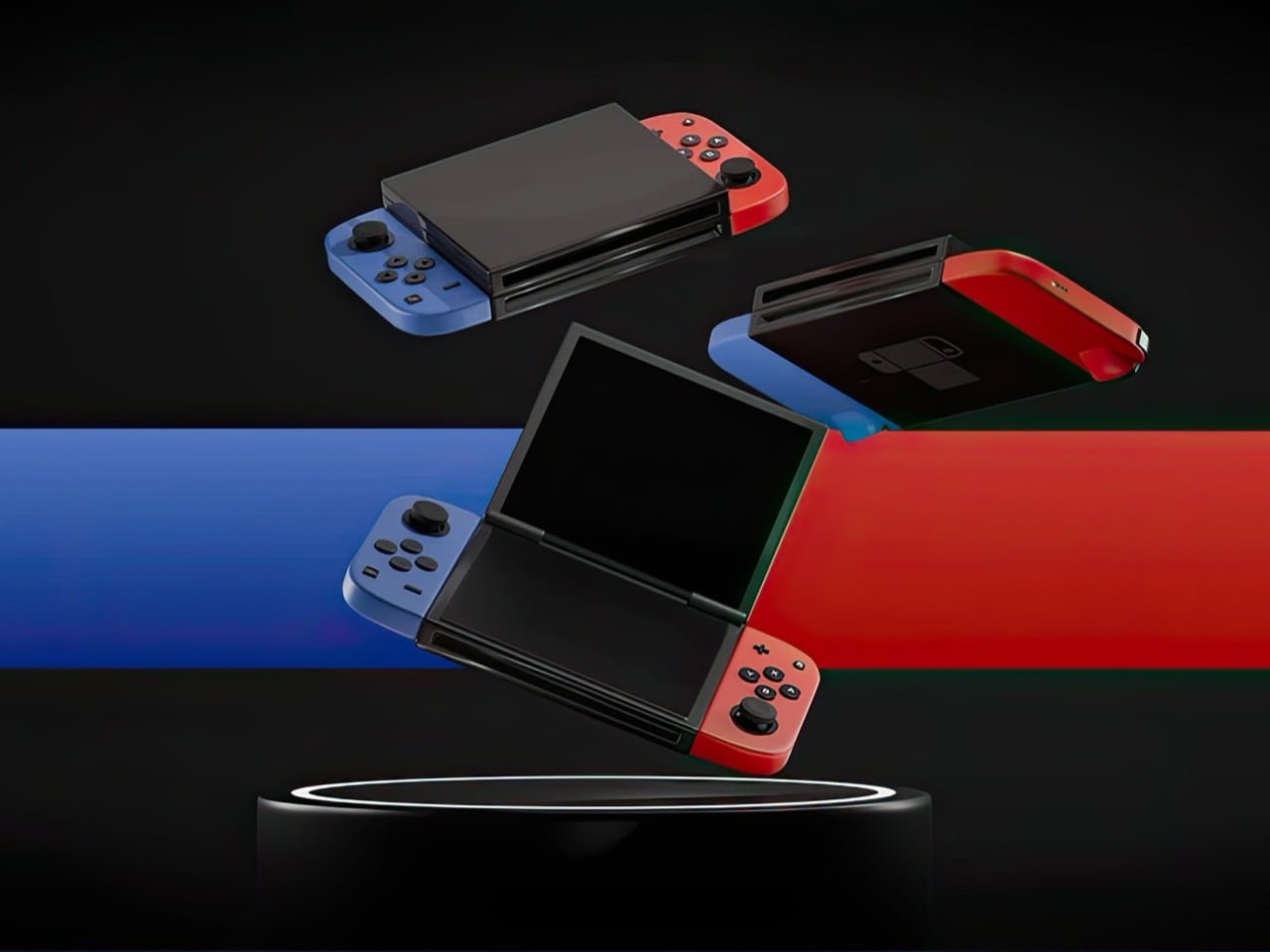
Nintendo had a choice when designing the Switch 2. They could iterate on the formula that made the original a cultural phenomenon, refining the single-screen hybrid into a faster, sharper, better version of itself. Or they could reach back into their own history, pull out the design philosophy that once made the DS family the best-selling handheld hardware line of all time, and merge two eras of thinking into something genuinely new. They picked the first path. Designer Juan Manuel Guerrero just sketched out the second.

The concept arrives as a series of beautifully lit 3D renders: a folding Nintendo Switch with dual screens, a hinge running through the center of the body, and Joy-Cons in the familiar blue-red split attached to either end. The renders carry the finish of product photography, which makes it genuinely easy to forget this never shipped. Closed, it looks like a sleek, pocket-ready device with a tighter footprint than the original Switch. Open, it recalls something older and warmer, the quiet satisfaction of flipping a DS open on a long car ride, except now the screens are large, the controllers are proper, and the whole thing feels built for today. The proportions are deliberate, the design choices are considered, and the whole thing wears its Nintendo identity without apology.

Designer: Juan Manuel Guerrero

The Nintendo DS sat at 154.02 million lifetime units for years, the gold standard for Nintendo hardware, until the Switch finally crept past it in early 2026 with 155.37 million. Two hardware generations, both cultural touchstones, separated by fewer than two million units across a combined history of roughly three decades. The closeness of that race matters. The DS built those numbers on a genuine design idea, a spatial logic where two screens gave developers room for two distinct kinds of information at once, and players responded to that for fifteen years. Guerrero’s concept asks whether the Switch era ever had to leave that behind.

Phantom Hourglass let you draw on the bottom screen to annotate your own maps and solve puzzles, an idea original enough to win awards at the time. Pokemon Diamond and Pearl split the party menu from the battlefield, giving battles a spatial clarity the GBA never had room for. GTA: Chinatown Wars ran the full city map on the lower display and handed the top panel entirely to the action. These were designs built entirely around the format, dependent on the split in a way that made them fall apart on a single screen. That vocabulary has been sitting idle for the better part of a decade.

Samsung’s Galaxy Z Fold 6 runs a 7.6-inch interior display and represents the sixth generation of the company working foldable hardware into something genuinely reliable. Motorola, OnePlus, Google, and Huawei all have competitive entries in the space. Display durability and hinge reliability have been largely solved through successive product generations and real commercial pressure. A dual-screen Switch in 2025 wouldn’t be asking anyone to invent something new; the foldable category has already done the hard engineering work. Guerrero’s concept asks someone to point that already-mature technology at a gaming audience.

The DS touchscreen read as a toy gimmick in 2004. The Wii’s motion controls got laughed at before that console sold 101 million units. The Switch itself looked like a confused category play until it climbed past 155 million units and became Nintendo’s best-selling platform ever. That history of moves that look sideways before they land is the context Guerrero’s concept actually lives in. The foldable technology exists, the Joy-Con design language holds across both halves of the fold, and the IP is coherent. Someone drew it. Now it’s genuinely difficult to look at the Switch 2 without wondering what the other path could have looked like.

The post Nintendo Patented a Dual-Screen Switch and Never Made It. Here’s What It Looked Like. first appeared on Yanko Design.

Rokid’s Smart Glasses Let You Pick Your AI: Gemini or ChatGPT

Par : JC Torres
10 mars 2026 à 19:15

Most wearable tech that puts an AI assistant in your ear assumes you want only theirs. The earpiece, the speaker, the entire software stack, all funneled through one model chosen for you before you even open the box. Rokid’s latest update to the AI Glasses Style takes a different position entirely, turning the glasses into what is effectively an open platform where you pick the brain behind the voice.

The update makes the Style the first smart glasses to natively support Google’s Gemini, sitting alongside OpenAI’s ChatGPT, DeepSeek, and Alibaba’s Qwen in a unified interface. Users toggle between them freely, which means reaching for Gemini for a quick Google Maps query and switching to ChatGPT for something else entirely is up to you.

Designer: Rokid

The glasses themselves debuted at CES 2026 in January, and the hardware makes a reasonable case for the category. At 38.5 grams, with a TR90 frame and titanium alloy hinges, they sit closer to a regular pair of prescription glasses than anything resembling a prototype. The frame takes prescription lenses directly, with a fitting service starting at $79, including photochromic options in over 200 colors that darken within 25 seconds.

Powering the AI and imaging workload is a dual-chip setup: an NXP RT600 handles always-on, low-power tasks, while a Qualcomm AR1 manages heavier processing. The same Qualcomm chip is in Meta’s Ray-Ban glasses, though the battery life here runs to 12 hours, noticeably longer than Meta’s. A 12MP Sony-sensor camera sits at the bridge, capturing 4K stills and 3K 30fps video with up to 10 minutes of continuous recording. A privacy indicator light signals to people nearby when the camera is active.

Audio comes through directional AAC speakers built into the temples, focused toward the ears with minimal bleed. The AI interaction itself works through a two-finger tap to summon any of the four models, head gestures for call management, and voice prompts in 12 supported languages. Real-time translation, navigation, photo recognition, and AI-generated meeting summaries are all part of the feature set, fed through whichever model the user has selected.

For anyone already oriented around a specific AI assistant, the practical appeal is straightforward. Someone in Google’s ecosystem gets Gemini in their glasses without compromise; someone who prefers ChatGPT for writing picks that instead. At $299 to start, with a lens fitting service folding in prescription and photochromic options, the Style has cleared 15,000 units sold ahead of its formal global rollout, which is a reasonable early signal for a category still working out what it wants to be.

The post Rokid’s Smart Glasses Let You Pick Your AI: Gemini or ChatGPT first appeared on Yanko Design.

7 Retro Handhelds So Good They Actually Beat Consoles

Par : JC Torres
10 mars 2026 à 17:20

At some point in the last couple of years, something quietly shifted in the gaming world. Not in the blockbuster, billion-dollar-franchise sense, but in the more personal, “why am I actually having more fun with this tiny device than my main console” sense. Search interest in retro gaming handhelds jumped 400% year-over-year, hitting 90,500 monthly searches in January 2026 alone. That’s not a blip. That’s people rediscovering something they forgot they wanted, and then telling everyone they know about it.

What’s driving it isn’t hard to understand. Modern gaming has gotten heavy, with big installs, long tutorials, and games that feel like part-time jobs. A retro handheld sidesteps all of that. You pick it up, you’re playing something in thirty seconds, and it fits in your jacket pocket. The designs themselves have become worth caring about, too, from machined aluminum bodies to translucent clamshells to square screens that look like props from a ’90s anime. These aren’t budget toys. Some of them are genuinely beautiful objects that happen to play games. Here are seven that are worth your attention.

Anbernic RG Cube: The one with the square screen that somehow works

The first thing you notice about the RG Cube is the screen shape, a perfect square, and your brain immediately goes: that can’t be right. Gaming moved to widescreen fifteen years ago. A 1:1 display in 2024 looks like a design mistake, or at best a gimmick. It is neither. The 3.95-inch IPS panel at 720×720 turns out to be native to more retro games than you’d expect, with Game Boy, arcade titles, and Nintendo DS with dual-screen stacking all living here without compromise.

Designer: Anbernic

The broader package is hard to argue with. An octa-core Unisoc T820 processor and 8GB of RAM run Android 13, with emulator support up through PS2 and GameCube, though more demanding titles on those systems will push its limits. The asymmetric thumbstick layout borrows from the Steam Deck playbook, and the Saturn-inspired D-pad is precise without drama. At around $170, it comes in Beige White, Radiant Purple, Black, Grey, and the radiant purple has no right looking as good as it does.

What we liked

  • Square 1:1 screen is genuinely ideal for Game Boy, arcade, and DS emulation
  • RGB lighting and color options make it a genuinely attractive object

What we disliked

  • Widescreen games require letterboxing or aspect-ratio compromise
  • Demanding PS2 and GameCube titles push the processor to its limits

ModRetro Chromatic: The Game Boy Color that Nintendo never made

There’s a version of this product that could have been embarrassing: a magnesium alloy Game Boy Color clone bundled with a new Tetris cartridge, sold at $199. On paper, it sounds like a premium nostalgia trap. In practice, it’s one of the most carefully considered handheld devices released in years. It’s FPGA-based, meaning it reconstructs the Game Boy hardware at the circuit level rather than emulating it in software, which produces zero input latency and a millisecond-accurate match to original hardware behavior.

Designer: ModRetro

The physical design earns its price in ways spec sheets can’t capture. The curved battery compartment gives your hands something to grip. A physical volume wheel, a detail so obvious it’s shocking how rarely it appears on modern devices, lets you kill the sound without touching a menu. Colors run from Inferno and Bubblegum to a very wearable Wave blue, with English or Japanese button labeling as an option. It plays physical Game Boy and Game Boy Color cartridges only, which is either a dealbreaker or a feature, depending on how you think about focus.

What we liked

  • FPGA hardware delivers true zero input lag, not a software approximation
  • Magnesium alloy shell feels premium and genuinely durable
  • Comes bundled with a new Tetris cartridge

What we disliked

  • Plays only Game Boy and Game Boy Color cartridges, no ROMs or other systems
  • AA battery requirement adds ongoing cost; rechargeable Power Core is sold separately

Analogue Pocket: The one photographers keep picking up

The Analogue Pocket is the device that made the retro handheld conversation respectable. It uses an FPGA rather than software emulation and plays Game Boy, Game Boy Color, and GBA cartridges out of the box. Via cartridge adapters, it adds Game Gear, Neo Geo Pocket Color, Atari Lynx, TurboGrafx-16, PC Engine, and SuperGrafx. Via its microSD slot and the OpenFPGA community platform, it loads cores for nearly every retro system that ever existed. The 3.5-inch LCD at 1600×1440 and 615 ppi is, simply, one of the sharpest displays ever put in a handheld.

Designer: Analogue

At $239, it sits at the premium end of this list, and it’s also frequently out of stock. Firmware updates require a microSD card reader, which feels like friction that shouldn’t exist on a $239 device. TV output needs the separately sold $99 Dock. These aren’t dealbreakers so much as signals that Analogue built this for the dedicated enthusiast first. If you want one device to handle everything in your retro library for the next decade, this is probably it.

What we liked

  • OpenFPGA community support covers an enormous range of retro systems
  • Plays GBA in addition to GB and GBC, plus many more with adapters
  • MicroSD slot enables ROM loading
  • Premium aluminum build with a distinctly modern design language

What we disliked

  • Frequently out of stock; restocks sell out within minutes
  • Firmware updates require an external microSD card reader
  • TV output requires a separately purchased $99 Dock

Retroid Pocket Flip 2: The clamshell that brought the GBA SP back with PS2 power

The GBA SP was the handheld that arguably peaked the clamshell form factor: it folded, it protected its own screen, and it had a backlit display before that was standard. The Retroid Pocket Flip 2 arrives in 2025 with that same closing-hinge energy, but with a 5.5-inch 1080p AMOLED screen, a Snapdragon 865 processor, and enough emulation horsepower to run PlayStation 2, GameCube, and Wii. When closed, it has roughly the same desk footprint as a modern smartphone. Closing the lid puts it to sleep; opening it wakes it up.

Designer: Retroid

Color options include a translucent Ice Blue, GameCube Purple, a two-tone 16-bit US, and Black. Retroid clearly understands its audience. The AMOLED panel brings deep blacks and accurate color to games designed for CRTs, and the results are often striking for titles you’ve played a hundred times. At $229 for the Snapdragon variant, there is no meaningful clamshell competitor at this performance level. One persistent note from extended use: the form factor rewards shorter sessions more than marathon ones, which is maybe appropriate for a device meant to live in a bag pocket.

What we liked

  • 5.5-inch AMOLED at 1080p is impressive for the price
  • Handles PS2, GameCube, Wii, and Dreamcast emulation
  • Translucent Ice Blue colorway is a design highlight

What we disliked

  • Thicker than it looks in product photos
  • Extended sessions can feel less comfortable than flat handhelds

AYANEO Pocket Micro Classic: The one that fits in an actual pocket

The Game Boy Micro launched in 2005 as Nintendo’s most polarizing hardware decision. It was tiny, it was beautiful, it only played GBA games, and it was discontinued within a year. Design historians were kinder to it than the market was. The AYANEO Pocket Micro Classic is clearly in conversation with that history. It removes the analog joysticks, uses a CNC-machined aluminum alloy frame with a seamless all-glass front, and produces something that slides into a front jeans pocket without catching on anything.

Designer: AYANEO

The 3.5-inch borderless IPS display at 960×640 in a 3:2 ratio is built for GBA emulation, with 4x pixel-perfect upscaling. Available in Obsidian Black, Charm Red, Vintage Grey, and Gold, each colorway has a different character. The Gold skips “gaming device” and lands somewhere closer to “considered object.” The MediaTek Helio G99 handles everything up through PS1 confidently. If your retro library is 8-bit and 16-bit with a strong GBA presence, the Pocket Micro Classic is probably the most beautiful way to play it.

What we liked

  • CNC aluminum and all-glass build is genuinely premium for the category
  • No joysticks make it notably slimmer and more pocketable
  • Android 13 with Play Store access expands utility beyond emulation

What we disliked

  • No joysticks limit N64, Dreamcast, and PSP playability

TrimUI Brick Hammer: Budget price, luxury aluminum shell

The original TrimUI Brick arrived in 2024 with an unusually sharp 3.2-inch IPS screen at 1024×768, giving it a pixel density of 405 PPI, a number that belongs on a premium smartphone, not a $55 device. The Brick Hammer edition, launched in 2025, replaces the plastic shell with a full CNC-machined aluminum alloy in Gunmetal Gray, Rose Gold, and Fluorescent Green. The metal shell doubles as a heatsink, dropping operating temperatures noticeably. Three interchangeable shoulder button sets ship in the box.

Designer: TRIMUI

The software runs CrossMix OS on a Linux base: clean, fast, minimal overhead. Load your ROMs, pick a game, and play. Battery life lands around four to six hours. The processor handles Game Boy through PS1 without complaint; N64 gets through most titles; Dreamcast is inconsistent. The CNC backplate can be engraved, which no other device at this price point offers. The Rose Gold aluminum version sitting next to a MacBook on a desk looks less out of place than it has any right to, and that’s a strange and interesting thing to say about a $99 handheld.

What we liked

  • CNC aluminum Hammer shell runs noticeably cooler than the original plastic
  • Swappable shoulder buttons and engravable backplate are genuinely rare customization options
  • Rose Gold and Gunmetal colorways punch well above the budget tier

What we disliked

  • No analog joysticks, which limits 3D game compatibility
  • Dreamcast and demanding N64 titles run inconsistently

Miyoo Mini Plus (and Mini Flip): The one that started the whole obsession

If there’s a single device responsible for bringing this category to mainstream attention, the Miyoo Mini Plus is probably it. It weighs 200 grams, fits in a jeans pocket, has a 3.5-inch IPS screen at 640×480, and runs OnionOS, a community-built firmware that turns a modest Cortex-A7 processor into a near-perfect front end for everything from the NES to the original PlayStation. The interface is clean, the emulator library covers over a hundred platforms, and save states work the way save states should.

Designer: Miyoo

The Miyoo Mini Flip takes the same hardware and wraps it in a GBA SP-style clamshell, adding screen protection and an extra wave of nostalgia. Early production runs had hinge concerns, though those appear to have been addressed in more recent batches. At $69-99, this is the gateway to the category that doesn’t feel like a compromise. The honest question isn’t whether this device is worth the money, since it clearly is. It’s whether starting here will satisfy the itch, or simply make you want to own the other six devices on this list as well.

What we liked

  • Genuinely pocketable at 200g, fits in a jeans pocket without bulk
  • Covers NES through PS1 with confident performance
  • Mini Flip clamshell adds nostalgic GBA SP energy and screen protection

What we disliked

  • Not powerful enough for N64, Dreamcast, or PS2
  • 640×480 screen resolution shows its age

The post 7 Retro Handhelds So Good They Actually Beat Consoles first appeared on Yanko Design.

This Circular Shelf Solved the Rental Damage Problem in 30 Seconds

Par : JC Torres
10 mars 2026 à 16:20

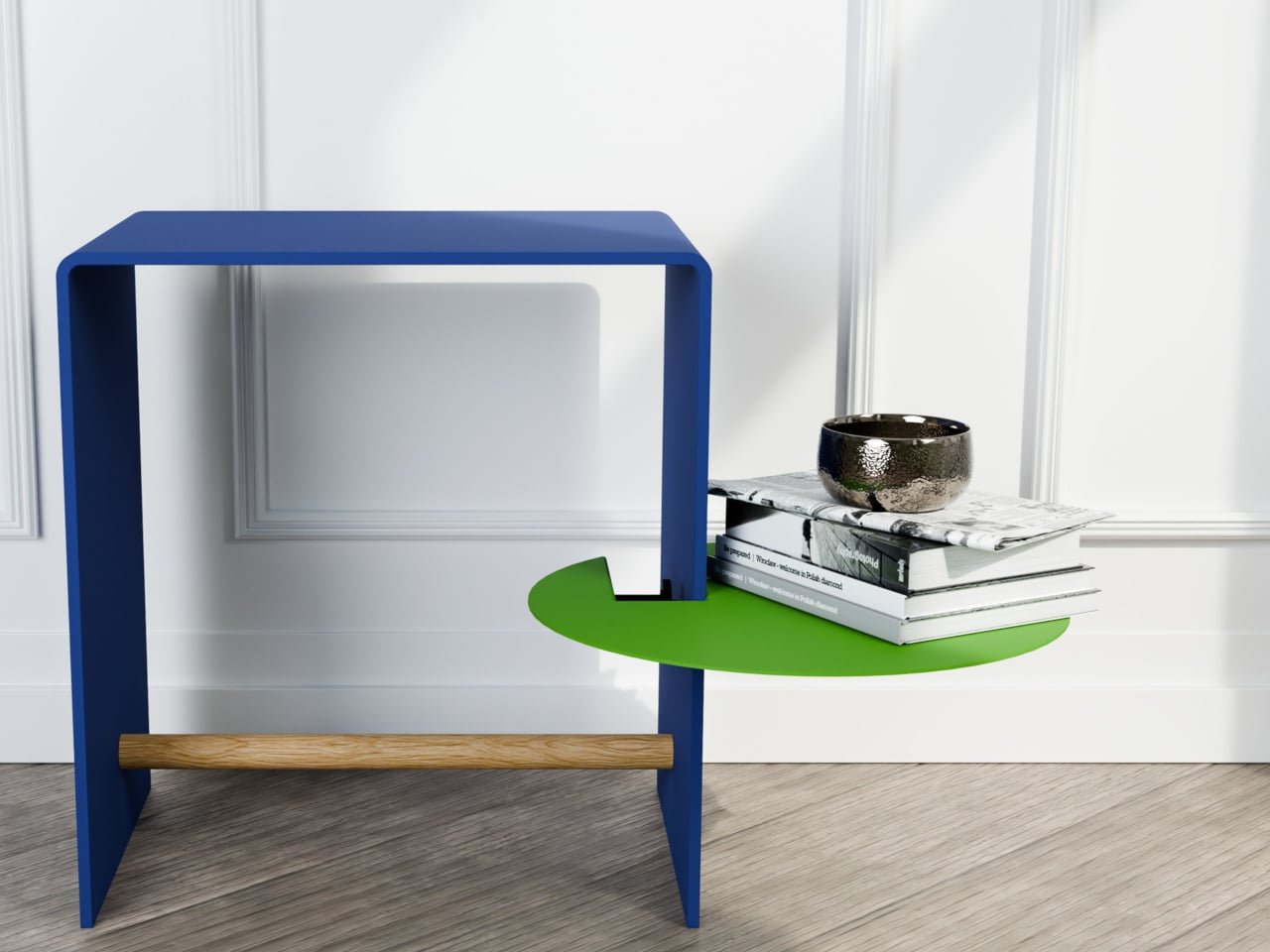
Most shelving solutions ask you to commit before you can even start. Drill a hole here, anchor a bracket there, then live with the consequences if you change your mind six months later. The TAB, designed by Berlin-based architect Michael Hilgers for housewares brand Purstahl, takes a different approach entirely. It clamps onto any vertical panel up to 38mm thick, no drilling, no damage, and releases just as easily when you want to move it.

The form itself is the most unexpected part. Where most clip-on accessories default to a rectangle, the TAB is a circle, a 30cm disc of 2mm aluminum with a fine-textured powder coating. That’s a small but meaningful choice; a circular shelf sitting against the side of a bookcase or cabinet reads more like a deliberate design detail than a functional add-on. It comes in two versions, TAB_left and TAB_right, which simply determine which direction the shelf extends from the clamp.

Designer: Michael Hilgers for Purstahl

The thinness of the aluminum is doing more work than it looks like. At 2mm, the shelf sits flush and close to the panel face rather than jutting out awkwardly, which matters in tighter rooms. The powder coating adds color without bulk, and Purstahl offers enough options to match or contrast with the furniture underneath. That flexibility is part of the appeal: the TAB can read as an accent piece or disappear into the background, depending on the color you pick.

What makes it genuinely interesting is how widely the word “panel” applies. Hilgers frames his approach as “pragmatic design,” meaning objects that work with what already exists rather than replacing it. The TAB clamps onto a bookshelf side, the edge of a wardrobe, a balcony railing, a freestanding room divider, anywhere a flat vertical surface falls within that 38mm thickness range. That’s a broader set of possibilities than a 30cm disc might initially suggest.

The one thing Purstahl doesn’t mention is a maximum load rating, which is a fair thing to wonder about at €79 per unit. A small plant, a few magazines, or an espresso cup are probably fine. A heavy ceramic pot or a stack of hardcovers is a less certain proposition, and it would help to know the limits before buying. The screw clamp mechanism does allow for repositioning, so there’s room to adjust if the shelf shifts under load.

Hilgers has built a consistent body of work around the idea that existing furniture doesn’t need replacing, only rethinking. The TAB fits neatly into that logic. It’s a small, unhurried intervention in a room you already have, and the more interesting question is less about whether it works and more about how many panels around your home you’d actually want to put it on once you start looking at them differently.

The post This Circular Shelf Solved the Rental Damage Problem in 30 Seconds first appeared on Yanko Design.

This titanium ‘Spork’ multitool packs 6 functions in a single unibody design

Par : Gaurav Sood
10 mars 2026 à 15:20

Daily utility meets design in EDC multitools. And here at Yanko Design, we have this knack for recognizing the best tools for you, which would provide advanced features and excellent value when you need them. In the market flooded with multitools that are designed to fold and twist, Prometheus Design Werx has surprised the demanding with the stunning idea of the SPD Ti-Spork Chop – a multitool in its own unibody design.

While multitools that fold and feature pull-out accessories from the body are a common sight, it is unusual for a multitool to arrive in a one-piece design with construction that’s durable enough to withstand whatever you can throw at it. Looking at the Ti-Spork Chop, you can instantly count it out as a viable pocket tool, but spare a thought and read further before you arrive at a conclusion.

Designer: Prometheus Design Werx

The look of the Ti-Spork Chop is self-explanatory of what the design entails. But the first thing that can disturb many is how to fit that EDC into the pocket. To ensure that it is possible and effortless, the one-piece multitool features a pocket clip to hold it in place inside the pocket. And when you’re unsure of having it in the pocket, the tool’s lanyard hole makes carrying it worry-free. The look may not obviously suggest, but this tool has six built-in functions.

It obviously starts with the combination of a spoon and fork in the front, which clearly wins it the word ‘Spork’ (combination of spoon and fork) in its name. Besides, making it a valuable EDC for casual campers and serious adventurers are features like the bottle opener, box/can opener, and a prybar. Of course, the pocket clip on one side and the lanyard in the middle are other notable options that make the tool even more handy.

Describing various scenarios in which the multitool can be used, the company notes, “Whether you’re shoveling canned peaches, stirring your precious hot cup of instant coffee with powdered creamer in some remote, dangerous corner of the world, or opening a bottle of Jarritos, our Ti-Spork Chop has got you covered.” It’s “A titanium spork to rule them all…” the company website reads.

All these tools are packed on a Ti-Spork Chop that’s milled from a single piece of 6AL-4V grade-5 titanium. The construction makes it highly durable and exceptionally resistant to corrosion. The design, as opposed to that of other folding multitools, ensures that it is easy to clean. Weighing roughly 30g and measuring about 4.72 inches long, the lightweight but incredibly robust Prometheus Design Werx multitool is available on the company website for only $79.

The post This titanium ‘Spork’ multitool packs 6 functions in a single unibody design first appeared on Yanko Design.

No Balcony Space? This Table Hooks On as a Planter, Bar, or Desk

Par : JC Torres
10 mars 2026 à 14:20

A small city balcony has a way of making every square meter feel personal, just barely. There’s room for a folding chair, maybe a potted plant, and the occasional optimistic thought about al fresco breakfast. What there usually isn’t, though, is any real surface. Designer Michael Hilgers noticed this particular gap, and the balKonzept is his answer: a railing-mounted table that hooks onto the balcony railing with no tools, no hardware, and no permanent commitment.

The form is immediately legible. A wedge-shaped body in recyclable polyethylene curves at the rear into a smooth hook, looping over the railing and gripping it via an adjusting screw underneath. That single mechanical gesture is the entire installation. The raised trough at the back sits above the railing line and acts as a windbreak for objects resting on the work surface below. The unit comes in at 60 cm wide and roughly 40 cm deep on the interior side.

Designer: Michael Hilgers (rephorm)

The material choice is worth pausing on. Polyethylene, produced in a Brandenburg plastics factory through rotational molding, is not a glamorous option. It won’t feel precious the way powder-coated steel does. What it does do is survive outdoor life without complaint: frost-resistant, UV-stable, and recyclable at its end of life. Rotational molding also produces hollow, seamless shells with consistent wall thickness, which matters for something exposed to seasonal temperature extremes.

The table height is a fixed function of whatever railing it’s hanging on; subtract 21 cm from the railing height, and that’s the surface level. That means the balKonzept works very differently on a low French-style balcony versus a taller contemporary glass railing, with no way to adjust it beyond moving the piece. For anyone wanting to sit and work at a comfortable height, the railing geometry will decide the experience before any other consideration does.

Where the design earns its keep is in the planter box. Filling it with soil and roots is one option, but the trough is deep enough to function as an improvised cooler, and Rephorm’s own description cheekily acknowledges this, noting it works just as well with ice cubes and sparkling wine as it does with geraniums. That kind of built-in flexibility is the whole point; the balKonzept doesn’t commit to being one thing, which is probably what a small balcony needs most.

The post No Balcony Space? This Table Hooks On as a Planter, Bar, or Desk first appeared on Yanko Design.

This Hermès x Bialetti Moka Pot Concept Has No Business Looking This Good

Par : Ida Torres
19 février 2026 à 18:20

If you follow concept design on social media, there’s a good chance you’ve already stumbled across Jane Morelli’s work. She’s the designer behind that Lacoste x Bialetti moka pot that went viral not too long ago, and now she’s back with something that somehow manages to feel even more covetable. For the Year of the Horse, she has created a concept coffee set that imagines what a Hermès x Bialetti collaboration could look like, and the result is genuinely breathtaking.

To be clear, this is not a real product. It’s a speculative design concept, an unofficial creative exploration that Morelli put together entirely on her own. Neither Hermès nor Bialetti has signed off on it, and there’s no indication it will ever hit shelves. But that hasn’t stopped the internet from losing its collective mind over it, and once you see it, you’ll understand why.

Designer: Jane Morelli

The concept draws on two things that already go together better than most people realize. Hermès has deep equestrian roots. The brand was originally founded as a harness and saddle workshop, and the horse has been central to its identity ever since. That iconic logo featuring a horse-drawn Duc carriage pays homage to the brand’s equestrian beginnings and still appears on every box and ribbon the brand produces today. So when a designer decides to celebrate the Year of the Horse, Hermès is a natural fit.

Bialetti, meanwhile, has its own kind of cult status. The Moka Express, invented by Alfonso Bialetti in 1933, completely changed how people made coffee at home. That eight-sided stovetop brewer became one of the most recognizable objects in design history, sitting comfortably in the same conversation as the Eames chair or the Anglepoise lamp. It’s Italian, it’s timeless, and it’s on millions of kitchen counters around the world.

Morelli’s concept merges both worlds with a detail-oriented love for both brands that really shows. The moka pot gets the full Hermès treatment: a rich burnt orange body with a cream horse silhouette painted on its side, and a three-dimensional horse figurine standing on top of the lid in place of the usual knob. It’s playful without being loud, sculptural without being impractical. The color palette, that signature Hermès orange paired with warm cream and a cognac brown handle, feels completely at home on a stovetop.

The espresso cup might be the most charming piece of the set. A sculpted horse head forms the top of the handle, with the body flowing down into a ribbed, flowing tail that curves back up to meet the cup. The saucer takes the shape of a horseshoe, with the spoon resting neatly in the groove on one side. Every element has been thought through, which is what sets a great concept apart from a quick render.

The whole set comes presented in a walnut wooden box lined with cream fabric, with “Hermès x Bialetti: Year of the Horse” inscribed on the inside of the lid. Even the packaging looks like something you’d want to display on a shelf rather than throw away. It’s the kind of unboxing experience that luxury brands have mastered, and Morelli has translated that into her concept with impressive accuracy.

What makes this design so compelling is how it sits at the intersection of craft, culture, and storytelling. The Year of the Horse in the Chinese zodiac is associated with energy, freedom, and elegance, all qualities that feel right at home in both the Hermès and Bialetti universes. Morelli didn’t just slap two logos together and call it a day. She built a visual language that feels native to both brands, which is no small feat. It’s a concept, yes. But the best concepts do exactly what this one does: they make you want something that doesn’t exist yet, and they make you wonder why nobody has done it already.

The post This Hermès x Bialetti Moka Pot Concept Has No Business Looking This Good first appeared on Yanko Design.

This Wooden Basket Becomes a Low Table When You Flip It Upside Down

Par : JC Torres
19 février 2026 à 17:20

There’s a familiar moment that happens when you carry food, cups, and random essentials to a park, balcony, or floor seating setup and then realize you still need a stable surface to put any of it on. Most people improvise with a bag or a corner of a blanket. Small-space living and casual gatherings reward objects that can do two jobs without taking up twice the storage, but most furniture is still designed around one fixed purpose.

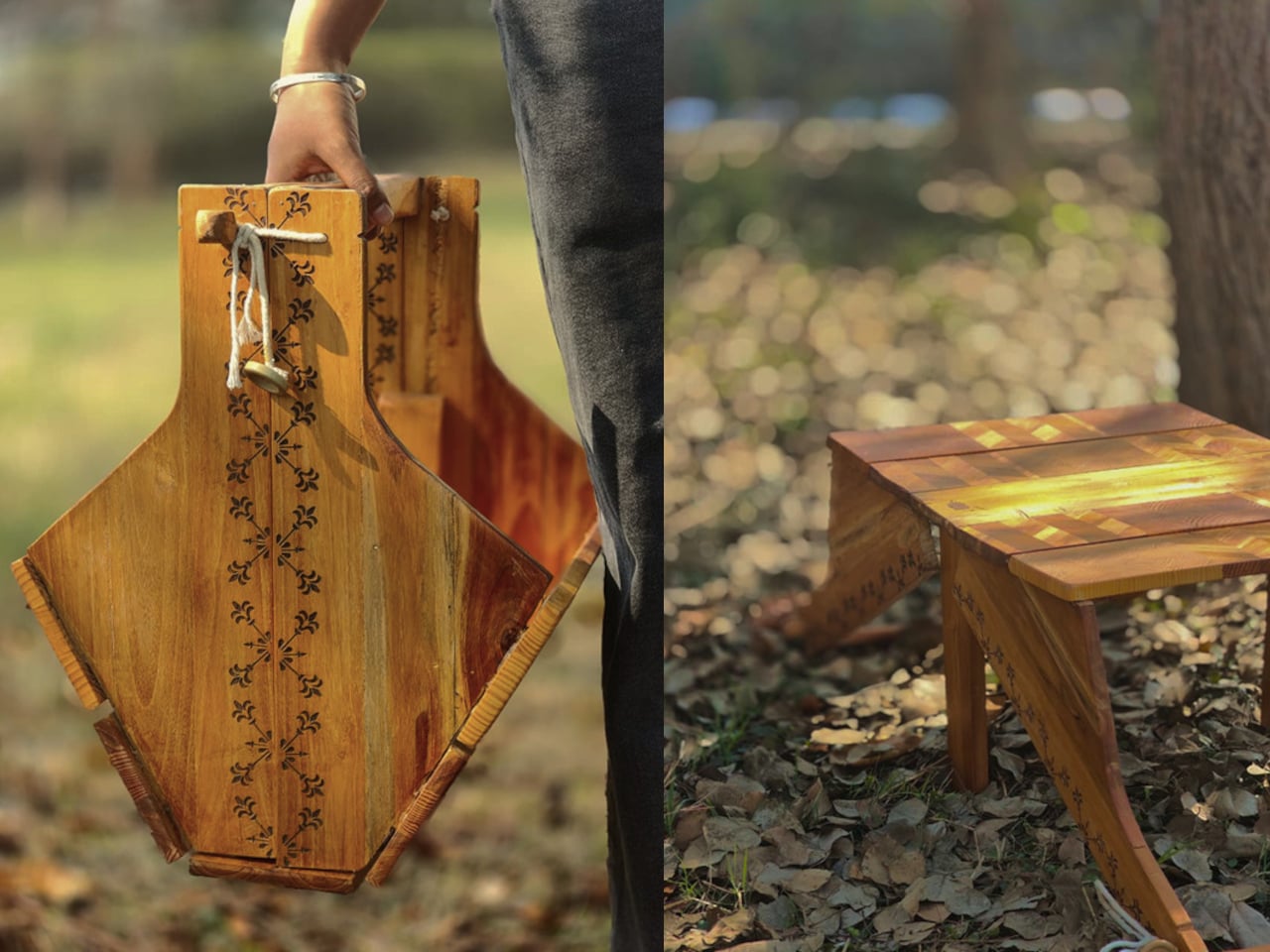
This Convertible Basket Table concept works as both a carry basket and a low table in one form. By simply inverting it, the basket becomes a stable table surface suitable for picnics or casual indoor use. The design combines storage, portability, and easy transformation, making it ideal for relaxed gatherings and compact living spaces.

Designer: Siya Garg

In basket mode, the structured wooden body has a built-in handle and a container that can hold the messy mix of picnic items, fruit, napkins, a book, or a small speaker. The form feels sturdy rather than floppy, carrying like a proper object with a clear handle instead of a tote that collapses when you set it down. That sturdiness is what makes the flip transformation credible. It’s definitely not a soft bag pretending to be furniture.

Once inverted and unfolded, it becomes a low table that works with floor cushions, outdoor blankets, or a casual living room setup. Low tables are the unsung heroes of flexible spaces. They work as coffee tables, game surfaces, or quick work perches, but they’re rarely portable. This one travels in your hand and arrives as a surface, which is a surprisingly underexplored idea.

A square knot side lock keeps the form secure when needed. It’s a rope-based closure that tightens the sides without complicated latches, click mechanisms, or hardware that will eventually strip or break. The whole thing is quiet, tool-free, and easy to replace if the rope wears out, which fits the picnic vibe better than snapping plastic clips would.

The build draws on traditional woodworking throughout. Pattern making involved pine wood in alternating grain directions and a chevron pattern using alternating teak and pine strips. Assembly relies on mortise and tenon joints and sliding mortise and tenon joints to hold the structure together without screws, so the connections are strong enough to handle the repeated flipping and carrying that the concept demands.

The design doesn’t ask you to change how you live, it just quietly accommodates the way you already move through the day. A basket when you’re going somewhere, a table when you arrive, and a warm wooden object that looks like someone actually made it rather than assembled it from a flat pack.

The post This Wooden Basket Becomes a Low Table When You Flip It Upside Down first appeared on Yanko Design.

5 Best Desk Accessories That Turn Your Workspace Into a Minimalist Studio

19 février 2026 à 12:40

Your desk says more about you than you think. It isn’t just a surface—it’s a quiet reflection of how you work, how you think, and how seriously you take the space where ideas are born. The minimalist studio aesthetic isn’t about stripping everything bare; it’s about choosing objects that genuinely earn their place. Every piece should serve a purpose and feel entirely deliberate. A considered desk doesn’t just organize—it inspires.

From gravity-defying pens to waterproof notebooks built to outlast everything you throw at them, the design world is quietly rethinking what it means to be at your desk. This list gathers five accessories that don’t just look good—they change how you work. Whether you’re a freelancer building a mobile studio, a creative professional craving calm, or someone who simply believes tools should match the quality of their thinking, these picks deliver.

1. Levitating Pen 2.0: Cosmic Meteorite Edition

The Levitating Pen 2.0 Cosmic Meteorite Edition isn’t the kind of thing you tuck away in a drawer. Balanced at a precise 23.5-degree angle on a spacecraft-inspired pedestal, it hovers in place as it belongs behind glass—and arguably, it does. Crafted from aircraft-grade aluminum, shaped from a single block of material, it’s as tactile as it is visually appealing. A flick sends it spinning for up to 20 seconds, which sounds like a trick until you realize it genuinely helps you think and refocus between tasks.

What sets this edition apart from any other writing instrument is its tip—a genuine fragment of the Muonionalusta meteorite, one of the oldest ever discovered, predating Earth itself. Writing with it carries a strange, grounding quality that’s difficult to explain until you’ve held it. The premium Schmidt ink cartridge inside delivers a smooth, reliable experience, and the magnetic cap snaps shut with quiet, satisfying precision. The entire object settles into a minimalist desk layout with an authority that only truly considered design can project naturally.

Click Here to Buy Now: $399.00

What We Like

  • The meteorite tip connects the act of writing to a material that predates the planet itself.
  • The spin function delivers genuine cognitive value, supporting creative focus between tasks.

What We Dislike

  • At $399, this is collector territory—a significant ask for everyday stationery.
  • The pedestal demands dedicated desk real estate, which works against ultra-minimal setups.

2. Dynamic Folio

If your iPad has become your primary creative tool, the MOFT Dynamic Folio is the stand it’s been waiting for. Built as a single-piece structure that folds into a workstation, lifting the iPad two full inches off the surface, it shifts posture meaningfully without requiring any complicated setup procedure. What separates it from comparable stands is how smoothly it transitions between modes—one flip moves you from active creation to relaxed viewing without the clunky two-handed repositioning that most alternatives demand of you.

For anyone logging serious hours at a creative desk, neck strain is a quiet but compounding tax on productivity that accumulates gradually across sessions. The Dynamic Folio addresses this directly, reducing neck strain by at least 50 percent in both creation and entertainment positions. The angle adjustment is icon-guided: two circles for a flatter, reclined position and two lines for a steeper working angle. When the session ends, it folds flat and disappears into any bag without resistance. For the mobile creative, this is a quietly essential kit.

What We Like

  • The single-piece structure sets up in one motion with no extra components to manage.
  • A 50 percent reduction in neck strain is an ergonomic improvement that compounds meaningfully over time.

What We Dislike

  • The icon-guided angle system has a short but real learning curve for first-time users.
  • Its value is closely tied to iPad-centric workflows and doesn’t adapt well to mixed-device setups.

3. M NOTE

Sticky notes have a quiet design problem nobody talks about: they curl. The moment a note starts peeling at its corner, the information it holds becomes harder to read and easier to lose, which defeats the entire point of having written it down. M NOTE from Bravestorming solves this with a dual-material approach that combines a magnetic backing with a reusable adhesive layer, keeping notes flat and secure against whiteboards, glass panels, and wooden desks alike. No unfolding, no repositioning—just consistently readable information exactly where you left it.

What makes M NOTE genuinely useful in a minimalist workspace is its adaptability across surface types. On metal, the magnetic backing does the adhesion work entirely. On non-metal surfaces, the reusable adhesive steps in—releasing cleanly, leaving no residue, and repositioning without damaging what it’s applied to. Notes can be written on, cleared, and reused, which cuts the paper waste that most desk setups generate almost invisibly. Bravestorming has taken one of the most throwaway items in any modern office and built something designed to stay indefinitely.

What We Like

  • The dual magnetic and adhesive backing works across metal, glass, and wood surfaces without accommodation.
  • Flat, curl-free notes keep information consistently visible throughout the working day.

What We Dislike

  • Reusable adhesive degrades gradually with heavy, repeated repositioning over time.
  • The magnetic backing only activates on metal surfaces, limiting one of its two core functions.

4. Orbitkey Desk Mat

Most desks don’t have a clutter problem—they have a structure problem. The Orbitkey Desk Mat addresses this with quiet intelligence, creating a defined visual zone that makes the act of organizing feel natural rather than forced. Available in Black and Stone across two sizes, it suits both compact setups and expansive studio tables without demanding that you rethink the whole room around it. The toolbar keeps stationery and small accessories within immediate reach, while the overall layout keeps everything purposeful and within the logic of a genuinely considered workspace.

What makes the Desk Mat more than a surface upgrade is the document hideaway built beneath the top layer. Loose papers, reference notes, and half-finished ideas slide underneath and stay flat, accessible, and out of visual range until you actually need them. It’s an elegant solution to a problem every desk accumulates quietly over time—the slow migration of paper that eventually surrounds the work instead of supporting it. With two colors and two sizes to choose from, the Desk Mat earns its place not just as a design object but as the organizing logic your workspace has been missing.

What We Like

  • The document hideaway keeps loose papers accessible without letting them visually take over the desk.
  • Two sizes and two colorways make it adaptable to almost any workspace scale and aesthetic.

What We Dislike

  • The defined toolbar space may feel restrictive for users with a larger collection of daily-use desk tools.
  • Its impact is most pronounced on consistently active desks—minimal users may find less need for the full feature set.

5. Nuka Eternal Stationery

The Nuka Eternal Stationery set begins with a simple question: What if your notebook never had to end? The answer is a waterproof, tear-proof notebook paired with a metal alloy pencil tip that writes with the smooth consistency of a traditional pencil but requires no sharpening and never breaks. Pages clear completely with the Nuka Magic Eraser and accept fresh writing immediately. For a minimalist desk, this is precisely the kind of object that earns permanent residency without asking for maintenance, restocking, or replacement in return.

Beyond the environmental logic, the Eternal Stationery has a tactile appeal that’s hard to convey without handling it. The metal alloy tip writes consistently across the notebook’s waterproof surface, and the notebook itself handles spills, rough commutes, and outdoor sessions without registering them as damage worth acknowledging. It suits a specific type of person: someone who values fewer objects doing more, who finds calm in not constantly replacing what they depend on, and who wants tools that stay as capable on day one hundred as they were on day one.

What We Like

  • The write-erase-repeat system eliminates paper waste and removes the need to restock entirely.
  • Waterproof and tear-proof construction means this notebook works as hard as you do without extra care.

What We Dislike

  • Losing the Nuka Magic Eraser disables the reusable function with no common alternative to substitute.
  • Ink-dependent writers will need time to adjust to the feel of the metal alloy tip in practice.

Every Object Earns Its Place

A minimalist desk isn’t built by accident. It’s built through deliberate choices—objects selected as much for what they do as for how they sit in the space around them. The five accessories on this list share that quality. None of them asks for attention. They earn it through function, through material honesty, and through design that respects the surface it occupies. That’s the distinction between a cluttered desk and a curated one, and it sharpens every time you sit down to work.

Whether you start with the levitating pen’s quiet theatre or the Eternal Stationery’s unassuming permanence, each of these pieces shifts something in how your desk feels to work at. The best studio setups don’t come together when you add more—they come together when every object you keep is one you’d choose again without hesitation. These five make that case without announcing it. They simply belong there, and in a minimalist workspace, belonging without noise is exactly the point.

The post 5 Best Desk Accessories That Turn Your Workspace Into a Minimalist Studio first appeared on Yanko Design.

vivo V70 Review: A Concert Photographer’s Phone in Mid-Range Clothes

Par : JC Torres
19 février 2026 à 08:30

PROS:


  • Striking "Sunset Glow" Golden Hour design

  • 4K 60fps video recording on a mid-tier smartphone

  • Powerful 50MP ZEISS Super Telephoto Camera

  • Large 6,500mAh battery with super-fast 90W charging

CONS:


  • 8MP ultra-wide camera is decent but mediocre

  • No wireless charging

RATINGS:

AESTHETICS
ERGONOMICS
PERFORMANCE
SUSTAINABILITY / REPAIRABILITY
VALUE FOR MONEY

EDITOR'S QUOTE:

The vivo V70 proves that a clear camera identity and premium materials still matter at this price.

The mid-range smartphone segment is crowded in ways that make individual products hard to distinguish. Specs converge, designs flatten, and most phones feel interchangeable within days. vivo’s V70 enters that space with a clear point of view: a ZEISS-co-engineered telephoto camera tuned for stage photography and travel, a large battery built for long days, and a physical design that genuinely tries to look and feel like something worth keeping.

The v70 also introduces the Golden Hour edition, the most visually expressive option in the lineup, with an etched glass back, an aerospace-grade aluminum frame, and a ZEISS camera module with serious hardware inside. Running OriginOS 6 on a Snapdragon 7 Gen 4, it promises a telephoto-first camera experience for concerts and travel, backed by a 6,500mAh battery. Does the full package deliver on all of it? Read on.

Designer: vivo

Aesthetics

Of all the V70’s color options, the Golden Hour edition is the one most worth talking about. vivo uses a specialized chemical etching process to form micron-scale texture on the back glass, creating a diffuse reflection that reads as refined matte from a distance but reveals subtle warmth in direct light. It’s fingerprint-resistant and smooth without feeling slippery, a noticeably more considered finish than the glossy or painted backs that dominate this price tier.

What’s more surprising is that the back doesn’t stay a single color. Depending on the viewing angle and ambient lighting, it shifts toward a cooler, slightly bluish hue you wouldn’t expect from a finish called Golden Hour. That unexpected chromatic movement makes it more visually engaging than a standard gradient, the kind of surface detail that keeps catching your eye without you fully understanding why.

Around the front, the aerospace-grade aluminum alloy frame wraps a flat display with ultra-thin bezels measuring just 1.25 mm on the sides. Rounded corners soften the silhouette without cheapening it, and the flat screen is a deliberate departure from curved-edge designs that can distort content near the edges. The overall impression is controlled and considered rather than flashy, which suits the V70’s personality well.

On the back, the camera module is a rounded metallic rectangle sitting just 3.29mm above the surface, low enough that the phone doesn’t rock noticeably on a table. Three lens rings and a ZEISS badge keep the composition clean without feeling crowded. It’s a well-executed rear panel that reinforces the premium identity without needing extra ornamentation to make the point.

Ergonomics

At 194g light and 7.59mm thick in the Golden Hour configuration, the vivo V70 feels present without being heavy. The matte AG glass provides enough grip for confident one-handed use without a case, and the flat sides and rounded corners make it comfortable to hold at its screen size. Weight distribution is balanced, which matters more for all-day carry than any single spec on a data sheet.

The 3D Ultrasonic Fingerprint Scanning 2.0 is one of the more underrated features here. It works reliably with damp fingers, meaning no frustrating tap-and-retry cycle after a workout or a skincare routine. Best of all, it’s located a good distance away from the bottom, so you don’t have to precariously shift your hand from its natural holding position just to unlock the phone.

Performance

Under the hood, the vivo V70’s Snapdragon 7 Gen 4 with LPDDR5X memory and UFS 4.1 storage handles everyday tasks and multitasking without hesitation, and a 4,200mm² vapor chamber keeps sustained performance steady during longer camera sessions. It’s not a chipset that headlines benchmark charts, but it delivers consistent, smooth day-to-day performance, which is more relevant to what the V70 is actually designed for than theoretical peak numbers.

The 6.59-inch 1.5K OLED runs at 120Hz with 459 PPI and peaks at 5,000 nits local brightness, which holds up well in direct sunlight and makes reviewing photos outdoors genuinely practical. Colors are rich without being oversaturated, and the 1.07-billion color depth makes gradient-heavy AI-edited shots look smooth rather than banded. It’s one of the better mid-range displays available at this price tier right now.

The camera system’s two stars are the 50MP main and 50MP periscope telephoto. The main uses a Sony LYT-700V sensor with a 1/1.56-inch surface area and OIS, delivering consistent, detailed portraits across daylight and mixed lighting. The telephoto uses a 1/1.95-inch sensor with its own OIS and a periscope structure that enables 10x zoom in a compact body. Both cameras consistently outperform what you’d expect at this price.

Of the three rear cameras, the 8MP ultra-wide is where things get more ordinary. It’s functional for casual wide shots, but the gap in detail and dynamic range between it and the main and telephoto cameras is noticeable. Given the vivo V70’s travel ambitions, wide landscape shots will come out looking more ordinary than portraits taken at the same destination. The phone’s real camera personality clearly lives in the other two lenses.

AI Stage Mode is a genuine differentiator if you attend live events regularly. At 10x zoom from 10m to 20m away, the AI Image Enhancement Algorithm and AI Style Portrait Technology combine to pull facial detail and expression clarity from performers under challenging stage lighting. It won’t replace a dedicated camera at that distance, but for a phone that fits in your jacket pocket, the results hold up surprisingly well.

Video gets a meaningful upgrade with 4K 60fps, the first time the vivo V series has offered this, and footage looks cinematic when lighting cooperates. AI Audio Noise Eraser in post-editing selectively reduces wind noise, crowd chatter, or ambient sound from recorded clips. It sounds like a spec sheet bullet point until you actually try cleaning up a concert recording with it, and then it becomes a feature you’d miss on another phone.

Battery life is a genuine strength. The 6,500mAh BlueVolt battery with 90W FlashCharge handles a full day of heavy use and then some, including heavy video playback. Wireless charging still isn’t part of the package, though, which will matter to those who’ve built it into their daily routine, but fast wired charging and a genuinely large battery soften that trade-off considerably.

Sustainability

vivo commits to four generations of OS updates and 6 years of security patches for the V70, placing it firmly in the category of phones worth keeping rather than replacing every two years. That’s the most meaningful sustainability argument a phone can make, applying regardless of materials or recycling programs. Longer software support means slower obsolescence, and slower obsolescence means less electronic waste accumulating on a shelf somewhere.

IP68 and IP69 ratings, combined with what vivo calls 10-Facet Drop Resistance, lower the anxiety of carrying a polished phone through real conditions. IP69 covers high-pressure water jets, going well beyond typical rain scenarios. That durability confidence changes how casually you handle the phone day to day, and there’s something genuinely reassuring about owning a device you don’t have to constantly worry about.

The material choices also support long-term ownership. Aerospace-grade aluminum and etched AG glass age more gracefully than glossy plastic, which yellows, scratches, and starts looking tired within a year of daily use. The matte texture stays presentable with minimal cleaning, and IP68/IP69 combined with drop resistance gives the V70 a realistic chance of surviving the accidents that typically end mid-range phones early.

Value

The V70 packages premium design, a ZEISS telephoto-first camera system, a strong OLED display, fast charging, and long software support into a price tier that usually demands more compromises. The Golden Hour finish gives it a visual identity that stands above most phones at its price, and the combination of AI Stage Mode with ZEISS Multifocal Portrait focal lengths makes it genuinely specialized rather than just generically capable.

The 8MP ultra-wide is the honest weak spot, and travelers who rely heavily on wide shots will feel that gap. Wireless charging is also absent. But what the V70 does well, it does consistently, and the combination of a premium-feeling design, a capable telephoto system, and 6 years of security updates makes it a phone that’s easy to justify and hard to grow out of quickly.

Verdict

The vivo V70 in Golden Hour is one of the more cohesive mid-range phones available right now. The etched glass with its unexpected bluish shift, the aluminum frame, the ultrasonic fingerprint sensor, the bright 1.5K OLED, and the ZEISS telephoto and portrait system all work together in a way that makes the phone feel intentional rather than assembled from a spec sheet and a parts catalog.

The 8MP ultra-wide and the absence of wireless charging are unfortunate blemishes on what is otherwise a remarkably well-rounded package. Both are real trade-offs rather than dealbreakers, though, and the vivo V70 earns its place as a phone that’s genuinely hard to fault for what it costs, especially if portrait photography, concert shooting, and long battery life are what matter most to you.

The post vivo V70 Review: A Concert Photographer’s Phone in Mid-Range Clothes first appeared on Yanko Design.

❌
❌