Reddit is retiring RSS and its remaining public Data API access, giving moderators, app developers, and organizations several migration deadlines.
The post Reddit Is Killing RSS and Public API Access: What Changes and When appeared first on TechRepublic.
See what you missed in Daily Tech Insider from Sept. 28–Oct. 2.
The post AI Agents, Security Crises, and Workforce Upheaval Define This Week in Tech appeared first on TechRepublic.
Anthropic has made Claude for Government generally available with FedRAMP High authorization, spending controls, audit logs and early Microsoft 365 access.
The post Claude for Government Adds Spending Controls, Audit Logs, and FedRAMP High appeared first on TechRepublic.
Anthropic has made Claude for Government generally available with FedRAMP High authorization, spending controls, audit logs and early Microsoft 365 access.
Typing with one hand usually means stretching a finger across a keyboard while the other hand holds a drink or works a mouse. Google’s Gboard team has a wonderfully impractical fix: put the keys on a conveyor belt and let them come to you. Its Rotating Keyboard stands upright on a desk, asking your finger to stay put while the letters keep moving.
Regular keyboards assume your hands will travel between stationary keys, a reasonable arrangement that has survived decades of typing. Google reverse
Typing with one hand usually means stretching a finger across a keyboard while the other hand holds a drink or works a mouse. Google’s Gboard team has a wonderfully impractical fix: put the keys on a conveyor belt and let them come to you. Its Rotating Keyboard stands upright on a desk, asking your finger to stay put while the letters keep moving.
Regular keyboards assume your hands will travel between stationary keys, a reasonable arrangement that has survived decades of typing. Google reverses that relationship by mounting rows of keycaps on loops that travel around rollers. The tall blue frame and angled stand make the moving assembly feel closer to a miniature factory machine than a computer peripheral, which is probably part of the joke.
Instead of looking down for a letter, you watch for the right key to arrive and press it as it passes. Google says each belt carries 29 keys and can input both uppercase and lowercase letters. That might let one hand stay near the same spot, though it also turns typing into a timing exercise, especially when the next letter takes its time coming around.
Imagine answering an email with a cup of tea in your free hand. On a conventional keyboard, you’d either put the cup down or hunt for letters one finger at a time. Here, the moving keys do the traveling while you wait at the front of the machine. Google also suggests using your free hand on a mouse, which sounds suspiciously like extra work.
There’s an oddly earnest design lesson underneath the silliness. Questions about ergonomics often begin with who a familiar object was made for, and Google has taken that thought to a ridiculous extreme. The upright arrangement might use less horizontal desk space than a full keyboard, but it trades that footprint for height, moving parts, and the need to watch every passing key.
Google plays along with its own premise, floating ideas for faster movement, longer belts with more characters, shorter versions for phones, and different colors. None of those variations is a promised product. Even the keyboard itself isn’t headed for stores; the team has released open-source plans for a similar device instead. That keeps the joke open to anyone curious enough to build one.
The date is part of the gag, too. Google chose October 1 as a nod to the familiar 101-key keyboard, rather than waiting for April Fools’ Day. It’s the team’s 15th keyboard proposal, continuing a habit of treating ordinary typing as a problem that needs an absurdly elaborate solution. A conveyor belt is hardly the first thing most people would try.
You’re unlikely to write a novel by chasing letters around this contraption, and that isn’t really the point. Google has built a physical answer to a question no keyboard maker was asking: what if the keys did all the moving? It’s a ridiculous way to type an email, but an effective way to notice how much we expect our fingers to do.
The best network monitoring tools include NinjaOne, FortiMonitor, PRTG, OpManager, and Domotz for monitoring and managing network infrastructure.
The post 5 Best Network Monitoring Tools for 2026 appeared first on TechRepublic.
Imagine sitting at a table with friends and whipping your phone out. Your friends see it’s a foldable… then as you unfold it, the animation looks suspiciously like the iPhone Duo. Your friends are impressed, they designate you as the group photo taker… and you tell them regrettably that your iPhone Duo has no cameras. Then you add… not only does it not sport any cameras, it also costs fourteen grand.
To be honest, that scenario is entirely imaginary. Mainly for a bunch of key reasons. Caviar bu
Imagine sitting at a table with friends and whipping your phone out. Your friends see it’s a foldable… then as you unfold it, the animation looks suspiciously like the iPhone Duo. Your friends are impressed, they designate you as the group photo taker… and you tell them regrettably that your iPhone Duo has no cameras. Then you add… not only does it not sport any cameras, it also costs fourteen grand.
To be honest, that scenario is entirely imaginary. Mainly for a bunch of key reasons. Caviar built this version of the iPhone Duo for privacy, championing what they call “Privacy, Minimalism, and a Refined Masculine Style.” Someone who sees truth in that ethos isn’t designated photographer material. And if they were, shelling 14k on a phone means you probably have a few extra grand to hire a photographer wherever you go. The only reason someone buys this hare-brained version of the iPhone Duo is because they can. Plain and simple.
Removing the camera stack from the back of the iPhone Duo does something unexpected: the phone becomes genuinely beautiful. That rear panel, normally dominated by the triple-lens module, turns into a single flat sheet of satin-finished black titanium. No bumps, no rings, no glass circles competing for visual real estate, just one uninterrupted surface that shifts character depending on the light hitting it. Caviar calls the inspiration “supersonic aviation aesthetics,” which sounds like marketing speak until you actually look at the product photos. A blacked-out Apple logo sits flush in the titanium, the Caviar crown marks the opposite panel in a swept fabric-like texture, and the whole thing looks less like a phone and more like a prop from a very expensive spy film.
Apple’s decision to use Touch ID for the iPhone Duo, abandoning Face ID, turns out to be what makes Caviar’s camera-free execution actually hold up. A Face ID phone needs its front camera array to function as a biometric sensor, so pulling that out would mean a very pretty device that cannot unlock. Touch ID lives in the frame rather than behind the screen, so Caviar could strip the entire camera stack, front hole-punch and rear module both, without breaking anything fundamental. Based on product images, the inner display on the Ultimate appears completely clean, no hole-punch interrupting the screen, which makes the inside as seamless as the outside. Two separate design decisions from two separate companies ended up fitting together better than either could have planned.
Caviar made 19 of these total. Each unit ships in a custom lockable black luxury box, presented the way a jeweler presents a watch rather than the way Apple ships a phone. A smaller gold-colored wooden case inside holds what appears to be a gold-plated commemorative coin, the kind of object that exists purely to make the unboxing feel like a ceremony. The side of the phone is engraved with a serial number too, for exclusivity. Caviar knows exactly who they are selling to, and made sure the packaging matches the energy.
Caviar has been doing this for years, taking flagship Apple hardware somewhere Apple would never go, for clients who appreciate the gesture. The formula is consistent: start with the most premium Apple product on the market, make it rarer, make it more dramatic, and let the price be the final statement. We have covered their gold-plated and titanium iPhone builds here before, and none of them committed this hard to stripping features as a form of self-expression. At $13,990 for 19 units (mind you, that’s just the 512GB variant), the Ultimate is the purest version of the Caviar argument: a phone that costs seven times its base price because it does less, and somehow makes that sound like the point.
I’m the kind of person who can set down my keys, turn around, and immediately forget where they went. Wallets, earbuds, and bags have a way of disappearing at the least convenient moment, too. A smart tracker can spare you a frantic search, but only if its battery is working and its location can still be found. That makes battery life and the ability to locate an item beyond your phone’s immediate range just as important as a good-looking design.
Designed by Samsung, the Galaxy SmartTag3 aims t
I’m the kind of person who can set down my keys, turn around, and immediately forget where they went. Wallets, earbuds, and bags have a way of disappearing at the least convenient moment, too. A smart tracker can spare you a frantic search, but only if its battery is working and its location can still be found. That makes battery life and the ability to locate an item beyond your phone’s immediate range just as important as a good-looking design.
Designed by Samsung, the Galaxy SmartTag3 aims to address those everyday frustrations in a smaller package. Its rounded, nearly square shape gives it a clean look, while its reduced size should make it less noticeable on the things you carry. That matters more than it might seem. A tracker attached to a set of keys needs to be easy to live with every day, not just useful on the rare occasion those keys go missing.
Design: Samsung
The change in shape also raises a practical question: how will you attach it to your belongings? Samsung offers a silicone case with an integrated keyring and a loop case, giving users different ways to secure the tracker to keys or a bag. The smoother outline may look better on its own, but anyone buying one for their keys should consider which attachment will work best.
Samsung says the SmartTag3 is 35% smaller by volume and 33% lighter than its predecessor. It also retains an IP67 rating, indicating resistance to dust and water under specified test conditions. That offers reassurance if the tag gets caught in the rain, though it does not mean the device is waterproof in every situation.
Battery life may be the more meaningful upgrade for anyone who has discovered a dead tracker while looking for a lost item. Samsung says the SmartTag3 can run for up to 550 days under standard usage or up to 790 days in Power Saving Mode. Those figures are based on Samsung’s testing, not a promise that every user will get the same result. Still, a tracker that needs attention less often is less likely to let you down because you forgot to check its battery.
Finding something nearby should be easier, too. Compass View uses Bluetooth 6.0 Channel Sounding to provide distance and directional guidance from up to 60 meters away, about three times farther than on the previous model, according to Samsung. It could help you narrow down where to look before you’re close enough to spot the missing item. Compass View is not available on iOS.
The other finding features are intended to help in different situations. If you leave a tagged bag behind, a Left Behind Alert could prompt you to go back for it, although that feature is also unavailable on iOS. Place Notification is designed to alert you when a tagged item enters or leaves an area you define. Location History and Movement Detection Alert may provide additional clues about where an item has been or whether it has moved. Together, these tools could help you notice a problem sooner and narrow down where to look.
Lost Mode addresses a different problem: helping someone return an item they find. With a compatible phone, a finder can scan the tag using NFC to see the contact information or short message you have registered. That could be useful for a bag left at a café or luggage separated from you during a trip. When an item is beyond your phone’s range, however, location updates depend on nearby participating Galaxy devices. The SmartTag3 should not be treated as a continuous, real-time GPS tracker.
The SmartTag3’s appeal is the combination of a compact design, long claimed battery life, and features that help at several stages of a search. It cannot prevent you from leaving your keys behind, and its alerts will not replace paying attention to your belongings. But if it helps you catch a forgotten bag before you get home, or gives you a useful clue when something disappears, it has done what a well-designed tracker should: made a small, stressful problem easier to manage.
SlopTotal
est un projet qui se présente lui-même comme le "VirusTotal du texte IA", alors faut pas s'étonner que ça m'intéresse ! Vous y collez un texte, un PDF ou une URL, et ensuite 23 détecteurs le passent au crible, en parallèle à l'aide de classifieurs neuronaux, de tests statistiques et autres heuristiques. Ensuite, un score calibré de 0 à 100 résume leurs avis et doit vous dire normalement si tel ou tel texte a été écrit avec de l'IA
SlopTotal
est un projet qui se présente lui-même comme le "VirusTotal du texte IA", alors faut pas s'étonner que ça m'intéresse ! Vous y collez un texte, un PDF ou une URL, et ensuite 23 détecteurs le passent au crible, en parallèle à l'aide de classifieurs neuronaux, de tests statistiques et autres heuristiques. Ensuite, un score calibré de 0 à 100 résume leurs avis et doit vous dire normalement si tel ou tel texte a été écrit avec de l'IA
J'ai donc installé ça sur ma machine puis passé 36 textes divers et variés (IA et humains) dans mon instance. Parmi eux, 24 ont été écrits par Claude, ChatGPT et Gemini (12 en français, 12 en anglais), avec comme consigne d'avoir un ton neutre, et pour d'autres un ton de "blogueur" ^^. Les 12 autres textes, eux, sont humains. Je lui ai donné 6 de mes articles écrits entre 2018 et 2021 ainsi que 6 billets de blog tech en anglais publiés entre 2020 et 2021.
Voici donc mes résultats...
Sur les 12 textes humains, 4 ont été pris pour de l'IA (verdict "Likely AI-generated" ou pire), ce qui représente 33 %, et ils étaient tous en anglais !! Et sur mes 24 textes écrits par une IA, 9 ont été pris pour une réalisation humaine (verdict "Clean"), ce qui équivaut à 38 %. Ah et ils étaient tous en français.
Le README annonce pourtant mieux comme résultats donc je suis assez étonné (1 texte humain sur 66 classé "Likely AI"), mais sur d'autres genres de textes, comme la presse ou les livres et en 100% english. Alors oui, mon échantillon est petit, mais pour savoir si un texte vient d'une IA, SlopTotal ne me semble pas fiable
Le rapport de SlopTotal pour un article de 455 mots écrit par Claude : 23,6 sur 100, verdict "Clean", 4 moteurs sur 23 en alerte.
Le rapport de SlopTotal pour un billet du blog d'avril 2020 : 56,9 sur 100, "Likely AI-generated", 9 moteurs sur 23 en alerte.
Après c'est pas un nouveau problème car je pense par exemple à OpenAI qui a retiré son propre classifier en juillet 2023 parce que la précision était trop faible (
The Register
). Vanderbilt a débranché également celui de
Turnitin
le mois suivant et
des chercheurs de Stanford
ont testé en 2023, 7 détecteurs en leur faisant analyser 91 rédactions humaines TOEFL de non-anglophones et en moyenne, ils en ont pris 61 % pour de l'IA.
Toutefois, 2 études plus récentes ont également testé des détecteurs commerciaux (pas SlopTotal donc...), et sur du texte humain ancien, elles se rejoignent.
Le NBER
trouve par exemple un taux de faux positifs quasi nul chez Pangram, de 0,1 à 0,3 % chez OriginalityAI et d'environ 0,7 % chez GPTZero, sur 1 992 textes humains d'avant 2020. De son côté, le chercheur
Jonathan Karr et ses collègues
n'ont trouvé aucun positif IA en testant avec Pangram et GPTZero, des tonnes de résumés textes datés de 2013 à 2015.
Par contre, ces études divergent sur l'humanisation. Par exemple, selon le NBER, Pangram tient bon face à l'humanizer StealthGPT alors que moins de 4 % des textes IA passés par Undetectable AI restent signalés chez Karr. Ce dernier note aussi qu'à l'inverse, un résumé écrit par un humain et simplement retouché par une IA est quant à lui, signalé comme IA dans 38 à 80 % des cas. Ça pourrait expliquer pas mal de petits problèmes de "littérature" qu'on a en ce moment, looool.
Bref, installez-le pour vous faire votre propre idée, en commençant par des textes dont vous connaissez l'auteur, mais surtout pas pour "accuser" quelqu'un. Je pense d'ailleurs qu'aucun détecteur ne devrait être la seule preuve d'une accusation... Par exemple, un texte humain qui est passé dans un correcteur orthographique full IA ou alors un texte qui est dicté avec un modèle de speech to text IA peuvent très bien être reconnus comme étant des textes IA alors qu'en fait ce sont juste des textes écrits / dictés par des humains et qui ont été "un peu" modifiés ou "un peu" réorganisés par un LLM. Je dis ça parce que c'est exactement ce que fait mon application de reconnaissance vocale
Kassis
, qui dispose de fonctionnalités de correction et de réécriture... héhé.
La société de sécurité Depthfirst a publié un billet que j'ai trouvé intéressant dans lequel ils expliquent en gros que les conteneurs (Docker et compagnie) ne sont plus une barrière de sécurité suffisamment solide. La thèse du papier, c'est qu'il faut désormais partir du principe qu'un attaquant (hacker ou malware) saura sortir d'un conteneur quand il le veut, sans grande difficulté.
En effet, un conteneur comme ceux que font tourner Docker ou Kubernetes, donne à un programme l'impression d'avo
La société de sécurité Depthfirst a publié un billet que j'ai trouvé intéressant dans lequel ils expliquent en gros que les conteneurs (Docker et compagnie) ne sont plus une barrière de sécurité suffisamment solide. La thèse du papier, c'est qu'il faut désormais partir du principe qu'un attaquant (hacker ou malware) saura sortir d'un conteneur quand il le veut, sans grande difficulté.
En effet, un conteneur comme ceux que font tourner Docker ou Kubernetes, donne à un programme l'impression d'avoir sa propre machine. Sauf qu'en réalité, il n'embarque pas de système d'exploitation. Tous les conteneurs d'un serveur passent par le même noyau Linux qui est celui de l'hôte et dont le rôle est de gérer pour eux la mémoire, le processeur ainsi que le réseau.
Toutefois, beaucoup d'organisateurs de CTF notamment s'y fient les yeux fermés et hébergent plusieurs épreuves sur le même serveur, chacune dans son conteneur, en comptant uniquement sur la sécurité de l'hôte. Mais c'est un faux sentiment de sécurité, j'en veux pour preuve ce
bulletin de sécurité
d'AWS daté de novembre 2025 où il est expliqué que l'entreprise ne considère plus les conteneurs comme une barrière de sécurité et ne s'en sert donc plus pour isoler ses clients les uns des autres.
Ce qui a changé depuis quelques mois, vous le savez, c'est le prix d'entrée de la recherche de failles puisqu'avec les modèles d'IA de pointe, même un attaquant avec des moyens modestes peut fabriquer sans effort, dès la publication d'une faille, un exploit contre des machines qui ne sont pas encore corrigées, alors qu'avant ça demandait de sérieuses compétences.
source : Depthfirst
Et les chiffres publiés par Depthfirst montrent que tout ça s'accélère puisque 249 CVE ont été publiées pour le noyau Linux en janvier, et en août on en a eu 1 650 !
Depthfirst relève également que sur les 36 CVE divulguées via le kernelCTF de Google, 13 sont réalisables via des interfaces ordinaires comme celles qu'un conteneur reçoit par défaut (dont les sockets locaux). En fait, on en croise sans le savoir dès qu'on passe systemd, Docker ou une base de données locale.
Le 24 juillet dernier, Depthfirst a même décroché une place au kernelCTF avec un exploit 0day (donc avant tout correctif) et aujourd'hui, le PoC est en accès libre sur GitHub. Rassurez-vous, côté noyau Linux, le correctif est sorti le 6 août mais malheureusement, côté Ubuntu la mise à jour au 24 septembre, affichait encore que le noyau de la 26.04 était en "Vulnerable, work in progress" et celui de la 24.04 en "Vulnerable". Bref, trouver des vulns ça va vite. Fixer ces vulns sur TOUTES les releases et les machines, ça prend du temps. Alors qu'avant c'était l'inverse. Bref, tout a été chamboulé et c'est un peu la merde maintenant niveau cybersécurité pour patcher rapidement.
Alors comment se protéger de tout ça ?
Hé bien la solution de Depthfirst va vous mettre en PLS car eux proposent carrément de ne plus partager le noyau. Ils recommandent à la place de migrer les charges non fiables vers des microVM, autrement dit des machines virtuelles légères où chaque charge aura son propre noyau.
Le projet Firecracker
en fait partie tout comme Kata Containers comme ça, en théorie, si un attaquant casse l'un de ces noyau, il ne compromet que sa propre instance et pas l'hôte dans son entièreté ni ses voisins.
Reste que Firecracker s'appuie sur KVM, la brique de virtualisation du noyau Linux de l'hôte. Et comme vous le savez, KVM a eu ses propres failles. En effet, cet été,
la faille Januscape
ouvrait en grand la porte de la machine physique à un attaquant pourtant enfermé dans sa VM, à condition bien sûr que l'hôte autorise la virtualisation imbriquée (une VM dans la VM). Alors certes, la surface d'attaque est plus petite mais loin d'être nulle.
Voilà, en attendant, si vous êtes sous Ubuntu 24.04 ou 26.04, surveillez bien la mise à dispo du prochain noyau. Canonical a d'ailleurs annoncé il y a peu, une publication hebdomadaire des noyaux pour tenter de compenser cet emballement.
Have you been wanting to live out of an all-wooden camper? Driving solo to the pastures you visited with your father as a child but never had the opportunity to spend a night under the stars there, then brace up. You can follow the new 90-odd-minute detailed video from ambitious YouTuber Quiet Nerd, and build yourself an 8-wheel-drive electric tank-style steering wooden camper from scratch.
All you will need is tools and supplies. The brain is already applied. So even blindly following the inst
Have you been wanting to live out of an all-wooden camper? Driving solo to the pastures you visited with your father as a child but never had the opportunity to spend a night under the stars there, then brace up. You can follow the new 90-odd-minute detailed video from ambitious YouTuber Quiet Nerd, and build yourself an 8-wheel-drive electric tank-style steering wooden camper from scratch.
All you will need is tools and supplies. The brain is already applied. So even blindly following the instructions can confidently give you a near replica. That’s how elaborately detailed this entire DIY video is. When you’re ready with your cabin on eight wheels, you can, like the modder, steer it into the jungle for a fun-filled night in the wild. He had a night that belonged to him. A night with home-cooked sushi and some flat tires, and a subsequent morning with freshly-made pancakes and a broken front axle rod.
Hopefully, your experience will be much better, coz you know when too many donuts in this guy are too many. The DIYer didn’t. Anyway! That’s for the fluff; let’s now get the real creation. “This is the most ambitious, complicated, and technically challenging build I have ever attempted,” the creator reveals at the beginning of the video. If you think that’s just said for the sake of it, you can spend some time reading about his previous DIY electric camper created around a wooden bed with tank treads for wheels.
Yes, Quiet Nerd is a genius when it comes to building these electric camping rigs from scratch. He has done it in the past, this time though, this fully electric, 8-wheel-drive micro camper that steers exactly like a tank is way different and above board than what he has created. In fact, I wouldn’t be kidding if I said this camper is definitely one of the most interesting DIY projects in the recent past. If not the camper itself, the video definitely deserves appreciation for its depth.
The build starts with a frame made of square punch tubing, which rests on eight separate 48-volt, 1000-watt brushless differential motors. To ensure a tank-steering mechanism for the cabin, the modder welded the differential gears in all eight gearboxes separately so they didn’t move. This meant the drivetrain on the left and right of the cabin could then work independently, which, when throttled in opposite directions, would allow the camper to perform perfect 360-degree donuts at one place.
Once the frame and the drivetrain were ready, suspensions were added to each of the eight wheels, and the modder then constructed the frame of the camper’s cabin using marine-grade wood. Interlocking pine wood panels were specially created for the siding, and the door was placed at the back. The floor was laid out with interlocking gym foam puzzle mats for comfort, and for ventilation, porthole windows are mounted on each side. On the front, vinyl sheets are used for the windscreen.
The batteries onboard are hooked up to a pair of 200-watt flexible solar panels mounted on the roof, which power the camper when its running or when stationary at the camp. When everything was checked and created, Quiet Nerd took the camper for a ride in the green pastures. Besides a few flat tires and a broken axle rod, most of the time in the woods was awesome, the modder notes in the video. Nighttime donuts are my favorite, but I still believe maybe he can get welded some cutters in the square punch tubing frame and this guy can be an awesome lawn mower. Or get a few ploughs in there and while doing donuts, it can help with ploughing the area.
Truecaller Scam Checker lets users check suspicious links, numbers, and messages for free as the company expands its fraud protection beyond caller ID.
The post Truecaller Scam Checker Launches in India: How It Works appeared first on TechRepublic.
Truecaller Scam Checker lets users check suspicious links, numbers, and messages for free as the company expands its fraud protection beyond caller ID.
Most public sculpture asks you to look and keep walking. You admire the bronze figure, read the little plaque, maybe snap a photo, and move along to wherever you were actually headed. The art stays over there, behind an invisible line, and you stay over here. That gap between viewer and object is the quiet problem a lot of city parks have never solved: they install expensive, meaningful work, and then wonder why nobody lingers.
Alexandre Arrechea’s answer, installed this year at Biidaasige Park
Most public sculpture asks you to look and keep walking. You admire the bronze figure, read the little plaque, maybe snap a photo, and move along to wherever you were actually headed. The art stays over there, behind an invisible line, and you stay over here. That gap between viewer and object is the quiet problem a lot of city parks have never solved: they install expensive, meaningful work, and then wonder why nobody lingers.
Alexandre Arrechea’s answer, installed this year at Biidaasige Park as part of Toronto’s new Lassonde Art Trail, is to remove the line entirely. Orange Functional is a twenty-foot steel tree with basketball hoops sprouting off its branches, and you’re invited to bring your own ball and start shooting. No velvet rope, no “please do not touch” energy. Just a big red tree standing at the park entrance, daring you to play.
I like that the idea took over a decade to get here. Arrechea’s archive traces the concept back to 2010, when the hoop-covered tree existed purely as sculpture, something you’d circle and photograph but never actually use. It wasn’t until a 2022 commission from Art Omi in upstate New York that he reengineered the branches so real basketballs could drop through the nets. That’s a meaningful shift for an artist. Turning a static object into a functional one means giving up some control. Once people can touch the work, they also get to misuse it, argue about it, get bored of it. Arrechea made that trade anyway, and the piece is better for it.
What sells me on the design is how little it explains itself. A basketball hoop is one of the most recognizable objects in American and Canadian public life, sitting outside driveways, gyms, and rec centers everywhere. Arrechea doesn’t reinvent it so much as multiply it until it stops making sense as sport equipment and starts reading as something closer to a fruit tree. Art Omi’s own description leans into that: as people throw the ball and it falls from hoop to grass, it evokes oranges dropping from a branch. The title does double duty, too, pairing the color with the idea of something actually working the way it looks like it shouldn’t.
Placing the sculpture at a park entrance, next to newly planted real trees, feels like the smartest curatorial choice in the whole project. It’s not tucked into a sculpture garden where only people already looking for art will find it. It’s the first thing you see walking in, competing for attention with the skyline behind it. A parent walking past with a kid who has a basketball in their bag doesn’t need to understand Arrechea’s twenty-year interest in public gathering spaces to want to stop and shoot a few hoops. The concept sells itself in about four seconds.
There’s a version of this idea that could have felt gimmicky, a photo-op sculpture built mainly for Instagram. Arrechea avoids that trap by making the interaction the entire point rather than an afterthought bolted onto a finished artwork. He’s spent over two decades returning to the basketball court as a symbol, and this piece is where that research finally gets to be useful instead of just visible. You don’t need the artist statement to enjoy it. You need a ball and about ninety seconds of patience while you figure out which branch to aim for.
Public art has a reputation problem in a lot of cities: expensive, confusing, occasionally resented by the people who live near it. Orange Functional sidesteps all of that by refusing to be precious. It asks for nothing more than a basketball and a little curiosity, and it gives back an actual reason to stop walking. That’s a rarer trade in public space than it should be.
A parking lot does not care how good your speaker sounded in the store. Too quiet for an open sky, too fragile for a cooler lid, too generic to earn a second look from anyone walking by. These five are built differently. Each earns its place in the setup before you even hit play, and holds it comfortably long after the sun disappears behind the stadium.
The best tailgate speaker is not the loudest one or the most expensive one. It is the one that handles the full arc of a Saturday outdoors with
A parking lot does not care how good your speaker sounded in the store. Too quiet for an open sky, too fragile for a cooler lid, too generic to earn a second look from anyone walking by. These five are built differently. Each earns its place in the setup before you even hit play, and holds it comfortably long after the sun disappears behind the stadium.
The best tailgate speaker is not the loudest one or the most expensive one. It is the one that handles the full arc of a Saturday outdoors without asking you to manage it. Good battery life, real weather resistance, and a design identity strong enough to start a conversation are the only criteria that matter when the truck is parked, and the grill is on. These five clear all three.
1. RetroWave 7-in-1 Radio
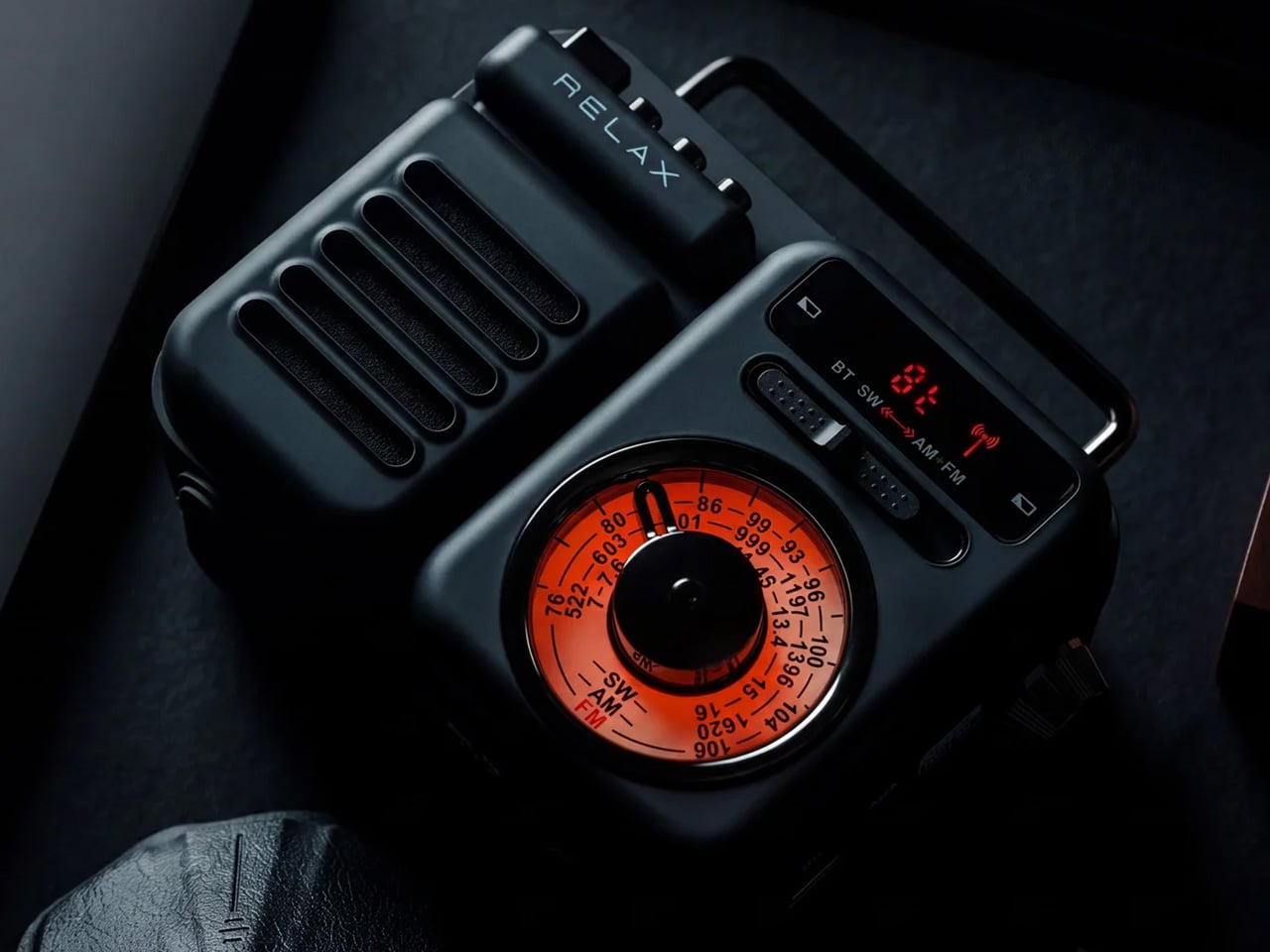
The RetroWave is not trying to look vintage. It simply does, because the people who designed it understood that warm tones and a tactile tuning dial carry a feeling that modern hardware cannot replicate on its own. For you, that distinction matters at a tailgate, where every object on the truck bed shapes the atmosphere of the whole setup whether you intended it to or not. The RetroWave earns its spot before a single note plays.
Seven functions live inside a body that reads as a single cohesive object, not a spec sheet assembled into hardware. AM/FM and shortwave radio, Bluetooth streaming, a USB charging port, and a built-in flashlight all coexist without crowding the design or complicating the interface. For you, that means one piece of gear that moves cleanly from pre-game energy to late-night wind-down without ever needing to swap anything out. It carries the whole day without announcing it.
Analog character translates immediately in outdoor settings
Seven functions in one body removes the need to bring anything else
What we dislike:
The retro aesthetic will not appeal to everyone
Battery life under sustained outdoor use has not been independently verified at publication
2. Brane X
Most portable speakers fake their bass. They boost the low end digitally and call it sub-bass, and it fools you indoors but gets swallowed by open air the moment you step outside. The Brane X does not fake anything. Its proprietary Repel-Attract Driver cancels internal air pressure to deliver genuine sub-bass from a body barely nine inches wide. For you, that means a speaker that actually fills a parking lot instead of politely suggesting it could.
Five drivers and four class-D amplifiers push past 200 watts combined, backed by a 72-watt-hour battery rated for twelve hours of runtime. IP57 waterproofing handles rain and the inevitable cooler spill without breaking stride. Wi-Fi streaming and Bluetooth 5.3 cover both strong and spotty signal scenarios across a large lot. For you, the ability to group up to eight units means the sound scales with the size of your crowd rather than capping out at the wrong moment.
What we like:
Genuine sub-bass output from a compact enclosure
Twelve-hour battery life clears even the longest tailgate
What we dislike:
Two hundred-plus watts at full volume will cut into runtime considerably
Wi-Fi streaming depends on stable network access in the parking lot
3. Beosound Explore
Bang & Olufsen built the Beosound Explore from hard-anodized aluminum instead of the polycarbonate most competitors default to, and that single decision changes how the speaker ages. Polycarbonate scratches and scuffs into a reading of neglect. Aluminum picks up honest wear and keeps looking considered. For you, that means a speaker that still belongs in your setup on its twentieth outing, rather than one that starts looking disposable before the season is halfway through.
Twenty-seven hours of battery life removes the anxiety that follows every other portable speaker through a long weekend outdoors. Dual full-range drivers produce True360 sound with no preferred listening axis, so there is no bad seat at your tailgate. IP67 water resistance covers submersion up to one meter for thirty minutes, handling every realistic outdoor scenario without fuss. For you, the carabiner strap means it travels without ceremony and arrives looking like it belongs wherever you set it down.
What we like:
Twenty-seven hours of runtime covers a full day and night without a second thought
Hard-anodized aluminum ages honestly with outdoor use
What we dislike:
The Bang & Olufsen premium is real and unavoidable
360-degree output reduces directional volume control in loud open environments
4. Battery-Free Amplifying iSpeakers
The premise sounds like a trick: a speaker that amplifies sound without drawing a single watt of power. The iSpeaker uses passive acoustic geometry instead of electronics, channeling audio through a precisely shaped horn that physically increases volume without a battery or Bluetooth chipset. For you, that means zero charging anxiety at a tailgate where outlets are not a given. It works the moment you set your phone inside it and keeps working until you leave.
The design reads as furniture as much as audio hardware, which earns it a different kind of presence at a tailgate than a traditional plastic cylinder would. It sits on the table as a deliberate object, not a forgettable gadget. For you, that matters because it communicates something about the setup before a single note plays. No cords, no app, no pairing ritual. You place it, drop your phone in, and the afternoon takes care of itself from there.
Zero battery dependency removes the most common outdoor-speaker anxiety
Passive horn amplification produces real volume with no electronics involved
What we dislike:
Output ceiling is physically limited by the horn geometry
Works only with phones that fit the cradle dimensions
5. Muzen Wild Mini
The Muzen Wild Mini looks like it was pulled from a gear locker rather than designed for a product page, and that is exactly the point. The all-metal body carries a military character that communicates durability before you ever pick it up. For you, that matters in a setting where gear gets moved, stacked, and occasionally dropped between the cooler and the truck bed. The Wild Mini does not ask to be handled carefully, which means you never have to think about it.
Bluetooth 5.0 handles the streaming, and a built-in flashlight with three lighting modes earns its place once daylight fades on the lot. A single charge delivers six hours of runtime at full volume, covering the core of a game-day schedule without needing a top-up. For you, the clip system means it attaches to a bag, a belt loop, or a tent frame with equal ease, keeping the speaker accessible without requiring a dedicated surface to set it on.
What we like:
All-metal build shrugs off drops and rough handling
The built-in flashlight adds genuine utility once the sun goes down
What we dislike:
Six hours is the shortest runtime in this group
The compact body limits total output volume compared to the larger enclosures here
The Right Speaker Makes the Saturday
None of these five ask you to compromise. The RetroWave brings analog warmth to a setting that usually defaults to generic plastic. The iSpeaker removes the charging question entirely. The Brane X delivers the bass a parking lot actually requires. The Beosound Explore brings luxury-grade materials to outdoor conditions they were genuinely built for. The Wild Mini goes anywhere without asking permission. Each pulls its weight differently, and that range is exactly the point.
A good tailgate speaker is the one you stop noticing because it never gives you a reason to worry about it. The battery holds, weather is not a factor, the sound fills the space, and the object earns a second look from whoever walks by. All five of these clear that bar. Pick the one that fits how your Saturdays actually run, and it will handle the rest without asking for much in return.
Crusoe dropped Boom Supersonic’s $1.25B turbine deal while continuing to secure gas generation, batteries, and grid power for AI data centers.
The post Crusoe Walks Away From $1.25B Boom Turbine Deal as AI Power Race Intensifies appeared first on TechRepublic.
Camping has always come with a quiet trade-off. You get the freedom of being anywhere, but you give up the comfort of being somewhere. Tents leak, campers feel cramped, and cabins can’t move with you when the season changes. Atelier Lune, a US-based design studio, just built something that refuses to make you choose.
It’s called Camping House. The idea is simple to say and genuinely hard to execute: a home that tows behind a standard SUV, unfolds like a tent within a couple of hours, and then b
Camping has always come with a quiet trade-off. You get the freedom of being anywhere, but you give up the comfort of being somewhere. Tents leak, campers feel cramped, and cabins can’t move with you when the season changes. Atelier Lune, a US-based design studio, just built something that refuses to make you choose.
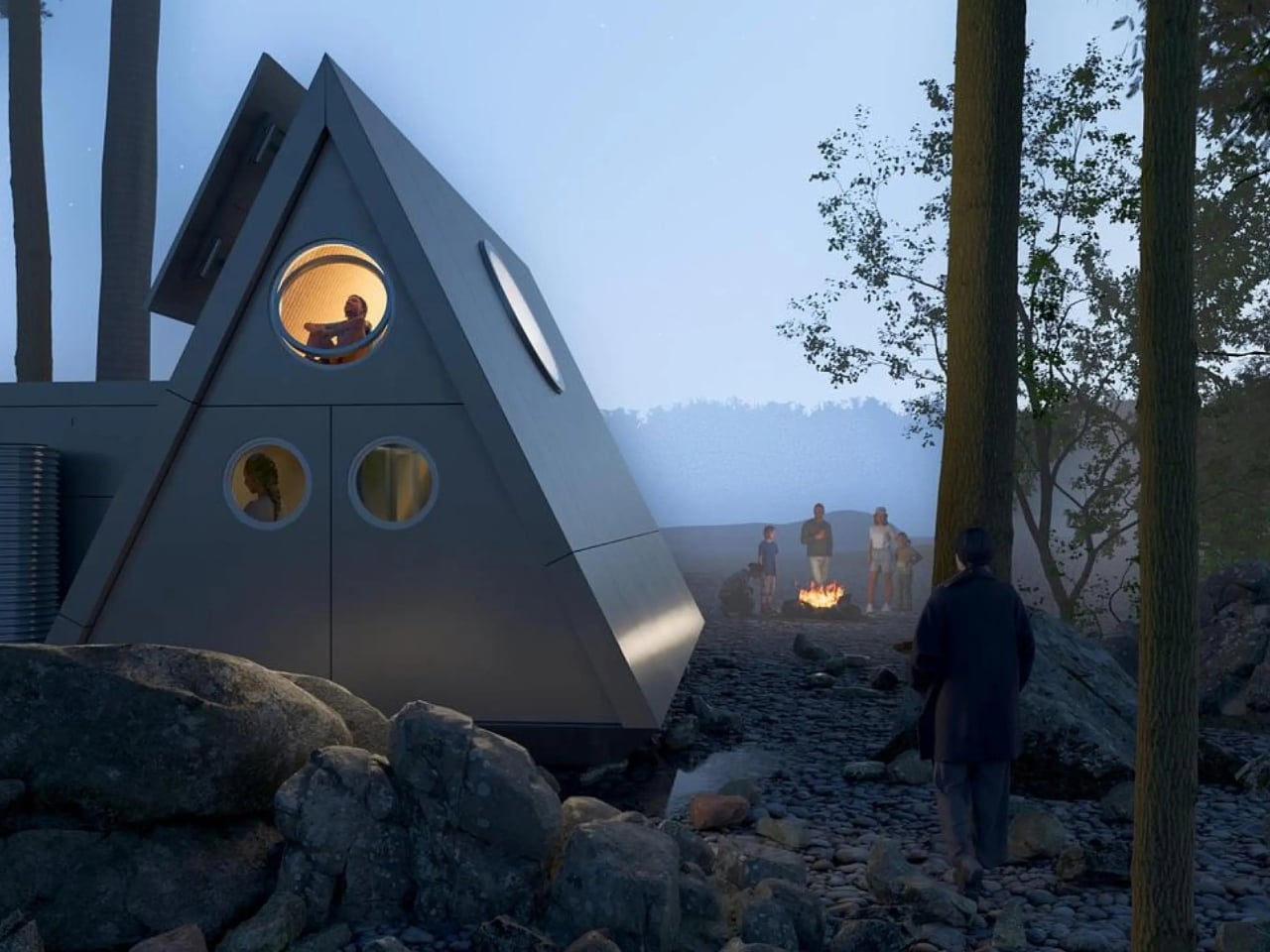
It’s called Camping House. The idea is simple to say and genuinely hard to execute: a home that tows behind a standard SUV, unfolds like a tent within a couple of hours, and then behaves like real architecture once it’s standing. Architect Na Shen, who previously worked at Gensler and Zaha Hadid Architects before starting her own studio, designed the whole structure around that tension between mobility and permanence, and you can feel that intention in every decision she made.
Designer: Atelier Lune
That last part is the actual innovation. Plenty of tiny homes are mobile, but most of them stay rigid once you get them there, basically a smaller box on wheels. Camping House does something different. The structure is a folding shell that fans open on-site into a steep A-frame, then locks into place with weather-sealed joints and insulated panels built to hold up through an actual winter. The A-frame isn’t just an aesthetic choice either. It’s structurally efficient, sheds rain and snow naturally, and creates a dramatic interior volume that reads much larger than the footprint suggests.
The system is built around three modules the studio calls Ports. The Residential Port handles living and sleeping, with furniture that flips from day mode to night mode in seconds. The Utility Port carries a real kitchen and a real bathroom, not a camper-van compromise version of either. The Extended Port clips on when you need a workspace, storage, or room for guests. You arrive, stabilize the base, release the hinges, and the shell swings open into a two-level interior that looks nothing like what fit on the trailer an hour earlier. The joinery and panel system that makes this possible is where most of the real design work lives, hidden in the hinges and seals rather than announced by the exterior.
What makes this feel like it’s arriving at the right moment is who it’s actually for. Remote work untethered a lot of people from a single address, and the appetite for spending real time outdoors, not just weekend camping but seasonal living, has grown alongside it. Camping House is designed with that shift in mind: off-grid solar integration, rainwater harvesting, passive cross-ventilation through a solar chimney, and no permanent foundation required. It leaves the ground beneath it essentially undisturbed, which matters if you’re setting up somewhere ecologically sensitive, or if you just don’t want to explain a poured foundation to a national forest.
There’s a practical honesty to designing for departure instead of designing for permanence. Most residential architecture asks how a building holds its ground. Camping House asks how a building lets go of it. Multiple units can even couple together into small clusters, which opens the door to uses beyond personal travel: disaster relief housing, temporary shelter during regional housing shortages, or small eco-tourism outposts that can be struck at the end of a season without leaving scars.
None of this is on the market yet. It’s a concept, and concepts have a habit of staying concepts. But two people can reportedly assemble it in under two hours, which is a modest ask for what you get in return: a structure with actual dignity, not a glorified pop-up tent with delusions of permanence.
The bigger idea Camping House is testing is whether shelter has to pick a lane between temporary and permanent. For a long time, those felt like separate categories with separate architecture. This project treats them as two settings on the same machine. Whether or not this exact version reaches driveways, the question it’s asking, why should mobility mean sacrificing comfort, feels like one more designers are going to keep chasing.
I’ve established in my previous articles that I’m not an artist and can only draw stick figures, or maybe follow paint-by-numbers-style sketches. That hasn’t stopped me from buying and collecting drawing pads and notebooks of all kinds, though. Of course, I’m not hoping I’ll eventually learn to draw or become the next Andy Warhol or anything like that. I like having these writing surfaces because I have a lot of things to write down, whether it’s for productivity, as part of my numerous journal
I’ve established in my previous articles that I’m not an artist and can only draw stick figures, or maybe follow paint-by-numbers-style sketches. That hasn’t stopped me from buying and collecting drawing pads and notebooks of all kinds, though. Of course, I’m not hoping I’ll eventually learn to draw or become the next Andy Warhol or anything like that. I like having these writing surfaces because I have a lot of things to write down, whether it’s for productivity, as part of my numerous journaling tools, or just somewhere to randomly write or sketch things out.
The Japanese Drawing Pad, despite having “drawing” in its name, isn’t just an art tool for artists, architects, and other visual creatives. It’s a blank, tactile surface that can be useful for anyone who likes to write, think, plan, or organize. And in a world that’s becoming an increasingly digital-analog hybrid, having a tool like this by your side whenever you need it is always a plus. It’s not just a regular drawing pad, though. It’s simply designed, but expertly crafted by masters in the bookbinding and papermaking industries, giving you paper that helps you create your own masterpiece, whether visual or written.
So if you’re like me and don’t need it for actual drawing, here are a few ways to get your money’s worth out of the Japanese Drawing Pad. No drawing skills needed.
Brain-dump Your To-Do List
For those times when you just need to mindlessly dump out all your tasks, lists, and thoughts, this is the perfect place to do it. It doesn’t have a cover, so you get straight to the blank page you need. The tear-away pages make it easy to toss the list once you’re done, or stick it somewhere you’ll actually see it.
Create a Mood Board
The drawing pad can also serve as your analog Pinterest board. Use it to brainstorm a trip itinerary, visualize an outfit for an upcoming event, or build a vision board for your next few months. The microperforated pages tear easily and cleanly, so you can arrange them side by side on a wall or corkboard.
Take Notes in a Meeting (Without a Boring Notebook)
Meetings can drag on forever, but having a unique tool to take notes with can make them feel a little less like a slog. The Drawing Pad’s gray paper and black base give it a sleeker, more distinctive look than your average notepad, so pulling it out mid-meeting feels less like a chore and more like an upgrade.
Mind-mapping and Brainstorming
Having a freeform space without any lines is ideal for when you need to jot down branching ideas, bubbles, and connections. It also comes in different sizes (A6, A5, and A4), so you can choose how much space you need for these brainstorming sessions, even if the meeting is just with yourself.
Journaling
Whether you need a space for habit tracking, junk journaling, or creative writing prompts, the premium feel of the paper will make your journaling ritual more satisfying. If you tear off the pages, you can attach them to your other journals or use the loose-leaf sheets to build a journal of your own.
Teaching Kids (or Yourself) Letters, Numbers, and Shapes
The pad can also double as a lesson space for kids who are still learning to write their letters, numbers, or shapes, offering a low-pressure surface with no stakes attached. And if you’re learning a new language that uses characters different from what you’re used to, it can be your practice space, too.
Doodling to De-stress
Even if you’re not an artist who can draw well, there may be times when you just want to doodle your stress away. Whether you’re sketching the meal you just ate, dreaming up an imaginary creature to fight off boredom, or scribbling whatever abstract shapes come to mind, the pad puts no pressure on you to be “good.” It’s simply a tactile stress outlet.
Beyond what’s already been covered, the Japanese Drawing Pad has a few more details worth knowing. Every pad is handmade by ITO Bindery, a Japanese bookbindery that’s been at it since 1938. The binding glue is still brushed on by hand, and each microperforation is checked for consistency by trained craftspeople rather than left entirely to machines. The pages themselves are premium paper (81.4 g/m²) mounted on a sturdy, recycled cardboard base, and each sheet tears away cleanly without leaving any strays behind on the page. This particular edition is also limited to just 100 individually numbered pads per size, which makes the pad feel less like a disposable notepad and more like a small, functional collectible.
At the end of the day, you don’t need to be able to draw to justify owning something this well made. A design like the ITO BINDERY × YANKO DESIGN Drawing Pad earns its keep simply by being there, ready on your desk for the next to-do list, doodle, or half-formed idea you don’t want to lose. And that’s really the beauty of building an analog habit into an otherwise digital life: it doesn’t ask much of you, just a pen, a blank page, and a few free minutes. Whether it ends up full of to-do lists, mind maps, or terrible stick-figure doodles, this drawing pad might just become one of those small, everyday objects you didn’t know you needed until it’s part of your routine.
L'odieux connard préféré des internautes a encore frappé ! Après son
Iron Man à la française
de cet été, Julien a mis en ligne une seconde fausse bande-annonce qui m'a bien fait rigoler.
C'est
Top Gun made in France
et cette fois, l'élite de l'élite des pilotes américains partent en programme d'échange international à... Landivisiau en Bretagne !! Avec le pitch, déjà, je suis mort de rire. Alors, pourquoi est-ce qu'ils font ça, les Ricains ? Eh bien, tout simpleme
L'odieux connard préféré des internautes a encore frappé ! Après son
Iron Man à la française
de cet été, Julien a mis en ligne une seconde fausse bande-annonce qui m'a bien fait rigoler.
C'est
Top Gun made in France
et cette fois, l'élite de l'élite des pilotes américains partent en programme d'échange international à... Landivisiau en Bretagne !! Avec le pitch, déjà, je suis mort de rire. Alors, pourquoi est-ce qu'ils font ça, les Ricains ? Eh bien, tout simplement pour apprendre à faire comme l'élite de l'élite de l'élite, c'est-à-dire la Marine nationale française.
On y voit donc Erwan Mav'rek, un pilote pur beurre salé donner ses premières leçons d'humour chauvin et de choix de pseudonymes douteux, et surtout, au bout de quelques minutes, recevoir un appel très important de notre leader suprême, qui lui demande...
Bon vous verrez, je ne vais pas vous raconter toute la vidéo...
Je vous laisse découvrir donc comment tout ceci se termine, mais au passage, ce qu'on retient surtout c'est que le Mont-Saint-Michel et Nantes sont en Bretagne (bande de Normands !).
Ah et côté fabrication, c'est bien sûr de l'IA générative, mais attention, fait maison !! Comme Julien n'a d'Odieux Connard que le nom, il a respecté la planète en faisant tout tourner en local sur son PC sans avoir recours au moindre datacenter polluant et surtout en utilisant le modèle open source Minimax.
Depuis que X a shooté
Nitter et XCancel à grands coups de lettres d'avocat
fin août, lire X sans compte c'est redevenu une méga galère. Mais il reste pourtant un outil que plein de gens utilisent sans le savoir, parce qu'il tourne dans les coulisses de Discord et Telegram. Son nom ?
FxTwitter !
À la base,
le projet FxEmbed
, qui fait tourner FxTwitter et FixupX, sert à réparer les aperçus de liens X. Vous mettez f
Depuis que X a shooté
Nitter et XCancel à grands coups de lettres d'avocat
fin août, lire X sans compte c'est redevenu une méga galère. Mais il reste pourtant un outil que plein de gens utilisent sans le savoir, parce qu'il tourne dans les coulisses de Discord et Telegram. Son nom ?
FxTwitter !
À la base,
le projet FxEmbed
, qui fait tourner FxTwitter et FixupX, sert à réparer les aperçus de liens X. Vous mettez fx devant twitter.com (ou fixup devant x.com) et Discord affiche enfin la vidéo, le sondage ou toutes les images du post. Sauf que derrière, il y a surtout une API publique et gratuite, api.fxtwitter.com, qui affiche n'importe quel post public en JSON sans avoir besoin de compte ou de clé API facturé une couille. Ché Elon !
Alors oui, les rageux diront que x.com affiche encore n'importe quel post isolé à un visiteur déconnecté, même les longs, mais sur un profil, ça s'arrête à 5 posts avant de vous demander de "Continuer sur X". Et surtout, ça ne vous affichera pas les vidéos et ça ne vous permettra pas d'avoir ça sous la forme d'un flux RSS.
Alors que FxTwitter, lui, nous sort tout ça sans avoir à ouvrir x.com !
Lire un post dans le navigateur
Maintenant pour nos tests, prenons un vieux de la vieille, un vétéran, le post numéro 20 de @jack, publié le 21 mars 2006 et dont l'URL est x.com/jack/status/20. Le nombre à la fin, c'est l'identifiant du post.
Collez tout simplement cet identifiant au cul de api.fxtwitter.com/2/status/ et ouvrez ça dans votre navigateur :
Et vous obtiendrez un gros pavé en JSON avec dedans le texte du post dans le champ "text", l'auteur dans "author", et un peu plus bas vous trouvez les likes, les reposts, les réponses et la date.
Le post 20 de @jack vu par l'API : le texte dans le champ text, l'auteur juste en dessous.
Et si vous avez la flemme de recopier l'identifiant (vous êtes toujours dans l'abus, vous ^^), remplacez simplement x.com par api.fxtwitter.com dans l'adresse complète du post et voilà ! Ça marche à tous les coups, même si c'est le retour de l'ancienne version de l'API, conservée pour la compatibilité.
Et si le post n'est pas en français, ajoutez ?lang=fr à l'adresse et hop, magie magie, l'API glisse alors un bloc "translation" dans la réponse, avec le texte en français :
Le texte d'origine du post 20, puis sa traduction demandée avec ?lang=fr.
La traduction provient de X lui-même quand elle existe (sur ce post, le champ "provider" indiquait "grok"), sinon l'API se rabat avec joie sur un service de traduction. Et pour un profil, c'est le même principe avec /2/profile/ : api.fxtwitter.com/2/profile/jack qui affichera la bio de @jack, son nombre d'abonnés et sa date d'inscription. Les autres "routes" qui récupèrent les fils, les abonnés ou les médias d'un compte sont dans
la documentation de l'API
.
Elle est pas belle la vie ?
Récupérer une vidéo
Maintenant, on va rentrer dans le dur parce qu'ici, pour récupérer une vidéo, vous n'avez pas besoin d'API. Suffit de jouer avec l'adresse.
Mettez d. devant fxtwitter.com et le lien vous renverra directement le fichier, sans HTML autour. Avec curl, ça donne ça (le -L sert à suivre la redirection) :
Grâce à ça, on peut par exemple récupérer le MP4 de cette vidéo bien kitchou de 30 secondes de la NASA. Et ajouter .mp4 à la fin d'une adresse fxtwitter.com fera la même chose. Et pour choisir la qualité, jetez un œil au JSON du post, où la liste des formats de media.videos donne chaque version de la vidéo avec son adresse et son bitrate.
Suivre un compte en RSS
Dernier truc que je trouve pratique avec cet outil c'est que chaque compte public peut avoir son flux RSS. Il suffit d'ajouter /feed.xml après le nom du compte :
Collez ensuite ça dans votre lecteur RSS et vous suivrez le compte X de vos rêves sans avoir à y mettre les pieds. Le flux remonte ainsi les 90 derniers posts par défaut, et le paramètre ?count= permet de réduire ce nombre ou de l'augmenter jusqu'à 100 maximum. Et si vous remplacez feed.xml par media.xml vous ne verrez dans le flux que les posts contenant des photos ou des vidéos. Et si vous ajoutez ?with_replies=1 vous verrez aussi les réponses.
Ce qui coince
Maintenant ce qui peut être relou, c'est que l'API n'encaisse que 1 000 requêtes par minute et par adresse IP. Par contre, si vous pensiez absorber tout x.com sans la moindre vergogne, vous allez vite vous retrouver coincé.
Attention aussi au domaine que vous tapez. Les seuls officiels sont fxtwitter.com, twittpr.com, fixupx.com, xfixup.com et fxbsky.app pour Bluesky. Je précise ça parce qu'il y a eu, par exemple un fxtwiter.com avec un t en moins, qui a été signalé sur le dépôt du projet et qui renvoyait les gens vers des arnaques.
Comme d'hab, une faute de frappe et c'est le drame... Soyez très vigilants.
Maintenant, si vous êtes un petit peu curieux comme moi, vous vous êtes sûrement demandé comment FxTwitter récupérait tout ça ??
Eh bien, comme le fait Nitter, ou plutôt
comme le faisait Nitter
, il récupère les données en utilisant de vrais comptes X sur lesquels il répartit les requêtes. Et comme c'est ce qui a été reproché à Nitter, je me dis qu'il y a des chances qu'à un moment FxEmbed soit visé aussi.
On verra bien, mais si un jour le service tombe, sachez que le code est bien dispo sous licence MIT, donc vous pouvez le faire tourner chez vous sans problème dans un Docker. Et si vous n'utilisez pas de compte X connecté dessus, ça marchera quand même avec, c'est vrai, des limites de requêtes plus basses et surtout sans accès au contenu NSFW (Et ça, je sais que ça vous rend super triste.)
Si vous développez pour AWS, il y a de bonnes chances que LocalStack tourne déjà quelque part dans votre docker-compose ou votre CI. C'est un peu l'outil incontournable pour tester ses buckets S3 et ses fonctions Lambda sans avoir à toucher au vrai cloud. Sauf que depuis mars dernier, ses nouvelles versions
exigent un compte LocalStack
et un jeton d'authentification, CI comprise, et surtout l'édition Community n'est plus prise en charge.
Ouin !
Et comme si ça ne suffisait pas, l'
Si vous développez pour AWS, il y a de bonnes chances que LocalStack tourne déjà quelque part dans votre docker-compose ou votre CI. C'est un peu l'outil incontournable pour tester ses buckets S3 et ses fonctions Lambda sans avoir à toucher au vrai cloud. Sauf que depuis mars dernier, ses nouvelles versions
exigent un compte LocalStack
et un jeton d'authentification, CI comprise, et surtout l'édition Community n'est plus prise en charge.
Ouin !
Et comme si ça ne suffisait pas, l'offre gratuite qui reste interdit totalement l'usage commercial. Donc si vous l'utilisez dans le cadre de votre travail, faudra passer à la caisse. Alors, oui, ne pas respecter la licence ou se figer sur une ancienne image reste possible, mais déjà, ça ne se fait pas, et ensuite, niveau faille de sécu, ce n'est pas top.
Mais c'est là qu'arrive en sauveur Floci,
un émulateur AWS local
sous licence MIT qui se présente comme un remplaçant direct de LocalStack, sans avoir besoin de se créer un compte ou un jeton et surtout sans offre payante planquée dedans.
Maintenant, le principe reste le même puisque vous pointez dessus l'AWS CLI (Floci écoute sur le port 4566), vos SDK, Terraform, OpenTofu ou le CDK, avec la région de votre choix et des identifiants bidon, et vos commandes habituelles tomberont sur votre machine au lieu de partir chez Amazon.
Le plus simple pour démarrer, c'est sa CLI qu'on peut déployer avec Homebrew (il y a aussi un script pour Linux et un pour Windows) :
Ensuite, faites un floci start pour lancer l'émulateur dans un conteneur et lui monter le socket Docker de votre machine. Floci s'appuie sur de vrais conteneurs dès que la fidélité l'exige ce qui fait que Lambda tourne dans l'image d'exécution officielle d'AWS, RDS lance un vrai PostgreSQL, MySQL ou MariaDB, ElastiCache un Valkey, et c'est pareil pour ECS, EC2 ou EKS.
J'ai fait l'essai sur mon Mac avec un bucket S3, une table DynamoDB et une petite fonction Lambda en Python, et tout a répondu du premier coup à la CLI AWS. La Lambda a juste mis six secondes à répondre au premier appel, puis moins d'une seconde au suivant.
Pour voir ce qui se passe ensuite, une console web est dispo localhost:4566/_floci/ui, avec vos ressources rangées par service.
La console web de Floci sur localhost, après un essai sur S3, DynamoDB et Lambda
Notez aussi que si vous venez de LocalStack, la bascule se résume simplement dans le nom de l'image puisque Floci traduit tout seul les variables d'environnement de LocalStack, exécute sans modification les scripts d'init rangés dans /etc/localstack/init/ et répond même sur /_localstack/health. Cela veut dire qu'une CI qui attend ce signal ne voit pas la différence et ça c'est super cool pour migrer vite fait bien fait.
Et si vos scripts appellent aws ou boto3, prenez l'image floci/floci:latest-compat, qui embarque les deux.
Par contre, méfiez-vous du volume de données, car LocalStack range tout par défaut dans /var/lib/localstack et Floci dans /app/data. Donc dans le docker compose, pointez bien votre volume sur /app/data sinon, vous perdrez vos fichiers au premier restart du docker.
Après n'oubliez pas non plus que Floci imite le comportement d'AWS, et pas sa sécurité. En effet, par défaut, il n'applique aucune politique IAM, donc si vous voulez vérifier qu'un rôle trop resserré bloque bien une action, il faudra activer la variable FLOCI_SERVICES_IAM_ENFORCEMENT_ENABLED. Et certains services ne sont également que des façades. Par exemple Bedrock Runtime renvoie des réponses factices et Transcribe termine ses tâches aussitôt, sans jamais traiter l'audio, donc oui, votre code peut les appeler, mais le résultat ne sera pas au rendez-vous, ce qui est tout à fait normal.
Pour le reste, les données sont stockées en mémoire par défaut et s'effaceront à l'arrêt, ce qui est pile poil ce qu'on veut en CI. Vous pouvez quand même le paramétrer pour que ça s'écrive sur le disque si vous voulez...
Voilà, à essayer sur une branche de votre CI si vous voulez vous débarrasser de débrancher LocalStack pour de bon !
Microsoft vient de prévenir le monde entier que File History,
sa sauvegarde intégrée à Windows depuis Windows 8
, peut ne plus créer ni mettre à jour la moindre sauvegarde sur certaines machines et cela depuis l'installation des mises à jour de sécurité de septembre 2026 !!
Mise à jour du 25 septembre 2026 : bonne nouvelle, Microsoft a corrigé le bug ! Sur Windows 11, le correctif est dans les mises à jour optionnelles du 22 septembre,
KB5124010
pour les versions 2
Microsoft vient de prévenir le monde entier que File History,
sa sauvegarde intégrée à Windows depuis Windows 8
, peut ne plus créer ni mettre à jour la moindre sauvegarde sur certaines machines et cela depuis l'installation des mises à jour de sécurité de septembre 2026 !!
Mise à jour du 25 septembre 2026 : bonne nouvelle, Microsoft a corrigé le bug ! Sur Windows 11, le correctif est dans les mises à jour optionnelles du 22 septembre,
KB5124010
pour les versions 24H2 et 25H2 et KB5124006 pour la 26H1. Et si vous ne voulez pas des mises à jour optionnelles, il arrivera avec le Patch Tuesday du 13 octobre. Par contre, pour Windows 10 et les éditions LTSC, Microsoft n'a encore rien annoncé...
Et par défaut, c'est le profil utilisateur au complet qui y passe avec le Bureau, les Documents, les Images, la Musique et les Vidéos, recopiés sur un disque branché en USB ou sur un partage réseau. Autant dire l'essentiel !
Microsoft l'a pourtant remplacée depuis par Windows Backup (qui sauvegarde vos données sur OneDrive, quelle surprise...), mais File History était quand même toujours là, accessible via le Panneau de configuration.
Le symptôme ressemble à une panne de matériel puisque Windows vous réclame de reconnecter votre disque alors qu'il est branché et qu'il fonctionne parfaitement. De son côté, la date de dernière sauvegarde reste figée, et les fichiers déjà archivés répondent qu'aucune version précédente n'est disponible quand vous en cherchez une...
Et quand on y regarde de plus près dans l'Observateur d'événements, ce sont des plantages de FileHistory.exe et de KERNELBASE.dll. Surtout que
le périmètre est large
avec en versions impactées, Windows 11 depuis la 23H2, Windows 10 depuis la 21H2 + les éditions Enterprise LTSC 2016 et 2019.
Maintenant comment est-ce qu'on remédie à ça ? Hé bien ce n'est pas marrant parce que la seule solution que j'ai pu voir sur
le fil de support Microsoft consacré au problème
, c'est un utilisateur qui raconte que la seule chose qui a marché chez lui, c'est de désinstaller la mise à jour et de couper Windows Update en attendant. Sauf que KB5124008 corrige quand même un grand nombre de vulnérabilités, dont des zero-days activement exploités, et la retirer réduira sérieusement votre niveau de sécurité.... Je ne vous conseille donc pas de faire ça.
Gardez vos correctifs Windows et sauvegardez avec autre chose. Par exemple
FreeFileSync
qui est très bien. En tout cas, le temps que Microsoft trouve une solution.
Côté libre, y'a aussi
Kopia
qui fait le boulot proprement. Ça crée des snapshots chiffrés de vos fichiers et dossiers vers un disque local, un stockage réseau ou du cloud, avec compression et déduplication au passage. Et surtout c'est dispo en ligne de commande comme en GUI (interface graphique).
Et si la console ne vous fait pas peur,
restic
fera la même chose sans souci. Par contre avec ces solutions alternatives, je ne vais pas vous vendre du rêve hein... Le clic droit et l'onglet des versions précédentes dans l'explorateur, c'était le gros confort de File History, et aucun de ces outils ne vous le permet. Vous devrez restaurer depuis un snapshot, c'est un peu plus lourd quoi...

 Connexion