❌

Vue normale

  • ✇Yanko Design
  • LUMVIA Coffee Table Prototype Pairs a Customizable Mosaic With Hidden Drawers
    Choosing a coffee table usually means choosing a finish you’ll be living with for years. LUMVIA leaves that decision open a little longer, with interchangeable mosaic tiles that let you change the tabletop’s pattern instead of replacing the furniture. Developed by Romania’s mkt, the coffee table prototype puts that freedom inside a solid oak frame, with hidden storage underneath for the less decorative things. The top has a hexagonal outline, with a broad wooden border surrounding 24 triangular
     

LUMVIA Coffee Table Prototype Pairs a Customizable Mosaic With Hidden Drawers

Par : JC Torres
20 octobre 2026 à 06:07

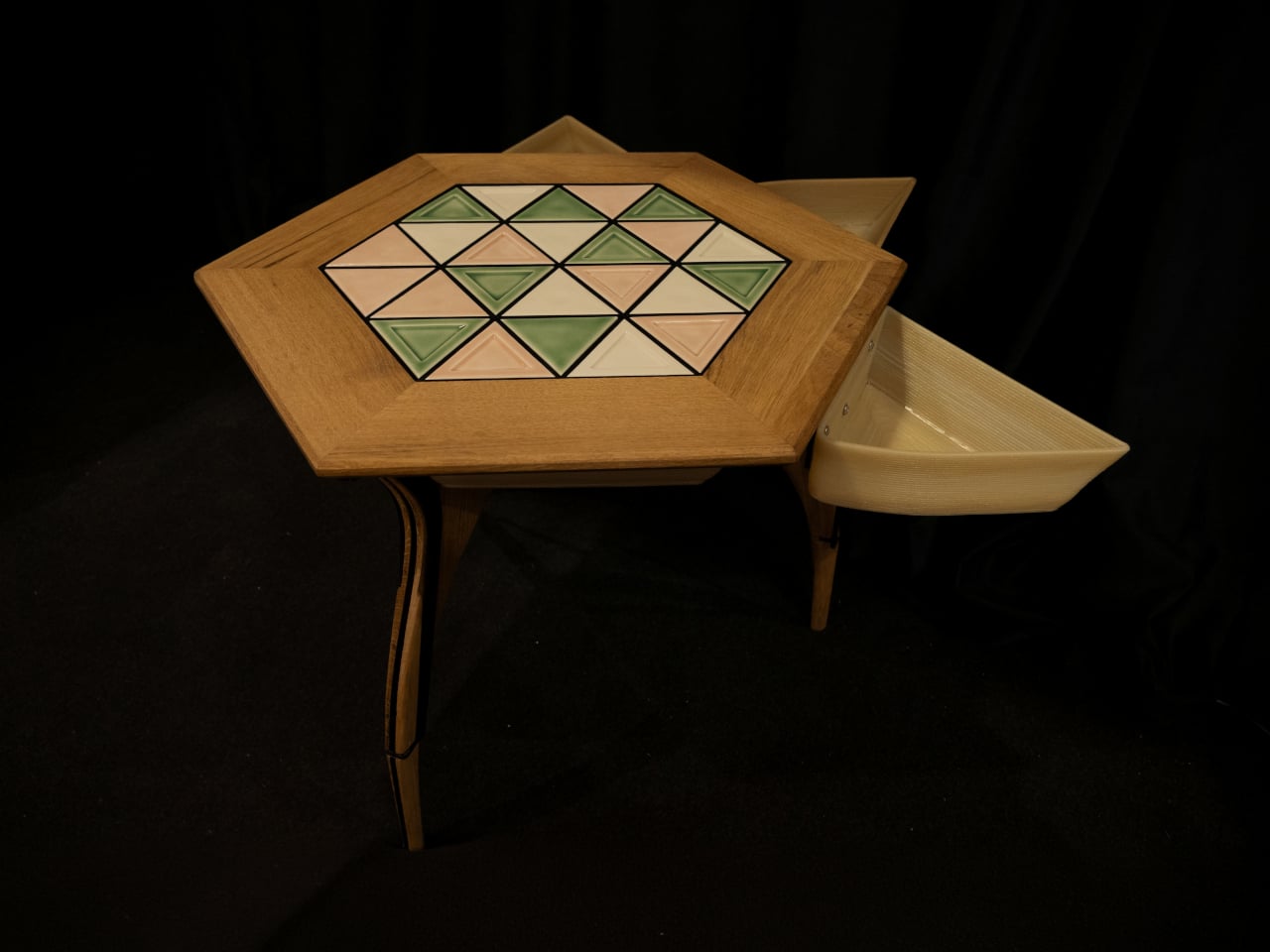
Choosing a coffee table usually means choosing a finish you’ll be living with for years. LUMVIA leaves that decision open a little longer, with interchangeable mosaic tiles that let you change the tabletop’s pattern instead of replacing the furniture. Developed by Romania’s mkt, the coffee table prototype puts that freedom inside a solid oak frame, with hidden storage underneath for the less decorative things.

The top has a hexagonal outline, with a broad wooden border surrounding 24 triangular tiles. Those repeated shapes give every arrangement a common structure, even when the colors change completely. You could group similar shades together or scatter contrasting pieces across the surface, turning the same geometry into a quiet backdrop or something that competes with the coffee cups for your attention.

Designer: mkt

There’s more to the customization than picking a favorite color, of course. Ceramic and glass provide different material options, while the lines between the tiles can be black or white. Dark separators make the individual triangles more pronounced against pale pieces; lighter ones soften that contrast. Even before rearranging anything, changing those lines alters how strongly the mosaic announces itself in a room.

That flexibility becomes particularly appealing when the rest of the room changes. A new rug might make yesterday’s tabletop feel a little too busy, while a neutral sofa could leave space for a bolder composition. LUMVIA’s removable tiles are intended to accommodate those shifts, letting owners revise the pattern over time rather than treating the original selection as a permanent decorating commitment.

The geometry continues underneath, where triangular drawers offer somewhere to tuck away the small objects that tend to collect around a sofa. Their shape follows the mosaic above, rather than introducing a rectangular box below it. There’s a practical tradeoff here, though: an angular compartment won’t suit everything, even if it gives keys or other small belongings a place away from the tabletop.

Both the drawers and the grid supporting the tiles are 3D-printed, placing digital manufacturing beneath the more familiar wood, ceramic, and glass. The approach gives the repeated triangular forms a role in construction as well as decoration. A separate wood version uses interlocking wooden tiles, offering another way to build a pattern without introducing ceramic or glass into the surface.

Still, a surface that invites rearranging also needs to work when you’re setting down a hot drink. Some tiles have recessed triangular details, while others are plain, making the choice about texture as well as color. How those pieces sit together, stay in place, and handle everyday spills will matter just as much as the pleasure of choosing which triangle goes where next.

LUMVIA remains a customizable prototype rather than a mass-produced table, and its configurator includes a step for selecting extra tiles. Having spare pieces could let you test different combinations without replacing the whole set every time your tastes change. You’ll still need somewhere to keep all the triangles that aren’t on display, though. Even a coffee table makeover can leave you with leftovers.

The post LUMVIA Coffee Table Prototype Pairs a Customizable Mosaic With Hidden Drawers first appeared on Yanko Design.

  • ✇Yanko Design
  • SolidSafe Duo Magnetic Power Bank Is Shaped to Fit Apple’s Folding iPhone
    Magnetic charging makes attaching a battery easy, but it doesn’t guarantee that the battery will fit your phone’s shape. Apple’s folding iPhone Duo introduces a shorter body that gives accessories less room to stretch. BMX’s SolidSafe Duo responds with a compact, 5,000mAh power bank designed around those proportions, bringing a rotating stand, color display, and attached USB-C cable along for the ride. The difference starts inside, where a custom-shaped battery cell lets the enclosure follow th
     

SolidSafe Duo Magnetic Power Bank Is Shaped to Fit Apple’s Folding iPhone

Par : JC Torres
20 octobre 2026 à 05:15

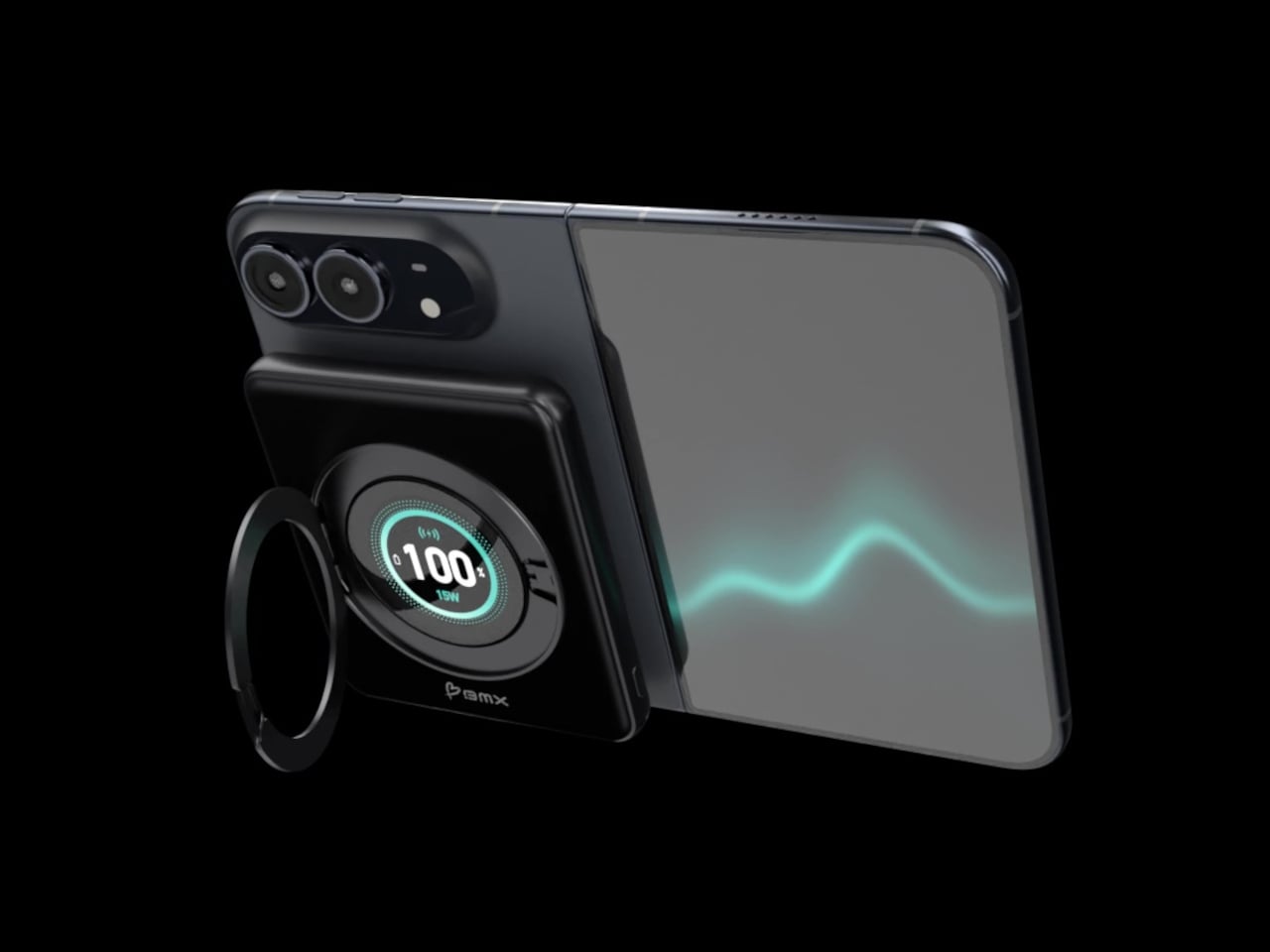
Magnetic charging makes attaching a battery easy, but it doesn’t guarantee that the battery will fit your phone’s shape. Apple’s folding iPhone Duo introduces a shorter body that gives accessories less room to stretch. BMX’s SolidSafe Duo responds with a compact, 5,000mAh power bank designed around those proportions, bringing a rotating stand, color display, and attached USB-C cable along for the ride.

The difference starts inside, where a custom-shaped battery cell lets the enclosure follow the Duo’s footprint instead of extending beyond its edges. The black, CNC-machined aluminum housing has rounded corners and a broad face that sits below the cameras. That gives the accessory a more deliberate relationship with the phone, although matching its outline doesn’t make the added thickness disappear, of course.

Designer: BMX (Better Mobile Experience)

A circular ring folds out from the back and rotates 360°, giving the phone support in portrait or landscape orientation. Reading a recipe on the counter could give way to watching a video over lunch without detaching the battery. The stand makes particular sense for an unfolded screen, which offers more room to watch but also more phone to hold in your hand.

Nestled inside that ring is a full-color display showing the power bank’s remaining charge and live charging wattage. The distinction matters because the percentage belongs to the accessory, not your iPhone. It also gives you a way to check both your reserve and the current power output, rather than assuming that an attached battery is always charging at its advertised maximum speed.

The attached USB-C cable doubles as a lanyard, so wired charging doesn’t begin with a search through your bag. Plug it into a compatible device for up to 20W output, or use it to refill the power bank at up to 15W. It’s a simple detail, but it keeps the wired option available even when the rest of your charging gear is elsewhere.

Wireless charging, meanwhile, tops out at a claimed 15W, below the iPhone Duo’s supported 25W maximum. You’re getting a tailored shape rather than the phone’s fastest wireless charging. Connecting two devices also changes the numbers, splitting output between 10W over USB-C and 5W wirelessly. That could help another device through the afternoon, but neither connection retains its single-device maximum in that arrangement.

The SolidSafe name also needs a little unpacking. BMX uses semi-solid-state cells and says their reduced liquid electrolyte content helps lower fire risk compared with conventional lithium-ion batteries. That’s a reduced-risk claim, not a promise that the battery can’t fail. The rigid aluminum enclosure also helps dissipate heat, according to BMX, rather than preventing the pack from becoming warm while it charges your phone.

Available for $79.99 in the US, SolidSafe Duo adds about 0.43 inch of thickness and 4.47 ounces to your phone. Those numbers deserve as much attention as its compact outline, particularly when the phone itself already folds shut. Having a stand and cable built into the battery means fewer loose accessories to pack, but a thicker stack to slide back into your pocket.

The post SolidSafe Duo Magnetic Power Bank Is Shaped to Fit Apple’s Folding iPhone first appeared on Yanko Design.

  • ✇Yanko Design
  • Clevetura S Keyboard Review: Swipe Across the Keys Instead of Reaching for a Mouse
    PROS: Innovative combination of keyboard and touchpad in one Compact, lightweight design Customizable gestures and sensitivity Supports 3 Bluetooth and 1 USB-C connections CONS: Has a bit of a learning curve for accuracy and speed Premium price tag RATINGS: AESTHETICSERGONOMICSPERFORMANCESUSTAINABILITY / REPAIRABILITYVALUE FOR MONEYEDITOR'S QUOTE:The Clevetura CLVX S brings typing and navigation together in a compact design that gives your mouse hand
     

Clevetura S Keyboard Review: Swipe Across the Keys Instead of Reaching for a Mouse

Par : JC Torres
19 octobre 2026 à 12:20

PROS:


  • Innovative combination of keyboard and touchpad in one

  • Compact, lightweight design

  • Customizable gestures and sensitivity

  • Supports 3 Bluetooth and 1 USB-C connections

CONS:


  • Has a bit of a learning curve for accuracy and speed

  • Premium price tag

RATINGS:

AESTHETICS
ERGONOMICS
PERFORMANCE
SUSTAINABILITY / REPAIRABILITY
VALUE FOR MONEY

EDITOR'S QUOTE:

The Clevetura CLVX S brings typing and navigation together in a compact design that gives your mouse hand less traveling to do.

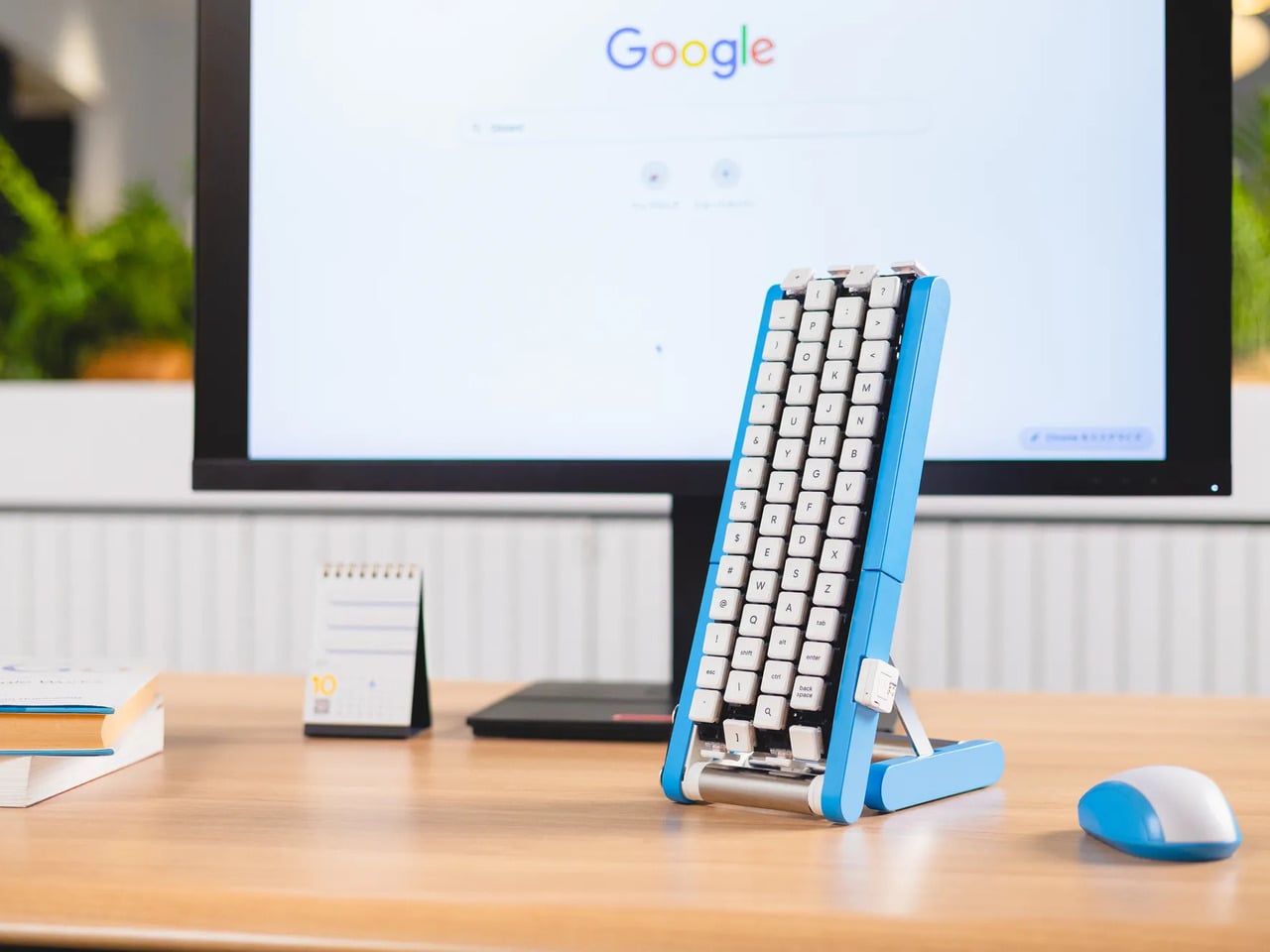
Keyboards and mice have shared our desks for decades, but our hands still have to travel between them whenever typing gives way to clicking. That familiar shuffle becomes especially noticeable when there’s barely enough room for a laptop, let alone another accessory. The Clevetura S offers an interesting solution by turning the keys themselves into a touchpad, giving your fingers another way to get around without leaving the keyboard.

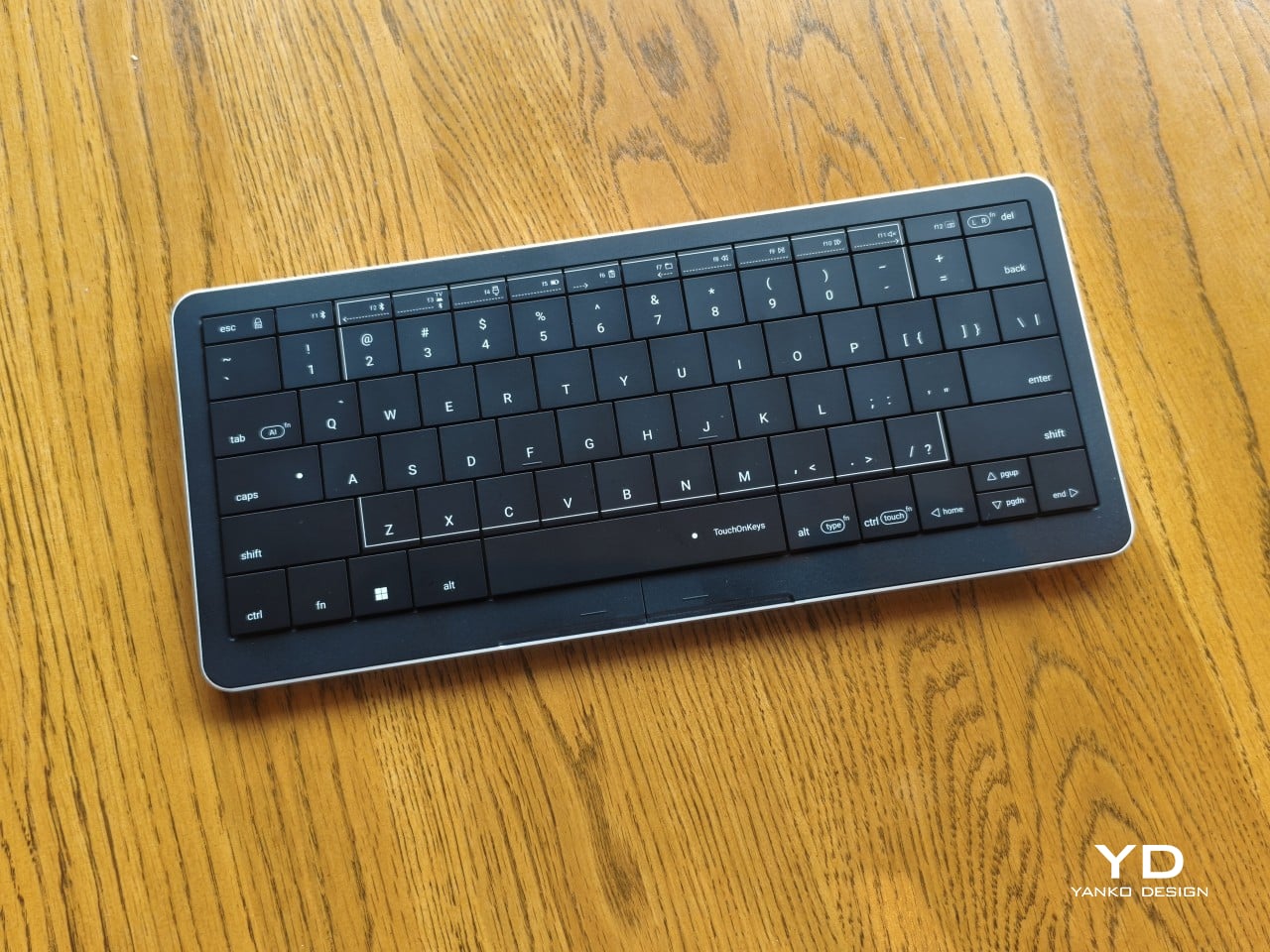
Also known as the CLVX S, this compact, 78-key keyboard brings Clevetura’s TouchOnKeys technology to a more portable design. The Windows version reviewed here can handle familiar gestures without additional software, although there’s plenty to customize if you want to. More importantly, it makes an unusual interaction surprisingly useful, even if sliding across letters and keeping resting fingers from triggering gestures take a little getting used to.

Designer: Clevetura

Aesthetics

Upfront, the Clevetura S looks almost like someone forgot to leave space between the keys. The flat keycaps sit unusually close together, giving the 78-key layout a tidy, almost tiled appearance. There’s a practical reason for that, of course. Fingers need to travel across the surface as comfortably as they press down on it, and generous gaps would make that second job considerably less inviting.

An anodized aluminum base gives the keyboard its silver lower half, while polycarbonate covers the top and ABS plastic forms the keycaps. Both black and white versions retain that silver body, which is particularly noticeable against the darker finish. I would have preferred an entirely black option for a simpler look, though the contrast does make the thin profile a little more obvious when viewed from the side.

Otherwise, there isn’t much to distract from that continuous field of keys, save for the extra markings explaining their secondary functions. Two buttons below the spacebar provide physical left- and right-click controls, recalling the arrangement on older laptops. Then there’s the per-key RGB lighting, which can turn this relatively understated keyboard into something considerably more colorful. Fortunately, those lights also have practical roles beyond decorating your desk.

Ergonomics

At roughly 403g, the Clevetura S doesn’t ask for much commitment when you’re packing a laptop bag. Its body measures approximately 11.5 inches wide, 5.12 inches deep, and just 0.49 inches (12.4mm) thick, making it easy to accommodate on smaller desks, too. The closely fitted keycaps don’t leave many edges sticking out, although I’d still use the included fabric pouch rather than let them rub against everything else.

The scissor switches feel familiar if you’re coming from a decent laptop keyboard, with around 1.2mm of travel. Typing is perfectly serviceable, though it probably won’t steal the attention of someone devoted to mechanical switches. Folding feet let you raise the back, but there’s only one elevated position. That keeps setup simple, provided you’re comfortable with either the flat profile or the available incline.

The more interesting benefit shows up when you need to scroll through a reference or reposition the cursor between sentences. Instead of reaching sideways, you can make that movement right where you’ve been typing. Your chair and screen position still matter, of course. The Clevetura S simply reduces the back-and-forth, although its flat, closely fitted keys take some getting used to when finding your usual typing rhythm.

Performance

The central key area doubles as the touchpad, automatically switching between recognizing finger movements and registering keypresses. Sliding across letters feels a little peculiar at first, but my fingers didn’t catch on the edges, and pointer control worked well. Scrolling through a document becomes especially convenient when you’re jumping back into writing every few moments. A light tap handles clicking without requiring you to press a letter.

That automatic switching does have to contend with personal habits, however. Mine involves keeping fingers on the home row, which happens to sit inside the touchpad area. This frequently triggered three-finger gestures when I hadn’t intended anything of the sort. Sensitivity adjustments and the option to disable unwanted gestures provide useful flexibility, though finding the right balance is something to budget time for rather than expect immediately.

Clevetura’s Adaptive Intelligence, or AI, can help by selecting a sensitivity level after studying 10,000 typed characters. Training requires the TouchOnKeys app and a USB connection, with touch recognition disabled while it runs. A separate mouse is handy during that process, although you can pause training if necessary. Thankfully, this particular AI has a fairly modest assignment: learning when your fingers mean to type rather than swipe.

The lighting makes that second role easier to follow, and a little more entertaining, too. In my setup, a white trail followed my finger across the keys, almost like leaving a trace of magic behind. Checking the battery dims the surrounding lighting and uses illuminated number keys to show the remaining charge. Even the function row gets involved, with touch sliders for volume and backlight brightness.

Windows recognizes supported touchpad gestures without installing additional software, but TouchOnKeys opens up more settings, including profiles for different apps. Three Bluetooth slots and a USB-C connection let you select between up to four devices, one at a time. That’s useful if your desk serves more than one computer. The cable also handles charging and provides the wired connection required for firmware updates.

Clevetura advertises up to 44 hours of continuous use without backlighting, which is an important qualification for anyone drawn to those colorful effects. That’s the manufacturer’s estimate rather than a result measured here, so it shouldn’t become a promise of weeks between charges. Wired operation remains available at a desk, while wireless endurance deserves particular attention if you’re planning to travel with the lighting switched on.

Sustainability

The aluminum and plastic construction follows a fairly familiar recipe, and there’s no documented recycled content to give the CLVX S a particular advantage on materials. Clevetura rates its keys for 3 million presses, although that remains a manufacturer specification rather than a prediction of service life. The more useful question is how easily this unusual keyboard can be maintained once everyday use starts leaving its mark.

Here, the same integration that makes TouchOnKeys possible also limits what owners can replace. Clevetura warns against removing or swapping keycaps because doing so can damage the keyboard, and the battery isn’t easily user-replaceable either. Routine surface cleaning and manufacturer support therefore matter more than they would on a board designed for tinkering. It’s worth understanding that arrangement before expecting mechanical-keyboard levels of customization or straightforward repairs.

Value

At $199, discounted from $209, the Windows model sits well above the price of many conventional compact keyboards. The extra cost is easier to understand when you consider what you’re paying for: typing and pointer control in the same footprint. Separate devices offer more freedom to choose each component, but they also need more space. Clevetura’s appeal is having those everyday functions share one portable object.

That could be particularly attractive when you’re writing code, checking references, or moving between shortcuts and controls in creative software. Quick navigation stays close, even if detailed drawing or extended pointer work still calls for a separate mouse. The Clevetura S doesn’t have to handle every task equally well to be useful. Its value depends on how often you make those small trips away from the keys.

Verdict

Combining a keyboard and touchpad sounds simple enough until your fingers have to tell the two jobs apart. Clevetura gives that idea a thoughtful physical form, from the closely fitted keys to lighting that explains what’s happening beneath your hands. My habit of resting on the home row made gesture sensitivity especially important, but the pointer control itself worked well and gave the unusual surface a practical purpose.

The Clevetura CLVX S makes the strongest impression when space is limited and typing is regularly interrupted by a scroll or a click. Its price deserves consideration, and the flat surface won’t replace everyone’s favorite keyboard feel. Still, there’s something pleasing about editing a sentence, sliding across the letters to move the cursor, and carrying on without sending a hand off to find another device.

The post Clevetura S Keyboard Review: Swipe Across the Keys Instead of Reaching for a Mouse first appeared on Yanko Design.

  • ✇Yanko Design
  • LAYER’s Ripple Dining Table Uses a Wavy Plywood Core to Cut Weight
    Large dining tables are useful right up until you need to move one, when their reassuring weight becomes somebody else’s lifting problem. LAYER’s Ripple research table explores a lighter construction by giving thin plywood a corrugated profile instead of relying on a thick slab. That said, the project keeps a flat surface for everyday use while putting the waves underneath, mostly hidden from view. The original table was specified at approximately 8.2 feet long and 39.4 inches wide, weighing ab
     

LAYER’s Ripple Dining Table Uses a Wavy Plywood Core to Cut Weight

Par : JC Torres
14 octobre 2026 à 06:07

Large dining tables are useful right up until you need to move one, when their reassuring weight becomes somebody else’s lifting problem. LAYER’s Ripple research table explores a lighter construction by giving thin plywood a corrugated profile instead of relying on a thick slab. That said, the project keeps a flat surface for everyday use while putting the waves underneath, mostly hidden from view.

The original table was specified at approximately 8.2 feet long and 39.4 inches wide, weighing about 19.8 pounds. That’s a generous dining surface for something intended to be moved by one person. Bringing it across a room for guests or shifting it away from the wall could become less of a coordinated household event. Its footprint, however, doesn’t shrink along with its weight.

Designer: LAYER

The material comes from a collaboration with Canadian manufacturer Corelam, using pressure lamination to form the repeating curves. LAYER specifies plywood approximately 0.12 inches thick, although that isn’t the overall depth of the assembled tabletop. The distinction matters here: the design gets its structure from a shaped sheet and layered construction, rather than pretending a thin, flat board can do everything alone.

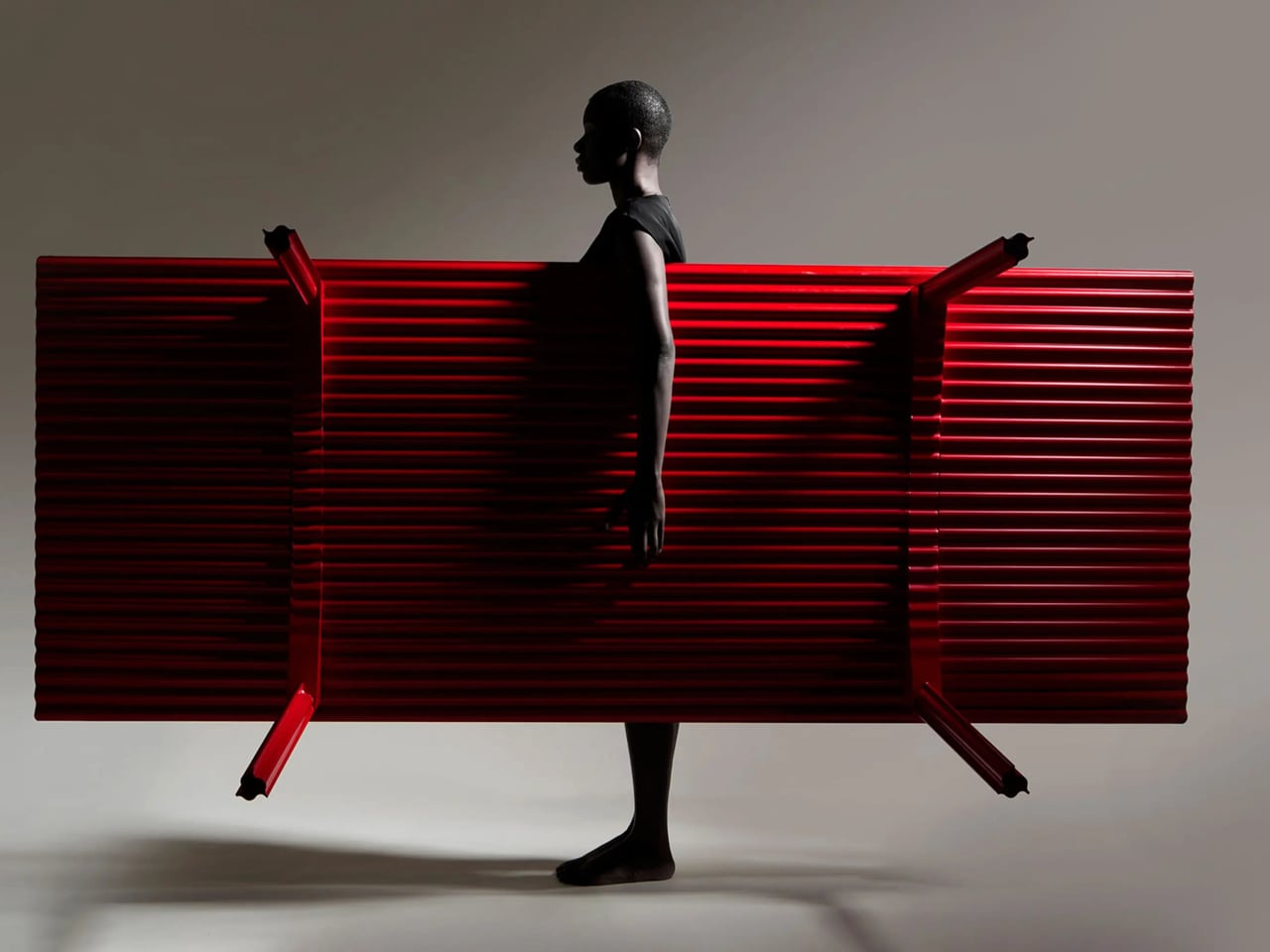
Of course, a wavy dining surface would be a fairly annoying place to balance your coffee. Ripple covers its corrugated structure with a flat plywood sheet, leaving the waves visible below and along the edge. Plates and laptops get the ordinary surface they need, while the underside carries the more unusual geometry. The useful part doesn’t have to look particularly experimental from above.

The legs follow the same preference for shape over bulk. A refined version uses hollow triangular profiles, designed to increase rigidity in two directions. The tabletop’s underside also curves gently across its length and width. Those changes address a fairly obvious concern with lightweight furniture: being easy to pick up is only useful if the table still supports what you put on it.

The red finish keeps Ripple from disappearing into the background, even with such a thin outline. From the side, the top appears almost like a sheet balanced on four narrow supports. Along the short edges, the repeating curves reveal why that impression is misleading. The structure supplies its own ornament, without adding a carved border or a heavier decorative frame.

Using less wood is part of the environmental argument, too. The project’s original documentation claims 70% to 80% less material than a standard timber table, but doesn’t establish a defined comparison for that figure. Less material isn’t automatically a complete environmental assessment, either. Adhesives, finishing, production, and working life still matter, even when the basic idea of doing more with less is appealing.

LAYER presents Ripple as a studio research project, without a current retail price or ordering details. The construction offers an answer for people whose furniture has to move with them, though size remains a constraint. You might no longer need help with the lifting, but you’d still need a clear route through the house before taking that tabletop around a corner.

The post LAYER’s Ripple Dining Table Uses a Wavy Plywood Core to Cut Weight first appeared on Yanko Design.

  • ✇Yanko Design
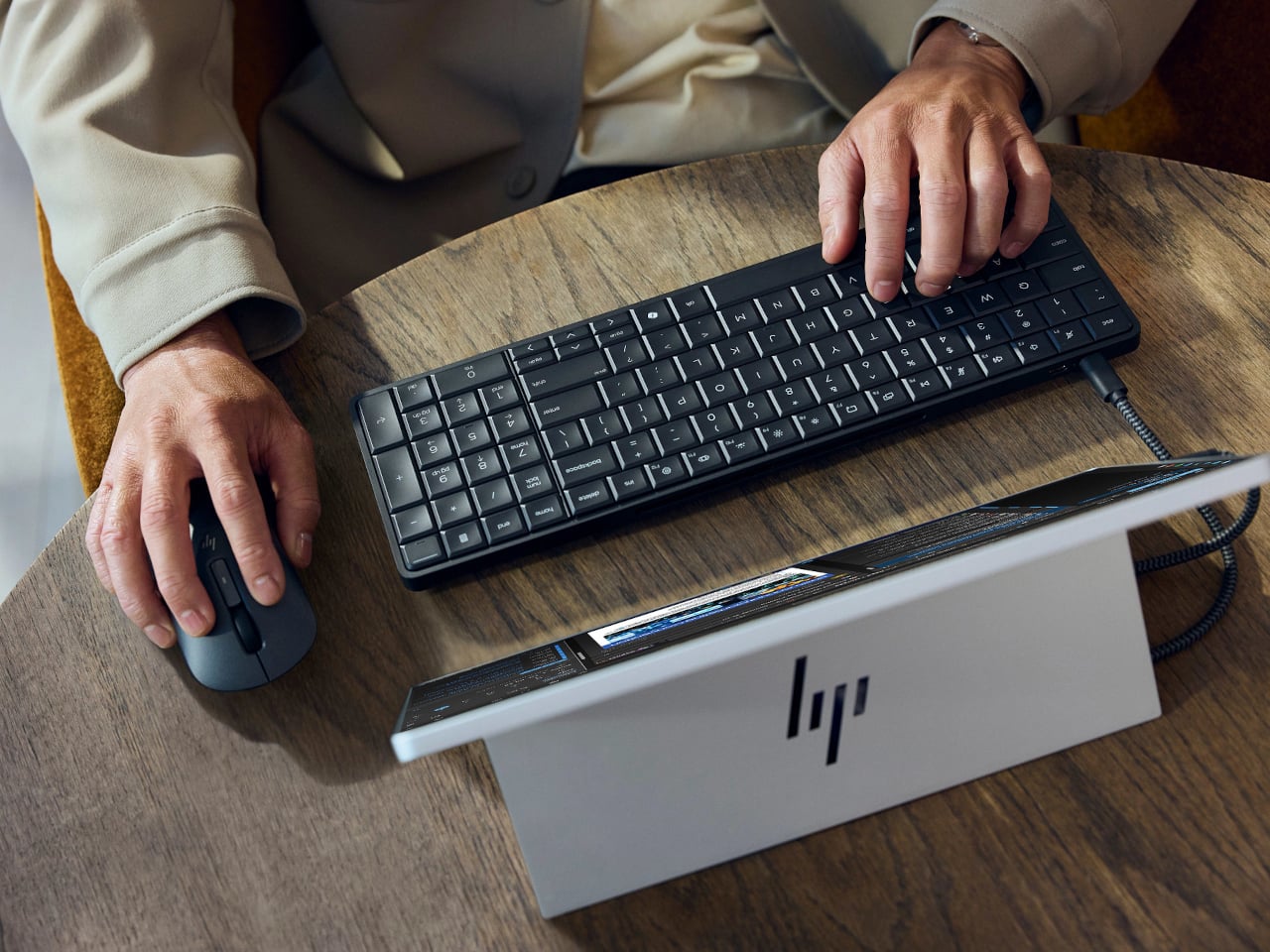
  • HP EliteBoard G2a Hides a Windows PC in an Ordinary-Looking Keyboard
    Desktop computers have become smaller, but even a little box needs somewhere to sit and cables to connect it. HP’s EliteBoard G2a removes that separate enclosure by putting the computer inside a full-size keyboard. This Windows PC keeps the surface you already type on and gives it another job, making a compact workstation easier to carry between home and office. The gray body measures 14.1 by 4.7 by 0.7 inches and weighs about 1.49 pounds, depending on configuration. Low-profile keys, a numeric
     

HP EliteBoard G2a Hides a Windows PC in an Ordinary-Looking Keyboard

Par : JC Torres
14 octobre 2026 à 05:15

Desktop computers have become smaller, but even a little box needs somewhere to sit and cables to connect it. HP’s EliteBoard G2a removes that separate enclosure by putting the computer inside a full-size keyboard. This Windows PC keeps the surface you already type on and gives it another job, making a compact workstation easier to carry between home and office.

The gray body measures 14.1 by 4.7 by 0.7 inches and weighs about 1.49 pounds, depending on configuration. Low-profile keys, a numeric keypad, and backlighting preserve the familiar business-keyboard layout rather than shrinking everything into a travel accessory. That makes the design’s restraint rather convincing: there’s no separate machine competing for attention, although you’re still setting aside space for a full keyboard.

Designer: HP

Of course, the missing piece is a screen. Connect the G2a to a compatible USB-C monitor and you can bring your computer to a desk where the display already lives. A single cable can carry video, data, and power, provided the monitor supplies the required 65W. Otherwise, the included power adapter is still needed. A USB-C socket alone doesn’t guarantee that tidy arrangement.

The cable itself comes in attached and detachable versions, a small choice with consequences when packing up. An attached lead stays with the machine, so there’s one less item to leave behind. A detachable cable separates from the keyboard for storage or replacement. The second USB-C connection handles accessories, but USB-A devices and wired Ethernet require adapters, adding clutter to the setup.

Underneath, AMD Ryzen AI 5 PRO 435 or Ryzen AI 7 PRO 450 processors distinguish this G2a from the older G1a. Both include a 50-TOPS neural processing unit for compatible local AI software. The listed configurations pair 16GB or 32GB of RAM with a 512GB SSD. These prove the existence of a powerful computer beneath the keys, not a keyboard controlling something hidden behind your monitor.

An optional 32Wh battery gives the arrangement another advantage when you’re changing desks: the computer can stay running while disconnected. That doesn’t turn it into a laptop, since you’ll still need a display when you arrive. Integrated speakers and microphones reduce the peripherals needed for audio calls, and a prepaired wireless mouse completes the controls. Video calls still need a separate camera, of course.

Putting everything beneath the keys could make a damaged keyboard an expensive problem, which is why serviceability matters here. HP makes the top-mounted keyboard replaceable, alongside the RAM, SSD, and optional battery. Two accessible memory slots support upgrades to 64GB. You don’t have to treat the computer as disposable because its most frequently touched part wears out, although repairs still require appropriate skills.

That said, the price is harder to hide than the computer. Listed US configurations start at $3,028, while the attached-cable version with 32GB of RAM is priced at $3,846. A compatible monitor remains a separate purchase. For someone moving between equipped workspaces, carrying a keyboard instead of a desktop makes sense. Paying that much to avoid a separate box, however, is a considerably bigger decision.

The post HP EliteBoard G2a Hides a Windows PC in an Ordinary-Looking Keyboard first appeared on Yanko Design.

  • ✇Yanko Design
  • This Robotic Pavilion Concept Would Change Its Layout Only When Empty
    A public pavilion can give people somewhere to gather, but returning to it usually means finding the same spaces and following the same paths. Self-Assembling Robotic Environments explores a more flexible alternative: mobile architectural sections that could rearrange themselves between visits. This unbuilt public art concept would pause whenever someone enters, letting people explore one arrangement before the space changes for another group. Each section combines a floor, wall, and roof in a
     

This Robotic Pavilion Concept Would Change Its Layout Only When Empty

Par : JC Torres
13 octobre 2026 à 12:20

A public pavilion can give people somewhere to gather, but returning to it usually means finding the same spaces and following the same paths. Self-Assembling Robotic Environments explores a more flexible alternative: mobile architectural sections that could rearrange themselves between visits. This unbuilt public art concept would pause whenever someone enters, letting people explore one arrangement before the space changes for another group.

Each section combines a floor, wall, and roof in a large C-shaped profile, like a little shelter with its sides left open. Two versions stand about 10 and 14 feet tall, both four feet wide. Place several together, and those simple shapes could become passages or covered pockets. Separate them again and the same pieces would offer a different place to wander.

Designer: Michael Jantzen

Of course, rearranging those sections wouldn’t mean asking someone to wheel them into position. Each floor would contain its own computer, sensors, motors, wheels, and battery, allowing the entire unit to travel forward, backward, or sideways. The wall and roof would move with it. The robotics aren’t proposed as equipment that builds the installation and then leaves; they’d remain part of the architecture.

Rather than following one permanent floor plan, the modules would use artificial intelligence to decide on their positions through majority agreement. The proposal doesn’t explain how they would evaluate possible arrangements, though. A gap between two units could become a passage, while several facing one another might define a gathering spot. The same pieces could give visitors different ways to use the space.

The roof would do more than shelter whoever stands beneath it. Solar cells on top would recharge the battery inside the floor, keeping the proposed power supply within each moving section. It’s a sensible place to collect sunlight, but the project doesn’t specify how much energy movement would require. Keeping these large pieces in motion isn’t as simple as putting solar panels overhead.

A black perimeter would mark the robots’ territory, containing their movements within a circular arena. Sensors would watch for people or objects entering that space, pausing every module until the area is clear. You wouldn’t be expected to dodge a moving wall while exploring. The intended sequence is straightforward: the pieces rearrange when empty, then hold their positions while visitors are inside.

That rule still needs engineering before anyone could walk in. Detecting a visitor isn’t the same as stopping safely, and the project doesn’t establish braking distances or structural performance. Raised floor sections also need an accessible way in. These are questions for a working installation, rather than reasons to dismiss the idea, but the concept drawings don’t settle them on their own.

For visitors, the pause could make staying put part of the interaction. Sit inside a sheltered corner for a while, and that particular arrangement would remain available until everyone leaves. A later group might find a different route or gathering spot. Someone lingering to finish a conversation would therefore be doing something rather unusual: keeping a version of the architecture from disappearing yet.

The post This Robotic Pavilion Concept Would Change Its Layout Only When Empty first appeared on Yanko Design.

  • ✇Yanko Design
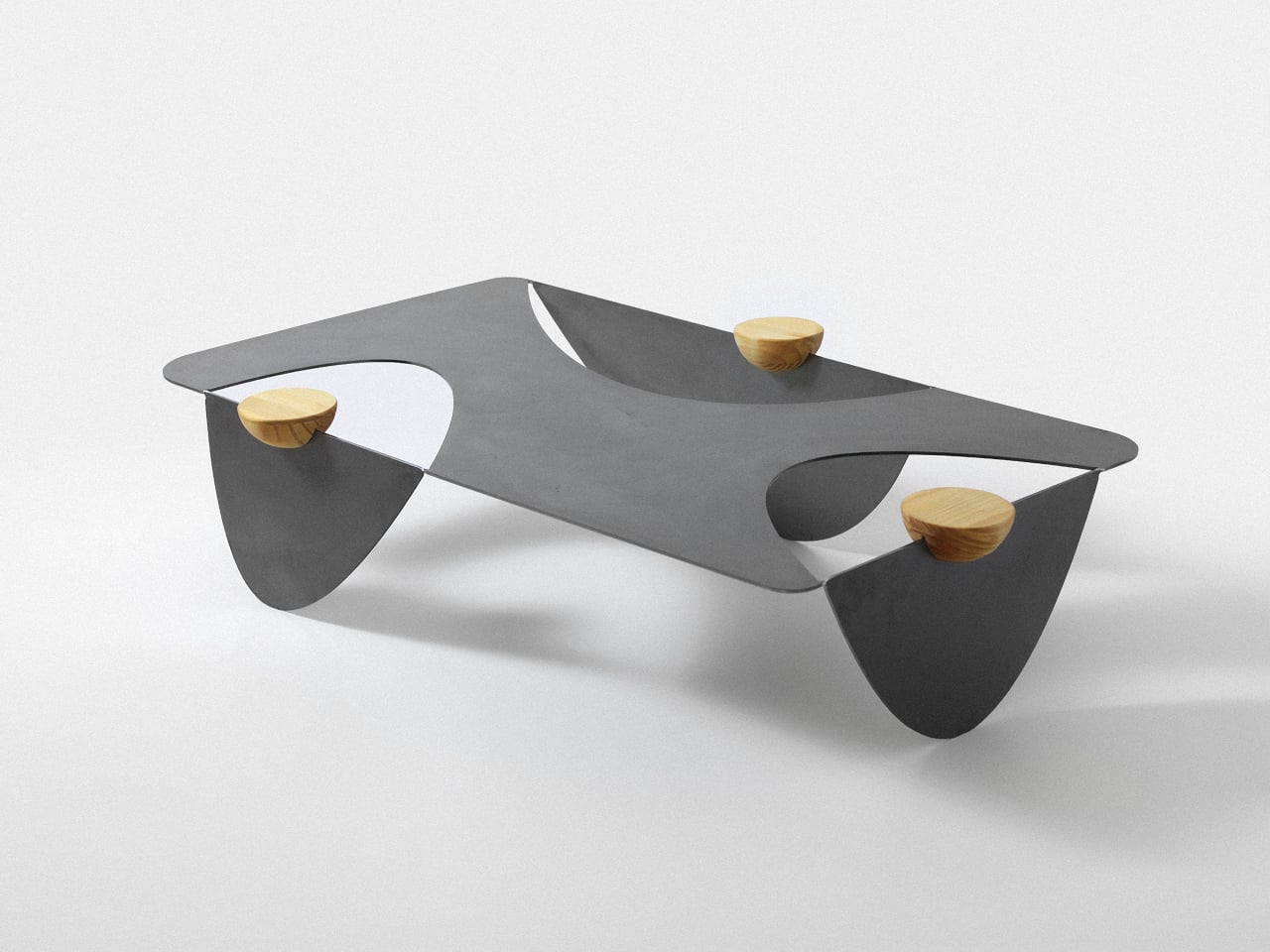
  • Colheita Coffee Table Concept Shapes Its Steel Legs With Ant-Inspired Cuts
    Ants aren’t usually welcome around a coffee table, especially when there are snacks involved. The Colheita Coffee Table concept, however, borrows something more useful from them: the curved cuts left by leafcutter ants. Its steel surface folds downward to become its own legs, while movable wooden supports provide places for drinks. The nature reference gives the table its construction logic, rather than simply decorating it. The body starts with a single steel sheet, cut by laser and bent so th
     

Colheita Coffee Table Concept Shapes Its Steel Legs With Ant-Inspired Cuts

Par : JC Torres
12 octobre 2026 à 13:20

Ants aren’t usually welcome around a coffee table, especially when there are snacks involved. The Colheita Coffee Table concept, however, borrows something more useful from them: the curved cuts left by leafcutter ants. Its steel surface folds downward to become its own legs, while movable wooden supports provide places for drinks. The nature reference gives the table its construction logic, rather than simply decorating it.

The body starts with a single steel sheet, cut by laser and bent so three broad sections reach the floor. Those sections remain attached, leaving openings where a conventional tabletop would be solid. Rather than adding separate legs underneath, Colheita carries the tabletop material through to its base. The relationship is easy to follow, even if the resulting silhouette is rather unusual.

Designer: Fabrício Auler

That approach is intended to reduce component count and material waste, although it isn’t a claim of waste-free manufacturing. A smaller detail helps explain how the sheet takes shape: enlarged, rounded ends on the cuts provide relief during bending. They’re there to ease stress where flat metal becomes a leg. The graceful curves have a fabrication purpose alongside their resemblance to a harvested leaf.

The wooden pieces might look like little bowls at first, but their flat tops serve as platforms rather than containers. Each hemisphere has a groove that slots onto the folded steel, allowing it to move along the edge. The wood adds a warmer color and visible grain to the dark metal, while giving a glass or small object its own resting place.

That means the arrangement doesn’t have to stay the same after you’ve chosen where the table goes. Move a wooden support closer to your seat, or spread them around when friends gather on different sides. The system is also intended to help stabilize the upper surface. These small additions therefore have a job beyond making the steel look a little less austere.

Of course, all those openings leave less uninterrupted space for whatever usually accumulates on a coffee table. A book or tray needs a solid patch beneath it, and a loose remote won’t forgive careless placement. The gaps do leave room for trailing plants and allow light through. Colheita invites you to arrange its contents more deliberately, which won’t appeal to everyone’s housekeeping habits.

The project also explores an unfinished carbon steel version, letting oxidation change the surface’s colors and patterns over time. That’s a different proposition from furniture meant to keep an immaculate, uniform finish. It gives the table a changing appearance rather than a permanent shade of gray. The project presentation doesn’t explain how to manage that aging around spilled drinks or routine household cleaning.

Colheita means “harvest” in Portuguese, a nod to the ants and to gathering around the table. It remains a concept project with fabrication work documented, rather than a verified retail offering. Dimensions and load capacity aren’t provided. Before trusting one of those platforms with hot coffee, you’d want to know how securely it stays put when someone nudges the table.

The post Colheita Coffee Table Concept Shapes Its Steel Legs With Ant-Inspired Cuts first appeared on Yanko Design.

  • ✇Yanko Design
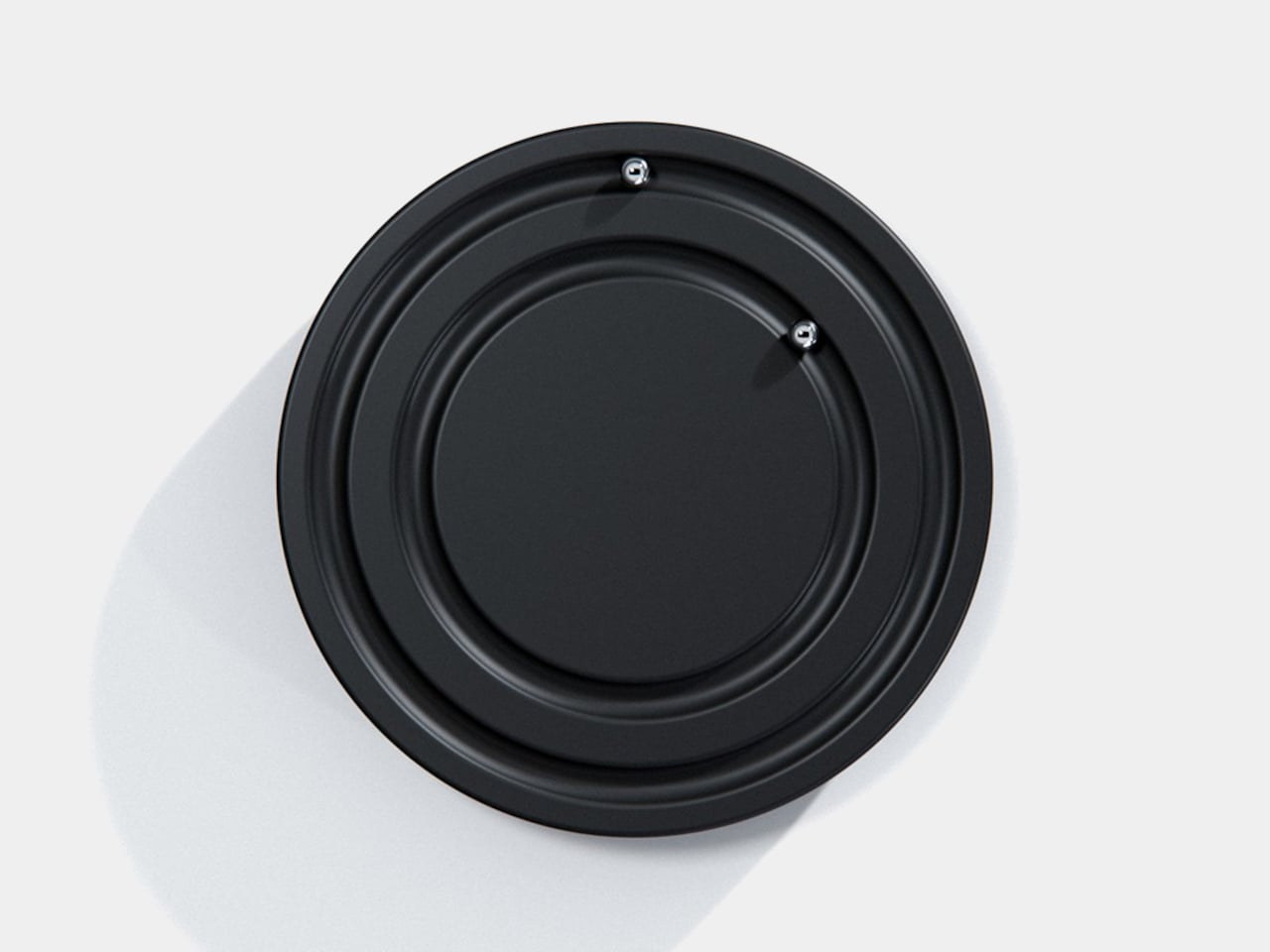
  • Orbit Clock Concept Lets You Pick Up Its Hour and Minute Markers
    Clocks have become so familiar that we barely think about what their hands are doing. They point to positions around a circle, a habit that Orbit keeps while removing the hands themselves. This ultra-minimalist clock concept replaces them with two magnetically held metal spheres, giving time a physical presence you can reach and remove, instead of leaving it behind protective glass. The face is a dark circular disk with two concentric recessed tracks, each carrying a polished sphere. There’s no
     

Orbit Clock Concept Lets You Pick Up Its Hour and Minute Markers

Par : JC Torres
12 octobre 2026 à 12:20

Clocks have become so familiar that we barely think about what their hands are doing. They point to positions around a circle, a habit that Orbit keeps while removing the hands themselves. This ultra-minimalist clock concept replaces them with two magnetically held metal spheres, giving time a physical presence you can reach and remove, instead of leaving it behind protective glass.

The face is a dark circular disk with two concentric recessed tracks, each carrying a polished sphere. There’s no cluster of numerals or central pin to interrupt the surface. Instead, the grooves give the small bearings separate paths, while their reflective finish contrasts with the darker background. The clock’s relief supplies the detail that printed markings would normally provide on a conventional dial.

Designer: Liam de la Bedoyere (boredeye.design)

One sphere represents the hours and the other the minutes, preserving the basic logic of an analog clock. You still look for positions around the face, only without a pair of hands connecting those positions to the center. That makes the idea less unfamiliar than it initially sounds. Reading it doesn’t call for learning an entirely new code, although some adjustment seems inevitable.

Of course, removing all those markings comes with a compromise. Estimating the hour should be simpler than judging an exact minute on an unmarked circle. Orbit could suit a living room where a glance is enough to keep track of the afternoon. Checking how many minutes remain before catching a train might make you rather grateful for the numbers on your phone.

The more unusual part is that the spheres aren’t permanently trapped in their tracks. Magnetic attachment is intended to let you lift each one away and put it back, adding a tactile interaction to an object usually left alone. That’s a surprisingly playful detail for such a restrained design, especially when removing both markers would leave the clock with nothing to tell you.

There’s a sculptural quality to the body itself, with a rounded outer edge and circular channels that give the black surface depth. A rear keyhole slot provides for wall mounting, keeping that face upright without a separate stand. The name Orbit feels appropriate here, with two small spheres occupying rings around an empty center, rather than hands meeting at a shared pivot point.

Orbit remains a concept, so there’s no established price or availability to weigh against those compromises. Its detachable markers do suggest a rather different relationship with a wall clock, though. Reach for the face and you’re handling the things that tell the time. Just make sure those little spheres don’t end up somewhere less useful, such as behind the living room sofa.

The post Orbit Clock Concept Lets You Pick Up Its Hour and Minute Markers first appeared on Yanko Design.

  • ✇Yanko Design
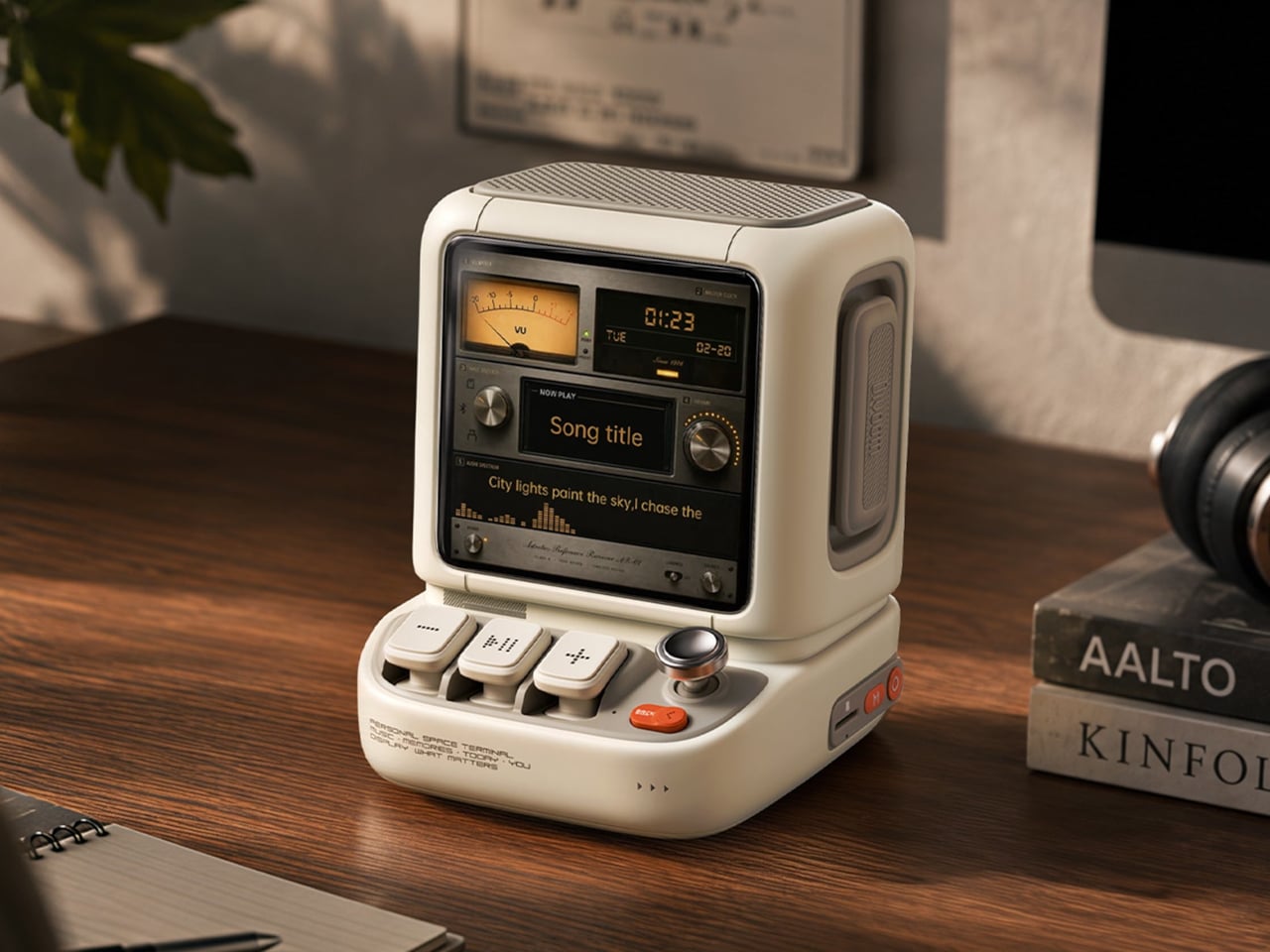
  • Divoom Astrotoo Is a Desktop Speaker Dressed as a Retro Computer
    Desktop speakers usually have a pretty straightforward job and an equally straightforward appearance. That makes sense when all you want is music, but it doesn’t leave much room for personality. Divoom’s Astrotoo takes a different approach, putting a display and oversized physical controls into a speaker that looks like a tiny computer terminal. It definitely gives your desk something playful and personal, and your friends something to be jealous of. The rounded housing and recessed side panels
     

Divoom Astrotoo Is a Desktop Speaker Dressed as a Retro Computer

Par : JC Torres
12 octobre 2026 à 06:07

Desktop speakers usually have a pretty straightforward job and an equally straightforward appearance. That makes sense when all you want is music, but it doesn’t leave much room for personality. Divoom’s Astrotoo takes a different approach, putting a display and oversized physical controls into a speaker that looks like a tiny computer terminal. It definitely gives your desk something playful and personal, and your friends something to be jealous of.

The rounded housing and recessed side panels give Astrotoo the appearance of equipment from an imagined future, albeit one with chunky buttons. White, pink, and green finishes offer different levels of restraint. At roughly 4.2 by 4.3 inches across its base, it won’t need the space of a computer, although its upright screen certainly makes it harder to overlook than a conventional speaker.

Designer: Divoom

Of course, those buttons aren’t simply there to complete the retro disguise. Three raised mechanical keys, a joystick, and an orange Back button handle music and display functions. You can reach over to control playback without opening another app, though customizing the display still involves your phone. It’s a familiar division of labor, with physical controls for everyday actions and software for the changes.

Despite the pixel art theme, Astrotoo doesn’t limit you to blocky characters and low-resolution graphics. Its 3.95-inch IPS display has a 480×480 pixel resolution, accommodating photographs and detailed clock faces as well. That means you can keep a family photo beside your monitor without making room for another frame. Music visualizations are also available, if you’d rather have your speaker put on a show.

The Divoom app lets you change visual content and clock faces, giving the device something to do when the music stops. Weather and stock information bring a more practical side to that small screen. That said, another dashboard isn’t necessarily what a busy desk needs. A favorite picture might be a better companion than financial numbers quietly competing for your attention all afternoon.

Divoom positions the 20W speaker for listening nearby, so the desktop proportions aren’t entirely about appearance. Playing music while answering emails or listening to a podcast during a break fits that purpose. Of course, the power rating doesn’t tell us how balanced the sound will be. The styling is easier to judge than the audio, which needs listening rather than a specification sheet.

Bluetooth 6.0 handles wireless audio, while microSD playback lets you bring a collection of stored music along without keeping a phone connected. Wi-Fi supports the connected display features. There’s also a battery, with Divoom claiming up to six hours of operation. That’s enough to move it between rooms for a while, but don’t expect it to stay unplugged through an entire workday.

The $199.99 US price makes this a considered desk accessory rather than a casual decoration. Divoom lists approximately 3.5 hours for USB-C charging, so it probably makes sense to leave a cable nearby. You can dress the screen as a futuristic control panel, but there’s nothing futuristic about discovering that your tiny computer needs plugging in before the afternoon playlist.

The post Divoom Astrotoo Is a Desktop Speaker Dressed as a Retro Computer first appeared on Yanko Design.

  • ✇Yanko Design
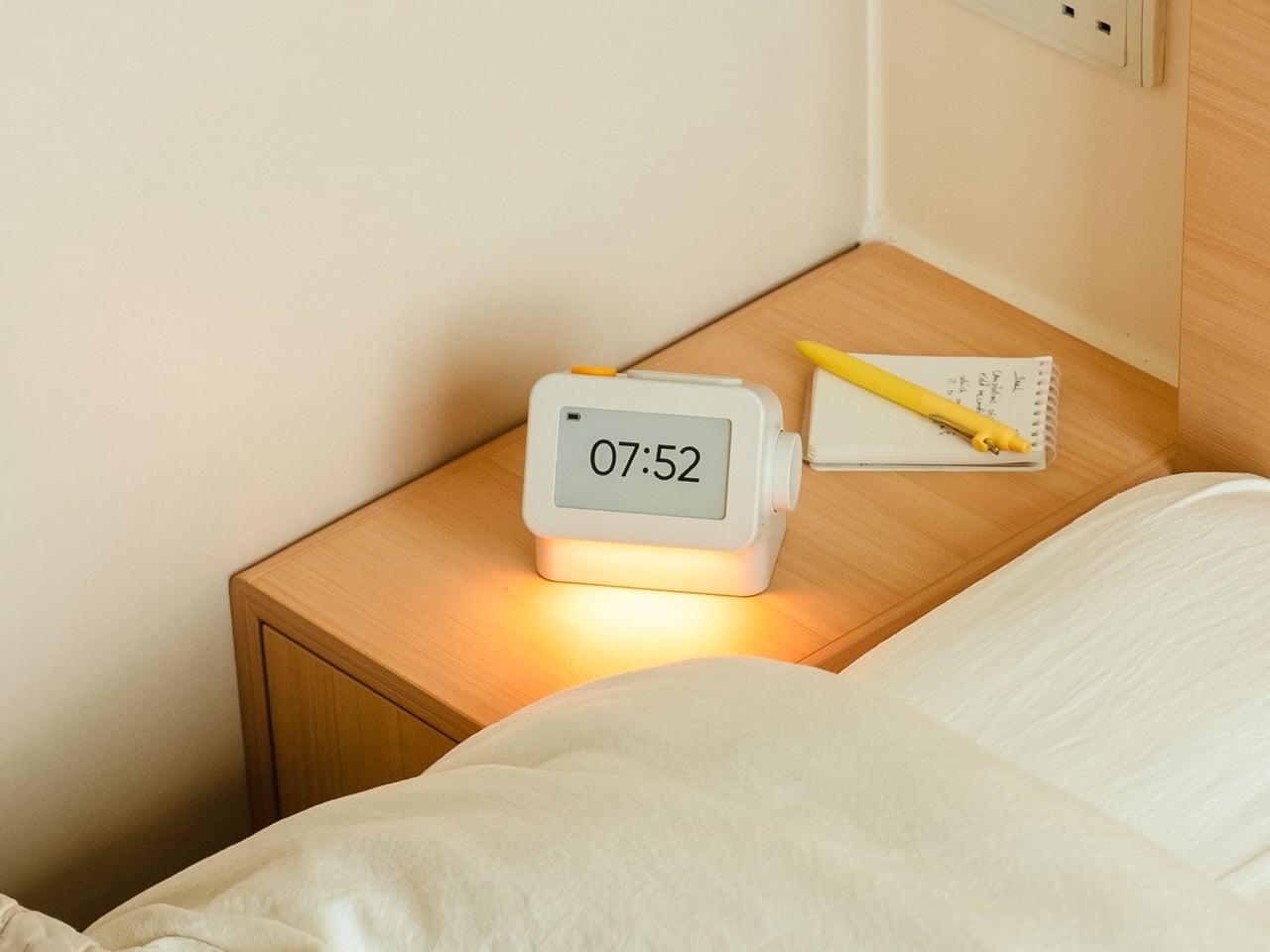
  • Habity’s E-Paper Bedside Clock Makes a Case for a Phone-Free Nightstand
    Smartphones have become rather good at convincing us they belong beside the bed, if only because we need an alarm in the morning. Unfortunately, that also puts every source of distraction within reach the moment you open your eyes. To fight that, Habity’s E-Paper Bedside Clock takes over the alarm, sleep sounds, and nightlight duties with physical controls and a display that doesn’t glow continuously, giving your phone fewer reasons to stay. The clock has a rounded rectangular body and a slight
     

Habity’s E-Paper Bedside Clock Makes a Case for a Phone-Free Nightstand

Par : JC Torres
12 octobre 2026 à 05:15

Smartphones have become rather good at convincing us they belong beside the bed, if only because we need an alarm in the morning. Unfortunately, that also puts every source of distraction within reach the moment you open your eyes. To fight that, Habity’s E-Paper Bedside Clock takes over the alarm, sleep sounds, and nightlight duties with physical controls and a display that doesn’t glow continuously, giving your phone fewer reasons to stay.

The clock has a rounded rectangular body and a slightly tilted face, but its most useful details are the ones your fingers encounter. A large side dial handles settings and volume through turning and pressing. On top, a yellow stop button sits beside a broad snooze key. Their different shapes separate two decisions you probably don’t want to confuse when you’re half asleep.

Designers: Peter Arvad, Jesper Westendahl

Of course, the screen is where Habity really parts ways with your phone. Its 3.7-inch e-paper display reflects ambient light rather than relying on continuous illumination. That means darkness calls for a little help. Interacting with the clock activates a warm frontlight for 10 seconds, enough for a quick check without leaving the time glowing beside your pillow all night long.

There’s also a built-in speaker for sleep sounds, which don’t need an app or subscription. Rain and ocean waves are familiar choices, but a sleeping dog and dishwasher bring a surprisingly domestic touch to the collection. Double-press the snooze button to start playback and turn the dial to change volume. Sessions can last up to eight hours, without borrowing your phone for the soundtrack.

Mornings get a little more flexibility than a single repeating alarm. Habity lets you choose weekday schedules or different wake-up times for individual days, although you’re limited to one wake-up alarm per day. The built-in light can gradually brighten up to 30 minutes beforehand. Once the alarm sounds, that broad snooze button grants another five minutes, as many times as you care to negotiate.

Perhaps the most curious detail is what happens when you stop touching the clock. After 10 minutes, an optional idle screen introduces an illustrated face and shrinks the time. The hour is still there, just less prominent. It’s a small concession for people who don’t want a constant reminder of how late it’s getting, and you can disable it if you’d rather keep watching the, er, watch.

Despite those straightforward controls, Habity hasn’t completely shut the door on connected features. Optional Wi-Fi provides automatic time setting and integrations with Philips Hue Bridge, Home Assistant, and Homey. That requires USB-C power, however. Leave it offline and the alarms and sounds still work, so your morning routine doesn’t need to depend on whether the router is having a good day.

Habity estimates two weeks of battery life, depending on use, but a full recharge can take up to 24 hours. You’ll want to plan that USB-C top-up rather than squeeze it in before bedtime if you’re using it unplugged. Getting one won’t move your phone to another room, of course, so you’ll still have to decide where it spends each night.

The post Habity’s E-Paper Bedside Clock Makes a Case for a Phone-Free Nightstand first appeared on Yanko Design.

  • ✇Yanko Design
  • Razer Wolverine V4 Pro has four back buttons, but none have to stay
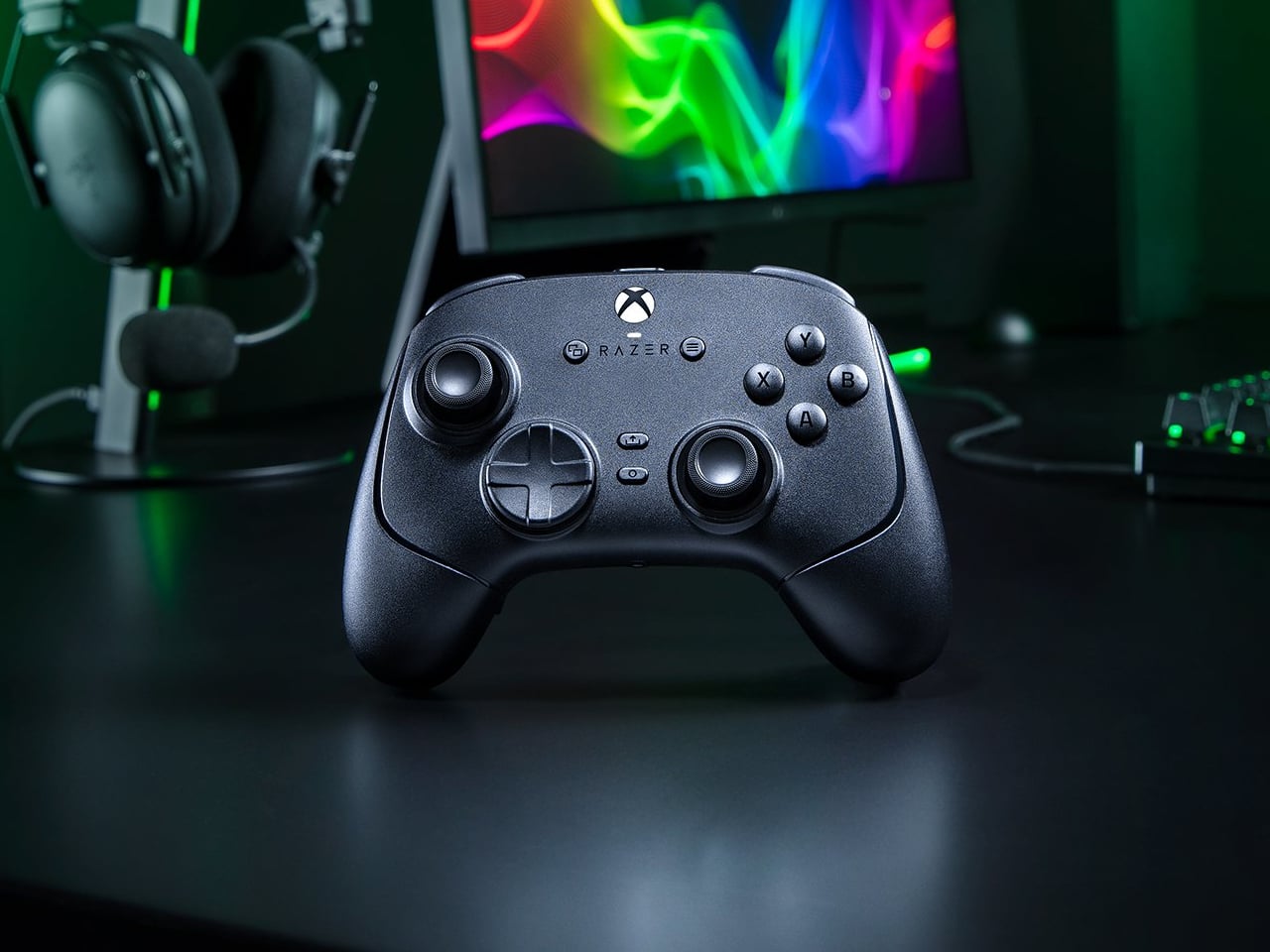
    Extra buttons on a game controller can be handy, at least until they get in the way of holding it. Razer’s Wolverine V4 Pro gives players a little more say in that arrangement, with magnetic back buttons you can remove instead of simply ignoring them. Available for Xbox and PC, the wireless controller also lets you change its thumbstick caps and even take off its faceplate. The four rear buttons come off without tools, making it possible to keep all of them, use only a pair, or clear the back e
     

Razer Wolverine V4 Pro has four back buttons, but none have to stay

Par : JC Torres
12 octobre 2026 à 04:15

Extra buttons on a game controller can be handy, at least until they get in the way of holding it. Razer’s Wolverine V4 Pro gives players a little more say in that arrangement, with magnetic back buttons you can remove instead of simply ignoring them. Available for Xbox and PC, the wireless controller also lets you change its thumbstick caps and even take off its faceplate.

The four rear buttons come off without tools, making it possible to keep all of them, use only a pair, or clear the back entirely. Blank inserts replace the unwanted controls, following the controller’s contours rather than leaving little gaps behind. It’s a small detail, but an important one when that surface is where your fingers spend most of their time during a game.

Designer: Razer

Of course, keeping those buttons attached makes sense when you’re juggling several actions at once. Their mouse-click switches can handle commands such as jumping or reloading, letting your thumbs stay on the sticks while your other fingers do the work. Two additional shoulder buttons bring the total to six remappable inputs, giving frequently used actions somewhere to go besides the familiar face buttons.

The thumbsticks get their own set of options, changing both their height and the surface beneath your thumbs. Short convex caps provide a rounded surface, while tall concave versions give your thumb a recessed resting spot and more height to work with. Razer recommends the taller caps for precise aiming. You can mix the supplied options, but swapping caps doesn’t mean you’re replacing the sensors underneath.

That flexibility continues with the triggers, which can switch between a short mouse-click action and a full analog pull using rear-mounted locks. The shorter setting suits firing in a shooter, while the longer travel lets you ease onto the throttle in a racing game. Through Razer Synapse, you can also adjust each trigger’s activation point to suit how you play.

Even the exterior is open to a little tinkering, thanks to a magnetic faceplate that lifts off without tools. Personalize that panel, or leave it off entirely to reveal the translucent housing underneath. The working components remain enclosed, so you’re changing the controller’s outer appearance rather than exposing its electronics. It’s an option for people who prefer seeing a bit of machinery.

The software takes care of the changes you can’t make with magnets. Four onboard profiles hold different button assignments and sensitivity settings, so a racing setup doesn’t have to overwrite your shooter preferences. You can also adjust thumbstick dead zones, deciding how much movement registers as input. That said, greater sensitivity can pick up tiny thumb movements you didn’t intend.

At $199.99 in the US, this level of customization doesn’t come cheap, and there’s no included carrying case to keep the removable pieces together. You’ll have to find your own place for spare caps and unused buttons. After spending that much on a controller you can rearrange, a dedicated home for the bits you’ve removed would have been rather welcome.

The post Razer Wolverine V4 Pro has four back buttons, but none have to stay first appeared on Yanko Design.

  • ✇Yanko Design
  • PocketBook Gave Its $198 E-Reader the One Trick Old Nokia Phones Had
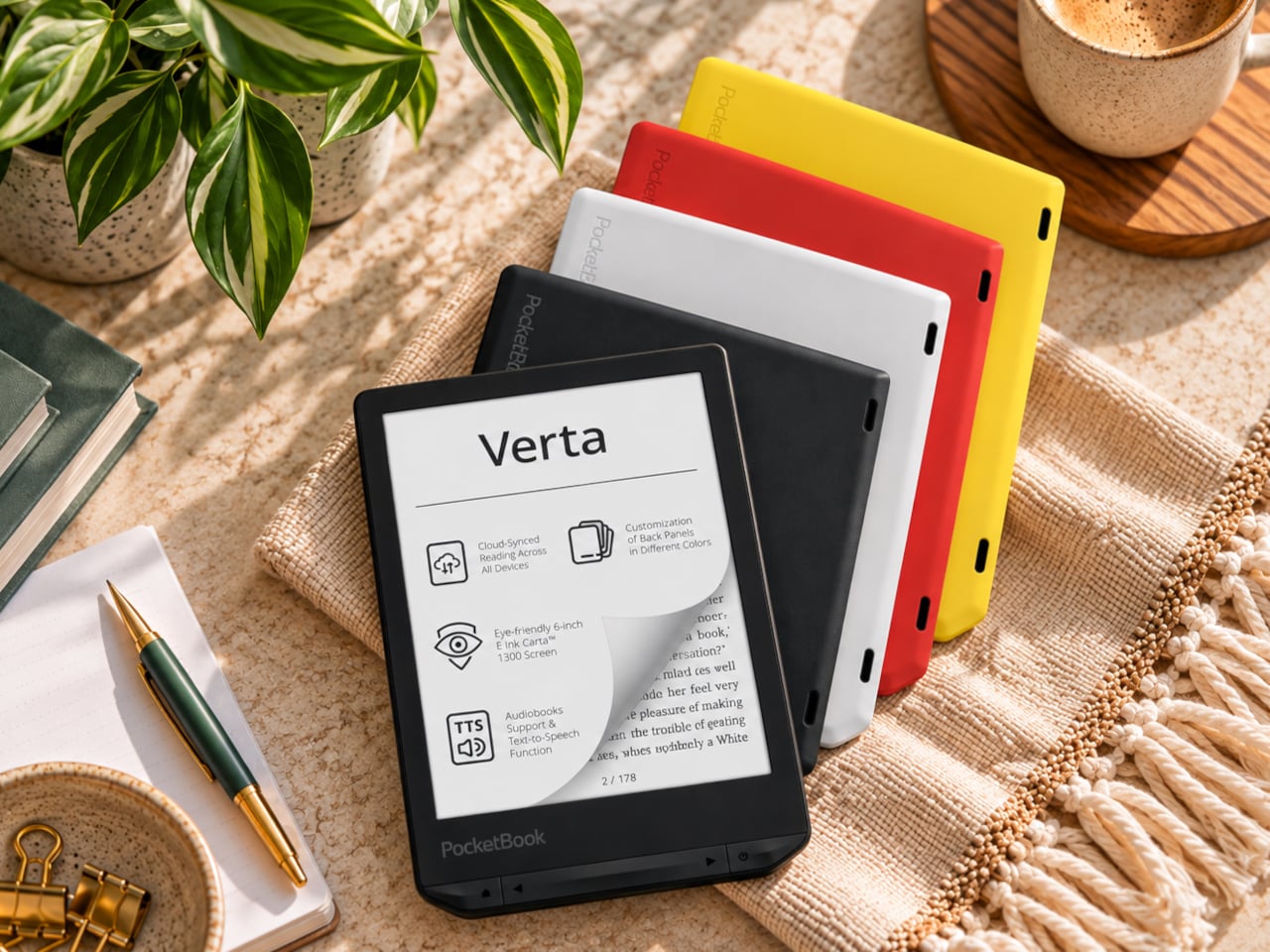
    E-readers are supposed to replace physical books, but they strangely come mostly in black or gray, unlike colorful and distinctive book covers. Although not a complete design overhaul, Pocketbook’s new Verta and Verta Color e-readers offer a simple fix, and no, it doesn’t require slapping on a case. You can change the color of the e-reader by swapping the back panel while maintaining its slim shape and keeping the screen and page-turn buttons uncovered. That’s a rather different approach to per
     

PocketBook Gave Its $198 E-Reader the One Trick Old Nokia Phones Had

Par : JC Torres
8 octobre 2026 à 06:07

E-readers are supposed to replace physical books, but they strangely come mostly in black or gray, unlike colorful and distinctive book covers. Although not a complete design overhaul, Pocketbook’s new Verta and Verta Color e-readers offer a simple fix, and no, it doesn’t require slapping on a case. You can change the color of the e-reader by swapping the back panel while maintaining its slim shape and keeping the screen and page-turn buttons uncovered.

That’s a rather different approach to personalization than slipping on a protective cover. The interchangeable panels are sold separately, so you can keep a few colors around and switch when your taste changes. More importantly, they replace the back rather than wrapping over the front. There’s no extra flap to fold behind the reader when you settle into a chair with a book.

Designer: PocketBook

The front stays familiar in the best way. Both readers have a 6-inch touchscreen and enlarged page-turn buttons beneath it, giving your thumb another way forward when the screen is smudged or your hands are occupied. Each measures just 0.28 inches thick and weighs about 4.9 ounces, a size that suits a jacket pocket or an overstuffed bag on the commute.

Choose the regular Verta, and you get a 6-inch E Ink Carta 1300 display at 300 pixels per inch, built for the sort of long novel that makes you miss your stop. SMARTlight lets you adjust brightness and warmth as daylight disappears. It also offers Dark Mode, so you can keep reading in bed without a bright white page facing the person beside you.

The Verta Color is for readers who want their covers, illustrated pages, and comics to retain some color. Its E Ink Kaleido 3 screen renders monochrome text at 300 pixels per inch, but color drops to 150 pixels per inch. Those numbers matter if you read fine print in graphic novels; the color option gives illustrations some life, not the punch of a tablet.

Both have 16GB of storage, Wi-Fi for downloading books, and Bluetooth audio for audiobooks or text-to-speech, though you’ll need headphones or another compatible listening device. PocketBook also supports a broad range of file formats and borrowing through library apps. That flexibility comes in handy when the next book you want isn’t sitting in a single company’s store waiting for you.

An IPX4 rating gives the pair protection against splashes, not an invitation to use them in the bath. Their 1,500mAh batteries are meant to last up to two months, depending on how you read, although that figure comes from PocketBook rather than an independent test. The removable backs add personality, but they’re not a replacement for a protective case if the reader needs one.

PocketBook plans to release both in November 2026, pricing the Verta at €169 (about $198) and the Verta Color at €179 (about $209). Both are marked as coming soon on its storefront. The cleverest trick, though, is letting you change the color of something you hold for hours on end without asking a protective case to do the decorating for you.

The post PocketBook Gave Its $198 E-Reader the One Trick Old Nokia Phones Had first appeared on Yanko Design.

  • ✇Yanko Design
  • A $249 Smart Lock That Still Opens When You’ve Forgotten to Charge It
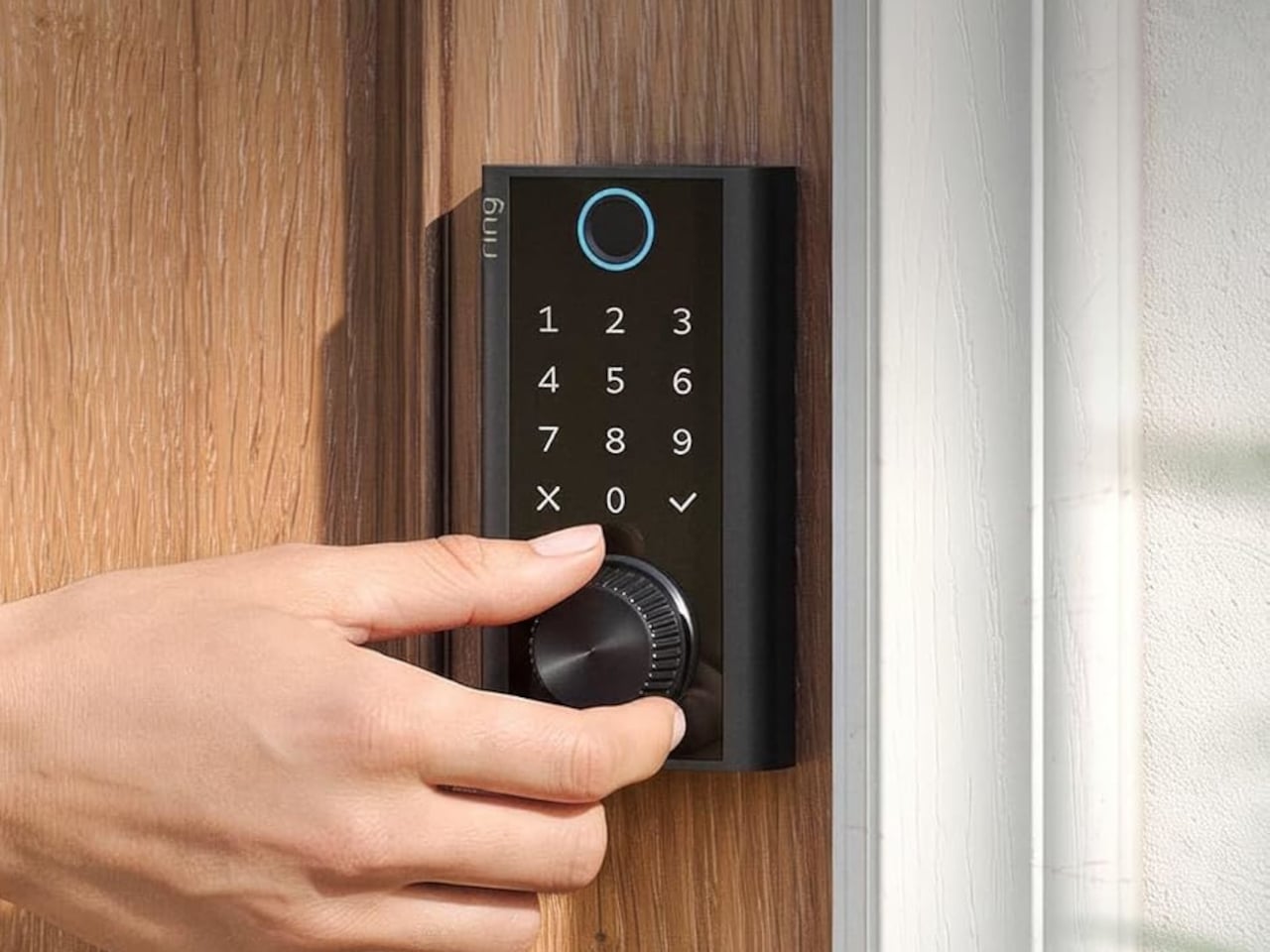
    Smart locks sound like the future until you’re standing outside with groceries and the lock won’t wake up because of a dead battery. Although there are different methods to address that, Ring’s first-ever Smart Lock has a rather ingenious solution: an almost literal crank. Simply turn a dial a few times to power the keypad just long enough to key in your code. It’s simple yet effective, and it doesn’t require you to fumble for a cover to replace the battery. The knurled dial sits beneath the b
     

A $249 Smart Lock That Still Opens When You’ve Forgotten to Charge It

Par : JC Torres
8 octobre 2026 à 04:15

Smart locks sound like the future until you’re standing outside with groceries and the lock won’t wake up because of a dead battery. Although there are different methods to address that, Ring’s first-ever Smart Lock has a rather ingenious solution: an almost literal crank. Simply turn a dial a few times to power the keypad just long enough to key in your code.

It’s simple yet effective, and it doesn’t require you to fumble for a cover to replace the battery. The knurled dial sits beneath the backlit touchscreen keypad, with a circular fingerprint reader topping them all. All in all, the design looks more like a stack of controls instead of a deadbolt with electronics just bolted on.

Designer: Amazon

On regular days or nights, you can simply touch the fingerprint reader instead of digging for keys in your bag or pocket. You can also give a visitor a PIN that only works during a set time window. The Ring app also offers yet another way to let you in, and it also allows you to check the lock remotely, including Alexa voice control. These are the typical features you’d expect from a smart lock, but Ring does one better.

Most keyless locks require a cable or a spare battery before they even wake up, which isn’t exactly the fastest or the easiest when you only have one hand free. Ring puts that backup in that same free hand, figuratively. Simply turn the dial to “charge” the lock, almost like cranking some lever for power. It’s an almost comical analogy, but it gets the job done.

Of course, you don’t charge the Ring Smart Lock by turning the dial endlessly. That’s what the Quick Release Ultra Battery Pack is for. That battery is rechargeable, which means you don’t need to worry about extra wiring or hardware when installing the Smart Lock. It works with a standard single-cylinder deadbolt, making it immediately compatible with many doors.

One thing to note is that remote features depend on Amazon Sidewalk rather than your home Wi-Fi. That could spare you a trip back to check whether the door locked, or let you admit someone while you’re away, provided there’s coverage where you live. Ring says unlocking at the door happens locally, but Sidewalk remains a requirement for the connected functions. It’s a condition beneath the promise of convenience.

The lock can share the Ring app’s activity feed with Ring’s other products such as doorbell, cameras, and alarms, so you get a more holistic view of everything that happens at home even when you’re away. That said, it doesn’t have a camera of its own, which is a subtle nudge to get a Ring doorbell, too.

Black, silver, and brass finishes are planned, with a $249 price and U.S. availability expected in early 2027, pending regulatory authorization. For now, some details about the Ring Smart Lock have yet to be fully disclosed, including battery life. Regardless, it’s an interesting and low-tech solution to a high-tech problem that makes you feel you’re in control, even in such an emergency.

The post A $249 Smart Lock That Still Opens When You’ve Forgotten to Charge It first appeared on Yanko Design.

  • ✇Yanko Design
  • This $59 Cork Wallet Makes Your Overstuffed Bifold Look Embarrassing
    Most wallets don’t start out bulky. They get there one receipt, spare card, and folded bill at a time, until slipping one into a front pocket feels like packing a book. Corkor’s slim card holder asks you to carry less, then makes that decision feel less austere with a cork exterior. Its appeal lies in the material as well as its size. Cork is something you pull from a bottle or pin notes into, not what you reach for when paying for coffee. Here, its irregular grain gives the wallet character wi
     

This $59 Cork Wallet Makes Your Overstuffed Bifold Look Embarrassing

Par : JC Torres
7 octobre 2026 à 13:20

Most wallets don’t start out bulky. They get there one receipt, spare card, and folded bill at a time, until slipping one into a front pocket feels like packing a book. Corkor’s slim card holder asks you to carry less, then makes that decision feel less austere with a cork exterior. Its appeal lies in the material as well as its size.

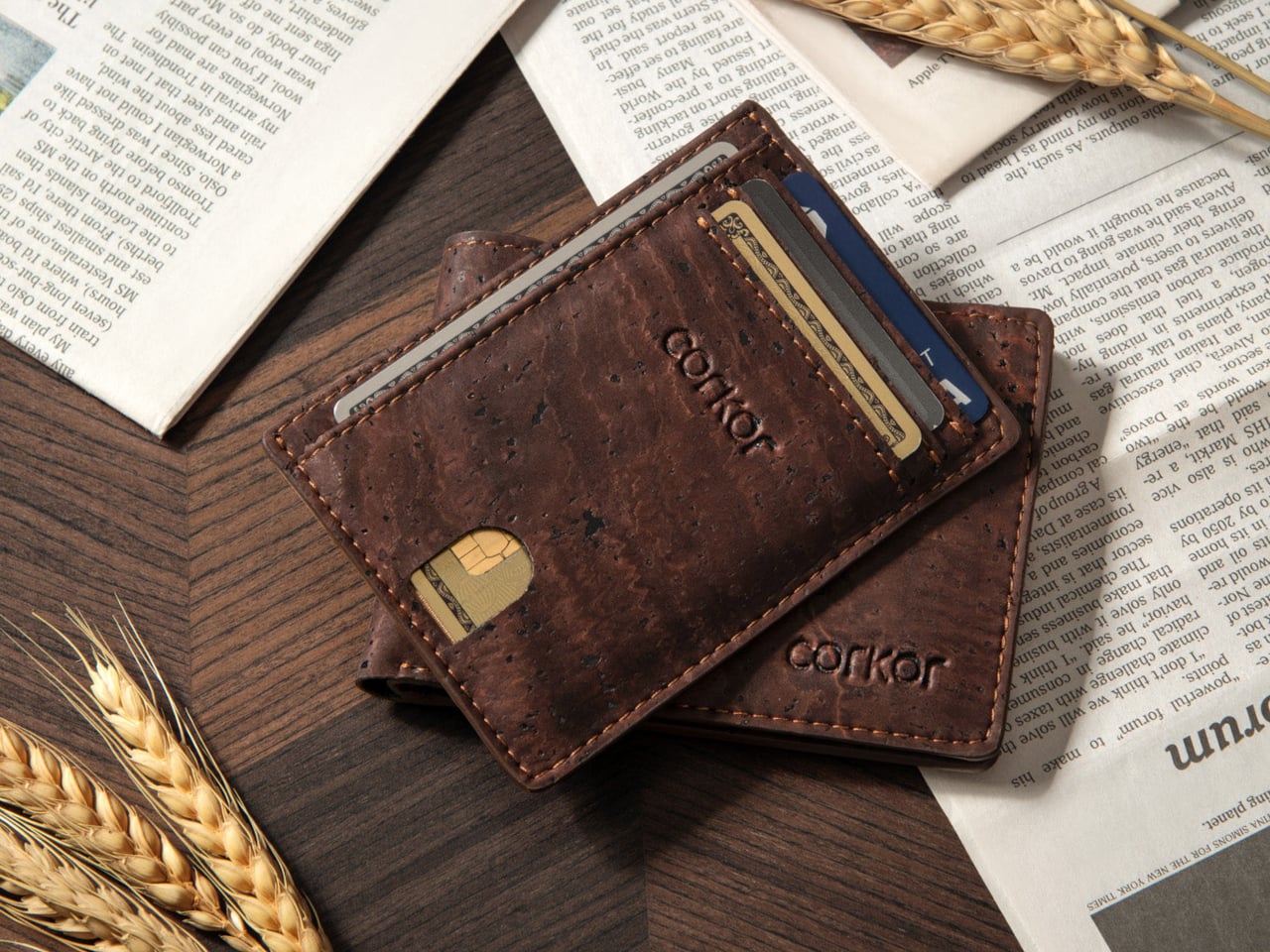
Cork is something you pull from a bottle or pin notes into, not what you reach for when paying for coffee. Here, its irregular grain gives the wallet character without needing decorative hardware or branding. Stitched edges and stacked pockets keep the shape familiar, but the surface feels different from the smooth leather and synthetic finishes that dominate everyday carry.

Designer: Corkor

The layout keeps your most-used cards in three slots, with an ID window and two compartments for folded bills. A small opening on the front helps you nudge a card upward rather than digging at its edge. Keep only the cards you actually use, though, because squeezing too many into those pockets would inevitably change how slim the wallet feels in your pocket.

At 4.3 inches tall, 3.2 inches wide, and 0.4 inches thick when empty, the holder takes up less room than a traditional bifold. It weighs just 0.70 ounces before you add anything. You can leave home with a payment card, an ID, and a little cash without carrying a stack of compartments you’ll never open during a long, busy day away from home.

Cork has a purpose beyond its unusual appearance. The thin, pliable material lets the holder bend gently instead of feeling like a rigid little case, and Corkor describes it as water-repellent and easy to clean. For someone who wants an animal-free alternative to leather, that makes the material choice part of the daily experience rather than a claim printed on a label.

The cork comes from Portugal, where Corkor also makes the holder in-house. That doesn’t mean a wallet can settle every question about sustainability, but it does give this one a clear material identity. Corkor says its packaging is recyclable or compostable, and the card holder is certified vegan. Those details matter most when they’re paired with something you actually want to keep using.

Of course, minimalism has limits. There’s no coin pocket, and those folded bills won’t be as quick to sort through as cash in a full-size wallet. RFID-blocking construction is included to help protect compatible cards from skimming, but it won’t prevent other kinds of theft. This is a holder for an edited pocket, not a place to stash whatever the day hands you.

Corkor prices the holder at $59, which might seem steep for something designed to carry so little. That small footprint is precisely the point. The soft, mottled cork makes a familiar stack of slots feel unexpectedly personal, while the slim layout encourages you to leave the clutter behind. Once you’ve pared things down, that front pocket might finally have room for more than your wallet.

The post This $59 Cork Wallet Makes Your Overstuffed Bifold Look Embarrassing first appeared on Yanko Design.

  • ✇Yanko Design
  • Bloom Built a Cat Tower Around the Cat You Haven’t Got Yet
    A kitten might be happy with a hideaway, but give it a few months and that same nook starts looking cramped. Add another cat, and a single perch becomes contested territory. Bloom takes that problem literally, building a cat tower from separate cylindrical modules that can be arranged as its occupants grow. It starts small instead of demanding space for a feline family. Most cat towers arrive as a collection of platforms, posts, and houses, whether your cat needs all of them or not. Their bulk
     

Bloom Built a Cat Tower Around the Cat You Haven’t Got Yet

Par : JC Torres
7 octobre 2026 à 12:20

A kitten might be happy with a hideaway, but give it a few months and that same nook starts looking cramped. Add another cat, and a single perch becomes contested territory. Bloom takes that problem literally, building a cat tower from separate cylindrical modules that can be arranged as its occupants grow. It starts small instead of demanding space for a feline family.

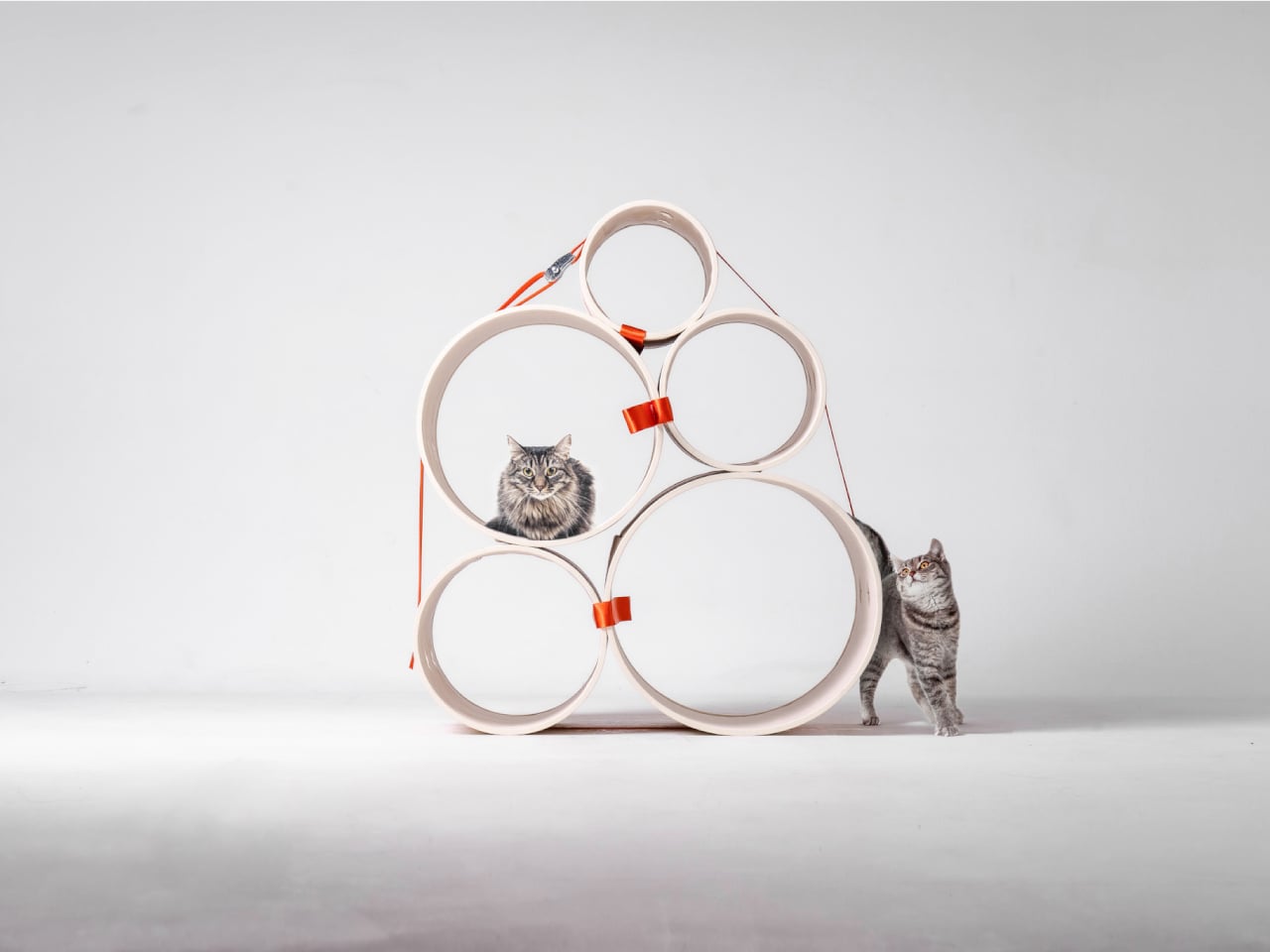
Most cat towers arrive as a collection of platforms, posts, and houses, whether your cat needs all of them or not. Their bulk can make a living room feel as if it has been furnished around the pet. Bloom swaps that predetermined silhouette for a cluster of open tubes, each one a place to curl up, climb through, or watch the room.

Designers: Joonseo Choi, Taewoon Kang

Those cylinders come in several diameters, so arranging them feels closer to stacking play objects than assembling pet furniture. A smaller cat can settle into a tighter opening, while a larger one has room to stretch out in a wider tube. The circles also give Bloom its character: soft, repeating forms that can take different shapes instead of committing your room to one tower.

Of course, loose tubes wouldn’t make much of a cat tower once the occupants started leaping about. Bloom uses orange straps to hold the modules together, with hook-and-loop fastening that makes them easier to attach and detach. The straps add a punch of color to the pale cylinders, but their important job is letting you change the arrangement without committing to a rebuild.

You might begin with two tubes near the sofa, then add another when your kitten starts climbing above everybody’s heads. If a second cat joins the household, a wider cluster could give each animal somewhere to pause without fighting over the same opening. The exact layout can follow the cats, rather than asking them to adapt to whatever configuration came in a box.

The holes along the sides serve another purpose beyond giving the straps somewhere to attach. Slide a toy toward one, and a cat tucked inside has something to investigate, while you get a way to join the game without reaching into the tube. It’s a detail, but it turns the enclosed space into somewhere for interaction rather than just another hiding place.

There are still questions a concept can’t answer. A tall arrangement would need to stay steady under a cat’s weight, especially if one launches itself at an upper opening. Bloom doesn’t specify load limits or explain how every possible configuration would be supported, so that flexibility shouldn’t be mistaken for unlimited stacking. For now, its flexibility remains an intriguing, unproven design proposition.

Still, Bloom understands something about cats that a fixed tower often misses: the creature you bring home won’t always be small, and it might not always be alone. Its tubes can be rearranged as that story changes, while its openings leave room for curiosity. The furniture doesn’t need to grow overnight; it can take shape alongside the animals that claim it.

The post Bloom Built a Cat Tower Around the Cat You Haven’t Got Yet first appeared on Yanko Design.

  • ✇Yanko Design
  • The Selfie Camera on Your Phone Has Always Been in the Wrong Place
    Most budget phones have one screen you stare at and a back you think about. The Honor X5d s makes that back worth a second look by placing a 2.01-inch touchscreen next to its rear camera. It shows the time and alerts, handles music, and helps you take selfies with the better camera. That’s a useful design trick for an inexpensive phone. The camera island looks like it was built around that display, rather than having a screen tacked on afterward. Two dark circles sit beside it, although Honor l
     

The Selfie Camera on Your Phone Has Always Been in the Wrong Place

Par : JC Torres
5 octobre 2026 à 06:20

Most budget phones have one screen you stare at and a back you think about. The Honor X5d s makes that back worth a second look by placing a 2.01-inch touchscreen next to its rear camera. It shows the time and alerts, handles music, and helps you take selfies with the better camera. That’s a useful design trick for an inexpensive phone.

The camera island looks like it was built around that display, rather than having a screen tacked on afterward. Two dark circles sit beside it, although Honor lists only one rear camera. Forest Green makes the island pop against a pale back, while Midnight Black keeps things subdued. Either way, the phone’s most interesting feature is visible before you even wake it.

Designer: Honor

That rear screen makes sense when you’re trying to get everyone into a photo. Instead of extending your arm, guessing at the framing, and discovering that someone’s head is missing, you can see the shot while using the 50-megapixel rear camera. A tap on the back takes the picture. There’s also a 5-megapixel front camera, but this arrangement gives selfies another option.

Of course, a phone can’t spend all day posing for pictures. Leave the X5d s face down on a desk, and its little window can still show the time or a call alert. Music controls live there too, so skipping a song doesn’t require turning the whole device over. It’s a small convenience, but those are often the ones you keep using.

On the other side, there’s a 6.78-inch LCD for more than a glance. Its size makes room for videos, messages, and the photos you took, although the 1,576×720 resolution isn’t particularly sharp for such a large panel. The rear display doesn’t fix that limitation. It simply gives quick tasks their own place instead of asking the bigger screen to do everything.

There’s a 6,000mAh battery to keep both screens running, though the phone’s 15W wired charging might test your patience when it finally needs a refill. Honor also provides 64GB of storage and a three-card slot, letting you add a microSD card without sacrificing either SIM. That’s handy if you keep your photos and music on the phone rather than in the cloud.

Inside, the Unisoc T610 processor and 4GB of RAM tell a more familiar budget-phone story. The side-mounted fingerprint reader is convenient, but there’s nothing particularly exotic about the rest of the hardware. In South Africa, the 4GB/64GB version costs R2,499 (about $150), which puts the extra screen in reach of people who aren’t shopping for a flagship just to get a conversation-starting feature.

That display won’t replace your phone’s main screen, nor will it make the X5d s a better choice for demanding games. But it changes the small interactions that fill a day: a glance at a call, a tap to skip a song, a preview before taking a selfie. At this price, giving the back something useful to do feels refreshing.

The post The Selfie Camera on Your Phone Has Always Been in the Wrong Place first appeared on Yanko Design.

  • ✇Yanko Design
  • Laifen’s Fall Sale Is for the Bathroom Tools You’ve Always Ignored
    It’s a little strange when you think about it. People will spend weeks comparing headphones or picking the right coffee maker, yet the hair dryer, shaver, or toothbrush sitting on the bathroom counter rarely gets a second thought. Laifen’s fall lineup is built around fixing exactly that gap, treating everyday personal care tools with the same design attention usually reserved for gadgets people actually brag about owning. The brand happens to be running one of its bigger sales of the season rig
     

Laifen’s Fall Sale Is for the Bathroom Tools You’ve Always Ignored

Par : JC Torres
3 octobre 2026 à 21:45

It’s a little strange when you think about it. People will spend weeks comparing headphones or picking the right coffee maker, yet the hair dryer, shaver, or toothbrush sitting on the bathroom counter rarely gets a second thought. Laifen’s fall lineup is built around fixing exactly that gap, treating everyday personal care tools with the same design attention usually reserved for gadgets people actually brag about owning.

The brand happens to be running one of its bigger sales of the season right now, and it covers four products that together handle nearly every step of a morning routine. Two hair dryers, an electric shaver, and an electric toothbrush, each one designed less like a bathroom appliance and more like something you’d actually want to leave sitting out in view.

Laifen SE 2: The Hair Dryer Most People Should Have Switched to by Now

Most hair dryers get the job done, until something faster comes along and makes the old one feel sluggish by comparison. The Laifen SE 2 runs on a 108,000-RPM brushless motor that pushes air at nearly 48mph, noticeably quicker than what most household dryers manage without resorting to constant blasts of heat. That speed alone cuts a few minutes off the usual routine.

What makes the SE 2 worth a second look is Temperature Cycling Mode, which alternates airflow patterns instead of holding one constant heat level, cutting down on damage from daily drying. 10 drying settings cover most hair types, and at 14.35 ounces without the cord, it’s light enough to hold through a full styling session. The matte white finish fits into almost any bathroom without effort.

Click Here to Buy Now: $112.50 $149.99 (25% off, use coupon code “PRFALLSALE”). Hurry, deal ends in 48-hours!

Laifen Swift 4: The Dryer That Turns an Everyday Step Into a Hair Care Routine

Most people treat drying and hair care as two separate steps, applying oil or serum first and hoping the blast of hot air doesn’t undo the work. The Laifen Swift 4 folds both into one motion through its Nourishing Nozzle, which breaks essential oils into fine particles and distributes them at a steady 136°F, letting the oil work into hair while it dries instead of sitting on top of it.

Behind that trick sits a 115,000-RPM motor pushing air at nearly 51mph, with temperature checks running 1,000 times a second to keep heat steady. Six modes cover everything from a quick blast to a gentler nourishing cycle, while 400 million negative ions calm frizz and 70 million positive ions look after the scalp. It comes in three metallic finishes, none of them loud.

Click Here to Buy Now: $170 $199.99 (15% off, use coupon code “PR15SWIFT4”). Hurry, deal ends in 48-hours!

Laifen P3 Pro: A Shaver Built the Way Premium Gadgets Are Built

The Laifen P3 Pro Space Gray leads with a detail that has nothing to do with how close it shaves: a transparent motor window borrowed from the exhibition backs of mechanical watches, letting the internals show through instead of hiding behind plain plastic. The body itself is CNC-machined aluminum, a process that takes 9,000 seconds per unit, longer than what most flagship phones require.

At 6.3 ounces and barely bigger than a deck of cards, it slips into a dopp kit or jacket pocket without adding bulk. The dual-drive linear motor reads beard density in real time and adjusts power automatically, so thick patches don’t cause snagging. Two shaver heads handle close, short stubble, a flexible trimmer catches longer hair, and the whole thing carries an IPX7 rating for shower use.

Click Here to Buy Now: $126 $179.99 (30% off, use coupon code “PRFALLSALE”). Hurry, deal ends in 48-hours!

Laifen Wave Pro: The Toothbrush That Actually Pays Attention While You Brush

Most people’s relationship with their toothbrush doesn’t involve much thought, which is exactly the assumption the Laifen Wave Pro pushes back on. Its brush head oscillates through a 60-degree arc, wider than most sonic brushes manage, combined with 66,000 vibrations a minute, following a brushing pattern modeled on the Modified Bass technique dentists have recommended for decades. The stainless steel body signals this isn’t an afterthought.

A pressure sensor tracks how hard you’re brushing and dials back motor speed the moment it senses you’re pressing too hard, protecting gums and enamel in the process. Two modes and three intensities give 10 adjustable levels through the companion app, while wireless charging and roughly 70 days of battery life mean it rarely needs attention. A travel pouch and two brush heads round out the package.

Taken together, these four pieces cover the parts of a morning that rarely get a second thought until something better shows up and makes the old routine feel dated. Laifen built each one around a specific daily habit, from drying to shaving to brushing, and the fall lineup lands right as the season nudges people to reset those habits anyway.

Click Here to Buy Now: 96 $119.99 (20% off, use coupon code “PRFALLSALE”). Hurry, deal ends in 48-hours!

The post Laifen’s Fall Sale Is for the Bathroom Tools You’ve Always Ignored first appeared on Yanko Design.

  • ✇Yanko Design
  • A Pocket Concept Built to Catch Design Ideas Before They Get Away
    Good ideas don’t always wait until you’ve found the right pen and an empty page. For industrial designers, a quick sketch can turn into a note, then vanish while they’re looking for something to write on. Ideo is a pocket-sized concept that puts a sticky-note pad, a crank-set timer, and a random-word prompt in one place, giving those fleeting thoughts somewhere to land. The trick isn’t to replace a sketchbook or ask a computer to finish your thinking. It’s to keep the small tools for getting st
     

A Pocket Concept Built to Catch Design Ideas Before They Get Away

Par : JC Torres
3 octobre 2026 à 18:30

Good ideas don’t always wait until you’ve found the right pen and an empty page. For industrial designers, a quick sketch can turn into a note, then vanish while they’re looking for something to write on. Ideo is a pocket-sized concept that puts a sticky-note pad, a crank-set timer, and a random-word prompt in one place, giving those fleeting thoughts somewhere to land.

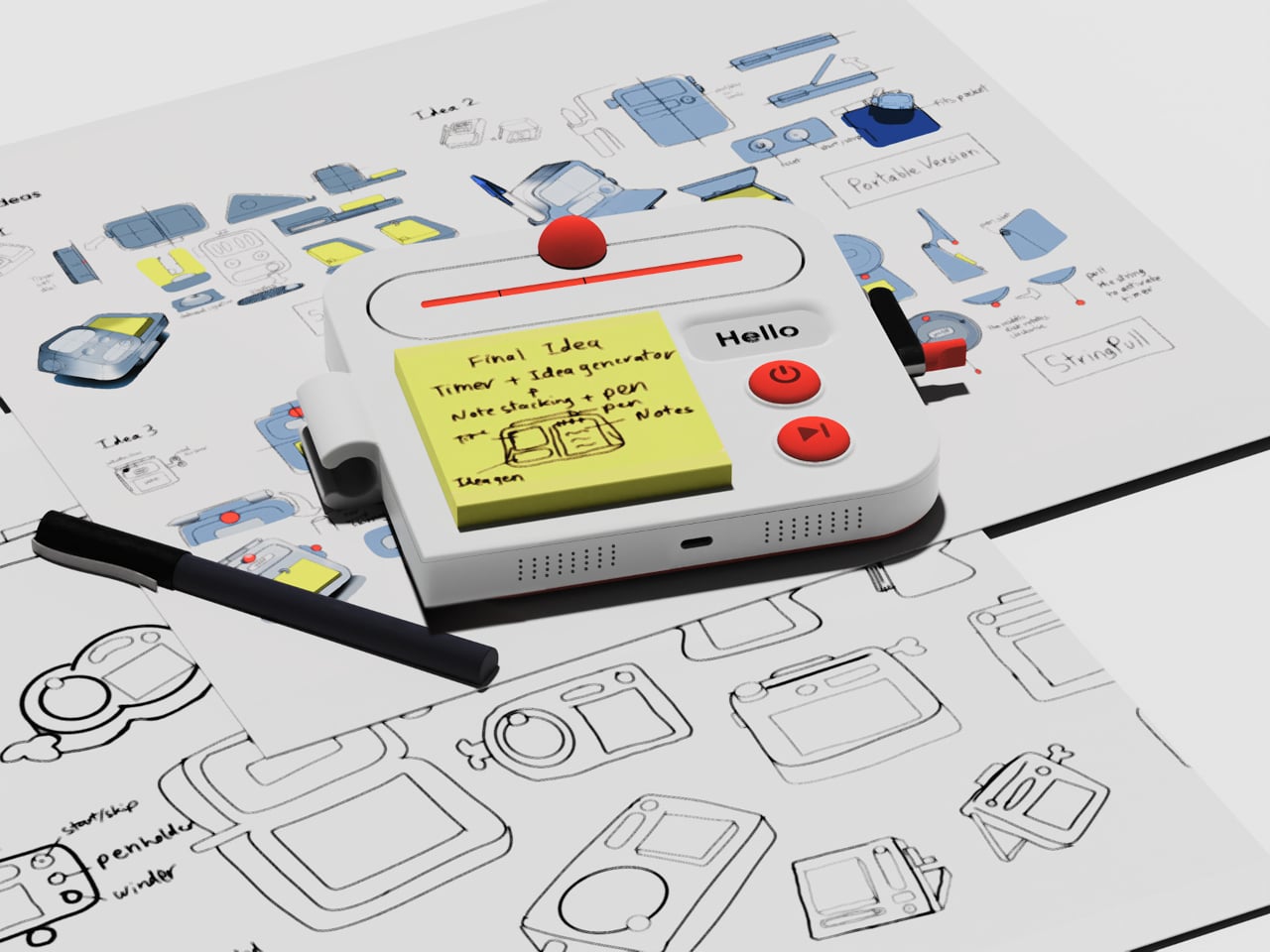
The trick isn’t to replace a sketchbook or ask a computer to finish your thinking. It’s to keep the small tools for getting started within reach. A pen clips to one side of the rounded body, while a stack of sticky notes takes up much of the front. You can jot down a shape, a measurement, or a question before it slips away.

Designer: Aditya Rajiv

Then there’s the timer, which makes the device a little stranger than an ordinary stationery holder. Turn the crank on the side until the orange bar reaches your chosen duration, and a bright ball moves along the track as time passes. When its cycle finishes, the concept calls for a sound. That gives a short sketching session a visible beginning and end.

A blank note can be surprisingly intimidating when someone asks you for three different directions before lunch. Ideo responds with an e-ink display that presents a random word, such as “tiger” or “apple,” to nudge your thoughts somewhere unexpected. If the word doesn’t help, a physical button skips to another. This isn’t some AI that tries to take over your thinking process but, rather, a nudge to keep your pen moving.

During a workshop, you might have a few minutes to sketch a handle before the group moves on to another idea. The timer keeps that deadline obvious, while the note stays attached to the device until you’re ready to place it beside other sketches. Having the prompt nearby could help when your first drawing feels too much like the one you made yesterday.

There’s a playful contrast between the quiet white housing and its red controls, with the yellow notes taking up nearly half the front. The broad knob and two large buttons look approachable rather than like the controls on a complicated drawing tablet. It almost looks like a child’s toy, which is the perfect idiom for playful and unhindered ideation.

The concept understands a small but familiar delay: the moment between having an idea and finding a place for it. A notepad and pen handle that first step, while the timer and word generator give you a reason to start drawing instead of staring at a blank sheet. Ideo is still a concept, of course, but the scramble for a pen makes its arrangement seem practical.

The post A Pocket Concept Built to Catch Design Ideas Before They Get Away first appeared on Yanko Design.

  • ✇Yanko Design
  • HP’s $699 OmniBook 5 Has the One Thing the MacBook Neo Doesn’t
    Affordable laptops often make you choose between a nice screen and a machine you’d want to carry. HP’s $699.99 OmniBook 5 14 makes a different pitch against Apple’s MacBook Neo: an OLED touchscreen wrapped in a slim, colorful aluminum body. It’s an appealing combination for someone moving between classes, work, and a movie, though the price doesn’t buy every specification HP advertises for the series. HP treats color as part of the laptop, rather than something to add with a sticker. Starlit Bl
     

HP’s $699 OmniBook 5 Has the One Thing the MacBook Neo Doesn’t

Par : JC Torres
2 octobre 2026 à 06:07

Affordable laptops often make you choose between a nice screen and a machine you’d want to carry. HP’s $699.99 OmniBook 5 14 makes a different pitch against Apple’s MacBook Neo: an OLED touchscreen wrapped in a slim, colorful aluminum body. It’s an appealing combination for someone moving between classes, work, and a movie, though the price doesn’t buy every specification HP advertises for the series.

HP treats color as part of the laptop, rather than something to add with a sticker. Starlit Blue, Peony Pink, Soft Honeydew, and Smoke Silver give the aluminum chassis some character, with a tone-on-tone keyboard to keep the look together. At 2.6 pounds and 0.46 inches thick, it could slip into a bag without looking like an anonymous office machine when it comes back out.

Designer: HP

Open the lid and the 14-inch OLED touchscreen becomes the reason to look twice. Its 16:10 proportions leave more vertical room for a document or editing tools, while touch makes a quick tap feel natural. But the $699.99 model has a 1920×1200 resolution and a 300-nit brightness rating, not the up-to-2.5K, 620-nit display mentioned in HP’s broader launch announcement.

The 180-degree hinge is a smaller detail, but it might be the one you appreciate when sharing a draft across a cafe table. Lay the laptop flat, turn it toward a friend, and neither of you has to hunch over the keyboard. The backlit keys make a difference when that conversation stretches into the evening, although this isn’t a tablet you can fold backward.

HP also makes room for an HDMI 2.1 port, two USB-C connections, and a headphone jack. If you need to show a presentation on a meeting room display or connect a monitor at work, you might not need to hunt for an adapter. The catch is that there’s no USB-A port listed, so an older mouse or flash drive could still send you looking.

Underneath the colorful shell, this configuration has an Intel Core 5 320 processor, 8GB of onboard memory, and a 256GB SSD. Those numbers should keep expectations in check if you juggle large creative files and a dozen browser tabs. There’s a 512GB storage option, but it shouldn’t be confused with what the starting price includes.

Battery life deserves careful reading. HP touts up to 42 hours for the series, but that figure comes from local video playback, not a day of calls, spreadsheets, and multitasking. The listed 60Wh battery and a claimed 50% charge in about 30 minutes are useful details when you’re planning a day out. Neither tells you when you’ll need an outlet.

The HP OmniBook 5’s challenge to the MacBook Neo isn’t about winning every specification. It offers a different set of priorities: a touchscreen, OLED contrast, cheerful colors, and ports that could save you from carrying an adapter. The modest memory and storage are harder to overlook. Still, it’s good to see an affordable laptop make its strongest argument the moment you open it.

The post HP’s $699 OmniBook 5 Has the One Thing the MacBook Neo Doesn’t first appeared on Yanko Design.

  • ✇Yanko Design
  • Google’s Fix for One-Handed Typing Is a Rolling Belt of Letters
    Typing with one hand usually means stretching a finger across a keyboard while the other hand holds a drink or works a mouse. Google’s Gboard team has a wonderfully impractical fix: put the keys on a conveyor belt and let them come to you. Its Rotating Keyboard stands upright on a desk, asking your finger to stay put while the letters keep moving. Regular keyboards assume your hands will travel between stationary keys, a reasonable arrangement that has survived decades of typing. Google reverse
     

Google’s Fix for One-Handed Typing Is a Rolling Belt of Letters

Par : JC Torres
2 octobre 2026 à 05:15

Typing with one hand usually means stretching a finger across a keyboard while the other hand holds a drink or works a mouse. Google’s Gboard team has a wonderfully impractical fix: put the keys on a conveyor belt and let them come to you. Its Rotating Keyboard stands upright on a desk, asking your finger to stay put while the letters keep moving.

Regular keyboards assume your hands will travel between stationary keys, a reasonable arrangement that has survived decades of typing. Google reverses that relationship by mounting rows of keycaps on loops that travel around rollers. The tall blue frame and angled stand make the moving assembly feel closer to a miniature factory machine than a computer peripheral, which is probably part of the joke.

Designer: Google Japan

Instead of looking down for a letter, you watch for the right key to arrive and press it as it passes. Google says each belt carries 29 keys and can input both uppercase and lowercase letters. That might let one hand stay near the same spot, though it also turns typing into a timing exercise, especially when the next letter takes its time coming around.

Imagine answering an email with a cup of tea in your free hand. On a conventional keyboard, you’d either put the cup down or hunt for letters one finger at a time. Here, the moving keys do the traveling while you wait at the front of the machine. Google also suggests using your free hand on a mouse, which sounds suspiciously like extra work.

There’s an oddly earnest design lesson underneath the silliness. Questions about ergonomics often begin with who a familiar object was made for, and Google has taken that thought to a ridiculous extreme. The upright arrangement might use less horizontal desk space than a full keyboard, but it trades that footprint for height, moving parts, and the need to watch every passing key.

Google plays along with its own premise, floating ideas for faster movement, longer belts with more characters, shorter versions for phones, and different colors. None of those variations is a promised product. Even the keyboard itself isn’t headed for stores; the team has released open-source plans for a similar device instead. That keeps the joke open to anyone curious enough to build one.

The date is part of the gag, too. Google chose October 1 as a nod to the familiar 101-key keyboard, rather than waiting for April Fools’ Day. It’s the team’s 15th keyboard proposal, continuing a habit of treating ordinary typing as a problem that needs an absurdly elaborate solution. A conveyor belt is hardly the first thing most people would try.

You’re unlikely to write a novel by chasing letters around this contraption, and that isn’t really the point. Google has built a physical answer to a question no keyboard maker was asking: what if the keys did all the moving? It’s a ridiculous way to type an email, but an effective way to notice how much we expect our fingers to do.

The post Google’s Fix for One-Handed Typing Is a Rolling Belt of Letters first appeared on Yanko Design.

❌