Vue normale

Il y a de nouveaux articles disponibles, cliquez pour rafraîchir la page.
À partir d’avant-hierFlux principal

Claude Cheat Sheet: Features, Access, Pricing, Models

Par : Liz Ticong
26 février 2026 à 15:41

Claude cheat sheet with Claude’s core capabilities, how it works, model lineup, availability, pricing, setup steps, and the main alternatives to watch.

The post Claude Cheat Sheet: Features, Access, Pricing, Models appeared first on TechRepublic.

Someone Finally Made Video Meetings Look Like a Game Console

Par : Ida Torres
8 février 2026 à 20:15

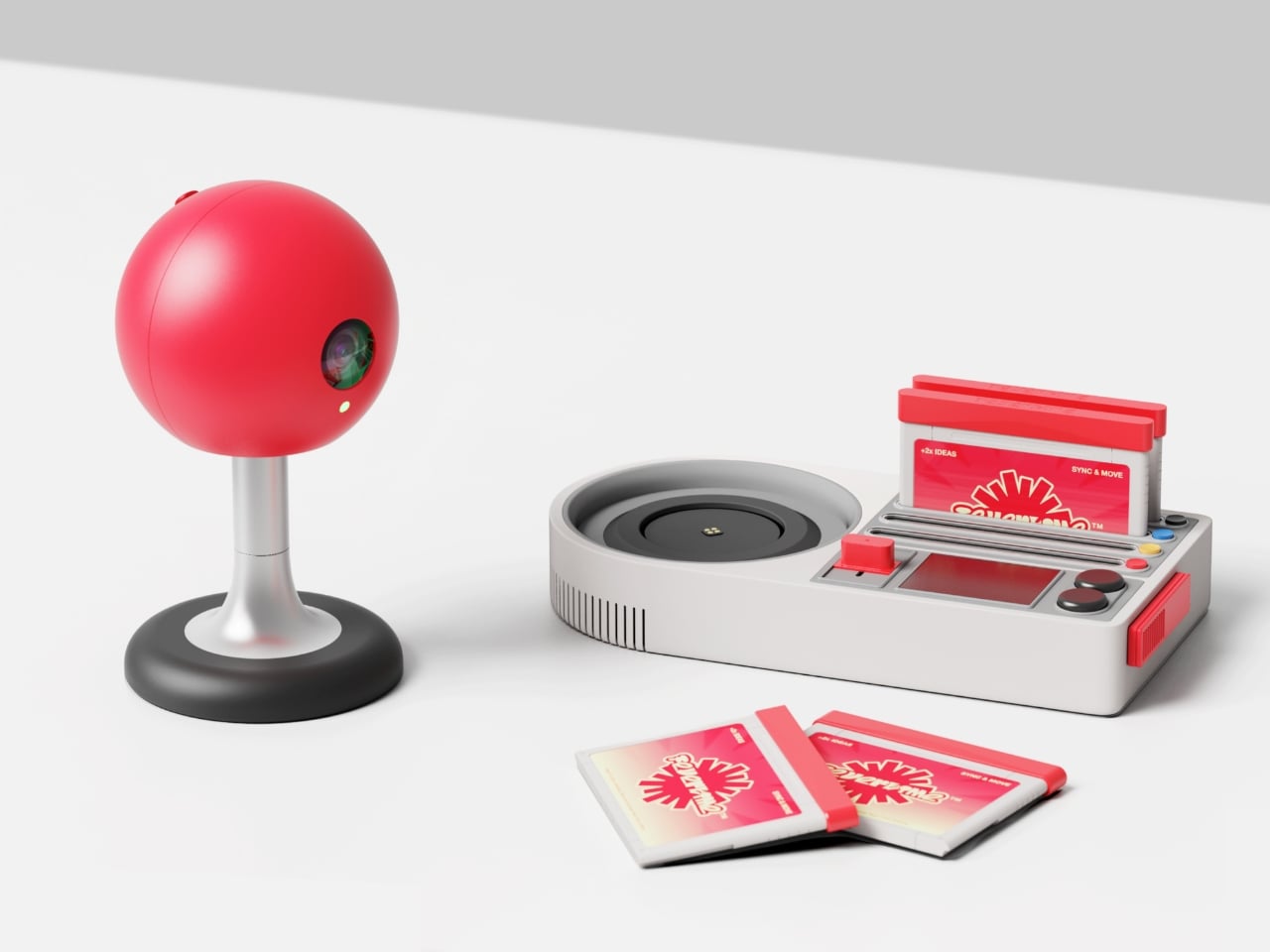
There’s something deeply satisfying about watching designers take a swing at corporate boredom. Fevertime, a recent collaboration by Dugyeong Lee, Gyeong Wook Kim, MyeongHoon Cheon, and Dayong Yoon, does exactly that by transforming the typical video conference setup into something that looks like it belongs in a mid-80s arcade.

The concept is deceptively simple: what if meetings felt less like mandatory Zoom rectangles and more like gathering around a shared screen? The team created a physical meeting system inspired by retro game consoles, complete with a bright red spherical camera perched on a stand like some cheerful robot companion, and a base unit that wouldn’t look out of place next to your old Nintendo. There are even cartridge-style slots and that unmistakable game controller aesthetic, all rendered in a palette of scorched red, neon accents, and soft grays.

Designers: Dugyeong Lee, Gyeong Wook Kim, MyeongHoon Cheon, dayong Yoon

But this isn’t just nostalgia bait. The designers identified a real problem with modern collaboration tools: everyone staring at their own screens creates this weird isolation, even when you’re supposedly “together” in a virtual room. Fevertime flips that script by projecting content onto a shared surface, encouraging actual eye contact and spatial awareness. The physical device becomes a focal point, something to gather around rather than disappear behind.

The system lets users set up meetings in advance, defining time, participants, and structure before anyone logs on. When the session starts, participants can instantly share content from their personal devices onto the collective display. Everything stays synced and visible to everyone simultaneously. No more “Can you see my screen?” or fumbling through share settings while everyone waits. The interface shows meeting cards, schedules, and project data in a clean, modular layout that feels more like organizing a playlist than managing corporate logistics.

What makes Fevertime visually compelling is how committed it is to the gaming metaphor. The red sphere isn’t trying to look sleek or invisible like most tech hardware. It wants to be noticed. It practically begs to be the conversation starter in the room. The cartridge system for what appears to be different meeting modes or templates plays into that collectible, tactable quality that made physical media so satisfying. You’re not just clicking through digital menus; you’re handling objects, sliding things into slots, physically engaging with the technology.

The UI design carries that same energy. Bright pink highlight screens pop against neutral backgrounds. Typography is bold and condensed, channeling the space constraints of old arcade cabinets where every pixel counted. Cards and modules feel like game level selects or achievement screens. There’s a playful confidence in the branding, with the Fevertime logo rendered in that wavy, almost melting typography that suggests heat and intensity without being aggressive.

The designers describe the project as capturing “a single moment of high-intensity creative output,” that fever state when an idea finally clicks and everything flows. That philosophy shows up in the pulsing, breathing quality of the custom lettering, where font weights fluctuate to create visual rhythm. It’s design that refuses to sit still, much like the creative process it’s trying to facilitate.

From a product design perspective, Fevertime sits in that interesting space between speculative concept and plausible near-future tech. The physical components look production-ready, with thoughtful details like ventilation ridges on the base unit and a weighted stand for the camera sphere. But there’s also a conceptual boldness here, a willingness to say “what if meeting technology looked completely different from what we’re used to?”

The team used Adobe’s creative suite to develop the project, combining Photoshop and Illustrator for the identity work with After Effects for motion elements. That mix of static and animated content gives Fevertime a kinetic presence even in still images. You can imagine the interface cards sliding, the logo pulsing, the whole system humming with that arcade-ready energy.

Whether Fevertime ever makes it to market is almost beside the point. As a design exercise, it asks useful questions about how we physically and emotionally experience collaboration technology. It challenges the assumption that workplace tools need to look serious and minimal. And it demonstrates how pulling from gaming culture can make even something as mundane as meeting software feel fresh and approachable. Sometimes the best design projects are the ones that make you think, “Wait, why doesn’t everything look like this?”

The post Someone Finally Made Video Meetings Look Like a Game Console first appeared on Yanko Design.

When Your Speaker Is Also a Statement: The Tresound Mini

Par : Ida Torres
1 février 2026 à 14:20

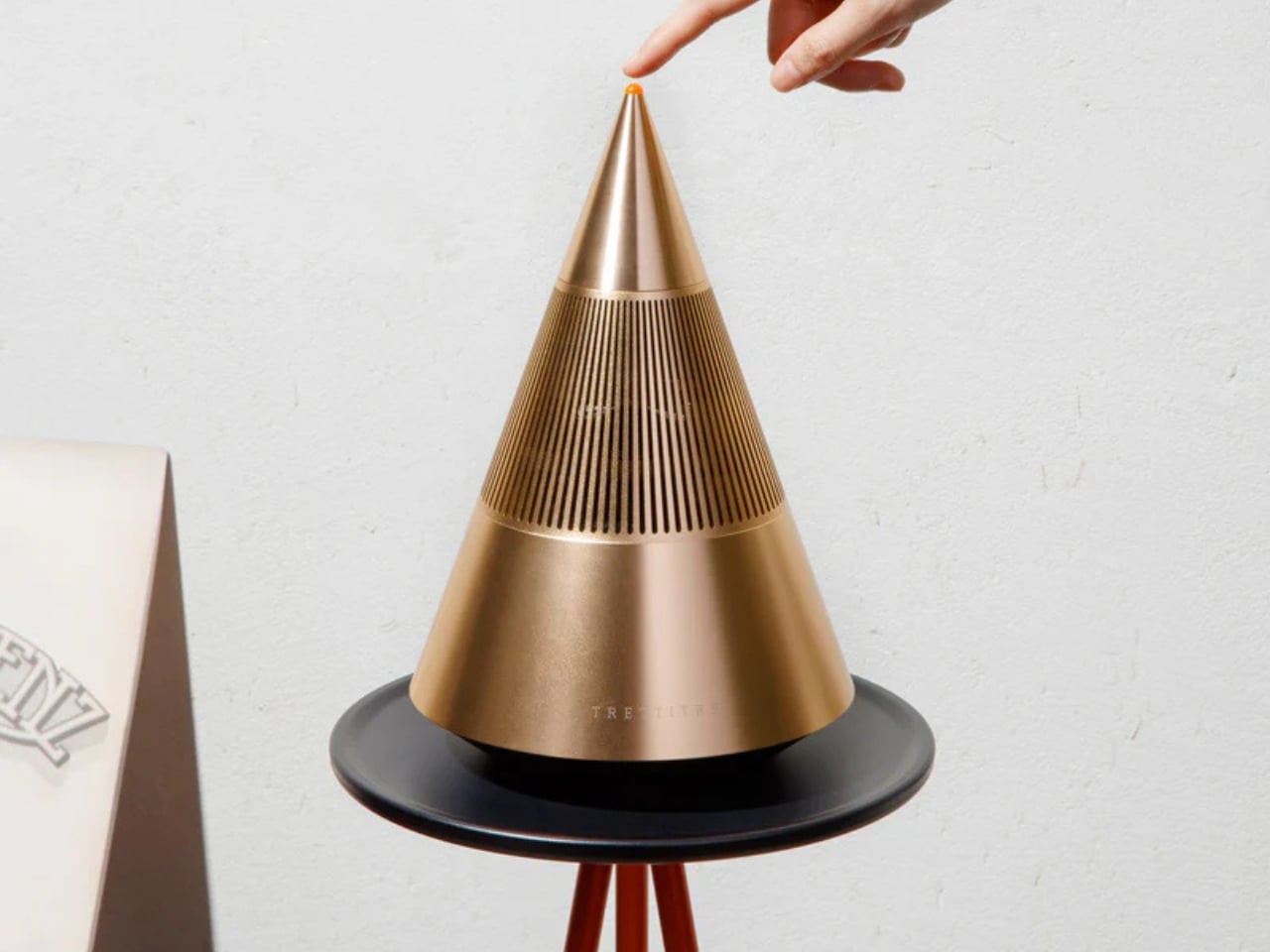
Sometimes the best tech isn’t the loudest. It’s the one that makes you pause and actually look at it before you press play. That’s what designers Yong Cao and Jianfeng Lv have managed to pull off with the Tresound Mini, a desktop Bluetooth speaker that refuses to be just another black box on your desk.

At first glance, this compact speaker looks like it wandered in from a modern art gallery. Its cone-shaped design is clean, almost architectural, with a minimalist aesthetic that feels intentional without being precious about it. The form isn’t just for show, either. TRETTITRE, the emerging HiFi brand behind the speaker, describes itself as bridging traditional audio quality with something more forward-thinking, and you can see that philosophy at work here.

Designers: Yong Cao and Jianfeng Lv

The Tresound Mini recently won the Golden A’ Design Award in the Audio and Sound Equipment Design category, which is one of those achievements that signals serious design cred. But awards aside, what makes this speaker interesting is how it thinks about the desktop experience differently. Instead of trying to dominate your workspace with aggressive angles or flashy lights, it takes a more refined approach. The design integrates seamlessly into your environment, whether that’s a home office setup, a creative studio, or just a corner of your apartment where you actually get things done.

Art Director Yong Cao and Designer Jianfeng Lv, both from China, approached this project with a focus on what they call the “deep integration of brand design and product design”. That sounds like design speak, but what it really means is that every element serves a purpose. The cone shape isn’t arbitrary. It contributes to the audio performance while also giving the speaker a distinctive profile that stands out without screaming for attention. It’s the kind of design that works equally well in a carefully curated Instagram photo or just sitting there doing its job.

Let’s talk about the packaging, because this is where things get genuinely clever. Instead of going with the typical cardboard box and foam inserts, the Tresound Mini comes with a carrying bag that’s wet-pressed from bamboo fiber pulp. This isn’t just packaging in the traditional sense. It’s designed to double as a carrying case, making the speaker genuinely portable. The bamboo fiber approach is both environmentally friendly and cost-effective, reducing packaging waste while providing actual protection for the product. It’s the kind of thoughtful detail that shows someone was actually thinking about the full lifecycle of the product, not just the unboxing moment.

The portability factor is key here. Desktop speakers traditionally live in one spot, tethered to your workspace. But the Tresound Mini was designed with the understanding that people move around now. You might want it on your desk in the morning, out on a balcony in the afternoon, or in your kitchen while you’re cooking dinner. The compact size and that bamboo fiber carrying bag make that kind of flexibility possible.

TRETTITRE positions itself as catering to “the new generation of HiFi enthusiasts”, which is a smart read of where audio culture is heading. There’s a growing audience that cares about sound quality but doesn’t want to sacrifice design or deal with the bulk and complexity of traditional HiFi setups. They want something that sounds good, looks intentional, and fits into spaces that might not have room for a full speaker system. The Tresound Mini seems built specifically for that demographic.

What’s interesting about this design is how it challenges the assumption that good audio equipment needs to look technical or industrial. There’s no display screen, no visible screws, no aggressive branding. Just a clean geometric form that happens to deliver quality sound. It’s the audio equivalent of those minimal tech accessories that proved you don’t need to sacrifice aesthetics for function.

The success of the Tresound Mini might signal a broader shift in how we think about desktop audio. As more people work from home or create hybrid living and working spaces, there’s an appetite for products that perform well without dominating the visual landscape. We want our tech to be good at what it does, but we also want it to feel like it belongs in our actual lives, not in a showroom.

Yong Cao and Jianfeng Lv have created something that manages to be both functional and thoughtful. The Tresound Mini proves that when you approach product design with real consideration for how people actually use things, you can create something that transcends its basic function and becomes worth talking about.

The post When Your Speaker Is Also a Statement: The Tresound Mini first appeared on Yanko Design.

This 5-Inch “Video Business Card” Wants To Replace Your Stack Of Paper Cards

Par : Sarang Sheth
1 février 2026 à 02:45

Televisions used to be heavy boxes that dominated a room. Now, the latest LG and Samsung prototypes at CES 2026 look more like posters than TVs, with panels so slim they almost blend into the wall and bezels that seem to disappear when the screen lights up. These displays are no longer just appliances in the corner of a living room. They are becoming design elements that can live almost anywhere you might put a sheet of paper.

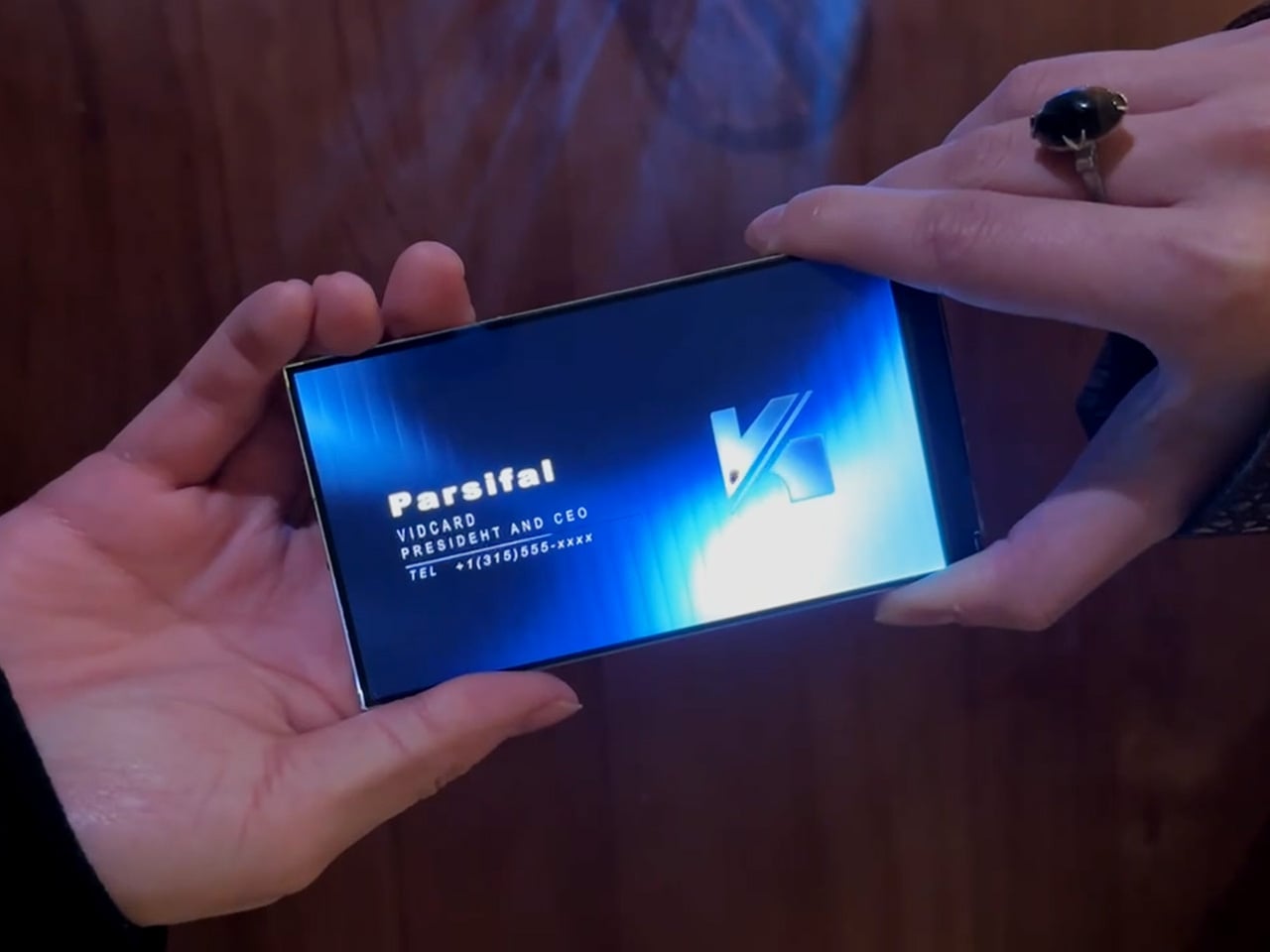
That shift makes it feel natural to ask a simple question: if screens can be this thin, why not put them where we have always relied on print? Business cards are a perfect example. They carry introductions, identity, and a first impression in a tiny rectangle. VidCard takes that same footprint and turns it into a living surface, transforming the familiar business card into a personal video introduction that plays in the palm of your hand.

Designer: Parsifal

Click Here to Buy Now: $59 $99 (40% off). Hurry, only a few left! Raised over $66,000.

VidCard is basically what it sounds like: a rigid card with a 5 inch, 1280×720 IPS LCD screen built in, playing a looping video of you introducing yourself or your brand motion graphic. The whole thing measures 120.05mm by 86.4mm, which puts it somewhere between a credit card and a small phone, and it’s under 5mm thick. That’s genuinely impressive when you remember there’s a battery, NFC chip, display controller, and 256MB of onboard storage packed inside. The card charges via contact pins, lasts about an hour of continuous playback (roughly 120 to 240 interactions per charge), and syncs content through a companion app on iOS or Android. You upload your intro video, it pushes to the card, and you’re set. The screen itself looks clean in the campaign photos and bright enough for indoor use.

The NFC feature sidesteps the whole “how do I actually save your contact info” problem. You tap the card against someone’s phone, and it pulls up your mobile optimized landing page with your video, company profile, documents, and whatever else you want to link. No app download required on their end, which makes sense because nobody wants to install something just to see your business card. Real time analytics track who viewed your profile, when they watched, how long they engaged, and if they came back for a second look. There’s a slightly dystopian charm to getting a notification at 11pm that someone just rewatched your intro for 87 seconds, but it does give you actual data to inform follow ups instead of wondering if your card got tossed in a drawer.

Here’s the thing, though. You know what else has a high resolution screen, NFC, internet connectivity, and can play video? The phone in your pocket. You could theoretically just show someone your intro video on your phone, tap for NFC sharing, and achieve most of the same result for zero additional hardware. VidCard’s counter to that is the physical artifact itself. Handing someone a glowing screen feels different than showing them your phone (besides, unlocking a phone, opening your gallery, and finding the right video can take painful minutes), and if you leave the card behind with a high value contact, it becomes a keepsake that lives on their desk instead of disappearing into a contacts list. That’s either brilliant or unnecessary depending on how much you value the showmanship in networking, although I genuinely can’t decide which camp I’m in.

The founders claim inspiration from Call of Duty: Advanced Warfare, where a character hands over a video business card inviting you to join a fictional military contractor. That’s a deeply nerdy origin story, and I respect it. VidCard works best in situations where you need to stand out in a sea of forgettable interactions: trade shows, high stakes sales meetings, investor pitches, creative industry networking where showing your work matters more than listing credentials. It’s overkill for casual meetups or industries where a LinkedIn connection does the job, but if you’re trying to leave an impression on someone who sees 50 people a day, a card that talks and moves will get you remembered. The real test is whether that memory translates to actual follow through, which the analytics dashboard is designed to help with by showing you who’s genuinely interested versus who just thought the card was neat.

VidCard is live on Kickstarter through February 5, 2026, with early bird pricing starting at $59 USD for a single unit, $162 USD for a three pack, and scaling up to $599 USD for a 10 unit business pack with bulk branding options. Estimated delivery is June 2026 for early backers, with standard shipments following through June 20. The campaign has already cleared its funding goal by a wide margin, which suggests the concept resonates with enough people that we may just end up seeing video or even holographic business cards in the not-so-distant future.

Click Here to Buy Now: $59 $99 (40% off). Hurry, only a few left! Raised over $66,000.

The post This 5-Inch “Video Business Card” Wants To Replace Your Stack Of Paper Cards first appeared on Yanko Design.

Your Dog Can Now Turn On the Lights (No, Really)

Par : Ida Torres
31 janvier 2026 à 20:15

We’re living through a strange moment where our refrigerators are smarter than ever, our thermostats learn our habits, and now, apparently, dogs can control household appliances. The Dogosophy Button, developed by researchers at The Open University’s Animal-Computer Interaction Laboratory, is a wireless switch designed specifically for canine use. Think of it as a smart home device, but instead of asking Alexa, you’re teaching your golden retriever.

This isn’t some novelty gadget cooked up to go viral on TikTok. The button is the result of years of serious research led by Professor Clara Mancini, who runs the ACI Lab. Initially created for assistance dogs who need to help their owners turn on lights, fans, or kettles, the button has now been launched to the public for any dog owner who wants to give their pet a bit more agency. The philosophy behind it, called “Dogosophy,” centers on designing technology around how dogs actually experience the world, rather than forcing them to adapt to our human habits.

Designer: The Open University’s Animal-Computer Interaction Laboratory

So what makes this button dog-friendly? Start with color. Dogs see the world differently than we do, and blue happens to be one of the colors they can recognize most clearly. The button’s push pad is a bright blue, set against a white casing that creates high contrast, making it easier to spot against floors, walls, or furniture. The slightly curved, raised shape means dogs can press it from various angles without needing pinpoint accuracy, which anyone who’s watched a dog enthusiastically miss their water bowl can appreciate.

The button itself is built to handle the reality of being used by an animal. The outer casing is sturdy plastic designed to withstand repeated nose-booping and paw-whacking. The push pad has a textured surface that helps dogs grip without slipping, whether they’re using their snout or paw. Inside, a small light flashes when the button is pressed, soft enough not to hurt their eyes but clear enough to confirm the action worked. It’s the kind of thoughtful design that comes from actually studying how dogs interact with objects, not just shrinking human tech down to pet size.

The system is refreshingly simple. Each set includes the button, a receiver, and basic mounting hardware. The receiver plugs into whatever appliance you want your dog to control, from a lamp to a fan to a kettle. The button connects wirelessly up to 40 meters away, giving you flexibility in where you place it. Press the button once, the appliance turns on. Press it again, it turns off. No app required, no monthly subscription, no “please update your firmware” notifications.

For assistance dogs, this kind of tool is genuinely useful. A dog trained to help someone with mobility issues could turn on a light when their owner enters a dark room or switch on a fan during hot weather. But the public release opens up more playful possibilities. Your dog could theoretically learn to turn on a fan when they’re overheated, activate a toy dispenser when they’re bored, or signal when they want attention by flipping a lamp on and off like a furry poltergeist.

Of course, training matters. Professor Mancini tested the button with her own husky, Kara, noting that huskies are notoriously stubborn compared to more biddable breeds like Labradors. The button works if your dog is motivated and you’re patient. This isn’t plug-and-play; it’s more like plug-and-train-with-treats-and-repetition.

The Dogosophy Button is priced at £96 (including VAT) and is currently available through retailers like Story & Sons. Whether it becomes a legitimate tool for pet owners or just an interesting experiment in animal-computer interaction remains to be seen. But there’s something appealing about the idea of designing technology that considers more than just human needs. Professor Mancini puts it plainly: humans have built a world measured for ourselves, often pushing other species out. A button that meets dogs on their terms feels like a small step toward sharing space more thoughtfully.

The post Your Dog Can Now Turn On the Lights (No, Really) first appeared on Yanko Design.

❌
❌