Vue normale

Il y a de nouveaux articles disponibles, cliquez pour rafraîchir la page.
Aujourd’hui — 16 mars 2026Flux principal

This Jellyfish-Inspired Lamp Transforms When You Switch It On

Par : JC Torres
16 mars 2026 à 10:07

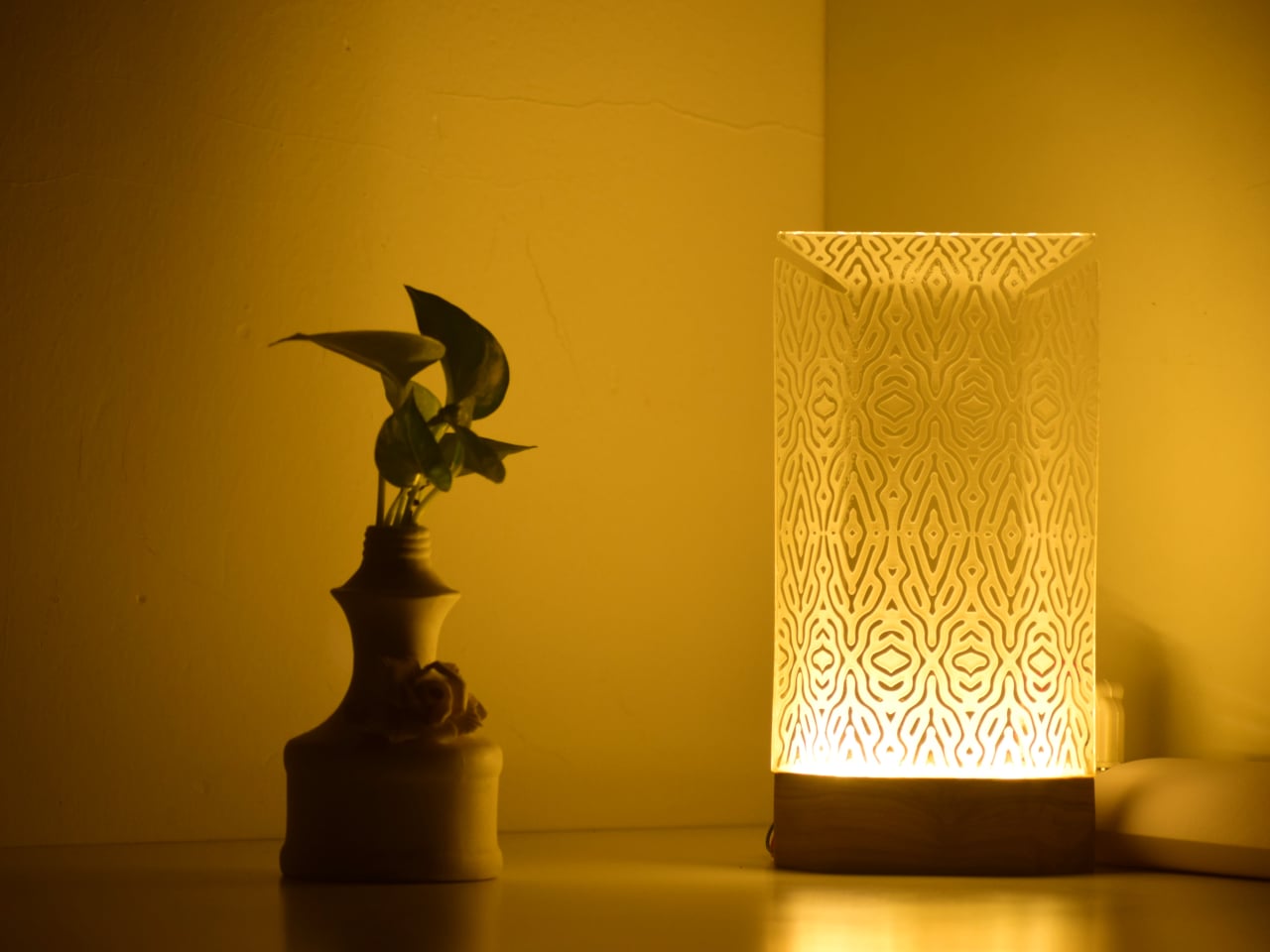
Table lamps have a fairly narrow brief: sit on a surface, produce light, and try not to embarrass themselves in the process. Most manage two out of three. The Aurelia table luminaire takes a more considered approach, drawing from the slow, hypnotic movement of jellyfish to build something that works as a light source and as an object worth looking at when it’s switched off.

The reference point is specific, not from a general impression of the ocean, but from the particular way jellyfish tentacles move: slow, layered, and almost meditative in repetition. That quality informs the lamp’s layered construction and the dense organic lattice etched across its translucent shade. The pattern reads quietly in a lit room. Switch the lamp on and the whole surface activates, casting warm amber light through the texture in a way that feels atmospheric rather than task-driven.

Designer: Nizamuddin N.S

That distinction matters for where the lamp is meant to live. Aurelia isn’t designed to light a workspace, and the designer makes no claim that it should. The design targets bedside tables, desk corners, and living spaces where the goal is to soften the mood of a room rather than sharpen its focus. Diffused light changes the quality of a space in ways that sharp overhead sources simply cannot manage, which is the quiet premise the whole lamp is built around.

The physical form carries that logic through. The shade is a tall, slim panel mounted on a dark rectangular base that reads as wood. Unlit, the lamp is restrained and cool, with the etched lattice surface present but not clamoring for attention. Lit, the object shifts register entirely. Warm amber pushes through the pattern, and the base-to-shade contrast, dark below and luminous above, becomes the lamp’s defining visual move.

Beyond the light itself, Aurelia stands as a small sculptural piece meant to give a room some character. That’s a harder claim than it sounds. Most decorative lamps lean entirely on their shades for visual interest and have nothing to offer in the middle of the afternoon. Aurelia’s etched surface is structured enough to hold attention without illumination, which is the minimum requirement for a lamp that wants to be treated as more than a lamp.

There’s also a practical dimension that the jellyfish reference shouldn’t distract from. A lamp that produces soft, diffused warmth rather than direct output is genuinely useful in spaces that already have overhead lighting covered. It fills a secondary role well: the kind of light you turn on at the end of the day, not the kind you read by, and rooms that lack that option tend to feel unfinished in ways that are hard to articulate.

The post This Jellyfish-Inspired Lamp Transforms When You Switch It On first appeared on Yanko Design.

Michael Jantzen’s Garden Retreat Has 30 Panels to Rearrange by Hand

Par : JC Torres
16 mars 2026 à 08:45

Most garden structures ask one thing of you: sit still and enjoy the shade. A pergola is a pergola, a gazebo is a gazebo, and neither one particularly cares what the afternoon light is doing. Michael Jantzen’s Interactive Garden Pavilion operates on a different premise entirely, one where the occupant has as much say over the structure as the designer did.

Built from sustainably grown stained wood and painted a uniform forest green, the pavilion sits on an octagonal support frame fitted with 30 slatted hinged panels across its walls and roof. Each panel pivots independently, sliding and rotating along the frame before locking into position. Open them wide on a hot afternoon, and the interior breathes. Angle them down against the glare, and the space dims considerably.

Designer: Jantzen

That last point is where the design earns its name. Most adjustable outdoor structures offer a single variable, usually an awning or a retractable canopy, within an otherwise fixed form. Here, the entire skin of the building is the variable. The wall panels, roof panels, and ground-level platform extensions can all be repositioned, which means the pavilion can look substantially different from one afternoon to the next.

Pull the panels shut on three sides, and the structure becomes a genuinely private enclosure. Splay them open, and the interior connects fully to the garden around it. In one arrangement, it reads as a dense closed form. In another, the structure opens up entirely, and the slatted framework becomes almost sculptural against the lawn.

Inside, two benches with adjustable backrests run the length of the interior, facing each other. The seating is built into the frame, which keeps the floor plan clean and leaves room to recline fully. When the overhead panels are partially open, sunlight enters in sharp parallel bands that shift across the benches as the day moves, a quality that is either meditative or distracting depending on what you came in for.

The construction logic is also notably practical. The pavilion is a prefabricated modular system, so the components can be scaled before assembly or joined with additional units to form a larger cluster. No foundation is required in most configurations. Given its size and type, a building permit is unlikely to be needed in many jurisdictions, which removes one of the more tedious barriers between an interesting design and an actual garden.

Jantzen has spent decades proposing architecture that responds dynamically to its occupants, much of it remaining on paper. This pavilion is one of the cases where the idea got built, and the result holds up at close range. The slatted wood is honest about what it is, the green paint ties the structure to the garden without trying to disappear into it, and the hinge mechanism does exactly what it promises.

The post Michael Jantzen’s Garden Retreat Has 30 Panels to Rearrange by Hand first appeared on Yanko Design.

LiberNovo Omni Just Won the iF Design Award 2026 for Wellness Design

Par : JC Torres
16 mars 2026 à 01:45

Most office chairs operate on a quiet assumption that sitting is something your body should adapt to, not the other way around. You adjust the height, nudge the lumbar support into roughly the right position, and then spend the rest of the day subtly fighting the chair anyway. The ache between your shoulders, the stiffness in your lower back by mid-afternoon, that’s just part of the deal, apparently, and most of us have accepted it without much argument.

LiberNovo decided not to accept it. The result is the Omni, a chair the company calls a Dynamic Ergonomic Chair, and it just picked up the iF DESIGN AWARD 2026 in the Product Design – Beauty/Wellness category. The iF Design Award has been one of the most internationally respected design recognitions since 1954, with this year’s cycle drawing more than 10,000 entries from over 60 countries. That’s a serious field to stand out in

Designer: LiberNovo

Click Here to Buy Now: $929 $1099 (15% off). Hurry, deal ends in 48-hours!

The core idea behind the Omni is that your posture doesn’t stay fixed throughout a workday, so your chair probably shouldn’t either. The Bionic FlexFit Backrest is built around that logic, using 16 spherical pivot points, 8 adaptive flexible panels, and 14 dual-connection points to follow the natural curve of your spine as it shifts. It covers you from the hips up through the shoulders, spreading pressure across the whole back rather than piling it onto one fixed lumbar point.

What makes this work in practice is the Dynamic Support system, which adjusts automatically to changes in your posture without you having to reach for anything. Lean forward during a focused stretch of work, sit back when you’re thinking something through, the chair tracks those shifts, and responds in real time. It’s the kind of feature that sounds modest until you realize how much of your day you’ve spent adjusting a chair that couldn’t do this.

Then there’s OmniStretch, which is where the Omni starts to feel like something genuinely different. Sitting for long hours compresses the lower spine gradually, and most chairs just let that happen. OmniStretch is a guided decompression feature that gently stretches the lower spine during the workday, designed to actively relieve pressure rather than simply tolerate it. It’s probably why the iF jury placed the Omni in the Beauty/Wellness category: this chair isn’t just holding you up, it’s doing a bit of recovery work along the way.

The Omni also offers four recline positions running from 105 to 160 degrees. The shallower end is built for focused, upright work, while the deep 160-degree Spine Flow position is designed for full spinal decompression between sessions. The two intermediate angles cover the range in between, which gives the chair a kind of daily rhythm that matches how most people actually move through their hours rather than sitting rigidly in one position all day.

The chair was developed by LiberNovo’s team in Shenzhen alongside industrial design firm Kairos Innovation, also based there. Winning an iF award is meaningful external confirmation that the design thinking behind the Omni translates beyond the product brief. For a chair that started from the premise that desk work doesn’t have to hurt, that’s a pretty good place to land.

Click Here to Buy Now: $929 $1099 (15% off). Hurry, deal ends in 48-hours!

The post LiberNovo Omni Just Won the iF Design Award 2026 for Wellness Design first appeared on Yanko Design.

À partir d’avant-hierFlux principal

Apple Finally Rounded the MacBook’s Corners After 18 Years

Par : JC Torres
13 mars 2026 à 17:20

For about 18 years, every aluminum MacBook has looked more or less the same. Silver. Angular. Quietly serious. There’s nothing wrong with that. Apple’s unibody aluminum design, introduced in October 2008 and carved from a single block of metal, was genuinely elegant and set the template for an entire industry. But it also retired something along the way: the idea that a Mac laptop could feel chosen rather than just defaulted to.

The MacBook Neo, announced March 4 and starting at just $599, is the first real crack in that template. It comes in four colors (blush, indigo, silver, and a yellow-green called citrus) with enclosure corners that are noticeably softer than any aluminum Mac in recent memory. Whether that adds up to a proper design statement or just smart positioning is worth thinking through.

Designer: Apple

What happened to Apple’s color confidence

iBook G3 Clamshell (courtesy of Wikipedia)

Apple’s fondness for color didn’t always live inside an iPhone. The iBook G3, launched in 1999, came in tangerine and blueberry, and later in indigo and key lime. It was rounded, slightly toy-like, and completely unapologetic about being a consumer product. When the aluminum unibody arrived in 2008, Apple traded that warmth for precision machining and sharp rectilinear edges. Right call for the MacBook Pro. Default for everything else, apparently, for nearly two decades.

The result was a color drought in aluminum Mac laptops that has lasted until now. Silver, space gray, midnight, starlight: all variations on the same mood of professional restraint. The Neo’s citrus and blush aren’t just options on a spec page. They’re a quiet admission that not every laptop buyer wants a device that looks like it belongs in a boardroom. For Apple, that’s actually not a small thing to say at the product level.

Two different stories about corners

M1 MacBook Pro (2021)

There’s a distinction worth making here, because “rounded corners” gets used loosely when describing the Neo. MacBook displays have had rounded screen corners since 2021, which is a display-level detail and nothing new. What’s different on the Neo is the chassis itself. The physical aluminum enclosure is softer at the edges and corners than any aluminum Mac before it, and Apple’s own press materials describe “soft, rounded corners” specifically in terms of how the device feels to hold and carry.

That’s a real shift in the design language. The 2008 unibody was celebrated for machined sharpness, corners you could feel were engineered. The Neo softens that deliberately. It’s not a revival of the iBook, and it’s not trying to be, but the instinct is similar: a consumer Mac that feels a little more like it belongs to you. The notch is also gone, making this the first notchless MacBook since 2020, which quietly tidies up the one thing that made recent Airs feel slightly unfinished.

The repairability angle is actually a design story too

One thing that got a little buried under the color conversation: the Neo is the most repairable Mac laptop in years, and that’s partly a design decision worth noting. Teardowns showed how the whole machine was disassembled in just a few minutes using standard Torx screws throughout. No tape, no adhesive, anywhere inside. That’s a first for a modern Mac. The USB-C ports, speakers, and headphone jack are all modular. The keyboard can be replaced on its own, without swapping the entire top case, which on the MacBook Air currently costs over $370 in parts.

The internal simplicity isn’t accidental. The A18 Pro chip runs so efficiently that the Neo needs no fan at all, which removes a whole layer of thermal engineering that usually clutters a laptop’s interior. The result is a cleaner, more logical internal layout. Whether Apple arrived here from genuine design philosophy or from regulatory pressure (the EU’s right-to-repair push has been building for years) is an open question, but the outcome is real either way.

What it doesn’t fix, and what might come next

It’s not all sunshine and rainbows, of course. The base model has 8GB of non-upgradable RAM, one USB-C port runs at USB 2.0 speeds, and there’s no backlit keyboard. These are calculated trade-offs for the price point, not mistakes, but they matter depending on what you actually need the machine for. And repairability, for all the justified enthusiasm, is still partial: the RAM and storage are fixed at purchase, just like every other current Mac.

Still, the Neo feels like Apple designing for a specific person it had previously ignored: someone who was never going to spend $1,000 on a MacBook Air and wasn’t particularly well served by anything else Apple made. The color, the softer form, the price, the clean internals, all of it points at the same person. What’s genuinely interesting is whether any of this travels upmarket. If a future MacBook Air gets a color story this confident, the Neo might end up looking less like an entry-level product and more like Apple quietly figuring out what comes next.

The post Apple Finally Rounded the MacBook’s Corners After 18 Years first appeared on Yanko Design.

This Brutalist Lounge Chair Is 3D-Printed From Recycled Water Bottles

Par : JC Torres
13 mars 2026 à 16:20

Most furniture sits in a room without saying much. It fills a corner, does its job, and disappears into the background. Nako Baev’s THE OBJECT 01 is not that kind of furniture. The Amsterdam-based designer set out to build a chair that carries the weight of a spatial statement, something that holds its ground without decoration or apology, and in that specific ambition, the object largely delivers.

THE OBJECT 01 is a 3D-printed lounge chair built from recycled PETG, a plastic more commonly found in water bottles than in furniture workshops. At 20kg, it is lighter than its blocky, slab-heavy proportions suggest, though not exactly something you would reposition on a whim. Its dimensions push it closer in scale to a small architectural fragment than to a typical chair, which is likely the whole point.

Designer: Nako Baev

The construction follows a modular panel system, where each 3D-printed block fits into a sequence designed to cut material waste and keep the overall mass structurally lean. Finished in a cold grey Baev calls “Kyoto Fog,” the chair reads somewhere between concrete and matte stone. In a sparse studio or raw loft, it anchors the space with quiet authority. In a more conventional living room, it would likely dominate in ways not every household would welcome.

What makes THE OBJECT 01 genuinely worth attention is how honestly it exposes its own making. The layer-by-layer texture from the printing process is not hidden or smoothed away; it stays visible across the surface, turning the manufacturing method into part of the visual language. That kind of material honesty is far more common in ceramics or cast concrete than in plastic furniture, and it gives the piece a tactile quality that polished renders simply do not convey.

Baev describes the design as sitting between furniture and sculpture, drawing on minimalist brutalism and a quieter Japanese restraint in equal measure. The emotional reference points are more unusual: the designer cites the atmosphere of Silent Hill and Half-Life, those game environments built from silence and abandoned space, as part of what shaped the object’s mood.

The workflow involved AI assistance across early form studies, structural testing, and design refinement, reducing development time considerably. That footnote is becoming standard across the industry, and it doesn’t add or subtract much here. This process might even become the key to sustainable furniture design, as it can help optimize 3D printing, increase efficiency, and reduce waste in the long run.

The post This Brutalist Lounge Chair Is 3D-Printed From Recycled Water Bottles first appeared on Yanko Design.

This Foldable DIY Cyberdeck Has Breadboards Built In and Runs Doom

Par : JC Torres
13 mars 2026 à 13:20

Most portable computers are sealed boxes, which is exactly what makes them frustrating for anyone who wants to experiment with electronics. You can run code on a laptop, but try wiring a temperature sensor or an infrared transmitter directly to it, and you’ll realize that consumer hardware was never designed for that kind of access. A maker who goes by PickentCode got tired of that gap and built something to close it.

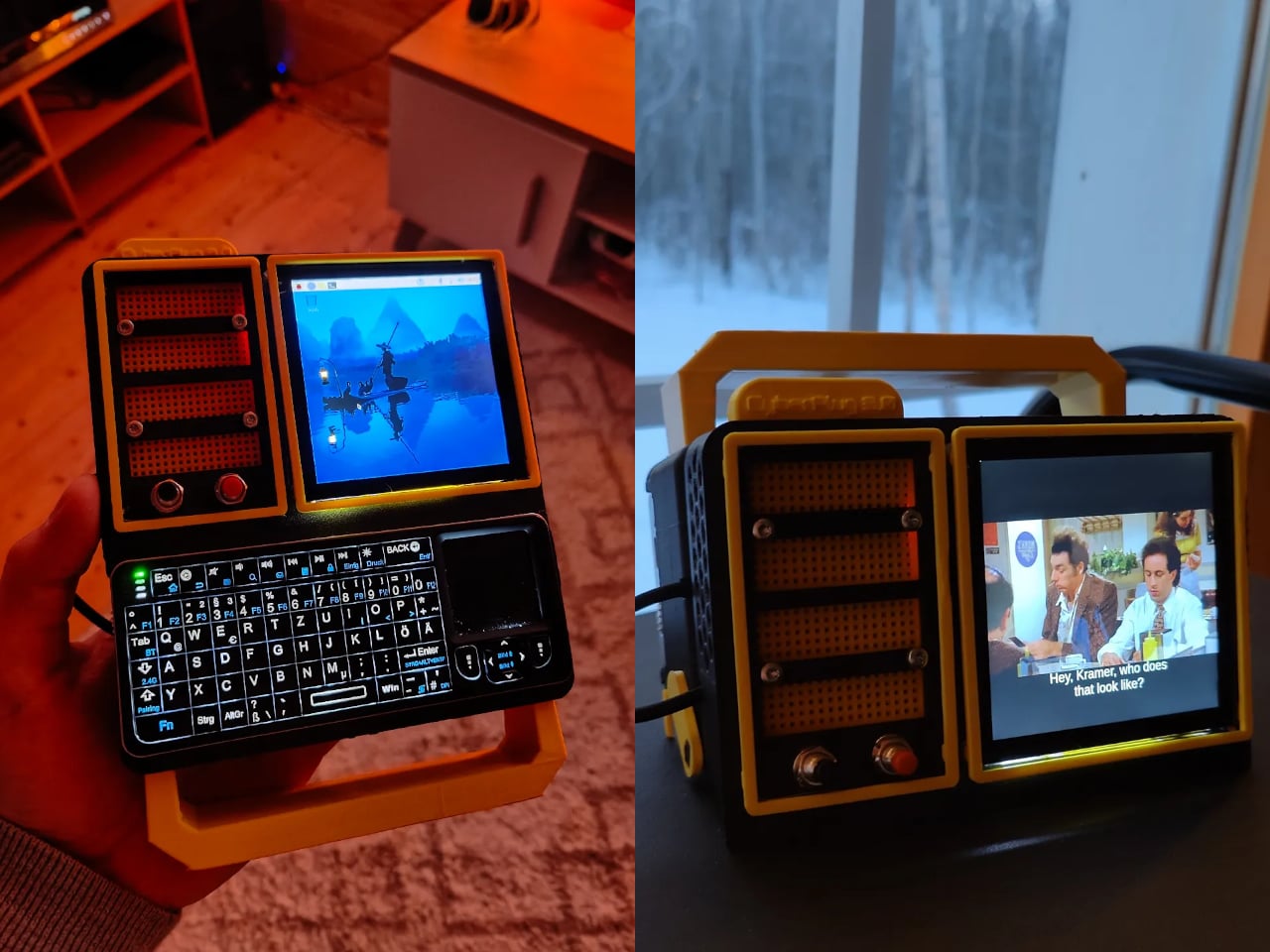
The CyberPlug 3.0 is the third iteration of a personal cyberdeck project, the earlier two having usability problems that sent PickentCode back to Blender to redesign. The final build packs a Raspberry Pi 4 Model B, a 4-inch IPS touchscreen, a Rii K06 mini keyboard with a built-in touchpad, and a 5,000 mAh USB-C power bank into a 3D-printed hinged body that folds flat for handheld use or props open at a desk-friendly angle.

Designer: PickentCode

What separates this from a standard Raspberry Pi build is the pair of breadboards soldered directly to the GPIO pins, seated inside the case, and accessible through a removable back panel. Connecting a sensor no longer means hunting for a separate breadboard and a tangle of jumper wires. PickentCode plugged in a temperature and humidity sensor and had it reading live data within minutes, then built an infrared setup that records remote control signals and replays them as single-button macros.

The two form factors each have a distinct locking mechanism rather than just flopping into position. In handheld mode, twin magnets pull the two halves together. In desktop mode, a metal ring on the back grabs the MagSafe-style power bank magnetically, holding the whole thing at a stable upright angle. Both the keyboard and the power bank slide out independently, and the deck keeps working on a desk without either of them.

Extensions are where the project gets more interesting. PickentCode added a PWM-controlled external fan that reads CPU temperature and adjusts speed automatically, and a small speaker module that opened the door to YouTube and older games. Doom, Half-Life, and GTA: Vice City all ran on it, better with an external setup in desktop mode, though workable in handheld after some button remapping.

PickentCode frames this plainly as a testbed for learning electronics, not a replacement for a phone or a real computer. The 3D files are free on Printables, so the main cost is filament, time, and the components. For anyone who has ever stared at a sealed laptop wishing they could just plug something into it, that framing is probably the most relatable thing about it.

The post This Foldable DIY Cyberdeck Has Breadboards Built In and Runs Doom first appeared on Yanko Design.

Carrying a USB-C Hub and SSD? ADAM elements Hub S Does Both

Par : JC Torres
11 mars 2026 à 01:45

Modern laptops aren’t short on power, but they’re increasingly short on ports. One USB-C port ends up doing everything: charging, video out, storage, and peripherals, while a small pile of adapters accumulates next to the keyboard. The setup works, but it doesn’t look like the clean, minimal desk you were going for, and it means carrying more pieces than you’d like when you’re working somewhere that isn’t home.

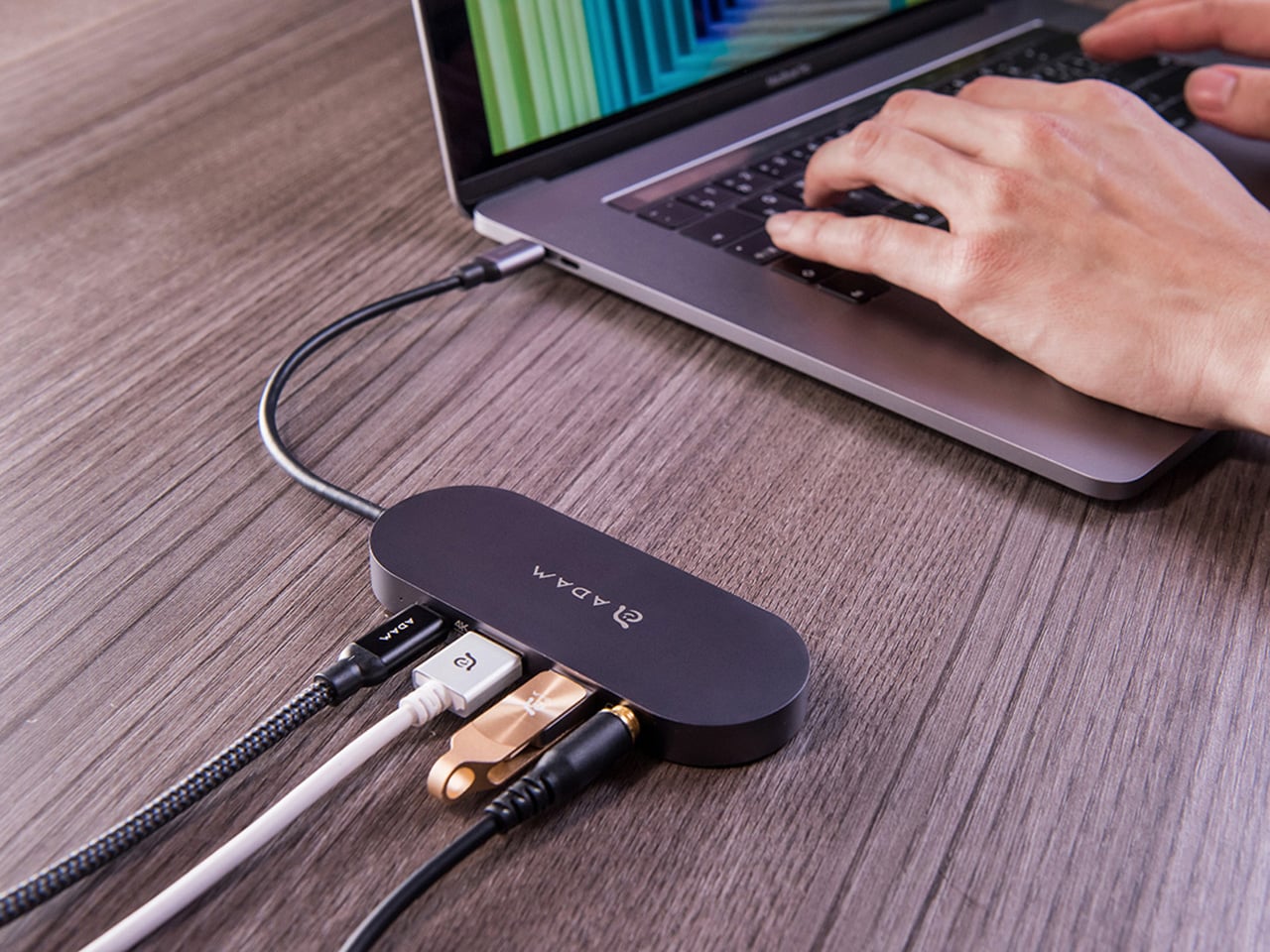
ADAM elements’ Hub S is a USB-C hub with built-in SSD storage, designed around the idea that a hub and an external drive don’t need to be two separate objects. Instead of plugging in one thing for ports and another for files, you plug in one slim aluminum accessory that handles both. It isn’t trying to replace a full docking station, but it’s the right-sized tool for someone who needs the essentials covered without the clutter.

Designer: ADAM elements

Click Here to Buy Now: $69.30 $99 (30% off, use coupon code “30YANKOHBSN”). Hurry, deal ends in 48-hours!

The built-in SSD is available in 240 GB, 480 GB, and 960 GB capacities, so there’s a size for whether you’re keeping a working project library or just enough space for recent shoots and backups. Having storage physically attached to your hub means it’s always there when you need to dump footage, move large project files, or keep a client’s assets close during a session, without remembering to pack a separate drive.

Transfer speeds are rated at up to 520 MB/s read and 456 MB/s write, which makes moving large files feel routine rather than something you schedule around. That kind of speed isn’t just a spec, though. It’s the difference between waiting through a transfer and forgetting it’s happening. For photographers and video editors working on the road, that matters more than it sounds on a product page.

For Mac users, the ADAM elements Hub S is also Apple Time Machine compatible. That means it can act as a rolling backup target every time you plug in, turning a habit that’s easy to forget into something that happens automatically. Backup isn’t exciting, but having it built into the same accessory you’re already using for everything else makes it feel less like a separate job.

The USB-C port on the hub supports PD 3.0 pass-through charging up to 60W, so your laptop doesn’t lose its charge while the hub is handling storage, display, and peripherals. That’s a meaningful consideration when you’re transferring large files and streaming to an external display at the same time, both of which can pull enough power to make a laptop feel like it’s running a sprint.

The HDMI port outputs up to 4K at 30Hz and supports HDCP 2.2, which is the protocol required for streaming 4K HDR content from services like Netflix. A lot of hubs advertise “4K output” but fail on DRM handshakes, so the HDCP 2.2 compliance isn’t a minor footnote. Whether you’re mirroring for a presentation or extending to a monitor for a proper editing session, the connection holds up where it matters.

Rounding out the port selection is a USB-A 3.1 port rated at up to 5 Gbps for peripherals or flash drives, and a 3.5mm headphone jack that supports 48kHz/16-bit audio. Neither is glamorous, but together they cover the inputs that would otherwise require yet another adapter. The aluminum alloy body is designed to sit flush on a desk surface, and the whole thing weighs about 2.5oz, roughly the weight of a single C battery.

The ADAM elements Hub S works best as the kind of accessory you stop thinking about. You plug it in, your files are there, your display is connected, your laptop is charging, and your headphones are plugged in. That’s it. For people who’d rather carry one considered piece of hardware than a small collection of adapters and drives, consolidating all of that into a single slim object that fits in a jacket pocket feels like the more sensible way to work.

Click Here to Buy Now: $69.30 $99 (30% off, use coupon code “30YANKOHBSN”). Hurry, deal ends in 48-hours!

The post Carrying a USB-C Hub and SSD? ADAM elements Hub S Does Both first appeared on Yanko Design.

Rokid’s Smart Glasses Let You Pick Your AI: Gemini or ChatGPT

Par : JC Torres
10 mars 2026 à 19:15

Most wearable tech that puts an AI assistant in your ear assumes you want only theirs. The earpiece, the speaker, the entire software stack, all funneled through one model chosen for you before you even open the box. Rokid’s latest update to the AI Glasses Style takes a different position entirely, turning the glasses into what is effectively an open platform where you pick the brain behind the voice.

The update makes the Style the first smart glasses to natively support Google’s Gemini, sitting alongside OpenAI’s ChatGPT, DeepSeek, and Alibaba’s Qwen in a unified interface. Users toggle between them freely, which means reaching for Gemini for a quick Google Maps query and switching to ChatGPT for something else entirely is up to you.

Designer: Rokid

The glasses themselves debuted at CES 2026 in January, and the hardware makes a reasonable case for the category. At 38.5 grams, with a TR90 frame and titanium alloy hinges, they sit closer to a regular pair of prescription glasses than anything resembling a prototype. The frame takes prescription lenses directly, with a fitting service starting at $79, including photochromic options in over 200 colors that darken within 25 seconds.

Powering the AI and imaging workload is a dual-chip setup: an NXP RT600 handles always-on, low-power tasks, while a Qualcomm AR1 manages heavier processing. The same Qualcomm chip is in Meta’s Ray-Ban glasses, though the battery life here runs to 12 hours, noticeably longer than Meta’s. A 12MP Sony-sensor camera sits at the bridge, capturing 4K stills and 3K 30fps video with up to 10 minutes of continuous recording. A privacy indicator light signals to people nearby when the camera is active.

Audio comes through directional AAC speakers built into the temples, focused toward the ears with minimal bleed. The AI interaction itself works through a two-finger tap to summon any of the four models, head gestures for call management, and voice prompts in 12 supported languages. Real-time translation, navigation, photo recognition, and AI-generated meeting summaries are all part of the feature set, fed through whichever model the user has selected.

For anyone already oriented around a specific AI assistant, the practical appeal is straightforward. Someone in Google’s ecosystem gets Gemini in their glasses without compromise; someone who prefers ChatGPT for writing picks that instead. At $299 to start, with a lens fitting service folding in prescription and photochromic options, the Style has cleared 15,000 units sold ahead of its formal global rollout, which is a reasonable early signal for a category still working out what it wants to be.

The post Rokid’s Smart Glasses Let You Pick Your AI: Gemini or ChatGPT first appeared on Yanko Design.

7 Retro Handhelds So Good They Actually Beat Consoles

Par : JC Torres
10 mars 2026 à 17:20

At some point in the last couple of years, something quietly shifted in the gaming world. Not in the blockbuster, billion-dollar-franchise sense, but in the more personal, “why am I actually having more fun with this tiny device than my main console” sense. Search interest in retro gaming handhelds jumped 400% year-over-year, hitting 90,500 monthly searches in January 2026 alone. That’s not a blip. That’s people rediscovering something they forgot they wanted, and then telling everyone they know about it.

What’s driving it isn’t hard to understand. Modern gaming has gotten heavy, with big installs, long tutorials, and games that feel like part-time jobs. A retro handheld sidesteps all of that. You pick it up, you’re playing something in thirty seconds, and it fits in your jacket pocket. The designs themselves have become worth caring about, too, from machined aluminum bodies to translucent clamshells to square screens that look like props from a ’90s anime. These aren’t budget toys. Some of them are genuinely beautiful objects that happen to play games. Here are seven that are worth your attention.

Anbernic RG Cube: The one with the square screen that somehow works

The first thing you notice about the RG Cube is the screen shape, a perfect square, and your brain immediately goes: that can’t be right. Gaming moved to widescreen fifteen years ago. A 1:1 display in 2024 looks like a design mistake, or at best a gimmick. It is neither. The 3.95-inch IPS panel at 720×720 turns out to be native to more retro games than you’d expect, with Game Boy, arcade titles, and Nintendo DS with dual-screen stacking all living here without compromise.

Designer: Anbernic

The broader package is hard to argue with. An octa-core Unisoc T820 processor and 8GB of RAM run Android 13, with emulator support up through PS2 and GameCube, though more demanding titles on those systems will push its limits. The asymmetric thumbstick layout borrows from the Steam Deck playbook, and the Saturn-inspired D-pad is precise without drama. At around $170, it comes in Beige White, Radiant Purple, Black, Grey, and the radiant purple has no right looking as good as it does.

What we liked

  • Square 1:1 screen is genuinely ideal for Game Boy, arcade, and DS emulation
  • RGB lighting and color options make it a genuinely attractive object

What we disliked

  • Widescreen games require letterboxing or aspect-ratio compromise
  • Demanding PS2 and GameCube titles push the processor to its limits

ModRetro Chromatic: The Game Boy Color that Nintendo never made

There’s a version of this product that could have been embarrassing: a magnesium alloy Game Boy Color clone bundled with a new Tetris cartridge, sold at $199. On paper, it sounds like a premium nostalgia trap. In practice, it’s one of the most carefully considered handheld devices released in years. It’s FPGA-based, meaning it reconstructs the Game Boy hardware at the circuit level rather than emulating it in software, which produces zero input latency and a millisecond-accurate match to original hardware behavior.

Designer: ModRetro

The physical design earns its price in ways spec sheets can’t capture. The curved battery compartment gives your hands something to grip. A physical volume wheel, a detail so obvious it’s shocking how rarely it appears on modern devices, lets you kill the sound without touching a menu. Colors run from Inferno and Bubblegum to a very wearable Wave blue, with English or Japanese button labeling as an option. It plays physical Game Boy and Game Boy Color cartridges only, which is either a dealbreaker or a feature, depending on how you think about focus.

What we liked

  • FPGA hardware delivers true zero input lag, not a software approximation
  • Magnesium alloy shell feels premium and genuinely durable
  • Comes bundled with a new Tetris cartridge

What we disliked

  • Plays only Game Boy and Game Boy Color cartridges, no ROMs or other systems
  • AA battery requirement adds ongoing cost; rechargeable Power Core is sold separately

Analogue Pocket: The one photographers keep picking up

The Analogue Pocket is the device that made the retro handheld conversation respectable. It uses an FPGA rather than software emulation and plays Game Boy, Game Boy Color, and GBA cartridges out of the box. Via cartridge adapters, it adds Game Gear, Neo Geo Pocket Color, Atari Lynx, TurboGrafx-16, PC Engine, and SuperGrafx. Via its microSD slot and the OpenFPGA community platform, it loads cores for nearly every retro system that ever existed. The 3.5-inch LCD at 1600×1440 and 615 ppi is, simply, one of the sharpest displays ever put in a handheld.

Designer: Analogue

At $239, it sits at the premium end of this list, and it’s also frequently out of stock. Firmware updates require a microSD card reader, which feels like friction that shouldn’t exist on a $239 device. TV output needs the separately sold $99 Dock. These aren’t dealbreakers so much as signals that Analogue built this for the dedicated enthusiast first. If you want one device to handle everything in your retro library for the next decade, this is probably it.

What we liked

  • OpenFPGA community support covers an enormous range of retro systems
  • Plays GBA in addition to GB and GBC, plus many more with adapters
  • MicroSD slot enables ROM loading
  • Premium aluminum build with a distinctly modern design language

What we disliked

  • Frequently out of stock; restocks sell out within minutes
  • Firmware updates require an external microSD card reader
  • TV output requires a separately purchased $99 Dock

Retroid Pocket Flip 2: The clamshell that brought the GBA SP back with PS2 power

The GBA SP was the handheld that arguably peaked the clamshell form factor: it folded, it protected its own screen, and it had a backlit display before that was standard. The Retroid Pocket Flip 2 arrives in 2025 with that same closing-hinge energy, but with a 5.5-inch 1080p AMOLED screen, a Snapdragon 865 processor, and enough emulation horsepower to run PlayStation 2, GameCube, and Wii. When closed, it has roughly the same desk footprint as a modern smartphone. Closing the lid puts it to sleep; opening it wakes it up.

Designer: Retroid

Color options include a translucent Ice Blue, GameCube Purple, a two-tone 16-bit US, and Black. Retroid clearly understands its audience. The AMOLED panel brings deep blacks and accurate color to games designed for CRTs, and the results are often striking for titles you’ve played a hundred times. At $229 for the Snapdragon variant, there is no meaningful clamshell competitor at this performance level. One persistent note from extended use: the form factor rewards shorter sessions more than marathon ones, which is maybe appropriate for a device meant to live in a bag pocket.

What we liked

  • 5.5-inch AMOLED at 1080p is impressive for the price
  • Handles PS2, GameCube, Wii, and Dreamcast emulation
  • Translucent Ice Blue colorway is a design highlight

What we disliked

  • Thicker than it looks in product photos
  • Extended sessions can feel less comfortable than flat handhelds

AYANEO Pocket Micro Classic: The one that fits in an actual pocket

The Game Boy Micro launched in 2005 as Nintendo’s most polarizing hardware decision. It was tiny, it was beautiful, it only played GBA games, and it was discontinued within a year. Design historians were kinder to it than the market was. The AYANEO Pocket Micro Classic is clearly in conversation with that history. It removes the analog joysticks, uses a CNC-machined aluminum alloy frame with a seamless all-glass front, and produces something that slides into a front jeans pocket without catching on anything.

Designer: AYANEO

The 3.5-inch borderless IPS display at 960×640 in a 3:2 ratio is built for GBA emulation, with 4x pixel-perfect upscaling. Available in Obsidian Black, Charm Red, Vintage Grey, and Gold, each colorway has a different character. The Gold skips “gaming device” and lands somewhere closer to “considered object.” The MediaTek Helio G99 handles everything up through PS1 confidently. If your retro library is 8-bit and 16-bit with a strong GBA presence, the Pocket Micro Classic is probably the most beautiful way to play it.

What we liked

  • CNC aluminum and all-glass build is genuinely premium for the category
  • No joysticks make it notably slimmer and more pocketable
  • Android 13 with Play Store access expands utility beyond emulation

What we disliked

  • No joysticks limit N64, Dreamcast, and PSP playability

TrimUI Brick Hammer: Budget price, luxury aluminum shell

The original TrimUI Brick arrived in 2024 with an unusually sharp 3.2-inch IPS screen at 1024×768, giving it a pixel density of 405 PPI, a number that belongs on a premium smartphone, not a $55 device. The Brick Hammer edition, launched in 2025, replaces the plastic shell with a full CNC-machined aluminum alloy in Gunmetal Gray, Rose Gold, and Fluorescent Green. The metal shell doubles as a heatsink, dropping operating temperatures noticeably. Three interchangeable shoulder button sets ship in the box.

Designer: TRIMUI

The software runs CrossMix OS on a Linux base: clean, fast, minimal overhead. Load your ROMs, pick a game, and play. Battery life lands around four to six hours. The processor handles Game Boy through PS1 without complaint; N64 gets through most titles; Dreamcast is inconsistent. The CNC backplate can be engraved, which no other device at this price point offers. The Rose Gold aluminum version sitting next to a MacBook on a desk looks less out of place than it has any right to, and that’s a strange and interesting thing to say about a $99 handheld.

What we liked

  • CNC aluminum Hammer shell runs noticeably cooler than the original plastic
  • Swappable shoulder buttons and engravable backplate are genuinely rare customization options
  • Rose Gold and Gunmetal colorways punch well above the budget tier

What we disliked

  • No analog joysticks, which limits 3D game compatibility
  • Dreamcast and demanding N64 titles run inconsistently

Miyoo Mini Plus (and Mini Flip): The one that started the whole obsession

If there’s a single device responsible for bringing this category to mainstream attention, the Miyoo Mini Plus is probably it. It weighs 200 grams, fits in a jeans pocket, has a 3.5-inch IPS screen at 640×480, and runs OnionOS, a community-built firmware that turns a modest Cortex-A7 processor into a near-perfect front end for everything from the NES to the original PlayStation. The interface is clean, the emulator library covers over a hundred platforms, and save states work the way save states should.

Designer: Miyoo

The Miyoo Mini Flip takes the same hardware and wraps it in a GBA SP-style clamshell, adding screen protection and an extra wave of nostalgia. Early production runs had hinge concerns, though those appear to have been addressed in more recent batches. At $69-99, this is the gateway to the category that doesn’t feel like a compromise. The honest question isn’t whether this device is worth the money, since it clearly is. It’s whether starting here will satisfy the itch, or simply make you want to own the other six devices on this list as well.

What we liked

  • Genuinely pocketable at 200g, fits in a jeans pocket without bulk
  • Covers NES through PS1 with confident performance
  • Mini Flip clamshell adds nostalgic GBA SP energy and screen protection

What we disliked

  • Not powerful enough for N64, Dreamcast, or PS2
  • 640×480 screen resolution shows its age

The post 7 Retro Handhelds So Good They Actually Beat Consoles first appeared on Yanko Design.

This Circular Shelf Solved the Rental Damage Problem in 30 Seconds

Par : JC Torres
10 mars 2026 à 16:20

Most shelving solutions ask you to commit before you can even start. Drill a hole here, anchor a bracket there, then live with the consequences if you change your mind six months later. The TAB, designed by Berlin-based architect Michael Hilgers for housewares brand Purstahl, takes a different approach entirely. It clamps onto any vertical panel up to 38mm thick, no drilling, no damage, and releases just as easily when you want to move it.

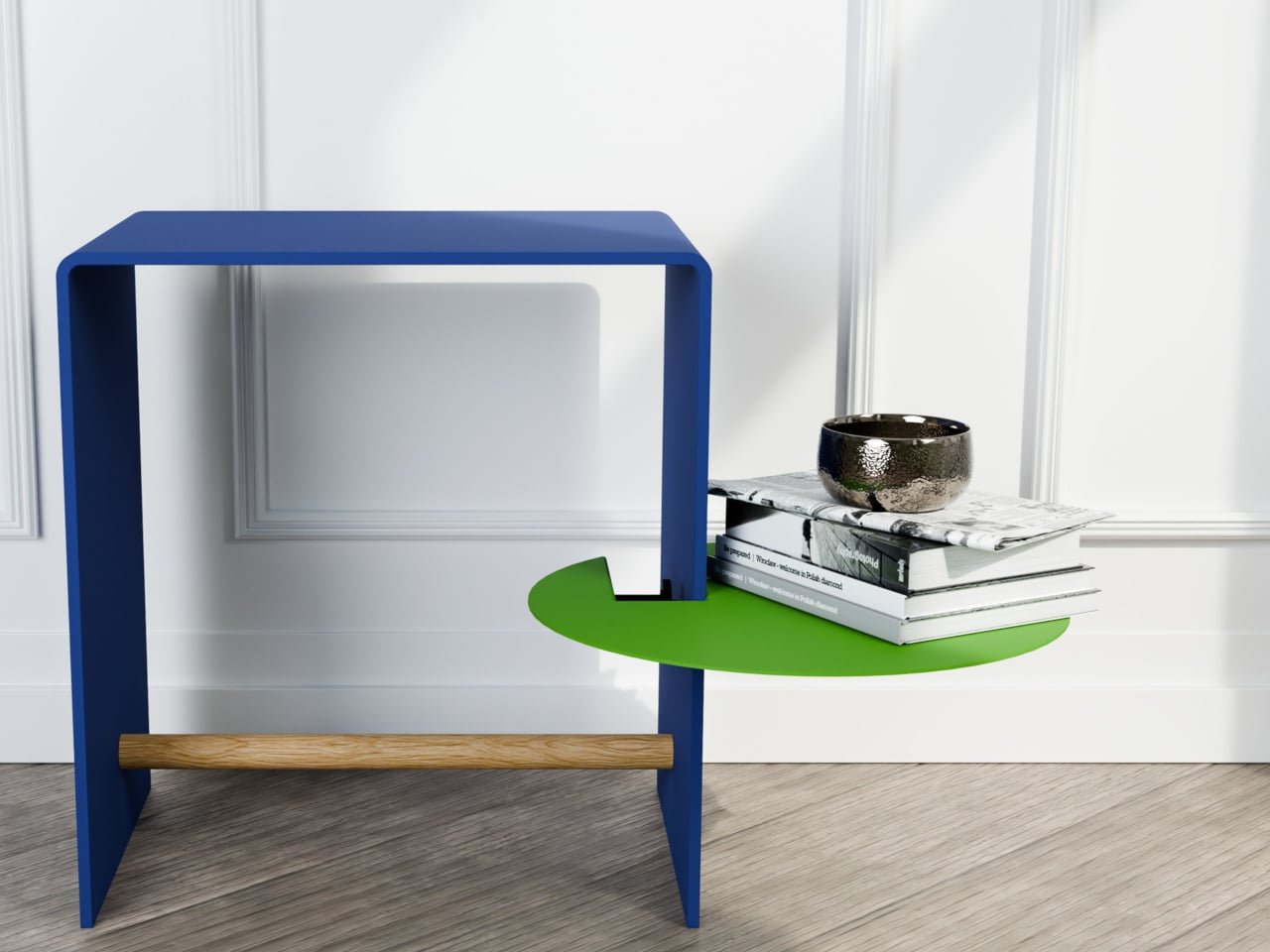
The form itself is the most unexpected part. Where most clip-on accessories default to a rectangle, the TAB is a circle, a 30cm disc of 2mm aluminum with a fine-textured powder coating. That’s a small but meaningful choice; a circular shelf sitting against the side of a bookcase or cabinet reads more like a deliberate design detail than a functional add-on. It comes in two versions, TAB_left and TAB_right, which simply determine which direction the shelf extends from the clamp.

Designer: Michael Hilgers for Purstahl

The thinness of the aluminum is doing more work than it looks like. At 2mm, the shelf sits flush and close to the panel face rather than jutting out awkwardly, which matters in tighter rooms. The powder coating adds color without bulk, and Purstahl offers enough options to match or contrast with the furniture underneath. That flexibility is part of the appeal: the TAB can read as an accent piece or disappear into the background, depending on the color you pick.

What makes it genuinely interesting is how widely the word “panel” applies. Hilgers frames his approach as “pragmatic design,” meaning objects that work with what already exists rather than replacing it. The TAB clamps onto a bookshelf side, the edge of a wardrobe, a balcony railing, a freestanding room divider, anywhere a flat vertical surface falls within that 38mm thickness range. That’s a broader set of possibilities than a 30cm disc might initially suggest.

The one thing Purstahl doesn’t mention is a maximum load rating, which is a fair thing to wonder about at €79 per unit. A small plant, a few magazines, or an espresso cup are probably fine. A heavy ceramic pot or a stack of hardcovers is a less certain proposition, and it would help to know the limits before buying. The screw clamp mechanism does allow for repositioning, so there’s room to adjust if the shelf shifts under load.

Hilgers has built a consistent body of work around the idea that existing furniture doesn’t need replacing, only rethinking. The TAB fits neatly into that logic. It’s a small, unhurried intervention in a room you already have, and the more interesting question is less about whether it works and more about how many panels around your home you’d actually want to put it on once you start looking at them differently.

The post This Circular Shelf Solved the Rental Damage Problem in 30 Seconds first appeared on Yanko Design.

No Balcony Space? This Table Hooks On as a Planter, Bar, or Desk

Par : JC Torres
10 mars 2026 à 14:20

A small city balcony has a way of making every square meter feel personal, just barely. There’s room for a folding chair, maybe a potted plant, and the occasional optimistic thought about al fresco breakfast. What there usually isn’t, though, is any real surface. Designer Michael Hilgers noticed this particular gap, and the balKonzept is his answer: a railing-mounted table that hooks onto the balcony railing with no tools, no hardware, and no permanent commitment.

The form is immediately legible. A wedge-shaped body in recyclable polyethylene curves at the rear into a smooth hook, looping over the railing and gripping it via an adjusting screw underneath. That single mechanical gesture is the entire installation. The raised trough at the back sits above the railing line and acts as a windbreak for objects resting on the work surface below. The unit comes in at 60 cm wide and roughly 40 cm deep on the interior side.

Designer: Michael Hilgers (rephorm)

The material choice is worth pausing on. Polyethylene, produced in a Brandenburg plastics factory through rotational molding, is not a glamorous option. It won’t feel precious the way powder-coated steel does. What it does do is survive outdoor life without complaint: frost-resistant, UV-stable, and recyclable at its end of life. Rotational molding also produces hollow, seamless shells with consistent wall thickness, which matters for something exposed to seasonal temperature extremes.

The table height is a fixed function of whatever railing it’s hanging on; subtract 21 cm from the railing height, and that’s the surface level. That means the balKonzept works very differently on a low French-style balcony versus a taller contemporary glass railing, with no way to adjust it beyond moving the piece. For anyone wanting to sit and work at a comfortable height, the railing geometry will decide the experience before any other consideration does.

Where the design earns its keep is in the planter box. Filling it with soil and roots is one option, but the trough is deep enough to function as an improvised cooler, and Rephorm’s own description cheekily acknowledges this, noting it works just as well with ice cubes and sparkling wine as it does with geraniums. That kind of built-in flexibility is the whole point; the balKonzept doesn’t commit to being one thing, which is probably what a small balcony needs most.

The post No Balcony Space? This Table Hooks On as a Planter, Bar, or Desk first appeared on Yanko Design.

This Wooden Basket Becomes a Low Table When You Flip It Upside Down

Par : JC Torres
19 février 2026 à 17:20

There’s a familiar moment that happens when you carry food, cups, and random essentials to a park, balcony, or floor seating setup and then realize you still need a stable surface to put any of it on. Most people improvise with a bag or a corner of a blanket. Small-space living and casual gatherings reward objects that can do two jobs without taking up twice the storage, but most furniture is still designed around one fixed purpose.

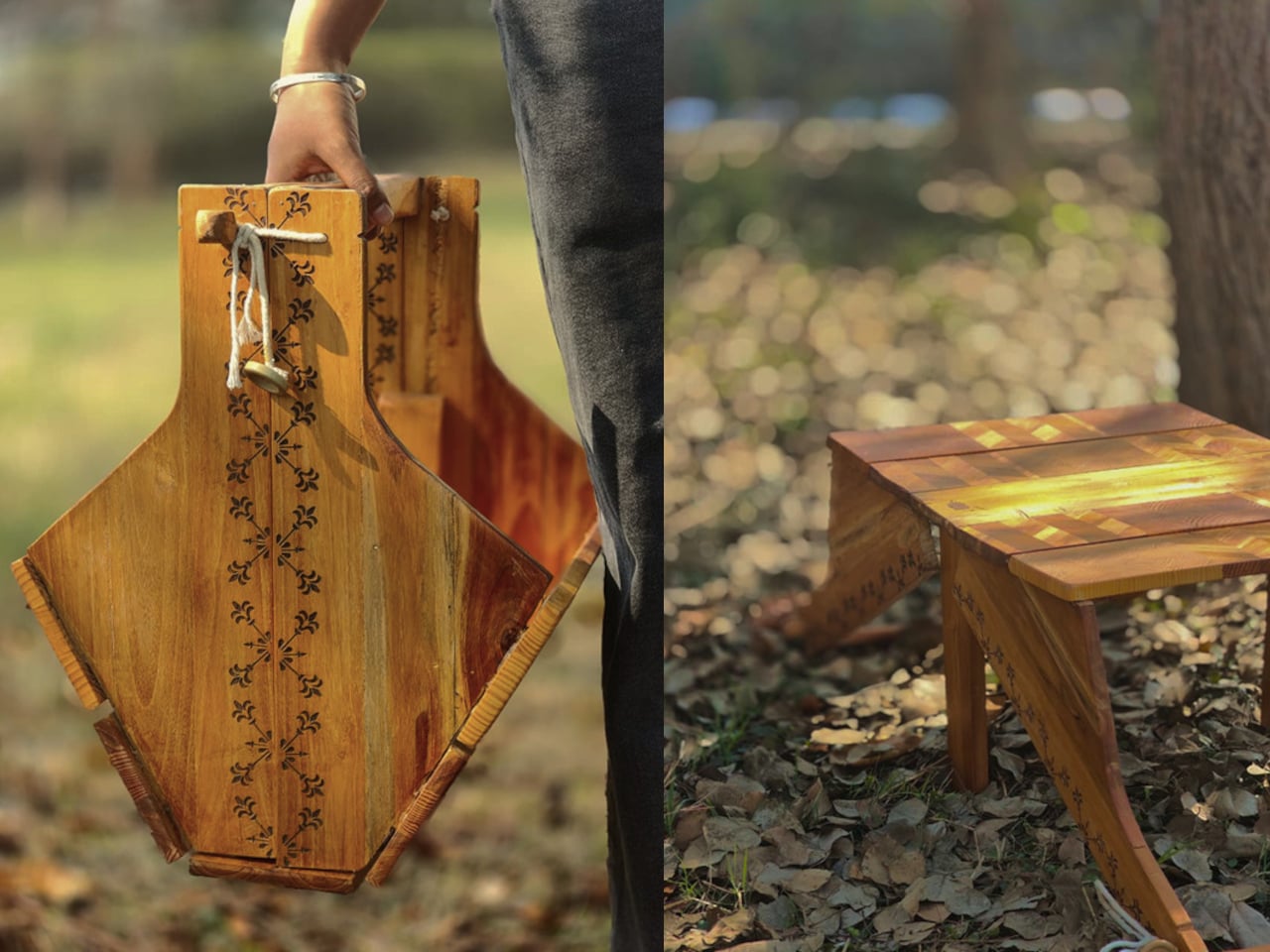
This Convertible Basket Table concept works as both a carry basket and a low table in one form. By simply inverting it, the basket becomes a stable table surface suitable for picnics or casual indoor use. The design combines storage, portability, and easy transformation, making it ideal for relaxed gatherings and compact living spaces.

Designer: Siya Garg

In basket mode, the structured wooden body has a built-in handle and a container that can hold the messy mix of picnic items, fruit, napkins, a book, or a small speaker. The form feels sturdy rather than floppy, carrying like a proper object with a clear handle instead of a tote that collapses when you set it down. That sturdiness is what makes the flip transformation credible. It’s definitely not a soft bag pretending to be furniture.

Once inverted and unfolded, it becomes a low table that works with floor cushions, outdoor blankets, or a casual living room setup. Low tables are the unsung heroes of flexible spaces. They work as coffee tables, game surfaces, or quick work perches, but they’re rarely portable. This one travels in your hand and arrives as a surface, which is a surprisingly underexplored idea.

A square knot side lock keeps the form secure when needed. It’s a rope-based closure that tightens the sides without complicated latches, click mechanisms, or hardware that will eventually strip or break. The whole thing is quiet, tool-free, and easy to replace if the rope wears out, which fits the picnic vibe better than snapping plastic clips would.

The build draws on traditional woodworking throughout. Pattern making involved pine wood in alternating grain directions and a chevron pattern using alternating teak and pine strips. Assembly relies on mortise and tenon joints and sliding mortise and tenon joints to hold the structure together without screws, so the connections are strong enough to handle the repeated flipping and carrying that the concept demands.

The design doesn’t ask you to change how you live, it just quietly accommodates the way you already move through the day. A basket when you’re going somewhere, a table when you arrive, and a warm wooden object that looks like someone actually made it rather than assembled it from a flat pack.

The post This Wooden Basket Becomes a Low Table When You Flip It Upside Down first appeared on Yanko Design.

vivo V70 Review: A Concert Photographer’s Phone in Mid-Range Clothes

Par : JC Torres
19 février 2026 à 08:30

PROS:


  • Striking "Sunset Glow" Golden Hour design

  • 4K 60fps video recording on a mid-tier smartphone

  • Powerful 50MP ZEISS Super Telephoto Camera

  • Large 6,500mAh battery with super-fast 90W charging

CONS:


  • 8MP ultra-wide camera is decent but mediocre

  • No wireless charging

RATINGS:

AESTHETICS
ERGONOMICS
PERFORMANCE
SUSTAINABILITY / REPAIRABILITY
VALUE FOR MONEY

EDITOR'S QUOTE:

The vivo V70 proves that a clear camera identity and premium materials still matter at this price.

The mid-range smartphone segment is crowded in ways that make individual products hard to distinguish. Specs converge, designs flatten, and most phones feel interchangeable within days. vivo’s V70 enters that space with a clear point of view: a ZEISS-co-engineered telephoto camera tuned for stage photography and travel, a large battery built for long days, and a physical design that genuinely tries to look and feel like something worth keeping.

The v70 also introduces the Golden Hour edition, the most visually expressive option in the lineup, with an etched glass back, an aerospace-grade aluminum frame, and a ZEISS camera module with serious hardware inside. Running OriginOS 6 on a Snapdragon 7 Gen 4, it promises a telephoto-first camera experience for concerts and travel, backed by a 6,500mAh battery. Does the full package deliver on all of it? Read on.

Designer: vivo

Aesthetics

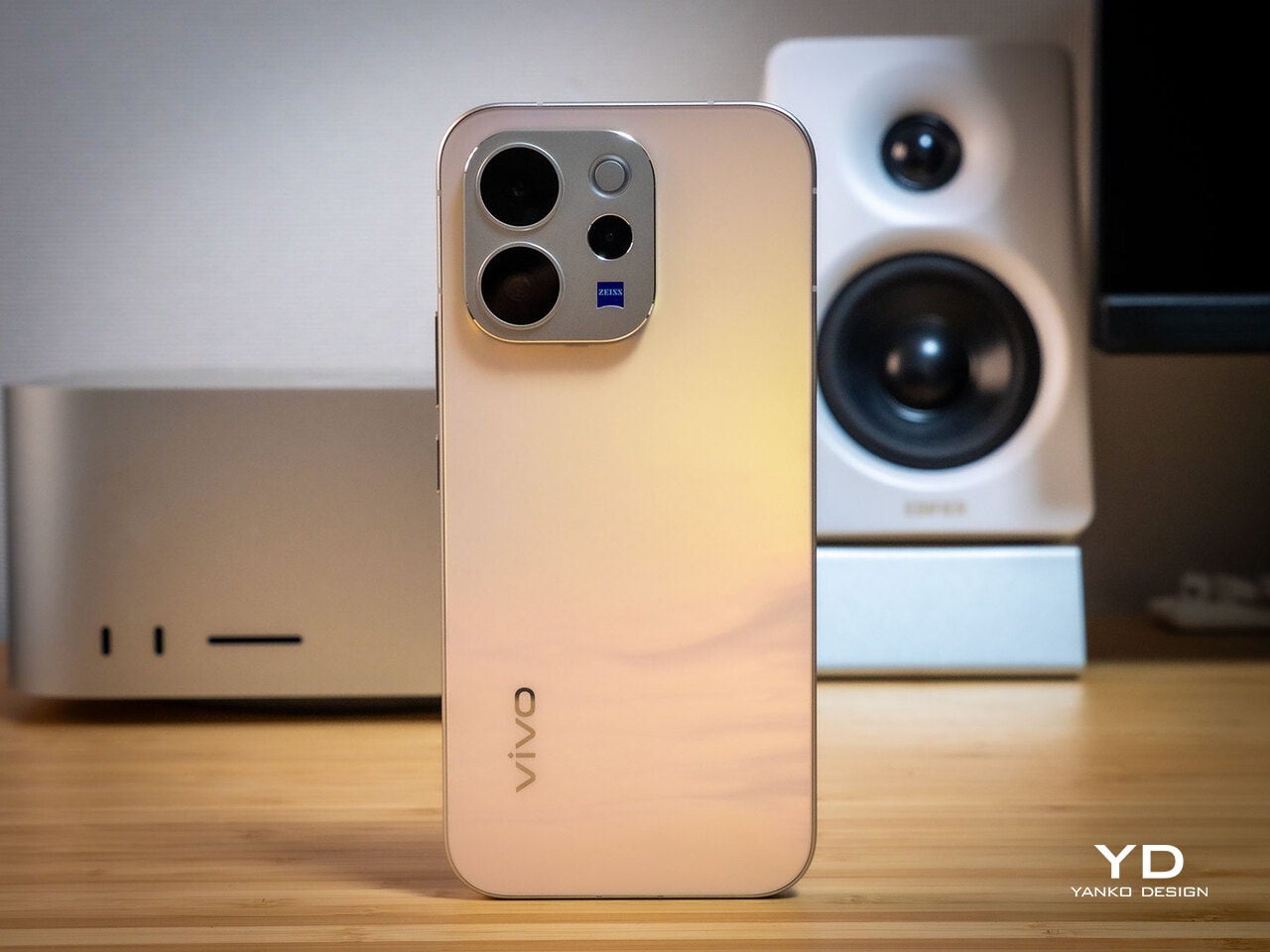
Of all the V70’s color options, the Golden Hour edition is the one most worth talking about. vivo uses a specialized chemical etching process to form micron-scale texture on the back glass, creating a diffuse reflection that reads as refined matte from a distance but reveals subtle warmth in direct light. It’s fingerprint-resistant and smooth without feeling slippery, a noticeably more considered finish than the glossy or painted backs that dominate this price tier.

What’s more surprising is that the back doesn’t stay a single color. Depending on the viewing angle and ambient lighting, it shifts toward a cooler, slightly bluish hue you wouldn’t expect from a finish called Golden Hour. That unexpected chromatic movement makes it more visually engaging than a standard gradient, the kind of surface detail that keeps catching your eye without you fully understanding why.

Around the front, the aerospace-grade aluminum alloy frame wraps a flat display with ultra-thin bezels measuring just 1.25 mm on the sides. Rounded corners soften the silhouette without cheapening it, and the flat screen is a deliberate departure from curved-edge designs that can distort content near the edges. The overall impression is controlled and considered rather than flashy, which suits the V70’s personality well.

On the back, the camera module is a rounded metallic rectangle sitting just 3.29mm above the surface, low enough that the phone doesn’t rock noticeably on a table. Three lens rings and a ZEISS badge keep the composition clean without feeling crowded. It’s a well-executed rear panel that reinforces the premium identity without needing extra ornamentation to make the point.

Ergonomics

At 194g light and 7.59mm thick in the Golden Hour configuration, the vivo V70 feels present without being heavy. The matte AG glass provides enough grip for confident one-handed use without a case, and the flat sides and rounded corners make it comfortable to hold at its screen size. Weight distribution is balanced, which matters more for all-day carry than any single spec on a data sheet.

The 3D Ultrasonic Fingerprint Scanning 2.0 is one of the more underrated features here. It works reliably with damp fingers, meaning no frustrating tap-and-retry cycle after a workout or a skincare routine. Best of all, it’s located a good distance away from the bottom, so you don’t have to precariously shift your hand from its natural holding position just to unlock the phone.

Performance

Under the hood, the vivo V70’s Snapdragon 7 Gen 4 with LPDDR5X memory and UFS 4.1 storage handles everyday tasks and multitasking without hesitation, and a 4,200mm² vapor chamber keeps sustained performance steady during longer camera sessions. It’s not a chipset that headlines benchmark charts, but it delivers consistent, smooth day-to-day performance, which is more relevant to what the V70 is actually designed for than theoretical peak numbers.

The 6.59-inch 1.5K OLED runs at 120Hz with 459 PPI and peaks at 5,000 nits local brightness, which holds up well in direct sunlight and makes reviewing photos outdoors genuinely practical. Colors are rich without being oversaturated, and the 1.07-billion color depth makes gradient-heavy AI-edited shots look smooth rather than banded. It’s one of the better mid-range displays available at this price tier right now.

The camera system’s two stars are the 50MP main and 50MP periscope telephoto. The main uses a Sony LYT-700V sensor with a 1/1.56-inch surface area and OIS, delivering consistent, detailed portraits across daylight and mixed lighting. The telephoto uses a 1/1.95-inch sensor with its own OIS and a periscope structure that enables 10x zoom in a compact body. Both cameras consistently outperform what you’d expect at this price.

Of the three rear cameras, the 8MP ultra-wide is where things get more ordinary. It’s functional for casual wide shots, but the gap in detail and dynamic range between it and the main and telephoto cameras is noticeable. Given the vivo V70’s travel ambitions, wide landscape shots will come out looking more ordinary than portraits taken at the same destination. The phone’s real camera personality clearly lives in the other two lenses.

AI Stage Mode is a genuine differentiator if you attend live events regularly. At 10x zoom from 10m to 20m away, the AI Image Enhancement Algorithm and AI Style Portrait Technology combine to pull facial detail and expression clarity from performers under challenging stage lighting. It won’t replace a dedicated camera at that distance, but for a phone that fits in your jacket pocket, the results hold up surprisingly well.

Video gets a meaningful upgrade with 4K 60fps, the first time the vivo V series has offered this, and footage looks cinematic when lighting cooperates. AI Audio Noise Eraser in post-editing selectively reduces wind noise, crowd chatter, or ambient sound from recorded clips. It sounds like a spec sheet bullet point until you actually try cleaning up a concert recording with it, and then it becomes a feature you’d miss on another phone.

Battery life is a genuine strength. The 6,500mAh BlueVolt battery with 90W FlashCharge handles a full day of heavy use and then some, including heavy video playback. Wireless charging still isn’t part of the package, though, which will matter to those who’ve built it into their daily routine, but fast wired charging and a genuinely large battery soften that trade-off considerably.

Sustainability

vivo commits to four generations of OS updates and 6 years of security patches for the V70, placing it firmly in the category of phones worth keeping rather than replacing every two years. That’s the most meaningful sustainability argument a phone can make, applying regardless of materials or recycling programs. Longer software support means slower obsolescence, and slower obsolescence means less electronic waste accumulating on a shelf somewhere.

IP68 and IP69 ratings, combined with what vivo calls 10-Facet Drop Resistance, lower the anxiety of carrying a polished phone through real conditions. IP69 covers high-pressure water jets, going well beyond typical rain scenarios. That durability confidence changes how casually you handle the phone day to day, and there’s something genuinely reassuring about owning a device you don’t have to constantly worry about.

The material choices also support long-term ownership. Aerospace-grade aluminum and etched AG glass age more gracefully than glossy plastic, which yellows, scratches, and starts looking tired within a year of daily use. The matte texture stays presentable with minimal cleaning, and IP68/IP69 combined with drop resistance gives the V70 a realistic chance of surviving the accidents that typically end mid-range phones early.

Value

The V70 packages premium design, a ZEISS telephoto-first camera system, a strong OLED display, fast charging, and long software support into a price tier that usually demands more compromises. The Golden Hour finish gives it a visual identity that stands above most phones at its price, and the combination of AI Stage Mode with ZEISS Multifocal Portrait focal lengths makes it genuinely specialized rather than just generically capable.

The 8MP ultra-wide is the honest weak spot, and travelers who rely heavily on wide shots will feel that gap. Wireless charging is also absent. But what the V70 does well, it does consistently, and the combination of a premium-feeling design, a capable telephoto system, and 6 years of security updates makes it a phone that’s easy to justify and hard to grow out of quickly.

Verdict

The vivo V70 in Golden Hour is one of the more cohesive mid-range phones available right now. The etched glass with its unexpected bluish shift, the aluminum frame, the ultrasonic fingerprint sensor, the bright 1.5K OLED, and the ZEISS telephoto and portrait system all work together in a way that makes the phone feel intentional rather than assembled from a spec sheet and a parts catalog.

The 8MP ultra-wide and the absence of wireless charging are unfortunate blemishes on what is otherwise a remarkably well-rounded package. Both are real trade-offs rather than dealbreakers, though, and the vivo V70 earns its place as a phone that’s genuinely hard to fault for what it costs, especially if portrait photography, concert shooting, and long battery life are what matter most to you.

The post vivo V70 Review: A Concert Photographer’s Phone in Mid-Range Clothes first appeared on Yanko Design.

Forget Mindfulness Apps, This Desk Top Spins for 2 Minutes Instead

Par : JC Torres
18 février 2026 à 18:20

Screens are on all day, and hands tend to find something to do when focus slips. Pen clicking, phone picking, knuckle cracking, the nervous tics of modern desk work. Most “mindfulness” solutions are still apps, which is a bit ironic when the problem is too much screen time. There’s something to be said for a small mechanical object that gives your brain a reset without asking for any attention in return.

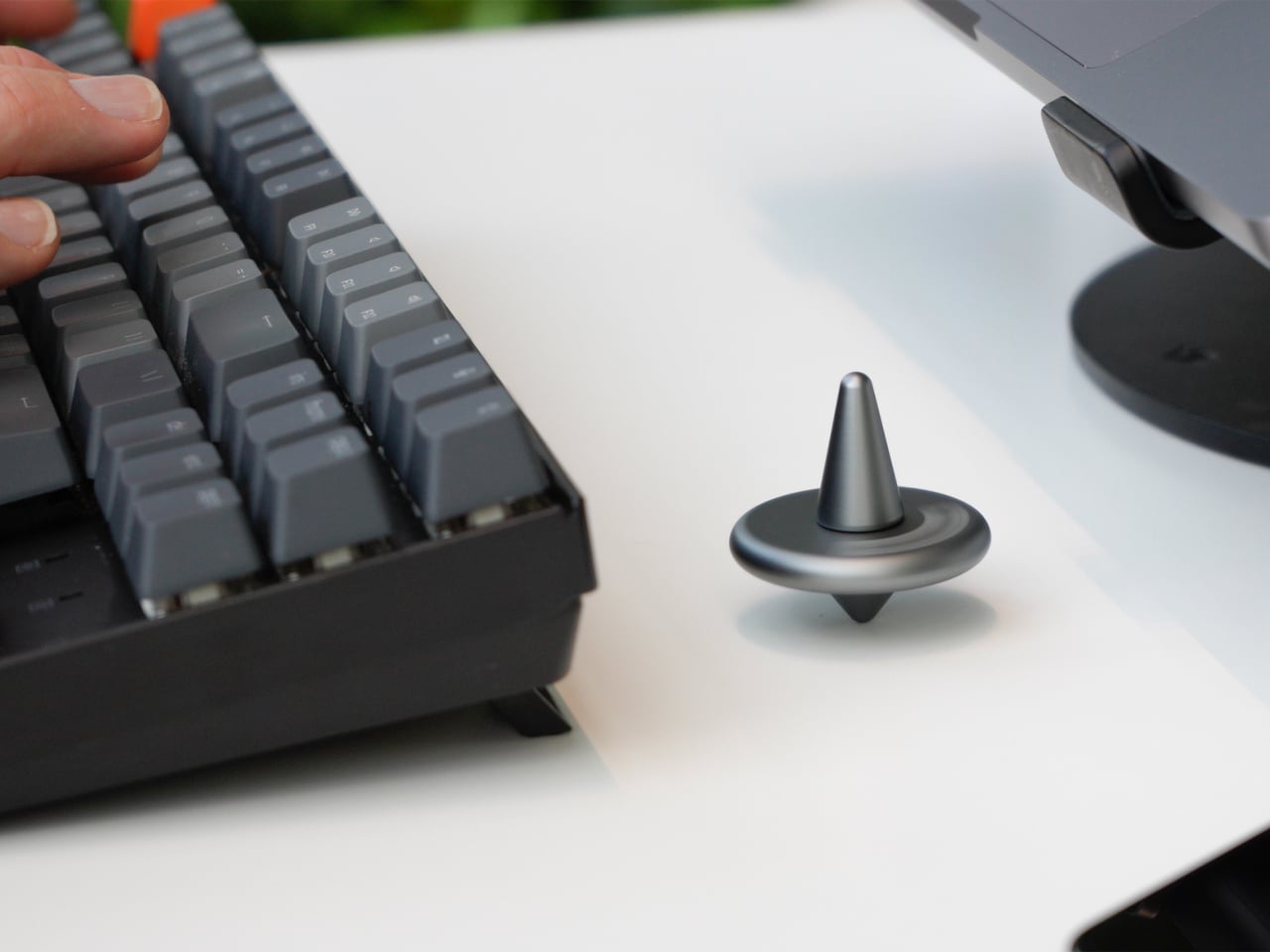
Amsterdam Dynamics’ ST-01 is a modular spinning top and tactile focus object built for desks, hands, and minds that rarely get a break. It’s intentionally simple but not single-purpose, offering multiple mechanical interactions with no correct sequence. You use one when you need it or work through all of them. No app, no setup, no instructions, just the object and whatever your hands feel like doing with it.

Designer: Antonio Lo Presti (Amsterdam Dynamics)

A gentle twist sets ST-01 rotating smoothly, and it’s engineered to keep going for over two minutes. That’s long enough to watch while thinking through a problem, waiting for a file to render, or cooling down after a difficult meeting. It functions as a visual anchor, something calm and physical in a field of notifications and browser tabs that all want something from you.

Pressing the top triggers a satisfying mechanical click with clear tactile feedback, the kind of repeatable, purposeful sensation that replaces the nervous habit of clicking pens or tapping a keyboard. Amsterdam Dynamics calls it “reset focus,” which is accurate if not exactly humble. The middle disc can also be flipped like a coin, adding a small decision-making tool and another texture to the interaction when you need a nudge in either direction.

Of course, there’s a modular construction underneath all of that. ST-01 is built from three parts that can be taken apart and snapped back together, held in alignment by two precisely positioned magnets. That magnetic core keeps the structure stable during spinning while making it easy to disassemble by hand. There’s also a built-in magnet that lets it stick to metal surfaces, which is either a neat trick or a genuinely useful parking spot depending on your desk.

CNC-machined, anodized aerospace-grade aluminum means it’s solid in the hand, balanced, and finished in a way you notice the first time you pick it up. Cheap fidget toys flex, squeak, and wear out quickly. ST-01 is designed to stay on the desk for a long time, with Amsterdam Dynamics framing it as “a beautiful object, made to last a lifetime” and something that can eventually be passed on.

That’s an unusual positioning for what is essentially a desk toy, but it fits the overall idea. ST-01 doesn’t ask for a lifestyle change, a daily streak, or a subscription. It just gives your hands a few repeatable interactions and a place to return when the work gets loud, which turns out to be the kind of quiet, mechanical company a desk actually needs.

The post Forget Mindfulness Apps, This Desk Top Spins for 2 Minutes Instead first appeared on Yanko Design.

This Air Purifier Concept Looks Like Scandinavian Audio Gear

Par : JC Torres
18 février 2026 à 17:20

Air purifiers tend to look like medical equipment and come with apps you didn’t ask for. They arrive with dashboards, push notifications, and Wi-Fi setup rituals that turn “cleaner air” into another thing to manage on a phone. Most of them sit in corners behind plants because they look clinical, and no one wants to acknowledge the white plastic box while having guests over for dinner.

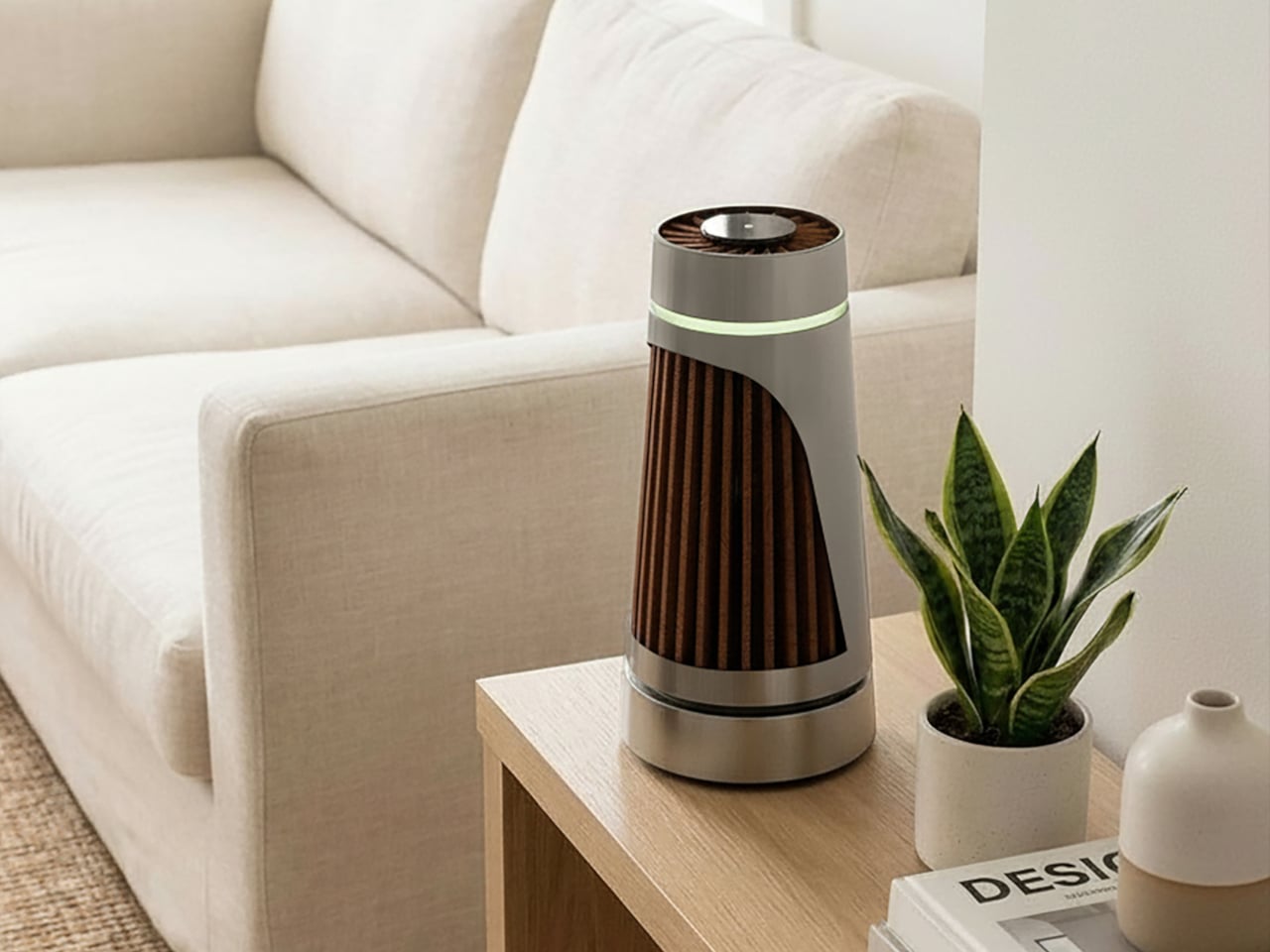
The Beolab Air 1 is a concept air purifier designed to sit in a room without announcing itself. It was developed as a student project and draws inspiration from the calm, material-driven design language of Bang & Olufsen’s Beolab line, though it’s not affiliated with the company in any way. The goal was to see what happens when you apply that kind of sculptural thinking to clean air, instead of just adding another screen to the wellness toolkit.

Designers: Ahaan Varma, Malhar Gadnis, Michelle Sequeira, Sharanya Karkera

The most refreshing part of the concept is the interaction model. A single button press is all it takes to start, with no app pairing, no IoT setup, and no onboarding routine. The project frames this as “digital detox,” which is a reasonable description when most purifiers try to sell you sensor graphs and weekly air quality reports. You turn it on the way you’d turn on a lamp or a speaker, then leave it to work.

The materials do a lot of the talking. Angled teak wooden ridges wrap the body and function as vents for filtered air, so the aesthetic choice also serves a purpose. Textured aluminum handles the rest of the exterior. The project’s own critique of the category is blunt: plastic yellows and looks cheap over time, while wood and metal age better. A purifier built to look like a piece of considered furniture has a better chance of earning a spot on a sideboard than one that resembles a hospital accessory.

Under the surface, there’s a plausible engineering stack. A high-efficiency BLDC fan delivers strong airflow while staying quiet, a HEPA filter handles particulate capture, and an MQ135 gas sensor pairs with PM2.5 sensing to monitor air quality without forcing anyone into an app. The concept keeps the monitoring internal and the feedback subtle, a soft ambient light band that changes gently rather than a display demanding attention.

Of course, that ambient feedback is the whole point. Clean air is invisible and usually silent, and a purifier that communicates the same way feels more appropriate than one with a scrolling PM2.5 count on a bright panel. You can check in when you feel like it, and the rest of the time it just works.

The concept calls out a genuine gap in the category: people want wellness that integrates quietly into a room, not hospital aesthetics, and yet another app. Whether or not Beolab Air 1 ever gets built, asking what a purifier looks like when treated with the same care as a premium speaker is a question the category probably needed someone to ask.

The post This Air Purifier Concept Looks Like Scandinavian Audio Gear first appeared on Yanko Design.

IKEA Just Made a Mouse-Shaped Speaker That Kids Can Actually Carry

Par : JC Torres
3 février 2026 à 18:20

IKEA’s GREJSIMOJS collection started with a dog-shaped lamp that dims when you hold its head for bedtime, turning a light switch into something closer to petting a sleepy puppy. The limited collection is more than just about cute animals, but also about playful behavior baked into everyday objects. That same thinking now shows up in a tiny Bluetooth speaker shaped like a mouse, with four stubby legs and a braided tail that doubles as a carry loop.

The GREJSIMOJS portable Bluetooth speaker is a small, mouse-shaped character IKEA calls a “cute little music friend” for playful people of all ages. It is meant to follow kids from room to room, turning background sound into something they can carry and interact with, while still being a straightforward wireless speaker for parents who just want podcasts in the kitchen or bedtime audiobooks without fumbling with phone speakers.

Designer: Marta Krupińska (IKEA)

Picture a child drawing at a desk, the purple mouse sitting nearby quietly playing an audiobook or favorite songs. Pairing is as simple as connecting a phone over Bluetooth, and the sound is tuned for everyday listening rather than shaking walls. The built-in volume limit protects sensitive ears, so kids can turn it up without parents needing to hover over the controls constantly or worry about hearing damage.

The braided tail makes it easy for small hands to grab and move the speaker from bedroom to living room. Charging happens over USB-C, though the cable and adapter are sold separately, and IKEA says adults should handle that part. The speaker cannot play while charging, which creates a split that lets kids control what they listen to while adults manage batteries and power.

The multi-speaker mode lets the mouse pair with other IKEA Bluetooth speakers supporting the same feature. That means the same music can play from multiple spots, turning a hallway and playroom into one sound zone without complicated app setups. It is an easy way to make dance parties or tidy-up time feel coordinated, even if the tech behind it stays invisible to everyone involved.

The collection’s goal is to inspire play and togetherness across the home, and the mouse fits that mission well. IKEA notes that £1 from every GREJSIMOJS product sold during a set period goes to the Baby Bank Alliance, adding a layer of purposeful giving. More than just decor, the speaker is a small facilitator for shared stories, music, and movement in family spaces without needing complicated setup rituals.

The GREJSIMOJS mouse speaker, like the dog lamp, treats technology as something that should feel approachable and a bit silly rather than cold. Rather than competing with serious audio gear, it is trying to make rooms feel more alive without asking kids to sit still or parents to manage another app. In homes where screens already demand enough attention, a small purple mouse that quietly pipes in sound might be exactly the kind of tech everyone can agree on.

The post IKEA Just Made a Mouse-Shaped Speaker That Kids Can Actually Carry first appeared on Yanko Design.

Maingear Retro98 Is the 90s Dream PC Finally Built with 2026 Hardware

Par : JC Torres
3 février 2026 à 15:20

Late-’90s desktops hummed under desks in beige towers that always felt heavier than they should. CRTs flickered, CD drives whirred, and somewhere in every PC gamer’s mind lived a fantasy build they only saw in shop windows or magazine ads. The gap between the family PC that struggled with Quake and the dream rig you sketched in notebooks, complete with turbo buttons and drive bays, felt impossibly wide.

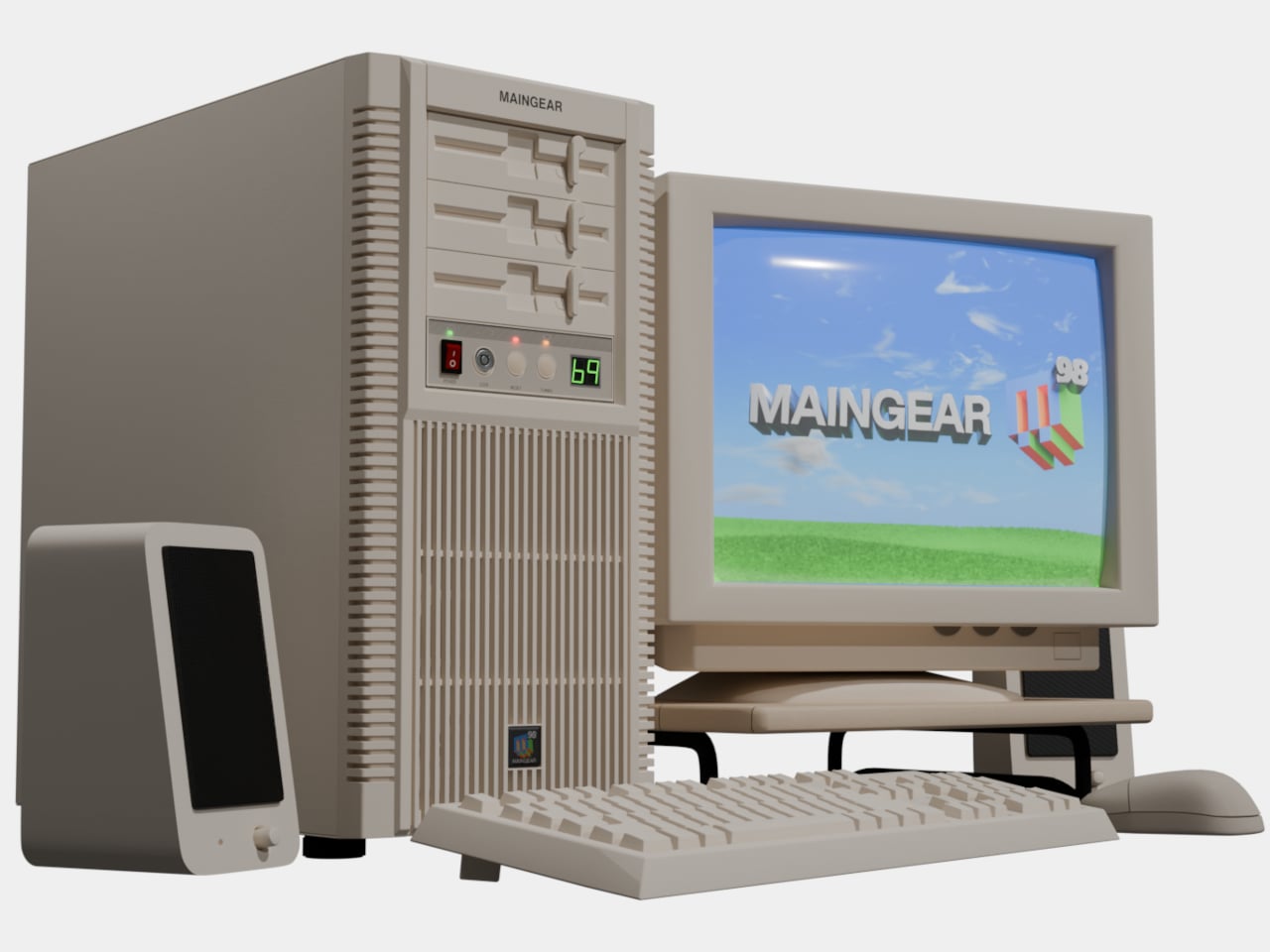
Maingear’s Retro98 is that fantasy finally built. The limited-run sleeper PC uses a retro beige SilverStone tower with a working turbo button and keyed power lockout, but hides 2026 hardware inside. The pitch is simple: 1998 on the outside, 2026 inside. It is the machine your younger self would have lost their mind over if they could see past the beige and understood what an RTX 5070 even meant.

Designer: Maingear

Water-cooled Retro98α

Retro98 feels more like a drop than a product line. Maingear limited it to 38 units: 32 standard builds and six water-cooled Retro98α rigs with braided ketchup-and-mustard cables. The brand positions it as something you will not find at a big-box store, and points out that you will not even find a Radio Shack next week. Each system is hand-built by a single technician, making it feel closer to a limited sneaker release than a typical prebuilt.

Even the lowest spec overshoots anything you could have imagined in 1998. The Retro98 5070 pairs an NVIDIA GeForce RTX 5070 with an Intel Core Ultra 7 265K, 32 GB of DDR5 at 6000 MT/s, and a 2 TB NVMe SSD. This is the kind of machine that runs Cyberpunk smoothly while looking like it should be loading StarCraft from a stack of jewel cases on the desk.

Of course, the front-panel rituals matter as much as the internals. The keyed power lock feels like something your parents would have used to keep you off the PC, and the fully functional turbo button now toggles performance profiles instead of pretending to overclock a 486. These physical interactions turn booting up into a tiny ceremony, a reminder of when pressing power felt like entering a different world rather than unlocking another screen.

Behind the retro faceplate, you still get modern conveniences. USB-C on the front, Wi-Fi 7, Bluetooth 5.4, and a clean Windows 11 install without bloatware. The machine is not trying to recreate the pain of driver floppies or IRQ conflicts. It is just borrowing the shell and the attitude. You get the look and the jokes, but you also get quiet fans, instant game launches, and none of the frustration.

Retro98 is not about value per frame but about finally owning the mythical beige tower you stared at in catalogs. It is for people who remember sharing a/s/l in chat rooms and slapping CRTs after another buffer underrun, and who now have the budget to indulge that memory. A beige box with a turbo button probably should not feel fresh in 2026, but somehow it does, which says more about how boring glass-and-RGB towers have gotten than it does about nostalgia.

The post Maingear Retro98 Is the 90s Dream PC Finally Built with 2026 Hardware first appeared on Yanko Design.

ROG Just Built the Gaming Headset Audiophiles Always Wanted

Par : JC Torres
3 février 2026 à 14:20

Gaming headsets tend to lean bass-heavy and closed-back, with flashy branding and mics that sound good enough for Discord but not much else. Planar-magnetic hi-fi headphones sound incredible but usually lack microphones and look out of place next to RGB keyboards. Players who care about both soundstage and winning often juggle two pairs or compromise, because the two worlds rarely meet in one product without awkward concessions.

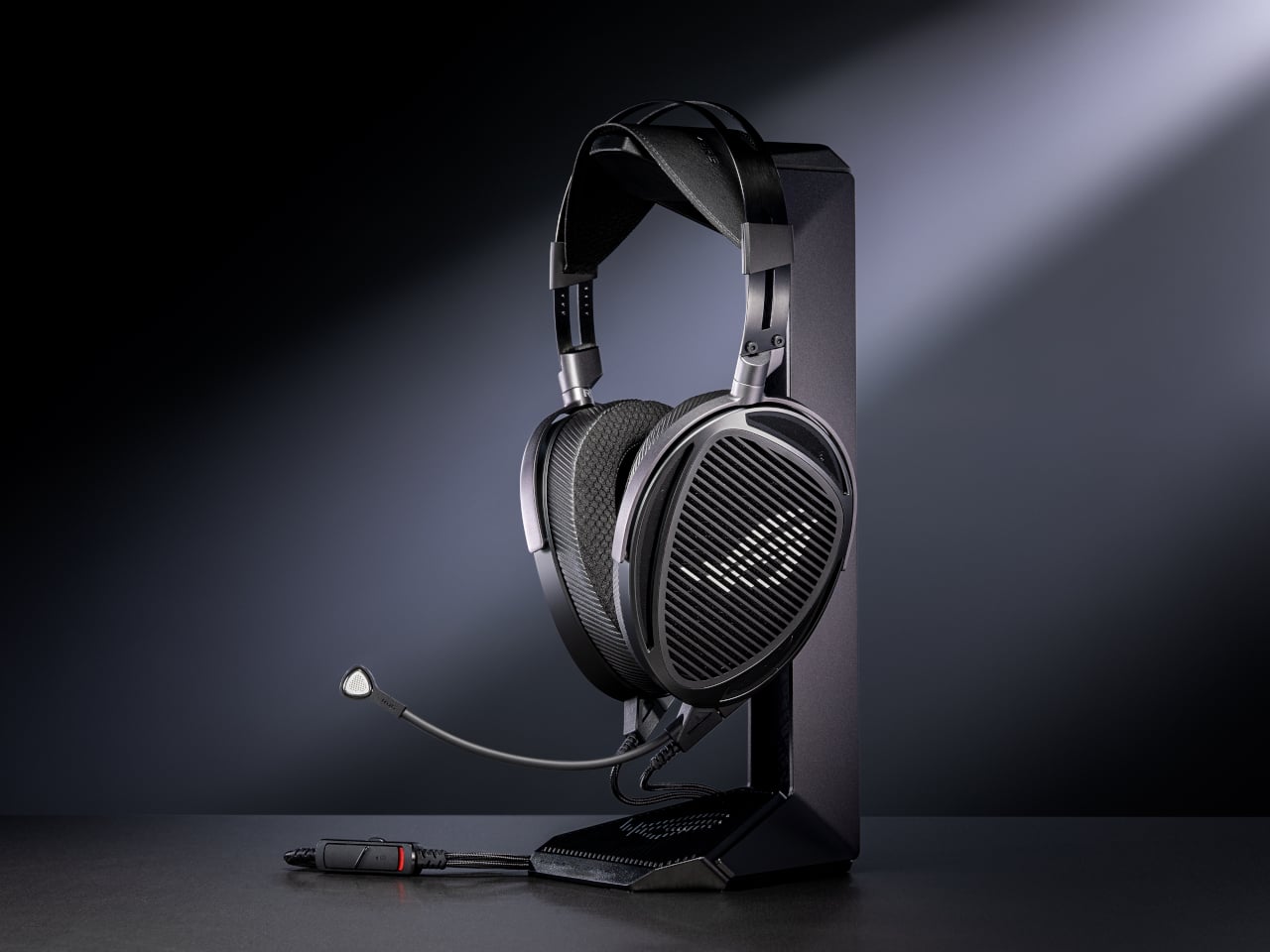
That is where ROG Kithara comes in. It is ROG’s first open-back planar-magnetic gaming headset, developed with HIFIMAN. The collaboration brings 100mm planar drivers into a headset that still has a proper boom mic, in-line controls, and all the plugs you need for PCs, consoles, DACs, and laptops. It treats games like they deserve hi-fi instead of just tolerating them as background noise.

Designer: ROG (ASUS)

The planar drivers deliver an 8Hz to 55kHz frequency response with very low distortion, which translates into deep, controlled bass and crisp treble without smearing. The open-back design creates a wider, more natural soundstage, so footsteps, reloads, and distant movement sit in believable positions instead of clustering in your head. It helps both immersion and tactical awareness without needing surround processing that usually just muddies everything.

Playing a competitive shooter, you can distinguish a teammate reloading behind you from an enemy stepping on metal two floors up. The fast transient response keeps those cues sharp, and the open-back architecture stops explosions from masking subtle sounds entirely. You react faster because you are not guessing where anything came from. You are actually hearing it placed in space the way the sound designer intended it.

The on-cable MEMS boom microphone covers the full 20Hz to 20kHz range with a high signal-to-noise ratio, so your voice sounds more natural than typical narrow-band gaming mics. Separate signal paths for audio and mic on the dual 3.5mm cable keep game sound from bleeding into chat, which your squad will quietly appreciate even if they never ask what headset you switched to or notice until the crosstalk disappears.

The balanced cable with swappable 4.4mm, 3.5mm, and 6.3mm plugs lets you move from a desktop DAC to a laptop or console without changing headsets. The included USB-C to dual 3.5mm adapter covers modern laptops and handhelds. With 16-ohm impedance, Kithara is easy to drive without a rack of gear just to get it loud enough for late-night sessions.

Of course, the metal frame, eight-level headband adjustment, and two sets of ear pads, leatherette with mesh for focused sound and velour for a softer feel, mean you can tune comfort and tonality. The open-back design leaks sound and is best in quiet rooms, but for players who want one headset that handles ranked matches, long story games, and critical music listening, Kithara feels like a rare crossover that actually respects both sides.

The post ROG Just Built the Gaming Headset Audiophiles Always Wanted first appeared on Yanko Design.

This Concept Makes Reading a Physical Ritual, Not an App Reminder

Par : JC Torres
31 janvier 2026 à 23:30

The intention to read a physical book more often usually gets buried under phones, streaming, and vague guilt about never finishing that stack on the nightstand. Reading is not just opening a book; it is a whole arc from deciding to start to actually making it through chapters without drifting away. Lead is a small family of objects designed to sit around a book and quietly support that arc.

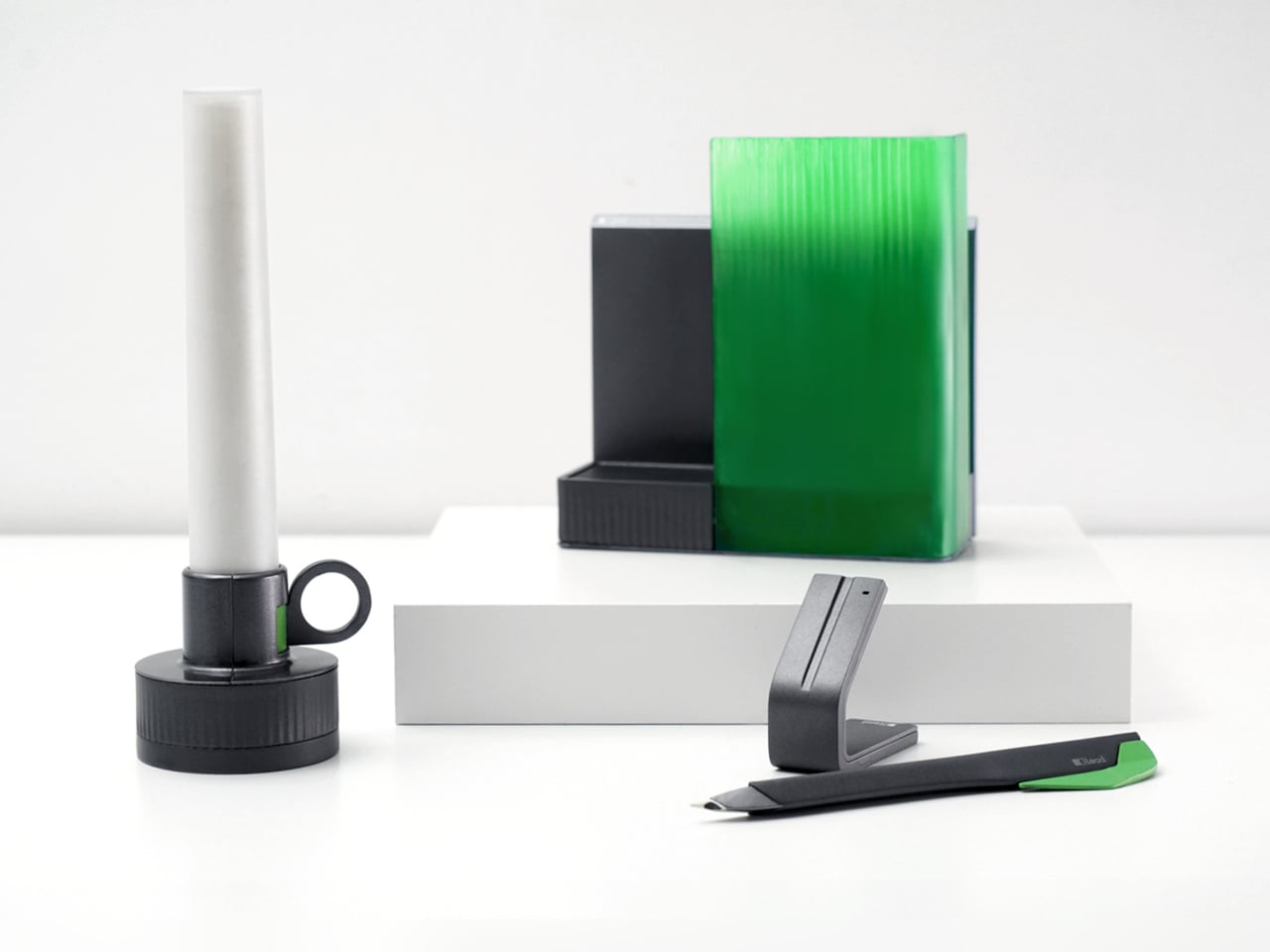
Lead is a design concept that treats reading as a story with a beginning, rising action, climax, and resolution. The name is a contraction of “Let’s read” and the first word of the slogan “lead back to the era of reading,” and the system uses three products, Bookeeper, Candle, and Quill, to give each phase of a reading session its own physical cue instead of relying on app notifications you will probably dismiss.

Designers: Yoo Chaeyeon, Kwon Eui Hwan, Yang Jinoo, Lee Sooyeon, Ha Seongmin

Coming home, you drop your book into Bookeeper, where it sits hidden behind a calm green panel. Earlier, you set a time to read, and as that moment approaches, the base lifts and the book slowly emerges from behind the screen. Instead of a phone notification buzzing and vanishing, the book itself appears, a quiet reminder that this is the slot you promised yourself you would actually use.

Candle is a slim vertical light that links to Bookeeper by default, then switches into timer mode with a twist of its ring. Before you dive into the pages, you set how long you want to read, and Candle becomes both atmosphere and clock. As you move through chapters, you can sense how your pace matches the time you set, adjusting speed without feeling chased by a digital countdown ticking in the corner.

When a line or idea sticks, Quill is a smart pen that lets you write by hand in a notebook or margin, then flip into scan mode to store that text on a device later. It has two main modes, transcription and scan, so you can copy favourite phrases, jot down reflections, and then capture them without breaking the flow. A bookmark element on the back lets Quill rest in the book when you pause.

All three objects share dark bases and a calm, translucent green for the parts that move or light up, so they feel like a family without shouting for attention. The interactions are borrowed from analog reading rituals, taking a book off a shelf, lighting a candle, picking up a pen, but layered with just enough technology to guide habit without dragging you back to a screen.

Lead is less about adding gadgets to the reading table and more about designing a gentle structure around a physical book. Bookeeper brings you back at the right time, Candle holds the space and the clock, and Quill helps you remember why the session mattered. When reading often gets squeezed between notifications and feeds, a trio of objects that simply lead you back to the page feels like a quietly radical idea.

The post This Concept Makes Reading a Physical Ritual, Not an App Reminder first appeared on Yanko Design.

❌
❌